Other
Skyrim mods that don't fit in any of the existing categories
259 files
-
Better Heels Sound FX
By Laethas
Description
Hey folks !
Did you ever said to yourself : "These heels sounds are really nice, but the quality of some sounds is pretty... meh"
Well, nothing wrong with that, some files from Heels Sound are encoded with a sampling rate of 11kHz, which is rather low. Say no more !
What it does
I replaced most of the heels sounds with better quality audio files, some of which I downloaded from royalty-free sound database websites, and others from the original sound files which I edited myself to reach 44kHz quality.
I didn't touch the files that had a good quality, like sounds on grass and carpet.
Good to know
I started editing these files almost 2 years ago and left the progress at 80%, and finished the last few files I didn't like recently, so there may be a slight inconsistency with some sounds (Nothing serious don't worry, I tested them in game).
Please let me know if you notice anything that sounds wrong to you.
Credits
Heels Sounds 1.5 SSE reupload by ApoKrytia and ybsj520 his original author.
High Heel Footstep Sounds by Indrisblake.
266558 downloads
Updated
-
Ashes - The Price of Stupid
By Pamatronic
This is a small flavor addon for my Death mod of choice, Ashes.
In the Original, whenever you die, you will respawn with an increasingly punishing debuff, which will reset on Level up.
All fine and dandy, but if you are like me and are bad at videogames, you might fall behind the curve to far and are left with a crippling debuff which will force you to hide behind Lydia for the next few hours.
And since nobody wants that, I wrote this small addon which allows you to do the Rich people thing and just throw money at the problem.
So what does this mod do exactly?
It adds the "Altair of Greed" to the Whiterun catacombs. Here you can pay a hefty sum (15.000 Gold) to reset Ashes Injuries and Debuffs.
Reqirements:
The Original Ashes mod (duh...)
-SE: https://www.nexusmods.com/skyrimspecialedition/mods/19234
-LE: https://www.nexusmods.com/skyrim/mods/92743
overwrite the originals esp when asked.
506 downloads
- death
- death alternative
- (and 3 more)
Updated
-
modern scroll
By lordarked
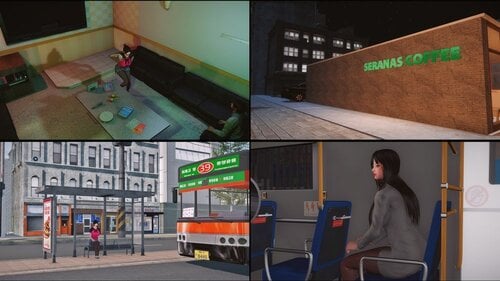
this is a modern city is a mod like moderntown but this much better and big also have npcs around,this is a port from original is SE version, i upload with autorization of owner .
the door is on riverwood a book on the floor is a spell teleport to the city see the pictures for see location of the book
the place expand twice of the size more npcs and places to explore
568 downloads
Updated
-
A Werewolf Should Know Decency
By Erundil
YOU ARE NOT ALLOWED TO USE MY WORK IN PAID MODS.
-----------------------------------------------------------------------------
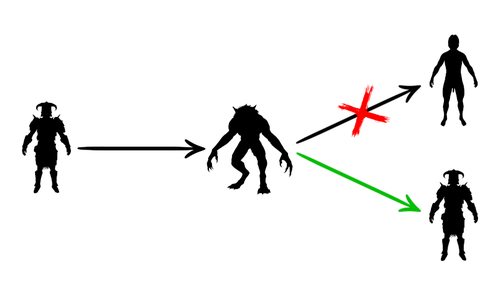
A werewolf should really know some decency and dress up after transforming back to human form. No one wants to see that ass, ok?
WHAT IT DOES
It re-equips all your gear and spells when you transform from a werewolf back to human form. Including your power. And it puts your left hand items back in your left hand instead in your right.
ATTENTION: there is a time lag before the re-equipping happens. It's due to the transformation anim taking longer than it seems to. Just be patient, your char will get dressed. Give it 5-10 sec.
A LITTLE BACKSTORY
Those who know my other mods can probably guess that for me it wasn't about decency, but convenience. It truly is a bother to equip every piece of armor, every weapon and every spell again, just because I transformed once. Especially the power. Jeez, I just used the Beast Form transformation power. Why would the game unequip it, come on? Of all the things, why this?
So here's a fix. It's not the first one around, and being a lazy person I wouldn't make my own if it wasn't out of necessity. All the other mods I found had some serious flaws - incompatible with Dawnguard, with RaceCompatibility, overwriting records I needed for something else, weird handling of crossbows, weird handling of left-hand weapon, ignoring non-vanilla slots (like for example underwear, wings, backpacks).
I've never written a script for Skyrim before. I tinkered with Morrowind around 2003, but back in the day you wouldn't even need to compile it! The code structure was easier too... Anyway, it's 2019, I taught myself the Skyrim version of Papyrus, and there it is, behold. I managed to work around almost every bug Bethesda has thrown at me, except for the torch. It's bugged so I decided not to re-equip it. Sorry, but Beth fucked up torches badly. Don't believe me? Try mounting a horse holding a torch. See where the torch goes. Enough said. Congratulations, Bethesda.
Anyway, I was considering not re-equipping the torch in the first place, so it kinda works for me. When you transform back, you should avoid being seen doing it. The torch draws attention, so lighting it should be a conscious choice, rather than a scripted, automatic action.
REQUIREMENTS
This mod was made for use with:
- Dawnguard (required)
- SKSE (very required)
- RaceCompatibility (the script is based on it - will work without RaceCompatibility, but it's better to have it)
The QF_PlayerWerewolfQuest_0002BA16 script is all good, same in Dawnguard / vanilla and not even covered by RaceCompatibility.
PlayerWerewolfChangeScript however differs between Dawnguard and vanilla. Analyzing the code, using Dawnguard version but playing vanilla shouldn't break the game, but it might throw errors and maybe, *maybe* bloat your save. RaceCompatibility further changes the script, but not in a game breaking way.
INCOMPATIBILITIES
This mod will conflict with any other that relies on changes in any of the 2 scripts:
- PlayerWerewolfChangeScript
- QF_PlayerWerewolfQuest_0002BA16
Sometimes the script is packed in the BSA, so you may not know you're overwriting it with my mod.
CREDITS
Every script author who provides the source code. The real MVPs. On the other hand fuck the authors who keep the source for themselves
Creation Kit Wiki was helpful too, so kudos to all the contributors.
My code is roughly based on Werewolf Aftermath Re-Equipper by Korodic.
Oh, and the img idea is from WereWolf Return Form No Naked by aaa. It's crude and simple, but caught my fancy.
403 downloads
Updated
-

SKSE Launch Patch
By Erundil
YOU ARE NOT ALLOWED TO USE MY WORK IN PAID MODS.
-----------------------------------------------------------------------------
SPECIAL EDITION DOES NOT EXISTS
Special Edition is so fucked up in terms of how it loads and organizes mods, so that a tool as simple as mine just doesn't cut it anymore.
You need an actual mod manager (or just don't use mods at all). My personal reccomendation is Mod Organizer 2.
USE EITHER THIS OR MOD MANAGERS
Because of how mod managers work, my patch is incompatible with them. I'm not going to fix that - if you're using a mod manager, you don't need my patch anyway.
HOW TO USE IT
Just run it. Execute it. Start the EXE file.
Oh, and of course you need SKSE installed. It's an SKSE patch after all.
WHAT IT DOES
This patch allows you to run Skyrim+SKSE:
- from your regular Desktop shortcut
- from Skyrim Launcher
- from Steam client
- or even starting TESV.exe directly
- oh, the shortcut generated by SKSE will work too, but now you don't really need it
HOW IT WORKS
When you run this patch:
- it extracts it's own version of TESV.exe, which not only starts SKSE, but also hides its ugly command line window
- right before extracting its own file, it renames official TESV.exe to TESV_original.exe
- it edits or creates from scratch an INI file (SKSE.ini), which tells SKSE to work on TESV_original.exe instead of TESV.exe
WHY IT'S SO AWESOME
1. 1. It's neat - doesn't pop up a console window, like regular SKSE does.
2. Because this patch will work with any version of SKSE, including those yet to come
3. Because it doesn't conflict with mods, that use their own SKSE.ini file, since it edits the file, not places a new one
4. In case of new Skyrim or SKSE version you only have to run the patch again
5. If you overwrite SKSE.ini with some mods, executing the patch again will solve the problem
6. Although this patch is written in English, it will work with any language version of the game
2342 downloads
Updated
-
neptunia room
By lordarked
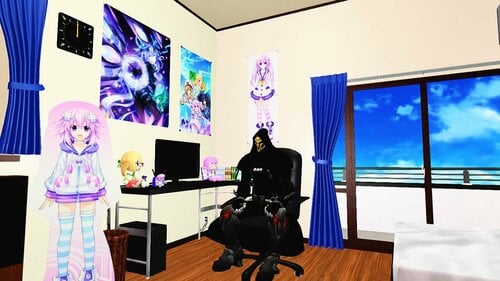
just a small bedroom from neptunia
for access : coc 00neptuniavr
neptunia bedroom
160 downloads
Submitted
-
test 0.3 project urban
By lordarked
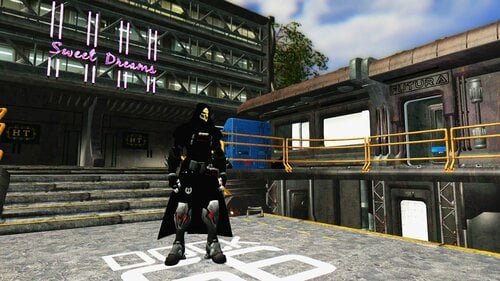
this is one place is wip ,i got the aval of creator to port to le i share with you ppl. is apocaliptic place ideal for take screeen shots.
for enter to this place find a bike on riverwood after the firts guards gate is easy to see you will no have problem.
all credits of this place to Rudolph Sergey
visiti orginal mod here ;
test 0.3 le
241 downloads
Updated
-
No Kids
By mrowrpurr
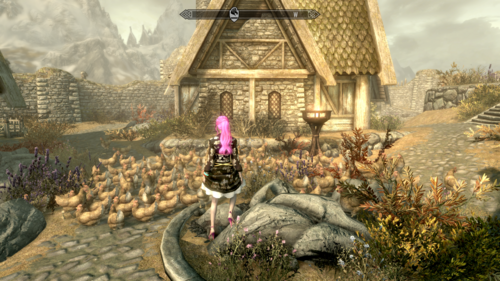
~ Removes Children and Replaces them With Chickens ~ (or simply hides them)
? No Kids
Previously, I've used Sex Lab - Sexual Fame 'Framework' (LE) (SE) specifically to remove children from the game.
I wanted a mod which:
Removes Children from The Game (and that's the only goal of the mod) Allows You to Search for Hidden Children to Enable Them (so you can start/complete quests which require children) Allows You to Re-Disable Children after You Enable Them (so you can make them disappear again) Turns them into Chickens (because... obviously!) ?
Mod Versions
You are viewing the Legendary Edition compatible version of No Kids. Here is the Special Edition version.
There are two versions of this mod available:
No Kids - Chickens (this version turns each child into 60x chickens) No Kids - Hide Children (simply hides children without the amusement of turning them into chickens)
Configuration
You can configure what children are turned into (and how many of each) via the Mod Configuration Menu.
Be default, the options are to turn children into:
Chickens Dogs Mudcrabs Hods
You can customize the options available by editing the Config.json file in the mod's folder.
Add whatever options you would like under the "nokids_replacement_options" section.
You can include items from the Skyrim base game or any mods you have installed, just be sure to specify the .esm or .esp name in the configuration.
"nokids_replacement_options": [ "0xA91A0|Skyrim.esm", "0x23A92|Skyrim.esm", "0xE4010|Skyrim.esm", "0x1347D|Skyrim.esm" ] NOTE FOR LEGENDARY EDITION USERS:
If you want to edit the .json, the above format does not work. Instead of "0xABC|Skyrim.esm" you must use "12345|Skyrim.esm" where "12345" is the hexadecimal converted to decimal (here is a converter you can use) So, basically search the internet for the Form ID of something in Skyrim, e.g. a cabbage is 00064B3F, and you use the converter to turn that into the number 412479 so you update the JSON with: "412479|Skyrim.esm" When replacing children with actors, e.g. Nazeem, use the actor's "Base ID" (not the "Ref ID"), e.g. for Nazeem it is 00013BBF (which, converted to decimal, would be 80831)
FAQ
Um, what?
We had this idea on my Twitch stream* so we made it together. Chickens were my idea. Dogs, Mudcrabs, and Hods were my viewers' ideas.
Source Code
https://github.com/mrowrpurr/NoKids
P.S.
This is my first Lovers Lab mod! I've been wanting to support this community for a long time.
I really hope this helps some users of Adult mods feel better about their kid-free Skyrim world.
Love y'all! Happy Modding. ~ MrowrPurr
Support Rules
The usual. Stay on topic. No trolling. No racism, sexism, homophobia, other -isms and -phobias, or inappropriate remarks.
Have fun! And remember: everyone is doing their best. Happy Modding!
681 downloads
Updated
-
Adventurers Guild
By smokenboots
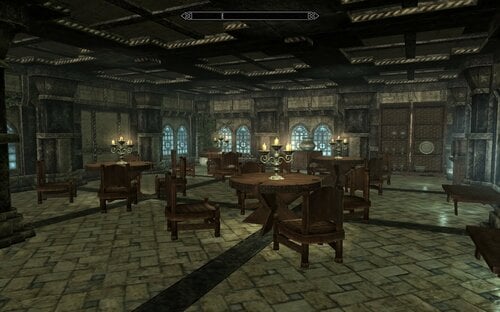
This Mod adds more to The Blue Palace..Adding a Large Restaurant an Additional Throne room(Guild Hall) joined together with a prison and many Guest rooms (separate cells) to holds easy 50 followers (on my old pc with large mod load) there are a few Guards and a Innkeeper so far But I intend to add much more as i go ..
154 downloads
Submitted
-
Cindy Lennox Racemenu Preset High Poly Head
By FlufyFox
Flufy Fox Cindy Lennox
This is my Cindy Lennox based preset :3 shes character from Resident evil Outbreak series, i will let an basic list for the mods needed, you can check my discord too. Oh i Forgot to mention the Race is Nord.
If you want the body look exactly same as my, she have medium to small breats, use uunp or bhunp, so i will list bhunp since is pretty nice for le too. I can add reference sliders pics or i try to make on the cbbe body too.
---Main mods i use on all my Characters---
BHUNP Next Generation
High Poly Head Vector Plexus
KS Hairdos
SG Female Eyebrows
Better Females Eyebrows
freckles for female
The Eyes of beauty
Linds Humans Eyes - Player Standalone
Eyes of Aber
Mikans Eyes
The Witcher Eyes
Female Makeup Suite 2K
Freckle Mania 2 Combo 4K
Female Expressive Facial Animation
Skin Texture was Fair skin, but i am using Diamond now.
This list is all mods i have now that i was using on my chars, i will let 2 presets, one with no make up and a normal blue skyrim eye, and another one full modded, and 2 files with mod managers path and one with just the files.
Discord:
https://discord.gg/JHzHgeZHyM
-----Credits-----
For the all the others authors of the mods i used to create her, theres too many so i put the for the main mods needed.
Vector Plexus
Kalilies
r1goodwin
LogRaam
853 downloads
- resident evil
- preset
- (and 3 more)
Updated
-

NiOPA Hotkeys and Skeletons
By Myst42
*This description is copy-pasted from my Patreon, the files are downloadable from there as it's mostly my new center of modding activities. Thought it was a good idea to make a window to the mod here too since it's some things that some people might find useful. I come bearing gifts. As this is quickly becoming halloween season, nothing more apropriate than posting skeletons.
This is 2 mods in 1 post actually.
For those who dont know, NiOPA (NiOverride Pose Adjustments) is a screenshot utility mod that allows repositiong of selective bones on a character, helping to make some posing issues in screenshooting go away by allowing pose adjustments, and allowing a new world of possibilities when posing. These mods are designed to work with it, and ultimately improve the quaility you can achieve with screenshooting.
__________________________________________________________
The first, I called "NiOPA Hotkeys".
What this thing does, is add an MCM menu to NiOPA that allows you to change its hotkeys in game. The original NiOPA came with a json file where you were supposed to be able to edit the control hotkeys, by looking at the keycode numbers page and editing it as a text file. As annoying as this already was, it never worked for me and every time I tried, it just broke the mod irreversivebly and I was forced to use the hotkeys as they came. Well, not anymore since I've tested this thing and it seems to be working perfectly. It does require, however, the original NiOPA which I believe can be found Here for LE and Here for SSE A good idea would be to merge the edits on my plugin into overwriting the quest form at the original NiOPA plugin to save some plugin slots, but I preferred not to do it myself on release and list NiOPA versions as a separate requirement instead. TESXEdit is an excellent tool and can complete the merge in a few clicks and a single drag and drop procedure. _____________________________________________
The second mod is Better Joint Ratios Skeleton for NiOPA - LE Version.
I've been using the Better Female Ratios Skeleton for LE for ages. What this mod does is improve the shape of body joints by editing a few scaling values on the skeleton's bones. It is fully upgraded and compatible with XPMSE Skeleton, but the problem is it was not compatible with NiOPA skeleton so both mods couldn't be used together. But then I found out someone made an SSE Skeleton that does in fact combine both, so I ported it back, and tried on my end and looks like it works. I've also patched it to be ready to use with All Geared Up Derivative (AllGUD) so it comes ready to just install and use.
Downloads available for free at Patreon
614 downloads
- posing
- screenshooting
- (and 1 more)
Updated
-
Vampire Quality of Undeath Tweaks
By Darkpig
This is a vampire makeover I mean overhaul I made because I didn't feel like fiddling with the MCMs in other vampire overhauls.
It is a simple esp file but I had it for awhile so I figured I'd share. First thing to mention is that you retain your appearance from before you turned so no more flashlight eyes. Sorry flashlight eye lovers. Another is that you no longer run like an overweight fat man in sunlight. In fact as long as you stay in stage 1 you won't have any penalties whatsoever. Just keep from going above that or that scary mudcrab will be doing up to 4 times the damage to you. Ouch! The frost resistance has been reversed to fix what I felt to be an issue which is that feeding should make you stronger not starving yourself. Molag Bal is the lord of Domination and feeding on humans seems pretty dominating to me. I added some shock resistance to the mix due to inspirations from Frankenstein. The vampire powers are still linked to starving yourself until I can figure it out. For now call it Bal's way of throwing you a bone. Also you can breathe underwater.
The vampire lord has also gained a few tweaks. The perks have been rewritten to show more of the nitty gritty data such as spell durations. The max default armor rating has been increased from 300 to 500 as well as a magic resistance of 75 at level 50. You are also immune to sunlight while transformed no matter which stage of vampirism you're at. You're welcome~
129 downloads
Updated
-
No Loading Screen Breezehome
By DavideMitra
Before showing you a full Youtube video about this unique mod, some quick words about it:
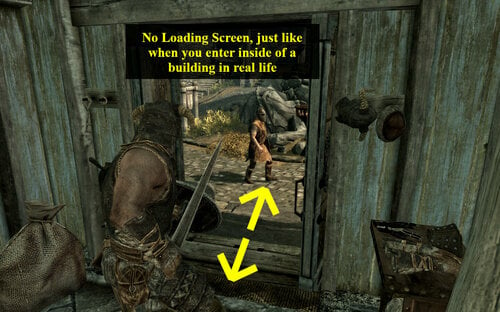
(1) With this mod, Breezehome will become part of the Whiterun Worldspace. You will be able to enter/exit without loading screens and you will be able to look outside from the door/windows.
(2) There are lots of special features like staged containers (open your cupboard/dresser/treasury chest and have a full look inside of them, just like you would do in real life), lit on/off torches, movable chairs, movable ladder, etc!
(3) You can still visit the vanilla house interior thanks to a tiny door located on the ground, near the entrance!
(4) In order to open the new entrance door, you will still need the vanilla Breezehome key.
(5) The house is for every type of character. But if you're an outlaw, there's something very special for you:
- You can literally lock everyone out of the house and nobody will be able to enter inside. Even hostile guards will remain locked outside!! It's not a standard door lock feature, it's something that really works!
- You can escape out of town thanks to the sewers beneath the house (the sewers do feature a loading screen, of course)! It's even better than the Riften player home!
MOD YOUTUBE WALKTHROUGH - CLICK ME
SELF-PROMOTION: By the way...I created a standalone basketball videogame for Skyrim physics, make sure to check it out because it's the best & most ambitious modding project of my life. Links below:
LINK TO MORTARBALL FOR SKYRIM SE
LINK TO MORTARBALL FOR SKYRIM LE
233 downloads
Submitted
-
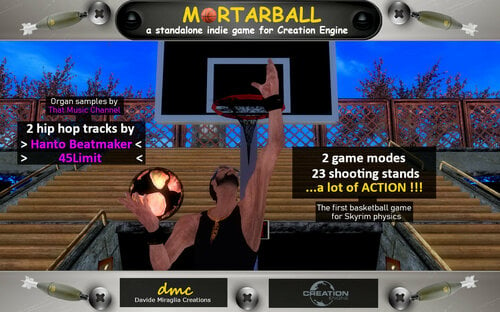
indie game MORTARBALL THE FIRST BASKETBALL GAME FOR SKYRIM PHYSICS
By DavideMitra
MORTARBALL IN POOR WORDS
A small first-person-view videogame that has nothing to do with warriors, mages, nordic explorations, ancient Eras and fantasy adventures.Since it uses a little number of Skyrim resources, it will need to be booted via SkyrimLauncher. From the Skyrim main menu, people will be
able to access to the Mortarball main menu (just open the console and write coc LaunchGame).
Mortarball will challenge your intuition, spatial intelligence, precision, quickness and - as a rookie - your patience.
Note : before installing and launching Mortarball, disable the 4 autosave features from the Skyrim settings submenu. Otherwise, you might overwrite your last Skyrim (auto)savegame...especially if "save on travel" is enabled!!!
MORTARBALL - PRE RELEASE YOUTUBE FOOTAGE - CLICK ME
29 downloads
- basketball
- skyrim legendary
- (and 3 more)
Updated
-
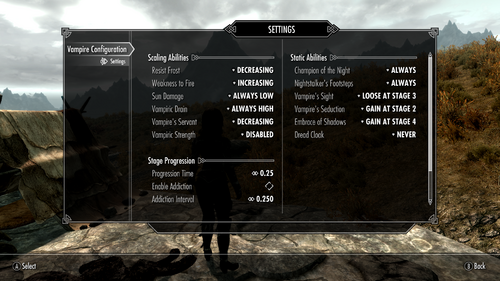
Vampire Configuarion Menu
By VersuchDrei
Gives you the freedom of configuring the powers of vampirism without completely overhauling how vampires work.
Mechanics
Adds an MCM where all of the powers of vampirism are listed, so you can configure for each power individually how you want it to scale with the vampirism stages. By default this behaves exactly like vanilla vampires. I know there already are Vampire Inverter mods out there, but they weren't fully to my liking so I wrote one that is more individually configurable.
Scaling Abilities
Scaling abilities are the ones who's power is depending on your current vampirism stage, these have the following options:
Disabled - Removes this ability entirely.
Increasing - You start with the weakest version at stage one and the power increases with every stage. This is the vanilla behavior.
Decreasing - You start with the strongest version at stage one the power decreases with every stage.
Always Low - You always have the weakest version of this ability.
Always High - You always have the strongest version of this ability.
Note that weak and strong are referring to the numerical values, so for weakness to fire and sun damage the strongest version is the one that gives the biggest penalty.
Static Abilities
Static abilities are the ones that always have the same power, but some of them you only have at certain vampirism stages, these have the following options:
Never - Removes this ability entirely
Always - You always have this ability. This is the vanilla behavior for most static abilities.
Gain at stage X - You only have this ability at stage X or higher. This is the vanilla behavior for Vampire's Seduction and Embrace of Shadows with stages two and four respectively.
Loose at stage X - You only have this ability if your stage is lower than X.
Vampiric Strength and Dread Cloak
Vampiric Strength and Dread Cloak are two abilities that were coded in the base game, but then disabled in the script. Vampiric Strength gives you five to twenty unarmed damage depending on your current stage and Dread Cloak is a daily power that gives a Frost Cloak (similar to the Dark Elves racial power that gives a Flame Cloak) that you were supposed to gain at stage three. I've added these powers to the configuration menu, but they are disabled by default.
Stage Progression Time
This feature lets you configure how long it takes for vampirism to progress to the next stage.
Blood Addiction
This is a new feature that reduces your stage progression time if you drink blood too often. It works with an addiction level, that increases whenever you drink blood while still in stage two or lower, and reduces when you wait until stage four before drinking again. These stages can be changed with the Addiction Stage and Dediction Stage settings, respectively. For every level of addiction the stage progression time gets reduced by the Addiction Interval (default a quarter of a day), but never goes lower than the Minimum Time (also default a quarter of a day). So in other words the more blood you drink the thirstier you get for it. This feature is disabled by default.
Requirements
Dawnguard, as most people should have it by now and I was too lazy to write the scripts twice.
RaceCompatibility, as otherwise vampires wouldn't work for custom races, so you should already be using it anyways.
303 downloads
Updated
-
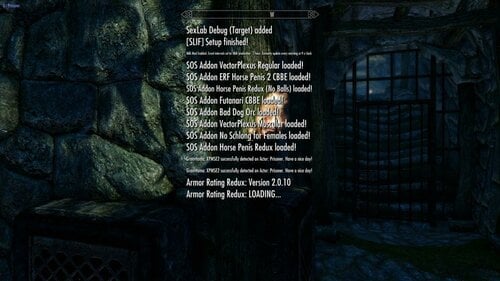
Faster Mod Setup Notifications LE
By pinkfluf
(text from SE page) But mod converted using LE vanilla Interface Assets and tested in LE
Supports Left, Centre and Right Notification messages.
This mod can increase the amount of notification messages (or use vanilla settings) and makes them fade faster. Handy during mod setups
This is based off this mod on Nexus but I didn't like the bright hud colours so I used the stock Interface assets
https://www.nexusmods.com/skyrimspecialedition/mods/30170?tab=description
Here are some timings with different settings (based on 261 active plugins)..
messages stopped/disappeared
3:29 80 frames 3 shown
2:12 50 frames 3 shown
2:02 40 frames 3 shown
1:27 30 frames 3 shown
1:17 20 frames 3 shown (Faster but noticed some messages still appeared "your follower can't follow you here" so scripts still running)
3:09 80 frames 15 shown
2:05 50 frames 15 shown
1:51 40 frames 15 shown (I use this setting, a good balance I think)
1:21 30 frames 15 shown
1:02 20 frames 15 shown (Faster but noticed some messages still appeared "your follower can't follow you here" so scripts still running)
You won't always get 15 spam messages during a playthrough unless your doing something to spam the notification messages (building a house etc)
Tools Used:
Jpexs - https://github.com/jindrapetrik/jpexs-decompiler
Compatability:
SE Version here
Anything that does not touch "interface/exported/hudmenu.gfx"
If you do have a mod that touches on it you can modify it (hudmenu.gfx or hudmenu.swf) yourself (might need to extract it if it's in a BSA).
Steps To Modify Or Change Position:
Open gfx or swf file in Jpexs ( if you get a "this uses assets from gfxfontlib.swf" just select no (twice).
1) In the left pane navigate to Scripts then click on Messages
2) In the far right pane click on "Edit P-code" and modify either the "MAX_SHOWN" (default 3) and "END_ANIM_FRAME" (default 80) to your choosing.
3) To change the position navigate to line 71 and change the x,y coords to your choosing
4) Press Save under the Pane, then Press Save on the main file menu voila your done.
1533 downloads
Updated
-
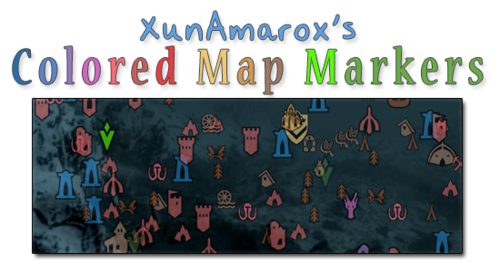
XunAmarox Colored Map Markers
By XunAmarox
Summary:
Contest winning map marker design based on EzEs Colored Map Markers. SkyUI 4.1 & all DLC compatible. Colored compass & unvisited markers included.
Required:
SkyUI 4.1 - May not actually be required... If you don't use it, let me know if it works alright without it.
I'm not sure how it'll do on older versions of Skyrim since there are markers from Dragonborn & Dawnguard. I'm also not sure if not having those DLC will affect it.
Design:
I started out with the idea that not everything needed unique colors because it becomes overwhelming and confusing and similar places should share colors to reduce clutter and make things easier to find on the map. So to do that I went through and reorganized the whole thing to make sure it all made sense. I tried to use mostly desaturated warm colors to that end. As for the coloring itself... I went with a yellow/orange (same spectrum) combination for the Major Cities & Palaces because I wanted them to be visible but not obnoxiously colorful, but still look related (e.g. same spectrum). They could have been about any color, but I thought a warm color would go best with the rest of the colors I chose which were also in the warm color spectrum.
I went with a very desaturated light brown color to indicate settlements because they're things that shouldn't really stand out that much and aren't a threat, so they should have a very mild color. For dungeons (e.g. very dangerous places) I gave them red as per the natural color response stimuli of red meaning danger so it indicates that the places is probably going to be hostile and dangerous, but I kept it very light and desaturated since these places are numerous as to not overwhelm the map with colors and become overly obnoxious... For the other world locations I went with a darker brown since they're more important than settlements though generally not as hostile as the more dangerous locations. The dark brown is a bit more vibrant, but brown tends to not be a color people associate with colorful and vibrant, so I figured it wouldn't draw too much attention other than making them noticeable.
As for the couple of special things, I wanted them to be very identifiable. Daedric Shrines are very rare in the world and attributed to Daedric Princes, so I wanted that to really stand out on its own. Dragon Lairs, a very dangerous and very unique set of places on the map and there aren't that many of them. With the Doomstones, I wanted these to have their own color and stand out more than other things because being able to find and change one's sign is pretty important. Giant Camps I made a lighter slightly more saturated red than the dungeons because they aren't really dungeons, but they're still extremely dangerous places. As for Stormcloak/Imperial camps, I wanted to give them their side's respective colors: red and blue.
Now, the player markers... Those are things the player is going to be seeing all the time and they tend to be vitally important. That's why I chose to go with green for the markers indicating places the player needs to go, since I made sure not to use the green spectrum anywhere else on the map so they would be noticeable. I left the generic markers a desaturated green, but made the player's custom marker a very bright green to be still in the same spectrum of normal markers, but to really pop out. I made the locked door thing an orange-ish color to indicate you can't go that way or it needs a key or whatever so it would be obvious but not stand out too much. And the player marker itself... I was actually really iffy on that. At first I had it a really bright red to make it stand out, but after I went with red for dungeons and Imperial camps I decided it might get too washed out and be hard to find... so I gave it a unique color. I went with the blue spectrum since very few things used that, but went much brighter so it'd be immediately noticeable and really pop out.
History:
Back in November of 2012 I won a design contest for the next new design of EzEs Colored Map Markers (linked above). I've used it ever since - I love it. Unfortunately when xEightballx updated his mod for SkyUI 4.1, much to my dismay, mine was never included. I completely understand -- it took me hours to do just this one while xEightballx was juggling 12 different versions. Insanity!
It makes sense to me in retrospect why only a handful were chosen to be updated and also why he does not include unvisted markers or the vast majority of compass markers. If you just do the map's discovered markers that's 1/2 of one page. If you do what I've done however, it's a full page for both the discovered and undiscovered markers, and then that is doubled because I did them for the compass as well. So my one map marker set that I'm uploading now is probably equivalent to about 4 of the others in terms of how much was done.
Making these colored map markers is not hard. It is however tedious and time consuming. If you want to know how to do it yourself, it's really so simple anyone could do it; xEightballx has a video tutorial on how to do it, so check it out if you're interested. I couldn't have made this without it.
The biggest problem for me using SWF Decompiler is that it doesn't play nice. Ctrl+A and Ctrl+V don't work so I have to manually highlight then right click and choose paste every time and every single time I have to select Solid from a drop down on what type of fill I want to do. Then, pretty frequently all the thumbnails will just disappear so I'd have to close the program and re-open it. Then, sometimes it refused to fill some markers at all and I had to go into select and individual groups and ninja my way around it. Tedious, time consuming, and a lot of work done exclusively with one hand since your other is completely useless.
All of that said, with the stark reality that EzEs markers will likely never be updated with mine ever again and xEightballx's video tutorial found I decided to just do it all from scratch myself, updated for SkyUI 4.1 and all the DLC's.
I actually had to redo the compass markers 3 times because first I started on the one included with EzE's which was horribly outdated, then I did it on the one extracted from my Interface bsa file, and then finally once more on the one from my Update bsa file. I'd gotten at least 80% done on each of those so yeah.. I was ready to start banging my head against the wall.
Changelog:
1.1 - Shape 307 which was previously thought unused (3 quest pointers stuck together) was colored (it's used one time, when you're sent to talk to Arngeir for the Peace Council I believe, or something like that). So, just minor update. You probably won't even notice, but I've got you covered anyways.
1.0 - Initial release
Credits:
xEightballx's video tutorial on how to edit Skyrim SWF & GFX files. I couldn't have made this without it. Also, he should be credited for the contest which inspired me to originally design my own map marker scheme.
195 downloads
Submitted
-
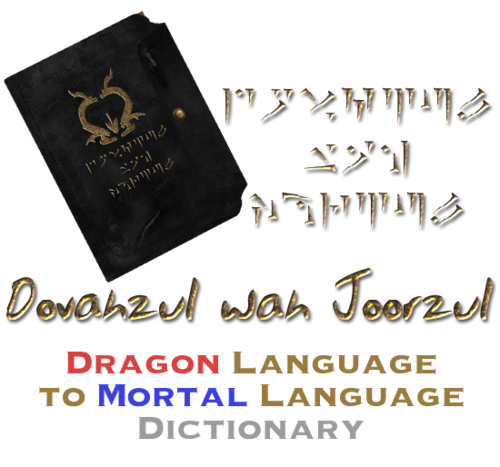
Dovahzul wah Joorzul - An in-game Dragon to Mortal Dictionary
By XunAmarox
Description
Adds a book to the game that contains the entire dragon alphabet as well as all known common translations.
Add it to your game via console.
player.additem xx000d62 1 ;Dovahzul wah Joorzul
Replace xx with the mod's load order. Text after ; not required, that's just a label if you want to make a bat file.
Video
Start at 10 minutes 36 seconds: video
Credits
Thuum.org - dragon alphabet font and translations
Dovah Zul Wiki - further translations
Changelog
•Version 1.1
Minor corrections. A "/" after "Mine" was removed and an extra "Mine - Dii" was removed.
•Version 1.0
Initial release.
68 downloads
Submitted
-
DMGfollower and more English translation
By venxiciciala
English translation for above mod here on loverslab
Since there isnt a discussion board for this mod on the loverslab mod page anymore, im posting this here.
Just run a normal install of the base mod and replace the esp provided here
62 downloads
Submitted
-
Race Delimited Vampire Lord
This is something I cobbled together almost a year ago to get rid of being locked into one race the first time vampire lord form is assumed.
It is pure script and therefore is suitable to both Skyrim LE, Skyrim SE, and very likel;y Skyrim VR.
If you change race after haveing been a vampire lord one or more times, it now returns you to your new race, not the old.
43 downloads
Updated
-
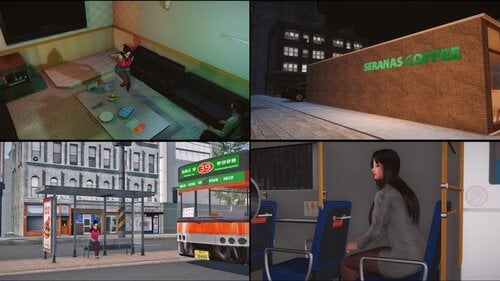
modern scroll SE
By lordarked
this is a modern city is a mod like moderntown but this much better and big also have npcs around, i upload with autorization of owner .
the door is on riverwood a book on the floor is a spell teleport to the city see the pictures for see location of the book.
there a le version too i uplodad on his recptive le section too
https://drive.google.com/file/d/1Sj1yOwWiRnahdtc4EZp44CE_VQ0YM0VA/view
422 downloads
Updated
-
Wait... I know you.
Fix for the guards dialolgue when playing a female and having a bounty between 101 and 1000 gold.
749 downloads
Submitted
-
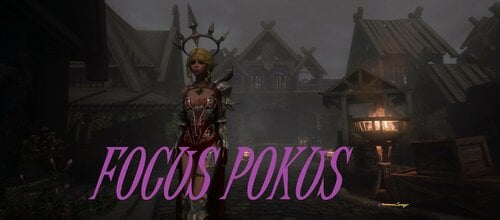
Focus Pokus
By Corsayr
Focus Pokus by Corsayr!
(Okay @Monoman1 did like most of it. ?)
Focus Pokus adds a spell that tracks various armor slots (configurable in the MCM) and depending on what you are wearing in that slot (also configurable in the MCM) increases your MagickaRateMult and thus increases your magicka regeneration.
?Why would I want that? (You ask)
I'm glad you asked!
What it can also do is set that MagickaRateMult to 0 as default this will make it so that you have no natural magical regeneration, and will require some outside assistance to regen magicka. So if you as a mage are wearing cloth items in the tracked slots, the mod checks the number of slots filled VS the number of slots tracked and provides a global rating. Based on that percentage it triggers magicka regen
Changed to this in 1.3 from 25/50/75/100
20% filled slots = 20% Magicka regen.
So if you track 5 slots
1 slot = 20% regen
2 slots = 40% regen
3 slots = 60% regen
4 slots = 80% regen
5 slots = 100% regen
as an example.
Obviously the more slots tracked the more items that have to be worn to achieve the percentage thresholds. But the magicka regen is always at the 25, 50, 75, and 100 percent. (So to get 50% regen when tracking 12 slots you need to be wearing valid items in 6 of those slots.)
? I'm still not getting, why would I want this (You ask)
Well, it's simple, the mod is basically designed to work with mods that damage or destroy your armor like Loot and Degradation, Mortal Weapons and Armor, Bikini Armor - Break, Equipment Durability System, etc, etc.
So as you become more naked, and un-able to equip armor in those spots you become more helpless. (less magicka regen)
That's right! This is just another perv mod in disguise! ? Designed to make your poor magic character vulnerable when naked so she has to scrounge for any scrap of clothing to put on so she can use her boom magic! ?
? Is it for LE or SE (You ask)
That's a great question! you are so smart! The answer is BOTH! Doesn't matter it can be installed without conversion into either platform. (You will get a File 43 error in SE on the esp, but just ignore it, if you are here on LoversLab and using SE you probably already have a thousand File 43 errors already. What's one more? ?)
Recommended Mod(s)
Obviously as mentioned before this whole thing works better and is more meaningful if your gear can be lost, stolen, or damaged in someway. So any mod that does that (I already mentioned a few)
I like Widget mod for monitoring your Magicka Regen this mod is actually a corner stone of a larger magicka philosophy that a characters magicka regen shouldn't be something that happens without outside intervention. So knowing what your regen is at all times is helpful.
Widget Mod LE or Widget Mod SE has an attributes widget that is helpful for that. Although it tracks the less useful MagickaRate stat and not the MagickaRateMult stat. This can be fixed by replacing the script pex in widget mod with this
WM_AttributeCountQuestScript.7z
This script was made for me by @Blackbird Wanderer to change the Attributes widget in Widget mod to track MagickaRateMult. Just put that in the Widget Mod Scripts folder and allow it to overwrite (SE or LE doesn't matter works on both)
Anyway, I am sure there is stuff I am missing, but I can always add more info later.
For now I leave you with
Special Thanks!
@Monoman1 For basically making this mod (He made me do the spell myself so I'd learn, but the Scripts, the MCM, the FOMOD... all him) ?
@Ashal for LoversLab and bringing us all together here to digitally beat our favorite games into the games we actually want. ?
@Blackbird Wanderer for the Widget Mod Script and for being an inspiration for me ?
521 downloads
Updated
-
Dawnguard Horse Combat Patch
By MadMansGun
Dawnguard Horse Combat Patch
v3
a patch for:
the right hand side sword charge bug...
angle of attack data...
reversel of left and right attack buttons...
v2
a patch for:
the right hand side sword charge bug...
angle of attack data...
v1
was added to the "Unofficial Skyrim Patch" so there is no need to upload it here.
.___.
{0,0} . ________________________________________________
/)__)> |creative commons All May Host This File, No One May Profit|
-"-"- - -"""""""""""""""""""""""""""""""""""""""""""""""""""""""""""""""""""""""""
522 downloads
Updated
-
A Small Patch For Labyrinthian
By MadMansGun
Edit: it looks like USLEEP has taken stuff without giving credit again.
there was a small error at Labyrinthian that was bugging the hell out of me, so i fixed it.
0006142D & 00084050 are NorBridge1wayEndCap02ice [sTAT:00060F1C] when they should have been NorBridge1wayEndCap02sn_light [sTAT:000A464D]
this problem can stand out a lot if you have the "Better Dynamic Snow" mod installed.
(that mod can be found in "The Ruffled Feather" mod pack under Miscellaneous here: http://www.nexusmods.com/skyrim/mods/11/? )
167 downloads
Updated
.thumb.gif.cd0cfa6beb84ac1f2f84125c2f291d78.gif)
![More information about "[TS4] BlackBox Bad Decisions v1.0.7 — aftermath after WooHoo / WickedWhims (YA–Elder)"](https://static.loverslab.com/screenshots/monthly_2026_09/04-we-need-to-talk.thumb.png.f4ac8bab6eefd20e135fdfc9efcb9fc2.png)
![More information about "[XCL] [0.25.9] Palais Royale"](https://static.loverslab.com/screenshots/monthly_2026_08/Screenshot2026-08-2721_28_29.thumb.png.cb7226b03283653c53cf0071d230d011.png)