Characters
4 files
-
StarfieldDecipherTool
By Wolfe6900
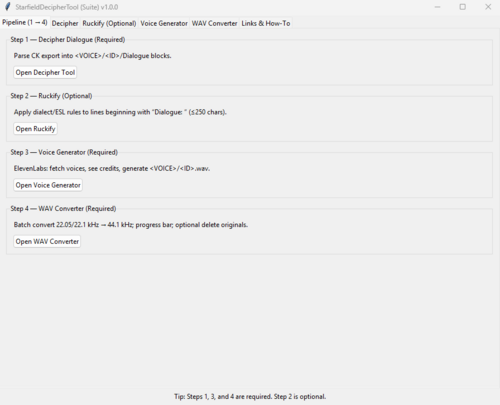
StarfieldDecipherTool is a tool/.exe file used for Creating or Replacing an NPCs voices in Starfield. Inside this .exe., there are currently 5 functions:
1. StarfieldDecipherTool: This converts the dialogue export from the Creation Kit to a readable and understandable .txt file.
2. Ruckify; This adds dialect to the text, i.e., Irish, Southern American, Russian, etc.
3. VoiceGenerator; this generates voice files from Elevenlabs (This will cost $20 or so for a monthly subscription for the 'Creator' upgrade)
4. WavConverter; Elevenlabs API will generate 22.1kHz files (Creator Subscription), which need to be converted to 44.1kHz.
5. WavFileCleaner; WWise adds a suffix when generating .wems. This is a simple tool that goes through and cleans them all after you've made .wem files. It just renames them to the original ID.
NOTE: Replacing an entire Companion will burn 400,000 - 500,000 tokens in Elevenlabs, roughly costing $80-$100. I've got the WavConverter to help from needing to upgrade further, but that's it.
Permissions:
I say this with all my mods. I'm not interested in making money or getting recognition. This is a game you paid for, and you should be able to modify it however you like. Feel free to use the program, upload it where you want, modify it, I don't care.
Requirements:
Elevenlabs Account: A text-to-speech AI program used to clone and/or generate voice files.
($20/month 'Creator' Subscription or above) https://elevenlabs.io/
*Without an Elevenlabs Subscription, you can still generate voice files, however, you will not receive an API for this tool and may need to manually download each file and have a 10,000 token cap. This tool could still be used for 4/5 functions it serves.
WWise: A tool used to convert .wav files to .wem (Starfield Uses):
(FREE) https://www.audiokinetic.com/en/
Instructions:
*Included in the .exe file; just press the "?" button on which tool, and it will tell you what to do. This tool should make it easy enough that someone with no coding or modding experience should be able to understand and use it.
69 downloads
Updated
-
Adoring Fangirl for Starfield
By Reigor
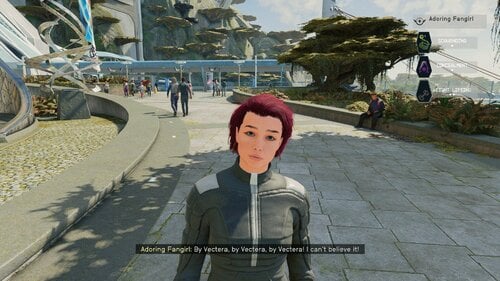
Hello! What this PC/Xbox Creation does is turn Starfield's Adoring Fan companion into an adorable (but still annoying) fangirl with a new female voice. Her appearance is fully customizable via the Enhance menu and the trait "Hero Worshiped" was also changed to reflect the gender change. The trait and companion can be added to an existing save, check out the player's room in the Lodge (see below).
In all other respects she SHOULD behave exactly as the original Adoring Fan. This means in order to have her as a companion, the player must have the Hero Worshiped trait and have joined Constellation. If those two things are true, the Adoring Fangirl will spawn and seek out the player near the New Atlantis spaceport or MAST Metro.
This mod's voice was created by using ElevenLab's AI driven text to speech generator.
NEW! In-game way of modifying the Adoring Fangirl skills!
As a dialogue option you can talk to the Adoring Fangirl about what role you want her to be on your spaceship. She'll respond with a menu of choices. One for a primary (up to rank 4) starship systems skill like Pilot or Payload and a secondary (up to rank 3) weapon system skill like missles. These two skills can be changed at any time by repeating the dialogue option.
NEW! In-game way of adding the Trait
Any time after joining Constellation, go to your room in the Lodge. On the table opposite of the table is a note. Pick it up and your character will be given the Hero Worshiped trait and her quest will start. Go to the MAST metro and head for the Spaceport. Along the way you should meet her.
NEW! In-game way of customizing her appearance
When talking to the Adoring Fangirl, the player should see a new option “I want to talk to you about something.” This will be where all of this Creation’s future content will be accessed.
There will be the option “I want to change your look”. Selecting this will open up the Enhance menu with the Adoring Fangirl avatar loaded. Change her however you like!
Save your work with YOUR character’s name and pronouns, otherwise it will change your character’s name and pronouns. If possible, I’ll try to fix this in a future update.
If you experience a crash or other error, trying stripping your player character's gear off first, then use the appearance change option. Custom clothing and accessories can sometimes cause the Enhance menu to crash.
Load Order and Requirements:
Load her after any crew or companion creations. There are no other requirements.
There is an OPTIONAL voice pack with a different AI voice.
This is my first creation, so appreciate any feedback and bug reports, especially if she uses the male voice or no voice at all. I know some lines, like her initial greeting sound a bit off, I'll try to fix those in the future.
Troubleshooting:
Some users, especially on Xbox, have reported her showing up with no head, male voice, etc…this is most likely because the archive files did not load properly for some reason or the creation is being overwritten by another creation.
Try deleting the creation from your load order and Bethesda.net. Make a save without it. Then redownload the Creation.
If you are using another audio replacer, the two creations might conflict. Try disabling other audio replacers and see what happens. If Adoring Fangirl starts working, well I can't fix that. Its a BGS issue.
Move the creation to the end of the load order. You might have to go back to an old save or start a new game. I HIGHLY recommend SSK Fast Start for testing.
With SSK Fast Start is a great creation one can use to test mods by quickly starting a new game. Choose 2, 1, and whatever starting gear when starting a new game. Get the trait from the note if you don’t already have it, fast travel to some other part of the planet, then back to the lodge, then head to the spaceport.
Recommended Mods:
CRT Body MeshVBB (Voluptuous Body for Beauties)
STARQUEEN - enhanced vanilla female skin
Peko's Eyelash
Fancy Teeth
The Eyes of Beauty - Starfield Edition
Crew and Companion Overhaul (with patch)
Tools used:
Visuals:
Starfield Creation Kit
SF1Edit
WinHex - To switch back and forth between esp and esm for editing.
Voice:
xTranslator
ElevenLabs "Freya" voice
Foobar2000
WWise
MediaHuman Audio Converter
This guide was very helpful in creating the fangirl's voice.
A step-by-step guide on AI voice modding at Starfield Nexus - Mods and Community (nexusmods.com)
1450 downloads
Updated
-
Males People of Starfield...
By Barbituric
Hi everybody,
this is my first mod, I've tried it, and it looks like working.
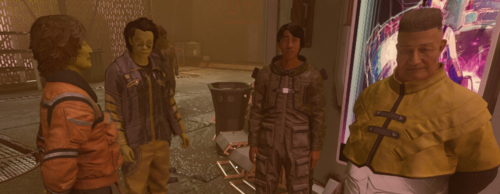
This mod turn all the spawed womens crowd and dead corpse to males, I didn't change the hair and outfit.
Now with it, in town, you'll have only guys, walking arround.
193 downloads
Submitted
-
More or less diverse Constellation
By Ronin_5564
More or less diverse Constellation
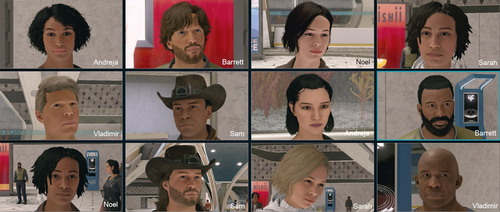
More or less diverse Constellation increases or decreases the diversity of Constellation society for a better gaming experience.
You can change the appearance of Andreja, Barrett, Noel, Sam, Sarah and/or Vladimir. Customize your
Constellation society the way you want to play.
Version
Version 1.1.0 was built with the Creation Kit and runs on Starfield 1.12.30
Installation
1) Simply install with your favorite mod manager (Vortex or Mod Organizer 2).
2) Enable Archive Invalidation (also called Load Loose Files) for your game in StarfieldCustom.ini
C:\Users\<YourUser>\Documents\My Games\Starfield\StarfieldCustom.ini
[Archive]
bInvalidateOlderFiles=1
sResourceDataDirsFinal=
3) With Version 1.1.0 Plugins.txt is not needed any more.
Disclaimer
File is provided "AS IS". No warranties included. The author is not responsible for any consequences this file may have.
As always for free software: USE AT YOUR OWN RISK.
Credits and Thanks
Bethesda for making another great RPG!
The xEdit-Team for their great continues work
The Loverslab community
255 downloads
Updated




![More information about "[XCL] EASY SALES !!! - A sales cheat mod"](https://static.loverslab.com/screenshots/monthly_2026_10/Breaking-Bad-money-nap-meme-6-3583251892.thumb.jpg.aad64969705614bba4e9834ed8f04670.jpg)