Utilities
2 files
-
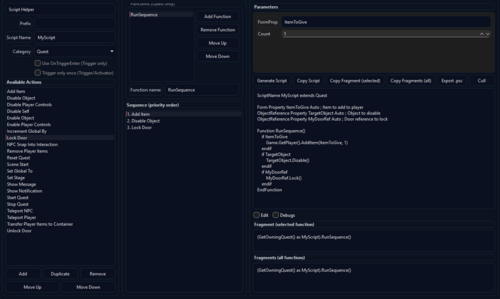
Starfield EZ Scripter
By Wolfe6900
Starfield_EZ_Scripter_v3:
What can you do?
TAB 1: AI Connect
- This is a tool with a built-in prompt so AI knows you're talking about modding Starfield. Example, instead of saying:
"I want you to design a script for the Starfield Creation Kit that disables on object"
You would instead just say "disable an object"
- This can attach to ChatGPT, Grok or DeepSeek's API if you have a full account.
(This is not fully tested, since I don't have full accounts with this ability to test them)
TAB 2: Script Helper
- This is a tool to help you build scripts from scratch as a Novice Modder:
- Assign a prefix: If all your scripts for your mod called "JohnnysMod" should start with "JH_"; this will apply it.
- Scriptname: Write a scriptname - if you name your script "DisableChair" with the prefix above, it would be called "JH_DisableChair"
- Categories: I've come to notice that I use 3 main categories in scripting:
1. Triggers (a box the Player walks into and activates the script)
2. Activators (The Player uses an activator like a book or something)
3. Quest (The player speaks to someone, after it's finished, something happens).
- Dependent on the 3 categories above, you may get more options. For example, triggers: you may have a flag for it to only trigger once. That way, it doesn't keep triggering every time the player steps into the invisible trigger box.
- Quests: Quests have an "Add", "Duplicate", "Remove" button and allow you to assign the priority. For example, you wanted the script to:
1. Add an Item to the Player
2. Show a popup message to the Player
3. Unlock a door
You could now do this, so an example of it running would look like:
1. Give a medpack to Johnny (the Player)
2. Tell Johnny, "YOU HAVE A MEDPACK!"
3. Unlock a Door for Johnny to go through
- These can also be in different sequences: For example, you can have 2 sequences in one script. A good example of this is if you'd like a single script to lock and unlock doors, but you would want to call it differently. You could use one dialogue fragment to unlock a door and a different dialogue fragment to lock the door, but all in one script. Additionally, this tool would provide both dialogue fragments needed to call this.
For an example: you could talk to an NPC and say either:
"Lock this door!" - call the lock function
"Unlock this door!" - call the unlock function
These would both be in the same script.
-Edit/Debug flags: These let you edit the script to how you'd like it and make it so the script always shows debugs. This is good for testing because Debugs can show you where something failed, especially in a sequence. For example, you:
1. Give a medback
2. Display a message
3. Unlock a door
This would say "Medpack given", "Message Displayed", "Could not open door due to XYZ" letting you know some parts worked, but some didn't pinpointing errors.
- Cull: This removes anything in the script that is not needed for the script to function. A lot of modders like to add little notes, extra spaces, etc., to their mods. This serves to eliminate them and show you what you need to get the mod to function, and nothing more. A good tool to clean up a heavy worded script or learn what is actually needed.
Tab 3: Useful Fragments:
When using scenes and dialogues to make things happen, these fragments are often used. This is just a quick copy/paste tool instead of writing and remembering the verbiage when calling.
Tab 4: Script Editor:
This allows you to pull entire scripts and edit/save them. This is more for an advanced modder, but also a useful tool if shortening scripts and etc.
136 downloads
Updated
-
Unity Framework - Framework that allow modders to inject new variants into NG+ handler
By Djlegends
Its been over a year now and I've noticed that many people were disappointed how BGS handled scenarios and how they were implemented. I was even more disappointed when I looked under the hood and saw how many safety checks that were that caps how many scenarios you have. So I'd decided to changes some things.
FEATURES
Restructure the New Game Plus script within the Quest Manager so that its properly compatible with modding. As a result of the above modders have the ability to inject New Scenarios and create their own "Universe".
FAQ
How do I start using this mod?
If you’re using a mod that has this as a requirement, just install it! No configuration or special steps necessary. If you want to use this to create your own Scenario, see the articles tab and check the optional files for an example plugin.
Is this compatible with Shutdown Constellation and Trigger NG by SKK?
Simple answer:
Long Answer: Yes its compatible with SKK Trigger NG but no because you won't be able to choose mod added NG+ Scenarios and only the vanilla versions. Hopefully I can talk with SKK so that people can choose their own NG+ scenarios as well instead of relying on RNGesus
Where can I get mods that use this?
At the moment currently no mod exists :(. Beyond that, if a mod requires this framework, the author will likely tell people.
I don’t use anything that requires this mod, why should I bother with it?
I you don't have any mods that requires it this is fine just do know that if you ever find a mod that add new Scenarios BGS made a soft cap limit which this mods removes. Also, if you install the example plugin, you can occasionally find a scenario with a special surprise.
309 downloads
Updated
.thumb.jpg.d864902d2e06ac7c1b931acbe3396de3.jpg)


![More information about "Ana de Armas [FREE NOW]"](https://static.loverslab.com/screenshots/monthly_2026_09/de2dba5b-5b93-49b1-a1bb-32ae19a5fe34.thumb.png.c23a9870b3da99b9eb8cd87fcefb4f1e.png)