Select a subcategory to view available files.
Files From Subcategories
-
OSF Animation
By ozooma10
OSF - native animation & scene framework for Starfield.
Early alpha - Very much a work in progress
OSF is a native animation and scene engine for Starfield, inspired by OStim and NAF. It plays animation on actors, keeps multiple characters in sync, anchors them in the world, controls the camera, and runs whole scenes in a data-driven, json based authoring flow. You can use it directly in-game: an animation browser to look through everything installed and play it on yourself or nearby NPCs, and an emote wheel for one-key quick emotes. Or drive it from other mods: you describe a whole scene in a json data file and OSF runs it at runtime, instead of scripting timings and animation events in papyrus yourself.
In-game animation browser (F10): search the full catalog, pick a cast from the crosshair or a nearby-actor scan, launch on furniture, drag to orbit the camera, and manage running scenes Emote wheel (default B): radial quick emotes for you or the NPC in your crosshair; pin any solo animation from the browser onto it Vanilla animation library (optional install): thousands of Starfield's own clips, humans plus 27 creature species, browsable and playable Synced multi-actor GLTF / GLB / .af playback on one shared clock JSON scene graphs - nodes, cues, actions, branching; no scripting needed Engine-native Wwise audio that rides the game mix, with subtitles Actor anchoring, camera/control locks, screen fades, equipment hide/restore A Papyrus API (OSF.*) for quest mods to drive scenes
Controls
Active while a scene has you locked in.
Space - Advance the scene + / Numpad + - Speed up - / Numpad - - Slow down - Reset speed P - Pause / resume End - End the scene Free Camera
MMB (middle mouse) - Toggle free camera Mouse - Orbit / look around Scroll Wheel - Zoom in / out WASD - Fly the camera through the scene Some controls depend on what the active scene allows - a scene can lock its ending or skip the free camera.
Requires: Address Library for SFSE and OSF UI (renders the browser, the wheel, the settings menu, and hotkeys - the engine and Papyrus API run without it). Install with MO2 or Vortex; the installer will offer the animation library and the emote pack - take both. Then in-game: *F10* opens the animation browser - pick something, hit LAUNCH. *B* opens the emote wheel (aim at an NPC first to emote them instead). Hotkeys and settings live in OSF UI's settings menu, under OSF Animation. No OSF UI? The engine still runs headless for content mods; smoke-test from the console (~): cgf "OSFTest.SoloScene" ; play a looping test animation
cgf "OSFTest.Stop" ; stop it Content Mods
OSF Seduce:
Scene authors: ship scenes as JSON plus GLB/AF clips. No Papyrus, No scripting. Quest mods: drive scenes from Papyrus via the OSF.* API.
Getting Started, the scene schema, and the API are documented on GitHub.
Deweh (NAF), the playback/graph base OSF is adapted from Calaverah (CALUMI.Animation), the .af / skeleton decoder libxse (CommonLibSF), the SFSE plugin library OSF is built on Plus fastgltf, ozz-animation, zlib, nlohmann/json and miniaudio. Source and issue tracker on GitHub, Let me know all your complaints and bugs!
1289 downloads
Updated
-
blender Starfield Rig Collection V1.0 (Blender 4.3+)
By Darkflip95
This is a quick upload of Starfield's Armatures for characters, all creature types, and robots.
Taking advantage of Animation IO - the new animation and rig export tools recently released by Devaris45 for Blender 4.3+, I've extracted Starfield's vanilla armatures for the following characters, creatures and robots:
Humans (All human characters share the same skeleton, the only difference is the female skeleton is scaled slightly smaller than the male skeleton.)
- Male
- Female
Creatures
- Biped
- Critter
- Floater
- Flyer
- Hexapod
- Hopper
- Larva
- Manta
- Mantid
- Octopede
- Parasite
- QuadrapedA
- QuadrapedB
- QudrapedC
- Starfish
- Swimmer
- Terromorph
Robotics
- BallisticTurret
- LaserTurret
- MiniBot
- ModelA
- ModelS
- ModelT
- SecurityCamera
The goal of this resource is to provide a central file that has all of Starfield's vanilla armatures for the purposes of creating custom animations or even new types of armatures. This is purely a modder's resources, and is meant for Blender 4.5 and up. It can probably work in earlier versions as it just contains raw armatures. I just saved the .Blend while using 4.5, so there's a chance data can be lost if using a earlier version, but that is exceedingly rare.
Do note that since the animation tools are in their infancy and have only just been released, the author has cautioned that rigs that have been exported back into Starfield have caused some crashes due to some possibly undecoded parts of the format.
So with that being said, let me know how these work.
Requirements
- Blender 4.3+
- Knowledge of how to animate in 3D software.
- Animation IO addon by Deveris256 for importing Starfield's .Rig and .AF formats into Blender. .AFs are Starfield's native animation files.
https://www.nexusmods.com/starfield/mods/16184?tab=description
Credits
- Bethesda Softworks for Starfield itself
- Blender for being Blender
- Deveris256 for the Animation IO addon
Starfield Rig Collection 1.0.rar
153 downloads
- animation
- resource pack
- (and 1 more)
Updated
-
Starfield EZ Scripter
By Wolfe6900
Starfield_EZ_Scripter_v3:
What can you do?
TAB 1: AI Connect
- This is a tool with a built-in prompt so AI knows you're talking about modding Starfield. Example, instead of saying:
"I want you to design a script for the Starfield Creation Kit that disables on object"
You would instead just say "disable an object"
- This can attach to ChatGPT, Grok or DeepSeek's API if you have a full account.
(This is not fully tested, since I don't have full accounts with this ability to test them)
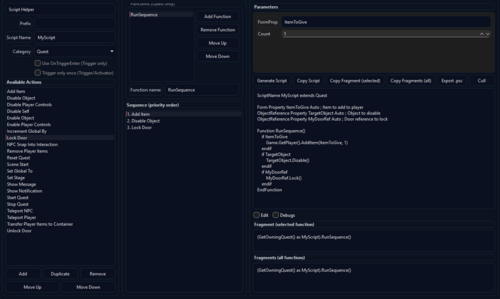
TAB 2: Script Helper
- This is a tool to help you build scripts from scratch as a Novice Modder:
- Assign a prefix: If all your scripts for your mod called "JohnnysMod" should start with "JH_"; this will apply it.
- Scriptname: Write a scriptname - if you name your script "DisableChair" with the prefix above, it would be called "JH_DisableChair"
- Categories: I've come to notice that I use 3 main categories in scripting:
1. Triggers (a box the Player walks into and activates the script)
2. Activators (The Player uses an activator like a book or something)
3. Quest (The player speaks to someone, after it's finished, something happens).
- Dependent on the 3 categories above, you may get more options. For example, triggers: you may have a flag for it to only trigger once. That way, it doesn't keep triggering every time the player steps into the invisible trigger box.
- Quests: Quests have an "Add", "Duplicate", "Remove" button and allow you to assign the priority. For example, you wanted the script to:
1. Add an Item to the Player
2. Show a popup message to the Player
3. Unlock a door
You could now do this, so an example of it running would look like:
1. Give a medpack to Johnny (the Player)
2. Tell Johnny, "YOU HAVE A MEDPACK!"
3. Unlock a Door for Johnny to go through
- These can also be in different sequences: For example, you can have 2 sequences in one script. A good example of this is if you'd like a single script to lock and unlock doors, but you would want to call it differently. You could use one dialogue fragment to unlock a door and a different dialogue fragment to lock the door, but all in one script. Additionally, this tool would provide both dialogue fragments needed to call this.
For an example: you could talk to an NPC and say either:
"Lock this door!" - call the lock function
"Unlock this door!" - call the unlock function
These would both be in the same script.
-Edit/Debug flags: These let you edit the script to how you'd like it and make it so the script always shows debugs. This is good for testing because Debugs can show you where something failed, especially in a sequence. For example, you:
1. Give a medback
2. Display a message
3. Unlock a door
This would say "Medpack given", "Message Displayed", "Could not open door due to XYZ" letting you know some parts worked, but some didn't pinpointing errors.
- Cull: This removes anything in the script that is not needed for the script to function. A lot of modders like to add little notes, extra spaces, etc., to their mods. This serves to eliminate them and show you what you need to get the mod to function, and nothing more. A good tool to clean up a heavy worded script or learn what is actually needed.
Tab 3: Useful Fragments:
When using scenes and dialogues to make things happen, these fragments are often used. This is just a quick copy/paste tool instead of writing and remembering the verbiage when calling.
Tab 4: Script Editor:
This allows you to pull entire scripts and edit/save them. This is more for an advanced modder, but also a useful tool if shortening scripts and etc.
141 downloads
Updated
-
StarfieldDecipherTool
By Wolfe6900
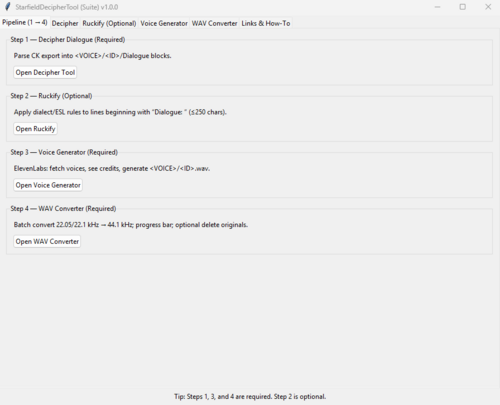
StarfieldDecipherTool is a tool/.exe file used for Creating or Replacing an NPCs voices in Starfield. Inside this .exe., there are currently 5 functions:
1. StarfieldDecipherTool: This converts the dialogue export from the Creation Kit to a readable and understandable .txt file.
2. Ruckify; This adds dialect to the text, i.e., Irish, Southern American, Russian, etc.
3. VoiceGenerator; this generates voice files from Elevenlabs (This will cost $20 or so for a monthly subscription for the 'Creator' upgrade)
4. WavConverter; Elevenlabs API will generate 22.1kHz files (Creator Subscription), which need to be converted to 44.1kHz.
5. WavFileCleaner; WWise adds a suffix when generating .wems. This is a simple tool that goes through and cleans them all after you've made .wem files. It just renames them to the original ID.
NOTE: Replacing an entire Companion will burn 400,000 - 500,000 tokens in Elevenlabs, roughly costing $80-$100. I've got the WavConverter to help from needing to upgrade further, but that's it.
Permissions:
I say this with all my mods. I'm not interested in making money or getting recognition. This is a game you paid for, and you should be able to modify it however you like. Feel free to use the program, upload it where you want, modify it, I don't care.
Requirements:
Elevenlabs Account: A text-to-speech AI program used to clone and/or generate voice files.
($20/month 'Creator' Subscription or above) https://elevenlabs.io/
*Without an Elevenlabs Subscription, you can still generate voice files, however, you will not receive an API for this tool and may need to manually download each file and have a 10,000 token cap. This tool could still be used for 4/5 functions it serves.
WWise: A tool used to convert .wav files to .wem (Starfield Uses):
(FREE) https://www.audiokinetic.com/en/
Instructions:
*Included in the .exe file; just press the "?" button on which tool, and it will tell you what to do. This tool should make it easy enough that someone with no coding or modding experience should be able to understand and use it.
69 downloads
Updated
-
GenderBender - Ervin To Cassandra
By Wolfe6900
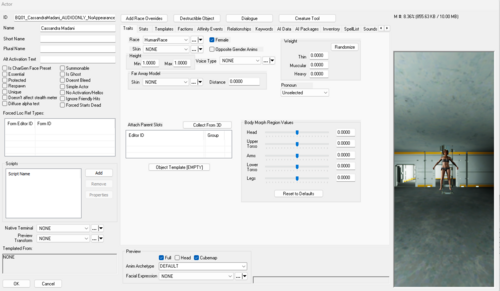
GenderBender (Ervin To Cassandra)
Features:
-Changes Barrett’s spouse from Ervin to Cassandra across 100+ lines (text, voice, and facial animation).
-Alters the "Break of Dawn" quest: Hilda (female) replaces Hugo (male).
-Updates romance options to focus on heterosexual relationships.
-Adjusts companion romance logic to reflect these changes.
-Updates Cora Coe’s hairstyle to align with her character's ethnic background.
How It Works:
-Barrett’s voice was analyzed across 16 emotions (consolidated into 8 categories).
-Each emotion group was used to generate seamless voice replacements (e.g., Barrett Happy, Barrett Angry).
-Supporting NPCs (Helgi, Pauline, Ellie) were also voice-cloned to ensure dialogue consistency.
-Subtitles were updated in the Creation Kit to reflect these text changes.
Installation:
-Install like any other mod: includes .esp plugin, .wav / .wem audio, and .ffxanim animation files.
-If the plugin is disabled, audio overrides will still work but subtitles will not update.
-To uninstall: remove the files, and your game reverts to normal.
Compatibility:
-Generally compatible with most mods.
-Only conflicts with mods that directly edit Barrett’s dialogue.
Requirements:
-Base game Starfield only. No DLC required.
Permissions:
-Free to share, redistribute, and modify.
-Once downloaded, it’s yours—mod your game however you like.
A Note on Availability & Player Choice:
-It does not contain hate speech or target any specific group.
-It offers an alternative experience for players who prefer different romance options or character designs.
-This mod exists to provide players with more customization choices, similar to other mods that adjust gameplay difficulty, appearance, or other narrative elements.
-If this mod is removed from one site, you should be able to find it through a simple search on other hosting platforms. I also plan to mirror my mods on additional sites to ensure continued availability.
Looking Forward:
-The techniques used in this project have opened the door to broader modding possibilities. With the same process, any NPC could be fully re-voiced and re-styled—whether you want Rick Sanchez instead of Sam Coe, or entirely different personalities for companions. This mod is just the start of experimenting with Starfield’s voice, dialogue, and animation systems.
Final Thoughts: This was beneficial to a tool I created to replace any Companion with anyone you want. In a trial, I was able to completely replace Barrett with Uncle Ruckus from the 2005 TV show "The Boondocks" changing 6707 voice lines to Uncle Ruckus's cloned voice and comments. Unfortunately, due to copywrite errors, this mod can not be posted anywhere without being taken down immediately. If you would like to use this tool to create any character, feel free to download it at:
111 downloads
Updated
-

No pants under skirts addon for Eit Clothier Plus
By Apot1
Small mod, removes the leggings under the three dresses/skirts from Zone79's Eit Clothiers Plus (ZBB version).
plugin is a light master.
Requires: Eit Clothiers Plus
I spent all day yesterday trying to figure out how the Nif files work in this game with the mesh paths and morph data, and I still don't quite get a lot of it, but here is my first attempt at modding Starfield.
I had to make a plugin to load the changes because each nif can only have one related morph.dat file, otherwise the legs would be missing morphs. From what I understand, the only alternative would be joining the body mesh and the outfit together in blender, but that would also require editing the textures, I think this way is simpler and less intrusive.
Credits:
Zone79 for the original mod
803 downloads
Submitted
-
Lost In Space (Ship combat defeat mod) Version 0.1 (02.27.2025)
By Gray User
Lost In Space (with enemy boarding groups). Added/Updated 02.27.2025
Credits/Thanks:
Hiroshi (my ex, for translation help)
Features (status):
Defeat in spaceship combats
This mod triggers when player ship is damaged in combat (threshold is 60% and can be changed with debug terminal). This will cause combat to stop, enemy ship that damaged PC ship to dock with you, and you will exit pilot chair.
If boarders are turned on, enemy boarders will come through hatch to attack you.
If you kill all of boarders or boarders are turned off, you can go through hatch to attack enemy ship (and take it over if you have correct pilot skills). Or you can undock (this will restart combat).
Version detector and updator
This should compare the script version against the version in your save, and if they are different it should restart the main combat script.
Debug/QA Terminal and Room
If you coc 'aaLostCell' you go to a debug room with a terminal. This terminal lets you set options for mod (damage threshold up or down, enemy boarders on or off, max waves of enemy boarders).
Warnings/Problems:
Ship weapons do a lot of damage. Threshold is set to 60% because when it was lower, often the enemy ships would destroy the PC ship before mod could trigger. If you set it lower, might not work well.
Boarding enemies may not have good pathing. They should spawn at your hatch and attack if they see you or crew, but if your ship has large or complicated layout they might just stand there and wait for you.
If enabled, mod should register your home ship when mod loads. After that, it will register new ship any time you change home ship (by sitting in pilot chair of new ship, using ship builder, etc).
Future Features (status):
Maybe better boarder AI. Troubleshooting/bug fixes.
Installation:
Copy the contents of this mod to your Starfield directory (the contents of the 'data' folder should go into your 'data' folder) or with mod installer. You must enable mod for it to work.
Uninstallation:
I think mod can be deleted without problems, it does not change any vanilla records.
Usage/Permissions:
You may use this files as base for your own mods, but you may not charge for anything that uses these files. Donations is fine as long as it is totally optional and users get the same functionality without giving money. Please do not repost these files elsewhere (unless LL is shut down and I am unable to put them back up on whatever replaces it). Please do not post mods that use these files to Nexus or Creations.
983 downloads
Submitted
-
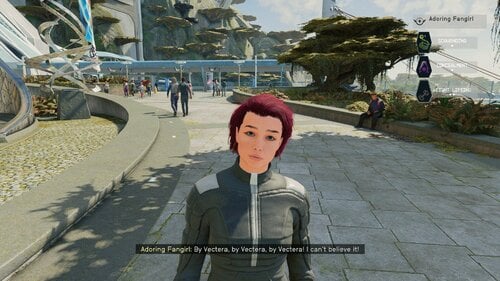
Adoring Fangirl for Starfield
By Reigor
Hello! What this PC/Xbox Creation does is turn Starfield's Adoring Fan companion into an adorable (but still annoying) fangirl with a new female voice. Her appearance is fully customizable via the Enhance menu and the trait "Hero Worshiped" was also changed to reflect the gender change. The trait and companion can be added to an existing save, check out the player's room in the Lodge (see below).
In all other respects she SHOULD behave exactly as the original Adoring Fan. This means in order to have her as a companion, the player must have the Hero Worshiped trait and have joined Constellation. If those two things are true, the Adoring Fangirl will spawn and seek out the player near the New Atlantis spaceport or MAST Metro.
This mod's voice was created by using ElevenLab's AI driven text to speech generator.
NEW! In-game way of modifying the Adoring Fangirl skills!
As a dialogue option you can talk to the Adoring Fangirl about what role you want her to be on your spaceship. She'll respond with a menu of choices. One for a primary (up to rank 4) starship systems skill like Pilot or Payload and a secondary (up to rank 3) weapon system skill like missles. These two skills can be changed at any time by repeating the dialogue option.
NEW! In-game way of adding the Trait
Any time after joining Constellation, go to your room in the Lodge. On the table opposite of the table is a note. Pick it up and your character will be given the Hero Worshiped trait and her quest will start. Go to the MAST metro and head for the Spaceport. Along the way you should meet her.
NEW! In-game way of customizing her appearance
When talking to the Adoring Fangirl, the player should see a new option “I want to talk to you about something.” This will be where all of this Creation’s future content will be accessed.
There will be the option “I want to change your look”. Selecting this will open up the Enhance menu with the Adoring Fangirl avatar loaded. Change her however you like!
Save your work with YOUR character’s name and pronouns, otherwise it will change your character’s name and pronouns. If possible, I’ll try to fix this in a future update.
If you experience a crash or other error, trying stripping your player character's gear off first, then use the appearance change option. Custom clothing and accessories can sometimes cause the Enhance menu to crash.
Load Order and Requirements:
Load her after any crew or companion creations. There are no other requirements.
There is an OPTIONAL voice pack with a different AI voice.
This is my first creation, so appreciate any feedback and bug reports, especially if she uses the male voice or no voice at all. I know some lines, like her initial greeting sound a bit off, I'll try to fix those in the future.
Troubleshooting:
Some users, especially on Xbox, have reported her showing up with no head, male voice, etc…this is most likely because the archive files did not load properly for some reason or the creation is being overwritten by another creation.
Try deleting the creation from your load order and Bethesda.net. Make a save without it. Then redownload the Creation.
If you are using another audio replacer, the two creations might conflict. Try disabling other audio replacers and see what happens. If Adoring Fangirl starts working, well I can't fix that. Its a BGS issue.
Move the creation to the end of the load order. You might have to go back to an old save or start a new game. I HIGHLY recommend SSK Fast Start for testing.
With SSK Fast Start is a great creation one can use to test mods by quickly starting a new game. Choose 2, 1, and whatever starting gear when starting a new game. Get the trait from the note if you don’t already have it, fast travel to some other part of the planet, then back to the lodge, then head to the spaceport.
Recommended Mods:
CRT Body MeshVBB (Voluptuous Body for Beauties)
STARQUEEN - enhanced vanilla female skin
Peko's Eyelash
Fancy Teeth
The Eyes of Beauty - Starfield Edition
Crew and Companion Overhaul (with patch)
Tools used:
Visuals:
Starfield Creation Kit
SF1Edit
WinHex - To switch back and forth between esp and esm for editing.
Voice:
xTranslator
ElevenLabs "Freya" voice
Foobar2000
WWise
MediaHuman Audio Converter
This guide was very helpful in creating the fangirl's voice.
A step-by-step guide on AI voice modding at Starfield Nexus - Mods and Community (nexusmods.com)
1462 downloads
Updated
-
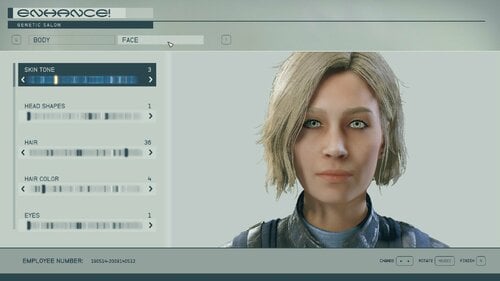
NPC Enhancer Gun
By Reigor
Introducing, the NPC Enhancer Gun!
Hello! This mod will, upon loading a game, add the Enhancer Gun, based on the Novablaster, to the player’s inventory. Firing this gun at a non-crowd/child NPC will bring up a menu of choices for modifying the NPC:
Open the Enhance interface that enables players to change the NPC’s appearance. Open a new set of menus to change a crew member or companion’s skills. Remove equipped items such as armor and weapons. Open the NPC’s inventory.
The Gun does no damage and firing it is flagged in the Creation Kit as a non-hostile act.
The Gun will only work on non-crowd NPC’s and adults. The Enhancer Gun is zero weight and value. It uses heavy fuse ammo. The Gun and some ammo are added to the player’s inventory when the mod is first installed or the start of a new game.
If lost, a replacement Gun can be found in a weapon’s case in the Den inside the Trade Authority. Look down on the floor to the right just as you enter the TA kiosk.
Change NPC Appearance:
In Starfield, the Enhance interface only works for the player, so it can’t be used for an NPC. However, one can copy an appearance from one actor to another in papyrus. This work-around in the code is what the Gun uses to change an NPC’s appearance through the Enhance interface. First, the Gun’s script copies the player's appearance onto an invisible dummy NPC to save it.
It then copies the gun target NPC's appearance to the player and opens the Enhance menu. The player changes the appearance of the avatar to what they want the NPC to look like and saves using their character's name and pronouns.
(On PC, you can hit the ESC key to autofill the player’s info)
The script then copies the new appearance from the player to the NPC and finally restores the player’s old appearance by copying it from the Dummy NPC.
Due to limitations with the Enhance interface and the Creation Kit, the Gun does not work on crowd NPCs, children, nor the player's parents if they have the Kid's Stuff trait. If you change the NPC's gender, they could lose lip sync or talk in the opposite gender's voice.
If you want to gender flip a character, for now it has to be done by directly editing the actor entry in the Creation Kit and providing new voice files. If you want some guidance on how this is done, see my Adoring Fangirl mod.
Also, the Gun doesn't work well with custom clothing or accessories and can cause crashes if used with them. Take anything but vanilla clothing off the player character and the target NPC before using the gun if you run into problems.
Non-vanilla hair and other cosmetics MIGHT work. I know some do, but don’t have any compatibility information. Please share your successes!
You can use mods like Biometric ID at Enhance (link below) to use preset appearances. Doing so will load up a random biometric ID instead of the NPC's appearance which will be ID 1.
I've noticed that sometimes NPC's will "disappear" after the gun is used to change appearance only to have respawned in a different location. For example, when using the gun on Sam at the Lodge he will disappear and respawn in the upstairs bar area.
Change NPC skills:
Choosing this option will bring up a series of menus that will enable the player to change a companion or crew’s skills using the addperk and removeperk functions in papyrus. The player can add or remove skills as they like, but there are limitations. Some skills do not have a full 4 ranks, but 3 or fewer. The Gun will not add any ranks that do not exist in the player’s game.
The Gun should play nice with other mods that modify crew skills and add ranks to them but will not be able to change any NEW skills that those mods add. That will require a patch.
The Gun cannot remove skills that are a part of the actor’s entry in the Creation Kit. For example, you will not be able to remove Andreja’s Theft skill. That will require directly editing the Actor’s entry via the Creation Kit or something like SFEdit.
Unequip NPC:
This selection will strip an NPC of any equipment they are carrying or wearing. Yes, this makes them naked depending on your appearance mods. Note, I could not find a method of reversing this in Starfield papyrus. So NPC’s will stay stripped unless they are one whose inventory you can control, like a companion. Use with caution!
Open NPC Inventory:
This selection will bring up the NPC’s inventory. You can take from the NPC’s inventory and into yours and the reverse. Sometimes, this is considered stealing! Again, unless you have full control of an NPC inventory, you won’t be able to force equip items. I might be able to enable this in the future, but only if there is a way in the vanilla papyrus to do so.
Requirements:
There are no requirements other than the base game.
Recommended Mods:
Biometric ID at Enhance
SKK Fast Start New Game (Starfield)
Beauty mods of your choice
(Possibly) Incompatible Mods:
Souls of Cities - SFSE - May have some odd interactions when the gun is used on Crowd NPCs. Use with caution.
Scared of Shootings - NPCs react to shootings - This and similar mods may cause a hostile reaction to the gun shooting someone.
Troubleshooting:
Screen stays Black or the Mod crashes when changing NPC appearance: This is possibly because of interference with another mod, especially custom clothing. Try stripping your player of any clothing and gear first before using the gun.
The Gun does not work. Shots pass through NPCs: If this bug happens, try modifying the Gun at a workbench and try again.
If the above fix actions don’t work, go back to a previous save without the gun installed. Make a new save. Load that saves with no mods enabled except the Enhancer Gun. Try it and see what happens. If there is still an error. Try deleting, downloading the last updated version, and reinstalling the mod. Changing your Load Order might help as well. Try moving the mod at the end of the load order and test.
You can also use SSK Fast Start to make a new test game with just fast start and the gun installed, then add one mod at a time until you find the incompatible mod. If you do, please report it.
Tools Used:
Starfield Creation Kit
1045 downloads
Updated
-

Vanilla Landing Animations
By azvampyre
Tricks the engine into thinking every landing is the first landing so the animation will play once again.
This will disable fast travel to landing zones
209 downloads
Submitted
-
Playable NPC Clothings
By Gray User
This is simple mod to make all NPC clothings marked 'playable' so they show in inventories and can be removed. It will also make default companion outfits show in inventories so they can be removed or re equipped by opening companion inventories. It is to go with mods like NAF Seduce that let you inside NPC inventories, but BGS made many of the clothings 'non-playable' so they can not be seen by player.
All clothings I changed are marked 'NPC' in the clothing name. I do not know if it will cause problems to wear them as PC.
I think it has all outfits that show up for normal NPCs but were not 'playable.' It has no crowd NPCs clothings (not human race I think) and no child NPCs clothings (which are illegal to make with no clothings).
There are both esm and esp versions to download. They can be enabled or disabled without messing up anything else I think.
10266 downloads
Submitted
-
Unity Framework - Framework that allow modders to inject new variants into NG+ handler
By Djlegends
Its been over a year now and I've noticed that many people were disappointed how BGS handled scenarios and how they were implemented. I was even more disappointed when I looked under the hood and saw how many safety checks that were that caps how many scenarios you have. So I'd decided to changes some things.
FEATURES
Restructure the New Game Plus script within the Quest Manager so that its properly compatible with modding. As a result of the above modders have the ability to inject New Scenarios and create their own "Universe".
FAQ
How do I start using this mod?
If you’re using a mod that has this as a requirement, just install it! No configuration or special steps necessary. If you want to use this to create your own Scenario, see the articles tab and check the optional files for an example plugin.
Is this compatible with Shutdown Constellation and Trigger NG by SKK?
Simple answer:
Long Answer: Yes its compatible with SKK Trigger NG but no because you won't be able to choose mod added NG+ Scenarios and only the vanilla versions. Hopefully I can talk with SKK so that people can choose their own NG+ scenarios as well instead of relying on RNGesus
Where can I get mods that use this?
At the moment currently no mod exists :(. Beyond that, if a mod requires this framework, the author will likely tell people.
I don’t use anything that requires this mod, why should I bother with it?
I you don't have any mods that requires it this is fine just do know that if you ever find a mod that add new Scenarios BGS made a soft cap limit which this mods removes. Also, if you install the example plugin, you can occasionally find a scenario with a special surprise.
316 downloads
Updated
-
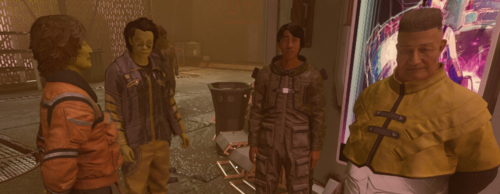
Males People of Starfield...
By Barbituric
Hi everybody,
this is my first mod, I've tried it, and it looks like working.
This mod turn all the spawed womens crowd and dead corpse to males, I didn't change the hair and outfit.
Now with it, in town, you'll have only guys, walking arround.
194 downloads
Submitted
-
Skill Challenges Removed
By Puff3r
Just as the name says. This ESM will remove all of the challenges required to upgrade a vanilla skill in the game. This does not remove any other preexisting requirements, only the silly challenges required to level up the skill.
Make with CK2, this mod removes all challenges from the vanilla skills in the game. It does not remove any other requirements, so you cannot get the skills out of order. I have seen this done a few ways here on the Nexus now, but none with the new CK. So, here we go. I have tested it a few times and found no issues. If you find one, please let me know and I will gladly take a look.
Not liable for this deleting your save, crashing your Tesla, or any other tomfoolery that may happen.
Made by me and shared here for those that choose to avoid that other place.
Install with you mod manager of choice or drop in the Starfield\Data directory.
184 downloads
Updated
-
GalBank+
By ag12
GalBank+
(& Lovers Utility Library)
Disclaimer: the CK has only been out for a short time and thus everyone is still trying to figure out how to do things and package mods properly. I've given it my best shot. There is a small library (only containing some time-keeping functions and a small workaround for removing the player's home ship) which is a full master, and the actual mod which is a "small" master. No idea if this will work. Please let me know. Fyi: the reason why I made that separate library is because I'm working on a different mod that needed the exact same functions, so I figured I might as well try to be smart and not have code duplication.
I. Concept & Introduction
GalBank+ is a mod that aims to flesh out the financial side of the game. GalBank is a very present entity, but has barely any interactions apart from some debt collector quests. However, you should note that this mod is not the "invest your money and make money" kind of bank mod, quite the opposite. While there are some upsides to using GalBank+, it mostly makes your game harder. It's a money sink and made a little in the spirit of something akin to SexLab Survival (or other "license"-type mods). Of course, a lot of the consequences and such aren't really there, but I figured why not make a proof-of-concept and get the heavy lifting done, so that I have an easier time integrating it with the fun kind of mods later.
II. Requirements & Installation
- Lovers Utility Library (LUL) (packaged with mod - load before GB+)
Use your mod manager or unpack directly. Nothing special. You do not need to start a new game, but I recommend it. I also think this mod makes more sense with a Survival mod added to your game. Please be aware that this is very early stuff - and so you should not put this mod on your main savegame and then do a bunch of progression. I'm not guaranteeing anything here...
III. Features & Mechanics
-ATMs & Managers: You can speak to a GalBank manager in New Atlantis or Akila City to discuss your account. The ATMs around Starfield are now interactable. Ignore the "crime" symbol, I decided to go the non-intrusive route for now and just replace the activation entry. Bring your GalCard.
-Bank Account: GalBank+ adds a fully functional bank account to Starfield. It offers multiple tiers (Basic, Pink, Green, Gold, Platinum) with different rates, fees, upsides and downsides. The credits you see in your inventory are, going forward, treated as CredSticks - so basically futuristic, but physical currency. Money in your bank account is purely digital - and subject to a lot of regulations. One of the most important things will be that if you lose to enemies and they rob you, they won't be able to steal your banked money, only what you carry on you. That doesn't matter for now, but will come in handy (I assume).
-Digital Purchases: When interacting with Vendors, you have access to a certain amount of additional Credits from your bank account. This is based on your account tier and daily allowance. When you purchase things, it will always use your physical currency first. You must have your GalCard with you!
- Sales Tax: When you sell goods to Vendors in any of the major controlled areas, the controlling faction will levy a sales tax. The sales tax is based off the actual monetary value of the transaction, so if you e.g. sell goods worth 2000 but also buy goods worth 1500, it will only apply the sales tax to the 500 differene.
- Spaceport Fees: When you land at a Spaceport controlled by one of the major factions, they will charge you fees per hour you occupy the pad. You can pay your bill with the Spaceport Services person. If you forget to pay your bill, they will send you an invoice after you launch - but charge an extra 15% remote transaction fee!
- Ship Mortgage: you can talk to the GalBank representative and ask for a mortgage to either buy or modify your ship. If they agree, you will be handed a credit slate. If you open the Ship Services sale/modify window with this slate in your inventory, you'll have the extra credits available. After you purchase or modify a ship, the mod checks if you used any of the additional money (it uses your physical creds first) and if yes, it adds the respective loan to your account and the ship as collateral.
- Loans: there's a full loan system including collateral (spaceships) that get seized if you default - currently only used by the ship mortgage system.
IV. Additional Information
You always start with a GalBank Basic account. If you start this on a new game, it will add a 75k load with 0% interest to your account after you complete the prologue quest. Later on, you will simply start without ship - but that requires a lot more fun mods that allow you to actually earn some meaningful credits in New Atlantis and get from place to place without a ship - so for now Constellation still gives you the ship, but they make you pay it off with a very generous 0% loan. If you default on this loan, the ship still gets seized, though. You can get stranded. If you do, get fucked. Smile.
This is basically a proof-of-concept kind of mod. Don't expect it to be everything you ever wanted in a finance overhaul - it's just a step and will be more interesting once there is more interesting content. The idea is to develop it into a license kind of money sink framework and lead into "fun" events - once they are available.
V. Compatibility & Permissions
This mod should be compatible with virtually anything else. I don't think I actually edited any entries, just used aliases to do my work.
Let me know if it doesn't play nice with something.
Do not reupload anything anywhere. If you want source code for GB+ and are a contributor here on LoversLab, send me a PM. I'll gladly share it.
This is my first Starfield mod so this might not work at all. I'd be grateful if you could tell me if it works.
Also, please keep in mind that this mod is designed to play into more interesting scenarios -that don't exist yet- and I will update it later, I just felt like putting something together to test the workflow and get something going for SF. Please report any exploits - there's probably a ton of loopholes and such.
Oh, and the balancing might be off, so give feedback for that too, please.
402 downloads
Submitted
-
More or less diverse Constellation
By Ronin_5564
More or less diverse Constellation
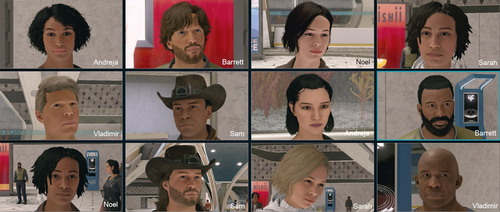
More or less diverse Constellation increases or decreases the diversity of Constellation society for a better gaming experience.
You can change the appearance of Andreja, Barrett, Noel, Sam, Sarah and/or Vladimir. Customize your
Constellation society the way you want to play.
Version
Version 1.1.0 was built with the Creation Kit and runs on Starfield 1.12.30
Installation
1) Simply install with your favorite mod manager (Vortex or Mod Organizer 2).
2) Enable Archive Invalidation (also called Load Loose Files) for your game in StarfieldCustom.ini
C:\Users\<YourUser>\Documents\My Games\Starfield\StarfieldCustom.ini
[Archive]
bInvalidateOlderFiles=1
sResourceDataDirsFinal=
3) With Version 1.1.0 Plugins.txt is not needed any more.
Disclaimer
File is provided "AS IS". No warranties included. The author is not responsible for any consequences this file may have.
As always for free software: USE AT YOUR OWN RISK.
Credits and Thanks
Bethesda for making another great RPG!
The xEdit-Team for their great continues work
The Loverslab community
255 downloads
Updated
-
Drab to Fab: Magazine Edition By Nuverotic
By Nuverotic
Description: SFW MAGAZINE REPLACERS
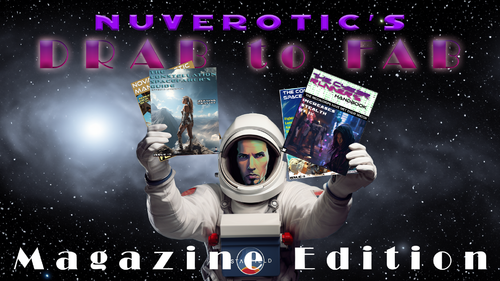
Discover a transformative overhaul to the magazine covers in Starfield. While the original designs by Bethesda offered a certain charm, this mod aims to inject a blend of allure and sophistication into each cover, making your in-game finds all the more intriguing.
Using advanced AI technology, each cover features an enhanced AI-rendered female, seamlessly integrated into a meticulously recreated background. The final product isn't just an AI rendition plastered onto a cover. Instead, with careful touch-ups in Photoshop and strategically placed text, these magazines are brought to life, promising an authentic yet enhanced experience.
The mod strikes a balance between being tantalizing yet tasteful. All covers are designed to be Safe For Work (SFW) and streamer-friendly. So, while they offer a more enticing aesthetic, they maintain the game's respectful ambiance.
THIS MOD IS COMPLETE! Enjoy!
I experienced some differences with The Nexus administration due to the presence of a "Liberal Tears" coffee cup in my content, despite also featuring a "Conservative Tears" version. It's important to remember the value of balanced dialogue and understanding in today's digital age. Some modders have expressed concerns about the use of their work on The Nexus without explicit consent. I advocate for platforms that promote freedom of expression. I've found Lovers Lab to be more accommodating in this regard.
791 downloads
Updated
-

German strings without *
By hansok
Bethesda made a very poor choice deciding to use the unaccepted and partly forbidden gender * in their German translation.
In these German federal states, gendering in written language is prohibited
In Saxony, gendering with special characters inside words is prohibited, and not just in administration. At school, points are deducted for using gender asterisks, colons, etc. But the issue is not only handled this way in Saxony.
In Schleswig-Holstein, too, students gendering with symbols are blamed as a mistake and, if repeated, as a subsequent error. Education Minister Karin Prien (CDU) had already issued a decree to schools in 2021. She also referred to the official regulations, which do not provide for gender.
BUT the uncomprehending moderators at Nexus banned this mod/translation because of diversity discrimination. They have no idea what this mod does.
I hope it will survive here.
Removes the unnecessary gender * in the German translation
Entfernt den unnötigen Gender * in der deutschen Übersetzung
In das ..Steam/Starfield Hauptverzeichnis entpacken
oder mit MO2 / Vortex installieren.
162 downloads
Updated
-
Drab to Fab: Poster Edition by Nuverotic
By Nuverotic
Description: SFW POSTER REPLACERS
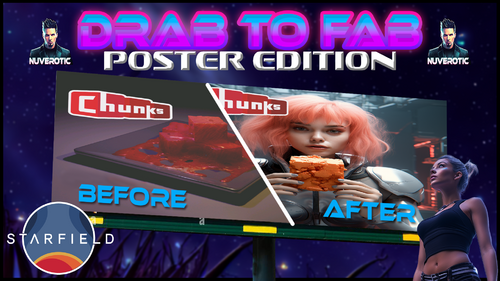
Venture into an enriched Starfield experience with a rejuvenated series of in-game posters. While Bethesda's original posters provide a foundational narrative, this mod breathes new life into them, merging allure with class, thereby enriching every player's discovery journey.
Each poster is an intricate blend of AI technology and artistic touch. At the heart of each design lies an AI-rendered figure, meticulously blended into a reimagined backdrop. However, it doesn't stop there. With precise Photoshop adjustments and carefully curated text placements, these posters transcend mere in-game decorations, offering players an aesthetically advanced and captivating visual.
Designed to be both captivating and respectful, all posters abide by Safe For Work (SFW) standards and are crafted with streamers in mind. They resonate with an enhanced allure, yet remain anchored in the game's immersive atmosphere.
This is an evolving project, and as such, players can anticipate periodic updates with batches of redesigned posters. Engage with Starfield in a whole new light, and enjoy the elevated sense of wonder these revamped posters bring to the game.
I experienced some differences with The Nexus administration due to the presence of a "Liberal Tears" coffee cup in my content, despite also featuring a "Conservative Tears" version. It's important to remember the value of balanced dialogue and understanding in today's digital age. Some modders have expressed concerns about the use of their work on The Nexus without explicit consent. I advocate for platforms that promote freedom of expression. I've found Lovers Lab to be more accommodating in this regard.
1469 downloads
Updated
-
BLACKED Tattoos
By ZeroLore
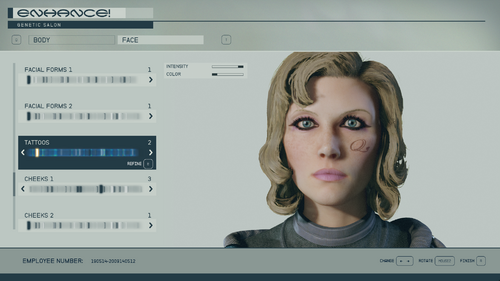
Replaces the 13 base game tattoos with Blacked or QoS tattoos.
Make sure you enable loose files to the top of your StarfieldCustom.ini
[Archive]
bInvalidateOlderFiles=1
sResourceDataDirsFinal=
942 downloads
Updated
![More information about "LoveWorld (Alpha 0.0.1) [Forge 1.20.1]"](https://static.loverslab.com/screenshots/monthly_2026_10/LW_alfa_main_001.thumb.png.4391d2d62de1509e21d15a616eb364d1.png)
.thumb.gif.26abf4f712e1a3b1ca799a5728e46259.gif)