
Search the Community
Showing results for tags 'patch'.
-
(EAP) Extended AAF Patch View File This is a fix and update of the Ultimate AAF Patch from Ulfberto. Changelog: Support for almost all animation packages. All XML files are rewritten according to a unified standard and can be edited in bulk using regular expressions. Outdated, duplicate, and currently useless XML files are replaced with placeholders. The unified animation naming system forms an ordered list in the AAF wizard. All animations consisting of multiple stages are grouped into "Trees" and are played by game mods from start to finish, regardless of the timer in the mod settings. The duration of staged animations is controlled by their positionTreeData.xml. Stages can be switched manually using the keyboard arrow keys, and in most animations, this happens instantly. In staged animations with smooth transitions between stages, to maintain a smooth transition, the previous animation always plays to the last frame before switching. Fixed twitching in T-pose or a freeze when switching animations where it possible. For all animations designed for F (passive) + M (active), separate XML files with settings for MM/FF/MF have been created. All animations settings are selected during installation. Settings for all Kissing / Hugging / Spanking / Footplay / Bondage / Dance animations are now stored in separate XML files. Separate XML files with never-nude settings have also been created for these animations. So, if desired, EAP can be used as an SFW. Simply disable all NSFW animations during installation. FF/MF animations using strap-ons now use all seven strap-ons available in Vioxsis, which are equipped randomly on NPCs at the start of the animation. PC are always equipped with the same strap-on. You can change the strap-on for PC in AAF\Vioxsis_Strap-ons_EquipmentSetData.xml. A modified UAPMoans framework is used for animation voiceovers. It was merged with CustomMoans to expand the functionality of both mods. It can now be used to add not only randomized voiceovers to animations, but also regular voiceovers. Automatic actor gender recognition. A separate voiceset can be assigned to a PC. EAPMoans now use lip animations when moaning. The "UAP Zaz Particle Effects" framework has been fixed and can now actually be used to equip female actors with squirt/gush effects. SAM and SAMFormer are integrated into most animations. Adjustment files are created and registered. Therefore, to edit an animation, simply open SAM and make the necessary corrections to an existing adjustment. Leito and RZ animations use modified adjustments from SAMEnhancedAnimations v1.45. New adjustments have been created for some animations. However, a significant portion of the 4,000+ files are still dummy files (mostly MM/MF files). Violate has been modified to support new DarthRoman animations and some previously unsupported actor race combinations. ESP are flagged as ESL whenever possible. Additional information for animation creators: SAMFormerNG v2.7: The script has been modified. This may be fixed the issue with it freezing. An additional adjustment for vaginal opening is now applied to actors using an insertable Viodoe strap-on. (Experimental): Added CBBE support. If your CBBE has VaginaPenetrate and AnusPenetrate sliders, they will be applied to the animations, marked as "PenisToVagina/PenisToAnus/StrapOnToVagina/StrapOnToAnus/StickToVagina/StickToAnus". For example, morphs added by CBBEVagMorphs. Adjustments no longer need to be registered in positionData. Simply assign the correct name to an adjustment when creating it. If SF doesn't find a specific adjustment in Tags, an adjustment consisting of the exact animation name and the actor number separated by a space is applied to the actor: "FullAnimationName A0," "FullAnimationName A1," "FullAnimationName A2." This applies, of course, if a file with such a name exists. Actor numbering starts at 0, from right to left, in the AAF interface. In staged animations, the adjustment for the first stage should have the name of the staged animation, not the stage. It's also worth noting that in EAP FM adjustments are still applied to FF animations, and MM adjustments are applied to MF animations. I consider this a sufficient alternative to creating several thousand more separate adjustment files. The names of the adjustments applied to actors can also be viewed in the Papyrus log. The LooksMenu morph "Anus Spread"=0.542 is now applied to AM/ABody bodies, and the SAM adjustment "EAP_BT_AnusSpread" is applied to BT bodies. Hard Requirements: Working AAF v1.5.5 or later sex system, of course - you must fulfill all mandatory requirements of [AAF] "The Fucking Manual". Screen Archer Menu - creating adjustments for animations. If you already have all the requirements of [AAF] "The Fucking Manual" you need to install only SAM. SAMFormerNG v2.1 - automatic application of SAM adjustments. Works on OG/NG/AE. (SCRS) SavageCabbage Animations Rescaling - framework for correct rescaling of actors when starting and stopping animations. Vioxsis Strap-Ons (ZeX Bones fixed) v4.0 - for FF/MF animations. Use this correct version, not the one in [AAF] "The Fucking Manual". Only main file required. Should be installed to prevent error spam even if you don't use strapons. Soft Requirements: Fusion Girl body - recommended female body which supported ZeX-skeleton's NSFW bones. BodyTalk - recommended male body. AAF Creature resources 1.1.6-1 (recommended) or The Ultimate AAF Patch - required for animations with creatures. NSFW Sound Pack 3.0.1 - voices for creatures and "Gray 50SoF". QUAAF Balanced v1.7e03/1.7e05 - balancing the voices used in animations. Furniture XML for AAF - for registration additional workshop furniture. Outfit ReDress Fix (OG/AE) - Engine bug fix to prevent NPCs from defaulting their outfits. Virgil Needs Happiness - NSFW bodyes for Virgil and Swan. Supported Sex Animations: AAF Darthroman creature pack AAF Creature Pack Release Version 3.01 AAF DLC Creature Animation Pack (Beta v0.1) 0.1 AAF BP70s Fallout 4 Sex anims 2.8 Allnarta AAF Animations Brave's Animations 1.3 C.H.A.K. Animation Pack 1.15 Crazy6987 - Sex Animations Gun Version Four-Play Animations by Crazy6987 1.3 Farelle Animations for AAF FO4 Animations by Leito 2.1b Gray 50 Shades of Fallout 4 Rain Maker animations 1.0 RohZima Fallout 4 Sex Animations for AAF RufGT's Atomic Lust RufGT's Mutated Lust 1.4 RufGT's Old Animations RufGT's Raid My Heart SavageCabbages My Animation Pack 1.3.0 Snapdragon animations Spicy Altered Biped Animations 1.00 Spicy Altered Creature Animations 2.00 TBOS Bedroom Hymn TortureDevices 2.22 Vadermania AAF animations 1.1 ZaZOut4 V0.0.3.3 Supported Pose Animations: Daily Life Of Hookers 1.1.0 IceStorms Poses 1.6.0 Just a pose mod Lesbian animations RohZima Fallout 4 Poser 0.75 Real Animated Poses Slave and Model Poses SM2 (ESL version) Additional support: Atomic Muscle and A-body - UAP settings are used. Now optional, not mandatory. For those who don't want to use BT. CBBE with VaginaPenetrate and AnusPenetrate sliders (Experimental). For example, from CBBEVagMorphs. For those who don't want to use FG. AAF Violate 1.61 - EAP modifies esp and script to support additional animations and creatures. Servitron v1.1.1 - add AAF, SAM, and Vioxsis compatibility patch. Thanks to DarthRoman for the SAM-compatible Servitron skeleton. Also recommended use "Servitron - Fusion Girl Bodyslides and Skeleton" and "Automatrons Have Genders Too". Tactical Reload v1.4 - EAP and TR modify MTBehavior.hkx, so a compatibility patch has been made for them. Installation: Automatic - FOMOD installer. Manual (for advanced users only) - MO2 users can copy the contents of the installation archive into the instance's mods folder to gain access to advanced customization. Of course, EAP should overwrite all the mods it fixes. Of course, if you change the list of these mods, you'll need to reinstall EAP to take those changes into profile. Credits: Submitter Holylokki Submitted 09/24/25 Category Framework & Resources Requirements AAF, UAP, Animal Posing Framework, Screen Archer Menu
-
 This is a thread that was created for the necessity of patching models for a Project Zomboid NSFW framework called Depraved Sense. The framework itself brings a brand new armature that allows for animated genitals, breast, and other body parts for our NSFW needs. However, most custom models out there do not have the necessary armature to it. Which makes certain body parts like the penis to not show up or be static. So, this thread is here to solve that. I will sacrifice myself, and patch any requested models in here, in order for them to work correctly with the framework. Of course I am not a machine and it might take some time until I make the patch for it. But I'm willing to do it since there isn't a lot of people in here with the knowledge to do it. (although we do have a guide for it in here.) You can reply to this forum with a requested model you wish to be patched. Share either the workshop link for the mod or the model file itself. But be warned, that the models will only work properly with Depraved Sense enabled. I will not patch models that are already available at LoversLab, I suggest requesting for those authors to have their models patched instead. This is mainly for respecting the authors, and avoid doing things without their permission. And if you're an author of any models present here, and do not wish for them to be used without your consent, you can communicate with me and I will take them down at your request. List of patched Models: you also require the original mod. Tomb's Player Body Overhaul tomb-depravedsense-patch.zip original mod: https://steamcommunity.com/workshop/filedetails/?id=3429790870 Trice Body trice-depravedsense-patch.zip original mod: https://steamcommunity.com/sharedfiles/filedetails/?id=3219188031
 -
List of updated SxB race supports by date of list update: June 7, 2020: Bunnykin by LazyBunni Zoroark by sh*ttyguy Gardevan by sh*ttyguy Miine by sh*ttyguy Deerkin by Ace_of_Heart Zeta by sh*ttyguy Felin by Kawaoneechan Lombax All-In-One by [TheBusySWAT] Alastor Braixen by sh*ttyguy Zeena by sh*ttyguy Cuter Felin by Fluff the Felin Argonian by [TheBusySWAT] Alastor Shadow2 by madameglitch Lunarian and Barometta by timmeh Demon by timmeh Saturnian CyB by [TheBusySWAT] Alastor Renamon by sh*ttyguy Alrune by PumpingPumkinsAllDay Eevee by sh*ttyguy Kitsune by TinyFox621 Tails by sh*ttyguy Scorsheep by sh*ttyguy Gnollbound by [TheBusySWAT] Alastor Zombie by sh*ttyguy Fragment of Ruin by Zorgman Neko-Alternate by Neko Boi Saturnian by IdioticExplorer Sergal by [TheBusySWAT] Alastor Omen by Red3dred WaspHive by [TheBusySWAT] Alastor Fullbreed Deerfolk by FelisMoon Lopunny by [TheBusySWAT] Alastor Avali by Red3dred Lamia by Red3dred Everis by [TheBusySWAT] Alastor Merrkin by Fozuna Shizubelle by sh*ttyguy Familiar Humanoid by [TheBusySWAT] Alastor Thaumoth by [TheBusySWAT] Alastor Kemono by [TheBusySWAT] Alastor Dark Latex by [TheBusySWAT] Alastor Lastree by [TheBusySWAT] Alastor Ningen by [TheBusySWAT] Alastor Shoggoth by SirBumpleton Kazdra by [TheBusySWAT] Alastor Halfbreed Draconis by [TheBusySWAT] Alastor Fullbreed Draconis by [TheBusySWAT] Alastor Slime by [TheBusySWAT] Alastor Oct. 30, 2020: Lucario by Zancuno Yoru by 루안(Ruan) Crewkin by Artus_ Icthysian by Polygore Jul. 21, 2021: Dreemurrers by Artus_ Vessel by Ice_Fox_of_Camelot Mollopod by Polygore Bohemian Lion by Ant Cant Skelekin by Red3dred Bipedal Deerfolk by Polygore Aug. 06, 2021: Gyrusen by Polygore Nov. 11, 2021: SBG Gamayun by RenamonNonaka Gem Redux by RenamonNonaka Protogen by [TheBusySWAT] Alastor Dibarusche Made by Am-Pumpking/Eric Richenford, Published by [TheBusySWAT] Alastor Neki by HyperJuni Glaceon Made by Am-Pumpking/Eric Richenford, Published by [TheBusySWAT] Alastor Feb. 12, 2022: Mechineki by Polygore Jun. 07, 2022: Majin by GlaceSpace Spacekidds by Am-Pumpking Aug. 12, 2022: Viera by Am-Pumpking List of "stop asking" races: - Lyceen. (alternative is already Kemono race minus the digitrade legs) - MLP race. - Any FU "originally made" Races. (RIP OG Nightar, OG Mantizi Empire and Kazdra's body sprite)
-

Version 1.0.0
236 downloads
A simple fix for the character window when using Harem More Concubines (and spouses) and Carnalitas Slavery Expansion together. Load order should be: ... Carnalitas Slavery Expansion ... Harem More Concubines (and spouses) HCM+CSE There's nothing fancy to this mod other than resurfacing the slaves and other goodies Slavery Expansion has, conflicting with Harem More Concubines. -
Harem More Concubines (and spouses) + Carnalitas Slavery Expansion Patch View File A simple fix for the character window when using Harem More Concubines (and spouses) and Carnalitas Slavery Expansion together. Load order should be: ... Carnalitas Slavery Expansion ... Harem More Concubines (and spouses) HCM+CSE There's nothing fancy to this mod other than resurfacing the slaves and other goodies Slavery Expansion has, conflicting with Harem More Concubines. Submitter cubaconn Submitted 09/29/26 Category Crusader Kings 3 Requirements
-
 Compatibility Patch for Fury - Animal Taming of Skyrim & More Nasty Critters View File Strugling finding a compatibility patch for fury and mnc i decided to make it myself. You can now play as the slutty druid you ever wanted to play. The patch consist in varius thing`s like changing the skeleton to match with the one`s provided by the mod BakaFactory Animated Beast Cocks tweaked the size of the tamed creatures (i wanted to change by 2 point the inital level, instead of starting with 6 start with 8 but i dont know how to do it) added sadle bones to the montable beast so you can mount in more than one way. feel free to change anything you want. It`s my first time doing something like this so expect some bugs and stuff. Submitter Elenano27 Submitted 07/03/26 Category Adult Mods Requirements Fury - Animal Taming of Syrim, Sexlab Aroused, CreatureFramework & Sexlab Regular Edition Compatible Install Instructions Install fury and its requirement https://www.nexusmods.com/skyrimspecialedition/mods/108212 Install or Install oslaroused And it`s requirement https://www.nexusmods.com/skyrimspecialedition/mods/65454 or the one you like Obviuly Instal mnc also check the recomendation there and this one (it seems the mega link broken) i thinks that`s all you need, install my patch below those mods or at the end of your list and dont forget to run loot
 -
View File 4.4.x Lustful Void Unofficial Patch as this is an unofficial patch, use at your own risk! (make a backup first or something!) Currently for Lustful Void version 0.8.0.1 For Stellaris Version 4.4.x I also have some patches / bandaid fixes for: Mango's Lewd Diplomacy Califire's Citizen's Sex Rights check those out if you are using those mods and have issues What is this? A combination of various fixes and patches to LV 0.8.0.1 to hopefully fix some broken aspects of it Issues addressed include: - No nurture drone / nurturer jobs filled even though there is excess pop - Breeding empires no access to Ravage bombardment stance - Breeding empires no access to Breeding offensive CB - Changed default Nurture Drone weight to grab from simple_drone instead of maintenance_drone (this prevents organic gestalt pops with negative "Sex Job" efficiency from flipping between Nurture Drone and Maintenance Drone) FAQ "I can see and use Ravage bombardment stance and Breeding offensive BUT it doesn't abduct pops" - You need Apocalypse DLC for it to work since the code for Ravage and Breeding Offensive uses Apocalypse DLC "Raiding" bombardment stance Installation Instruction 1. download and extract zip file 2. drag the "Lustful Void" folder in the extracted file to the "Lustful Void" folder in your \Documents\Paradox Interactive\Stellaris\mod\Lustful Void 3. click replace (if there is no replace prompt then you might have goofed up) 4. is patched, yay! Submitter MawOfSus Submitted 08/24/26 Category Stellaris Requirements [Stellaris] Lustful Void
-
 SOS-SE-1597-safefy-patch.rar View File SOS SE Stability & Safety Patch For Skyrim SE 1.5.97 and SKSE64 2.0.20 What this is This is a binary and script patch for Schlongs of Skyrim SE that fix the CTD issue after esp order changed, some esp uninstalled, if such changes is found, it simply clear all cache and re-detect everything from scratch. Also attempting to ignore schlongify-ing female 's armors. It does so by focused on safer armor form records handling, safer actor filtering, and recovery after changing the ESP/ESM plugin order. It contains no ESP and should be installed after your existing SOS SE installation so its DLL and scripts overwrite the originals. For skyrim se 1.5.97 only. For AE there is already an AE no-dll version here, should solve the crash problem. Main changes Fixes a CTD that could occur after the ESP/ESM plugin order changed.Detects an unsafe plugin-order change while loading the SOS SKSE co-save.Discards stale DLL cache entries instead of attempting to use potentially invalid FormIDs.Rebuilds the SOS addon cache after the game has loaded.Shows a notification when the cache was reset and rebuilt.Adds bounds checks around saved plugin indices.Fixes a native null-pointer dereference in the stored-armor migration code.Stops normal SOS armor handling from modifying Armor form slot masks.Repairs slot-mask changes left in existing saves by older SOS behavior, then clears the legacy armor classifications.Rejects female actors before calling the DLL's automatic schlong-selection function.Disables legacy SOS potion distribution and SOS dialogue features in this build.Changes the default random size range to 6-9. Yay! Requirements Skyrim Special Edition runtime 1.5.97SKSE64 2.0.20 - this skse version is used specificly for skyrim se 1.5.97, so it's important.Original Schlongs of Skyrim SE mod, of course. This is just a patch. This build is specifically compiled for Skyrim 1.5.97. Do not install its DLL on Anniversary Edition or another Skyrim runtime. Installation Install Schlongs of Skyrim SE and its normal requirements first.Install this patch afterward.Allow this patch to overwrite the SOS DLL and scripts.Launch the game through SKSE. Mod Organizer 2 and Vortex users should place this patch after SOS so it wins all file conflicts. No plugin sorting is required because this patch contains no ESP/ESM/ESL. Updating an existing save Existing saves are supported. On initialization, the patched scripts repair legacy SOS armor slot-mask changes. If the DLL detects that the full-plugin order differs from the order stored in the co-save, it clears the unsafe cache and rebuilds addon data after load. The player notification is: SOS: Plugin order changed. Cached data was reset and rebuilt.[/CODE] The first load after changing the plugin order can therefore perform additional SOS maintenance. Let the game finish loading before saving again. [B]Compatibility[/B] [LIST] [*]Built against the official SKSE64 2.0.20 source for Skyrim 1.5.97. [*]Contains no ESP and does not consume a plugin slot. [*]Other mods that replace SchlongsOfSkyrim.dll or the included SOS scripts will conflict. The last installed file wins. [*]This is not a conversion of SOS to another Skyrim runtime. [/LIST] [B]Technical details[/B] The original DLL manually remapped cached FormIDs after a load-order change. It accessed plugin arrays before validating the saved index, and its armor recovery path dereferenced a null armor pointer when a cached FormID resolved to the wrong record type. This patch guards both paths and uses a fail-safe policy: if the saved full-plugin list no longer exactly matches the current list, all DLL-managed SOS caches are discarded and reconstructed from the installed SOS addon quests after load. [B]Uninstallation[/B] Reinstall your original SOS SE files over this patch. Avoid removing or changing foundational DLL/script patches mid-playthrough unless you have a known-good backup save. [B]Version history[/B] [B]1.0.0[/B] [LIST] [*]Initial release. [*]Added safe cache invalidation and automatic rebuild after plugin-order changes. [*]Fixed load-order bounds access and native armor null dereference. [*]Added non-mutating armor handling, legacy armor repair, and female actor filtering. [/LIST] ========Made by gpt-5.6========= [B]Credits[/B] Schlongs of Skyrim and its original authors/contributors. The SKSE team for SKSE64. This download contains only patched SOS runtime files and no Bethesda assets. Submitter terrordrone Submitted 09/20/26 Category Adult Mods Requirements Skyrim Special Edition runtime 1.5.97 SKSE64 2.0.20 - this skse version is used specificly for skyrim se 1.5.97, so it's important. Original Schlongs of Skyrim SE mod, of course. This is just a patch. Regular Edition Compatible No Install Instructions Like any other mods out there. Just use MO2, let this overwrite original SOS mod
 -
Version 1.0.0
52 downloads
I not sure if anybody will care at this point but here is a patch that will fix "i hope" the Herm wolves to work with TWO for MadMansGun Werewolf Prostitution i am running AE 1.6.1170 and it works for me if that says anything.... HOWEVER if MadMansGun says so i will delete this! all this is just me trying to help that's all. -
 A Patch For Werewolf Prostitition to work with TWO. View File I not sure if anybody will care at this point but here is a patch that will fix "i hope" the Herm wolves to work with TWO for MadMansGun Werewolf Prostitution i am running AE 1.6.1170 and it works for me if that says anything.... HOWEVER if MadMansGun says so i will delete this! all this is just me trying to help that's all. Submitter wolfgundam Submitted 09/21/26 Category Adult Mods Requirements Werewolf Prostitution,TWO and all they need Regular Edition Compatible Not Applicable Install Instructions Set up Werewolf Prostitution as normal Then TWO Make Sure TWO is set as Priority over MNC and HCOS also do not use the sos for two then install my patch if all goes well it should work if not it may be load order or an overwrite issue if your still unsure leave a post and i'll see what i can do.
 -
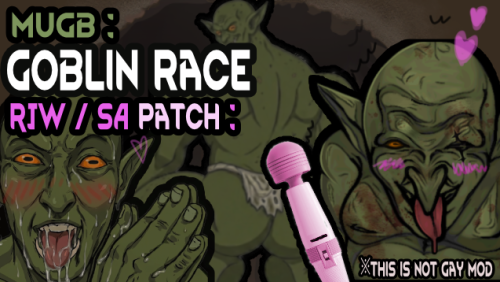
Version 0.1.4
2937 downloads
Adds + proper SA bodyparts to MUGB Goblin (proper offset to be precise) + Acquire pheromone Adaptation through RJW system + SA0 / SA2 bodypart texture option (you can adjust bodypart size, X,Y value, layeroffset) Require MUGB Goblin Race mod: https://steamcommunity.com/sharedfiles/filedetails/?id=3768425355&tscn=1784710300 RJW, Sized Apparel 0 or Sized Apparel 2 Added menstruation cycle mod compat image. Patch Log -
Version 1.0.0
266 downloads
SOS SE Stability & Safety Patch For Skyrim SE 1.5.97 and SKSE64 2.0.20 What this is This is a binary and script patch for Schlongs of Skyrim SE that fix the CTD issue after esp order changed, some esp uninstalled, if such changes is found, it simply clear all cache and re-detect everything from scratch. Also attempting to ignore schlongify-ing female 's armors. It does so by focused on safer armor form records handling, safer actor filtering, and recovery after changing the ESP/ESM plugin order. It contains no ESP and should be installed after your existing SOS SE installation so its DLL and scripts overwrite the originals. For skyrim se 1.5.97 only. For AE there is already an AE no-dll version here, should solve the crash problem. Main changes Fixes a CTD that could occur after the ESP/ESM plugin order changed.Detects an unsafe plugin-order change while loading the SOS SKSE co-save.Discards stale DLL cache entries instead of attempting to use potentially invalid FormIDs.Rebuilds the SOS addon cache after the game has loaded.Shows a notification when the cache was reset and rebuilt.Adds bounds checks around saved plugin indices.Fixes a native null-pointer dereference in the stored-armor migration code.Stops normal SOS armor handling from modifying Armor form slot masks.Repairs slot-mask changes left in existing saves by older SOS behavior, then clears the legacy armor classifications.Rejects female actors before calling the DLL's automatic schlong-selection function.Disables legacy SOS potion distribution and SOS dialogue features in this build.Changes the default random size range to 6-9. Yay! Requirements Skyrim Special Edition runtime 1.5.97SKSE64 2.0.20 - this skse version is used specificly for skyrim se 1.5.97, so it's important.Original Schlongs of Skyrim SE mod, of course. This is just a patch. This build is specifically compiled for Skyrim 1.5.97. Do not install its DLL on Anniversary Edition or another Skyrim runtime. Installation Install Schlongs of Skyrim SE and its normal requirements first.Install this patch afterward.Allow this patch to overwrite the SOS DLL and scripts.Launch the game through SKSE. Mod Organizer 2 and Vortex users should place this patch after SOS so it wins all file conflicts. No plugin sorting is required because this patch contains no ESP/ESM/ESL. Updating an existing save Existing saves are supported. On initialization, the patched scripts repair legacy SOS armor slot-mask changes. If the DLL detects that the full-plugin order differs from the order stored in the co-save, it clears the unsafe cache and rebuilds addon data after load. The player notification is: SOS: Plugin order changed. Cached data was reset and rebuilt.[/CODE] The first load after changing the plugin order can therefore perform additional SOS maintenance. Let the game finish loading before saving again. [B]Compatibility[/B] [LIST] [*]Built against the official SKSE64 2.0.20 source for Skyrim 1.5.97. [*]Contains no ESP and does not consume a plugin slot. [*]Other mods that replace SchlongsOfSkyrim.dll or the included SOS scripts will conflict. The last installed file wins. [*]This is not a conversion of SOS to another Skyrim runtime. [/LIST] [B]Technical details[/B] The original DLL manually remapped cached FormIDs after a load-order change. It accessed plugin arrays before validating the saved index, and its armor recovery path dereferenced a null armor pointer when a cached FormID resolved to the wrong record type. This patch guards both paths and uses a fail-safe policy: if the saved full-plugin list no longer exactly matches the current list, all DLL-managed SOS caches are discarded and reconstructed from the installed SOS addon quests after load. [B]Uninstallation[/B] Reinstall your original SOS SE files over this patch. Avoid removing or changing foundational DLL/script patches mid-playthrough unless you have a known-good backup save. [B]Version history[/B] [B]1.0.0[/B] [LIST] [*]Initial release. [*]Added safe cache invalidation and automatic rebuild after plugin-order changes. [*]Fixed load-order bounds access and native armor null dereference. [*]Added non-mutating armor handling, legacy armor repair, and female actor filtering. [/LIST] ========Made by gpt-5.6========= [B]Credits[/B] Schlongs of Skyrim and its original authors/contributors. The SKSE team for SKSE64. This download contains only patched SOS runtime files and no Bethesda assets. -
Version 1.2.0_beta_1
41 downloads
Фанатский перевод мода "Странная Европа" Возможны неточности/недоработки В переводе присутствует кучу "отсебятины" чтобы сделать перевод более подходящим под контекст и более живым Ссылка на оригинальный мод: Ссылка на страницу в Steam: https://steamcommunity.com/sharedfiles/filedetails/?id=3709408595 -
View File Strange Europa: Russian language patch Фанатский перевод мода "Странная Европа" Возможны неточности/недоработки В переводе присутствует кучу "отсебятины" чтобы сделать перевод более подходящим под контекст и более живым Ссылка на оригинальный мод: Ссылка на страницу в Steam: https://steamcommunity.com/sharedfiles/filedetails/?id=3709408595 Submitter Addeymod Submitted 09/16/26 Category Other Games Requirements https://www.loverslab.com/files/file/51503-barotrauma-sex-mod-%E5%BC%82%E7%A7%8D%E6%9C%A8%E5%8D%AB%E4%BA%8C-xenoeuropa-latest-version-chinese-version/ Install Instructions Закинуть в Barotrauma/Mods Загружать после оригинального мода
-
Version 0.5.3
125 downloads
Commonwealth Slavers - Female Protagonist Patch-0.5.3.zip made for Commonwealth Slavers 2.9.2 For normal female protagonist(non-futa), fusion girl body don't normally spread lips apart. Randomly gay animations recalled. It's really weired to see Nora and Morphy sucks Gristle's dick together on the campsite and other FMM animations in gay pose. This patch solved problems above. I made this patch using the matched UAP-improved animations instead of the CS's for scenes in quests and avoid gay threesome at certain scenes. Requirements: (UAP) Ultimate AAF Patch v2.6.64-1 (EAP) Extended AAF Patch v1.11 Commonwealth Slavers v2.9.2 -
 Commonwealth Slavers - Female Protagonist Patch-0.5.3.zip View File Commonwealth Slavers - Female Protagonist Patch-0.5.3.zip made for Commonwealth Slavers 2.9.2 For normal female protagonist(non-futa), fusion girl body don't normally spread lips apart. Randomly gay animations recalled. It's really weired to see Nora and Morphy sucks Gristle's dick together on the campsite and other FMM animations in gay pose. This patch solved problems above. I made this patch using the matched UAP-improved animations instead of the CS's for scenes in quests and avoid gay threesome at certain scenes. Requirements: (UAP) Ultimate AAF Patch v2.6.64-1 (EAP) Extended AAF Patch v1.11 Commonwealth Slavers v2.9.2 Submitter MegaRayRat Submitted 09/12/26 Category Other Requirements (UAP) Ultimate AAF Patch v2.6.64-1 (EAP) Extended AAF Patch v1.11 Commonwealth Slavers v2.9.2
 -
 View File Lux patches for Loverslab mods A couple of Lux patches I made for my own game. If you are like me and feel that there's a lot of dissonance between Lux interiors and Vanilla skyrim lighting, this might help you. All files are ESP flagged ESL. Mods currently covered are: Ebonitium 1.0 Milk Mod Economy 22-05-2022 SImple Slavery Plus Plus 6.3.27 S.L.U.T.S. Resume 4.6 Greyspammer 's Trapped in Rubber SE/AE Edition redux 1.0.10 Troubles of heroine 3.0.2 Wartimes Tweak v10.3 (A Daughter's Tale) Captured Dreams - Resored June 23 2023 4.15 Bandit Paradise 1.4.2 Install Instructions Download the patch for the mod you want and install like any other mod. Be sure to place the patch after both the original mod and Lux. Credits GGUnit for Lux El_Duderino for Ebonitium Ed86 for Milk Mod Economy Hex Bolt for Simple Slavery Plus Plus Scrab for S.L.U.T.S Resume AtomicGrimDark for Greyspammer's Trapped in Rubber DSHV for Troubles of Heroine Monoman1 for Wartimes Tweak Veladarius for Captured Dreams Donuts4me for Bandit Paradise Submitter hu7rx Submitted 03/08/26 Category Regular Mods Requirements Lux Regular Edition Compatible No Install Instructions
 -
View File Lustful Void Nomads Unnoficial Patch Description: Hello there! So, the Nomads DLC broke a lot of things, especially the colony/planet scopes with the introduction of the Ark Ships. In this mod patch, I will try to fix some of those things while the mod is not updated. Current Features: Ark Ships Pleasure districts Changed the logic for the buildings so that they can, again, be built on the corresponding district (e.g., SexLabs on Research districts) Planned Features: Fix the scope for the traits that have interactions with another trait so that they do not clog the error.log Fix Dairy world doesn't affect the dairy cows Create the modifiers for Breeding World and Dairy World for Ark Ships Fix the Interspecies sperm/womb policies Submitter DNL Submitted 07/10/26 Category Stellaris Requirements Lustful Void
-
 Patch for animations (Squirt/Cum Effects, cum overlays, stages, fixes) View File IF YOU HAVE PROBLEMS WITH THIS PATCH, REPORT IN THIS THREAD, DON'T ASK HELP ON AAF DISCORD OR SOMEWHERE ELSE What this mod changes: Other options: Required: What next: Recommended: Thanks to, original authors and ideas: Old changes: Contact me if you can create x-ray arts or vault style arts Submitter Indarello Submitted 09/29/2019 Category Sex Effects Requires
 -
 View File LV Extras - Sex Alderson Disk, Combination Traits, Civics, & More Tested for Stellaris 3.8, LV 0.7.2, and Gigastructure 3.27.3 Included mods to enhance your LV playing experience: LV Extras - Main feature is the reimplementation of the Sex Alderson Disk that was in the old Sexopolis mod. Also adds a couple new combination traits, some civics, and two edicts. What's New: Update to 3.8 Light version which excludes gigastructure elements. Features In Depth: LV Extras: Fully reimplemented the sexy version of Gigastructure's Alderson disk A new origin - Start your empire on the Alderson disk Two sex districts for Gigastructure's Birch World - Currently disabled Two new end game combination traits - Bombshell and Stud Civics: Tentacle World and Sex World Start Start on either world type without needing the origin (Now you can use Syncretic evolution and Tentacle World for example!) Allows custom starting systems to be used (Now you can start with an Earth Sex World for example!) You should be able to use these civics with most other civics/origins. Try it out and see what happens. Two new government edicts Old Features: Requirements: LV Extras: Requires LV and Gigastructural Engineering LV Extras Light: Requires only LV Compatibility Issues: LV Extras Overrides: Gigastructure/events/giga_003_dialog.txt Any other mod that overrides these file will need a patch. (But I am not aware of any that do). Installation: ~!~!~!~!~ Always delete old versions before installing any local mod!!! This is VERY IMPORTANT!!! ~!~!~!~!~ Extract the zip contents to Documents/Paradox Interactive/Stellaris/mod/ More Instructions Here Load Order: Load Lustful Void First. LV Extras must load after Gigastructures and Lustful Void. Load UI Overhaul Dynamic after everything else. Known Issues: Troubleshooting: Did you delete the old version before installing any local mod? - Delete the mod and reinstall from the zip. Are you using the latest version of all mods? - Download and install the latest version. Are any LV submods not updated to the latest LV version? - Try removing these mods first. Are any mods not updated to the latest Stellaris version? - Try removing these mods first. Have you verified your load order? - Try the suggested load order above. Crashes? - Make sure all sub-mods are installed or remove LV Tweaks. If you try out my mod please let me know of any problems you might come across. Please include your load order with your comment. Before commenting please insure you have tried the troubleshooting steps. Old Changes Credits: Thank you to all these modders for their contributions. Buttson117: for Sexopolis and the assets needed for the Alderson disk. Ascens: For providing me the icons for my bombshell and stud trait. TYVM. Gigastructure Contributors: I had to refer to a lot of their code to figure out how things work. Also the image for the origin is the same that Gigastrure uses. Side note: If anyone finds a more fitting picture I'd like to include it. Lithia: As always for their work on Lustful Void. Submitter SohCahToa Submitted 11/15/2021 Category Stellaris Requires Lustful Void; Gigastructural Engineering & More
 -
 More Nasty Critters - Draugrs - New models and textures Patch View File Makes the amazing Draugr replacer compatible with MNC (gives them a dong basically). Install manually or with your favourite mod manager. SSE/AE only Requirements: More Nasty Critters (duh) Draugrs - New models and textures Load my compatibility patch after these two mods and make sure it doesn't get overwritten by other mods. Have fun! ☺ Submitter Bizarro Submitted 07/11/2024 Category Framework & Resources Requires Regular Edition Compatible No
 -
 SOS Futanari CBBE Addon Patch for "The Pure" Body Texture View File DESCRIPTION This downloadable is a compatibility patch for SOS- Addon - Futanari CBBE SSE 1.1b for people using The Pure CBBE and UNP - 4K or 8K Female Skin Textures. INSTALLATION The patch utilizes FOMOD, so simply install it with a mod manager of your choice. It will prompt you to select the diffuse map option for The Pure (Default or Darker) so it can match the skin tone correctly. STEPS Install SOS- Addon - Futanari CBBE SSE first. Install this patch afterwards. This patch should always be loaded after SOS- Addon - Futanari CBBE SSE so it can replace the original files. ACKNOWLEDGEMENT This content would have never been possible if it wasn't for EvilReFlex's (futa mod author) help video on texturing SOS. This is also my first —hopefully useful— contribution on LL since I started lurking around and about in 2015. Bless the LL community for all it gives. Submitter Sezvek Submitted 05/09/2021 Category Adult Mods Requires SOS Futanari CBBE SE Regular Edition Compatible Not Applicable
 -
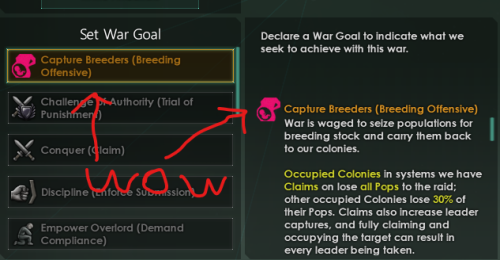
Version 0.0.2
1451 downloads
as this is an unofficial patch, use at your own risk! (make a backup first or something!) Currently for Lustful Void version 0.8.0.1 I also have some patches / bandaid fixes for: Mango's Lewd Diplomacy Califire's Citizen's Sex Rights check those out if you are using those mods and have issues What is this? A combination of various fixes and patches to LV 0.8.0.1 since it seems like it shipped unfinished and untested Issues addressed include: - No nurture drone / nurturer jobs filled even though there is excess pop - Breeding empires no access to Ravage bombardment stance - Breeding empires no access to Breeding offensive CB Installation Instruction 1. download and extract zip file 2. drag the "Lustful Void" folder in the extracted file to the "Lustful Void" folder in your \Documents\Paradox Interactive\Stellaris\mod\Lustful Void 3. click replace (if there is no replace prompt then you might have goofed up) 4. is patched, yay! LV Unoffical Patch 1.zip -
View File [1.6] Kilo's Vacsuit Series - Sized Apparel Patch Hi guys, this lil mod includes patches for almost all of my vacsuits - https://steamcommunity.com/workshop/filedetails/?id=3530186102 Be sure to load it after both my mods and SA0 Report any bugs and i'll be sure to fix em Submitter Kilo_MxM Submitted 09/20/2025 Category Rimworld
-
View File Vaporeon - Breeder Decided to make a new account with my primary username and email as I'm actually uploading something for once on here instead of just lurking and downloading, so hello LoversLab. Did you know that in terms of male human and female Pokémon breeding, Vaporeon is the most compatible Pokémon for humans? Not only are they in the field egg group, which is mostly comprised of mammals, Vaporeon are an average of 3"03' tall and 63.9 pounds. this means they're large enough to be able to handle human dicks, and with their impressive Base Stats for HP and access to Acid Armor, you can be rough with one. Due to their mostly water based biology, an aroused Vaporeon would be so wet that you could easily have intercourse with one for hours without getting sore. They can also learn the moves Attract, Baby-Doll Eyes, Captivate, Charm, and Tail Whip, along with not having fur to hide nipples. With their abilities Water Absorb and Hydration, they can easily recover from fatigue with enough water. No other Pokémon comes close to this level of compatibility. This patch adds nude textures for Vaporeon, a new start- The Vaporeon Breeder, changes to stats and male/female rarity. Changes males into shiny vaporeons. This also adds 26 portraits for use in the Bottom Left Portraits Mod. https://steamcommunity.com/sharedfiles/filedetails/?id=2887600947 For installing the portraits, move either the contents of portraits/cards or portraits/non card into the colonist folder for Bottom Left Portraits. There is a template there for photoshop to do the cards yourself also. Colonists folder for Bottom Left Portraits would be in Steamapps\workshop\content\294100\2887600947\Textures\Portraits\Colonist This was originally uploaded on the steam workshop as a joke because the author of the original Vaporeon mod HATES the meme and threatens to close comments and argues/deletes comments whenever anyone even mentions the compatibility between Vaporeon and humans- even though he literally was paid to make his mod based on the meme. He didn't appreciate the joke much, so the community manager said that unless I apologize to him and he gives it his blessing, "this is out of my paygrade". So while it's in steam support hell waiting for an official steam support call on it, here's The Vaporeon Breeder. _____________________________________________________________________________________, | | | REQUIRES https://steamcommunity.com/workshop/filedetails/?id=2900807338 | | .Load Vaporeon - Water Pokemon [1.6] first in the load order. | |_____________________________________________________________________________________| Submitter Teirdalin Submitted 02/07/23 Category Rimworld Requirements https://steamcommunity.com/workshop/filedetails/?id=2900807338 Install Instructions





.thumb.jpg.e9167c8fef023248619076a10336f8c4.jpg)