
Search the Community
Showing results for tags 'furniture'.
Found 15 results
-
 [AAF] Bound In Public (8/31/2023) View File Bound In Public v1.3.2 Intro This mod provides a repeatable "Bound in Public" quest where the player gets stripped, teleported to a random exterior location, and tied up to various furnitures (e.g. Torture Devices) that the player needs to try to escape from. Escaping from it is not easy, however, and the player will end up getting fucked probably a lot, by different kinds of NPCs that the mod spawns over time. The mod only provides the quest, and doesn't provide the means to trigger the quest (other than a "starter" button in the MCM debug menu, mainly for trying it out). It's intended to be called by other mods for serving post assault outcome (e.g. from AAF Violate) or consequences (e.g. from AAF Sexual Harassment) to players that.. uh.. deserve some "punishment". The mod's dialogue is aimed at female players, and all spawned NPCs are male. All functionalities (other than being called in female terms in dialogues) should still work for male players however. The dialogue contains a lot of player degradation. Main Features Overview Once a player gets locked in to a furniture (thus starting the "Bound in Public" quest), the player has about 30 seconds (variable) to try to struggle out of it. If the player fails to struggle out, then a "scenario" will trigger, where some random NPC will spawn to interact with the player. Once the NPC is done taking advantage of the defenseless player, they will move on, and the process repeats itself. The player is again given a window to try to escape, and if they are successful, the quest ends and the player regains control. But if they fail, then a new scenario will trigger again. This process repeats until the player successfully escapes, or a "good end" scenario triggers where the NPC releases the player. Scenarios Currently there are 2 different types of scenarios. One is a nice NPC that will release the player. The other are bad NPCs that will do stuff that you probably want them to do. Struggling Struggling is done by an MCM hotkey. In between scenarios, the player may use the hotkey to attempt to struggle out of the furniture they're tied to. Players may not struggle in the middle of an active scenario. In order to struggle, the player must have enough "Energy". "Energy" is a simple, self-regenerating resource that allows players to attempt to struggle out of the furniture. When the "Bound in Public" quest starts, player starts with 100 Energy, which is also the max. A single struggle attempt costs 50 energy; the energy cost is affected by player's Strength SPECIAL stat. If the player does not have enough energy, they may use Willpower (if Sex Attributes is installed) to make up the difference. If the player doesn't have enough Energy or Willpower to struggle, they have no choice but to wait for the next scenario to trigger. After a scenario completes, "Energy" is recharged by about 30; the recharge rate is affected by player's Endurance SPECIAL stat. Safe guards The mod has some safe guards put in place to help ensure that the player isn't stuck on the furniture forever due to unexpected circumstances. The mod has an internal timeout system. If the mod does not detect any progression after some time (currently 90 seconds), it will reset the scenario and trigger a new one. So just sit tight and wait - the scenarios are self healing. The mod has a mechanism for combat situations that will abort the quest and set the player free (end "Bound in Public" quest) if they get attacked and their health drops below a certain threshold (50%). If all else fails, there is a debug MCM button to abort the "Bound in Public" quest. Requirements Required AAF and all its requirements Torture Devices Savage Cabbage Animations LL FourPlay community F4SE plugin v43 or later Optional AAF Sex Attributes (Recommended) - provides more ways to struggle out of furnitures, influences how the NPCs react to player Tattoo After Rape - Raiders and gunners will add tattoos on the player if they recognize who the player is. ZazOut4 - Adds more furnitures the player can get locked into. Real Handcuffs - Raiders and gunners will apply shock collar on the player if they recognize who the player is. Installation Install like any other mod. Make sure to override Torture Device's "_TD_tagData.xml" file. This mod adds a tag that makes it so that a wrong animation does not play. Future Features Some potential ways the mod may get expanded: More restraints (if there's AAF sex animations for them) More locations More different kinds of scenarios/dialogues Maybe different scenario outcomes other than sex Modder's Resource ; Start "Bound in Public" quest Quest BIP_BoundQuest = Game.GetFormFromFile(0x00001ECC, "BoundInPublic.esp") as quest BIP_BoundQuest.start() Q/A I got locked in a furniture. What now? Try to struggle out of it. Or do nothing and just wait. A scenario will trigger within ~30 seconds where some NPC will spawn and.. do things to you. Do I need LL_FourPlay F4SE plugin? I don't want anything FourPlay related The LL_FourPlay F4SE plugin is not the FourPlay framework - not to be confused by the name. It is just a simple utility library that contain utility functions for mods (including AAF) to use in their scripts. AAF already uses and includes LL_FourPlay F4SE plugin as a dependency. But the version that comes with it is rather outdated, so you need to get the latest version (or at least v43) from the link above. Submitter twistedtrebla Submitted 04/07/2023 Category Dialog Sex Requires AAF, Torture Devices
 -
 TaraUltimateFurniturePack v1.20 + V3 SSE View File SSE conversion of TaraUltimateFurniturePack, at version 1.3. Built from the v1.20 base plus the V3 Patch, which together make up version 1.3 as published on the original mod page. The original has never been ported to Special Edition — its animations and meshes were all still in Legendary Edition format, which on SSE means T-poses and broken furniture. Over 200 furnitures, cages, gibbets, gallows, racks and animated objects. The playable showcase area sits around Riverwood, at the Lost Secret Castle, reachable by fast travel. What was converted 1179 animations from 32-bit Havok (hk_2010, 4-byte pointers) to 64-bit — every single one, verified individually 735 meshes from BS header 83 (LE) to 100 (SSE) V3 Patch merged in, with the path correction described below V3 Patch path fix — packaging error in the original patch, not in this conversion To be clear about what was changed and why: this is a fault in the V3 Patch archive as distributed on the original mod page. You can verify it yourself by opening the untouched patch — nothing here was invented. The patch places its 19 updated meshes at: meshes\t.ara - barrels\ meshes\t.ara - cages\ The ESM, however, references them one level deeper: meshes\Tara-UltimateFurniturePack\t.ara - barrels\ meshes\Tara-UltimateFurniturePack\t.ara - cages\ I counted every reference in both the v1.20 and the V3 ESM: 53 cage paths and 4 barrel paths, all of them using the longer form. Not a single one uses the short path the patch installs to. The consequence is silent. Install the patch as shipped and its 19 updated meshes land in a folder nothing ever looks at, while the game keeps rendering the old ones. No error, no warning — the patch simply does nothing for those meshes. The same applies to the patch's fnis und behavior (keine neuen animationen dazugekommen) folder, which is not a valid game path at all. Its two files belong in: FNIS_TaraFurniturePack_Behavior.hkx → meshes\actors\character\behaviors\ FNIS_TaraFurniturePack_List.txt → meshes\actors\character\animations\TaraFurniturePack\ Both have been corrected in this package. No other file was relocated — everything else sits exactly where t.ara put it. Requirements Skyrim Special Edition A behaviour generator — Pandora or FNIS. Run it after installing, or everything will T-pose. Zaz Extension Pack by zaira, if you want the alternative animations. Some furnitures are multi-animation and show a different pose on repeat use; ZEP is what makes those visible. Notes These are FNIS furniture animations, not SLAL. They do not consume SexLab animation slots. Three FNIS lists ship with the pack. Only FNIS_TaraFurniturePack_List.txt (746 entries) is read. _ListVINZENCA and _Listx are alternates the author named so they stay inactive. _Listx holds 1393 entries — rename it and re-run your behaviour generator if you want the extended set. The Lost Secret Castle interior is not navmeshed. It is a showcase for the player; NPCs will not path there. This is the author's own design decision and is unchanged here. Modders: t.ara asks that you only use furnitures listed in the Creation Kit. Unlisted nifs are work in progress and may cause CTDs. The ESM is still form version 43, unchanged from the original. No issues in testing, but it has not been re-saved in the Creation Kit. Credits t.ara — the entire mod and the V3 Patch. Every mesh, every animation, every piece of furniture is his work. Original: https://www.loverslab.com/files/file/4164-taraultimatefurniturepack-20170727/ zaira — Zaz Extension Pack, which the alternative animations rely on. XTH SSE — SSE conversion and patch integration. I did not create this mod and claim no ownership of it. If t.ara wants this taken down, say the word. Submitter XTH SSE Submitted 08/26/26 Category Adult Mods Requirements Regular Edition Compatible No Install Instructions 1. Install with your mod manager. The archive has no Data\ folder — the game folders sit at the root (meshes, textures, scripts, Interface, Seq, plus TaraUltimateFurniturePack.esm). Vortex and MO2 both detect this correctly on their own. 2. Enable TaraUltimateFurniturePack.esm. Its only master is Skyrim.esm, so load order placement is uncritical. 3. Run your behaviour generator. Pandora or FNIS — whichever you use. This step is not optional. The pack adds 746 FNIS entries to defaultmale and defaultfemale; without generating behaviours, every furniture animation will T-pose. 4. Load your save and go. No MCM, no in-game setup, no new game required. The showcase area is at the Lost Secret Castle near Riverwood — it is on the map and reachable by fast travel. If you already have the LE version installed Remove it completely first. Mixing the two leaves LE-format meshes and animations behind, and those are exactly what causes the T-poses this port exists to fix. If you want the extended animation set The pack ships three FNIS lists. Only FNIS_TaraFurniturePack_List.txt (746 entries) is active — behaviour generators read only the FNIS_<name>_List.txt pattern, so the other two are ignored by design. FNIS_TaraFurniturePack_Listx.txt contains 1393 entries. To use it, rename it to the active pattern and re-run your behaviour generator. Note that this roughly doubles the load on the character behaviour project, so keep an eye on your total animation count. Uninstalling Leave any furniture before removing the mod, and re-run your behaviour generator afterwards.
 -
ZaZ Animation Pack 9.2 SSE - CBBE and UUNP - by XTH SSE View File ZaZ Animation Pack 9.2 - Skyrim Special Edition conversion !!! Script fix at the very bottom !!! ================================================================ !!! READ THIS FIRST !!! The file you download here is NOT the mod. It is a small text file with the download links. ZAP is 7.0 GB (CBBE) and 8.9 GB (UUNP) - far too large to host on LoversLab, so the archives live on pixeldrain. Download the file here, open the text inside, use the link for the body version you want. Same way the original ZAP is hosted. ================================================================ !! ZaZ Animation Pack 9.2 is NOT backwards compatible and cannot be used to satisfy a dependency on any version of ZAZ 8 !! (Thanks to Talesien for pointing that out) This is not my mod. ZAP was made by ZaZ, XaZ and t.ara over more than a decade. All I did was convert version 9.2 so it runs on Skyrim SE, and fix a handful of files that were already broken in the original. The original is here and you should look at it first: https://www.loverslab.com/files/file/23102-zaz-animation-pack-zap/ WHAT THIS IS ZAP is a framework and animation package. It does nothing on its own. It is a modder's resource: furniture, restraints, animations, poses and building kits that dozens of other mods depend on. Both body versions are available, same conversion, pick one: CBBE-HDT UUNP-HDT WHAT WAS CONVERTED 2002 .hkx 32-bit packfiles, Havok tagfiles and XML -> 64-bit 6548 .nif BS 83 -> BS 100 (CBBE, 6540 in the UUNP build) .esm already shipped as Form 44 - left untouched Every hkx and nif was checked after conversion. No failures, no truncated files. WHAT WAS FIXED ON TOP Four normal maps ship as 0-byte files in the original pack: Textures\ZaZ\002Wood\BedWood01_n.dds Textures\ZaZ\002Wood\nobleBedWood01_n.dds Textures\ZaZ\018Beds\BedWood01_n.dds Textures\ZaZ\018Beds\nobleBedWood01_n.dds Empty normal maps make the wooden beds render with broken lighting. Rebuilt from the diffuse textures beside them, so the relief follows the actual wood grain instead of being flat. Same format and resolution as the originals. Three leftover 0-byte working files were removed. Nothing references them - I checked every mesh and the plugin: Leggings_Heights222222.dds, Leggings_Heights2222222.dds, ps366F.tmp LEFT AS FOUND Two meshes are in Gamebryo 20.0.0.5 (Oblivion) format and cannot be loaded by any version of Skyrim. They were already dead weight in the LE release and I left them alone rather than decide for the authors: ...\ZaZ - Clutter\...\artrapspikepit01OBLIVION.nif ...\Zaz - Prison Pack\prisoncellchains01.nif REQUIREMENTS: A behaviour engine - any one of these: FNIS SE https://www.nexusmods.com/skyrimspecialedition/mods/3038 Nemesis https://www.nexusmods.com/skyrimspecialedition/mods/60033 Pandora (Recommended) https://www.nexusmods.com/skyrimspecialedition/mods/133232 XPMSSE skeleton (or your skeleton of choice) https://www.nexusmods.com/skyrimspecialedition/mods/1988 SexLab SE - listed as a requirement by the original mod. The links in the original readme pointed at the old Skyrim LE Nexus and no longer apply. The readme inside the archive has been updated. ADULT CONTENT WARNING (from the original readme) THE ZAZ-ANIMATION-PACK IS A FULLY ADULT ORIENTED MOD. This mod may contain full nudity, BDSM, fetish and sexual content. Don't download it if that is not your taste or you are not allowed to. This is t.ara's work, not mine. The original page states that the content may not be used or redistributed without express permission. I have sent t.ara a message about this upload. She has not been active on LoversLab since September 2025 and the SSE version announced on her page has not moved since 2022, which is why this conversion exists at all. If t.ara objects, this comes down immediately - no discussion needed, just say the word. Same goes for any of the other authors in the credit list whose assets are in here. Do not make money with this content. That was t.ara's condition and it is a good one. ---------------------------------------------------------------- FIXES ---------------------------------------------------------------- Whipping Script There is a second download here, "Whipping Script Fix". It is a 22 KB patch, not another copy of the pack. Install it after ZAP 9.2 and let it overwrite, then run your behaviour engine again. It fixes the papyrus log spam from the whipping system - a property in zazWhp_NPCscript still asks for a class that was renamed away, so it never binds and the error repeats forever. Comes from the original pack and is in the LE version too. BODYSLIDE Fixed. See the separate download "BodySlide Update (CBBE)". The slidersets shipped with the CBBE slider list of the time, 55 sliders where CBBE SE has 137. The missing ones were exactly what heavy presets drive, which is why clothing didn't follow them. All 85 sets were rebuilt against CBBE Body Physics and refitted. Not perfect - a few parts are slightly stretched and some don't line up exactly. They work with modern presets now, which they didn't before. ---------------------------------------------------------------- KNOWN ISSUE - HDT CHAINS ---------------------------------------------------------------- Chains, cuff chains and the dangling jewellery don't move. They hang static instead of swinging. Inherited from the LE original. The meshes still carry the LE physics identifier "HDT Havok Path" where SSE needs "HDT Skinned Mesh Physics Object", and the physics configs are Havok packfiles from HDT-PE, which SMP can't read at all. So nothing ever gets attached. 114 meshes are affected - chains, cuffs, collars, ragdolls and the soulgem jewellery. Renaming isn't enough, every one of them needs a new SMP config, so I'm writing a tool for it. No date on that. Nothing breaks in the meantime, the items just don't swing. ZAP 9.2 SSE Whipping Script Fix.zip Submitter XTH SSE Submitted 09/01/26 Category Adult Mods Requirements A behaviour engine: FNIS/NEMESIS/PANDORA, XPMSSE skeleton, SexLab SE Regular Edition Compatible No Install Instructions Pick ONE body version, CBBE or UUNP. Do not install both. Install with Vortex or Mod Organizer 2. Activate ZaZAnimationPack.esm in your plugin list. Run your behaviour engine and let it patch. Run it again after every animation mod you add or remove. Not a light install - roughly 19 GB unpacked. Check your disk space before you start. Upgrading from the LE version: remove the old one completely first. Do not merge the two.
-
CRX - workshop crosses View File CRXXX - New and redesigned version of CRX mod. This mod adds crosses and other restraining workshop furniture. All items are under Furniture->CRXXX workshop menu. Important Always save the game before using any furniture from this mod. Save very often and keep many previous saves as unexpected errors breaking the game may happen occasionally! What's new in version 2.4 IMPORTANT! This version does not longer supports CRX 1.x furniture. All 1.x content has been removed from the mod. Before upgrading to 2.4 remove all 1.x furniture from your game and save. Uninstall previous version and delete all files before installing version 2.4 New furniture - high slave post added. New post allows up to 2 guards (back and front) Slave posts re done - Whipping now inflicts damage per hit. This can be configured in furniture's menu - Pose can be selected from the guard marker - More animations added New AI generated voice lines for female NPCs assigned to crosses added replacing vanilla lines New furniture - Firewood added. Fire wood can be moved around like other movable items and ignited with any flame weapon (flamethrower, flame trap, Molotov, torch etc.) or any energy weapon. It burns dead bodies around and ignites other firewood or wood stacks attached to crosses New wearables added available to create in chem stations under CRX section Fix - ropes position for X cross adjusted What's new in version 2.3 X cross with 2 poses (1 with nails, 1 with ropes) added New furniture type added - cage with 4 different cages available 4 new cross models added 2 new types of nails added. They are selectable under Configure... -> Configure attachments Integration with Knockout Framework added - NPCs released from the CRX furniture can be knocked out Experimental feature - NPC can be now assigned to CRX furniture outside settlement or within settlement they are not assigned to using 'command' option. There is an AI package implemented that will force them to sit back on the furniture on load. (Does not work 100% times) What's new in version 2.2 STABLE 3 new cross poses with ropes instead of spikes added 2 new cross poses with spikes added New type of cross made from rounded beams added FIX - Player is now automatically unassigned from CRX furniture on exit to avoid issue with player being teleported to furniture if not unassigned Workshop menu reorganized Multiple minor issues fixed Option to add special attachment added to crosses, check under Configure... -> Configure attachments What's new in version 2.1 BETA Player can use any CRXXX furniture as guard or slave New furniture - Rack - in 2 different versions with 2 different poses added Fixed issue with pose markers nor appearing in workshop mode Wounds overlays fixed/added for Male characters What's new in version 2.0 BETA Furniture mechanics have been completely redesigned and rewritten to avoid issues from the previous versions. Furniture use animation events instead of timers to update animations and state. All animations have been re-done to be more realistic, lot of new poses/animations added. Dead actors remain on the furniture until removed by the player. New furniture - Slave Post added - I recommend trying it! Blood decals applied via overlays which eliminates issues with previous mechanics. Lot of useful options added to the furniture: Known issues If NPCs don't want to stand on the guard marker for slave post or rack go into workshop mode then pick up and place marker in the same place. That ensures marker furniture is properly added to the settlement and NPC can be assigned to it. Additional information "release actor" ensures actor is unassigned from the furniture correctly - I recommend always using it to release the actor! "move to furniture" moves actor right to the furniture. All new furniture names are prefixed with [CRXXX] Furniture from CRX 1 were left for the compatibility and can be found under CRX 1.0 (OLD) workshop menu entry. Player can use any CRXXX furniture as guard or slave Crosses from CRX 1 can be updated to CRXXX via configuration menu option. Actor assigned to CRXXX furniture stands idle until pose is selected via configuration menu. Dependencies Mod is integrated with MCM, F4SE and Knockout Framework however these are not mandatory. If not installed mod won't use some features and can't be configured. Installation Vortex: Drag and drop RAR Archive to downloads area and install. Manual: Extract and copy content of RAR Archive into Fallout 4 Data folder. Uninstallation Before uninstalling mod CRX workshop menu must be removed: Open MCM and go to CRX configuration Select "Remove workshop menu entry" option from Mod Management section Optionally remove any CRX furniture placed, however it is not required Save game and quit Uninstall mod manually or using mod manager Continue game from previous save Upgrading from previous versions Uninstall previous version and remove all the files before installing new version. Permissions Modifying this mod in any way without my permission is prohibited. Redistribution of this mod or making any patches for this mod without permission is prohibited. If you want to make a patch for this mod or use it in your own mod please ask me for permission first. Credits Big thanks to: kadsend for creating wound overlays for Male characters Hair and Nails for letting me use their 3D models NoN for cage 3D model Different mods changing characters appearance have been used to create screenshots. Thanks to the authors for their work! Submitter Oakern Submitted 11/21/2016 Category Other Requirements
-
TortureDevices View File Description This mod provides animations, furniture, functionality and everything else that could be seen as or used for a torture device. Torture Devices provides two main things: - Craftable furniture like X-Crosses, Pillories, Wooden Horse, 3pPole, etc, that can be crafted at settlements and to which you can assign settlers - A framework of keywords, magic effects, and animations that allows mod authors to add bound animations and behavior to bondage gear. Current Content in TD version 2.1 : General : - A "TortureDevices" workshop menu, accessible via the workshop main menu, for craftable furniture - NoFighting MagicEffect (Blocks the ability for Player and NPCs to fight) - RestraintMovement MagicEffect (Blocks Running, Sprinting, and Jumping (Player Only)) - A MCM menu to use the idles in game Animations : Furniture: Static / Compound Devices: Updates / Uninstall - If updating from version 1.9 or newer, it is safe to uninstall the existing version and install the new version. Future Plans - More MT restraint animations - More keywords to apply restraint animations - More spells for restraint effects - Integration of gag sounds and other bondage functionality Functionality / For Modders Requirements TortureDevices itself requires nothing but Fallout 4 Credits and Special Thanks - Vader666 for creating the Torture Devices mod - ShadeAnimator for the F4 Animation Kit - Ag12 for helping me getting started with Scripts and AI Package handling - The guys who are writing the CK wiki pages - The ZaZ Animation Pack Guys - DexesTTP for HKXPack - Gray User for new hobble, armbinder, and yoke animations added in 2.2 - naaitsab for new X-Cross textures and materials files added in 2.2 - JB for the crop impact texture Full Changelog Submitter EgoBallistic Submitted 10/26/2016 Category Animation Requirements
-
ZazExtensionPack v1.08 SSE (FIXED) View File SSE conversion of Zaz Extension Pack v1.08. Original LE Thread: https://www.loverslab.com/files/file/3398-zazextensionpack/ The original has never been ported to Special Edition — its animations and meshes were all still in Legendary Edition format, which on SSE means T-poses and broken objects. This package fixes that. What was converted 86 animations to 64-bit Havok — every one verified individually 72 meshes from BS header 83 (LE) to 100 (SSE) Two repairs beyond the format conversion Seven animations were not binaries at all. KneelingCane_High.hkx and six others shipped as Havok XML tagfiles with a .hkx extension. The engine cannot load those — they have been broken since 2017, in the LE version too. They were converted along with the rest and now contain real hkaSplineCompressedAnimation data. Two normal maps were 0-byte files. BedWood01_n.dds and nobleBedWood01_n.dds were empty in the original, so the two wooden beds rendered with no normal map at all. Replaced with neutral tangent-space normal maps at the matching 430×176 resolution. Neither of these is a porting artifact. Both were faults in the original package that a plain format conversion would have carried straight over. Requirements Skyrim Special Edition SexLab SE — Sex Animation Framework v1.66c (SexLab.esm) Devious Devices SE (The 5.2 Version) OR Devious Devices NG — doesn't matter which, as long as you have Devious Devices - Assets.esm ZAZ Animation Packs for SE (ZaZAnimationPack.esm) Heretical Resources (11-03-2017), v1.51 (Heretical Resources.esm) A behaviour generator — Pandora, Nemesis or FNIS. Run it after installing, or everything will T-pose. (I Recommend Pandora) Notes 73 animation entries plus an Alternate Animation set (AAprefix zbx) covering movement, sneak and sprint states. The FNIS list cross-references five animations from ZaZ Animation Pack itself (ZazFurnitureExit, ZaZAPFXCII02B, ZazAPCAO001, ZazAPCAO003, ZazAPCAO016). All resolve against a standard ZAP install — verified. The ESM is still form version 43, unchanged from the original. No issues in testing, but it has not been re-saved in the Creation Kit. Do not use the forZap7AndTUFP variant of ZEP with this. That build ships no meshes or animations and requires TaraUltimateFurniturePack.esm as a master. This conversion is based on the full version. Credits zaira — Zaz Extension Pack. The artists credited in the plugin itself: d jans, darkevilhum, nosdregamon, t.ara, theFirstHeretic, Tepi, DarkAngel1265. XTH SSE — SSE conversion and repairs. I did not create this mod and claim no ownership of it. If zaira wants this taken down, say the word. Submitter XTH SSE Submitted 08/26/26 Category Adult Mods Requirements Skyrim Special Edition, SexLab SE, Devious Devices SE 5.2 or Devious Devices NG, ZAZ Animation Packs for SE, Heretical Resources, Pandora / Nemesis / FNIS Regular Edition Compatible No Install Instructions Install with a mod manager and let it overwrite older ZEP files. Then run your behaviour generator — Pandora, Nemesis or FNIS — or everything will T-pose. Load ZazExtensionPack.esm after ZaZAnimationPack.esm and Heretical Resources.esm. Do not install the forZap7AndTUFP variant alongside this one.
-
Version 1.0.1
4089 downloads
ZaZ Animation Pack 9.2 - Skyrim Special Edition conversion !!! Script fix at the very bottom !!! ================================================================ !!! READ THIS FIRST !!! The file you download here is NOT the mod. It is a small text file with the download links. ZAP is 7.0 GB (CBBE) and 8.9 GB (UUNP) - far too large to host on LoversLab, so the archives live on pixeldrain. Download the file here, open the text inside, use the link for the body version you want. Same way the original ZAP is hosted. ================================================================ !! ZaZ Animation Pack 9.2 is NOT backwards compatible and cannot be used to satisfy a dependency on any version of ZAZ 8 !! (Thanks to Talesien for pointing that out) This is not my mod. ZAP was made by ZaZ, XaZ and t.ara over more than a decade. All I did was convert version 9.2 so it runs on Skyrim SE, and fix a handful of files that were already broken in the original. The original is here and you should look at it first: https://www.loverslab.com/files/file/23102-zaz-animation-pack-zap/ WHAT THIS IS ZAP is a framework and animation package. It does nothing on its own. It is a modder's resource: furniture, restraints, animations, poses and building kits that dozens of other mods depend on. Both body versions are available, same conversion, pick one: CBBE-HDT UUNP-HDT WHAT WAS CONVERTED 2002 .hkx 32-bit packfiles, Havok tagfiles and XML -> 64-bit 6548 .nif BS 83 -> BS 100 (CBBE, 6540 in the UUNP build) .esm already shipped as Form 44 - left untouched Every hkx and nif was checked after conversion. No failures, no truncated files. WHAT WAS FIXED ON TOP Four normal maps ship as 0-byte files in the original pack: Textures\ZaZ\002Wood\BedWood01_n.dds Textures\ZaZ\002Wood\nobleBedWood01_n.dds Textures\ZaZ\018Beds\BedWood01_n.dds Textures\ZaZ\018Beds\nobleBedWood01_n.dds Empty normal maps make the wooden beds render with broken lighting. Rebuilt from the diffuse textures beside them, so the relief follows the actual wood grain instead of being flat. Same format and resolution as the originals. Three leftover 0-byte working files were removed. Nothing references them - I checked every mesh and the plugin: Leggings_Heights222222.dds, Leggings_Heights2222222.dds, ps366F.tmp LEFT AS FOUND Two meshes are in Gamebryo 20.0.0.5 (Oblivion) format and cannot be loaded by any version of Skyrim. They were already dead weight in the LE release and I left them alone rather than decide for the authors: ...\ZaZ - Clutter\...\artrapspikepit01OBLIVION.nif ...\Zaz - Prison Pack\prisoncellchains01.nif REQUIREMENTS: A behaviour engine - any one of these: FNIS SE https://www.nexusmods.com/skyrimspecialedition/mods/3038 Nemesis https://www.nexusmods.com/skyrimspecialedition/mods/60033 Pandora (Recommended) https://www.nexusmods.com/skyrimspecialedition/mods/133232 XPMSSE skeleton (or your skeleton of choice) https://www.nexusmods.com/skyrimspecialedition/mods/1988 SexLab SE - listed as a requirement by the original mod. The links in the original readme pointed at the old Skyrim LE Nexus and no longer apply. The readme inside the archive has been updated. ADULT CONTENT WARNING (from the original readme) THE ZAZ-ANIMATION-PACK IS A FULLY ADULT ORIENTED MOD. This mod may contain full nudity, BDSM, fetish and sexual content. Don't download it if that is not your taste or you are not allowed to. This is t.ara's work, not mine. The original page states that the content may not be used or redistributed without express permission. I have sent t.ara a message about this upload. She has not been active on LoversLab since September 2025 and the SSE version announced on her page has not moved since 2022, which is why this conversion exists at all. If t.ara objects, this comes down immediately - no discussion needed, just say the word. Same goes for any of the other authors in the credit list whose assets are in here. Do not make money with this content. That was t.ara's condition and it is a good one. ---------------------------------------------------------------- FIXES ---------------------------------------------------------------- Whipping Script There is a second download here, "Whipping System Fix". It is a 1 MB patch, not another copy of the pack. Install it after ZAP 9.2 and let it overwrite, then run your behaviour engine again. It fixes the papyrus log spam from the whipping system - a property in zazWhp_NPCscript still asks for a class that was renamed away, so it never binds and the error repeats forever. Comes from the original pack and is in the LE version too. BODYSLIDE Fixed. See the separate download "BodySlide Update (CBBE)". The slidersets shipped with the CBBE slider list of the time, 55 sliders where CBBE SE has 137. The missing ones were exactly what heavy presets drive, which is why clothing didn't follow them. All 85 sets were rebuilt against CBBE Body Physics and refitted. Not perfect - a few parts are slightly stretched and some don't line up exactly. They work with modern presets now, which they didn't before. ---------------------------------------------------------------- KNOWN ISSUE - HDT CHAINS ---------------------------------------------------------------- Chains, cuff chains and the dangling jewellery don't move. They hang static instead of swinging. Inherited from the LE original. The meshes still carry the LE physics identifier "HDT Havok Path" where SSE needs "HDT Skinned Mesh Physics Object", and the physics configs are Havok packfiles from HDT-PE, which SMP can't read at all. So nothing ever gets attached. 114 meshes are affected - chains, cuffs, collars, ragdolls and the soulgem jewellery. Renaming isn't enough, every one of them needs a new SMP config, so I'm writing a tool for it. No date on that. Nothing breaks in the meantime, the items just don't swing. ZAP 9.2 SSE Whipping System Fix.zip -
(AAF) Bad End Animation Pack View File AAF Bad End Animation Pack v01.05 (1.03 also available for download) (2025/01) I have no further plans to work on this (working on Starfield, maybe Baldur's Gate 3). If another user is interested in taking this over to add features, PM me. Credits: Shadeanimator, for the indispensible FO4 animation tutorials. Dagoba King, for all his amazing work on AAF. EgoBallistic, for a lot of beta testing, troubleshooting, and work on the AAF XML files. SAC, for the gallows meshes and textures Zaz, whose fluid nifs and textures I have included. Updates: 1.05 - fixed broken AAF files 1.04 - added still poses for modders to use 1.03 - stable release (still available for download) 1.02 - added textures for Zaz fluids Summary: This is a pack of furniture based 'bad end' animations. Each of the following furnitures has an animation series that goes with it: Gallows Impaling Pole Strangling (Garrote) Pole Reclamation Chair (electrocution) Machine themed Chair (electrocution) The animations should work with either male or female actors, though there may be some oddities with male actors (clipping, things may not be in the right places, etc). For each furniture, the AAF files have individual animation stages, or a sequential animation that plays a series of stages in a particular order. Note that, by itself, this mod doesn't do much (since you can only trigger the animations when you're near the furnitures). You'll need to find other mods that incorporate the content in an immersive way (or you could go to aaBadEndTestCell, which is a room that I used for development testing). Requirements: This pack requires AAF and Fallout 4 (surprise!). If you want sound, it requires my NSFW pack. https://www.loverslab.com/files/file/7748-nsfw-sound-pack/ Permissions: You are free to use any of the animations and files in this pack, with the following conditions: - Do not post them to sites outside of LL without asking me. Basically, don't be that person who puts this up on Nexus or Bethesda.net... - You cannot charge for mods that contain these animations. If you have an optional payment, that's fine, as long as users who don't pay get the same functionality Install directions: Copy the files into your /data/ folder. To uninstall, delete the files you copied. At present, the animation pack contains no scripts or anything else that should cause problems when added to or removed from an existing game. The pack includes some of Zaz' fluids, so if you are asked to overwrite those files, don't (it shouldn't cause any problems if you do - the files should be identical, but if at some point in the future Zaz release's an even better version, you shouldn't replace it with what's in this pack) Future Plans, Notes: None really. I may add more ends if I get ideas. If bugs come up, I'll try to get around to fixing them. If someone wants to mod this so you can build the furnitures in the workshop, go for it - you can either release that as a separate esp that depends on this one, or send me back an edited copy and I'll credit you. Just please don't release a fork of this mod without asking. I've left 'armor' versions of the meshes in the esp. There were some bugs associated with using them, and I'm expecting other modders to use the meshes that have been set up as furniture. There shouldn't be any dirty or off-topic edits in the esp, but I did change the sound output model for Mono1500 to include vibration. If that bothers you, it's easy to load the esp up in FO4edit and delete that change. If that bothers a lot of people, I can release a fork without it. Submitter Gray User Submitted 01/26/2019 Category Framework & Resources Requirements AAF, NSFW Sound Pack
-
 [SSE] PRJ Furniture Pack - A DM3 Furniture Pack View File Description ---------------------------------------------------------------------------------------------- Tired of the same boring tables and ornaments in your home? Downloaded more followers than you know what to do with them? Sick of NPCs knocking all your cool shit as they sandbox in your latest house mod? Why not solve all your issues and redecorate with the PRJ Furniture Pack! This is a furniture pack for Darkconsole's Display Model 3 mod. Though currently in beta, DM3 is perfectly usable as it is. This mod takes all the kinky poses and furniture added by PredatorRJ's Predator Pose Pack and repackages them as DM3 furniture. Requirements ---------------------------------------------------------------------------------------------- [SSE] Display Model 3: Beta 7 or newer (Remember to follow all the requirements, will 100% not work with I'll Take That Display Model) FNIS (As always remember to always rerun when adding or removing mods which add animations) (Note Predator Pose Pack is not required, all required assets are already packaged. Having both will not cause issues anyway) Recommended ---------------------------------------------------------------------------------------------- NiOverride Pose Adjustments + Objects SE 0.96 (Personally was a huge game changer. Some furniture addons like the oral dildos do not line up with every character. Use this to adjust character heads, etc.) F.E.P or any other mod that let's you control character facial expressions (Some poses involve phallic movements which would look weird clipping into your character's closed jaw) Simple Mod Item Spawner or you favourite item adding mod (Furniture is not obtainable from the forge like base DM3 furniture) Literally any BDSM accessories or clothes. Have you seen the furniture? (share pics pls) Do not use edited skeletons which adjust bone positions to reduce clipping. Feel free to if you do not mind some misalignment. Bugs/known issues ---------------------------------------------------------------------------------------------- - Though stable remember DM3 is still in beta, some issues may arise. Do not use it or this furniture pack on any save you are 100% unwilling to potentially lose. Backup regularly. - Some furniture will clip when used characters with absurdly thicc bodies. I've tried to adjust some furniture meshes to reduce clipping (used a BHUNP body as reference) - The Furniture does not have a recipe like the base DM3 ones. Spawn them into your inventory with Simple Mod Item Spawner or you favourite item adding mod - Do not drop the furniture from you inventory, they have no GND mesh so they will float in mid-air and be uninteractable - Some animated objects used in this mod's furniture are slightly misaligned compared to the original animation you just play with the sae command. Really not sure why this happens. Really only noticeable for the oral dildo or stationary bike animated objects. Use the NiOverride skeleton to adjust your character - Dildos on the stationary bike may not line up properly or desync over time. I am not an expert in animations or animated objects so I can't really help - All the furniture collision meshes do not match the furniture. Was too lazy to learn how so just reused the box collision shape in the DM3 rocking horse - All the furniture "ghosts" are not low poly variants as Darkconsole recommends. Also was too lazy. Should not cause issues unless your PC is getting very taxed, some of the furniture meshes found in this pack are decently large files - Nothing in this mod will open your character's mouth when posing on oral related furniture. Go use F.E.P or anything similar Available furniture (as of Predator Poser Pack 0.0.6) ---------------------------------------------------------------------------------------------- Unadopted furniture not included (as of Predator Poser Pack 0.0.6) ---------------------------------------------------------------------------------------------- Future Plans ---------------------------------------------------------------------------------------------- - Add gold frame poses, idk its tedious but not difficult to add. Unlikely unless asked. - Other future kinky poses and/or furniture PredatorRJ adds to his pack - maybe add an item that opens your character mouth when using the silver table, DM3 has a system which will auto equip items so could make a modified ZAZ gag or something - Add proper collision and "ghosts" for the furniture. Don't count on it though they don't really bother me personally - Am looking at making other DM3 furniture packs using other posers. Hit me up with recommendations and I'll try when available ? Credits ---------------------------------------------------------------------------------------------- Darkconsole for making Display Model 3 and assisting me with some issues I had with it. Seriously y'all need to try out DM3, it really spruces up the hundredth breezehome mod. PredatorRJ for making Predator Poser Pack and being my current favourite kinky skyrim modder. Shoutout to his Patreon where he posts lots of BHUNP outfits. No pressure but I'm always happy to add more kinky furniture you may add to your pack in the future ? Lord and saviour todd for skyrim I guess? IDK it's nice when it does actually just work. Permissions ---------------------------------------------------------------------------------------------- I mean honestly I just edited existing assets in a framework I did not make. If you want to edit this furniture pack and I do not respond after 1 month, go ask the original asset owners for their "blessing" and feel free. Also... Do not reupload on any other site or source without permission. Submitter ajelloacc Submitted 03/22/2022 Category Adult Mods Requires Display Model 3 Beta 7+, FNIS Regular Edition Compatible No
 -
Version 1.0.0
1104 downloads
SSE conversion of Zaz Extension Pack v1.08. Original LE Thread: https://www.loverslab.com/files/file/3398-zazextensionpack/ The original has never been ported to Special Edition — its animations and meshes were all still in Legendary Edition format, which on SSE means T-poses and broken objects. This package fixes that. What was converted 86 animations to 64-bit Havok — every one verified individually 72 meshes from BS header 83 (LE) to 100 (SSE) Two repairs beyond the format conversion Seven animations were not binaries at all. KneelingCane_High.hkx and six others shipped as Havok XML tagfiles with a .hkx extension. The engine cannot load those — they have been broken since 2017, in the LE version too. They were converted along with the rest and now contain real hkaSplineCompressedAnimation data. Two normal maps were 0-byte files. BedWood01_n.dds and nobleBedWood01_n.dds were empty in the original, so the two wooden beds rendered with no normal map at all. Replaced with neutral tangent-space normal maps at the matching 430×176 resolution. Neither of these is a porting artifact. Both were faults in the original package that a plain format conversion would have carried straight over. Requirements Skyrim Special Edition SexLab SE — Sex Animation Framework v1.66c (SexLab.esm) Devious Devices SE (The 5.2 Version) OR Devious Devices NG (Doesn't matter as long you have the (Devious Devices - Assets.esm) ZAZ Animation Packs for SE (ZaZAnimationPack.esm) Heretical Resources (11-03-2017), v1.51 (Heretical Resources.esm) A behaviour generator — Pandora, Nemesis or FNIS. Run it after installing, or everything will T-pose. (I Recommend Pandora) Notes 73 animation entries plus an Alternate Animation set (AAprefix zbx) covering movement, sneak and sprint states. The FNIS list cross-references five animations from ZaZ Animation Pack itself (ZazFurnitureExit, ZaZAPFXCII02B, ZazAPCAO001, ZazAPCAO003, ZazAPCAO016). All resolve against a standard ZAP install — verified. The ESM is still form version 43, unchanged from the original. No issues in testing, but it has not been re-saved in the Creation Kit. Do not use the forZap7AndTUFP variant of ZEP with this. That build ships no meshes or animations and requires TaraUltimateFurniturePack.esm as a master. This conversion is based on the full version. Credits zaira — Zaz Extension Pack. The artists credited in the plugin itself: d jans, darkevilhum, nosdregamon, t.ara, theFirstHeretic, Tepi, DarkAngel1265. XTH SSE — SSE conversion and repairs. I did not create this mod and claim no ownership of it. If zaira wants this taken down, say the word. -
Version 1.0.1
1265 downloads
SSE conversion of TaraUltimateFurniturePack, at version 1.3. Built from the v1.20 base plus the V3 Patch, which together make up version 1.3 as published on the original mod page. The original has never been ported to Special Edition — its animations and meshes were all still in Legendary Edition format, which on SSE means T-poses and broken furniture. Over 200 furnitures, cages, gibbets, gallows, racks and animated objects. The playable showcase area sits around Riverwood, at the Lost Secret Castle, reachable by fast travel. What was converted 1179 animations from 32-bit Havok (hk_2010, 4-byte pointers) to 64-bit — every single one, verified individually 735 meshes from BS header 83 (LE) to 100 (SSE) V3 Patch merged in, with the path correction described below V3 Patch path fix — packaging error in the original patch, not in this conversion To be clear about what was changed and why: this is a fault in the V3 Patch archive as distributed on the original mod page. You can verify it yourself by opening the untouched patch — nothing here was invented. The patch places its 19 updated meshes at: meshes\t.ara - barrels\ meshes\t.ara - cages\ The ESM, however, references them one level deeper: meshes\Tara-UltimateFurniturePack\t.ara - barrels\ meshes\Tara-UltimateFurniturePack\t.ara - cages\ I counted every reference in both the v1.20 and the V3 ESM: 53 cage paths and 4 barrel paths, all of them using the longer form. Not a single one uses the short path the patch installs to. The consequence is silent. Install the patch as shipped and its 19 updated meshes land in a folder nothing ever looks at, while the game keeps rendering the old ones. No error, no warning — the patch simply does nothing for those meshes. The same applies to the patch's fnis und behavior (keine neuen animationen dazugekommen) folder, which is not a valid game path at all. Its two files belong in: FNIS_TaraFurniturePack_Behavior.hkx → meshes\actors\character\behaviors\ FNIS_TaraFurniturePack_List.txt → meshes\actors\character\animations\TaraFurniturePack\ Both have been corrected in this package. No other file was relocated — everything else sits exactly where t.ara put it. Requirements Skyrim Special Edition A behaviour generator — Pandora, Nemesis or FNIS. Run it after installing, or everything will T-pose. Zaz Extension Pack by zaira, if you want the alternative animations. Some furnitures are multi-animation and show a different pose on repeat use; ZEP is what makes those visible. Notes These are FNIS furniture animations, not SLAL. They do not consume SexLab animation slots. Three FNIS lists ship with the pack. Only FNIS_TaraFurniturePack_List.txt (746 entries) is read. _ListVINZENCA and _Listx are alternates the author named so they stay inactive. _Listx holds 1393 entries — rename it and re-run your behaviour generator if you want the extended set. The Lost Secret Castle interior is not navmeshed. It is a showcase for the player; NPCs will not path there. This is the author's own design decision and is unchanged here. Modders: t.ara asks that you only use furnitures listed in the Creation Kit. Unlisted nifs are work in progress and may cause CTDs. The ESM is still form version 43, unchanged from the original. No issues in testing, but it has not been re-saved in the Creation Kit. Credits t.ara — the entire mod and the V3 Patch. Every mesh, every animation, every piece of furniture is his work. Original: https://www.loverslab.com/files/file/4164-taraultimatefurniturepack-20170727/ zaira — Zaz Extension Pack, which the alternative animations rely on. XTH SSE — SSE conversion and patch integration. I did not create this mod and claim no ownership of it. If t.ara wants this taken down, say the word. -
Version 1.0.0
99 downloads
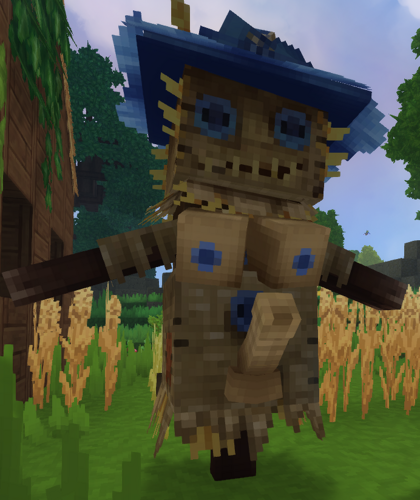
This mod adds 3 new scarecrow decorations with more alluring designs, craftable in the farming workbench. -
View File Perverted Scarecrow This mod adds 3 new scarecrow decorations with more alluring designs, craftable in the farming workbench. Submitter gaymate Submitted 02/11/2026 Category Other Games Requirements Install Instructions Unzip and place file in mod folder
-
Version 1.0.0
166 downloads
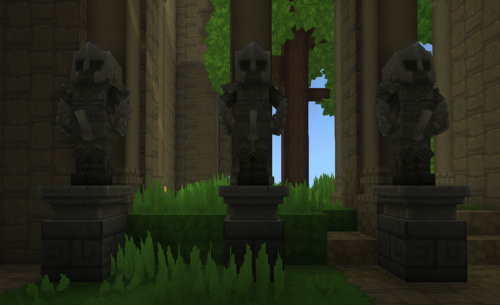
Pervy Sculptor replaces some some statues with more Horney versions. -
View File Pervy Sculptor Pervy Sculptor replaces some some statues with more Horney versions. Submitter gaymate Submitted 01/19/2026 Category Other Games Requirements Install Instructions


