Search the Community
Showing results for tags 'slal'.
Found 13 results
-
More Nasty Critters Legendary Edition View File BE ADVISED: some sack of shit is using my name to re-post mods on other websites, this person is NOT me. DO NOT DOWNLOAD ANYTHING FROM THOSE OTHER SITES. I ONLY UPLOAD TO LOVERSLAB. THIS VERSION IS FOR SKYRIM LEGENDARY EDITION ONLY go here for Skyrim Special/Anniversary Edition: https://www.loverslab.com/files/file/5464-more-nasty-critters-special-edition/ MNC is a unified collection of the basic adult creature mods, the contents within came from multiple mod authors. this version has updated mesh files, and is using SLAL for animation control. - - - - - - - - - - - - - - - - - - - - - - - - - - - - - - - - - - - - - - - - - - - - - - - - DISCLAIMER (copied from original mod page): I know its problematic to expand on the work of others or even expand upon someone elses expansion of the work of a third modder. However some of the stuff here cant be released in any other meaningful way, at least not for someone who just wants to download and have fun. If someone is offended by the stuff I put here let me know and I remove it. Its just here to give fellow players easy access to stuff thats posted all over the board, after all. original More Nasty Critters made by dentarr: http://www.loverslab.com/files/file/1140-more-nasty-critters/ ATTENTION: please read the upgrade procedure guide txt if updating from MNCV9 or you will have problems. READ IT IMMEDIATELY!!! - - - - - - - - - - - - - - - - - - - - - - - - - - - - - - - - - - - - - - - - - - - - - - - - The Downloads: MoreNastyCritters: the main mod, adds aroused meshes & animations for creatures + registers races into SexLab so that other SLAL Packs can use them. (note: mod does NOT have a MCM of it's own, the CF and SLAL MCMs are used to control this mod). CreatureSummoner: adds spells to summon creatures for you to play with (note: mod has a MCM). ModCompatibilityKitsForMNC: various patches for other mods. CreatureFramework: used to apply aroused meshes onto creatures (note: mod has a MCM). ExperimentalSexLabCreaturesV1-62ToSLALConversion.7z removes creature animations from sexlab and re-adds them as a SLAL Pack. - - - - - - - - - - - - - - - - - - - - - - - - - - - - - - - - - - - - - - - - - - - - - - - - Required Mods/Install Order: The full install guide (and a list of SLAL Packs) can be found here: http://www.loverslab.com/files/file/3524-sexlab-more-nasty-critters-install-guide/ install mods in order shown: Skyrim Script Extender (aka: SKSE) http://skse.silverlock.org/ Fores New Idles (aka: FNIS) (don't forget to download the "FNIS Creature Pack") http://www.nexusmods.com/skyrim/mods/11811/ SkyUI http://www.nexusmods.com/skyrim/mods/3863/ UIExtensions (needed for SexLabTools) http://www.nexusmods.com/skyrim/mods/57046/ SexLab https://www.loverslab.com/files/file/150-skyrim-sexlab-sex-animation-framework-v162-updated-jun-3rd-2016/ SexLab Tools (optional, but recommended) http://www.loverslab.com/files/file/2018-sexlab-tools-v30/ Sexlab Aroused Redux http://www.loverslab.com/files/file/1421-sexlab-aroused-redux-10-august-2016/ More Nasty Critters you are here Creature Summoner (optional) you are here Creature Framework you are here JContainers http://www.nexusmods.com/skyrim/mods/49743/? SexLab Animation Loader (aka: SLAL) http://www.loverslab.com/files/file/2488-sexlab-animation-loader/ MatchMaker (optional, but recommended) http://www.loverslab.com/files/file/163-sexlab-matchmaker-updated-09172014/ Suggested Load Order: (Skyrim and it's DLCs here) SexLab.esm SexlabAroused.esm CreatureFramework.esm (Sexlab Addon\Plugin mod's .esm here) (All other .esm mods here) SkyUI.esp UIExtensions.esp (needed for SexLabTools) FNIS.esp (All other .esp mods here) SexLabTools.esp (optional) MoreNastyCritters.esp CreatureSummoner.esp (optional) SexLabMatchMaker.esp (optional) SLAnimLoader.esp (Sexlab Addon\Plugin mod's .esp here) Warning: if you have it please load XP32/XPMSE before MNC. Do not let there skeletons overwrite MNC or your game may crash or have floating dick problems, MNC is using nodes that are sometimes not found in these skeleton mods. - - - - - - - - - - - - - - - - - - - - - - - - - - - - - - - - - - - - - - - - - - - - - - - - other Related Mods/Addons you may or may not want: SexLab v1.62 fixes (for v1.62 only) https://www.loverslab.com/files/file/5337-sexlab-162-fixes/ or SexLab Utility Plus https://www.loverslab.com/files/file/10316-osmelmc-mod-tweaks/ (please DON'T use both) Animation Limit Crash Fix https://www.loverslab.com/files/file/11208-animation-limit-crash-fix/ Animated Beast Cocks (ABC) https://www.loverslab.com/files/file/7556-animated-beasts-cocksabc-for-users-le-se/ SexLab Werewolves Redux (for using animations when in Werewolf form) https://www.loverslab.com/files/file/18014-sexlab-werewolves-redux/ SexLab Dragons https://www.loverslab.com/files/file/7900-sexlab-dragons/ + animations https://www.loverslab.com/files/file/2436-horny-creatures-of-skyrim/ https://www.loverslab.com/files/file/3999-billyys-slal-animations-2020-2-1/ SexLab Aroused Creatures https://www.loverslab.com/files/file/1146-sexlab-aroused-creatures-2016-01-20/ + patch https://www.loverslab.com/files/file/10316-osmelmc-mod-tweaks/ Creature Overhaul: https://www.loverslab.com/files/file/12760-creature-overhaul/ Bad Dog's Immersive Creatures - SIC Addon V3.0 (if you have "Skyrim Immersive Creatures" mod installed) https://www.loverslab.com/files/file/1889-bad-dogs-immersive-creatures-sic-addon/ Bad Dog's Bruma Creatures (if you have the "Beyond Skyrim - Bruma" mod installed) https://www.loverslab.com/files/file/5232-bad-dogs-bruma-creatures/ Scent of Sex https://www.loverslab.com/files/file/3037-scent-of-sex/ Animal Mansion Plus https://www.loverslab.com/files/file/2217-animal-mansion-plus/ SexLab Pheromones https://www.loverslab.com/files/file/6893-sexlab-pheromones/ untamed: https://www.loverslab.com/files/file/1672-untamed/ Chaurus Life: https://www.loverslab.com/files/file/9304-chaurus-life/ Riding Styles: https://www.loverslab.com/files/file/2593-riding-styles-2-6-7-21/ Animals and Followers: https://www.loverslab.com/files/file/2301-animals-and-followers/ - - - - - - - - - - - - - - - - - - - - - - - - - - - - - - - - - - - - - - - - - - - - - - - - Animation Troubleshooting: 1. if you are using a Mod Manager ( please go with Mod Organizer 2, it's highly recommended ) make sure it's installing the files to the right location and with the right load order. a good guide for using Mod Organizer 2 can be found here: https://www.youtube.com/watch?v=j4ZQpzf_iAE&list=PLE7DlYarj-DcLS9LyjEqOJwFUQIIQewcK 2. run/rerun the GenerateFNISforUsers.exe, if you don't the animations wont work/run. C:\Games\Steam\SteamApps\Common\Skyrim\Data\tools\GenerateFNIS_for_Users\GenerateFNISforUsers.exe or C:\Program Files (x86)\Steam\SteamApps\Common\Skyrim\Data\tools\GenerateFNIS_for_Users\GenerateFNISforUsers.exe WARNING: Windows (Vista/7/8/10) Security may interfere with updating/overwriting the FNIS behavior files. you may not even get a error message telling you that this has happened. make sure FNIS and your mod manager are running with administrator privileges. 3. when you start the game with the Skyrim Script Extender (SKSE) loader the list of installed mods wont get refreshed, so if you install a mod and just start the game with the loader any new mods you installed wont be fully activated. to fix this problem go to the skyrim launcher and click on "DATA FILES" and it will refresh the list of installed mods, you can now close the launcher and start the game with the skse loader. note: this only apply if you are not using a mod manager 4. in game you need to go inside SexLab's Mod Control Menu (MCM) and click on "install" first before you can use SexLab. 5. make sure you have "Allow Creature Animation" checked in SexLab's MCM settings. 6. turn off "Match Creature Gender" in sexlab's MCM settings, if this setting is enabled some animations won't play, its because most creatures don't have female counterparts in skyrim by default. 7. did you forget to install the FNIS Creature Pack? install it and rerun the GenerateFNISforUsers.exe, then do steps 5 & 8 NOTE1: if you do have the Creature Pack but some creatures are just playing idle animations during sex or not moving try clicking on "De-Install Creatures" in FNIS, after it's done running click on "Update FNIS Behavior" (doing this will delete all the creature behavior files generated by FNIS and remake new ones...that is assuming you DO have the FNIS Creature Pack installed) NOTE2: try turning on the "hkx file compatibly check" in FNIS to see if you installed the wrong version/s of any animation packs. 8. you may need to reload the animations, go to the Animation Loader's MCM and then: 8.1. click on the "Disable All" button. 8.2. click on "Rebuild Animation Registry", then Wait for the message to pop up*. 8.3. click on "Reload JSON". 8.4. click on "Enable All". 8.5. click on "Count Animations" and make sure nothing is over 500 (the stock SexLab v1.62 animation limit), turn off some animations if they are. 8.6. click on "Register Animations", then Wait for the message to pop up*. *if you like you can press "~" on your keyboard to open the console so you can watch it Register everything, just make sure you close it before you try to click on anything. 9. if SLAL Packs are not being listed in SLAL try reinstalling/updating JContainers. 10. if you are getting teleported into the air above Secunda's Kiss (giant camp at center of map) then try starting a animation in a indoor area first. it should stop happening outside after you do. 11. if all else fails, try loading a older save file from before sexlab was installed....but first try using sexlab's debug menu to reset everything to there default values. - - - - - - - - - - - - - - - - - - - - - - - - - - - - - - - - - - - - - - - - - - - - - - - - (Human) Animation Troubleshooting: Problem1: actors standing inside each other and T pose or playing idle animations. cause1: you forgot to run FNIS after installing/removing animations. fix: run FNIS. cause2: you installed the wrong animations for the version of the game you are using. fix: remove the animation mod that is wrong and install the correct version. tip: if you don't know what mod is wrong, then turn on the hkx compatibility check in fnis. cause3: the generated 0_master.hkx may be corrupted. fix: delete the 0_master.hkx to force fnis to generate a new one instead of trying to update it. file location: Data\Meshes\actors\character\behaviors\0_master.hkx note: should be deleted from within your mod manager...but that may also depend on however fnis was setup within it. Problem2: odd behavior from sexlab (Eg: animations are not what it says are running, massive actor misalignments, or other odd shit) cause1: corrupted animaton registry/SKSE cosave. fix: go to the Animation Loader's MCM and then: 1. click on the "Disable All" button. 2. click on "Rebuild Animation Registry", then Wait for the message to pop up*. 3. click on "Reload JSON". 4. click on "Enable All". 5. click on "Count Animations" and make sure nothing is over 1000 (the stock SexLab v1.65 animation limit, yours may be different), turn off some animations if they are. 6. click on "Register Animations", then unpause and Wait. cause2: corrupted sexlab settings/scripts. fix: go to sexlab's "Rebuld & Clean" menu and click on "Clean System", then unpause and wait. note: once done you will need to re-select any sexlab settings you changed, and re-register your SLAL Packs. cause3: the generated 0_master.hkx may be corrupted...again. fix: same as last time. - - - - - - - - - - - - - - - - - - - - - - - - - - - - - - - - - - - - - - - - - - - - - - - - Creature Framework Troubleshooting: note: don't use alt player werewolf form mods (Eg: the Player Hermaphrodite Werewolf patch) if you are playing as a vampire lord or using a creature transformation mod, due to how those mods work it will prevent CF from working on your non-werewolf creature form. CF will see you as still wearing the custom werewolf body mesh but as a different race, therefor seeing you as a unregistered race/armor combo. the MCM for Creature Framework is missing: you need to install Sexlab Aroused to fix this problem. http://www.loverslab.com/files/file/1421-sexlab-aroused-redux-10-august-2016/ also make sure it's loading before Creature Framework in the load order. Aroused mesh not getting/staying applied during animations (a list of things to try): A. go to the Creature Framework MCM and click on "Re-register all mods", then unpause the game and Wait a Minute. B. go to the Creature Framework MCM and click on "Clear Creatures" C. go to SexLab's MCM and turn off "Automatic Free Camera" (don't know why but freecam may stop meshes from getting refreshed, especially the player's werewolf form) D. go to the Creature Framework MCM and disable "SexLab Aroused integration" E. try clicking on the uninstall button in CF's MCM, then save & quit and reload the save. (wait for Creature Framework to reinstall and register) F. click on the uninstall button in CF's MCM, then save & quit, then use a save editor to remove all of Creature Framework's scripts & forms from your save file. NOTE: you may need to save & quit again after installing to get it's MCM menu to load. also adding this to the Skyrim.ini (My Documents\My Games\Skyrim) may help CF work a bit better: Creature Framework not registering mods or stuck in a registering loop: try reinstalling JContainers. https://www.nexusmods.com/skyrim/mods/49743/? - - - - - - - - - - - - - - - - - - - - - - - - - - - - - - - - - - - - - - - - - - - - - - - - List of known mods that cause Werewolf problems: One of the "Serana" mods but i can't remember the exact name, however theses esps are known to turn the female werewolf into a male: Serana.esp Valerica.esp Bijin AIO.esp load there esps before mnc's or delete the ArmorAddon ( NakedTorsoWerewolfBeast [ARMA:000CDD87] ) and any other werewolf edits from them. EasyNPC: I don't know the details of what this program it's doing, just that it's causing problems. I assume its creating the same issue as the above, and therefor has the same fix. ABC: the "MNC_ABC_Patch.esp" file found in that mod is turning the herm werewolves into male (and is also messing up the Player Hermaphrodite Werewolf patch because of it), turn off and/or delete that esp from that mod. ABC also has rogue meshes in it that are causing problems: "meshes\actors\werewolfbeast\character assets\" has random body part meshes in it, this may cause issues with mods such as "Total Werewolf Overhaul", the only thing that ABC should have in this folder are the skeleton files. ABC's version of "MaleWerewolf_1.nif" in "MoreNastyCritters\werewolf\" is causing double dick & permanent erections issues, the only thing ABC should be replacing in this folder are the "addon_penisnamehere.nif" files. SOS: double dick problems, you need to turn off werewolves under all of its mcm settings. if that fails to work then a more extreme fix can be found in the ModCompatibilityKit. One With Nature - Dynamic Animals and Creatures: it does not cover the female creatures added by mnc you need to add OWNWerewolfFaction "OWN Werewolf Faction" [FACT:xx00388B] to the female werewolf's faction, and OWNAbilityWerewolf "OWNAbilityWerewolf" [SPEL:xx04FBA9] to the female werewolf's actor effects. Bash/Smash patches: they can be known to mess up the body template flags on some creatures. Total Werewolf Overhaul (TWO): it has a patch for HCOS in it but HCOS no longer has werewolf meshes in it, so using that patch will only cause more problems. Moonlight Tales: that piece of shit is not even compatible with itself, let alone other werewolf mods. remove it and never look at it again. Growl - Werebeasts of Skyrim: this mod adds new keywords to the Werewolf & Werebear races, so the esp must be loaded after MNC to avoid problems. but this mod also makes them larger again, so you will need to edit the race's heights with xedit to make the animations line up again. - - - - - - - - - - - - - - - - - - - - - - - - - - - - - - - - - - - - - - - - - - - - - - - - FNIS Troubleshooting: "ERROR(9): Index was outside the bounds of the array" or "ERROR(2026): Too many animations": you may have Too many animation mods and/or SLAL Packs installed, use the "XXL" version of FNIS or uninstall some animations. "ERROR(76): Could not find a part of the path DebugData.txt": a Win10 update (or antivirus software) has forcibly turned on real time protection and it's stopping FNIS from generating/updating files. you need to disable real time protection before running FNIS, or add GenerateFNIS_for_Users.exe to the exclusions list (also you should probably add skse_loader.exe and TESV.exe as well) Crashing on loading save file: you have Too many animations installed, most people start crashing around 12000 to 14000. remove some animation mods to fix the problem.....or try installing these: Animation Loading Fix (only use v1.0) : https://www.nexusmods.com/skyrim/mods/98204 LE Animation Limit Crash Fix: https://www.loverslab.com/files/file/11208-beta-le-animation-limit-crash-fix/ - - - - - - - - - - - - - - - - - - - - - - - - - - - - - - - - - - - - - - - - - - - - - - - - Papyrus Tweaks: the problem with installing script heavy mods is that the default Papyrus settings are not capable of handling the additional stress. This tweak should increase stability, and needs to be added to the Skyrim.ini file under the [Papyrus] section. Your Skyrim.ini can be found in "My Documents\My Games\Skyrim" note1: there is some debate on the last 3, it has been suggested that they should just be deleted from (or never entered into) the Skyrim.ini https://www.loverslab.com/topic/56084-crash-fixes/ note2: you should only have logging turned on (bEnableLogging=1) if you are actively trying to find a problem, the rest of the time it's just a drain on system resources and it can cause extra stress for the papyrus system, therefor if you have it on all the time it can potentially become a part of the problem your trying to fix. it only logs the scripts anyways so if you have a problem like a deleted world object or a bad navmesh the log won't say anything helpfull, you should be doing this if you have such a problem: http://www.creationkit.com/index.php?title=TES5Edit_Mod_Cleaning_Tutorial http://wiki.step-project.com/TES5Edit/TES5Edit_Cleaning_Instructions - - - - - - - - - - - - - - - - - - - - - - - - - - - - - - - - - - - - - - - - - - - - - - - - Other Notes: when you select "MNC Rescaled Meshes" for the wolves in CF's MCM it makes the wolves larger and gives them a penis that does not support ABC animations, this is intended to be used for older wolf animations. (if you have RaceMenu/NIOverride you may want to edit the MoreNastyCritters.esp to remove the object effect from the wolf armors or they may end up much bigger than 1.2) - - - - - - - - - - - - - - - - - - - - - - - - - - - - - - - - - - - - - - - - - - - - - - - - Mod Compatibility Kit index of patches: Bear Mods: The DovahBear (with & without Werebear form) Canine Mods: A Dogs Life Amaterasu The Great Spirit (was unnecessary, Amaterasu is/was Female, this makes her a male) garm companion GenderDogs (you don't need the original mod to use this because MNC already includes female meshes) Meeko Reborn OkamiFollower True Meeko True Wolves of Skyrim Vargr - a Draugr Hound Vigilance Reborn Zombie Dogs and Skinned Hounds- Mihail Monsters and Animals Dragon Mods: Behemoth Dragon Chaos Dragons Deadly Dragons Diverse Dragons Collection 3 V4-1-3 DurnehviirResurrected Jills of Akatosh Jormungandr Dragon Nithhogg Dragon Thanatos Dragon (note:if you are mixing dragon mods (Eg: Chaos Dragons with Deadly Dragons) you may need to edit the leveled npc lists, Eg: LCharDragonAny "0005EACF") Horse Mods (the bane of my existence): Blaze Of Eventide Convenient Horses V5 GenderHorses (you don't need the original mod to use this because MNC already includes female meshes) Horse Armors Immersive Horses Levelers Tower Realistic Primitive Horse Breeds Stendarr Rising Other Mods: Bestial Essence (may or may not work) Creature Mod - Degonians (A.K.A: a DeathClaw mod for Skyrim) Darkend Reapers The Dark Tower SkyFem Tame the Beasts of Skyrim II The Gray Cowl of Nocturnal Tumbajamba's Mounts Vilja in Skyrim Yiffy Age of Skyrim Zombies- Mihail Monsters and Animals MNC Werewolf extras: Alternative Werewolf Textures (for female/herm werewolves) Player Hermaphrodite Werewolf patch Remove Werewolves from SOS installing the patches with a Mod Manager: note from harveytherabbit: "Mod Manager (i think he meant Mod Organizer) : Install the patch in the Mod Manager interface and you will see all of them under that one install. Navigate under the respective folder title for the patch you wish to install. Keep expanding the folder hierarchy until you see that patch's 'data' folder and the Right Click and set as Data Directory. Once it shows the green text indicating it is selected as the data folder, rename the install however you want to identify it as the patch for that specific mod (ex - "MNC Patch - ModTitle") and then complete the install and enable it. Repeat these steps for each patch you need for your own mod structure." as i understand the things i've seen other people say in the past the patches need to be extracted and then recompressed into 7zip files of there own to be installed. - - - - - - - - - - - - - - - - - - - - - - - - - - - - - - - - - - - - - - - - - - - - - - - - CREDITS: note: this list of credits most likely has many errors due to the amount of crossover work that has been done. its hard to keep track of things when others are expanding upon someone elses expansion of work from a third person. AnTiWoMaAgNoT (female VampierLord mesh) Ashal (SexLab, scripting consultant) Bad Dog (mesh consultant, edited Deer/Elk penis, Steam Centurion mesh, edited sabercat penis, Dragon Priest mesh, Riekling penis?, frost giant penis) billyy (past Animations now removed, mesh & animation consultant + testing) Blaze69 (consultant for many things) blipblap (edited Hulking Draugr mesh, edited Giant body meshes, edited troll penis, Ashhopper) Chosen Clue (Ash Spawn fix) Cyndi (Benthic Lurker penis) DARKGRAY (helped with something but i can't remember what it was) Dayelyte (Animations) dentarr (original MNC mod author) Derrax (werewolf balls) diarawr (Canine penis & werewolf penis from horny dogs of skyrim) Dr Fring (female VampierLord texture) Ep1cL3w1s (Creature Framework) Flyingtoaster (Hentai Creatures) Fore (FNIS, animation consultant) FunnyBiz (Animations) Gary3 (female horse meshes) Gone (Animations, Beastiality Extras, Bear balls, Chaurus penis, spider penis, Draugr penis, Falmer penis, Gargoyle penis, Giant penis, Sabrecat penis, troll penis, VampireLord penis) h38fh2mf (did something but i can't remember what it was) jacques00 (female giant mesh, female Draugr texture) Leito86 (Creature Features, Animations, Horse penis, new bear penis, Werebear penis, Riekling penis?) llabsky (Animations) lordescobar666 (Sexlab Nude Creatures) Lost_Hawk (Female Falmer) Lugburzum (Dremora face Fix for Hentai Creatures) MadMansGun (mod maintenance, multiple edited meshes, dwarven sphere dildos, Dwarven Spider penis, Dwarven Ballista dildo, Werebear penis (based on Leito's horse penis), Frostbite Spider penis (based on Gone's Chaurus penis), Chaurus Hunter (also based on Gone's Chaurus penis), Frost Atronach, edited Dragon penis) nicholas8 (helped with race registration) Moutarde421 (female werewolf) Panicforever (Animations) PaulGreen (modifications to SLAL and enabling icewraith animation support) Pfiffy (SSE porting) ppp (helped with the Immersive Horses patch) RavenKZP (female Dog & Husky) SirNibbles (consultant, idea tester) Skullered (helped with something but i can't remember what it was) SkyMoMod (the Arch Demon in Hentai Creatures) Subject2Host (edited bear penis textures, Werebear penis based on horse penis, Rabbit penis based on skeever) Vioxsis (Goat, Horker, Hagraven, new Boar) vpoteryaev (helped with something but i can't remember what it was) Xandero (Animations) ZarthonTheVanquished (fixed some creature voice errors) Submitter MadMansGun Submitted 05/27/17 Category Framework & Resources Requirements SexLab Framework, SLAL and all DLCs Special Edition Compatible No Install Instructions
-
Billyy's SLAL Animations (2026-9-4) View File These are my collections of animations for Skyrim. All the files are packed into 2 fomod install packages for both LE and SE. There is also a separate pack for my 'original' old animations. Also a P+ patch for those users. Make sure to pick the correct version for your game. Once installed through your mod manager, you can select the packs you want from the fomod. If you enjoy my works please consider supporting me on Pixiv Fanbox or SubscribeStar. ***New in SLAL_Billyy_Animations v10.6*** Creature Animations Previews: Blog Post Human Animations Previews: Blog post Requirements: Sexlab Framework Sexlab Animation Loader Required for For Creatures, otherwise don't need: More Nasty Critters SLAL Edition Animated Beast's Cocks(ABC) For users Recommended: SexLab MatchMaker (just for easy sex starting if that's what you're looking for) Installation: 1. Download and copy files from each individual folder you want into skyrim data, or use a mod manager to install and then tick the boxes for which packs you want in the fomod upon installation (don't forget to tick the 'animobjects' option if you want objects). 2. Run FNIS 3. Register animations in SLAL's MCM menu Update: It should be safe to update packs mid save with no adverse effects. 1. Uninstall old pack(s) from mod manager (all animations are included in each update, you only ever need the latest version of a pack to have all the animations) 2. Download and install new packs with a mod manager 3. Run FNIS and that’s it usually 4. Go in-game and open the SLAL MCM menu, then choose the animations and ‘register’ them. ---On rare occasion I will update an existing animation registration names (shorten them to decrease fnis stress). In these cases if you already have the renamed animations registered in SLAL in an active save file you’ll want to do a clean animation registration. You’ll know if you may need to do this step if you encounter a specific animation where both actors don’t animate, but all others seem to be okay. Otherwise it won’t negatively affect anything and this step can be skipped. If you’re starting a fresh save/SLAL registration then this won't be an issue either. 4b. Go into the SLAL MCM > General Options > Disable All > Rebuild Sexlab Anim Registry > Wait, then re-enable and register all the animations you want again as you normally would when first setting up. FAQ: ***Note: Please don't message me directly for basic troubleshooting, I usually won't respond if it's a question that's been asked multiple times before in the thread.*** Q: My characters breasts stretch during some animations. A: You'll want to make sure you're using a recent version of XP32 skeleton. Make sure the skeleton .nifs are also not being overwritten by other mods. Factoryclose added some bones into the new versions that in theory improve the experience and give animators more bones to utilize. Not ever animator uses them, hense why it may just be my animations you're expeirencing issues with. It could also be caused by odd/old physics setup. Q: X creature's dick isn't animating during sex. A: You'll need to have Factoryclose's Animated Beast Cocks (ABC) mod for it to work. Make sure to follow install instructions and have it overwrite everything. Q: Can’t start animation with specific creature (usually newer creatures, Canines, Dwemer bots, Dragon Priest, Chaurus Hunter, specific Spiders). A: Make sure you have latest More Nasty Critters SLAL Edition installed, and then in the SLAL MCM, disable all animations, then “rebuild sexlab animation registry”, and then enable all your animations again and click “register animations”. Q: Creatures get stuck in sex animation after it ends (Spiders, Slaughterfish, Rabbit). A: Some king of bug with custom behaviors perhaps. I believe Ed86 found a solution for at least the spiders, which you can find download and instructions here. For any other creatures you’ll be stuck with the tedious manual work-around: open up console with ~ > select the bugged creature > type “disable” then enter > type “enable” then enter. This more or less re-spawns the creature back in a mobile state. Q: I CTD on load after installing mod. A: Most likely case is your save is hitting the string limit. Unfortunately just because FNIS lets you install all those animations, doesn't mean your game can handle them. You can try removing animations, or try installing this mod; Animation Loading Fix. You can also manually edit the SLAL source files to manually remove animations you don't want. Sexlab Animation loader Guide Q: Can you make animations for Mudcrabs? A: To the extent of my knowledge mudcrabs will frequently break out of their sex animation to play an idle and then never return to the sexing. So mudcrabs are very impractical with all the issues they have. Q: Can you convert X creature animation to work with Y creature. A: No. Some creature skeletons may look similar, but often they are shaped differently, so it is by no means an effortless process. Q: What is the 'Invisible Furniture Pack'? A: Not to be confused with the regular 'Furniture Pack', it's a separate pack with different animations that are designed with specific objects in mind (IE a bed, or a wall), but they don't spawn an object. It's up to player to somewhat preemptively choose to use one of these animations and align your actor accordingly. It's a bit more tedious, but is more flexible in fitting into your scene. Objects can have different collisions, so not all objects will give same mileage. However they're intended to work by directly facing the object when the sex scene is starting and it should align itself more or less with the object. There are also some other mods that add some furniture detection to sexlab that might make these work too, but I’ve not really tested them out. Q: No animobject appears for the furniture DD pack? A: It requires having the resources from Devious Devices isntalled, but the esp/esms don't need to be active. Q: How do I use Gloryhole animations? A: They start like any other animation. Fomod has 3 options to use for the gloryhole shack with different door variations. They’re just big animobjects that popup during animations, not a special object to find in sitting around in Skyrim. Q: What is the difference between and 'SLAL_Billyy_Animations' 'SLAL_Billyy_OriginalAnimations'. The 'OriginalAnimations' (see mod details for list) includes my older animations formerly know as 'creatures1' and also my legacy wolf pack. It was separated to save bandwidth as I never add to those packs so no reason to constantly redownload + keeps file size lower to allow for hosting on here. The standard 'Animations' pack includes all my more recent work that continues to be updated. They can be installed together if you want both sets of animations. No conflicts. Credits: Ashal - Sexlab Framework Factoryclose - Animated Beast Cocks Orxx - Sexlab Animation Loader Dentarr - More Nasty Critters MadMansGun - More Nasty Critters SLAL Edition and assets/animobjects + Support god and sanity saver extraordinaire SirNibbles – 3ds Max Guide AnubiSs2167 – Rigs Pornphile – Rigs Leito – Rigs,Creature assets, Animobjects Kimy and Devious Device Team - Animobjects Shocky – Bone Table, Chaurus cage, WoodenPony, Creature Dildo Objects Powerofthree – Rune Animobjects Stroti – Outhouse assets Xaz, Zaz – Furniture objects Wenderer – fomod Creation Tool Changelog 2026-9-4: SLAL_Billyy_Animations v10.6 Creature Furniture Invis Pack - Canine Table Cunnilingus Creature Humanoids Pack - Riekling 3p Missionary Spitroast Creature Misc Pack - Hag Raven Fly Missionary Human Pack - Doggy 6 Ass Up - Sideways 2 Human Gangbang Pack - 3p Squatting Service Previous Versions: Submitter Billyy Submitted 04/18/17 Category Animation Requirements Sexlab Framework, Sexlab Animation Loader, MNC SLAL Edition, ABC for users Special Edition Compatible Yes
-
Psyche Animation (LE/SE) (2021-12-1) View File A green hand modder of skyrim. Support You know it takes a lot of time to make animation more outstanding, sometime a little detail need to be adjusted one hour and another... I really appreciate if you support me to continue my work. https://subscribestar.adult/psycheaos https://www.patreon.com/PsycheAos Latest Version Available in Subscribestar and Patreon! Requirement SexLab Fnis SLAL Animated Beast's Cocks Animated Beast's Cocks(ABC) t.ara's mod(highly recommend) Zaz Animation Pack V8.0 plus Sexlab speed(optional) permission You can do everything by using this mod, include making video\GIF, sharing the Public Version (post a link might be better) and modifying as mod resources(Plz let me know before). If you wanna get financial income, don't forget to support me a little bit.... Thanks to: T.ara for the greatest mesh. SirNibbles for his excellent guild. factoryclose for his modder resource. MadMansGun for his incredible creatrue mod and always helping me. Q&A: Q1: What's your body Physics in that GIF? A1: CBBE-SMP+Fair Skin GT_Breat03_SMP.7z Q2: What's your enb? A2: Esc Enb. You will find that in my download page. Q3: What's your hair style? A3: https://www.nexusmods.com/skyrim/mods/88416 Q4: Can I get your face preset? A4: Be sure you are using racement instead of ECE. I have upload my preset here, you can download from the download page named "FacePreset.7z", use it as a normal mod, enter the game, press "~" then go to console, type "showracemenu", import my presets under "presets" folder, 2 ways you can import them, preset & head model, if you get wrong brown or eyes even scan the whole preset, just go my mod file, rename my texture name to your current one. Q5: Why penetration issue happen? A5: There is no absolutely right alignment due to different stature, different sos type\length, different size of body unless you use some short animations. The hotkey of sexlab and sos can relieve that issue, it never border me. I usually use 2 same tall people, also Sexlab hotkey to adjust the position lightly, it works permanently. Q6: Why my creature dick don't move? A6: Missing requirement: Animated Beast's cocks. Q7: Where I can see that previews? A7: https://redgifs.com/users/PsycheAos/collections Q8: Why PsycheHHH update so slowly? A8: Because he is hungry to death without support! Submitter PsycheHHH Submitted 01/08/2020 Category Animation Requires SLAL, Fnis, Animated Beast's Cocks Special Edition Compatible Yes
-
SexLab Animation Loader View File This mod makes easier register new animations in SexLab Framework. Several animators on LoversLab have been creating lots of new animation files, but don't have the modding experience necessary to create mods that load them in Skyrim. This mod aims to help solve that problem. Now you can create simple animation packs without needing any modding experience, and then you can use this mod to load them in Skyrim. Dependencies For Users: If you just want to load an animation pack that someone else has already built, this is all you need: SexLab Framework 1.63+ JContainers FNIS Dependencies for Animators: If you want to build your own animation packs, you will also need: Python 3.x Installation: Just install this normally like you would install any other mod. This mod doesn't come with any animations though, so you will likely want to also install some animation packs as well. Installing animation packs: Install animation packs just like you would any other mod. (They need to be unpacked and put into your Skyrim data directory.) Usage: After installing the mod, open the MCM menu, select the animations you want to register, then click "Register" Uninstallation: Rebuild the SexLab animation registry after uninstalling this mod to remove any animations it added. Upgrade Procedure: No clean save or special upgrade steps needed. You will generally want to rebuild the SexLab animation registry after upgrading animation packs, to make sure you pick up the new pack data. Creating animation packs: Rydin has written up an excellent guide describing how to create animation packs. The mod itself contains a readme and an example animation pack source file. Normally you'll want to edit your animation pack source file, then run SLAnimGenerate.py to generate the FNIS lists and the JSON data read by this mod. You will need to run GenerateFNISforModders.exe if the FNIS lists change. An example animation pack can be found here. Additional documentation can be found in the README or in the example source file. Bugs: Probably some. Feel free to let me know if you run into anything unusual. Source: https://github.com/OsmelMC/SLAnimLoader/ License: Public domain. Feel free to do whatever you want with this. If Ashal or rydin ever want to include any of this code directly in SexLab or NSAP that would be cool with me. Credits: - Orxx, for the original mod - Andreis, for ported it to SSE - Ashal, for SexLab - Earen, for JContainers - rydin, for writing awesome docs, helping support users, and helping to build packs - CGi, for the German translation and setting up translation files for other languages - CPU, for fixing creature races when multiple races are used in an animation - MadMansGun, for updating the creature races list to match the latest More Nasty Critters release - modball, for the new logo out of the box. - All the awesome animators on LL for inspiring Orxx to write the original version of this Mod. - Probably others that Orxx forgot to mention. Submitter OsmelMC Submitted 09/10/2022 Category Framework & Resources Requires SexLab Framework Regular Edition Compatible Yes
-
.thumb.png.a3cfaa078ba2f2416704cfe329ae5b63.png)
2284376 downloads
These are my collections of animations for Skyrim. All the files are packed into 2 fomod install packages for both LE and SE. There is also a separate pack for my 'original' old animations. Also a P+ patch for those users. Make sure to pick the correct version for your game. Once installed through your mod manager, you can select the packs you want from the fomod. If you enjoy my works please consider supporting me on Pixiv Fanbox or SubscribeStar. ***New in SLAL_Billyy_Animations v10.6*** Creature Animations Previews: Blog Post Human Animations Previews: Blog post Requirements: Sexlab Framework Sexlab Animation Loader Required for For Creatures, otherwise don't need: More Nasty Critters SLAL Edition Animated Beast's Cocks(ABC) For users Recommended: SexLab MatchMaker (just for easy sex starting if that's what you're looking for) Installation: 1. Download and copy files from each individual folder you want into skyrim data, or use a mod manager to install and then tick the boxes for which packs you want in the fomod upon installation (don't forget to tick the 'animobjects' option if you want objects). 2. Run FNIS 3. Register animations in SLAL's MCM menu Update: It should be safe to update packs mid save with no adverse effects. 1. Uninstall old pack(s) from mod manager (all animations are included in each update, you only ever need the latest version of a pack to have all the animations) 2. Download and install new packs with a mod manager 3. Run FNIS and that’s it usually 4. Go in-game and open the SLAL MCM menu, then choose the animations and ‘register’ them. ---On rare occasion I will update an existing animation registration names (shorten them to decrease fnis stress). In these cases if you already have the renamed animations registered in SLAL in an active save file you’ll want to do a clean animation registration. You’ll know if you may need to do this step if you encounter a specific animation where both actors don’t animate, but all others seem to be okay. Otherwise it won’t negatively affect anything and this step can be skipped. If you’re starting a fresh save/SLAL registration then this won't be an issue either. 4b. Go into the SLAL MCM > General Options > Disable All > Rebuild Sexlab Anim Registry > Wait, then re-enable and register all the animations you want again as you normally would when first setting up. FAQ: ***Note: Please don't message me directly for basic troubleshooting, I usually won't respond if it's a question that's been asked multiple times before in the thread.*** Q: My characters breasts stretch during some animations. A: You'll want to make sure you're using a recent version of XP32 skeleton. Make sure the skeleton .nifs are also not being overwritten by other mods. Factoryclose added some bones into the new versions that in theory improve the experience and give animators more bones to utilize. Not ever animator uses them, hense why it may just be my animations you're expeirencing issues with. It could also be caused by odd/old physics setup. Q: X creature's dick isn't animating during sex. A: You'll need to have Factoryclose's Animated Beast Cocks (ABC) mod for it to work. Make sure to follow install instructions and have it overwrite everything. Q: Can’t start animation with specific creature (usually newer creatures, Canines, Dwemer bots, Dragon Priest, Chaurus Hunter, specific Spiders). A: Make sure you have latest More Nasty Critters SLAL Edition installed, and then in the SLAL MCM, disable all animations, then “rebuild sexlab animation registry”, and then enable all your animations again and click “register animations”. Q: Creatures get stuck in sex animation after it ends (Spiders, Slaughterfish, Rabbit). A: Some king of bug with custom behaviors perhaps. I believe Ed86 found a solution for at least the spiders, which you can find download and instructions here. For any other creatures you’ll be stuck with the tedious manual work-around: open up console with ~ > select the bugged creature > type “disable” then enter > type “enable” then enter. This more or less re-spawns the creature back in a mobile state. Q: I CTD on load after installing mod. A: Most likely case is your save is hitting the string limit. Unfortunately just because FNIS lets you install all those animations, doesn't mean your game can handle them. You can try removing animations, or try installing this mod; Animation Loading Fix. You can also manually edit the SLAL source files to manually remove animations you don't want. Sexlab Animation loader Guide Q: Can you make animations for Mudcrabs? A: To the extent of my knowledge mudcrabs will frequently break out of their sex animation to play an idle and then never return to the sexing. So mudcrabs are very impractical with all the issues they have. Q: Can you convert X creature animation to work with Y creature. A: No. Some creature skeletons may look similar, but often they are shaped differently, so it is by no means an effortless process. Q: What is the 'Invisible Furniture Pack'? A: Not to be confused with the regular 'Furniture Pack', it's a separate pack with different animations that are designed with specific objects in mind (IE a bed, or a wall), but they don't spawn an object. It's up to player to somewhat preemptively choose to use one of these animations and align your actor accordingly. It's a bit more tedious, but is more flexible in fitting into your scene. Objects can have different collisions, so not all objects will give same mileage. However they're intended to work by directly facing the object when the sex scene is starting and it should align itself more or less with the object. There are also some other mods that add some furniture detection to sexlab that might make these work too, but I’ve not really tested them out. Q: No animobject appears for the furniture DD pack? A: It requires having the resources from Devious Devices isntalled, but the esp/esms don't need to be active. Q: How do I use Gloryhole animations? A: They start like any other animation. Fomod has 3 options to use for the gloryhole shack with different door variations. They’re just big animobjects that popup during animations, not a special object to find in sitting around in Skyrim. Q: What is the difference between and 'SLAL_Billyy_Animations' 'SLAL_Billyy_OriginalAnimations'. The 'OriginalAnimations' (see mod details for list) includes my older animations formerly know as 'creatures1' and also my legacy wolf pack. It was separated to save bandwidth as I never add to those packs so no reason to constantly redownload + keeps file size lower to allow for hosting on here. The standard 'Animations' pack includes all my more recent work that continues to be updated. They can be installed together if you want both sets of animations. No conflicts. Credits: Ashal - Sexlab Framework Factoryclose - Animated Beast Cocks Orxx - Sexlab Animation Loader Dentarr - More Nasty Critters MadMansGun - More Nasty Critters SLAL Edition and assets/animobjects + Support god and sanity saver extraordinaire SirNibbles – 3ds Max Guide AnubiSs2167 – Rigs Pornphile – Rigs Leito – Rigs,Creature assets, Animobjects Kimy and Devious Device Team - Animobjects Shocky – Bone Table, Chaurus cage, WoodenPony, Creature Dildo Objects Powerofthree – Rune Animobjects Stroti – Outhouse assets Xaz, Zaz – Furniture objects Wenderer – fomod Creation Tool Changelog 2026-9-4: SLAL_Billyy_Animations v10.6 Creature Furniture Invis Pack - Canine Table Cunnilingus Creature Humanoids Pack - Riekling 3p Missionary Spitroast Creature Misc Pack - Hag Raven Fly Missionary Human Pack - Doggy 6 Ass Up - Sideways 2 Human Gangbang Pack - 3p Squatting Service Previous Versions: -
M2M Animations for SLAL View File Please read Tweens' Terms of Use (modified) before downloading this archive. This mod is a SLAL collection of animations from Tweens' M2M Animations. The animations were made for male/male usage, but can also be utilized by any characters with schlongs, i.e. it is suitable for use in gay, dickgirl, and femdom (strap-on) contexts though positional adjustments through SexLab are necessary for the latter two. Please note there are issues with timing in this SLAL pack not present in the original, hence Tweens' original decision to not utilize the SLAL framework and create a standalone mod. This collection is for individuals who would not be bothered by this problem. If this timing issue is unacceptable, please consider using M2M Animations instead. For previews of the animations, refer to the original mod's page (videos are male on male). Animation List: Solo Masturbation Duo Masturbation Standing BJ 69 3Way 4Way Duo Masturbation Deux Power Driver Face-down Fuck Aggressive Face-down Deep Kiss Laying BJ Muscle Worship Standing Jerk-Off Standing Jerk-Off Variation 1 Standing Jerk-Off Variation 2 Laying Jerk-Off Laying Jerk-Off Variation 1 Laying Jerk-Off Variation 2 Laying BJ 3Way Laying Pushups 3Way Laying Poke 3Way Standing BJ 3Way Cowboy Missionary Cock Milker Smooch 4 Way BJ Quick Suck-1,2,3 Leg Up Fuck Aggressive Face Fuck Aggressive KO 3Way Foreplay: 1) Kissing1 2) Kissing 2 3) Admire 4) Butt Check 5) Neck Kiss 6) Hand Trace REQUIREMENTS SexLab - Sex Animation Framework SexLab Animation Loader The above's requirements. INSTALLATION Install and enable. Run FNIS for Users. Register and enable the animations in SLAL's MCM. Terms of Use Credits Tweens for creating these animations and allowing the creation of this SLAL pack. © TweensAnimations ------------------------By clicking on the download link, you are agreeing to abide by the Terms of Use Contract--------------
-
Bottlefield Animations View File Hi, I create erotic animations for skyrim. You can look animation preview under spoiler. Animation preview: Animations list: Female Fisting Female Fisting 2 Mea culpa (FF, lesbian, romantic) BBE (Female solo, animobjects) Requirements: SEXLAB https://www.loverslab.com/files/file/150-skyrim-sexlab-sex-animation-framework-v162-updated-jun-3rd-2016/ FNIS https://www.nexusmods.com/skyrim/mods/11811 XP32 Maximum Skeleton (or another) http://www.nexusmods.com/skyrim/mods/26800/ SLAL https://www.loverslab.com/files/file/2488-sexlab-animation-loader/ Credits SirNibbles for his tutorials NCK30 for his help and advice Pornphile for his rigs and other modders for their resources Submitter Bottlefield II Submitted 12/25/2023 Category Animation Requirements Special Edition Compatible Yes
-
 Archers Slal Mega Pack View File A set of 30 converted wolf animations for foxes converted from Billy Nibbles Hcos Babo Submitter archerthegrey Submitted 04/16/2023 Category Adult Mods Requires SexLab Slal Regular Edition Compatible No
 -
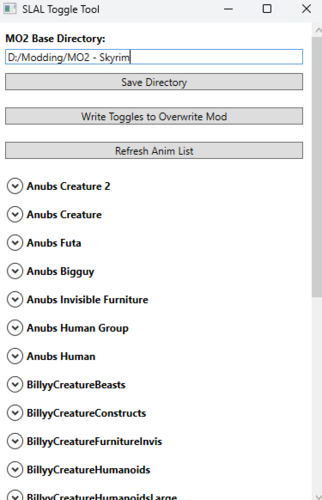
SLAL Toggle Tool View File If you don't want to toggle anims for SLAL in MCM, you can use this. Useful if you never want a particular animation to show up in MCM across saves. You still need to use SLAL to register animations. I mainly made this because I don't like spiders and certain packs only a have a few animations I want, and I didn't want to have to reenable/disable them all in SLAL every time I start a new game. Instructions: Start: When first starting the tool, select your MODS directory. It should match whatever you have set for your mods folder in the MO2 settings. Core: 1) toggle your animation using my toggle tool. 2) rebuild your animations (FNIS/Nemesis/Pandora) 3) go into SLAL MCM and click "enable all", then "Rebuild Registry", then "Register Animations" If you want to remove a pack completely, make sure to completely delete it from your mod list in MO2, and rewrite the override file using the tool. If you don't do this after removing a pack, SLAL will try to pick up the animations, even though they don't exist. Tag Editing: Tag editing comes in 3 modes: None, Aggressive, Full. None removes tagging options so you only see enabling option. Aggressive allows you to easily tick whether an animation should be tagged aggressive (useful for defeat mods or anything that prioritizes aggressive tags) Full allows you to directly add or remove tags as you see fit. Make sure they are comma separated. I am unsure if whitespace matters, but probably best to not have any. Notes: Don't add it as an executable to MO2, it doesn't work. Doesn't work for SL P+ since P+ doesn't use SLAL. Idk if it works for vortex, but assuming vortex uses a "mods" folder similar to MO2 it should be fine. The tool is not aware of what mods are enabled or disabled, so if you have disabled SLAL packs, it will still pick those up. In order to avoid picking them up you need to uninstall the SLAL pack you aren't using. If you uninstall a pack, make sure to reopen the tool and rewrite the jsons, otherwise the SLAL pack jsons it picked up from the previous rewrite will still be hanging around. Let me know if something doesn't work, or you have a suggestion to improve it. SL tags explained, leaving this here for my own reference later or if someone wants to know what the aggressive toggle does. How it works: Skyrim SLAL Toggle Tool 1.1.7.zip Submitter Aggressive_Coast Submitted 10/06/2025 Category Other Requirements SLAL: https://www.loverslab.com/files/file/5328-sexlab-animation-loader-sse/ If you don't use SLAL, this tool is useless. MO2 probably, haven't tried it with vortex. Regular Edition Compatible Not Applicable Install Instructions Installation: Extract to a folder. I prefer having a dedicated tools folder, but you should be fine putting it anywhere. I couldn't get it to run in MO2 so don't add it as an exe to MO2. Run "SL Anim Toggle Tool.exe". Copy and paste your MO2 Mods directory (Tools -> Settings -> Paths -> Mods Directory) Click Save directory and click Ok for the message. Click Refresh Anim List. Toggle the animations you don't want for each pack. Click Write Toggles to Overwrite Mod. Go back to MO2, refresh the mod list and enable "SLAL JSON Override" Make sure it is below your animation packs so it actually overrides them. Done. Uninstallation: Delete the tool and remove the SLAL JSON Override Mod from your mod list.
-
I had some files go missing and ended up having to reinstall most of my SLAL animation packs. Along the way I seem to have lost a SLAL animation pack that had a lot of creature animations. Particularly, it was the only one I have seen that had a FCC animation for Giants. I can't get an old save to load the original set of registered animations to find out the name. I'd sooner see if anybody can quickly look it up in their SLAL mod menu so I don't have to start a new file and reload animation packs one at a time to find this particular one (because the hard limit to animations for FNIS XXXL is a lot lower than the excellent animations available here). If anybody has that animation in their game and can look up for me the name of the animation pack it would be a real help.
-
 I remember in LE there was a few i used. But that data was lost with the PC. Can some one direct me to SE/AE version if any are out there?
 -
Hey just need help gathering all current up to date slal packs for skyrim ae please and thank you sometimes its hard to figure out what is what thank you human and creatures accepted
-
Version 1.1.8
1109 downloads
If you don't want to toggle anims for SLAL in MCM, you can use this. Useful if you never want a particular animation to show up in MCM across saves. You still need to use SLAL to register animations. I mainly made this because I don't like spiders and certain packs only a have a few animations I want, and I didn't want to have to reenable/disable them all in SLAL every time I start a new game. Instructions: Start: When first starting the tool, select your MODS directory. It should match whatever you have set for your mods folder in the MO2 settings. Core: 1) toggle your animation using my toggle tool. 2) rebuild your animations (FNIS/Nemesis/Pandora) 3) go into SLAL MCM and click "enable all", then "Rebuild Registry", then "Register Animations" If you want to remove a pack completely, make sure to completely delete it from your mod list in MO2, and rewrite the override file using the tool. If you don't do this after removing a pack, SLAL will try to pick up the animations, even though they don't exist. Tag Editing: Tag editing comes in 3 modes: None, Aggressive, Full. None removes tagging options so you only see enabling option. Aggressive allows you to easily tick whether an animation should be tagged aggressive (useful for defeat mods or anything that prioritizes aggressive tags) Full allows you to directly add or remove tags as you see fit. Make sure they are comma separated. I am unsure if whitespace matters, but probably best to not have any. Notes: Don't add it as an executable to MO2, it doesn't work. Doesn't work for SL P+ since P+ doesn't use SLAL. Idk if it works for vortex, but assuming vortex uses a "mods" folder similar to MO2 it should be fine. The tool is not aware of what mods are enabled or disabled, so if you have disabled SLAL packs, it will still pick those up. In order to avoid picking them up you need to uninstall the SLAL pack you aren't using. If you uninstall a pack, make sure to reopen the tool and rewrite the jsons, otherwise the SLAL pack jsons it picked up from the previous rewrite will still be hanging around. Let me know if something doesn't work, or you have a suggestion to improve it. SL tags explained, leaving this here for my own reference later or if someone wants to know what the aggressive toggle does. How it works: Skyrim SLAL Toggle Tool 1.1.7.zip

C.thumb.jpg.7413cd59e8fc5ba3399d37172065851a.jpg)