Search the Community
Showing results for tags 'modders resource'.
Found 7 results
-
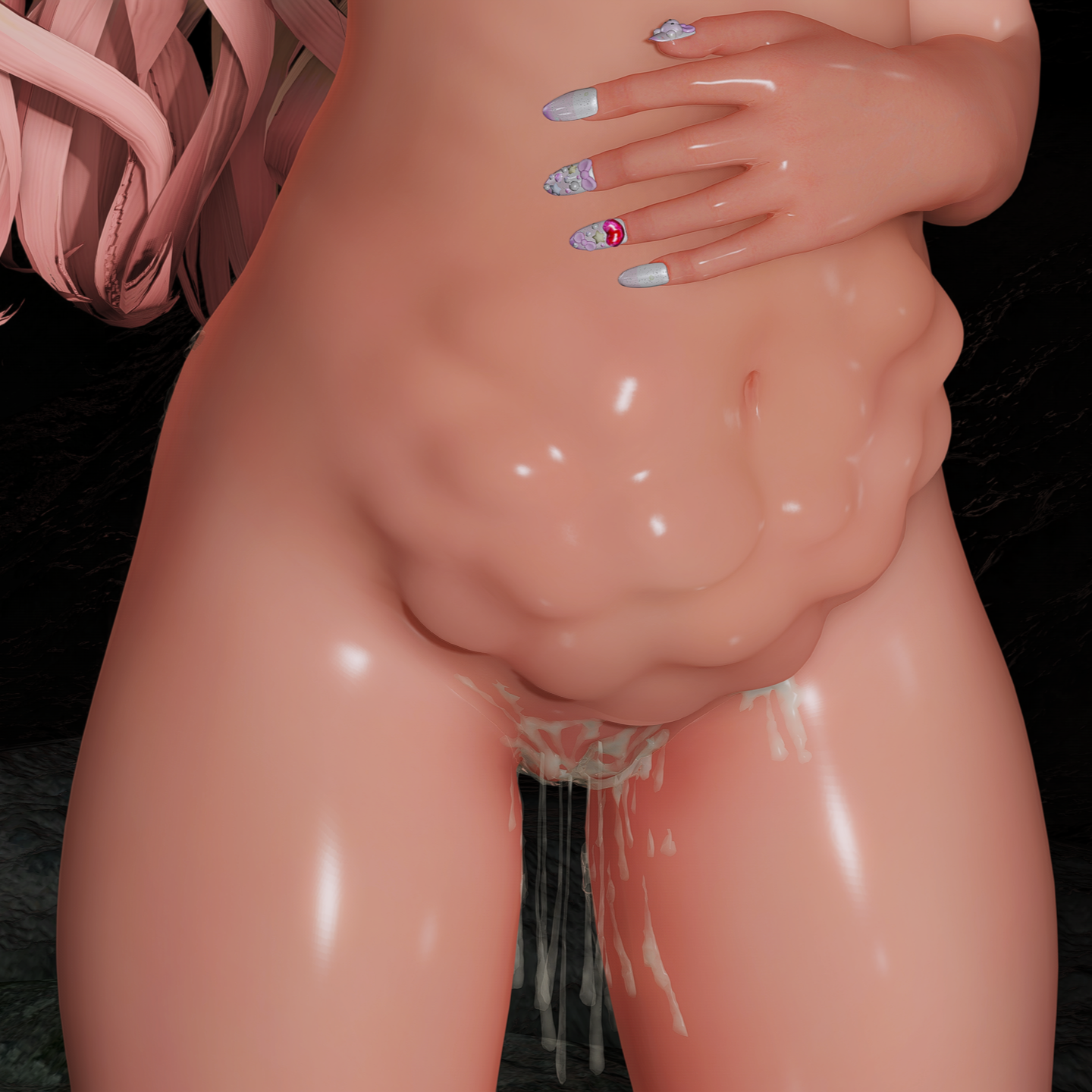
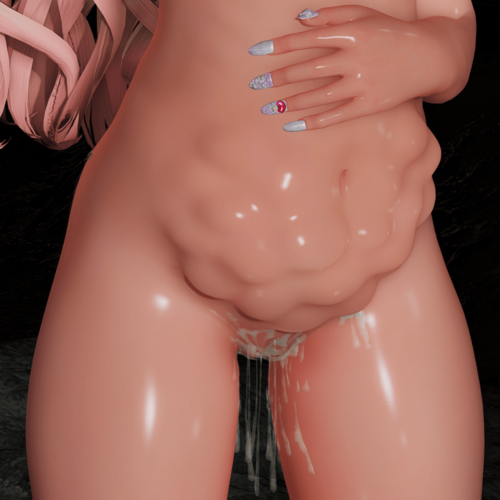
 (3BA/BHUNP/GT Softbody) OviBody - Reupload View File This is a re-upload of my Oviposition Resources mod. I originally took the mod down after receiving much harassment but am re-uploading the mod after encouragement from some friends. This mod does almost nothing on it's own and is intended to be used by other mods or for screen archery. What this mod does: This mod adds a visual effect to a character's belly for modders to implement when eggs have been laid inside them. See below Racemenu sliders: What you need: Your preferred body mod: CBBE 3BA or BHUNP or GT Softbody + All of their requirements!!! AND Photoshop or Paint.net or Mu Dynamic NormalMap How to use: Install the version of OviBody that matches your body mod. If using Mu Dynamic Normal Map skip to step 9 from here. Extract the Normal Map resources that match your body mod to a place you can easily access. Locate your femalebody_1_msn.dds from your skin or body mod and create a copy of it somewhere you can easily access. Open your new copy of femalebody_1_msn.dds from your skin or body mod, in Photoshop or Paint.net. Open your desired Oviposition belly overlay from OviBody Normal Map Resources in Photoshop or Paint.net. Copy the Oviposition belly overlay and paste it over your femalebody_msn.dds texture and save. You may want to mess with the alpha a bit to blend the belly into the skin nicely. In your mod manager... Create a new mod and create a folder structure that matches where you found femalebody_1_msn.dds. It usually looks something like (textures\actors\character\female\femalebody_1_msn.dds) Copy your new femalebody_1_msn.dds into your newly created mod, activate the mod and let it overwrite your body/skin mod texture. Open bodyslide and rebuild your body with sliders to match the Oviposition belly normal map you created. The sliders can be found at the bottom of the sliders list. I also recommend using the pregnancy belly slider for a nice effect. Load your game and enjoy! I highly recommend using this mod with Mu Dynamic NormalMap as it makes editing your sliders much easier and hassle free. This mod also supports the Erin Race out of the box. Just apply the normal maps in the same way by editing the femalebody_msn.dds located in the Erin race mod itself. GT Softbody info: If using the GT Softbody version of the mod you have three bodyslide options: GT_Softbody Ovibody, GT_SoftbodyUltra Ovibody, and GT_SoftbodyUltra (Sexlab only). GT_SoftbodyUltra Ovibody will have the best jiggle but could hit your performance pretty hard. If it tanks your performance please try using "GT_Softbody Ovibody". The Sexlab only version should be self explanatory, the body will only be used during Sexlab animations given you have the appropriate mcm settings. Please refer to the GT Softbody modpage for more info. #FREETHEANIMELOLIS Extra content: Ovibody with UBE Anus OviMovement: I did not make Ovimovement and have been ghosted by the original author for well over a year now. So I'm uploading the mod for use here. Requires: https://www.loverslab.com/files/file/35438-curse-of-life-alternate-pregnancy-mod Download: https://mega.nz/file/jqpVxTZK#SLeTVktwooWpOmyb57J7atnIQCSvpaXSNSNEQsGRMyc Permissions: If making a mod using these resources. Let me know, Oviposition content is few and far between, I love seeing it. You may under no circumstances make a UBE port of this mod. 3BA with UBE anus is however acceptable. Submitter ダッキー Submitted 09/15/25 Category Adult Mods Requirements CBBE 3BA, BHUNP or GT Softbody Photoshop, Paint.net or Mu Dynamic Normal Map Regular Edition Compatible Not Applicable Install Instructions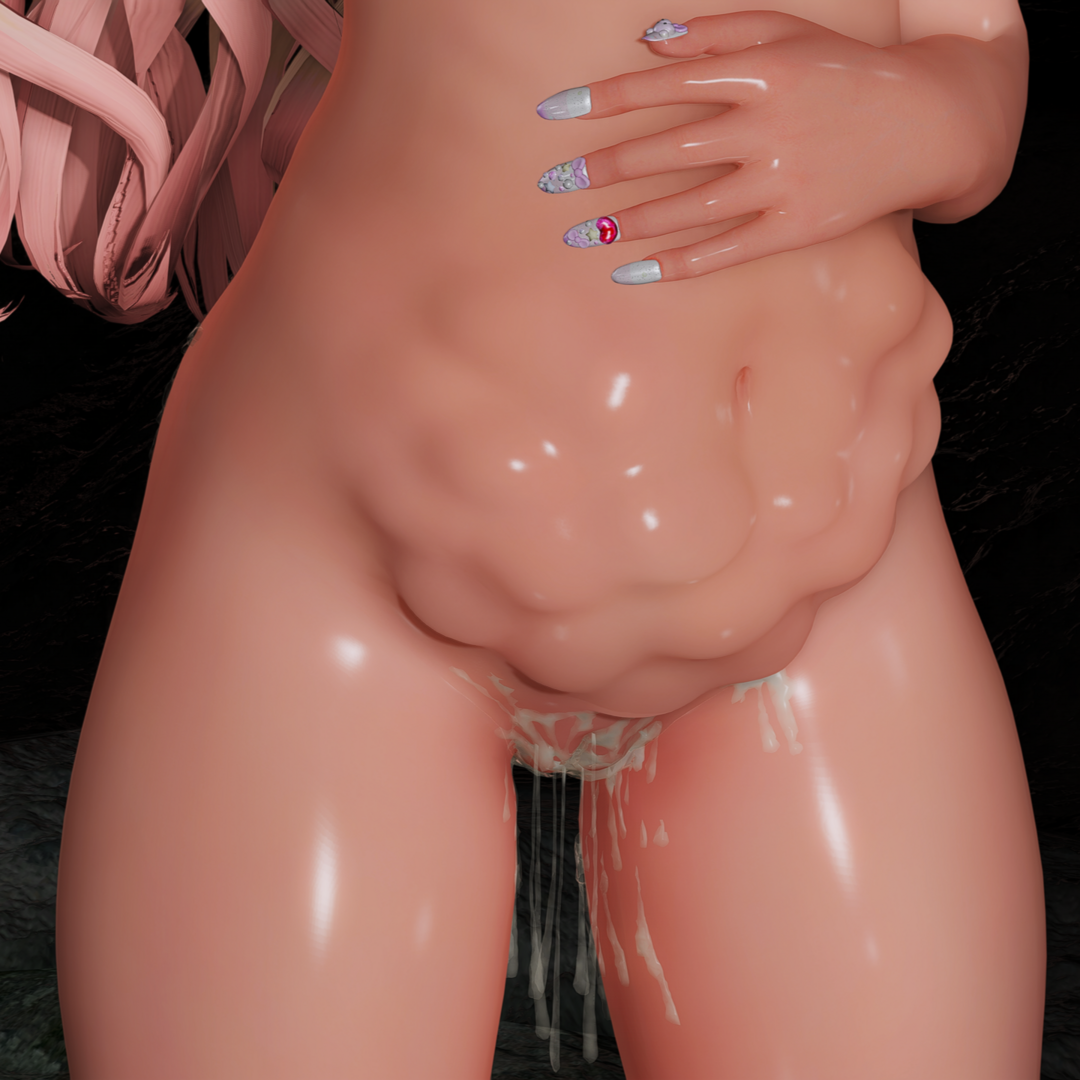

-
Version 1.2.0
10788 downloads
This is a re-upload of my Oviposition Resources mod. I originally took the mod down after receiving much harassment but am re-uploading the mod after encouragement from some friends. This mod does almost nothing on it's own and is intended to be used by other mods or for screen archery. What this mod does: This mod adds a visual effect to a character's belly for modders to implement when eggs have been laid inside them. See below Racemenu sliders: What you need: Your preferred body mod: CBBE 3BA or BHUNP or GT Softbody + All of their requirements!!! AND Photoshop or Paint.net or Mu Dynamic NormalMap How to use: Install the version of OviBody that matches your body mod. If using Mu Dynamic Normal Map skip to step 9 from here. Extract the Normal Map resources that match your body mod to a place you can easily access. Locate your femalebody_1_msn.dds from your skin or body mod and create a copy of it somewhere you can easily access. Open your new copy of femalebody_1_msn.dds from your skin or body mod, in Photoshop or Paint.net. Open your desired Oviposition belly overlay from OviBody Normal Map Resources in Photoshop or Paint.net. Copy the Oviposition belly overlay and paste it over your femalebody_msn.dds texture and save. You may want to mess with the alpha a bit to blend the belly into the skin nicely. In your mod manager... Create a new mod and create a folder structure that matches where you found femalebody_1_msn.dds. It usually looks something like (textures\actors\character\female\femalebody_1_msn.dds) Copy your new femalebody_1_msn.dds into your newly created mod, activate the mod and let it overwrite your body/skin mod texture. Open bodyslide and rebuild your body with sliders to match the Oviposition belly normal map you created. The sliders can be found at the bottom of the sliders list. I also recommend using the pregnancy belly slider for a nice effect. Load your game and enjoy! I highly recommend using this mod with Mu Dynamic NormalMap as it makes editing your sliders much easier and hassle free. This mod also supports the Erin Race out of the box. Just apply the normal maps in the same way by editing the femalebody_msn.dds located in the Erin race mod itself. GT Softbody info: If using the GT Softbody version of the mod you have three bodyslide options: GT_Softbody Ovibody, GT_SoftbodyUltra Ovibody, and GT_SoftbodyUltra (Sexlab only). GT_SoftbodyUltra Ovibody will have the best jiggle but could hit your performance pretty hard. If it tanks your performance please try using "GT_Softbody Ovibody". The Sexlab only version should be self explanatory, the body will only be used during Sexlab animations given you have the appropriate mcm settings. Please refer to the GT Softbody modpage for more info. #FREETHEANIMELOLIS Extra content: OviMovement: I did not make Ovimovement and have been ghosted by the original author for well over a year now. So I'm uploading the mod for use here. Requires: https://www.loverslab.com/files/file/35438-curse-of-life-alternate-pregnancy-mod Download: https://mega.nz/file/jqpVxTZK#SLeTVktwooWpOmyb57J7atnIQCSvpaXSNSNEQsGRMyc Permissions: If making a mod using these resources. Let me know, Oviposition content is few and far between, I love seeing it. You may under no circumstances make a UBE port of this mod. 3BA with UBE anus is however acceptable. -
 Skyrim SexLab - Sex Animation Framework v1.62 - UPDATED Jun 3rd 2016 View File Skyrim SexLab (SSL) v1.62 An adult animation framework This version of SexLab is for LE Edition ONLY For the newer SE / AE version, click here ----- Description -------------------------------------------------------------- Skyrim SexLab, is intended to serve as a unifying resource for modders to pull animations from to aid them in development of adult themed mods, without having to going through the complex scripting work it takes by themselves. A modder is provided with a wealth of tools and functions they can call that will aid them in creating their own mod. As it is intended as a resource mod that other mods can pull from to use for adult animations. This mod does NOTHING by itself, and requires a separate mod to make use of the resources provided. ----- Frequently Asked Questions ------------------------------------------- http://www.loverslab.com/topic/17711-sexlab-frequently-asked-questions-faq/ ----- Requirements ------------------------------------------------------------- Skyrim Script Extender (SKSE) REQUIRES SKSE 1.7.3 OR NEWER Fores New Idles in Skyrim (FNIS) REQUIRES FNIS 5.4.2 OR NEWER FNIS Creature Pack version 5.2 or newer is required only if you want creature animation support in SexLab, otherwise it is not required. If you get a warning in game about not having 5.2 installed despite having installed it. You have without exception, installed it incorrectly. You can either ignore the warning and keep using SexLab like normal if everything working anyway, or do the smart thing and figure out what's wrong with your FNIS install so the warning will leave you alone. SkyUI REQUIRES VERSION 5.0 OR NEWER If you dislike SkyUI for some reason, you can also install SkyUI-Away on top of it. It may work fine with older versions if you refuse to upgrade to 5.0 for whatever reason. You do so at your own risk. An actor skeleton mod such as XPMSE2 or XPMSE3 Unofficial Skyrim Legendary Patch OR the individual applicable patches Skyrim, Dawnguard, Dragonborn, and Hearthfire Unofficial Patch This is not a hard requirement and can be skipped, it has been known to fix some problems people have had related to SexLab however and there is little to no reason to not be using them anyway. If you choose to not use the Unofficial Patches for whatever reason, expect to be browbeat about not having them when posting your load order in the troubleshooting section. ----- Basic Installation Procedure ------------------------------------------ After properly installing SKSE, SkyUI, and FNIS as listed above, follow these steps. Download the latest full framework pack & install it using your mod manager of choice (Mod Organizer highly preferred.) Run the GenerateFNISforUsers.exe tool. If you have a custom animation skeleton installed (very likely, if you don't you should. See: XPMSE2 or XPMSE3) make sure you check the "Skeleton arm fix" patch. Click the big button that reads "Update FNIS Behavior" You should see a line that says "Reading SexLab ..." if not you've done something wrong. DO NOT ignore any warnings or errors you see in the FNIS window. Activate the SexLab.esm file in your list of active mods. Load or start a new save game in Skyrim and navigate to the Mod Configuration menu titled "SexLab" Check that you meet the requirements on the left pane and then click the Install option in the top right. NOTE: Some of the checks you'll see there are only soft dependencies, or can be a false-negative. If the Install button is clickable for you, just go ahead and continue. [*]Close all menus and stand still until the install finishes, it can take a few minutes. ----- Basic Update Procedure ------------------------------------------------- Download the latest full framework archive, if you are using a version older than 1.60, you will need the full archive, otherwise you will only need the update patch. Extract the updated framework/patch into your Skyrim's data folder, or if using Mod Organizer (like you should be) then merge the files ontop of an existing MO mod install for SexLab Framework. (optional, but recommended for safest upgrade) Disable ALL SexLab related mods except for SexLab.esm and any that are absolutely required or disabling will mean losing progress on in some way. Navigate to your Skyrim's data/tools/GenerateFNIS_for_Users folder and run the GenerateFNISforUsers.exe utility. If you have a custom animation skeleton installed (if you dont, you should) make sure you check the "Skeleton arm fix" patch. Click the big button that reads "Update FNIS Behavior" You should see a line that says "Reading SexLab ..." if not you've done something wrong. Load your save game and you should see a notification that SexLab is updating and/or installing, it will then go through the update process. If you were using a version of SexLab such as 1.59c or older, you will not get this notification and will instead need to go into the SexLab MCM and click the Install button. [*]Wait 1-2 minutes, until you see a notification that says SexLab has finished updating and/or installing [*]Wait another 30 seconds or so and then perform a quick test animation either via the SexLab MatchMaker mod or by starting one via the animation editor. [*]Assuming the test animation was successful, save your game with the update now fully applied, you should see the appropriate version number listed on the last page of the SexLab MCM. [*](optional, but recommended for safest upgrade) if you followed step 3, you should now reinstall all the SexLab mods you disabled, ensuring you are using the latest version of each. For best results reinstall them one at a time and make sure they are functional with the new version of SexLab before reinstalling the next one. ----- Creature Use Instructions ----------------------------------------- If you want to use creature animations, you will need to follow some extra installation instructions. Install the latest FNIS and the latest FNIS Creature Pack if you have not yet, both of which are available on the FNIS Download page Run GenerateFNISforUsers and click the big "Update FNIS Behavior" button. After it finishes patching, you should see 2 lines, "Create Creature Behaviors ..." and BELOW that "Reading SexLabCreature ..." Load your Skyrim save Navigate to the SexLab Mod Configuration menu and go to the first available settings page, "Animation Settings" Check the box for "Allow Creature Animation" so that it is in a toggled on state (the box is filled instead of empty) You will need to install mod that lets you start animations with creatures, as SexLab Framework does not start any animations by itself. SexLab MatchMaker works with creatures, and is the more straight forward of means to start creature animations. For others, look through the download page for SexLab mods with creature support ----- Suggestions ----------------------------------------------------------------- Since SexLab is largely a sex animation mod, you will likely want nude male and female bodies. While the mod does come with a nudesuit option to use in place of installing actual nude body mods, that remains an imperfect solution and is provided only for the sake of completeness. It's use is actually strongly discouraged. I would remove the feature entirely if I didn't know a handful of people who throw a fit. There are many body mods to choose from, personally I use and suggest UUNP / CBBE Bodyslide and Schlongs of Skyrim Default/Average for males. If for some weird reason you absolutely refuse to use a real body replacer and insist on using the horrible nudesuits option instead, you can enable the option in SexLab's MCM settings and then install the default meshes and textures for it here: SexLab Default NudeSuit SexLab is a very script heavy mod, if you come across an issue in-game related directly to SexLab, the very first place you should look is unquestionably the Papyrus debug log, with just the tiniest amount of modding know how you should be able to track down the culprit from just glancing over the log, if you can't decipher it than it should be unquestionably the first thing you are posting in a request for help. A BBP enabled skeleton is also useful, as many of the animations include BBP support, though it is optional it is STRONGLY recommended. I'd suggest XPMSE2 or XPMSE3 There is support for other strapons for females to use, but you will need to download and install them separately and run the "Rebuild Strapon List" option from the menu's Rebuild page if you install or remove any after loading the mod. The supported strapon mods are aeonflux88's strapon, Horker Tusk, Futa Equippable, Cozy & Rebels Equippable TG, & SOS Equipable Schlong If you want First Person animations, I highly recommend using the Immersive First Person View mod by h38fh2mf Stop using Nexus Mod Manager or no manager at all and start using Mod Organizer. In the likely event that you run more than just a handful of different mods, install and run LOOT when installing and updating mods. ----- Uninstalling ---------------------------------------------------------------- To cleanly uninstall the mod, perform the following steps. With your current installation, go into MCM and select the "Rebuild & Clean" page. Click on the row that says "Clean System" You will be prompted to close all your current menus, do so. After closing your menus and being told the system clean is complete, save your game. Perform the uninstall procedure for any 3rd party SexLab mods you have installed. Quit the game. Disable SexLab.esm and any SexLab mods you have enabled in your load order ----- Changelog ---------------------------------------------------------------- More detailed changelog at http://git.loverslab.com/sexlab/framework/commits/master v1.62: User Relevant Changes / Additions: Increased install limit of animations to 500 (up from 375) Added option to entirely remove any use of scaling applied to actors anywhere in the sexlab. May cause or fix some graphical glitches for some people or prevent the occasional scaling related CTD. [*]Holding Shift+End while outside of a sexlab animation will now forcibly end all active sexlab animations being done by NPCs. Functionally the same as opening the SexLab MCM and clicking the debug option to stop all scenes, but with the bonus of not having to navigate through the MCM to do it. [*]Added an enable toggle to the animation editor in the MCM The animation editor in the MCM will default to showing the currently playing animation for player Makes it easier to disable an animation you don't like without having to find what it's name is and hunt it down in the MCM. [*]Added a count of how many character animations, creature animations, voices, and expressions sexlab has registered so far. In the MCM debug/rebuild page. Lets you see how close you are to approaching the limit of 500. [*]Added Dragonborn and Dawnguard beds to sexlabs list of automatically detected beds when starting an animation. [*]When setting the player or NPC's voice setting in the MCM, any currently playing animations involving them will automatically update to use their newly set voice. Makes it much easier to test/sample various voices and find one you like. [*]The name of the animation being played is now only sent to your notifications if you have debug mode enabled. It is otherwise only shown in your console. [*]Creatures and Characters can no longer have the other's voice applies to them. Werewolves can only use the werewolf voice type if they are currently a werewolf. [*]SexLab no longer checks for a creature pack install, since they are no longer separate downloads. [*]Various other major and minor bug fixes and performance improvements. Mod Creator Relevant Changes / Additions: Added a method of registering animations via JSON files (similar to SLAL) See /SKSE/Plugins/SexLab/Animations for details A tool to generate the JSON files based of an animator's hkx files was originally planned, unsure if I'll get to it now or not though. [*]Added functions for adding custom bed forms to sexlabs bed list, including defining custom offsets to use for aligning to that bed and/or defining whether or not it's a bedroll, double, or single bed. Intended for beds in name, but could easily be used for helping define animation alignment for furniture other than beds as well. [*]Added modevent "SexLabActorGenderChange(form actorform, int gender)" that gets sent whenever an actor has their gender/futa-ness overridden or override/futa-ness removed. [*]Added some requested config property accessors to the main API script related to creatures. [*]Fixed some bugs related to making an actor silent during a scene. v1.61b: FIXED: Animation starting a few feet floating in the air. FIXED: Actors "jittering" during animation FIXED: Player being stuck while trying to move the scene FIXED: Free camera being disabled when changing animations during the 1st stage NEW: Export/Import settings now also includes your customizations in the Strip Editor. v1.61: NEW: Toggle to enable actors walking to the location of the scene instead of instantly teleport NEW: Support for creature voices + some default creature voices for the basic creature types NEW: The cum texture from animation can now double up on a single location. If a character already has the vaginal cum texture applied, the 2nd time it's applied it'll apply a messier more cum filled version NEW: A toggle option to set whether or not newly encountered NPC's will have their sex stats seeded or initialized as empty NEW: Can now set your targeted actor's forced gender from the SexLab MCM as well NEW: When swapping between actors to adjust the location for in an animation, the newly selected one will glow briefly to indicate which you now have selected NEW: Option to fully disable the use bed prompt / disable only when player is victim / always ask NEW: Frostfall 3.0 support, exposure will automatically pause during animation so you don't freeze to death. NEW: Added support for NiOverride High Heels under the same toggle that previously handled only HDT High Heels. ALTERED: AP animations are now disabled by default ALTERED: Creature animations are no longer a separate pack, because I'm tired of dealing with people who can't figure it out API: Further documentation and guides added to SexLabFramework.psc for modders API: Lots of new API additions for modders, most of which were requested by various modders at some point. Sorry if I forgot the one you requested - remind me again FIXED: Aggressive scenes wrongly getting non-aggressive animations or not being tagged as aggressive internally FIXED: Poor default positioning for various animations when played on a bed FIXED: Lip Sync has been heavily altered and is now more compatible with expressions FIXED: Various other bugs users have reported that I can't fully remember right now FIXED: Orgasm triggering instantly when scene starts and separate orgasms are enabled FIXED: Various issues related to async animations not starting properly, with some actors not playing their animation while others do FIXED: Lots of other stuff v1.60.2 hotfix 2: Added back in a copy of MfgConsoleFunc and reverted expression functions to use them instead of SKSE's native functions. Added a message in the MCM strip options to inform you what item you currently have equipped in a slot when you hover it Added a message in the MCM strip editor to inform you what slot masks an item uses when you hover over it. Raised the number of possible animations in a single scene from 100 to 125 Fixed an issue with character scale not being reset properly at the start of and during animation. Fixed an issue with weapons getting re-equipped in the wrong hand after animation. Fixed an issue with orgasm effects not triggering properly under certain conditions. Fixed an issue that caused items flagged in the strip editor as always/never strip to not be treated property during stripping. Fixed an issue with PapyrusUtil 3.0 that sometimes caused CTD during save load Fixed a bug with aggressive animation selection (thanks to user Random of Amber) Expanded the install fatal error to be more clear and provide some suggestions. Some misc performance improvements throughout the MCM and animation startup. v1.60.1 hotfix 1: Set actor storage preloading to no longer hold up the install process, and only occur once Added a check for if sexlab's files/quest have been overridden and prevent attempts to install with an error message Added a new schlong adjusting hotkey. Defaults to the 'C' key. v1.60: The SKSE requirement has been bumped up to 1.7.3 beta (or newer if available by the time you're reading this) is now required. The FNIS requirement has been bumped up to 5.5 or newer On new or old installs, you must now manually start SexLab's install process from the SexLab MCM install page. If you wish to use creature animations, the creature animations are now in a separate archive and is no longer included by default. If you for some crazy reason insist on using the nudesuit's option, the meshes and textures for it have also been removed from the default archive. You can find a link to these meshes and textures in the main post, or by clicking here Animation, creature animation, voices, and expressions are all now capable of registering up to 350 unique items each - can be easily expanding in the future if we ever bump up against the limit again. 14+ new animations by various authors such as Leito, 4uDIK, 3jiou, Mitos, & Arrok. These are animations previous in the NSAP pack, more to be carried over to the default pack in future updates. New item strip editor in MCM. Select items you or a target actor have in their inventory that should always or never be stripped at the start of a scene, regardless of other strip settings. Creature animation scan now have specific genders defined for their creature roles. By default all genders are considered the same gender, this can be toggled via the new creature gender option in the MCM. The player and NPCs can now optionally have separate, multiple, orgasms as their enjoyment stat builds up over the course of an animation. This is an optional effect enabled in addition to the traditional orgasm effect on the last stage of animation that has been in previous versions. A new animation setting option in the MCM to forcibly filter out non gay or lesbian animations in a scene when appropriate. So for example, 2 females in a scene will generally not play a regular animation with strapon if other animations are available to them. Can toggle the players override gender directly from the SexLab animation settings MCM page, so players can easily set them selves as transgender, with "female" player characters being treated as "male" in the eyes of SexLab, or vice versa. You can now toggle the default behavior of the adjustment hotkeys between adjusting all stages (default) or only the currently stage being played. Whichever you set it to will flip the modifier ctrl modifier hotkey to perform the opposite when held in combination. When targeting an actor and viewing their stats in the SexLab Diary/Journal, you can press the reset stats button once to complete zero all their skills, and then when pressed a second time while all stats are still zero in order to re-seed their starting stats. A new "limited strip" option (disabled by default) that will cause the actors in a scene to default to using the foreplay/limited strip options you have set, if ALL animations in the scene being played consist of only oral and foreplay animations. HDT Hight Heel effects detected and disabled after character strip to remove the height offset. Automatically enabled if you have HDT HighHeels installed, but can be turned off in the MCM if you prefer actors to keep their height offset during SexLab animation. Pressing the Realign actors hotkey is now more forceful, making all actors completely reset their animation, re-calculate their positions, and start the current stage's timer over from the start. Holding down the rotate scene hotkey will now continually rotate the actors until let go, just as the other adjustment hotkeys have done for a few versions now. Much improved (in my experience) syncing between separate actor animations. Many, many bug fixes and performance improvements than I could possibly remember or even attempt to name. TONS of things not listed here intended for modders to do new things with, will be more clear once the updated API documentation is released. ----- Modder's Guide ------------------------------------------------------------- A modders guide to using the API can be partially found in scripts/sources/SexLabFramework.psc as well as here: http://git.loverslab.com/sexlab/framework/wikis/home WARNING: The API docs are currently fairly outdated in some spots for v1.60. It should be fine in most spots, but if you have any questions feel free to private message me or ask somewhere else and I'll answer soon as I'm able. Updating them is my top priority right now. If you are a mod developer looking to develop a mod using SexLab, feel free to contact me via private message and I will do everything I can to help you along and if possible upgrade the framework to fit your needs. ----- Future Plans ---------------------------------------------------------------- See dedicated development thread ----- Credits ----------------------------------------------------------------------- Scripting & Project Owner: Ashal SKSE Plugin: kapaer - Mfg Console h38fh2mf Ashal Animations: Unknown Modders - http://skup.dip.jp Arrok - BBP Animations JoshNZ - Animated Prostitution Mithos Blac945 Zynsch TDA Zynsch Bleagh PanicForever Athstai - Dark Investigations 3jiou - http://www.loverslab.com/topic/38317-3js-animations/ Mitos - http://www.loverslab.com/topic/42217-mitos-animation-shop/ Leito86 - http://www.loverslab.com/topic/39465-animations-by-leito-12915-new-animations/ 4uDIK - http://www.loverslab.com/topic/38934-аnimations-for-sexlab/ FalloutBoy2 - http://www.loverslab.com/topic/39160-animation-complete/ Audio: Lovers with PK Setekh Mesh/Textures: Calyp - Strapon oli3d - Bukkake Shaders 4uDIK1 - Male Nudesuit Dimon99 - Female Nudesuit Vacaliga - Stacking cum textures Localization: aravis7 - French CGi - German mswind - Chinese anonymous - Japanese fedim - Russian sh1ny - Russian holtof55 - Russian Huili - Russian RockMic - Italian NOTE: If you have an updated translation file or would like to translate or update one of the existing translations; send it to me or let me know if you have any questions about how. ----- Permissions ----------------------------------------------------------------- You must ask my permission before distributing this base framework on any site other than LoversLab.com The animations themselves belong to the individual modders who made them, I am using them solely by their permission and/or stated open use policy. If you wish to repurpose them else where it is there permission you need and not mine. Unless you are contributing to the Git repository development branch, you are not allowed to edit any of the included scripts and resources except to translate the mod into another language. If you wish to translate the framework into another language, go right ahead, no need to ask. If you need it, I will provide you with as much support as I can to assist you with the translation process. Afterwards if you want to send me the translated file and I will package it with the releases, or you are free to release the translation file, and the translation file alone, however you wish. ----- Contacting Me -------------------------------------------------------------- I will provide direct support to people via email and private message ONLY if you are a modder using the framework in your mod. People seeking support for using the mod contacting me this way will be, without hesitation, completely ignored. If you need support for the framework, use the thread or support section, I will answer such questions there and only there. --------------------------------------------------------------------------------------- xx Submitter Ashal Submitted 04/24/2013 Category Framework & Resources Requirements SKSE 1.7.3+, FNIS 6.0+, SkyUI 5.0+ Special Edition Compatible No
 -
 ZaZ Animation Pack 9.2 SSE - CBBE and UUNP - by XTH SSE View File ZaZ Animation Pack 9.2 - Skyrim Special Edition conversion !!! Script fix at the very bottom !!! ================================================================ !!! READ THIS FIRST !!! The file you download here is NOT the mod. It is a small text file with the download links. ZAP is 7.0 GB (CBBE) and 8.9 GB (UUNP) - far too large to host on LoversLab, so the archives live on pixeldrain. Download the file here, open the text inside, use the link for the body version you want. Same way the original ZAP is hosted. ================================================================ !! ZaZ Animation Pack 9.2 is NOT backwards compatible and cannot be used to satisfy a dependency on any version of ZAZ 8 !! (Thanks to Talesien for pointing that out) This is not my mod. ZAP was made by ZaZ, XaZ and t.ara over more than a decade. All I did was convert version 9.2 so it runs on Skyrim SE, and fix a handful of files that were already broken in the original. The original is here and you should look at it first: https://www.loverslab.com/files/file/23102-zaz-animation-pack-zap/ WHAT THIS IS ZAP is a framework and animation package. It does nothing on its own. It is a modder's resource: furniture, restraints, animations, poses and building kits that dozens of other mods depend on. Both body versions are available, same conversion, pick one: CBBE-HDT UUNP-HDT WHAT WAS CONVERTED 2002 .hkx 32-bit packfiles, Havok tagfiles and XML -> 64-bit 6548 .nif BS 83 -> BS 100 (CBBE, 6540 in the UUNP build) .esm already shipped as Form 44 - left untouched Every hkx and nif was checked after conversion. No failures, no truncated files. WHAT WAS FIXED ON TOP Four normal maps ship as 0-byte files in the original pack: Textures\ZaZ\002Wood\BedWood01_n.dds Textures\ZaZ\002Wood\nobleBedWood01_n.dds Textures\ZaZ\018Beds\BedWood01_n.dds Textures\ZaZ\018Beds\nobleBedWood01_n.dds Empty normal maps make the wooden beds render with broken lighting. Rebuilt from the diffuse textures beside them, so the relief follows the actual wood grain instead of being flat. Same format and resolution as the originals. Three leftover 0-byte working files were removed. Nothing references them - I checked every mesh and the plugin: Leggings_Heights222222.dds, Leggings_Heights2222222.dds, ps366F.tmp LEFT AS FOUND Two meshes are in Gamebryo 20.0.0.5 (Oblivion) format and cannot be loaded by any version of Skyrim. They were already dead weight in the LE release and I left them alone rather than decide for the authors: ...\ZaZ - Clutter\...\artrapspikepit01OBLIVION.nif ...\Zaz - Prison Pack\prisoncellchains01.nif REQUIREMENTS: A behaviour engine - any one of these: FNIS SE https://www.nexusmods.com/skyrimspecialedition/mods/3038 Nemesis https://www.nexusmods.com/skyrimspecialedition/mods/60033 Pandora (Recommended) https://www.nexusmods.com/skyrimspecialedition/mods/133232 XPMSSE skeleton (or your skeleton of choice) https://www.nexusmods.com/skyrimspecialedition/mods/1988 SexLab SE - listed as a requirement by the original mod. The links in the original readme pointed at the old Skyrim LE Nexus and no longer apply. The readme inside the archive has been updated. ADULT CONTENT WARNING (from the original readme) THE ZAZ-ANIMATION-PACK IS A FULLY ADULT ORIENTED MOD. This mod may contain full nudity, BDSM, fetish and sexual content. Don't download it if that is not your taste or you are not allowed to. This is t.ara's work, not mine. The original page states that the content may not be used or redistributed without express permission. I have sent t.ara a message about this upload. She has not been active on LoversLab since September 2025 and the SSE version announced on her page has not moved since 2022, which is why this conversion exists at all. If t.ara objects, this comes down immediately - no discussion needed, just say the word. Same goes for any of the other authors in the credit list whose assets are in here. Do not make money with this content. That was t.ara's condition and it is a good one. ---------------------------------------------------------------- FIXES ---------------------------------------------------------------- Whipping Script There is a second download here, "Whipping Script Fix". It is a 22 KB patch, not another copy of the pack. Install it after ZAP 9.2 and let it overwrite, then run your behaviour engine again. It fixes the papyrus log spam from the whipping system - a property in zazWhp_NPCscript still asks for a class that was renamed away, so it never binds and the error repeats forever. Comes from the original pack and is in the LE version too. BODYSLIDE Fixed. See the separate download "BodySlide Update (CBBE)". The slidersets shipped with the CBBE slider list of the time, 55 sliders where CBBE SE has 137. The missing ones were exactly what heavy presets drive, which is why clothing didn't follow them. All 85 sets were rebuilt against CBBE Body Physics and refitted. Not perfect - a few parts are slightly stretched and some don't line up exactly. They work with modern presets now, which they didn't before. ---------------------------------------------------------------- KNOWN ISSUE - HDT CHAINS ---------------------------------------------------------------- Chains, cuff chains and the dangling jewellery don't move. They hang static instead of swinging. Inherited from the LE original. The meshes still carry the LE physics identifier "HDT Havok Path" where SSE needs "HDT Skinned Mesh Physics Object", and the physics configs are Havok packfiles from HDT-PE, which SMP can't read at all. So nothing ever gets attached. 114 meshes are affected - chains, cuffs, collars, ragdolls and the soulgem jewellery. Renaming isn't enough, every one of them needs a new SMP config, so I'm writing a tool for it. No date on that. Nothing breaks in the meantime, the items just don't swing. ZAP 9.2 SSE Whipping Script Fix.zip Submitter XTH SSE Submitted 09/01/26 Category Adult Mods Requirements A behaviour engine: FNIS/NEMESIS/PANDORA, XPMSSE skeleton, SexLab SE Regular Edition Compatible No Install Instructions Pick ONE body version, CBBE or UUNP. Do not install both. Install with Vortex or Mod Organizer 2. Activate ZaZAnimationPack.esm in your plugin list. Run your behaviour engine and let it patch. Run it again after every animation mod you add or remove. Not a light install - roughly 19 GB unpacked. Check your disk space before you start. Upgrading from the LE version: remove the old one completely first. Do not merge the two.
 -
Version 1.0.1
4810 downloads
ZaZ Animation Pack 9.2 - Skyrim Special Edition conversion !!! Script fix at the very bottom !!! ================================================================ !!! READ THIS FIRST !!! The file you download here is NOT the mod. It is a small text file with the download links. ZAP is 7.0 GB (CBBE) and 8.9 GB (UUNP) - far too large to host on LoversLab, so the archives live on pixeldrain. Download the file here, open the text inside, use the link for the body version you want. Same way the original ZAP is hosted. ================================================================ !! ZaZ Animation Pack 9.2 is NOT backwards compatible and cannot be used to satisfy a dependency on any version of ZAZ 8 !! (Thanks to Talesien for pointing that out) This is not my mod. ZAP was made by ZaZ, XaZ and t.ara over more than a decade. All I did was convert version 9.2 so it runs on Skyrim SE, and fix a handful of files that were already broken in the original. The original is here and you should look at it first: https://www.loverslab.com/files/file/23102-zaz-animation-pack-zap/ WHAT THIS IS ZAP is a framework and animation package. It does nothing on its own. It is a modder's resource: furniture, restraints, animations, poses and building kits that dozens of other mods depend on. Both body versions are available, same conversion, pick one: CBBE-HDT UUNP-HDT WHAT WAS CONVERTED 2002 .hkx 32-bit packfiles, Havok tagfiles and XML -> 64-bit 6548 .nif BS 83 -> BS 100 (CBBE, 6540 in the UUNP build) .esm already shipped as Form 44 - left untouched Every hkx and nif was checked after conversion. No failures, no truncated files. WHAT WAS FIXED ON TOP Four normal maps ship as 0-byte files in the original pack: Textures\ZaZ\002Wood\BedWood01_n.dds Textures\ZaZ\002Wood\nobleBedWood01_n.dds Textures\ZaZ\018Beds\BedWood01_n.dds Textures\ZaZ\018Beds\nobleBedWood01_n.dds Empty normal maps make the wooden beds render with broken lighting. Rebuilt from the diffuse textures beside them, so the relief follows the actual wood grain instead of being flat. Same format and resolution as the originals. Three leftover 0-byte working files were removed. Nothing references them - I checked every mesh and the plugin: Leggings_Heights222222.dds, Leggings_Heights2222222.dds, ps366F.tmp LEFT AS FOUND Two meshes are in Gamebryo 20.0.0.5 (Oblivion) format and cannot be loaded by any version of Skyrim. They were already dead weight in the LE release and I left them alone rather than decide for the authors: ...\ZaZ - Clutter\...\artrapspikepit01OBLIVION.nif ...\Zaz - Prison Pack\prisoncellchains01.nif REQUIREMENTS: A behaviour engine - any one of these: FNIS SE https://www.nexusmods.com/skyrimspecialedition/mods/3038 Nemesis https://www.nexusmods.com/skyrimspecialedition/mods/60033 Pandora (Recommended) https://www.nexusmods.com/skyrimspecialedition/mods/133232 XPMSSE skeleton (or your skeleton of choice) https://www.nexusmods.com/skyrimspecialedition/mods/1988 SexLab SE - listed as a requirement by the original mod. The links in the original readme pointed at the old Skyrim LE Nexus and no longer apply. The readme inside the archive has been updated. ADULT CONTENT WARNING (from the original readme) THE ZAZ-ANIMATION-PACK IS A FULLY ADULT ORIENTED MOD. This mod may contain full nudity, BDSM, fetish and sexual content. Don't download it if that is not your taste or you are not allowed to. This is t.ara's work, not mine. The original page states that the content may not be used or redistributed without express permission. I have sent t.ara a message about this upload. She has not been active on LoversLab since September 2025 and the SSE version announced on her page has not moved since 2022, which is why this conversion exists at all. If t.ara objects, this comes down immediately - no discussion needed, just say the word. Same goes for any of the other authors in the credit list whose assets are in here. Do not make money with this content. That was t.ara's condition and it is a good one. ---------------------------------------------------------------- FIXES ---------------------------------------------------------------- Whipping Script There is a second download here, "Whipping System Fix". It is a 1 MB patch, not another copy of the pack. Install it after ZAP 9.2 and let it overwrite, then run your behaviour engine again. It fixes the papyrus log spam from the whipping system - a property in zazWhp_NPCscript still asks for a class that was renamed away, so it never binds and the error repeats forever. Comes from the original pack and is in the LE version too. BODYSLIDE Fixed. See the separate download "BodySlide Update (CBBE)". The slidersets shipped with the CBBE slider list of the time, 55 sliders where CBBE SE has 137. The missing ones were exactly what heavy presets drive, which is why clothing didn't follow them. All 85 sets were rebuilt against CBBE Body Physics and refitted. Not perfect - a few parts are slightly stretched and some don't line up exactly. They work with modern presets now, which they didn't before. ---------------------------------------------------------------- KNOWN ISSUE - HDT CHAINS ---------------------------------------------------------------- Chains, cuff chains and the dangling jewellery don't move. They hang static instead of swinging. Inherited from the LE original. The meshes still carry the LE physics identifier "HDT Havok Path" where SSE needs "HDT Skinned Mesh Physics Object", and the physics configs are Havok packfiles from HDT-PE, which SMP can't read at all. So nothing ever gets attached. 114 meshes are affected - chains, cuffs, collars, ragdolls and the soulgem jewellery. Renaming isn't enough, every one of them needs a new SMP config, so I'm writing a tool for it. No date on that. Nothing breaks in the meantime, the items just don't swing. ZAP 9.2 SSE Whipping System Fix.zip -
Racial Support Mod Template/Resource View File Warning: This is NOT a mod for players! This is a modder's resource. It is for MODDERS. THIS MOD WILL CRASH ON LOAD IF YOU TRY TO PLAY WITH IT OUT OF THE BOX! THIS IS INTENTIONAL! YOU HAVE BEEN WARNED. With this warning out of the way, it's time to explain what this is: This is an all-in-one template and resource for any modder wishing to add racial supports for sexbound so that one does not need to go hunting around for several mods to unpack just to see how it's done. Included are: A sprite sheet (human) to use as an example/starting point. POV Sprite Sheet to work with (again, human, from the Complete Poses for POV Redux mod by Kirz). Bed and table example (avian bed and table) for making/converting beds and tables to loungable/sb compatible ones. Dialogue files (both a blank file and an advanced file) pregnancy patch (for compatible species) sexbound.config patch instructions on what to do file with links to helpful tools to get you started. Submitter rylasasin Submitted 10/30/2025 Category Starbound
-
Version N/A
282 downloads
Warning: This is NOT a mod for players! This is a modder's resource. It is for MODDERS. THIS MOD WILL CRASH ON LOAD IF YOU TRY TO PLAY WITH IT OUT OF THE BOX! THIS IS INTENTIONAL! YOU HAVE BEEN WARNED. With this warning out of the way, it's time to explain what this is: This is an all-in-one template and resource for any modder wishing to add racial supports for sexbound so that one does not need to go hunting around for several mods to unpack just to see how it's done. Included are: A sprite sheet (human) to use as an example/starting point. POV Sprite Sheet to work with (again, human, from the Complete Poses for POV Redux mod by Kirz). Bed and table example (avian bed and table) for making/converting beds and tables to loungable/sb compatible ones. Dialogue files (both a blank file and an advanced file) pregnancy patch (for compatible species) sexbound.config patch instructions on what to do file with links to helpful tools to get you started.