Search the Community
Showing results for tags '3bbb'.
Found 7 results
-
 [SE] CBBE HDT Piercing Sets - Bodyslide Conversion for 3BBB View File I wanted to use the piercings with the SE version of Skyrim but noticed a bit late they were not yet adapted to SMP and since I wanted them I red some guides on bodyslide/outfit studio and attempted to do the conversions myself, so for other people that would like to use them with CBBE 3BBB and SMP, here are my conversion attempts. (You will still require the meshes, textures and other files from CBBE HDT Piercing Sets) This is my first conversion so it may contain a lot of errors, please go easy on me :(, any errors I made just report them and I'll try to fix them as soon as I can. What was changed - All meshes optimized for Skyrim SE. - All nipple piercings were realigned to the nipples. - Some labia, navel and nipple piercings were adjusted in rotation/position to avoid clipping with the body. - Bones on the nipple piercings were replaced with the 3BBB ones, it will work with SMP and CBPC ?. - Ported needed files to SSE. Instructions Using Mod Organizer: - Install CBBE HDT Piercing Sets - Install this mod - Make sure this mod sits below the original in the Mod Order - Build all the piercings to your favourite body preset* Manually OR Any mod manager that install directly to data: - Install CBBE HDT Piercing Sets - Install this mod (Dump all to the 'data' folder if manually, overwrite everything if asked) - Build all the piercings to your favourite body preset* * When building the piercings in outfit studio, they will all be prefixed with "[SE 3BBB]" for ease of search (Look at the 2nd screenshot for reference). * Don't forget to build all the piercings you want to use to your preset The outfits can be found in the groups: - [SE 3BBB] AH1 Piercings - [SE 3BBB] Newmiller Piercings - [SE 3BBB] SED7 Piercings Obtaining the piercing in game: - Using console commands or mods like AddItemMenu - Crafting the piercings at a forge or having NPCs craft them (Honed Metal - SSE) - Buying the piercings from vendors if you chose extended changes during installation (PROBABLY WILL REQUIRE BASHED PATCH) * Radiant Raiment in Solitude for SED7 Piercings * Fralia in Whiterun market for Newmiller Piercings (except spikes) * Kerah in Markarth market for AH1 Piercings * Madesi in Riften market for Newmiller spikes * Any Khajiit caravan may hold some piercings of any set Notes - There may be slight differences as many corrections were made manually (specially belt and neck chains >.<). - Labia piercings may not be very correct since the body shape with hdt pussy changed a bit since the original piercings and I didn't had any reference for the positions. - If you have mods that alter jewellery merchants or caravan containers, the vendor lists will probably not work as expected and a bashed patch will be required. - I couldn't create an outfit group with the piercings because the slider presets disappear, and I don't understand why this happens when the piercings are grouped, however this makes it impossible to build the piercings for the preset you want, so I ungrouped all piercings for now. - I couldn't adjust the belt, neck & nipple chain piercings from Newmiller without deforming the models, so I'm leaving those 8 piercings for later, feel free to adjust them yourself if you would like to :D. Requirements - CBBE SMP (3BBB) - OR CBBE 3BBB - BodySlide and Outfit Studio - CBBE HDT Piercing Sets Future Plans Maybe add SMP to the piercings' chains, I thought of that while doing the conversions but don't have the know how right now. Besides this, only fixing stuff, this is pretty much final :P. Acknowledgements Much thanks to Skeuomorph for the HDT conversions I used to build the new files Hentaijin, Newmiller, and Shazhar for the original piercings Disclaimer I only did re-fitting and porting over Skeuomorph's original files and adapted the new bodyslide files based on his. So if he disagrees with this usage of his work, I'll remove the files immediately. Change Log 1.2.0 - Added FOMOD installer - Added optimized meshes and sliders for Newmiller's neck and belt chain piercings - Added inventory models to AH1 piercings - Fixed Newmiller/SED7 piercings' inventory model meshes - Fixed AH1 snake and skull missing textures from Dragon Princess - Removed "unneeded" npcs, containers and cell edits from the esp (extended changes option) - Removed light armour from SED7 piercings (extended changes option) - Added piercings to jewellery vendor lists (extended changes option) - Added smiting recipes for AH1 piercings (extended changes option) - Changed all piercings to use the same set of slots (extended changes option) - Changed weight and price values for AH1 piercings (extended changes option) 1.1.1 - Fixed the alignment of the optimized meshes - Fixed and enabled the slider groups for the piercings 1.1.0 - Fixed missing optimized meshes - Adapted a texture reported as unsupported by Nif Optimizer - Adapted esp to SSE (resaved as form 44) 1.0.0 - Initial Release Submitter EronicHunter Submitted 01/03/2021 Category Adult Mods Requires CBBE HDT Piercing Sets, CBBE SMP or CBBE 3BBB, Bodyslide and Outfit Studio Regular Edition Compatible No
 -
 TWO - Total Werewolf Overhaul View File Total Werewolf Overhaul (formerly HDT Werewolves Overhaul) is a complete visual makeover for male and female werewolves. The goal of TWO is to eventually become the definitive mod for werewolf apparel, offering versatile and highly customizable features integrated from or inspired by the many talented authors out there who have shown their love for one of Skyrim’s more underappreciated denizens. TealEri (AKA CinnaMewRoll), the creator of MFA and Expressive Werebeasts has been a fantastic help by providing additional textures for TWO. Please go and check out their tweaks for this mod! Current Features Male and Female Body Remakes: Bodies for both male and female werewolves have been given substantial makeovers, using VectorPlexus’ Mighty Beasts as a base. Shapes are now smoother, with more triangles and large-scale remeshing. Jiggle bones are back for the softer parts: the belly, butt, front and back thighs, calves and finally, breasts which feature 3 bones each. Multi-breast options have been remade using the original HDT werewolves as reference. 6 breasts with 3 bones each means a total of 18 breast bones! All physics interactions are driven by HDT SMP and almost every part of the body has had collision meshes added for extra interactivity. Physics in general are similar to CBBE 3BA. Last, but not least: Female werewolves now have a fully 3D modelled vagina and accompanying internal anatomy. Both males and females also have fully modelled anuses and rectums. All of these are HDT enabled with the necessary weight painting and collision meshes. A compatible Wicked Werewolves style skeleton is included in the optional installs if you prefer. Be aware this will change the proportions of the werewolves and will cause some animations to become misaligned. Expressive Head Parts: This mod gives werewolves genuine head parts that are capable of the same expression and phoneme functionality as the humanoid races. The high poly tongue is integrated from HCOS and works for both phonemes and mod animations that use the tongue bones, it also has HDT collisions. Expression morphs are based on Monster Facial Animations. Please give the original author, CinnaMewRoll, an endorsement for their fantastic work, as it is severely underrated! Bodyslide Functionality: Bodyslide allows for a great degree of freedom in the number and combination of possible options, you can mix and match various head and body shapes for highly customizable werewolves. I intend to expand the number of available sliders over time and this will be my primary way of implementing new shapes going forward. Multi-breast for females is controlled through ZAP checkboxes. Shapes that are now implemented as sliders: Asjure’s head shape. MadMansGun’s head shape, WhiteWerewolfX's head shape, Expressive Werebeasts by CinnaMewRoll, The Howling by Brevi, Naturalistic Werewolves by artifex0, HDT Werewolves by jacques00. If you are aware of any other werewolf shapes that might be easily implemented, let me know in the support thread and I may add them as sliders. NOTE: Some slider combinations may cause clipping. If you notice anything egregious, please report it and I’ll work to smooth out the shapes. Creature Framework / Horny Creatures of Skyrim: The Creature Framework contains a bunch of great features for werewolves along with Sexlab animations. TWO patches these features to work with the new werewolf bodies and makes some additions such as penis SMP collision meshes. The use of the CF system means that I am trading unsheathing animations for idle and Sexlab animations. I am intending to produce customized auxbone skeletons to integrate both features. If you do not wish to use the CF, the SOS based meshes from previous versions are included as an optional module in the main installer Herm Player Werewolf and Equipment System These features are grouped together in a separate module in the main installer called "Extras". This is due to complications with cross-compatibility. To enable this module, HCOS must be active in your load order. A lesser power will be added to your character which lets you change your werewolf form into a herm or urta werewolf, as seen in HCOS. This uses an SKSE function to overwrite the player's 'worn armor' slot when they transform into a werewolf. This implementation of herm player werewolves has no compatibility issues with custom races and does not result in missing body parts, unlike previous versions. A proof-of-concept werewolf equipment system is introduced. This edits the part of the werewolf script that unequips items so that it ignores armor with the keyword: "WerewolfEquippable". This allows armor with the keyword to remain equipped in werewolf form. Included are two sets of simple nipple loops to demonstrate the system. The loops are fitted for both males and females in both human and werewolf forms. For humans, they are fitted to the SAM male body and CBBE 3BA female body. For weres, they are fitted for the TWO bodies (obviously). The loops for the 3BA and TWO bodies have Bodyslide functionality. Nipple loop items are not currently implemented into any loot pools. To obtain them, enter the console and type "player.additem two_goldennippleloops 1" and "player.additem two_silvernippleloops 1". Alternate Skin Pack: A large collection of compatible alternate body and eye textures are available to replace the default vanilla style body. This is provided as a separate download to reduce the file size of the main download and for better ease of texture swapping. All credit to KrittaKitty and Brevi for the original Moonlight Tales, from which these textures were taken. Note that the skin system from Moonlight Tales will still need to be disabled. This texture pack will work independently from TWO so you can use it without the main mod if you wish. There are a few problems that were caught in testing but have not yet been fixed and can be seen in the ‘Known Issues’ section. SMP physics in particular are difficult to get right, reports of any strange physics behaviour would be useful. The fur layers that were in previous versions are missing currently, but I am working on re-implementing them. I wish to continue to bugfix and improve upon or add new features and Bodyslide shapes in a more iterative way, so bug reports and suggestions are appreciated! Mod Requirements and Recommended Load Order Hard Requirements – These mods are needed for baseline functionality: Monster Facial Animations – Main vanilla main file or werebeasts only file. This mod is only needed for the plugin. Faster HDT SMP – More performance optimized SMP physics. Make sure you choose the correct file for your Skyrim and SKSE versions. Soft Requirements – Required for additional key features: Bodyslide and Outfit Studio – Needed for building customized body and head parts for werewolves. Creature Framework – This is used to select and add the genitals to the werewolves. It is needed for HCOS but can also be used with TWO by itself if you prefer to not use that mod. Horny Creatures of Skyrim – For several features including making the werewolves (especially their genitals) more animated. Requirement for the extras component of TWO. Install in accordance with the guide found on the modpage. Recommended Mods – Not required, but will add useful or flavorful auxiliary features: Werewolf Eyetracking Behavior for MFA – Allows the werewolves to look at and track objects and actors. Use the FNIS patch only and NOT the main file if you have the Fores New Idles creature pack in your mod list. Werewolf Revert Effect – Gives werewolves changing back to human form a visual effect and animation to make the process less sudden. CinnaMewRoll has added compatibility options for TWO. Sexlab – Fairly self-explanatory. Most werewolf sex animations are set up to use the animation bones found in the CF / HCOS addons. Werewolf sex animations require the FNIS creature pack. Sexlab Werewolves Redux – Utility for the player to initiate Sexlab animations whilst in werewolf form. Dynamic Animation Replacer – If you have HCOS installed, you can install DAR which will give the werewolves sexual idle animations outside of combat if their arousal is high enough. If DAR is not installed, these animations will not play. MFG Fix – Fixes and improvements for Skyrim's expression system. Random Emotions / Conditional Expressions Extended – Causes both the player and NPCs to be more emotive and react to different situations. Works well with the werewolf expressions. Authentic Sinding Follower – Overhauls Sinding to be a voiced follower that can speak in werewolf form. Use main file only. More Werewolf Growling (optional file for MFA) – Causes friendly werewolves to ‘speak’ to each other, allowing the phoneme shapes to be used more. NOTE: May become obnoxious or interfere with voiced werewolf followers like Sinding. Installation Instructions Once the above mods along with their respective requirements have been installed you can begin with the main TWO module. There is a Fomod installer that contains some optional components and automatically selects appropriate modules depending on whether certain other mods are loaded in your profile. Miscellaneous patches are included for mods such as Moonlight Tales SE and Growl: Werebeasts of Skyrim which will be added automatically if these mods are active. However, the skin system from Moonlight Tales will still need to be deactivated. Once installed, TWO should be placed late in your load order and below all its requirements. Make sure the assets from TWO overwrite mods such as XPMSE and HCOS if they are installed. If TWO does not win every skeleton conflict, then you will have bugs like body parts floating in the air or falling through the floor. If a body or head conflict is lost then you’ll simply get the wrong head or body, possibly ending up with two heads stacked on top of each other. Please ensure your file conflicts are correctly resolved before continuing or asking for assistance. If HDT SMP is missing, or the wrong version is installed, the head of the werewolves may stretch away from the body. I have no idea why this happens, but if this bug occurs for you, please first ensure you have the correct version of SMP installed for your Skyrim and SKSE versions before asking. If you want to use the alternate skin pack, now is the time to install it. The 4.1 pack is provided as a Google Drive link in the downloads section, as the LL website is struggling to process it due to its size. You can choose alternate fur textures, eye textures or both from the included Fomod installer. Make sure the new textures are overwriting the main TWO module or they will not appear. The Werewolves.esp plugin should load after plugins from any other mod that modifies the werewolf race record, including MFA or HCOS. If you are unsure, or having issues such as werewolves missing their heads, try placing the plugin very late in your load order. Other plugins from TWO following the naming convention of Werewolves(suffix).esp should load immediately after Werewolves.esp following the order of plugin masters. Bashed patch or other similar merged patches will need to be rebuilt if they are present. If you want to customize how your werewolves look, now is the time to open up Bodyslide through your mod manager of choice. A guide on how I recommend you use Bodyslide to build the werewolf body parts is in the below spoiler section: Pre-built body parts made using the default presets are included, so if you decide to not build werewolves yourself the mod will still work. Once in game, the shape and colour of the werewolf genitals can be modified in the Creature Framework MCM. Werewolves are found on the 4th page of the creature list. Sometimes the genitals might take a while to appear or may not update when switching shapes. In this case you can force the target creature to update using the puppeteer tab of the CF MCM and wait about 15 seconds. Other times, the CF addon loading can result in overlapping werewolf bodies with double head parts. In this case, or if all else fails, try reregistering all mods from the CF MCM and updating and waiting like previously discussed. In some cases, a quit to desktop and reload may also be necessary. If you have installed TWO with any of its SOS patches mid-save then you might have to restart SOS from its MCM in order to prevent it and the CF from fighting over which framework will provide genitals. If you decide to not use the CF, you can use any of the werewolf compatible SOS addons on offer. Additionally, included in the Fomod is an optional SOS module which will replace the default SOS shapes with the animated canine shape by olebronkosrak. If you choose to use SOS over CF, make sure that CF is either not active or that werewolves are disabled in its MCM. Be aware that this feature is largely depreciated for the time being and won’t be supported much unless I decide to return to using SOS in the future. Compatibility with Other Mods CBPC – No longer used for bounce physics in this mod. If it is installed, make sure it is not conflicting with and overriding the physics from HDT SMP. Conflicts can arise if you are using body replacer mods such as CBBE 3BA or BHUNP that have components that rely on CBPC. I recommend installing those mods with SMP physics only options selected to minimize conflicts. Schlongs of Skyrim – TWO has migrated to primarily using the Creature Framework for the genitals system as it is broadly more compatible with what I am trying to do with this mod. SOS can conflict with the CF and cause multiple penis meshes to appear. Altered plugins are included that will make the default SOS and SkyFurry SOS addons ignore werewolves so that this effect does not occur. If you’re having trouble with other SOS addons besides these ones, please see the section of the MNC install guide concerning SOS conflicts. XPMSE and other mods containing werewolf skeletons – Make sure that TWO wins the skeleton conflict otherwise body parts might be static or fall through the floor. Any mod that edits the werewolf race record will need to be patched to work with TWO. Patches for MTSE and Growl are already included. Patches for similar werewolf gameplay mods may be requested in the support thread. A Note on Frequently Reported Head Part Issues A number of people have reported problems with missing head parts or general instability / crashing when using TWO despite following the installation instructions correctly. I, and the people who I've asked to test this mod are not able to replicate such issues. To the best of my knowledge, the head part meshes included in this mod are not problematic. I might be wrong on this, but I'm going to need more evidence on exactly what is causing the crashing (such as crash logs) to make that call. I would guess that these crashes or glitches are a result of general instability in SKSE based mods such as HDT SMP when using the latest build of Skyrim. I personally continue to use Skyrim 1.5.97 AKA the last pre-anniversary edition build, since the stability of this version is better established. My recommendations are to first ensure you are always checking for updates to SKSE and mods based on it if playing on the latest build of Skyrim. SMP in particular has a tendency to exhibit buggy interactions with head parts. It might also be a good idea to disable automatic Steam updates, or even backport your game to SE for a more stable experience. This can be done via this patcher on the Nexus. Known Issues Eye tracking movements are too extreme at times. The naturalistic head shape appears quite bug eyed. The Closed Mouth shape may cause clipping with the tongue during certain animations. I would recommend not setting this slider much higher than 50%. Possible instability if playing on the latest versions of Skyrim (AE 1.6+). If your character is male but you are using the herm player werewolf spell, some problems like mismatching the male head parts or nipple loops with the female body can occur. Planned Features Reintroduce Fluffworks style fur layering options Dewclaw and other body mesh tweaks Sexlab expression pack for werewolves Racemenu implementation for werewolves Custom genital meshes that can utilize auxbones Werewolf behaviour modifications Credits BakaFactory – Some ABC assets used. b3lisario – Schlongs of Skyrim CinnaMewRoll – Expressive Werebeasts, MFA and alternate genitals textures. Groovtama – XPMSE jacques00 – Original HDT Werewolves Kartoffel – Cleaned vanilla texture resource KrittaKitty, Fiszy and Brevi – Werewolf skins and other textures lifted from Moonlight Tales MadMansGun – Numerous assets and technical support olebronkosrak – SOS canine schlong animations theshiba – Testing and several amazing preview screenshots VectorPlexus – Original Mighty Beasts and SOS shapes SPECIAL THANKS to MadMansGun and the SkyFurry team for their help with technical support and testing! This mod would not be what it is now without you. Submitter Frosferes Submitted 01/04/2021 Category Adult Mods Requires SKSE, Monster Facial Animation SE, FSMP, Bodyslide and Outfit Studio, Creature Framework Regular Edition Compatible No
 -
 Need help with bodyslide, No physics and static body on nude body but the Physics work when NPC has armor on. I can change preset with OBody and the physics work only with the armor on but when I strip the npc there is no physics whatsoever and the body of the npc also changes to some other preset. Heres my loadorder: 0 0 Skyrim.esm 1 1 Update.esm 2 2 Dawnguard.esm 3 3 HearthFires.esm 4 4 Dragonborn.esm 5 5 ccBGSSSE001-Fish.esm 254 FE 0 ccQDRSSE001-SurvivalMode.esl 254 FE 1 ccBGSSSE037-Curios.esl 6 6 ccBGSSSE025-AdvDSGS.esm 254 FE 2 _ResourcePack.esl 7 7 unofficial skyrim special edition patch.esp 254 FE 3 Lux - Master plugin.esm 8 8 BBLuxurySuite.esm 9 9 UndergroundBathhouse.esm 10 a Embers XD.esm 254 FE 4 Lux - Resources.esp 254 FE 5 TrueHUD.esl 254 FE 6 Experience.esl 254 FE 7 TheNewGentleman.esp 254 FE 8 Heels Sound.esm 254 FE 9 iWant Widgets.esl 11 b Lux Via.esp 12 c SkyUI_SE.esp 13 d SMIM-SE-Merged-All.esp 254 FE a Particle Patch for ENB.esp 14 e Azurite Weathers II.esp 15 f UlvenwaldLite.esp 16 10 Modpocalypse NPCs (v3) SSE.esp 17 11 BBLS_SKSE64_Patch.esp 254 FE b Lux Via - plugin.esp 18 12 Relationship Dialogue Overhaul.esp 19 13 Embers XD.esp 20 14 man_DaedricShrines.esp 254 FE c Northern Farmhouses.esp 21 15 waterplants_lily.esp 254 FE d moretodo.esp 254 FE e moretosayfalkreath.esp 22 16 BBLuxurySuiteENM.esp 23 17 BBLSmusic.esp 254 FE f Embers XD - Patch - Lux Via.esp 254 FE 10 moretosayrorikstead.esp 24 18 ub_cell_bedroom.esp 25 19 ub_cell_dislayroom.esp 26 1a ub_cell_darkarea.esp 27 1b ub_cell_cavern.esp 28 1c ub_cell_maintenance_room.esp 29 1d ub_cell_kitchen.esp 30 1e ub_cell_armory.esp 31 1f ub_tapestry.esp 32 20 ub_bbls_merge.esp 254 FE 11 moretosaywhiterun.esp 254 FE 12 moretosayriverwood.esp 254 FE 13 moretosayshorsstone.esp 33 21 Azurite Mists.esp 254 FE 14 Embers XD - Patch - Survival Mode.esp 254 FE 15 DVLaSS Skyrim Underside.esp 254 FE 16 MoonsAndStars.esp 34 22 RaceMenu.esp 35 23 RaceMenuPlugin.esp 254 FE 17 SimpleItemSpawner.esp 254 FE 18 MCMHelper.esp 36 24 UIExtensions.esp 254 FE 19 Skoglendi - A Grass Mod.esp 254 FE 1a water mod.esp 37 25 Fluffworks.esp 254 FE 1b QuickLootIE.esp 38 26 ENB Light.esp 39 27 Bijin NPCs.esp 40 28 Bijin Warmaidens.esp 41 29 Bijin Wives.esp 254 FE 1c moretosaykarthwasten.esp 254 FE 1d moretosaycityguards.esp 254 FE 1e guardencounters.esp 254 FE 1f priestsgrantblessings.esp 254 FE 20 moretosaywinterhold.esp 254 FE 21 moretosayriften.esp 254 FE 22 mtsfollowerbanter.esp 254 FE 23 moretosaygeneric.esp 254 FE 24 secretofrorikstead.esp 42 2a SkyHUD.esp 254 FE 25 UntarnishedUI_Blur.esp 254 FE 26 UntarnishedUI_Subtitle.esp 43 2b Joy of Perspective.esp 254 FE 27 BD Armor and clothes replacer.esp 254 FE 28 CBBE.esp 44 2c RaceMenuMorphsCBBE.esp 254 FE 29 FSMPM - The FSMP MCM.esp 254 FE 2a 3BBB.esp 45 2d XPMSE.esp FNIS.esp 46 2e LazyBodyEdit.esp 47 2f LazyTools.esp 254 FE 2b StripNPCs.esp 254 FE 2c BBLSExtBeds.esp 48 30 KS Hairdo's.esp 254 FE 2d KSHairdosSMP.esp 254 FE 2e [COCO]Lingerie.esp 254 FE 2f [COCO] FlyinDance.esp 254 FE 30 [COCO]LaceBody.esp 254 FE 31 [COCO]CheongSan_SE.esp 254 FE 32 [COCO] Chaos Sorcerer.esp 254 FE 33 [COCO] Fairy Queen.esp 254 FE 34 [COCO] RONIN.esp 254 FE 35 [COCO]Bikini Collection.esp 254 FE 36 [COCO] Scarlet Rose.esp 254 FE 37 [COCO] Pinpup Cheongsam.esp 254 FE 38 [COCO] Lace Lingerie Pack.esp 49 31 DudestiaOutfitChanger.esp 254 FE 39 OStim.esp 254 FE 3a OHorny.esp 50 32 OStimCommunityResource.esp 51 33 OOD.esp 254 FE 3b OStimSimpleDialog.esp 254 FE 3c OStimNPCs.esp 254 FE 3d OstimAdvancedMatchmaker.esp 254 FE 3e AnubAnimObj.esp 254 FE 3f AnubAnimObjAdaptedFurniture.esp 254 FE 40 SLALAnimObjBillyy.esp 52 34 OPIrresistible.esp 254 FE 41 OBody.esp 254 FE 42 0SeranaReplacer.esp 254 FE 43 HonedMetal.esp 254 FE 44 NibblesAnimObjects.esp 254 FE 45 NCK30Obj.esp 53 35 alternate start - live another life.esp 54 36 Lux.esp 254 FE 46 Lux - USSEP patch.esp 254 FE 47 Lux - No grass in caves patch.esp 254 FE 48 Lux - CC Fish patch.esp 254 FE 49 Lux - Live Another Life patch.esp 254 FE 4a Lux - Saints and Seducers patch.esp 55 37 The Manipulator.esp PLease help thank you!
 -
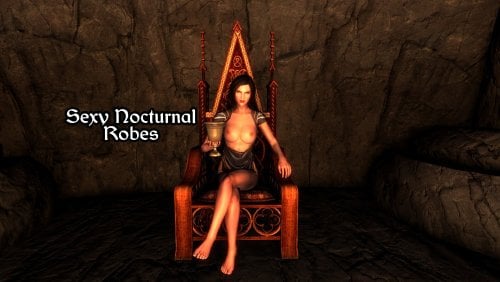
 Sexy Nocturnal Robes - CBBE 3BBB View File The replacement includes BodySlide files named “Sexy Nocturnal Robes,” but it also comes with pre-generated NIF files in case you don't want to generate your own. This is just my imagination, but I imagine Mistress wearing fewer clothes and showing off this and that to her Nightingales ❤️ I removed the sleeves and hood because I never liked them. What this mod does currently: - Removes the hood from the outfit - Removes the sleeves Installation Instructions: 1) Download BodySlide and Outfit Studio for your game and install it. 2) Open BodySlide through your mod manager (Vortex or MO2). Ensure the executable is added to your dashboard. 3) Find the outfits in Bodyslide by searching for "Sexy Nocturnal Robes" or "Nocturnal" 4) Customize: Adjust sliders (e.g., Breast, Waist, Hip) to customize the body. 5) Build: Click "Build" (bottom) to generate the meshes for the single selected outfit/body. 6) Enjoy! You can obtain her outfit using the command in consol or use any Add Item mods. player.additem 00088952 1 Submitter killer905 Submitted 03/22/26 Category Adult Mods Requirements BodySlide and Outfit Studio , Caliente's Beautiful Bodies Enhancer -CBBE- , CBBE 3BA (3BBB) Regular Edition Compatible No Install Instructions 1) Download BodySlide and Outfit Studio for your game and install it. 2) Open BodySlide through your mod manager (Vortex or MO2). Ensure the executable is added to your dashboard. 3) Find the outfits in Bodyslide by searching for "Sexy Nocturnal Robes" or "Nocturnal" 4) Customize: Adjust sliders (e.g., Breast, Waist, Hip) to customize the body. 5) Build: Click "Build" (bottom) to generate the meshes for the single selected outfit/body. 6) Enjoy!
 -
Version 1.0
385 downloads
The replacement includes BodySlide files named “Sexy Nocturnal Robes,” but it also comes with pre-generated NIF files in case you don't want to generate your own. This is just my imagination, but I imagine Mistress wearing fewer clothes and showing off this and that to her Nightingales ❤️ I removed the sleeves and hood because I never liked them. What this mod does currently: - Removes the hood from the outfit - Removes the sleeves Installation Instructions: 1) Download BodySlide and Outfit Studio for your game and install it. 2) Open BodySlide through your mod manager (Vortex or MO2). Ensure the executable is added to your dashboard. 3) Find the outfits in Bodyslide by searching for "Sexy Nocturnal Robes" or "Nocturnal" 4) Customize: Adjust sliders (e.g., Breast, Waist, Hip) to customize the body. 5) Build: Click "Build" (bottom) to generate the meshes for the single selected outfit/body. 6) Enjoy! You can obtain her outfit using the command in consol or use any Add Item mods. player.additem 00088952 1 -
 Is there a configuration I can change or mod I can add to make the breasts of my character fall apart to either side when she's lying on her back? I use https://www.nexusmods.com/skyrimspecialedition/mods/30174. Example (not my character):
 -
Can someone tell me what is the real difference between using CBBE or TWB with the 3BBB physics? I obviously know that one has more sliders to control more about the look of the body, but to be honest, I just want my character to have nice clothes, use the bodygen function and be as compatible as possible to avoid any mental breakdowns. So, do I just discard completely the TWB body or there is another reason for anyone to use it, also if I just use the 3BBB for CBBE only do I need to convert the clothes to work with 3BBB?. Sorry if it sounds stupid to ask but I just needed to know. Any answer is welcomed.