Select a subcategory to view available files.
Files From Subcategories
-
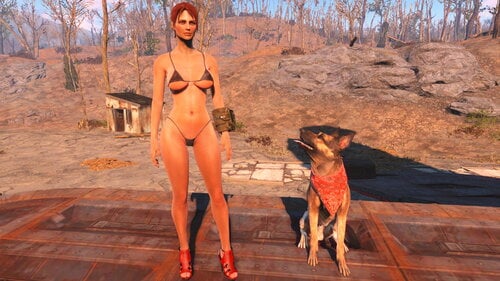
Fallout 4 "Suki body" CBBE bodyslide preset!
By Lionel Rossi
Update 1/29/2021: I fixed the problem with the "Suki Body". Please uninstall the: "Suki Body CBBE Bodyslide Preset" mod and install the "Suki Body 2 -CBBE- Bodyslide Preset". The "Suki Body 2" is identical with the "Suki Body" and it must work without any problems! Mod discription: Hi everybody, this is my new bodyslide preset, after five hours of experiment on bodyslide:) You can use the Suki Body preset as is, or use it as a base to create your own preset and save it with a new name, using the "Save As" button in Bodyslide. Requierments: You must have these mods and their requierments installed: Caliente's Beautiful Bodies Enhancer -CBBE-: https://www.nexusmods.com/fallout4/mods/15 BodySlide and Outfit Studio: https://www.nexusmods.com/fallout4/mods/25 For the "vanilla" armor and clothing I use the: CBBE curvy (outfit) preset because they don't look good with my preset and because I don't want all the female characters of the game to look the same. If you want to see more of my mods look for my other files in LoversLab, or you can visit my PATREON page: https://www.patreon.com/FalloutFanatic. I make outfits, armors and more, Fallout 4 only!
My Twitter
My Instagram
My YouTube channel
Have fun and stay safe
2010 downloads
Updated
-
Immersive Power Armor HUD(s) WIP
By warbaby2
Since I'm a bit of a power armor/mecha nerd, the helmets/cockpits of the FO4 PAs always bothered me a bit. They fit the purpose, but just are not immersive enough. In my opinion, PAs should make one feel protected, powerful, and an immersive helmet UI is a very big part of that illusion. So I started pulling my photoshop and (limited) modding skills together and started working on my own little mod by riffing off the other PA UI mods on the Nexus, and I think I did quite well for a start.
CURRENT CONTENT:
- Raider power armor helmet and dashboard with different visual options like decorations and damage effects.
- T-45 power armor helmet and dashboard with different visual options like decorations and damage effects.
CURRENTLY WIP:
- T-51 power armor helmet and dashboard with different visual options like decorations and damage effects.
- T-60 power armor helmet and dashboard with different visual options like decorations and damage effects.
- X-01 power armor helmet and dashboard with different visual options like decorations and damage effects.
FUTURE PLANS:
- Implementation of HUDs for popular mods like the Enclave X-02, T-49, Tumbajamba's Combat Power Armor, etc.
- Exploring the possibility of making the game auto switch HUDs based on PA helmet used and it's damage state.
- Possible implementation of visible first person helmet visors into the game.
INSTALLATION:
Pick the HUD by power armor model you want to use and install via NMM/MO. The file structure inside the ZIP is optimised for mod manager use, so I wouldn't attempt to install them manually.
DEINSTALLATION:
Just remove via mod manager or delete the following files:
*\data\meshes\effects\CameraAttachedFX\CameraAttach_WetArmorView.nif
*\data\meshes\interface\objects\padashdials01.nif
*\data\meshes\interface\objects\PADashPipboyScreen.nif
*\data\textures\effects\ColorBlackUtility.dds
*\data\textures\effects\NixieTubeNumbers01_d.dds
*\data\textures\effects\PowerArmorVisorGlassFX_d.dds
*\data\textures\effects\PowerArmorVisorGlassFX_n.dds
*\data\textures\effects\PowerArmorVisorGlassFX_s.dds
*\data\textures\interface\PA <whole folder>
CONFLICTS:
Should only arise when used with mods that change meshes and/or textures associated with the power armor HUD or power armor pip UI. Just install "Immersive Power Armor HUD" overwriting any conflicts, and it should work as intended.
REQUIREMENTS:
None.
CREDITS:
Picture artworks done by the wonderfully talented Chipman Starratt (http://chipman1911.deviantart.com)
Textures and meshes inspired by:
Makconner's Spartan Cockpit - http://www.nexusmods...t4/mods/22246/?
KeithVSmith's Power Armor HUD Visor - http://www.nexusmods...ut4/mods/6985/?
Hellstorm102's Power Armor HUD - No Transparency - http://www.nexusmods...ut4/mods/3106/?
6116 downloads
- power armor
- HUD
- (and 5 more)
Updated
-
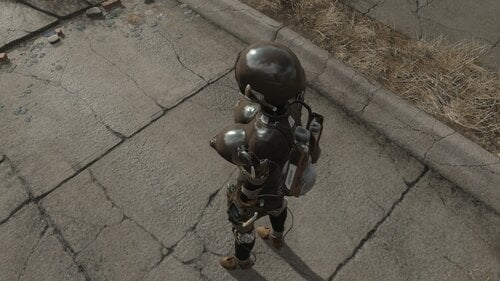
Angeli Explorer Suit CBBE Conversion
By Ankahet
Angeli Explorer Outfit CBBE Conversion
Converts the following to CBBE body:
Jetpack
Suit
Mask
Gag
DOES NOT CONVERT the power armor itself, still working on that.
Requirements:
Angeli's Explorer Suit and Power Armor
Notes:
Hose has a tiny gap between it from the jetpack, and a tiiiiny bit of clipping near the very top of the collar/neck. Will work to try and fix both of these.
These will show up in "Unassigned" in BS, build the file "Angeli Powersuit CBBE Convert" instead of the normal Angeli files.
13470 downloads
Submitted
-
Red Rocket Basement
By Reginald_001
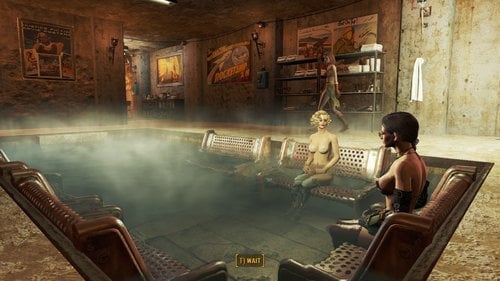
Welcome to the Red Rocket Basement Player Home Update 2! (V1.0.3)
VERSION 1.3 IS NOT PHYSICALLY DIFFERENT FROM VERSION 1.2. IT JUST CHANGES THE VOICE.
During its checkered past, the basement below Red Rocket had always been a perfect place to handle the more... shady business of Power Armor repair and underground dealings. Favored by local criminals to tune stolen goods, the cave access in the back gave them means to move, and repair, both stolen cars and power armor unseen. Now collapsed, the back entrance to the cave cannot be entered, but its secret entrance on the hill right in front of the shop makes it an ideal place to stay, while your settlers work up top. Shielded from both radiation and the dangers from up top, it's as secure as a vault!
Features
RR Basement is a simple undecorated player home. It has a workshop and quite a few resources you can scrap before you decorate it. You can use all interior workshop elements. Power is supplied at two places, players need to add their own power nodes to expand power across the home. The workbench is (SHOULD BE) connected to the workshop up top. This means that if you create a settlement at Red Rocket truck stop, you could in theory live out your days in the basement, while your settlers gather resources, food and water. Settlers will NOT enter the basement so everything there is yours.
Thank YOU for direct or indirect support:
- @urbanoantigo (ptBR translation)
- Chic Geek
- @Fiona159 (Ru translation)
- @Nebuchadnezzer2 (for being supportive)
- @Flashy (JoeR) for helping out when needed and furthering my knowledge of the engine
- Anyone I might have forgot to mention and I'm sure I have...
New features include:
- A maid that can satisfy many needs and keeps the basement clean and fresh..
- A terminal to provide you with configuration options (such as music, doors etc..)
- A bath pool
- A sauna.
- 3 New rooms to explore and decorate.
Portugal/BR translation available!
Download the Red Rocket Basement_v1.0.2_ptBR.7z file and overwrite it's contents, after installing the original file!
Russian translation available!
Download the RedRocketBasement1.0.2_ru.7z file and overwrite it's contents, after installing the original file!
How to Enter
For game balance the home is not available right away in a fresh game. You'll need a lock pick skill of Expert to be able to lock pick the entrance!
If you can't wait, you can always cheat:
Known issues
NPC's and companions should have no difficulty navigating through the player home, unless you fill it up completely with furniture and book cases. All nav meshing was done by hand to ensure smooth navigation and I've play tested this player home thoroughly after making it over 6 months ago. I've been tweaking and adding rooms slowly since then and I found that this size was the best size for me so I can live in comfort, while raiding the wasteland...
At some places the wall meshes don't really align well, this can cause some overlapping/flickering lines here and there. This will be tweaked in the future as I find them, or if they really bother me.
Installation instructions
Drag the 7zip file into your mod manager and activate it... OR:
Unzip it manually into your Fallout 4 directory.
WARNING 1.0.1 IS NOT YET AVAILABLE ON NEXUS.
Older version available from Nexus Mods:
https://www.nexusmods.com/fallout4/mods/35056/
WATCH THE VIDEO TO GET AN IDEA OF THE LATEST FEATURES
RR VID 2.mp4
Australian Maid Voce.
Maid Bot Aussie Intro.mp4
Maid Bot Aussie Dialogue.mp4
See the download topic for more screenshots AND a layout of the place!
Warning: All screenshots reflect ONE way that you can decorate this home. It's very reactive to the light you use, so you can do with this whatever you desire.. make it a cozy fire lit place.. make it a bright workshop.. or a dark underground sex basement.. it's up to you!
9291 downloads
Updated
-
Companion Ivy - Magazine Addon - Portugues do Brasil
By urbanoantigo
Companion Ivy - Magazine Addon -
Tradução Portugues do Brasil
*pt-BR (texto em português a seguir do em inglês)
ATENÇÃO: A tradução da versão 5.3 da JÁ TEM ESSE ADICIONAU, eu o deixei aqui atualizado por acaso, se voce já baixou a tradução da 5.3, ela já tem o mesmo arquivo que está aqui, não precisa repetir com este, use só o outro e bom proveito, link abaixo:
This is a Brazilian Portuguese translation file, from Companion Ivy - Magazine Addon
About Companion Ivy - Magazine Addon
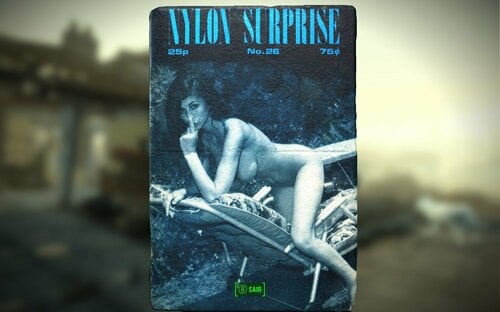
The quest is to find the rare pornographic magazines for Ivy's collection, spread throughout the game map
This mod is an add-on and works well with Companion Ivy 5.3, when downloading and installing Companion Ivy, you will see in the files the option to also download Companion Ivy - Magazine Addon
This is a very interesting adult mod that inserts into the Fallout 4 universe, “real” vintage pornographic magazines that can be found in vaults, mailboxes or invaders' camps, there are more than 69 magazines spread throughout the community,
There was a lot of work and research to find images of the real covers of magazines of the time, between the 60s and 70s, and the true story of when it was printed and its impact on society at the time.
Every time she finds a magazine and is with Ivy accompanying you she makes comments and tells something about the story of that publication, very fun and interesting.
To use this mod in Brazilian Portuguese you must first install the Original mod: Companion Ivy 5.3, and Companion Ivy - Magazine Addon.
Creio que você use o MO2 ou outro gerenciador de mods, então, não tem segredo, é só abrir esse arquivo compactado e ele vai sobrescrever os arquivos originais. Claro que esse arquivo de tradução deve ser instalado “depois” da instalação do arquivo original que está qui:
EM PORTUGUES:
Este é um arquivo de tradução para português do Brasil, do Companion Ivy - Magazine Addon
Sobre o Companion Ivy - Magazine Addon
Esse mod é um adicional e funciona bem com o Companion Ivy 5.3, quando for baixar e instalar o Companion Ivy, vai ver nos arquivos a opção para baixar também o Companion Ivy - Magazine Addon
Este é um mod adulto muito interessante que insere no universo Fallout 4, revistas pornográficas vintage “reais” que podem ser encontradas em cofres, caixas de correios ou acampamentos de invasores, são mais de 69 revistas espalhadas pela comunidade,
Houve um grande trabalho e pesquisa para encontrar imagens das capas reais de revistas da época, entre anos 60 e 70, e a história verdadeira de quando foi impressa e seu impacto na sociedade na ocasião.
Toda vez que encontrar uma revista e estiver com a Ivy te acompanhando ela faz comentários e conta algo da história daquela publicação, muito divertido e interessante.
Para usar esse mod em português do Brasil você precisa primeiro instalar o mod Original
Companion Ivy 5.3 WITH Porn Mag Addon que tambem já tem tradução em Portugues do Brasil
ATUALIZAÇÂO: esta tradução foi inclusa no outro pacote completo, use do link abaixo e esqueça essa
Um pouco sobre a Ivy
Por favor, não se acanhe em fazer algum comentário ou sugestão para melhorar a tradução.
lembre de depois deixar uma comentário incetivando o autor da Ivy, Reginald lá na página do mod original
Então é isso, Aproveite bem a Ivy, ela é muito especial.
1038 downloads
Updated
-

StaticPhobia's Final Farewell
Description:
A backup to all my files. Don't think I'd leave without saying goodbye!
Simple Patch Requirements:
- Fusion Girl Females ( Download )
- Body Talk Males ( Download )
- Zex Skeleton ( Download )
- Body Slide ( Download )
- AAF ( Download )
- AAF Themes ( Download )
- AAF Creature Resources 1.1.3 ( Download )
- Savage Cabbage's Animation Pack V 1.2.5 ( Download )
- BP70's Animation Pack 2.4 ( Download )
- Grey User's Creature Animation Pack V 3.0.1 ( Download )
- Wash Out That Cum ( Download )
- Recommend Elzee's banner for other animations like ghouls, as a placeholder ( Download )
- Recommend Tats after rape by TwistedTrebla ( Download )
- Recommend Inderello's Fusion Girl Tweaks so vaginas and anuses work with creatures ( Download )
- Recommend my Script Tweaks ( Download )
- Recommend some kind of physics like FunkyFysics ( Download )
SSG Requirements:
Zex Skeleton ( Download ) Fusion Girl Females ( Download ) Body Slide ( Download )
ScriptTweak Requirements:
Violate ( Violate ) Family Planning Enhanced ( FPE ) Combat Strip ( CSL ) Maybe something else
FunkyFysiscs Requirements:
OCBPC Physics (+ its requirements)
Permissions:
Do whatever with them. Respect the original authors! Don't load to paywall stuff and don't load to region blocked sites. No need for credit, StaticPhobia is no more! Good luck with your mods!
7494 downloads
Updated
-
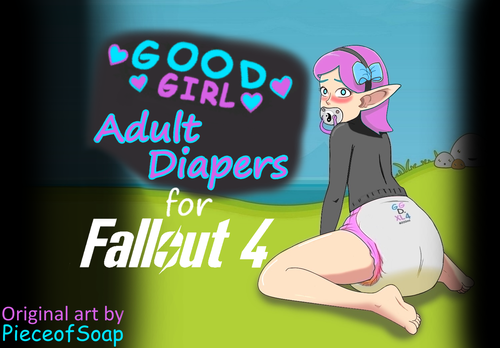
abdl Good Girl Adult Diapers Fallout4 Edition
By dibz666
This is a mod I've been working on for a couple weeks for the ABDL community, ADULT DIAPERS for Fallout 4!!!
About 7 months ago from now (9/4/2020) I started learning 3D modeling & I am FAR from making good models on my own...
I made this diaper mesh with HEAVY inspiration from a mesh called "Little cow diaper" by 3D model artist named LizzyKoopa,
It took me like 3 months to copy the mesh as best I could & a couple days to make this mod, I also had to do BodySlide data.
I've contacted LizzyKoopa regarding the use of Her content & She has given me the go ahead to make this mod, YAY ^^
I'm part of the ABDL community but I've never personal got the AB side "age play" aspect of it all because I find immaturity to be VERY annoying,
People wanting to act like babies has never made sense to me, but I was drawn in to it all by the people wearing diapers & NOT acting like babies.
I've always been into girls sucking on binkies because I have an oral fixation so I've always liked seeing girls with ANYTHING in their mouths.
I'm also an ass/thigh man & I think that's how I started liking diapers, because it gives the illusion of a big butt, But I'm a full blown DL now.
To me its cute & sexy when women wear diapers & pull-ups because of the embarrassment factor, I find shyness to be very attractive.
I find it even sexier when women wear diapers &/or suck on pacifiers without embarrassment as I find confidence more attractive than shyness...
I also think it's cute when women pee in their diapers(wet themselvs)because of the panic that's usually on display when it happens to them in public,
pee is the limit for me though, I am NOT a fan of fecal matter at all, I think it's GROSS when women mess(poop) in they're diapers.......
To me that's just disgusting.
To each they're own though, If it's what u like then enjoy it........ I'm not one to judge.
Anyway,
This is for all you other diaper lovers out there.
These diapers are also available for Skyrim
--------------------------------------------------------------------------------------------------------------------------------------------------------
Special thanks to my patron(s) ^^
Sade Johns - August 2020
Ladisaul - September 2020
ALL my content is free & will stay that way. But I do have a patreon so anyone who may want to support me financially can do so,
Any Help would be greatly appreciated. https://www.patreon.com/DIBZmodding?fan_landing=true
----------------------------------------------------------------------------------------------------------------------------------------------------------
There are 3 different textured versions/packs to choose from
1.Normal diapers - these are the diapers with plane clean textures.
2.Wet diapers - These diapers give the player the appearance of having wet themselvs.
3.Pee stained diapers - these diapers make the player look as if they are either VERY dehydrated or have been reusing the same diaper.
RECOMENDED MOD(S) / PRESET(S) - for "debby's downloads"
----------------------------------------------------------------------------------------------------------------------------------------------
This mod would NOT be possible at all without LizzyKoopa's help & permission, PLEASE go check Her out as
thanks.https://www.patreon.com/LizzyKoopa
---------------------------------------------------------------------------------------------------------------------------------------
Credit & a HUGE thank you goes to LizzyKoopa for the original mesh used in the creation of this mod.
-------------------------------------------------------------------------------------------------------------------------------------------
These diapers were made for "Debby Evolent's" body, however there are optional Bodyslide files available for people to use their own presets.
--------------------------------------------------------------------------------------------------------------------------------------------
Everyone enjoy! ^^
6549 downloads
Updated
-
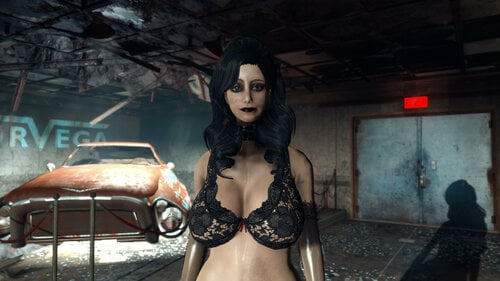
WanderLust's Pornstar FusionGirl Preset and Face Presets
Hey everyone!
I recently made the switch from CBBE to Fusion Girl and find and found the bodyslide preset selection quite limited! After tinkering to create a preset to my tastes, I wanted to share mine to save other people's effort.
I was targeting a realistic but idealistic curvy/busty preset. Wide hips, plenty of thighs, narrow waste and nice thick assets.
Also, I've included my facial presets! My goal is to provide attractive faces that don't look like the default "nora". In version 1, there's two faces included. Kelsi is a cute blonde while Ivy is a similar face with black hair and a more gothy look. Both also include an RS variant with CaptiveTats and different hairstyles included. To get the same results, you'll need Commonwealth Cuts, Cute Oni Asian Face Parts, The Eyes Of Beauty, and Tattoos for Captives.
3930 downloads
Updated
-

Albino & Two More Dark Skin Options
By Victor14
2020-12-25 - New Section - Screenshots Added - Other Information
Three screenshots have now been added to better illustrate the new skin tones that were added, one for each of them. From left to right: Albino, Black & Very Dark. I hope that these screenshots assists people in wondering if this mod will help them create the character of their choice. If not, please let me know. Also, as these skin tones are "color forms" no different than the typical skin tones found in the menu, they should work for any type of model (CBBE, Fusion Girl, Jane Bod, etc.).
For those who may not be adept at using the console commands to get to the 'looks menu' after you have initiially created your character in-game, the command is "showlooksmenu 14 1". This is how the screenshots shown here were created (my apologies for the Albino screenshot... She was very fidget-y!).
2020-12-25 -End New Section - Screenshots Added - Other Information
OVERVIEW
This is an .ESP that adds three additional skin tones to the Human race (namely, you): Albino, Very Dark & Black. All three are "color forms" (Creation Kit's terminology) that were already in Creation Kit but I have simply repurposed them to be available for use when creating a character. "Albino" is simply the "white" color form relabeled; "Very Dark" is unchanged (for whatever reason, Bethesda created it but never implemented it as an option); "Black" is literally the "black" color form but capitalized because I hear that capitalizing the word 'black' is the politically correct thing to do these days.
NOTES
The compressed package used 7-zip; Use that program to decompress the zip. Just place the .ESP in your DATA folder or use a mod manager. Remember to 'activate' the mod so that the game knows to use the mod with your game. I don't know why simply editing in 3 additional skin tones caused the ESP to be 127k un-zipped.
Please do not re-distribute; It's merely a simple file and I want to see if this becomes popular; If so, I may include more colorforms in a future edition. Thanks.
512 downloads
Updated
-
"Recharger" Lazer Pistol
By Victor14
2020-12-25 - NEW SECTION - "OPTIONAL" INSTITUTE LAZER PISTOL
I have decided to include a new .ESP with this file (ZZZLasergun2) that is the exact same (provides a weapon with the "recharger" ability) but uses the Institute Lazer Pistol model instead of the typical lazer pistol. It is mostly overpowered and I include it hesitantly if only because I was disappointed with the outcome. My disappointment comes from the fact that the pistol itself is very bulky and obscures too much of the screen in first-person mode, especially when you 'mod' the pistol up (such as a longer barrel). Everyone's personal preferences are different, though, and I include this new .ESP in the file for those who would like to try it out for themselves.
Nothing has been removed from the previous version of this mod; Only ZZZLasergun2 has been added to it.
I think that this is fully compatible with the ZZZLasergun .ESP as well so that the two may live side-to-side but I did not fully test that possibility out. You do not need to rename the ZZZLasergun2 (as opposed to ZZZlasergun & ZZZlasergun_overpower, for which they were the same weapon but one was an overpowered variant and one was normal but with the "recharger" ability) file; It may be inserted as-is.
2020-12-25 - END NEW SECTION - "OPTIONAL" INSTITUTE LAZER PISTOL
2020-11-28 - NEW SECTION - NEW BUG
Described new bug in "BUGS" section. I hope that you don't plan on using power armor...
Also, minor editing here and there...
2020-11-28 END NEW SECTION - NEW BUG - MAIN SECTION BELOW
Overview
This file is for a "recharger" lazer pistol in the spirit of the recharger weapons from Fallout: New Vegas. I have placed the word "recharger" in quotes for a good reason: It is not entirely a recharger weapon in definition of F:NV but emulates it to the best of my programming ability. Whenever you fire one shot from the pistol, one unit of ammunition appears in your inventory. There are two known "bugs": The weapon may lose it's recharger function if you use the console command to change your face (not alter an existing face but change it wholesale) or if you start a new game with the mod installed. The bugs may be resolved by unloading the mod, saving the save game without the mod, then adding the mod back in. There are two versions of this weapon: One that is of normal strength (a typical lazer pistol but with the recharger capability) and one that is vastly overpowered.
Description
I have created a lazer pistol with a recharger-like ability, in that for every pull of the trigger a new unit of ammunition (a fusion cell, in this case) is added to your inventory. This ability functionally gives to you a limitless supply of ammunition. You still must manually reload the weapon (unless you attach the "never-ending" legendary mod to your weapon, which is "[the weapon id].amod 001cc2ac" for those who are curious). The lazer pistol uses the typical lazer pistol model. The pistol may have weapons mods attached to it, either through the in-game mechanisms or though console commands.
Instructions
The file is compressed using 7-zip. Decompress the file & then choose which of the two .ESP files that you would like to use: The regular, normal lazer pistol (ZZZLasergun) or the overpowered variant (ZZZLasergun_overpower). If you choose the overpowered variant, remove the "_overpower" part of the filename before using it. Insert the files however you choose, either manually or with a mod manager program. Be sure to check the box next to "ZZZLazergun" in order to activate the mod, depending upon the program that you use to manage your mods.
Location of weapon
The weapon is located at the edge of the garage of your former house in Sanctuary. I considered using a screenshot but most people should know where your character's former house in Sanctuary Hills is, where the garage is and it is right as you look at the garage from the road. There are no fusion cells to go along with it; You can either generate these through the console or you should probably have enough of them by the time you acquire this weapon. A slight spoiler for novices in the game: You can acquire fusion cells in-game by going to Concord (if you have not previously done so) near the entrance to the Museum of Freedom.
Bugs
The weapon loses it's recharger ability in three known instances:
** First, if you use the console command to change your entire face (from, say, Face01 to Face02).
** Second, if you start a new game with this mod installed. If you have a save game that did not use the mod and then you install this mod and use that save game, the weapon should work as advertised.
** Third, entering power armor for any reason (including at the Museum of Freedom where it is "necessary").
I'm not sure why the script is invalidated during these instances. I can only hazard a guess that it may involve how scripts are attached to weapons through the use of a "quest." My theory is that, whenever your person changes inside of the game (for instance, going from Face01 to Face02 through the use of console commands or entering power armor which, from my limited understanding of the internal workings of Fallout 4, renders you as a different "person"), the quest breaks and, therefore, the script stops.
These bugs may be resolved by unloading this mod, saving the affected save game, then re-loading the mod. I do not consider myself an experienced Fallout 4 scripter/modder & there may be other scenarios where the weapon loses it's recharger ability; I have not found them yet.
Scripts
The mod does contain a script and it should be noted that, from my understanding for how Fallout 4 save games work, the scripts are "baked" into the save game. There are some players that are very sensitive to this information and others who are less sensitive about that information.
Permissions
Please do not redistribute this file. There are many reasons for my not wanting this file to be redistributed. One of those reasons is that this file is somewhat personal in presentation: The weapon is not placed upon the ground realistically, the weapon is rather unrealistically placed within the world (it's not in a laboratory & it's very easy to find), etc. so forth. The file works well enough for me and, I hope, that it works well enough for you but the time and effort to make it "lore-friendly" would be counter-productive for me at the moment. Perhaps, in the future, I shall make an attempt to create a more "lore-friendly, developer-grade" mod of this type. However, I feel that most people will be satisfied with finding the weapon and using it as-is without a quest or holotape or any other lore-creating events. Furthermore, I have no idea why the script suddenly stops working if you create a new game with it installed or create a new character with the mod installed (as described previously). I suppose that there are reasons but, if there are, I haven't found them yet. Therefore, for all of those reasons and more, I would merely prefer for this mod to be presented here where I may see how many downloads and views it gets. Should it become popular, I will revisit whether to include additional elements to the mod.
And that's it. I hope that you have enjoyed this mod. Any comments or critiques, please feel free to share. Thank you.
56 downloads
Updated
-

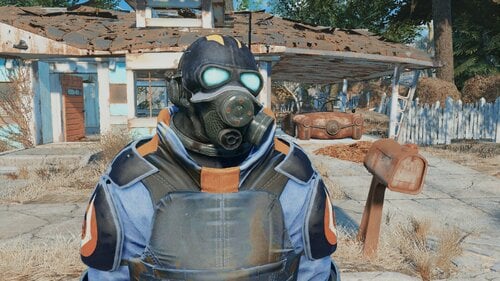
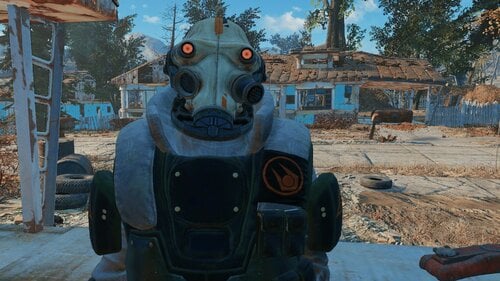
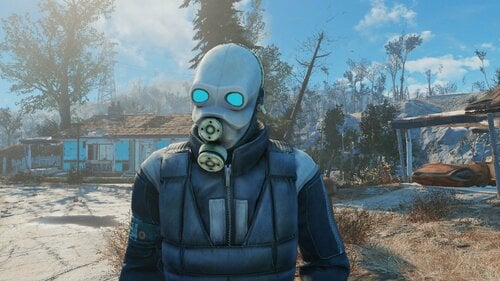
Half-Life: Combine Armors and Suits
By Hive17
Pack of armors and suits ported from Half-Life 2 and Half-Life: Alyx
All previous mods merged into one esp plus added two new armors from hl2 beta
Craftable at chemlab, all recipes hidden under C17 Combine category
4468 downloads
Submitted
-
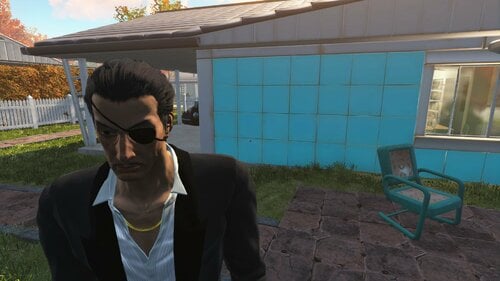
Yakuza 0 Majima's Tuxedo
By sansgaming14
This mod port's Majima's Tuxedo from Yakuza 0, and adds a new hairstyle
The suits and eyepatch can be obtained from Chem workbench under Utilities
The new hairstyle is not a port of Majima's hair mesh but is heavily inspired by it
Credits
Ryu Ga Gotoku Studio - Mesh and Textures
Bethesda - Fallout 4
459 downloads
Updated
-
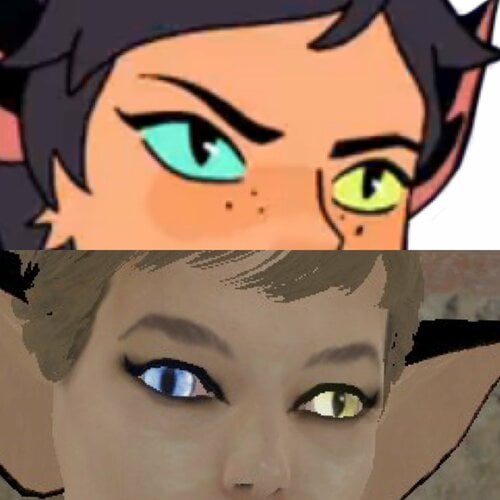
Catra - Companion NPC
Catra In all her glory can be found in the wasteland and will allow you to join her on her adventures.
FUSION Girl Based NPC follower with custom body and Custom clothing.
Includes a "tactical outfit" that I cobbled together as a combination of something a bit more realistic but is loosely inspired by her general S5 Outfit look.
I have also included a converted "Retro" outfit by PJ Thornton (perms available upon request) which is a very good creation of her original outfit worn early in the show. This can be found in her duffel bag.
Catra's demeanor can improve as you find certain dead drops and explore her dialogue a bit more. The dead drops can be looked for or ignored. This is not an expansive quest mod, the mini-quest is simply included to add a motivation for her to travel with you.
For now she is Not voiced.
In the future I would like to add some combat sound clips from the cartoon.
Where the fuck is she?
Shes in a bunker in the sewers in Concord.
- if the dialogue scene doest trigger properly reload, save before you enter her bunker, It is extremely rare (only happened once) that it doesn't work properly. It is located near a dirty mattress for those who are on survival and don't want to use a cheat save.
CBBE Patch:
This mod relies on the fusion girl body being your default body. If you Use CBBE or any mod that doesn't rely on Zex Skeleton use this patch to overwrite the fusion girl meshes.
Catra Bodyslide Body preset.
Why?
So you can convert your own outfits to her bodyshape. this WILL NOT give you heterochromia, nails and a tail. It will only let you shape Other mod clothing to fit her shape for her to wear.
Equipping her with any clothing that replaces her body will remove her nails and sometimes her tail.
To do:
expand dialogue.
Add more stuff.
Add a variant of her Formal outfit.
Add combat voice sound clips.
Let me know if there are any issues.
382 downloads
Updated
-
Submitted
-
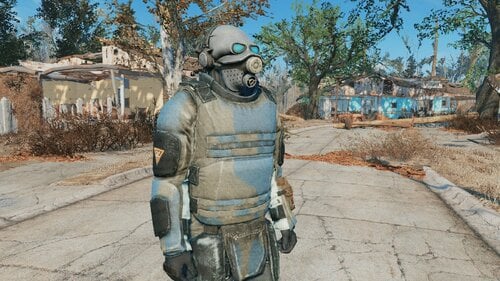
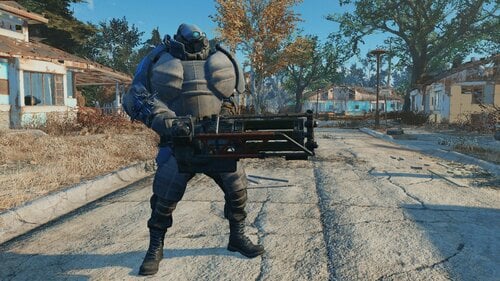
Half-Life 2 - Combine Soldier Armor
By Hive17
Craftable at Chemlab. You can change skin at Armor Workbench
443 downloads
Submitted
-
Submitted
-
Submitted
-
Updated
-
Updated
-
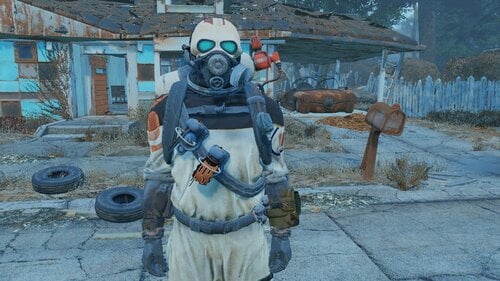
Half-Life: Alyx - Combine Grunt Armor
By Hive17
Craftable at Chemlab
You can change color and enable/disable gas tank/grenade holster at Armor Workbench
305 downloads
Submitted
-
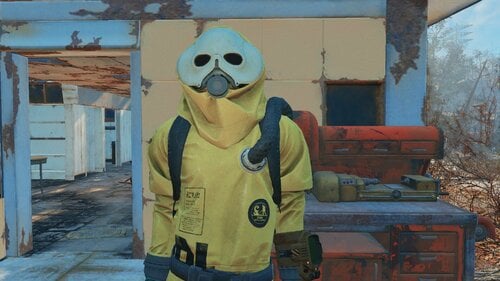
Half-Life: Alyx - Combine Hazmat Suit
By Hive17
Craftable at Chemlab
You can change color and enable/disable lens glowing at Armor Workbench
380 downloads
Submitted
-
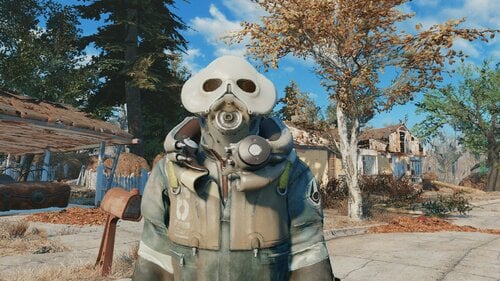
Half-Life: Alyx - Combine Worker Suit
By Hive17
Craftable at Chemlab
You can change color, open/close helmet and enable/disable lens glowing at Armor Workbench
259 downloads
Submitted
-
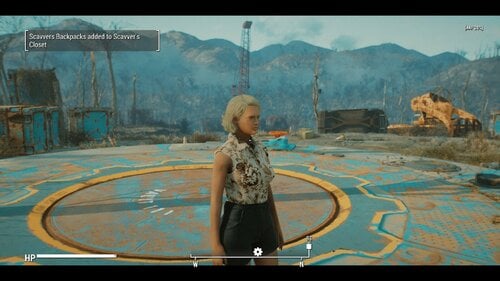
SCAVVER'S CLOSET - One size does not fit all -
By Tentacus
SCAVVER'S CLOSET
- One size does not fit all -
What's new:
I added an optional download of vanilla eyeglasses without facebones. This is to prevent them from deforming with custom faces. You may need to adjust your character's ear position for best results. It's unknown if this will negatively affect any npcs, but the glasses are just models so they are safe to uninstall at any time.
What's new in 1.1.3:
Bug Fix.
VIEW CHANGELOG:
What's new in 1.1.2:
------------------------------------------------------------------------------------------------------------------------------------------------------------------------------------
NEW FEATURES:
------------------------------------------------------------------------------------------------------------------------------------------------------------------------------------
Improved Backpack system:
Backpacks are now additive rather than replacing the base carry amount. This offers more flexibility and less bugginess, and is just generally more realistic.
Perishable fusion cells:
The Gun condition sorting ignores energy weapons for compatibility reasons, but I personally think laser weapons are far too easy to get. If I can't have the guns be broken why not the ammo? I mean, yes Fusion cells are modern marvels, but no battery is gonna lie around for 200 years and work 100% of the time. When selected this makes only 1 in 3 Fusion cell pickups viable.
Hardcore encumbrance for food, drinks, meds, chems, ingredients, empty water bottles, and Molotovs:
These are all handled by one set of sliders. Imagine how nerve wracking it will be to have to choose between food, water and stimpacks... Suddenly that psycho addiction seems a whole lot worse.
"Why molotovs?" you might ask... Well if everything else that comes in a bottle is covered why not? Unlike grenades you can't attach molotovs to a belt or bandolier, or easily pocket them. It makes sense to me anyway.
What's new in 1.1.1: EXTREMELY VITAL UPDATE!
1.1.1 Introduces a LOT of vital bugfixes. It will be the only version abailable and all users are urged to update. It adresses issues I did not know about the Fallout 4 Inventory system, such as the fact that keywords on items in the players inventory or containers DO NOT PERSIST after a reload. This means that the Gun system introduced in 1.1.0 is basically useless for actual gameplay.
-----------------------------------------------------------------------------------------------------------------------------------------------------------------------------------------
The info in this section only applies to guns and mod added clothing that is in the sorting list:
-----------------------------------------------------------------------------------------------------------------------------------------------------------------------------------------
I've made every effort to address that in this update. Now on load, all guns and mod added clothing items that need it will be sorted and have their ownership keywords restored. Likewise the backpack will run the same procedure on it's contents whenever you put it on. This works pretty much seamlessly.
Somewhat stickier is the issue of containers. Containers have the same issue with eating keywords. The way I've come up with to get around this is whenever you add an item with the _T_ Owned Keyword to a container it will get an keyword of it's own to tell the mod that you own whatever is inside. This can be exploited potentially so RP responsibly. When you first add an owned object to the container you will get a warning telling you to close the container so that it can be sorted. DO THIS. After the message about the keyword being added you can freely add more items to the container.
When retrieving owned items... ESPECIALLY after a reload it is of VITAL importance that you remove them one at a time (You will be prompted when this is necessary)
UNDER NO CIRCUMSTANCES hit the take all button!!
Upon removal of all owned keyworded items the container's keyword will be removed.
NOTE: If you do accidentally take all, you can save the game then reload, and the keywords should be restored on load!
------------------------------------------------------------------------------------------------------------------------------------------------------------------------------------
NEW FEATURES:
------------------------------------------------------------------------------------------------------------------------------------------------------------------------------------
Added support for several clothing mods:
Militarized minutemen:
Uniform
Full support
Backpack
(note MM backpack autoequips much slower than the Scavvers packs... no idea why. Can be added with MCM like the Scavver packs)
Mojave Manhunter:
Duster
Outfit
(Encumbrance only)
Vesta new armor is picked up
(Vest uses new torso armor encumbrance system )
Brotherhood Recon:
(Leveled items have full support, constructable encumbrance only).
Torso armor encumbrance:
Functioning similarly to how heavy gun emcumbrance works, you can only pick up one torso armor at a time and it auto equips. On enequip it drops. (The vest added by Mojave Manhunter can be unequipped but will still drop if another armor is added, I had to do it this way to accommodate a script on the armor) Can be toggled in the MCM.
What's new in 1.1.0:
1.1.0 is a ground up rewrite, with many more features than the previous release, as such I'll be treating it as essentially a new mod, so please carefully read the entire mod page.
Have you ever been playing fallout 4 and felt un-immersed by the fact that every single piece of clothing you find fits you perfectly? That it's all in good enough condition to wear? That every gun you find is in working order, even the shoddily made pipe pistols? that as long as you have the carry weight you can seemingly cram as many huge objects as you want into thin air? Have you wished that scavenging could be more difficult and nerve wracking like we see in post apocalypse movies like The Road Warrior?
Well, that's what this simple mod seeks to accomplish!
What it does:
Most of the features listed below can be activated , deactivated, or adjusted in the MCM:
Clothing check:
Now, when you pick up a clothing item from the ground, a corpse or a container, you will try them on. If the clothing fits, it will be renamed (IE: Your Road Leathers) This owned version of the item will behave exactly like normal, you can drop it, mod it, rename it, whatever. There is an MCM option to determine if you automatically wear the new item after finding out if it fits, or not.
If the clothing didn't fit... you'll be given a non wearable version of the item that you can scrap or sell like normal. (junk) When trading with NPCs such as merchants you'll always receive the version that fits.
Some item types, (wasteland clothing and rags mostly) have a chance of being completely unsalvagable. I've made an effort to ensure that unique and rare items either aren't touched by this part of the mod or always fit perfectly. Prisoner rags aren't affected as many mods add them. That said I may have missed something so save often, or turn the mod off temporarily when in doubt.
Bonus loot:
Select if you are RPing a nearsighted person in the MCM and recieve extra glasses loot. This is mainly intended to be used alongside the great mod: Myopia Simulator (Immersive Glasses) As with the clothing sometimes the glasses are broken or the the wrong prescription, but you may get scrap.
If you have the mod Commonwealth Vans - CBBE - JBE - EVB Male - Fusion Girl - FG-JBE installed, you will also have a chance to find shoes with the ruined clothing. These may or may not fit as well.
Weapon check: (See What's new in 1.1.1 for updated information)
Guns you find might be broken. If it's a prewar gun and you have the Gun nut perk and a screwdriver, you can strip the weapon for parts. If you have the Scrapper perk you will also get screws. Gather enough and you can repair the next broken weapon you find. Some weapon types will always be functional and some are more or less likely to be damaged. For example, revolvers and bolt actions are far more reliable than automatics. Pipe weapons are FAR more likely to be broken, and don't yeild weapon parts, but they can be stripped for minor scrap and unlike prewar guns no special skills or tools are required.
Again, I've made every effort to protect uniques.
Heavy weapon Encumbrance:
No longer can you slip a minigun into your pocket! Now heavy weapons like Fatman and flamers, must be equipped and drawn to be carried (Think of the way Halo treats the turret guns Masterchief pulls off.) If you attempt to holster or unequip the weapon it will be dropped on the ground, and you can only carry one at a time. Doesn't count against your hard core encumbrance. For the purposes of this mod bulky guns like Railway, and Gauss Rifles are considered heavy.
Hard Core Encumbrance:
REQUIRES CLOTHING CHECK BE ACTIVATED
Limits the number of clothing and weapons you can carry on your person at any one time. By default this is extremely restrictive, however you can carry more by equipping a backpack Requires the mod Scavver's backpacks (no relation) Each item type has it's own maximum value (Clothes, pistols, long guns) These can be individually adjusted to your liking in the MCM. Even clothing not included in the clothing check is affected by this.
Special Backpack effect:
When backpack is unequipped, it's dropped on the ground taking all the non equipped weapon and clothing items (fitting and not) with it. If you pick up your non backpack limit while the backpack is off then try to pick it back up you'll have to drop what you are carrying. Once you pick the pack back up it will automatically re-equip and return all the items to your inventory.
Caveats/limitations:
I've done my best but there are still a few quirks.
When weapons are checked they are momentarily dropped from the inventory, this may result in the occasional odd moment of seeing a phantom gun in front of you for a second. This also means you will see a weapon dropped notification whenever you pick up even owned guns (no way to silence this sadly)
Some pipe and laser pistols will be counted as long guns, there is just no way around this given the way the lego-gun system in FO4 works.
This mod is intended for a new game and the main functions shouldn't be started until after the vault, or any alternate start operations. If you add this to an existing save where you already have vanilla clothes you can use a function in the MCM to convert them to the "owned version" If they don't convert they are probably one of the items not covered by clothing check, such as vault suits, hazmat suits, companion outfits, bath robes, and quest rewards.
Lastly I removed the DLC requirements, that means however that clothing and weapons added by Nuka World and Far Harbor aren't covered. It honestly wasn't worth the effort for the benefit IMO.
Requirements:
Mod Configuration Menu
Scavver's backpacks (optional, but HIGHLY recommended)
Commonwealth Vans - CBBE - JBE - EVB Male - Fusion Girl - FG-JBE (optional)
Cross Mojave Manhunter (optional)
Cross Brotherhood Recon (optional)
Militarized Minutemen (optional)
Give Me That Bottle (optional)
Smokeable Cigars - Cigarettes - Joints - With HardCore Auto Save (optional)
LEGAL:
The source code is provided for you to make personal changes, should you wish to. It is not provided for you to alter, compile and redistribute your own version of the mod. The mod, Scavver's Closet is only allowed to be hosted and downloaded from Lover's Lab, under my specific user account.
THANKS:
To @EgoBallistic for providing some example code that made the weapon sorting possible.
To the Hardship fans who've been patient while I worked on this instead.
1670 downloads
Updated
-
Angeli's Explorer Suit and Power Armor
By Angeli
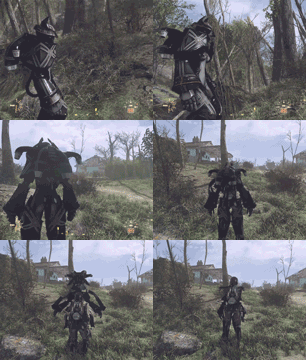
Angeli's Explorer Suit and Power Armor
Description:
State of art Explorer Suit and Power Armor made by Angeli Technology(TM)
Please enter Power Armor while wearing the associated Explorer Suit.
User Menu:
get it from Root Celler in Sanctuary Hills. You can also build the custom frame in any settlement.
Power Armor should come with standard X-01 modifications in Power Armor station.
Default 2K textures
to install 4K textures, just replace the textures folder.
Known Bugs:
a small percentage of people can't find modifications in Power Armor Station...reason unknown. Still investigating it.
If you encountered this mod, please report to me with your mod list.
Credit:
thanks Galvon94's Unique Power Armor Frames modder resource for script.
==================
Happy Halloween, enjoy the mod. Please report any bugs you find.
Yes I know this mod has nothing to do with Halloween because it was supposed to be released few months ago if I didn't procrastinated...but don't mind the details and Happy Halloween.
On the plus side I finished Far Harbor for the 1st time. Great DLC.
Follow my Pixiv:
https://www.pixiv.net/artworks/84378160
107678 downloads
- angeli
- power amor
- (and 1 more)
Updated
-
Fallout 4 dynamic CWSS furniture placement
By phillout
This is a simple xEdit script to replace some of the vanilla furniture in the game with CWSS furniture - toilets and showers, so you can finally have a shower at your Institute quarters and poop without having to go to the mines every time. Mostly for those who use Advanced Needs, but it's not required. Since it's a dynamic patch, it should be compatible with everything, with all mods adding the supported furniture etc. Tested on vanilla locations and Lexington Interiors.
Simply put the file into the "Edit Scripts" folder of your FO4Edit installation, load all your plugins, right-click anywhere and select "Apply Script...".
Then choose "Fallout4 - CWSS Dynamic Placement" to run. Run it, enter the name of the plugin you're going to generate. That's it.
In version 1.2 the patch to fix CWSS shower activation has been added. Install it with a mod manager of your choice or simply unpack it to the Data folder of the game. For this to work you need either
A new game Clean install of CWSS (remove it, save, use FallrimTools to clean up the scripts, install again, add the patch, make a patch using the script) Clean up all CWSS shower scripts from the game, using FallrimTools. If you have no idea how to use it, just start a new game. Sorry. If you have - load a save, add a filter for CraftableShowerScript in FallrimTools filter (the one in the top left corner) and remove the script CWSS_CraftableShowerScriptF and all its instances.
Let me know if something isn't working as expected.
Things to check if it's not working as expected:
It doesn't replace the furniture:
Is the furniture actually supported? Check with the list in the first comment Did you allow FO4Edit to generate references and not skipped that step (it's possible to skip in by holding the Shirt key, IIRC - don't) Did you forget to enable the generated plugin?
"Access violation" errors
Are you using the 64 bit version of FO4Edit? When xEdit developers say it's not really stable, they mean it. Even the 32-bit version is kinda wonky, and the 64-bit version seems to be broken IME in many ways.
The script itself released under the BSD license. Meaning - do whatever you want, but if you redistribute it or your own work based on it - crediting the original author is appreciated.
The CWSS patch is not for redistribution. According to the original CWSS permission, modification or redistribution of its content require author's permission. I have a permission to redistribute the modified copy with the patcher, but that's all. So please don't.
I haven't tested this with CWSS 3. You certainly can't use the patch provided. Hopefully it works w/o it, if it's not - let me know.
WARNING: the script breaks PreVis so you'll need mods to recover it.
First - Boston FPS Fix - aka BostonDT PreVis-PreCombine for exteriors.
Seconds - Previs Repair Pack for interiors. Download the Interiors version, which is complete, unlike the one for exteriors, and you don't need it for now, thanks to Boston FPS fix which also has patches for some other mods.
Place them at the very bottom of your LO. If you use Smashed Patch, Previs Repair pack goes below it.
3251 downloads
Updated

.thumb.png.7f1c7ce57a5e38ca37416af927abf813.png)

.thumb.gif.5792e3f854417e0fb126b039f1f90c98.gif)