Select a subcategory to view available files.
Files From Subcategories
-
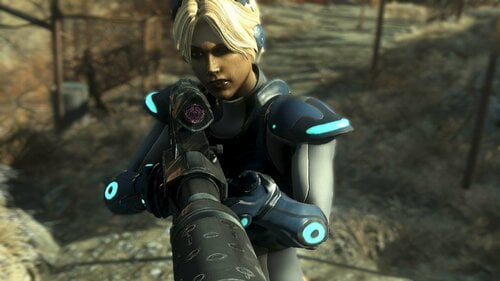
Fallout 4: Nova Terra Starcraft II Covert Ops Mod Release
Hello welcome back and Merry Christmas!
First and foremost I hope everyone has a fun and safe holiday! Please like, comment and subscribe for more content! Alex and I read everything so it's really nice to see people's wonderful comments! If you have any questions, feel free to ask.
FEATUERS:
1. Professionally and scratch made Nova's Ghost Suit and Gun in beautiful 4K textures
2: Custom Reload animation
3. Weapon Customization
BEFORE Downloading... this mod requires the following:
1. CBBE
Location:
1. Sanctuary https://staticdelivery.nexusmods.com/mods/1151/images/56796/56796-1640211080-1428040792.jpeg
2. Console Commands
NOTES:
1. Nova Race will come in the next update, still kinking out some annoying bugs
2. The download is not the actual mod but a dropbox link as I can't upload anything over 250mb.
Credits:
Blizzard for creating the Starcraft universe
Alexscorpian: Animations, rigging, textures
L0rdofWar: Model
Maybenexttime: For everything else
1008 downloads
Submitted
-
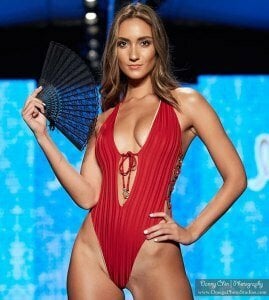
Priscilla Ricart
By Valency
Priscilla
A custom-made preset for one girl, I had it for a year, she probably stopped playing games, which is a pity..
requirements
Fusion Girl
BodySlide
Looks menu
Looks menu customization compendium
deLuxe Makeup
https://www.nexusmods.com/fallout4/mods/25087 Extended Facial Sculpting
https://www.nexusmods.com/fallout4/mods/32404 HIPoly Faces
Any hairstyles
installation
MO 2 .Or manually
2479 downloads
Submitted
-
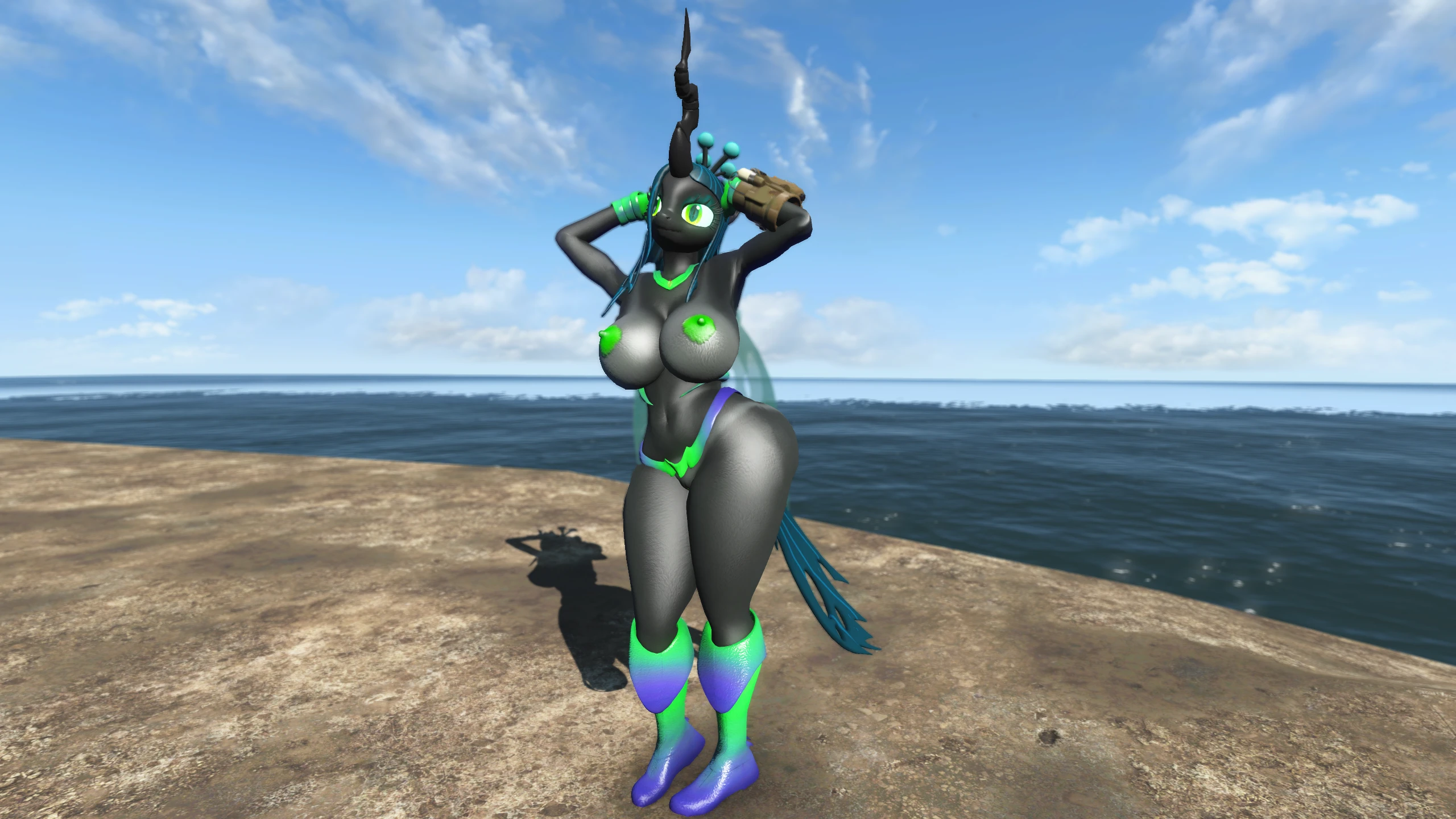
Chrysalis' Armour
By Evan555alpha
Chrysalis' Armour originally started out as just that; an armour mod. But over the months of developing assets, it's grown in to more than that.
The armour itself is based off of Burgerkiss' lewd depiction of the armour, as seen in game as one of the added world objects. That is based off of IDW's Fiendship comic series, Queen Chrysalis' arc in particular.
The optional file, suffixed with "perversions", is a simple replacement plugin that uses the armour keywords for the exhibitionism feature in Odinn's Perversions mod.
All the poses used in the screenshots can be found as part of Dave's Poses.
The ENB used for the screenshots is Vivid ENB.
You can find the Nexus hosted version Here.
Notes on compatibility:
-If you decide to use CaN's "Player Pony" plugin, then you will crash when using the mod, Unique Player Redux.
-Be aware of any mods that alter CaN's records directly, especially the RACE records. This mod relies on those, and having them
changed will break things.
If anything else is incompatible, let me know and I will add it to the list.
-A full set of armour based upon a picture done by Burgerkiss, which itself is based upon the original depiction of the armour in the MLP
Fiendship comics.
-The armour is all Body Morph ready; use the in-game bodyslide to your heart's content!
-The armour is all weighted using CHCBBEBP; hooray for boob and butt physics!
-Alternate models so that you can at least somewhat cover yourself.
-Dedicated slider in the bra to prevent the middle strap from being crumpled by cleavage.
-A new perk that allows you to consume the love of anyone you meet. A warning, though, this will make people hostile!
-New weapons that summon drones that will aid you in combat!
-Full custom assets so that you can look like the best Changeling Queen!
-Script added items; no Vanilla records are directly edited to ensure maximum compatibility.
Place Anywhere
Allows you to do exactly that; place anywhere.
Ponify
Ponify the wasteland!
Pony Raiders
Make yourself less like an alien to everyone else.
Pony Settlers
Make yourself even less alien.
Player Comments
Finally be able to comment back.
Miscellaneous Settings
-Set the player scale to 1.35, and change the speedmult actor value down to 85. Fix for ensuing terminal issues would be
Any terminal At Any Height.
-Disable character lighting.
Where do I find the armour?
The armour can be bought from the Mr. Handy in the Cambridge Science Centre Gift Shop, for between 1,000 and 3,000 caps apiece.
The hair is clipping reeeeee(?)
Rebuild using the ChrysHair Bodyslide file and your preset of choice, preferably one that is close to your Body Morph sliders, if you're using it. Body Morph doesn't work on Headparts, it seems.
I can't see the tail when I wear the helmet. Why?
I don't know/can't recall how Vanilla's helmets that show hair, such as the Metal Helmet, only show certain bits of it. At the moment, the helmet shows all or nothing. And trust me, you don't want to see the "all".
Is there an Atomic Beauty version of this mod?
At the moment, no. However, there may be one released in the future, provided there's enough interest for it.
I made the boobs big but now the middle part of the bra is missing?
Please remember to set the "Cleavage" slider to an appropriate value when building the bra meshes.
Why is the Cleavage/Butt/Glove Slider's range different to the rest of the sliders?
CBBE's default slider range is from 0 to 1, and mine if -2 to 2. Install the optional file that replaces it with my version with larger slider ranges.
Do you actually lay eggs in this mod?
No, not really, no. You do get given eggs, though. Keep eating that love.
Where do you find those new workshop items you added?
The Egg Cluster and Nymph can be found under Decorations -> Miscellaneous, and the Posters are under Decorations -> Wall Decorations -> Posters.
The posters don't have collision and are hard to place, pls fix(?)
If you know of an appropriate mesh which I can steal collision off of, sure, I'll fix it. Otherwise, I really can't. I recommend using a mod such as Place Anywhere.
Why?
Because I could.
This mod breaks my immersion ten different ways!(?)
Don't use it, then.
You use the wrong English!11!one(?)
No u.
Will this mod be coming to the xbone?
Highly unlikely, as as far as I know, it goes against BethNet's Terms of Service in regards to more adult mods.
The panties won't follow my Body Morph settings?
The way I implemented it, the bits that are affected by my new sliders are not affected by any others. Rebuild using the Bodyslide files without the added slider.
Burgerkiss
For the absolutely wonderful piece of work that inspired me to create this mod in the first place! Go check them out on their Patreon!
ForFun41
For doing the original sketch that I created some of the posters out of. Go check them out on their Patreon!
AWP3RATOR
For helping me with some texture issues that were plaguing me for weeks. Half this mod's looks wouldn't have been possible without your help!
Soundtea
For helping with some of the initial testing with this mod. Thanks man!
TFN Discord
For answering my various questions about plugin and script related things, and giving ideas on what might be causing issues.
Cherry
For CHCBBEBP. The physics is awesome!
BlenderGuru
For the awesome tutorial series on Blender; it made it so much easer to model things after watching
Twichie
For the two great Bodyslide presets that I used to create this mod's preset.
asdasfa
For the tool, jBS2BG, which made creating BodyGen morphs a hell of a lot easier.
Wenderer
For the FOMOD Creation Tool.
LazyRadly
For help with making the wing Tri Morphs.
3993 downloads
Updated
-
karneth CBBE Conversion
By sm0och91
CBBE Conversion for karneths sets
Requires the original clothes
Crimson Punk - Fusion Girl - Armor & Clothing - LoversLab
Colorful Wit - Fusion Girl - Armor & Clothing - LoversLab
Stylish Bloomer - Fusion Girl - Armor & Clothing - LoversLab
Venus Nine Baseball Uniform - Fusion Girl - Armor & Clothing - LoversLab
PS: It's the first time I did something like that, so it might not be perfect, but it works for the Orgasm Bodyslide Preset at Fallout 4 Nexus
3612 downloads
Updated
-
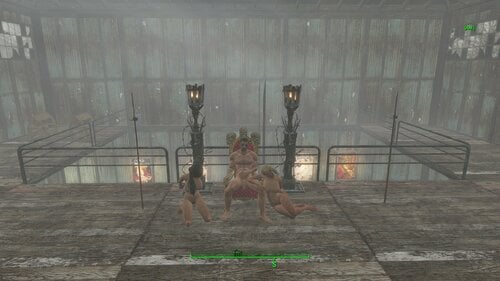
Slaver Camp, Brothel, Strip Club(Egret Tours Marina)
By rennex
Fallout 4 2021.03.01 - 03.23.24.02.mp4
Fallout 4 2021.03.01 - 03.23.24.02.mp4 About This File
This mod transforms Egret Tours Marina into a raider themed slaver settlement. Features a strip club with exotic dance idle markers. Slave Auction Stage with several areas to keep slaves. Lots of jail cells and cages! Because you can never have enough cages! improved performance over my last version.
------ Required Mod ------------------------------------
Fallout 4 Game of the Year Edition
---------------------------------------------------------------
93173216_Fallout42021_03.01-03_23_24_02.mp447784 downloads
- player slaver
- slavery
- (and 2 more)
Updated
-
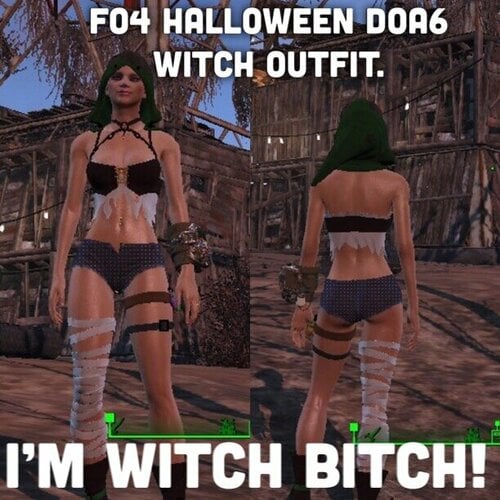
I'M Witch Bitch! - Happy Halloween DOA6 Witch Costume
A conversion of Mila, Ayane, Lisa, Phase 4 and Christie's Witch Party costume.
Craft at Campfire (witches are combustible)
each outfit Uses lots of bone to craft.
customize colors at armor bench.
I am not responsible for you mixing colors and making your character look stupid.
Bodyslide files for Fusion Girl 1.75+ and CBBE
feel free to do what you want iwth this so long as no one is charging money, but If you want to use the assets or upload it somewhere you need to pay it forward by buying someone some booze.
Let me know if there are any issues.
(Pics Soon)
1007 downloads
Updated
-
Stability Goggles
By Victor15
OVERVIEW - Provides the player with blueprints to create a pair of "stability goggles" that allows you to steady your aim (while they are being worn, of course). Why hold your breath while aiming when you don't have to?
The mod contains no scripts for those who are sensitive about mods that contain scripts.
The mod is a single .ESP file that is placed where all of the other .ESP files go. To uninstall, merely perform the sensible action of removing the goggles from your character, saving your game, removing the .ESP file from your mod loader, and then restart your game.
The mod only needs the Fallout 4 base game. I do not consider it overpowered but if eliminating scope sway is considered overpowered to you... Perhaps another mod would be better for you.
There are no quests involved although you do have to find the plans (and keep them in your possession while creating the goggles). And where are they? Well, for those who do not want to peruse the file using the Creation Kit, here is the first hint: Lexington. And, for those who want more hints:
One final note - PLEASE DO NOT PLACE THIS MOD ONTO NEXUSMODS. It is nothing personal; I do not "hate" the site. However, I would like to retain complete control over this mod. Having the mod only be available here would allow for me to see what I may be able to improve upon. Any constructive comments and critiques are always welcome. Thank you.
127 downloads
Updated
-
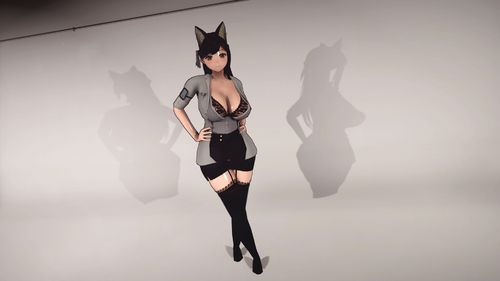
Sexy Scientist-Fusion Girl
By ahboy99
Sexy Scientist made by former StaticPhobia.
Requirements:
Fusion Girl 3BBB(I don't know which version does his outfit use.)
ZeX Skeleton
Bodyslide & Outfit Studio-You need to use your preset to build your preferred body at your outfit
HHS
Optional:
AnimeRace Nanako-chan
AnimeRace Nanako-chan Fusion Girl
Simple Patch for Morphs
Installation:
FOMOD, MO2 Drag and Drop, make sure your esp is active(ESP flagged ESL)
and build your preferred body preset at your bodyslide.
How to get?:
Just type in console help sexyscientist 4 or craft it at chemistry lab under the category "Sexy Scientist"
Known Issues:
Incorrect ESL Flag(due to records since I don't posses any knowledge of ESL)
Credits:
Staticphobia(Original Author)-For making this outfit possible I love it
Mark Antony-For letting me use the file before Staticphobia left off
PimpCrew-For Pip-Pad 3500 textures stuffs
Xing SkyrimSE-For OS tutorial and guidance advice.
Smoking Puppy-For FO4 CK guidance advice
2838 downloads
Submitted
-
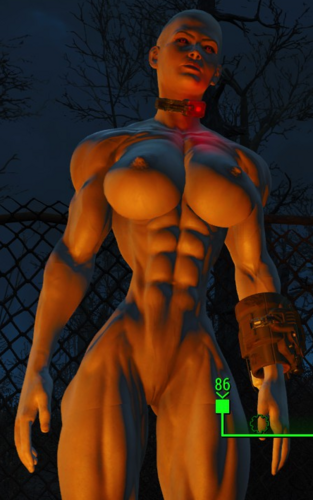
JaneBod - Preset - Muscular/Fit
By Victor15
UPDATE 2021-11-13 - NEW SECTION BEGINS BELOW
You aren't seeing double; What occurred was that LoversLab changed the way that a person logs into their website. When I made my original account so long ago (as Victor14), I used an E-Mail address that I have long since forgotten. Therefore, I had to set up a new account (as the highly original "Victor15"). I made an appeal to have my two accounts merged but that merging has not yet occurred and I am uncertain if it shall ever occur. Why wait on progress? For the meanwhile, here are more presets for you to enjoy with none of the original ones discarded (when I was "Victor14"). Not all of the presets are created equal (the ones marked with "-sky" on the end were intended to be ported over to Skyrim and were certainly not meant for usage in Fallout 4 but everyone is different).
Also, please do not distribute these presets to NexusMods. It is nothing personal; I do not "hate" that site. However, I would like to retain control over my creation and monitor it's appreciation from this location. I understand that this body type is a niche (as, I suppose, they all are in some way) but it is available to those who prefer their ladies looking as though they are more than able to punch the snot out of their opponents.
And, also, in celebration of re-opening this mod, a relatively new screenshot with one of the newer presets (it might be the 211003-x1, if I remember correctly).
END OF 2021-11-13 NEW SECTION
UPDATE 2021-06-13 - NEW SECTION BEGINS BELOW
I have included more presets into this new compressed file. Nothing has been removed; The file contains everything thus far. Some (but not all) of the new presets with "-exp," to be polite, did not exactly live up to expectations but have been included anyway because one man's trash is another man's treasure. I have also included another screenshot of one of the latest presets ("210606-exp" if I remember correctly) simply because I haven't included a screenshot for this file recently and did not want people to think that the variations were so slight as to be entirely representative of the first four screenshots. Nevertheless, the theme for all of them remains the same as being fit and muscular. Any comments or critiques concerning these presets, please feel free to express them. Thank you.
END OF 2021-06-13 NEW SECTION
UPDATE 2020-12-25 - NEW SECTION BEGINS BELOW
I have included more presets into this new compressed file. Nothing has been removed; The file contains everything thus far (as noted earlier, I did remove a preset that had a horrible neck seam due to the use of some sliders from Jane Bod Fixed but I'm not sure if anyone would have wanted that one to begin with). Any comments or critiques concerning these presets, please feel free to express them. Thank you.
END OF 2020-12-25 NEW SECTION
UPDATE 2020-11-22 - NEW SECTION BEGINS BELOW
Once again, I have uploaded new presets. The file contains both the new presets and a majority of the old presets as well. I took the liberty, this time, to go through all of the presets that were previously included and to find the few where the neck seam was significantly incompatible with the Jane Bod Rev head. To my surprise, I think that I only eliminated one preset; Therefore, all of the presets in the compressed file should all be good at this point (at least, in terms of the neck seam).
Also, I figured that I would carefully examine all of the Jane Bod Fixed sliders and to see which ones were, indeed, causing the neck seam changes. So here is a list of all of them, should you care to avoid them for the reason of those sliders changing the neck seam on your preset:
JBF Bod Fitform A
JBF Bod Fitform B
JBF Bod muscle details
JBF body Weigdt (their misspelling, not mine)
JBF Body hips curve
JBF Body hips fix
JB Belly muscles
JBF Leg Morph 1
If I remember correctly, I've switched from using the Jane Bod Rev body to the Jane Bod Rev 2 body. I don't think that it makes a bit of difference one way or the other (I haven't noticed a difference) but I thought that I would mention that in the rare instance that someone does care about that detail. I think that these presets will work just fine with either.
As always, these presets are packed using 7-zip so you will need to unzip them but it's an extremely common program and, if you are here, you likely have the technical know-how to find, download & use the program with no trouble at all. However, I mention that fact in the extreme off-chance that someone new to body replacer modding might be reading this description.
All of these presets are variations on a theme. The original screenshots are fairly representative of the variants although the additional presets included tends to skew towards having larger and/or differently shaped breasts along with a larger and/or differently shaped butt. Since presets are so small and can be compressed to an even smaller size, there was no point not to include them for purposes of comparison.
And, just as in the original section below, any comments or critiques are welcome. Thank you.
END OF 2020-11-22 NEW SECTION - ORIGINAL SECTION BEGINS BELOW - ORIGINAL SECTION MAY CONTAIN OUTDATED INFORMATION
Bodyslide Preset for use with JaneBod Rev body (with some additional JaneBod Fixed sliders)
I always take and rarely give (partially because I feel as though what I have to offer is not much) but I feel as though I should always be offering more. Therefore, here is a bodyslide preset that I have been using in Fallout 4 as of late.
It is a female bodyslide preset using the JaneBod body (technically, the JaneBod Fixed body) & using the Jane Bod Rev sliders with a few sliders from the JaneBod Fixed body.
I have included four screenshots: Three from Bodyslide that are fairly self-explanatory (front view, back view, angle) & one from inside of the game.
For those who have not integrated regular JaneBod with JaneBod Fixed sliders, the only Fixed sliders used are for feet size & so, hopefully, you can use this with regular JaneBod just fine.
If need be, I will refine this description should there be any glaring omissions with the present description.
Any comments or critiques are welcome. Thank you.
1059 downloads
- jane bod
- body replacer
- (and 4 more)
Updated
-
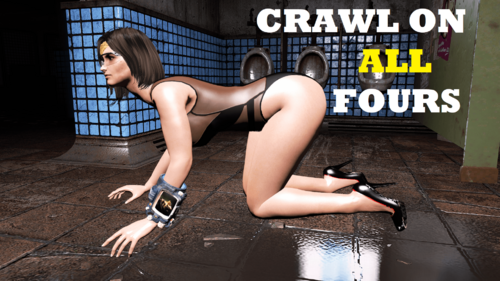
Crawl on all Fours animation for Fallout 4
By Guest
Crawl on all fours for Fallout 4.
This mod replaces the vanilla sneak, sneak walk/run animations, so all the characters will now CRAWL on all fours.
See pics and videos for how.
This is NOT A PORT of the skyrim / SSE Crawl on all fours mod. I just named them because people can find it better. I created this from scratch.
I really liked the mod, Crawl on all fours SSE by alhaquin ported from Crawl on all fours for Oldrim by DarkAngel1265. I wanted one similar for fallout 4 but didn't find any.
I Just used this AMAZING mod HkxPoser from nexus site and took out vanilla animations from fallout 4 - animations ba2 file. Then using this tool I modified the vanilla idle/sneak animation, vanilla run animation, vanilla walk animation. For a tutorial on how to do this yourself. Check out my crawl on all fours mod page in nexus - > https://www.nexusmods.com/fallout4/mods/55715
Youtube:
Credits:
HKxposer tool user opparco, from nexus. His amazing tool made me create this mod in 6 hours. If not I am not sure if I would I ever done this mod at all. So big thanks to him.
I love crawl on all fours mod for skyrim se / oldrim. But fallout 4 didn't have any so I made this myself. Thanks for introducing me to this (Kink) I didn't know I would like it so much to see women crawling on all fours until I came across your mod. So thanks for that.
10965 downloads
Updated
-
Healing Collar
By Victor15
OVERVIEW - This is a single .ESP file that allows the player to construct a wearable collar that continuously heals the player, both with health as well as rid the player of radiation and even repairs limbs. There is even a bit of a 'hidden feature' of sorts concerning the collar but I'll leave that up to the player to discover.
The collar is not overpowered (at least, in my opinion; as always, everyone's individual tastes vary); My recommendation would be to not run into a violent situation in the hopes that the collar alone would save you from death. There are no scripts involved, for those who are sensitive about using mods that contain scripts. The mod does need the Nukaworld DLC along with the base game (obviously), but this should not be much of a detriment at this point since pretty much everyone has the "Game of the Year" edition anyway which automatically contains the Nukaworld DLC.
Installation is simple; It's merely a single .ESP file and it goes where all of the other .ESP files would go. Deletion is also simple, merely delete the file and you are done.
Constructing the collar requires that you find a chemistry station (the only place where the game allows you to build any such objects) and that you are in physical possession of the plans (they can not be in a trunk or otherwise not on your person at the time of construction). You will also, obviously, need all of the parts necessary to build the collar. In order to make the mod somewhat lore-friendly, the parts required to build the collar is somewhat extensive; Consider yourself warned.
The location of the plans is a bit spoiler-ish. Let's see if I can format this next part properly:
For those who want a general hint at it's location, let's just say that, after starting the game, if you go past the Museum of Freedom, you've gone too far.
FUTURE PLANS - I may make the collar upgradable but I hate complicating anything beyond what is absolutely necessary. I may also turn the notes into a hologram tape (which would probably be more appropriate) but that is a minor concern in the overall scheme of the mod. As is, I think that this mod is a fun addition and allows the player to forego the hassle of stimpaks and rad-aways (at least for minor situations; The Glowing Sea will not be kind to you without additional safeguards) and other such potions should they so choose.
One final note - PLEASE DO NOT PLACE THIS MOD ONTO NEXUSMODS. It is nothing personal; I do not "hate" the site. However, I would like to retain complete control over this mod. Having the mod only be available here would allow for me to see what I may be able to improve upon. Thank you.
Enjoy.
843 downloads
Updated
-
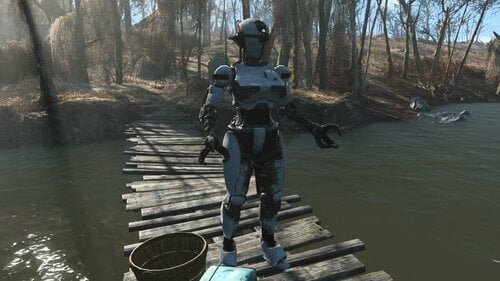
Rogg Assaultron Stuff
By Roggvir
This is some of the stuff i ended up with while doing some experiments, and i thought others may find it useful.
The contents:
Assaultron BodySlide
The BodySlide is based on Fusion Girl, but Fusion Girl is not needed for this to work.
Only the basic Assaultron parts and armors are covered (ie. no Construction or Wasteland parts/armors), so depending on your preset, you may get some clipping on robots that wear some Construction/Wasteland parts.
Optional OCBP Physics (only for upper torso)
Be warned, your immersion will suffer as your brain refuses to accept that hard metalic parts can bounce and jiggle.
For now it is made to replace the original Assaultron Torso and its Factory Torso Armor, so there may be some clipping on robots that use any non-Factory torso armors which are not physics-enabled.
Claw with Melee and Laser capabilities
A new "Laser Claw" allows the robot to use both melee attacks (including the pretty finishers) and ranged laser attacks.
About the Laser Claw
Build the new Assaultron Left/Right Laser Claw, which uses mesh with added projectile node.
Then build the desired laser weapon, found in the hand armor category on the claw.
The more powerful laser you give it, the less likely you will see the robot to use melee - partially because it may kill the enemies before getting within the melee range, partially because the robot may prefer the more powerful laser over the (probably) less powerful melee attack.
If you see laser coming from the robot's feet, its probably because you gave it the vanilla claw by mistake.
To avoid altering any vanilla game data or files, and to avoid conflicts with other Automatron mods, i used the Hand Armor attach point to attach the laser weapons. Otherwise i would have to add a new attach parent keyword which would then have to be added into some Automatron formlist, which i wanted to avoid.
The consequence of using the vanilla Hand Armor slot is that you can install the "Claw Laser" weapons even into the vanilla claw, but because the vanilla claw doesn't have the projectile node, you would see the lasers firing from robot's center at the feet level.
So, make sure you gave the robot the new "Laser Claw".
Compatibility
Laser Claw
Should be compatible with anything, as long as the other mod isn't modifying hand and hand armor related attach points on vanilla robot parts.
BodySlide
It was made from vanilla robot parts, so if a mod radically changes these parts, or their attach/parent points, then it won't work right.
OCBP BodySlide
Same as default BodySlide above.
Requirements
Automatron DLC BodySlide and Outfit Studio (needed only if you want to use the BodySlide files. Laser Claw doesn't need this) OCBP for Fallout 4 (needed only if you want to use the OCBP BodySlide)
3414 downloads
- assaultron
- bodyslide
- (and 1 more)
Updated
-
.thumb.png.d37eb1dfaff60dc202046459a1580606.png)
adult Vodka Body Physics
By ChaosAsunder
This is a custom female body slide preset I made for my game and you are welcome to use this in any mod you make all I ask is you credit me and provide a link for them to download the body.
THIS BODY WAS MADE WITH DEVIOUS DEVICES IN MIND!!!!
I made this also so it works with AAF Animated Fannies. It's not a hard requirement but the body slide was made with the AAF Animated Fannies body slide.
PLEASE MAKE SURE YOU HAVE BUFFOUT 4 PROPERLY INSTALLED AND WORKING PRIOR TO DOWNLOANDING THIS MOD OTHERWISE IT WILL CRASH!!
Link to AAF Animated Fannies:
I DO NOT OWN AAF ANIMATED FANNIES I SIMPLY JUST USED THEIR MOD IN MY BODYSLIDE AND FELT LIKE SHARING IT WITH EVERYONE!!
3625 downloads
Updated
-
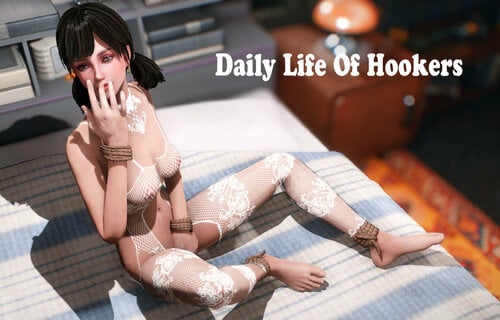
animation Daily Life Of Hookers
By kziitd
100 animation poses
The main purpose is to reflect the daily life of hookers in the Commonwealth. Of course, they can be anyone's posture.
If you want to use animation on anyone, please click the character with the console open, and then enter "playidle kziitd-001", the number from 001 to 100
I also provided the data file of OpparcoPoserHotkeys. If you use PoserhHotkeys to play animation, this is its use.
I didn't make AAF files because I felt very troublesome.
Poses is made for FG. It doesn't matter if you use CBBE, but I think some animations will lose some "details".
There are no animation objects in the poses, but for some poses, it may be better to use the rope in ego's Commonwealth Captives
------------------------
If you want to do anything with these animations, just let me know.
------------------------
Credits:
Synthoverboss and Zex team
Rufgt's Fo4 animation Guide
AAF document of JB.
------------------------
kziitd Animation poses.mp4374732 downloads
Updated
-
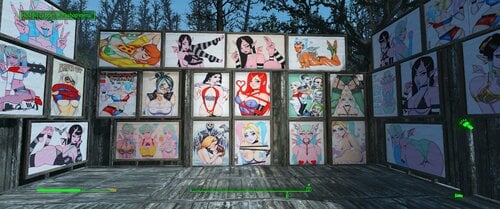
Scott Blair Art Painting pack
By gmggreviews
This mod adds a total of 60 "Paintings" from the fantastic artist Scott Blair. You can find these paintings under the vanilla Wall decorations-Paintings Tab.
These are standalone additions.
As said above, this mod adds a total of 60 "Paintings" from the fantastic artist Scott Blair. You can find these paintings under the vanilla Wall decorations-Paintings Tab. The pictures listed in the images section are a few random ones from the pack. These are standalone additions.
I contacted Scott a few days ago asking his permission to create and upload his pack, and was given his blessing. If you have never heard of him, hopefully this pack will send you in his direction! You can find him on pretty much all of the standard social media accounts under @Scottblairart
The template for this mod was provided by @XvomTheMad on Nexus. The dude did a great job with this original blank slate pack, so if you are like me and want to easily add customized paintings into your settlement, you gotta check his mod out.
Thank you so much to both authors for allowing me to use and build off of their work!
If you are also an artist and would like me to do something similar for you, please feel free to send me a PM. I enjoy doing this, it helps me to focus on something relaxing after a stressful day.
-Drew (GMGG Reviews)
*Please do NOT upload this anywhere else, and do not integrate these images into any other mods. If you want permission to do so, reach out to @Scottblairart and ask him for permission yourself, the same way I did.
3303 downloads
Submitted
-
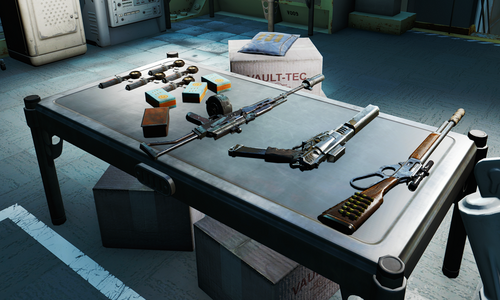
Woodfuzzy Vault 111 Tweaks
By izzyknows
Requirements:
Nuka World
Far Harbor
Conflicts:
Anything that edits the Cryo Vault, for the most part.
It does work fine with Deviously Cursed Wasteland.
What it does:
The short version.... Well, lets just say this a bloody arse cheat mod that will get you killed. You get a VIP lane to the exit of the vault and some custom, very over powered, weapons.
The detailed version...
Father. having learned of origins, decided to have you released and give you an advantage over the cruel Commonwealth. At least it seems that way. You see, Shaun has no emotional attachment, and thus, you really are just an experiment. And he has a somewhat twisted sense of humor.
After exiting the Cyro pod, your Pip-Boy will be right there. Equipping it will remove all the Radroaches in the Vault. (Yes you can still equip it running the Belted quest)
When you open the first door you'll see a clear path to the exit. That's right.. no taking the long way around.
At the entrance you'll find a table with custom modified weapons and some key supplies.
To your right, you'll find an armor, chem and weapon workbenches that are well stocked.
You'll notice the weapons are very over powered. But, they're not unique... thanks to Shaun.
In the end... it's just for fun!
Change Log:
1507 downloads
Updated
-
Kill Settlers without guilt
By BotisSarkany
Hello everyone,
i like to play with harassment mods like the included module of M.C.G. or others similiar to this. But if it happen at your settlement, you cant get your revenge.
With this one you can change this.
437 downloads
Submitted
-
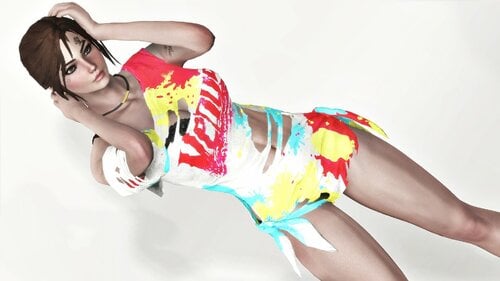
Colorful Wit - Fusion Girl
By kharneth1
Casual Outfit ported from DOA Venus Vacation.
Requirements
-Fusion Girl
-Bodyslide and Outfit Studio (Optional, Recommended): Included meshes are zero sliders, you need to build the outfit in bodyslide to fit it to your preset.
Installation
Donwload the file, install with any mod manager. Make sure the esp is active. (It's esl flagged so it won't take max esp space).
To fit the outfit to your body shape open bodyslide and build all items in the group "Colorful Wit FG" with your FG preset.
Description
T-Shirt, Underwear, Collar and Shoes as separate pieces.
It has no armor value but add some special stats and can be upgrade with ballistic and miscellaneus weave. Also can be legendary upgrade, provide you have a mod that add legendary modification.
T-Shirt and Underwear have diferent apparences to choose at armor workbench.
Everything can be build at chem station under the category "Colorful Wit".
Credits
-DOA venus vacation
Permissions
-Don't use any assets here for any commercial or paywalled purposes.
5964 downloads
Submitted
-
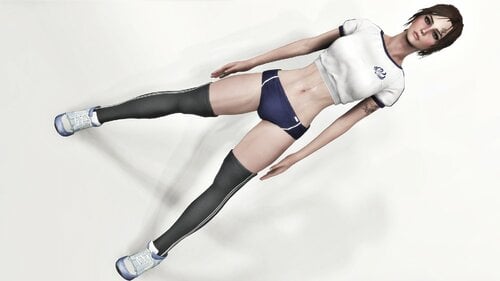
Stylish Bloomer - Fusion Girl
By kharneth1
Basbeball uniform ported from DOA Venus Vacation.
Requirements
-Fusion Girl
-Bodyslide and Outfit Studio (Optional, Recommended): Included meshes are zero sliders, you need to build the outfit in bodyslide to fit it to your preset.
Installation
Donwload the file, install with any mod manager. Make sure the esp is active. (It's esl flagged so it won't take max esp space).
To fit the outfit to your body shape open bodyslide and build all items in the group "Stylish Bloomer FG" with your FG preset.
Description
Top, Shorts and Shoes as separate pieces.
It has no armor value but add some special stats and can be upgrade with ballistic and miscellaneus weave. Also can be legendary upgrade, provide you have a mod that add legendary modification.
Top, shorts and socks have diferent apparences to choose at armor workbench.
Everything can be build at chem station under the category "Stylish Bloomer".
Credits
-DOA venus vacation
Permissions
-Don't use any assets here for any commercial or paywalled purposes.
13926 downloads
Submitted
-
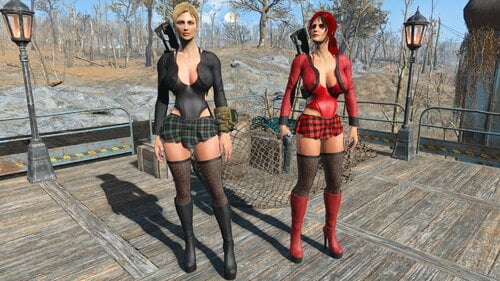
Fallout 4 "Clarice" Outfits
By Lionel Rossi
Hi, this outfit is made of five pieces. You will get five pairs of boots, five bodies, five jackets, seven skirts, one pair of stockings, in two colors and one wearable weapon.
You can craft the outfits at any chem lab (chemistry station), under the Clarice Outfits category.
Link to YouTube video: Fallout 4 -Clarice outfits- Test
Requierments: You must have these mods and their requierments installed:
Caliente's Beautiful Bodies Enhancer -CBBE-: https://www.nexusmods.com/fallout4/mods/15
BodySlide and Outfit Studio: https://www.nexusmods.com/fallout4/mods/25
Fallout 4 High Heels System: https://www.nexusmods.com/fallout4/mods/39850
If you want to see more of my mods you can find me here: GamewolfMods
All of my outfits-armors are compatible with OCBP physics for Fallout 4 and MTM OCBP Physics Preset - CBBE. I use the natural-normal preset.
Install with your favorite mod manager or manually, I use Vortex.
These outfits are designed for the curvy CBBE and the Shirakune body types, I don`t know if they fit well with other body presets. You can always use the Outfit Studio for a better fit.
Do not reupload the content of my mods.
Have fun and enjoy the game!:)
3073 downloads
Submitted
-
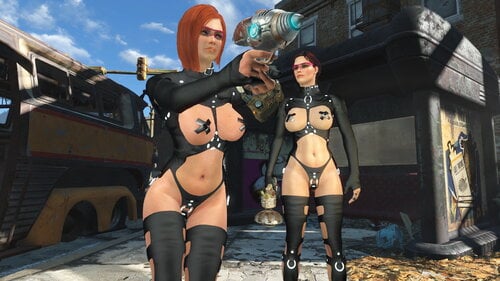
Fallout 4 -Hellraiser- Armor!
By Lionel Rossi
This is the "Hellraiser" armor mod, made by Odd-Doomei-deedlit-z-Sub63 and the original author is es47. I made a replica of the armor, I removed some parts to make it work in Fallout 4 and I added the high heels, the pasties and the two raincoats. Thank you xxxODDxx, for giving conversion permission.
YouTube video -preview of the mod- here:
You can craft the parts at any chem lab (chemistry station), under the Hellraiser category. You must build the parts in bodyslide.
Requirements: You must have these mods and their requirements installed:
Caliente's Beautiful Bodies Enhancer -CBBE-: https://www.nexusmods.com/fallout4/mods/15
BodySlide and Outfit Studio: https://www.nexusmods.com/fallout4/mods/25
Fallout 4 High Heels System: https://www.nexusmods.com/fallout4/mods/39850
If you want to see more of my mods you can find me here: GamewolfMods
All of my outfits-armors are compatible with OCBP physics for Fallout 4 and MTM OCBP Physics Preset - CBBE. I use the natural-normal preset.
These outfits are designed for the curvy CBBE body and the Shirakune body, I don`t know if they fit well with other body presets. You can always use the Outfit Studio for a better fit. If you use my "Suki body" preset you don't have to build the outfits in bodyslide, they are premade.
Do not reupload the content of my mods!
Install with your favorite mod manager or manually, I use Vortex.
Have fun and stay safe!
145212 downloads
Updated
-
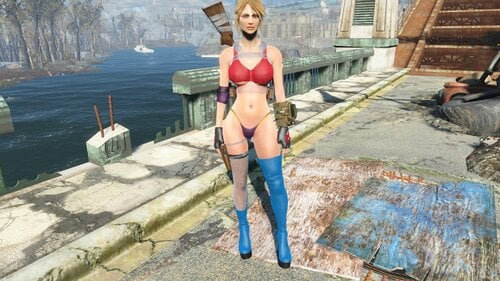
"Grenade Girl" CBBE Bodyslide Preset
By Lionel Rossi
This is my "Grenade Girl" Bodyslide Preset for the CBBE body. If you want to see more of my mods you can find me here: GamewolfMods
All of my outfits-armors are compatible with OCBP physics for Fallout 4 and MTM OCBP Physics Preset - CBBE. I use the natural-normal preset.
Requierments: You must have these mods and their requierments installed:
Caliente's Beautiful Bodies Enhancer -CBBE-:
https://www.nexusmods.com/fallout4/mods/15
BodySlide and Outfit Studio:
https://www.nexusmods.com/fallout4/mods/25
Install with your favorite mod manager or manually.
2785 downloads
Updated
-
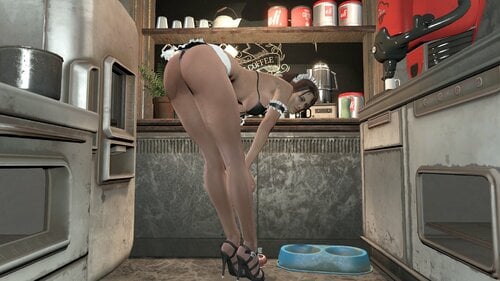
Fallout 4 "Sexy Maid" Outfits
By Lionel Rossi
The " Sexy Maid " was made originally by Melodic for Skyrim and I made replicas available in Fallout 4. Thank you Melodic! You can craft the outfits at any chem lab (chemistry station), under the Sexy Maid LR category. You must build the parts in Bodyslide. The parts are, armbands, bra, neck, panty, skirt, stockings and a headband, all in four colors. This outfit has no shoes, the shoes in the photos are from my "Starfish and Pearls" Outfits, the stockings don't work with high heels! For all my outfits, armors and the CBBE naked body, I recommend this mod for physics:
CBP Physics for Fallout 4 https://www.nexusmods.com/fallout4/mods/39088 very good mod and bugs free, makes the female body look more alive, but the original preset IMO sucks, that's why I use the:
MTM CBP and OCBP Physics Preset - CBBE https://www.nexusmods.com/fallout4/mods/39195 from the requirements you will need only the cbbe body (I guess you already have it, if you have some of my outfits, or armors!:) and the CBP Physics for Fallout 4. I use the normal version, you can install and uninstall many times, untill you find the one you like!
If you want to see more of my mods you can find me here: GamewolfMods
Requirements: You must have these mods and their requirements installed: Caliente's Beautiful Bodies Enhancer -CBBE-: https://www.nexusmods.com/fallout4/mods/15 BodySlide and Outfit Studio: https://www.nexusmods.com/fallout4/mods/25 These outfits are designed for the curvy CBBE body and the Shirakune body, I don`t know if they fit well with other body presets. You can always use the Outfit Studio for a better fit. Do not reupload the content of my mods! Install with your favorite mod manager or manually, I use Vortex. Have fun and enjoy the game!:)28471 downloads
Updated
-
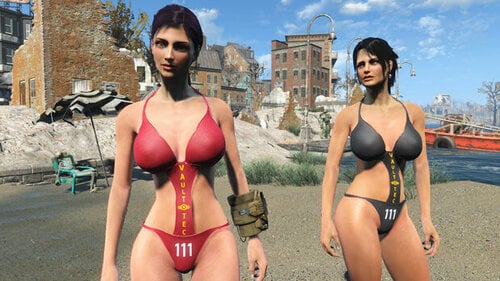
Fallout 4 -Vault-tec 111- Swimsuits
By Lionel Rossi
Please read the discription, before you download.
The swimsuit Vault-tec never made, in five colors, plus five transparent. If you want to see more of my mods you can find me here: GamewolfMods
You must build the swimsuits in bodyslide first and then you can craft them at any chem lab (chemistry station), under the healing category.
Requirements: You must have these mods installed:
Caliente's Beautiful Bodies Enhancer -CBBE-: https://www.nexusmods.com/fallout4/mods/15
BodySlide and Outfit Studio: https://www.nexusmods.com/fallout4/mods/25
These outfits are designed for the curvy CBBE and the Shirakune body types, I don`t know if they fit well with other body presets. You can always use the Outfit Studio for a better fit.
Do not reupload the content of my mods.
Install with your favorite mod manager or manually, I use Vortex.
Have fun and enjoy the game!:)
136399 downloads
Updated
-
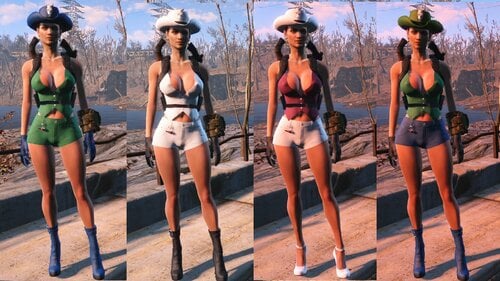
Fallout 4 -Kawaii Waifu- Outfits
By Lionel Rossi
This is a 33 pieces outfit that offers very little protection and it is made for Power Armor users. If you want to see more of my mods you can find me here: GamewolfMods
You can craft the outfits at any chem lab (chemistry station), under the healing category NOT the utility category. Please message me if there is any problem.
What you will get is: 5 pairs of boots, 5 pairs of high heels, 5 hats, 5 pairs of gloves, 5 denim shorts, 5 denim vests, one gear and two wareble weapons.
Link to YouTube video: Fallout 4-Kawaii Waifu Outfits
Requierments: You must have these mods and their requierments installed:
Caliente's Beautiful Bodies Enhancer -CBBE-: https://www.nexusmods.com/fallout4/mods/15
BodySlide and Outfit Studio: https://www.nexusmods.com/fallout4/mods/25
Fallout 4 High Heels System: https://www.nexusmods.com/fallout4/mods/39850
Warning: The High Heels System has a problem that I don`t know if it has been fixed. Some people, (me too) have reported the "infinite loading screen" when they start a new game. If that happen, open your mod manager, deactivate the High Heels System , start a new game and -after you make your character- you can activate the High Heels System, anytime.
These outfits are designed for the curvy CBBE and the Shirakune body types, I don`t know if they fit well with other body presets. You can always use the Outfit Studio for a better fit.
Do not share the links for the drive, or reupload the content of my mods!
Install with your favorite mod manager or manually, I use Vortex. You must build the parts in bodyslide.
Have fun and enjoy the game!:)
15655 downloads
Updated
.thumb.png.d476ec0bfca6ca16a086bc179741e360.png)
.thumb.png.ea1cd1c28ec6e6a0dc7025d0ce1ef3ab.png)
![More information about "[Simpossible] ❤️💜💛 Lewd And Cute Sex Animations for WW 💛💜❤️ [54 in total - 19 June 2026] - NEW ANIMATIONS 😘🥵💞🥧"](https://static.loverslab.com/screenshots/monthly_2026_10/MasterClassInPleasingHerPOV.thumb.gif.b2e96d22cf33a0c4381a4bd1cf5acf1a.gif)
![More information about "HL_PornStar — Adult Film Career [18+]"](https://static.loverslab.com/screenshots/monthly_2026_08/PornstarLogo.thumb.png.3f9b6ccf3fff7e3e52f829c2784f8643.png)