Search the Community
Showing results for tags 'f4se'.
-
Version v60-20260528
237212 downloads
Scriptname LL_FourPlay Native Hidden ; ; Shared community library of utility function from LoverLab distributed with FourPlay resources as a F4SE plugin with sources included ; ; Version 52 for runtime 1.10.984 2024 08 19 by jaam and Chosen Clue and EgoBallistic and Fedim ; Runtime version: This file should be runtime neutral. The accompanying F4SE plugin (ll_fourplay_1_10_984.dll) is NOT! ; You need to always use a plugin corresponding with the game version you play. ; Plugin should be available just after F4SE has been updated for the modified runtime. ; Runtime versions lower than 1.10.984 will no longer be supported. ; Written and tested against F4SE 0.7.2. You should not use an older version of F4SE. ; ; ; ; Returns the version of this script (when someone has not forgotten to update it :) ) Float Function GetLLFPScriptVersion() global return 52.0 endFunction ; Returns the version of the plugin and servers to verify it is properly installed. Float Function GetLLFPPluginVersion() native global ; Custom profile: written into "Data\F4SE\Plugins" ; =============== ; Returns the full path for custom profile name. IE "WhereverYourGameIs\Data\F4SE\Plugins\name". Don't forget to provide the .ini extension. string Function GetCustomConfigPath(string name) native global ; Get the value of custom config string option string Function GetCustomConfigOption(string name, string section, string key) native global ; Get the value of custom config integer option (Use 0/1 for boolean) int Function GetCustomConfigOption_UInt32(string name, string section, string key) native global ; Get the value of custom config float option Float Function GetCustomConfigOption_float(string name, string section, string key) native global ; Sets the value of custom config string option (at most 66535 characters per option). The directories and path will be created as needed. If the result is false, the set did not happen. bool Function SetCustomConfigOption(string name, string section, string key, string value) native global ; Sets the value of custom config integer option. The directories and path will be created as needed. If the result is false, the set did not happen. bool Function SetCustomConfigOption_UInt32(string name, string section, string key, int data) native global ; Sets the value of custom config float option. The directories and path will be created as needed. If the result is false, the set did not happen. bool Function SetCustomConfigOption_float(string name, string section, string key, float data) native global ; Get all the keys and values contained in a section. Both at once to avoid discrepancies in the order. ; The keys are in VarToVarArray(Var[0]) as String[] and the values in VarToVarArray(Var[1]) as String[] Var[] Function GetCustomConfigOptions(string fileName, string section) native global ; Set a list of keys and values in a section. Any other existing key will be left alone. bool Function SetCustomConfigOptions(string fileName, string section, string[] keys, string[] values) native global ; Reset all the keys and values contained in a section. ; Any exiting key value pair will be suppressed first, so providing none arrays will effectivly removes all keys from the section. bool Function ResetCustomConfigOptions(string fileName, string section, string[] keys, string[] values) native global ; Get all the sections in a file. string[] Function GetCustomConfigSections(string fileName) native global ; For all array functions: ; The implementation as an arbitrary limitation of 32767 bytes buffer for all Keys, Values or sections involved. ; If needed because the limitation becomes a problem, another implementation can be done using memory allocation, though there will remain a limit imposed by Windows. ; When arrays for keys and values are provided, the count of elements in both arrays must be identical or the function fails on purpose. ; An empty value should be provided as a zero length string. TO BE TESTED ; ; Camera functions ; ================ ; ; Forces the FlyCam state. ; if activate is true and the FlyCam is not active AND the FXCam is not active either, the FlyCam will be activated. ; if activate is false and the FlyCam is active, the FlyCam will be deactivated. ; if the requested state is identical to the current state nothing is done. ; Returns whether the FlyCam was active or not before the call so mods can restore the previous state if needed. bool Function SetFlyCam(bool activate) native global ; TO BE TESTED ; Forces the FlyCam state. Alternative version that allows to pause/unpause the game when entering FlyCam ; if activate is true and the FlyCam is not active AND the FXCam is not active either, the FlyCam will be activated. ; if pause then the game will be paused ; if activate is false and the FlyCam is active, the FlyCam will be deactivated. ; otherwise if the requested activate is identical to the current state nothing is done. ; Returns whether the FlyCam was active or not before the call so mods can restore the previous state if needed. ;TBT; bool Function SetFlyCam2(bool activate, bool pause) native global ; TO BE TESTED - So far this is useless as scripts seem to be stopped while in pause mode :( ; Get the current state of the FlyCam bool Function GetFlyCam() native global ; Get the current pause state of the game bool Function GetPaused() native global ; Get the current state of the FXCam bool Function GetFXCam() native global ; Select the speed at which the FlyCam moves (identical to SetUFOCamSpeedMult/sucsm console command) ; The console command supports an optional second parameter to control rotation speed. ; The way it handles default value is not compatible so I use an explicit bool to select which speed to change ; Returns the previous value of the selected speed. float Function SetFlyCamSpeedMult(float speed, bool rotation=False) native global ; ; Power Armor/Race/Skeleton functions ; =================================== ; ; Returns the actor's race when in PowerArmor Race Function GetActorPowerArmorRace(Actor akActor) native global ; Returns the actor's skeleton when in PowerArmor string Function GetActorPowerArmorSkeleton(Actor akActor) native global ; Returns the actor's current skeleton, not affected by PowerArmor string Function GetActorSkeleton(Actor akActor) native global ;Chosen Clue Edit ; ; String functions ; ================ ; ; Returns the first index of the position the toFind string starts. You can use this to check if an animation has a tag on it. Is not case sensitive. Int Function StringFind(string theString, string toFind, int startIndex = 0) native global ; Returns the selected substring from theString. If no length is set, the entire string past the startIndex number is returned. string Function StringSubstring(string theString, int startIndex, int len = 0) native global ; Splits the string into a string array based on the delimiter given in the second parameter. ; As this function does ignore whitespace, putting a space as the delimiter will only result in a string being returned without spaces. string[] Function StringSplit(string theString, string delimiter = ",") native global ; Opposite of StringSplit. string Function StringJoin(string[] theStrings, string delimiter = ",") native global ; Converts an integer of any base to a hexadecimal string representation string Function IntToHexString(Int num) native global ; Converts a hexadecimal string to an integer Int Function HexStringToInt(String theString) native global ; ; Array functions ; =============== ; ;Just a precursor: This does not mean we can use Alias based scripts to store animations like sexlab does, as the F4SE team has yet to include a typedef of them in the F4SE CPP files. I am guessing that they haven't reverse engineered it yet. Form[] Function ResizeFormArray(Form[] theArray, int theSize, Form theFill = NONE) native global String[] Function ResizeStringArray(String[] theArray, int theSize, String theFill = "") native global Int[] Function ResizeIntArray(Int[] theArray, int theSize, Int theFill = 0) native global Float[] Function ResizeFloatArray(Float[] theArray, int theSize, Float theFill = 0.0) native global Bool[] Function ResizeBoolArray(Bool[] theArray, int theSize, Bool theFill = False) native global Var[] Function ResizeVarArray2(Var[] theArray, int theSize) native global Var[] Function ResizeVarArray(Var[] theArray, int theSize) global ; Because filling with invalid values will CTD ; Bugged for any version prior to 14 ; theFill will be ignored, but kept for compatibility. Anyway nobody used it ever as it would have CTD. Please use ResizeVarArray2 Int theFill = 0 return ResizeVarArrayInternal(theArray, theSize, theFill) endFunction ; if the int theSize is negative, the resulting array is a copy of the original array unchanged. ; Sets the minimum array size required by a mod. Returns false if the current value was greater. Bool Function SetMinimalMaxArraySize(int theMaxArraySize) native global ; This patches ArrayAdd and ArrayInsert so they respect that maximum. The value is memorised in ToolLib.ini ;[Custom Arrays] ;uMaxArraySize=nnnnnn ; ; !! Creating arrays that are too large will adversaly affect your game !! ; ; Keyword functions ; ================= ; ; Return the first keyword whose editorID is akEditorID Keyword Function GetKeywordByName(string akEditorID) native global ; Adds a keyword to a form (not only a reference). Does not persists. bool Function AddKeywordToForm(Form akForm, Keyword akKeyword) native global ; Delete a keyword from a form (not only a reference). Does not persists. bool Function DelKeywordFromForm(Form akForm, Keyword akKeyword) native global ; Return an array of all keywords loaded in game. Keyword[] Function GetAllKeywords() native global ; ; CrossHair functions ; ==================== ; ; Returns the Reference that is currently under the CrossHair. Returns None if there isn't one currently. ObjectReference Function LastCrossHairRef() native global ; Returns the last Actor that is or was under the CrossHair. Returns None until there is one since the game was (re)started. Actor Function LastCrossHairActor() native global ; ; ObjectReference functions ; ========================= ; ; Set the reference display name as a string without token. TO BE TESTED bool Function ObjectReferenceSetSimpleDisplayName(ObjectReference akObject, string displayName) native global ; Sets reference angle in degrees. Will not cause load screen if called on Player Function SetRefAngle(ObjectReference akRef, float x, float y, float z) native global ; Sets no-collision state on reference Function SetRefNoCollision(ObjectReference akRef, bool abState) native global ; Get the scale of a reference Float Function GetScale(ObjectReference akRef) native global ; Set the scale of a reference Function SetScale(ObjectReference akRef, Float afScale) native global ; ; Actor functions ; =============== ; ; Check if the ActorBase has a specific skin. TO BE TESTED bool Function ActorBaseIsClean(Actor akActor) native global ; Return the WNAM ARMO of either the actor base or the actor's race Form Function GetActorBaseSkinForm(Actor akActor) native global ; Copy the base skin of one actor onto another as a skin override, similar to what LooksMenu does bool Function CopyActorBaseskinForm(Actor akSourceActor, Actor akDestActor) native global ; MFG morph function provided by EgoBallistic ; Apply a MFG Morph to the actor bool Function MfgMorph(Actor akActor, int morphID, int intensity) native global ; Set all MFG Morph values to zero on an actor bool Function MfgResetMorphs(Actor akActor) native global ; Save an actor's MFG Morph values to an array of float Float[] Function MfgSaveMorphs(Actor akActor) native global ; Restore an array of saved MFG morph values to an actor bool Function MfgRestoreMorphs(Actor akActor, Float[] values) native global ; Copy the MFG morph values from one actor to another bool Function MfgCopyMorphs(Actor a0, Actor a1) native global ; Apply a set of MFG morphs to an actor. Morph ID morphIDs[x] will be set to values[x] bool Function MfgApplyMorphSet(Actor akActor, int[] morphIDs, int[] values) native global ; Return an Actor's actor flags (not the same as the Form flags) Int Function GetActorFlags(Actor akActor) native global ; Reset an actor's persistent Essential / Protected data ; Calling Actor.SetEssential() overrides the actor base value. Changing the state on the actor base will no longer have any effect, and ; neither will the Essential flag on Aliases. This function resets the override so ActorBase and alias flags will work again. bool Function ResetActorEssential(Actor akActor) native global ; Sets an actor's position. Directly moves the ref so does not cause load screen if called on player Function SetActorPosition(Actor akActor, float x, float y, float z) native global ; Enable collisions for specific actor Function EnableActorCollision(Actor akActor) native global ; Disable collisions for specific actor Function DisableActorCollision(Actor akActor) native global ; Snap actor out of whatever interaction (furniture, etc) they are in Function ActorStopInteractingQuick(Actor akActor) native global ; Force AI package Function ActorSetPackageOverride(Actor akActor, Form pkg) native global ; Clear forced AI Package Function ActorClearPackageOverride(Actor akActor) native global ; Returns whether the actor is currently ignoring combat (e.g. due to package flags) Bool Function ActorGetIgnoringCombat(Actor akActor) native global ; Force the actor to ignore combat or not, overriding any package flags Function ActorSetIgnoringCombat(Actor akActor, Bool abIgnoreCombat) native global ; Update actor 3D equipment only (less expensive than QueueUpdate 0xC) Function ActorUpdateEquipment(Actor akActor) native global ; Update Player Character 3D Function PlayerUpdateEquipment() native global ; ; Collision functions ; =================== ; ; Set the collision state of a reference. Returns the previous state. TO BE TESTED _ currently fails. ;TBT; bool Function ObjectReferenceSetCollision(ObjectReference akObject, bool enable=True) native global ; Get the collision state of a reference. If akObject is None, return the global collision state (controlled by TCL). TO BE TESTED ;TBT; bool Function ObjectReferenceGetCollision(ObjectReference akObject) native global ; ; Cell Functions ; ============== ; ; Returns the number of references of type formType in cell. Use GetFormType() below for formType values. If formType is 0 this returns the count of all refs in the cell. Int Function GetNumRefsInCell(Cell akCell, Int formType) native global ; Returns nth reference of type formType in cell. If formType is 0 this returns the nth reference of any type. ObjectReference Function GetNthRefInCell(Cell akCell, Int index, Int formType) native global ; ; Misc. Form functions ; ==================== ; ; Returns the Editor ID of a Race. Originally GetFormEditorID, but passing in a form and using the F4SE function GetEditorID() has only worked on Quest and Race forms. So I've just made it for race forms only. String Function GetRaceEditorID(Race akForm) native global ; Returns the name of the plugin that created a form String Function OriginalPluginName(Form akForm) native global ; Returns the persistent ID of a form (excluding the load index) Should be compatible with esl files. (Fixed as of v18) Int Function OriginalPluginID(Form akForm) native global ; Returns whether a form is in a given leveled item list bool Function GetInLeveledItem(Leveleditem akList, Form akForm) native global ; Return a form's record flags Int Function GetRecordFlags(Form akForm) native global ; Return a form's formType Int Function GetFormType(Form akForm) native global ; Return whether form is persistent or not - updated in v51 Bool Function IsPersistent(Form akForm) native global ; Set a form persistent or not. Returns false if form does not exist - updated in v51 Bool Function SetPersistent(Form akForm, bool akFlag) native global ; Return an array of all the forms in a FormList Form[] Function FormListToArray(FormList akFormList) native global ; Return the form with the given formID from any type of plugin (esm, esl, esp) Form Function GetFormFromPlugin(String modName, Int formID) native global ; Return an array of forms given an array of plugin names and an array of form IDs Form[] Function GetFormArray(String[] modNames, Int[] formIDs) native global ; Given an array of FormID Ints that was packed as Var via VarArrayToVar(), return the array of corresponding forms Form[] Function GetFormArrayFromVar(Var akVar) native global ; Populate a formlist with the forms given an array of plugin names and a corresponding array of form IDs Function PopulateFormlist(FormList akFormList, String[] modNames, Int[] formIDs) native global ; ; AAF functions ; ============== ; ; Return an array of actors near akRef who qualify for AAF animations Actor[] Function AAF_PerformActorScan(ObjectReference akRef, float radius) native global ; Return the actor gender as seen by AAF Bool Function AAF_GetGender(Actor targetActor) native global ; Collects statistics on an actor for use by the Scaleform Var[] Function AAF_MakeActorData(Actor targetActor, Bool includeDistance, Keyword[] conditionKeywords) native global ; Collects statistics on location objects for use by the Scaleform Var[] Function AAF_MakeLocationData(ObjectReference target, Bool includeDistance = False) native global ; Returns whether an object is suitable for use as an animation location Bool Function AAF_IsValidLocation(ObjectReference targetLocation, Var[] actorGroup) native global ; Converts the internal representation of AAF's furniture list to an array of Forms as Var Var[] Function AAF_ProcessFurnitureList(Var[] akArgs) native global ; Returns an array of LocationData, packed as a Var, of all the valid locations for animations within the given radius from the scan location Var Function AAF_GetLocationData(int scanLocation, Var[] furnitureForms, Var[] furnitureSources, Var[] actorGroup, Bool quickScan, Float scanRadius) native global ; Returns whether an actor has any keywords in the blocked keywords list Bool Function AAF_GetBlockedStatus(Actor akActor) native global ; Returns whether an actor is valid for AAF use (not dead, not disabled/deleted, etc.) Bool Function AAF_IsValidActor(Actor akActor) native global ; Returns whether an actor is valid for use and not currently in an animation Bool Function AAF_IsAvailableActor(Actor akActor) native global ; ; Misc functions ; ============== ; ; Prints a message to the debug console. Exposes the internal F4SE function Console_Print using the code found in Papyrutil in Skyrim. bool Function PrintConsole(String text) native global ; Enable or disable blinking. Disabling allows MFG morphs to work on eyelids (morph ID 18 and 41) Function SetAllowBlinking(Bool allowed) native global ; ; HIDDEN Functions. Never call directly. ; ; hidden function, use ResizeVarArray instead Var[] Function ResizeVarArrayInternal(Var[] theArray, int theSize, Var theFill) native global ; ; Wav function (by Fedim) ; ; Plays a WAV file. FileName relative to "Data\Sound\Voice\" ; Option is possible "Data\Sound\Voice\MyPlugin\sound001.wav" Function PlaySoundWav(string FileName) native global ; Returns the current volume level of the player (-1 = 0xFFFFFFFF -> max) ; LowWord - left channel volume ; HeighWorg - right channel volume ; 0 <= volume <= 65535 (0xFFFF) int Function GetVolumeWav() native global ; Sets the volume of the player channels ; 0 <= volume <=65535 (0xFFFF) int Function SetVolumeWav(int volumeA, int volumeB) native global ; Randomly selects a line from the SectionText section of the "Data\F4SE\Plugins\PluginName.ini" file, plays the WAV and returns the text ; ini file must be UTF-8 encoded ; Sounds should be in the "Data\Sound\Voice\PluginName.esp\" String Function VoiceMessage(String PluginName, String SectionText) native global ; ; INI setting functions ; ===================== ; ; Functions to retrieve INI settings, e.g. Fallout4.ini, Fallout4Prefs.ini, Fallout4Custom.ini, mod .ini files in Data folder ; These functions retrieve the settings from the game engine, not from the INI files themselves. ; Parameter is the .ini setting name and section, fSettingName:SectionName. For example, fMinCurrentZoom:Camera ; Note that typing is strict, e.g. you cannot call GetINIFloat on an Int setting ; ; Return Float setting value or 0.0 if not found float Function GetINIFloat(string ini) native global ; Return Int setting value or 0 if not found int Function GetINIInt(string ini) native global ; Return Bool setting value or false if not found Bool Function GetINIBool(string ini) native global ; Return String setting value or NONE if not found String Function GetINIString(string ini) native global ; ; Animation functions ; =================== ; ; Functions to play animations on actors. They do basic sanity checking on the inputs so that None idles and actors, ; actors who are deleted or disabled, and actors with no AI middle process will not attempt to play idles. ; ; Make one actor play an idle Function PlayIdle(Actor akActor, Form akIdle) native global ; Make an array of actors play a corresponding array of idles, in synch Function PlayMultipleIdles(Actor[] akActor, Form[] akIdle) native global ; Stop the actor's current idle Function StopCurrentIdle(Actor akActor) native global Looks like I delteted the list of updates Well the first post is a lot shorter now. Also there is now a GitHub site to host the sources for this and other tools of mine at https://github.com/Lkdb5RDr v52-20240902 is a hotfix for v52-20240821 v53-20250105 fixes loading in fallout 1.10.163. v54-20250330 Hotfix for issue describe on March 30th by EgoBallistic v55 : deleted. v56 for 1.11.137.0 v57-20251120 adds support for Game version 1.11.159.0 (~AE Hotfix) paired with F4SE 0.7.5. Maintains support with 1.10.163.0, 1.10.984.0 and 1.11.137.0 (temporary) Tested successfully with basic functionality. v58-20251126: Adds support for Fallout v1.11.169.0 and F4SE 0.7.6. v59 for Fallout 1.11.191.0 and F4SE 0.7.8 v60 : - Compatible with game version 1.11.221.0 (and F4SE 0.7.8) - Corrected an issue with SetFlyCamSpeedMult in all versions but 1.10.984.0 since that game version was available. -
 [Dev/Test/Beta] LL FourPlay community F4SE plugin View File Scriptname LL_FourPlay Native Hidden ; ; Shared community library of utility function from LoverLab distributed with FourPlay resources as a F4SE plugin with sources included ; ; Version 52 for runtime 1.10.984 2024 08 19 by jaam and Chosen Clue and EgoBallistic and Fedim ; Runtime version: This file should be runtime neutral. The accompanying F4SE plugin (ll_fourplay_1_10_984.dll) is NOT! ; You need to always use a plugin corresponding with the game version you play. ; Plugin should be available just after F4SE has been updated for the modified runtime. ; Runtime versions lower than 1.10.984 will no longer be supported. ; Written and tested against F4SE 0.7.2. You should not use an older version of F4SE. ; ; ; ; Returns the version of this script (when someone has not forgotten to update it :) ) Float Function GetLLFPScriptVersion() global return 52.0 endFunction ; Returns the version of the plugin and servers to verify it is properly installed. Float Function GetLLFPPluginVersion() native global ; Custom profile: written into "Data\F4SE\Plugins" ; =============== ; Returns the full path for custom profile name. IE "WhereverYourGameIs\Data\F4SE\Plugins\name". Don't forget to provide the .ini extension. string Function GetCustomConfigPath(string name) native global ; Get the value of custom config string option string Function GetCustomConfigOption(string name, string section, string key) native global ; Get the value of custom config integer option (Use 0/1 for boolean) int Function GetCustomConfigOption_UInt32(string name, string section, string key) native global ; Get the value of custom config float option Float Function GetCustomConfigOption_float(string name, string section, string key) native global ; Sets the value of custom config string option (at most 66535 characters per option). The directories and path will be created as needed. If the result is false, the set did not happen. bool Function SetCustomConfigOption(string name, string section, string key, string value) native global ; Sets the value of custom config integer option. The directories and path will be created as needed. If the result is false, the set did not happen. bool Function SetCustomConfigOption_UInt32(string name, string section, string key, int data) native global ; Sets the value of custom config float option. The directories and path will be created as needed. If the result is false, the set did not happen. bool Function SetCustomConfigOption_float(string name, string section, string key, float data) native global ; Get all the keys and values contained in a section. Both at once to avoid discrepancies in the order. ; The keys are in VarToVarArray(Var[0]) as String[] and the values in VarToVarArray(Var[1]) as String[] Var[] Function GetCustomConfigOptions(string fileName, string section) native global ; Set a list of keys and values in a section. Any other existing key will be left alone. bool Function SetCustomConfigOptions(string fileName, string section, string[] keys, string[] values) native global ; Reset all the keys and values contained in a section. ; Any exiting key value pair will be suppressed first, so providing none arrays will effectivly removes all keys from the section. bool Function ResetCustomConfigOptions(string fileName, string section, string[] keys, string[] values) native global ; Get all the sections in a file. string[] Function GetCustomConfigSections(string fileName) native global ; For all array functions: ; The implementation as an arbitrary limitation of 32767 bytes buffer for all Keys, Values or sections involved. ; If needed because the limitation becomes a problem, another implementation can be done using memory allocation, though there will remain a limit imposed by Windows. ; When arrays for keys and values are provided, the count of elements in both arrays must be identical or the function fails on purpose. ; An empty value should be provided as a zero length string. TO BE TESTED ; ; Camera functions ; ================ ; ; Forces the FlyCam state. ; if activate is true and the FlyCam is not active AND the FXCam is not active either, the FlyCam will be activated. ; if activate is false and the FlyCam is active, the FlyCam will be deactivated. ; if the requested state is identical to the current state nothing is done. ; Returns whether the FlyCam was active or not before the call so mods can restore the previous state if needed. bool Function SetFlyCam(bool activate) native global ; TO BE TESTED ; Forces the FlyCam state. Alternative version that allows to pause/unpause the game when entering FlyCam ; if activate is true and the FlyCam is not active AND the FXCam is not active either, the FlyCam will be activated. ; if pause then the game will be paused ; if activate is false and the FlyCam is active, the FlyCam will be deactivated. ; otherwise if the requested activate is identical to the current state nothing is done. ; Returns whether the FlyCam was active or not before the call so mods can restore the previous state if needed. ;TBT; bool Function SetFlyCam2(bool activate, bool pause) native global ; TO BE TESTED - So far this is useless as scripts seem to be stopped while in pause mode :( ; Get the current state of the FlyCam bool Function GetFlyCam() native global ; Get the current pause state of the game bool Function GetPaused() native global ; Get the current state of the FXCam bool Function GetFXCam() native global ; Select the speed at which the FlyCam moves (identical to SetUFOCamSpeedMult/sucsm console command) ; The console command supports an optional second parameter to control rotation speed. ; The way it handles default value is not compatible so I use an explicit bool to select which speed to change ; Returns the previous value of the selected speed. float Function SetFlyCamSpeedMult(float speed, bool rotation=False) native global ; ; Power Armor/Race/Skeleton functions ; =================================== ; ; Returns the actor's race when in PowerArmor Race Function GetActorPowerArmorRace(Actor akActor) native global ; Returns the actor's skeleton when in PowerArmor string Function GetActorPowerArmorSkeleton(Actor akActor) native global ; Returns the actor's current skeleton, not affected by PowerArmor string Function GetActorSkeleton(Actor akActor) native global ;Chosen Clue Edit ; ; String functions ; ================ ; ; Returns the first index of the position the toFind string starts. You can use this to check if an animation has a tag on it. Is not case sensitive. Int Function StringFind(string theString, string toFind, int startIndex = 0) native global ; Returns the selected substring from theString. If no length is set, the entire string past the startIndex number is returned. string Function StringSubstring(string theString, int startIndex, int len = 0) native global ; Splits the string into a string array based on the delimiter given in the second parameter. ; As this function does ignore whitespace, putting a space as the delimiter will only result in a string being returned without spaces. string[] Function StringSplit(string theString, string delimiter = ",") native global ; Opposite of StringSplit. string Function StringJoin(string[] theStrings, string delimiter = ",") native global ; Converts an integer of any base to a hexadecimal string representation string Function IntToHexString(Int num) native global ; Converts a hexadecimal string to an integer Int Function HexStringToInt(String theString) native global ; ; Array functions ; =============== ; ;Just a precursor: This does not mean we can use Alias based scripts to store animations like sexlab does, as the F4SE team has yet to include a typedef of them in the F4SE CPP files. I am guessing that they haven't reverse engineered it yet. Form[] Function ResizeFormArray(Form[] theArray, int theSize, Form theFill = NONE) native global String[] Function ResizeStringArray(String[] theArray, int theSize, String theFill = "") native global Int[] Function ResizeIntArray(Int[] theArray, int theSize, Int theFill = 0) native global Float[] Function ResizeFloatArray(Float[] theArray, int theSize, Float theFill = 0.0) native global Bool[] Function ResizeBoolArray(Bool[] theArray, int theSize, Bool theFill = False) native global Var[] Function ResizeVarArray2(Var[] theArray, int theSize) native global Var[] Function ResizeVarArray(Var[] theArray, int theSize) global ; Because filling with invalid values will CTD ; Bugged for any version prior to 14 ; theFill will be ignored, but kept for compatibility. Anyway nobody used it ever as it would have CTD. Please use ResizeVarArray2 Int theFill = 0 return ResizeVarArrayInternal(theArray, theSize, theFill) endFunction ; if the int theSize is negative, the resulting array is a copy of the original array unchanged. ; Sets the minimum array size required by a mod. Returns false if the current value was greater. Bool Function SetMinimalMaxArraySize(int theMaxArraySize) native global ; This patches ArrayAdd and ArrayInsert so they respect that maximum. The value is memorised in ToolLib.ini ;[Custom Arrays] ;uMaxArraySize=nnnnnn ; ; !! Creating arrays that are too large will adversaly affect your game !! ; ; Keyword functions ; ================= ; ; Return the first keyword whose editorID is akEditorID Keyword Function GetKeywordByName(string akEditorID) native global ; Adds a keyword to a form (not only a reference). Does not persists. bool Function AddKeywordToForm(Form akForm, Keyword akKeyword) native global ; Delete a keyword from a form (not only a reference). Does not persists. bool Function DelKeywordFromForm(Form akForm, Keyword akKeyword) native global ; Return an array of all keywords loaded in game. Keyword[] Function GetAllKeywords() native global ; ; CrossHair functions ; ==================== ; ; Returns the Reference that is currently under the CrossHair. Returns None if there isn't one currently. ObjectReference Function LastCrossHairRef() native global ; Returns the last Actor that is or was under the CrossHair. Returns None until there is one since the game was (re)started. Actor Function LastCrossHairActor() native global ; ; ObjectReference functions ; ========================= ; ; Set the reference display name as a string without token. TO BE TESTED bool Function ObjectReferenceSetSimpleDisplayName(ObjectReference akObject, string displayName) native global ; Sets reference angle in degrees. Will not cause load screen if called on Player Function SetRefAngle(ObjectReference akRef, float x, float y, float z) native global ; Sets no-collision state on reference Function SetRefNoCollision(ObjectReference akRef, bool abState) native global ; Get the scale of a reference Float Function GetScale(ObjectReference akRef) native global ; Set the scale of a reference Function SetScale(ObjectReference akRef, Float afScale) native global ; ; Actor functions ; =============== ; ; Check if the ActorBase has a specific skin. TO BE TESTED bool Function ActorBaseIsClean(Actor akActor) native global ; Return the WNAM ARMO of either the actor base or the actor's race Form Function GetActorBaseSkinForm(Actor akActor) native global ; Copy the base skin of one actor onto another as a skin override, similar to what LooksMenu does bool Function CopyActorBaseskinForm(Actor akSourceActor, Actor akDestActor) native global ; MFG morph function provided by EgoBallistic ; Apply a MFG Morph to the actor bool Function MfgMorph(Actor akActor, int morphID, int intensity) native global ; Set all MFG Morph values to zero on an actor bool Function MfgResetMorphs(Actor akActor) native global ; Save an actor's MFG Morph values to an array of float Float[] Function MfgSaveMorphs(Actor akActor) native global ; Restore an array of saved MFG morph values to an actor bool Function MfgRestoreMorphs(Actor akActor, Float[] values) native global ; Copy the MFG morph values from one actor to another bool Function MfgCopyMorphs(Actor a0, Actor a1) native global ; Apply a set of MFG morphs to an actor. Morph ID morphIDs[x] will be set to values[x] bool Function MfgApplyMorphSet(Actor akActor, int[] morphIDs, int[] values) native global ; Return an Actor's actor flags (not the same as the Form flags) Int Function GetActorFlags(Actor akActor) native global ; Reset an actor's persistent Essential / Protected data ; Calling Actor.SetEssential() overrides the actor base value. Changing the state on the actor base will no longer have any effect, and ; neither will the Essential flag on Aliases. This function resets the override so ActorBase and alias flags will work again. bool Function ResetActorEssential(Actor akActor) native global ; Sets an actor's position. Directly moves the ref so does not cause load screen if called on player Function SetActorPosition(Actor akActor, float x, float y, float z) native global ; Enable collisions for specific actor Function EnableActorCollision(Actor akActor) native global ; Disable collisions for specific actor Function DisableActorCollision(Actor akActor) native global ; Snap actor out of whatever interaction (furniture, etc) they are in Function ActorStopInteractingQuick(Actor akActor) native global ; Force AI package Function ActorSetPackageOverride(Actor akActor, Form pkg) native global ; Clear forced AI Package Function ActorClearPackageOverride(Actor akActor) native global ; Returns whether the actor is currently ignoring combat (e.g. due to package flags) Bool Function ActorGetIgnoringCombat(Actor akActor) native global ; Force the actor to ignore combat or not, overriding any package flags Function ActorSetIgnoringCombat(Actor akActor, Bool abIgnoreCombat) native global ; Update actor 3D equipment only (less expensive than QueueUpdate 0xC) Function ActorUpdateEquipment(Actor akActor) native global ; Update Player Character 3D Function PlayerUpdateEquipment() native global ; ; Collision functions ; =================== ; ; Set the collision state of a reference. Returns the previous state. TO BE TESTED _ currently fails. ;TBT; bool Function ObjectReferenceSetCollision(ObjectReference akObject, bool enable=True) native global ; Get the collision state of a reference. If akObject is None, return the global collision state (controlled by TCL). TO BE TESTED ;TBT; bool Function ObjectReferenceGetCollision(ObjectReference akObject) native global ; ; Cell Functions ; ============== ; ; Returns the number of references of type formType in cell. Use GetFormType() below for formType values. If formType is 0 this returns the count of all refs in the cell. Int Function GetNumRefsInCell(Cell akCell, Int formType) native global ; Returns nth reference of type formType in cell. If formType is 0 this returns the nth reference of any type. ObjectReference Function GetNthRefInCell(Cell akCell, Int index, Int formType) native global ; ; Misc. Form functions ; ==================== ; ; Returns the Editor ID of a Race. Originally GetFormEditorID, but passing in a form and using the F4SE function GetEditorID() has only worked on Quest and Race forms. So I've just made it for race forms only. String Function GetRaceEditorID(Race akForm) native global ; Returns the name of the plugin that created a form String Function OriginalPluginName(Form akForm) native global ; Returns the persistent ID of a form (excluding the load index) Should be compatible with esl files. (Fixed as of v18) Int Function OriginalPluginID(Form akForm) native global ; Returns whether a form is in a given leveled item list bool Function GetInLeveledItem(Leveleditem akList, Form akForm) native global ; Return a form's record flags Int Function GetRecordFlags(Form akForm) native global ; Return a form's formType Int Function GetFormType(Form akForm) native global ; Return whether form is persistent or not - updated in v51 Bool Function IsPersistent(Form akForm) native global ; Set a form persistent or not. Returns false if form does not exist - updated in v51 Bool Function SetPersistent(Form akForm, bool akFlag) native global ; Return an array of all the forms in a FormList Form[] Function FormListToArray(FormList akFormList) native global ; Return the form with the given formID from any type of plugin (esm, esl, esp) Form Function GetFormFromPlugin(String modName, Int formID) native global ; Return an array of forms given an array of plugin names and an array of form IDs Form[] Function GetFormArray(String[] modNames, Int[] formIDs) native global ; Given an array of FormID Ints that was packed as Var via VarArrayToVar(), return the array of corresponding forms Form[] Function GetFormArrayFromVar(Var akVar) native global ; Populate a formlist with the forms given an array of plugin names and a corresponding array of form IDs Function PopulateFormlist(FormList akFormList, String[] modNames, Int[] formIDs) native global ; ; AAF functions ; ============== ; ; Return an array of actors near akRef who qualify for AAF animations Actor[] Function AAF_PerformActorScan(ObjectReference akRef, float radius) native global ; Return the actor gender as seen by AAF Bool Function AAF_GetGender(Actor targetActor) native global ; Collects statistics on an actor for use by the Scaleform Var[] Function AAF_MakeActorData(Actor targetActor, Bool includeDistance, Keyword[] conditionKeywords) native global ; Collects statistics on location objects for use by the Scaleform Var[] Function AAF_MakeLocationData(ObjectReference target, Bool includeDistance = False) native global ; Returns whether an object is suitable for use as an animation location Bool Function AAF_IsValidLocation(ObjectReference targetLocation, Var[] actorGroup) native global ; Converts the internal representation of AAF's furniture list to an array of Forms as Var Var[] Function AAF_ProcessFurnitureList(Var[] akArgs) native global ; Returns an array of LocationData, packed as a Var, of all the valid locations for animations within the given radius from the scan location Var Function AAF_GetLocationData(int scanLocation, Var[] furnitureForms, Var[] furnitureSources, Var[] actorGroup, Bool quickScan, Float scanRadius) native global ; Returns whether an actor has any keywords in the blocked keywords list Bool Function AAF_GetBlockedStatus(Actor akActor) native global ; Returns whether an actor is valid for AAF use (not dead, not disabled/deleted, etc.) Bool Function AAF_IsValidActor(Actor akActor) native global ; Returns whether an actor is valid for use and not currently in an animation Bool Function AAF_IsAvailableActor(Actor akActor) native global ; ; Misc functions ; ============== ; ; Prints a message to the debug console. Exposes the internal F4SE function Console_Print using the code found in Papyrutil in Skyrim. bool Function PrintConsole(String text) native global ; Enable or disable blinking. Disabling allows MFG morphs to work on eyelids (morph ID 18 and 41) Function SetAllowBlinking(Bool allowed) native global ; ; HIDDEN Functions. Never call directly. ; ; hidden function, use ResizeVarArray instead Var[] Function ResizeVarArrayInternal(Var[] theArray, int theSize, Var theFill) native global ; ; Wav function (by Fedim) ; ; Plays a WAV file. FileName relative to "Data\Sound\Voice\" ; Option is possible "Data\Sound\Voice\MyPlugin\sound001.wav" Function PlaySoundWav(string FileName) native global ; Returns the current volume level of the player (-1 = 0xFFFFFFFF -> max) ; LowWord - left channel volume ; HeighWorg - right channel volume ; 0 <= volume <= 65535 (0xFFFF) int Function GetVolumeWav() native global ; Sets the volume of the player channels ; 0 <= volume <=65535 (0xFFFF) int Function SetVolumeWav(int volumeA, int volumeB) native global ; Randomly selects a line from the SectionText section of the "Data\F4SE\Plugins\PluginName.ini" file, plays the WAV and returns the text ; ini file must be UTF-8 encoded ; Sounds should be in the "Data\Sound\Voice\PluginName.esp\" String Function VoiceMessage(String PluginName, String SectionText) native global ; ; INI setting functions ; ===================== ; ; Functions to retrieve INI settings, e.g. Fallout4.ini, Fallout4Prefs.ini, Fallout4Custom.ini, mod .ini files in Data folder ; These functions retrieve the settings from the game engine, not from the INI files themselves. ; Parameter is the .ini setting name and section, fSettingName:SectionName. For example, fMinCurrentZoom:Camera ; Note that typing is strict, e.g. you cannot call GetINIFloat on an Int setting ; ; Return Float setting value or 0.0 if not found float Function GetINIFloat(string ini) native global ; Return Int setting value or 0 if not found int Function GetINIInt(string ini) native global ; Return Bool setting value or false if not found Bool Function GetINIBool(string ini) native global ; Return String setting value or NONE if not found String Function GetINIString(string ini) native global ; ; Animation functions ; =================== ; ; Functions to play animations on actors. They do basic sanity checking on the inputs so that None idles and actors, ; actors who are deleted or disabled, and actors with no AI middle process will not attempt to play idles. ; ; Make one actor play an idle Function PlayIdle(Actor akActor, Form akIdle) native global ; Make an array of actors play a corresponding array of idles, in synch Function PlayMultipleIdles(Actor[] akActor, Form[] akIdle) native global ; Stop the actor's current idle Function StopCurrentIdle(Actor akActor) native global Looks like I delteted the list of updates Well the first post is a lot shorter now. Also there is now a GitHub site to host the sources for this and other tools of mine at https://github.com/Lkdb5RDr v52-20240902 is a hotfix for v52-20240821 v53-20250105 fixes loading in fallout 1.10.163. v54-20250330 Hotfix for issue describe on March 30th by EgoBallistic v55 : deleted. v56 for 1.11.137.0 v57-20251120 adds support for Game version 1.11.159.0 (~AE Hotfix) paired with F4SE 0.7.5. Maintains support with 1.10.163.0, 1.10.984.0 and 1.11.137.0 (temporary) Tested successfully with basic functionality. v58-20251126: Adds support for Fallout v1.11.169.0 and F$SE 0.7.6. Submitter jaam Submitted 07/22/17 Category Modders Resources Requirements Fallout 4 version 1.11.159.0 or 1.11.137.0 or 1.10.984.0 or 1.10.163 only. Use the correct related F4SE
 -
Living is Pain (alpha version) View File In post apocalyptic world, full of violence, it is hard to imagine that psyche of people remain intact. This is the framework that shows the idea how such world might affect psyche. Living is Pain (Alpha version) Disclaimer: work still in progress. No backward compatibility is assumed during alpha stage releases. This work was inspired by @twistedtrebla's Sex Attributes, so something could sound familiar to you. LiP Framework itself doesn't affect any aspect of gameplay, except cosmetic things that are not visible without mods like LiP UI. The purpose of framework - provide usefull functionality for new mods building. Several sample mods are available. Probably some gamers will found them interesting LiP Framework provides: - set of new attributes for any sentient life form in the Commonwealth - by default: humans, ghouls, 3rd gen synths, supermutants. - ability to extend sentient life forms list - many different customization points - logic of interdependency between these attributes - attributes value calculation routines - integration with other popular mods - large amount of configuration options Attributes and default dependencies: Actual purpose of attributes may vary depending on situation and game mechanics. Generic attributes, that reflects mental state of a character: Sexual attributes: Health attributes: Reasons of attributes changes available out of box Hits Environmental damage Kills Time elapsing Limits exceeding Combat finish Orgasm Orgasm failure AAF scene: Dependencies (Requirements): F4SE Additional Attributes F4DS Integrations: Advanced Animation Framework Follow AAF FM to install and configure it. If you have AAF installed then LiP will automatically use information from AAF Dependencies (requirements) if you want to have integration with AAF: AAF Themes and AAF Informer Devious Devices If you have DD installed then LiP will automatically use information about DD wearing Real Handcuffs If you have RH installed then LiP will automatically use information about RH wearing Commonwealth Captives If you have EBCC installed then captives will have reasonable LiP attributes assigned Mod Configuration Menu If you have MCM installed, LiP configuration page will be available Know Your Friend If your have KYF installed then LiP attributes will be shown for NCPs. Samples: LiP Effects - initiates arousal animation when actor receives orgasm notification. more mechanics could be added later. Animations from following mods are used (if they are installed): LiP Morph - vagina/anus morhping depending on health attributes. Designed for FusionGirl Morph+ from @StaticPhobia2. Depends on LooksMenu (required) Use LiP UI if you looking for option to display LiP attributes. More detailed techical description will be added over time TODO: Permissions: Credits: Submitter Dlinny_Lag Submitted 12/08/2021 Category Modders Resources Requirements F4SE
-
 Semantics of Animation Scenes (alpha) View File SoAS introduces rich meta information for animations played by AAF/NAF. Semantics of Animation Scenes Disclaimer: Project is far from finished. Some parts may not work properly. Crashes are possible. At this stage it can be considered as announcement of upcoming features. Project is designed for defining and obtaining in the scripts bunch of information related to animations played by AAF/NAF. This tool consist of multiple parts: 1) Data\Scenes\tools\ScenesEditor.exe - visual editor of information associated with animation scenes 2) Data\Scenes\tools\AAFXmlScanner.exe - visual tool for detecting potential errors in AAF XML files 3) Data\Scenes\Default - default set of data. 4) Data\F4SE\plugins\SoAS.dll - F4SE plugin that holds information associated with animations. 5) Data\Scripts\SoAS.pex - Papyrus script with API to get access to information held by F4SE plugin. Key features: 1) Rich information about animation itself, about participants, about contacts between participants and environment can be defined and obtained. 2) F4SE plugin supports dynamic custom Papyrus structs populating. At this moment boolean fields that represents some specific flags are supported. See below. 3) Visual editor of information related to scenes/participants/contacts How data accessing works: At the game start F4SE plugin initiates background reading of information from files located in Data\Scenes. When it is successfully finished F4SE pluigin is able to provide this information via Papyrus script API. F4SE plugin is able to reload this information during game play via console by command: cgf "SoAS.StartDataReload" NOTE: Do not call this method from a Papyrus script. During data reloading all calls of Papyrus API are failing until reload done. How data defined: 1) ScenesEditor is able to import animations, positions, groups, trees and tags data from AAF XML files. It is able to categorise tags and make a guess what these tags may mean. Guesses reflected as participant's and contacts attributes. Also tags falls to multiple categories. Consider it as semi-automation of participants and their contacts defining. NAF data import is not supported yet as it is not finalized. 2) User of ScenesEditor is able to define: - tags (and its category) for the scene. - participant's attributes - contacts between participants and between participant and environment. - select the area of participant's contact. multiple creatures are supported - attributes of defined contacts - custom scene attributes as an object, not a plain string. 3) When edit finished, data can be exported as a zip package ready to upload. Notes for the initial version (0.5.0): Ability to add scene is not supported yet. Import only is supported. There is the problem of animation's participants validation, so this feature is postponed. Not all creatures are supported yet. List of supported creatures can be found in Data\Scenes\docs Default data set is shipped along with binary files. Later default data set and binary files will be released separately. Default data set populating is barely started. It will be populated over time Scene's custom attributes obtaining is not implemented yet. Source code is available on github Default data set source is available on github Code sample how to obtain contacts information in a Papyrus script: Please note for the structure CustomActorsContact. It contains boolean fields like From_Is_Left_Hand, To_Is_Butt and so on. It is the part of custom structures population feature. Fields that meet following naming convention are automatically calculated and populated: {From|To}_Is_{AreaName} From or To - the keyword to define direction of the contact. Value from outcoming (or incoming) participant's contact is assigned. Is - the keyword to define a flag field AreaName - one of the allowed contact area names. Allowed contact area names can be found in the files in Data\Scenes\docs The value of such flag is calculated according to body parts hierarchy. An example for humanoid creature: Lets assume we have the Hand contact area selected for Left Arm body part. In this case flags will be: Is_Left_Hand=true, Is_Arm=true, Is_Left_Arm=true, but Is_Right_Hand=false. Another example for brahmin that have 2 heads: Lets assume we have Ear contact area selected for Right Head body part. In this case flags will be: Is_Right_Ear=true, Is_Right_Head=true, Is_Head=true More documentation and code samples will be added over time. Your feedback is welcome. Don't hesitate to share your thoughts in comments and on related github issues page. You are welcome to take a part in default data set populating. I will update ScenesEditor soon to make the work easier. Credits -- Submitter Dlinny_Lag Submitted 03/27/2024 Category Modders Resources Requirements F4SE
 -
 im sure you'll ask why, f4se has AAF, yea but for some reason whenever i open the f4se launcher thing no mod files apear, but when i open it with the normal fallout launcher, all mod files are back... except the most important one which is f4se, im sure ive tried just about everything and i am ready to just give up, so yea, if you know of any nice nsfw mods that dont require f4se, it would be really nice if you could link them.
 -
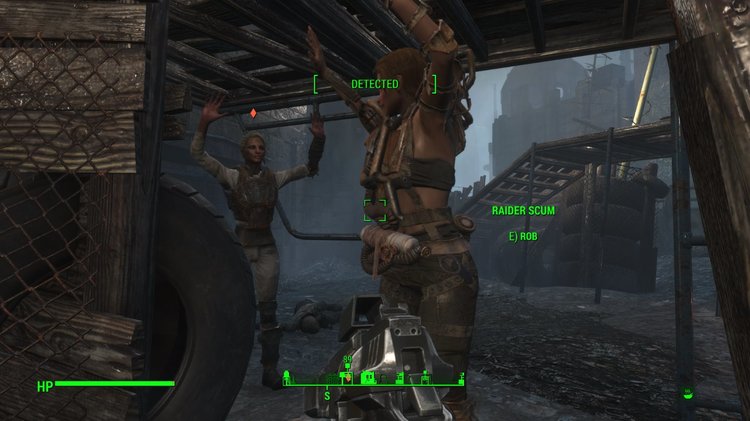
[Edit 2018-01-08: Updated to Beta 4] This mod is currently in Beta. I have not found any breaking errors in my testing. I am looking for feedback, especially: does it work? are there any bugs? how is the balance, especially for the surrender part (too many/not enough surrenders)? any obvious improvements or features that I missed? Holdup is my take on a mod to improve the pacify/surrender mechanism of Fallout 4. The design goals for this mod are: it should feel like a balanced and natural part of the game it should be as compatible as possible with other mods players should be able to disable individual features if they don't like them, or if they are incompatible with other mods they are using This mod consists of multiple features that can individually be enabled and disabled if you have Mod Configuration Menu installed. If you don't have MCM, the default settings will be used instead (all features/options enabled). The following features are currently implemented: Pacify (player must have the Intimidation perk): Implements changes to the Pacify action. It will now work on NPCs of any level. Chance is improved when player is in power armor and when NPCs are caught sleeping; chance is reduced when NPCs are in power armor. Additional options that can be enabled/disabled in MCM: Ignore player sheathing weapon to allow hacking terminals etc. Use special Holdup action when catching NPCs by surprise from close distance. The chance of success is greatly improved in this situation. Surrender: Allows NPCs to surrender if a fight goes poorly for them (they are wounded or even crippled, or you defeated their allies). Civilians may surrender rather quickly. More confident NPCs will still fight to their death, unless you impress them by defeating many of their allies. NPCs who surrender are cowed and will stay peaceful even if you put away your weapon (so you can for example hack a terminal in the same room). This feature does not require the player to have the Intimidation perk. Rob: Allows the player to rob NPCs who have been pacified, held up, or who have surrendered. This is done by activating them while crouching. This replaces the pickpocket action. Additional options that can be enabled/disabled in MCM: Allow to undress NPCs when robbing them such that the outfit can be taken, too. Undressing will ignore devious devices. Tie Up (new in Beta 4): Allows the player to tie up NPCs who have been pacified, held up, or who have surrendered. Requirements: Hard requirements: F4SE Soft requirements: Mod Configuration Menu [https://www.nexusmods.com/fallout4/mods/21497/?] Devious Devices (not for functionality, just for rope visuals of tied up NPCs) [https://www.loverslab.com/topic/73925-devious-devices/] Installation: Just install with any mod manager. If installing manually, copy everything from the Data folder to Fallout 4's Data folder. Mod Organizer 2 users: Make sure to use one of the new builds (2.1.0 +) as the MCM will not work with the old builds (2.0.x). License: CC0 1.0 - basically you can do whatever you want with this mod and the sources (script sources are included and installed), including the very primitive fomod installer. A copy of the license is included in the archive but not installed with the mod. Dowload: Holdup 1.0 Beta 4.zip (previous version: Holdup 1.0 Beta 3.zip) Some random screenshots:
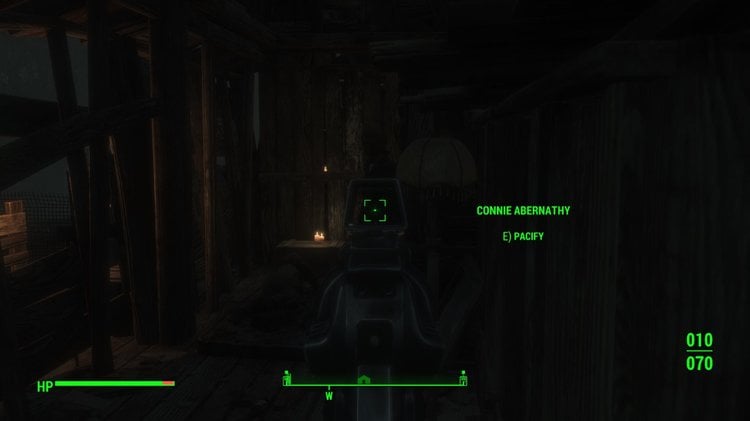
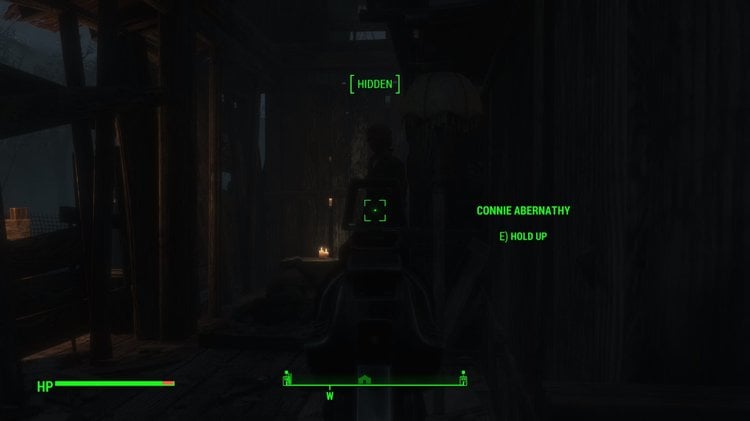
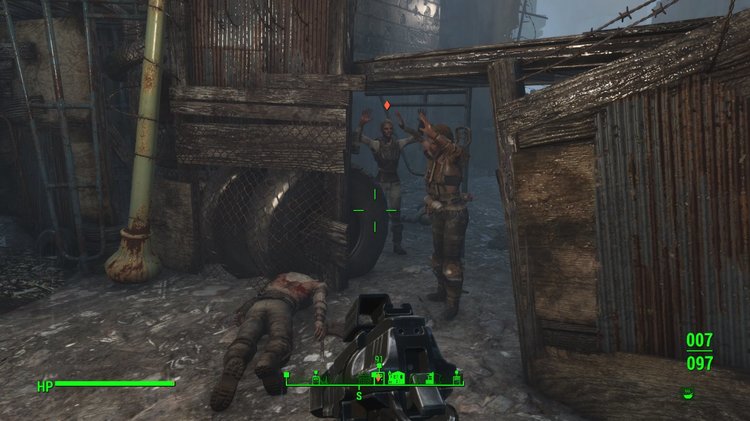
-
View File Here is a preset of a very lovely and attractive young miss named Susan who is sure to turn the heads of commonwealthers. Requires the following mods to work *Looskmenu *Fallout 4 script extender *THbrows *Mischairstyles *Zella's hair color collection To install, just move the susan.json file into the following directory Computer/Local Disk/Program Files (x86)/Steam/steamapps/common/fallout 4/data/f4se/plugins/f4ee/presets Submitter ChokingHazard Submitted 01/05/2018 Category Other Requires Looksmenu, Fallout 4 Script Extender, THbrows, MiscHairstyles, Zella's Hiar Color Collection
-
 Oil Skin Full Body Female Reflection Enhancer Replacer All Skins Texture Compatible 4K 8K 2025 View File Oil Skin mod for Fallout 4 2025 Full Female Oil Skin bgsm Next Gen Patch 2025 Exxtra Oil Skin Female Bgsm Full Female Body covers Custom made by Foojoin Review my Animation My Animation Videos Click Here This is Material files which is Compatible with all your Custom 4K Skins Textures. This is .BGSM file. Oil Sweaty Skin Reflection Replacer Install Copy and Paste Into Main Fallout 4 Data Folder Make sure Back up before Replacement Enjoy Download Here https://www.mediafire.com/file/inhrw51wnyh3ij5/Extra_Oil_Skin_Female_bgsm.7z/file https://www.mediafire.com/file/27p6lvgqvaql0j1/FULL_Female_Oil_skin_bgsm.7z/file Male Version https://www.mediafire.com/file/79yihhtqvrwjuw2/Male_Extra_OIL_MOD_bgsm.7z/file 2025 FULL Female Oil skin bgsm.7z 2025 Exxtra Oil Skin Female bgsm.7z Submitter Foojoin Submitted 02/15/2022 Category Sexual Content Requirements
 -
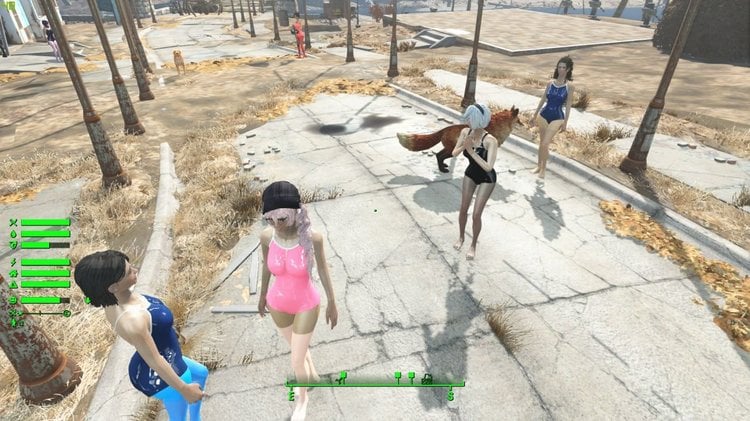
Looksmenu Pantyhose Overlay View File I take no credit for this. The file I based everything off of was ported to racemenu for skyrim by @b3lisario. If @b3lisario has an issue I will immediately pull the file. This is a port of UNP Racemenu Pantyhose overlay for Fallout 4. I thought Fallout 4 could use one and I did use the Skyrim one alot. There is currently 28 pantyhose, tights and faux thigh high includes. I am constantly messing with it. If it goes over well, I might publish it to nexus. I'm just testing the waters out here first Here is what is included: Black Tights Black Pantyhose High Waisted Black Tights Blackout Tights Black Faux Thigh Highs Blue Tights Blue Pantyhose Grey Tights Grey Pantyhose White Tights White Pantyhose White Faux Thigh Highs Pink Tights Pink Pantyhose Pink Blackout Tights Pink Faux Thigh Highs Tan Tights Tan Pantyhose Suntan Tights Suntan Pantyhose Purple Tights Purple Pantyhose Teal Tights Teal Pantyhose Navy Tights Navy Pantyhose Red Tights Red Pantyhose I think that's everything. looksmenu pantyhose.7z Submitter irsuv Submitted 07/17/2018 Category Armor & Clothing Requires f4ae
.thumb.jpg.59bb8e511d2fafb25d21c69756838edc.jpg)
.thumb.jpg.ede50b530d6681f4bdca7d494305ca84.jpg)
.thumb.jpg.50423cd70153d547a6690c7143f9e931.jpg)
.thumb.jpg.f12e0e725961a809aff58543f894b984.jpg)
.thumb.jpg.67342fd736491c0aa77a56cbf872b82b.jpg)
.thumb.jpg.2d398682b24b3c23f2296fce72f66c79.jpg)
.thumb.jpg.7d8e99260dfc1de894017f259fe40cc6.jpg)
.thumb.jpg.0381d6e445fea7216b62b682cce9fd68.jpg)
.thumb.jpg.a5b538110679d3e0e9d0759912b78e0d.jpg)
.thumb.jpg.7ba73ec0275ef5d5a5cd61f67fffb86a.jpg)
.thumb.jpg.1d31c490304859a9400f57fb03496734.jpg)
.thumb.jpg.77b5b41b611b47f68aa15b7ce6c839f0.jpg)
.thumb.jpg.7567c74da9184eda66f6fcf77b80764b.jpg)
.thumb.jpg.8d3231ed0ab022264a0f04cbc64f6065.jpg)
.thumb.jpg.be31430eb19390945b95c5857bdb145e.jpg)
.thumb.jpg.cfe99ba06e193d8944998923d3008ba5.jpg)
.thumb.jpg.b86b509676bbc941dd032ea18d7b8d73.jpg)
.thumb.jpg.64f954a588d33d11cb87b8be515ff3c1.jpg)
.thumb.jpg.6288ce908a2d914b53fab61a09054816.jpg)
.thumb.jpg.da24bfaaa3489be7e9361f3fdf691401.jpg)
.thumb.jpg.5524690432acbaffcc69af51501e884a.jpg)
.thumb.jpg.f678c268c8cb8db3d3305bc861bc7eed.jpg)
.thumb.jpg.9df2108562eddf68ed8d3d1b6d1403c6.jpg)
.thumb.jpg.4820a4e977e23826549c3faeb17ef84b.jpg)
.thumb.jpg.75d425cc8bb2e75ee367035696deb99c.jpg)
.thumb.jpg.4c930bda9a55fe71d6f1d160198a3254.jpg)
.thumb.jpg.8505d86f9045272860a7b4688f046cf0.jpg)
.thumb.jpg.5a2c3f1c79b85516fe9266130dc04445.jpg)
.thumb.jpg.4c98b842ba754ecfbb4c2476776e1d2d.jpg)
.thumb.jpg.ccb044e96e82583f716f7be0e69f0324.jpg)
.thumb.jpg.551cced6e943c86fb5d95a1d6a803585.jpg)
-
Xxtra Jiggle Physic Full Body Mod Reconfigured for Next Gen Patch 2025 View File Extra Jiggle Physic Mod Modified Next Gen Update Patch 2025 MAIN DOWNLOAD 200Kb BREAST AND BUTT JIGGLE PHYSIC 2025 NEXT GEN UPDATE WORKING!!!.7z OPTIONAL DOWNLOAD NOT MANDATORY 120MB 2MY PERSONAL BIMBO BREAST AND BUTT JIGGLE PHYSIC 2025 NEXT GEN UPDATE WORKING!!!.7z 120MB Version include this Muscle Bimbo Body morph .Nif LATEST RELEASE 1.10.984.0 17/01/2025 I CONFIGURED MODIFIED THE .ini Files .DLL FILES COMPATIBLE WITH ALL VARIOUS CLOTHES, ARMOR MODS NOW COMPATIBLE WITH ALL PHYSIC MODS!!!! THIS MOD WORKS WITH ALL FEMALE NPC!!! COMPATIBLE WITH CBBE, CBP , OCBP, MTM 3BBB CBP OCBP OCBPC Physics Preset - CBBE - Fusion Girl - Wonder Body - Enhanced Vanilla Bodies - JaneBod Extended - Vanilla BACKWARD COMPATIBLE WITH OLDER FO4 F4SE AND NEXT GEN F4SE UPDATE IM NOT THE ORIGINAL CREATOR TO INSTALL JUST COPY AND PASTE THE DATA AND SCRIPTS INTO YOUR FALLOUT 4 MAIN DATA FOLDER EXAMPLE A:\Steam\steamapps\common\Fallout 4\Data FIRST MAKE SPARE ORIGINAL COPY OF YOUR CURRENT F4SE FOLDER AND SCRIPTS FOLDER. Copy Folder F4SE and Scripts, PASTE IN DATA Folder. PRESS YES TO REPLACE EVERYTHING. JIGGLE PHYSIC FOR BREAST AND BUTT WORKING 100% 2025 NEXT GENERATION UPDATE PATCH ANY QUESTIONS SEND ME MESSAGE BREAST AND BUTT JIGGLE PHYSIC 2025 NEXT GEN UPDATE WORKING!!!.7z READ HOW TO INSTALL JIGGLE PHYSIC MOD 2025 NEXT GEN.txt Mileena Xxtra Jiggle Physic Preview 902846153_2023-05-1321-16-06.mp4 2023-05-13 21-09-43.mp4 Submitter Foojoin Submitted 01/18/2025 Category Animation Requirements F4SE
-
LiP UI View File UI for Living is Pain LiP UI UI for displaying LiP atrtibutes for player and NPCs. UI for NPCs displayed in AAF scenes only. Outside of AAF scenes one could use Know Your Friend to see LiP attributes of NPC Requires Living is Pain 0.6.1 or higher with its dependencies. Mod can be configured via MCM if it is installed. For player and NPCs same UI widget is displayed (see screenshot above) Widget displays LiP attributes in 4 sections: 1. Attributes related to body areas that can be stimulated 2. Mental attributes 3. Other attributes 4. Failed orgasms counter TODO: Sources available at GitHub Submitter Dlinny_Lag Submitted 01/04/2022 Category Other Requirements F4SE, LiP
-
I think i installed it correctly. Though i put the global instance on a network drive. But as the title implies, it doesn't work in-game. I drag and dropped everything in the 7z, over to my fallout 4 game directory. Then i set it up in MO2... and then moved onto getting some mods. Mostly weapon and sex-related mods. AAF Violate, and almost all of the recommended animation mods(and of course their requirements, if possible to find.) Doombased weapons merged. Plus a few other mods, to tweak the experience. A few more weapon mods, and skins. CBBE, BodySlide, and a few other mods to add onto that. And that seems to be it. I've tried running as administrator, and reinstalling F4SE... but it doesn't work. I'll try moving the instance, to a local drive, and restarting my pc. Then come back with the result. However, i doubt that this'll fix the issue.
-
 After weeks of not playing Fallout 4 or any games i mod with stuff from here, I come back to play a bit & MO2 refuses to launch the game properly. it just keeps going non responsive in task manager & never makes it past a black screen. I tested launching without mo2 through steam & f4se directly in file explorer & it worked both times without fail. I even tested fallout new vegas which I mod with MO2 to see if the manager is affecting both games & it wasn't, vegas is fine too. then I checked both Skyrim SE & its having the same issue while Oldrim is having its own clusterfuck of issues here while Oblivion is also somehow functional. I have no idea how to determine whats wrong with the manager. the only notifications i get are files in overwrite which is intended & the manager is on version 2.5.1rc2 as it says on the bottom left of the window, All my executables are listed correctly & MO2 isnt giving me an error or warning like if a mod is missing a dependency so idk how else to find out whats wrong so I can fix it. When launching the game, no other error window or light up shows under it like the kind that does for Skyrim when it fails to launch. And NO my fallout is not updated past the April 2024 update that was the next gen one for console, my appmanifest file is read only & always has been since the last version of the game before that update released. Need ideas on what to look for please as i havent had this issue with MO2 modded games before, EDIT: Resolved from MO2 discord by running chkdsk on drive containing MO2 & slowly re-enabling every mod
 -
 I recently nuked my mods to start a new. I have only downloaded mods that are mentioned within the Four-Play Beginners Guide I have updated my F4SE as well as installed up to date mods however I am getting the attached error: Not entirely sure why this is happening, Can someone assist?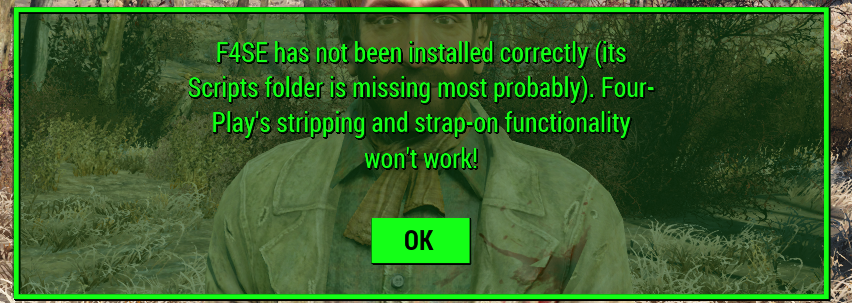
-
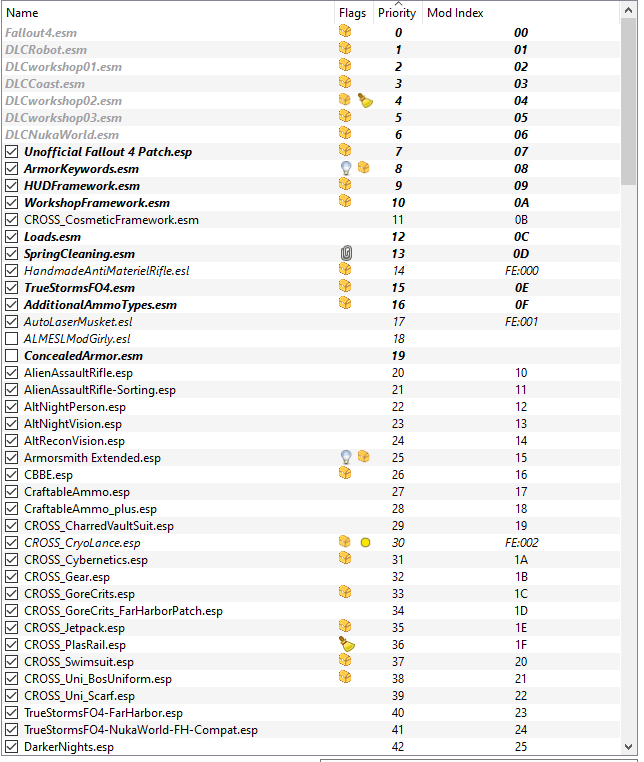
Game crashes immediately on launch. Load Order below:
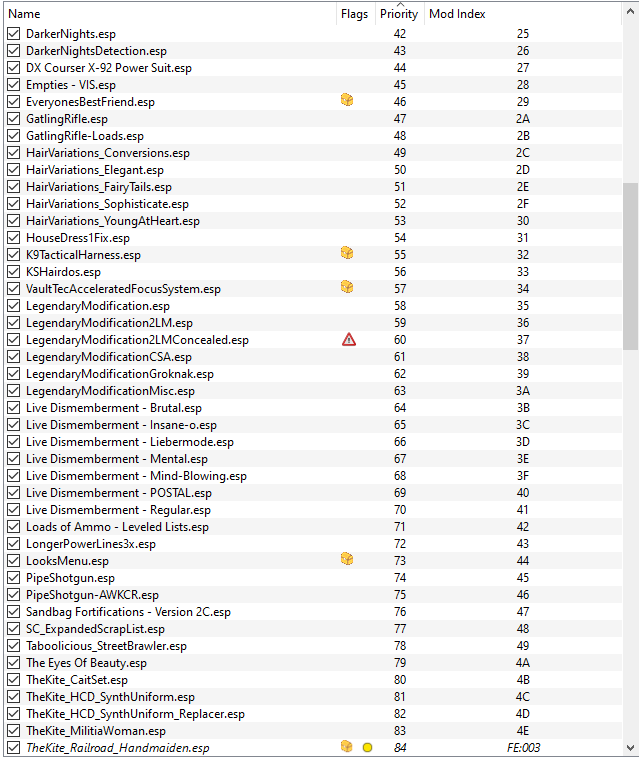
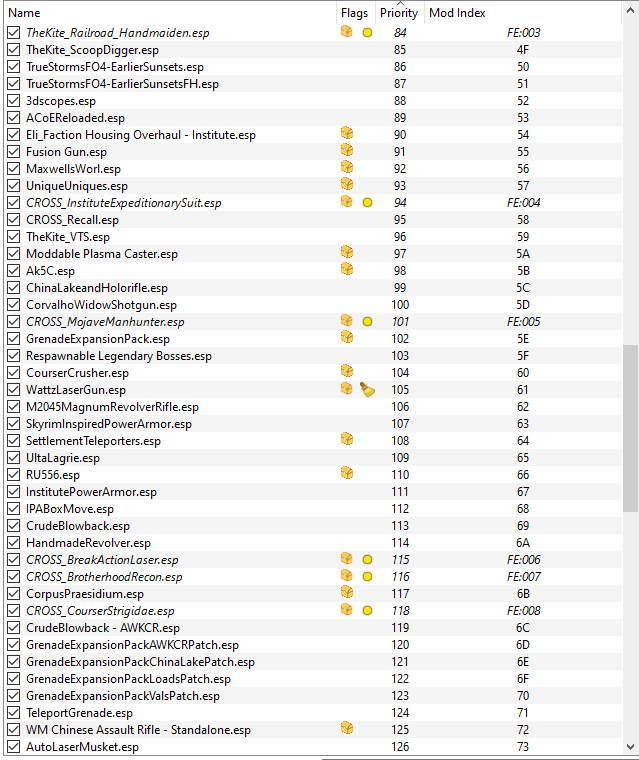
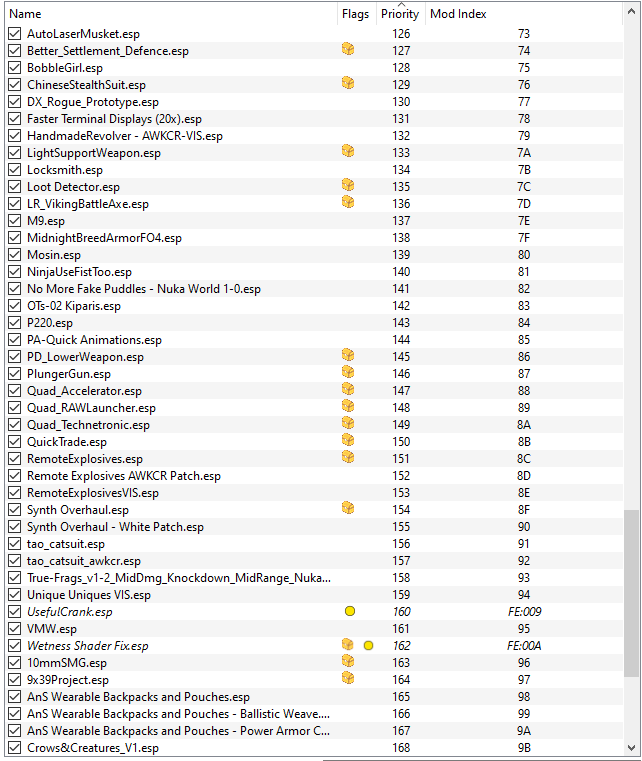
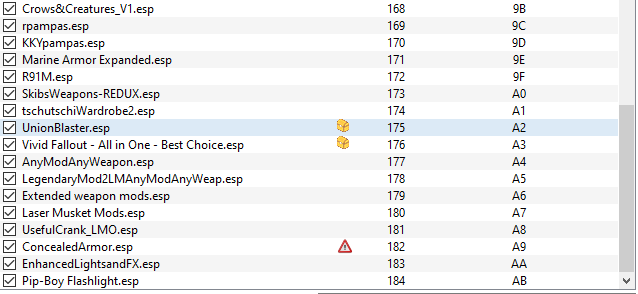
-
 If I open my FO4 using F4SE, non of the player related subtitles during the time that player has control show up. Doesn't matter if it's a mod dialogue or not. Without F4SE... it works. Any ideas what might be causing this? ____________________________________________________________________________________________________________________________Load Order in the attached files because it was LONG! but it doesn't go above the limit cause only 251 are ESP --------------------------------------------------------------------------------------------------------------------------------- Fix: F4z Ro D'oh is the problem. Remove it. loadorder.txt
 -
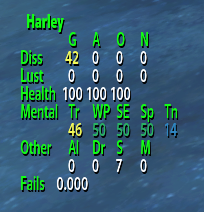
Version 0.6.6
1694 downloads
UI for Living is Pain LiP UI UI for displaying LiP atrtibutes for player and NPCs. UI for NPCs displayed in AAF scenes only. Outside of AAF scenes one could use Know Your Friend to see LiP attributes of NPC Requires Living is Pain 0.6.1 or higher with its dependencies. Mod can be configured via MCM if it is installed. For player and NPCs same UI widget is displayed (see screenshot above) Widget displays LiP attributes in 4 sections: 1. Attributes related to body areas that can be stimulated 2. Mental attributes 3. Other attributes 4. Failed orgasms counter TODO: Sources available at GitHub -

Version 2.0.0
5240 downloads
Extra Jiggle Physic Mod Modified Next Gen Update Patch 2025 MAIN DOWNLOAD 200Kb BREAST AND BUTT JIGGLE PHYSIC 2025 NEXT GEN UPDATE WORKING!!!.7z OPTIONAL DOWNLOAD NOT MANDATORY 120MB 2MY PERSONAL BIMBO BREAST AND BUTT JIGGLE PHYSIC 2025 NEXT GEN UPDATE WORKING!!!.7z 120MB Version include this Muscle Bimbo Body morph .Nif LATEST RELEASE 1.10.984.0 17/01/2025 I CONFIGURED MODIFIED THE .ini Files .DLL FILES COMPATIBLE WITH ALL VARIOUS CLOTHES, ARMOR MODS NOW COMPATIBLE WITH ALL PHYSIC MODS!!!! THIS MOD WORKS WITH ALL FEMALE NPC!!! COMPATIBLE WITH CBBE, CBP , OCBP, MTM 3BBB CBP OCBP OCBPC Physics Preset - CBBE - Fusion Girl - Wonder Body - Enhanced Vanilla Bodies - JaneBod Extended - Vanilla BACKWARD COMPATIBLE WITH OLDER FO4 F4SE AND NEXT GEN F4SE UPDATE IM NOT THE ORIGINAL CREATOR TO INSTALL JUST COPY AND PASTE THE DATA AND SCRIPTS INTO YOUR FALLOUT 4 MAIN DATA FOLDER EXAMPLE A:\Steam\steamapps\common\Fallout 4\Data FIRST MAKE SPARE ORIGINAL COPY OF YOUR CURRENT F4SE FOLDER AND SCRIPTS FOLDER. Copy Folder F4SE and Scripts, PASTE IN DATA Folder. PRESS YES TO REPLACE EVERYTHING. JIGGLE PHYSIC FOR BREAST AND BUTT WORKING 100% 2025 NEXT GENERATION UPDATE PATCH ANY QUESTIONS SEND ME MESSAGE BREAST AND BUTT JIGGLE PHYSIC 2025 NEXT GEN UPDATE WORKING!!!.7z READ HOW TO INSTALL JIGGLE PHYSIC MOD 2025 NEXT GEN.txt Mileena Xxtra Jiggle Physic Preview 902846153_2023-05-1321-16-06.mp4 2023-05-13 21-09-43.mp4 -
Version 0.8.0
5418 downloads
AAF Informer is the F4SE plugin to simplify obtaining of AAF scenes information in Papyrus scripts. AAF Informer consist of 3 parts: - AAFInformer.dll - F4SE plugin - AAFCollector.exe - service executable to parse AAF XML files - Info.pex/Info.psc - Papyrus script to access AAFInformer.dll API How it works: At the game start up AAFCollector.exe is started to parse AAF XML files. When it finishes all collected information memorised in F4SE plugin and later this information can be accessed via API calls from Papyrus script. Following information is available: - For scenes (actually, positions in AAF terminology) that you can see in AAF UI - see SceneInfo structure in Info.psc - For scene participant(s) - see ActorInfo in Info.psc Most information is obtained from tags defined by animation authors or by themes. Themes are essential to get information from AAF scenes. Without themes installed, most likely your script will not receive usefull information. Tags that defines types of actors (like F_F or F_M) are ignored. Actor types retrieved from animation definitions. Tags that defines furniture are ignored. Furniture information retrived from positionData XMLs Note: animation author's XML files and themes XML files contains a lot of mistakes. Fixing them is out of scope of this tool, but I hope all mistakes will be elimenated sooner or later. To simplify mistakes detection usefull logs could be found in %userprofile%\documents\My Games\Fallout4\F4SE\AAFInformer.log Also this log contains error messages generated by AAFCollector.exe Implementation details: What tags are supported? All tags falls into several categories: How values are applied to actors? Example of script Known issues: 1. Some positions contains location attribute that has multiple furniture groups separated by comma. Such locations are handled, but I can't test it as such position does not appear AAF UI. Probably defining multiple furniture groups is invalid location definition, but without original AAF source code it hard to say definitely. 2. I had no chances to test AAF sex overriding with keywords. So not sure is it even working. 3. With current system of tags it is not possible to recognize how actors are contacted with each other, so all contacts for actors with index greater than 0 are applied to actor with index 0. So scenes like "BP70 Lesbian Threesome..." might have irrelevant contact information. See below. Next steps: - try to introduce new tags system to allow definition of actors contacts exacly. This plugin will be updated on succees. - try to introduce new tags system to allow definition of Held/Love/Dom/Stim values for each actor. This plugin will be updated on succees. - try to introduce new tags system to allow definition of actor position for actors with index greater than 0. This plugin will be updated on succees. New system to define contacts beween actors in scenes. Sample file with contacts that handles tentacles made by Snapdragon_ Feel free to request new features. -
Version 3.5
31458 downloads
Last edit on 11/09/2025: Update description with latest status. Release v3.5 Assimilation Nate or Nora are great fighters (just ask Strong!) and extremely valuable to factions in the Commonwealth. Thus, if the player health gets too low (or NPCs are romanced) then that faction may assimilate them by changing their looks or locking them into the faction. This mod consists of several quests that trigger after certain events like your health getting too low or AAF animations or a hotkey. There are MCM options to control many mod features (for example if AAF is enabled). This mod complements LL mods like AAF Violate, Sexual Harassment and Sex 'Em Up and is similar in some ways to LL mods like Tattoo After Rape and Rad Morphing Redux. Features If the player health falls below a configurable value or after the player romances a partner of a particular faction or after using a hotkey, there is a chance that the player's clothes, hair, body, skin, face, and faction may be changed. The chance for a change to happen for each body section and for each faction is configurable through MCM. Clothes - Your clothes will be changed to something appropriate for that faction. Expect to get a harness for Raiders and a suit for Triggermen. There are differences for male and female characters. There is an option to swap your clothing hats/helmets when combat starts/ends and an option to swap your clothing gas mask when bad weather starts/ends. I could tell you what all the apparel possibilities are, but that would take away the fun and surprise. Currently, base game/DLC apparel is supported plus the following mods: Harness Wardrobe - Raiders Militarized Minutemen - Minutemen Wearable Super Mutant Armor - Super Mutants Gunner Outfit Pack - Gunners ToneTigre Slave Clothes - Raiders / Super Mutants Kharneth Slave Clothes - Raiders / Super Mutants More can easily be added! Which ones would you like? Hair - Your hair will be changed to something appropriate for that faction. Expect to get a mohawk for Raiders and a military cut Gunners. There are differences for male and female characters. Supported hair, beard, and pubic hair styles will also regrow over time or fall out from radiation. There are some penalties if your hair gets too long so you should find & drop some scissors on the ground and use them (outside of combat) to trim up to avoid them (the scissors may break!). I could tell you what all the hairstyle possibilities are, but that would take away the fun and surprise. Currently, base game/DLC hairstyles are supported plus the following mods: Ponytail Hairstyles v3.0 (note that v2.5a no longer supported) ANiceOakTree's Hairstyles Pubes Forever Commonwealth Cuts KS Hairdos KS Hairdos with Physics More can easily be added! Which ones would you like? Body - Your CBBE or FusionGirl body will be morphed based on settings in MCM. Configure them as you see fit, but by default it is set for female characters making the breasts and butt bigger and the waist smaller, i.e. an hourglass figure for most factions except "settler" factions which are the opposite. It is possible to configure the settings for male and female characters. Uses BodySlide FEV - If you romance a super-mutant, then some FEV may sneak into your system and cause increased muscle mass and some increased strength side-effects. Beware! (This can be configured or disabled in MCM). Actions Effect Body - Similar to mods like WTTF. You eat - you get large, You swing & bash & workout - you get muscle, You lounge & get rads - you get thin (can be configured or disabled in MCM). Metabolism - If you don't eat/exercise your body grows thinner by a small, balanced, configurable amount over time... like real people. Walking/Standing-Still Bonus option - To aid in surviving while in faction, you get a tiny heal bonus while walking or standing still. Noise Option - There is an option that player makes noise when swinging, bashing, jumping, or swimming. Skin - If certain mods are installed, then tattoos can be applied to the entire body Uses Looksmenu Once across entire body when first affected if Random Overlay Framework is installed Thereafter one after romance, combat defeat or helping faction members Face - Your face can have tattoos or damage applied to it. Uses Scripted Face Tints (SFT) Create Medicated Face Wipes aid item that can erase one face damage tint (can be an aid gift). Faction - Available in version 3.0 and greater. Your faction will be changed to that faction and possibly moved to a faction-friendly location. Your last partner will have a small dialogue to initiate it. You will remain in the faction until you help or romance enough faction members to leave the faction. When leaving, a small dialogue allows you to confirm leaving or remaining in the faction. While assimilated to the faction, you will gain a perk appropriate for that faction. Asking to help or romancing faction members may result in them offering gifts or to be a companion (up to 2). You will receive better gifts based on your faction reputation which increases each time non-faction members are killed. It can decrease as well! Talking to faction members using an assigned hotkey allows you to ask for info, request gifts, offer help, or romance them. After talking, some faction members may be a doctor and can help heal you. Alternate Ending quest - If not assimilated to a faction (chance failed), then there is a chance that an alternate ending quest can occur, mostly romantic but depending on the outcome of a small dialog can be other things (if installed) like being Bound In Public or POTC or Real Handcuffed or even Caps taken, etc. Overseer quest - get assigned a random faction Overseer (and possibly shock collared) to check-in with on your progress or be punished. Late to Overseer quest - Overseer sends a group of faction members to track you down and bring you back to them. The following Assimilation Help Quests are supported for earning payback to get out of the faction (all included with Assimilation unless linked): Ammunition Beer Run Feed Me! Kissing Booth Milk of Human Kindness Rival Raider Return Signed, Sealed, Delivered Takedown Village Bicycle Watered Down NOTE: Some details on implementation here: To make other factions hate the player if they become a Raider, those factions must be modified to dislike the player. The faction relations are saved before faction assimilation and restored after un-assimilation, but there is some risk here if they never get restored properly. I have been careful to assure that doesn't happen in the scripts, but that said I would only play version 3.0 with faction assimilation enabled on a new game not your long-term game with 1000's of hours played. Post a comment if you notice an NPC is unexpectedly a friend or enemy after faction assimilation and I can likely fix it. NOTE: There is no quick undo for the changes once they happen. If the player's hair changes, then you're going to have to see John in Diamond City or Horatio in Vault 81 to get a new hairstyle. If the player's body or skin changes, then you're going to have to see Doc Crocker in Diamond City to fix it. You can put your other clothes back on if you don't like the ones given to you (the mod doesn't remove them), or some may play with mods where all your clothes are stripped, and then the changed clothes will be the only ones you have! There are easy ways to change all of these with the showlooksmenu command, but role playing and continuing with whatever changes is more interesting. Installation Review the Conflicts and Requirements sections below, and then install with your favorite mod manager. Additional features are available in the mod if the Optional Mods listed below are installed. Version 3.0 and later has many portions re-written, and it is unlikely that an upgrade from any 2.0 version will work properly. Versions 3.0 and later are so different that I would recommend starting a new game after download and installation. Definitely do not be assimilated into a faction when upgrading! Conflicts Assimilation conflicts with the following other mods mostly because they are also modifying your faction relationships: Raider Pet - Does something similar to Assimilation for Raiders and you end up with the Raider Pet and Assimilation systems fighting each other. For the best experience, use one or the other. If there is a feature from Raider Pet that you miss when using Assimilation then let me know and I may be able to add something similar. Requirements Fallout 4 v1.10.984 or newer (NextGen) F4SE - needed for lots of expanded script functions MCM - needed for extensive configuration options LLFP - needed for string functions only (included but included in AAF if you install that) Optional Mods AAF including some themes/animations - for animation triggering Tested with CBBE and FusionGirl (LMK if you have another one where it works) - for body changes BodySlide - if you want body changes Looksmenu - if you want skin overlay changes Random Overlay Framework - will use for an initial set of skin overlay changes Tattoo After Rape - will use it for skin overlay changes if installed, and otherwise it uses Looksmenu directly Scripted Face Tints (SFT) - if you want face changes F4z Ro D'oh - for better silent dialogue lines Credits and Prioritized Issues & Features Off-Site Link What's New in Version 1.4.0 Initial version (it was revisioned several times privately before posting) 1.12.0 Support DLC and implement progressive hairstyles from long to short 2.0 Faction assimilation, create hairstyles/apparel databases, FEV effect, hair growth/loss, helmet swap on combat 2.5 Bug fixes and stability/error recovery improvements, gas mask swap on bad weather 2.6 Bug fixes from 2.5 release discovered right after release 2.7 Bug fixes still existing in 2.6 version 3.0 Assimilation via Combat & Theft, NPC Talking giving 7 generic side-quests with faction specific ones planned for future 3.1 Bug fixes from 3.0 release discovered right after release, Simple sit out ground feature to rest 3.2 Bug fixes from 3.1 release, shortcut consumables, Atom Cats faction assimilation, info popup menu 3.5 Bug fixes from 3.2 release and internal 3.3 & 3.4 versions. Face! Endings. Overseer. Help Mail, Food, Water. Metabolism. Noise. -
Version 0.6.5
4978 downloads
In post apocalyptic world, full of violence, it is hard to imagine that psyche of people remain intact. This is the framework that shows the idea how such world might affect psyche. Living is Pain (Alpha version) Disclaimer: work still in progress. No backward compatibility is assumed during alpha stage releases. This work was inspired by @twistedtrebla's Sex Attributes, so something could sound familiar to you. LiP Framework itself doesn't affect any aspect of gameplay, except cosmetic things that are not visible without mods like LiP UI. The purpose of framework - provide usefull functionality for new mods building. Several sample mods are available. Probably some gamers will found them interesting LiP Framework provides: - set of new attributes for any sentient life form in the Commonwealth - by default: humans, ghouls, 3rd gen synths, supermutants. - ability to extend sentient life forms list - many different customization points - logic of interdependency between these attributes - attributes value calculation routines - integration with other popular mods - large amount of configuration options Attributes and default dependencies: Actual purpose of attributes may vary depending on situation and game mechanics. Generic attributes, that reflects mental state of a character: Sexual attributes: Health attributes: Reasons of attributes changes available out of box Hits Environmental damage Kills Time elapsing Limits exceeding Combat finish Orgasm Orgasm failure AAF scene: Dependencies (Requirements): F4SE Additional Attributes F4DS Integrations: Advanced Animation Framework Follow AAF FM to install and configure it. If you have AAF installed then LiP will automatically use information from AAF Dependencies (requirements) if you want to have integration with AAF: AAF Themes and AAF Informer Devious Devices If you have DD installed then LiP will automatically use information about DD wearing Real Handcuffs If you have RH installed then LiP will automatically use information about RH wearing Commonwealth Captives If you have EBCC installed then captives will have reasonable LiP attributes assigned Mod Configuration Menu If you have MCM installed, LiP configuration page will be available Know Your Friend If your have KYF installed then LiP attributes will be shown for NCPs. Samples: LiP Effects - initiates arousal animation when actor receives orgasm notification. more mechanics could be added later. Animations from following mods are used (if they are installed): LiP Morph - vagina/anus morhping depending on health attributes. Designed for FusionGirl Morph+ from @StaticPhobia2. Depends on LooksMenu (required) Use LiP UI if you looking for option to display LiP attributes. More detailed techical description will be added over time TODO: Permissions: Credits: -
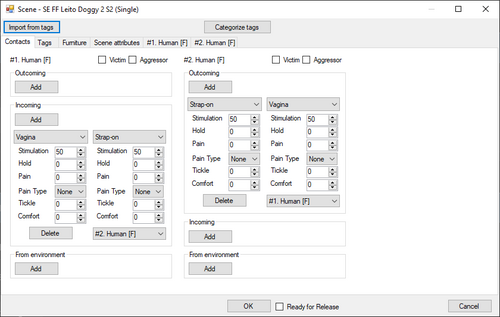
Version 0.5.2
2700 downloads
SoAS introduces rich meta information for animations played by AAF/NAF. Semantics of Animation Scenes Disclaimer: Project is far from finished. Some parts may not work properly. Crashes are possible. At this stage it can be considered as announcement of upcoming features. Project is designed for defining and obtaining in the scripts bunch of information related to animations played by AAF/NAF. This tool consist of multiple parts: 1) Data\Scenes\tools\ScenesEditor.exe - visual editor of information associated with animation scenes 2) Data\Scenes\tools\AAFXmlScanner.exe - visual tool for detecting potential errors in AAF XML files 3) Data\Scenes\Default - default set of data. 4) Data\F4SE\plugins\SoAS.dll - F4SE plugin that holds information associated with animations. 5) Data\Scripts\SoAS.pex - Papyrus script with API to get access to information held by F4SE plugin. Key features: 1) Rich information about animation itself, about participants, about contacts between participants and environment can be defined and obtained. 2) F4SE plugin supports dynamic custom Papyrus structs populating. At this moment boolean fields that represents some specific flags are supported. See below. 3) Visual editor of information related to scenes/participants/contacts How data accessing works: At the game start F4SE plugin initiates background reading of information from files located in Data\Scenes. When it is successfully finished F4SE pluigin is able to provide this information via Papyrus script API. F4SE plugin is able to reload this information during game play via console by command: cgf "SoAS.StartDataReload" NOTE: Do not call this method from a Papyrus script. During data reloading all calls of Papyrus API are failing until reload done. How data defined: 1) ScenesEditor is able to import animations, positions, groups, trees and tags data from AAF XML files. It is able to categorise tags and make a guess what these tags may mean. Guesses reflected as participant's and contacts attributes. Also tags falls to multiple categories. Consider it as semi-automation of participants and their contacts defining. NAF data import is not supported yet as it is not finalized. 2) User of ScenesEditor is able to define: - tags (and its category) for the scene. - participant's attributes - contacts between participants and between participant and environment. - select the area of participant's contact. multiple creatures are supported - attributes of defined contacts - custom scene attributes as an object, not a plain string. 3) When edit finished, data can be exported as a zip package ready to upload. Notes for the initial version (0.5.0): Ability to add scene is not supported yet. Import only is supported. There is the problem of animation's participants validation, so this feature is postponed. Not all creatures are supported yet. List of supported creatures can be found in Data\Scenes\docs Default data set is shipped along with binary files. Later default data set and binary files will be released separately. Default data set populating is barely started. It will be populated over time Scene's custom attributes obtaining is not implemented yet. Source code is available on github Default data set source is available on github Code sample how to obtain contacts information in a Papyrus script: Please note for the structure CustomActorsContact. It contains boolean fields like From_Is_Left_Hand, To_Is_Butt and so on. It is the part of custom structures population feature. Fields that meet following naming convention are automatically calculated and populated: {From|To}_Is_{AreaName} From or To - the keyword to define direction of the contact. Value from outcoming (or incoming) participant's contact is assigned. Is - the keyword to define a flag field AreaName - one of the allowed contact area names. Allowed contact area names can be found in the files in Data\Scenes\docs The value of such flag is calculated according to body parts hierarchy. An example for humanoid creature: Lets assume we have the Hand contact area selected for Left Arm body part. In this case flags will be: Is_Left_Hand=true, Is_Arm=true, Is_Left_Arm=true, but Is_Right_Hand=false. Another example for brahmin that have 2 heads: Lets assume we have Ear contact area selected for Right Head body part. In this case flags will be: Is_Right_Ear=true, Is_Right_Head=true, Is_Head=true More documentation and code samples will be added over time. Your feedback is welcome. Don't hesitate to share your thoughts in comments and on related github issues page. You are welcome to take a part in default data set populating. I will update ScenesEditor soon to make the work easier. Credits -- -
Version 2.0.0
5280 downloads
Oil Skin mod for Fallout 4 2025 Full Female Oil Skin bgsm Next Gen Patch 2025 Exxtra Oil Skin Female Bgsm Full Female Body covers Custom made by Foojoin Review my Animation My Animation Videos Click Here This is Material files which is Compatible with all your Custom 4K Skins Textures. This is .BGSM file. Oil Sweaty Skin Reflection Replacer Install Copy and Paste Into Main Fallout 4 Data Folder Make sure Back up before Replacement Enjoy Download Here https://www.mediafire.com/file/inhrw51wnyh3ij5/Extra_Oil_Skin_Female_bgsm.7z/file https://www.mediafire.com/file/27p6lvgqvaql0j1/FULL_Female_Oil_skin_bgsm.7z/file Male Version https://www.mediafire.com/file/79yihhtqvrwjuw2/Male_Extra_OIL_MOD_bgsm.7z/file 2025 FULL Female Oil skin bgsm.7z 2025 Exxtra Oil Skin Female bgsm.7z -
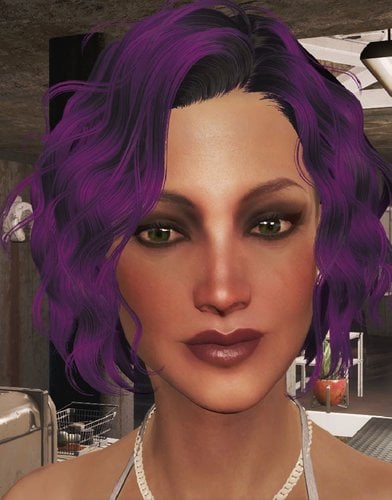
Version 1.0
404 downloads
Here is a preset of a very lovely and attractive young miss named Susan who is sure to turn the heads of commonwealthers. Requires the following mods to work *Looskmenu *Fallout 4 script extender *THbrows *Mischairstyles *Zella's hair color collection To install, just move the susan.json file into the following directory Computer/Local Disk/Program Files (x86)/Steam/steamapps/common/fallout 4/data/f4se/plugins/f4ee/presets -
AAF Informer (Beta) View File AAF Informer is the F4SE plugin to simplify obtaining of AAF scenes information in Papyrus scripts. AAF Informer consist of 3 parts: - AAFInformer.dll - F4SE plugin - AAFCollector.exe - service executable to parse AAF XML files - Info.pex/Info.psc - Papyrus script to access AAFInformer.dll API How it works: At the game start up AAFCollector.exe is started to parse AAF XML files. When it finishes all collected information memorised in F4SE plugin and later this information can be accessed via API calls from Papyrus script. Following information is available: - For scenes (actually, positions in AAF terminology) that you can see in AAF UI - see SceneInfo structure in Info.psc - For scene participant(s) - see ActorInfo in Info.psc Most information is obtained from tags defined by animation authors or by themes. Themes are essential to get information from AAF scenes. Without themes installed, most likely your script will not receive usefull information. Tags that defines types of actors (like F_F or F_M) are ignored. Actor types retrieved from animation definitions. Tags that defines furniture are ignored. Furniture information retrived from positionData XMLs Note: animation author's XML files and themes XML files contains a lot of mistakes. Fixing them is out of scope of this tool, but I hope all mistakes will be elimenated sooner or later. To simplify mistakes detection usefull logs could be found in %userprofile%\documents\My Games\Fallout4\F4SE\AAFInformer.log Also this log contains error messages generated by AAFCollector.exe Implementation details: What tags are supported? All tags falls into several categories: How values are applied to actors? Example of script Known issues: 1. Some positions contains location attribute that has multiple furniture groups separated by comma. Such locations are handled, but I can't test it as such position does not appear AAF UI. Probably defining multiple furniture groups is invalid location definition, but without original AAF source code it hard to say definitely. 2. I had no chances to test AAF sex overriding with keywords. So not sure is it even working. 3. With current system of tags it is not possible to recognize how actors are contacted with each other, so all contacts for actors with index greater than 0 are applied to actor with index 0. So scenes like "BP70 Lesbian Threesome..." might have irrelevant contact information. See below. Next steps: - try to introduce new tags system to allow definition of actors contacts exacly. This plugin will be updated on succees. - try to introduce new tags system to allow definition of Held/Love/Dom/Stim values for each actor. This plugin will be updated on succees. - try to introduce new tags system to allow definition of actor position for actors with index greater than 0. This plugin will be updated on succees. New system to define contacts beween actors in scenes. Sample file with contacts that handles tentacles made by Snapdragon_ Feel free to request new features. Submitter Dlinny_Lag Submitted 08/21/2021 Category Framework & Resources Requirements AAF, F4SE

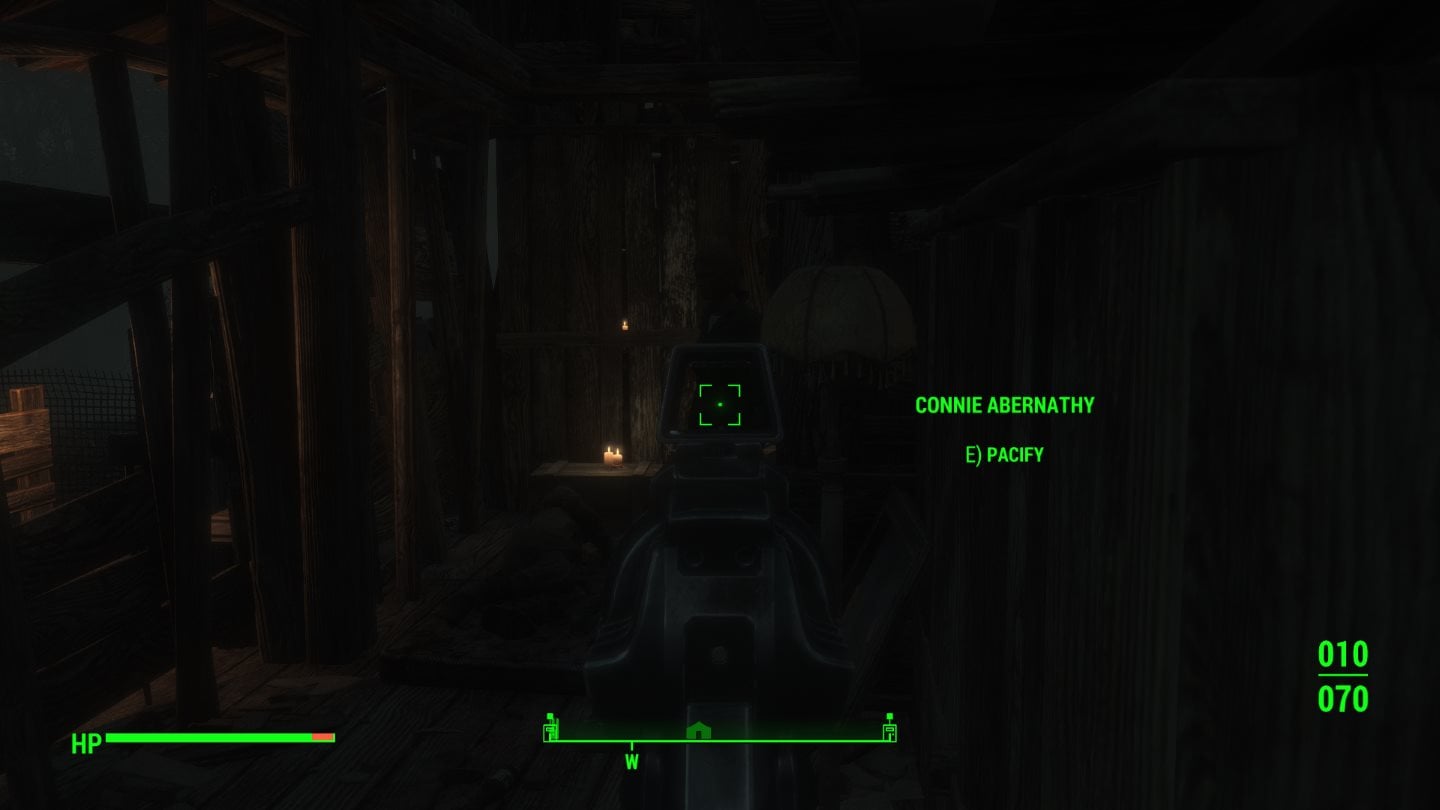
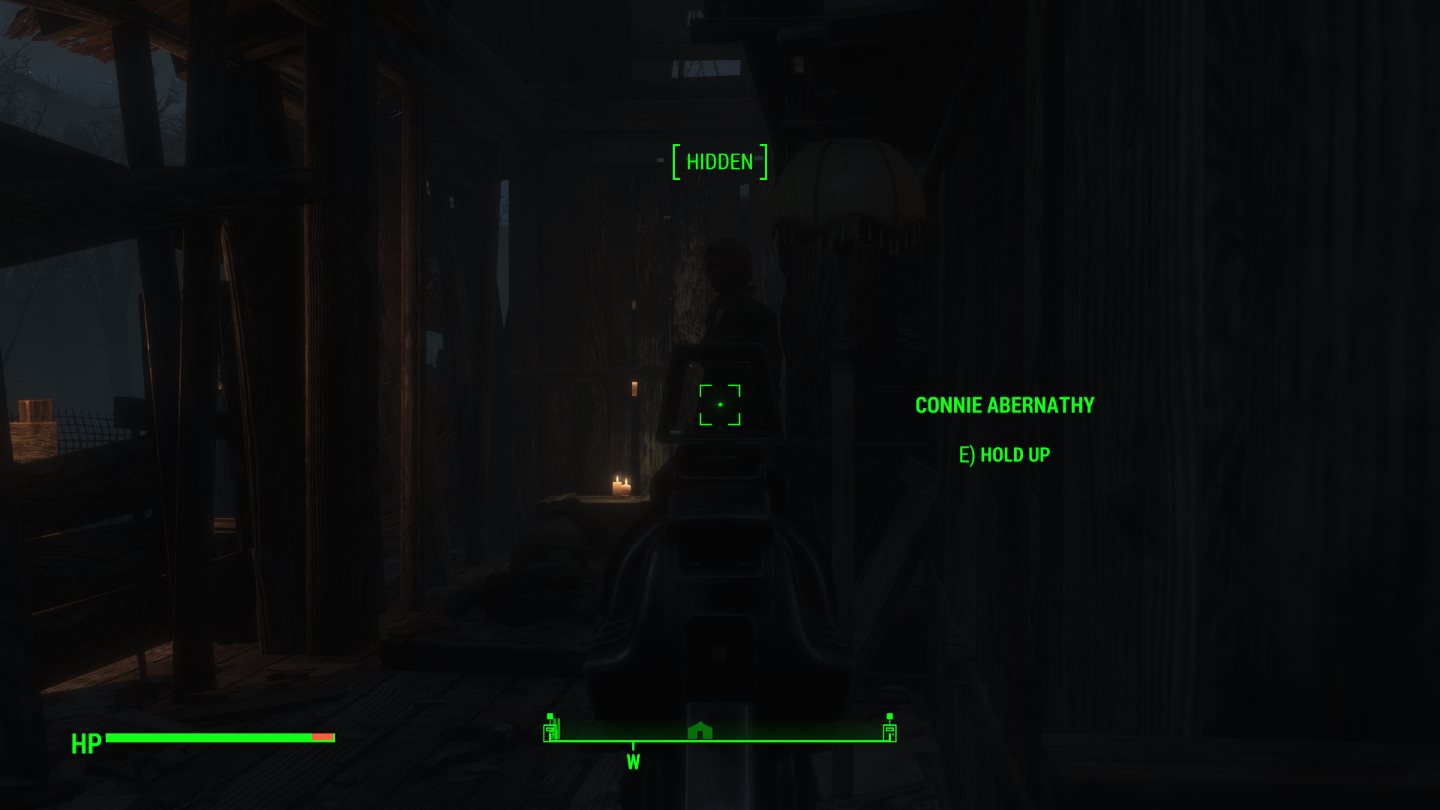
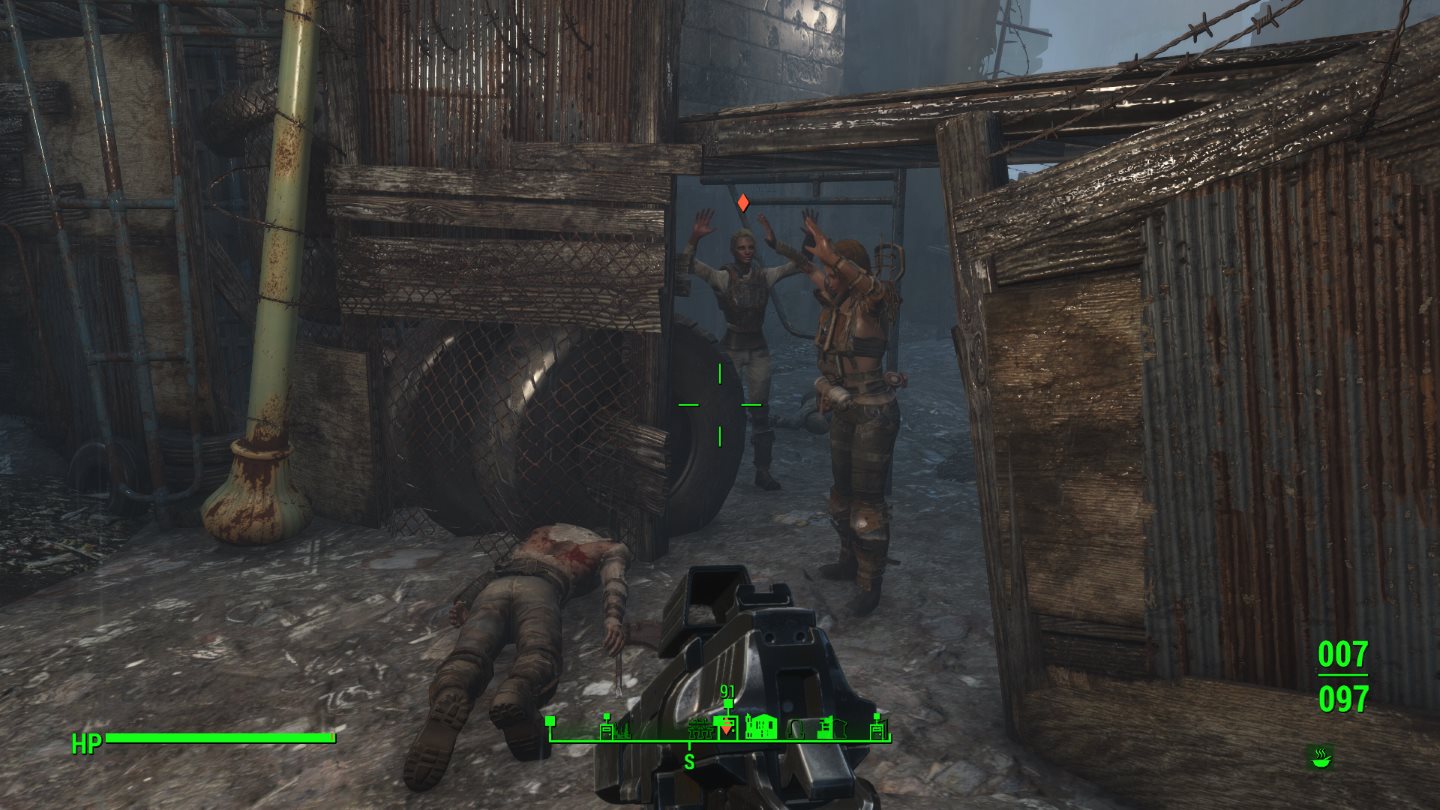
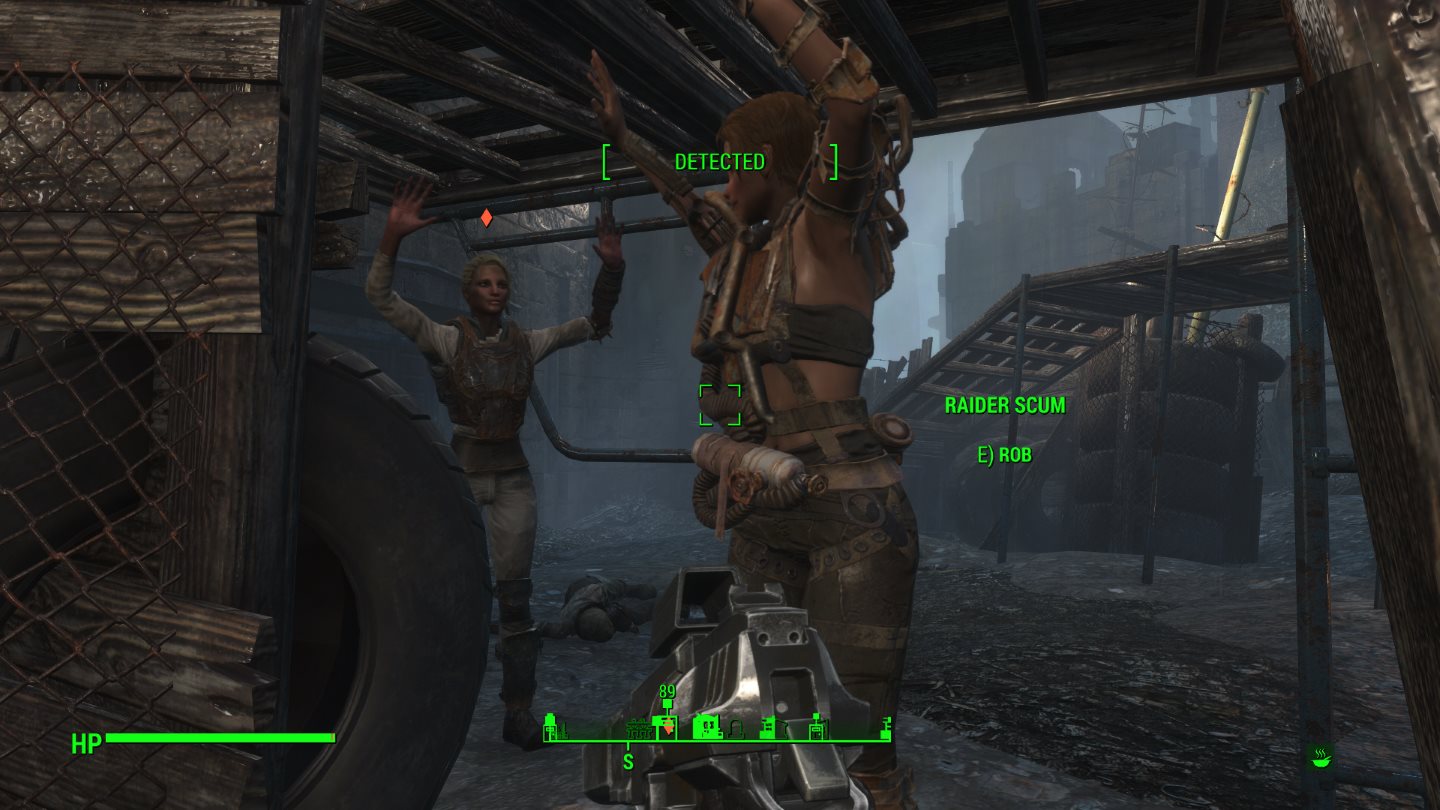

.jpg.2cfb1c54ee3880d61d5f6c882ad5e8e8.jpg)
.jpg.9c27fe98104a187bbd89196c63462726.jpg)
.jpg.5b015326d614f6486fd483de9c3f411a.jpg)
.jpg.54b297e901167644f1f18c8d2cab976b.jpg)
.jpg.e2c14e80d8c40180fb7a2ec46fad4629.jpg)
.jpg.ce3c71b6855a2be82c35f21660566528.jpg)
.jpg.e3b89582aab3461571aa2c4c68342584.jpg)
.jpg.7867b7a1323bc85079c56bb26d8b3d00.jpg)
.jpg.5d74116336f343c8f05d4c743499bac9.jpg)
.jpg.302e6b4f647a62e0912ca05fa635db42.jpg)
.jpg.fd6164d4b215e72cf1e8ee2a336de636.jpg)
.jpg.1af4457311a544e01bd1997ec9a1044d.jpg)
.jpg.ecef07f8c94bc8209eb7fd306968ddf4.jpg)
.jpg.7dbba7269f960d316c5afd6cb1d0a2a7.jpg)
.jpg.ca8c2f258773c355ee91b4b5c4ede6a2.jpg)
.jpg.2eeb12f2bef23057014a8b49d6edc7ef.jpg)
.jpg.f56bc08085f5107a8aeb6897d498a120.jpg)
.jpg.347d5be8c70778c2bf7f696c67488dd0.jpg)
.jpg.e96f11263dfdfc418b691fafcb83a38e.jpg)
.jpg.3b2a272d81b65ab66f6d480c6dca959b.jpg)
.jpg.69c3951c6d51ab509cf86939d2681f0b.jpg)
.jpg.8414538dd961dbd49f48444603600953.jpg)
.jpg.79e852c19788c37a4f78e535176a2020.jpg)
.jpg.55dcb8f902ff4db7cf37689601d76003.jpg)
.jpg.3bf6fdbfce4131009c091f19ea996527.jpg)
.jpg.1613aa287584c23f750251ed0448d0e2.jpg)
.jpg.a350952e566836b1436bc62bd79c450b.jpg)
.jpg.9aceb7da05692025a459d0f06599b815.jpg)
.jpg.10397459d4eb67e71ca3952108200821.jpg)
.jpg.1ee405ccbce81124e0ee260bcce5f39a.jpg)
.jpg.9ff457a5bb5d2665f77cf4a55aba86c5.jpg)