Search the Community
Showing results for tags 'mcm'.
Found 10 results
-
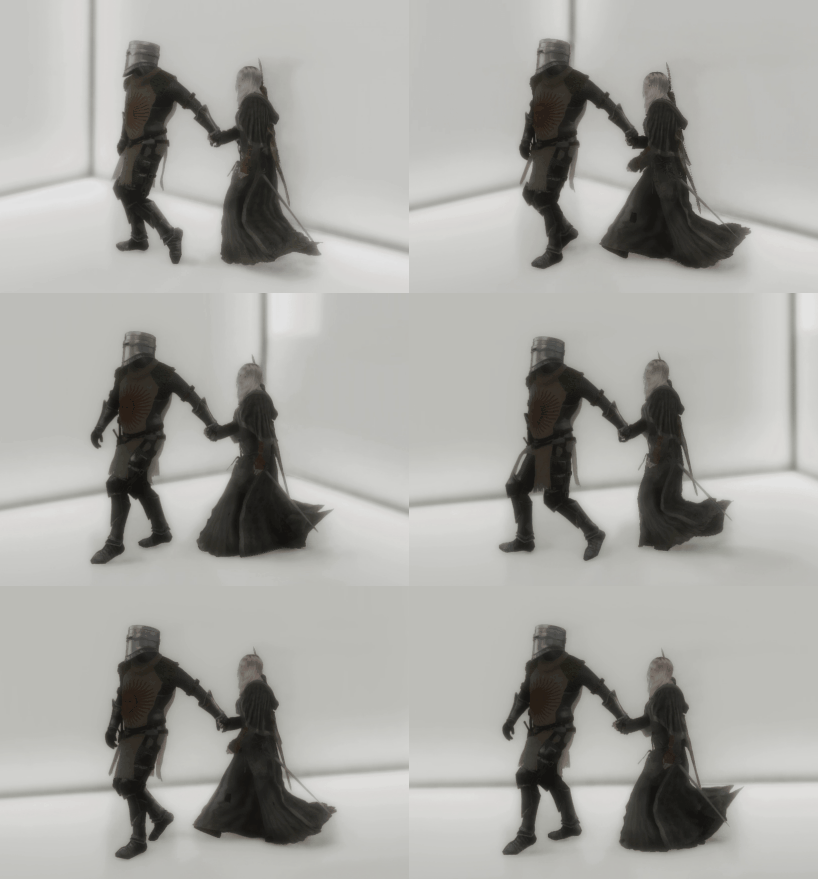
 View File TETHER - Hand-Holding for Followers An SKSE plugin for Skyrim SE / AE that implements continuous follower hand-holding: a hand connection that survives walking, running, and terrain movement without breaking. Built on a combination of a Havok ball-and-socket constraint and kinematic position control. ━━━━━━━━━━━━━━━━━━━━━━━━━━━━━━━ ■ On AI use ━━━━━━━━━━━━━━━━━━━━━━━━━━━━━━━ Most of this plugin's code was generated by Claude Code (Anthropic). The author (KEI997) handled: - Spec decisions, prioritization, trade-off calls - In-game testing and bug reports - Pointing the AI at specific reference mod sources ("read this, use as reference") - Reviewing and accepting/rejecting generated code - SSEEdit ESP construction, Papyrus compilation, OAR animation authoring All reference sources the AI read are publicly-licensed. Per-feature attribution is listed in the GitHub README: https://github.com/Kei-BWV997/TETHER If any listed author objects to their source being used this way, please contact and I will rework the affected feature or adjust the credit. ━━━━━━━━━━━━━━━━━━━━━━━━━━━━━━━ ■ Features ━━━━━━━━━━━━━━━━━━━━━━━━━━━━━━━ - One hotkey to engage / release the hand-hold (default H, works with both keyboard and Xbox controller) - While tethered, hands are physically bound via a Havok ball-and-socket constraint (the palms actually stay stuck together, not just visually near each other) - The follower is kept directly behind the player via KeepOffsetFromActor - While tethered, the player's max movement speed scales with distance to the follower — try to sprint away and you'll automatically be slowed down to a speed the follower can match (natural since you're literally holding their hand) - Custom OAR conditions let you swap in dedicated tether animations ━━━━━━━━━━━━━━━━━━━━━━━━━━━━━━━ ■ Animation status in v1.0.0 ━━━━━━━━━━━━━━━━━━━━━━━━━━━━━━━ Only ONE pattern currently has an authored motion: player-male (the puller). The other three folders (player-female, follower-male, follower-female) exist as empty structure — they contain only the OAR config.json, no .hkx files. Actors matching those conditions will just play vanilla locomotion while tethered. The plugin ships this structure so users can drop their own .hkx into the correct folder to enable that pattern, or wait for future updates / a community animation pack. ━━━━━━━━━━━━━━━━━━━━━━━━━━━━━━━ ■ Known issues ━━━━━━━━━━━━━━━━━━━━━━━━━━━━━━━ - Sometimes on engage, the follower doesn't start moving to the tether position. Workaround: release, walk a few steps away, then re-engage. Cause not yet identified. - Third-person only (no first-person support) - One active tether at a time (no multi-follower) - Doesn't work while a weapon is drawn (deliberate — releases on draw) - Very rare CTD possible if an actor's state changes at an unfortunate moment (auto-release handles the common cases: cell change, save load, weapon drawn, etc., but edge cases remain) ━━━━━━━━━━━━━━━━━━━━━━━━━━━━━━━ ■ MCM options ━━━━━━━━━━━━━━━━━━━━━━━━━━━━━━━ - Toggle key rebind (keyboard + gamepad) - Follower offset position, Follow / Catchup radius - Elastic tether curve (ideal/slack distance, speed multipliers at both ends) - Follower speed boost while tethered - Palm attachment offset - Auto-release toggles (on weapon drawn / on combat start / on extreme distance) - R key resets a single option; "Reset All Settings" button ━━━━━━━━━━━━━━━━━━━━━━━━━━━━━━━ ■ Source code / technical details ━━━━━━━━━━━━━━━━━━━━━━━━━━━━━━━ Open source under MIT license: https://github.com/Kei-BWV997/TETHER The GitHub README covers: - Per-feature reference-source table (which mods were used for which techniques) - Technical details of each feature (hook sites, Papyrus APIs called, state machine) - License and third-party file handling Bug reports and pull requests are welcome via GitHub Issues. ━━━━━━━━━━━━━━━━━━━━━━━━━━━━━━━ ■ About the author ━━━━━━━━━━━━━━━━━━━━━━━━━━━━━━━ I'm normally an OStim animator, active on the OStim Community Discord. If you want to chat about this mod, request features, or just say hi — come by: [https://discord.gg/ostim] (TETHER is not an adult mod, but I develop from that community and that's where I hang out.) Submitter KEI997 Submitted 08/13/26 Category Regular Mods Requirements [Required] - Skyrim SE / AE (1.6.11xx recommended) - SKSE64 / SKSE-AE - Address Library for SKSE Plugins (AE version) - SkyUI 5.2 SE - Open Animation Replacer 3.0 or later - powerofthree's Tweaks (EditorID preservation — without it, the MCM values won't reach the plugin) [Strongly recommended] - Keep Up! Follower Locomotion Fix (TESFAN) — fixes an engine bug where followers get stuck on stairs or complex terrain. TETHER works without it, but this significantly reduces the "follower left behind" problem. [Confirmed compatible] - FOMS (Follower Organized Management System) - True Directional Movement Regular Edition Compatible No Install Instructions 1. Install all Requirements first 2. Install the TETHER zip via your mod manager (MO2 / Vortex) and enable it 3. Make sure TETHER.esp is enabled in your load order 4. Launch the game, load a save 5. Confirm "TETHER" appears in the MCM list ■ In-game usage - With your weapon sheathed - Look directly at your follower - Press the hotkey (default H, rebindable in MCM) to hold hands - Same hotkey releases - Drawing a weapon automatically releases ■ Verifying it loaded correctly On a clean launch, Documents\My Games\Skyrim Special Edition\SKSE\TETHER.log should contain lines like: TETHER v1-0-0-0 TETHER loaded OAR condition register (TETHER_IsTetheredPlayer): OK OAR condition register (TETHER_IsTetheredFollower): OK Settings::Load: 16/16 globals bound from TETHER.esp kDataLoaded: TETHER ready If you see "Settings::Load: 0/16", the plugin can't read EditorIDs. Make sure powerofthree's Tweaks is installed and TETHER.esp is enabled. ■ Uninstalling Release the tether (make sure you're not currently holding hands), save the game, then disable the mod. This avoids leaving any Havok state in the save.
 -
 AAF Family Planning Enhanced for CBBE, Fusion Girl, and Jane Bod View File This is a conversion of Chosen Clue's great mod Family Planning Enhanced to the Advanced Animation Framework, supporting CBBE, Fusion Girl, and Jane Bod bodies. Mod Features Family Planning Enhanced, or FPE, is a pregnancy mod with a host of options to customize its behavior. Straight from installation, it works like this: If you are male You have intercourse with a female until she becomes pregnant. That's really all there is to it. There are options that help you determine if you succeeded in impregnating your partner, such as notifications about your virility, the chances your partner was pregnant, and when she becomes pregnant. If you are female Have intercourse until you become pregnant. As with males, you can enable notifications about your fertility, post-intercourse notifications about the chances of pregnancy, and notifications about conception and the stages of pregnancy. What about NPCs? They can get pregnant too, either through intercourse with the player, or with each other. What happens next? Pregnancy, of course! Women will have their bodies grow accordingly, if you have the right mods. Then, after 9 FPE months*, she will give birth, and after a certain amount of FPE months, the baby will grow into a child. Then after some more time, they will grow into an adult. *Note, that FPE months are different from actual months, and can be customized to last however long the user wishes. This is pretty vague, I thought you said that FPE had a host of options? Hell yes it does. 4 pages, 30 settings, all available via the Mod Configuration Menu (MCM). Every option affects things differently, so be sure to hover over them while in the MCM menu to learn about each, or find out something you didn't know FPE had! Full list of features: Requirements Fallout 4 Script Extender (F4SE) by the F4SE team. Please make sure this is installed correctly. CBBE by Caliente, Fusion Girl by Vioxsis, Leito86, TheBottomhoodOfSteel, and ZaZ, or Jane Bod by Nightasy Mod Configuration Menu by Registrator2000 LooksMenu by Expired6978 Advanced Animation Framework (AAF) by Dagobaking AAF Themes by Halstrom And of course you need to install animation packs. Note: The latest version of FPE requires Fallout 4 runtime 1.10.162 or newer. If you are running an older version of Fallout 4 you can use Fallout 4 Plugin Version Check Patcher to enable it to load AAF FPE. Optional Mods FPE Male Mesh Override mod by AppleWaterSugar. This provides a male pregnancy morph slider for Atomic Muscle and BodyTalk3, allowing pregnant males to have proper pregnancy bellies. This is totally optional, but recommended if you play with male pregnancies enabled. Installation Install the prerequisite mods, listed above. Pay special attention to the F4SE installation -- you must install the Data folder from the F4SE archive into your Fallout 4 folder. If using CBBE, be sure to install the F4EE morphs when installing. If using Fusion Girl or Jane Bod, build your body in Bodyslide with the "Build Morphs" option enabled after installing. For all body types, always use the "Build Morphs" option whenever you build a body or outfit in BodySlide. Then, install AAF Family Planning Enhanced (this mod!) AAF_FamilyPlanningEnhanced_2.710.7z is the main mod file. This is required. AAF_FPE_2.710_DLC_Doctors_Addon.7z adds support for the doctors in Far Harbor and Nuka World. You need the main mod and the DLC to use this. FPESuperMutantAddon.7z allows humans impregnated by Super Mutants to have babies who grow into Super Mutants. This is optional. FPEDogAddon.7z allows humans impregnated by dogs to have puppies who grow into real dogs. This is optional. FPEMakeYourOwnBabyAddon.pdf is instructions for mod authors wishing to make their own baby add-ons FPE_Interface_Script_2.610.7z is an example script for mod authors - you do not need this if you are only playing the game Once you've installed the mod, start up Fallout 4 and go into the AAF FPE MCM and choose your settings. Then go forth and procreate! Frequently Asked Questions Q: Do third party add-ons work with this version? A: Yes. The add-on interface is unchanged from previous versions. AAF FPE Addon Pack or FPE More Creatures work with this mod, as do the add-ons in the Download section. Q: Is there an option to create random NPC pregnancies? A: The only way FPE can create pregnancies is when an animation occurs. Any mod that allows NPCs to have sex with other NPCs will work. Shenanigans, Autonomy, prostitution mods, companions in an AAF Violate event, or simply using the AAF wizard can make NPCs get pregnant. Q: How does the position filtering work? A: FPE looks for certain tags on animations, and will prevent pregnancy if any of those tags are found. The list of excluded tags is: Kissing, Hugging, Cuddling, Blowjob, 69, Cunnilingus, Scissor, Handjob, Footjob, Jackoff, Masturbation, Spanking, Dancing, Pose. This is in addition to the other requirements, i.e. there must be at least one actor capable of becoming pregnant, one actor capable of fathering a child, etc. Q: Does this work with Unique Player? A: Yes, but you must copy the morph files for your chosen body. When you build the female body in BodySlide, you must copy the .tri file (the morphs file) from the Characterassets folder into the PlayerCharacterAssets folder under Data\Meshes\Actor\Character Q: Can I prevent certain actor types or individual actors from becoming pregnant? A: Yes. Version 2.201 and up have a formlist, FPFP_ProhibitedKeywords (XX017743) for this purpose. Actors with any keyword in this list cannot get pregnant. So you can add keywords like ActorTypeGhoul or AnimArchetypeElderly to this formlist to prevent those actor types from becoming pregnant. The formlist includes the new keyword FPFP_NoPregKW (XX017742), so it can be added to an individual actor to prevent them from becoming pregnant. Q: Can I prevent certain pregnancies from starting up the Find the Father quest? A: Yes. Version 2.610 and up include a new keyword FPFP_NoDaddy (XX01E1A6). If this keyword is on the actor who impregnates the player, the Find the Father quest will not start for that pregnancy. Q: Is there an API I can use to make my mod cause or end pregnancies or find out when an actor gave birth? A: Yes. The main quest includes a GetAPI() function which you can use to access the API. The primary function you will use is GetPregnancyInfo(akActor) which allows you to call all of the internal functions to manipulate pregnancy. As of version 2.610, the mod also includes FPFP_GetPregnant and FPFP_GiveBirth events which will be sent out when a pregnancy begins or ends. The FPE_Interface_Script available in the Downloads is a modder's resource illustrating the use of these features. Q: Does this work with the Menstruation system from Advanced Needs? A: Yes, with Advanced Needs 76 only, not with Advanced Needs 2. Version 2.710 and up will check if you are on your period and prevent you from becoming fertile or getting pregnant if so. Credits @vinfamy for Family Planning @Chosen Clue for Four-Play Family Planning Enhanced, which is 99% of this mod @Z0mBieP00Nani for the Condom Boy texture on the condom box @TheBottomhoodofSteel for the Fusion Girl morph sliders and help with the BT3 pregnancy morph @fedim for the original AAF 79 port of FPE @WandererZero for quality assurance @AppleWaterSugar for developing the male pregnancy morph sliders for Atomic Muscle and BodyTalk3 @Ulfberth for help with Atomic Muscle pregnancy morph Changelog Submitter EgoBallistic Submitted 04/29/2019 Category Sex Effects Requirements F4SE, MCM, LooksMenu, AAF, CBBE or Fusion Girl, AAF Themes
 -
Unhealthy Craving View File Perfectly perverse fat gain and loss system with body morphs and food addiction, highly configurable, includes soft integration for many popular adult mods. Gain body fat the more you eat, and lose it through typical wasteland activities. Unhealthy packaged pre-war food and sugary drinks fatten you up faster than raw or cooked foods. Booze and some chems will also cause you to put on weight while others will help you lose it. Too much or too little body fat results in (potentially severe) debuffs, but staying fit gives you some mild bonuses. Eat junk food too often and you might become addicted! Unhealthy Craving includes depictions of and references to fat fetishism, shaming and humiliation, destructive behaviors like self-harm... in essence sexualizing physical and mental health disorders. As such, it may not be to everyone's tastes. Most features can be disabled individually, but if these themes offend you then it's probably better to skip this mod and move on. The goal is to put you inside the mind of a person with on-again/off-again food addiction and weight problems, experiencing the challenges and embarrassments which go along with that. Because this is still a game, the portrayal is often cartoonish or otherwise unrealistic, sometimes making light of real life health risks. In order to offset the negative aspects and keep things playable, there are somewhat outlandish benefits to being fat or being food-addicted. Unlike real life, nothing is permanent and any lapses in judgment can be overcome with time. Like real life however, the deck is stacked against you and you must make strategic choices if you intend to stay healthy. Installation and Requirements Rad Morphing Redux version 2.0.0 or later and its dependencies are required (MCM, F4SE, SUP F4SE, LooksMenu, and the Far Harbor and Nuka-World DLCs). To use this mod, install it with a modern FOMOD-capable manager like Mod Organizer 2 or Vortex and then configure one or more sliders in RMR's MCM to use the trigger it provides. Adjust other features and settings in the Unhealthy Craving MCM pages, and by editing the included mod integration text files under the UC subdirectory of your game's Data directory. Features All of these are on by default, but you can use MCM to disable any you don't like. Credits and Permissions The included RMR trigger plugin was created by shamelessly plagiarizing the reference plugins published by @LenAnderson, without whose guidance and dedication none of this would be possible. Script source code is included, and all contents of this mod are distributed under the same terms as Rad Morphing Redux itself. Submitter vaultbait Submitted 11/28/2022 Category Other Requires Rad Morphing Redux (RMR), Mod Configuration Menu (MCM), Fallout 4 Script Extender (F4SE), SUP F4SE, LooksMenu, Far Harbor DLC, Nuka-World DLC
-
Estrus Chaurus+ View File All credits go to the original author of this mod, Jbezorg. Since he has taken a hiatus, I will be maintaining this mod for the time being. Thanks to Min for helping to keep the Mod alive by updating it for SL1.5+ Original Mod Description by Jbezorg WHAT DOES THIS MOD DO? Chaurus spit attacks will trigger an Estrus Tentacle attack and impregnation. In roughly 3 days, they Chaurus Eggs will be expelled from the host's body. WHAT CAN YOU DO? If the skeleton supports node scaling the breasts will enlarge during that time. MCM will auto-configure Estrus Chaurus based on your skeleton and it will be available if the skeleton and body mesh supports it. If this is available, you can set how large the breasts will grow. You can set how long the impregnation will last. You can turn on / off impregnation by enabling / disabling the pregnancy option. The tentacle attack will still happen but no impregnation. You can turn on / off the chaurus eggs hatching by enabling / disabling the Chaurus Infestation option. An impregnated NPC will still lay chaurus eggs. They just will not hatch. You can choose to have some residual breast growth. Breast size is not returned fully to the original size. You can remove all impregnation effects from NPCs, Companions & the Player by enabling "Prepare for uninstall" ( this can take a few min. to run). The breast enlargement feature is very experimental. It's very likely to cause CTDs. You can disable this feature in MCM by setting breast growth to "NONE". SOME THINGS TO KEEP IN MIND Don't update to a new version without first enabling "Prepare for Uninstall" and letting it cure everyone. Estrus shout abilities AND THE ESTRUS MOD ITSELF is completely unrelated to this mod. When the pregnancy effect ends: The original breast scale is restored. The victim is removed to the Chaurus Faction ( if still in it ) The perk is removed. [*]Don't save or game wait while the Estrus Tentacle magic effect is active. You'll most likely CTD. Wait a few min. before to allow for the first NiNode update to occur. [*]Breast enlargement and pregnancy will only work on body meshes that support skeletal scaling e.g. TBBP, BBP body meshes. [*]If You don't see MCM updating, use the following console command. setstage SKI_ConfigManagerInstance 1 EC+ Version 4.390 As version 4.390 has major changes to the esp file I do not recommend trying to upgrade - a new game is required For the LE version NiOverride and XPMSE are required for pregnancy scaling to work in EC+ 4.20 onwards For the SE version SKEE and XPMSE are required for pregnancy scaling to work. Thanks to t3h0th3r for providing the updated scaling code! There are three methods by which the EC effect can be applied to the player or a follower: Chaurus spit attacks can trigger tentacle attacks - the chance of attack is configurable via the EC MCM Sexlab scenes involving a Chaurus triggered by another mod (e.g. Sexlab Defeat) EC+ scenes triggered by other mods (e.g. FMEA, Deviously Enchanted Chests, Sexlab Parasites, Deviously Cursed Loot) Chaurus Spit can also trigger Tentacle attacks on non-follower NPCs! At present NPC pregnancies will be lost if you or the NPC changes cell. Updating Updating from version 4.381 to version 4.390 requires a clean save or new game. For Modders Required Mods and Versions Legendary Edition Estrus For Skyrim V2.41r1 (Must be installed but the mod does not have to be activated) Sexlab 1.62 FNIS 6.1+ FNIS Creature Pack 6.1+ SkyUI 5.1 XPMSE 2.80+ Net Immerse Override 3.2.2+ or Racemenu 3.0+ (includes NIO) Special Edition Estrus For Skyrim SE V2.45 (Must be installed but the mod does not have to be activated) Sexlab 1.63 Beta 9+ FNIS 7.6SE + FNIS Creature Pack SE 7.6+ SkyUI 5.2SE XPMSE 4.80+ Racemenu SE 0.4.16+ (includes SKEE - required for pregnancy scaling) Known Issues None - please report any problems (or success) and I will try and sort them. Credits qotsafan for the Sexlab Inflation Framework integration cod osmelmc for the automatic EC animation registration patch Submitter Bane Master Submitted 05/03/2014 Category Combat Sex Requires SexLab , SKSE, FNIS, FNIS Creature Pack, SkyUI, Estrus For Skyrim (Assets only), NIOverrride (LE), SKEE (SE) Special Edition Compatible Yes
-
Rad Morphing Redux View File Extensible Body Morphing Framework Rad Morphing Redux reacts to external triggers and modifies LooksMenu sliders on your (or your companion's) body based on the values provided by those triggers. Pretty much every aspect of the mod can be configured via MCM (which sliders to change, by how much, thresholds for the trigger values, unequipping of clothes, ...). Originally, all morphing was done based on the player's radiation (hence the name Rad Morphing), but the mod has now been extended to allow input from any other mod instead. That means you could apply morphs not just based on radiation, but also SPECIAL stats, health, Sex Attributes, calorie intake, weather, addictions... as long as a mod provides the respective triggers. Based on the mod Rad Morphing by @Invictusblade. Cover image on LoversLab graciously provided by @Narsdarknest. By default this mod is disabled through MCM. You need to open MCM to configure and enable Rad Morphing Redux before it does anything. Getting Started Dependencies MCM to configure the mod LooksMenu to apply morphs A BodySlide compatible body (any body that can be modified with BodySlide / LooksMenu will work) All clothes must be built with morphs enabled in BodySlide F4SE 0.6.23 for Fallout 4 1.10.163 SUP F4SE to detect MCM changes outside of the current savegame At least one RMR trigger All DLCs Conflicts The mod comes with the LL_FourPlay library (LL_FourPlay.pex/psc/dll) that is also included in other mods (e.g., AAF). When your mod manager complains about a conflict I would suggest letting AAF overwrite this file. Integration Combat Strip Lite or Combat Strip Lite, Sound Replacer (Ripping Sounds) Installing either of these mods (or both) allows Rad Morphing Redux to play a sound from that mod when clothes are removed due to rads. Devious Devices will not be unequipped by this mod (tested with unofficial version RC8). Advanced Animation Framework / AAF scenes involving the player are detected and the body double created by AAF will be morphed alongside the actual player body while AAF scenes are playing. Installing Install with your mod manager of choice. The FOMOD installer asks you how many slider sets you want to have available and lets you pick an optional default slider configuration for a couple of different bodies. Unless you're already familiar with RMR and know how many slider sets you need, I would suggest starting with 10 to keep the MCM small. You can always re-run the installer and increase the number of slider sets later. By default this mod is disabled through MCM. You need to open MCM to configure and enable Rad Morphing Redux before it does anything. Uninstalling Before uninstalling, disable this mod in MCM to restore the original body. If you uninstall without disabling the mod first in MCM you will be stuck with a morphed body. Triggers Rad Morphing Redux does nothing on its own. You must install a mod that provides a trigger for this mod to be able to do anything. RMR Trigger: Cleavage RMR Trigger: Rads RMR Trigger: S.P.E.C.I.A.L. Unhealthy Craving by @vaultbait Limitations of LooksMenu / BodyGen Depending on which version of LooksMenu you have installed, you will see different behavior when morphing sliders. One big limitation that as of writing this (February 2023) all versions of LooksMenu have, is that only one single value is ever applied to one slider. If multiple sources try to modify a slider (i.e., you have given a slider a value in LooksMenu and RMR tries to morph that slider, or RMR morphs a slider and another mod tries to morph that same slider), those values are not combined in any way, but only one of them is chosen by LooksMenu and applied to that slider. LooksMenu v1.6.18 With this version of LooksMenu, which is the version suggested in the The Fucking Manual thread, the morph sent from the mod that has been set with the "highest" mod-specific keyword is being applied, independent of the slider value. As far as I understand this logic, that means that the mod with the highest (largest) mod index, i.e., loaded last in your load order, will win out. However, I have not tested this version of LooksMenu, so confirmation or correction of this assumption would be appreciated. LooksMenu v1.6.20 With this version of LooksMenu (currently the latest version), the highest of all the values assigned to a slider is being used. As a result any value that RMR sets on a slider that is lower than either the value specified directly in LooksMenu or lower than a value sent from another mod will not have any effect since it is suppressed by that higher value. Unfortunately that means that even without other mods modifying sliders, RMR cannot produce negative morphs on a slider that has been given a value through LooksMenu. Configuration The FOMOD installer comes with default settings for Atomic Beauty, CBBE, Fusion Girl, and Jane Bod. However, you can configure it to your liking through MCM with up to 50 sets of sliders with individual morphing strengths and ranges. By using the RMR Helper or editing the MCM ini file you can use even more slider sets. For easier configuration, with previews of morphs and automatic setup for morphing from one BodySlide preset to another, you can use RMR Helper. Start or load a game, pause, open MCM, and select Rad Morphing Redux. General Settings Enable Rad Morphing Redux Enable or disable Rad Morphing Redux. On disabling RMR, the original body is restored. Display disabled warning Whether to display a warning message when you load a game with RMR disabled. This only really exists as a notice for first installs, since RMR is disabled by default. Reload MCM settings Reload all settings from MCM. Use this if you have modified the settings outside of the game (e.g., by using RMR Helper or directly editing the ini file) or made changes in another savegame. Changes from other savegames and from RMR Helper should be automatically detected and result in RMR restarting. Morph Updates Morph calculation How to calculate the morph value. RMR: This is how previous version of RMR v2 up to v2.4.0 have worked. The value calculated from your slider set configuration is sent to BodyGen to morph your character. Due to the way BodyGen / LooksMenu works (LooksMenu version 1.6.20), this means that you will not see any change on the affected sliders if the value directly set in LooksMenu (i.e., your default / original body) is higher than this value. You also won't see any change on the affected sliders if another mod has morphed that slider to a value larger than the one calculated by RMR. RMR + LooksMenu: With this setting, RMR adds the value set in LooksMenu (i.e., your default / original body) to the value calculated from your slider set configuration before sending it to BodyGen to morph your character. You still won't see any change on the affected sliders if another mod as morphed that slider to a value larger than the sum of RMR's value and LooksMenu's value. RMR + Highest Morph: With this setting, RMR reads the highest value for a slider (i.e., your default / original body or a morph from another mod) and adds that value on top of the value calculated from your slider set configuration before sending it to BodyGen to morph your character. Update delay Seconds between morph updates when Update Type is set to Periodically. Companions Restore companion morphs when dismissed Whether to restore morphed companion bodies to their original body when dismissing them. Healing Caps to heal 1% of morphs Number of caps to heal 1% of morphs at a doctor. This only applies when permanent morphing (only doctors can reset morphs) is enabled. Debug Tools Enable logging If you experience any problems with RMR, please enable logging and provide your papyrus log when reporting your issue. Global Overrides Settings made in this section will override all individual settings on the slider set pages. Descriptions for each setting can be found further down. Permanent Morphs Only doctors can reset morphs Additive morphing Limit additive morphing Additive morphing limit Unequipping Unequip action Override chance to drop / destroy Chance to drop / destroy Equipped Items Show a list of all the currently equipped items and their slots. Actor Dropdown to select the actor (player or active companions) whose items you want to see. Refresh The list is not automatically updated when you equip or unequip items. Click to refresh this list. Slider Set X Use the slider sets to configure how the body should be morphed when a trigger changes. A slider set is a group of sliders (or a single slider) that react the same way when their trigger value changes. Sliders Slider names Enter the names of the sliders that should be affected. When entering multiple sliders, separate them with | (e.g., Boobs Yuge|Bum Chubby). Unfortunately you cannot just use the labels shown in BodySlide as the game needs the internal name / keyword of the slider. You can look these up in the body's SliderCategories XML file, found in .../Data/Tools/BodySlide/SliderCategories/. Each slider has a name and a displayname attribute. The displayname is the label shown in BodySlide while name is the internal name that you have to enter in MCM. One example from CBBE (CBBE.xml): <Slider name="BreastsNewSH" displayname="Silly Huge" /> The internal name for the slider labeled Silly Huge in BodySlide is BreastsNewSH. So BreastsNewSH is what you need to enter in MCM if you want this slider to change. Targets Apply to Whether to apply this slider set to only the player, only companions, or player and companions. Sex Whether to apply this slider only to female characters, only to male characters, or to both. Trigger Trigger name Choose the trigger that you want to base the morphs for this slider set on. Invert trigger When inverting the trigger value, morphs will take full effect when the trigger value reaches 0% and no effect at 100%. This would allow for example to apply morphs as the player's HP goes down (i.e., no morphs at 100% HP, full morphs at 0% HP). Update type Whether to update immediately when the trigger sends an update, periodically every X seconds (see Update delay in General Settings), or after you sleep. When this is set to After sleeping, morphs will according by the current trigger value every time you go to sleep; i.e., after sleeping four times with a trigger value of 25% morphs will reach 100%. This way, only doctors will be able to reset your morphs, as a 0% trigger only means that no additional morphs will be added. Size Target size increase How much the slider will change when the trigger value reaches its maximum. These are absolute percentage points, not percentage of the current slider value. If the slider on your unmorphed body is at 50% and target size increase is set to 100% the slider will end up at 150% when fully morphed. When set to -100% it will end up at -50% when fully morphed. Lower threshold Percentage of the trigger value at which morphing should start. While the trigger value is lower than this, no morphs will be applied. Upper threshold Percentage of the trigger value at which morphing should end. While the trigger value is higher than this, full morphs will be applied. Unequipping Armor slots to unequip Enter the numbers of the armor slots to unequip when the unequip threshold is reached. Separate multiple slot numbers with | (e.g., 9|11|15). You can only equip the items again once the morphing is again below the threshold. To see what you have currently equipped, go to the Equipped Items page and click on Refresh. Unequip threshold When x% of the morphing target is reached, the above slots will be unequipped. This is a percentage value that refers to the target size increase. Unequip action Determines what happens to unequipped items. Unequip: Old behavior. The unequipped items are put into the character's inventory. Drop: Unequipped items are dropped to the ground. Destroy: Unequipped items are completely destroyed. Chance to drop / destroy If unequip action is set to Drop or Destroy, this setting determines how likely it is that the unequipped items are actually dropped or destroyed or just placed in the inventory. Permanent Morphs Only doctors can reset morphs With this option enabled, the body will not restore its original shape on its own when the trigger values goes down again. You will have to visit a doctor to restore your body. Additive morphing If enabled, morphs are added every time the trigger value increases, even if the trigger value decreases in between. This can lead to reaching a fully morphed body without a 100% trigger value, or even morphing beyond the target size increase. Example with rads as trigger: You take 50% radiation and get morphed to 50% of your target size increase. You reduce rads to 20% (no morph change due to permanent morphs / only doctors can reset). You take some more rads and are now back up to 30% and morph a further 10% to 60% of the target size increase. Limit additive morphing If enabled, you can limit how far additive morphing can exceed the target size increase. If disabled, there is no limit and you can morph until Fallout crashes... I would keep this enabled. Additive morphing limit Percentage how far additive morphing can exceed the target size increase. 0%: morphing will stop once the target size increase is reached. 100%: morphing will stop once 2x the target size increase is reached. Development Creating a new trigger Rad Morphing Redux provides an API for other mods (like triggers) to interact with RMR. Get a reference to the API Game.GetFormFromFile(0x4C50, "LenA_RadMorphing.esp") as LenARM:LenARM_API When first running your trigger mod, register your trigger name with RMR. RegisterTrigger("YourTriggerName") Call UpdateTrigger with value as a float between 0.0 (0%) and 1.0 (100%) to update the trigger value. UpdateTrigger("YourTriggerName", value) Register for the OnStartup and OnShutdown events to keep track of RMR's state and avoid wasting resources while RMR is inactive. Register for the OnRequestTriggers event. Re-register your trigger name and provide the current value whenever this event is raised. For more details, have a look at the Rads trigger. The source code is included with the mod and the full project is also available on GitHub. Source Code All source code is included with the mod. The full project including build scripts for VSCode is available on GitHub. Changelog Submitter LenAnderson Submitted 03/12/2020 Category Other Requires MCM, F4SE, SUP F4SE, LooksMenu, DLCs
-
Skill Based Muscle View File What this mod does Adds Muscle stat derived from skill levels. Changes normal maps of female/male bodies depending on Muscle for all vanilla races except Khajiit and Argonians (all that's missing is textures). Changes body morphs of female body depending on Muscle. Has modifiers to apply at a higher rates for higher Actor weight. Adds option to have Actor weight dependent on Actor level. Adds MCM to configure nearly every option. Hard Requirements SKSE SkyUI, for MCM RaceMenu, for NetImmerse Override (script functions that change body morphs / normal maps) PapyrusUtil SE, absolutelty necessary, all mod settings are enabled by json. Flaccid Requirements CBBE 3BA, the json/textures are set up for this, script may need small adjusts for different bodies. HIMBO, same as above. Vera Skin -CBBE 8K- , the included female textures use this as a base, I recommend my darker edit Tempered Skins for Males, the included male textures use the SOS version as a base. SPID, for NPC support Notes SPID The SPID file is set up to distribute to all eligible NPCs, so males and females. If you want only females to affected, use this line instead. Spell = 0x838~Skill Based Muscle.esp|NONE|-00000013,-00013279,-0002E894,-0010760A|NONE|F|NONE|100 Textures This mod supports up to 10 levels of body/hand normal maps for all playable vanilla races, male or female. So that's a total of 60 potential textures. Any missing textures will simply be ignored, no override will be applied. I've only included 10 body normal maps and 1 hand normal map for male/female human/elf races. To have argonians/khajiit be affected, or to have more hand normal map levels, simply place your favorite normal maps following the naming convention of the existing texture files. If you are using different textures than what this mod is based on, you may need to make your own. This requires an image editor like Photoshop or GIMP, and some basic knowledge of layers. To do this I've included a psd file to help. The textures are BC7 dds files, so you may need to download the "Intel® Texture Works Plugin for Photoshop*". Body Morphs To add more body morphs, go to one of the profile json file (SKSE\Plugins\SkillBasedMuscle\filename.json), add the slider name as it appears in the body's xml file (CalienteTools\BodySlide\SliderCategories\filename.xml) Any invalid body morphs will have no effect. Up to 63 body morphs for each sex can exist. Same for the weight modifiers. To have argonians/khajiit be affected you need a body with bodyslides for them. Mod updating Should be fine to just update, but uninstall and run a save cleaner if you're unsure. For upgrading to 5.0 running a save cleaner is a good idea. Known Bugs / To-do When WeightLevel is updated armor meshes don't update with new Actor weight. Problem is solved by reequipping armor. Ideas in order of likelihood (probably won't do any of these) Implement skill specific body morph options (e.g. Restoration increases only breasts, might require a matrix of textures for normal map support, ehhhh...). Convert to SKSE plugin (after Anniversary Edition, hard maybe). Replace SetSkin() with some NiOverride function to replace only normal map textures (someone link some documentation please). BLESS THIS MAN Implement male support (don't feel like looking for male textures). Done. Implement Khajiit / Argonian support (don't really care to, unless I can find a mod that replaces their heads and some good body textures, the framework in the esp is set up tho). Implemented, all that's needed is to drop the textures in their respective folder. Implement male body morphs (Not quite sure how to access the ones in RaceMenu). Thanks/Credits This fucking guy for being the only person to ever document NiOverride and for this post Suzutsuki3 for Skill Based Status, wouldn't be able to make this without referencing that. ousnius for WeightMorphs SE, again, good reference Lunyra for Fitness Body, normal map muscle overlays veracruze for Vera Skin -CBBE 8K-, normal map base sds1 for showing me the json implementation and advice on Beast Forms Submitter jjabrams420 Submitted 10/13/2021 Category Adult Mods Requires Regular Edition Compatible
-
View File The Advanced Medical Scanner Requires Fallout NV, NVSE, and NVSE extender, Mod Configuration Menu. Recommended: Sexout, Sexout Common Resources,Sexout Pregnancy, Spunk, and Body Morph. you don't need these but it will give all zeros for the data. What does This mod do? It adds a MCM menu to your game with the following Data. -- Basic Scan -- health (curr/max), damage Threshold, resistances, Body Conditions, Karma, Lust, Arousal. -- Role Scan 1 and 2 -- Spunks count, xp, and Enjoy of various types of sex. (Giving Birth is masturbation role) -- Species Scan 1,2 and 3 -- Spunks Count, Xp, and Enjoy of Species. If the Enjoy stays at zero it is because there are no animations for that species. -- Pregnancy Scan -- Total semen, sperm, in womb sperm, ova, Father?, Mother?, Preg Percent, Stage, Time left, Miscarry/mutation chance, Total #orgasms, lust multiplier, arousal multiplier. -- Drug and BodyMorph Scan-- Drug scan stolen from the medical scanner and gives the BodyMorph scales if installed. -- Special and Skills -- Current and Base Values. -- Wear And Tear -- Diseases and Wear/Tear amout (0-1000) How does it work? Walk up to a NPC, get them in your crosshairs and open The mcm menu. Then just go through the menus. What about the Player's? point your crosshair at NOTHING and open the MCM menu and go through the menus. Will this work on anyone? Yes and creatures and custom followers and tables and beds and oops. Can you add.....? Maybe. I have 1 more menu That I can add, and if I can call the NX variables then yes, but If I have to make it dependent on another mod then no. Why? Why not, no one else did it. I made it mostly for me, but I am willing to alter it if there is a good enough reason. New Version AMS.esp Requires Fallout NV, NVSE, and NVSE extender, Sexout Pregnancy This one adds a Book to your Inventory -AMS- If you were looking at a character before you open the PIPboy, then You can Store them (8 NPC's MAX) for Later retrieval of Information. or just view their Information Pregnancy DATA from SCR Medscn Drug Data from SCR medscan Wear and Tear Diseases Mood (Lust, Lust multiplier, Arousal, Arousal Multiplier and a few other things) I left The original MCM medscanner up for those that want the Species and Role Data as I have yet incorporate that data into the limited space provided by the Message Window. Submitter securenym Submitted 08/29/2015 Category Other Requires Fallout NV, NVSE, and NVSE extender, Mod Configuration Menu
-
Version 1.1.0
3726 downloads
An SKSE plugin for Skyrim SE / AE that implements continuous follower hand-holding: a hand connection that survives walking, running, and terrain movement without breaking. Built on a combination of a Havok ball-and-socket constraint and kinematic position control. ━━━━━━━━━━━━━━━━━━━━━━━━━━━━━━━ ■ On AI use ━━━━━━━━━━━━━━━━━━━━━━━━━━━━━━━ Most of this plugin's code was generated by Claude Code (Anthropic). The author (KEI997) handled: - Spec decisions, prioritization, trade-off calls - In-game testing and bug reports - Pointing the AI at specific reference mod sources ("read this, use as reference") - Reviewing and accepting/rejecting generated code - SSEEdit ESP construction, Papyrus compilation, OAR animation authoring All reference sources the AI read are publicly-licensed. Per-feature attribution is listed in the GitHub README: https://github.com/Kei-BWV997/TETHER If any listed author objects to their source being used this way, please contact and I will rework the affected feature or adjust the credit. ━━━━━━━━━━━━━━━━━━━━━━━━━━━━━━━ ■ Features ━━━━━━━━━━━━━━━━━━━━━━━━━━━━━━━ - One hotkey to engage / release the hand-hold (default H, works with both keyboard and Xbox controller) - While tethered, hands are physically bound via a Havok ball-and-socket constraint (the palms actually stay stuck together, not just visually near each other) - The follower is kept directly behind the player via KeepOffsetFromActor - While tethered, the player's max movement speed scales with distance to the follower — try to sprint away and you'll automatically be slowed down to a speed the follower can match (natural since you're literally holding their hand) - Custom OAR conditions let you swap in dedicated tether animations ━━━━━━━━━━━━━━━━━━━━━━━━━━━━━━━ ■ Animation status in v1.0.0 ━━━━━━━━━━━━━━━━━━━━━━━━━━━━━━━ Only ONE pattern currently has an authored motion: player-male (the puller). The other three folders (player-female, follower-male, follower-female) exist as empty structure — they contain only the OAR config.json, no .hkx files. Actors matching those conditions will just play vanilla locomotion while tethered. The plugin ships this structure so users can drop their own .hkx into the correct folder to enable that pattern, or wait for future updates / a community animation pack. ━━━━━━━━━━━━━━━━━━━━━━━━━━━━━━━ ■ Known issues ━━━━━━━━━━━━━━━━━━━━━━━━━━━━━━━ - Sometimes on engage, the follower doesn't start moving to the tether position. Workaround: release, walk a few steps away, then re-engage. Cause not yet identified. - Third-person only (no first-person support) - One active tether at a time (no multi-follower) - Doesn't work while a weapon is drawn (deliberate — releases on draw) - Very rare CTD possible if an actor's state changes at an unfortunate moment (auto-release handles the common cases: cell change, save load, weapon drawn, etc., but edge cases remain) ━━━━━━━━━━━━━━━━━━━━━━━━━━━━━━━ ■ MCM options ━━━━━━━━━━━━━━━━━━━━━━━━━━━━━━━ - Toggle key rebind (keyboard + gamepad) - Follower offset position, Follow / Catchup radius - Elastic tether curve (ideal/slack distance, speed multipliers at both ends) - Follower speed boost while tethered - Palm attachment offset - Auto-release toggles (on weapon drawn / on combat start / on extreme distance) - R key resets a single option; "Reset All Settings" button ━━━━━━━━━━━━━━━━━━━━━━━━━━━━━━━ ■ Source code / technical details ━━━━━━━━━━━━━━━━━━━━━━━━━━━━━━━ Open source under MIT license: https://github.com/Kei-BWV997/TETHER The GitHub README covers: - Per-feature reference-source table (which mods were used for which techniques) - Technical details of each feature (hook sites, Papyrus APIs called, state machine) - License and third-party file handling Bug reports and pull requests are welcome via GitHub Issues. ━━━━━━━━━━━━━━━━━━━━━━━━━━━━━━━ ■ About the author ━━━━━━━━━━━━━━━━━━━━━━━━━━━━━━━ I'm normally an OStim animator, active on the OStim Community Discord. If you want to chat about this mod, request features, or just say hi — come by: [https://discord.gg/ostim] (TETHER is not an adult mod, but I develop from that community and that's where I hang out.) -
Version 2.2.3
902 downloads
# Work in Progress This page is currently under construction. The mod is already functional and can be used, but the documentation is still being rewritten for V2. Some sections may be incomplete or updated as development continues. This is the second generation of SL Tags and Dialogue Sex. V2 focuses on a cleaner workflow, remove small bugs, and improved slot management, easy preset handling, A simple spell has been added to make it easier to test the low-health dialogue. This mod supports human 1 vs 1 animiations only. So I made add on to start 3p animaiton with prostitution dialog and up-date it too. SL Tag and Prostitution V2 Not compatible with SexLab P+ Currently, this mod is designed for the traditional/native SexLab environment, including users of SexLab Utility Plus. Supporting SexLab P+ would require adapting the mod's existing animation and tag-search system to the APIs and registry system used by SexLab P+. Since this involves more than simple compatibility changes, native SexLab support will remain the current target. Though I may consider a separate SexLab P+ compatible version when I migrate my own Skyrim environment to AE/P+ in the future. Then, this mod is intended for users who, like me, continue to maintain and use a traditional SexLab-based setup with ## What does this mod do? SL Tags and Dialogue Sex V2 is a dialogue animation management system for SexLab It allows you to organize your installed SexLab animations into reusable slot groups and play them through conditional dialogs. if you have very few registered animations, only a few tags and results may be available. This mod can search and organize nearly 2,000 registered animations as one List group.The more 2p human animations you have, and the more accurately they are tagged, the better the results will be. Search results depend entirely on the tags assigned to each animation. Incorrect or incomplete tags may produce unexpected results. ## Features Create and save reusable animation 16 slots (A–P). Assign animattion slots to different 5 main dialogue topics. Start animations automatically or manually from a selection list. Search animations again at any time using the current tags of each slot when run animation. (option) Save and load presets as JSON files. Display all serched animation as list with a page system. (avoid hard limit of 128 papyrus list length) (option) Test your current tag settings instantly with the included Test Dialogue and options ## Dialogue Conditions Dialogue A - available for most of NPC (default Dialogue) DIalogue B - Follower-only dialogue DIalogue C - NPC currently in bed DIalogue D - NPC health checked or is affected by a unique Magic spell (this mod added spell) DIalogue E - NPCs carrying a lockpick These are only example conditions. So I recommend change condition as you like. You can set your own conditions for each dialog in the Creation Kit, and assign your saved slot in MCM menu. (or show all slot option) A basic Creation Kit tutorial will be added in a future update. to change dialog text and condtions, Though this guide may assumes you already know the basics of the Creation Kit. not intended as a perfect beginner's guide. ------------------------------------------------------ Currently, there are three Quick Start Guides. ## Quick start guide 1 (edit tag setting and test animation) -------------------------------------------------------------------------- ## Quick start guide 2 (Save a Slot and Assign It to a Dialogue) -------------------------------------------------------------------------- ## Quick start guide 3 (save and load preset json) ------------------------------------------------------------------------------- ## Option Guide (Choosing Slots and Animation) If you find any behavior that is different from what I described here, please feel free to post in the Help thread for this mod. If possible, tell me the steps you followed, your settings, and what happened. That will help me investigate the problem. I plan to continue improving and updating this mod little by little. Thank you for using my mod, and have fun! Peace and Love! ## For advanced users and modders The saved slots can also be used by other add-ons to start sexlab animation. For example, my Prostitution Add-on lets you assign saved 16 animation slots through its MCM and start animations from its own custom dialogues. ---------------------------------------------------------- # About My AI Aibou (How and why I Use AI for Mod Development) I would like to thank ChatGPT, whom I call "Aibou" , which means "my partner" in Japanese. Aibou has been my programming teacher, code reviewer, and brainstorming partner throughout the development of this mod. Rather than generating code blindly, we discuss ideas, review each change step by step, and I always read, understand, test, and verify the final implementation by myself. Working together has helped me to learn papyrus scripting, and I hope this mod reflects that journey. -
SL Tags and Dialogue Sex V2 View File # Work in Progress This page is currently under construction. The mod is already functional and can be used, but the documentation is still being rewritten for V2. Some sections may be incomplete or updated as development continues. This is the second generation of SL Tags and Dialogue Sex. V2 focuses on a cleaner workflow, remove small bugs, and improved slot management, easy preset handling, A simple spell has been added to make it easier to test the low-health dialogue. This mod supports human 1 vs 1 animiations only. (PC vs NPC) ---------------------------------------------------- So I made add on for NPC vs NPC (tag and sex saved slot animation and setting) , 3P. SL Tag and Prostitution V2 ---------------------------------------------------------------------------- Version 2.2.3 fixes a bug in version 2.2.2 that could prevent animations from starting through dialogue in normal selection mode😑 2.2.2 NEW Features The MCM now shows the total number of matching animations, including matches beyond the 125 animations stored in a slot. Added a paged preview of every matching animation for the Temp Slot and Slots A–P. Added Rebuild Slot by Current Tags and Clear Slot controls for Slots A–P. Clear Slot resets the slot name, tags, and saved animations. The Temp Slot’s Tag Editor can now clear Common Tags, Normal Tags, and Suppress Tags individually. Removed the JSON load option that restored tags without rebuilding animations. Loading a preset now rebuilds animations and show total counts for every slot with saved keys. After updating: 2.2.0 NEW Features 1. The tag selection list now use paging, allowing all available SexLab tags to be displayed and selected. Previously, tags beyond the list/array limit could not be shown, so this is a major fix that finally allows the mod's tag-selection features to be used to their full extent. 2. Common Tags support I have also added support for **Common Tags**, which are part of SexLab's tag-search system, although I don't think many mods make much use of them. This greatly expands what you can do with tag-based animation searches. I'll add a more detailed explanation later... Not compatible with SexLab P+ ## What does this mod do? SL Tags and Dialogue Sex V2 is a dialogue animation management system for SexLab It allows you to organize your installed SexLab animations into reusable slot groups and play them through conditional dialogs. if you have very few registered animations, only a few tags and results may be available. This mod can search and organize nearly 2,000 registered animations as one List group.The more 2p human animations you have, and the more accurately they are tagged, the better the results will be. Search results depend entirely on the tags assigned to each animation. Incorrect or incomplete tags may produce unexpected results. ## Features Create and save reusable animation 16 slots (A–P). Assign animattion slots to different 5 main dialogue topics. Start animations automatically or manually from a selection list. Search animations again at any time using the current tags of each slot when run animation. (option) Save and load presets as JSON files. Display all serched animation as list with a page system. (avoid hard limit of 128 papyrus list length) (option) Test your current tag settings instantly with the included Test Dialogue and options ## Dialogue Conditions Dialogue A - available for most of NPC (default Dialogue) DIalogue B - Follower-only dialogue DIalogue C - NPC currently in bed DIalogue D - NPC health checked or is affected by a unique Magic spell (this mod added spell) DIalogue E - NPCs carrying a lockpick These are only example conditions. So I recommend change condition as you like. You can set your own conditions for each dialog in the Creation Kit, and assign your saved slot in MCM menu. (or show all slot option) A basic Creation Kit tutorial will be added in a future update. to change dialog text and condtions, Though this guide may assumes you already know the basics of the Creation Kit. not intended as a perfect beginner's guide. ------------------------------------------------------ Currently, there are three Quick Start Guides. ## Quick start guide 1 (edit tag setting and test animation) -------------------------------------------------------------------------- ## Quick start guide 2 (Save a Slot and Assign It to a Dialogue) -------------------------------------------------------------------------- ## Quick start guide 3 (save and load preset json) ------------------------------------------------------------------------------- ## Option Guide (Choosing Slots and Animation) If you find any behavior that is different from what I described here, please feel free to post in the Help thread for this mod. If possible, tell me the steps you followed, your settings, and what happened. That will help me investigate the problem. I plan to continue improving and updating this mod little by little. Thank you for using my mod, and have fun! Peace and Love! ## For advanced users and modders The saved slots can also be used by other add-ons to start sexlab animation. For example, my Prostitution Add-on lets you assign saved 16 animation slots through its MCM and start animations from its own custom dialogues. ---------------------------------------------------------- # About My AI Aibou (How and why I Use AI for Mod Development) I would like to thank ChatGPT, whom I call "Aibou" , which means "my partner" in Japanese. Aibou has been my programming teacher, code reviewer, and brainstorming partner throughout the development of this mod. Rather than generating code blindly, we discuss ideas, review each change step by step, and I always read, understand, test, and verify the final implementation by myself. Working together has helped me to learn papyrus scripting, and I hope this mod reflects that journey. Submitter greenmango12 Submitted 08/06/26 Category Dialog Sex Requirements Skyrim runtime SE 1.5.97 SexLab Framework SE v1.63 (and all of its required dependencies) SKSE for Skyrim SE 1.5.97 SKY UI for Skyrim SE 1.5.97 Regular Edition Compatible No Install Instructions 1. Download the archive. 2. Install it with your preferred mod manager (I may recommend MO2). 3. Enable the plugin. 4. Launch the game and wait for the MCM menu to initialize. Depending on your load order, this may take a few minutes after the first installation. 5. Open the MCM menu and configure the mod as desired.