Misc
Anything not related to any other category.
184 files
-

Simple Cam Toggle, Team Changer, and NPC AI Toggle for Star Wars: Jedi Academy
By inb4poof
This lets you do quick basic commands, such as toggling camera settings, changing player team, toggling HUD, and toggling NPC AI. Useful for many things like viewing your player character up close, making fancy scenes and screenshots, or just simple experimenting.
It also lets you toggle certain effects and even fool around in cutscenes. Some of these features may not work in Multiplayer, as they require cheats to be enabled to work.
I made this originally for myself for testing custom weapons and NPCs and taking screenshots for customization icons.
Getting this to work in OpenJK was a real hassle, as the numberpad keys don't work properly in the newer builds. Use "openjk-2020-09-07-ca63f215" if you want to use this without problems. https://builds.openjk.org/
The following buttons are affected:
KP_NUMLOCK - Toggles disappearing corpses to either 15 seconds(default), 5 minutes, or never. KP_SLASH (/) - Toggles dynamic shadows on character models. KP_STAR (*) - Toggles glow effect of sabers and certain lights. KP_MINUS (-) - Toggles HUD and screen effects such as the Force Sense screen effect, underwater effect, and the droid view effect. Also affects visibility of Disruptor Rifle's scoped view and saber clash flares. KP_PLUS (+) - Toggles visibility of health bars of NPCs. KP_ENTER - Toggles camera used in cinematics. KP_DEL (.) - Makes camera stay still, but follows the player in view, movie style. It changes position every time the player goes behind a wall. KP_INS (0) - Toggles camera mode: Default, Lower, and OverTheShoulder. KEYPAD NUMBERS - Changes where the camera stays when following the player. Default is KP_2. F5 - Change player team: Player(Good), Enemy(Bad), Neutral(Targeted if provoked attacker), Free(Targeted by everyone). F6 - Toggles AI of NPCs. Even while off, they still react when attacked(turning on saber, raising weapon, turning their head toward attacker), but not move. This also prevents NPCs from going into surrender state, in which they raise their arms and die instantly if they take any damage while in that state. F7 - Kills the player. F8 - Kills all NPCs. May result in a game over.
This mod affects either the F5-F8 keys, the keypad, or both depending on which pk3 file you choose:
zzzzzzzCamToggle-TeamChanger-npcAIToggle.pk3 - Contains the full mod that affects the numberpad keys and F5, F6, F7, and F8 keys.
zzzzzzzCamToggle.pk3 - Contains only the camera, HUD, and effects toggler mod that affects the number pad keys.
zzzzzzzTeamChanger-npcAIToggler.pk3 - Contains only the team changer and NPC AI toggler that affects the F5, F6, F7, and F8 keys.
You can edit the files and binds to your liking by opening the pk3 files with 7-zip, and editing the text files with any text editor like Notepad.
This mod enables cheats when executed. Starting a new game may disable cheats. If this happens, enable cheats by typing "helpusobi 1" in the console. Also keep in mind that in OpenJK, the keypad only works when number lock is off.
-HOW TO INSTALL-
If you're using vanilla Jedi Academy:
Extract the zip file, then put only one of the pk3 files into your base folder: "Star Wars Jedi Knight - Jedi Academy/Gamedata/base"
The details above may help you decide which pk3 to use, as it tells you what is inside each pk3 file.
In-game, type "exec go". Depending on which pk3 you put, the keypad and/or F5, F6, F7, F8 keys will now have the binds you need.
If you're using OpenJK:
I recommend using an older build of OpenJK, specifically "openjk-2020-09-07-ca63f215". The numberpad keys still work properly in this version and any version below it, unlike later versions, where the keypad arrows were changed to behave like arrow keys.
Now put only one of this mod's pk3 files into OpenJK's base folder: "Documents/My Games/OpenJK/base" If no such path exists, launching OpenJK once will generate those folders.
In-game, enter "exec go" in the console (Open the console with Shift + ~). Depending on which pk3 you put, the keypad and/or F5, F6, F7, F8 keys will now have the binds you need.
P.S.:
Make sure you keep backups of jaconfig.cfg and jampconfig.cfg (openjk.cfg and openjk_sp.cfg if using OpenJK) just in case you want to restore your old keybinds.
-LICENSE-
Others are free to share, modify, and/or put this in their mods, and should give credit while they're at it.
======================================================================
THIS MODIFICATION IS NOT MADE, DISTRIBUTED, OR SUPPORTED BY ACTIVISION, RAVEN, OR LUCASARTS ENTERTAINMENT COMPANY LLC. ELEMENTS TM & © LUCASARTS ENTERTAINMENT COMPANY LLC AND/OR ITS LICENSORS.
keybind-packRedo-1-3.mp4183 downloads
0 comments
Updated
-
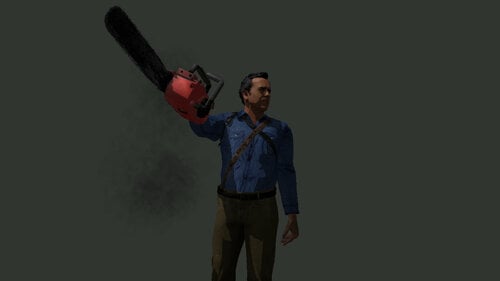
Ash Williams (VsEvilDead) for Star Wars: Jedi Academy
By inb4poof
This is a port of a custom model of Ash Williams by Evil-Ash, ported from a Source Film Maker port. It has customization, sounds, NPCs, bot support, and team skins.
This mod also includes his signature chainsaw and the boomstick, which replaces the flechette. The boomstick also makes reloading sounds sometimes after you fire a shot.
The sounds were taken and edited from several films (and a show) featuring Bruce Campbell: The Evil Dead, Evil Dead 2, Army of Darkness, Spider-Man 2002, My Name Is Bruce, Bubba Ho-Tep, and Ash Vs. Evil Dead
The chainsaw sounds are from Evil Dead 2 and Ash vs. Evil Dead, but still use some Resident Evil 7 chainsaw sounds.
To use him in-game, while cheats are enabled, type "npc spawn (name)", replacing (name) with any of the npc names listed below. You can also play as the npc by entering "playermodel (name)"
Here are the names of the NPCs:
ashwilliams - spawns Ash Williams wielding chainsaw
ashwilliams2 - spawns Ash Williams wielding boomstick
ashwilliamsred - spawns red team Ash Williams with chainsaw, on the enemy's side
ashwilliamsblue - spawns blue team Ash Williams with chainsaw that targets everyone
ashwilliams_r - spawns a harmless Ash Williams with 50,000 health
To use his chainsaw, type "saber chainsaw_ash"
Details about the pk3 files:
zzzAshWilliamsVsED.pk3 - Contains the model, sounds, botfiles, and Ash's chainsaw.
zzzAshWilliamsVsED-npcs.pk3 - Optional. Contains the custom NPCs that you spawn with cheats.
zzzAshWilliamsVsEDboomstick.pk3 - Optional. Contains the Boomstick and its sounds, icons, and custom effects. It replaces the Flechette. Works fine in singleplayer but sounds weird in multiplayer.
zzzAshWilliamsVsEDboomstickNORELOADSOUNDS.pk3 - Optional. Same as above, except this one doesn't have the fancy reload sounds when you sometimes fire a shot. Certain weapon sounds work differently in multiplayer, so I made this one specifically for those who play both multiplayer and singleplayer.
zzzAshWilliamsVsED-ReplaceKyle.pk3 - Optional. Replaces Kyle with Ash Williams.
zzzAshWilliamsVsED-ReplaceChewie.pk3 - Optional. Replaces Chewie with Ash Williams.
-CREDITS-
Evil-Ash for creating the models.
The-Doomguy for the SFM port of the models.
Shotgun sounds edited from Evil Dead 2.
Chainsaw sounds edited from Evil Dead 2 and Ash vs. Evil Dead.
Bullet impact sounds from LEGO Indiana Jones 2: The Adventure Continues.
Voice lines from The Evil Dead, Evil Dead 2, Army of Darkness, Spider-Man 2002, My Name Is Bruce, Bubba Ho-Tep, and Ash Vs. Evil Dead
Other chainsaw sounds from Resident Evil 7.
-HOW TO INSTALL-
Extract the zip file, then put the pk3 files you need into your base folder: "Star Wars Jedi Knight - Jedi Academy/Gamedata/base"
Make sure you also run this in OpenJK to prevent crashes. OpenJK is an overhaul that raises the limitations of Jedi Academy's engine, and makes it possible to support higher-poly models. https://github.com/JACoders/OpenJK
Ash Williams and Evil Dead © Sam Raimi, Renaissance Pictures
-LICENSE-
Others are free to share, modify, and/or put this in their mods, and should give credit while they're at it.
======================================================================
THIS MODIFICATION IS NOT MADE, DISTRIBUTED, OR SUPPORTED BY ACTIVISION, RAVEN, OR LUCASARTS ENTERTAINMENT COMPANY LLC. ELEMENTS TM & © LUCASARTS ENTERTAINMENT COMPANY LLC AND/OR ITS LICENSORS.
ashwilliams-4.mp441 downloads
- sfw
- ash williams
- (and 8 more)
0 comments
Updated
-
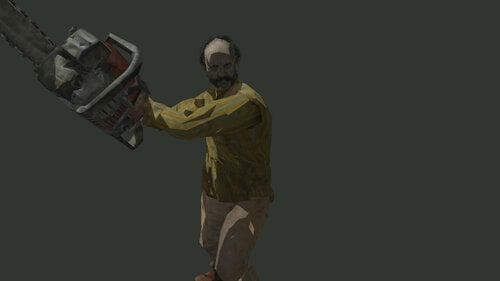
Jack Baker and Chainsaw for Star Wars: Jedi Academy
By inb4poof
This is a port of Jack Baker from Resident Evil 7, ported from a Source Filmmaker port, complete with sounds, NPCs, bot support, and team skins.
This also comes with a Chainsaw from the same game, ported from a mod for Left 4 Dead 2. It has its own custom effect in which it sheds blood when it hits characters. Oh, and this was the 2nd ever SFM model I ported, after Renamon 2019.
Also included are pk3s that replace some NPCs with Jack Baker. So in escort missions with Kyle or Chewie, if they are replaced with him, they will chase you throughout the level with their chainsaw.
The sounds were taken and edited from gameplay footage of Resident Evil 7.
To use the NPCs, while cheats are enabled, type "npc spawn (name)", replacing (name) with any of the npc names listed below. You can also play as the npc by entering "playermodel (name)"
Here are the names of the NPCs:
jackbaker - spawns default Jack Baker that targets everyone
jackbaker2 - spawns red team Jack Baker, on the enemy's side
jackbaker_r - spawns a harmless blue team Jack Baker with 50,000 health
To use the Chainsaw, type "saber chainsaw_re7"
Details about the pk3 files:
zzzJackBakerRE7.pk3 - Contains the model, sounds, and botfiles.
zzzJackBakerRE7-npcs.pk3 - Optional. Contains the custom NPCs that you can spawn with cheats.
zzzChainsawRE7.pk3 - Optional. Contains the Chainsaw and its sounds and custom effects. Jack Baker uses a normal lightsaber if this isn't included in the Base folder.
zzzJackBakerRE7-ReplaceChewie.pk3 - Optional. Replaces Chewie with a hostile Jack Baker.
zzzJackBakerRE7-ReplaceKyle.pk3 - Optional. Replaces Kyle with a hostile Jack Baker.
zzzJackBakerRE7-ReplaceRancor.pk3 - Optional. Replaces the Rancor with Jack Baker.
zzzJackBakerRE7-ReplaceWampa.pk3 - Optional. Replaces the Wampa with Jack Baker.
-CREDITS-
Capcom for creating the models and sounds.
Auditor for the SFM port of Jack Baker.
Xenecrite for the L4D2 port of Chainsaw.
Dark_Maul for the blood effect I used as reference.
-HOW TO INSTALL-
Extract the zip file, then put the pk3 files you need into your base folder: "Star Wars Jedi Knight - Jedi Academy/Gamedata/base"
Make sure you also run this in OpenJK to prevent crashes. OpenJK is an overhaul that raises the limitations of Jedi Academy's engine, and makes it possible to support higher-poly models. https://github.com/JACoders/OpenJK
Jack Baker and Resident Evil/Biohazard © Capcom
-LICENSE-
Others are free to share, modify, and/or put this in their mods, and should give credit while they're at it.
======================================================================
THIS MODIFICATION IS NOT MADE, DISTRIBUTED, OR SUPPORTED BY ACTIVISION, RAVEN, OR LUCASARTS ENTERTAINMENT COMPANY LLC. ELEMENTS TM & © LUCASARTS ENTERTAINMENT COMPANY LLC AND/OR ITS LICENSORS.
29 downloads
0 comments
Updated
-
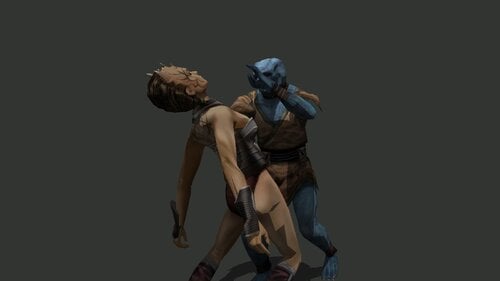
Invisible Force Effects for Star Wars: Jedi Academy
By inb4poof
A file from my Minor FX Rework mod with some additions. This makes most force power effects invisible. This also includes a pk3 that mutes the Force Protect, Force Absorb, Force Drain, Force Rage, Force Heal, and Mind Trick sounds.
Finally figured out how to hide the Force Rage effect. All I needed to do was make 2 textures blank. Doing this also affected Force Lightning, so I made an alternate pk3 that lets Force Lightning use substitute textures to still be seen. The static on a lightning victim's body still stays hidden though, since it uses the same textures as Force Rage and seems to be hardcoded and lacking any efx file to edit, but I hope that's not a big deal.
What this mod basically does:
Hides force protect and absorb shields Hides force rage shield Hides force drain's red lightning projectile Hides force grip's red bubble around victim's neck Hides force marks on characters that get force pushed/pulled Hides force heal's purple cloud Removes mind trick's blue sparks and blue cloud Removes saber fizz and boil effects in water
Details about the pk3 files:
zzzzzzzzForceEffectsInvisible.pk3 - Hides the Force Absorption, Force Protection, Force Rage, Force Drain, Force Push marks, Force Grip, Mind Trick, Force Heal, and Force Lightning effects.
zzzzzzzzForceEffectsInvisibleExceptLightning.pk3 - Same as above, except it makes Force Lightning still visible.
zzzzzzzzForceEffectsInvisible2NoFizz.pk3 - Completely removes and mutes the fizz and boil effect that sabers make while under the rain and underwater.
zzzzzzzzForceMuteSounds.pk3 - Optional. Mutes the looping sounds and activation sounds of Force Protect, Absorb, Drain, Rage, Heal, Mind Trick, and Force Lightning.
zzzzzzzzForceMuteSoundsExceptLightning.pk3 - Same as above, except Force Lightning isn't muted.
-CREDITS-
Raven Software for the files used for the effect edits.
-HOW TO INSTALL-
Extract the zip file, then put the pk3 file(s) you need into your base folder: "Star Wars Jedi Knight - Jedi Academy/Gamedata/base"
-LICENSE-
Others are free to share, modify, and/or put this in their mods, and should give credit while they're at it.
======================================================================
THIS MODIFICATION IS NOT MADE, DISTRIBUTED, OR SUPPORTED BY ACTIVISION, RAVEN, OR LUCASARTS ENTERTAINMENT COMPANY LLC. ELEMENTS TM & © LUCASARTS ENTERTAINMENT COMPANY LLC AND/OR ITS LICENSORS.
invisiFX-3-3.mp4
325 downloads
0 comments
Updated
-
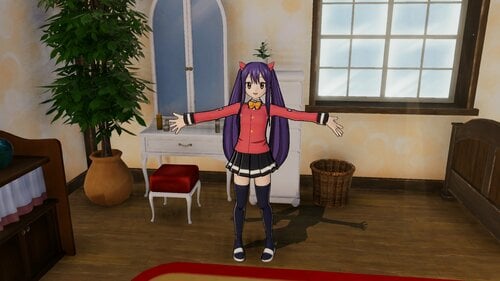
Fairy Tail Wendy Tartaros Costume
By Ikaros473
Hello!
This costume will replace Wendy's 'alternate color' costume. The 3Dmigoto base mod is required for this to work. A tutorial on how to install the base mod can be found here.
For more mods do check out the rest of the thread linked above.
INSTALLATION
Once the base mod is installed, simply place the contents of the zip in the mods folder within the "SteamLibrary\steamapps\common\FAIRY TAIL\Mods" Directory. Once in game make sure mods are on by pressing f2.
26 downloads
0 comments
Updated
-
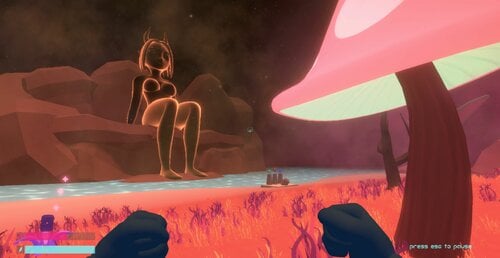
TAG (Demo)
Hey Guys!
TAG is a silly little game(demo) I made to teach myself a some game design. TAG is a first person adventure about you the player crashing your space ship on an alien planet inhabited by a sexy alien race determined to get their mitts on their rarest commodity. MEN! Can you find a way to repair your ship, or are you destined to spend your final days at their mercy?
Installation,
-Extract Zip file and run .exe
A couple of things to know,
-this game does not contain and actual sex(yet?), but does contain nudity.
-I'll update this project as I find better ways to do things and create more content.
-I've never made a game like this before and I'm just doing the best I can. I'll get better, I promise
Now lets see where this whole thing goes,
Hope you like it!
232 downloads
0 comments
Updated
-
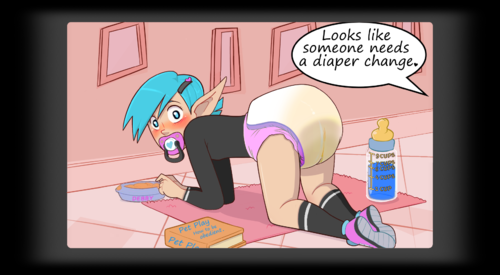
Diaper Debby Wallpaper
By dibz666
This is a simple interactive-ish Wallpaper I made for Wallpaper Engine of Debby in a diaper.
I'm just sharing for anyone who likes it. ^^
There are 2 versions of this wallpaper, one has Debby wearing a black spandex shirt & the other has Her shirtless.
Both versions of this wallpaper are "kinda" interactive,
there's a blue floral pattern that follows the mouse around the screen & there's steam coming off the food bowl that avoids the mouse.
-------------------------------------------------------------------------------------------------------------------------------------------------------------
This artwork is not an original art work of my own, the original image used to make this one was created by PieceofSoap.
https://www.deviantart.com/pieceofsoap/art/Frankie-750162287 - If you like/enjoy PieceofSoap's artwork(s) you should go check them out & maybe support them.
---------------------------------------------------------------------------------------------------------------------------------------------------------------------------------------------------
To install these wallpapers just toss the projects folder into your wallpaper_engine folder then run wallpaper engine & enjoy ur new desktop.
107 downloads
0 comments
Submitted
-
Resident Evil 2 Remake Claire Redfield for Skyrim SSE & LE
By jackcee
This is my Follower mod to have Claire Redfield become your companion in Skyrim. Personally, I think LE is better than SSE, but that is me. If you ever wanted to meet Claire in Tamriel, now's your chance.
She is located at Whiterun, but there's no need to look for her. If you load a save near Dragon's Reach or coc nearby, she will find you. Also, she will only stop following you if you ask her to follow you, then tell her to wait.
Claire is standalone, meaning you don't need to do anything but drag the meshes, textures, BSA, and ESP files into your Data folder, and activate on your mods menu. She has her own skeleton and unique body meshes as well. You may find she has grown a bit since you last saw her in Raccoon City. But she is still gorgeous.
And yes, her mouth, eyes, brows, and teeth all work--thanks to a shitload of time creating animation TRIs for her custom head meshes. She also has a tidy collection of outfits (4 HER ONLY) to wear.
In the spirit of sharing... Enjoy!
Credits: ToraNeko for their Sexy Sheriff RE2 clothing mod, and Akuma76 for their Wild Baby RE2 clothing mod.
1814 downloads
0 comments
Updated
-
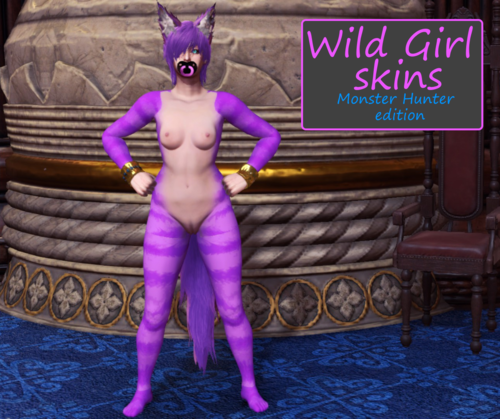
Wild Girl Skins (Monster Hunter edition)
By dibz666
I've brought back one of my favorite ideas for monster hunter, Wild Girl Skins!!!
Now you can play as a furry girl in Monster Hunter World, for all you fellow Furry fans out there. ^^
------------------------------------------------------------------------------------------------------------------
This mod replaces the textures for the high poly nude body with furry ones to go with the kitsune/neko mods by zStatykz.
Choose a color/folder & Just toss the "nativePC" folder into ur MHW folder.
This mod is just body textures, You will need to install the high poly nude body 1st & the neko/kitsune mod(s) are recomended but not needed.
REQUIRED
High poly nude mod - https://www.nexusmods.com/monsterhunterworld/mods/1965
RECOMENDED
Wild Kitsune/wolf ears & tail - https://www.nexusmods.com/monsterhunterworld/mods/1940
Wild Neko/cat ears & tail - https://www.nexusmods.com/monsterhunterworld/mods/1965
-----------------------------------------------------------------------------------------------------------------------------
Credit goes to AsteriskAmpersand for the MHW Mod3 Importer-Exporter & CrAs T MRL3 Editor.
&
Credit to friccirf for the original body textures used in the creation of these furry ones.
Enjoy ^^
101 downloads
0 comments
Submitted
-
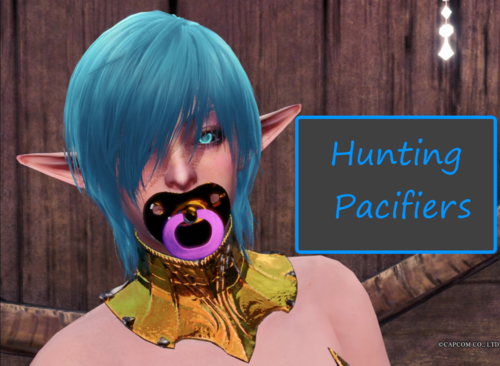
Hunting Pacifiers
By dibz666
This mod is for all my fellow ABDL fans out there. ^^
These pacifiers are for Monster hunter world.
As any of my long time fan(s) may know I'm part of the ABDL modding community & I REALLY like pacifiers...
I also really like sharing with people & so I just wanted to share what I was able to create,
I know there's a small amount of people like me out there playing MHW who wished this kind of mod was a thing so here I am. ^^
--------------------------------------------------------------------------------------------------------------------------------------------------------------------------------------------------
Hunting Pacifiers ^^
Pacifiers for stressed out hunters with tooth grinding problems, to keep them calm & their teeth safe & strong. ?
---------------------------------------------------------------------------------------
This mod will replace the Thermea helmet with an adult pacifier.
Update.1 - I've added an alternate golden version of the pacifier,
the shield is gold & the pull ring is the colorable part instead of the shield.
There's 10 pull ring colors to choose from, White, Black, Blue, Purple, Pink, Red, Orange, Yellow, Green, & a Golden version.
The pacifier shield is colorable in the armor color menu(s) unless u use the golden pacifier, then the pull ring is colorable.
Choose a color/folder & Just toss the "nativePC" folder into ur MHW folder.
Credit goes to AsteriskAmpersand for the MHW Mod3 Importer-Exporter & CrAs T MRL3 Editor.
&
Credit to the creators of Blender.
Huge thanks & credit to the MHW decryption team.
Enjoy ^^
78 downloads
0 comments
Updated
-
Test file for Wabbajack Integration
By halgari
Ignore this file, this is to test integration with Wabbajack, the automated modlist installer.
5896 downloads
0 comments
Submitted
-
Horny Girl Simulator
By heather306
A short little game i made with java.
Click on the buttons to start the animation. when it reaches orgasm,you'll gain a point.use them to unlock new ones. unlock all 10 of them to win.
ANIMATIONS NOT BY ME
1883 downloads
0 comments
Updated
-
NPC Relationship Manager
By CaseyOmah
NPC Relationship Manager by CaseyOmah
Written for LifePlay by Vinfamy
v1.0 Features:
Adding and removing relationships between your contacts (NPCs showing in your contact list)
3466 downloads
0 comments
Updated
-
Code Vain.
By 27X
Max Quality Config settings for Code Vein
These are very very likely to be incompatible with a large chunk of reshade presets as they basically do the same thing or try to turn the game into a 2D ~animuuguuu~ style or just add pink and/or yellow to everything, including transparent objects and shadows. That stated, I haven't tried to combine any and maybe it looks amazeballs. Whatever.
Max Quality Tonemapping: tone map curve is now based on the ACES/Dolby12 HDR standard. While it will be harder to notice if you don't have a 10bit monitor, even on 6 and 8 bit the removal of flattened contrast and washed the fuck out luminance values will be pretty obvious. Note that this is not actual HDR screenspace usage, as Shift disabled that because why not.
1/2 Max Res Shadows at max Quality: Object, Pawn and Global shadows changed to 4096x2, except for cutscenes which are still dot matrix bad in several scenes. Note that local/instanced light sources are disabled on pawns except for very very few objects, probably to get this to run at all on consoles, so what shadows you get are pretty, but there ain't very many and SSAO, even reshade MXAO is going to look off.
Bloom Diffusion: Bloomed materials now receive correct scattering and haze instead of simply being full bright.
Max LOD: All objects and Pawns will use the highest tessellation regardless of distance. This includes any static objects with LODs.
Indirect Shading/Lighting: Enabled for all five objects in game that actually have the right material properties to use it. Does make Falling Flame and Burning Sand prettier.
Motion Blur Removal: Get that shit out of here.
Depth of Field Removal: See above.
Volumetric Fog: Fog now actually occupies space instead just occluding the screen
Dithered AO: Max HBAO/SSAO (no hbao+ however, que lastima) settings where usable. Very likely to conflict with MXAO if using a reshade.
Max Diffusion SSS: Subsurface Scattering enabled and increased to Senpai Noticing Levels
Max Quality SSR: All five objects that have reflective properties now do so. Don't expect miracles because Shift apparently doesn't understand what the Material Property Panel does in UE4 other than make things glowy sometimes.
Max Quality Object Diffuse/Normals: All object and pawn textures forced to max resolution.
Max Detail Texturing: While the detail texturing is significantly improved, it an only be as good as the source texture it's derived from and you can't squeeze blood from a stone. Some places look much better like Depths and Caverns, some place look about the same as they did before like Cathedral.
Max Bandwidth Streaming: Contrary to popular belief, preloading in Code Vein simply isn't fully enabled, and you'll have streaming regardless of whether you enable it or not. The config set is for the highest bandwidth commercial cards available now, those settings will automatically default to your available ram and sustained bandwidth. This has not been tested on any IC of any flavor, so laptop users may wish to set things differently.
AA is disabled by default as most forms of AA and SSS/IBL don't get along and fxaa looks like gangrenous donkey balls. The relevant setting exist in the ini, research will be your burden.
______________
By default this ini file is set to READ ONLY for obvious reasons. If you need to change anything you'll need to change the file properties. If you forget to set it to read only again, Code Vein will conveniently erase it at the earliest opportunity via a hard coded back up. You've been warned.
Test Beds:
Ryzen 2990+Titan RTX
Ryzen 3700+ 2080
I7 940+ 1080
I5 8500+ 980
No current gen AMD GPUs were available to test, so FPS may vary, but rather unlikely since Shift's spec is decidedly dated comparative to other current UE4 titles.
______________
Installation:
place the ini in
*YOURINSTALLDRIVEHERE*:\Users\*YOURACCOUNTNAMEHERE*\AppData\Local\CodeVein\Saved\Config\WindowsNoEditor
When asked to overwrite say yes. If you cannot overwrite you don't have admin and thus are obviously way too young to be downloading this file in the first place.
108 downloads
- ue4
- max quality
- (and 1 more)
0 comments
Updated
-
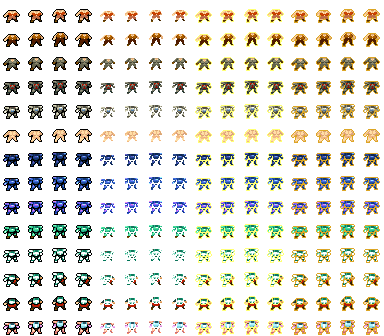
Crypt Of The Necrodancer Mod
By Joe_Biden
You might want to desync your steam files, if it isn't viable with your version send it to me and I'll fix it!
I'll make a more nude version later, just comment and it'll reach me soon enough.
68 downloads
0 comments
Submitted
-
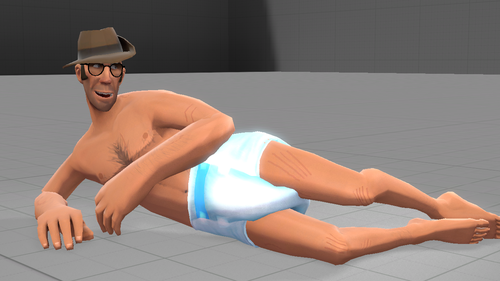
source filmmaker Adult Diapers
By MeowButt
Edit: I received a couple of reports that this mod will not work due to how I compiled it. I'll do my best to get this fixed myself, but if you fix it before I do, I will be happy to upload your fix here with all credit given. My apologies.
If you want to support this project, please consider tipping me here. Thanks!
Hello, everyone! Here is the first preview version of my latest diaper model for Source Filmmaker!
Features:
The texture's .psd file to allow everyone to make their own diaper textures A rig for animating and flexibility.
Features coming soon:
Slider controls for wetting, messing, squishes, checking, and boners. A normal map. Multiple skins for wet, messy, and both. A pink diaper Either slider controls or separate models to fit other TF2 mercenaries and other models. Additional rigging for more realistic movement.
Noted Issues:
Long directory paths for models and textures. Some clipping around the legs. May fix with additional rigging. It may not fit most models
HELP WANTED!
If you are good at working with the source engine, please DM me on Twitter. @DiaperSniperTF2
How to install the mod:
Simply unzip the file into the following directory:
Steam\steamapps\common\SourceFilmmaker\game\usermod
How to use the mod:
Assuming you are using the TF2 Nude Sniper model, be sure to tuck his penis inside his body to hide it.
Once you import the diaper model, extend the leg and body rig menus on both the diaper and your model. Click your model's bone name (ex. bip_pelvis) and drag it to the corresponding bone in the diaper model. Make sure that all bones are properly parented, including root_transform, before dragging the zero bar all the way to the right in the graph editor. If done right, the model will move and rotate to the appropriate coordination.
Usage:
You may create images and videos using my model as well as monetize them as long as you give credit to me (either MeowButt here or DiaperSniperTF2 on Twitter).
If my work is used to attack other people, groups, or myself in any shape or form; I will take action. This includes, but is not limited to racism, transphobia, ablism, kink shaming, political hatred, and homophobia.
You can modify my work, but don't reupload it without my permission. I would rather reupload it myself here as an update while giving you credit and linking back to your KoFi, Patreon, ect.
You may upload your textures made for my model here without the need for my permission. Be sure to link me your work so I can post it here.240 downloads
0 comments
Updated
-
Elin Dickplomacy Reloaded Addon
By _Hanabi_
Adds Elin to Dickplomacy Reloaded
This is *NOT* a standalone module. Dickplomacy Reloaded must be installed first.
If you're like me and can tolerate anime girls in places they don't belong then this the mod for you! As per mod's request this is a censored version. There is no body model and they will be invisible from the neck down when they have no armor (Every body armour in the game replaces the body anyways).
Features:
Selecting female when creating your kingdom's custom troops will replace them with Elin (Requires new game) Replaces some followers with Elin Replaces some lords with Elin Peasant woman tree replaced with Elin with an extra tier that uses firearms
Installation:
Install Dickplomacy Reloaded Copy the contents of the zip to the Diplomacy Reloaded module folder and override
Screenshots:
Credits:
LilyModzStuff for Dickplomacy Reloaded Elin head/ears/hair: https://www.deviantart.com/junk-hoes/art/TERA-Online-Elin-Set-1-DL-59276077591 downloads
0 comments
Updated
-
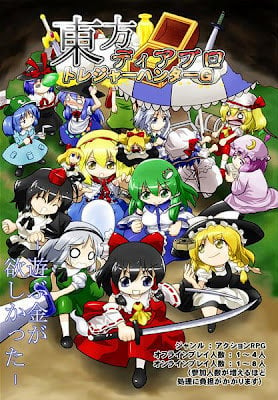
Touhou Diablo - Treasure Hunter G Save 100% with mane game and Oni patch
By RubyRose11
save0.txt my 100% game of Touhou Diablo - Treasure Hunter G
Touhou Diablo - Treasure Hunter G 100% Save game I will tall you here you put at C:\Users\YouName\Downloads\TD - THG Next go to C:\Users\youname\Downloads\TD - THG\Touhou Diablo - Treasure Hunter G next go to .ttg put my save in and you good to go for the have suika in you game download save2.txt and put it in .ttg
133 downloads
0 comments
Updated
-
Bayonetta 100% Complete Game Save
By Kureka
This is 100% complete save game files for Bayonetta (Steam/Codex version).
Just copy and paste (overwrite) the content of zip file to C:\Users\[username]\Documents\Bayonetta or "C:\Users\Public\Documents\Steam\CODEX\460790\remote".
1171 downloads
0 comments
Updated
-
The Sims 2 MoonwalkerSims Naked Clothes♥
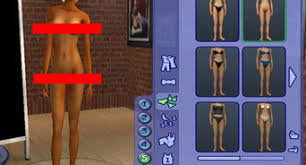
Naked Clothes For The Sims 2 Created By MoonwalkerSims,Made In Body Shop, Available For Now Everyday Wear & Many More! For Female Only Sorry.(DON'T CLAM OR RE-UPLOAD TO ANY SITES).Thank You,Enjoy☺ (Picture From Goggle)
163 downloads
- thesims2
- nakedclothes
- (and 1 more)
0 comments
Submitted
-
The Sims 2 Body Shop Download
Here's The Sims 2 Body Shop Download☺ Also Here's The Sims 2 Bella Goth By MoonwalkerSims Please Follow Me For More Stuff Like This♥
56 downloads
0 comments
Submitted
-
The Sims 2 Bella Goth By MoonwalkerSims
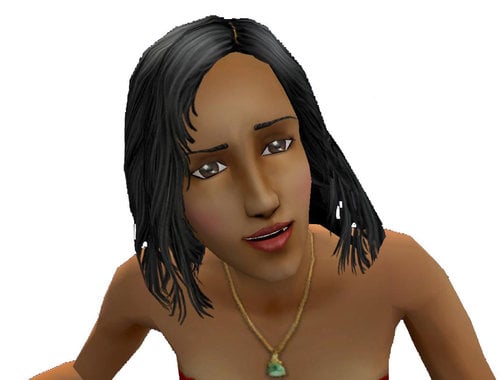
The Sims 2 Bella Goth By MoonwalkerSims. Please DON'T Clam Or Re-Upload Or DON'T CHANGE, Thank You, Sim Created In Body Shop
46 downloads
0 comments
Submitted
-

Cyberdimension Neptunia: 4 Goddesses Online 100% Complete Game Save
By Kureka
This is 100% complete save game files for Cyberdimension Neptunia: 4 Goddesses Online (Steam/Codex version).
Just copy and paste (overwrite) the content of zip file to "C:\Users\[username]\AppData\Local\CyberdimensionNeptunia4GoddessesOnline".
273 downloads
0 comments
Updated
-
portal
By clickin
new on this and thinking a portal not sure how it all looks as a first time mod
52 downloads
0 comments
Submitted
-
wip Defiler Wings 1.4.1 English translation (not machine)
By monsta88
This project is now officially abandoned. Feel free to pick it up and continue.
I haven't updated it for a long time and I don't see myself picking it up again. I hope it helped for some people. Special thanks to Akmed, who helped with a lot of translations.
Attention Russian speakers!
Looking for help from you guys! There is a section in the What's new section where I put the lines which I couldn't figure out from the machine translation. If you are willing to help, please check it and give me a rough translation. It is okay if it has bad grammar or not really English - it will be still a hundred times better than the machine translated texts. I'll fix it if necessary and of course you will be listed in the credits for your contribution.
What is this?
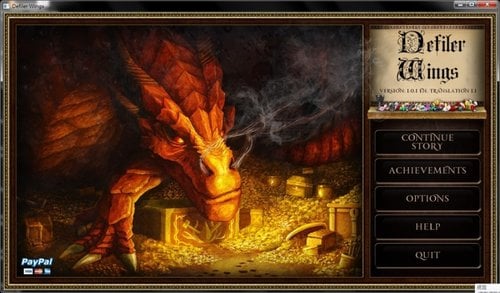
This is an English translation for Defiler Wings 1.4.1. You need the original game to be able to use this.
Defiler Wings is a dragon simulator game. You take the role of a dragon and bring destruction to all kingdoms. You also kidnap virgins and work on your dynasty...
It was developed by Old Huntsman and Co, a russian(?) dude and Co. When I tried it, it was obvious at once that the English version is mostly a machine translated one. Except from a few small parts (which was made by people) it is simply horrible.
So I started to make my own version, simply by writing directly in the python files. I thought I might as well share it with you.
It is not an easy job, because:
- I don't speak Russian, so I don't know what was the original text and what style the text had.
- I don't speak Google translate (nobody does...)
- I don't speak python
- English is not my 1st language.
- I am a Grandmatser of typoing.
An example: "Yes, if all women Floor was such a Dark Lady and her offspring would have very salty!"
Basically I have to figure out what the original text was by reading lines like this. Since I look at the python code, I don't have much context, just some variable names and comments. Sometimes there are still Russian words in it, which I may or may not find in online translators. Most of the time I think I know what was the text about, but in cases like the above, I just don't have the foggiest idea. So I come up with something which fits the text around it or just leave it out.
How to install
(Optional) Do a safety copy of the "game" directory in your game folder (or just the files which are in the zip).
Unpack into the game directory, overwrite when asked.
Disclaimer
I'm aware that the texts I "fixed" are still full with errors, typoes, etc. At the moment I made only 1 pass on them, meaning I didn't recheck them. IMO it is better to get all texts in "somewhat good" state before I start spending more time on shining them. That being said if you report problems I will fix them.
Credits
- Old Huntsman - the creator of the game
- the people who made the current translations, English menu, etc.
- Akmed - helped with countless lines from day 1. Kudos!
- LightSpectr, Graiden and<Censored name> - their help was invaluable in making sense of some tricky lines
5164 downloads
- defiler winngs
- english
- (and 1 more)
0 comments
Updated
.thumb.jpg.d864902d2e06ac7c1b931acbe3396de3.jpg)