Misc
Anything not related to any other category.
184 files
-

FAPU
By dewguru
FAP-U
Current Version uploaded: 0.74 Uploaded on November 1, 2017
Q. What is that Mirror Link?
A. The Mirror Link points to a directory where I have placed the software for you to download. There are two versions. One is for PC's (Windows or Linux) and the other is for Mac's. Select the one that applies to you, unzip and play as desired.
Q. What is FAPU?
A. It's my having fun learning how to use Ren'Py and Python, while also building on an idea I had after playing a similar game called Ashford Academy. Ashford Academy has you playing the role of a High School Principal, while FAPU has you taking on the role of a University Dean, in the future where Earth isn't alone in the universe. Since universities (at least in America) enjoy using acronyms a lot, I opted to do the same. FAPU stands for Federation of Allied Planets University.
Q. But what kind of game is FAPU?
A. Well, it's a hybrid of sorts. A lot of RenPy games are linear style visual novels. While FAPU uses some of those elements, it's not linear, nor is it a visual novel. The university has specific stats that can be increased through events. Events are triggered by visiting different areas during the course of the day. It uses a day-planner like set-up, where you've three periods (Morning, Afternoon, Evening) where you can go to certain locations. Each location visited triggers an event. Some events are purely random - other events require you to achieve certain thresholds (such as a certain social rating, a certain building level, a certain affection level) - and there are some unique events that only run once (and many of these require certain thresholds be achieved). Plus, some events can change over the course of a game. For example, an event where you interact with someone may result in different dialog or choices as you progress and reach different thresholds. For the most part though, it is intended to be an open game, where you control the flow of what you experience. It does have some Game Over points, and just how many can be tracked in the event chart below.
Q. Why are the right choices in some areas are completely obvious?
A. When I hear this, I feel that is someone thinks a 'right' choice is obvious, then they're over simplifying the game. If you do a play through where you're a 'good' Dean, then you're missing content that would be there if you play a 'bad' Dean - and vice versa. Some NPC's prefer one approach over the other. So if you're very complimentary to someone who likes the bad or aggressive type, then you may either get a negative rating with them or get placed in the *shudder* friend zone. That said - I'm not trying to trick people either, so it would hopefully be relatively easy to figure out what kind of interaction someone may prefer. But for those that think you HAVE to be either good or bad in the game, that's not true at all. Good, bad, or a mixture all work - and each has some rewards and risks.
Q. What's with the mirror and a lack of actual LoversLab download links?
A. The game has grown to over 100MB in size, which means it exceeds the upload limit for Lover's Lab. Once I decide I'm done, I'll likely upload a version that is broken into parts, but for now since it is still largely a work in progress, I'm just going to be using the file link feature.
Q. It seems a little sparse in some areas.
A. Yes, I agree completely. From a features point of view, it's largely at the point where I plan on taking it. From a content point of view, it still needs work, and that's my primary focus going forward is adding more events.
Events by location (include random & story type events):
(Location: # of run once events, # of always random chance events, # of conditional random events)
Arcane College: 1 6 2 = 9
Beach: 0 6 3 = 9
Cafeteria: 1 7 3 = 11
Campus: 3 7 9 = 19
Catacombs: 1 3 2 = 6
Church: 1 3 7 = 11
Classroom: 6 5 18 = 29
Dance Club: 1 3 4 = 8
Dean Home: 6 2 2 = 10
Dean Office: 13 3 4 = 19
Dormitory: 0 6 5 = 10
Downtown: 2 6 8 = 16
Gym: 1 5 5 = 11
Infirmary: 0 3 2 = 5
Library: 0 5 6 = 11
Onsen: 0 2 5 = 7
Pool: 0 7 4 = 11
Science Lab: 2 3 5 = 9
Security: 3 2 4 = 9
Sports Field: 0 4 1 = 5
Student Lounge: 0 4 1 = 5
Good Endings: 0
Bad Endings: 5
Potential Dean Potential Sex Events (some are available only to certain genders): 11
Potential Dean Adventures: 0.1
9084 downloads
0 comments
Updated
-

Hyperdimension Neptunia Re;Birth3 V Generation 100% Complete Game Save
By Kureka
This is 100% complete save game files for Hyperdimension Neptunia Re;Birth3 V Generation (Steam/Codex version).
Just copy and paste (overwrite) the content of zip file to "C:\Users\<username>\AppData\Roaming\Steam\CODEX".
623 downloads
0 comments
Updated
-

Hyperdimension Neptunia Re;Birth2 100% Complete Game Save
By Kureka
This is 100% complete save game files for Hyperdimension Neptunia Re;Birth2 (Steam/Codex version).
Just copy and paste (overwrite) the content of zip file to "C:\Users\[username]\AppData\Roaming\Steam\CODEX".
610 downloads
0 comments
Updated
-

Hyperdimension Neptunia Re;Birth1 100% Complete Game Save
By Kureka
This is 100% complete save game files for Hyperdimension Neptunia Re;Birth1 (Steam version).
Just copy and paste (overwrite) the content of zip file to "C:\Users\[username]\Documents\My Games\Idea Factory International, Inc".
809 downloads
0 comments
Updated
-
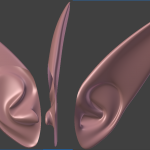
Elf Ear mesh
By shaw1
make it look the way you want it
and do what you want with mesh
30 min
93 downloads
0 comments
Updated
-
ASXSexinTamriel
By Symon
The first ASX release but it is a little unusual.
This is a modders resource, usable in Morrowind, Oblivion and Skyrim.
It's a simple 7zipped Word document, with commentary and possible suggested dialog for sex that doesn't feel like Modern, 21st century America or Japan.
Use as much or as little of it as you wish.
Naturally because of it's nature, there are no screenshots or requirements apart from the ability to open a 7z archive, a Word document and a desire to read.
384 downloads
0 comments
Submitted
-
Kendo 2's Cali Boobs Type3 Lover's Lab Edition
By Kendo 2
(The content has been consolidated into THIS mod.)
11252 downloads
0 comments
Updated
-
Blender 2.49b All in One
By Ark of Truth
This download contains all the files and programs need to get started with Blender. I am loading it up here as it is the one I use for modding and saves me trying to find it again on the internet after I end up losing it.
There is another download as well which includes all the latest version of each program, note these my be incompatible or slightly buggy.
Blender 2.49b Stable file contains:
(Works)
Blender 2.49b installer
Nifskope 1.1.3
PyFFI 2.2.2.win32
python 3.3.2
Blender 2.49b AIO file contains:
(My not work correctly)
Blender 2.49b installer
Nifskope 1.1.3
PyFFI 2.2.2.win32
python 3.3.2
718 downloads
Updated
-
Pose Converter
By gerra6
Pose Converter Beta 0.73
This is the big update I've been promising.
Pose Converter is a suite of Blender tools designed to simplify and automate many animation related tasks. The latest update simplifies and streamlines the process of converting animations from one game or armature to another. At things currently stand, if you can port an animation and its armature into Blender, you can port it to any other armature with a vaguely similar structure.
Features:
1. Automated compensation for differences in bone bind orientation: This radically simplifies the process of porting animations from one armature to another.
1.a. Automatically convert animations between different creature types, or between creatures and humans.
1.b. Automatically convert animations between different games...if you can import it into Blender, you can convert it.
2. 1-Click button to freely convert Skyrim, Fallout, and Oblivion meshes between Skyrim, Fallout, and Oblivion bind positions
3. Automatic BB generation has been improved. The X, Y, and Z orientation are no longer relative to the bind position of the bones. This means that it is much easier to get consistent results from the settings.
4. Modify the magnitude of any movement, rotation, or scale animations, by bone and frame.
5. Set bone priorities to all bones in an animation
6. Automatically add B4 (BBB) Breast animation to Skyrim, Fallout, and Oblivion Animations
7. Automatically add B4 (BB) Buttock animation to Skyrim and Oblivion Animations
8. Automatically add B4 (BBB) style motion to any bone on any armature
9. Rotate Oblivion animations (movement and/or direction) - Fixes the 90 degree import bug and simplifies the creation of left, right, forwards, backwards animation groups.
10. Automatically update Anim text keys for Oblivion animations
11. Automatically add facial expressions to Oblivion animations
12. Automatically repair breast scaling distortion when using Growlf's controllable skeleton.
12.a. Improved repair of breast scaling distortion. Requires Lovers Animation Workshop Skeleton Mark II
Using the Tool
Converting Animations between Armatures
(ie, from Oblivion to Fallout, from an NPC to a creature, etc)
Adding Bouncing Breasts, Buttocks, or any other bone
As you can see, the number of control settings for modifying BB Butts animations and BB Breasts animations has grown to absurd levels. But it does a damn fine job if you tweak the settings a bit.
Explanation of Options
Recommended tweaks:
To generate a L/R swinging motion, set the Z frequency multiplier to double that of the X.
In order to generate L/R symmetrical animations, the Left Y amplitude generally needs to be set to the negative of the value of the R Y amplitude.
Using the Copy Animations tool
I'm in the process of writing instructions now, so please feel free to post any questions, feedback, suggestions, etc.
1015 downloads
0 comments
Submitted
.thumb.jpg.d864902d2e06ac7c1b931acbe3396de3.jpg)