Select a subcategory to view available files.
Files From Subcategories
-
Playable Alucard - SE Port
By ayrasci
This adds Alucard as a playable race. SE only. Ported from Castlevania Lord Of Shadows 2 Alucard Race with some tweaks from the original. By request.
216 downloads
Updated
-
Min's BaboDialogue Keyword Patcher
By Min
Hey folks! I wrote this a while back for my own personal use, and decided to share it. This mod is a Mutagen patcher for Synthesis which automatically attempts to add appropriate keywords to all armors in your load-order. It does so via string comparison; if the name of an armor has a specific string within it, it is assigned a tag. For example, any armor containing the word "Transparent" is assigned the SLA_ArmorTransparent tag. You can see the list of what strings correspond to what tag in the code, here.
For those who are unaware, the tags on your armor affect how NPC's from certain mods (Such as BaboDialogue) react to your character. So, if you're wearing erotic armor, people are going to comment on it accordingly. The purpose of this mod is to automate the process of applying these tags to everything in your load-order. Of note, this patcher covers most Devious Devices use-cases as well, allowing NPC's to react to your devices via these frameworks.
Future Plans:
Move the string/tag pairings to user configuration, so that users can edit this without editing the code. Maybe.
Credits:
@nb097 for submitting a patch reducing the number of masters that the patcher adds to the generated plugin.
10949 downloads
- babodialogue
- synthesis
- (and 1 more)
Updated
-
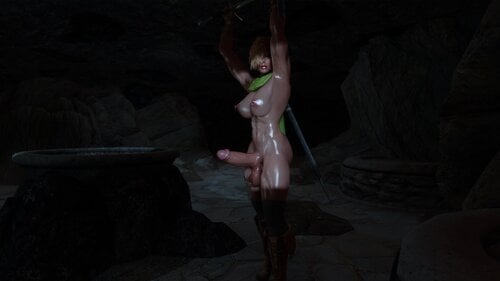
Sonja Lothbrok Muscled Warrior
By Bullfye
Sonja Lothbrok
Racemenu Preset for your Futa or Female Character
Created from Scratch and this time using different assets
Using My Wonder Woman bodyslide preset with some extra tweekings
Mod Files Required for the same look
For Female Version
Bodyslide and Outfit Studio
Racemenu
Valkyr HDT-SMP Hair
Wonder Woman Ultimate Muscle Body Preset
High Poly Head 1.4 SE
Fair Skin Complexion
CBBE 3BA (3BBB)
Lyru's Tattoo Pack Collection Wet Function Redux SE Extra file for Futanari Version TRX - Futanari Addon Don't Forget to download the Muscle Maps that are in the same TRX Futanari Addon download as optional TRX Futanari addon mesh modified by me to get this form In The Download section Uploaded the Futa addon mesh if you want this sized NYL Style futa penis and balls.. Training time.mp4
Downloads Preset and Bodyslide XML files for Her cock In Fact I was surprised to be able to Love The allowed Customizing of TRX Futanari addon
That made me get the Futa Model closer than ever to what I wanted , since I am a Fan of NYL Animation and models
this model is in fact almost identical..
Well done
TRX_Trixter
How to add this Mesh as an Addon to TRX - Futanari Thanks to
First Download the original TRX - Futanari Addon
TRX Futanari Addon
Then Download this Esp file
SOS - TRX - Futanari Addon.esp
This is the Esp that will overwrite the original TRX Futanari Addon Esp
Unpack the original TRX Futanari Addon in your desktop
open the extracted TRX folder and navigate to
Data\Meshes\[TRX] Futa addon
You will see this files inside the last folder called [TRX] Futa addon
Now in there do not touch anything
Just make a New folder Called Nyl
it will look like this after
and place inside the
schlong meshes and tri that come in my file
TRX - Futanari Sonja addon mesh.7z
This are the files from my meshe files
Now take the esp file changed you download in this explaining above
SOS - TRX - Futanari Addon.esp
and replace the original TRX Futanari esp
Now repack the all file with Rar or 7Z and install replacing the Original TRX -Futanari mod you have installed
This procedure will not change anything in the original mod or any bodyslide changes you might have made to your TRX schlong
it will only add in the SOS menu a new TRX Futanari Addon Called TRX Futanari Nyl with this new meshes and it will use the same TRX Textures
I will not add for download the all thing done cause of respect For Trixter and cause its easy to do following this steps Thanks have Fun !5785 downloads
Updated
-
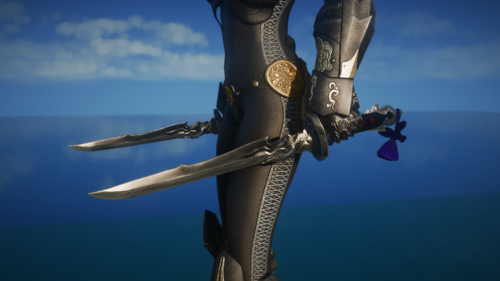
Yoshimitsu
Daggers from FF14 wielded by the shinobi, Yugiri Mistwalker.
Please note that due to the different ways in which Skyrim and FF14 implement and render textures, how the sword looks in Skyrim will not be exactly like the original.
The weapon can be crafted, enchanted, and upgraded.
Installation
-Use a Mod Manager.
Credits
-Final Fantasy 14, by Square Enix
1185 downloads
Submitted
-
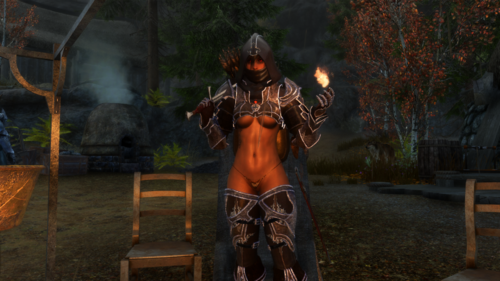
Sexy Demon Hunter 3BA
By sonic174
Half ass port and bodyslide of Sexy Demon Hunter set. I'm pretty sure it's got all the necessary pieces, if not tell me and I'll try not to break it even more.
I only did 3BA bodysliders for the body, belt, gloves, and flat boots. I'm lazy, sorry.
Also it's a regular ESP (again, lazy.). This has been corrected thanks to mastga
Original mod by Jojjo and zzjay, sexed up version by MCKing, LE CBBE by Kofman77.
this is literally so shittily made someone please take this and do it better
1355 downloads
Updated
-
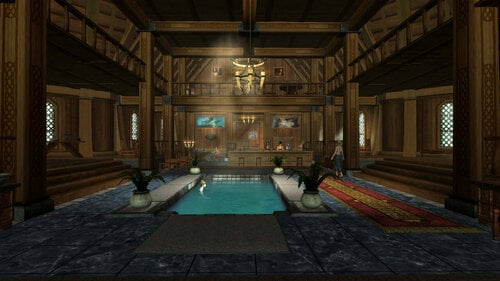
Bathing Beauties or Beefcake Luxury Suite
By migal130
If you are installing an update with M02, you must choose "Merge" and not "Replace." Choosing "Replace" will delete the 3.2B base mod.
BBLS 3.2B SE (you need this plus any update downloads -- all downloads available here)
Current update version: 3.3b
The 3.3b Update fixes a bug where a follower you had asked to wait in the same cell where you then teleport would cause the waiting follower to teleport with you and then start waiting in the new location (the Bride of Migal's room or other target destination if the waiting follower was in the BBLS basement). This version is also required for compatibility with the BBLS ColdSun Patch.
Optional additional download: BBLS ColdSun patch 1.0
Requirements: ColdSun's Vayne and ColdSun's Coralyn. Vayne is on Nexus and Coralyn will be posted on Nexus within the next 24 hours. It also requires the BBLS 3.3b Update available here on LoversLab.
The BBLS ColdSun Patch provides proper voicing for ColdSun's Vayne and Coralyn when they are using BBLS dialogues, such as inviting them to live in the residence or anywhere else in the Suite. It will also cause BBLS bed-warming to honor Coralyn's cheating mechanic when using OPrivacy with Coralyn.
Support and the BBLS FAQ are in my discord.
I'm not going to describe everything about this mod. We'd end up with a wall of text. Suffice to say, this is a large player home/inn/business that allows you to invite NPCs to live there and have customers from all over Skyrim visit. This is the most recent version of the mod. It is a large download and as such I will do future updates as additional downloads that should overwrite.
Requires PapyrusUtils and SKSE. Will work with AE if those are updated.
Note: The BBLS Base download comes with four plugins:
BBLuxurySuite.esm -- This is the base master plugin. It will be high in your load order.
BBLuxurySuiteENM.esp -- This is the exterior navmesh. Place it low to overrule encroaching mods.
BBLS_SKSE64_Patch.esp -- Disable if not running SKSE. Place low in your order.
BBLSextBeds.esp -- ESL plugin that modifies vanilla beds in extensions locations. Disable if you are not using extensions. Place below all others.
Please do not upload or redistribute this file or its contents to another site without my permission.
90358 downloads
Updated
-
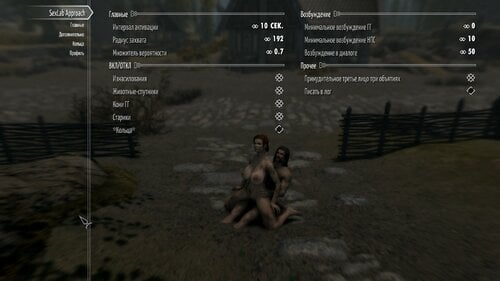
SexLab Approach JPPlus RU
By vjnmrf
В обсуждении Approach от Баки я увидел вот этот пост
со ссылкой на старую версию, переделанную неким японцем nbits-ssl, и решил сравнить
плюсы
1 работает стабильно
2 не требует ключевых слов
3 подходы НПС-НПС (то есть, вполне надежная замена SexLabRandomSex и тп)
4 животные спутники тоже домогаются ГГ
5 никаких глючных обнимашек
минусы
1 меньше диалогов и комментариев (ну так себе минус)
2 нет шлепков по жопе (вот это жаль)
3 нет визитов в дома (у меня и в бачьем моде их не было)
Ссылка на исходник https://github.com/nbits-ssl/SexLabApproachJPPlus/
Если установлен Papyrus Tweaks NG и в нем включен Run Scripts On Main Thread все подходы прекращаются Для NG 3,0 неактуально - теперь все работает
1439 downloads
Updated
-

Book Of UUNP Heels Sound and Baka Aroused Keywords
Pretty simple plugin for Book Of UUNP
I added Heels Sound to the footwear that appeared to have large enough heels to warrant it
And I added Baka Aroused Keywords to the armors (note: these were all based entirely on what I thought was best. Not all the items have an Aroused keyword, since it's what I'd consider a regular armor (or regular enough), and unless I completely missed something, I probably won't change it. If you don't agree with some keywords, its pretty easy to change yourself. Just open it in SSEEdit, find the armor you want, remove the Keyword I put (will either start with "sla_" or it's called "eroticarmor") and place the one of your choice)
I also made some smaller edits that were just mistakes in the regular one (for example, there were some steel boots that were misnamed as armor, so I renamed them to boots. Or the Thalmor items were called Thalmore items, so I removed the E)
Requires:
Book Of UUNP: https://www.nexusmods.com/skyrimspecialedition/mods/7505
Heels Sound: https://www.loverslab.com/files/file/1795-heels-sound/
And Sexlab Aroused (Baka Edit), You can find the link to it in the description here (make sure to pick the SE version): https://www.loverslab.com/files/file/20139-sexlab-approach-redux/
(and all of their requirements)
329 downloads
Updated
-
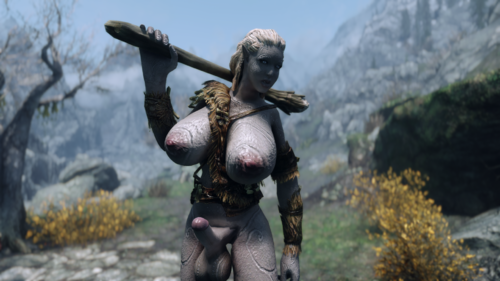
Futanari Giantess Replace for Giants
This mod it's a compilation and major workaround of various sources, all this made with the purpose of adding Giantess in Skyrim.
While various other mods add Giantess, this mod have features like:
Compatibility with animations mods thanks to the XP32 Skeleton.
Variation in the names: The female variation is simply named "Giantess" while the male variation is named "Futanari Giantess", with proper gender flag.
While this mod have his own textures for the body and penis; the eyes, hair and clothes textures use vanilla textures, so they will depend of the textures mods you have.
Compatibility with Physics and jiggle body, this mod have properly named CBPC files, making really difficult to conflict with other mods that use CBPC.
The two Giantess variations will spawn with the same probabilities, thanks to the Leveled NPC List.
Proper sound and voice replace, not totally new.
Some Giants have changed names to be more "immersive"
FUTURE FAQ
1.- Down Bad?
A: Not really, only inspired.
2.- Know bugs?
A: The Giantess Penis can sometimes bend to the right in Animations. The neck is a little buggy with the vanilla animations.
3.- No physics?
A: You need CBPC to add Physics.
4.- The Futanari variation don't have physics?
A: You need to enable the "Male Physics" in your CBPCMasterConfig.txt.
5.- Compatibility?
This mod will conflict with any mod that replaces meshes or textures to Giants.
The Leveled NPC will conflict too, so you will need to make a patch or fix the conflict in Xedit.
The physics can conflict if you have a mod that adds CBPC physics to Giants, you will need to choose what physics use.
6.- Creature Framework?
A: You need to disable the Giants in the MCM of Creature Framework.
TO DO
New and better models and textures, the penis can have a better "connection".
Compatibility with Schlong of Skyrim for better physics.
New vanilla animations to reduce the cripple neck.
The load screen with a giant has been disabled, need to make a new one compatible with this mod.
More rigid penis in Animations.
THANKS TO
SKSE Team for making possible to add jiggles.
CBPC for making possible to add jiggles.
Naked Giants for the models, textures and sounds.
XP32 for the Skeleton.
Female Creatures Reworked For the guide and models.
Some of this mods uses their own resources, thanks to them too
Todd Howard for making Skyrim and being indirectly responsible for this madness
Bakafactory for ABC
Only Tested for 1.5.97
Special notes for Loverslab:
This mod works with Sexlab, but i haven't tested how collision works with bodies.
You probably need to disable Giants in Creature framework, because this mod replaces the vanilla giant.
I have only tested Sexlab vanilla animations, one of them is pretty buggy because the Penis move to the right, IDK if is because of my mod or is the animation, future test will answer this.
If someone can help me to make a replacer for Trolls, that would be good.
If you notice some incompatibility with a Sexlab mod, Message me so i can make a patch or die trying.
5317 downloads
Updated
-
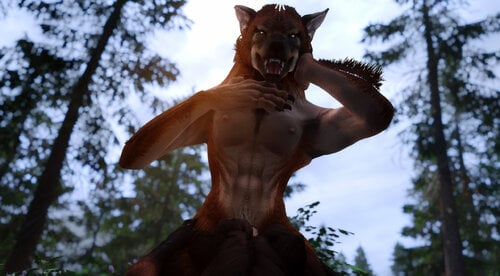
TWO - Total Werewolf Overhaul
By Frosferes
Total Werewolf Overhaul (formerly HDT Werewolves Overhaul) is a complete visual makeover for male and female werewolves. The goal of TWO is to eventually become the definitive mod for werewolf apparel, offering versatile and highly customizable features integrated from or inspired by the many talented authors out there who have shown their love for one of Skyrim’s more underappreciated denizens.
TealEri (AKA CinnaMewRoll), the creator of MFA and Expressive Werebeasts has been a fantastic help by providing additional textures for TWO. Please go and check out their tweaks for this mod!
Current Features
Male and Female Body Remakes:
Bodies for both male and female werewolves have been given substantial makeovers, using VectorPlexus’ Mighty Beasts as a base. Shapes are now smoother, with more triangles and large-scale remeshing.
Jiggle bones are back for the softer parts: the belly, butt, front and back thighs, calves and finally, breasts which feature 3 bones each. Multi-breast options have been remade using the original HDT werewolves as reference. 6 breasts with 3 bones each means a total of 18 breast bones! All physics interactions are driven by HDT SMP and almost every part of the body has had collision meshes added for extra interactivity. Physics in general are similar to CBBE 3BA.
Last, but not least: Female werewolves now have a fully 3D modelled vagina and accompanying internal anatomy. Both males and females also have fully modelled anuses and rectums. All of these are HDT enabled with the necessary weight painting and collision meshes.
A compatible Wicked Werewolves style skeleton is included in the optional installs if you prefer. Be aware this will change the proportions of the werewolves and will cause some animations to become misaligned.
Expressive Head Parts:
This mod gives werewolves genuine head parts that are capable of the same expression and phoneme functionality as the humanoid races. The high poly tongue is integrated from HCOS and works for both phonemes and mod animations that use the tongue bones, it also has HDT collisions. Expression morphs are based on Monster Facial Animations. Please give the original author, CinnaMewRoll, an endorsement for their fantastic work, as it is severely underrated!
Bodyslide Functionality:
Bodyslide allows for a great degree of freedom in the number and combination of possible options, you can mix and match various head and body shapes for highly customizable werewolves. I intend to expand the number of available sliders over time and this will be my primary way of implementing new shapes going forward. Multi-breast for females is controlled through ZAP checkboxes.
Shapes that are now implemented as sliders: Asjure’s head shape. MadMansGun’s head shape, WhiteWerewolfX's head shape, Expressive Werebeasts by CinnaMewRoll, The Howling by Brevi, Naturalistic Werewolves by artifex0, HDT Werewolves by jacques00.
If you are aware of any other werewolf shapes that might be easily implemented, let me know in the support thread and I may add them as sliders.
NOTE: Some slider combinations may cause clipping. If you notice anything egregious, please report it and I’ll work to smooth out the shapes.
Creature Framework / Horny Creatures of Skyrim:
The Creature Framework contains a bunch of great features for werewolves along with Sexlab animations. TWO patches these features to work with the new werewolf bodies and makes some additions such as penis SMP collision meshes.
The use of the CF system means that I am trading unsheathing animations for idle and Sexlab animations. I am intending to produce customized auxbone skeletons to integrate both features. If you do not wish to use the CF, the SOS based meshes from previous versions are included as an optional module in the main installer
Herm Player Werewolf and Equipment System
These features are grouped together in a separate module in the main installer called "Extras". This is due to complications with cross-compatibility. To enable this module, HCOS must be active in your load order.
A lesser power will be added to your character which lets you change your werewolf form into a herm or urta werewolf, as seen in HCOS. This uses an SKSE function to overwrite the player's 'worn armor' slot when they transform into a werewolf. This implementation of herm player werewolves has no compatibility issues with custom races and does not result in missing body parts, unlike previous versions.
A proof-of-concept werewolf equipment system is introduced. This edits the part of the werewolf script that unequips items so that it ignores armor with the keyword: "WerewolfEquippable". This allows armor with the keyword to remain equipped in werewolf form. Included are two sets of simple nipple loops to demonstrate the system. The loops are fitted for both males and females in both human and werewolf forms. For humans, they are fitted to the SAM male body and CBBE 3BA female body. For weres, they are fitted for the TWO bodies (obviously). The loops for the 3BA and TWO bodies have Bodyslide functionality.
Nipple loop items are not currently implemented into any loot pools. To obtain them, enter the console and type "player.additem two_goldennippleloops 1" and "player.additem two_silvernippleloops 1".
Alternate Skin Pack:
A large collection of compatible alternate body and eye textures are available to replace the default vanilla style body. This is provided as a separate download to reduce the file size of the main download and for better ease of texture swapping. All credit to KrittaKitty and Brevi for the original Moonlight Tales, from which these textures were taken. Note that the skin system from Moonlight Tales will still need to be disabled. This texture pack will work independently from TWO so you can use it without the main mod if you wish.
There are a few problems that were caught in testing but have not yet been fixed and can be seen in the ‘Known Issues’ section. SMP physics in particular are difficult to get right, reports of any strange physics behaviour would be useful. The fur layers that were in previous versions are missing currently, but I am working on re-implementing them. I wish to continue to bugfix and improve upon or add new features and Bodyslide shapes in a more iterative way, so bug reports and suggestions are appreciated!
Mod Requirements and Recommended Load Order
Hard Requirements – These mods are needed for baseline functionality:
Monster Facial Animations – Main vanilla main file or werebeasts only file. This mod is only needed for the plugin. Faster HDT SMP – More performance optimized SMP physics. Make sure you choose the correct file for your Skyrim and SKSE versions. Soft Requirements – Required for additional key features:
Bodyslide and Outfit Studio – Needed for building customized body and head parts for werewolves. Creature Framework – This is used to select and add the genitals to the werewolves. It is needed for HCOS but can also be used with TWO by itself if you prefer to not use that mod. Horny Creatures of Skyrim – For several features including making the werewolves (especially their genitals) more animated. Requirement for the extras component of TWO. Install in accordance with the guide found on the modpage. Recommended Mods – Not required, but will add useful or flavorful auxiliary features:
Werewolf Eyetracking Behavior for MFA – Allows the werewolves to look at and track objects and actors. Use the FNIS patch only and NOT the main file if you have the Fores New Idles creature pack in your mod list. Werewolf Revert Effect – Gives werewolves changing back to human form a visual effect and animation to make the process less sudden. CinnaMewRoll has added compatibility options for TWO. Sexlab – Fairly self-explanatory. Most werewolf sex animations are set up to use the animation bones found in the CF / HCOS addons. Werewolf sex animations require the FNIS creature pack. Sexlab Werewolves Redux – Utility for the player to initiate Sexlab animations whilst in werewolf form. Dynamic Animation Replacer – If you have HCOS installed, you can install DAR which will give the werewolves sexual idle animations outside of combat if their arousal is high enough. If DAR is not installed, these animations will not play. MFG Fix – Fixes and improvements for Skyrim's expression system. Random Emotions / Conditional Expressions Extended – Causes both the player and NPCs to be more emotive and react to different situations. Works well with the werewolf expressions. Authentic Sinding Follower – Overhauls Sinding to be a voiced follower that can speak in werewolf form. Use main file only. More Werewolf Growling (optional file for MFA) – Causes friendly werewolves to ‘speak’ to each other, allowing the phoneme shapes to be used more. NOTE: May become obnoxious or interfere with voiced werewolf followers like Sinding.
Installation Instructions
Once the above mods along with their respective requirements have been installed you can begin with the main TWO module. There is a Fomod installer that contains some optional components and automatically selects appropriate modules depending on whether certain other mods are loaded in your profile. Miscellaneous patches are included for mods such as Moonlight Tales SE and Growl: Werebeasts of Skyrim which will be added automatically if these mods are active. However, the skin system from Moonlight Tales will still need to be deactivated.
Once installed, TWO should be placed late in your load order and below all its requirements. Make sure the assets from TWO overwrite mods such as XPMSE and HCOS if they are installed. If TWO does not win every skeleton conflict, then you will have bugs like body parts floating in the air or falling through the floor. If a body or head conflict is lost then you’ll simply get the wrong head or body, possibly ending up with two heads stacked on top of each other. Please ensure your file conflicts are correctly resolved before continuing or asking for assistance.
If HDT SMP is missing, or the wrong version is installed, the head of the werewolves may stretch away from the body. I have no idea why this happens, but if this bug occurs for you, please first ensure you have the correct version of SMP installed for your Skyrim and SKSE versions before asking.
If you want to use the alternate skin pack, now is the time to install it. The 4.1 pack is provided as a Google Drive link in the downloads section, as the LL website is struggling to process it due to its size. You can choose alternate fur textures, eye textures or both from the included Fomod installer. Make sure the new textures are overwriting the main TWO module or they will not appear.
The Werewolves.esp plugin should load after plugins from any other mod that modifies the werewolf race record, including MFA or HCOS. If you are unsure, or having issues such as werewolves missing their heads, try placing the plugin very late in your load order. Other plugins from TWO following the naming convention of Werewolves(suffix).esp should load immediately after Werewolves.esp following the order of plugin masters. Bashed patch or other similar merged patches will need to be rebuilt if they are present.
If you want to customize how your werewolves look, now is the time to open up Bodyslide through your mod manager of choice. A guide on how I recommend you use Bodyslide to build the werewolf body parts is in the below spoiler section:
Pre-built body parts made using the default presets are included, so if you decide to not build werewolves yourself the mod will still work.
Once in game, the shape and colour of the werewolf genitals can be modified in the Creature Framework MCM. Werewolves are found on the 4th page of the creature list. Sometimes the genitals might take a while to appear or may not update when switching shapes. In this case you can force the target creature to update using the puppeteer tab of the CF MCM and wait about 15 seconds. Other times, the CF addon loading can result in overlapping werewolf bodies with double head parts. In this case, or if all else fails, try reregistering all mods from the CF MCM and updating and waiting like previously discussed. In some cases, a quit to desktop and reload may also be necessary.
If you have installed TWO with any of its SOS patches mid-save then you might have to restart SOS from its MCM in order to prevent it and the CF from fighting over which framework will provide genitals.
If you decide to not use the CF, you can use any of the werewolf compatible SOS addons on offer. Additionally, included in the Fomod is an optional SOS module which will replace the default SOS shapes with the animated canine shape by olebronkosrak. If you choose to use SOS over CF, make sure that CF is either not active or that werewolves are disabled in its MCM. Be aware that this feature is largely depreciated for the time being and won’t be supported much unless I decide to return to using SOS in the future.
Compatibility with Other Mods
CBPC – No longer used for bounce physics in this mod. If it is installed, make sure it is not conflicting with and overriding the physics from HDT SMP. Conflicts can arise if you are using body replacer mods such as CBBE 3BA or BHUNP that have components that rely on CBPC. I recommend installing those mods with SMP physics only options selected to minimize conflicts.
Schlongs of Skyrim – TWO has migrated to primarily using the Creature Framework for the genitals system as it is broadly more compatible with what I am trying to do with this mod. SOS can conflict with the CF and cause multiple penis meshes to appear. Altered plugins are included that will make the default SOS and SkyFurry SOS addons ignore werewolves so that this effect does not occur. If you’re having trouble with other SOS addons besides these ones, please see the section of the MNC install guide concerning SOS conflicts.
XPMSE and other mods containing werewolf skeletons – Make sure that TWO wins the skeleton conflict otherwise body parts might be static or fall through the floor.
Any mod that edits the werewolf race record will need to be patched to work with TWO. Patches for MTSE and Growl are already included. Patches for similar werewolf gameplay mods may be requested in the support thread.
A Note on Frequently Reported Head Part Issues
A number of people have reported problems with missing head parts or general instability / crashing when using TWO despite following the installation instructions correctly. I, and the people who I've asked to test this mod are not able to replicate such issues. To the best of my knowledge, the head part meshes included in this mod are not problematic. I might be wrong on this, but I'm going to need more evidence on exactly what is causing the crashing (such as crash logs) to make that call. I would guess that these crashes or glitches are a result of general instability in SKSE based mods such as HDT SMP when using the latest build of Skyrim. I personally continue to use Skyrim 1.5.97 AKA the last pre-anniversary edition build, since the stability of this version is better established.
My recommendations are to first ensure you are always checking for updates to SKSE and mods based on it if playing on the latest build of Skyrim. SMP in particular has a tendency to exhibit buggy interactions with head parts. It might also be a good idea to disable automatic Steam updates, or even backport your game to SE for a more stable experience. This can be done via this patcher on the Nexus.
Known Issues
Eye tracking movements are too extreme at times. The naturalistic head shape appears quite bug eyed. The Closed Mouth shape may cause clipping with the tongue during certain animations. I would recommend not setting this slider much higher than 50%. Possible instability if playing on the latest versions of Skyrim (AE 1.6+). If your character is male but you are using the herm player werewolf spell, some problems like mismatching the male head parts or nipple loops with the female body can occur.
Planned Features
Reintroduce Fluffworks style fur layering options Dewclaw and other body mesh tweaks Sexlab expression pack for werewolves Racemenu implementation for werewolves Custom genital meshes that can utilize auxbones Werewolf behaviour modifications
Credits
BakaFactory – Some ABC assets used.
b3lisario – Schlongs of Skyrim
CinnaMewRoll – Expressive Werebeasts, MFA and alternate genitals textures.
Groovtama – XPMSE
jacques00 – Original HDT Werewolves
Kartoffel – Cleaned vanilla texture resource
KrittaKitty, Fiszy and Brevi – Werewolf skins and other textures lifted from Moonlight Tales
MadMansGun – Numerous assets and technical support
olebronkosrak – SOS canine schlong animations
theshiba – Testing and several amazing preview screenshots
VectorPlexus – Original Mighty Beasts and SOS shapes
SPECIAL THANKS to MadMansGun and the SkyFurry team for their help with technical support and testing! This mod would not be what it is now without you.
104435 downloads
- hdt
- werewolves
- (and 3 more)
Updated
-
Slaverun Reloaded Comments SSE - Standalone
By Corsec
TL:DR; Enables sexualized NPC comments about bondage and slavery. Can be voiced with third-party mod. Optionally compatible with Non-Devious Devices.
The voicepack for this is available here-
INTRODUCTION
Slaverun Reloaded has a wonderful submod that enables NPCs to comment on the existence of devious devices and slavery in the game world. However this submod is dependent on the Sexlab Sexual Fame mod, and many of the comments won't work unless the Slaverun main quest is running. Therefore I decided to convert the Slaverun comments submod into a fully standalone mod for SSE so that it can be used on it's own without Slaverun or the Sexlab Sexual Fame mod.
Since these comments were written to go alongside Slaverun, these comments are intense, misogynistic, hypersexual, degrading, dehumanizing, objectifying, vulgar, extreme and very over-the-top. They're great, in my opinion, it's the best lewd comments mod available for Skyrim! If you are using misogyny mods like Sexlab Survival and PC/NPC slavery mods then this would be a great mod to accompany them.
The comments take into account the following conditions when selecting dialogue lines-
If the speaker/player is male/female.
If the speaker/player is wearing lockable devious devices.
If the speaker/player is wearing armor/clothes on the torso slot.
If the speaker is wearing a gag that would prevent dialogue.
If the speaker is wearing devious belts/plugs.
If the speaker is a member of the zaz slave factions.
If the speaker is a follower.
(Optionally) Whether the speaker and/or player are wearing any Non-Devious Devices from my other mods.
Comments are spoken whenever you open a dialogue window with NPCs, and also when you trigger greeting dialogue by walking close to NPCs. Won't happen 100% of the time, sometimes vanilla dialogue lines will still be spoken. If you are using other comment mods then there is a reduced chance that comments from this mod will be spoken.
The most important distinction is whether your character or NPCs are wearing devious devices (and/or Non-Devious Devices), if your PC is then the comments will treat you as a slaveslut and you will see the most degrading and abusive comments. NPCs in devious devices will talk like slavesluts.
Females are weak-minded and enthralled by their passions! No female has the strength of will to resist the psychological effects of wearing Devious Devices! Wearing devious devices will make female followers and NPCs much more submissive, lustful and slutty. Their inhibitions will drop and they will enjoy any attention, especially from more a dominant player character. Female followers immediately will begin talking like slavesluts if you put them in devious devices. If you want female followers to stay neutral or dominant then make sure they don't wear devious devices. If free followers catch your character in devious devices then they will treat YOU like a slaveslut, although they might be kind/merciful at times. Only followers, other slaves and free females can potentially be kind/merciful, everyone else will treat you like a piece of property! Slaver males will talk to you in an especially degrading way.
Nudity is registered by whether there is armor/clothes on the torso slot of your character and NPCs. Other armor slots are not considered. NPCs/followers will respond to your nudity or comment on their own. If you are nude and bound expect to be treated like a juicy piece of meat. Other NPCs might admire your nudity, be jealous/envious, insult you, lust for you. If you are clothed and female then expect NPCs to tell you how they'd rather see you nude! Nude and bound followers will be happier than followers who are clothed and bound.
Slaves, especially from the Hydra Slavegirls mods, now have a LOT to say and are extremely chatty. How they talk to you depends on whether they see you as a slave or not. They won't be deferential to other slaves, but might show kindness or offer words of encouragement. However some have internalized the misogyny of their Owners and will treat females as badly as their owners do. If you are free of devious devices then they will treat you with the respect that is due to a person of superior status. Slaves express lustful feelings very often, it is in their nature after all.
This mod works better if you have more NPCs wearing Devious Devices. I have made patches to assign Non-Devious Devices to many NPCs from vanilla and mods, the link is in the spoiler below. If you are using my other patches for Non-Devious Devices items, then those items will be treated the same as their Devious Devices equivalent.
INSTALLATION
There are two versions, use one and only one. Unfortunately they cannot be flagged as esl or else the voicepack won't work for some reason. If you know why then let me know!
Slaverun Reloaded Comments SSE - Standalone
If you are not using my other Non-Devious Devices mods then this is the version that you need. Do *not* use the other one.
Slaverun Reloaded Comments SSE - Standalone - Non-Devious Devices
If you are using my other Non-Devious Devices mods then this is the version that you need. Do *not* use the other one. You can find my Non-Devious Devices mods in the spoiler below.
Note that this is only compatibe with the versions of Non-Devious Devices Masterlist released after 22th November 2022.
RECOMMENDED
judge007 has a voicepack that is compatible with this to make all comments voiced. It is *highly* recommended-
Standalone version of the SLaverun Enforcer for public sex and stripping-
Sexlab Survival
Hydra Slavegirls
Player/follower slavery mods such as Paradise Halls Enhanced, or Sanguine's Debauchery
My patches to distribute devious devices to NPCs, link is in the spoiler below.
Credits to Kenjoka and pcha for their original work. I only converted the comments submod to be fully independent of SLSF and SRR, and to be itnegrated with ym Non-Devious Devices mods.
5829 downloads
Updated
-
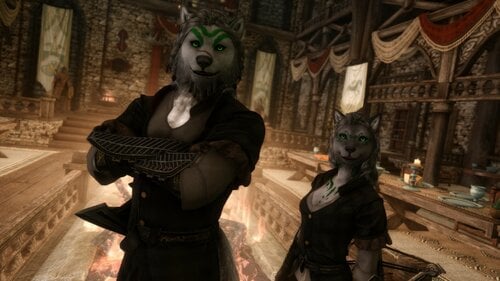
Wildwolves - the Lykaios Sibling(s) Followers UNP-UUNP CBBE-3BA HIMBO
By WeerW3ir
Wildwolfes - the Lykaios Siblings
Two siblings agaisn't the world. (avaiable in LRB and Standalone) Introduction
Information
Thorn
Lykaios (own race)
Weight: 90
Height: Standard Lykaios height.
Scales with the player. Base level is 30.
Voice Type: Sultry.
Body: UNP (slim) or CBBE (slim)
Ranger combat AI and AI
As she is from the "Tribes of the North". as a far northerner Lykaios she has a longer tail.
If you're not afraid of getting bitten, then she is very eager to be your wife.
She is wearing the Toughened Traveler Outfit.
Since she has mastered the Marksmanship, she is eager to teach you to aim better, and even tell you about it. (Yes, fully voiced)
Her arsenal is quite powerful. Her crossbow which she have gained on her adventures can easily beat most of the enemies. The name is Tranquility.
Her Wildfire wolf will aid her in the fight
Wildfire Wolf
A strong and burning mate in fight.
Scales with player. Base level is 30.
Fern
Lykaios (own race)
Weight: 90
Height: Standard Lykaios height.
Scales with the player. Base level is 30.
Voice Type: MaleEvenToned.
Body: Basic or HIMBO
Berserker combat AI and AI
If you're not afraid of getting bitten, then he is very eager to be your husband.
He is wearing a Toughened Traveler Outfit.
His arsenal is quite powerful as well. His Forsaken Axe is very decent weapon, as well as his Wildfire Flames.
From the far north. He brought a book with himself as a memento from his "failure" in the past.
Since he has mastered the Axes, he is eager to teach you, and talk with you about it. (Yes. It's fully voiced)
As he is from the "Tribes of the North". as a far northerner Lykaios he has a longer tail.
Credits & Thanks
First of all. Thank You KrittaKitty and BadDog for making such an awesome race.
Also once again Thank you QuarantineCouture for making the Toughened Traveler Outfit
and as well Thank you DomainWolf for Community Overlay 3 and Wolfpaint and for Ziovdendian Bodypaint
Thank you all ❤️
FAQ&A
Q: Where can i find them?
A: The lore always contains a hint abour my followers wereabouts.
Q: So they have green fire and green summonables?
A: As the text said. Yes
Q: Can i learn their powers?
A: Yes, you can.
Q: What armor they are wearing on the pictures?
A: Toughened Traveler Outfit.
Q: What is LRB stands for?
A: Acronym for Lykaios Race Based. So you will need the race for it if you see it.461 downloads
Submitted
-
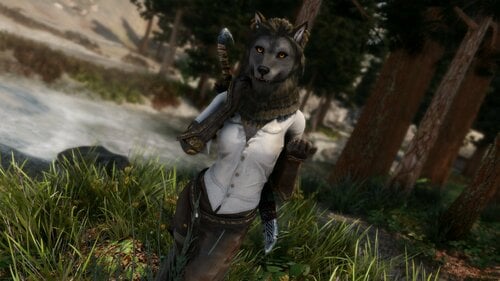
Tala the Packmaster - Lykaios follower UNP CBBE
By WeerW3ir
TALA THE PACKMASTER
Could you ever imagine a talking wolf from the far far away north on a way to seek out new adventures and a new friend?
Well now my dear leader. Now, you will witness it. You can choose between LRB or Standalone version
Introduction
Informations
Tala
Own non playable race. Weight: 30 Height: Standard Lykaios height. Scales with the player. Base level is 35. Voice Type: Dunmer to fit her otherworldy visage. Body: UNP (slim) or CBBE (slim) Packmaster combat AI and AI You can make her your wife if you're not afraid of getting bitten. She is wearing Rugged Rogue Outfits. Her arsenal contains the Sword of Revelation, a weapon from the far far away northern lands with the power of Chaos. ~and her pack member Wolfs. As she is from the "Tribes of the North". as a far northerner Lykaios she have a longer tail. Her paws making her to be a really good thief, but to be a bit of clumsy lockpicker.
Packmates
Two summonable female Wolf Scales with player. Base level is 30. They are Royal and Strong to their packmaster Size scale: 1.4 They are so fluffy
Credits & Thanks
First of all. Thank You KrittaKitty and Bad Dog for making such an awesome race.
Also once again Thank you QuarantineCouture for making the Rugged Rogue Outfits.
And as the newest addation in ver. 1.5. Thank you Macxhiin for your Fluffyworks mod and your approve.
Thank you all ❤️
FAQ&A
Q: Where can i find her?
A: The lore always contains a hint abour my followers wereabouts
Q: Wait... Hold on. She have two summonable wolf?!
A: As the text said. Yes. You should know anyway that there is a perk called Twin Soul.
Q: What armor she is wearing on the pictures?
A: Rugged Rogue Outfits
Q: How is her Packmates are so fluffy?
A: Fluffworks addon.
Q: What is LRB stands for?
A: Acronym for Lykaios Race Based. So you will need the race for it.
846 downloads
Updated
-
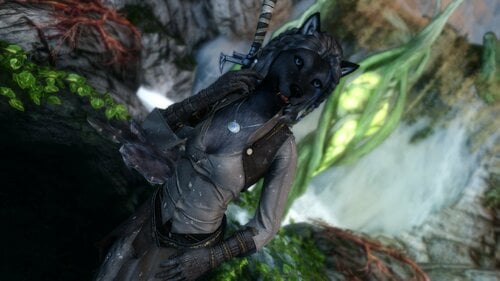
Ailani the Fearless - Lykaios follower UNP CBBE
By WeerW3ir
Ailani the Fearless Sometimes the strongest warriors are not always the manly mans. In Ailani's case a secret, a pompous father and a lovely mother.
You can choose between LRB or Standalone version
Introduction
Informations
Ailani
Lykaios (Own non playable race) Weight: 69 Height: Standard Lykaios height. Scales with the player. Base level is 35. Voice Type: Sultry. Body: UNP (slim) or CBBE (slim) Warrior combat AI and AI You can make her your wife if you're not afraid of getting bitten. She is wearing a Practical Pirate Outfit. Her arsenal contains her trusty two handed sword, a weapon from the far far away northern lands with some stunning powers and a secret. The weapon
just call itself the "Fatebringer"
Her journal also contains some more information about her adventures As she is from the "Tribes of the North". as a far northerner Lykaios she has a longer tail. Her paws make her to be a really good thief, but to be a bit of a clumsy lockpicker.
Guardian Spirit
A strong femme spirit guardian Scales with player. Base level is 30. Fluffy guardian is fluffy
Credits & Thanks
First of all. Thank You KrittaKitty for making such an awesome race.
Also once again Thank you QuarantineCouture for making the Practical Pirate Outfit.
Thank you Macxhiin for your Fluffyworks mod and your approve.
Thank you all ❤️
FAQ&A
Q: Where can i find her?
A: The lore always contains a hint abour my followers wereabouts
Q: Wait... Hold on. She have a big summonable fluffy wolf?!
A: As the text said. Yes
Q: What armor she is wearing on the pictures?
A: Practical Pirate Outfit.
Q: How is her Guardian Spirit is so fluffy?
A: Fluffworks addon.
Q: What is LRB stands for?
A: Acronym for Lykaios Race Based. So you will need the race for it.
1230 downloads
- follower
- lykaios race
- (and 3 more)
Updated
-
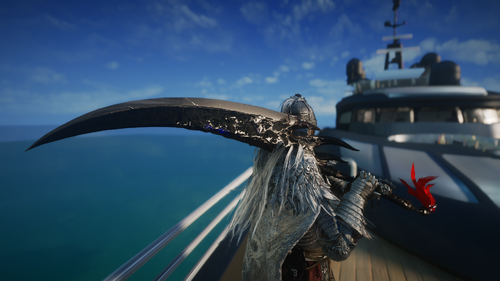
Blade's Justice
A greatsword ported from FF14. One of the relic weapons from Shadowbringers.
Please note that due to the different ways in which Skyrim and FF14 implement and render textures, how the sword looks in Skyrim will not be exactly like the original.
The weapon can be crafted, enchanted, and upgraded.
Installation
-Use a Mod Manager.
Credits:
-Final Fantasy 14, by Square Enix
965 downloads
Updated
-
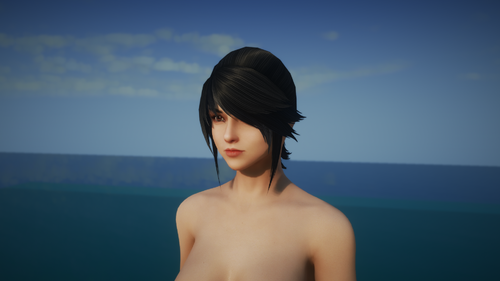
Hydaleyn Hair Pack (HDT-SMP)
A bundle of 12 hairs from FF14. This pack includes the following.
-Practical Ponytails (SMP)
-Venat (SMP)
-Hilda (SMP)
-Yshtola
-Aymeric
-Zero
-Lightning (SMP)
-Noctis
-Tall Tails (SMP)
-Styled For Hire (SMP on accessory)
-Modern Legend
-Themis
Requirements
-HDT-SMP or Faster HDT-SMP
-Bald Head Hair Style (Requires Racemenu) https://www.nexusmods.com/skyrimspecialedition/mods/4277
Installation
-Use Mod Manager of choice.
-Obtain them by using additemmenu. They are wigs that occupy slot 31 (hair) and are tintable.
-Go into Racemenu and change your hair to Bald Head option. This is to prevent the default Skyrim scalp hair from showing underneath the FF14 hairs.
Other comments
-Please note that depending on the shape of your character's head, and the type of clothing you are wearing, that there may be clipping occurring.
-If that is the case, make a backup of the hair's .nif file in another folder, go into OS and adjust the hair mesh manually. Make sure to select all parts of the hair mesh in the panel on the right while doing so. Lastly, save as a new .nif under the same name.
Credits
-Final Fantasy 14, Dissidia Final Fantasy NT by Square Enix.
7151 downloads
Updated
-
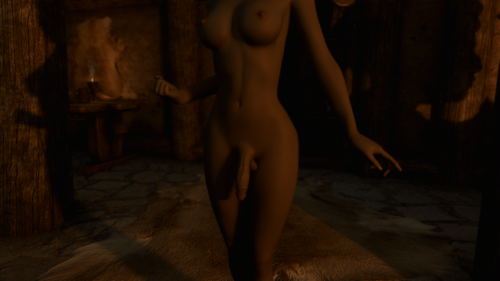
Reverie Skin for TRX Futanari Addon
By Erastos
This is the Reverie skin texture patch for TRX Futanari Addon to make the the schlong seamlessly blend. It contains all options and combinations. You can either overwrite the files located in TRX Futanari addon >Textures > [TRX] Futa Addon > Regular Or you can just make a new empty mod and put my stuff in it, the file structure should be correct.
Hope you enjoy my mod!
Technical notes:
The difference between hairless and hairy is just the schlong.dds
The difference between smooth, athletic and strong is the schlong_msn.dds
The difference between clean and dirty is the schlong.dds
Every combinations share the same schlong_sk.dds and schlong_s.dds
Credits:
TRX Futanari Addon by TRX_Trixter
Reverie - Skin by Novelyst
34831 downloads
- trx
- trx futa addon
- (and 7 more)
Submitted
-
SexLab Beastess SE - Patched
By Azmodeous55
This is an all-in-one solution to fix the issues with the sabre-cat quest from SexLab Beastess - SSE Port. I pulled the patch esp from a.i.'s post from the oldrim thread. Everything else is the same, all I did was add that .esp file and thankfully everything worked perfectly.
This is a full replacement, use this one instead of SexLab Beastess - SSE Port. Make sure all three plugins are enabled.
Support:
I claim absolutely no knowledge on the inner workings of this mod. All I did was slap other people's work together and put it in a nice, clean package for everyone.
I do know that trying to uninstall this mod caused my own save file to become corrupted. So I searched for a fix instead... hence this update patch version. Luckily, I was able to recover it from a previous save (save often and in new files mod friends).
Atronach Error Issue:
If you can't even start the Atronach encounter (can't have sex after speaking to the creature) then the issue is *usually* that one or more of the below steps were not completed before starting:
1) Allow creature animations checked in SexLab MCM
2) Initialized Creature Framework
3) Enabled and Registered SLAL animations.
3a) This can take a long time if you have a lot of animations so go get a drink or something, do NOT leave the menu screen during this process.
Prior Description (for preservation):
Minor Modification Of:
16842 downloads
- creatures
- beastiality
- (and 3 more)
Updated
-
LazyItemHider
By LazyGirl
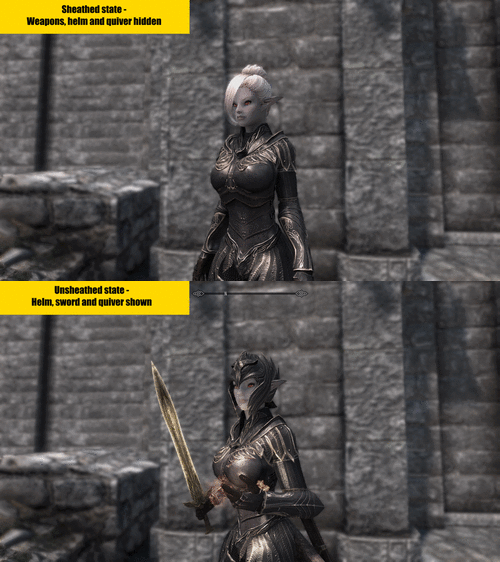
Automatic helm, weapon etc hider -
Because I got tired of falling for the "Spend an hour creating a face - wear helmet the whole game" meme
Getting started
Install mod
Wait until SkyUI message pops up about menu being registered
If you don't want to use the auto hide function make sure to bind the toggle key. Note - you can have auto hide enabled and still toggle manually
Helm and gauntlets are automatically detected when mod starts up. If you weren't wearing any at this time they'll be detected whenever any are equipped instead
The NPC option will attach the necessary scripts in order to manage them. This will increase the number of scripts running in your (save) game, no way around it. If you don't know what this means do not use this option. Obselete as of Redux release
How it works
Helm and gauntlets are unequipped - Armor rating and effects of attached enchantments will be removed
Weapons are rescaled to 0 - Won't show but still there so any custom stuff they offer will still be active
Supported nodes
WeaponBack
Weapon
WeaponAxe
WeaponMace
WeaponSword
WeaponDagger
WeaponAxeLeft
WeaponMaceLeft
WeaponSwordLeft
WeaponDaggerLeft
WeaponStaff
WeaponStaffLeft
WeaponBow (includes crossbows as well)
Quiver
Shield
Notes
If you're using a skeleton that places weapons on different nodes or lack them entirely mod won't work.
The script is conditional triggered and should be very lightweight. No cloak effects, loops or other scripts are running in the background.
The node scaling is a session override and not permanent. The mod will however rehide your equipment on game load when applicable.
The nodes are assumed to have a default scale of 1 so if you've used another mod to change their size in game this will be overridden. Fixed in Redux version
6624 downloads
Updated
-
SL Attributes Boost
By sinzzzz
Temporarily buffs Attributes after the sex act.
When using the Combat Sex Mod, I often found myself in situations where I would be surrounded by a large number of enemies, get raped, and then released on the spot, only to be immediately attacked and defeated by many more.
I felt stressed by this and wondered if I could escape the situation by temporarily enhancing my Player.
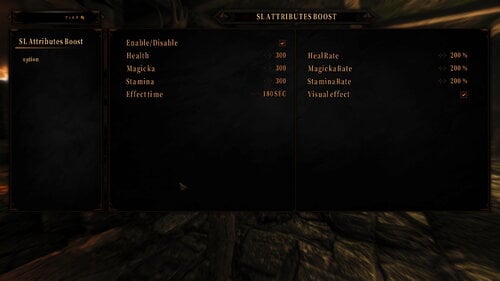
After the sexual act, Health, Magicka, Stamina and the respective HealRate are increased.
The value added and the duration of the effect can be set from the MCM.
---Required
SexLabFramework
SkyUI
SKSE
The operation test was done with SE (1.5.97).
I think it will work with LE and AE as well, since I did not do any difficult processing.
Q. Doesn't it damage the enemy or absorb its strength?
A. There are many other mods like that. Look for them in Succubus Mod, for example. What I wanted was a means of emergency escape from being surrounded by enemies.
3060 downloads
Updated
-
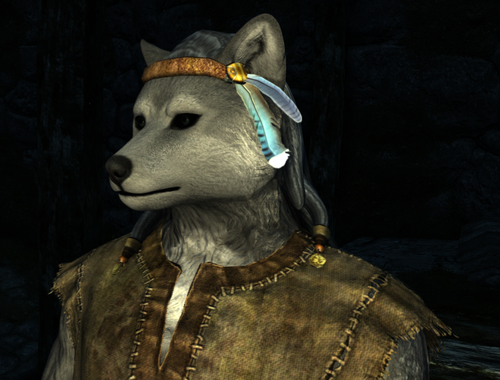
Lykaios Race SSE Version
By Bad Dog
This is KrittaKitty's Lykaios race, updated with her latest work and completed by Bad Dog.
A subspecies of the forest dwelling Vukasin tribe, the Lykaios are thought to be distantly related to the long extinct 'Vulpine' Lilmothiit peoples of Black Marsh. The nomadic Lykaios have no homeland; instead they live in small family packs in the coldest and most unreachable parts of Tamriel. Excellent hunters and trackers, the Lykaios are a hardy and rugged people resistant to cold and most diseases.
LE version here
About the mod
This mod allows you to play as a Lykaios, male or female. The race has its own abilities and perks. There are many facial markings available but not all are obviously labeled, so play around with the sliders. Some markings are under the "dirt" option, so look there too.
There are hair and earrings. Some earrings are under the "brow" slider.
Males have an optional SOS schlong that uses my Hoodies mechanism. Hoodies is built in so it's not an extra prerequisite. Schlongs are dog sheaths and will unsheath for sex or if you have Sexlab Aroused installed with SOS integration turned on. There's an antho uncircumcised unsheathing schlong for your extra pleasure. There are female sheathing schlongs.
History
KK was in the middle of a major update to the race when she stopped modding. She made her assets available, and I picked them up to use in the Yiffy Age mod. Mostly I just finished what she started. Differences are that I gave them my canine pawfeet and my clawhands; I left out the Scottie-dog brows and made her earrings available on that slider so they could be used with any hairstyle; I gave them high-poly heads following her models; and I re-did the face markings to allow a wider range of wolf and dog patterns.
Installation
Make sure you have the latest version of the files. 3.0 is a save-breaking update because some scripts have changed.
Download the files and install the ones you want in this order:
Dawnguard RaceCompatibility. Use the "Untranslated Files" download to prevent crashes. Lykaios Reborn - The FOMOD will walk you through the options. If you choose NPCs, you can find followers near the Alchemist's Shack in the Rift. XPMSE if you're using the digi feet. If you don't want to run the XPMSE mod, disable the ESP.
Managing the Schlongs
Get the schlongs by installing Hoodies.
Making NPCs
Tint files ship in 256x and 2048x sizes. Go to textures\actors\character\Lykaios\Tintmasks and copy the contents of whichever size you prefer from the subfolder to the main folder. You need the 256 if you're creating NPCs, 2048 if you're just setting up your PC. If using 2048, edit skse.ini to add
iTintTextureResolution=2048
so the higher-res face tints will work.
106961 downloads
Updated
-
Generated voice pack for Pet Project 2.2.2 SE
Generated voice pack for:
Due to the large number of voice lines available, voices have only been generated for a few common voice types:
If you want the voices generated for a different voice type I can add it in as well provided that there is enough demand for the voice type.
Installation: Just install with your favorite mod manager like you would any other mod. BSA recommended for SE, esp marked as light.
Credits:
Thanks to DoubleCheesburger for his script to extract voice lines, and thanks to Dan Ruta for xVaSyth. @Herowynne for testing.
1496 downloads
Submitted
-
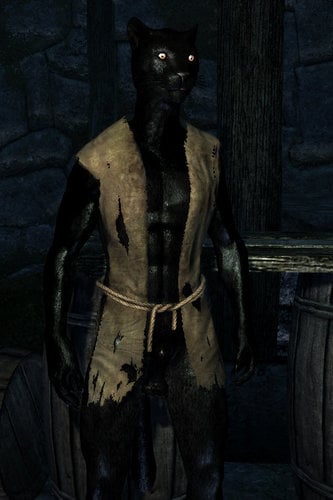
Yiffy Age of Skyrim SE
By Bad Dog
Yiffy Age (Furry Age Expandec) for Special Edition and Anniversary Edition!
This mod turns all the humans in Skyrim into furries--with beast feet and beast schlongs.
LE version here
Latest Update
I put the whole thing into a FOMOD because all the installation options were getting crazy.
You now can choose between digi and platigrade feet; with or without MMG's digi boots; UNP or CBBE bodies. You can choose your level of eroticism from SFW, nude, to erotic.
A bunch of patches have been rolled in, including USSEP, Saints & Seducers, Legacy of the Dragonborn, Immersive College of Winterhold, Bruma, Reach, and some followers. That kind of blew up the file size, sorry. I'll add more as time permits. In this version you only need a patch if there's armor or clutter that needs furrifying; use the Furry Patch Builder to patch mods that just need their NPCs furrified.
I'm not providing a SOS addon. Get schlongs from Hoodies. Hoodies has a FOMOD installer that will recognize YA and the other furry races and install the right plugins.
The new armor patcher will optionally create invisible boots so your digi feet will show. It now recognizes non-YA furry races and includes them, so you don't end up with deer with canine feet.
Details
Each Skyrim race is transformed into a different animal race:
Nord - Lykaios (Wolf) by KrittaKitty Imperial - Vaalsark (Jackal-ish) originally by Wolf of the Azar, updated by Bad Dog and Valehyena Breton - Fennec Fox by Jelly, new texture and adapted to Citrus mesh by Bad Dog Redguard - Kygarra (Hyena) by Wolf of the Azar, adapted to Citrus mesh by Bad Dog High Elf - Cheetah by Bad Dog, head mesh by NightroModzz Wood Elf - Tigers by Bad Dog, head mesh by NightroModzz Dark Elf - Panther by Bad Dog, head mesh by NightroModzz Orc - Saberlion by Bad Dog, head mesh by NightroModzz Khajiit - Khajiit Snow Elf - Snow Leopard Reachmen - Striped hyenas Skaal - African Wild Dogs
The change is appearance only. Each race still has its vanilla race-specific buffs. You can also play as a dremora (cat-style) or snow elf.
There's a Discord Server for discussion and what-all for those who are into that.
Character Setup
Check the "Dirt" slider on the canine races. I had more patterns than sliders so I put some overall face patterns there. I also co-opted some of the other sliders, so check around and see what they do. (The lips slider, for example, isn't really useful on furries so it generally does something else.) Also I put some earrings on the "brows" slider so you can mix them up with hair.
Content Warning
The base mod contains statues which are nude but not erotic. The SOS download adds a bunch of nudie load screens. Many of the paintings in that addon are erotic.
Installation
I recommend you start this on a new game. You're changing every race and every NPC mesh--Skyrim will probably freak if you try to load it over an existing game.
Files are here or at the "Mirror" link below. Note that when the major version number changes it usually means heads have changed and characters have to have facegen run on them, and if that's not done SE gets pissy and crashes a lot.
Latest Version: Furry Age Expanded SE
Load the stabilization mods, especially if you're having CTDs. Optional but recommended:
Address Library for SKSE Plugins Havok Fix (not updated for AE) SSE Display Tweaks SSE Engine Fixes
Load the prerequisites:
Skyrim Special/Anniversary Edition (all DLCs) SKSE SkyUI RaceCompatibility with the "Untranslated Plugins" optional file or bad things happen PapyrusUtil CBPC (Physics with Collisions) if using HDT tails Faster HDT-SMP if using the HDT tails A nude male and female body, if you care about such things. Schlongs of Skyrim for guys Add the AE patch if using the Anniversary Edition of Skyrim A nude female body, CBBE or UNP. Sexlab - If you're using the schlongs More Nasty Critters - If using the draugr tails XPMSE - Load this BEFORE YA--they ship a draugr skeleton that conflicts with the draugr tails in this version.
Optional but good with this mod:
A UNP body. Footprints Skyrim Coin Replacer Redux (that's an LE mod but seems to work fine with the standard conversion) Any furry races outside of YA: Otters, Ungulates (deer, horse, minotaur), Birds and Bats. Armor merge patch. Doesn't really have anything to do with YA, but you want it. The script is BD_Armor_Patch_Builder.pas in the "Tools" folder at the drive.
For YA itself, there are two files because it's a big download:
Furry Age Expanded SE ASSETS - The base mod. You always want this. Furry Age Expanded SE OPTIONS - A FOMOD allowing you to choose options--UNP vs CBBE body, digitigrade vs plantigrade feet, no nudity or... lots. Also installs patches for other mods. See below for handling mods that don't have a special patch.
Make patches to work with your load order using xEdit.
Gear patch - Vanilla headgear is already set in the base mod. Gear added by other mods isn't, and any modifications to vanilla gear made by other mods will be lost. Build a patch to make sure your load order works with YA. Do this and load this after the consolidated gear mod you made above. NPC patch - To make all the (non-vanilla) NPCs in your load order furry. Surprising mods have NPCs you need to worry about. Build an NPC patch to cover them. Most patches will be in the FOMOD, but check for patches in the "Patches for Other Mods" folder on the Drive. The mod description links to the mod they are for, as does the description in the ESP itself. These patches will generally change things beyond just NPCs and armor, statues for example. Load the Hoodies mod before YA, as usual. Put the Hoodies plugins that require YiffyAgeConsolidated after YA.
Once you have YA running, there are variants and options you can load if you choose.
Anything in the "Addons and Extras" More Nasty Critters patch - By default most humanoid monsters are made furry. If you also want them to engage in sex scenes get MNC and the YA patch from the MNC page. The YA patch is an option within the "Compatibility Kits" download Deer NPCs -- If you stack my ungulate races and want some of the vanilla NPCs in Falkreath to be deer, load that ESP after YA.
VORTEX USERS: Vortex will NOT get the load order right on its own. See this post for instructions on how to set it up.
Female schlongs are set up as separate SOS schlongs. That way you can set the probability of female schlongs as you like, separate from the males. By default all the female hyenas get schlongs, because hyenas, but you can change this or set up the other races so they sometimes or always have schlongs. There's a "no schlong" option for females so the SOS probabilities will work. Enable strapons in Sexlab (the default). In this version, SL handles them.
I'm using a revealing armor in the screenshots. If you don't like to look at dick, don't load revealing armor and your furries will cover themselves up decently. If you don't like online synthetic beast sex, don't load Hoodies and your furries will strip to underwear. In that mode, SOS and SexLab are not required.
This mod is based on the work of the people who made the race mods! At this point all the assets except the Lykaios are mine, but YA wouldn't have happened without their inspiration. Please click on the links above and vote up their mods! It's the only reward a modder gets.
Compatibility
Killable Children does not work. It also makes it possible to sex up children, so cut that shit right out. Any new human races. Inconsequential NPCs adds a teen race and they aren't handled properly without a patch. No Snow Under the Roof mod - messes up some statues, otherwise works. SOS is the only male mesh supported. No Better Males or SAM or SOS Lite. Improved Open Face Helmets is redundant--the furries have open face helmets that suit their race. Sheathing schlongs not compatible with No Enchantment Restriction SKSE Remake
Troubleshooting
Things to try when your installation seems borked (thanks to ASlySpyDuo):
Q: WTF all my characters have animal heads but body is human plz help!!
A: Something is overwriting Yiffy Age's changes. Make sure that nothing overwrites its files and race changes. Make sure the ESP loads as late as possible, just before alternate start mods. Make sure your NPC patch (you made an NPC patch, right?) loads after YA.
Q: All NPCs look like they should but I'm a half-human hybrid, this mod is broken!!1
A: Unique player werewolf mods are incompatible, disable those.
Q: tails are detaching from npc during animations what do
A: Your skeleton is either broken or incompatible. (Re)install XPMSE.
Q: Children are bald humans with floating eyes and mouths. I'm terrified.
A: Killable children is incompatible since it modifies child race records.
Q: Argh! Random CTDs! Or CTDs at a particular place!
A: SSE is stupid and crashes if you look at it wrong. Make sure the load order is right--if any other mod overwrites the facegen files you'll get a CTD. Load the various "SSE Fix" mods suggested above.
Version Numbering
Just in case you're wondering what the version numbers mean...
Uninstallation
Don't, the impact is too high. Treat this mod like its own game.
Credits
Blaze69 for major contributions: schlongs for the ladies, better texture files, kids, chasing bugs through dark corners of the Skyrim engine & more MadMansGun for improved critters NightroModzz for great heads and feet Ranaline over at Nexus for assets from RS Children Overhaul Trado for the original Furry Age Fluffy, Jelly, KrittaKitty, Mickyan, Wolf of the Azar, ArcicCarnage for the furries Navida1 for Improved Closedfaced Helmets, which I borrowed some meshes from. Grimoas and Ratoboran for the Almighty Talos statue idea, which triggered way too much work PaulGreen and ChosenClue for scripting and nif help
Go vote up their mods over on Nexus while you're there.
70325 downloads
Updated
-
SOA Separate Orgasm Adventures Male Futa orgasm sound
By Bullfye
SOA Separate Orgasm Adventures
Male & Futa orgasm sound
Since I installed this Fantastic Mod
SOA - Separate Orgasm Adventures
by dePog i knew I would end up changing sounds ,
for example the male or futanari orgasm sounds are two files
that originally have some kind of extra like small strong jet sound
on the orgasm file giving the impression that someone as a drum inside is balls
or have subsonic ejaculation strength...lol
decided to change this and in the course why not improve some other sounds ..
WIP Testing files
Sound 1
Firstload.mp4.c556064490920cd1a7cf46abe7145807.mp4
Sound 2
ExtraLoad.mp4.a85c8e31779bb9a276908ef4857d3adf.mp4
Version 1.0.1 update
Just updated the all orgasm fx folder including the squirting files
Remember to post your volume results in your end and this is a simple upgrade just to check if fits the actions..
Wasn't very fun of the original game sounds
So starting with this testing 2 sound files that are for the
Male or Futa orgasm sounds I will be changing the all sound folder
in The Mod
SOA - Separate Orgasm Adventures
This is for testing purposes but this sounds are more of my liking ...
Hope you like it people
Salutes
3013 downloads
Updated
-
SPID Bikini Armors for Female NPCs
By Corsec
TL;DR: This mod uses SPID to dress female NPCs in Bikini amors from TAWOBA REMASTERED 6.1 and TEWOBA by Pumpkin. Bikini armors should now become very common everywhere.
Everything requires Spell perk item Distributor (SPID) or else it won't work.
https://www.nexusmods.com/skyrimspecialedition/mods/36869
This is a set of esl flagged plugins and ini files that tell Spell Perk Item Distributor (SPID) mod to distribute Bikini Armors to any female NPC who uses the appropriate vanilla outfits. For example, Mjoll will wear the iron bikini armor, Lydia will wear the steel bikini armor, bandits will get hide, leather, iron or steel etc. This will affect almost all female vanilla NPCs if there is a bikini armor version available to replace their vanilla outfit.
Hopefully this should cover all vanilla female NPCs who use armors that have bikini armor versions. Modded female NPCs will also be affected if they are wearing vanilla outfits.
The Nexus version is here and both versions are identical.
https://www.nexusmods.com/skyrimspecialedition/mods/78746
LIST OF PATCHES
SPID Bikini Armors for Female NPCs - TAWOBA Remastered 6.1
Requires TAWOBA Remastered 6.1 which you can find here-
https://www.sunkeumjeong.com/post/the-amazing-world-of-bikini-armors-remastered-6-0
The TAWOBA Remastered 6.1 patch assigns the following bikini armors so that any female wearing a vanilla outfit version of this armor will be switched to the bikini version-
blades
dragonbone
dwarven
ebony
elven
falmer
hide
iron
leather
nord plate
nordic carved
orcish
steel
thalmor
wolf
SPID Bikini Armors for Female NPCs - TEWOBA 1.03
Requires TEWOBA 1.03 which you can find here-
https://www.nexusmods.com/skyrimspecialedition/mods/41585
The TEWOBA by Pumpkin patch assigns the following bikini armors so that any female wearing a vanilla outfit version of this armor will be switched to
the bikini version-
ancient nord
daedric
dragonscale
glass
imperial heavy
imperial light
scaled
Immersive Wenches Bikini Armor For Female NPCs
This adds bikini armors to armoured wenches from the mod Immersive Wenches. This needs TAWOBA Remastered 6.1 and my patches for it.
https://www.nexusmods.com/skyrimspecialedition/mods/595
WACCF ACE Bikini Armor For Female NPCs
This patch is to make sure that WACCF properly assigns bikini armors to the female housecarls (Irileth and Olfina). Requires TAWOBA Remastered and it's patch plus WACCF ACE.
https://www.nexusmods.com/skyrimspecialedition/mods/18994
8681 downloads
Submitted