About This File
AUTO ARMOR DISTRIBUTOR
Every armor and weapon mod you install, handed out to loot, merchants and NPCs - you choose who gets what.
No patches. No configs to write. Safe to add or remove mid-playthrough.
The menu - press F8
Everything is set up in the mod's own in-game menu. Press F8 to open and close it (you can change the key on the menu's Settings page). It opens in the middle of the screen and the game pauses while it's open.
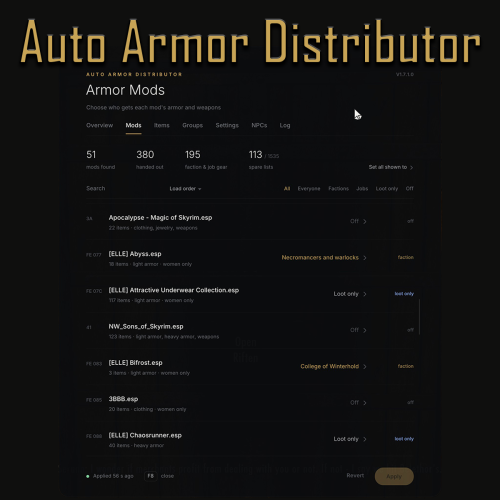
New armor and weapon mods start as Off. Nothing from a mod is handed out until you choose who gets it on the Mods page: Everyone, one faction, one job, or Loot and merchants only. Set all shown to... chooses for every mod in the list at once.
- Mods - every armor and weapon mod you have, listed in your load order (or A-Z), with search and filters.
- Items - every modded piece: what it was sorted as, whether it's handed out, and why not if it isn't. Block a single item with a click.
- Groups - all factions and jobs, how much each one got, and whether their named members join in.
- Settings - all distribution and balance options, plus the menu's own look: language, colour scheme, size, see-through background, cursor speed and the menu key.
- NPCs - pick an NPC near you to see what they wear and which mods' gear they can get, and dress them again on the spot.
- Log - what the mod did, without leaving the game.
- Apply - changes take effect straight away. No restart needed.
Works with mouse, keyboard and controller. There is no MCM page any more - the menu replaces it, and your settings from older versions carry over automatically.
New in 1.7.4: the menu can be translated into your own language - see Translations below.
The menu also works with Community Shaders frame generation / upscaling (DirectX 12 output) since 1.7.2.
What it does
You install an armor or weapon mod... and then you never see it unless you craft it or spawn it in. This mod fixes that.
Every time the game starts, Auto Armor Distributor looks at every armor piece and weapon in your load order, works out what it is, and mixes it into the game the same way vanilla gear is handed out:
- Loot, merchants and enemy gear - wherever the game would pick a vanilla item, it can now pick a modded item of the same kind instead. A modded steel cuirass shows up where the Steel Cuirass would, a modded ebony sword where the Ebony Sword would - at the same level, from the same merchants and chests.
- NPC outfits - generic NPCs (bandits, mercenaries, townsfolk and so on) get outfits with modded variants that actually fit their race and body.
- Split armor sets stay together - skirts, pauldrons, belts, capes and other extra pieces come with the armor they belong to.
- Factions and jobs get their own gear - modded Stormcloak armor goes to Stormcloaks, and you can give any armor or weapon mod to one group only: bandits, the Legion, guards, the Thalmor, vampires - or a job, like innkeepers and tavern staff, farmers, miners, merchants, blacksmiths or priests.
- Overpowered gear gets toned down - an item far stronger than the vanilla item of its tier can be rebalanced to match, so modded gear doesn't break your game's balance.
It works with any armor or weapon mod - you don't need patches, SPID files or SkyPatcher configs for each one. Add a new mod, choose who gets it in the menu, and it's handed out straight away.
Features
Smart sorting
- Armor is matched by its material keyword (iron, steel, dwarven, orcish, ebony, daedric, hide, leather, elven, scaled, glass, dragon, and the Dragonborn materials), its type (light, heavy, clothing) and its slot (helmet, body, hands, feet, shield).
- Weapons are matched by material and type: swords, daggers, war axes, maces, greatswords, battleaxes, warhammers, bows and crossbows.
- Jewelry - modded rings, necklaces and circlets join vanilla jewelry of the same kind.
- Clothing is matched as rich, poor or common clothing.
- Armor and weapons without a material keyword are given the tier whose vanilla stats are closest (can be switched off).
- Items with no value get the value of the vanilla item they stand in for, so merchants buy and sell them.
Split armor sets
Lots of armor mods split a set into extra pieces on their own slots - a skirt, pauldrons, a belt, a cape, a mask, bracers.
- Extra pieces are handed out together with their main piece: pick the cuirass, get its skirt and pauldrons too. A mask or hood comes with the helmet, bracers with the gloves, greaves with the boots.
- Pieces are matched by set name, by the folder their meshes are in, and by material - and it also works for extra pieces from a separate add-on plugin.
- Extra pieces are never handed out on their own.
- Even armor that its own mod already hands out gets its extra pieces added.
- Optional: keep whole sets together - a modded cuirass comes with the helmet, gloves and boots of the same set.
Factions
- Faction gear goes to its faction (on by default). Modded armor tagged as Stormcloak, Imperial, Forsworn, Thieves Guild, Penitus Oculatus, Blades, Dawnguard, Vampire, Hunter or Morag Tong stands in for that faction's own pieces, and modded Imperial weapons go to the Legion. A modded Stormcloak cuirass turns up on Stormcloak soldiers.
-
Choose who gets each mod. On the menu's Mods page every mod has a choice: Everyone, Off, Loot and merchants only, or one group:
- Factions - Bandits, Imperial Legion, Stormcloaks, Guards, Thalmor, Forsworn, Vampires, Necromancers and warlocks, Vigilants of Stendarr, Silver Hand, Dawnguard, Companions, Thieves Guild, Dark Brotherhood, College of Winterhold, Penitus Oculatus, Hunters, Morag Tong.
- Jobs - Innkeepers and tavern staff, Townsfolk, Farmers and mill workers, Miners, Merchants and shopkeepers, Blacksmiths, Priests. Perfect for mods that don't belong to a faction - give a tavern maid outfit to tavern staff, work clothes to farmers and miners. Guards never count as townsfolk.
- Loot and merchants only - the mod's items turn up in chests, on enemies' bodies and at merchants, but no NPC wears them. Good for outfits you want to find or buy for yourself.
- A mod given to a faction or job is only worn and carried by that group's members. Its armor replaces their pieces of the same kind (helmet, cuirass, gloves, boots, shield), uniforms included, and its weapons join their weapon lists. This mod never adds it to loot or merchants - you get it by looting them.
- Named members can be switched on per group on the menu's Groups page. Ticked, they wear their group's gear - never random gear. Handy for groups made of named characters like the Companions, the Thieves Guild, or innkeepers and tavern staff. On by default for the job groups (except Townsfolk), off for the factions.
- Followers are never touched.
Bodies and races done right
- Female-only armor only goes to women. Armor with no proper male model is never put on male NPCs - including mods that use a vanilla armor mesh as a stand-in male model, which used to give men invisible hands and feet.
- NPC outfits are made per race and sex, so Khajiit and Argonians only get armor that has a model for them, and nobody walks around with invisible pieces.
- Nobody ends up half-dressed. A piece that covers two areas (a cuirass with built-in gauntlets) or an extra piece on a normal slot (bracers, calf guards) is only given to an NPC where it can't push off something else they wear.
- New outfits go on as one full set. When an NPC you've met before gets a new outfit, their old outfit's clothes are taken back and the new one is put on fresh - nobody is left naked or barefoot. This happens a few seconds after the NPC loads in, one NPC at a time, so a busy town isn't redressed all at once while OBody and RaceMenu are still shaping everyone. Can be switched off ("Fix old outfits on NPCs").
- Armor with a broken body-shape file is skipped. Armor built in BodySlide comes with a .tri file that RaceMenu/OBody use to reshape it. If that file is missing, or was built for a different mesh, the piece is not handed out, and the log names it so you know what to rebuild in BodySlide. Anything the check can't read is left alone - it only skips a piece when it's sure.
- Armor whose meshes aren't installed is skipped.
Leaves the important stuff alone
- Named NPCs and the player are never touched (named group members only where you tick their group). Followers never.
- Faction uniforms only change with "Faction gear" on, or when you give a mod to that faction.
- Daedric artifacts are never handed out or rebalanced. Other enchanted items only if you switch it on.
- Staffs and bound weapons are left alone.
- Armor and weapons another mod already puts into leveled lists or outfits are not added a second time.
Balance
- Each modded item is compared with the vanilla item of the same material, type and slot (a modded "steel" helmet against the Steel Helmet, a modded ebony sword against the Ebony Sword).
- Rebalance: if it's more than 25% stronger (adjustable), its armor rating or damage is set to the vanilla item's and its value is lowered. Weight is never changed.
- Move up a tier: or keep its stats and only hand it out with the tier that matches its strength.
- Off: leave stats exactly as the mod made them.
- Balancing turns itself off automatically when an armor overhaul is loaded (Requiem, Armor Rating Redux, Smilodon...), unless you switch it back on.
- Every change is listed in the log, and all changes are undone the moment you turn balancing off.
Choosing who gets each mod
The menu's Mods page lists every armor and weapon mod you have installed, in your load order, with how many items it adds and what it's doing right now.
- Off (the starting choice for new mods) leaves a mod out completely - not handed out, not rebalanced. Right for unique sets, follower outfits, or mods that already hand out their own gear.
- Everyone - loot, merchants and all generic NPCs.
- A faction or job - only that group's members wear and carry it.
- Loot and merchants only - for outfits you want to find or buy for yourself, without NPCs wearing them.
- Works with huge load orders: search, filters (Everyone / Factions / Jobs / Loot only / Off) and Set all shown to...
- The list updates itself when you add or remove mods. Your choices are remembered.
Re-dress safety net
If you uninstall an armor mod mid-playthrough, NPCs who were wearing it would normally be left without those pieces until they respawn. Auto Armor Distributor remembers which armor mods it handed out, and only if one of them has been removed, it re-dresses generic NPCs that have no body armor or clothing left at all - once per NPC, for 30 in-game days.
It never touches named NPCs, followers, actors in SexLab or OStim scenes, anyone wearing Devious Devices or ZaZ items, prisoners or captives, or NPCs whose clothes were only taken off (bathing, sleeping, scenes) - and it does nothing at all in normal play.
Settings you can change any time
Change anything in the menu and press Apply (or just close it) - it is applied straight away: the mod undoes its old changes and redoes them with your new settings. No restart needed.
Translations
The whole menu can be shown in your own language. The log stays in English.
Using a translation
- Put the translation file (for example Deutsch.txt) in Data/SKSE/Plugins/AutoArmorDistributor/Translations - or install it as its own small mod with your mod manager.
- In game: F8 > Settings > Language and pick it. It switches straight away.
Making a translation
- Go to Data/SKSE/Plugins/AutoArmorDistributor/Translations and copy English.txt (every text in the menu, one per line).
- Name the copy after your language, e.g. Deutsch.txt, Français.txt, Русский.txt or 中文.txt. That name is what shows in the Language list.
-
Each line looks like this:
Settings = Settings
				{} items handed out = {} items handed out
Change only the text after " = ". Leave the text before it exactly as it is - that's how the menu finds the line.Settings = Einstellungen {} items handed out = {} Gegenstände verteilt - Keep every {} - the menu puts a number or a name there. Marks like {:.0f} work the same way.
- Save the file as UTF-8 (Notepad: Save As > Encoding: UTF-8).
- Lines you delete or leave unchanged simply stay in English, so you can translate a bit at a time and check it in game as you go.
Good to know
- Single and plural are separate lines ("{} item" / "{} items"), so languages with other plural rules work.
- If a line has a mistake in its {} marks, that one line shows in English instead of breaking the menu.
- Any language Windows has a font for works - including Chinese, Japanese and Korean. Letters the menu's own font doesn't have are borrowed from the fonts already on your PC; no extra downloads.
- Right-to-left languages (Arabic, Hebrew) and scripts with joined letters (Hindi, Thai) can't be shown correctly by the menu.
- Long translations may be cut off with "..." where there isn't room - shorter wording helps.
- Made a translation? Share it! Post it in the support thread and I'm happy to include it in the download.
Settings
All of these are on the menu's Settings and Groups pages.
Distribution
- Enabled
- Leveled lists (loot, merchants, enemy gear)
- NPC outfits
- Modded armor chance (default 35%) - how often a vanilla item comes out as a modded one
- Max items per mod (default 3, up to 50) - per material and slot or weapon type, so one huge mod can't take over
- Modded armor chance is exact however many modded items there are
- What to include: Clothing / Shields / Creation Club items / Weapons / Jewelry / Enchanted items (off)
- Guess untagged armor
- Female-only armor to women only
- Split armor: Add-on pieces with their armor (on) / Keep whole sets together (off)
Balance
- When a modded item is too strong: Off / Rebalance stats / Move up a tier
- Too strong when over (default 25%)
- Also raise weak items
- Balance with an armor overhaul
Safety net and log
- Re-dress NPCs if an armor mod is removed
- Fix old outfits on NPCs (on) - NPCs met before who still hold their old outfit are dressed fresh, one at a time
- Detailed log
Groups
- Faction armor and weapons to their faction (on)
- Named members: one tick box per faction and job (on for jobs except Townsfolk, off for factions)
Mods - for every armor and weapon mod: Off (new mods) / Everyone / one of 18 factions / one of 7 jobs / Loot and merchants only.
Items - block or unblock single items.
Menu
- Language (English, or any translation in the Translations folder)
- Colour scheme (gold, silver, ember, frost, jade, rose)
- Menu size and see-through background
- Cursor speed (mouse) and cursor speed (controller)
- Dim the game behind the menu
- Menu key (F8 by default) and an optional controller button
Data/SKSE/Plugins/AutoArmorDistributor.ini - the list of armor overhauls that switch balancing off, plus a blacklist you can still fill in by hand if you prefer (plugins, or items by name or Plugin.esp|0xFormID).
Requirements
- SKSE64
- Address Library for SKSE Plugins
SkyUI and MCM Helper are no longer needed - the mod has its own menu.
Supported game versions: 1.5.97, 1.6.317 to 1.6.1179 (including 1.6.640 and GOG) and 1.7.x - one DLL for all of them. Not for Skyrim VR.
Installation
Install with your mod manager (Vortex or MO2) and enable AutoArmorDistributor.esp. It is ESL-flagged, so it doesn't use a load order slot. Load order doesn't matter.
Safe to add to an existing save. NPCs you have already met change into their new outfit the next time they load in; merchants restock every 2 in-game days; chests you've already opened keep what they had until they reset.
Updating: install over the old version. Your settings are kept. Coming from a version with the MCM page, everything you set there is carried over to the menu the first time you load the game, and the old MCM page disappears by itself. Mods you already chose for keep their choice - only mods installed after the update start as Off.
Uninstalling: safe at any time. If a save remembered one of the mod's outfit copies, the NPC gets its original outfit back on load. Everything the mod does is rebuilt in memory each time the game starts, so once it's removed the game is back to normal. Items already handed out stay as normal items. The settings file the mod writes (Data/SKSE/Plugins/AutoArmorDistributor/Settings.ini) can be deleted by hand.
Compatibility
- Any armor or weapon mod - that's the point.
- No conflicts in your load order - the mod doesn't edit any records on disk. It works on top of whatever your load order (and patches like Wrye Bash / Synthesis) produce.
-
SPID, SkyPatcher, KID and outfit mods - Auto Armor Distributor is built to step back for them:
- It goes last. It waits until SPID, SkyPatcher, KID and other start-up patchers have finished, so it sees their keywords and their changes and works on top of them - never the other way round.
- Their outfits win. If SPID, SkyPatcher or another outfit mod gives an NPC an outfit, that NPC keeps it. Changing settings mid-game, the outfit repair and uninstalling never replace an outfit another mod gave; only NPCs still wearing this mod's own outfit copies are ever touched.
- Nothing is added twice. Armor and weapons a mod already puts into leveled lists or outfits are left to that mod.
- Undo only takes back its own changes. If another mod changed a list, an outfit or an item's stats after this one did, that change stays.
- Fixed weapons are never swapped - faction weapons only go into an NPC's random weapon lists.
- Tip: SPID hands items straight to NPCs, which this mod can't see. If an armor mod comes with its own SPID or SkyPatcher distribution, leave that mod set to Off (the default), or Loot and merchants only, so its gear isn't handed out twice.
- OBody, RaceMenu, BodySlide - armor with a missing or mismatched body-shape (.tri) file is skipped, and outfit fixes are spread out so they don't land while bodies are being shaped.
- Community Shaders - the menu works with it, including Upscaling with frame generation (DirectX 12 output) since 1.7.2.
- Armor overhauls - balancing switches itself off while Requiem, Armor Rating Redux or Smilodon is loaded. Distribution still works. Other overhauls can be added to the list in the ini.
- NPC overhauls - fine; the mod copies whatever outfits your load order ends up with.
- SexLab, OStim, Devious Devices, ZaZ - fully respected by the re-dress safety net and the outfit fixes.
- The distribution itself doesn't hook the game's code. The menu uses two small hooks (drawing the menu, and keeping keys and mouse away from the game while it's open), both from the Address Library, so game updates are unlikely to break it.
FAQ
I installed it but don't see modded gear anywhere.
New armor and weapon mods start as Off - open the menu (F8) and choose who gets each one on the Mods page. Chests you have already opened keep what they had. Check merchants after 2 in-game days, or go somewhere new. AutoArmorDistributor.log (Documents/My Games/Skyrim Special Edition/SKSE) shows how many items were handed out and why others were skipped.
Vendors only have one or two modded pieces.
Raise "Modded armor chance" in the menu's Settings page. Vendors only stock a handful of armor pieces at a time. For big armor packs, also raise "Max items per mod".
A mod's item is in the wrong tier / too strong / not wanted at all.
Set the mod to Off on the menu's Mods page, or block the single item on the Items page. The Items page shows which tier every item was given.
An item says "body shape file missing (.tri)" or "doesn't fit the mesh".
Its BodySlide files are out of date or incomplete. Rebuild that outfit in BodySlide (with "Build Morphs" ticked) and it will be handed out again on the next game start. The log lists the exact mesh and .tri file.
A skirt or cape from a set never shows up.
Extra pieces only come with their main piece, and they're matched by name and mesh folder. Turn on "Detailed log" - it lists exactly which extra pieces come with each item. If one is missing, tell me the mod and I'll look at it.
An NPC carries two helmets.
That's "Keep whole sets together": NPCs get the set's helmet, gloves and boots next to their own and wear one of them. Loot and merchants always give the whole set.
I gave a mod to a faction or job but don't see it.
NPCs change into their new outfit when they next load in (leave the area and come back). Named members also need their group ticked on the Groups page. The NPCs page shows what any NPC near you can get. The log lists how many items each group got.
An NPC changed clothes right in front of me.
That's the outfit fix: NPCs you met before installing (or before a settings change) are dressed in their new outfit a few seconds after they load in. It happens once per NPC. You can switch it off with "Fix old outfits on NPCs".
A mod doesn't fit any faction - like a tavern maid outfit.
Give it to a job instead: Innkeepers and tavern staff, Townsfolk, Farmers, Miners, Merchants, Blacksmiths or Priests. Or pick Everyone.
Will a mod set to Off still turn up at merchants?
No - Off leaves it out completely. Pick Loot and merchants only to find and buy it without NPCs wearing it.
F8 says "the menu could not start".
Update to 1.7.2 or later - older versions couldn't open the menu with frame generation (for example Community Shaders' upscaling) switched on. If it still happens, please post your AutoArmorDistributor.log: its "Menu:" lines show exactly which step failed.
F8 does nothing / clashes with another mod.
Change the menu key on the menu's Settings page, or set iMenuKey in Data/SKSE/Plugins/AutoArmorDistributor/Settings.ini (DirectInput key code, F8 = 66). Esc also closes the menu.
Can I have the menu in my language?
Yes - see Translations above. Pick a translation in F8 > Settings > Language, or make your own from English.txt.
Where did the MCM page go?
The new menu replaces it - press F8. Your MCM settings were carried over.
Does it work on Skyrim 1.5.97?
Yes. A few faction material tags (Forsworn, Thieves Guild, Penitus Oculatus, Blades) come from the newer Update.esm; if your game doesn't have them, that faction armor just isn't recognised. Everything else works the same.
A man is wearing a female-only piece.
NPC outfits check each NPC's race and sex. Loot can't know who will wear it, and spotting female-only armor is a best guess, so the odd piece can still end up in loot. Tell me the item and the mod and I'll look at it.
Does it make my save bigger?
Barely - it only stores a short list of armor mod names (for the re-dress safety net) and which NPCs it has already re-dressed.
Known limits
- Without "Keep whole sets together", each piece is picked on its own, so NPCs can wear a mixed set (a modded helmet with vanilla boots).
- Female-only detection is a best guess for loot (NPC outfits are checked properly).
- Arrows are not handed out - they have no material tags to sort them by.
- Faction weapons go into a faction's random weapon lists; an NPC that always carries one fixed weapon keeps it (swapping it would take it away from NPCs you have already met).
- An extra piece with a completely different name, in a mod with several sets sharing one mesh folder, can't be matched.
- Very large collections may use up the mod's spare lists - it then hands out a bit less and says so in the log. Nothing breaks.
- The body-shape check catches missing .tri files and .tri files built for a different mesh. A .tri file that is damaged in some other way can't be detected in advance.
- NPCs who already wear a piece that is now skipped for its body-shape file keep it until their outfit changes.
- Translations: right-to-left languages and scripts with joined letters (Arabic, Hebrew, Hindi, Thai) can't be shown correctly.
Credits and licences
Built with the MIT-licensed CommonLibSSE NG fork (QTR-Modding/CommonLibVR-MIT), spdlog, {fmt}, Dear ImGui, DirectXTK / DirectXMath (MIT), rapidcsv (BSD) and the Inter typeface (SIL Open Font License). Full notices are in THIRD-PARTY-NOTICES.txt in the download. Translations use the fonts already installed with Windows; no other fonts are included.
This mod contains no GPL-licensed code.
Thanks to the SKSE team, meh321 for Address Library, Omar Cornut for Dear ImGui and Rasmus Andersson for Inter.
What's New in Version 1.7.4
Released
Version 1.7.4: the menu can be translated
New Translations folder (Data/SKSE/Plugins/AutoArmorDistributor/Translations) with English.txt, which lists every text in the menu, ready to copy and translate. How-to in the description and at the top of the file.
New Language choice on the menu's Settings page. It switches straight away and is remembered.
Everything in the menu translates: pages, settings, item types, slots and materials, faction and job names, the reasons an item isn't handed out and the reasons an NPC is left alone. Singular and plural are separate lines.
Lines a translation leaves out stay in English. A line with a mistake in its {} marks shows in English instead of breaking the menu.
Chinese, Japanese, Korean and other alphabets work. Letters the menu's font doesn't have are borrowed from the fonts already on your PC, so there's nothing extra to download.
The log stays in English.
Version 1.7.3
Fix: pressing F8 could also reach the game and other mods for a split second while the menu opened (came in with 1.7.2). F8 is kept away from them again.
Version 1.7.2
Menu
Fix: "the menu could not start" with frame generation switched on (for example Community Shaders' Upscaling). The menu now draws on the game's own picture when the screen uses DirectX 12. Confirmed working by a player with frame generation on.
The log now records each step of starting the menu, so any future problem shows exactly where it stopped.
The menu now opens from the game's main thread, which is safer.
If the menu ever can't draw, it closes cleanly instead of leaving the game paused.
NPC outfits
NPCs who still hold their old outfit are now dressed fresh a few seconds after they load in, one at a time. Before, everyone was redressed at once the moment a town loaded, while OBody and RaceMenu were still shaping bodies.
New setting "Fix old outfits on NPCs" (on by default) to switch this off completely.
The log now lists what an NPC wears after being dressed.
Armor
New check: armor whose BodySlide body-shape file (.tri) is missing, or was built for a different mesh, is no longer handed out. That's a known cause of RaceMenu/OBody crashes on NPCs. The log names each piece and file, so you know what to rebuild in BodySlide. Anything the check can't read is still handed out as before.
Other
"Removed the old MCM page files" no longer shows in the log on every start.