Select a subcategory to view available files.
Files From Subcategories
-
Bunker Hills
By Guest
This is for a female play.
What it does, is to change 2 female workers to male and adding 4 male npc to the location.
Thats it.
It it serves your game play, maybe this tiny alteration can enhance it.
Anyway, not special requirements for this.
Cheers
195 downloads
Submitted
-
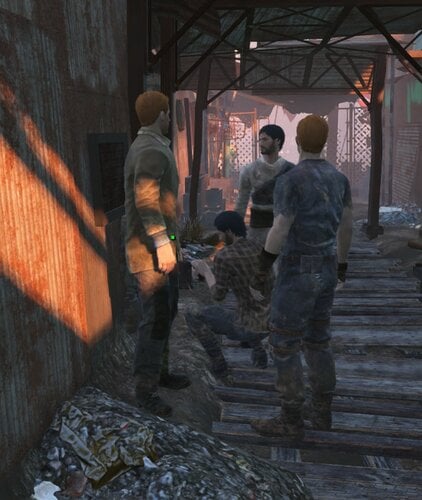
Diamond City Male Change
By Guest
This is a very simple mod that i made mainly for myself.
What does it do?
It will change existing prop female NPC into male.
Additionally, i added some male NPC. Though they are copies of existing NPC, i tried to give them some other uniforms.
No, quest individuals were altered.
I am currently working on changing their faces which is not that easy.
Mainly, it supposed to enhance female character play. Though perhaps it can also enhance same sex play. More opportunities.
This was just made with the Creation Kit. So nothing special at all. Just takes time.
I tried out some mods that add NPC, but they did not work for me.
So use it with caution. It should work best with a new game start. It does not change anything as far as i can tell.
Thanks
P.s. i am just learning to mod and scratching the surface of modding. Anyone can do something like that anyway.
489 downloads
Updated
-
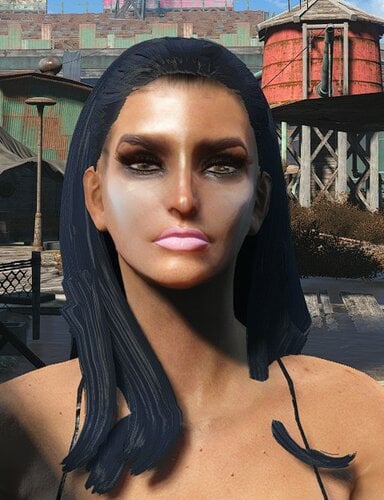
Wutpickels AtomicGirl Bimbo
By Guest
Looksmenu preset.
Should be going into this folder if you run Vortex. Fallout 4\Data\F4SE\Plugins\Presets
Otherwise you can install it with MO2.
It may be helpful if you use 2K textures to use this file if you use any 2K textures.
Looks Menu Customization Compendium at Fallout 4 Nexus - Mods and community (nexusmods.com)
There two optional files that will help, so you do not get the buggy face.
Cheers.
244 downloads
Updated
-
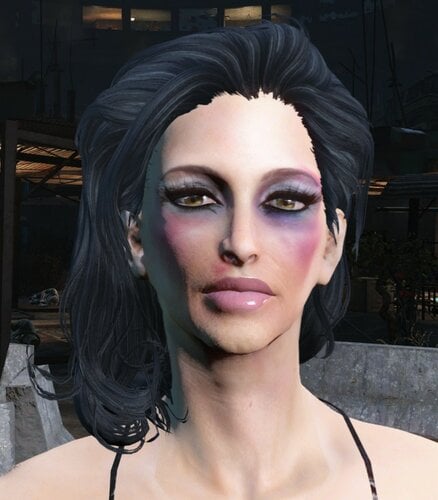
Kelly Drifter
By Guest
Looksmenu preset.
Should be going into this folder if you run Vortex. Fallout 4\Data\F4SE\Plugins\Presets
Otherwise you can install it with MO2.
It may be helpful if you use 2K textures to use this file if you use any 2K textures.
Looks Menu Customization Compendium at Fallout 4 Nexus - Mods and community (nexusmods.com)
There two optional files that will help, so you do not get the buggy face.
Cheers.
137 downloads
Updated
-
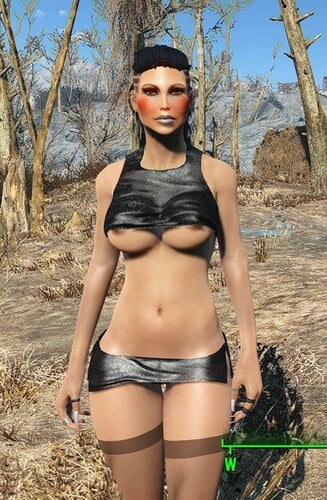
Wutpickels Gina
By Guest
Looksmenu preset.
Should be going into this folder if you run Vortex. Fallout 4\Data\F4SE\Plugins\Presets
Otherwise you can install it with MO2.
It may be helpful if you use 2K textures to use this file if you use any 2K textures.
Looks Menu Customization Compendium at Fallout 4 Nexus - Mods and community (nexusmods.com)
There two optional files that will help, so you do not get the buggy face.
Cheers.
152 downloads
Updated
-
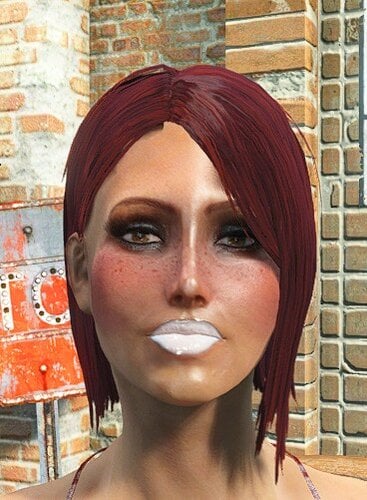
Wutpickels Uma Looksmenu Preset
By Guest
Looksmenu preset.
Should be going into this folder if you run Vortex. Fallout 4\Data\F4SE\Plugins\Presets
Otherwise you can install it with MO2.
It may be helpful if you use 2K textures to use this file if you use any 2K textures.
Looks Menu Customization Compendium at Fallout 4 Nexus - Mods and community (nexusmods.com)
There two optional files that will help, so you do not get the buggy face.
Cheers.
96 downloads
Updated
-
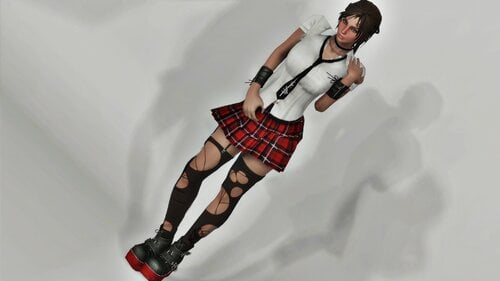
Crimson Punk - Fusion Girl
By kharneth1
Outfit ported from DOA Xtreme 3 scarlet.
Requirements
-Fusion Girl
-Bodyslide and Outfit Studio (Optional, Recommended): Included meshes are zero sliders, you need to build the outfit in bodyslide to fit it to your preset.
-Fallout 4 High Heels System: Or your character feet will be buried in the ground when use the boots.
Installation
Donwload the file, install with any mod manager. Make sure the esp is active. (It's esl flagged so it won't take max esp space).
To fit the outfit to your body shape open bodyslide and build all items in the group "Crimson Punk FG" with your FG preset.
Description
Outfit includes a shirt, skirt, boots, panties, stockings, arms, necklace and ribbon.
It has no armor value but add some special stats and can be upgrade with ballistic and miscellaneus weave. Also can be legendary upgrade, provide you have a mod that add legendary modification.
Ribbon fit Azar Ponytails, with other hair it will probably be out of place.
Boots, Panties, Skirt and Shirt have several material swaps to choose at armor workbench.
Everything can be build at chem station under the category "Crimson Punk".
Credits
-DOA Xtreme 3 scarlet
-Shuubaro: extract assets from DOA
Permissions
-Don't use any assets here for any commercial or paywalled purposes.
11587 downloads
Updated
-
Dugouts Secret Room
By Guest
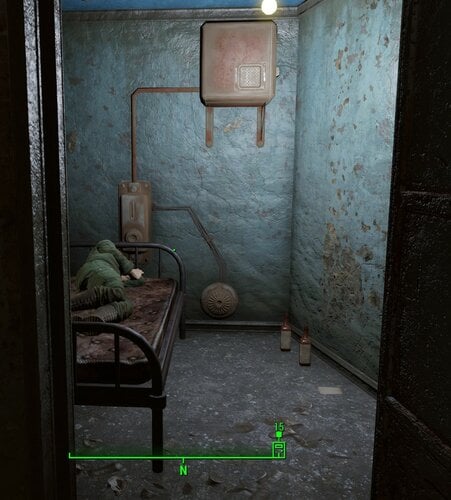
Well, i hadn't anything to do on my weekend. So i thought i create a small room of Dugout's bar. This should be space that wasn't used by the game. Just big enough for a bed.
Purpose? None. Though you could use it for some special time. Or just sleep without paying.
I tested it a little and seems to work fine. All assets are Fallout 4 assets. So there isn't anything special added.
I hope it works for you too as it does for me.
Cheers.
p,s, an NPC is using it right now. Not sure if i can make them not use it besides locking it.
242 downloads
Submitted
-
Eli's Armour Compendium precombines for Commonwealth Reclamation Project
By arshesney
Eli's Armour compendium is an excellent mod, but breaks precombines in the area around Diamond City, one of the most performance taxing in game. There's a patch for vanilla FO4 on Nexus: https://www.nexusmods.com/fallout4/mods/37260
This patch provides rebuilt precombines for Commonwealth Reclamation Project (available through ShadowOfTheWind's discord)
Required mods:
- Eli's Armour Compendium
- Commonwealth Reclamation Project
Plugin flagged as ESL, load after CRP1.esp
328 downloads
Updated
-
Assorted Mods by Invictusblade
so as Some of you know, I am going on an extended break (I don't know if I am coming back to modding(I do like modding but the game is pissing me off))
I decided to share some of my other mods
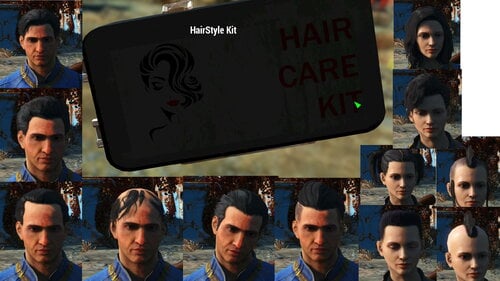
Haircut Mod
one of the things I attempted to do with Random Overlay Framework is to add different Haircuts to the game. (so an random Raider could have a haircut from KSHair for example)
and this project ended in failure because of two reasons
1. It would only affect Unique NPC's
2. when I made the mod for Advanced Hair Mods such as KSHair, it has a serious issue with Extra Hair parts (Hats, Ponytails, etc) that the extra parts couldn't be removed afterwards
so the mod posted uses hairs from the base and DLC's and require one of the haircut magazines (Not sure which) and you can craft an Aid item which will randomly change your hair cut.
BodyGen_DeadBodies - Raw
so hands up, if you have the disappeared dead body bug,
this is cause by using BodyGen to generate different shaped bodies
and when it reads a dead body, it freaks out and doesn't update it
(at least, this is what I think it does)
so here is my patch to prevent that
Raw (you will have to source the clothing yourself)
but there is a few steps before this works
1. copy and rename from \Data\Meshes\actors\character\characterassets
MaleBody to MaleBody_dead
FemaleBody to FemaleBody_dead
(NOT THE TRI FILES)
2. find an assorted clothing mod (such as Eli's or GrafPanzer's Classy Chassis Outfits)
Build them to NOT have Body morphs
and put the leveled lists into the Dead_bah_LL in the mod
BodyGen_DeadBodies - GrafPanzer's Version
so hands up, if you have the disappeared dead body bug,
this is cause by using BodyGen to generate different shaped bodies
and when it reads a dead body, it freaks out and doesn't update it
(at least, this is what I think it does)
so here is my patch to prevent that
GrafPanzer's version (I really like this series of mods)
I use all of GrafPanzer's clothing mods(Cheeky, Foxy, vulgar, and saucy) and I use both downloads
Replacer for everyone living
Craftable for the dead (I also added Player_cannotEquip keyword to them as well)
and then rework the recipes to turn the Craftable into the replacer (so reverse them)
but there is a few steps before this works
1. copy and rename from \Data\Meshes\actors\character\characterassets
MaleBody to MaleBody_dead
FemaleBody to FemaleBody_dead
(NOT THE TRI FILES)
2. find an assorted clothing mod (GrafPanzer's Classy Chassis Outfits)
you need to download the mods from this author here->
https://www.nexusmods.com/fallout4/users/977500?tab=user+files
Build the craftable clothing to NOT have Body morphs
My Tattoos Overlays
I love Overlays, I loved making them
and here is my personal file of Overlays (it should work)
(I based it of another overlay mod)
it contains content from XXX, Manga, Comics and Other Games as well as Random Fallout content
as well as other peoples work whom I am big fans of such as Dialup Hero (btw when I made this, I thought he was finished)
https://slushe.com/dialuphero
this contains a blank file for non Random Overlay Framework
as well as Random Overlay Framework version
Boston Breeder - Main
I am a big fan of Boston Breeders, I love the concept of micro stories in the commonwealth
but there are issues with the mod, Mainly the Loose Blank Voice Files (and issues with that)
so here is a 10meg file that unpacks to a 1gig file (this should speed things up if you have issues at startup)
Instructions
1. check the /sound/voice/ folder of Your Fallout 4 Data (there should be two folders that look like /sound/voice/Boston Breeder.esp & /sound/voice/Fallout4.esm)
2. delete both folders (I believe that Boston Breeder is the only mod to use the /Fallout4.esm/ folder)
3. unpack zip into Data (so Boston Breeder - Main is next to Boston Breeder.esp)
btw there is a chance that I missed some voice files (but i don't know what it does)
3695 downloads
Updated
-
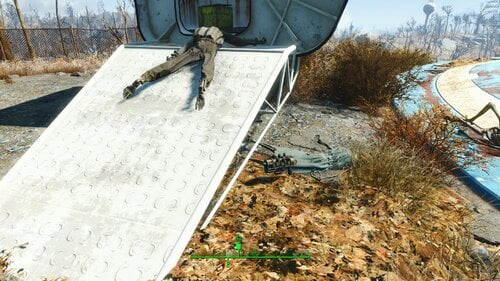
Plasma "Recharger" Weapon v2
By Victor14
2021-05-29 - NEW SECTION
A new version of this file has been uploaded. The following changes have occurred:
* The weapon has been made unscrappable in order to prevent accidental scrapping when at a weapons workshop. And, besides... Why would you want to scrap a recharging plasma weapon anyway? ?
2021-05-29 - END OF NEW SECTION
2021-05-07 - NEW SECTION
A new version of this file has been uploaded. The following changes have occurred:
* The plasma weapon is now contained inside of a suitcase. The suitcase is in the same location as where the plasma weapon was originally (slightly underneath the ramp to the enclosure just after you have exited Vault 111, which is at the beginning of the game). The screenshot is slightly outdated but still valid; Where the plasma weapon is in the screenshot is where the suitcase is now.
* The suitcase also contains a lore-friendly note that describes the properties of the plasma weapon: (1 shot generated per sec, shuts off after 60 shots total in inventory, having more than 60 shots exposes player to radiation, dropping weapon causes all shots in inventory to be removed, dropping weapon when the player has too much ammunition exposes players to a brief radiation burst). NOTE: The notes describe a more lore-friendly plasma weapon but the weapon in this version is still the same overpowered one as in previous versions.
* The plasma weapon is now completely unmodded and should be unmodded. In the prior version where the weapon was already in the game, the weapon may have generated into the game world with a stock or scope or some other mod.
2021-05-07 - END OF NEW SECTION
2021-05-04 - NEW SECTION
Added screenshot to illustrate where a physical copy of the recharger weapon is located. If you can not see the screenshot, the weapon is located near the ramp to the enclosure just after you have exited Vault 111 (at the beginning of the game).
Added a new version of the file that now has a recharger weapon physically in the game. You may still use the console commands to acquire a copy of the weapon, should you so choose.
2021-05-04 - END OF NEW SECTION
2021-05-01
OVERVIEW - The file contains one overpowered (consider yourselves warned) unmodded plasma gun that regenerates unique plasma ammunition once per second to a maximum of sixty rounds. This is an evaluation version of this mod and the weapon is not located within the game world. You need to add the weapon to the player using the console command "player.additem xx000f9b 1" (do not type the "xx" as this is reserved for your mod index order; if this mod index order number is "1a," you would type "1a000f9b"). No screenshot is needed; This is an ordinary-looking plasma gun just as in the game.
The weapon is:
** Power Armor friendly.
** Mod attachment friendly (you may mod it just as you would a normal plasma gun).
** "Never Ending" legendary mod friendly (should you add it through the console commands).
Dropping the weapon onto the ground eliminates all of the unique ammunition from both the weapon and your inventory. However, unequipping the weapon does not affect ammunition count.
There are two scripts in this mod for those who are sensitive about adding mods with scripts. As with all mods that contain scripts, do not use this mod on any savegame that you do not want to unduly influence permanently.
The file was compressed with 7-zip. It should (hopefully) work "out-of-the-box" if installed with Mod Organizer 2. Otherwise, you can unzip the file manually and install the individual files manually (it is just one .ESP & two .PEX files with two optional .PSC files).
The mod is only dependent upon the Fallout 4 base game (no DLCs required).
"It's not a bug, it's a feature" warning - As of this version, the unique ammunition for the weapon may be dropped from the Pipboy menu. It's not exactly game-breaking, but... You should be aware of it. I'm not presently smart enough to make the ammunition a quest item (if it is even possible). But if you are smart enough, I would really like to hear from you (hint hint).
Enjoy.
231 downloads
Updated
-
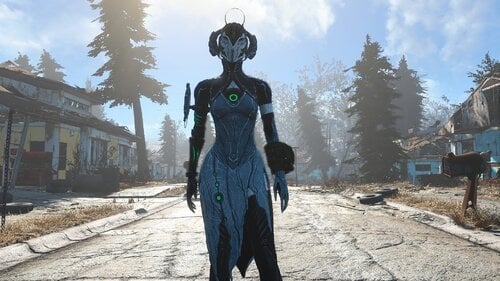
Soprana Suit
By Hive17
Craftable at chemlab
Skirt has cloth physics and also can be hidden at armor workbench
CBBE bodyslide support included
1401 downloads
Submitted
-
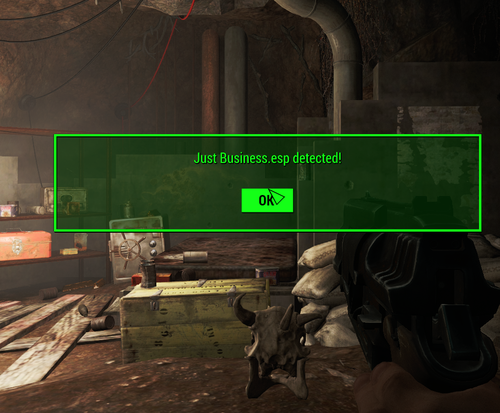
Is It Loaded?
By DocClox
Simple little doodad to check if the game can see a particular mod. It's got one item, a brahmin skull with an onload script. When the skull's 3d loads, it checks to see if the mod named in it's "Mod" property is loaded and pops up a message box, yay or nay. By default it detects "Just Business.esp", but crack it open with xEdit and change it to whatever you need.
There's an instance dropped in the Sanctuary storm cellar, but feel free to place it wherever suits your needs. When you're done, unload the mod with no lasting effects. Or pick up the skull and drop it in the workbench for some free bone ingredients.
I should stress, this is a modder's resource and does nothing interesting from a gameplay point of view.
443 downloads
Updated
-
Plasma "Recharger" Weapon
By Victor14
PLASMA "RECHARGER" WEAPON
OVERVIEW - 2021-04-11 - This file contains an overpowered (consider yourselves warned) plasma weapon that, when the last round is fired from it, you receive ammunition for it in your inventory. The weapon holds 30 rounds. This is a preview version of this mod and the weapon itself is not placed anywhere in the game world; You must use the console command to add the weapon. Enter into the console "player.additem xx000f99 1" (do not type the "xx" as this is reserved for your load order / mod index number so, if that number is "1a" you would type "1a000f99"). The weapon takes standard plasma cartridges and you may acquire them however you would prefer ("0001dbb7" in case you are interested and, since it is part of the base game, no modifying of that number is needed). Admittedly, you do need to reload the weapon. However, this version of a "recharger" weapon is completely Power Armor-friendly (as far as I could test it). It does contain a Papyrus script fragment (for those who are interested in whether the mod contains scripts or not).
No screenshots are necessary; It's just a regular-looking plasma weapon that regenerates ammunition (so long as you do not manually reload it). I used 7-zip to compress the file; Depending upon how you would prefer to install the mod, your mod manager may automatically decompress the file. If, for whatever reason, this mod does not work as intended, please let me know and I will make any corrections necessary.
At any rate, enjoy.
28 downloads
Submitted
-
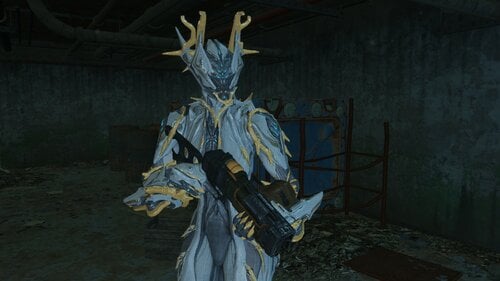
Valkyr Prime Suit
By Hive17
Craftable at Chemlab
You can upgrade both helmet and suit, and change their appearance at Armor Workbench
Some parts of suit optional and can be hidden
1319 downloads
Submitted
-
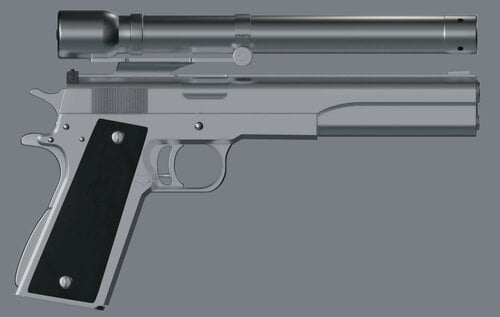
AMT 45. Longslide 3D model modder's resource
By Fixadent
3D model (Blender) modder's resource of the Arcadia Machine & Tool 45. Hardballer Longslide.
IMPORTANT: Model is only partially textured, and there are no animations.
A skilled modder and animator is going to need to figure out how to get this asset Fallout 4 as a usable weapon.
https://www.youtube.com/watch?v=k0kg80jAtI8
43 downloads
Submitted
-
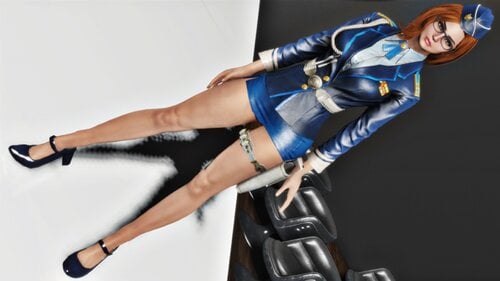
Xavier's Clothing - Fusion Girl Bodyslide Files
By kharneth1
Fusion Girl Bodyslide Files 1.75+ (1.80 cv) for some of Xavier's clothing mods. (Original mods required). At the moment covers Leifang, Chojiyoon and Claire Officer.
Requirements
-Fusion Girl
-Bodyslide and Outfit Studio
-Fallout 4 High Heels System
And the original file/s for the conversion/s you want, of course:
-Xavier's DOA5 Leifang 1.0.0
-Xavier's ChoJiYoon Outfit 1.0.0
-Xavier'RE2Remake Claire Sexy Officer 1.0.0
Installation
Install with any mod manager. Open bodyslide, build the Fusion Girl version of the outfit with any FG preset you fancy. Fusion Girl versions outfits have the original outfit name with FG at the end.
Credits:
Xavier19870828: For doing all this ports.
Look for more FG outfit in the FG official armour and clothing here in loverslab
5787 downloads
Updated
-
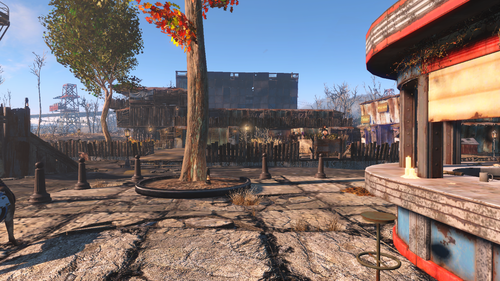
FO4 Starlight Drive In Blueprint
By Neodarkside
Here is the Blueprint for my Starlight Drive in settlement for Fallout 4. Mod required to import the settlement is Transfer Settlements which can be found here. https://www.nexusmods.com/fallout4/mods/22442
That is the only hard requirement of course, however I used assets from the following mods.
The plugins listed are not hard requirements, if you do not have them installed it will skip adding the items. I believe the option to skip mod items exists in the Import menu for Transfer Settlements. To better explain if you want/need each of them, here is what each added.
ArmorKeywords - Added the Armorsmith Crafting table, used to avoid using the Chemical crafting station for various downloadable Armor.
Homemaker - Added various new lights, trees, hedge fence, and stairs. (Highly recommend)
BetterStores - Adds the Neon Signs shown in the picture as well as various objects in the settlement (Highly Recommend)
Eli_Crafting Shiz (Can be found listed as Crafting Fury 9000 on Nexus) - Adds various objects to the settlement
Colored Workshop Lights - Adds the colored lights like above.
Installation
Very easy, Unzip the folder and paste it into -> Fallout 4 -> Data -> F4SE -> Plugins -> TransferSettlements -> Blueprints
In Game craft the Transfer Settlements tape in the Chemical Crafting station, go to Starlight Drive in after its been cleared of Mole Rats and claimed as a settlement. You will want to scrap all the cars, the radioactive barrels in the water, the speaker poles, and perhaps all the skeletons. You will also need to go into the Screen building and scrap all the shelves in the locked backroom as well as the fridge, grill, and crib in the side room, otherwise Crafting tables will be clipping thru them.
Use the Transfers Settlement tape and chose Import and pick file 12, should be labeled Octavia Starlight etc (basically the name of the character who built that settlement). Shouldn't need to touch any of the options and import it as is, but like I said, if any of the addons are not present, might be able to click an option to not attempt to import them. The mod will import the settlement in a rather flashy way. Best thing to do once its imported is Fast Travel away, stay a night, and Fast Travel back and things should be situated.
Highly recommend the mod Scrap Everything. It allows for things that normally cannot be scrapped, like those pesky Mole Rat holes. Just be careful as you can scrap the entire building and projector and even the roads in any settlement. There might be a safer version out there but this is what I have been using for years to clear unwanted clutter from settlements.
Many objects were placed into walls or the floor using a mod called Place, allows for actions such as the Water purifier that is currently buried into the water and Wood/Concrete foundation placed over it. (originally was open beneath it but settlers would phase thru the floors and roam around in the water beneath the floor).
The blueprints take up the courtyard between the Projector and the Screen and doesn't add anything to the buildings themselves. The crafting Tables are located in the back 2 rooms of the Screen itself. The center of the settlement has 9 planters with the various food needed to make the Adhesive item in the cooking station plus a few extra types. Should provide a total of 24 food if fully staffed.
Side building has 3 stores, level 3 Trader, Level 2 Weapon, Level 3 Armor. Main building lower level has the Bar on the right side as well as a Medic station, assuming you have Homemaker (Medic's station is the rug in the left corner) and Better Stores for the Bar. Left side of the bar is the players house, tried to make something like a interlocking door system. Lock the outer door when you are home to keep people out of your place, and lock the inner door when you leave (mostly for Roleplaying, I've come home to Settlers sleeping in my bed).
On either side of the lower level and the upper level are settler homes, I left the far right room on the lower level with a open wall to the bar so the bartender could walk into their own room, just need to assign it to the bartender. Should be beds suitable for 14.
Turrets are set in the most common attack spots, the hedge fence behind the Settlement tables shed keeps most enemies at bay long enough for the turrets and defenders to clear them while the turrets on the opposite side and the guard stations to defend the other side. In my game I have 2 guards, one set for the 2 larger guard towers on either side and the one closer to the gate and they patrol between them and one loan guard in the middle. There is a turret at the very top of the Screen, for those curious why the hell thats there, well I use a mod True Storms and for the Rad Storms option I enabled Ghoul Swarms, 30% during a Rad Storm that packs of ghouls will begin spawning, they tend to spawn up there so that turret clears them out.
The Settlement is as current "finished" tho I have been tweaking it here and there in my play thru, its what has been my players home in my current play thru and is the state of it when I exported it (hence the lvl 2 weapon seller). If people just want a bare bones version of the settlement without decorations, crafting stations, trader posts etc, I could upload one, but its easier if you did it yourself. Just make a save, import it, scrap what you don't want, export it to a new file, reload the save and import the clean location.
Credits go to the various modders who made the plugins. Feel free to change and alter the design, just don't upload it on the Nexus or here claiming it as your own. Any questions feel free to make a post or message me.
197 downloads
- blueprint
- settlement
- (and 1 more)
Submitted
-
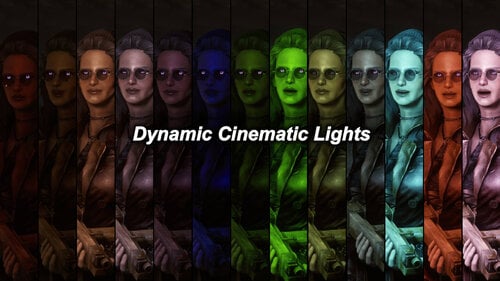
Dynamic Cinematic Face Lights
By Reginald_001
Automatically adds a light to faces during dialogue when it's dark!
Fully configurable. 15 different light combinations (5 colors, 3 intensities).
How to use the mod
You can install the mod at any time in your game progress. The mod will 'unlock' once you load your game and move into a new area. You will receive a new (settings) keyworded holotape in your inventory, which you can use to configure the lights with.
Compatible with all other face light mods
Note: This mod is primarily meant as aid during gameplay. It's not meant as a tool for beautification shots (but it can be used that way when in dialogue). The light is not bound to players or NPC's and cannot be turned on permanently.
Light Intensity Configuration
You can configure the light to 3 intensities: Dark, Normal and Bright.
Light Placement Configuration
You can configure the light to 4 preset locations:
- Low (Chest height)
- Medium (Right above face height) (Recommended setting)
- High (Above head)
- Very High (High above head)
Important: The light will always be placed between you and your first dialogue target.
KNOWN ISSUE: With 'High' and 'Very high' the light sometimes is not visible in areas with a low ceiling.
When to trigger the light to appear Configuration
You can configure the light to trigger as follows:
- Always during Dialogue (Recommended setting)
- Only when it's Dark (light level is beneath 50%)
- Only when it's Very Dark (light level is beneath 25%)
- Only during night time (From 18:00 - 08:00)
Important: When triggered to dynamically turn on/off depending on light level. The script will check the AVERAGE light level between you and the NPC's you are talking to. If you are 100% in the light and your NPC is 0% in the light, then the average calculated will be 50%.
KNOWN ISSUE: The light could 'blink' on and off when NPC's or players are standing under the shadow of a tree.
Installation
Install like any other mod. Use vortex or another mod manager.
You can safely uninstall this mod AFTER disabling it through the holotape.
14470 downloads
Updated
-
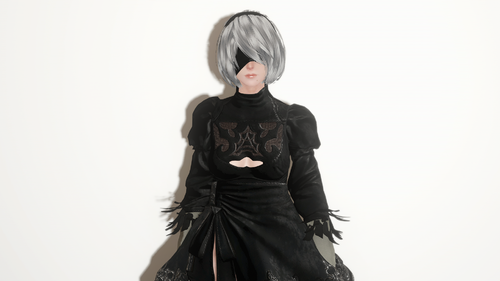
Model 2 Type B or Attacker Number 2 Follower/Replacer
By guicool138
Model 2 Type B or Attacker Number 2 Follower/Replacer
This mod replaces Curie/Cait/Piper or adds a basic follower that looks like one of two androids featured in the smash hit Nier: Automata.
They are Model 2 Type B, also known as 2B, or Attacker No. 2, known as A2. 2B comes with her iconic maid-like outfit, while A2 comes with both short and long hair versions, as well her original outfit and DLC one.
The replacers are updated to the UFO4 Patch.
This mod requires CBBE if you want to use different clothes on her, otherwise, it's standalone.
Pick your favorite version and CBBE Bodyslide via FOMOD.
How to use
Activate via your favorite mod manager.
Pick your options.
Play the game normally. Note: if you selected any of the replacers for Curie/Cait/Piper, they will be 2B or A2, depending on your selection.
Known Issues
Her clothes has parts that clip with each other. Her skirt have physics but it's quite broken, but you won't notice much. The basic follower version means you can't talk to her or change her outfit. The A2 non-DLC outfit is kinda bad, but you can't really notice much, unless you really look for it.
Credits
Square-Enix and Platinum Games: Awesome game and the resources that were ported in the first place.
Bethesda Game Studios for Fallout 4 and the Creation Kit, obviously.
saltmaxwell for porting her head mesh to Fallout 4 with face anims and making the light skin textures. Link: https://www.loverslab.com/files/file/7772-2b-race-hair-skincbbe/
Xavier19870828 for porting her body to Fallout 4, I also used the feathers from it. Link: https://www.loverslab.com/files/file/6141-niers-cosplay-outfit/
TeamTAL's Nier Automata 2B for SSE: Armor I converted to Fallout 4.
immyneedscake: For the A2 DLC outfit and long hair port to SSE, which I converted to Fallout 4.
Dint's Nier Automata: for making the A2 port for LE.
Reyxco for making a clean version of A2's outfit. Link: https://steamcommunity.com/sharedfiles/filedetails/?id=1197445174/
TheRottonCore: Fixing the 2B and A2 short hairs
Outfit Studio; Material Editor; xEdit: Good shit ?
Me (guicool): Make the follower replacers, port the 2B outfit from SSE, the A2 DLC outfit from SLE, making it all work together.
Notes
All bugs from the vanilla followers still exist, I can't fix those. I did however fixed their Actor entry in the CK with Unofficial Fallout 4 patch values.
I don't own any of these things, I just put it all together, which was a massive headache.
Please don't ask for a non-CBBE version, I have no time to make something I don't use.
If you want a player version, use saltmaxwell's mod.
14592 downloads
Updated
-
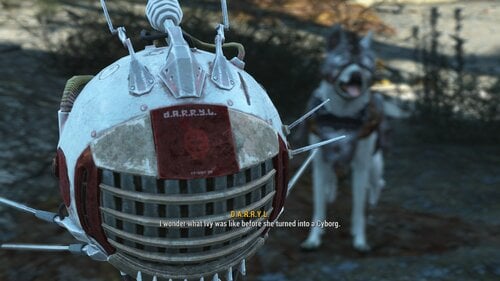
The Extended Lore Project (Beta)
By Reginald_001
WELCOME TO THE EXTENDED LORE PROJECT (BETA)
After 2.5 years of development I am finally at the point where I feel comfortable in releasing a public BETA version of this mod.
Adds a unique Eyebot companion (D.A.R.R.Y.L) with thousands of lines of dialogue about the locations you visit in the Commonwealth.
DARRYL has unique features such as an area scan, automatic alerting when enemies are nearby, all fully configurable!
Adds over 100 'lore items' in the world, notes, holotapes, etc.. that you can find and collect in the world, further deepening the history of locations with both small and personal histories as well as major historical events.
Why BETA you ask?
The only real reason is that I still have to add over 300 more locations to him, but with each location needing research and writing, this is a slow process. It is my hope that I can do semi-regular updates providing Darryl with new locations in the future.
As part of a secret organization called The Think Tank, Darryl has been tasked to accompany you--if you choose it--and to provide you with detailed information about the history and tactical status of many locations you visit in the Commonwealth. With an ever growing number of locations being added, eventually all locations in all DLC and some of the bigger mods (e.g. The Thuggy Universe) will be added to the mod.
DARRYL IS D.I.F.F.E.R.E.N.T.
Darryl does not fill a regular follower spot and can be used with any other followers you are traveling with. Darryl uses his own follower system, completely outside of other systems. Darryl is fully configurable using an ingame holotape. Darryl does not engage in any form of combat. When combat starts he will cloak and leave the area for a short while so as to not get in the way. Darryl currently has historical information on 220 locations in the Commonwealth. Darryl can not be customized through a Robot Workbench. Extreme care has been taken as to NOT break any precombines in locations where lore was added.
THANKS:
JoerQC for continued tech support Thuggysmurf for continued tech support The Valkyrie community The Ivy League KChurch for being my wingman The IVY Test Team for their continued support and endless patience while helping me test my mods.
MODPACK CREATORS: READ THE OPT-OUT.TXT FILE. YOU ARE NOT ALLOWED TO PACK THIS AND REDISTRIBUTE IT IN ANY WAY.
2703 downloads
Updated
-
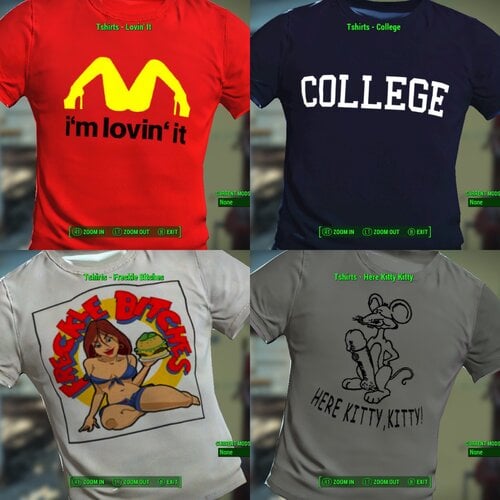
Cool T-Shirts
This Mod adds 48 Cool T-shirts with funny slogans or just cool pictures/logos.
Now you can travel the commonwealth in style with your cool T-shirt on!
The logos and wording gets distorted on larger breasted women.
bodyslide files for Fusion Girl and CBBE.
I have included my meshes for males. the default is for EVB males fit.
I do not know how to make bodyslide files for bodytalk and have not yet upgraded to body talk 3 so they might not work properly anyway.
Craft at Chem Station Under "Cool T-Shirts"
Future Plans:
- Add a vendor version to sell the T-shirts so one of the first people you meet is selling bootleg T-Shirts.
T-Shirt Requests:
I don't mind taking requests for additional T-Shirts but please find me the logo in good form to add. I will work with you when I am ready to do the next "Crop" of T-Shirts. I first want to make a vendor version.
NOTE:
The vendor is NOT VOICED, you MUST TURN ON SUBTITLES!
1138 downloads
Updated
-
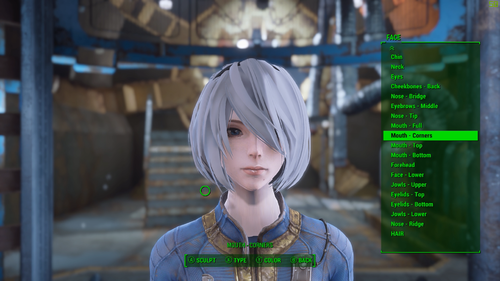
2B Race Hair skin(CBBE)
By saltmaxwell
Pardon my broken English.
Adds 2B Race (Overwrite Preset2) in character creation. Adds hair. Adds 2b eye patch (slot is Beard). *2B of Clothes are not included.
Hair change, hair color change, eye color change is possible.
Please select "01_2B_eye color" when changing eye color.
*Skin color can not be changed.
*"Extra"(Makeup and damage) can not be used.
------ Required Mod ------------------------------------
CBBE
Unique Player and Followers REDUX(CBBE body skin textures)
IN-GAME ESP Explorer(to get 2B eye patch.)
SSF - Skeleton Style Framework
The Eyes Of Beauty Fallout Edition
--------------------------------------------------------------
------ Using Mod ------------------------------------
Extended Facial Sculpting - now with 90 percent less beta (can adjust the face from Ver 4.1. I've confirmed that this mod also works. )
30727 downloads
Updated
-
Immersive Power Armor HUD(s) WIP
By warbaby2
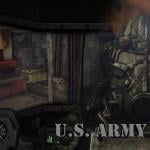
Since I'm a bit of a power armor/mecha nerd, the helmets/cockpits of the FO4 PAs always bothered me a bit. They fit the purpose, but just are not immersive enough. In my opinion, PAs should make one feel protected, powerful, and an immersive helmet UI is a very big part of that illusion. So I started pulling my photoshop and (limited) modding skills together and started working on my own little mod by riffing off the other PA UI mods on the Nexus, and I think I did quite well for a start.
CURRENT CONTENT:
- Raider power armor helmet and dashboard with different visual options like decorations and damage effects.
- T-45 power armor helmet and dashboard with different visual options like decorations and damage effects.
CURRENTLY WIP:
- T-51 power armor helmet and dashboard with different visual options like decorations and damage effects.
- T-60 power armor helmet and dashboard with different visual options like decorations and damage effects.
- X-01 power armor helmet and dashboard with different visual options like decorations and damage effects.
FUTURE PLANS:
- Implementation of HUDs for popular mods like the Enclave X-02, T-49, Tumbajamba's Combat Power Armor, etc.
- Exploring the possibility of making the game auto switch HUDs based on PA helmet used and it's damage state.
- Possible implementation of visible first person helmet visors into the game.
INSTALLATION:
Pick the HUD by power armor model you want to use and install via NMM/MO. The file structure inside the ZIP is optimised for mod manager use, so I wouldn't attempt to install them manually.
DEINSTALLATION:
Just remove via mod manager or delete the following files:
*\data\meshes\effects\CameraAttachedFX\CameraAttach_WetArmorView.nif
*\data\meshes\interface\objects\padashdials01.nif
*\data\meshes\interface\objects\PADashPipboyScreen.nif
*\data\textures\effects\ColorBlackUtility.dds
*\data\textures\effects\NixieTubeNumbers01_d.dds
*\data\textures\effects\PowerArmorVisorGlassFX_d.dds
*\data\textures\effects\PowerArmorVisorGlassFX_n.dds
*\data\textures\effects\PowerArmorVisorGlassFX_s.dds
*\data\textures\interface\PA <whole folder>
CONFLICTS:
Should only arise when used with mods that change meshes and/or textures associated with the power armor HUD or power armor pip UI. Just install "Immersive Power Armor HUD" overwriting any conflicts, and it should work as intended.
REQUIREMENTS:
None.
CREDITS:
Picture artworks done by the wonderfully talented Chipman Starratt (http://chipman1911.deviantart.com)
Textures and meshes inspired by:
Makconner's Spartan Cockpit - http://www.nexusmods...t4/mods/22246/?
KeithVSmith's Power Armor HUD Visor - http://www.nexusmods...ut4/mods/6985/?
Hellstorm102's Power Armor HUD - No Transparency - http://www.nexusmods...ut4/mods/3106/?
6124 downloads
- power armor
- HUD
- (and 5 more)
Updated
-
Red Rocket Basement
By Reginald_001
Welcome to the Red Rocket Basement Player Home Update 2! (V1.0.3)
VERSION 1.3 IS NOT PHYSICALLY DIFFERENT FROM VERSION 1.2. IT JUST CHANGES THE VOICE.
During its checkered past, the basement below Red Rocket had always been a perfect place to handle the more... shady business of Power Armor repair and underground dealings. Favored by local criminals to tune stolen goods, the cave access in the back gave them means to move, and repair, both stolen cars and power armor unseen. Now collapsed, the back entrance to the cave cannot be entered, but its secret entrance on the hill right in front of the shop makes it an ideal place to stay, while your settlers work up top. Shielded from both radiation and the dangers from up top, it's as secure as a vault!
Features
RR Basement is a simple undecorated player home. It has a workshop and quite a few resources you can scrap before you decorate it. You can use all interior workshop elements. Power is supplied at two places, players need to add their own power nodes to expand power across the home. The workbench is (SHOULD BE) connected to the workshop up top. This means that if you create a settlement at Red Rocket truck stop, you could in theory live out your days in the basement, while your settlers gather resources, food and water. Settlers will NOT enter the basement so everything there is yours.
Thank YOU for direct or indirect support:
- @urbanoantigo (ptBR translation)
- Chic Geek
- @Fiona159 (Ru translation)
- @Nebuchadnezzer2 (for being supportive)
- @Flashy (JoeR) for helping out when needed and furthering my knowledge of the engine
- Anyone I might have forgot to mention and I'm sure I have...
New features include:
- A maid that can satisfy many needs and keeps the basement clean and fresh..
- A terminal to provide you with configuration options (such as music, doors etc..)
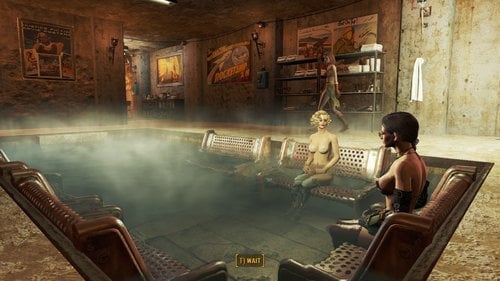
- A bath pool
- A sauna.
- 3 New rooms to explore and decorate.
Portugal/BR translation available!
Download the Red Rocket Basement_v1.0.2_ptBR.7z file and overwrite it's contents, after installing the original file!
Russian translation available!
Download the RedRocketBasement1.0.2_ru.7z file and overwrite it's contents, after installing the original file!
How to Enter
For game balance the home is not available right away in a fresh game. You'll need a lock pick skill of Expert to be able to lock pick the entrance!
If you can't wait, you can always cheat:
Known issues
NPC's and companions should have no difficulty navigating through the player home, unless you fill it up completely with furniture and book cases. All nav meshing was done by hand to ensure smooth navigation and I've play tested this player home thoroughly after making it over 6 months ago. I've been tweaking and adding rooms slowly since then and I found that this size was the best size for me so I can live in comfort, while raiding the wasteland...
At some places the wall meshes don't really align well, this can cause some overlapping/flickering lines here and there. This will be tweaked in the future as I find them, or if they really bother me.
Installation instructions
Drag the 7zip file into your mod manager and activate it... OR:
Unzip it manually into your Fallout 4 directory.
WARNING 1.0.1 IS NOT YET AVAILABLE ON NEXUS.
Older version available from Nexus Mods:
https://www.nexusmods.com/fallout4/mods/35056/
WATCH THE VIDEO TO GET AN IDEA OF THE LATEST FEATURES
RR VID 2.mp4
Australian Maid Voce.
Maid Bot Aussie Intro.mp4
Maid Bot Aussie Dialogue.mp4
See the download topic for more screenshots AND a layout of the place!
Warning: All screenshots reflect ONE way that you can decorate this home. It's very reactive to the light you use, so you can do with this whatever you desire.. make it a cozy fire lit place.. make it a bright workshop.. or a dark underground sex basement.. it's up to you!
9307 downloads
Updated
![More information about "LoveWorld (Alpha 0.0.1) [Forge 1.20.1]"](https://static.loverslab.com/screenshots/monthly_2026_10/LW_alfa_main_001.thumb.png.4391d2d62de1509e21d15a616eb364d1.png)
.thumb.gif.26abf4f712e1a3b1ca799a5728e46259.gif)