Select a subcategory to view available files.
Files From Subcategories
-

Albino & Two More Dark Skin Options
By Victor14
2020-12-25 - New Section - Screenshots Added - Other Information
Three screenshots have now been added to better illustrate the new skin tones that were added, one for each of them. From left to right: Albino, Black & Very Dark. I hope that these screenshots assists people in wondering if this mod will help them create the character of their choice. If not, please let me know. Also, as these skin tones are "color forms" no different than the typical skin tones found in the menu, they should work for any type of model (CBBE, Fusion Girl, Jane Bod, etc.).
For those who may not be adept at using the console commands to get to the 'looks menu' after you have initiially created your character in-game, the command is "showlooksmenu 14 1". This is how the screenshots shown here were created (my apologies for the Albino screenshot... She was very fidget-y!).
2020-12-25 -End New Section - Screenshots Added - Other Information
OVERVIEW
This is an .ESP that adds three additional skin tones to the Human race (namely, you): Albino, Very Dark & Black. All three are "color forms" (Creation Kit's terminology) that were already in Creation Kit but I have simply repurposed them to be available for use when creating a character. "Albino" is simply the "white" color form relabeled; "Very Dark" is unchanged (for whatever reason, Bethesda created it but never implemented it as an option); "Black" is literally the "black" color form but capitalized because I hear that capitalizing the word 'black' is the politically correct thing to do these days.
NOTES
The compressed package used 7-zip; Use that program to decompress the zip. Just place the .ESP in your DATA folder or use a mod manager. Remember to 'activate' the mod so that the game knows to use the mod with your game. I don't know why simply editing in 3 additional skin tones caused the ESP to be 127k un-zipped.
Please do not re-distribute; It's merely a simple file and I want to see if this becomes popular; If so, I may include more colorforms in a future edition. Thanks.
513 downloads
Updated
-
"Recharger" Lazer Pistol
By Victor14
2020-12-25 - NEW SECTION - "OPTIONAL" INSTITUTE LAZER PISTOL
I have decided to include a new .ESP with this file (ZZZLasergun2) that is the exact same (provides a weapon with the "recharger" ability) but uses the Institute Lazer Pistol model instead of the typical lazer pistol. It is mostly overpowered and I include it hesitantly if only because I was disappointed with the outcome. My disappointment comes from the fact that the pistol itself is very bulky and obscures too much of the screen in first-person mode, especially when you 'mod' the pistol up (such as a longer barrel). Everyone's personal preferences are different, though, and I include this new .ESP in the file for those who would like to try it out for themselves.
Nothing has been removed from the previous version of this mod; Only ZZZLasergun2 has been added to it.
I think that this is fully compatible with the ZZZLasergun .ESP as well so that the two may live side-to-side but I did not fully test that possibility out. You do not need to rename the ZZZLasergun2 (as opposed to ZZZlasergun & ZZZlasergun_overpower, for which they were the same weapon but one was an overpowered variant and one was normal but with the "recharger" ability) file; It may be inserted as-is.
2020-12-25 - END NEW SECTION - "OPTIONAL" INSTITUTE LAZER PISTOL
2020-11-28 - NEW SECTION - NEW BUG
Described new bug in "BUGS" section. I hope that you don't plan on using power armor...
Also, minor editing here and there...
2020-11-28 END NEW SECTION - NEW BUG - MAIN SECTION BELOW
Overview
This file is for a "recharger" lazer pistol in the spirit of the recharger weapons from Fallout: New Vegas. I have placed the word "recharger" in quotes for a good reason: It is not entirely a recharger weapon in definition of F:NV but emulates it to the best of my programming ability. Whenever you fire one shot from the pistol, one unit of ammunition appears in your inventory. There are two known "bugs": The weapon may lose it's recharger function if you use the console command to change your face (not alter an existing face but change it wholesale) or if you start a new game with the mod installed. The bugs may be resolved by unloading the mod, saving the save game without the mod, then adding the mod back in. There are two versions of this weapon: One that is of normal strength (a typical lazer pistol but with the recharger capability) and one that is vastly overpowered.
Description
I have created a lazer pistol with a recharger-like ability, in that for every pull of the trigger a new unit of ammunition (a fusion cell, in this case) is added to your inventory. This ability functionally gives to you a limitless supply of ammunition. You still must manually reload the weapon (unless you attach the "never-ending" legendary mod to your weapon, which is "[the weapon id].amod 001cc2ac" for those who are curious). The lazer pistol uses the typical lazer pistol model. The pistol may have weapons mods attached to it, either through the in-game mechanisms or though console commands.
Instructions
The file is compressed using 7-zip. Decompress the file & then choose which of the two .ESP files that you would like to use: The regular, normal lazer pistol (ZZZLasergun) or the overpowered variant (ZZZLasergun_overpower). If you choose the overpowered variant, remove the "_overpower" part of the filename before using it. Insert the files however you choose, either manually or with a mod manager program. Be sure to check the box next to "ZZZLazergun" in order to activate the mod, depending upon the program that you use to manage your mods.
Location of weapon
The weapon is located at the edge of the garage of your former house in Sanctuary. I considered using a screenshot but most people should know where your character's former house in Sanctuary Hills is, where the garage is and it is right as you look at the garage from the road. There are no fusion cells to go along with it; You can either generate these through the console or you should probably have enough of them by the time you acquire this weapon. A slight spoiler for novices in the game: You can acquire fusion cells in-game by going to Concord (if you have not previously done so) near the entrance to the Museum of Freedom.
Bugs
The weapon loses it's recharger ability in three known instances:
** First, if you use the console command to change your entire face (from, say, Face01 to Face02).
** Second, if you start a new game with this mod installed. If you have a save game that did not use the mod and then you install this mod and use that save game, the weapon should work as advertised.
** Third, entering power armor for any reason (including at the Museum of Freedom where it is "necessary").
I'm not sure why the script is invalidated during these instances. I can only hazard a guess that it may involve how scripts are attached to weapons through the use of a "quest." My theory is that, whenever your person changes inside of the game (for instance, going from Face01 to Face02 through the use of console commands or entering power armor which, from my limited understanding of the internal workings of Fallout 4, renders you as a different "person"), the quest breaks and, therefore, the script stops.
These bugs may be resolved by unloading this mod, saving the affected save game, then re-loading the mod. I do not consider myself an experienced Fallout 4 scripter/modder & there may be other scenarios where the weapon loses it's recharger ability; I have not found them yet.
Scripts
The mod does contain a script and it should be noted that, from my understanding for how Fallout 4 save games work, the scripts are "baked" into the save game. There are some players that are very sensitive to this information and others who are less sensitive about that information.
Permissions
Please do not redistribute this file. There are many reasons for my not wanting this file to be redistributed. One of those reasons is that this file is somewhat personal in presentation: The weapon is not placed upon the ground realistically, the weapon is rather unrealistically placed within the world (it's not in a laboratory & it's very easy to find), etc. so forth. The file works well enough for me and, I hope, that it works well enough for you but the time and effort to make it "lore-friendly" would be counter-productive for me at the moment. Perhaps, in the future, I shall make an attempt to create a more "lore-friendly, developer-grade" mod of this type. However, I feel that most people will be satisfied with finding the weapon and using it as-is without a quest or holotape or any other lore-creating events. Furthermore, I have no idea why the script suddenly stops working if you create a new game with it installed or create a new character with the mod installed (as described previously). I suppose that there are reasons but, if there are, I haven't found them yet. Therefore, for all of those reasons and more, I would merely prefer for this mod to be presented here where I may see how many downloads and views it gets. Should it become popular, I will revisit whether to include additional elements to the mod.
And that's it. I hope that you have enjoyed this mod. Any comments or critiques, please feel free to share. Thank you.
56 downloads
Updated
-

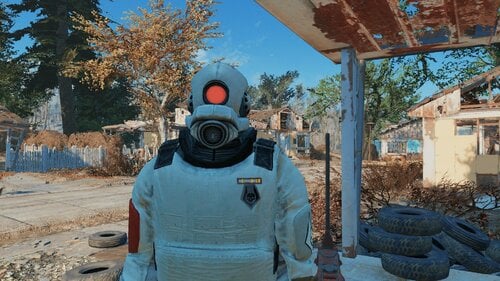
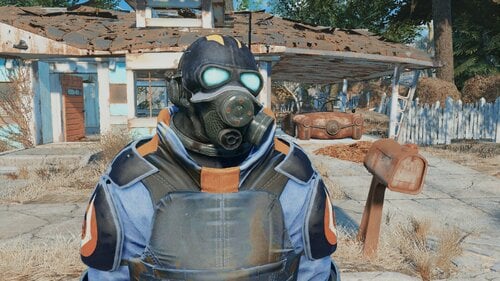
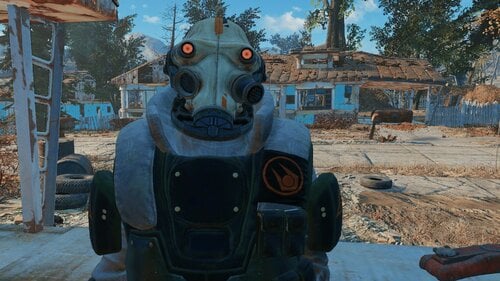
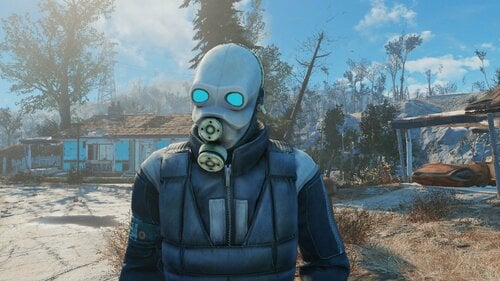
Half-Life: Combine Armors and Suits
By Hive17
Pack of armors and suits ported from Half-Life 2 and Half-Life: Alyx
All previous mods merged into one esp plus added two new armors from hl2 beta
Craftable at chemlab, all recipes hidden under C17 Combine category
4482 downloads
Submitted
-
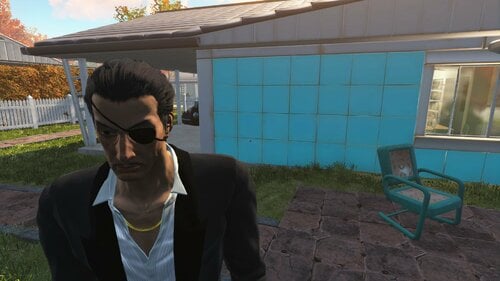
Yakuza 0 Majima's Tuxedo
By sansgaming14
This mod port's Majima's Tuxedo from Yakuza 0, and adds a new hairstyle
The suits and eyepatch can be obtained from Chem workbench under Utilities
The new hairstyle is not a port of Majima's hair mesh but is heavily inspired by it
Credits
Ryu Ga Gotoku Studio - Mesh and Textures
Bethesda - Fallout 4
459 downloads
Updated
-
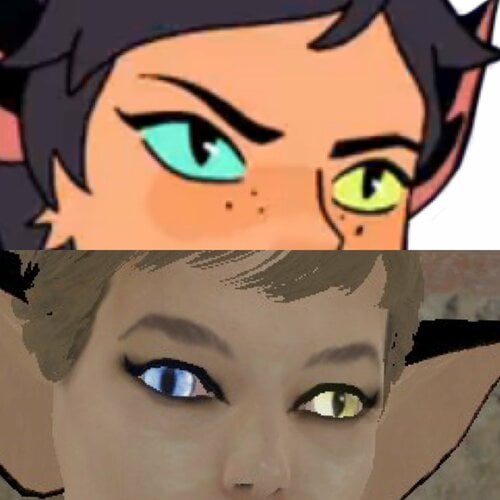
Catra - Companion NPC
Catra In all her glory can be found in the wasteland and will allow you to join her on her adventures.
FUSION Girl Based NPC follower with custom body and Custom clothing.
Includes a "tactical outfit" that I cobbled together as a combination of something a bit more realistic but is loosely inspired by her general S5 Outfit look.
I have also included a converted "Retro" outfit by PJ Thornton (perms available upon request) which is a very good creation of her original outfit worn early in the show. This can be found in her duffel bag.
Catra's demeanor can improve as you find certain dead drops and explore her dialogue a bit more. The dead drops can be looked for or ignored. This is not an expansive quest mod, the mini-quest is simply included to add a motivation for her to travel with you.
For now she is Not voiced.
In the future I would like to add some combat sound clips from the cartoon.
Where the fuck is she?
Shes in a bunker in the sewers in Concord.
- if the dialogue scene doest trigger properly reload, save before you enter her bunker, It is extremely rare (only happened once) that it doesn't work properly. It is located near a dirty mattress for those who are on survival and don't want to use a cheat save.
CBBE Patch:
This mod relies on the fusion girl body being your default body. If you Use CBBE or any mod that doesn't rely on Zex Skeleton use this patch to overwrite the fusion girl meshes.
Catra Bodyslide Body preset.
Why?
So you can convert your own outfits to her bodyshape. this WILL NOT give you heterochromia, nails and a tail. It will only let you shape Other mod clothing to fit her shape for her to wear.
Equipping her with any clothing that replaces her body will remove her nails and sometimes her tail.
To do:
expand dialogue.
Add more stuff.
Add a variant of her Formal outfit.
Add combat voice sound clips.
Let me know if there are any issues.
382 downloads
Updated
-
Submitted
-
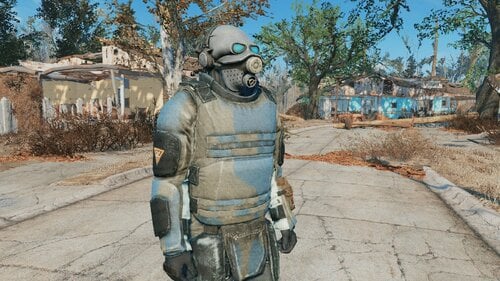
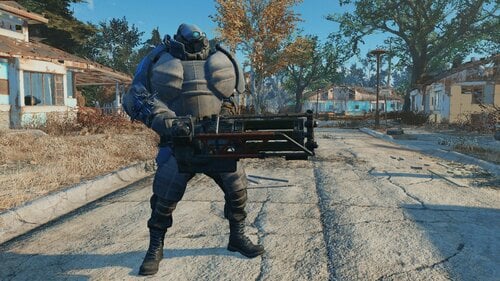
Half-Life 2 - Combine Soldier Armor
By Hive17
Craftable at Chemlab. You can change skin at Armor Workbench
444 downloads
Submitted
-
Submitted
-
Submitted
-
Updated
-
Updated
-
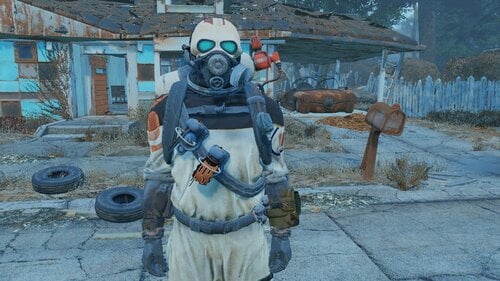
Half-Life: Alyx - Combine Grunt Armor
By Hive17
Craftable at Chemlab
You can change color and enable/disable gas tank/grenade holster at Armor Workbench
306 downloads
Submitted
-
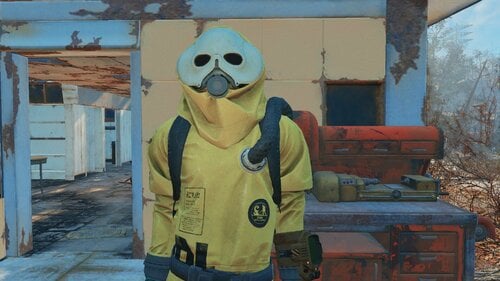
Half-Life: Alyx - Combine Hazmat Suit
By Hive17
Craftable at Chemlab
You can change color and enable/disable lens glowing at Armor Workbench
382 downloads
Submitted
-

Half-Life: Alyx - Combine Worker Suit
By Hive17
Craftable at Chemlab
You can change color, open/close helmet and enable/disable lens glowing at Armor Workbench
260 downloads
Submitted
-
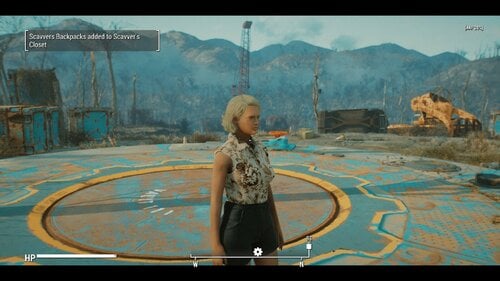
SCAVVER'S CLOSET - One size does not fit all -
By Tentacus
SCAVVER'S CLOSET
- One size does not fit all -
What's new:
I added an optional download of vanilla eyeglasses without facebones. This is to prevent them from deforming with custom faces. You may need to adjust your character's ear position for best results. It's unknown if this will negatively affect any npcs, but the glasses are just models so they are safe to uninstall at any time.
What's new in 1.1.3:
Bug Fix.
VIEW CHANGELOG:
What's new in 1.1.2:
------------------------------------------------------------------------------------------------------------------------------------------------------------------------------------
NEW FEATURES:
------------------------------------------------------------------------------------------------------------------------------------------------------------------------------------
Improved Backpack system:
Backpacks are now additive rather than replacing the base carry amount. This offers more flexibility and less bugginess, and is just generally more realistic.
Perishable fusion cells:
The Gun condition sorting ignores energy weapons for compatibility reasons, but I personally think laser weapons are far too easy to get. If I can't have the guns be broken why not the ammo? I mean, yes Fusion cells are modern marvels, but no battery is gonna lie around for 200 years and work 100% of the time. When selected this makes only 1 in 3 Fusion cell pickups viable.
Hardcore encumbrance for food, drinks, meds, chems, ingredients, empty water bottles, and Molotovs:
These are all handled by one set of sliders. Imagine how nerve wracking it will be to have to choose between food, water and stimpacks... Suddenly that psycho addiction seems a whole lot worse.
"Why molotovs?" you might ask... Well if everything else that comes in a bottle is covered why not? Unlike grenades you can't attach molotovs to a belt or bandolier, or easily pocket them. It makes sense to me anyway.
What's new in 1.1.1: EXTREMELY VITAL UPDATE!
1.1.1 Introduces a LOT of vital bugfixes. It will be the only version abailable and all users are urged to update. It adresses issues I did not know about the Fallout 4 Inventory system, such as the fact that keywords on items in the players inventory or containers DO NOT PERSIST after a reload. This means that the Gun system introduced in 1.1.0 is basically useless for actual gameplay.
-----------------------------------------------------------------------------------------------------------------------------------------------------------------------------------------
The info in this section only applies to guns and mod added clothing that is in the sorting list:
-----------------------------------------------------------------------------------------------------------------------------------------------------------------------------------------
I've made every effort to address that in this update. Now on load, all guns and mod added clothing items that need it will be sorted and have their ownership keywords restored. Likewise the backpack will run the same procedure on it's contents whenever you put it on. This works pretty much seamlessly.
Somewhat stickier is the issue of containers. Containers have the same issue with eating keywords. The way I've come up with to get around this is whenever you add an item with the _T_ Owned Keyword to a container it will get an keyword of it's own to tell the mod that you own whatever is inside. This can be exploited potentially so RP responsibly. When you first add an owned object to the container you will get a warning telling you to close the container so that it can be sorted. DO THIS. After the message about the keyword being added you can freely add more items to the container.
When retrieving owned items... ESPECIALLY after a reload it is of VITAL importance that you remove them one at a time (You will be prompted when this is necessary)
UNDER NO CIRCUMSTANCES hit the take all button!!
Upon removal of all owned keyworded items the container's keyword will be removed.
NOTE: If you do accidentally take all, you can save the game then reload, and the keywords should be restored on load!
------------------------------------------------------------------------------------------------------------------------------------------------------------------------------------
NEW FEATURES:
------------------------------------------------------------------------------------------------------------------------------------------------------------------------------------
Added support for several clothing mods:
Militarized minutemen:
Uniform
Full support
Backpack
(note MM backpack autoequips much slower than the Scavvers packs... no idea why. Can be added with MCM like the Scavver packs)
Mojave Manhunter:
Duster
Outfit
(Encumbrance only)
Vesta new armor is picked up
(Vest uses new torso armor encumbrance system )
Brotherhood Recon:
(Leveled items have full support, constructable encumbrance only).
Torso armor encumbrance:
Functioning similarly to how heavy gun emcumbrance works, you can only pick up one torso armor at a time and it auto equips. On enequip it drops. (The vest added by Mojave Manhunter can be unequipped but will still drop if another armor is added, I had to do it this way to accommodate a script on the armor) Can be toggled in the MCM.
What's new in 1.1.0:
1.1.0 is a ground up rewrite, with many more features than the previous release, as such I'll be treating it as essentially a new mod, so please carefully read the entire mod page.
Have you ever been playing fallout 4 and felt un-immersed by the fact that every single piece of clothing you find fits you perfectly? That it's all in good enough condition to wear? That every gun you find is in working order, even the shoddily made pipe pistols? that as long as you have the carry weight you can seemingly cram as many huge objects as you want into thin air? Have you wished that scavenging could be more difficult and nerve wracking like we see in post apocalypse movies like The Road Warrior?
Well, that's what this simple mod seeks to accomplish!
What it does:
Most of the features listed below can be activated , deactivated, or adjusted in the MCM:
Clothing check:
Now, when you pick up a clothing item from the ground, a corpse or a container, you will try them on. If the clothing fits, it will be renamed (IE: Your Road Leathers) This owned version of the item will behave exactly like normal, you can drop it, mod it, rename it, whatever. There is an MCM option to determine if you automatically wear the new item after finding out if it fits, or not.
If the clothing didn't fit... you'll be given a non wearable version of the item that you can scrap or sell like normal. (junk) When trading with NPCs such as merchants you'll always receive the version that fits.
Some item types, (wasteland clothing and rags mostly) have a chance of being completely unsalvagable. I've made an effort to ensure that unique and rare items either aren't touched by this part of the mod or always fit perfectly. Prisoner rags aren't affected as many mods add them. That said I may have missed something so save often, or turn the mod off temporarily when in doubt.
Bonus loot:
Select if you are RPing a nearsighted person in the MCM and recieve extra glasses loot. This is mainly intended to be used alongside the great mod: Myopia Simulator (Immersive Glasses) As with the clothing sometimes the glasses are broken or the the wrong prescription, but you may get scrap.
If you have the mod Commonwealth Vans - CBBE - JBE - EVB Male - Fusion Girl - FG-JBE installed, you will also have a chance to find shoes with the ruined clothing. These may or may not fit as well.
Weapon check: (See What's new in 1.1.1 for updated information)
Guns you find might be broken. If it's a prewar gun and you have the Gun nut perk and a screwdriver, you can strip the weapon for parts. If you have the Scrapper perk you will also get screws. Gather enough and you can repair the next broken weapon you find. Some weapon types will always be functional and some are more or less likely to be damaged. For example, revolvers and bolt actions are far more reliable than automatics. Pipe weapons are FAR more likely to be broken, and don't yeild weapon parts, but they can be stripped for minor scrap and unlike prewar guns no special skills or tools are required.
Again, I've made every effort to protect uniques.
Heavy weapon Encumbrance:
No longer can you slip a minigun into your pocket! Now heavy weapons like Fatman and flamers, must be equipped and drawn to be carried (Think of the way Halo treats the turret guns Masterchief pulls off.) If you attempt to holster or unequip the weapon it will be dropped on the ground, and you can only carry one at a time. Doesn't count against your hard core encumbrance. For the purposes of this mod bulky guns like Railway, and Gauss Rifles are considered heavy.
Hard Core Encumbrance:
REQUIRES CLOTHING CHECK BE ACTIVATED
Limits the number of clothing and weapons you can carry on your person at any one time. By default this is extremely restrictive, however you can carry more by equipping a backpack Requires the mod Scavver's backpacks (no relation) Each item type has it's own maximum value (Clothes, pistols, long guns) These can be individually adjusted to your liking in the MCM. Even clothing not included in the clothing check is affected by this.
Special Backpack effect:
When backpack is unequipped, it's dropped on the ground taking all the non equipped weapon and clothing items (fitting and not) with it. If you pick up your non backpack limit while the backpack is off then try to pick it back up you'll have to drop what you are carrying. Once you pick the pack back up it will automatically re-equip and return all the items to your inventory.
Caveats/limitations:
I've done my best but there are still a few quirks.
When weapons are checked they are momentarily dropped from the inventory, this may result in the occasional odd moment of seeing a phantom gun in front of you for a second. This also means you will see a weapon dropped notification whenever you pick up even owned guns (no way to silence this sadly)
Some pipe and laser pistols will be counted as long guns, there is just no way around this given the way the lego-gun system in FO4 works.
This mod is intended for a new game and the main functions shouldn't be started until after the vault, or any alternate start operations. If you add this to an existing save where you already have vanilla clothes you can use a function in the MCM to convert them to the "owned version" If they don't convert they are probably one of the items not covered by clothing check, such as vault suits, hazmat suits, companion outfits, bath robes, and quest rewards.
Lastly I removed the DLC requirements, that means however that clothing and weapons added by Nuka World and Far Harbor aren't covered. It honestly wasn't worth the effort for the benefit IMO.
Requirements:
Mod Configuration Menu
Scavver's backpacks (optional, but HIGHLY recommended)
Commonwealth Vans - CBBE - JBE - EVB Male - Fusion Girl - FG-JBE (optional)
Cross Mojave Manhunter (optional)
Cross Brotherhood Recon (optional)
Militarized Minutemen (optional)
Give Me That Bottle (optional)
Smokeable Cigars - Cigarettes - Joints - With HardCore Auto Save (optional)
LEGAL:
The source code is provided for you to make personal changes, should you wish to. It is not provided for you to alter, compile and redistribute your own version of the mod. The mod, Scavver's Closet is only allowed to be hosted and downloaded from Lover's Lab, under my specific user account.
THANKS:
To @EgoBallistic for providing some example code that made the weapon sorting possible.
To the Hardship fans who've been patient while I worked on this instead.
1670 downloads
Updated
-
Fallout 4 dynamic CWSS furniture placement
By phillout
This is a simple xEdit script to replace some of the vanilla furniture in the game with CWSS furniture - toilets and showers, so you can finally have a shower at your Institute quarters and poop without having to go to the mines every time. Mostly for those who use Advanced Needs, but it's not required. Since it's a dynamic patch, it should be compatible with everything, with all mods adding the supported furniture etc. Tested on vanilla locations and Lexington Interiors.
Simply put the file into the "Edit Scripts" folder of your FO4Edit installation, load all your plugins, right-click anywhere and select "Apply Script...".
Then choose "Fallout4 - CWSS Dynamic Placement" to run. Run it, enter the name of the plugin you're going to generate. That's it.
In version 1.2 the patch to fix CWSS shower activation has been added. Install it with a mod manager of your choice or simply unpack it to the Data folder of the game. For this to work you need either
A new game Clean install of CWSS (remove it, save, use FallrimTools to clean up the scripts, install again, add the patch, make a patch using the script) Clean up all CWSS shower scripts from the game, using FallrimTools. If you have no idea how to use it, just start a new game. Sorry. If you have - load a save, add a filter for CraftableShowerScript in FallrimTools filter (the one in the top left corner) and remove the script CWSS_CraftableShowerScriptF and all its instances.
Let me know if something isn't working as expected.
Things to check if it's not working as expected:
It doesn't replace the furniture:
Is the furniture actually supported? Check with the list in the first comment Did you allow FO4Edit to generate references and not skipped that step (it's possible to skip in by holding the Shirt key, IIRC - don't) Did you forget to enable the generated plugin?
"Access violation" errors
Are you using the 64 bit version of FO4Edit? When xEdit developers say it's not really stable, they mean it. Even the 32-bit version is kinda wonky, and the 64-bit version seems to be broken IME in many ways.
The script itself released under the BSD license. Meaning - do whatever you want, but if you redistribute it or your own work based on it - crediting the original author is appreciated.
The CWSS patch is not for redistribution. According to the original CWSS permission, modification or redistribution of its content require author's permission. I have a permission to redistribute the modified copy with the patcher, but that's all. So please don't.
I haven't tested this with CWSS 3. You certainly can't use the patch provided. Hopefully it works w/o it, if it's not - let me know.
WARNING: the script breaks PreVis so you'll need mods to recover it.
First - Boston FPS Fix - aka BostonDT PreVis-PreCombine for exteriors.
Seconds - Previs Repair Pack for interiors. Download the Interiors version, which is complete, unlike the one for exteriors, and you don't need it for now, thanks to Boston FPS fix which also has patches for some other mods.
Place them at the very bottom of your LO. If you use Smashed Patch, Previs Repair pack goes below it.
3258 downloads
Updated
-
Encounter Zones Adjusted
By Slorm
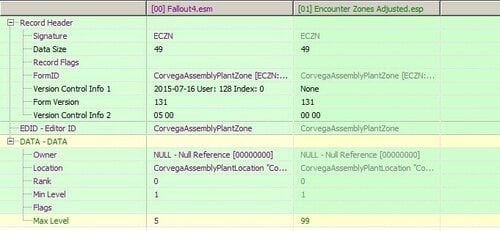
I personally find many of the locations unbalanced as they are capped at a very low level, so if you visit them at a higher level you can virtually just cough and the bad guys fall dead.
This mod simply removes the many of location level caps, so when you visit you will get enemies at your appropriate level (e.g. Corvega upper level goes from L5 to L99) minimum stays the same at L1 so it scales with the pc.
I have left a few (like Concord) at its vanilla setting (max level 5) for users of mods like AAF Violate for easy pickings if your gear gets robbed and you need to re-equip.
I have also lowered the lower limit at three locations:
Revere Satellite Array – you get this mission (BoS Lost Patrol) at an early level and although I have completed it a number of times it gets very tedious slowly drawing out high level Mutants, so I have lowered it from minimum 35 to level 10).
Castle – L35 to L20 as it’s a bit tedious
University Point L35 to L25 as you usually get this at fairly early in the Railroad quest line so it’s a bit overpowered at L35 in my view
If you don’t like the minimum level changes then just revert them back to L35 with FO4Edit.
One of the issues that also dogs FO4 (same with Skyrim) is that once you enter an area it’s level is fixed for the whole game, so I would recommend also using Encounter Zone Recalculation by Ea6t (https://www.nexusmods.com/fallout4/mods/45674) which resets the zone when you return after a cell reset.
This mod has no scripts and simply changes the vanilla levels so is safe to add or remove at any point in the game, but best early on to get the full effect. It should be compatible with all other mods except those that also change min/max location levels
The DLC have not been adjusted so are not necessary for this mod and some locations were not changed as they were already maxed out or seemed inappropriate.
412 downloads
Updated
-

Macrosoft
By HornyViking
There's a strange new disease plaguing the Commonwealth. People become crazy and violent for no reason, wearing mouth coverings and gas masks seems to be the only protection. Could this fear for an invisible enemy be worse than rad poisoning? Doctor Bill from the institute is working on a safe and effective stimpak to cure them all. However some people believe his syringe contains something else and some rebels believe there's a dark agenda behind it. Everyone must pay bottlecaps as contribution to finance his research, meanwhile his company Macrosoft is taking over everything. His cult followers will kill you on sight if you cough or sneeze, refusing his stimpak is not an option. Always wear mouth coverings, stay inside or become feral at your own peril.
Macrosoft was a pre-War computing company, producing a vast range of software and operating systems like:
Fenestra '98 Macrosoft spreadsheets Winblows 57 Wyndoze 99
Still a work in progress... only texture replacers at the moment for immersion.
This mod was banned by the Nexus Nazis, so this will be a Lovers Lab exclusive!
Don't upload anywhere else and wash your hands after playing.
Recommended Mods
Windows Terminal
Syringer Overhaul
Paint it Vax!
Updates coming soon, stay safe!
108 downloads
Updated
-

Mod_Backup_Mo-Z.7z
By X1000
Mod_Backup_Mo-Z.7z contains a compressed folder containing 16 mods. Please view the provided picture for more information.
These mods are being made available here as I've decided to quit supporting the popular mod site where they were previously hosted. I'm sorry to leave them here with so little information but I will add to this page when I am in a better mood.
310 downloads
Updated
-
Mod_Backup_A-Mi.7z
By X1000
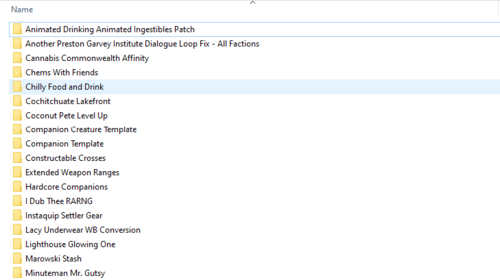
Mod_Backup_A-Mi.7z contains a compressed folder containing 18 mods. Please view the provided picture for more information.
These mods are being made available here as I've decided to quit supporting the popular mod site where they were previously hosted. I'm sorry to leave them here with so little information but I will add to this page when I am in a better mood.
249 downloads
Updated
-
eye color Debby's Elven Eye Implants
By dibz666
Debby's
Elven Eye Implants
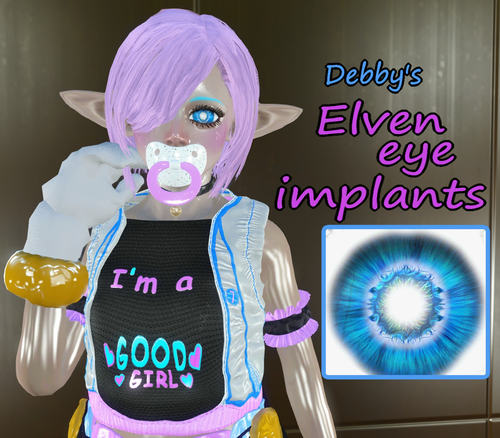
This is just a personal eye texture pack of mine I've decided to share with the public...
Debby Evolent is a 22 year old women with an I.Q. of 142 & a self taught scientist, She's a very vain individual & can alter Her own looks...
While exploring the wastes Debby found & read comics & fantasy stories & took a liking to the appearance of elven people,
She decided to make Herself look like an elf out of vanity & as part of this desire She changed Her own eyes with implants...
Now if people come to Her with enough bottle caps She's totally willing to alter other people's eyes in the same manner.
-----------------------------------------------------------------------------------------------------------------------------------------
These textures will replace the default eye textures of the game...
Just drop the Data folder in your Fallout4 folder, and blam new eye color(s).
--------------------------------------------------------------------------------------------------------------------------------
Special thanks to my patron(s) ^^
Sade Johns - August 2020
Ladisaul - September 2020
ALL my content is free & will stay that way. But I do have a patreon so anyone who may want to support me financially can do so,
Any Help would be greatly appreciated. https://www.patreon.com/DIBZmodding?fan_landing=true
185 downloads
Updated
-
Dirty Skirt Suit
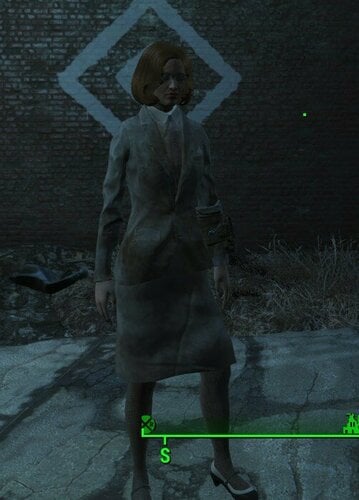
Another one. Overwrites default female dirty tan suit. I may add other suits later.
You may need to manually enable DirtyTanSkirtSuit.esp in game.
79 downloads
Submitted
-
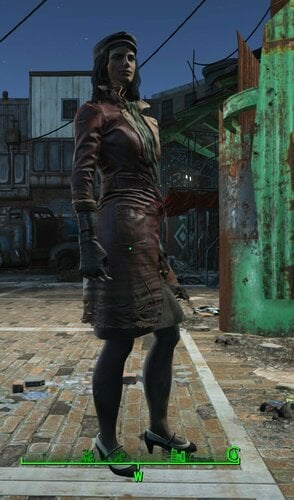
Piper With Skirt
I'm new to this kind of stuff, just wanted to do an idea of mine. This is an absolutely default model, I may update later for other specifications.
I used the dirty parts of Lab coat's skirt and leggings to replace trousers of Red Leather Trench Coat. I also used the shoes from Sequin dress.
You can do whatever you want with this, but a little appreciation won't hurt.
298 downloads
Submitted
-

Meet Companion Ivy 5.3/Russian translation
By Fiona159
Meet Companion Ivy/Компаньон Айви v 5.3
Russian translation of the latest version of the mod (Only file ESM/ESP)
Перевод на русский язык последней версии мода Companion Ivy 5.3 от известного автора Reginald_001
Содержит только файлы ESM и ESP.
Возможности:
Айви обладает многими талантами и способностями: в определённых условиях может взламывать терминалы,обнаруживает врагов и новые территории.Обладает телепортацией и новым боевым стилем-Гипер-Боем.Он позволяет ей телепортироваться к противнику,убивая на месте или подкладывая гранату.Также,она может телепортировать части тела врага к себе).У неё есть личное оружие - ручная пушка Ручница (модернизированный пистолет 44 калибра).Это оружие Келлога,в своё время доставшееся её брату.
У Айви своя радиостанция W.I.V.S.,где она ведёт передачи в прямом эфире,отвечает на вопросы слушателей,сообщает новости и погоду и крутит свою любимую музыку.От радио она получает доход и делится им с вами.Радиостанции можно строить в поселениях.В меню мастерской также можно найти и скрафтить радио Айви.
Если,вдруг,вы заметили,что Айви пропала,не спешите паниковать-в свободное время она занимается проституцией и зарабатывает для вас деньги).Отключить эту функцию можно в Сервисном Меню.
Помимо голодиска управления,вам в инвентарь помещается локатор(меню Помощь),которым вы можете призвать Айви немедленно,если она где-то застряла.
Этот мод полностью вписан в канву игры,с самой первой минуты после выхода ГГ на поверхность.Поэтому,очень желательно,начать новую игру,чтобы не пропустить квестовую составляющую мода. Автор создал этого компаньона,как основного в игре.Поэтому,чтобы не было проблем с диалогами и продвижением,настоятельно НЕ РЕКОМЕНДУЕТСЯ использовать мод AFT и подобные ему моды.Не вызывает проблем мод на собачку-с Псиной Айви может бегать спокойно.Не замечено пока и проблем с модом на Безлимитных команьонов.Мод на диалоговый интерфейс FDI тоже не вызывает ошибок в диалогах.
Изменения в версии 5.3:
Это самая большая и лучшая сборка Айви! Более стабильная, более содержательная, гораздо более изысканный Гипер-Бой, больше квестов.. больше пользовательских моделей..
Ниже только небольшое описание того, что было добавлено:
- Гипер-Бой Айви более стабилен и имеет больше анимаций.
- Подвал Айви был значительно расширен с гораздо большим содержанием.
- Диалоговые фильтры Айви теперь можно регулировать и через её "Стиль поведения", который вы можете изменить в любое время.
- Новые квесты и контент были добавлены для вас, чтобы открыть для себя. В Дополнении журналов теперь есть пользовательские журнальные стойки, которые Айви попросит вас разблокировать и построить для неё в какой-то момент во время путешествия с ней.
- Многие мелкие ошибки были исправлены.
- У Айви теперь есть своя музыка в ключевые моменты.
- И много чего ещё!
ОТВЕТЫ НА ВОПРОСЫ, ПРЕЖДЕ ЧЕМ ВЫ ИХ ЗАДАДИТЕ
- Да, вы можете просто перезаписать текущие файлы, когда получите предупреждение.
- Да, вы можете просто бросить это в свою текущую игру и "это должно просто работать"
- Да, настоятельно рекомендуется начать новую игру с Айви 5.3, но не по техническим причинам, а из-за её нового контента и слегка измененных систем аффинити.
- Да, больше ошибок может и всегда будет происходить из-за того, как моды взаимодействуют друг с другом. И гарантированная "чистая" стабильная свежая игра работает на 100%. Когда задействованы другие моды.. всякое может случиться. Здесь есть много документации по LL, и все это по-прежнему считается 5.3.
Порядок установки :
1.Скачать и установить оригинальный мод со страницы автора Meet Companion Ivy .
2.Скачать и установить перевод с заменой файлов.
Примечание :
Мод очень объёмный и специфичный по тексту,поэтому наверняка присутствуют ошибки и опечатки,за что прошу прощения(потихоньку исправляю).
758 downloads
- fallout 4;
- meet companion ivy
- (and 2 more)
Updated
-
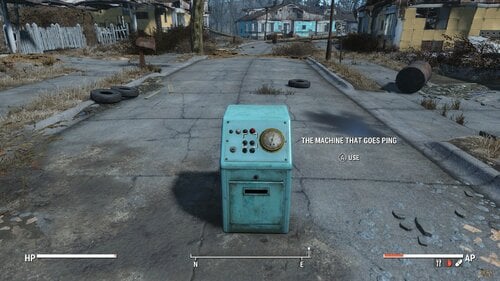
The Machine That Goes PING!
If you are confused by this mod, then you have not seen Monty Python and the meaning of life.
I urge you to see that movie then come back here.
This mod adds the machine that goes ping to the commonwealth. Craft at settlement and activate it.
-This is your favorite machine in the whole hospital
-This machine lets you know your baby is alive!
-By leasing the machine back from the company you sold it to it comes out of your monthly current budget and not your capital account!
Craft at any settlement and it goes "PING!"
164 downloads
Updated


![More information about "LoveWorld (Alpha 0.0.1) [Forge 1.20.1]"](https://static.loverslab.com/screenshots/monthly_2026_10/LW_alfa_main_001.thumb.png.4391d2d62de1509e21d15a616eb364d1.png)
.thumb.gif.26abf4f712e1a3b1ca799a5728e46259.gif)





![More information about "[XCL] [0.25.9] Palais Royale"](https://static.loverslab.com/screenshots/monthly_2026_08/Screenshot2026-08-2721_28_29.thumb.png.cb7226b03283653c53cf0071d230d011.png)