Select a subcategory to view available files.
Files From Subcategories
-
.thumb.png.5ad591ee6aeda26ceccdc1f5ae03f4c5.png)
On The Fens
By muttlywolf
have you ever truly explored around Dimond city's exterior with a jet pack and wondered why there was a diner area with a bed but never been able to really figure out how to make it a there reliably or thought it would be a central area as a player home without being inside diamond city where this is the settlement for you, workshop area covers out to the gate into diamond city and over to the building where you can now go up at .
Sorry I wasn't able to figure out how to remove the one gate worked pretty good for keeping random ferals out.
328 downloads
Updated
-
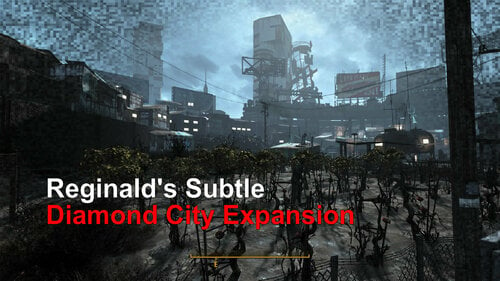
Reginald's Simple Subtle Diamond City Expansion (BETA)
By Reginald_001
Reginald's Simple Subtle Diamond City Expansion (BETA)
- Adds housing in the background empty areas (decorative only)
- Adds 25 new (random) citizens, making DC feel much more crowded
- Makes all citizens (not security) in DC 'player activate only' (they don't talk to you unless spoken too).
- Adds new ambient sound to the center of DC to add to the ambience of a 'busy' place.
SHOULD be compatible with other 'diamond city expansion' mods, as long as you place this one BEFORE those in the load order.
INSTALLATION
Drag & Drop into your favorite mod manager.
Known issues
- Might interfere with other mods that touch upon DC. Place this one as LOW as possible in your load order (e.g. so it's loaded first and other mods load on top of this one. E.g. it should be 'low' in load order priority)
- Upon first entering DC all the new NPC's will be bunched up in the center market. If you sit & wait, sleep, or travel in/out of an interior cell the NPC's will spread out across DC and will remain there.
- NPC's have no sleep rhythm, nor do they have assigned beds. I headcanon this by thinking a place like this would be bustling at any time of day after the apocalypse. And having been to touristic places in Asia and Europe I know of many places that were truly never empty before Covid.
Future features if I'm in the mood (in order of likelihood)
- Configurable amount of citizens in the city (e.g. 12/25/32/40/60)
- Specific citizens for specific areas
- More detailing in the housing in the background
- New custom cells to make the houses in the back area accessible
524 downloads
Updated
-
Healing Collar (Locked & "Glowing" variant)
By Victor15
UPDATE 2022-01-07 - I have decided to upload a new version of this mod based upon user feedback. As always, thank you for your feedback. I have not deleted the prior version; It is still available should you decide to download that one as well. They are virtually the same, file structure wise and, if you are mod-proficient, the only change is in the .ESP file itself. The script is identical. However, you may only choose one to use (again, unless you are mod-proficient and want to change the .ESP file name).
The changes are as follows: I've increased the healing rate a bit but, at the same time, I've also increased the radiation a tiny, tiny bit as well. The net result, though, is more healing for the radiation. I don't necessarily think that it's overpowered but, again, to each their own. The big change is in HOW you get radiated; If you stand still, you won't be irradiated. This should resolve a bunch of playstyle concerns that were expressed. If you're moving, you get irradiated. You will still "heal" your radiation by crouching and not moving. And, of course, the collar is still unlockable.
Another significant change is in the environmental storytelling; In brief, the note is more visible (hopefully) and a few aspects of the story are a bit more ambiguous (because we all love happy endings).
As always, constructive feedback is always welcome. Thank you and I hope that you enjoy the mod.
UPDATE - 2021-12-31 - The original version of this mod likely contained an incorrect script, causing the collar not to lock once it was equipped. Please download this new version of the mod. All that has been changed is the script itself; All other aspects of the mod has remained the same. Thank you.
OVERVIEW - This file contains a collar that, once worn by the player, can not be removed unless you use console commands ("player.unequipitem xx001066", the 'xx' being the order number that the mod is loaded). The collar has healing properties but emits a tiny bit of radiation (with one exception, being that you must be crouched & motionless). I do not consider this collar overpowered (nor do I consider the amount of radiation damage debilitating) but, to alter a phrase, "overpowered" is in the eye of the beholder. I certainly wouldn't depend upon this collar alone to save me in a combat situation. On the other hand, you could wear the collar for awhile in a radiation-free zone without the urgent need for a constant supply of Radaway.
The mod does contain a script; The script is how the collar locks to the player.
There is a tiny bit of "physical storytelling" included in order to make the mod lore-friendly.
The collar can not be constructed and there is only one of them. The location of the collar is, as always, a bit spoiler-ish. Here is that location:
The non-spoilerish hint for the location would be - If you go past the Museum of Freedom, you've gone too far.
Installing / Uninstalling - I have used 7-zip to compress the file. You may install this mod manually or through a mod manager. It ought to work regardless of that method. As with all mods with scripts, it is not recommended to continue using a save file that depended upon a mod with a script based upon how Fallout 4 creates saved games. The mod does require that the player has the Nuka-World DLC (although this should not be a huge detriment as most players have the Fallout 4 GOTY edition or it's equivalent by now) because the collar comes from that DLC.
Please do not distribute this mod to NexusMods. I do not hate them; I merely want to monitor the progress of this mod from one central location and have complete control over whether to modify or completely remove it. NexusMods now has a policy whereby a creator does not retain complete control over their mod and so I do not want to be answering questions about possible earlier versions of mods that I create, nor do I have the time to provide support for those possible earlier versions of mods.
I hope that you enjoy this mod; Having collars that irreversibly lock and had a bit of a "price" to them for what they provided in abilities were requested features for this collar and I hope that I've implemented those features successfully. If not, please provide constructive feedback as rates of healing and radiation may always be adjusted. Also, I just realized that the tiny bit of story-telling involved may be misconstrued. No ill intent was ever intended and it was just myself trying to give creative (and, hopefully, amusing) credit to others while also learning a few things about the Creation Kit. Nobody, and no mod, is perfect. Thank you.
569 downloads
Updated
-
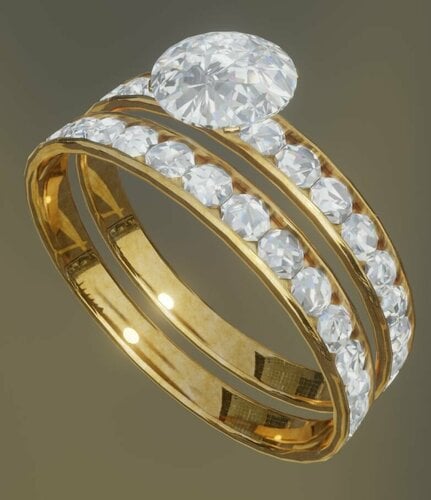
jewelry Women's wedding ring and engagement ring combo 3D model modder's resource.
3D model (Blender 3.0) modder's resource of a women's wedding ring and engagement ring combo.
This is meant to either replace, or serve as a substitute for the default wedding ring model.
It is meant for female characters and is intended to be fitted onto the left-hand ring finger.
Comes in gold, silver, and black versions.
440 downloads
Submitted
-
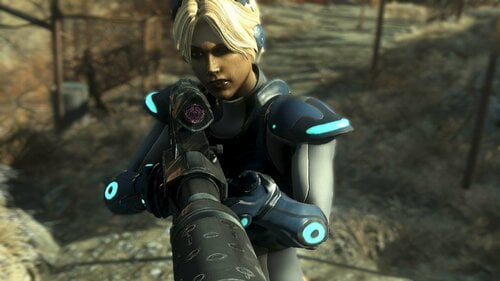
Fallout 4: Nova Terra Starcraft II Covert Ops Mod Release
Hello welcome back and Merry Christmas!
First and foremost I hope everyone has a fun and safe holiday! Please like, comment and subscribe for more content! Alex and I read everything so it's really nice to see people's wonderful comments! If you have any questions, feel free to ask.
FEATUERS:
1. Professionally and scratch made Nova's Ghost Suit and Gun in beautiful 4K textures
2: Custom Reload animation
3. Weapon Customization
BEFORE Downloading... this mod requires the following:
1. CBBE
Location:
1. Sanctuary https://staticdelivery.nexusmods.com/mods/1151/images/56796/56796-1640211080-1428040792.jpeg
2. Console Commands
NOTES:
1. Nova Race will come in the next update, still kinking out some annoying bugs
2. The download is not the actual mod but a dropbox link as I can't upload anything over 250mb.
Credits:
Blizzard for creating the Starcraft universe
Alexscorpian: Animations, rigging, textures
L0rdofWar: Model
Maybenexttime: For everything else
1008 downloads
Submitted
-
karneth CBBE Conversion
By sm0och91
CBBE Conversion for karneths sets
Requires the original clothes
Crimson Punk - Fusion Girl - Armor & Clothing - LoversLab
Colorful Wit - Fusion Girl - Armor & Clothing - LoversLab
Stylish Bloomer - Fusion Girl - Armor & Clothing - LoversLab
Venus Nine Baseball Uniform - Fusion Girl - Armor & Clothing - LoversLab
PS: It's the first time I did something like that, so it might not be perfect, but it works for the Orgasm Bodyslide Preset at Fallout 4 Nexus
3628 downloads
Updated
-
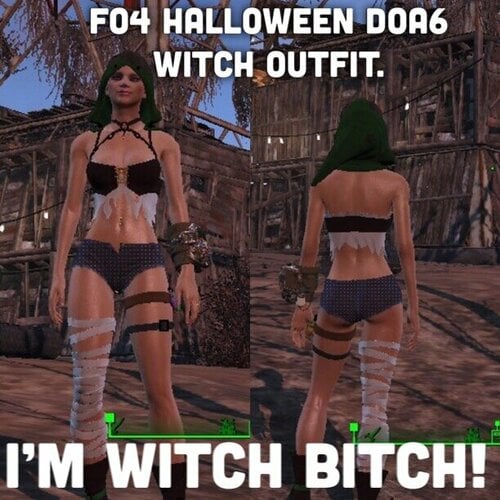
I'M Witch Bitch! - Happy Halloween DOA6 Witch Costume
A conversion of Mila, Ayane, Lisa, Phase 4 and Christie's Witch Party costume.
Craft at Campfire (witches are combustible)
each outfit Uses lots of bone to craft.
customize colors at armor bench.
I am not responsible for you mixing colors and making your character look stupid.
Bodyslide files for Fusion Girl 1.75+ and CBBE
feel free to do what you want iwth this so long as no one is charging money, but If you want to use the assets or upload it somewhere you need to pay it forward by buying someone some booze.
Let me know if there are any issues.
(Pics Soon)
1011 downloads
Updated
-
Stability Goggles
By Victor15
OVERVIEW - Provides the player with blueprints to create a pair of "stability goggles" that allows you to steady your aim (while they are being worn, of course). Why hold your breath while aiming when you don't have to?
The mod contains no scripts for those who are sensitive about mods that contain scripts.
The mod is a single .ESP file that is placed where all of the other .ESP files go. To uninstall, merely perform the sensible action of removing the goggles from your character, saving your game, removing the .ESP file from your mod loader, and then restart your game.
The mod only needs the Fallout 4 base game. I do not consider it overpowered but if eliminating scope sway is considered overpowered to you... Perhaps another mod would be better for you.
There are no quests involved although you do have to find the plans (and keep them in your possession while creating the goggles). And where are they? Well, for those who do not want to peruse the file using the Creation Kit, here is the first hint: Lexington. And, for those who want more hints:
One final note - PLEASE DO NOT PLACE THIS MOD ONTO NEXUSMODS. It is nothing personal; I do not "hate" the site. However, I would like to retain complete control over this mod. Having the mod only be available here would allow for me to see what I may be able to improve upon. Any constructive comments and critiques are always welcome. Thank you.
127 downloads
Updated
-
Healing Collar
By Victor15
OVERVIEW - This is a single .ESP file that allows the player to construct a wearable collar that continuously heals the player, both with health as well as rid the player of radiation and even repairs limbs. There is even a bit of a 'hidden feature' of sorts concerning the collar but I'll leave that up to the player to discover.
The collar is not overpowered (at least, in my opinion; as always, everyone's individual tastes vary); My recommendation would be to not run into a violent situation in the hopes that the collar alone would save you from death. There are no scripts involved, for those who are sensitive about using mods that contain scripts. The mod does need the Nukaworld DLC along with the base game (obviously), but this should not be much of a detriment at this point since pretty much everyone has the "Game of the Year" edition anyway which automatically contains the Nukaworld DLC.
Installation is simple; It's merely a single .ESP file and it goes where all of the other .ESP files would go. Deletion is also simple, merely delete the file and you are done.
Constructing the collar requires that you find a chemistry station (the only place where the game allows you to build any such objects) and that you are in physical possession of the plans (they can not be in a trunk or otherwise not on your person at the time of construction). You will also, obviously, need all of the parts necessary to build the collar. In order to make the mod somewhat lore-friendly, the parts required to build the collar is somewhat extensive; Consider yourself warned.
The location of the plans is a bit spoiler-ish. Let's see if I can format this next part properly:
For those who want a general hint at it's location, let's just say that, after starting the game, if you go past the Museum of Freedom, you've gone too far.
FUTURE PLANS - I may make the collar upgradable but I hate complicating anything beyond what is absolutely necessary. I may also turn the notes into a hologram tape (which would probably be more appropriate) but that is a minor concern in the overall scheme of the mod. As is, I think that this mod is a fun addition and allows the player to forego the hassle of stimpaks and rad-aways (at least for minor situations; The Glowing Sea will not be kind to you without additional safeguards) and other such potions should they so choose.
One final note - PLEASE DO NOT PLACE THIS MOD ONTO NEXUSMODS. It is nothing personal; I do not "hate" the site. However, I would like to retain complete control over this mod. Having the mod only be available here would allow for me to see what I may be able to improve upon. Thank you.
Enjoy.
846 downloads
Updated
-
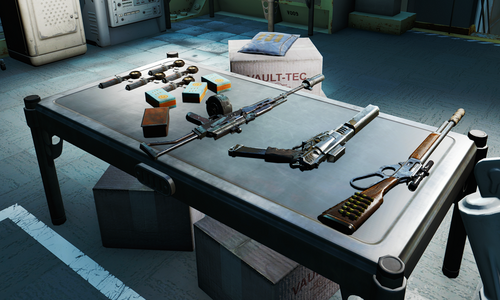
Woodfuzzy Vault 111 Tweaks
By izzyknows
Requirements:
Nuka World
Far Harbor
Conflicts:
Anything that edits the Cryo Vault, for the most part.
It does work fine with Deviously Cursed Wasteland.
What it does:
The short version.... Well, lets just say this a bloody arse cheat mod that will get you killed. You get a VIP lane to the exit of the vault and some custom, very over powered, weapons.
The detailed version...
Father. having learned of origins, decided to have you released and give you an advantage over the cruel Commonwealth. At least it seems that way. You see, Shaun has no emotional attachment, and thus, you really are just an experiment. And he has a somewhat twisted sense of humor.
After exiting the Cyro pod, your Pip-Boy will be right there. Equipping it will remove all the Radroaches in the Vault. (Yes you can still equip it running the Belted quest)
When you open the first door you'll see a clear path to the exit. That's right.. no taking the long way around.
At the entrance you'll find a table with custom modified weapons and some key supplies.
To your right, you'll find an armor, chem and weapon workbenches that are well stocked.
You'll notice the weapons are very over powered. But, they're not unique... thanks to Shaun.
In the end... it's just for fun!
Change Log:
1509 downloads
Updated
-
Kill Settlers without guilt
By BotisSarkany
Hello everyone,
i like to play with harassment mods like the included module of M.C.G. or others similiar to this. But if it happen at your settlement, you cant get your revenge.
With this one you can change this.
437 downloads
Submitted
-
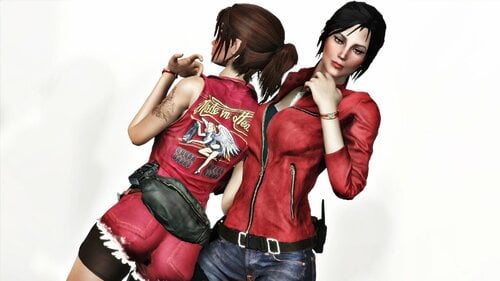
Claire Outfits - Fusion Girl
By kharneth1
Claire outfits from RE
Requirements
-Fusion Girl
-Bodyslide and Outfit Studio (Optional, Recommended): Included meshes are zero sliders, you need to build the outfit in bodyslide to fit it to your preset.
Installation
Donwload the file, install with any mod manager. Make sure the esp is active. (It's esl flagged so it won't take max esp space).
To fit the outfit to your body shape open bodyslide and build all outfits in "RE Claire FG" group with your FG preset.
Description
Add two Claire outfits from RE, with two versions each.
Has some armor value and some charisma bonus and can be upgrade with ballistic and miscellaneus weave. Also can be legendary upgrade, provide you have a mod that add legendary modification.
Everything can be build at chem station under the category "RE Claire". Use the armor workbench to swap the different outfits.
Note
-MIH version also have a port from VTAW (and a FG conversion by myself). This is however a 100% new port made from scrath. I fit it better to FG than my original conversion and change some things at my own taste (for example remove the horrendous knife).
Credits
-Capcom: Resident Evil
-Fusion Girl - 3BBB by Team ZeX
-BodySlide and Outfit Studio by Ousnius and Caliente
Permissions
-Don't use any assets here for any commercial or paywalled purposes.
3471 downloads
Submitted
-
Tougher Raider Firepower
By Slorm
One thing that annoys me in FO4 is how weak the Raiders are. For example I recently went through DB Tech at level 16 and hardly got a scratch, so I wanted to give them a bit more bite in their firepower.
This is a simple mod to help make the Raider firepower a bit more powerful and so make them a bit tougher to deal with, but doesn’t turn them into bullet sponges or make them overpowered for low level characters.
Vanilla low level raiders have a debuff so they only do 75% of normal damage. This has been removed and replaced with a buff to make them do 150% of normal damage. The same for all the other Raider levels, except for Legendary which I have left at its vanilla 125%.
I tested with various settings at Normal game setting with a level 1 and level 17 pc and 150% seemed to be around the best, but it’s easy to adjust in xEdit or CK if you want to increase the values (just change the perk). Bear in mind that if you play on Very Hard or Survival then you may find the first Raider encounter at Concord rather interesting as the incoming damage factor will go from 2 to 3.
It’s safe to remove or change mid game as there are no scripts and it simply changes the perks in the Raider templates.
Many thanks to @EgoBallistic for pointing me in the right direction as to what files needed to be looked at.
362 downloads
Updated
-

how to build your mara? (Cod)
By Guest
Hi, this is my first post so don't judge me so hard hahaha
As the name indicates, I will leave a series of steps here to be able to build or create the female character of call of duty MARA, I will leave some screenshots of how it looks in my game and also the links corresponding to the original mods and their respective creators, all the credits to them, anything they can comment.
1) face preset: The most similar, if not exact, face preset from MARA can be found in the following link with their respective requirements.
- link: https://www.nexusmods.com/fallout4/mods/44669 nexus by NotWord2
2) Clothes and accessories: The following link is one of her armors, I have seen others in some publications around here but I have not been able to find them, if you find more, you can suggest them in the comments, this link also includes the hair, so I suggest downloading it since It looks very good with the hair of this mod, I use FS and not CBBE and it has worked for me without a problem, so that accessory should not present any error.
- link https://www.nexusmods.com/fallout4/mods/52738 nexus by Vitriks
3) body / tattoo textures: NotWord2 He has shared some textures of both the tattoo and the body, both the texture and the tattoo will be found in the download section.
3.1) how to put: (Putting the body texture is easy, it already comes with the tattoo included and it is only to replace)
- Look for your folder where you install the mods and look for the body replacement folder (FUSION GIRL, CBBE, ETC).
example: D:\ModOrganizer\fallout4\mods\FusionGirl
- now we will open the folder of textures / actors / character / BaseHumanFemale (In this folder you will find the textures of the body, hands, feet, etc. will be in DDS format)
- once there, we are going to take the DDS file that we downloaded and we are going to copy and paste it into that folder and replace it. NOTE: this does not replace the body of the NPC, only that of our character.
3.2) once this is done we can enter the game to be able to see if the body texture is there, make sure it has the same name as the original file that has body textures and make a backup in case something goes wrong.
4) special sections:
- I would not know if there is a body preset for it, so that depends on each person.
- If you want to add other tattoos such as looksmenu, etc, you can, the replaced body texture does not prevent this and adjusts with the skin tone.
- As I said before, I know that there are other armor or clothes similar to the ones she wears, however I am not aware of all of them but I will leave some recommendations so that you can take a look at them.
some mods that can accompany:
Clothes and accessories:
- Colorful Leggings: https://www.nexusmods.com/fallout4/mods/35289 by TyperTM
- Collection of tops v2.0 by DonEb14n: https://www.nexusmods.com/fallout4/mods/46942 by DonEb14n
- Vtaw Utility Pack: https://www.nexusmods.com/fallout4/mods/42971 by vtaw
- Vtaw Wardrobe 5: https://www.nexusmods.com/fallout4/mods/43844 by vtaw
- Vtaw Wardrobe 6: https://www.nexusmods.com/fallout4/mods/46628 by vtaw
- Vtaw Wardrobe 7: https://www.nexusmods.com/fallout4/mods/51798 by vtaw
weapons:
- DOOMBASED Weapons Merged (Weapon Pack): by DOOMBASED
visuals:
- Hide Pip-Boy: https://www.nexusmods.com/fallout4/mods/805 by p3king
I AM NOT THE AUTHOR OF ANY OF THESE MODS OR TEXTURES, ALL CREDITS TO THEIR RESPECTIVE CREATORS, THIS IS ONLY A GUIDE AND COMPLIATION OF FILES TO BE ABLE TO BUILD SUCH CHARACTER IN FO4.
some questions and answers:
- can i just have the arm tattoo?
R: Yes, it is in the download section as tattoo.png.
- the skin color of the hands and head does not match correctly
R:It is a small error, it is hardly noticeable, however I do not know any solution to this.
- face preset comes out brown or black when i build it in game
R:first make sure you have all the preset requirements, if so, then open your looksmenu and go to the face part, then to color and change it to pale or whatever you like and it is normalized.
Known issues:
- The color of the hands, head, does not fit or is the same as the rest of the body, it has a slight alteration, it is hardly noticeable, I do not know a solution in this regard.
197 downloads
Updated
-
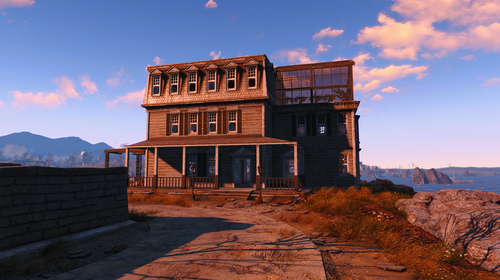
Woodfuzzy Croup Manor Bug Fixes & Clean up
By izzyknows
Requirements:
Fallout 4
Conflicts:
Anything that edits Croup Manor
What it does:
Bug fixes:
Changes the build area a bit which in turn stops settlers from spawning in the ocean. Because we all know that "current" settlers spawn at the build/sandbox volume center.
Cleaned up and fixes Bugthesda's navmesh errors. Now, the settlers will path the entire house.
Other Tweaks:
Repaired the house, cleaned it up and added a greenhouse with a few crops along with a boat dock out back. There's a couple Bobbleheads if you can find them, & a magazine.
And before you ask, this mod doesn't break the precombines.. cause I rebuilt them. HA!
640 downloads
Submitted
-
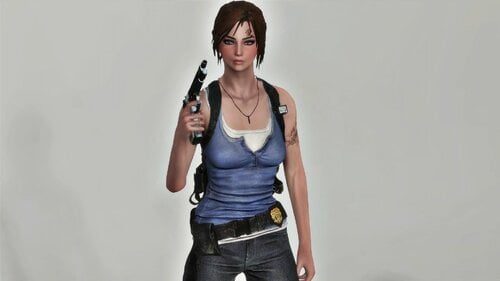
RE3 Jill Outfit - Fusion Girl
By kharneth1
Jill outfit ported from Resident Evil 3.
Requirements
-Fusion Girl
-Bodyslide and Outfit Studio (Optional, Recommended): Included meshes are zero sliders, you need to build the outfit in bodyslide to fit it to your preset.
-Fallout 4 High Heels System (Optional, Recommended): Shoes are only slighted elevated to take into account the sole. You can go without it, but it looks better with HHS.
Installation
Donwload the file, install with any mod manager. Make sure the esp is active. (It's esl flagged so it won't take max esp space).
To fit the outfit to your body shape open bodyslide and build "RE Jill Outfit FG" with your FG preset.
Description
Add Jill outfit from RE3.
Has some armor value and special stats and can be upgrade with ballistic and miscellaneus weave. Also can be legendary upgrade, provide you have a mod that add legendary modification.
Everything can be build at chem station under the category "RE Jill Outfit".
Note
-Originally I want to make a Fusion Girl conversion of this same port from Xavier here. But it wasn't totally well fitted to the body, that was even more noticiable when conver it to FG, make any preset looks bigger than it should. So decide to port it from scracht again, as using FG sliders is way easy to correctly fit it. If you want a CBBE version check linked Xavier port.
-Don't take into account the dark pendant in some ss, I was testing things and have a unrelated cubemap problem. It will be silver as it should in your game (well, assuming you don't have problems with your cubemaps too LOL).
-The gloves are from Dicky's Pinup Outfit (FG conversion here, the one in the main page is outdated).
Credits
-Capcom: Resident Evil Resistance
-Fusion Girl - 3BBB by Team ZeX
-BodySlide and Outfit Studio by Ousnius and Caliente
Permissions
-Don't use any assets here for any commercial or paywalled purposes.
2768 downloads
Submitted
-
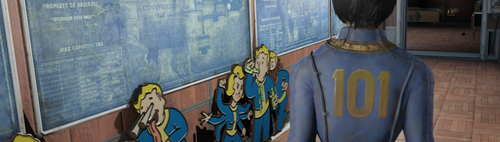
Woodfuzzy's Vault 101 Settlement
By izzyknows
This is my Vault 101 settlement from Nexus, but has been updated and fixed. The version on Nexus is outdated, and since... well.. we wont get into that shite.
Requirements:
Vault Tec Workshop DLC
Settlement Features:
Vault 101 jump suits and Pip-Boy creates to outfit your settlers
101 Power & 101 Water. (See what I did there...don't worry, the cheese doesn't end there)
Radio Beacon.. just wire it up.
Settlement attacks and MM/Help quests have been disabled.
2 Beds: 1 in the Overseers and 1 under the stairs. (Might upload a fully cluttered to hell version later.)
All clutter is lootable. Well.. most of it anyway.
Some interesting items not normally found...a few items will only show up after you reach xx level.
A fun little Find the Keys challenge. (Hint: crank up that Pick Pocket perk!)
1 Brahmin and 2 pet Radstags.
Idle markers all over the place. But not a silly amount!
I tried to place them where they wont interfere with settlement stuff.
The diner booths have been fixed so the plates/clipboards are on TOP of the table instead of inside it. Each booth
only seats 2, this prevents settlers writing on their neighbors food.
The Overseers terminal has a bit of ramblings..
Installation:
Use whatever MM you want, or install manually. It's only 2 files for Pete's sake. LOL
Conflicts:
Any mod that edits the top left world cell.
Credits:
I'd like to thank the thousands of settlers that selflessly gave their pixels in the creation of this mod. A virtual plaque will be place in the bathroom.. once we have enough donations.
And an honorable mention to the couple dozen Deathclaws who's lives were snuffed out, but in the end, was for no reason. (didn't use em)
Change Log:
815 downloads
Updated
-
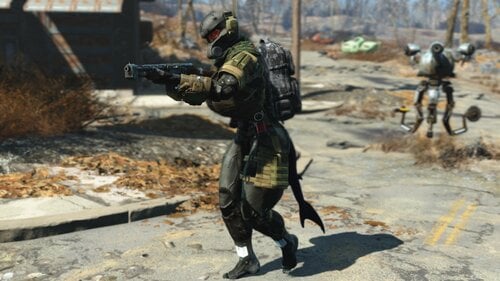
Haven Trooper v1.5 For Atomic Beauty
By Rex89
it's a conversion of the Haven Trooper armor by mrsasa789 (MrRage789)
i sent a messenge to MrRage789 (mrsasa789) about permission but that was back in February.
so for the time being I'll upload it here unless otherwise
there is one small problem with it, the morphs don't work in looks menu.
don't know why, tried to fix it but couldn't but it works fine as is.
it's pretty much done
anyone can mess with it fix it, it doesn't bother me
I'm uploading it so I don't loose it by accident hope you like it
oh and don't mind the shark tail it from this mod The Selachii - Shark Race
Requirements
Atomic Beauty
Haven Trooper Frogs Armor Pack
337 downloads
Updated
-
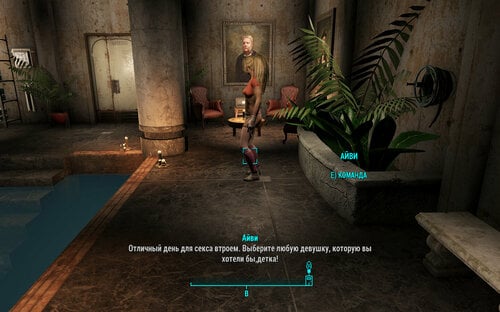
Red Rocket Luxurious Underground Living Estate/Russian translation
By Fiona159
Red Rocket Luxurious Underground Living Estate/Роскошный подвал Красной Ракеты
Перевод на русский язык мода Red Rocket Luxurious Underground Living Estate от Reginald_001
- Полностью оформленное и оптимизированное жилое пространство.
- Полноценный последователь (который работает вне системы последователей, поэтому вы можете нанять любого другого, кого захотите, в свою команду)
- 2 синтетических кошки со способностями "Гипер-Бой" и "Лазерный глаз" по имени Майло и Люси.
Требуется:
- WORKSHOP DLC (!)
Содержит только файл ESP.
286 downloads
Updated
-
Red Rocket Luxurious Underground Living Estate
By Reginald_001
The Luxurious Red Rocket Underground Living estate is a mod that features:
- Fully decorated and optimized living space.
- Complete follower (that works outside the follower system so you can recruit anyone else you want in your party)
- 2 'Hyper Combat' / 'Laser Eye' cats called Milo and Lucy.
Requires:
- WORKSHOP DLC (!)
The mod and accompanying video should speak for itself.
(Please allow youtube some time to render the 1080p/60fps version)
6010 downloads
- companion
- player home
- (and 5 more)
Updated
-
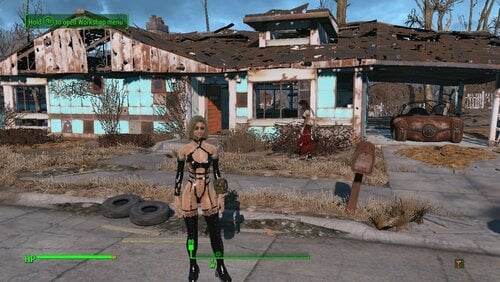
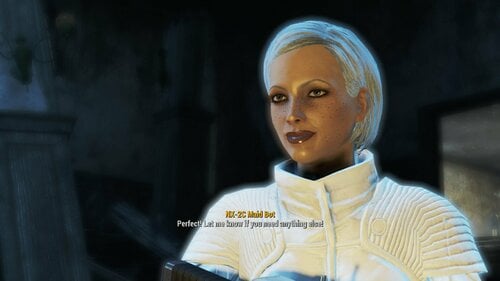
Christie's Eat Me Beat Me Fighting Harnass! Now In Technicolor.
Adds Everyone's favorite Doa Assasin's hottest outfit. Available for males too, I left the hard on Intentionally.
Craft at chem station unter "Utility" change colors to red or white at armor bench.
Includes female bodyslide files for fusion girl and cbbe, this mod was built around fusion girl then later converted to CBBE.
2039 downloads
Updated
-
Satellite Color World Map Combo
By XunAmarox
Description:
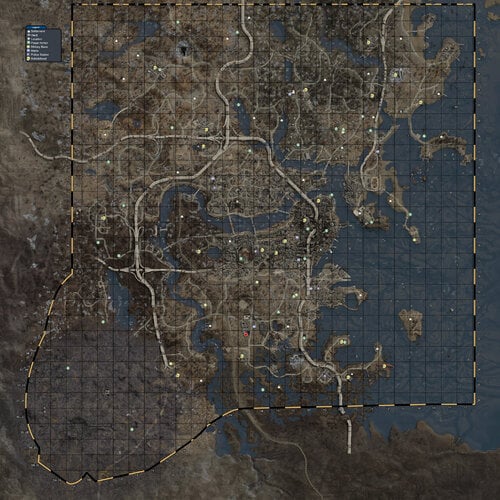
This is a replacer for your World Map in your Pip-Boy. It's a combination of Satellite World Map by FloorBelow and Color Map by VirusZ. It is a texture replacer and of the correct size so no ESP file is required. The map itself gives a satellite view of the Commonwealth made using the game's LoD meshes and textures. This map has icons for settlements, vaults, power armor, military bases, metros, police stations, magazines, discoverable locations (optional), and roads + railroads (optional). You'll discover many varieties of options in terms of what icons should appear on your map during the installation process, and this particular map features a more accurate boundary line. Oh yes, I painstakingly (with god mode and tons of run speed gear) ran around the edge of the entire wasteland just for you, so I could discover where the boundaries actually are. What was ever the point of a border on the map that didn't even represent any kind of boundary anyways? Sheesh. Get your stuff together, Bethesda.
Aside from the new boundary lines and the combining of those two maps, the icons being used have also been updated and the grid for the map has been made more like we're used to. The outer boundaries were manually fixed, because the original large black grid from the Satellite World Map was actually the individual meshes of the LoD and they didn't quite meet seamlessly. So... clone stamp, bitches!
I was going to remove the large black grid from Satellite World Map from the entire map (which would have been kind of a pain in the ass tbh) but it occurred to me that it would be more useful if there was a grid there. And so, I completely remade the grid - I even pulled out a calculator to figure out the exact size each square needed to be (hey, I was really proud of myself about that... I suck at math. For real.) - and now it's labeled with coordinates. That way it's easier to tell your friends where to find something. Like, "I ran into this crazy overpowered deathclaw at 1C-30, so don't go there! Or, uh... I mean... Forget what I said. There's tons of loot just laying around at 1C-30, go there immediately... and uh... don't save for a few hours before that. Yeah. Do that. >:]" Anyways, I'm sure you all will figure out some kind of use for it.
There are two primary editions: Vault Boy bobbleheads, or Vault Girl bobbleheads. We have replacers for the bobbleheads already and we'll surely have a full interface replacer sometime soon; so, we may as well have a matching map. Each of these types includes several variations: all features, no location markers, no location markers and no roads, and just no roads. You can choose which you prefer during the FOMOD installation.
"But Xun, I don't use NMM." Well, then you can manually install! The folders are named pretty intuitively, and here's how you do it...
Manual Installation:
Extract archive. Choose your desired flavor, and open that folder (e.g. VG-All). Copy "worldmap_d.dds" to "textures\interface\pip-boy" in your Data folder. Done!
All of this shit's in color. That means it's not going to be just pure pink or green or whatever the heck you have your Pip-Boy color set as. It's not going to look like that though unless you do some wizardry in your ini files first. Now look, before I continue... I'm just going to be up front with you: The entire interface for your Pip-Boy will be white after this, but the rest of your UI will be unaffected. So, weigh whether you want a color map & white pip-boy UI or if you'll just settle for a monotone map. Your choice.
Installation:
To get it in color you're going to need to navigate to Documents\My Games\Fallout4 and either edit your existing file or create a new file called Fallout4Custom.ini and it needs to have this:
[Pipboy]
bPipboyDisableFX=1
Now, if your map doesn't work at all - dude, have you done any texture or mesh replacer mods yet? - then you'll need to edit your Fallout4.ini and under [Archive] you'll want to add this line:
bInvalidateOlderFiles=1
And if you have anything after sResourceDataDirsFinal= then delete all that shit after it because it makes your game load like a sloth stoned out of its mind. Seriously. This will be your game's load speeds:
You don't want that. Or maybe you do. I don't know. I'm not the boss of you. Do what you want.
Moving on!
So, my map is the same resolution as the 8K Satellite Map. I know what you're thinking...
"mmm... 8K... high res... want..."
But, my map is only 4K.
I have a good reason though. The 8k Satellite Map had a ton of extra map area that quite frankly isn't really necessary. Once you crop the map to just the actual map area (which is why this map doesn't require an ESP), then it's the same resolution as it was with the 8K even though it's 4K.
Aaand, uh... that's pretty much it.
...EXCEPT FOR THE CREDITS!
Permissions
If you can get permission from everyone else whose assets were used in this (they're literally listed below), and you'd fucking better, then you can use whatever you want from this that is my work. Sharing is caring, ay? Only caveat: Don't put it on NexusMods without my express written consent.
Credits:
Satellite World Map by FloorBelow, for the satellite map. Used with permission.
Color Map by VirusZ, for icon placement, some icons, and inspiration. Used with permission.
JAMA / Armor Location Map by Nixsy, for the roads & railroads. Used with permission.
Shadman for vault girl's icon. Shadman is awesome. Check out Shadman's art. Uhh... if you're over 18. Definitely... only... if you're over 18...
Fallout 4 Map on Reddit by koolkyle802 which I used for placing magazine locations.
Oh!!! I almost forgot!!!
That little fucking red thing. What the fuck was that?:
Well, I'll tell you what the fuck that was...
It was THIS. Open that in a new tab and look at it. Things will make sense.
It still looked kind of ghetto though, but it got better:
You're welcome.
Troubleshooting:
Problem: My map isn't in color. What gives?
Solution: To get it in color you're going to need to navigate to Documents\My Games\Fallout4 and either edit your existing file or create a new file called Fallout4Custom.ini and it needs to have this:
[Pipboy]
bPipboyDisableFX=1
If you already have those entries in your other ini files then you'll need to either edit them there or remove them from there.
Problem: My map isn't in color but I've already done the ini changes. What gives?
Solution: Double check to make sure they're correct first. But failing that, if you're using Fallout 4 Configuration Tool (previously called the Fallout 4 Tweaker) by Bilago, some people mentioned a page back in the comments that the ini settings don't work because they're overwritten by it. "In the UI tab, there is button by Pipboy Colors called Disable FX that is not enabled by default."
Problem: Uhh... everything on the map is way off from where it should be.
Solution: Chances are you've installed Satellite World Map by FloorBelow. You'll need to either uninstall it or disable the ESP that came along with that mod. It will mess up this one.
Problem: I'm new to modding Fallout 4 and this doesn't work at all. Nothing changed.
Solution: Did you by any chance completely skip the installation instructions? There are some ini entries you'll need to make to get this to show in color and some more entries - especially if you're new to Fallout 4 modding - to get any changes to your game to work whatsoever.
Problem: Since the new update my player symbol is now a cave!
Solution: This map mod is just a texture. It doesn't mess with actual interface files. If you are having this problem it is likely due to Zoom Out Extended mod by Zenotep and if that is the case you can either uninstall it or try this fix.
Problem: I want a color map and a color pip-boy instead of a white pip-boy screen. How can I do that?
Solution: Try something like Gold Kit for Color Pipboy.
Problem: My power armor's map is way too bright.
Solution: Try something like Power Armor map fix.
Changelog:
1.3 - Feb 15, 2016 New!
-Placed the Agility bobblehead icon back at the FMS Northern Star, whose icon was incorrectly removed and placed on Spectacle Island in 1.2 as the Luck bobblehead that was added to Spectacle Island.
-Replaced location dots with small question marks. I did this because even as the map maker I didn't keep locations on because they cluttered the map.
-Location renamed to Point of Interest.
-Vault icons were made smaller.
-Metro icons were made smaller.
-Military base icons were made smaller.
-Power armor icons were made smaller.
-Settlement icons were updated to look more like a house, made light brown, and made somewhat smaller.
-Bobblehead icons were made smaller.
-Russian version added to misc files (as one was requested).
1.2 - Feb 7, 2016
-Corrected location of Luck Bobblehead.
-Removed incorrectly placed bobblehead locations from Lexington.
-Moved Perception Bobblehead closer to the Museum of Freedom.
-Moved Concord power armor to roof of Museum of Freedom.
-Added a missing power armor location.
-Added magazine locations. They're all likely a bit off so just assume "in this general area."
-All roads + railroads are now the faint version.
-Boston Commons area roads made significantly more defined for easier navigation.
-Removed variations: VB-NoRoad, VG-NoRoad, VB-NoLocFaintRoads, VG-NoLocFaintRoads, VB-NoLocNoRoad, VG-NoLocNoRoad. Why? I think the faint roads look better with a satellite map and there were starting to be far too many versions to maintain.
-Added variation: No Special: Removes the bobblehead, power armor, and magazine icons.
-Lighter grid for all variations except mono.
-Fixed a power armor icon so it looks better without full roads.
1.1 - Feb 3, 2016
-Adds the bridge outside sanctuary which was previously missing.
-Removes the vault icon from Vault 111. Why, you might ask? Well, it's impossible not to discover so it's pointless.
-Adds two new versions: Clean with only roads and clean with only faint roads.
-Adds two new variations: Vault Girl bobbleheads + no locations + faint roads, and Vault Boy bobbleheads + no locations + faint roads. This was previously the XunCustom.
1.0 - Feb 2, 2016
-Initial release.
Where TF are the DLC maps Xun? Eh? Eh?!
I got permission from DigitalUtopia to use his satellite maps for Far Harbor & Nuka World. So I'll be doing those at some point™.
I haven't played Fallout 4 in quite some time and probably won't for quite some time, so it's pretty much on the backburner. It'll happen some day when I'm particularly bored and think of doing it.
In the meantime, you can use Sakura9's satellite maps for Far Harbor & Nuka World.
Misc/Optional Files
• Mono-Blank-9414-1-1.7z Monotone with darker high contrast ocean and no icons.
• Satellite Color World Map Combo RUS 1-3-9414-1-3.7z
FOREIGN LANGUAGE. FOMod Installer. Russian. Русская язык.
User submitted YouTube videos:
https://www.youtube.com/watch?v=L64NwBKNDn0
20798 downloads
Updated
-

Curie - ESP Replacers and LooksMenu Presets
By EdDante34
Installing :
Manual installation - Extract archive to your Fallout 4 Data folder Install using the mod manager of your choice
Getting the preset in game :
During Character Creation at the beginning and upon leaving Vault 111 Type slm 14 in the console in the game Looksmenu while in surgery
***WARNING***
DO NOT USE THE LOOKS MENU PRESETS ON CURIE DIRECTLY, IT WILL CAUSE SERIOUS ISSUES. USE THE ESP REPLACERS FOR CURIE ONLY.
***Important***
Her appearance is basically set in stone, the only way to change her hair or other facial features that I'm aware of is to go into looksmenu for your character (If you're playing female and if not, you will need to go to the character creation at the beginning of the game and select Nora and use her instead) and load one of the presets, make your changes, save the preset, then use face ripper to transfer the changed face of the new preset to a premade esp file that has Vanilla Curie in it only.
Make Sure that any hairstyle mod or other appearance mod requirement is in the master files list of the esp file header beforehand by going into FO4Edit and copying that hairstyle's head part (Or whatever head part from the mod you're using) as an override into the esp with Curie on it.
This will automatically add that hairstyle/other appearance mod's esp file as a master file to the Curie esp file.
There's another method involving cloning Curie via the console, but I'm not familiar with it so I've never bothered, I know my method works, so that's what I use.
Required Mods
Looksmenu Looks Menu Customization Compendium - For the eyebrows MiscHairstyle - For both the Flying Dance and Rosa hairstyle esp replacers. The Eyes of Beauty Fallout Kaleidoscope Edition - For her eye textures, main file in the downloads section. Oni cute asian face parts - For her eye shape, main file in the downloads section. The K Makeup - For the eyeliner, otherwise it will look much different than in the screenshots. Extended Facial Sculpting - now with 90 percent less beta - This face was created using the extended facegen controls from this mod and will NOT render correctly without it. My advice is to Install for FEMALE FACES ONLY, NOT BOTH. I installed for female faces only with the optional singe side sculpt controls and have never had any issues. Having both male AND female installed can and will lead to certain issues as detailed here :
TL;DR adds new facial sculpts, as well as extended versions of the existing sculpts, to the LooksMenu/Plastic Surgery menu. Customize your face shape beyond the tiny amount allowed normally, and in ways simply not possible before. Existing characters/NPCs aren't touched unless you want them to be. This is entirely an addition, not a replacement. Males and females both benefit, since Bethesda made the both good and bad decision to use similar skeletons for everything. However, due to a bug in the looks menu, having Male installed will cause the Female list to revert to vanilla. This is purely cosmetic - changes to female faces will persist as long as the female sculpt file is present, and extended female presets will load fine - but it does mean you have to remove the Male file to further customize female faces.
I advise you read the mod's description page if you've never used this mod before. I also encourage you to read the mod page's articles as well as they have some helpful info.
Suggested Mods - Required If you want the preset/replacer to look like the screenshots :
Valkyr Female Face and Body Textures - specifically version 1.1 in the old files section. I don't like the normal map under the eyes in the current 2.0 version. Natasha Face Texture - Main file v1.1 at the top of the download section. This works with Valkyr Female Face textures as it affects the type 1 face parts while Valkyr affects type 2 face parts onward. These replacers/presets use a combination of type 1-3 face parts so you will need to use both texture mods. *Note* - If you absolutely do not wish to use these textures and use your own, I recommend you go into the presets and change the type 1 face parts to type 2 and adjust the % to match the type 1 face parts. If you use CBBE instead of the vanilla female body, you will need to use CBBE Ida Body Texture - Use the vanilla-like version. Eye Normal Map Fix Fallout 4 Edition Nuanced Eye Reflection
Recommended mods : HN66s and XAZOMNs Distinctive Teeth for FO4
ENB used in the screenshots is Ghost ENB for NAC - Vivid Weathers - True Storms -
Last two pictures are with ENB turned off.2306 downloads
Updated
-
Lazer "Recharger" Weapon v2
By Victor14
OVERVIEW
This is a recharging laser weapon, nearly identical to a prior effort of mine except that it is a laser weapon and not a plasma weapon. The weapon is overpowered, so consider yourself warned. It recharges at 1 fusion cell per second and it requires special ammunition that can not be used in normal laser weapons. It recharges up to 60 rounds and then stops. A radioactive penalty is inflicted should you have more than 60 rounds of this special ammunition. Dropping the weapon while you have 60 or less rounds wipes out all of the rounds in your inventory. Dropping the weapon while you have more than 60 rounds also gives you a radiation penalty and also removes all of the rounds from your inventory.
The weapon is located inside of a suitcase that is next to the blue 'construction' trailer when you leave Vault 111. The suitcase is outside of the trailer at the opposite end of the entrance. You may use both my plasma & laser recharger weapon mods at the same time; The two suitcases are located in different areas.
The suitcase is locked (novice) and contains a lore-friendly note.
As with my plasma recharger weapon v2 mod, this weapon is power armor and weapon mod friendly.
This mod does not require any of the Fallout 4 DLCs or Script Extenders; Only the base game is required.
The mod should work but, if it does not, please let me know. Thank you.
72 downloads
Submitted
-
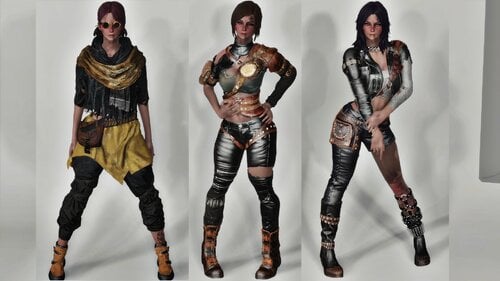
RE Wasteland Outfits - Fusion Girl
By kharneth1
Three outfits ported from Resident Evil Resistance.
Requirements
-Fusion Girl
-Bodyslide and Outfit Studio (Optional, Recommended): Included meshes are zero sliders, you need to build the outfit in bodyslide to fit it to your preset.
-Fallout 4 High Heels System: Only for January Outfit, your character feet will be buried in the ground if you don't have it.
Installation
Donwload the file, install with any mod manager. Make sure the esp is active. (It's esl flagged so it won't take max esp space).
To fit the outfit to your body shape open bodyslide and build all items in the group "RER Wasteland FG" with your FG preset.
Description
Adds three outfits and also glasses, googles and underlip piercing (You will probably need to adjust yourself the piercing in bodyslide to your face preset, as there's no way to automatically do it. Right now it fit Cute Preset, that is the one I use)
Has some armor value and special stats and can be upgrade with ballistic and miscellaneus weave. Also can be legendary upgrade, provide you have a mod that add legendary modification.
Everything can be build at chem station under the category "RE Wasteland".
Credits
-Capcom: Resident Evil Resistance
-Kanbara914: extract assets from RER
-ajhakra: For the cubemaps
Fusion Girl - 3BBB by Team ZeX
BodySlide and Outfit Studio by Ousnius and Caliente
Permissions
-Don't use any assets here for any commercial or paywalled purposes.
3556 downloads
- fusion girl
- bodyslide
- (and 1 more)
Updated

![More information about "LoveWorld (Alpha 0.0.1) [Forge 1.20.1]"](https://static.loverslab.com/screenshots/monthly_2026_10/LW_alfa_main_001.thumb.png.4391d2d62de1509e21d15a616eb364d1.png)
.thumb.gif.26abf4f712e1a3b1ca799a5728e46259.gif)