Select a subcategory to view available files.
Files From Subcategories
-

DORAEMON LE
By lordarked
I port this funny follower from se to le and translate on folder you see 2 files the mod and esp on english. this doraemon come with funny weapons XD
https://www.mediafire.com/folder/j640kbvd0q986/doraemon
87 downloads
Submitted
-
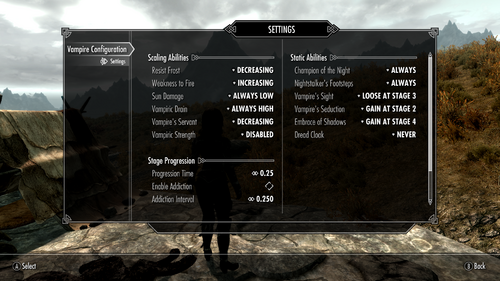
Vampire Configuarion Menu
By VersuchDrei
Gives you the freedom of configuring the powers of vampirism without completely overhauling how vampires work.
Mechanics
Adds an MCM where all of the powers of vampirism are listed, so you can configure for each power individually how you want it to scale with the vampirism stages. By default this behaves exactly like vanilla vampires. I know there already are Vampire Inverter mods out there, but they weren't fully to my liking so I wrote one that is more individually configurable.
Scaling Abilities
Scaling abilities are the ones who's power is depending on your current vampirism stage, these have the following options:
Disabled - Removes this ability entirely.
Increasing - You start with the weakest version at stage one and the power increases with every stage. This is the vanilla behavior.
Decreasing - You start with the strongest version at stage one the power decreases with every stage.
Always Low - You always have the weakest version of this ability.
Always High - You always have the strongest version of this ability.
Note that weak and strong are referring to the numerical values, so for weakness to fire and sun damage the strongest version is the one that gives the biggest penalty.
Static Abilities
Static abilities are the ones that always have the same power, but some of them you only have at certain vampirism stages, these have the following options:
Never - Removes this ability entirely
Always - You always have this ability. This is the vanilla behavior for most static abilities.
Gain at stage X - You only have this ability at stage X or higher. This is the vanilla behavior for Vampire's Seduction and Embrace of Shadows with stages two and four respectively.
Loose at stage X - You only have this ability if your stage is lower than X.
Vampiric Strength and Dread Cloak
Vampiric Strength and Dread Cloak are two abilities that were coded in the base game, but then disabled in the script. Vampiric Strength gives you five to twenty unarmed damage depending on your current stage and Dread Cloak is a daily power that gives a Frost Cloak (similar to the Dark Elves racial power that gives a Flame Cloak) that you were supposed to gain at stage three. I've added these powers to the configuration menu, but they are disabled by default.
Stage Progression Time
This feature lets you configure how long it takes for vampirism to progress to the next stage.
Blood Addiction
This is a new feature that reduces your stage progression time if you drink blood too often. It works with an addiction level, that increases whenever you drink blood while still in stage two or lower, and reduces when you wait until stage four before drinking again. These stages can be changed with the Addiction Stage and Dediction Stage settings, respectively. For every level of addiction the stage progression time gets reduced by the Addiction Interval (default a quarter of a day), but never goes lower than the Minimum Time (also default a quarter of a day). So in other words the more blood you drink the thirstier you get for it. This feature is disabled by default.
Requirements
Dawnguard, as most people should have it by now and I was too lazy to write the scripts twice.
RaceCompatibility, as otherwise vampires wouldn't work for custom races, so you should already be using it anyways.
303 downloads
Updated
-
HTools+ (equippable tongues with auto mouth open)
By zstj
A simple yet useful modification of HTools mod by Halo (https://dysintropi.me/mods-archive/) containing equipable tongues and feet, which makes tongues open mouth when equipped. Original mod not needed.
Dependencies:
- MFGConsole or Sexlab (bundled with it)
Conflicts:
- Probably SexlabSurvavial, since it uses the same assets.
Credits:
- Halo for 99.9999% work
TODO:
- Move mouth open values to MCMconfig
- Check out possible SL Survival conflicts
2534 downloads
Updated
-
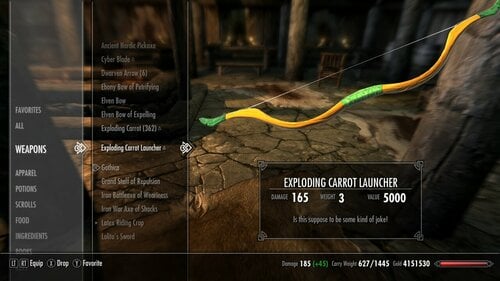
DMF- Carrot Launcher
By nokou
This mod was made for fun... it's extremely overpowered so if you don't like this sorry..
you can craft the bow under silver smithing and the arrows under misc..
also it fly really far and does instant damage..
body type required. umm... any body you wanna shoot a carrot into... lol
Please note.. the wedding dress mod is not available to download atm.. please don't ask for it. thank you.
Legal Shit..
This mod is exclusive to LoversLab only... please do not upload or repack to any other mod sites
including naver cafe.. Links to this mod is ok.
198 downloads
Updated
-
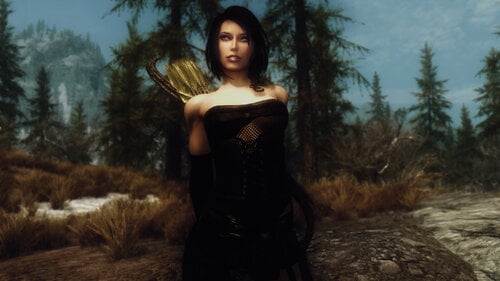
Nerida - Imperial Rogue Follower LE
"Muahaha! I am Princess Stabbity! Stab, kill, kill!"
Nerida is a woman always on the run, never looking back. Usually because she has a talent for getting into trouble with the authorities, but she is also running away from her past, disappointments, and bad decisions.
Life in Tamriel is harsh and she has learned that lesson. She is out for coin and treasures, taking it all and never giving anything back. She can be nice, but be careful when she offers you a drink... it might be poisoned.
Just recently Nerida had came to Whiterun, where a guard took her away for questioning about the sudden rise of vanishing coin purses. That was the day when a stranger came into her life and changed everything.
Nerida is an Imperial rogue / archer follower with a customized voice and her own idle comments and combat lines. It's based on FemaleYoungEager, but pitched down a bit and edited to fit her darker nature.
She isn't sweet and sugar at all, but a person who looks out mostly for herself. She will be loyal to you, but don't expect her to turn into a gallant heroine, she's a material girl.
Voice:
Nerida comes in two versions: the custom voice one will have unique dialogue, interactions and personality. The vanilla voice one is like any normal follower using the standard FemaleYoungEager voice and will have none of the extras.
Location:
At first you'll find Nerida in the Dragonsreach Dungeon (Jail) in Whiterun, later she'll go to the Bannered Mare if dismissed. If you choose to use the vanilla voice version of Nerida, she'll be always located in the Bannered Mare.
Extras:
Nerida has an extra dialogue option ("Let's talk for a moment") where you'll find several options. Once a day you can ask her for potions, poisons and lockpicks, or she can teach you in rogue-related skills. You can also give her a share of of the loot in form of plain gold or valuable items. All this will affect her affection towards you, which has influence on her responses and the possibility of marriage.
Marriage:
Once her affection is raised enough by giving her loot, she will have a short conversation with you. After this she can be married like a normal NPC (Talk to Maramal, wear the Amulet of Mara and ask Nerida if she's interested in you)
Combat Style:
Nerida prefers to fight in ranged combat, but she can also dual-wield when in close quarters.
When she's in danger, she also can use Voice of the Emperor once per day.
Equipment:
Nerida comes with a darker coloured version of the Tembtra Thief Armor. For close combat she has two daggers, but since she prefers to fights dirty and from afar, she mostly relies on her special bow, the Poison Ivy. The enemy might realize the hit, but then it's already to late. Additional she has some healing potions, lockpicks and 200 Elven arrows.
Perks:
Overdraw (Rank 1) Critical Shot (Rank 1) Quick Shot Armsman (Rank 1) Dual Flurry (Rank 1) Agile Defender (Rank 1) Stealth (Rank 1) Lightfoot Silent Roll Depending on her level she can unlock doors if she has lockpicks in her inventory
Level:
Nerida levels from 3 to 150 at a rate of 90%
Protection:
Protected, which means she can be killed by the player
Body:
UNP or CBBE. She is standalone, so you can have a different body installed. Height: 0.97 / Weight: 75
Requirements:
Latest version of Skyrim
Optional: If you want to use her high heels outfit, you'll need the HDT High Heels System
Install options:
Body Type (UNP or CBBE) Hair Style (6 styles available) Muscle Tone (Soft muscles or stronger) Skin Gloss (Normal or Wet look) Clean or dirty face Optional Body Tattoo on her back Outfit (Flat or heeled boots) Custom or Vanilla Voice Alternate face created by Billyro
Nerida comes with 2k resolution skin textures, a 4k version is available as a seperate download.
Compatibility:
Followers with a custom voice type like Nerida can have sometimes a few issues with follower management mods. Use them at your own risk / discretion.
The vanilla voice version of Nerida will be of course compatible with every follower management mod.
Technical Information:
This mod edits the cells WhiterunDragonsreachBasement and WhiterunBanneredMare.
The subtitles for Nerida's relationship dialogue don't match the spoken lines, this is done intentionally and not a bug.
Nerida's BaseID is xx000D64, her RefID is xx008520 (xx depends on your load order)
Credits
- Mods used for her creation -
DIMONIZED UNP Female Body by dimon99
Caliente's Beautiful Bodies Edition -CBBE- by Ousnius and Caliente
The Eyes Of Beauty by Gabriel Mailhot
KS Hairdos - Renewal by Kalilies Stealthic Khaos and Shocky
High Resolution Scars by Xenius
Tembtra Thief Armor UNP - CBBE by Deserter X - Mitosuke
Demoniac - High Quality Glossy Female Body Texture by Regenbot03 (Demoniac FMS uses assets from Mature skin texture and body for UNP(B) 7BASE CBBE Vanilla by Maevan2)
FemFeet Redesigned by Leito86
Feminine Hands CBBE UNP by Sunspot2
Maevan2's Eye Brows by Maevan2
- Tools -
GIMP, Audacity, NifSkope
TES5Edit by ElminsterAU
RaceMenu by Expired
NifMerge by Turulo
Voice File Reference Tool by greentea101
Skyrim & Creation Kit by Bethesda
Special Thanks
Billyro for creating the alternate face
Have fun!
1345 downloads
Submitted
-
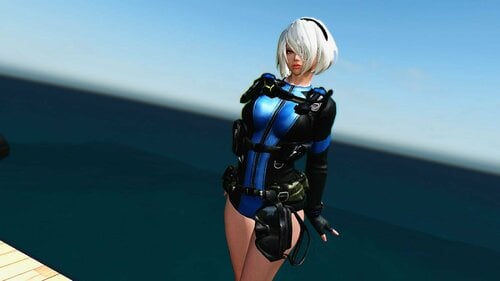
SUDDENT ATACK 2
By lordarked
this another port to le from se.i doit with autorization of creator this port
uunp body
download link
if you wish sponsor me or donation
https://www.patreon.com/XAYS
https://ko-fi.com/xays1
visit my tweeter for more:
273 downloads
Submitted
-
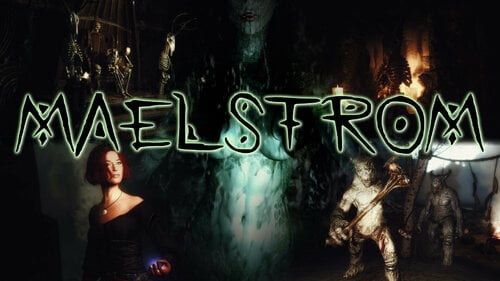
Maelstrom - Norse Dungeon Quest Mod LE
A strange island has risen from the depths of the sea, an expedition to uncover its mystery is already on its way. You are just a little too late to the party, and following the expedition's footsteps you uncover a tale of treachery, madness and forgotten secrets before you self are drawn into the Maelstrom...
Maelstrom is a dungeon quest mod inspired by Norse mythology and spans a large dungeon complex and other locations filled with puzzles, enemies, secret areas and more!
How to start the quest:
Talk to the innkeeper of the Winking Skeever in Solitude, and ask if he knows about some work for you. Alternatively you can find a new location along the coastline which also leads to starting the quest.
What awaits you:
A multipart dungeon questline with three possible outcomes Lots of old-school RPG style puzzles New enemy variants, equipment, lore and flavour texts and a lot more A fully voice acted NPC and potential follower (voiced by Simone Mountain) A secondary vanilla voice follower with some custom dialogue New dialogue created by editing vanilla voice assets
Requirements:
Latest version of Skyrim
Dawnguard DLC
Dragonborn DLC
Video Reviews:
Playthrough by Zero Period Productions (contains spoilers, but useful for hints):
Changelog for v1.03:
Added a third way to complete the quest Rán can now ride her own horse as a follower (you can disable it via dialogue option) Fix for a rare CTD when fighting drowned enemies Minor clarifications, fixes and enemy tweaks
Installation:
Use your favourite mod manager that can handle a FOMOD installer, simple as that. Manual installation is also possible by dropping the .esp and .bsa files from the archive into Skyrim's Data folder.
Uninstallation:
Uninstalling a mod midgame is never really a good idea, but if you have no other choice:
Dismiss any followers you might get from this mod and go to a location which is definitely not part of this mod (e.g. Riverwood) Wait for 24 ingame hours Save game and uninstall the mod with your mod manager or delete the files you've installed manually from the Data folder.
Compatibility:
Both followers have their own follower system and they will follow you regardless of any other followers you might have. They won't conflict with any mods regarding followers, but they also will be ignored by them and their respective special features. It's not recommended to use any force recruit / manage features from other mods on them as this certainly will mess up things.
The vanilla voice follower will switch to Skyrim's vanilla follower AFTER the questline is completed, then she can be managed by any mod you like.
Install Options:
A few of the NPCs are nude by default. If you don't like this, the FOMOD installer gives you the option to give the respective NPCs a basic set of underwear.
Conflict Potential:
This mod makes no changes to any vanilla records except adding two new locations to the worldmap by editing the cells 00000D74, 00003DBE and 0000B478. Only new objects are placed, existing objects are left untouched.
Credits
- Voice Acting -
Simone Mountain as Rán
All other NPC voice were created by editing vanilla voice assets
- Mods, Assets & Resources -
Feminine Argonian Textures by MONSTERaider
Modder's Resource Pack by Oaristys and Tony67
zzjay's wardrobe by zzjay
KS Hairdos Renewal by Kalilies Stealthic Khaos and Shocky
Lind's Human Eyes by Lind001 - LindsWorkshop
Maevan2's Eye Brows by Maevan2
Caliente's Beautiful Bodies Edition -CBBE- by Ousnius and Caliente
DIMONIZED UNP Female Body by dimon99
Demoniac High Quality Glossy Female Body Texture by Regenbot03 / Demoniac FMS uses assets from Mature skin texture and body for UNP(B) 7BASE CBBE Vanilla by Maevan2
Leyenda Skin by HeroedeLeyenda
Freckle Mania 2 by tetrodoxin
The Amazing World of Bikini Armor by NiseTanaka
Ice Titans - Mihail Monsters and Animals (mihail immersive add-ons- giant- witcher) by MihailMods
Duelist - A New Sword and Yggdrasil Viking Sword by Billyro
Amulets of Skyrim and Vanilla Followers AI by uni_SL
Evil Laughing Woman Sound - Woman Laugh Sound Effect | Ver.2 by Distorted Room
A Siren's Lure Song by Reaper Cat
Music: Ásgarðr by Adrian von Ziegler
- Tools -
GIMP, NifSkope, Audacity
Lazy Voice Finder by BowmoreLover
Unfuzer CPP Edition by greentea101
RaceMenu by Expired
BodySlide and Outfit Studio by Ousnius and Caliente
TES5Edit by ElminsterAU
NifMerge by Turulo
MultiXWM by Vikichan
SSE NIF Optimizer by Ousnius
Skyrim & Creation Kit by Bethesda
Special Thanks
Simone Mountain, for bringing life to my creation
Porterhause, my trusty chronicler
Have fun!
3023 downloads
Updated
-
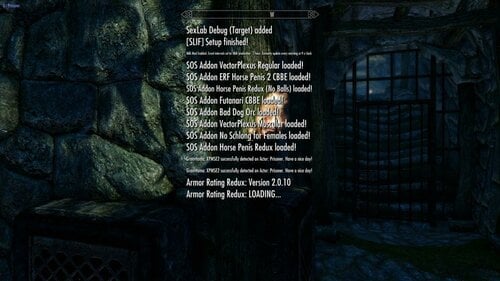
Faster Mod Setup Notifications LE
By pinkfluf
(text from SE page) But mod converted using LE vanilla Interface Assets and tested in LE
Supports Left, Centre and Right Notification messages.
This mod can increase the amount of notification messages (or use vanilla settings) and makes them fade faster. Handy during mod setups
This is based off this mod on Nexus but I didn't like the bright hud colours so I used the stock Interface assets
https://www.nexusmods.com/skyrimspecialedition/mods/30170?tab=description
Here are some timings with different settings (based on 261 active plugins)..
messages stopped/disappeared
3:29 80 frames 3 shown
2:12 50 frames 3 shown
2:02 40 frames 3 shown
1:27 30 frames 3 shown
1:17 20 frames 3 shown (Faster but noticed some messages still appeared "your follower can't follow you here" so scripts still running)
3:09 80 frames 15 shown
2:05 50 frames 15 shown
1:51 40 frames 15 shown (I use this setting, a good balance I think)
1:21 30 frames 15 shown
1:02 20 frames 15 shown (Faster but noticed some messages still appeared "your follower can't follow you here" so scripts still running)
You won't always get 15 spam messages during a playthrough unless your doing something to spam the notification messages (building a house etc)
Tools Used:
Jpexs - https://github.com/jindrapetrik/jpexs-decompiler
Compatability:
SE Version here
Anything that does not touch "interface/exported/hudmenu.gfx"
If you do have a mod that touches on it you can modify it (hudmenu.gfx or hudmenu.swf) yourself (might need to extract it if it's in a BSA).
Steps To Modify Or Change Position:
Open gfx or swf file in Jpexs ( if you get a "this uses assets from gfxfontlib.swf" just select no (twice).
1) In the left pane navigate to Scripts then click on Messages
2) In the far right pane click on "Edit P-code" and modify either the "MAX_SHOWN" (default 3) and "END_ANIM_FRAME" (default 80) to your choosing.
3) To change the position navigate to line 71 and change the x,y coords to your choosing
4) Press Save under the Pane, then Press Save on the main file menu voila your done.
1533 downloads
Updated
-
ShockCane
First, sorry for my bad english.
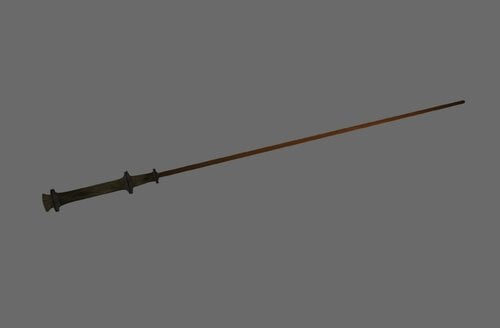
This mod brings a modified ZaZ-OldCane into the game.
It change not the original Cane. It comes with its own ID.
In addition to the normal damage, it also causes shock damage (see the images).
I create this weapon for my own, but i hope you have fun with it ?
Sorry, I forget to tell you, where you get this weapon ?.
You can buy this weapon by the Riverwood Trader or use additemmenu.
Installing
It is only a esp.-file, so you can drag and drop to your Skyrim\data - folder or use a MM like NMM.
Requires
- Skyrim
- last Update
- ZaZ Animation Pack CBBE V.8.0
180 downloads
Updated
-
skyrim Small ports from other games..
By Reenana
Hello ?
Recently my hard drive had failed me, so upon scouring of what is left , i manage to save a few clothing mods and clutters that i personally use for myself.
and to prevent further losses, i decided to share it here in LL, so that i could redownload it too when i had a new workstation to tinker with.
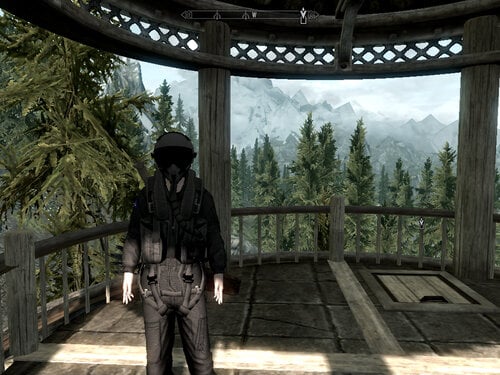
this port consists of :
- 3 Female sets, and 2 Male sets.
- everything is _0 :C
- Either for male only , or for female only.
- and 1 female set may require HDT so it doesnt clip your feet through the ground when wearing it.
It wont crash though even if you dont uses HDT, it just sunk your feet through the ground.
i only have skyrim LE, so idk about the recent ones.
and there may be imperfections,so please bear with me.
Credits to :
- DICE/BF3
- Grasshopper Manufacture / Lollipop Chainsaw
-Kojima/MGS4
- Sparky84 & antistar for a gasmask (didnt make any records in esp for this one)
- and anyone i had not yet mentioned , will update please bear with me.
PS: there's a few things not added to the game , because im quite busy fixing things to even make edits on a creation kit.
check the data folder for more info.
feel free to use this port as you wish
screenshots are incomplete, please add yours to compliment it. thank you vm ?
488 downloads
Updated
-
DEM Open Dress CBBE HDT Cloth
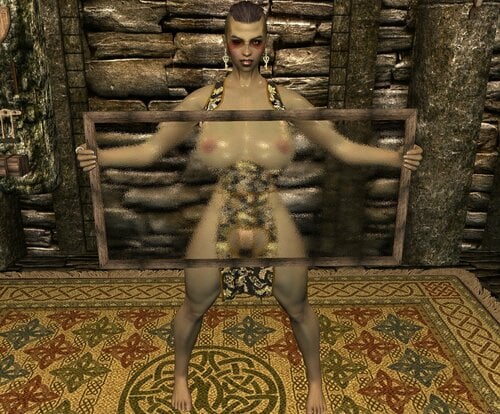
Description: DEM Open Dress CBBE Bodyslide LE v 1.0.0
======================
Converted to CBBE Bodyslide and Repackaged by NIND, I have left Elxdark's original Readme.
Original Author: Krista
Changes Made (in addition to CBBE Bodyslide):
-HDT-PE CLOTH OPTION ADDED BOIIIIIII (Yes there is some clipping but it looks pretty good)
-Additional Black Dragon body Texture Dress Added
-"Love Holes" Cutout Dress added in every texture
-Oily body option
-Zaps including: Back Cutout and Skirt/String Length
Install/Uninstall:
=======================
Use the usual methods and install with mod manager.
Select Zaps and build before use
Acquistion:
=======================
Utilize AdditemMenu and search "Open"
Credit to Krista for the original outfit, and Elxdark for the UUNP conversion.
3184 downloads
Updated
-
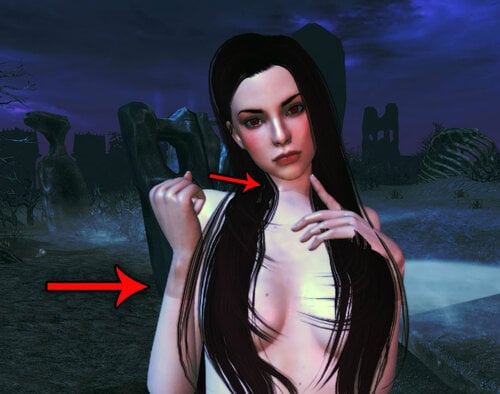
Fix texture mismatches (LE/SE/Whatever)
By Papitas
tl;dr: This is a Windows batch file that copies files from one place to another.
The problem
Mod authors who make new NPCs (or beautify the vanilla ones) often have a very specific idea of how they want their characters to look like, so they bundle custom textures with them for they to look exactly like envisioned. And they look exactly as intended... on THEIR OWN COMPUTERS.
The problem with using fixed textures for your NPCs is that you (modder) basically coerce players to use the same textures as you. If you (player) don't use them, you get the kind of color mismatches and seams between body/hands/feet/neck you see in the first picture of this file.
For example, do you use Leyenda Skin and installed The Ordinary Women (an NPC beautifier)? All bodies (naked, armored, clothed, whatever) will use Leyenda, but faces, hands and possibly feet of NPCs modified by The Ordinary Women will use the textures its author made for them. And you will be getting ugly color mismatches and seams as your prize.
The solution
It's quite simple, really. You just copy the textures you actually want to the folders with the custom textures made by the culprits; thereby, replacing them.
But that's a really tedious job. You copy one file by one, hoping you didn't forget to replace any of the textures. Or you can brute force and carelessly copy all files from the folder with your textures, but textures files are big and you can easily rake many gigabytes of useless files if you do so.
The best solution is using my script, of course. This script copies only the files that already exist in the destination folder.
Better yet, it also replaces files found in subfolders, so you don't need to run this script many times; once is enough (people that have ever had to mess with Bijin's textures will really apreciate this feature).
Usage
Put my script (bat file) in the folder with the textures you actually want (in my case, Leyenda). Drag and drop the root folder you want replaced (Bijin in this example) to my bat file and you are done.
Example pictures on how to use it are in this file's description.
I suggest to backup the folder with the textures you actually want before using my script.
Not because it's prone to errors, but because we are the ones prone to make mistakes
I made this script some time ago and I forgot how to use it, so I ended up replacing the files I wanted with the files I didn't want... twice
If you ever forget how to use it, you can open it with Windows Notepad and read how it works. I certainly wrote those instructions specially for me
Once you are familiar with how to use my script, you can stop backing up your folders.
Troubleshooting
This is a simple script that replaces files by name. It won't work on files that:
Don't have the very same name. Exist in the target folder, but not in the one where you put this script.
Since it just copies files, it doesn't matter what game you use it for.
Hell... for all I know, it could even work for Fallout (I don't play it, btw).
503 downloads
Updated
-
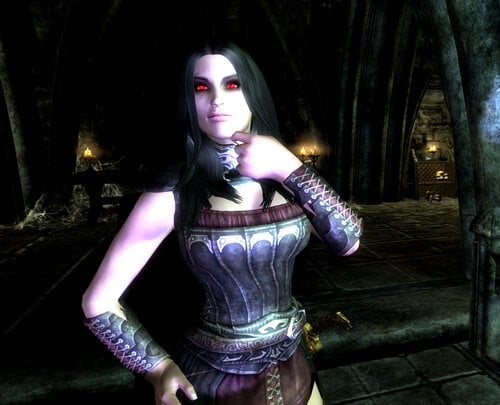
Serana and Valerica Redone
By XunAmarox
Description:
Just changes the appearance of Serana and Valerica. See the screenshots. Not much else to say really.
If you want the same exact textures as me, I'm using my CBBE Innies mod, you'll need the optional vampire face textures file too. And as for the eyes, the exact texture you can get in my VTF Vamp Innies mod VTF Vamp CBBE Innie-39568-1-0.7z, just download manually and only do the eye mesh and texture. If you don't want either of those though, then don't mess with any of that. It should look fine whatever texture pack you're using.
If you have a grey face bug it's probably because you changed how the NPC's look after their appearance was stored in your save game. You'll have to open console, click Serana and do "setnpcweight 50" and on Valerica "setnpcweight 100" then save and reload and they should be fixed. On a new save you shouldn't encounter that kind of problem.
If her lips look funny or makeup looks off then chances are it's because the Unofficial Dawnguard Patch breaks vampire faces a bit (though they won't admit it). If you set UDGP to Active with the CK then click Details then find NordRaceVampire and hit your Delete key to set it to IGNORE then load it, then save, then the problem should go away. The problem also happens to the player as well. You'll probably have to set their weight again afterwords.
Load this esp after any mod that might possibly change their appearance.
REQUIREMENTS:
ApachiiSkyHair - You will need both ApachiiHair.esm & ApachiiHairFemales.esm.
Dawnguard DLC
Mods used in screenshots:
Female Facial Animation
Smile in HD
BVFE - Better Vampire Fangs and Eyes (fangs only)
Killer Keos Skimpy CBBE V2-V3 Armor Replacer - Skimpy Vampire Armors
CBBE Innies + optional vampire face textures
VTF Vamp CBBE Innie-39568-1-0.7z - optional eye mesh and textures only - manually install just those
Credits
Serana's hair is by Apachii.
82 downloads
Submitted
-
No More Hay Beds
By XunAmarox
It's so simple that I'm amazed it hasn't been done.
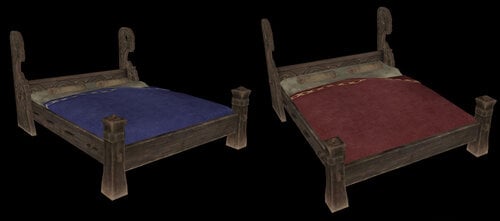
Do you hate straw beds? Cringe whenever you see one and lose the urge to sleep? Well, lose your sleep no more! No more hay beds, no sir. Noble beds for all.
This is a simple model replacer mod with no scripts - it should be safe to install or uninstall on any save. It changes the "common" and "upperclass" beds - both single and double, to "noble" beds. You know, the nice green ones that actually look somewhat fit for human use.
As an added bonus, they're color coded so you still know what's "really" supposed to be there. Green is noble - that's vanilla. Red is "upperclass" and blue violet is "common."
Yep... you're welcome.
Permission
Re-use is free as long as credit is given.
420 downloads
Submitted
-
XunAmarox Modder's Resource
By XunAmarox
Description
I'll add some more stuff later after I finish my current project but I feel that these two things are severely needed by the modding community so I want to get them out there right away.
What's Included
As of right now there are just three scripts: One to create custom displays (e.g. for stuff like elder scrolls, thieves guild stuff, daedric artifacts, or whatever you want!), another for a disenchanting font which removes all enchantments and improvements from an item placed in a container and returns it to the player. Well, you could call it a renewal font or whatever you want since it pretty much renews the item to its original state before anything was done to it. And as of 1.3 a script to display animated objects (toggle their animation on/off) much like the display script does but it's set up for the Auriel's Bow Pedestal (a static version of it) so you'll need to edit the source and rename it for any other animated object you want to use it for.
I've also included an esp with a small test cell with the scripts implemented so you can study how the scripts work. You can go to the area via console with "coc 0xtestlab" and it's in the CK under 0xTestLab right at the top. As of 1.3 it's probably not too useful for showing the newer features. I recommend just taking a look at my Stormcrown Estate mod to see how I implemented the scripts if you're having issues.
Tip: To create a static object of any item you don't need to extract it from the BSA just edit it in the Object Window and copy the entire line it lists under Model, something like Clutter\Containers\Satchel.nif and then when you create a new static object make sure you're in your Meshes folder then just paste that address and click Open.
How to use
aaXunDisplayScript
-Create a static item that will be what you are displaying and set it to initially disabled.
-Create a container (set to not respawn), and hide it off of the map like under the floor or behind a wall or something (hiding it is optional but recommended).
-Add the script to a new trigger.
-Go to Primitives tab and make sure player activation is checked.
-Go to the scripts tab and then Properties and click Auto-Fill.
-Hover over various sections for descriptions, it should be intuitive.
Only one of DisplayArmor, DisplayWeapon, DisplayItem, DisplayBook, or DisplaySoulGem, should be used at a time and should point to the original item's BaseID. The words after Display are the category it falls under - Item is for MiscItem.
DisplayReference should link to the disabled static item you added earlier, the script will enable/disable it based on whether the real item is added or not.
DisplayContainer should link to the hidden container you created earlier. It doesn't need to be unique, you can use one container for your entire display setup.
When activated, the script should take the item out the player's inventory, move it to the container, and enable the static item. When activated again it will disable the static item and move the item back to the player's inventory. Any improvements or enchantments will have been retained.
aaXunDisenchantingScript
-Add the script to a container, any container will do.
-Create a new Global under Miscellaneous/Global called RFontGlobal with variable type of short, value set to 0, and Constant left unchecked.
-Create a new message under Miscellaneous/Message called RenewalFontMSG and keep Message box checked, inside the text box add a warning letting the user know what's happeing for instance "Items you place here will have all improvements and enchantments removed." or something.
-Go to properties in the script and click Auto-Fill.
-Done. Script will now work, any item added will be "disenchanted" and renewed to its original state. It'll also remove any smithing improvements done or renaming. Additionally, on its first activation the user will get the help pop-up that you wrote earlier.
aaXunDisplayScriptAnim
Currently this one only works for the Auriel's Bow pedestal which you'd want to create a static object for. If you wanted to use it for a different object you'd need to edit the source and change "AnimIdle01" and "AnimIdle02" to the appropriate animations but if you're going to do that then ensure you change the name of your script before distributing it so it doesn't conflict with anyone else's. The animation names are listed when you prevew an item (right click > preview)
To set this one up you need to place a static copy of auriel's bow pedestal and then create an activator and add this script to the activator.
--Go to Primitives tab and make sure player activation is checked for your activator.
-Open the script and hit auto-fill, PlayerRef and defaultLackTheItemMSG should be filled for you.
-Set the DisplayContainer to the hidden container where the bow will be stored for safekeeping.
-Set the DisplayAnim to the static copy of the auriel's bow pedestal
-Set the DisplayWeapon to Auriel's Bow (DLC1AurielsBow)
Hit OK.
Permission
This is a modder's resource. You are free to re-use it, modify it, and include it in your mods as much as you want as long as credit is given.
Changelog
Version 1.1
-DisplayItem renamed to DisplayMiscItem to avoid confusion.
-Linking the static reference to enable/disable to the activator is no longer required. It was just an oversight as we already set it in the script, now the script uses that variable rather than checking for linked references. It should be easier to do multiple displays now.
Version 1.0
Initial release.
31 downloads
Submitted
-
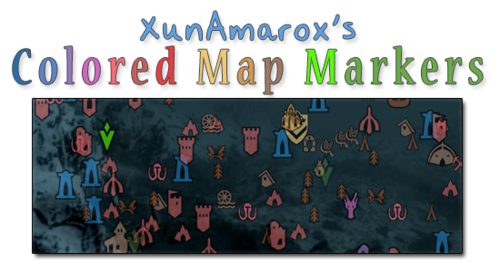
XunAmarox Colored Map Markers
By XunAmarox
Summary:
Contest winning map marker design based on EzEs Colored Map Markers. SkyUI 4.1 & all DLC compatible. Colored compass & unvisited markers included.
Required:
SkyUI 4.1 - May not actually be required... If you don't use it, let me know if it works alright without it.
I'm not sure how it'll do on older versions of Skyrim since there are markers from Dragonborn & Dawnguard. I'm also not sure if not having those DLC will affect it.
Design:
I started out with the idea that not everything needed unique colors because it becomes overwhelming and confusing and similar places should share colors to reduce clutter and make things easier to find on the map. So to do that I went through and reorganized the whole thing to make sure it all made sense. I tried to use mostly desaturated warm colors to that end. As for the coloring itself... I went with a yellow/orange (same spectrum) combination for the Major Cities & Palaces because I wanted them to be visible but not obnoxiously colorful, but still look related (e.g. same spectrum). They could have been about any color, but I thought a warm color would go best with the rest of the colors I chose which were also in the warm color spectrum.
I went with a very desaturated light brown color to indicate settlements because they're things that shouldn't really stand out that much and aren't a threat, so they should have a very mild color. For dungeons (e.g. very dangerous places) I gave them red as per the natural color response stimuli of red meaning danger so it indicates that the places is probably going to be hostile and dangerous, but I kept it very light and desaturated since these places are numerous as to not overwhelm the map with colors and become overly obnoxious... For the other world locations I went with a darker brown since they're more important than settlements though generally not as hostile as the more dangerous locations. The dark brown is a bit more vibrant, but brown tends to not be a color people associate with colorful and vibrant, so I figured it wouldn't draw too much attention other than making them noticeable.
As for the couple of special things, I wanted them to be very identifiable. Daedric Shrines are very rare in the world and attributed to Daedric Princes, so I wanted that to really stand out on its own. Dragon Lairs, a very dangerous and very unique set of places on the map and there aren't that many of them. With the Doomstones, I wanted these to have their own color and stand out more than other things because being able to find and change one's sign is pretty important. Giant Camps I made a lighter slightly more saturated red than the dungeons because they aren't really dungeons, but they're still extremely dangerous places. As for Stormcloak/Imperial camps, I wanted to give them their side's respective colors: red and blue.
Now, the player markers... Those are things the player is going to be seeing all the time and they tend to be vitally important. That's why I chose to go with green for the markers indicating places the player needs to go, since I made sure not to use the green spectrum anywhere else on the map so they would be noticeable. I left the generic markers a desaturated green, but made the player's custom marker a very bright green to be still in the same spectrum of normal markers, but to really pop out. I made the locked door thing an orange-ish color to indicate you can't go that way or it needs a key or whatever so it would be obvious but not stand out too much. And the player marker itself... I was actually really iffy on that. At first I had it a really bright red to make it stand out, but after I went with red for dungeons and Imperial camps I decided it might get too washed out and be hard to find... so I gave it a unique color. I went with the blue spectrum since very few things used that, but went much brighter so it'd be immediately noticeable and really pop out.
History:
Back in November of 2012 I won a design contest for the next new design of EzEs Colored Map Markers (linked above). I've used it ever since - I love it. Unfortunately when xEightballx updated his mod for SkyUI 4.1, much to my dismay, mine was never included. I completely understand -- it took me hours to do just this one while xEightballx was juggling 12 different versions. Insanity!
It makes sense to me in retrospect why only a handful were chosen to be updated and also why he does not include unvisted markers or the vast majority of compass markers. If you just do the map's discovered markers that's 1/2 of one page. If you do what I've done however, it's a full page for both the discovered and undiscovered markers, and then that is doubled because I did them for the compass as well. So my one map marker set that I'm uploading now is probably equivalent to about 4 of the others in terms of how much was done.
Making these colored map markers is not hard. It is however tedious and time consuming. If you want to know how to do it yourself, it's really so simple anyone could do it; xEightballx has a video tutorial on how to do it, so check it out if you're interested. I couldn't have made this without it.
The biggest problem for me using SWF Decompiler is that it doesn't play nice. Ctrl+A and Ctrl+V don't work so I have to manually highlight then right click and choose paste every time and every single time I have to select Solid from a drop down on what type of fill I want to do. Then, pretty frequently all the thumbnails will just disappear so I'd have to close the program and re-open it. Then, sometimes it refused to fill some markers at all and I had to go into select and individual groups and ninja my way around it. Tedious, time consuming, and a lot of work done exclusively with one hand since your other is completely useless.
All of that said, with the stark reality that EzEs markers will likely never be updated with mine ever again and xEightballx's video tutorial found I decided to just do it all from scratch myself, updated for SkyUI 4.1 and all the DLC's.
I actually had to redo the compass markers 3 times because first I started on the one included with EzE's which was horribly outdated, then I did it on the one extracted from my Interface bsa file, and then finally once more on the one from my Update bsa file. I'd gotten at least 80% done on each of those so yeah.. I was ready to start banging my head against the wall.
Changelog:
1.1 - Shape 307 which was previously thought unused (3 quest pointers stuck together) was colored (it's used one time, when you're sent to talk to Arngeir for the Peace Council I believe, or something like that). So, just minor update. You probably won't even notice, but I've got you covered anyways.
1.0 - Initial release
Credits:
xEightballx's video tutorial on how to edit Skyrim SWF & GFX files. I couldn't have made this without it. Also, he should be credited for the contest which inspired me to originally design my own map marker scheme.
195 downloads
Submitted
-
Dovahzul wah Joorzul - An in-game Dragon to Mortal Dictionary
By XunAmarox
Description
Adds a book to the game that contains the entire dragon alphabet as well as all known common translations.
Add it to your game via console.
player.additem xx000d62 1 ;Dovahzul wah Joorzul
Replace xx with the mod's load order. Text after ; not required, that's just a label if you want to make a bat file.
Video
Start at 10 minutes 36 seconds: video
Credits
Thuum.org - dragon alphabet font and translations
Dovah Zul Wiki - further translations
Changelog
•Version 1.1
Minor corrections. A "/" after "Mine" was removed and an extra "Mine - Dii" was removed.
•Version 1.0
Initial release.
68 downloads
Submitted
-
NMM Installer Tutorial - FOMOD - FOMM
By XunAmarox
This is a tutorial and example file of how to make a fomod NMM installer for your mod. Inside the download you'll find an Instructions.rtf - read it. It'll explain all of the tags of the xml files required, what they do, and how to use them. Some example xml files are also provided so that you can see how it's done.
Personally I wanted one when I was trying to figure out how to make an NMM installer but I simply couldn't find one. The only ones I could find were extremely long and far more complicated than they needed to be. This one just covers the basics of exactly what you need to do to make yours work for your mod.
I go into detail with what all of the tags and fields do, to a point, but if you have a basic grasp of any kind of code, even basic HTML or BBCode will do, then you can probably just check out the provided xml files and you'll have a pretty good idea of what's going on and what you need to do and then you can check the instruction file if you come up with any questions you need to reference.
If you've looked at the xml files and read everything in the Instructions.rtf and are still scratching your head then it may be helpful to go ahead and head on over to my CBBE Innies mod that I based this installer on (WARNING: It's NSFW and contains adult content, and nudity). You can download that file manually and check out how I have the xml files set up. They should be almost identical to this but with the fields filled in so you can see how one works in action if you can't figure it out. It shouldn't be necessary, but I'm just going to suggest that as a last resort.
Also as an important note: I didn't mention in the instructions that you'll need to open the xml file with notepad (or ideally something like Notepad++ for syntax highlighting), because you're not going to get much use out of it if you just double click it and let it open in your browser. So make sure you're editing it with the text editor of your choice.
Changelog:
1.2 - August 26th 2013
-It turns out that NMM isn't actually smart enough to install your mod if you only put the source folder and leave the destination blank. It'll go all the way through then when you click finish it'll say "Mod Not Activated" - this is at present time of editing with NMM 1.45.6. Each file needs to be explicitly defined and linked to.
1.1 - August 9th 2013
-added information explaining Flags and made the moduleConfig much more complex
-a simple moduleConfig is still included
-added information about file source and destination that will save people a lot of time
-explained what the config tag up at the top of the xml file does just to make a certain someone happy
1.0 - August 2nd 2013
-initial release
Permissions
Don't upload this anywhere else.
You have my permission to translate this mod to your language and do not need permission to upload a translation to this site or any other as long as it is very clearly credited to me originally. You only need to send me a message informing me that you've made a translation.
129 downloads
Submitted
-
DMGfollower and more English translation
By venxiciciala
English translation for above mod here on loverslab
Since there isnt a discussion board for this mod on the loverslab mod page anymore, im posting this here.
Just run a normal install of the base mod and replace the esp provided here
63 downloads
Submitted
-
DARK MAGICAN GIRL and more!!!!
By lordarked
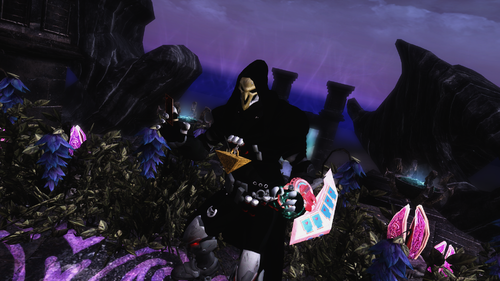
this dmg can be found on whiterun palace with his twin ,on this mod you will find cards and armor stuff from yugi oh duel disk also 2 bikes and a third follower summon by card,on wizard palace desk. this a port from original version from se. i made it also check the original version too, this made it with autorization of creator of mod.
on folder both version se/le : https://www.mediafire.com/folder/9ge3nhtzqwxkd/dmg
if you wanna sponsor me :https://www.patreon.com/XAYS
visit my tweeter for skyrim stuff: https://twitter.com/xays19https://app.mediafire.com/9ge3nhtzqwxkd
198 downloads
Submitted
-
cortana suit cbbe 3bbb and bhunp
By lordarked
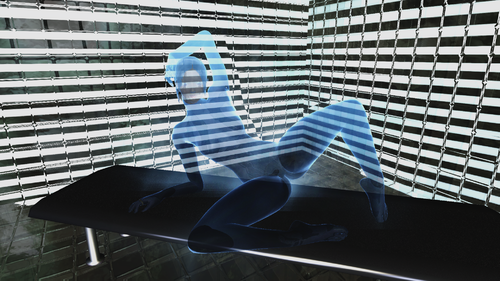
original creator rektas i made this port to le , come on cbbe 3ba and bhunp, all credits to recktas
se version by recktas: https://www.rektasmarket.com/post/rektas-cortana
my port to le : https://t.co/59hwRyUvX4?amp=1
visit my tweeter ; here i got 99% of things of what you see here XD
ther
233 downloads
Submitted
-
Race Delimited Vampire Lord
This is something I cobbled together almost a year ago to get rid of being locked into one race the first time vampire lord form is assumed.
It is pure script and therefore is suitable to both Skyrim LE, Skyrim SE, and very likel;y Skyrim VR.
If you change race after haveing been a vampire lord one or more times, it now returns you to your new race, not the old.
43 downloads
Updated
-
modern scroll SE
By lordarked
this is a modern city is a mod like moderntown but this much better and big also have npcs around, i upload with autorization of owner .
the door is on riverwood a book on the floor is a spell teleport to the city see the pictures for see location of the book.
there a le version too i uplodad on his recptive le section too
https://drive.google.com/file/d/1Sj1yOwWiRnahdtc4EZp44CE_VQ0YM0VA/view
422 downloads
Updated
-
.thumb.png.440f52238330f12aa7e4da9605e4e3a2.png)
Wicks Chainmail Bikinis UUNP & CBBE With Bodyslide LE
By engeljess23
This is a Convert From Skyrim Special Edition to Skyrim Legendary Edition
Create UUNP & CBBE Bodyslide Files (Standard is UNPB)
info: ESP,Meshes,Textures,Bodyslide Files
!! This is not my mod !!
- UUNP version comes with UNPB as its default meshes - Use bodyslide files to build to your own custom shape if you so desire.
- CBBE Version comes with CBBE Curvy as its default meshes - Use bodyslide files to build to your own custom shape if you so desire.
Mod adds 8 different colours.
Black, Blue, Gold, Green, Pink, Purple, Red, Silver.
All are craftable and Temperable.
Create Screenshots and give Use feedback ^_^♥
Credits all Original Modder from this Mod
Original by Wickwah for Skyrim Special Edition
783 downloads
Submitted
-
.thumb.png.27bc2dd1897e130fa28a0776b3d3fa92.png)
Witch Dealer Outfit Retextures SLE & SSE with Bodyslide files by Engeljess23
By engeljess23
I have all colors adding in the ESP + Bodyslider Files
---------------------------------------------------------------------------------------
Textures
meshes
Bodyslider Files
For CBBE,CBBE PHYSICS,CBBE SMP(3BBB)Bodys(SSE)
For UUNP,BHUNP BODYS (SLE)
---------------------------------------------------------------------------------------
---------------------------------------------------------------------------------------
Cap/Hat
Robes
Pants
Socks
---------------------------------------------------------------------------------------
Install this with Mod manager (MO,NMM,vortex)Or Manuell in you skyrim Data folder
->(meshes in the meshes folder) ->(textures in the textures folder) ->(CalienteTools in the CalienteTools folder)
---------------------------------------------------------------------------------------
For Skyrim Legendary Edition Version BHUNP-UUNP BODYS Here
and Yes you can for other bodys Converting
you can Port this to Skyrim SE but give me Credits thank you
little info for skyrim SE (special Edition)
is porting but is with one color is for CBBE SE Body you can this found HERE Portet by Outlawer
For UNP BODYS
Skyrim Special Edition -UNP-UUNP-UNPB-7BB-Seraphim-DreamGirl
port by bchick3
---------------------------------------------------------------------------------------
My Blog Site
My Patreon Site
My youtube Channel: Engeljess23
Tutorial for Bodyslider Presets HERE
Feedbacks & Screenshots is Welcome
have you Problems with the File from here?
then Download this from Mediafire again and test again
---------------------------------------------------------------------------------------
Credits
Original Asset Author by NumericGazerSkyrim
LE Porting uunp body by SkyrimOnion
Thank you bchick3 For creating Recept and adding bodyslide files(Esp etc is from him)
1004 downloads
Submitted
.thumb.png.d476ec0bfca6ca16a086bc179741e360.png)
.thumb.png.ea1cd1c28ec6e6a0dc7025d0ce1ef3ab.png)
![More information about "HL_LetDown — Lactation Gameplay Mod [18+]"](https://static.loverslab.com/screenshots/monthly_2026_06/profile.thumb.png.076d13708b11021a02526925f6aa0fe9.png)