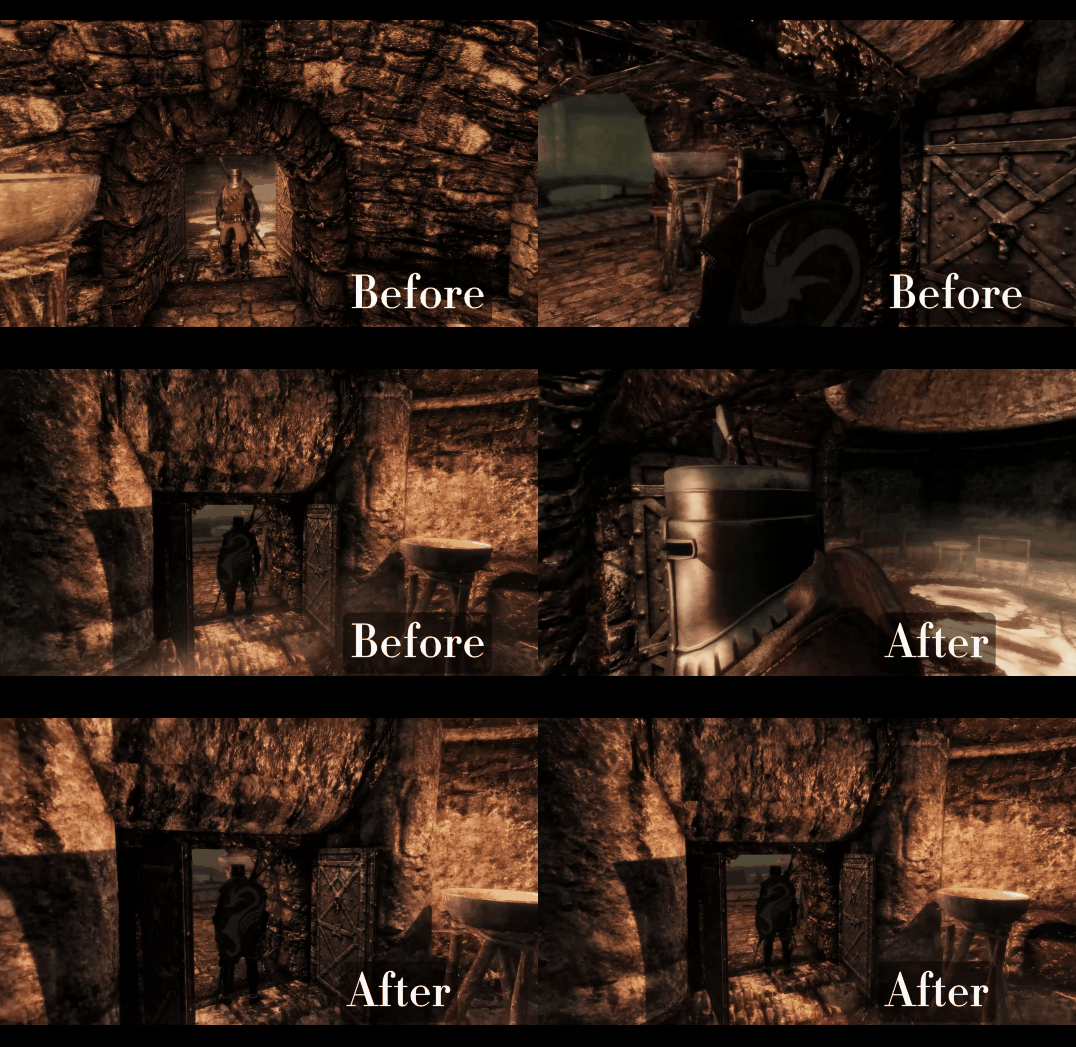
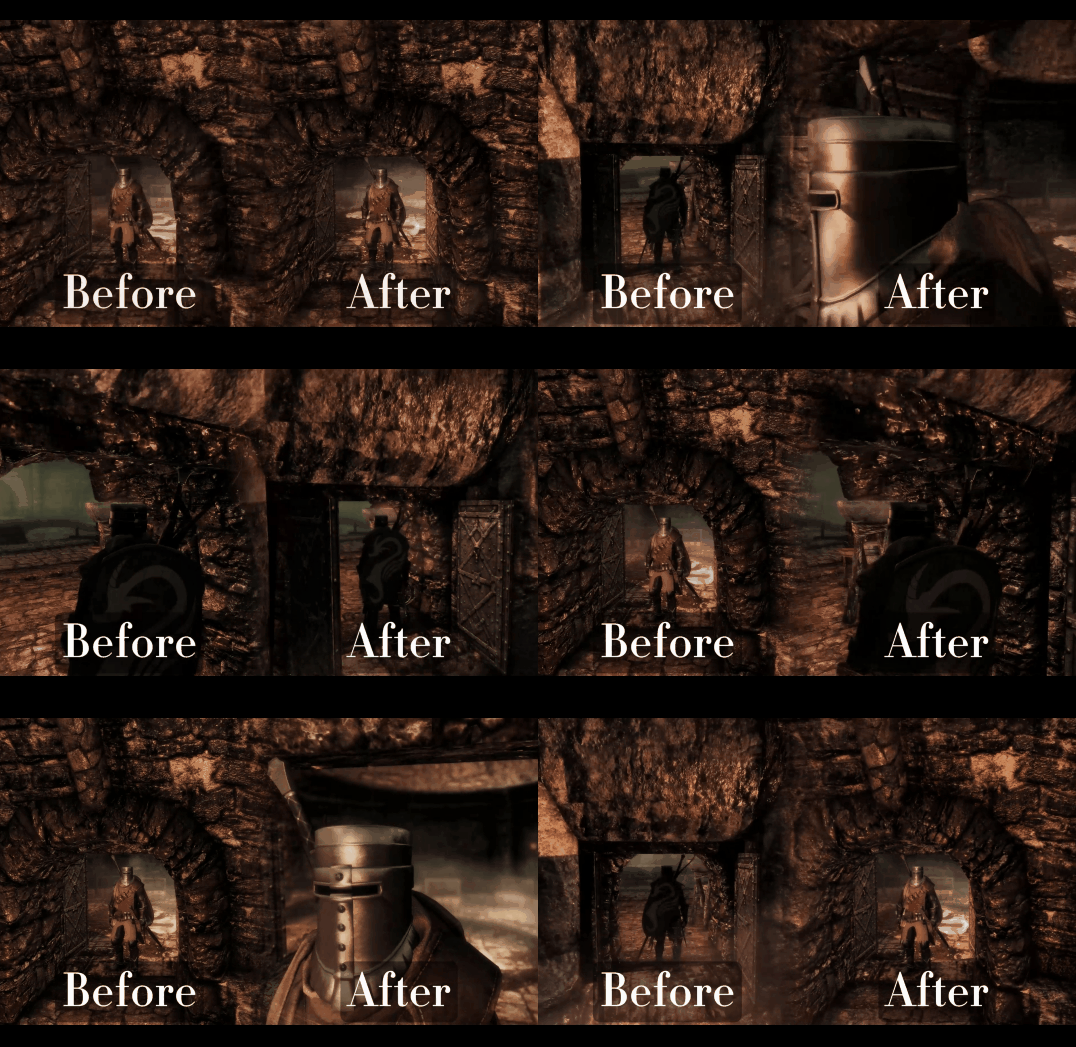
An SKSE plugin for Skyrim SE / AE that fixes the jittery third-person camera in tight spaces. In corridors, around pillars and in cramped dungeons, the camera keeps hitting an obstacle and letting go of it, snapping in and out several times a second. Cushion sits on top of SmoothCam and smooths out that collision response: the camera still never shows you the other side of a wall, but it gets pushed in smoothly, holds, and eases back out — closer to how modern third-person games (Helldivers 2 and the like) feel in close quarters.
IMPORTANT - GAME VERSION
I play on Skyrim 1.6.1170.0 and built and tested this mod only there. It is NOT updated for the recent 1.7.x Skyrim updates. If you are on 1.7.x and want to use it, downgrade to 1.6.1170.
━━━━━━━━━━━━━━━━━━━━━━━━━━━━━━━
■ On AI use
━━━━━━━━━━━━━━━━━━━━━━━━━━━━━━━
Most of this plugin's code was generated by Claude Code (Anthropic). The author (KEI997) handled:
- Defining the problem ("the camera jitters in tight spaces, I want it to feel like a modern TPS"), spec decisions, trade-off calls
- Working through the design with the AI one decision at a time (fork SmoothCam or layer on top of it, what goes into the first version, etc.)
- In-game testing and feedback (several rounds, including dropping a feature that pulled the camera in too much in corridors)
- Pointing the AI at specific reference mod sources
- Reviewing and accepting/rejecting generated code
The non-trivial technical work — finding the cause of the jitter in SmoothCam's source, the hook site, where to write the camera position, the engine's camera collision cast, working out SmoothCam's camera rig — was all borrowed from existing mods after reading their source. Cushion's own design choices are limited to the response logic layer (smooth only the amount the collision pushed the camera in; real collisions are instant, predictions are smooth, returning waits and then eases out). Per-feature attribution to the actual mod authors is listed in the GitHub README:
https://github.com/Kei-BWV997/Cushion
If any listed author objects to their source being used this way, please contact and I will rework the affected feature or adjust the credit.
━━━━━━━━━━━━━━━━━━━━━━━━━━━━━━━
■ Features
━━━━━━━━━━━━━━━━━━━━━━━━━━━━━━━
- Instant in, slow out: when the camera actually hits something it moves in immediately (you never see through the wall), then holds for a moment (default 0.3 s) and eases back out (default 0.8 s). No more in-out-in-out flicker beside pillars
- Rotation look-ahead: while you turn the camera, Cushion checks slightly ahead in the direction you're turning and starts moving in smoothly before an obstacle blocks the view. Swing the camera around a pillar and it glides around it instead of jumping
- Movement look-ahead: the same for walking past a pillar or approaching a corner. Standing next to a wall or running down a straight corridor does not trigger it
- Zoom is untouched: only the collision push-in is smoothed, so mouse-wheel zoom and SmoothCam's own offsets / smoothing behave exactly as before
- Compare toggle: an optional hotkey switches Cushion on/off instantly, so you can compare against plain SmoothCam in the same spot
- Debug HUD (optional): shows the camera distances and why the camera is pulled in
- Settings in SKSE Menu Framework, applied immediately
- No ESP, nothing is saved in your save game
━━━━━━━━━━━━━━━━━━━━━━━━━━━━━━━
■ How it works (quick technical note)
━━━━━━━━━━━━━━━━━━━━━━━━━━━━━━━
- The cause: SmoothCam smooths only the camera's ideal (pre-collision) position. The collision result is written every frame with no smoothing, so whenever the collision check flips between hit and no-hit, the camera distance jumps
- Camera write: trampoline hook on the same PlayerCamera::Update call site TDM uses, applied AFTER SmoothCam and TDM have finished. Cushion reads SmoothCam's collision result through the SmoothCam API and only rewrites the distance along the same line — it never moves the camera further out than SmoothCam's own safe position
- Look-ahead: uses the same engine camera cast as SmoothCam, with the same radius, aimed at where the camera will be 0.125 s / 0.25 s from now
- Active only in normal / weapon-drawn third person. Skips first person, horseback, dialogue, the idle vanity camera, furniture, menus, and any time another mod has taken the camera through the SmoothCam API
━━━━━━━━━━━━━━━━━━━━━━━━━━━━━━━
■ Known issues
━━━━━━━━━━━━━━━━━━━━━━━━━━━━━━━
- Not updated for Skyrim 1.7.x (see GAME VERSION above)
- SE 1.5.97: the DLL is built to load there too, but I have not tested it
- Obstacles that appear without you moving (an NPC walking between you and the camera, a door) can't be predicted, so the camera still moves in instantly there, the same as SmoothCam alone
- While Cushion has the camera pulled in, SmoothCam's 3D crosshair may be very slightly off (not tested)
━━━━━━━━━━━━━━━━━━━━━━━━━━━━━━━
■ Settings (SKSE Menu Framework > Cushion > Settings)
━━━━━━━━━━━━━━━━━━━━━━━━━━━━━━━
Saved to Data/SKSE/Plugins/Cushion.ini. Changes apply immediately, no reload needed. Without SKSE Menu Framework, Cushion runs with the values in Cushion.ini.
User preferences
- Enabled
- Hold before return (default 0.3 s): after an obstacle pushed the camera in, how long it waits before moving back out.
- Return time (default 0.8 s): how long the camera takes to ease back out.
- Rotation look-ahead (default ON): start moving in before an obstacle blocks the view while you turn the camera.
- Movement look-ahead (default ON): the same while your character is moving.
- Toggle key (default none): press in game to switch Cushion on/off instantly for comparison. Not saved; Cushion is always on when the game starts.
Debug
- Debug log (verbose): writes camera values to Cushion.log once per second.
- Debug HUD: shows the camera distances and the current state in the top-left corner.
Presets
- Restore from shipped defaults: resets everything to the values shipped with the mod.
- Export current settings as defaults: for mod authors; writes Cushion_defaults.ini.
━━━━━━━━━━━━━━━━━━━━━━━━━━━━━━━
■ Source code / technical details
━━━━━━━━━━━━━━━━━━━━━━━━━━━━━━━
Open source under MIT license:
https://github.com/Kei-BWV997/Cushion
The GitHub README covers:
- Per-feature reference-source table (which mods were used for which techniques)
- How each feature works
- License and third-party file handling
docs/design.md is the design log (in Japanese): the cause of the jitter, why Cushion layers on top of SmoothCam instead of forking it, the algorithm, and the in-game test rounds that led to the final design:
https://github.com/Kei-BWV997/Cushion/blob/main/docs/design.md
Bug reports and pull requests are welcome via GitHub Issues.
━━━━━━━━━━━━━━━━━━━━━━━━━━━━━━━
■ About the author
━━━━━━━━━━━━━━━━━━━━━━━━━━━━━━━
I'm normally an OStim animator, active on the OStim Community Discord. If you want to chat about this mod, request features, or just say hi — come by:
https://discord.gg/ostim

(Cushion is not an adult mod, but I develop from that community and that's where I hang out.)
If something breaks, please attach Documents/My Games/Skyrim Special Edition/SKSE/Cushion.log.
1. Make sure your game is 1.6.1170 (1.7.x is not supported), and install the Requirements first. SmoothCam especially: Cushion does nothing without it.
2. Install the Cushion zip with your mod manager (MO2 / Vortex) and enable it. It only contains SKSE/Plugins/Cushion.dll.
3. Launch the game and load a save.
4. With SKSE Menu Framework installed, "Cushion" appears in its menu.
In-game usage
Cushion is fully automatic. Just play: walk through a dungeon, swing the camera around a pillar.
If you want to see the difference, assign the Toggle key in the settings and press it next to a pillar to switch between Cushion and plain SmoothCam.
Verifying it loaded correctly
On a clean launch, Documents\My Games\Skyrim Special Edition\SKSE\Cushion.log should contain lines like:
Cushion v1-0-0-0
SKSEPlugin_Load OK
[smoothcam] obtained SmoothCam API (V3)
[settings] final: enabled=true hold=0.30 return=0.80 rotationLookahead=true movementLookahead=true ...
[hook] PlayerCamera::Update call site hooked at ...
[ui] registered with SKSE Menu Framework (settings + debug HUD)
[gate] active (was: starting)
Troubleshooting from the log:
- "SmoothCam API was not obtained": SmoothCam is not installed or not loading. Cushion needs it.
- "SKSE Menu Framework not installed": not an error. Cushion still works; edit Data/SKSE/Plugins/Cushion.ini instead of using the menu.
Uninstalling
Cushion doesn't write anything to your save. Just disable the mod in your mod manager.
- SmoothCam — mwilsnd (finding the cause of the jitter in its collision code; camera-node write pattern; the engine camera cast and its radii; the camera rig math Cushion reverse-engineers; SmoothCam API header)
- True Directional Movement — Ersh (PlayerCamera::Update call-site trampoline hook; SmoothCam API usage)
- SKSE Menu Framework — QTR-Modding (settings menu and HUD)
- CommonLibSSE-NG — Ryan-rsm-McKenzie / powerof3 / CharmedBaryon and contributors (SKSE runtime API)
- Precision — Ersh (build system template, via my earlier plugins)
- ImmersiveSellChest (key-selection table in the settings menu)
- PEEK / PREY / TETHER — my own earlier SKSE plugins (hook pattern, settings layout, build template)
- Skyrim Camera Disocclusion System (read as a reference; its render-side approach was deliberately not used)
Design references:
- John Nesky, "50 Game Camera Mistakes" (GDC 2014)
- Unity Cinemachine Deoccluder (separate smoothing for avoiding obstacles vs. returning)
- Unity Mathf.SmoothDamp / Game Programming Gems 4 (critically damped smoothing)
- Helldivers 2 (Arrowhead Game Studios) — the feel I was aiming for
Anthropic — Claude Code (the code-generation AI)
.thumb.gif.5693a814c7496ddec1713ea2dc4c520f.gif)