Select a subcategory to view available files.
Files From Subcategories
-
Vault 144 Quest 1.0 traducción
otra traducción hecha con todas la ganas de ir me a dormir .-. disfruta de ella o yo que se XD
101 downloads
Submitted
-
Boston Devious Helper traducción
una traducción un tanto floja por una persona aun mas floja . ___. la cual soy . créditos al creador de este mod un tanto rikolino
58 downloads
Submitted
-
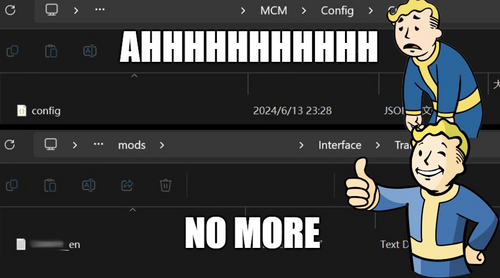
tool MCM Translation Text Generator
🎉Introduction🎉
If you've ever felt frustrated while translating a mod's Config.json file because it lacks an "interface/translation" text file that XTranslator can use, then this tool is exactly what you need. It can automatically create $keywords and generate the corresponding translation file based on them.
there are a lot of amazing mods here that has a long and massive MCM menu, I don't know about the need of translation here, but there might be someone need something like this, if it happens to be you, *cheers* my friend.
🌟 About 🌟
Mod Name: MCM Translation Text Generator
Ever felt lost in translation with Mod Configuration Menu (MCM) without a translation text? from what I see recently there are many translations uploaded.
🔧 Features 🔧
Automated creation of keywords and translation files for MCM Config.json, saving you from manual labor, which I already did a lot.
The keywords are generated first by ID, then by type. If neither of those exists, it falls back to using the page and section number.
It automatically generates the interface/translation/modname_en.txt file based on its location path. If the Config.json file is in the correct data folder structure, the file will be created there. Otherwise, it will be created in the same location as the Config.json file itself.
You can choose to generate between all modName_xx.txt language codes that's supported by Fallout 4.
Now with UI language support in English, Chinese, Japanese, Korean, French, Dutch, Russian, and Spanish—all translated by ChatGPT—if there's an incorrect part, simply open the exe location/lang/yourlanguage.txt.
📝 Details 📝
I made an application because I felt there might be a need, even though tools like Simple MCM Json Translator exist. However, it can't always handle the disorganization that happens in MCM menu structures after updates. Importing older versions' configs didn't consistently align the texts correctly, even with minor differences. After dealing with these long and never-ending config files, I had the idea for this application. Now, you can generate translation files, then use Xtranslator to translate or import a comparison MCM file of older version. Since the keywords are generated by a pattern, the chance of errors is low. Just ensure you do a quick check in Xtranslator when importing a comparison file. Enjoy!
📖How To Use📖
Open this App Drag Config.json file of the mod you want to generate translation file. A quick check on the keywords, recommend leaving them as it be, it will be easier if mod author released a new version when you need to update again. Change the mod name prefix field to any prefix you like. Click save. Open Xtranslator, select "Load MCM/Translate file". Choose the mod folder you just generated from, there should be a new Interface folder. Locate to Interface/Translations folder, you should see the generated modName_xx.txt files in there. Load them in Xtranslator, start to translate and all done.
⭐If there is a mod Update and MCM has changed⭐
Don't delete your old file, either make a copy or install new mod as a different folder name that won't replace the original modName.txt Repeat the above to generate modName.txt for the mod's latest version. Open Xtranslator, select "Load MCM/Translate file" again. Choose the latest modName.txt. Go to "Tools", select "Load MCM/Translate (Compare)". Choose the old version modName.txt for comparison. Xtranslator should automatically replace texts with same keywords, and if you didn't edit them in the first place, they should 90% all be the same. Translate and all done Note: if folder isn't like Data/MCM/modName/Config.json, app can't detect the correct mod name and will only generate translate_xx.txt
👾Known Issues👾
It doesn't work when there is a "setting.ini" in the same folder with Config.json, and says MCM version 1 or 2.
Don't know why, might because it's from old version of MCM, if you have solution please comment.
But most of the mods don't have that file and not using old version MCM,
So test before use, I'd say 90% of mods would work, but there will be exceptions, who knows.
👏 Credits 👏
Me,
All the lost souls when translating directly from Config.json
✨ More ✨
This isn't finished yet, but it's usable for its intended purpose. Let me know if you encounter any bugs.
289 downloads
Updated
-
![More information about "Deal Gone Wrong [Scene]"](https://static.loverslab.com/screenshots/monthly_2024_06/Fallout42024-06-0813-27-01.thumb.png.9424399acc6cb4c6578ef5c9be200e9d.png)
Deal Gone Wrong [Scene]
By Guest
This mod adds a simple scene taking place within a junkyard, it can be accessed via console commands COC KaoBadDeal or with SAM
A junkyard deal beyond the outskirts of town? What could possibly go wrong?
Whatever happened, the story and outcome are up to you.
Credits:
XNALara's porting community for the vehicle models.
Rockstar Games for the cash decals
324 downloads
Submitted
-
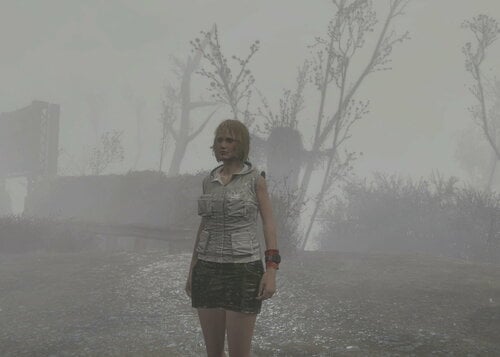
This mod adds Heather's clothes to the game.
Clothes can be made in a chemical laboratory.
214 downloads
Submitted
-
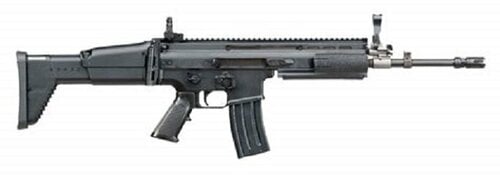
SCAR
By viasqi
adds the SCAR rifle , mods allow 2 configurations : Assault Rifle / Marksman Rifle , craft at chem station
credits : WarfightersWorkshop
287 downloads
Submitted
-
Submitted
-
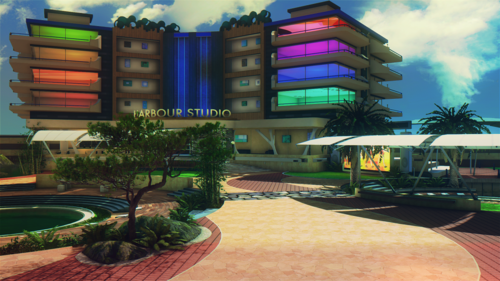
SCEE - Home Plaza
By Guest
Adds a small, yet contemporary plaza with Workshop functionality.
Can be accessed via SAM
or
Console Commands via: COC InoueSceePlaza01
Oh yeah, the theatre only plays Falling Down.
766 downloads
Submitted
-
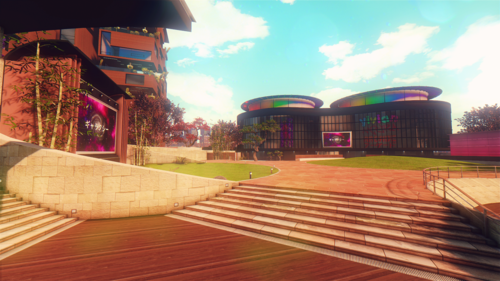
SCEJ - Home Square
By Guest
Adds a moderately sized contemporary plaza with Workshop functionality.
Can be accessed via SAM
or
Console Commands via: COC SCEJHomeSquare01
512 downloads
Submitted
-
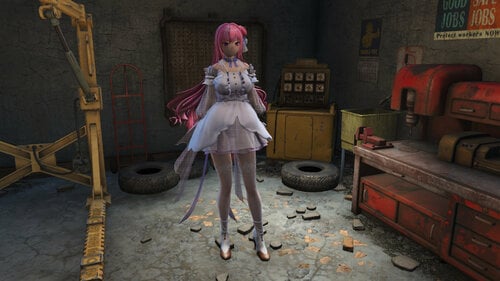
FO4 Nikke Dorothy CBBE (Bodyslide file included)
By naughtycell
Port from Kumahkiin's Goddess of Victory: Nikke - Dorothy 1.0.0.
Requirements
CBBE
HHS (Optional)
BodySlide and Outfit Studio
Credits
ShiftUp
765 downloads
Updated
-
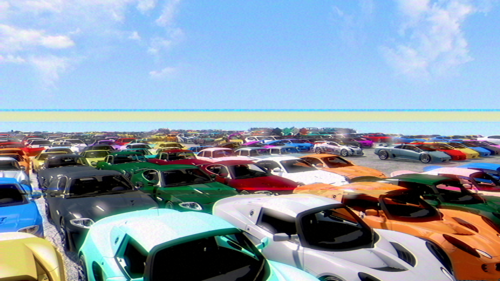
Commonwealth Customs V+100
By Guest
Konata's Customs / Commonwealth Customs v2.0
This has been a pure passion project of mine that has taken a considerable amount of time for me to curate.
This pack features over 100 unique base vehicle models (not counting variants or colours) ranging from Classic Muscle, JDM legends, Hyper cars, Offroaders, Bikes, service vehicles, barnfinds and many decorations.
Included vehicle props are the following:
Known bugs:
Some models are not appropriately scaled.
A few models have messed up normals.
Some models might be named incorrectly.
If you have the previous version installed, please delete the BA2's from it and manually install Ajhakra's Cubemaps.
To get paint and metal materials to work properly, put the maps in this path: Fallout 4\Data\Textures\Shared\Cubemaps
Be sure to download the attached script fix as well!
REQUIRES SMM
Settlement Menu Manager at Fallout 4 Nexus - Mods and community (nexusmods.com)
Rockstar Games / Take Two for many of the wheels and vehicles.
Permissions
Daniel Zhabotinsky
For some of their vehicles from Sketchfab
CDPR For the Kusanagi and Alvarado
Countless other sources from DeviantArt's porting communities, XnaLara's Community, and many more.
1491 downloads
Updated
-
Submitted
-
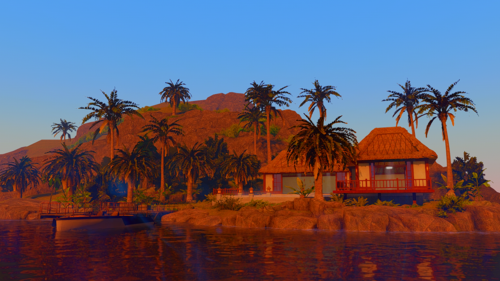
SCEA Island Bungalow
By Guest
Adds a modern, yet traditional island bungalow to Fallout 4 featuring a bathing pool and lovely sunset view.
Can be accessed via the teleporter near Mahkra Fishpacking
(Yes, features workshop)
862 downloads
Submitted
-
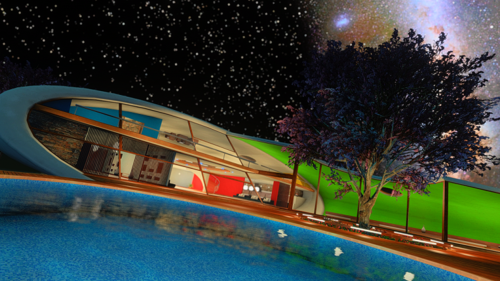
SCEA Dream House
By Guest
Adds a large lakeside ultra modern shell shaped home with an outdoor terrace.
Can be accessed via teleporter next to the shack behind Abernathy Farm
(Features a workshop)
Each file is a different colour theme, each of which are named accordingly.
1758 downloads
Updated
-
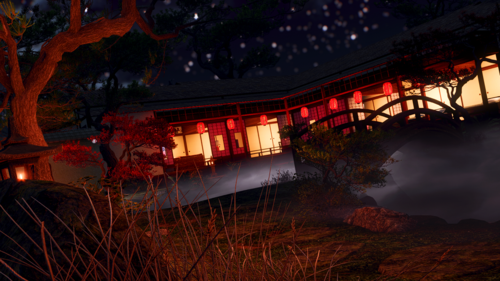
SCEE Japanese House Redux
By Guest
Adds a small, but well decorated Japanese house with a garden and pond.
House Redux Can be accessed via the teleporter near the Concord water tower.
Features workshop.
994 downloads
Updated
-
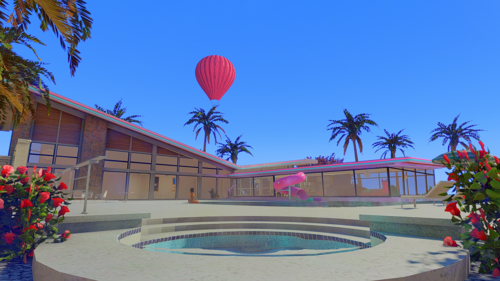
SCEA Hollywood Hills Home
By Guest
Adds a 60's ultra modern home with an island overview.
Can be accessed via the telelporter by the Mahkra Fishpacking plant entrance
Features workshop.
Each file is a different colour theme, each of which is named accordingly.
914 downloads
Updated
-
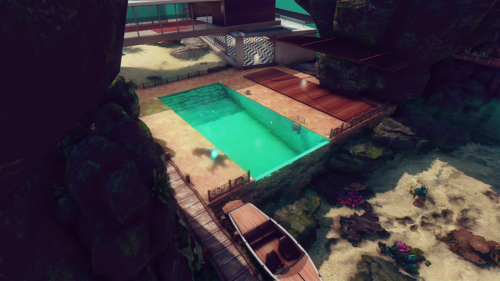
LKWD Dream Island
By Guest
Adds an ultra modern fantasy island in South East Asia. Features a two story house, cave, swimming pool, and more.
Can be accessed via boat at the pier near Mahkra Fishpacking Plant.
A workshop is included.
1326 downloads
Updated
-
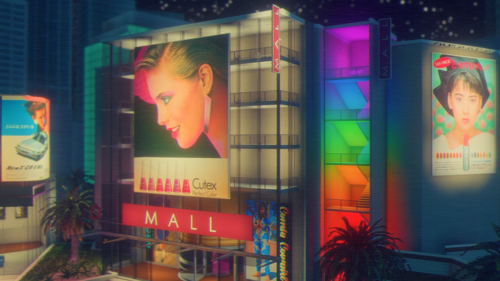
SCEA Home Plaza
By Guest
Adds a modern and well decorated plaza featuring a Theatre, Bowling Alley, Shopping Centre, Pond, and more.
Location can be accessed by entering the glowing white doorway in an alleyway on the west side of Concord.
(Also features a workshop)
938 downloads
Updated
-
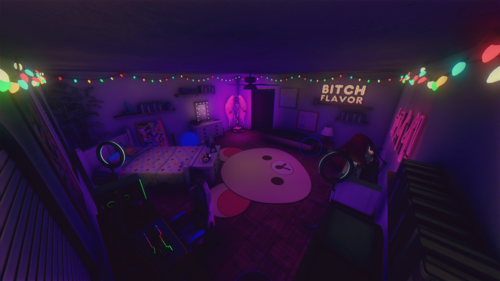
Gamer Girl Getaway
By Guest
Adds a gamer girl / streamer themed player home in Cambridge.
('Bout right across the street from Plumbers Secret)
Inside Features plenty of storage, a bed, and an overall well decorated and modern space.
Outside features a small garden and workshop.
Credits to:
CodeRestricted for the Desk, Monitor, ring lamp and Gaming Chair on Open3d Lab.
Caio de Oliveira on Sketchfab for the gaming PC.
Rockstar Games for much of the furniture and a few small props.
SM Sahil on sketchfab for the Xbox Series X.
2279 downloads
Submitted
-

Assorted Jmenaru Fusion Girl 1.80 conversions
By djimac74
Fusion Girl 1.80 conversions of:
Baggy Pants
Clothes Pack 1
Clothes Pack 2
Eda Skirt
Eda Top
SY Outfit
Wet T-Shirt
You will need the original files from their Patreon account (paywall) for this to work and Fusion Girl 1.80 of course. https://www.patreon.com/jmenaru/posts
All credit to Jmenaru for the original files.
456 downloads
Updated
-
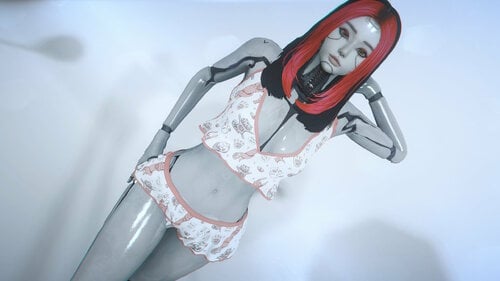
NGamma's Fusion Girl Bodyslide and IKAROS Android Patch collection
By N.Gamma
Ngamma's Fusion Girl Bodyslide and IKAROS Android Patch collection
To avoid conflicts, in the future I will post all Fusion Girl bodyslides and Ikaros Android patches I created, whose main mod is not available on Nexus Mods, here.
Don't hit the "Download this file" button, the download are in spoiler sections.
Explanation of the IKAROS patch.
If the patch contains the abbreviation - FG - IKAROS, then the patch consists of Fusion Girl Bodyslides and a light esp.
If the patch only contains the abbreviation - IKAROS, then the patch only consists of a light esp. In this case, the patch can also be used with existing body models such as CBBE.
If you like my work, please leave me a tip.
BZW Cyber Nurse
Cyborg Ninja
IceStorm's Blade Thigh Boots
IceStorms Goth Boots
IceStorm's Heelless Wedge Pumps
IceStorms Horse Boots
IceStorms Oxford Heels
IceStorm's Platform Ankle Boots
IceStorm's Platform Pumps
IceStorm's Stiletto High Heel Boots
IceStorm's Studded Platform Pumps
RR Cyberpunk HeyGirl
RR Dark Secret Outfit
RR Enigma Redux
RR Sexy Alet Police
RR Street PE Outfits
RR Tekky Cat
Vtaw Activewear
Vtaw Bodycon Dress
Vtaw Cheeky
Vtaw Club Dress
Vtaw Gothic Dress
Vtaw Halloween 2023
Vtaw Lana
Vtaw March Dress
Vtaw Officer
Vtaw Private Pasties
Vtaw Princess Bodysuit
Vtaw Raven
Vtaw School Girl 2023
Vtaw Sexy PJs
Vtaw Sweet Rebel
Vtaw Tonkinese
Vtaw Traveler
Vtaw Treasure Hunter
Vtaw Vintage Dress
Vtaw Virgin Killer
Vtaw Wedding Dress
Vtaw Wardrobe 10 Beta 0.05
Zero Two
1683 downloads
- fusion girl
- bodyslide
- (and 8 more)
Updated
-

Furry Fallout 4
By Bad Dog
Furry Fallout
This mod makes the whole Commonwealth furry.
What's New
LATEST VERSION UP ON NEXUS I'm not sure if I'll be updating this mod here. Managing multiple locations is a PITA.
Details
You can play as lykaios (wolves), fox, hyena, cheetah, lion, tiger, horse, deer, snekdogs (nightstalkers), or otters. With the "world" addons, objects in the world (statues, posters, etc.) are furry. With the NPC addon, all NPCs are transformed into one of the above furry races These are independent of each other, so go wild. Furry in a human world, human in a furry world, all furry, whatever floats your boat. Otters can be found in Far Harbor mainly. Ghouls are snekdogs. Races have a range of fur colors and race-appropriate face patterns. The face morph system can be used to customize head shape. FO4's UI SUCKS but if you know how to do it for people you can do it for the furries. Some face morphs use the "Type" section and others use the "Sculpt" section, so check both. Deer have a full set of horn options. Choose the preset with the horns you want and customize from there. Most races have a full set of face pattern options, which you can find in the "Extras" section. Tigers and cheetah are already over-decorated so they don't. You'll see some options in the UI that don't seem to do anything. That's because they don't. I suck and didn't remove all the options I'm not using from the races. Bodies are based on BodyTalk for males and CBBE for females. They are anatomically complete (with the NSFW plugin) and fully functional if you install AAF. All bodies have animal feet and peens All bodies ship with BT or CBBE tri files, containing all the original morphs customized to work with the furry body parts Hair and headgear have been converted to fit, vanilla and DLC. Face scarves use the faceBones system to fit different-length muzzles, but it's only moderately successful. Kids are furry too and have their own child races. Some artwork has been made furry in the "world" plugins. There's some new magazines in here too. By default it's guys but there is a patch that makes them female for your viewing pleasure. Races generally reflect family relationships. (Kids follow the mother.) The furrifier is packed into a zip and available at github. Instructions in the associated wiki. There's a kit with Bodyslide files for customizing male and female bodies.
Sex
AAF is not required unless you want sex animations. Best way to get started is go to the AAF Fucking Manual and do everything it says.
-Note that some of the pictures use clothes and gear from other mods, and they're not mine so I don't know where they came from-
Installation
Warning: These are gigantor files. Get a coffee. Also if you get a "quota exceeded" error wait a day or so and try again.
Note the FFO files may have different version numbers. That's okay--the latest will always be at the top-level directory at the link.
CBBE is a prerequisite.
Get detailed installation instructions here.
Compatibility
Any other mods that add NPCs will need a patch if you want them to be furry. (They should work correctly without a patch, but the NPCs they add will stay human.) Use the furrifier.
Any mods that add headgear will need a patch to accommodate muzzles and the slightly altered head position.
Known Bugs
When you select one of the face regions to edit in character setup, the head disappears. I have no idea why. It comes back as soon as you're actually editing the face, so it doesn't get in your way but it's a bit startling.
Credits
TheFuckingQueen, LordFlawn, PenBoozerX, and Leono Hisashi for the fabulous furry art KrittaKitty for the Lykaios, which will never die Blaze69 and ASlySpyDuo for instigating this; extra credit to Blaze for help all along the way. Valehyena for the cool supermutant models Shadowliger, Blaze69, darklynxxx, Petruz3D, Dipanjanc33, ASlySpyDuo for the AMELIA and JAVELIN assets Blaze69 and Sandworm Wrangler for the fancy pics GreenTheGhost for work on furrifier customizations49348 downloads
Updated
-
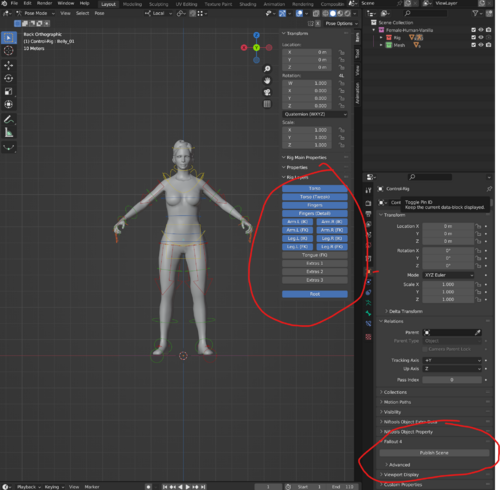
Fallout 4 Blender Animation Kit
By dagobaking
This is a kit to help streamline animation creation via Blender.
It still takes a bit of set-up. But, once set-up, publishing game files should be much easier.
Includes:
Male and Female rigs (vanilla mesh but Zex skeleton) wrist twist and shoulder automation.
The required bonelist and havok config files for Zex.
A bat script that automates running other tools to convert FBX to HKX with one action.
A Blender add-on that automates steps needed to bake/export animations to FBX. (splits multi-actor anims into multiple FBX for you)
Detailed instructions for set-up and use.
Credits:
SynthOverboss - Helping me with various import solutions.
EngineGaming - Helping me also with importing and other processes new to me.
andrelo1 - For FBXImporter
1873 downloads
Updated
-
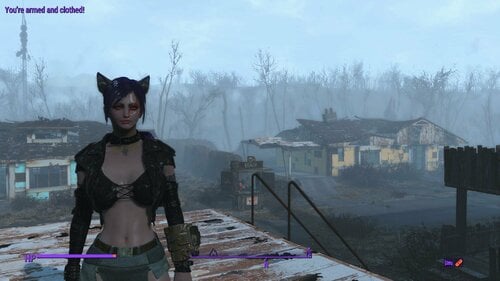
Wearable Ears and Tails
By valcon767
please read the whole post before downloading
Credits and Legal stuff
chemistt made 2 mods that i combined and slightly modified
https://www.nexusmods.com/fallout4/mods/19108 and https://www.nexusmods.com/fallout4/mods/19107
robotized made the tutorial i used to modify them
https://www.nexusmods.com/fallout4/mods/56149
original credits from chemistt mods
Calyps for this mod and other awesome work on Skyrim
Caliente and others - you know what for
Nadriel for first inspiration with that bunny ears
FingerCeaser for testing vanilla body type
AAF - everyone who helped with AAF
JB - for fixing it to work correctly with AAF
original permissions say to enhance as you like but give credit and i do.
permissions for my work is simple
give credit
do not require payment (keep it free)
that's all
Requirements = base game
now what the mod gives you is a total of 4 types of ears and 2 types of tails, craftable at Cham Station (1 leather each).
2 versions of the mod - use only 1 version
Combo Version - see bottom of post
AAF Version - now works correctly with AAF (Thanks to JB)
regular names uses biped slot 48 (headband) for the ears and slot 54 (unnamed) for the tails.
i would suggest using this version if you plan to equip the ears and tails to NPCs (followers, settlers, etc)
after crafting (or using console to get them) equip like normal (for both you and other NPCs)
Lite names takes a little work when equipping for them to show correctly. after getting them (whether by crafting or using console)
equip one part then exit Pip-Boy, then equip 2nd part and both should now be visible on your character.
Conflicts = none known at this time.
Known Issues
Limited Testing results (tested with Commonwealth Slavers and Milking Human Kindness)
if you can improve (or want to) them please do so, just please give credit to the original creators.
if you can fix Known Issue #2 (AAF) PLEASE (pretty please with sugar on top) do so. Fixed thanks to JB.
thank you to anyone who tries them out and enjoy.
WOOT i actually learned something new and it works (figured out how to have both biped slot and non biped slot types in game and have them
work without the lag issue).
NEW - Combo Version AAF Test is a ESL flagged ESP (does not use a regular plugin slot)
this version allows you to craft both types (biped slot type and the Lite non biped slot type).
in Chem Station the type that does not use a biped slot is labelled Animal Ears Lite/Animal Tails Lite (use this only on your character as it will not show correctly on NPCs)
the type that does use the biped slots is usable by both NPCs and your character. labelled in Chem Station as Animal Ears/Animal Tails (without the Lite).
if using the Lite version on your character you still have to equip one piece and exit Pip-Boy then equip second piece for it to show correctly.
the regular named show fine on all, but the Lite named pieces may not show correctly during AAF scenes.
leaving this version for those who want them but do not want scripts but they will not work fully with AAF.
AAF Version works the same as the combo version, but will now show correctly in AAF scenes.
this version should work the exact same as the Combo Version, but does have scripts.
1325 downloads
Updated
-
![More information about "Environment Cubemapping Framework [15/03/24]"](https://static.loverslab.com/screenshots/monthly_2023_11/ECF_2.thumb.png.a9844d2aaabda7b4ba7591fd3d50d64d.png)
wip Environment Cubemapping Framework [15/03/24]
By EngineGaming
QUICK NOTES
> THIS IS A WORK IN PROGRESS, for each description need to be more explicit !
It takes long time to edit and update everytime, with LL open, since it has no Save for later button.
> I call it ECF (Environment Cubemapping Framework), cause it contains cubemaps, and for each materials have to be setup with environmental mapping scale values...
But now that was included, i also added something else, find out more below what's included...
> Would be cool if you don't redistribute to somewhere else without my approval! The only place you can find me or where i host, is my discord server.
===
STORY ACTION COMPENDIUM [ unavailable ]
*I host my mods in my server and LL for now on. I terminated NexusMods for Fallout 4 !
*Keep in track with my stories / mod status news, in my server, or nothing but chill like home.
===
[ INTRO ]
> This is a mod, and a framework for Users and Modders.
> ECF is a repository. The links are not hosted here.
> Cubemaps, material files, ... are added into one place, so i don't have to duplicate all of them for all my mods (100 times...), while i could simply use FROM it, for all, without adding anything. [ Find out about How to patch a mod with ECF, ONLY if you are a modder ! ]
*Permission granted by Ajhakra for custom cubemaps.
> Follow my topic, in case any updates arrive sometimes...
===
[ INSTALL ]
ECF_ENGINE Placeholder (2.12) ECF_AJ_Cubemaps (2.0)
*I recommend you installing both, then merge into one mod using MO2.
I don't know about Vortex how you guys handle it.
[ MODS - PATCHED UP with ECF ]
== LOGS ==
===================================================================
[ USER MODE ]
> ECF is a 'install and play', mod index-free. It's required only for patched mods.
*Self-troubleshooting
> If you see anything black/purple meshes as missing textures in game, that's cause cubermaps are NOT included in a mod you installed.
*Solution: It's patched up by ECF. Re-read, and install ECF
> If there's anything missing (wrong location) or something else, i figure out where and update it. In rare cases, broken textures that makes your game crash...
*DM me on Discord >.<
===================================================================
===================================================================
[ MODDER MODE - INTRO - What contains ECF ? ]
> CORE PLUGIN: ECF.esl
Material Swaps: BGSM + BGEM - Emissive colors (Glowing in the dark), Cubemaps Keywords: Attach points and Mod associations - DEFAULT Swaps; for Emissive Colors, cubemaps, flat colors, etc... OMODs: Default setup along with material swaps, in a mod slot
> LOOSE TEXTURES
The main things to know, before patching a mod - What's the use for certain cases?
Case 1: BlackDiffuse_d.dds [ Used for covering meshes / Cubemaps passing over your meshes ]
*Sometimes, it's used along with Emissive Per Colors ... when getting your meshes brighter and glowy.
*Mostly, for diffuse, it's used as a protection, without having to paint the vertex color of your mesh: Black.
Case 2: Disabled_d.dds [ Used to hide one of your mesh parts, invisible. / Default Stickers OFF ]
*It's a temporary way of hiding your parts, using BGSM material. Otherwise, it can be done by just flagging the '(1) Hidden' enabled, with Nifskope...
Case 3: GlassOverlay_d.dds (dds integrated with nifskope, only) [ Used for Glass overlays ]
*Don't confuse one with gray one from Flat Colors! This has 50% alpha map, exported. BGEM only, because of better alpha blending for glass!
==========
[ MODDER MODE - CONTENT / MATERIAL LOCATIONS (BGSM / BGEM) ]
I suggest you, not to put anything from Textures folder in your mod folder!
---
> Black Diffuse (.bgsm + .bgem)
Location: ( ./ECF )
> Disabled (.bgsm)
Location: ( ./ECF )
---
CUBEMAPS (Ajhakra) (source) [ colors and rainbow ]
Location: ( ./ECF/Cubemaps )
CUBEMAPS (ENGINE) [ More colors, gradients, unused vanilla cubemaps ] [ WIP ]
Location: ( ./ECF/Cubemaps )
Location: ( ./ECF/Cubemaps_Gradient )
Location: ( ./ECF/Cubemaps_Vanilla )
---
Flat Colors (+ No Specular)
Location: ( ./ECF/FlatColors )
Location: ( ./ECF/FlatColors (NoSpecular) )
> No details, unless you want your meshes look realistic...
Flat Colors_Reflections (+ No Specular)
Location: ( ./ECF/FlatColors_Reflection )
Location: ( ./ECF/FlatColors_Reflection (NoSpecular) )
> Pale, Unsaturated colors, with or without specular, that doesn't look bright
(Ref: vanilla coffee cup that can be replaced for a good looking ceramic cup)
---
Alpha, Transparent, Translucent, Opague Overlays [ WIP ]
Location: ( ./ECF/Alpha_Maps )
> Differences are by how alpha blending behaves. These overlays work for any types of glass: Windows, lenses, screens, etc.
> Only works for BGEM-integrated meshes
---
Stickers / Patches [ WIP ]
Location: ( ./ECF/STICKERS )
> Logo and text stickers for fun, memes.
> This can only be done on a plane mesh, either by square shaped for patches or by ratio sized for text.
EMISSIVE / GLOWING [ BGSM + BGEM ]
Emissive
Location: ( ./ECF/Emissive ) > This protects your meshes with BlackDiffuse_d.dds which securely covers everything. (+ You skip painting them to black)
Emissive (Protected)
Location: ( ./ECF/Emissive (Protected) ) > This is alternative protection, using Flat Colors instead of vertex colors, to cover your meshes completely.
> Example: You want one Red, the emissive protected for it, contains flat colors red as a temporary "vertex color" cover.
> Without that, it would cause your mesh to behave like the emissive color uses 50% opacity, 50% empty textures with vertex colors off.
> NOTE: if vertex color is off OR it's painted white, the emissive colors MIGHT glow up brighter than ever in game. If so, enable vertex and paint them black.
Emissive (Vertex)
Location: ( ./ECF/EmissivePerColors ) > This doesn't provide any protections. You MUST have your meshes' vertex color 100% black (or any colors), in order to integrate this!
> To paint your mesh pieces, refer to ([ MODDER MODE - Common problems ]) section.
===
[ MODDER MODE - HOW TO PATCH A MOD - with ECF ? ]
===[ NIFSKOPE ]====[ OUTFIT STUDIO ]===
Manual Injection ( ECF integrations with(-out) ECF.esl master dependencies )
*Note that if you going to inject a material with different colors and not default-ready one, it WONT work with material swaps done by ECF.esl in game!
*Default-ready materials are necessary for ECF.esl integrations. Even if you don't wanna use ECF.esl, you can still inject it.
*Default-ready materials integrated = Material swaps with ECF.esl + swap ANY colors you want in game!
*Tools for MATERIAL INJECTION: Nifskope or Outfit Studio (Object Properties)!
> Default-ready Cubemaps: Inject a BGSM for any matal pieces you have
( ./ECF/Cubemaps_Vanilla/DefaultOutside1.bgsm )
> Default-ready Emissive: Inject a BGSM or BGEM for any pieces with vertex color painted black
( ./ECF/Emissive/EmissiveOFF.bgsm )
( ./ECF/Emissive/EmissiveOFF.bgem )
> Default-ready Emissive (Vertex)
( ./ECF/Emissive (Vertex)/EmissiveOFF.bgsm )
( ./ECF/Emissive (Vertex)/EmissiveOFF.bgem )
> Default-ready Emissive (Protected)
[ Default material is reductant cause it also contains diffuse black = No any glow. But name changed to avoid duplications for material swap slot ]
( ./ECF/Emissive (Protected)/EmissiveOFF.bgsm )
( ./ECF/Emissive (Protected)/EmissiveOFF.bgem )
> Default-ready Flat Colors (+Reflection and NoSpecular)
( ./ECF/FlatColors/_Default.bgsm )
> Default-ready Stickers: Inject a BGSM on a plane you created from blender or 3ds max (You can check Braindance model as example) [WIP]
( ./ECF/STICKERES/StickerPatch_1.bgsm )
( ./ECF/STICKERES/StickerPatch_2.bgsm )
( ./ECF/STICKERES/StickerPatch_3.bgsm )
==========
===[ NIFSKOPE ]====[ OUTFIT STUDIO ]===
Manual Injection ( Simple integrations for no-plugin mods )
> If you don't plan to use ECF.esl, it's still required because of the textures!
> Tools for MATERIAL INJECTION: Nifskope or Outfit Studio (Object Properties)!
> Inject any BGSM / BGEM material from ECF for your meshes!
(e.g. Emissive RED that will be red only.... or Cubemap Gold that will never change)
> If you have your diffuse/normal/specular textures you wanna use, with cubemaps, you can have/create your BGSM material, BUT with path folder locations from ECF for cubemaps!
==========
===[ FO4EDIT ]=======
ECF.esl ( DEPENDENCY ) - [ *Used for attaching material swaps for your ARMO meshes ]
1. LINK YOUR MOD - SETUP
2.1. INTEGRATE [ AP + MA ] IN YOUR ARMOR ENTRY
2.2. INTEGRATE [ MATERIAL SWAP ] IN YOUR ARMOR / STATIC / FURN / PROPS ENTRIES
*The rest, ECF.esl will do the job for your mods, as it gives you all the options you can swap, using SAM or armor bench.
==========
===================================================================
===================================================================
[ MODDER MODE - Common problems ]
===================================================================
8356 downloads
Updated

![More information about "[CalebVito]Couple Pose714-Animation"](https://static.loverslab.com/screenshots/monthly_2026_10/GIF_20261020144345409.thumb.gif.b4158e5f71212b9c33cb5f05937d1ea8.gif)
![More information about "LoveWorld (Alpha 0.0.1) [Forge 1.20.1]"](https://static.loverslab.com/screenshots/monthly_2026_10/LW_alfa_main_001.thumb.png.4391d2d62de1509e21d15a616eb364d1.png)
.thumb.gif.26abf4f712e1a3b1ca799a5728e46259.gif)