Select a subcategory to view available files.
Files From Subcategories
-
.thumb.png.dfb0acb284106e5e1aa044005afe7230.png)
follower Shamie Follower by Engeljess23
By engeljess23
!!!Highly Requirements!!!
CBBE 3BA (3BBB)
CBPC - CBP Physics with Collisions for SSE and VR
HDT-SMP (Skinned Mesh Physics)
XP32 Maximum Skeleton Special Extended - XPMSSE
BodySlide and Outfit Studio
She Is Standalone She have Heavy Armor (V2 Vanilla Armor) She is a Nord She have two Handed weapon She is Essential She Leveling with you (she is level 100) you can she Marriage she can full Damage (999)
*Update V2.0
Change Armor to Vanilla Armor
Fixing ESP
Convert ESP TO ESL
Create Bodyslide Files Presets & Shapes for Body in 3BA Body
You Can she Find Steamcrag Camp,South of Windhelm
You can Porting open you console with ^ and then coc steamcragcampexterior01
Or you can she porting to you Player.placeatme NPC Number
Install manuell or with Mod Manager
C:\Program Files (x86)\Steam\steamapps\common\Skyrim
C:\Program Files (x86)\steamapps\common\Skyrim Special Edition
Thank you all ♥
4754 downloads
Updated
-
.thumb.png.7cd0cc60f6c4095ef1eafe123536033c.png)
follower Princess Selly Follower by Engeljess23
By engeljess23
Essential
Marriage
Leveling
CBBE 3BA
Standalone
Full Armor
Perks: One & Two Handed, Light&Heavy Armors,
Mage: Restoration & Destruction
Requirements for SE/AE
CBPC - Physics with Collisions for SSE and VR Needed for collisions Faster HDT-SMP - Ultra Performance Config HDT-SMP (Skinned Mesh Physics) XP32 Maximum Skeleton Special Extended - XPMSSE Needed for skeleton CBBE 3BA (3BBB) Needed for Body BodySlide and Outfit Studio
Princess Selly Follower Body,Armor etc Presets
Not Working? then try BEES - Backported Extended ESL Support
*Update:
v1.0SSE
5.26.2019
Princes Selly Follower SSE conversion by ff7legend (NexusMods)
Optimized all textures and meshes for Skyrim Special Edition
Converted .esp to SSE Form 44.
*V2.0
20.9.2024
-Create 3BA Body,Hands,Feet + Armor with Bodyslide Files
-ESP to ESL Convert
*V2.5
21.9.2024
Change Body Skin Textures looks better now.
Shape Data
Princess Selly Follower 3BA Body
Princess Selly Follower 3BA Hands
Princess Selly Follower 3BA Feet
Princess Selly Follower 3BA Armstraps
Princess Selly Follower 3BA Bra
Princess Selly Follower 3BA Panty
Princess Selly Follower 3BA Boots (Clipping)
Princess Selly Follower 3BA Pelvisstraps
Princess Selly Follower 3BA Topstraps
Slider Sets
Princess Selly Follower 3BA.osp
Princess Selly Follower 3BA Armor.osp
Slider Presets
Princess Selly CBBE 3BA.xml
Install with MM (Mod Manager) Or Manuell
(Mod Manager Example: Mo2,Vortex)
Steam\steamapps\common\Skyrim Special Edition\Data
Location:
Riverwood Sleeping Gigant INN
(you must she searching) Or you open Console ^
Help Selly or Princess Selly
Player.placeatme NPCNumber - (port to you)
Credits
Hair - KS Hairdos by Kalilies and Stealthic
Body Textures - Binibini Skin for CBBE 3BA COCO by s4rMs
Eyes - The Eyes Of Beauty by Gabriel Mailhot as LogRaam
Armors- by Melodic and yes i have Permission (Old Armors)
Bodyslide and outfitstudio by Ousnius and Caliente
2118 downloads
Updated
-
.thumb.png.8ec35184214d3b4a6daa8ec8ab8b490c.png)
follower Lady Melody Follower by Engeljess23
By engeljess23
She has CBBE 3BA Lite or UUNP HDT body
She has Custom Armor
She is Standalone
She is Essential
She is Marriageable
Starts at Level 5 & will level with the player indefinitely
Perks: One-handed (Maces), Heavy Armor, Sneak, Destruction (75 - Shock-based magic), & Restoration (75)
Requirements for SE/AE
CBPC - Physics with Collisions for SSE and VR Needed for collisions Faster HDT-SMP - Ultra Performance Config for Melody follower V2 HDT-SMP (Skinned Mesh Physics) Needed for breast physics Heels Sound blank for Melody follower V2 RaceMenu High Heels (Height Fixes) for Melody follower V2 XP32 Maximum Skeleton Special Extended - XPMSSE
CBBE 3BA (3BBB)
Needed for skeleton
*update V2 2023
-Fixing
-Adding Bodyslide Files for Body and armor
-CBBE 3BA Converting+Create
-Change and editing Textures+Meshes
-Deleted Horns + Nails
-Adding Boots (is with sounds and is high heels)
please download heels sounds.esm + RaceMenu High Heels
YOU CAN FIND HER IN RIVERWOOD - SLEEPING GIANT INN
Or use AreYouThere mod (Grab the updated .dll at the link provided in the Posts section)
Install this Manually or With Mod Manager
Skyrim SE: Steam/Steamapps/Common/Skyrim Special Edition/Data
Credits:
Hair - KS Hairdos by Kalilies and Stealthic
Body Textures - LEYENDA SKIN by HeroedeLeyenda's Lair (UUNP)/Fair Skin Complexion by HHaley (CBBE)
Body Meshes with Bodyslide (CBBE 3BA Lite or UUNP)
Eyes - The Eyes Of Beauty by Gabriel Mailhot as LogRaam
Horns - horns by t0tal13 (Removed due to incompatibility with SSE)
Armors- by Melodic and yes i have Permission
Credits Update:
Armor new - Lady Horus Tera
Body- Bodyslide & outfit Studio
Skin-diamonds Body Skin Textures CBBE 3BA
Hair-KS Hairdos
Eyes- New Mikan Eyes
Brows- Fair SKin Texture (Brows Optinal)
Very Big Thank you ♥
And what for armor ?
this is the Golden Princess from Melodic look Patreon
Thank you And Have FUN ♥
1282 downloads
Updated
-
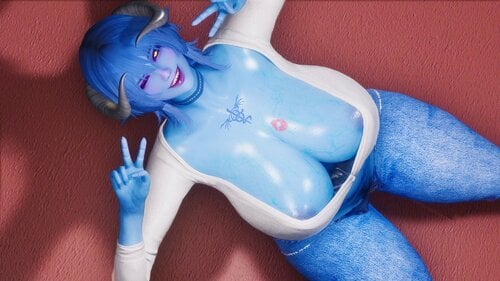
Flufy Fox Poser Update 23/10/2024
By FlufyFox
FlufyFox Poser LE SE
Dont forget to join discord and get verified to see eveyrthing, all the new animations previews and my content ^^
Dont forget to check out my Discord and SubscribeStar, Thank You
You can support me on my new page https://subscribestar.adult/flufyfox this will help me keep going and improve even more.
The Sad Cat Dance meme
2022-06-29 03-17-26.mp4
Idle Replacer
I made it pretty simple with 32 sec duration and not too much running out of the vanilla one,i was wanting something that the character look more cool but at same time looking similar to the normal one will let the preview here
2021-10-15 20-54-27.mp4
Please do not reupload my mod i will let all updates here on LL for you guys too ^^
Hello its Flufy now i going to share my posees and animations with you guys, i still a begginer so they are pretty simple :3 i will keep doing my best to improve.
You will need PoserHotkeys Plus, the data gen for it i already made it, but if you want to use again to make sure its fine, dont forget to enable
FootIK off on poserhotkeys plus MCM menu, otherwise some poses will not look right.
Thats it is pretty simple theres no secret on make them work, will let some links here now and a short vid showing some of them ^^ Thanks hope you enjoy
I have improved some old idles Motions too ^^
-NEW- 1.3 Alright guys i made some Male poses too now theres not some stuff for Male chars so i made those hope you guys enjoy
I want to thank Goma PeroPero taht give me permission to use his obj assets and Daymar for helping me to talk with Goma :3
68 Normal - including my Specials of 300 followers celebration and my 6 girls thogeter, i changed for the value of the solo poses statics, is 77 couting the group ones if used in each one
2 pair - with the throne - the pair will be in sequence, the first with second, 3-4, 5-6 etc
43 Animations - you can see on my discord with the previews and anims names ^^
11 Male poses and more 6 with objs verion
2 Futa added
38 with Objects all animated idles freaturing Ahri's Throne from More song clip i made S2
6 obj static
Requiriments:
Poser Hotkeys Plus, Poser Hotkeys DataGen, FNIS - Fore New Idles for Skyrim for users
Support me here so you can get more stuff and follow works on my discord :3
VIdeo Showing some of them:
ON Youtube:
PS: Sorry guys i trolled the first post have to remade..
PS: Please guys dont use the obj i made in others mods or stuff without my permission, thanks s2
Credits:
millepon for poserhotkeys plus - which make posing really easy
Poser Hotkeys by Mz1n
Anubis for helping me when i was doing the set up to animate
Goma PeroPero
And everything that make this possible
12726 downloads
- animations
- posers
- (and 2 more)
Updated
-

Main Menu Replacer 16x9 LE.7z
By Mrs.Tay
Main menu replacer for wide screens. A bit colorized, a bit kinky.
LE only. SE version here
137 downloads
Updated
-
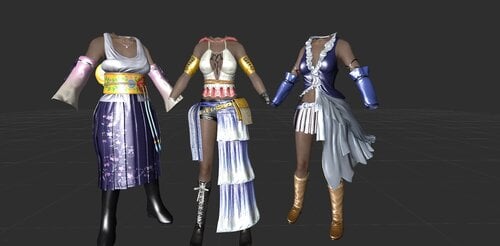
Yuna Outfit AIO From Final Fantasy X and X-2 for CBBE HDT
By Black714
There is 3 Outfit into single ESP File.
Summoner, Gunner, and SongStress (3 Colour). Including All Variant.
You can Replace the ESP file if use 3 of them. Loose Verison for Remodel AIO.
Credit by yunaffxqq25 as Original Creator.
631 downloads
Updated
-
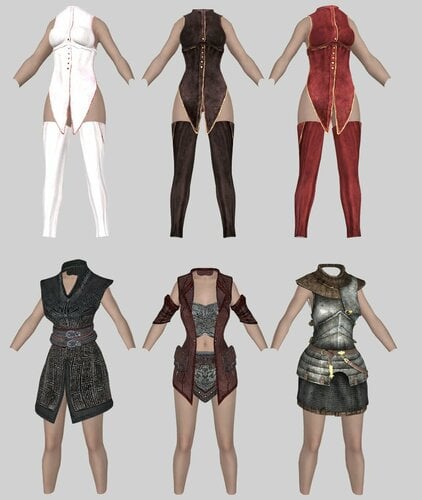
Skimpy Outfit Replacer for The Evil Mansion CBBE HDT
By Black714
Replace all woman outfit for The Evil Mansion Final and Remaster. Simply See Screenshot.
Loose Version for Underwear and Devious mod Remodel AIO.
Note: Should be Works both Complete Edition and Remaster one.
313 downloads
Updated
-

Extinguishable Candles (Modders Resource!)
By El_Duderino
Light- and Extinguishable Candles
A simple script and CK guide to create candles that can be lit and extinguished by the player.
Attention: This is NOT a playable mod!
It's a modder's resource which you will need to install to your own mod in the Creation Kit. You need a basic understanding of Papyrus and world building in the CK in order to use this. It only works for candles which you place new in a mod; it will not affect existing candles in the game world.
With that out of the way, let's get to business:
How to Create Extinguishable Candles in the Skyrim CK (LE/SE)
Step 1: Activators
Create two activators, one for the lit candle and one for the unlit candle. You can use existing candle objects from the base game (the Nordic Ruins candles come in lit- and unlit versions).
Add the script from the download section to both activators. Do not fill their properties!
Don't forget to compile the script.
See the screenshot from the CK above for a recommended setup, including two sound effects that work well in my opinion.
Step 2: World Placement
1) Place the unlit activator in your scene.
2) Place the lit activator nearby and set it disabled by default.
3) Fill the script property "LinkedCandle" on both placed activators with the other candle (i.e., fill the unlit candle into the lit candle's property and vice versa).
4) Place a light bulb. Set the lit activator as its enable parent so that it only becomes visible when the lit candle is, too.
5) Move the two activators so that they overlap completely.
And you're done!
Next time you visit this room in the game, your unlit candle will be there and you should be able to activate it. If you've set up everything correctly, clicking on it will light it, and clicking on it again will extinguish it.
Credits
This was created adapting ideas and script snippets from the Creation Kit Wiki. I can't claim any credit for this idea nor the script.
Please feel free to use this script or derivatives of it in any way you like. This should also work in other Papyrus-based Beth games.
42 downloads
Submitted
-
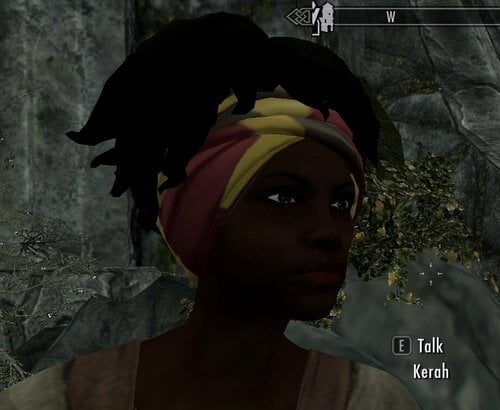
Better faces for Reguard females
By whatsoldier
This is a submod for "Better Hair -Redguard NPCs" from Lynnaria on Nexus. Changes the faces of most female Redguard NPCs to look more African. They will also have slightly different skin tones.
Credits:
Lynnaria for the original mod (https://www.nexusmods.com/skyrim/mods/103047)
Roggvir for Rayya headmesh and help in making this mod. Tlam99 for SE port.
Earlier version without head meshes (vanilla sliders only) can be downloaded in this topic:
Link to SE version:
608 downloads
- redguard npc
- redguard female
- (and 1 more)
Updated
-
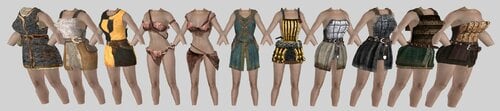
Skimpy Outfit Replacer for Beyond Reach CBBE HDT
By Black714
Female Outfit Replacer for Beyond Reach. Loose Version for Underwear Remodel AIO Mod.
"Beyond Reach - Some Better Meshes" also Available
See Screenshot for Simple Description.
Note: if you installed "Underwear for Female" in the middle playthrough. you should "Resetinventory" in console to female NPC.
829 downloads
- beyond reach
- skimpy
- (and 1 more)
Updated
-
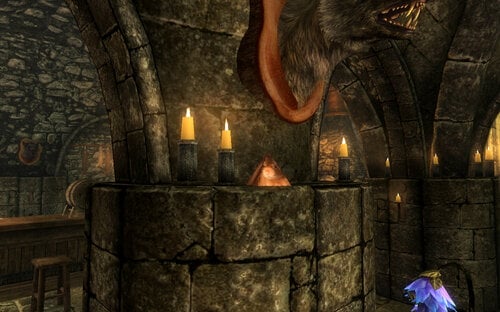
Eternal Rat Prism Thing
By MadMansGun
"Print and glue together the rat prism and have a friend for eternity! It's OK because the rat likes it."
basically a meme rat pyramid thing that does nothing and may get lost in the floorboards if your not careful with it.
it can be found in the Winking Skeever.
125 downloads
Updated
-
YPS Thought Framework with Voiceovers (YTF)
By emily1673
YPS Thought Framework with Voiceovers (YTF)
YTF is a framework mod featuring "thoughts" that appear as notifications and (optionally) as voice-overs.
Works for both LE and SE.
The following conditions may trigger "player thoughts":
LocationTypes Certain player conditions: flying, incombat, onmount, running, sneaking, sprinting, tresspassing, weapondrawn, swimming, sitting, hasnogold, hasfollower, etc... (worn) armor keywords Papyrus (StorageUtil) variables set by modders any combination of the above conditions, linked with the operators & ("and"), | ("or"), or negated with the operator ! ("not")
Fully customizable by the user simply by editing some text files.
Voice-overs can be added/changed/removed simply by dropping the wav files into a folder and editing one text file.
This is a modders' resource.
Players don't have to download anything here. They may read the FAQ and install one of the mods that include YTF (see list below).
Instructions for Modders
First read the FAQ for players below to understand how it works.
The easy way:
Set some storageutil values in your mod. The script command is:
StorageUtil.SetIntValue(None, "<papyrusvaluename>", 1) and the same command with 0 to turn it off.
Then add the corresponding thoughts to the thought database (and optionally add sounds). Done!
(You will need to install another mod that includes YTF to make this work, e.g. YPS.)
You can name the storageutil variables just as you like (its recommended to have them start with an acronym of your mod).
You can also temporarily disable thoughts with the script command StorageUtil.SetIntValue(None, "ytfThoughtsDisabled",1)
This is meant for cut-scenes etc.; don’t forget to reset the variable to 0 once the cut-scene has finished.
The complex way:
To use more advanced features of the thoughts system for your mod, download the script ypsThoughts.psc, rename it and attach it to a quest of your mod. Make any necessary changes (you might want to change the json file path names in the first lines). Autofill all properties. Then make a script in your main mod call the function Playthought() at the desired frequency. It is advised to add an MCM option to turn the thought system on/off, and to set the frequency.
Another feature is to directly call the function playthoughtchoice(), to play a specific thought. This can for example be used to add voiceovers to quest journal entries.
It is recommended each mod has its own thought conditions file (e.g. ypsThought_conditions.json) and thought database (e.g. ypsThought_male_database.json)
To use sounds: If you want to use a reasonable number of sounds for your mod (up to a few thousand), it is recommended to channel them through the existing ypssounds.esp.
I can reserve a sound range in the file for you.
If you need an extremely high number of thought sounds (>10000), please send me a PM, and we will work something out.
FAQ for Players
Q: What is the YPS Thought Framework (YTF)?
A: The Player Thought System will from time to time show certain “thoughts” depending on conditions defined in a configuration file. The purpose is to add more immersion to the game. It can also be used to simulate aspects of mind control.
Q: Do I need to install the YTF framework?
No. It is sufficient to install one single mod that includes YTF (see list below). This will allow you to configure "thoughts" for any mod you have installed (not just the mod that has YTF included).
You can install multiple mods supporting YTF - modders will take care that they won't conflict each other.
The files in the download section here are for modders only.
Q: Which conditions are available?
A: The system may react to general player conditions (running, swimming, fighting…), location types (city, dungeon, wilderness…), keywords (of items currently worn), and StorageUtil variables set by a mod.
Q: The system is a nice idea, but the thoughts do not match my playing style.
A: You may configure your own thoughts. Open the file \SKSE\Plugins\ypsThoughts\ypsThought_(fe)male_database.json, where you can change, add or remove thoughts just as you like. There are two files, one for male and one for female characters. You are encouraged to share your “thoughts” with the community. Every small contribution helps.
But when editing the json files, remember to make backups of your modifications, as they might get overwritten when updating the mod.
Q: How is determined, which thought is played?
A: The thought system mod will go through all conditions defined in the file \SKSE\Plugins\ypsThoughts\ypsThought_conditions.json, then pick a random condition that is currently true, and finally play a random thought from the thought database.
Q: Can I change the frequency of a single thought?
A: The mods you use should have a slider in MCM affecting the frequency of thoughts in general. To change the frequency of a single specific thought, you can repeat the same thought string several times and/or add empty thoughts “” to the thought database.
Q: How to use the StorageUtil variables?
A: They are found in the section “papyrusvalues”. These variables can be set by modders. There are over 100 papyrus values predefined by YPS, matching certain YPS conditions. You can also add papyrus values from other mods.
Q: What are the location conditions?
A: These conditions begin with “LocType” and match any location type in vanilla Skyrim. Here is a full list:
Furthermore, the thoughts system accepts the “LocTypeWilderness”, which does not have to appear in the list.
Q: What general player conditions are available?
A: These conditions begin with a $ sign. Currently available are:
These are hard-coded.
Q: What about item keywords?
A: These keywords begin with the # sign and will be valid, if the player is currently wearing an item with the keyword. You may add as many additional item keywords to the list as you like. You can use item keywords from any mod you have installed, not just vanilla Skyrim and YPS.
Q: What about the “thoughtconditions”?
A: This is a powerful advanced feature. You may take any number of conditions (StorageUtil, Location, Player conditions, Item keywords) and combine them with the operators “&” (“and”) as well as “|” (“or”); each condition may also be prefixed with the operator “!” (“not”). Brackets are not allowed. The thought will then only be played if the logical combination is met.
For example: Thoughts with the condition "loctypedungeon&$isoverencumbered&!$isincombat" may be played if (1) the player is in a dungeon and (2) is overencumbered and (3) is currently not in battle.
The conditions used here do not have to appear in the above conditions list. Note that you have to define corresponding thoughts for the whole combination in the thought database.
Q: What is the hierarchy of these logical operators?
A: The "!" operator is linked directly to the following single condition. The “|” operator has higher priority than the “&” operator. For example, the condition items: !A&B|!C&D are evaluated as (NOT A) AND ( B OR NOT C ) AND D.
Q: Player characters have totally different things in mind when in battle. How is this reflected?
A: During combat only thoughts with the condition "$isincombat" will be shown (including complex "thought conditions" beginning with "$isincombat&...")
Q: Now I added a lot of my own thoughts to the thought database, but the thoughts aren't showing up at all.
A: Be aware of the json syntax. It is very easy to miss a bracket or to add an unneeded comma. I recommend using a json syntax checker like https://jsonlint.com/ . Furthermore, all conditions listed in the thought database must be written in lower case characters.
Q: Can I add more voice-overs?
A: Definitely! Adding your own voice overs is as easy as follows:
Record the voice to a wav file, give it a 5 digit name with leading zeroes (e.g. 01737.wav). (If you care: Sound quality should be PCM516 LE 48 kHz, 16 Bit, Mono. Other sound qualities might also work, just try.) Place it into the folder data\Sound\fx\ypsSounds (use new numbers for new sounds) Add the number in square brackets (e.g. "[01737]") to the corresponding thought in the thought database json. Done! Currently the limit is at 32767 voices. Sounds number 00001-05999 may be used freely for female thoughts. 06000-08999 should be used for male thoughts; 09000-10000 are reserved for YPS internal use. 10001-32767 are reserved for future uses.
The order of the numbers does not matter, but better avoid making it too messy.
You are very much encouraged to share your "thoughts" and/or voice-overs with the community.
Mods that include YTF:
YPS Immersive Fashion Full version (needs SL and DD) Yps Immersive Fashion LITE version (SL and DD not needed); same link as the full version.
Disclaimer:
- may only be used in conjunction with other mods if they are all legal in your region or country
- may not be posted or reposted without permission on a website other than LL (or a dedicated successor site)
- may only be distributed free of charge
- you may modify and use the contents of this mod for your own mod, as long as you give proper credit, and distribute your mod for free
2581 downloads
Updated
-
Updated
-
Skyrim Save File Sorter
By _Starfruit
This is a simple Python script that will sort the contents of your saves folder so you can easily pick out saves/characters you want to keep or get rid of. Simply run the script, paste in the path to your saves folder, paste in the path to where you want your saves to be sorted, and let it do its thing. Made and tested with Python 3.11, but there's no reason it wouldn't work on earlier versions too. The only external library it uses is tqdm to show progress bars, but if you don't feel like installing that then it'll run just fine without.
I've also included an exe version, but it was made with auto-py-to-exe so your antivirus will probably throw a hissy fit about it (which is a good thing. You really shouldn't be running random executable files you find on the internet). Probably not worth the trouble.
52 downloads
Updated
-
Objects Make Noise
By Darkpig
This is a personal mod I use that makes all doors, activatables and containers make noise when you interact with them that is unless you have the Quick Hands perk. It does this by an invisible explosion that gives off a detection event on par with a sword swing every time you interact with something. Don't worry. You can still flip off Nazeem and the guards won't notice.
It only effects the player(As far as I can tell). I never tested it with followers and I never plan to as NPCs are finicky as is.
Should be SE compatible but I never tested it.
180 downloads
Updated
-
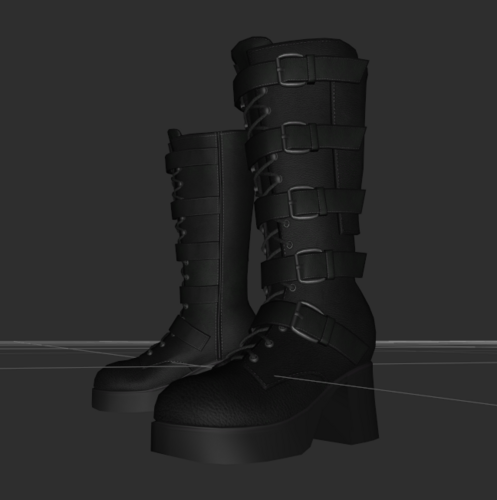
NEO Selene Boots (Nioverride High Heels version) for NEO Selene Outfit UNP (LE) CBBE 3BA (SE)
By Yinkle
Hi all, I had a request to make this for another forum member and figured I should release it on here in case others might like it too.
The problem: The original boots have high heels but are made with no "Nioverride" adjustment, so they make the character's legs look stubby since the bottom of the heels are where the foot heel should be.
This mod fixes that by moving the boots down, re-weighting them to a high heel foot shape, and adding a Nioverride adjustment node.
Skyrim LE (UNP) and Skyrim SE/AE (CBBE 3BA) versions, make sure and pick the right one for your game version.
Requirements:
NEO Selene Outfit
Nioverride/Racemenu (depending on which game version).
Installation:
Merge this mod into your NEO Selene outfit mod (it shouldn't overwrite anything).
Build with bodyslide.
Done.
If you want to adjust the "highheel offset", open the CalienteTools\BodySlide\ShapeData nif file in nifscope.
LE: edit the NiStringExtraData node in the boots shape, changing the 4.0 to a different value.
SE: edit the NiFloatExtraData HH_OFFSET "Float Data" in the boots shape, changing the 4 to a different value.
Build in bodyslide.
Enjoy, and thanks to @Mookeylama for requesting it, otherwise it wouldn't exist!
Credit to NEO for making the outfit in the first place.
291 downloads
Submitted
-
Simply Hide
By Darkpig
Have you ever wanted to hide in barrels like a sneaky bastard? Of course you do. You're here ain't ya?
Well this mod doesn't do that. But it does do the next best thing. Whenever you activate a large container while sneaking you have the option to hide thus turning you invisible at least until you move again... or murder someone or steal all their belongings.
The mod isn't perfect. This is merely a proof of concept. People will still know it is you if they bump into you so try to stay out of the way. The reason for making this mod is because all the other mods doing similar things have furniture animations which breaks you out of stealth mode which is bad when you are trying to sneak.
Should be SE compatible in theory but I haven't tested it out.
Let me know if there is a way to make it more efficient.
177 downloads
Updated
-
Pet The Freaking Dog Already
By MadMansGun
a small animation mod that lets you pet canines (activated by dialogue)
2 dog/wolf animations
1 fox animaton
956 downloads
Updated
-
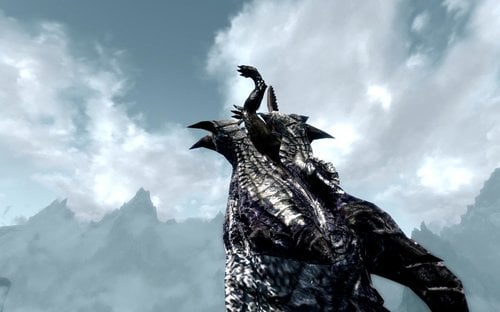
(the old non-FNIS) Dragon Vore KillMove Replacer
By MadMansGun
this mod replaces the Dragon's bite&throw animation (and sound effects) with a swallowing animation:
https://drive.google.com/open?id=1AJ22pQC5nReGJ-Ac6ywPGGZJVKCvRfPH
there are no mod requirements for this animation mod (not even FNIS)
Warning: conflicts with the FNIS version, don't use both.
8934 downloads
Updated
-
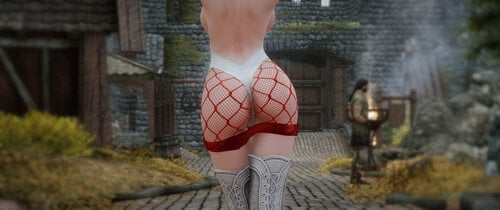
Hakuryuu Race Queen Outfit (CoCo Body v6)
By Jtaygang
This outfit is based off of some fanart. I did the best I could as a beginner modder, but don't expect any miracle work or fancy features here. Gloves and Boots not Included.
UNP body textures
XP32 Maximum Skeleton Extended - XPMSE
COCO Body (3BBB) v6 or something similar (No promises, but BHUNP will probably work)
BodySlide and Outfit Studio
NetImmerse Override or RaceMenu
The outfit can be crafted at any forge (Needs Elven Smithing Perk) or with console commands. You could also use something like Automated Leveled List Addition to distribute it in the world.
620 downloads
Updated
-
Player exhibitionist patches reuploaded
By Kanlaon
Some patches I had created for my mod player exhibitionist, to be used together with some popular DLS sized new lands mods.
All patches are developed using Skyrim LE.
If you are playing Skyrim SE maybe they work, maybe not.
Use at own risk
195 downloads
Submitted
-
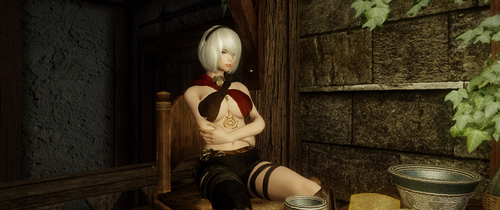
Flame Mane Armor (CoCo Body v6)
By Jtaygang
HUGE SHOUTOUT TO Drag-oon23, THIS MOD WOULD HAVE BEEN SCRAPPED HAD HE NOT SAVED ME
This is Dehya's armor from Genshin Impact, but I tried to make it fit better into Skyrim. There's not much more to it than that, its a single chest-piece with a ground item.
HOW TO OBTAIN: You have to use console commands or patch it into your leveled lists. I will not be adding it to the world.
FEEL FREE TO YOINK THIS MOD AND FIX/UPGRADE/CHANGE ANYTHING, just put my name in the credits somewhere.
321 downloads
- genshin impact
- lore friendly
- (and 1 more)
Submitted
-
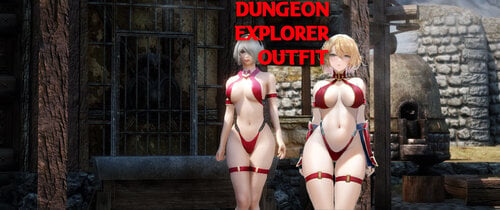
z23 Dungeon Explorer Outfit BHUNP/COCOBody v6
By Jtaygang
This is a simple armor mod I made using Bodyslide/Outfit studio and misc assets I found. The armor is modeled after a skin for Azur Lane- z23 "Upgrade Failure?!". I tried to make it as close as I could to the artwork currently made for the skin, with some slight creative liberties taken. As far as lore friendly-ness is concerned, the armor uses leather and steel for its entirety of materials, so do with that what you will.
HOW TO OBTAIN: currently you have to use the console. Try using help "dungeon explorer" to get the ID you need
Depending on your bodyslide preset for BHUNP, you may need to edit the mesh if there is clipping. However, for most reasonable presets there shouldn't be any issues.
I am not responsible for you manually installing everything or not making backups. This is just an armor mod, so it shouldn't break your game even if you decide to uninstall it later.
1641 downloads
Updated
-
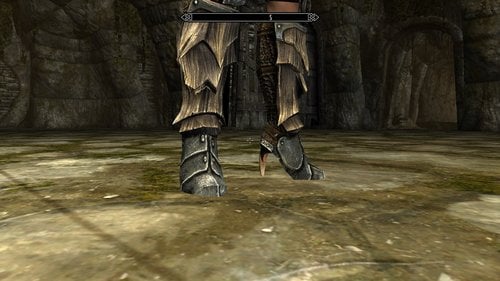
DW UUNP Armor Matching High Heels
By Darkwing241
20 UNP high heels, designed to match the default Skyrim armors and their various remakes and mashups.
-craftable/temperable as in the normal game (non-craftable items can be obtained via the console)
-gameplay balanced
-nioveride
-UUNP
Dark Wing's Heels UUNP : Stand alone craftable
Dark Wing's Heels Replacer UUNP : Replaces vanilla armor boots with new models
TAWoBA DWHH replacer: for https://www.nexusmods.com/skyrim/mods/83383 users that want to replace the tawoba boots. Requires either either the stand alone or replacer versions of DW and tawoba.
Sound patches: require the corresponding main file as well as https://www.loverslab.com/files/file/1795-heels-sound/ be aware that the the replacer sound file is going to replace the sound for male boots as well.
added corsayr's DW Heel Sound NPC no HH sound for dudes patch, that was hanging around in the forum post
7208 downloads
Updated
-
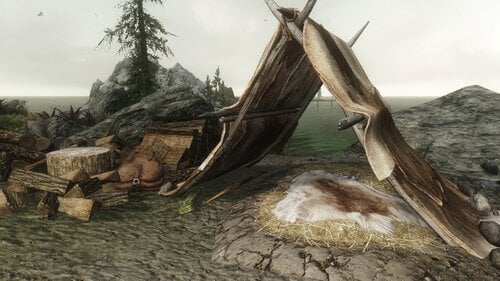
Tents - No Collision
By Guest
Simple mod that disables collision for the small nordic and imperial tent by removing the collision flag in the
nif files, which enables you to start sex scenes in the tent. It always bothered me that I couldn't get in there.
Installation
Install the file with your mod manager.
Have fun.
646 downloads
Updated

![More information about "Oniki's Kinky World Build 454 v1.0.0 - LoversLab Edition [BiterBit's QoL]"](https://static.loverslab.com/screenshots/monthly_2026_03/S3_2F7D0004_00000000_EBF9372AFF28D610_i_welcome_kinkyworldIMAGcopyLLe.png.0afce9e1b887c3fe92bcab1899388acb.thumb.webp.ae2f07901c16554cc27a6b220b298155.webp)

![More information about "[XCL] [0.25.9] Bar Girl - Carolina Sweets (+Anal)"](https://static.loverslab.com/screenshots/monthly_2026_10/loverslab_icon4.thumb.jpg.8ad4a837b433b7fdd7f189dde9410bf5.jpg)