Search the Community
Showing results for tags 'nmm'.
Found 10 results
-
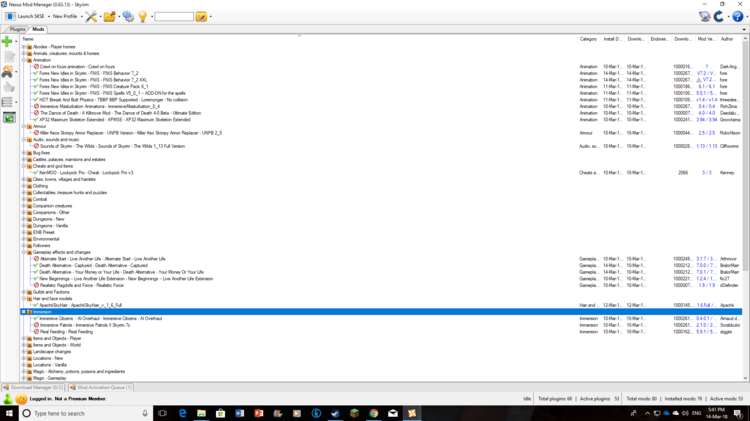
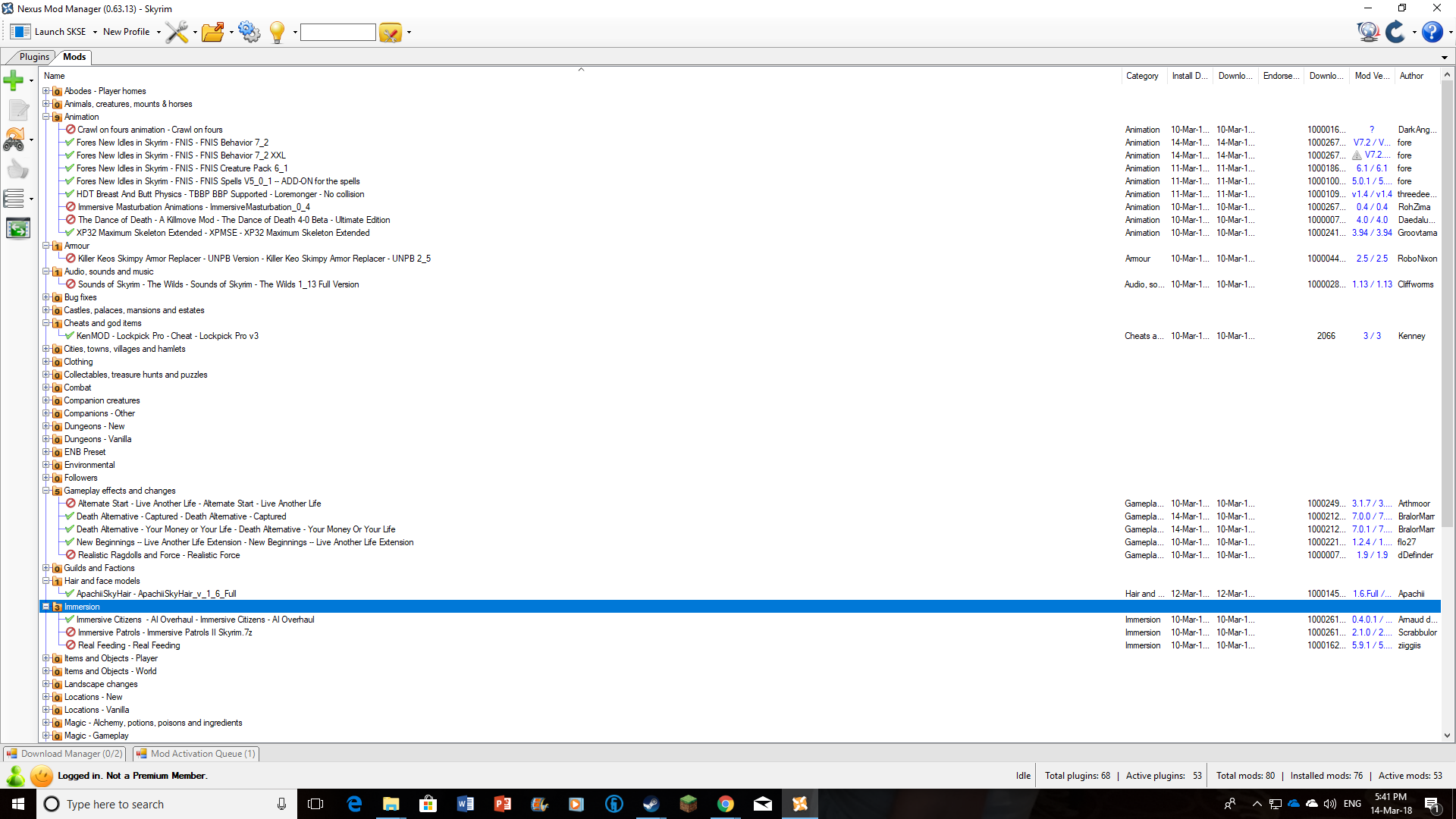
Can someone please help me out? Whenever I try to play the game (in old or new saves) my character, regardless of gender, is always in a T-pose. I have used FNIS several times but nothing changes. I have validated mods on Steam to make sure nothing is missing. Here are all the mods I have active: (Click on the image to make it clearer)
.thumb.png.a6ab87bda3a6901d50bfb68149c51d3a.png)
.thumb.png.c4454185c4d2c161b2f1ed44151093a3.png)
-
 Conglomerate 01 This guide is for Skyrim LE: Terms for "Skyrim LE": Skyrim Legendary Edition Skyrim + the three DLC: Dawnguard, Hearthfire, Dragonborn Skyrim 32bit version + 3 DLC Highly recommend additional Skyrim LE guides: 2020 Skyrim LE Stability Guide STEP Skyrim LE v3.0 For more Skyrim related links: Conglomerate - Links For Skyrim SE check out this guides: (v1.1.2) Mod Organizer 2 & Other tools - From zero to "Hey Sexlab is working!" Skyrim SE for Beginners - V 3.2.0 (3BBB / HDT-SMP / HPH) Intro: My blog is pretty basic and should be used as a "quick" reference to prepare Skyrim LE for modding. If you want to learn more about the technical aspects on how the various Stability Fixes for Skyrim work you can start your research from here. Main goal is to show how to install Skyrim ready to be modded and how to use "Stability Fixes" to keep Skyrim LE stable even with a multitude of installed mods. In addition you can find here a list of tools needed to keep the game stable and fix issues. The instructions are written in a way that a user can just work through it from top to bottom (recommend!), for a first install or a reinstall of Skyrim LE. I use Nexus Mod Manager (NMM v0.8+) in combination with Wrye Bash to compensate for the NMM shortcomings, that's why you find a few NMM related hints included in this blog. The stability fixes are the same for use with any Skyrim LE setup unrelated to the used mod manager (MO, MO2, Vortex, Wrye Bash). I mainly post only solutions I tried or use on my own Skyrim setup and that showed practical results. Many of the here posted fixes and tools are the absolute basics and mandatory to create a stable modding environment. In combination with Conglomerate 02 it is possible to create a lewd base setup that can be trusted to be stable. A stable base setup is needed for troubleshooting, because it is really hard to find mod bugs or conflicts if the base setup creates glitches or worse crash to desktop (CTD). Most used abbreviations and technical terms: Conglomerate - Abbreviations and file types What you find on this blog page: Installing Skyrim LE Installing Skyrim LE Backup and preparations before uninstalling Skyrim TES5EDIT Quick_Auto_Clean and cleaning Skyrim Master files a quickie with Quick Auto Clean SKSE & SKSE.ini Mandatory Papyrus expansion Memory (Block) Fix Crash fixes, Crashfixplugin.ini Memory allocator String count fix other fixes ENBoost & enblocal.ini ENBoost is the standalone memory manager without the graphical effects from ENBSeries Provides Skyrim with more usable memory BethINI ini configuration tool and tweaks fixes user errors and/or fixes changes from ini manipulating mods Savegame Tools: FallrimTools NetImmerse Override Cleaner (SKSE Co-Save Cleaner Utility) Other useful Tools: 7zip Notepad++ 1. Installing Skyrim LE Installing Skyrim LE Backup and preparations before uninstalling Skyrim 2. TES5edit and cleaning the Skyrim DLC Master files 3. SKSE & SKSE.ini 4. Crash fixes, Crashfixplugin.ini 5. ENBoost & enblocal.ini 6. BethINI 7. Savegame Tools: FallrimTools NetImmerse Override Cleaner (SKSE Co-Save Cleaner Utility) 8. Other useful Tools:
 -
Conglomerate - Merging Plugins? For this it's time for a closer look!
donttouchmethere posted a blog entry in Conglomerate
Conglomerate - Merge Plugins with Merge Plugins Out of plugin slots, time to merge-a-lot How to install, configure and use Merge Plugins (with NMM) Tool: Merge Plugins NMM Requirements: Creation Kit (via steam) Champollion a PEX to Papyrus decompiler TESVedit 7-zip How to: Mator's Merge Plugin PDF: Merge Plugins Documentation.pdf GamerPoet's Merge Plugins Video: Start to finish Installation: Install Creation Kit via Steam delivers the PapyrusCompiler.exe Download Merge Plugins from Nexus and unzip Merge Plugins folder Rename folder to "Merge Plugins" and move it to ...Steam/steamapps/common/skyrim Create a shortcut from MergePlugins.exe to Desktop to create a shortcut: right-click > send to > desktop Preparation: The Merge Plugins Output folder: Create a new folder in Nexus Mod Manager/mods/ and name it Merge Plugins (example) actually location of the folder and folder name can be created as you like the created folder will be the place where MP will save finished merges to In Skyrim/data find Scripts.rar extract scripts.rar make sure it installs into skyrim/data/scripts if the files got extracted to the wrong place MP won't be able to find Papyrus flags Unzip Champollion and move the resulting folder to ...Steam/steamapps/common/skyrim First time startup of Merge Plugins (MP): Start MP and choose the Skyrim Profile (TES5), or create a new Profile If MP gets started the first time it will ask you to configure it Configuration of the MP Merging Tab: Configuration of the MP Integrations Tab After installation and configuration: After starting Merge Plugins always wait till the Background Loader is finished After the Background Loader is finished, do a "Find Errors" check via magnification glass ? This has to be repeated every time new mods get added to LO and after opening MP The magnification glass will be grayed out if there is nothing new to check First Merging Process: Preparations and hints: Move the mods you want to merge close together in LO Keep them in the same order you would want them in LO (LO sequence remains unchanged inside the Merge) Keep in mind that you can only load 255 mods at once into Merge Plugins. Just deactivate a few plugins that are not needed for the merging process before starting Merge Plugins. ⚠️Deactivate Bashed Patch if you want to merge mods that could also be merged into the bashed patch. ⚠️Best to merge mods that do the same, for example create a pure follower merge, Outfits merge, City Overhaul merge... ⚠️If a master mod has multiple patches that you want to merge, but there are also multiple other mods that relay on the master mod, don't merge the master mor with the patches together. If no other mod relays on the master mod, then it's okey to merge the master mod with it's patches. Example for a Merging Process of multiple followers: First I move the followers together in LO and activate their esp Next I start Merge Plugins. Skyrim.esp must be activated manually in the MP mod selection window. The OK button is grayed out as long as: skyrim.exp isn't activated more than 255 plugins activated bashed patch is activated (not always an issue tho) Wait for the Background Loader to finish loading, after that use the magnifying glass to check for errors Mark all follower mods, right click > select new merge and name the merge. The actual merge will be build after that in the Merge tab. green check mark = theoretically merge-able without issues (but merged mods can have issues ingame) red exclamation mark = warning that the mod might not be merge-able. This can be resolved in the merges tab for some mods If the error can't be resolved then remove the mod from the patch -
 252 Active Plugins + 347 Installed Mods + Horizon + AAF + RSE Full Load Order in Spoiler If anyone is familiar with me from Skyrim you're probably well aware I've never physically finished Skyrim due to being constantly hauled into game restarts cause of my constantly changing mod list. Thankfully I finished Fallout 4 back about a month or so after its original release but with 76 on its way I'm getting back into Fallout 4 specifically mostly for building because being able to create swank crash pads in the new game is gonna be lit obvi so.....I wanted to get stronger on that end of things. That aside I can never play a game without modding the living crap out of it. I remember when I stole my brothers Fallout 2 disc and played it like crazy and the best parts about it were the more adult situations the game presented, I'd never played a game like that in my entire life and it set my expectations for what I expect from an immersive roleplay experience....so here I am, weirdest weirdo on the internet....or so I thought til I found you people. That aside, I've been watching the RSE thread and seeing a lot of confusion about how load order works to make everything work together and even had an immense amount of trouble myself and it all comes down to an automatic assumption many of us will make if we're familiar with NMM and LOOT from Skyrim and that assumption is simple. "The software understands how to create a proper load order." and unfortunately in the case of Fallout 4 that is entirely incorrect. I was consistently having mod failures and issues with Horizon and AAF/RSE based integrations and it all stems from having faith in the LOOT system to be able to coherently understand how Fallout 4 formid's work and what has the greatest potential to override what and it appears to have no bloody idea how to deal with any of it. I'm sharing my load order to give people help with understanding the right way to get all of this stuff to function with the maximum amount of stability....and since I tend to run the most ridiculous installs ever, hopefully it will help people that are running much smaller installations that are still having trouble. The basic structure goes like this >MAIN GAME ESMS >MOD ESM LOAD -----AAF.ESM -----Z_Architect.esm > ESL FILES > WEAPON ESPs > ARMOR ESPs > HOMESTEAD ESPs > MINOR ADDITION ESPs > CHARACTER OVERHAUL ESPs > MAJOR SYSTEM OVERHAUL ESPs -----FP_FamilyPlanningEnhanced.esp=1 -----four_play.esp=1 <===AAF Compatibility - not FP -----AAF_RSE.esp=1 -----RSE_CWSS_patch.esp=1 -----AAF_RSE_DLCPatch.esp=1 -----AAF_Four-Play_Animations_Crazy6987.esp=1 -----SavageCabbage_Animations.esp=1 -----CumNWealth.esp=1 -----Scrap Everything - Ultimate Edition.esp=1 -----Z_Horizon.esp=1 -----Z_Horizon_DLC_Automatron.esp=1 -----Z_Horizon_DLC_FarHarbor.esp=1 -----Z_Horizon_DLC_Nuka.esp=1 -----Z_Horizon_DLC_Workshop01.esp=1 -----Z_Horizon_DLC_Workshop03.esp=1 -----Z_Horizon_DLC_Workshop02.esp=1 -----Z_Horizon_Loot_Respawn.esp=1 -----Z_Horizon_Loot_Respawn_DLC.esp=1 -----Z_Horizon_DEFUI_MenusOnly.esp=1 -----Z_Horizon_Patch_ArmorsmithExtended.esp=1 -----Z_Horizon_Patch_ArmorsmithExtendedDLC.esp=1 -----Z_Horizon_Patch_Homemaker.esp=1 -----Z_Extras.esp=1 -----Z_Horizon_Timescale.esp=1 -----Z_Horizon_Patch_ScrapEverythingFull.esp=1 -----EnhancedLightsandFX.esp=1 -----StartMeUp.esp=1 By following this structure you can very simply reorder your mod install to ensure the least amount of error my cut and pasted mod list isn't 100% optimal yet but it does all work so I'm loathe to even mess with it at this time. As far as AAF/RSE goes I am able to trigger CSA, abductions and encounters do have a potential to result in pregnancies from Family Planning and I finally got the cum layers from the AAF compatibility patches for Leito and Crazy Animations working as well. So its a 100% functional install with the highest possible load order without merged patches....which to be fair don't work well for FO4 anyways from what I can tell. But basically a lot of the problems I was having were all created by trusting LOOT to sort my load order coherently, and it didn't, it took my Horizon install and put the esp's all over the place, the AAF/RSE related stuff was all wrong, hell it couldn't even seem to put Bobblegirl in the right place and that was constantly getting overwritten by something else. TLDR: DON'T TRUST LOOT TO NOT FUCK UP YOUR MOD ORDER. CAUSE IT WILL. CONSTANTLY. YOU NEED TO UNDERSTAND HOW TO BEST ORDER YOUR MOD INSTALL YOURSELF.
 -
Hi everyone Im having a bit of a problem. For context I have two versions of NMM (one of my desktop and one on an external drive for travelling). I went to update my mods on the external drive through my pc, however, in doing my two versions of fallout new vegas conflicted and the mod manager got confused. It began saying there were mod files missing and asking to update and install different mods. I tried to wipe both versions as the game stopped working and my nexus would be stuck in an infinite load. Eventually after a few hours nexus closed and produced a crash dump. I have no idea what I have done and I cannot understand the crash dump. Any help is welcomed. Thanks Crash dump file: Trace file has been created: TraceLog20220621080433.txt Mod Manager Version: 0.83.6.0 OS version: Microsoft Windows NT 6.2.9200.0 Installed .NET Versions: CDF SP 0 v2.0.50727 SP 2 v3.0 SP 2 v3.5 SP 1 v4 SP 0 v4.0 SP 0 v4.5: 4.6 or later Tracing is forced: False Discovering Game Mode Factories... Looking in: F:\Nexus Mod Manager\GameModes Checking: Antlr3.Runtime.dll Checking: BaldursGate3.dll Initializing: Nexus.Client.Games.BaldursGate3.BaldursGate3GameModeFactory Checking: BreakingWheel.dll Initializing: Nexus.Client.Games.BreakingWheel.BreakingWheelGameModeFactory Checking: CSharpScript.dll Checking: Cyberpunk2077.dll Initializing: Nexus.Client.Games.Cyberpunk2077.Cyberpunk2077GameModeFactory Checking: DarkSouls.dll Initializing: Nexus.Client.Games.DarkSouls.DarkSoulsGameModeFactory Checking: DarkSouls2.dll Initializing: Nexus.Client.Games.DarkSouls2.DarkSouls2GameModeFactory Checking: DragonAge.dll Initializing: Nexus.Client.Games.DragonAge.DragonAgeGameModeFactory Checking: DragonAge2.dll Initializing: Nexus.Client.Games.DragonAge2.DragonAge2GameModeFactory Checking: DragonsDogma.dll Initializing: Nexus.Client.Games.DragonsDogma.DragonsDogmaGameModeFactory Checking: Enderal.dll Initializing: Nexus.Client.Games.Enderal.EnderalGameModeFactory Checking: EnderalSE.dll Initializing: Nexus.Client.Games.EnderalSE.EnderalSEGameModeFactory Checking: Fallout3.CSharpScript.dll Checking: Fallout3.dll Initializing: Nexus.Client.Games.Fallout3.Fallout3GameModeFactory Checking: Fallout3.XmlScript.dll Cannot load F:\Nexus Mod Manager\GameModes\Fallout3.XmlScript.dll: cannot find dependency Antlr3.Runtime, Version=3.4.1.9004, Culture=neutral, PublicKeyToken=eb42632606e9261f Checking: Fallout4.CSharpScript.dll Checking: Fallout4.dll Initializing: Nexus.Client.Games.Fallout4.Fallout4GameModeFactory Checking: Fallout4.XmlScript.dll Cannot load F:\Nexus Mod Manager\GameModes\Fallout4.XmlScript.dll: cannot find dependency Antlr3.Runtime, Version=3.4.1.9004, Culture=neutral, PublicKeyToken=eb42632606e9261f Checking: Fallout4VR.dll Initializing: Nexus.Client.Games.Fallout4VR.Fallout4VRGameModeFactory Checking: FalloutNV.CSharpScript.dll Checking: FalloutNV.dll Initializing: Nexus.Client.Games.FalloutNV.FalloutNVGameModeFactory Checking: FalloutNV.XmlScript.dll Cannot load F:\Nexus Mod Manager\GameModes\FalloutNV.XmlScript.dll: cannot find dependency Antlr3.Runtime, Version=3.4.1.9004, Culture=neutral, PublicKeyToken=eb42632606e9261f Checking: GamebryoBase.dll Checking: Grimrock.dll Initializing: Nexus.Client.Games.Grimrock.GrimrockGameModeFactory Checking: ModScript.dll Cannot load F:\Nexus Mod Manager\GameModes\ModScript.dll: cannot find dependency Antlr3.Runtime, Version=3.4.1.9004, Culture=neutral, PublicKeyToken=eb42632606e9261f Checking: MonsterHunterWorld.dll Initializing: Nexus.Client.Games.MonsterHunterWorld.MonsterHunterWorldGameModeFactory Checking: Morrowind.dll Initializing: Nexus.Client.Games.Morrowind.MorrowindGameModeFactory Checking: MountAndBlade2Bannerlord.dll Initializing: Nexus.Client.Games.MountAndBlade2Bannerlord.MountAndBlade2BannerlordGameModeFactory Checking: Newtonsoft.Json.dll Checking: NoMansSky.dll Initializing: Nexus.Client.Games.NoMansSky.NoMansSkyGameModeFactory Checking: Oblivion.dll Initializing: Nexus.Client.Games.Oblivion.OblivionGameModeFactory Checking: Sims4.dll Initializing: Nexus.Client.Games.Sims4.Sims4GameModeFactory Checking: Skyrim.CSharpScript.dll Checking: Skyrim.dll Initializing: Nexus.Client.Games.Skyrim.SkyrimGameModeFactory Checking: Skyrim.XmlScript.dll Cannot load F:\Nexus Mod Manager\GameModes\Skyrim.XmlScript.dll: cannot find dependency Antlr3.Runtime, Version=3.4.1.9004, Culture=neutral, PublicKeyToken=eb42632606e9261f Checking: SkyrimSE.CSharpScript.dll Checking: SkyrimSE.dll Initializing: Nexus.Client.Games.SkyrimSE.SkyrimSEGameModeFactory Checking: SkyrimSE.XmlScript.dll Cannot load F:\Nexus Mod Manager\GameModes\SkyrimSE.XmlScript.dll: cannot find dependency Antlr3.Runtime, Version=3.4.1.9004, Culture=neutral, PublicKeyToken=eb42632606e9261f Checking: SkyrimVR.dll Initializing: Nexus.Client.Games.SkyrimVR.SkyrimVRGameModeFactory Checking: Starbound.dll Initializing: Nexus.Client.Games.Starbound.StarboundGameModeFactory Checking: StardewValley.dll Initializing: Nexus.Client.Games.StardewValley.StardewValleyGameModeFactory Checking: StateOfDecay.dll Initializing: Nexus.Client.Games.StateOfDecay.StateOfDecayGameModeFactory Checking: Subnautica.dll Initializing: Nexus.Client.Games.Subnautica.SubnauticaGameModeFactory Checking: SubnauticaBelowZero.dll Initializing: Nexus.Client.Games.SubnauticaBelowZero.SubnauticaBelowZeroGameModeFactory Checking: TESO.dll Initializing: Nexus.Client.Games.TESO.TESOGameModeFactory Checking: WarThunder.dll Initializing: Nexus.Client.Games.WarThunder.WarThunderGameModeFactory Checking: Witcher2.dll Initializing: Nexus.Client.Games.Witcher2.Witcher2GameModeFactory Checking: Witcher3.dll Initializing: Nexus.Client.Games.Witcher3.Witcher3GameModeFactory Checking: WorldOfTanks.dll Initializing: Nexus.Client.Games.WorldOfTanks.WoTGameModeFactory Checking: XCOM2.dll Initializing: Nexus.Client.Games.XCOM2.XCOM2GameModeFactory Checking: XmlScript.dll Cannot load F:\Nexus Mod Manager\GameModes\XmlScript.dll: cannot find dependency Antlr3.Runtime, Version=3.4.1.9004, Culture=neutral, PublicKeyToken=eb42632606e9261f Checking: XRebirth.dll Initializing: Nexus.Client.Games.XRebirth.XRebirthGameModeFactory Loading Game Mode Factories for Installed Games... Loading MountAndBlade2Bannerlord: Supported Loading Fallout4: Supported Loading FalloutNV: Supported Determining Game Mode: (From Selection Form) FalloutNV Game Mode Factory Selected: Fallout: New Vegas (FalloutNV) Creating Game Mode mutex (Attempt: 0) Game Mode Built: Fallout: New Vegas (FalloutNV) Installation Path: F:\SteamLibrary\steamapps\common\Fallout New Vegas Install Info Path: E:\Games\Nexus Mod Manager\FalloutNV\Install Info Mod Path: F:\Games\Nexus Mod Manager\FalloutNV\Mods Mod Cache Path: F:\Games\Nexus Mod Manager\FalloutNV\Mods\cache Mod Download Cache: F:\Games\Nexus Mod Manager\FalloutNV\Mods\downloads Overwrite Path: E:\Games\Nexus Mod Manager\FalloutNV\Install Info\overwrites Virtual Install Path: F:\Games\Nexus Mod Manager\FalloutNV NMM Link Path: Scanning for read-only files... Initializing Mod Repository... Registering supported Script Types... Discovering Script Types... Discovering Generic Script Types... Looking in: F:\Nexus Mod Manager\ScriptTypes Checking: Antlr3.Runtime.dll Checking: CSharpScript.dll Initializing: Nexus.Client.ModManagement.Scripting.CSharpScript.CSharpScriptType Checking: ModScript.dll Initializing: Nexus.Client.ModManagement.Scripting.ModScript.ModScriptType Checking: XmlScript.dll Initializing: Nexus.Client.ModManagement.Scripting.XmlScript.XmlScriptType Discovering Game Mode Specific Script Types... Looking in: F:\Nexus Mod Manager\GameModes Checking: FalloutNV.CSharpScript.dll Initializing: Nexus.Client.Games.FalloutNV.Scripting.CSharpScript.FalloutNVCSharpScriptType Checking: FalloutNV.XmlScript.dll Initializing: Nexus.Client.Games.FalloutNV.Scripting.XmlScript.FalloutNVXmlScriptType Found 3 script types. Registering supported mod formats... Discovering Mod Formats... Looking in: F:\Nexus Mod Manager\ModFormats Checking: FOMod.dll Initializing: Nexus.Client.Mods.Formats.FOMod.FOModFormat Found 1 formats. Finding managed mods... Discovering Managed Mods... Looking in: F:\Games\Nexus Mod Manager\FalloutNV\Mods Found 0 managed mods. Initializing Install Log... Checking if upgrade is required... Path: E:\Games\Nexus Mod Manager\FalloutNV\Install Info\InstallLog.xml Loaded from XML. Found Dummy Mod: ORIGINAL_VALUE...OK Found F:\Games\Nexus Mod Manager\FalloutNV\Mods\frontier.7z...Missing Found F:\Games\Nexus Mod Manager\FalloutNV\Mods\COD_WWII_WeaponsPack_V1.0b-74903-1-0b-1641657191.rar...Missing Found F:\Games\Nexus Mod Manager\FalloutNV\Mods\Slave Harbor Side quest-68009-0-1-1642344478.zip...Missing Found F:\Games\Nexus Mod Manager\FalloutNV\Mods\RX 10mm SMG Advanced Customizing-75146-1-0-1643321223.rar...Missing Found F:\Games\Nexus Mod Manager\FalloutNV\Mods\The Lodge - NV-74829-1-0-1640521597.rar...Missing Found F:\Games\Nexus Mod Manager\FalloutNV\Mods\CitSMod-73485-0-57-1631558294.zip...Missing Found F:\Games\Nexus Mod Manager\FalloutNV\Mods\The Happy Place V2-70258-V2-1604360486.rar...Missing Found F:\Games\Nexus Mod Manager\FalloutNV\Mods\Kristinas Closet Main File v8-47059-8-1.7z...Missing Found F:\Games\Nexus Mod Manager\FalloutNV\Mods\FalloutNV MCTF - Default Field of View-59451-1-4a-1612552611.rar...Missing Found F:\Games\Nexus Mod Manager\FalloutNV\Mods\FNV 4GB Patch-62552-1-4-1541454309.7z...Missing Found F:\Games\Nexus Mod Manager\FalloutNV\Mods\NVHR-69779-3-2-1622060833.zip...Missing Found F:\Games\Nexus Mod Manager\FalloutNV\Mods\YUP - Base Game and All DLC-51664-12-3-1639760361.7z...Missing Found F:\Games\Nexus Mod Manager\FalloutNV\Mods\Main Installer 1.0-76426-1-0-1651767252.7z...Missing Found F:\Games\Nexus Mod Manager\FalloutNV\Mods\Raider Chains Armor T6M - T6BB - TN - BerryK2 Bouncing-47545-1-2.7z...Missing Found F:\Games\Nexus Mod Manager\FalloutNV\Mods\Wheelsinthewasteland-71709-1-0-1615662053.rar...Missing Found F:\Games\Nexus Mod Manager\FalloutNV\Mods\Mojave Wildlife-64638-1-02-1597225231.zip...Missing Found F:\Games\Nexus Mod Manager\FalloutNV\Mods\Loot All Vehicles DLCs-46045-1-1-1606361780.7z...Missing Found F:\Games\Nexus Mod Manager\FalloutNV\Mods\Sexy attire-44556-Beta.rar...Missing Found F:\Games\Nexus Mod Manager\FalloutNV\Mods\Fallout The Frontier Unofficial Patch-71120-2-9-0-1647459630.rar...Missing Found F:\Games\Nexus Mod Manager\FalloutNV\Mods\Main-72734-1-0-1623905592.zip...Missing Found F:\Games\Nexus Mod Manager\FalloutNV\Mods\VegasChokers-36661-2-0.zip...Missing Found F:\Games\Nexus Mod Manager\FalloutNV\Mods\Mad Max Mojave-76363-3-0-1651484318.rar...Missing Found F:\Games\Nexus Mod Manager\FalloutNV\Mods\Mojave Raiders-64660-1-1-0-1617557974.zip...Missing Found F:\Games\Nexus Mod Manager\FalloutNV\Mods\NCR CF - Sexout-50882-2-5.zip...Missing Found F:\Games\Nexus Mod Manager\FalloutNV\Mods\Mojave Wildlife - Vanilla Version-64638-1-01.zip...Missing Initializing Plugin Management Services... Initializing Plugin Registry... Discovering Managed Plugins... Discovering Plugins... Looking in: F:\SteamLibrary\steamapps\common\Fallout New Vegas\Data Found: F:\SteamLibrary\steamapps\common\Fallout New Vegas\Data\CaravanPack.esm Found: F:\SteamLibrary\steamapps\common\Fallout New Vegas\Data\ClassicPack.esm Found: F:\SteamLibrary\steamapps\common\Fallout New Vegas\Data\DeadMoney.esm Found: F:\SteamLibrary\steamapps\common\Fallout New Vegas\Data\FalloutNV.esm Found: F:\SteamLibrary\steamapps\common\Fallout New Vegas\Data\GunRunnersArsenal.esm Found: F:\SteamLibrary\steamapps\common\Fallout New Vegas\Data\HonestHearts.esm Found: F:\SteamLibrary\steamapps\common\Fallout New Vegas\Data\LonesomeRoad.esm Found: F:\SteamLibrary\steamapps\common\Fallout New Vegas\Data\MercenaryPack.esm Found: F:\SteamLibrary\steamapps\common\Fallout New Vegas\Data\OldWorldBlues.esm Found: F:\SteamLibrary\steamapps\common\Fallout New Vegas\Data\TribalPack.esm Found: F:\SteamLibrary\steamapps\common\Fallout New Vegas\Data\CaravanPack.esm Registered. Found: F:\SteamLibrary\steamapps\common\Fallout New Vegas\Data\ClassicPack.esm Registered. Found: F:\SteamLibrary\steamapps\common\Fallout New Vegas\Data\DeadMoney.esm Registered. Found: F:\SteamLibrary\steamapps\common\Fallout New Vegas\Data\FalloutNV.esm Registered. Found: F:\SteamLibrary\steamapps\common\Fallout New Vegas\Data\GunRunnersArsenal.esm Registered. Found: F:\SteamLibrary\steamapps\common\Fallout New Vegas\Data\HonestHearts.esm Registered. Found: F:\SteamLibrary\steamapps\common\Fallout New Vegas\Data\LonesomeRoad.esm Registered. Found: F:\SteamLibrary\steamapps\common\Fallout New Vegas\Data\MercenaryPack.esm Registered. Found: F:\SteamLibrary\steamapps\common\Fallout New Vegas\Data\OldWorldBlues.esm Registered. Found: F:\SteamLibrary\steamapps\common\Fallout New Vegas\Data\TribalPack.esm Registered. Found 10 managed plugins. Initializing Plugin Order Log... Loading Plugin Order... Getting Plugin Load Order from the load order manager... Loading F:\SteamLibrary\steamapps\common\Fallout New Vegas\Data\FalloutNV.esm (IsNull=False) Loading F:\SteamLibrary\steamapps\common\Fallout New Vegas\Data\DeadMoney.esm (IsNull=False) Loading F:\SteamLibrary\steamapps\common\Fallout New Vegas\Data\HonestHearts.esm (IsNull=False) Loading F:\SteamLibrary\steamapps\common\Fallout New Vegas\Data\OldWorldBlues.esm (IsNull=False) Loading F:\SteamLibrary\steamapps\common\Fallout New Vegas\Data\LonesomeRoad.esm (IsNull=False) Loading F:\SteamLibrary\steamapps\common\Fallout New Vegas\Data\TribalPack.esm (IsNull=False) Loading F:\SteamLibrary\steamapps\common\Fallout New Vegas\Data\MercenaryPack.esm (IsNull=False) Loading F:\SteamLibrary\steamapps\common\Fallout New Vegas\Data\ClassicPack.esm (IsNull=False) Loading F:\SteamLibrary\steamapps\common\Fallout New Vegas\Data\CaravanPack.esm (IsNull=False) Loading F:\SteamLibrary\steamapps\common\Fallout New Vegas\Data\GunRunnersArsenal.esm (IsNull=False) Initializing Active Plugin Log... Initializing Plugin Manager... Initializing Activity Monitor... Initializing Mod Activation Monitor... Initializing Mod Manager... Upgrading replaced Mods... Uninstalling missing Mods... F:\Games\Nexus Mod Manager\FalloutNV\Mods\frontier.7z is missing... Removing. Tracing an Unhandled Exception: Exception: Message: Exception of type 'Nexus.Transactions.RollbackException' was thrown. Full Trace: Nexus.Transactions.RollbackException: Exception of type 'Nexus.Transactions.RollbackException' was thrown. at Nexus.Transactions.Transaction.Rollback() at Nexus.Transactions.TransactionScope.Dispose() at Nexus.Client.ModManagement.ModUninstaller.RunTasks() at Nexus.Client.Util.Threading.TrackedThread.RunThread() at System.Threading.ExecutionContext.RunInternal(ExecutionContext executionContext, ContextCallback callback, Object state, Boolean preserveSyncCtx) at System.Threading.ExecutionContext.Run(ExecutionContext executionContext, ContextCallback callback, Object state, Boolean preserveSyncCtx) at System.Threading.ExecutionContext.Run(ExecutionContext executionContext, ContextCallback callback, Object state) at System.Threading.ThreadHelper.ThreadStart() Loading Game Mode Factories for Installed Games... Loading MountAndBlade2Bannerlord: Supported Loading Fallout4: Supported Loading FalloutNV: Supported Determining Game Mode: (From Selection Form) Running Threads (2) 4 () Aborted 3 () Aborted
-

Version 1.0.1
840 downloads
"Ручной" патч переводов на русский язык для NMM by mrcl (v1.6) и NMM-opinions 1.0.9 (v1.6). https://gitgud.io/Mrcl/nudity-matters-more https://github.com/MiruKoto/NudityMattersMore_opinions Просто перенесите содержимое в папки модов. ПРОФИТ!!! Перевод может быть "грубым" и с ошибками построения предложений, но это лучше, чем ничего, верно? Для NMM-opinios не до конца переведен журнал взаимодействия (aka interaction log) (Common\Defs\SituationalOpinionsDefs). Авто-переводчик переводил весь текст включая плейсхолдер в {} скобках, а мне лень делать что-то вручную. Все остальное переведено. (может быть кто-нибудь когда-нибудь переведет это вместо меня xD) Так же не переведены настройки у модов. Нет файлов, видимо язык вшит в настройки -
View File Translation of mods NudityMattersMore and NudityMattersMoreOpinions into Russian "Ручной" патч переводов на русский язык для NMM (v1.6) и NMM-opinions 1.0.9 (v1.6). Просто перенесите содержимое в папки модов. ПРОФИТ!!! Перевод может быть "грубым" и с ошибками построения предложений, но это лучше, чем ничего, верно? Не переведены настройки у обоих модов. Нет файлов, видимо язык вшит в настройки. Надеюсь разработчик вынесет их в отдельный файл для будущего перевода. Все остальное, что возможно - переведено. Буду рад если вы захотите представить улучшенный перевод для патча. Подробнее об версии 1.0.1 - latest До конца переведен журнал взаимодействия (aka interaction log). Подробнее об версии v1.0.0 Submitter xprvtt Submitted 09/13/2025 Category Rimworld
-
 So I still can't start a new game anymore. I made a thread the day before the site went down which may have screwed me out of getting more help back then so I'm reposting my problem with some updated information. I tried launching a new game in order to clear away bugs related to SexLab's stripping & Defeat creature surrender, but every time I start a new game it hangs on the logo screen with the music indefinitely. It doesn't even reach the Alternate Start cell or any loading screen before it. Clicking "New Game" just clears the menu away & leaves the logo & music of the main menu playing infinitely. I have tried multiple times now to start a new game but it never goes through. I managed to disable enough new mods from my recent playthrough to load my original playthrough safely (it wasn't broken, I just didn't want to add too many plugins at once to prevent potential issues) & after setting up its new mods, the bugs plaguing my current playthrough never occurred again. All the more reason why I need to resolve this problem of not being able to start a new game so I can load all my desired mods without having either playthrough's issues. I do not know what to do to fix this problem short of deleting every mod or reinstalling Skyrim, which I can't even do because my SE is currently & thankfully not updated for AE & never will be. I tried disabling each new mod in my manager's load order that was installed before my 2nd playthrough was made one by one & it changed nothing. Then I deleted multiple saves between both my 2 playthroughs thinking maybe it's some kind of space issue but that did nothing either. Need a method to fix this that doesn't involve restarting my entire game folder from scratch. I really need help here as this has completely stonewalled my ability to mod SE further since I need to be able to start multiple new games when mods require it. Current load order: https://modwat.ch/u/RSantos183 Notes about load order: 1. 1st playthrough has everything listed there, newest mods are the DD mods, ZaZ 8+, Maria Eden & its related plugins, SexLab Aroused/Creatures & the plugins related to SkyFem & MNC. 2. 2nd & current playthrough has Flower Girls, Abduction, & AP Skyrim plugins disabled. 3. None of it is sorted through LOOT as it & its Oblivion counterpart (BOSS) have fucked up my game & intended overwrites in the past so I'm not using LOOT. I will take suggestions to changes still but know this mimics my Oldrim order which works fine as it is. Can also provide logs of whatever kind needed when asked, just need to know what & how to set up if there are others besides Papyrus & the kind like SexLab's.
 -
I'm currently using nmm just because I'm familiar with it and it's able to manage my skyrim and fallout mods with one appication. But I keep seeing that most people choose to use Fomm over nmm when playing a fallout game. Is there any reason to choose fomm over nmm? Cause nmm can run downloads for you if it's from the nexus site and I find it pretty convenient with the exception that it's a buggy mess. What does fomm have over nmm exactly?
-
I'm off work this week and decided that I would take the Skyrim SE that Steam or Bethesda or whoever it was, gave me for free since I bought LE a long time ago, and load it up. Having chosen to do that I decided to look at a couple of other things as well. I downloaded Vortex to be its mod manager and I chose to use the UNP body instead of the CBBE to which I am accustomed. As the title indicates I must admit I wasn't terribly happy with the results. First the mod manager switch. This was the most successful of the lot. I looked at some videos, downloaded it and really didn't have any problem with it. I would go so far as to say that, if I were learning to manage mods for the first time right now, there are some real advantages to Vortex over NMM. However, the biggest advantages were dealing with things (like avoiding conflicts) that I had already learned while using NMM. In short, I can't see what the deal with it is especially for a veteran mod user such as me. Second the body. There are some really good armors out there for UNP. However, as I was scrolling through Nexus all the most downloaded and endorsed armors and armor replacers were for CBBE. I never could find a complete replacer (like CT77's for CBBE) that I liked (skimpy and adjustable). Finally SE itself. I was not all that impressed by any change in the play or the "look" of the game. I was very impressed that, like the body, a lot of my favorite LE mods were not available. There may be similar mods in SE (although I didn't find them - I didn't look for ALL of them either, I got bored) but I sure didn't find them. As the title says, maybe I'm just change adverse, but I don't know that I learned anything that I will wind up using. However, I learned something and, at my age, that's a good thing all by itself.

.png.5809bd6d6fcda8a47387954db710fe3b.png)
.png.d521692848a7fe0046ff5fab97c6928f.png)