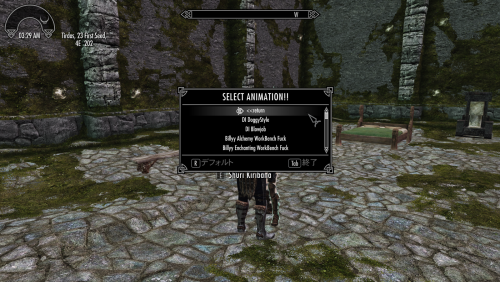
# Work in Progress
This page is currently under construction.
The mod is already functional and can be used, but the documentation is still being rewritten for V2.
Some sections may be incomplete or updated as development continues.
This is the second generation of SL Tags and Dialogue Sex.
V2 focuses on a cleaner workflow, remove small bugs, and improved slot management, easy preset handling,
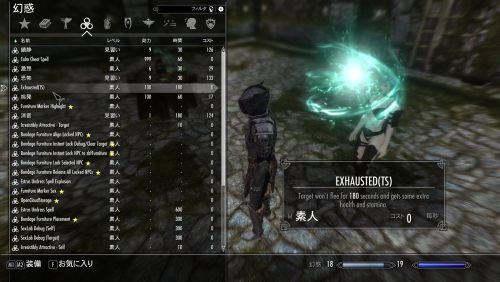
A simple spell has been added to make it easier to test the low-health dialogue.
This mod supports human 1 vs 1 animiations only. (PC vs NPC)
----------------------------------------------------
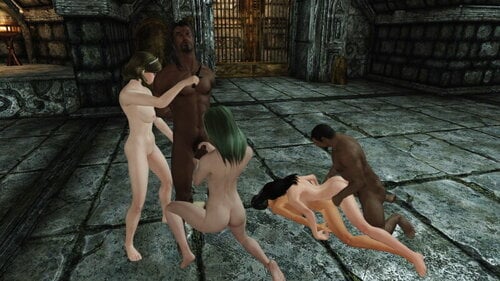
So I made add on for NPC vs NPC (tag and sex saved slot animation and setting) , 3P.
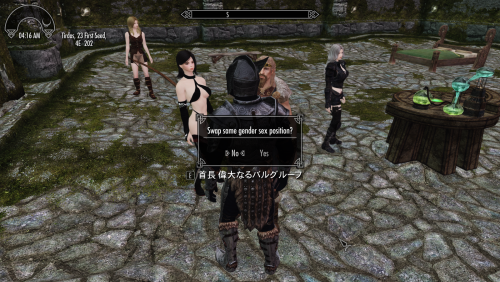
SL Tag and Prostitution now includes Free Mix Scene, a feature that lets you freely test 2P animation slots saved in Tag and Sex, including the temporary slot, through a single dialog—with either NPC + NPC or Player + NPC.
It also provides Simple NPC management features for animation testing, along with various SexLab options available through the MCM and the list menus that appear after dialog. Even if you’re not interested in prostitution or 3P scenes, please give it a try!
----------------------------------------------------------------------------
Version 2.2.3 fixes a bug in version 2.2.2 that could prevent animations from starting through dialogue in normal selection mode😑
 2.2.2 NEW Features
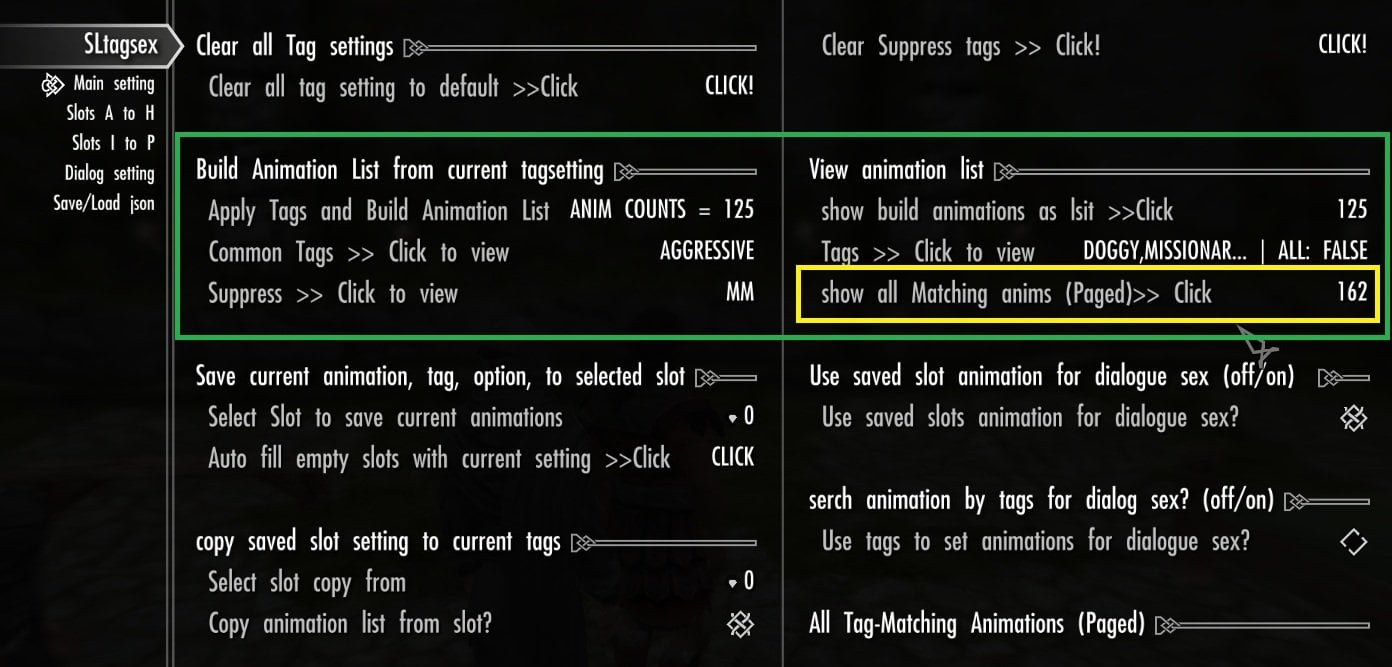
- The MCM now shows the total number of matching animations, including matches beyond the 125 animations stored in a slot.
- Added a paged preview of every matching animation for the Temp Slot and Slots A–P.
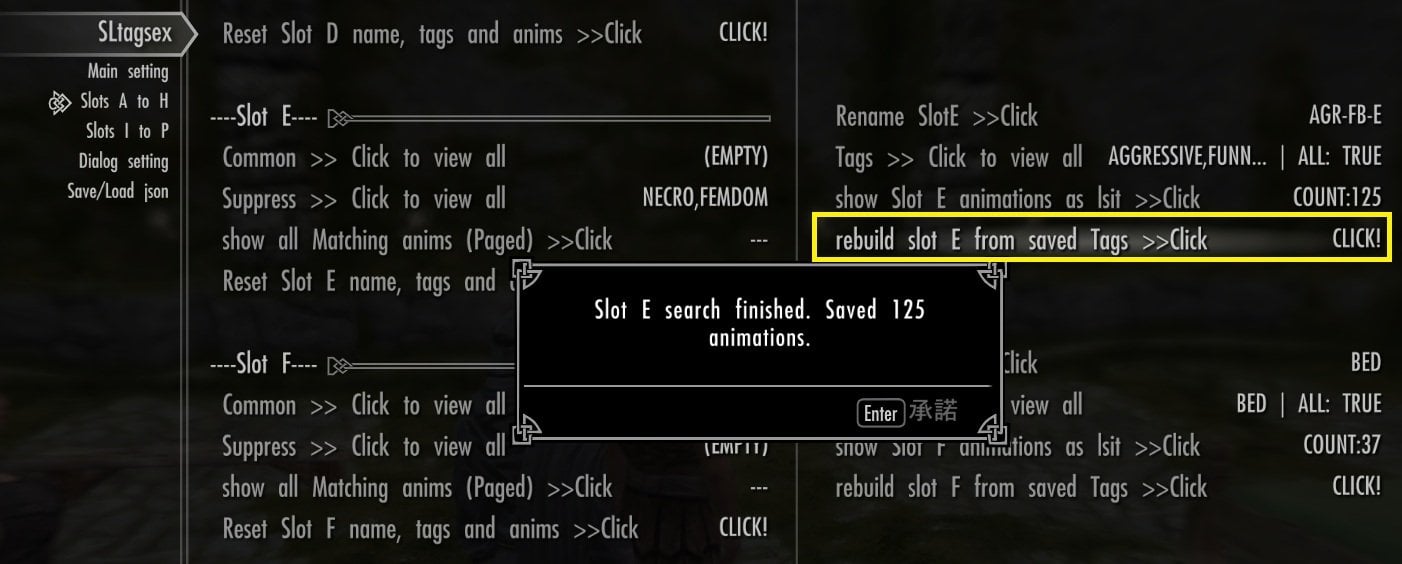
- Added Rebuild Slot by Current Tags and Clear Slot controls for Slots A–P. Clear Slot resets the slot name, tags, and saved animations.
-
The Temp Slot’s Tag Editor can now clear Common Tags, Normal Tags, and Suppress Tags individually.
-
-
-
Removed the JSON load option that restored tags without rebuilding animations. Loading a preset now rebuilds animations and show total counts for every slot with saved keys.
After updating:
Existing slots’ total counts are not calculated automatically.
You can calculate them individually by ”rebuilding and saving a slot,” or open "each slot paged preview".
Tip: To show the counts for all slots at once, save your slots to a JSON slot preset and then load that preset. Loading it searches each saved slot again, displays its total matching count, and stores up to 125 matching animations per slot.
(if a slot has more than 125 matches, its stored animations may differ after loading.)
2.2.0 NEW Features
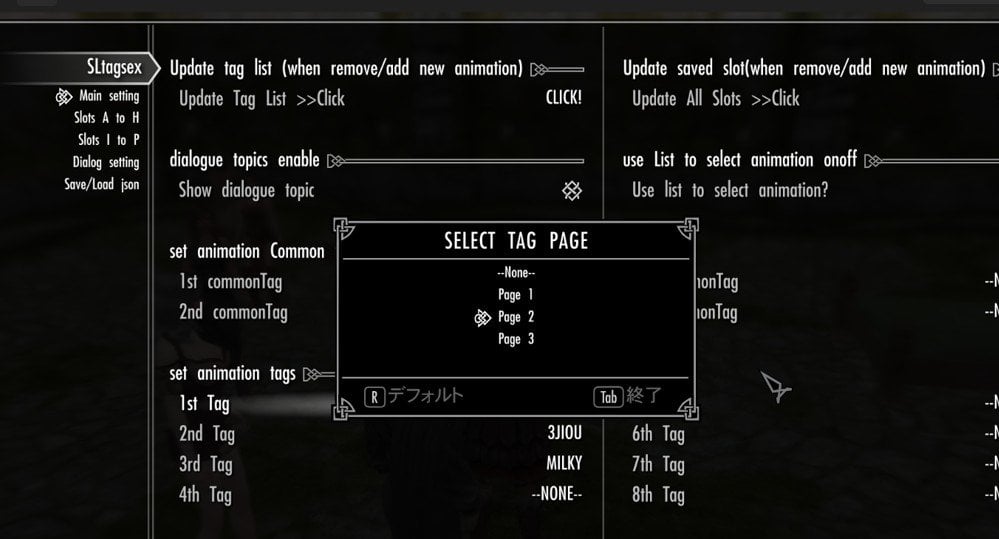
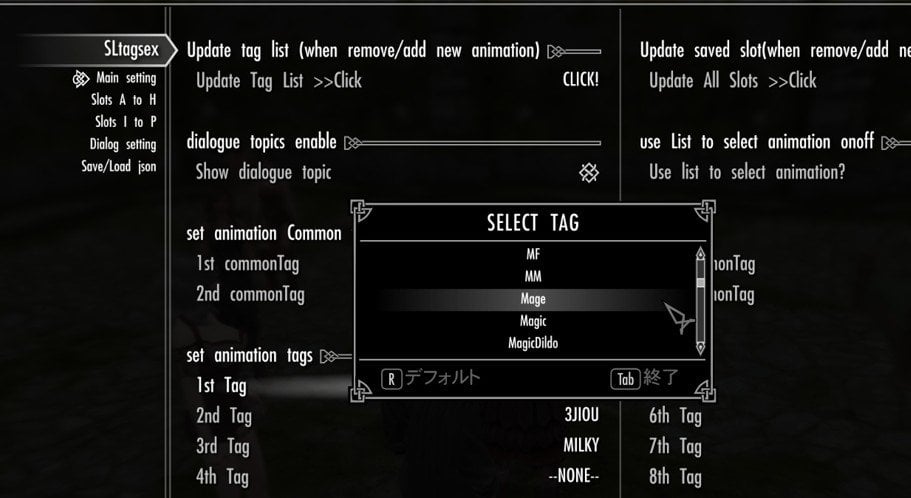
1. The tag selection list now use paging, allowing all available SexLab tags to be displayed and selected.
Previously, tags beyond the list/array limit could not be shown, so this is a major fix that finally allows the mod's tag-selection features to be used to their full extent.
---
2. Common Tags support
I have also added support for **Common Tags**, which are part of SexLab's tag-search system, although I don't think many mods make much use of them. This greatly expands what you can do with tag-based animation searches. 
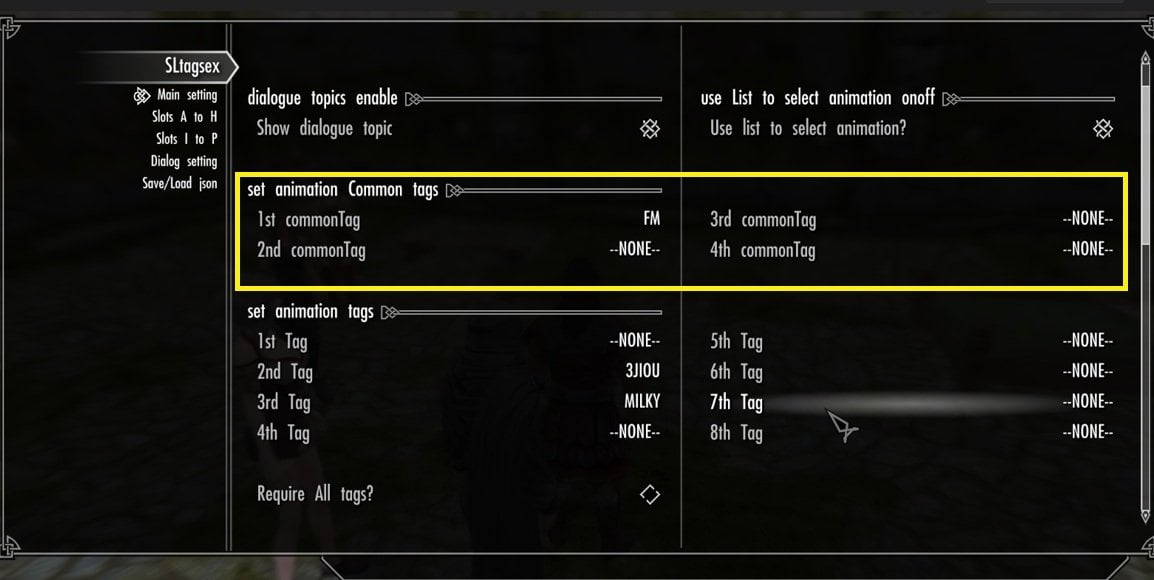
I'll add a more detailed explanation later...
Not compatible with SexLab P+
Currently, this mod is designed for the traditional/native SexLab environment, including users of SexLab Utility Plus.
Supporting SexLab P+ would require adapting the mod's existing animation and tag-search system to the APIs and registry system used by SexLab P+.
Since this involves more than simple compatibility changes, native SexLab support will remain the current target.
Though I may consider a separate SexLab P+ compatible version when I migrate my own Skyrim environment to AE/P+ in the future.
Then, this mod is intended for users who, like me, continue to maintain and use a traditional SexLab-based setup with
## What does this mod do?
SL Tags and Dialogue Sex V2 is a dialogue animation management system for SexLab
It allows you to organize your installed SexLab animations into reusable slot groups and play them through conditional dialogs.
if you have very few registered animations, only a few tags and results may be available. This mod can search and organize nearly 2,000 registered animations as one List group.The more 2p human animations you have, and the more accurately they are tagged, the better the results will be.
Search results depend entirely on the tags assigned to each animation. Incorrect or incomplete tags may produce unexpected results.
## Features
- Create and save reusable animation 16 slots (A–P).
- Assign animattion slots to different 5 main dialogue topics.
- Start animations automatically or manually from a selection list.
- Search animations again at any time using the current tags of each slot when run animation. (option)
- Save and load presets as JSON files.
- Display all serched animation as list with a page system. (avoid hard limit of 128 papyrus list length) (option)
- Test your current tag settings instantly with the included Test Dialogue and options
## Dialogue Conditions
- Dialogue A - available for most of NPC (default Dialogue)
- DIalogue B - Follower-only dialogue
- DIalogue C - NPC currently in bed
- DIalogue D - NPC health checked or is affected by a unique Magic spell (this mod added spell)
- DIalogue E - NPCs carrying a lockpick
These are only example conditions. So I recommend change condition as you like.
You can set your own conditions for each dialog in the Creation Kit, and assign your saved slot in MCM menu. (or show all slot option)
A basic Creation Kit tutorial will be added in a future update. to change dialog text and condtions, Though this guide may assumes you already know the basics of the Creation Kit. not intended as a perfect beginner's guide. 
------------------------------------------------------
Currently, there are three Quick Start Guides.
## Quick start guide 1 (edit tag setting and test animation)
Let's start with something simple. First, we'll choose a few tags, save and build the Temp Slot, then test it with the Test Dialogue. Once you understand this basic workflow, the rest of the MCM options will make much more sense.
## Step 1
Check the MCM Menu After installing the mod and loading your save, wait for the MCM menu to appear. Open **SLTagsex** in the MCM and confirm the following:
- The MCM menu is displayed correctly.
- The second page, **Slots Info**, is available.
- Saved slots from **Slot A to Slot P** are shown on that page.
- The third page, ** save and load new preset menu is available.
## Step 2
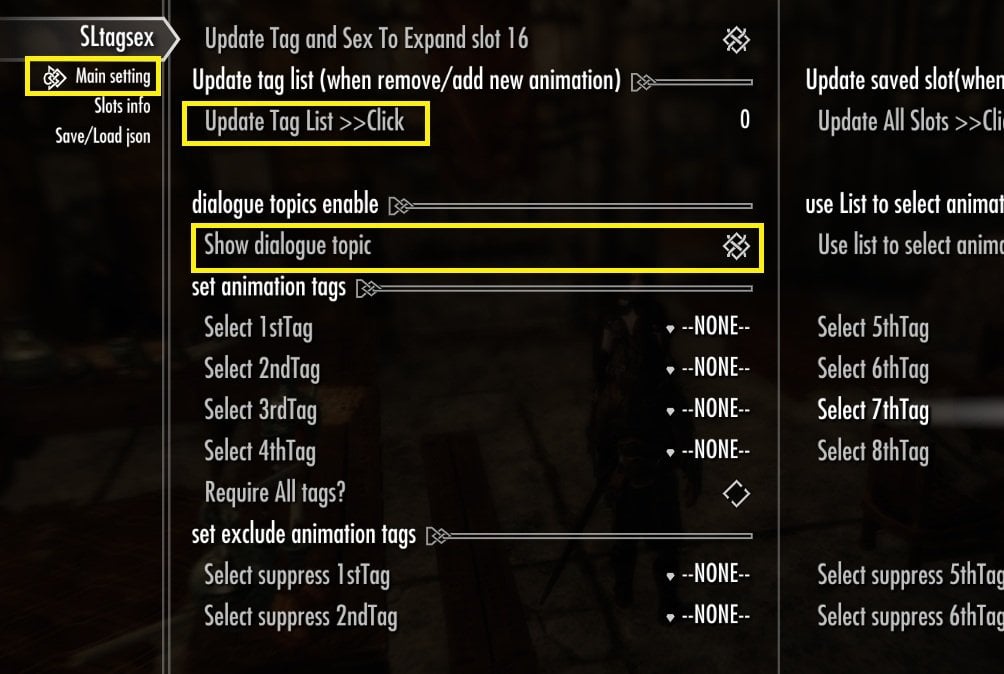
You may notice the first option on the Main Settings page: **"Update Tag and Sex to Expand Slot 16"** In most cases, you can safely ignore this option. It was only used to upgrade older versions of the mod when the number of slots was expanded from 10 to 16. If this is your first time installing **SL Tags and Dialogue Sex V2**, you do **not** need to use this option. Even if you click it, it will simply try to recreate the slot settings and normally won't change anything .
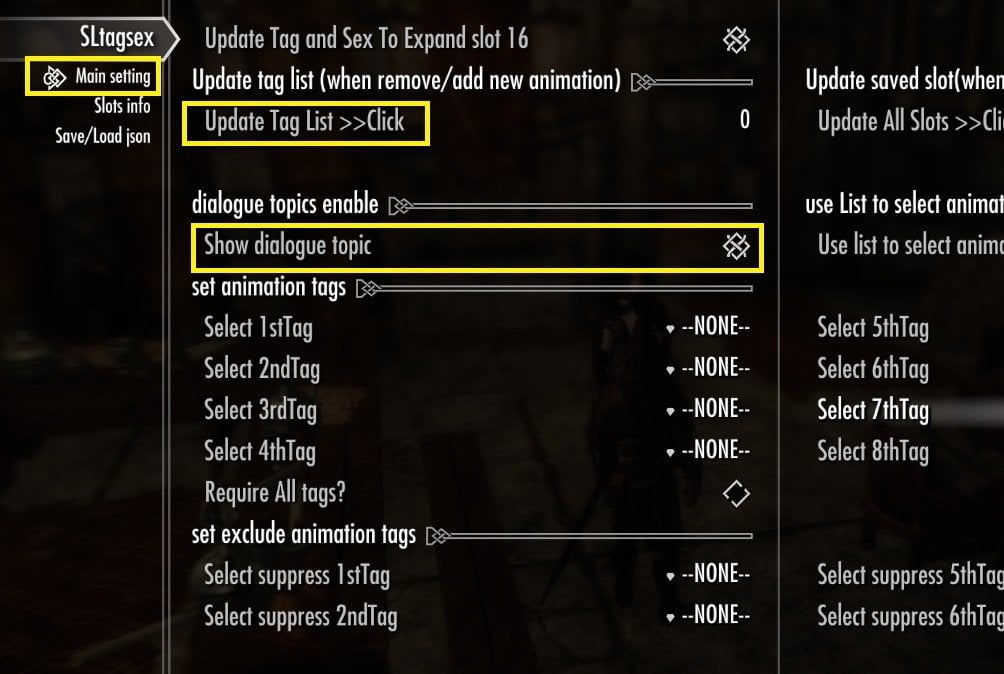
- Update Tag List
This scans all registered SexLab animations and updates the tag list used by this mod. Run it whenever you add or remove SexLab animations. If you are new user of this mod, must click it to generate tag list.!! or you can not use any tags.
- Show dialog topic
Enable or disable all dialogues added by this mod. Set and leave this option **ON** to use the mod.
## Step 3
- Set your first animation-list.
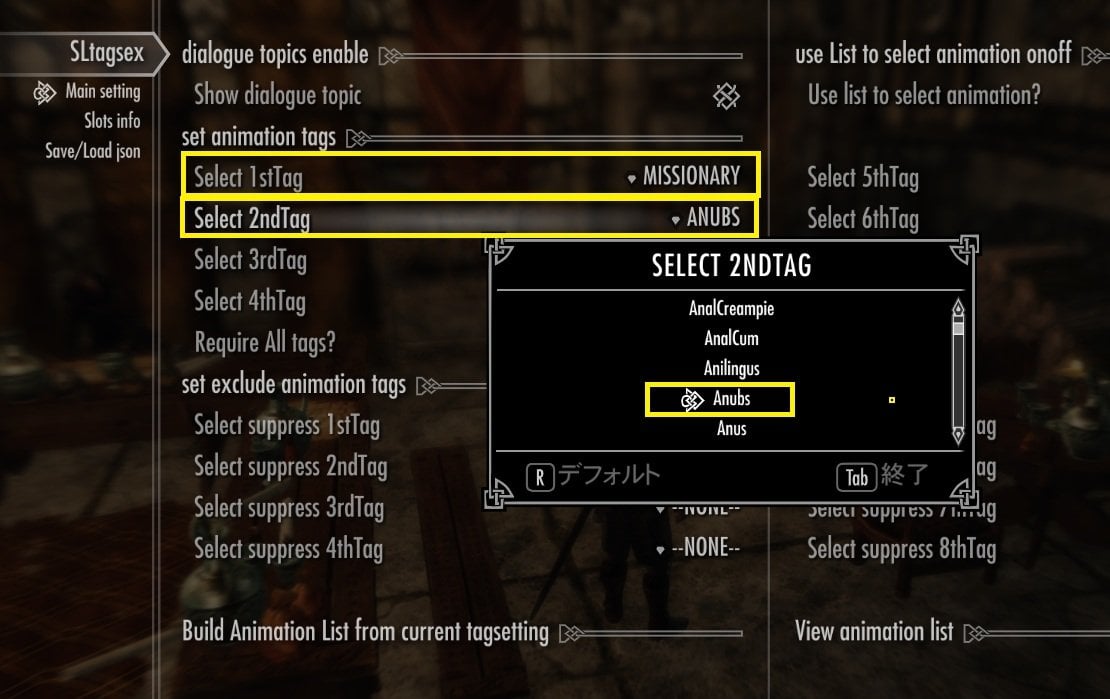
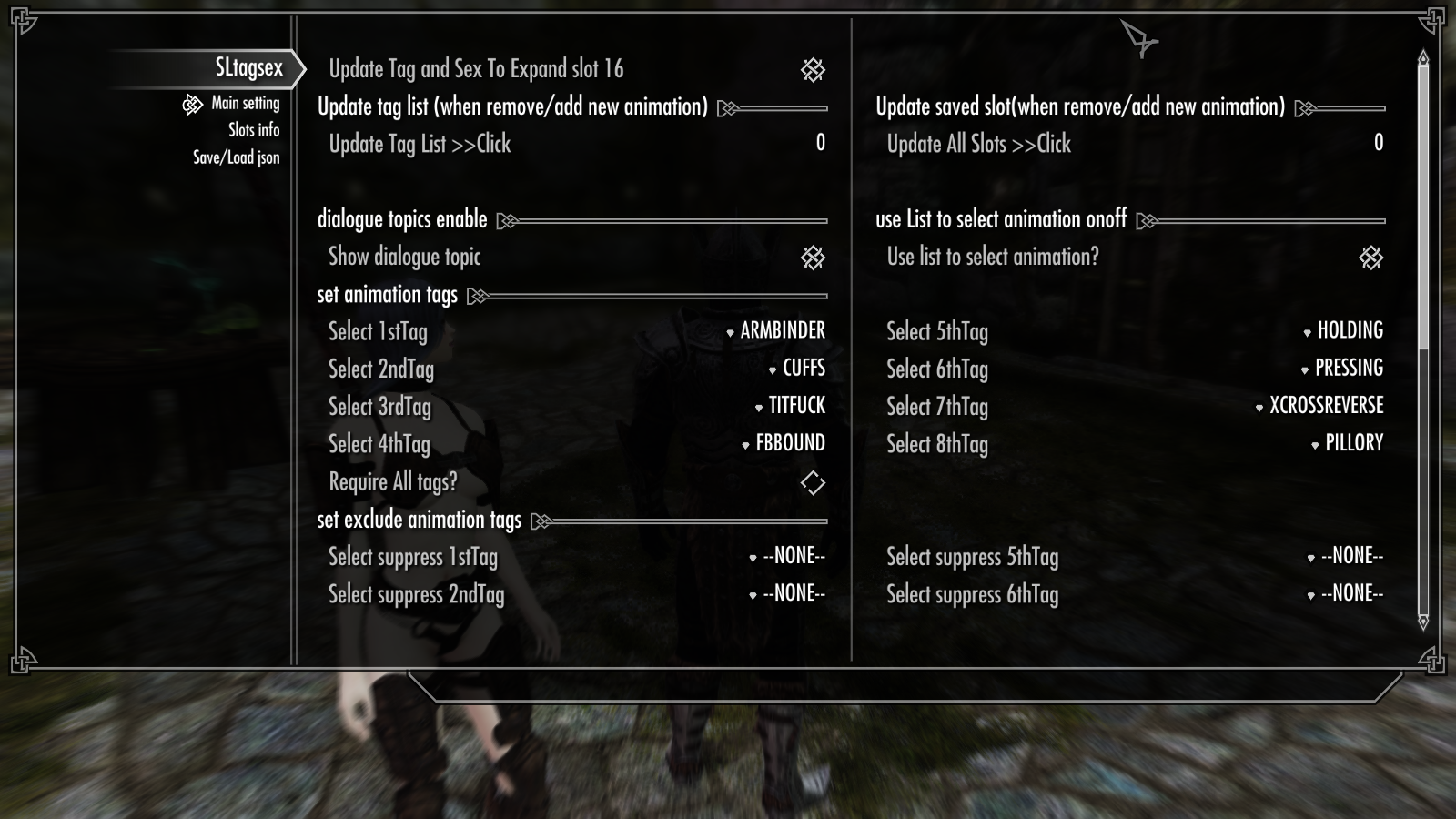
In the **Set Animation Tags** section, select the tags you want to use from the drop-down menus.
Although this is very simple, there are **two important rules** you should know.
1 . Always select tags in order without gap(--None--)
Because Tag searching stops at the first **None** section, If you leave a gap, all tags below --None-- are simply ignored.!
2. Always set at least one tag.
If the 1st Tag is left as **--None--**, this mod automatically assigns SexLab's default gender tag to prevent search errors.
But For this tutorial, I may recommend you start with 2 tags only. I may set **two tags**. For example: - 1st Tag: Missionary - 2nd Tag: Anubs , like this.
What is Require All tags?
This option is important to set animation list, even though you use only 2 tags.
- **OFF** = Match **any** selected tag (OR search).
- **ON** = Match **all** selected tags (AND search).
For example, if you select the tags **Missionary** and **Anubs**:
**OFF** → The list will include all animations that have either the Missionary or the Anubs tag.
- **ON** → The list will include only animations that have both the Missionary and Anubs tags.
You may see as actual result, when you generate animation list with your current option setting. I may set it as ON
so list will show animations, which should have both tag .
## Step 4
- Generate Animation list for Temp Slot
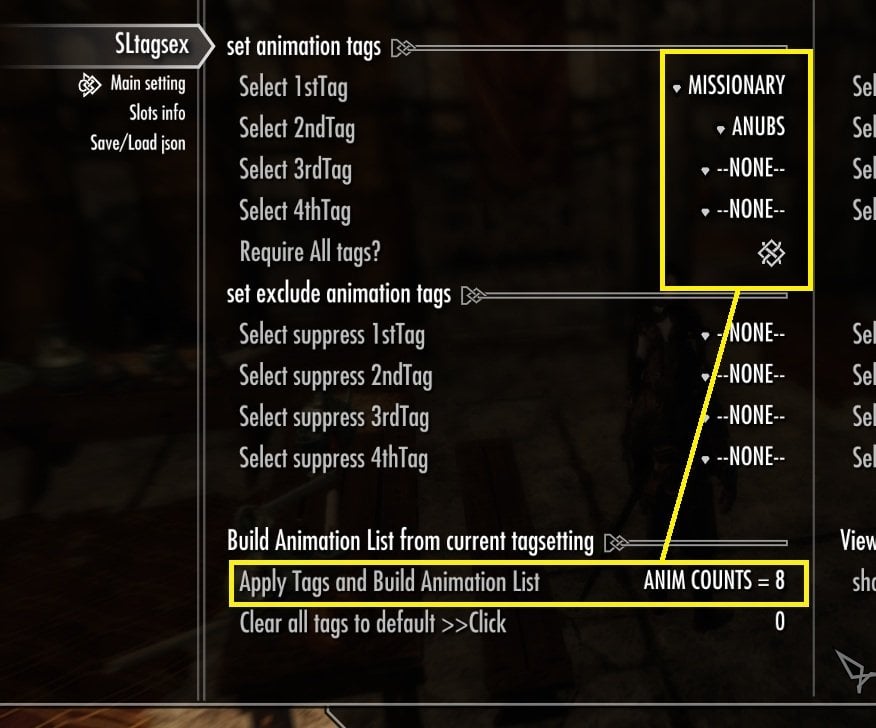
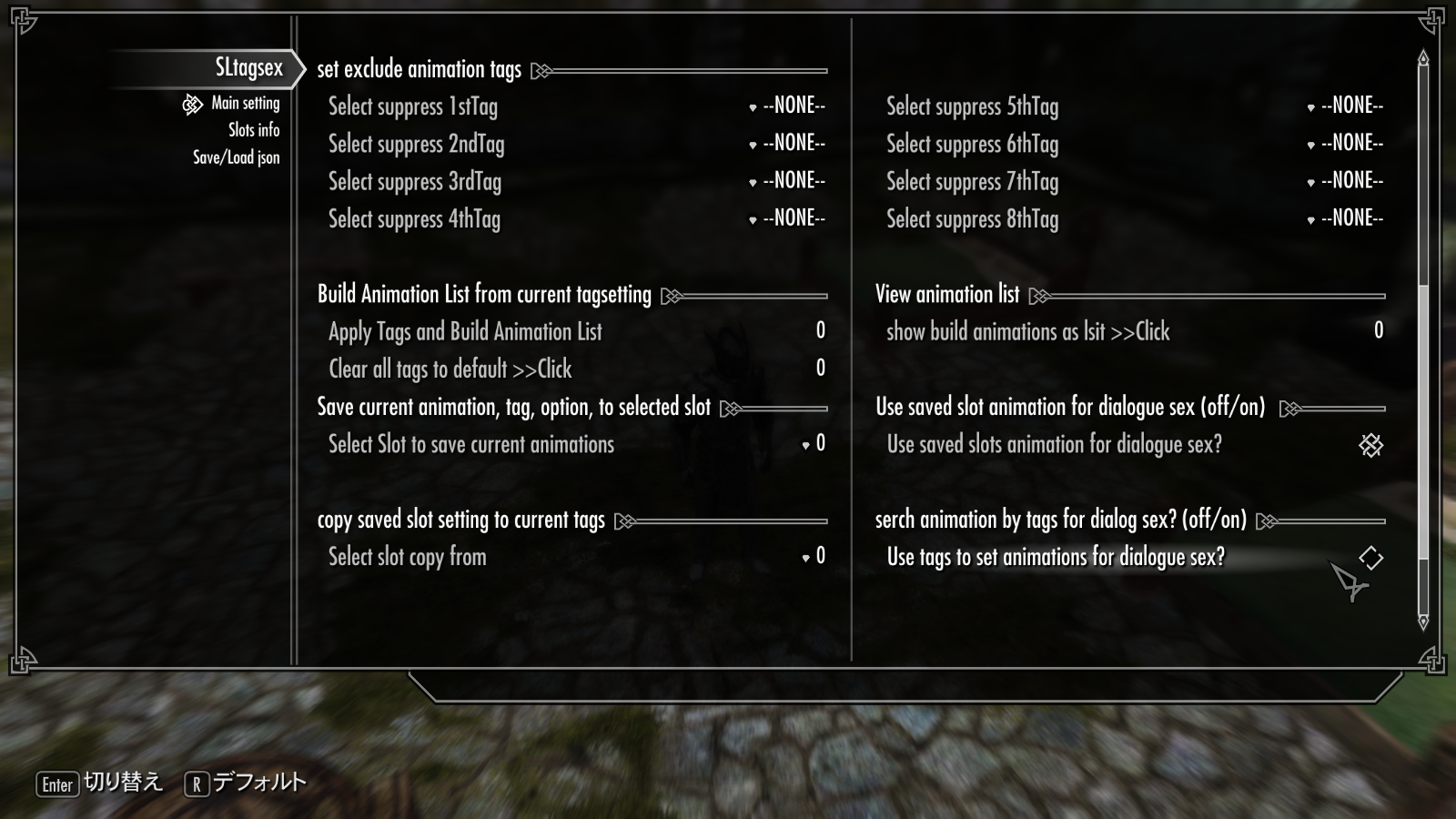
Click Apply Tags and Build Animation List. This is the main workflow of this mod when you set or change current MCM tag settings.
when you click this option, The current tag settings are used to search SexLab animations, build a new animation list, and automatically save it as the **Temp Slot**. The **Test Dialogue** will uses the current **Temp Slot**. If you change your tags and hope to test it, you should click this button again to rebuild the Temp Slot before testing.
Then it will show animation counts which stored in.
About my case, With Activate Require All tag, I could make list include 8 animiations, which have Anubus, and Missionary.
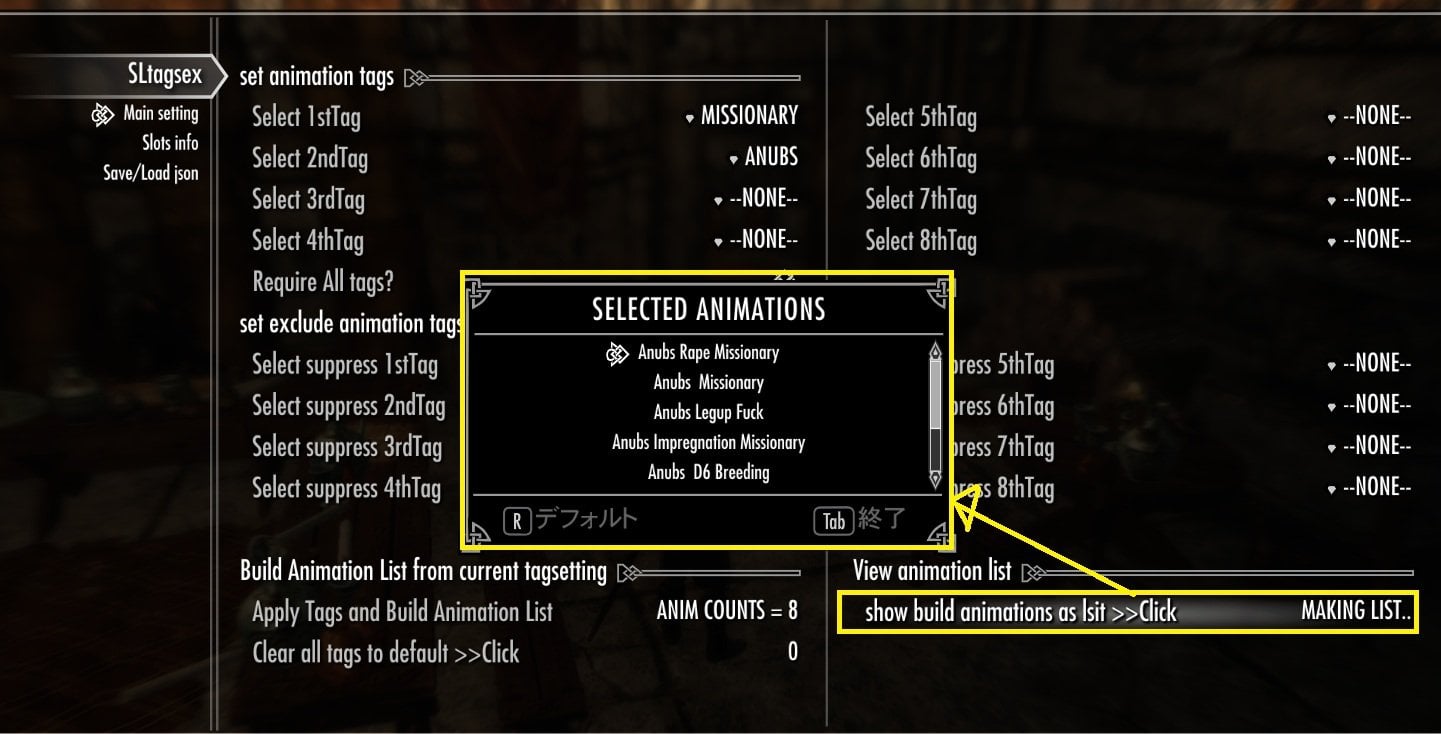
- Show animation list.
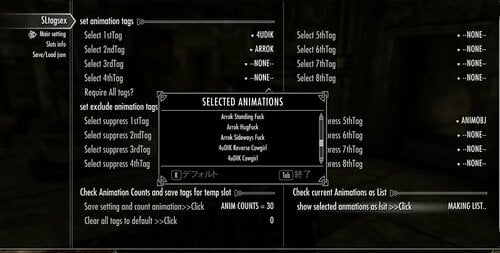
To check and confirm the animation list, Click it. it will show UILIB list currently saved in the temp slot. (= serched animations with tag setting)
## Step 5
-Test your Temp Slot Animations
For this test, please simply follow the steps below ! Don't worry about what each option does I 'll explain the important options after you've successfully started to run animations.
Since this mod starts animations through dialogue, a special **Test Dialogue** is included so you can immediately test the animations stored in your **Temp Slot**.
First, let's configure an option that is shared by all dialogue topics.
a) On the right side of the MCM, turn **Use List to Select Animation?** **ON**.
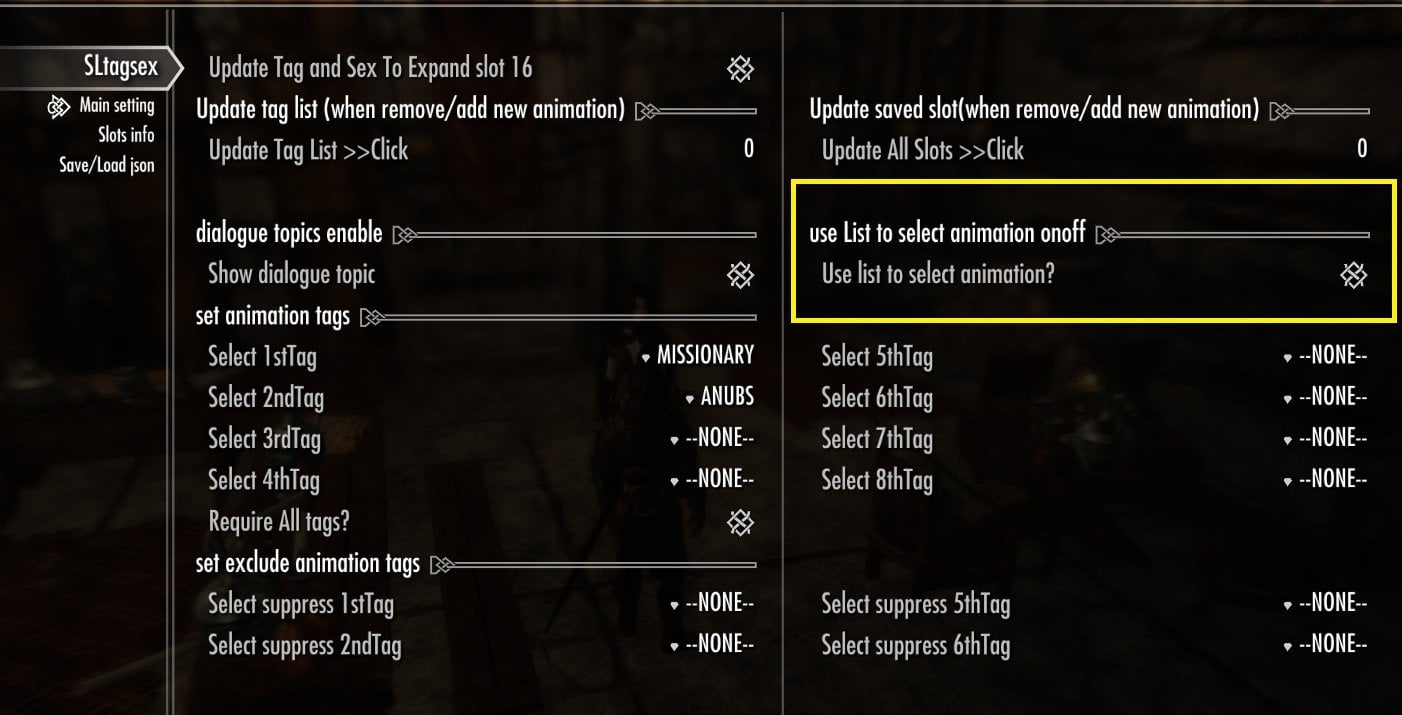
This enables **Manual Selection from list Mode**.
Instead of randomly selecting an animation from the **Temp Slot**, the mod displays all matching animations stored in the **Temp Slot** as list , allowing you to choose one animation manually. So you can confirm actually your saved temp slot are used for.
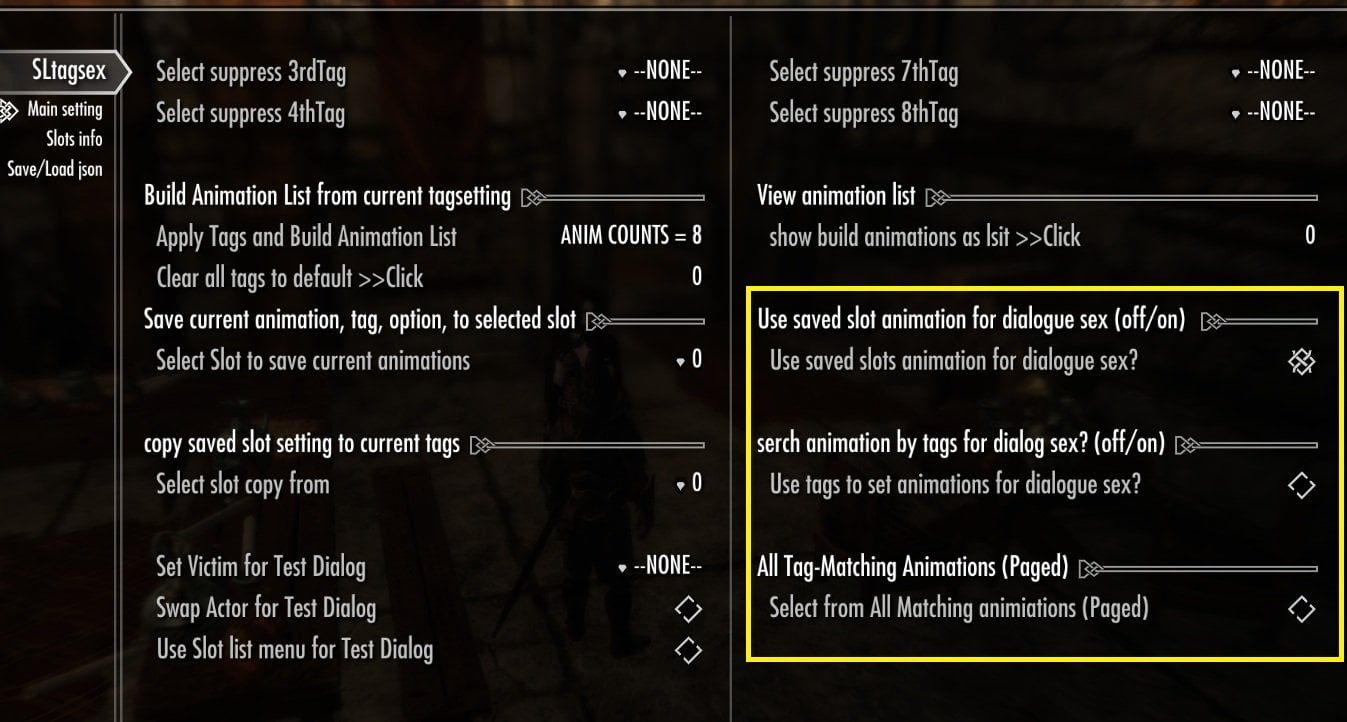
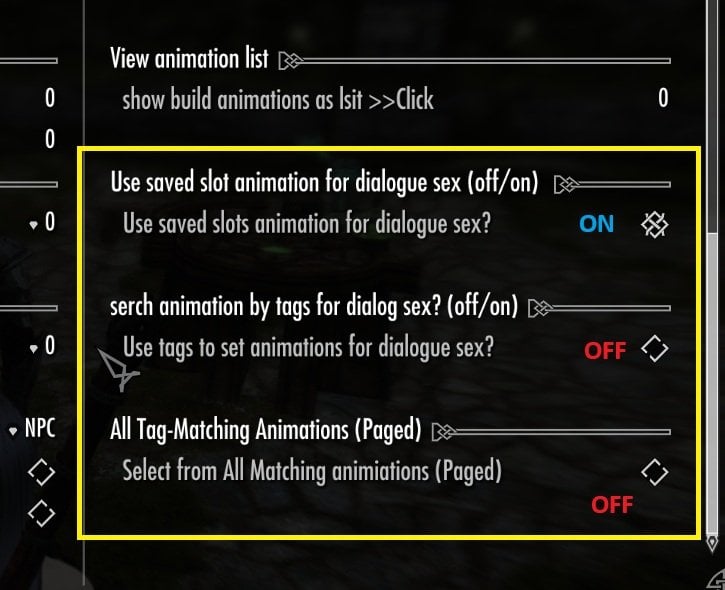
b) ** Use saved slot animation for dialogue sex? **
Turn this option **ON**. This allows dialogue to use the animation list already saved in the **Temp Slot** (or other saved slots).
I recommend leaving this option **ON**. If it is **OFF**, the dialogue will use my default tag settings for each dialog instead of your own saved animation list. These default settings are only examples and are not recommended.
c) **Serch Animation by tags for dialog sex? **
For this tutorial, leave this option **OFF**. When enabled, the mod ignores the saved animation list and rebuilds it from the saved tag settings of the slot. Every time a dialogue starts. In most cases, you do not need this option. Since the animation list is rebuilt each time, dialogues may take longer to start.
d) **Select from all matching animations (Paged)
For this tutorial, leave this option **OFF**. When enabled, the mod rebuilds the animation list from the current tag settings and displays **all** matching animations using the page system. This option is intended for large animation list that exceed SexLab's normal list limit (about 125 animations). For normal use, I recommend creating animation lists with **125 animations or fewer**. then save all in slot. A detailed explanation of this option will be added later. it effect and over-write other settiing too.
So, abot b, c, d, option, simply follow this pic setting please.
e) 3 Options for Test Dialog
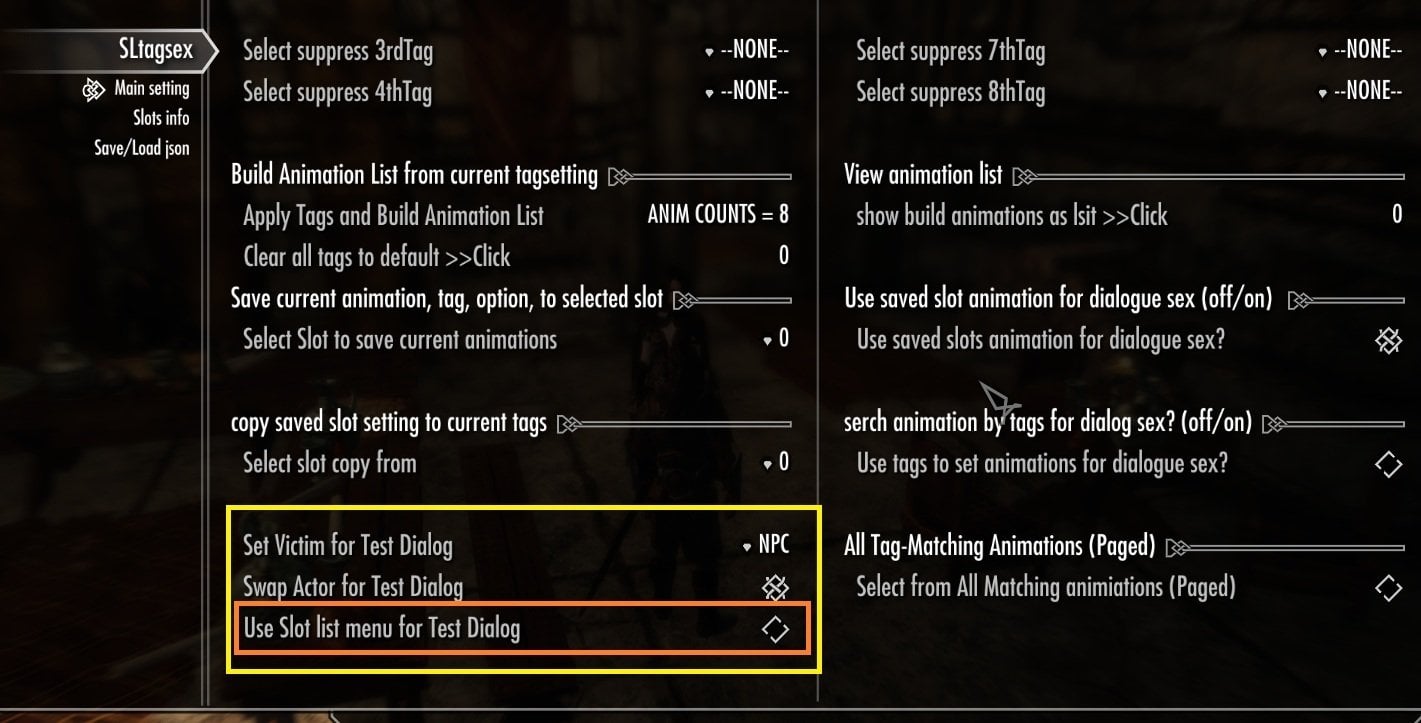
In left side bottom area of this MCM page, (1st page) you may see 3 options for Test Dialog.
The first two options are standard SexLab settings:
- **Set Victim** - **Swap Actor** Adjust these however you like.
I usually set Victim as NPC, Swap Actor OFF, then test animation. but Feel free to use whatever settings work best for your character.
please find good setting for you.
However, please keep the last option:
Use Slot list menu for Test Dialog = OFF
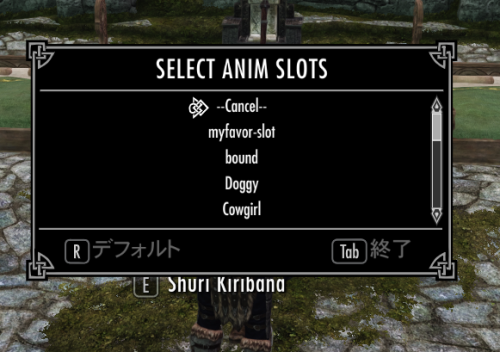
Though it is useful option after you save Current Temp slot to A to P standard 16 slots. (you can choose a slot when run animation , but not use current tag setting and saved temp slot).
To check current tag setting and saved temp slot list, please keep it as off, or you can not see your saved list animations in temp slot.
Check pic please.
##Step 6
Lets Start Test DIalog!!
Simply activate NPC who you liket to start animation. I worry if I set special condition for test dialog, so if you need to change please tell me. I may up-date.
(I do not need to set limit setting for tesst dialog) but as we know, I must limit NPC by Age. )
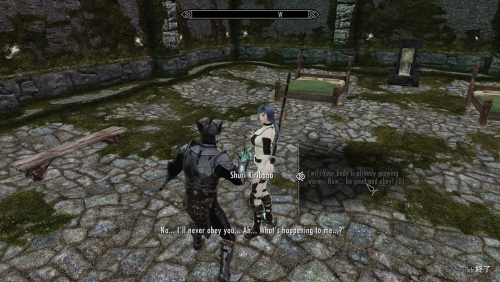
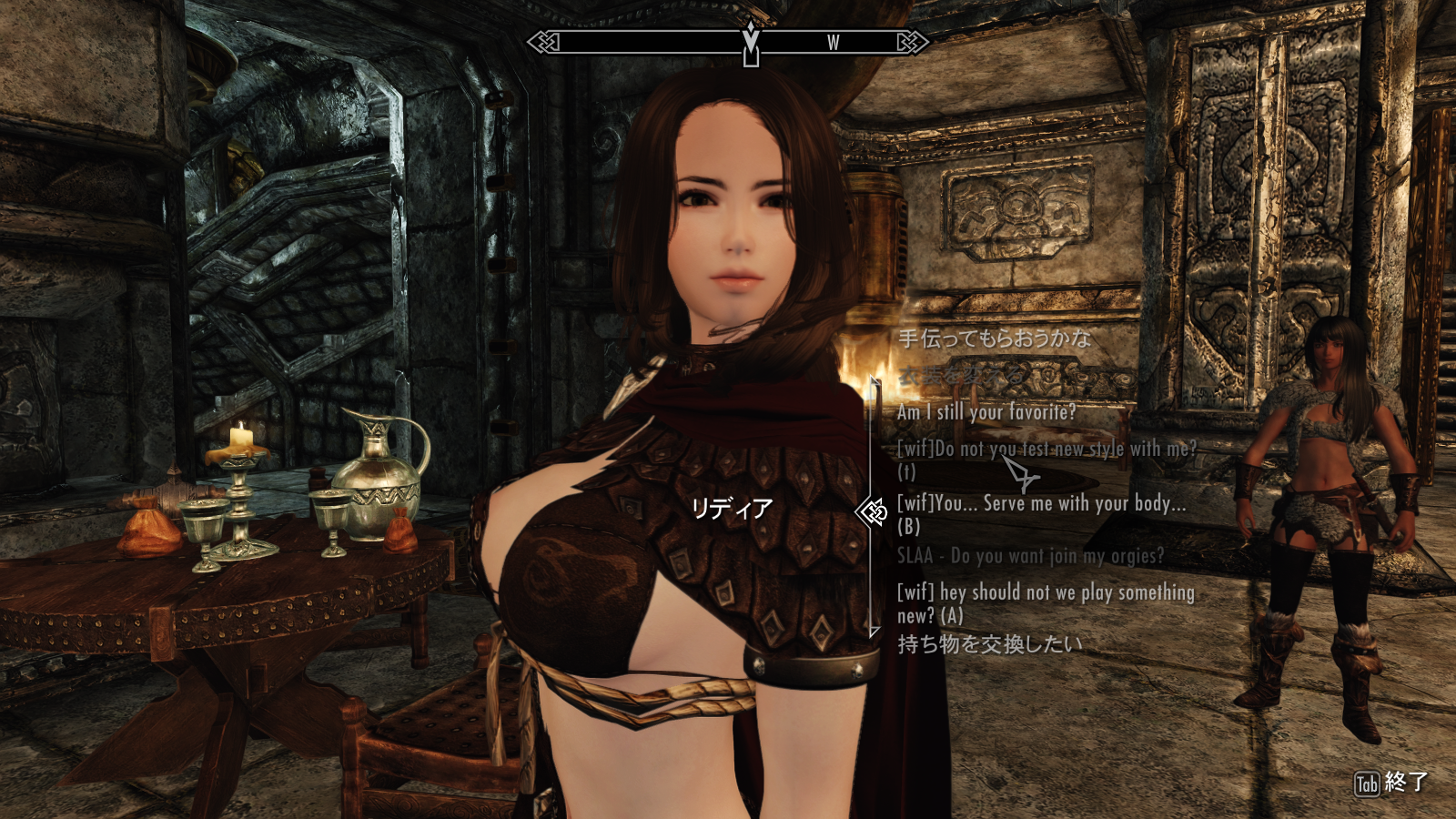
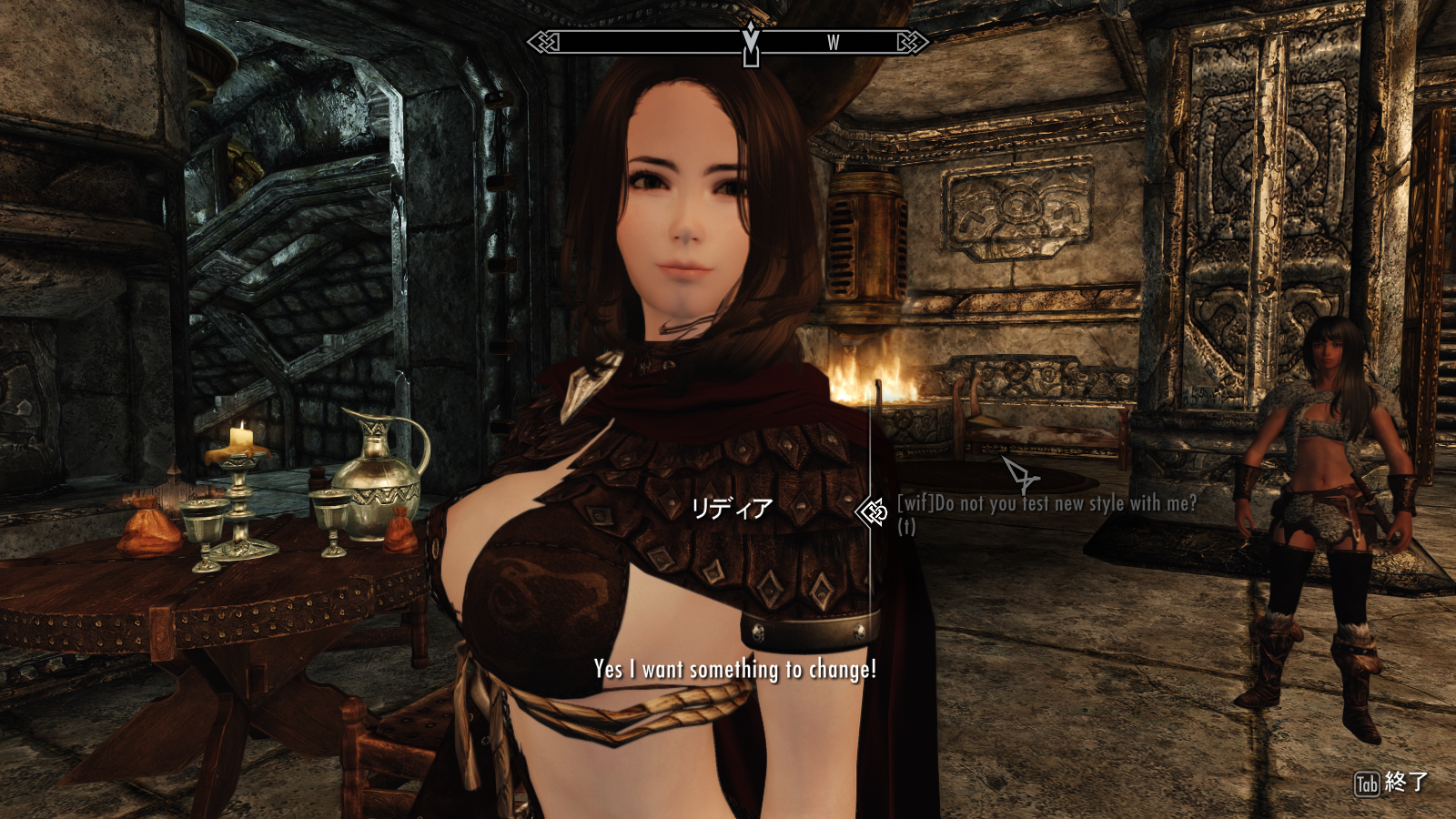
I test with current follower, so you may find 3 dialog of thiis add on in my pics.
1. test dialog (t)
2. default npc dialog (A)
3 follower dialog (B)
About test slot, we only need to use the test dialog. (t)
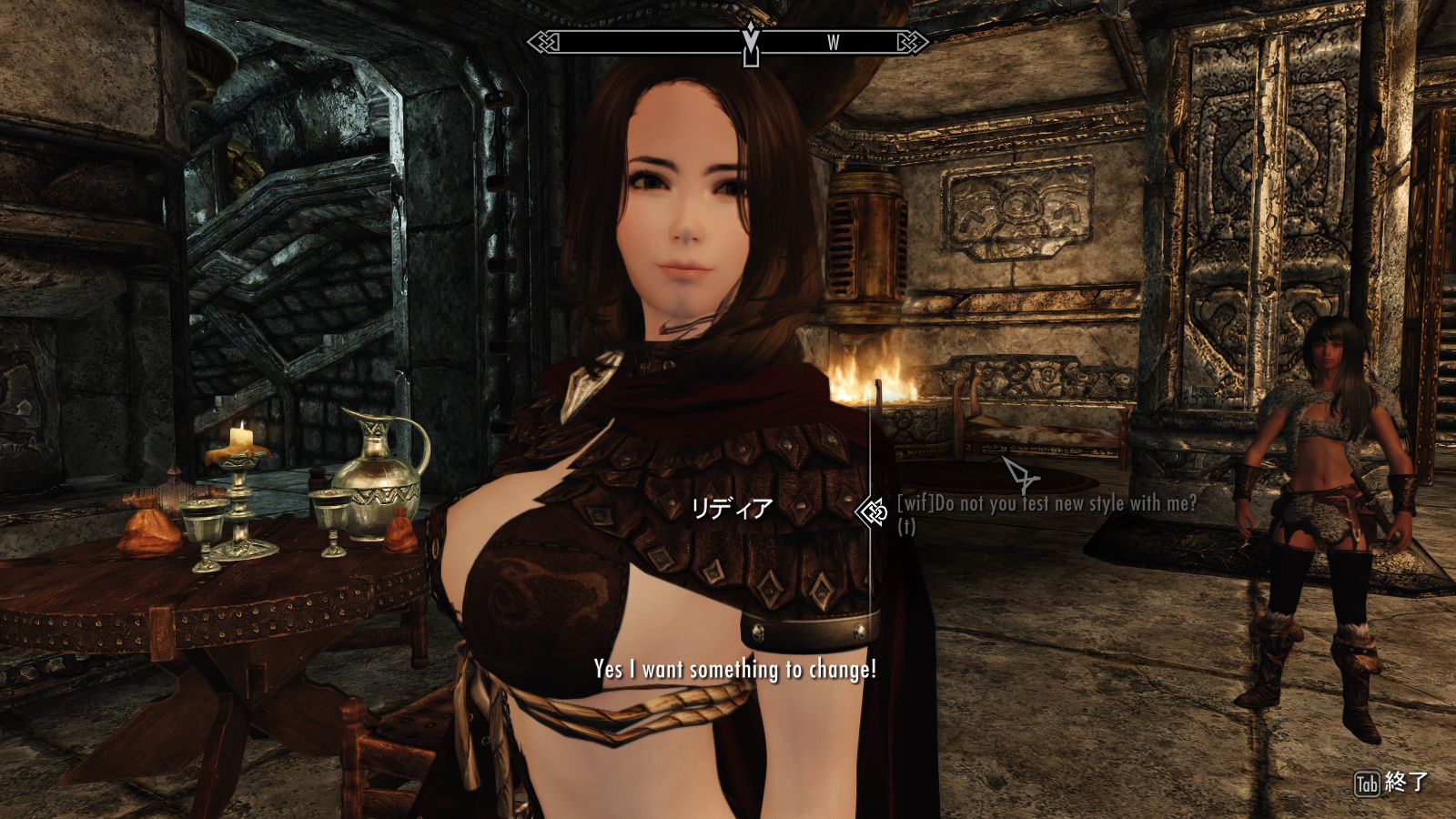
(wif) "Do not you test new style with me?" (t)
I asked Lydia but it is not question. it is trigger, so she simply reply "OK!"
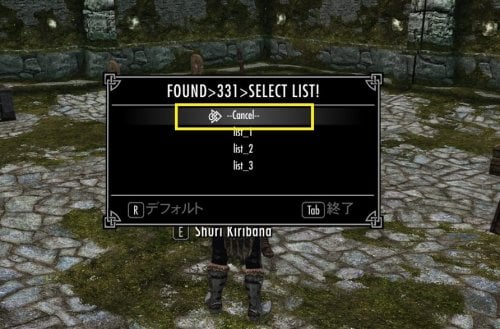
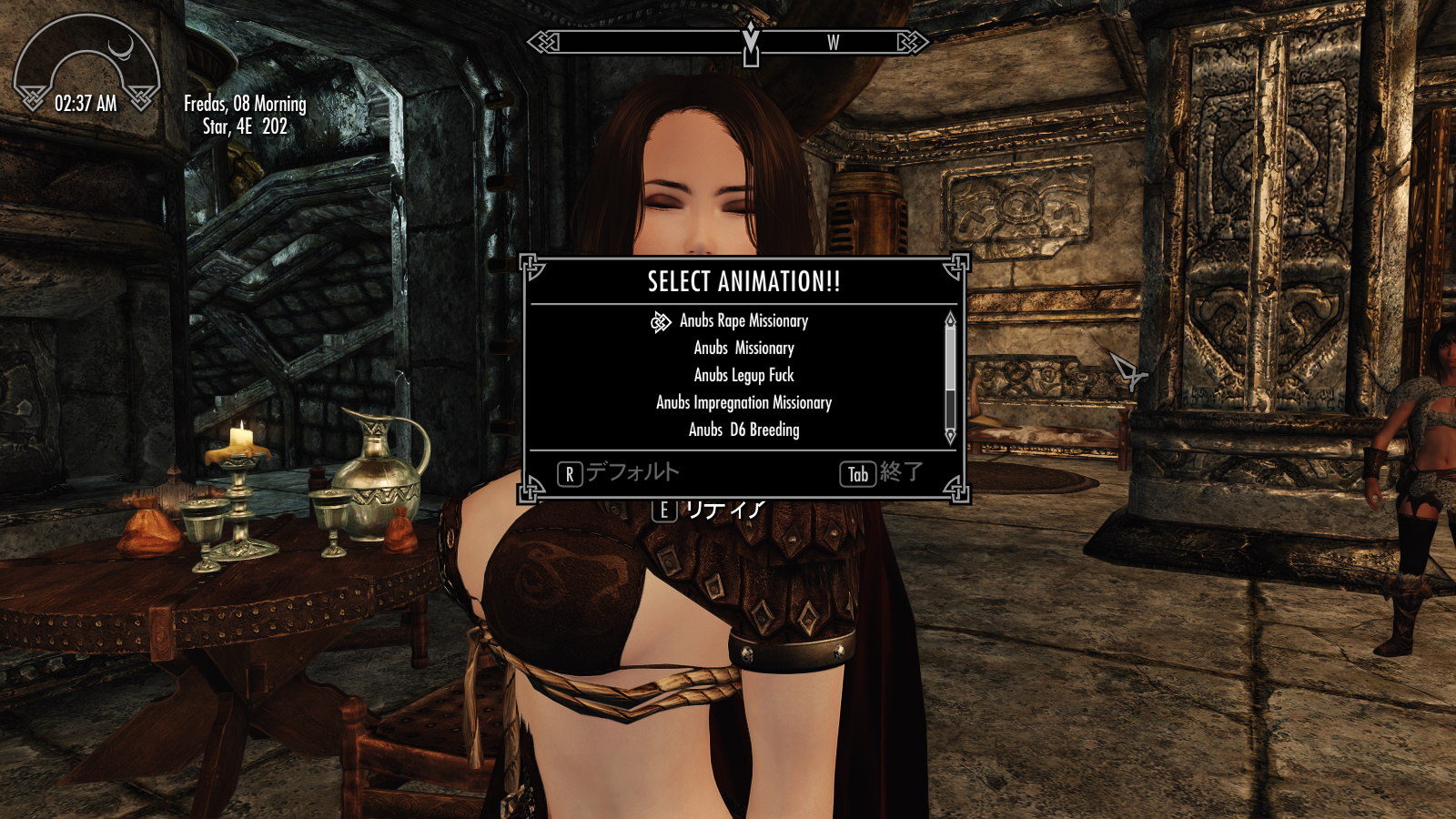
After that you should see Animation List which you have stored as temp slot.
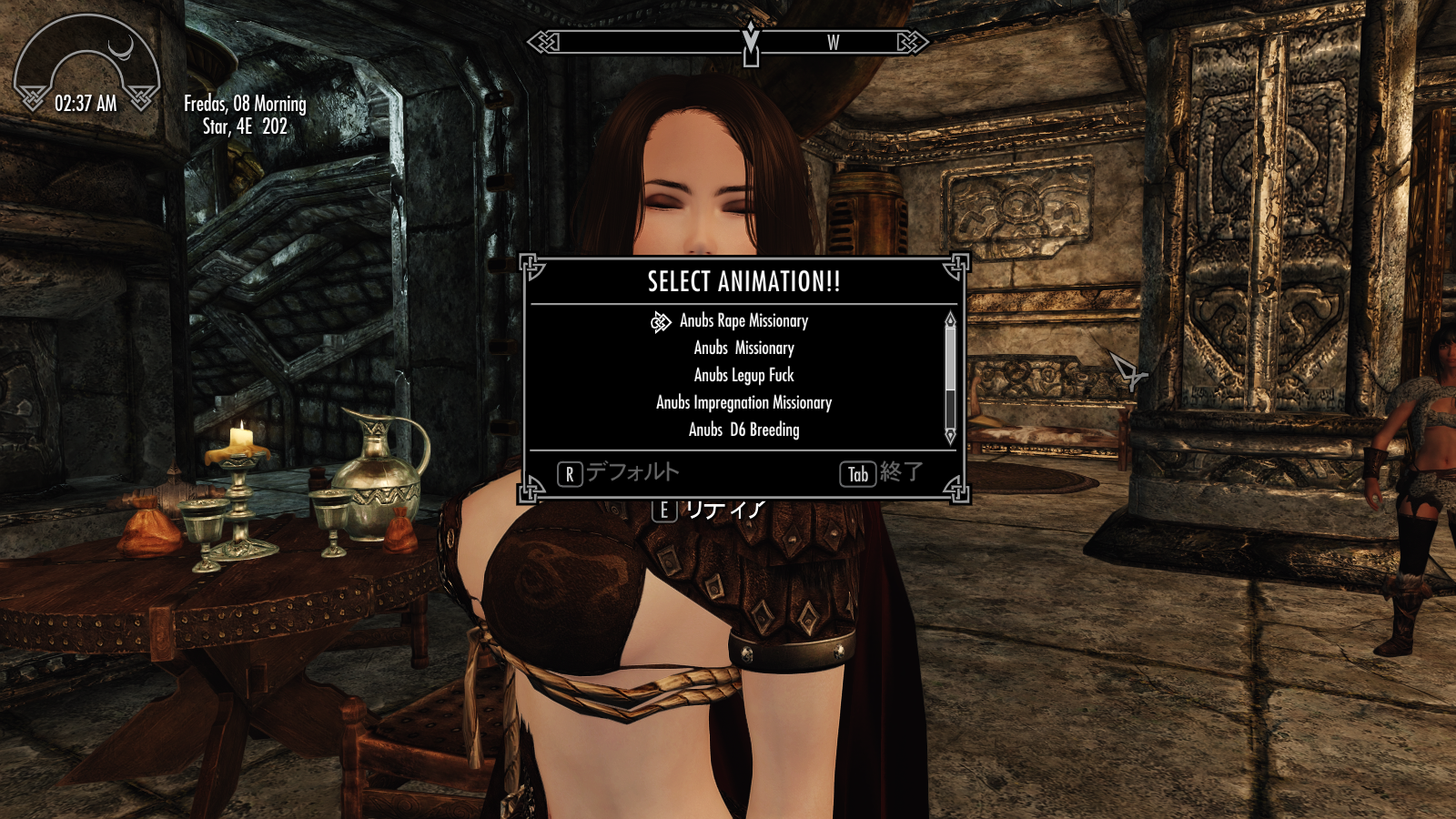
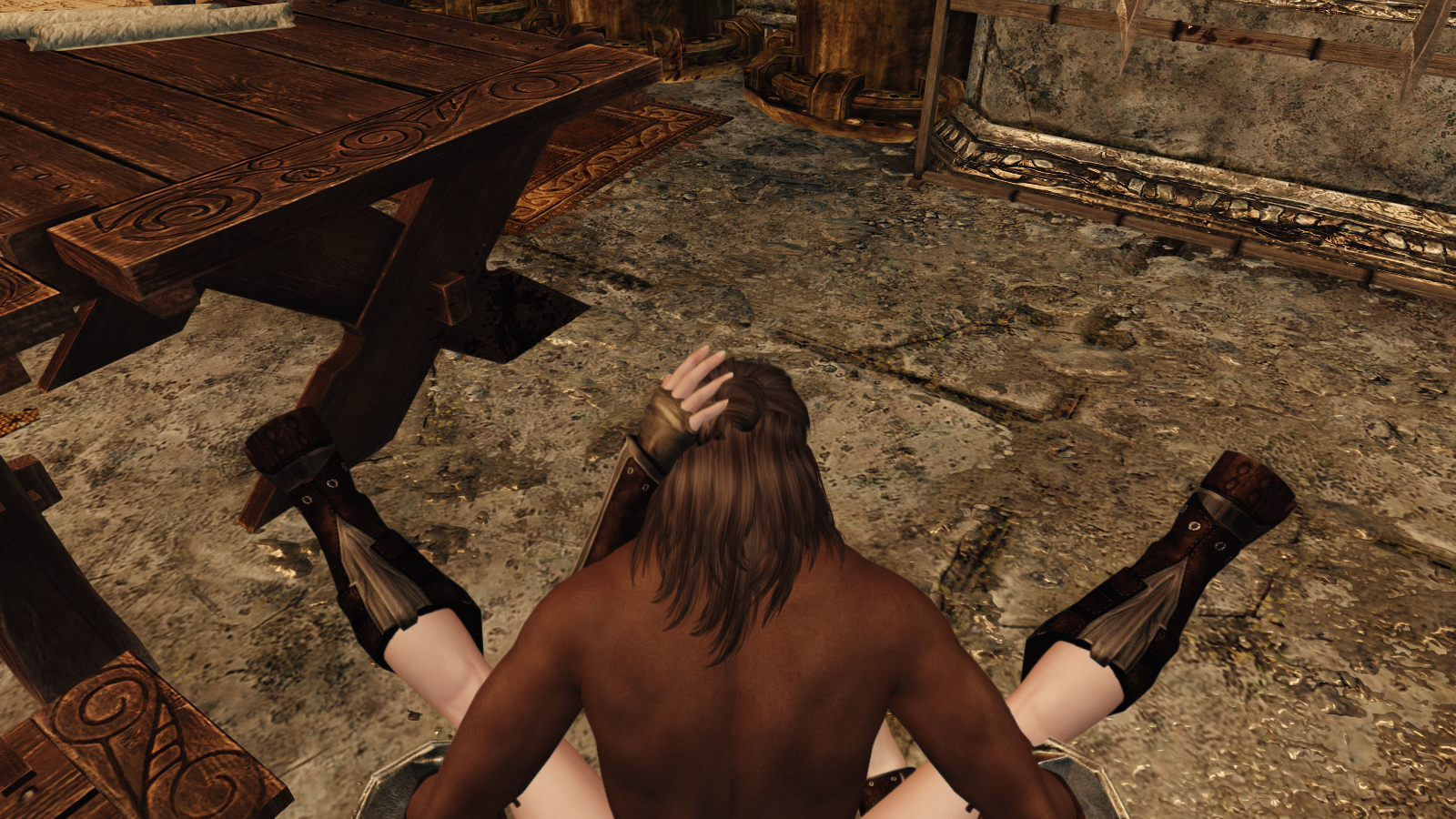
--------------------------------------------------------------------------
## Quick start guide 2 (Save a Slot and Assign It to a Dialogue)
After setting your Tags and Suppress Tags and building your Temp Slot, you currently have only one animation list.
But you may want to keep this list and create another one using different tag settings. That's what A to P 16 Slots are for! ✨
This time, let's save your current animation list to another slot, assign that slot to a dialogue, and then automatically start one of the animations from the slot.
I assume you've already created a Temp Slot and tested it through the Test Dialogue. If not, please read Quick Start first.
##Step 1
- confirm currently saved animation list in temp slot.
First, confirm your current Tag / Suppress Tag settings and the animation list saved in your Temp Slot.
Usually, once you build a Temp Slot and save your game, your current tag settings and animation list are automatically kept until you edit them again.
So, when you open View Animation List, you should see the animation list you created before.
Of course, you can change the Tags / Suppress Tags, search again, and build a new Temp Slot if you want. It's up to you!
For now, just use View Animation List = clcik "show animations as list", and make sure that your Temp Slot already contains some animations.
If you've edited your ”Tags” or ”Suppress Tags” but haven't rebuilt the Temp Slot yet, the current settings may not match the animation list stored in your Temp Slot.
The Temp Slot still contains the tag settings and animation list from the last time you built it.
You can rebuild the Temp Slot with your current settings, or just keep using the already saved one. It's up to you! You'll be able to see what's actually stored in it more clearly after we save it to another slot and check its tag settings and animation count.
----------------------------------------
##Step 2
- save temp-slot to default slots (A to P)
Now let's save your Temp Slot to one of the 16 default slots (A–P).
n the MCM Main Settings page, look under the Tag / Suppress Tag selections.
Find the "Save current animation, tag, option, to selected slot." section, then click ”Select slot to save current animations”.
In recent versions, you may briefly see a small message window saying "Preparing save slot list". After that, show list of all available 16 slot names will open.
Select the slot you want to use, and The copy of current Temp Slot data will be transferred to that slot.
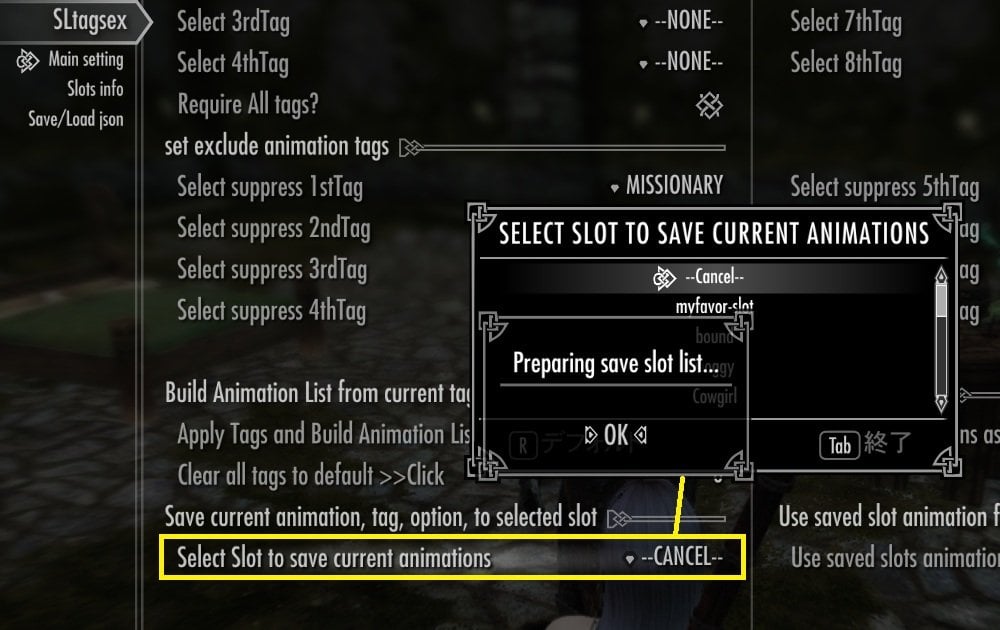
By default, the slots are simply named Slot A through Slot P. Of course, You can rename them anytime later if you like! like my pic
For this tutorial, I recommend using either the first slot (Slot A) or the last slot (Slot P). Just remember which one you used—we'll need it again later!.
That's it! Your first slot is saved. ✨
-----------------------------------
##Step 3
- confirm saved slot setting and animation list.
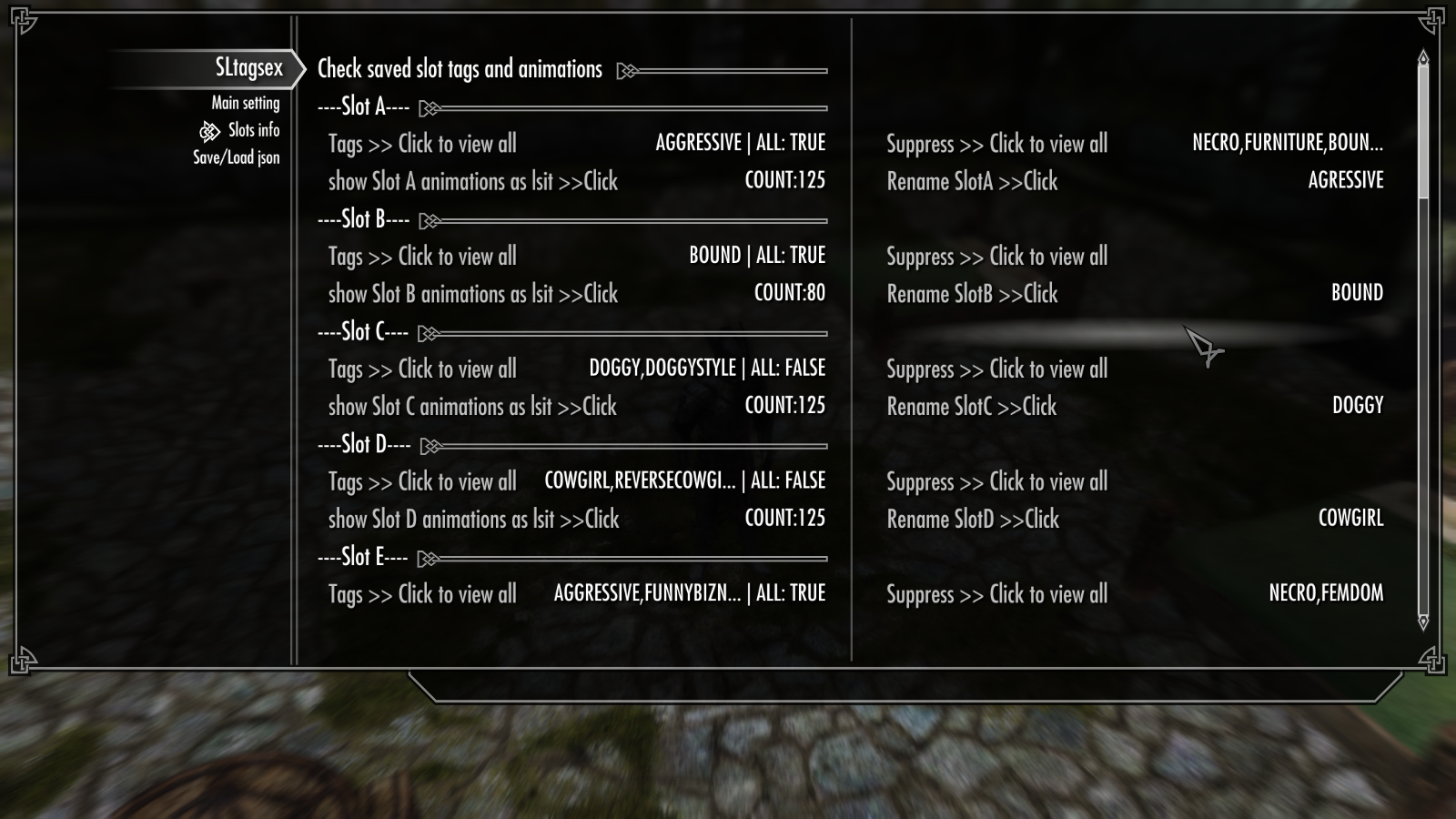
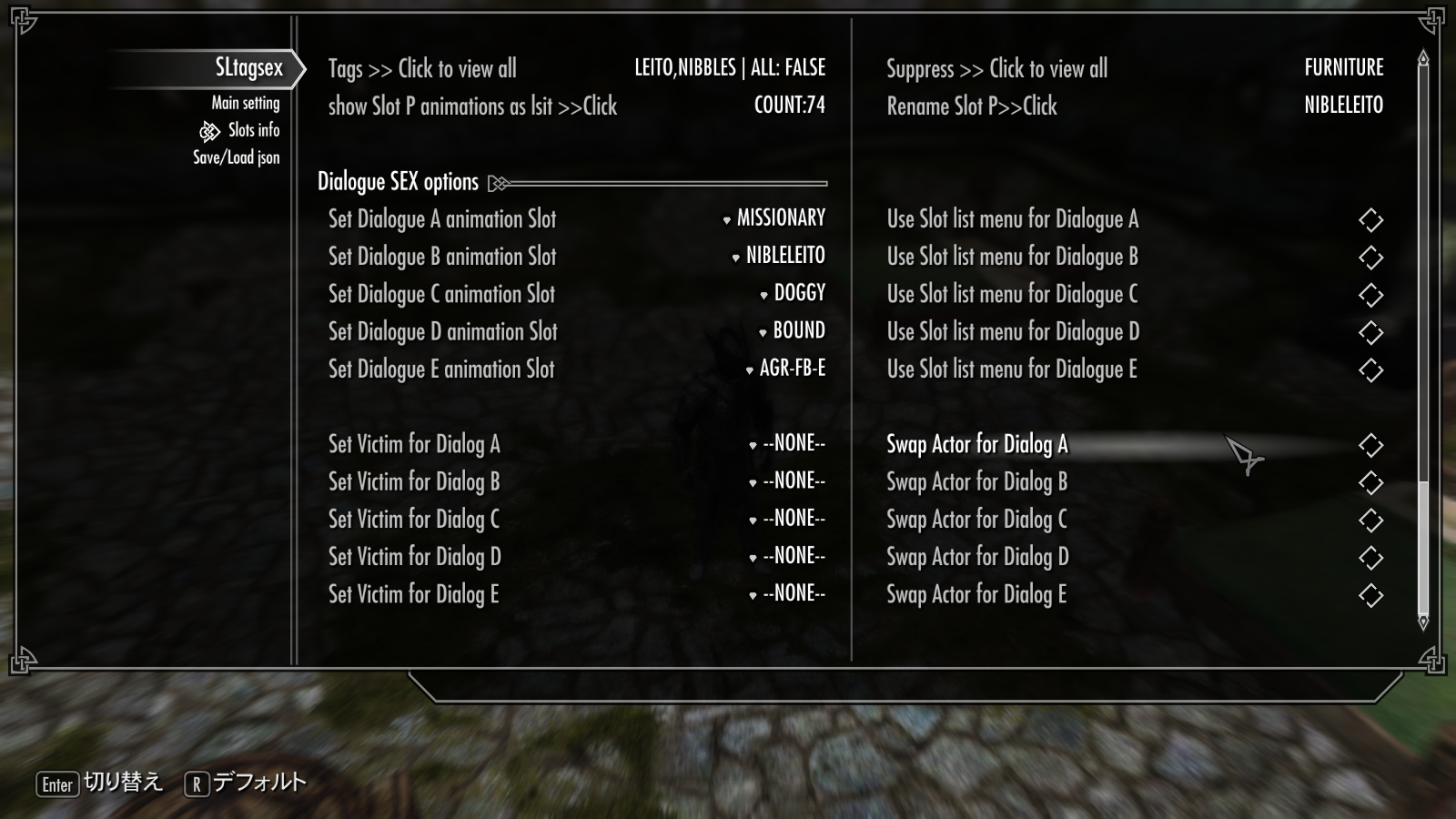
Now let's check the slot you just saved! Open the Slots Info page in MCM. (2nd page)
This page lets you check the settings and animation list stored in each of your saved slots.
I saved new setting and animations to the last slot (slot P) , then find "slot-P sections".
there are 4 options under --- Slot P ----
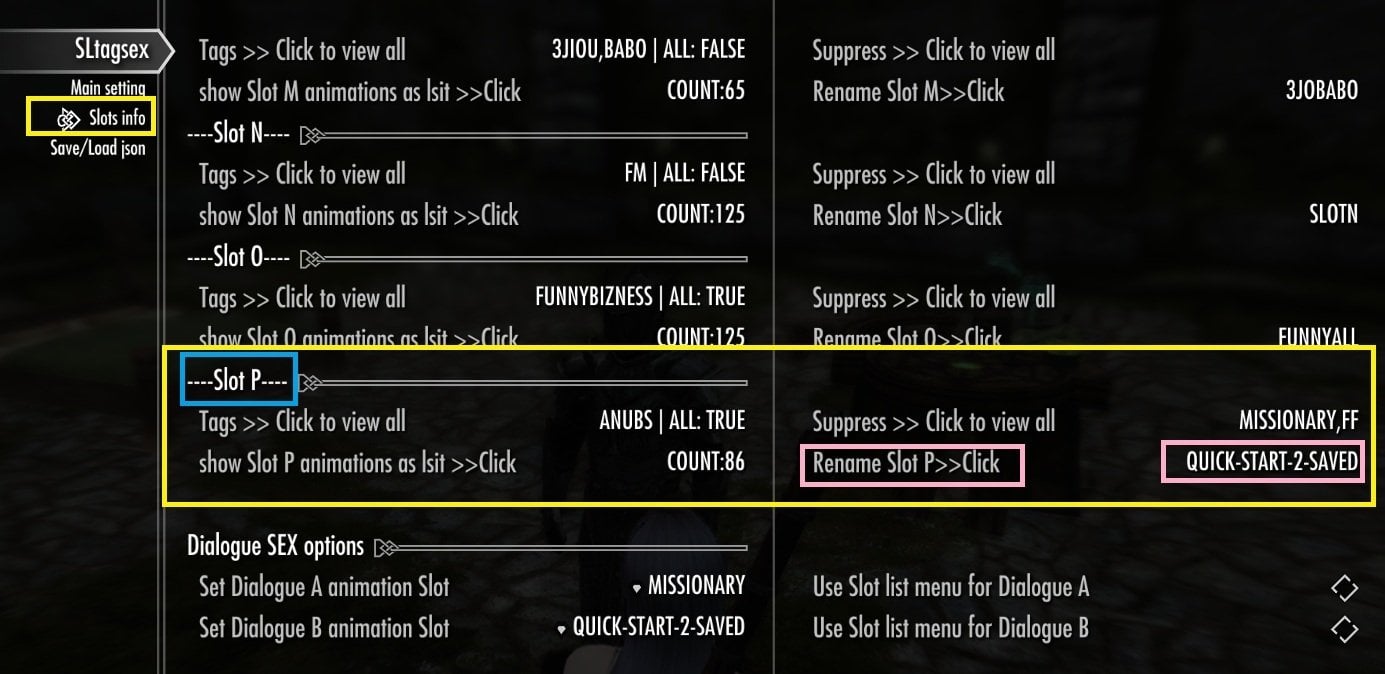
1. Tags >> Click to veiw all
it show all tags and Require all option of the slot as msg window
2. Suppress >> Click to view all
it show all Suppress tags of the slot as msg window
3 show slot (P) animations as list >> Click
it show all animation list in the slot P
4. Rename Slot (P)>> Click
it open rename window, then change it as you like. it update "current slot name", and "list of slots name"
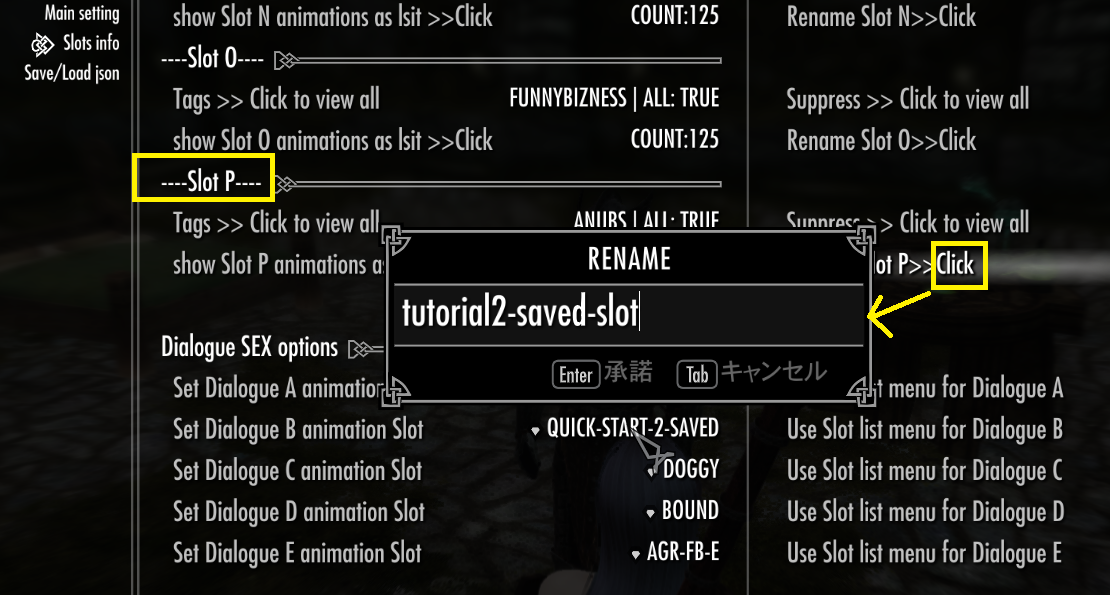
You may rename slot for this test, then just remember the slot name when you use it.
Anytime you can check current slot name in this menu, it always show current slot name. (default or your edit name)
Test and confirm as you like these 4 optoins about Slot which you seaved.
After you've checked your first saved slot, I recommend creating a new set of tag settings, building another animation list in Main setting page,
and saving it to a second slot and rename it.
Feel free to experiment with different Tags and Suppress Tags this time!
BTW, don't worry if your search finds more than 125 animations.
Each slot can store only up to 125 animations (automatically selected by the SexLab function), but this mod also keeps your tag settings for each A to P slot, including the Temp Slot, when you build / saved slots.
Using those saved tag settings, my mod can also search again and show all matching animations as page lists. We'll try that option later.
For now, just use the animation list searched and selected by SexLab (up to 125 animations).
--------------------------------------------------
##Step 4
- Assign saved Slot to a Dialogue and Auto-Start an Animation
In the 2nd MCM page, slots info, below the Slot A–P sections, you'll find the Dialogue SEX Options section.
Unlike the slot sections above, these options are configured for each dialogue, not for each slot.
They control how each dialogue selects animation list and starts an animation.
If you don't want to use the new spell added by this mod, you can simply use Dialogue A and start the animation from there.
But I'd like to show you how to use the new spell, so we'll use Dialogue D this time!
The spell is used only for Dialogue D by default (unless you edit the conditions in CK). ... and because I like the magic effect @@; ✨
The most important option here is "Set Dialogue (A to E) animation slot."
For now, we only need to set the animation slot for Dialogue D. Click the option for Dialogue D, then select the slot you just saved from the slot list.
If you've already saved several slots, feel free to choose whichever one you like!
Just remember: Dialogue D will use the slot you selected for Dialogue D to search for an animation. In the same way, if you set a slot for Dialogue A, that slot will be used by Dialogue A. And yes, you can assign the same slot to multiple dialogues!
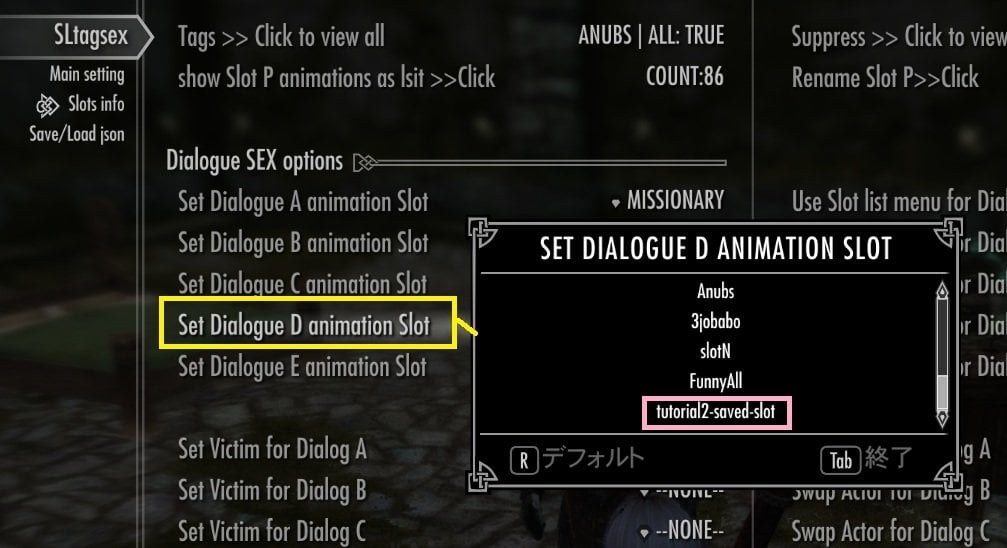
On the right pane, Next option
- Use slot list menu for Dialogue (A to E )
This option lets you enable or disable the Slot List Menu for each dialogue individually.
When enabled, the dialogue will not simply use the slot you assigned above. Instead, the Slot List Menu will open each time, allowing you to choose which slot to use.
For this tutorial, please leave this option OFF (Default: OFF), because we want Dialogue D to use the slot we just assigned to.
- Set Victim / Swap Actor (A to E)
These are the same settings you used for the Test Dialogue on the first MCM page.
You can set these two arguments for each dialogue when starting a SexLab animation. Adjust them if needed for your setup.
For my usual setup, I simply leave Victim as None and Swap Actor disabled, and that works fine for my purposes.
-----------------------------------------------------------------------
##Step 5
- Set Global Options for Auto-Start
For this tutorial, we want to start an animation without selecting it manually from a list.
This means that when we use Dialogue D, SexLab will use the animation list from the slot you assigned to Dialogue D,
automatically pick one animation from that list, and start it!
So return MCM main setting page, and set then confirm these 4 options.
a ) **Use list to select animation**>>> OFF
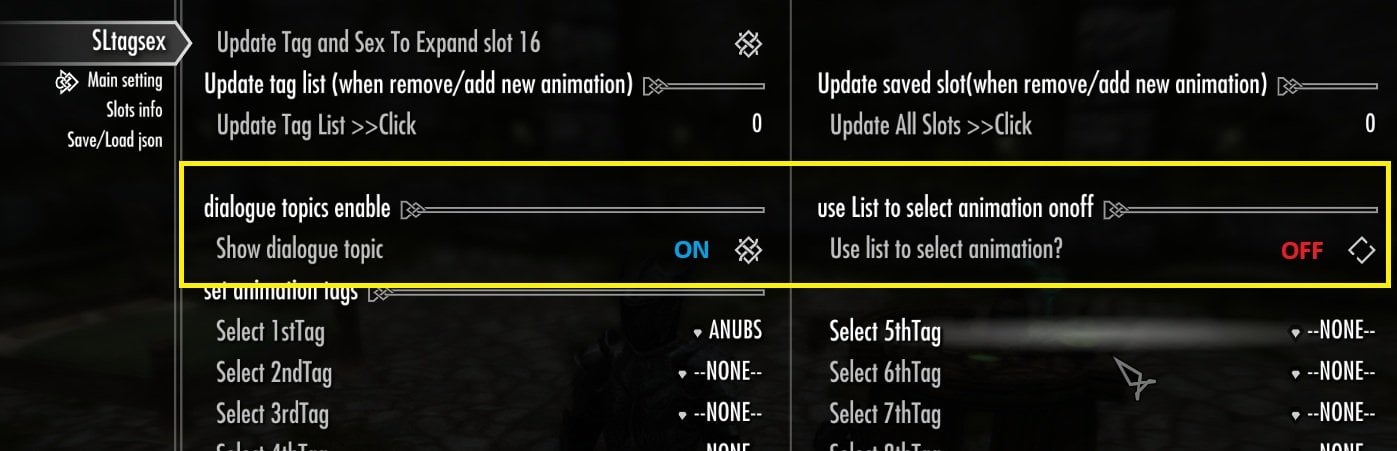
Keep these three Global Options the same as in Quick Start Guide 1 (for temp dialog and temp slot)
b) ** Use saved slot animation for dialogue sex? ** >>> ON
c) **Serch Animation by tags for dialog sex? ** >>> OFF
d) **Select from all matching animations (Paged) >>> OFF
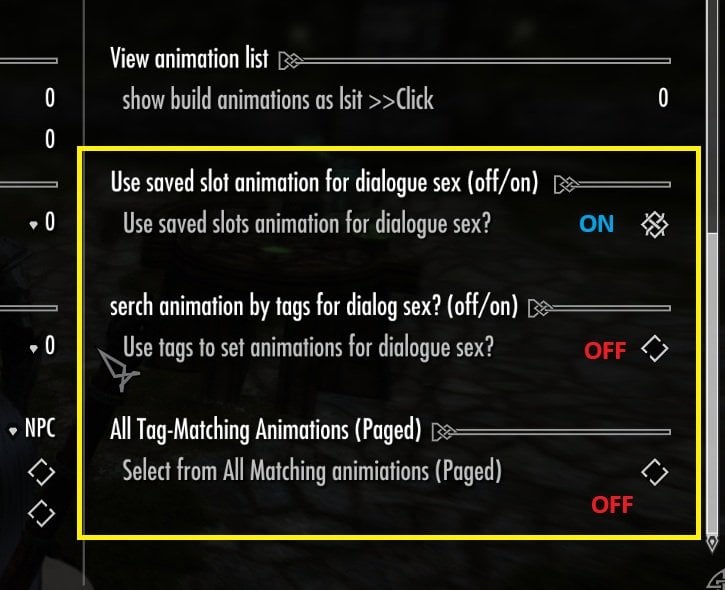
##Step 6
- Let's Start the Dialogue D and Animation!!
Close the MCM menu., then return game.
Now open your Magic menu and, using SkyUI's search function, search for the spell named "Exhausted (TS)".
you should find the magic spell , mod auto add when you install "Tag and Sex ver 2"
equip it in either your right or left hand.
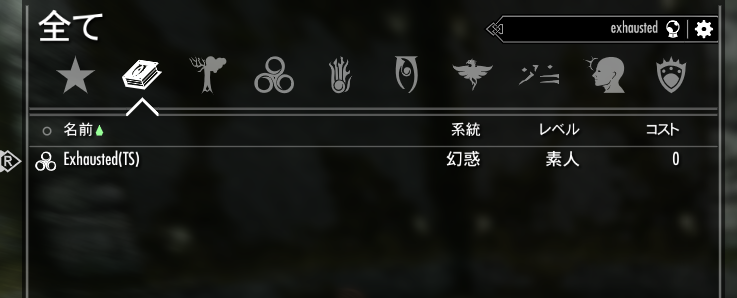
Aim the spell at any NPC you like and cast it! Don't worry—nothing bad will happen! ✨
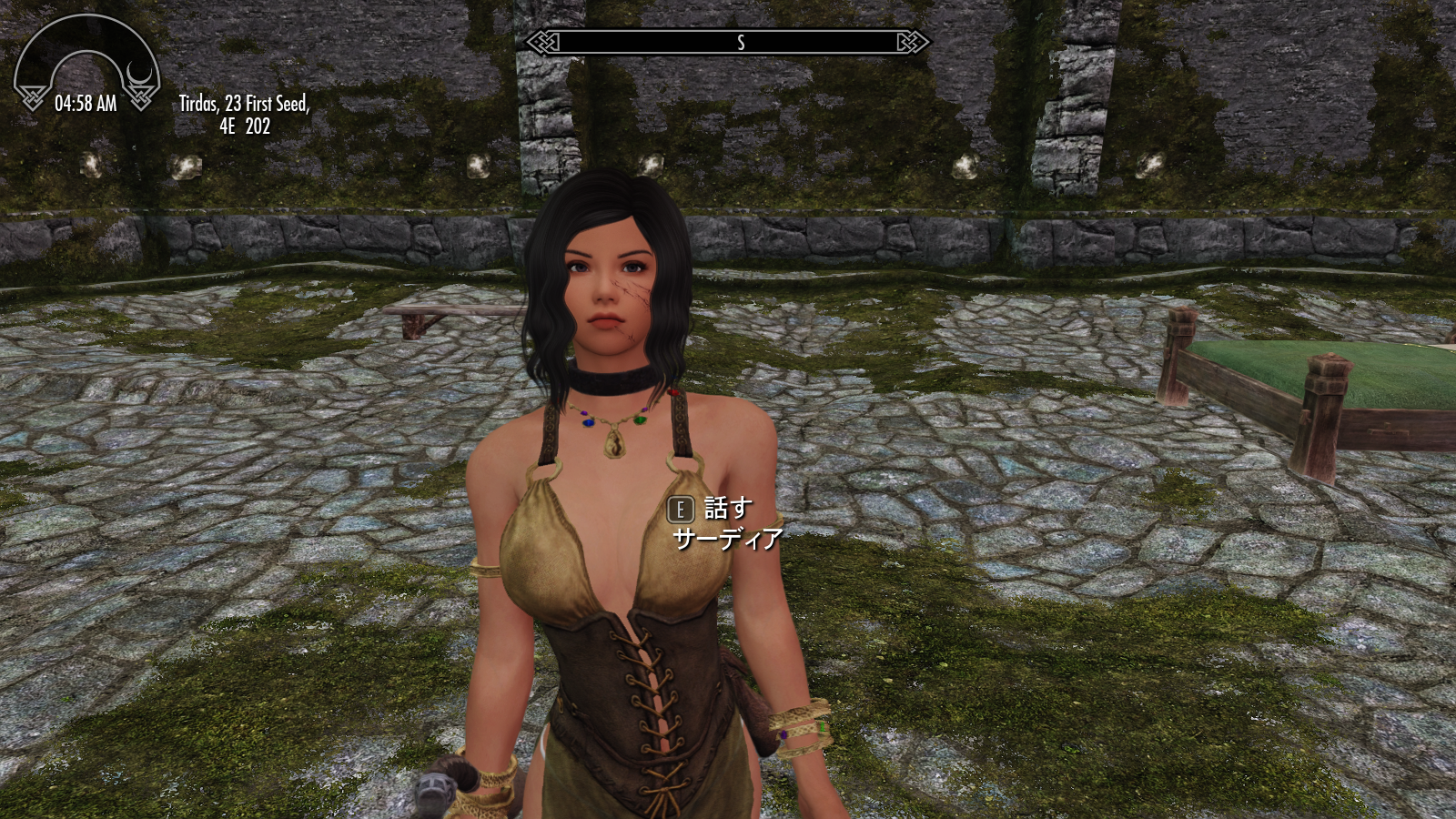
Btw Saadia is one of my favorite characters in Skyrim, so of course I summoned her with my prostitution add on shout, from club member, and cast the spell on her!
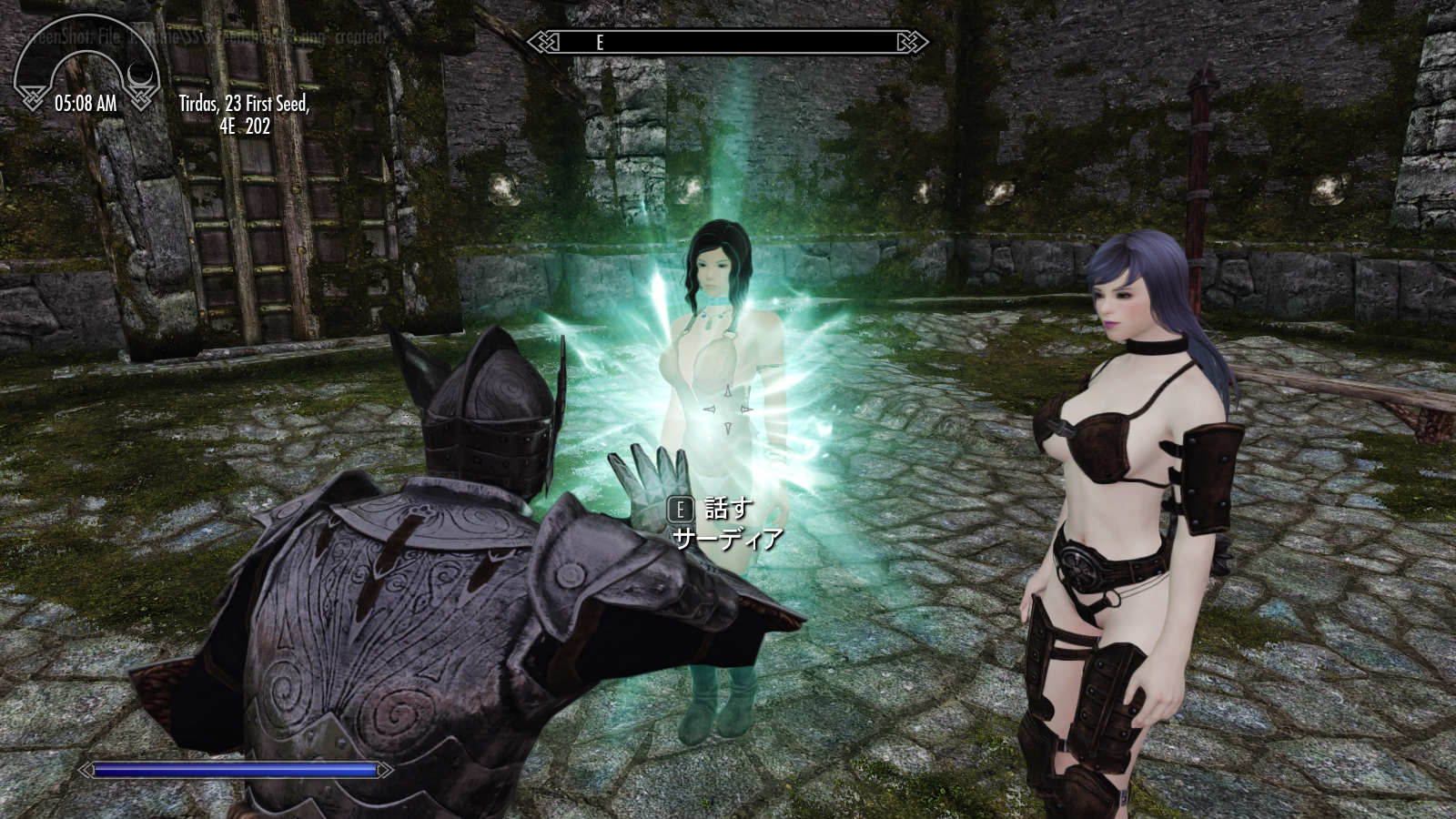
Now Saadia should meets the condition for Dialogue D. Talk to saadia, then can start Dialogue D!
( I do not ask her anything, just tell the fact) 
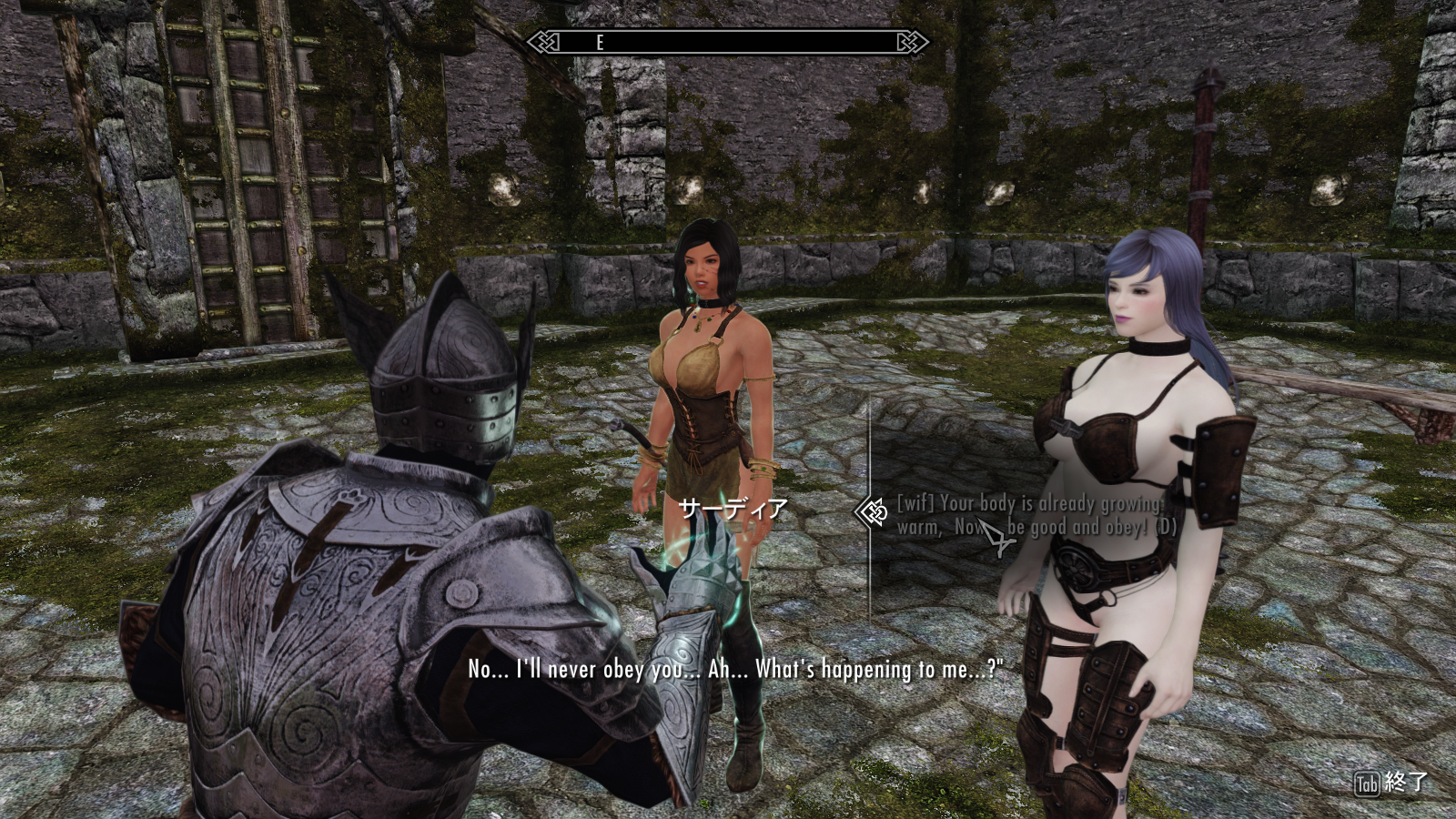
Now one animation in the slot list which you set for dialgoue D ,should auto start.
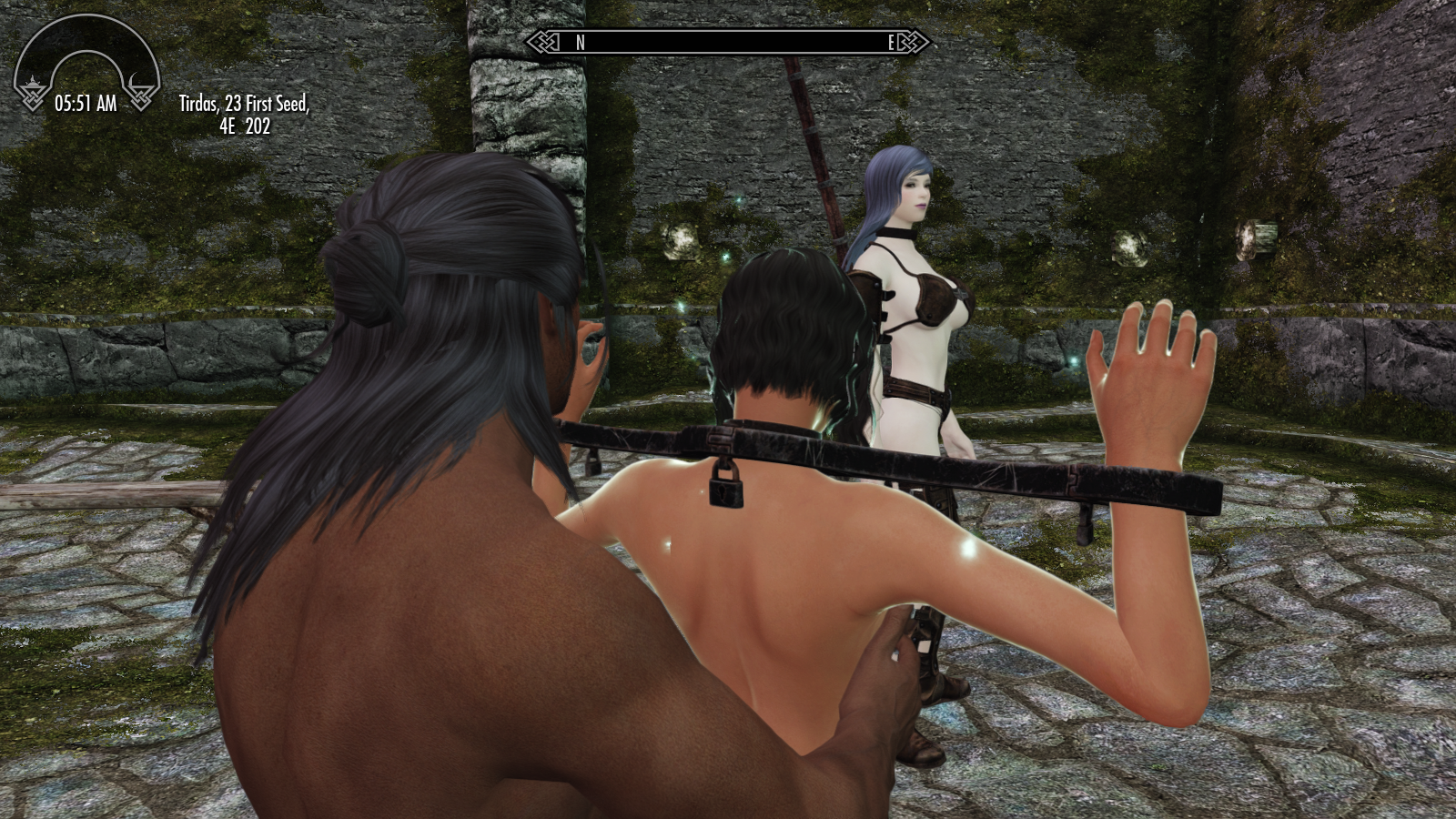
Tip: After selecting the dialogue, the dialogue menu may remain active for a short time while the animation is starting.
You can press Tab to close dialogues and avoid accidentally selecting another dialogue option.
Congratulations! 🎉
Now you can assign any of your saved animation slots to any dialogue from A to E, and play your animations using various options!
We used Dialogue D in this tutorial, but the other dialogues are even easier to access. Feel free to choose any dialogue you like, assign your favorite slot to it, and experiment with different settings!
In the next guide, I'm planning to explain JSON Import / Export, along with a few more useful options.
That's all for now. Bon voyage! ✨
--------------------------------------------------------------------------
## Quick start guide 3 (save and load preset json)
This time, you will save your current slot tags and options as a JSON preset with any file name you like, then reload it and apply the saved settings to all slots!
SL Tag and Sex (old versions) could save up to four presets, and you could set custom display names for those four preset files.
In Version 2, you can save as many presets as you need, using their actual file names.
The exact directory location may vary depending on your setup. If you want to load an old preset or a custom preset, place the file in the directory where this mod saves its presets:
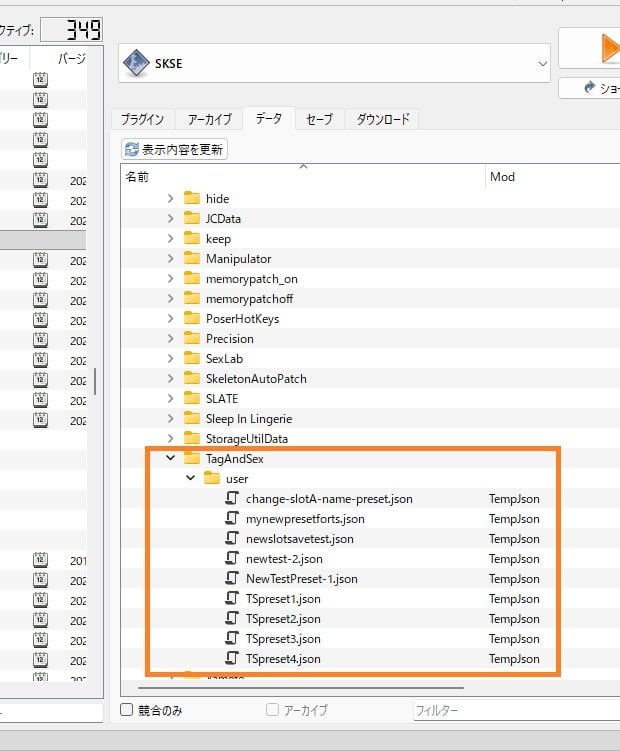
\Data\SKSE\Plugins\TagAndSex\user\
The actual location may vary depending on your mod manager. MO2 usually exports newly created preset files to the Over-write directory.
Note: If a preset with the same file name already exists in the location, it will be overwritten automatically.
You can easily locate your saved .json preset from the Data tab in MO2's right pane:
MO2 right pane >> data section >> SKSE\Plugins\TagAndSex\user
Anyway, let's save your first preset!
**Step 1
Before saving your preset, please build two or three slots first. Set some tags for each slot and make sure they contain some animations. You can confirm this on the Slots Info page.
By the way, this mod does not save the names of all animations contained in each slot. Instead, the preset saves the tag settings used to build each slot.
There is little benefit in saving every animation name found by the search in prreset json, because there is no guarantee that those same animations will still be registered in SexLab when you load the preset later.
It remembers how each slot was built — its tags, suppressed tags, Require All setting, and related options — so the slot can be rebuilt using your current SexLab registry.
**Step 2
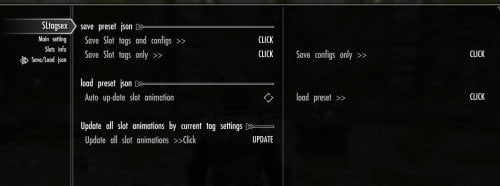
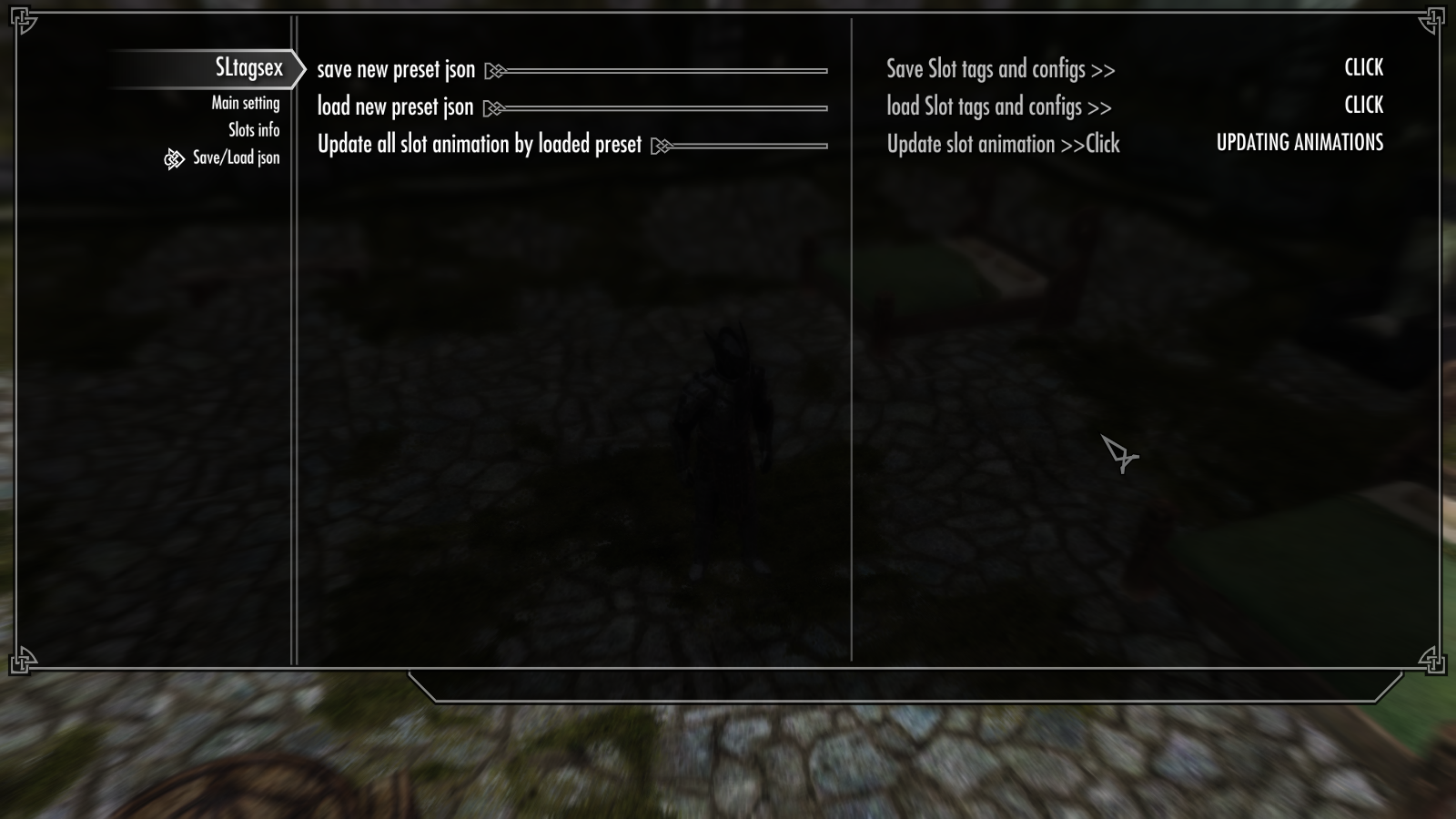
Once you have confirmed that several slots contain animations and have their Tags and Suppress Tags properly set, open the last MCM page, Save/Load JSON.
This page is very simple. Currently, it has only three options.
First, click "Save New Preset JSON" to save your current slot settings.
A text input window will open then input your file-name without file suffix. like this Pic.
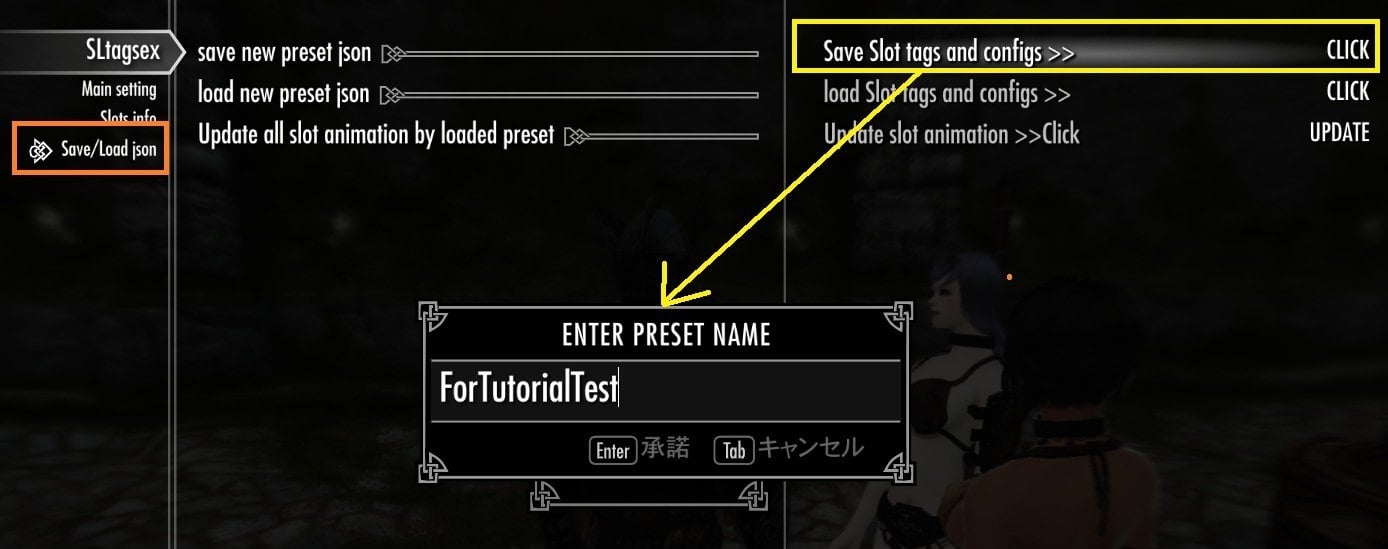
Press Enter, and a confirmation window will tell you that your preset has been saved successfully.
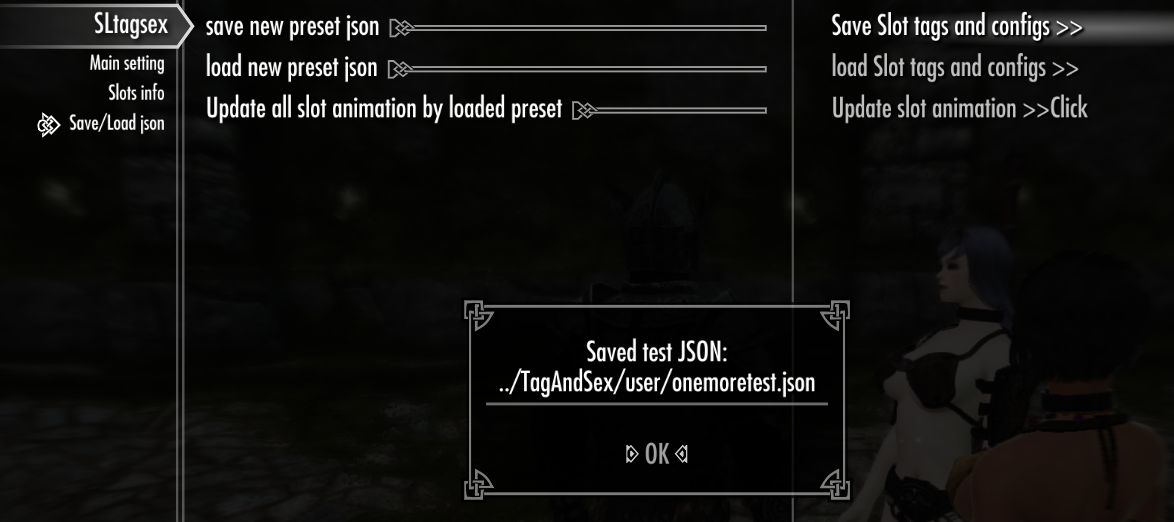
The preset directory should be created automatically when you save your first preset. If this does not work with your setup or mod manager, please let me know.
**Step 3
I recommend that after exporting your preset JSON, you quit the game and open the file with your favorite text editor. For now, just take a look at it—don't edit anything yet.
You may notice that the JSON still contains some data that is not particularly important, such as the animation count for each slot. If you have already used Tag and Sex for some time, the preset may also contain information such as old preset file names.
However, Version 2 can still load almost all presets saved with older versions. This is simply because I kept using the same option names (keys) when exporting the settings to JSON.
Now I'll briefly explain the main saved keys that will be loaded and applied when you import this JSON preset.
a). "dlgshowslot-x" , "digslotidx-x", "dlgswapuse-x", "dlgvicidx-x"
These dlg- four keys store the Dialogue settings:
x represents Dialogue 0 to 4 (A to E).
"dlgshowslot-x" — whether to use the Slot List
"digslotidx-x" — the selected Slot index
"dlgswapuse-x" — whether to Swap Actors
"dlgvicidx-x" — the Victim setting
b) "fg_all-"
This key stores the Require All Tags setting for each animation slot, 0 to 15 (A to P).
It is stored as a Boolean integer:
0 = False / OFF
1 = True / ON
c) Global Settings
"showdlgfg", "uselistfg", "useslotfg", "usetagfg"
These four keys store the Global Settings for the mod:
-
"showdlgfg"— whether to show the mod's dialogue options -
"uselistfg"— whether to use the animation selection list -
"useslotfg"— whether to use saved animation slots -
"usetagfg"— whether to search for animations by tags instead of using the saved slot cache
These settings are stored as Boolean integers: 0 = OFF, 1 = ON.
d) Slot Settings — "slotname-x", "tags-x", "stags-x"
These keys store the main settings for each animation slot, 0 to 15 (A to P).
-
"slotname-x"— the display name of the slot -
"tags-x"— the Tags used to search for animations -
"stags-x"— the Suppress Tags, used to exclude animations containing those tags
x represents animation slots 0 to 15 (A to P).
Because the JSON exporter writes integer values before string values, the "fg_all-x" keys described earlier appear separately from these slot settings in the JSON file.
However, "fg_all-x" belongs to the same slot configuration. Together, these four values define how each animation slot is built:
-
"slotname-x"— Slot name -
"tags-x"— Animation search Tags -
"stags-x"— Suppress Tags -
"fg_all-x"— Require All Tags (0 = OFF,1 = ON)
they work together as the blueprint used to build each animation slot.
##About using multiple tags in JSON
Someone asked me about this before. I was away from Skyrim for quite a while at the time and couldn't answer — sorry about that! If you want to manually write multiple tags in the JSON file, use a comma-separated string like this:.
"tags-15" : "Armbinder,Cuffs,TortureRack,FBBound,Holding,Pressing,Yoke,Pillory"
So, Simply separate each tag with a comma.
As far as I know, SexLab uses Papyrus's built-in Find() function to match animation tags. Papyrus string comparisons are case-insensitive, so capitalization should not matter. However, spaces are part of the string, so spaces inside a tag name do matter.
For example, Doggy and doggy should match the same tag, while Blow Job and BlowJob are different tag names.
To be safe, I still recommend using the tag name exactly as it appears.
**Step 4
- Before Loading a Preset
Before testing the Load function, I recommend saving your current game first. then keep it please.
Though this mod does not immediately auto replace everything when you load a preset.
After loading, the tag conditions for each slot will be changed to the values stored in the preset.
When you update the slots in MCM first page, the mod will check whether those saved tags still exist in animations currently registered in SexLab. Invalid or unused tags will be removed, and the animation list for each slot will be searched and rebuilt using the valid tags.
So, even if you load a preset that you just saved, the resulting animation lists may not be exactly the same as before.
This is especially important when more than 125 animations match the tags.
SexLab selects animations from the matching results, so when the slot is searched again, a new selection may be created and the saved animation list may change.
**Step 5
Try changing some of the current Global Options on Setting of Page 1 (Main setting)
This will make it easier to confirm that the preset restores them correctly.
Actually, this exact test revealed a bug in the previous version today, and it has now been fixed.
The JSON preset saves the following four Global Options:
- Show dialogue topic
- Use list to select animation
- Use saved slot animations for dialogue sex
- Use tags to set animations for dialogue sex
Change a few of these options so that they are different from the values you saved in your preset. Then, when you load the preset, you can easily check whether they are restored correctly.
Note: The option to search and select from more than 125 matching animations using paged lists is intentionally not saved in the JSON preset at this time.
In a future version, I plan to separate these global settings from the individual slot data into different preset types, so they can be saved and loaded independently.
**Step 6
- load json preset
Open MCM Page 3 (Save/Load JSON), then click "Load slot tags and configs".
A list window will open, showing all JSON preset files found in the user directory. The presets are displayed using their actual file names, including any custom JSON presets you added or edited yourself.
Select the preset you want to load and click Tab(End)
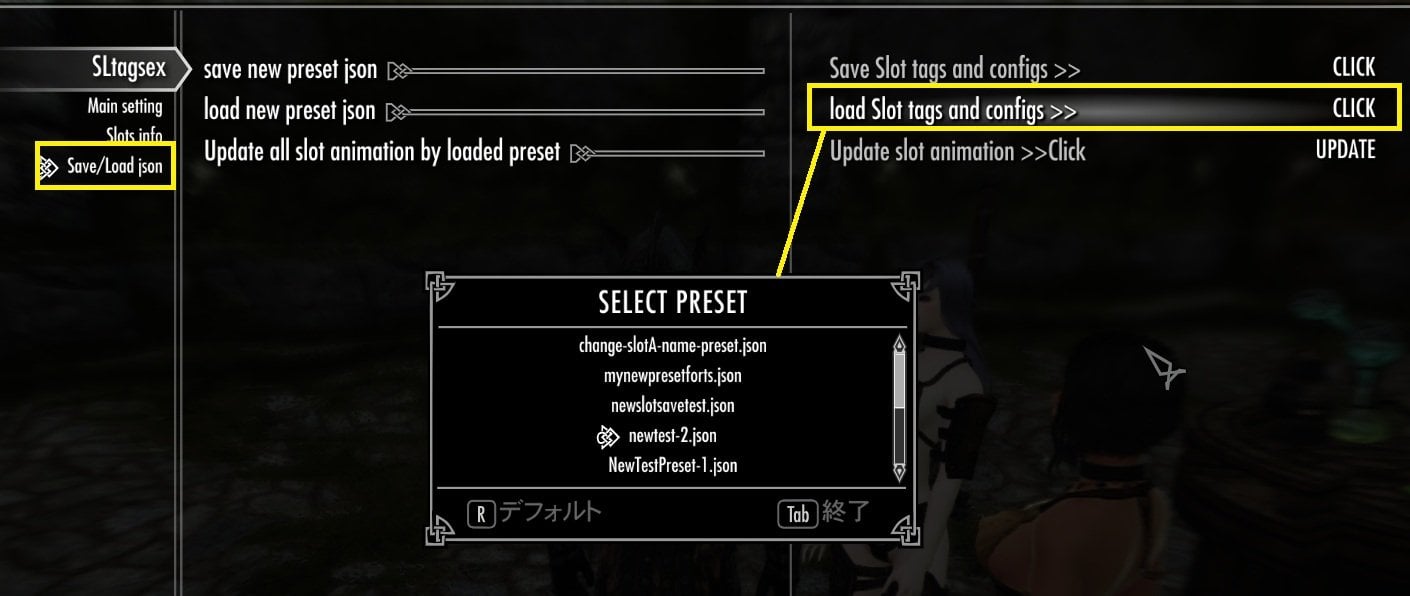
then confirm window open (to cancel easy),
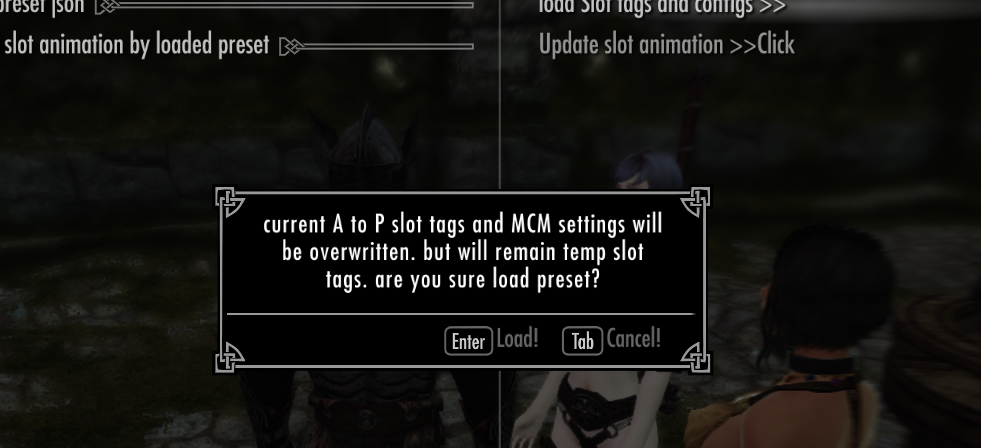
When you click "Enter", the preset will load and apply your slot tag settings and Global Options.
However, it does not automatically update or rebuild the slot animation lists yet.
You can open Page 2 — Slot Info to check that the slot names and tag settings have been loaded correctly.
You may also notice that the animation count has changed to the value saved in the preset. This saved count is not actually used as the current animation count of the slot, and it may not match the animations currently registered in the slot.
For now, this value is loaded only as a reference, so you can easily confirm that the preset data was loaded correctly.
If this is not the preset you want, simply load another JSON preset and check its saved tags and animation counts.
You can repeat this until you find the preset you want to use. Each time you load a preset, you can check its Slot tag settings and Global Options (Page 1 — Main Settings) before rebuilding the slot animation lists.
--------------------------------------------
- Rebuild animations for all slots (quick)
There are two ways to synchronize the loaded tag settings with the animation lists in each slot.
Each method has its own advantages.
However, in most cases, "Update Slot Animation" on the Save/Load JSON page is all you need to apply the loaded preset.
It searches for animations using your saved tag settings and rebuilds all animation slots (A to P)
Note: I plan to add an option in a future version that will allow you to load or replace only the individual slots you want.
For now, these function loads and rebuilds all slots (A to P). However, it does not change the Test (Edit) Slot or the current tag settings shown on Page 1.
-------------------------------------------------------
- Full Update from the Main Settings Page
The other method is to perform a full update using the two update options on the Top Page (Main Settings).
1. Click "Update Tag List"
Its rebuilds the "tag list" from your current SexLab animation registry.
2. Then click "Update All Slots"
This option uses the updated tag list and your loaded slot settings to rebuild the animation lists for all slots.
These 2 options are normally used only when you have changed your SexLab animation registry and some tags have been added or removed.
However, the SexLab registry you are using now may also be different from the one you were using when the preset was originally saved.
For example, suppose your preset contains a tag called "miss-spel-tag". Even if that tag actually existed when you saved the preset, it may no longer exist in your current SexLab registry because an animation pack was removed, updated, or changed.
In this case, the Full Update refreshes the tag list from your current SexLab registry and removes tags that are no longer available in tag-settings for each (A to P) slots, before rebuilding your slots.
It is more thorough, but takes longer than the Quick method.
------------------------------------
- Summary — After Loading a JSON Preset
If your SexLab animation registry has not changed much since you saved the preset, or if you simply want to search again using the same tags that were saved at that time, you only need to use:
"Update Slot Animation" on the Save/Load JSON page.
I recommend trying this first in most cases.
After that, you can continue normally — edit your tag settings, rebuild animation lists, and save new slots as usual.
However, if a loaded slot contains tags that no longer exist in your current SexLab registry, the animation search results will naturally be different from what you saved before.
If you want to update the tags used by each slot to match your current SexLab registry, and remove tags that are no longer available, perform the Full Update process:
"Update Tag List" → "Update All Slots"
After the update is complete, check your slots again. If necessary, edit their tag settings to get better animation search results with your current SexLab setup.
-------------------------------------------------------------------------------
## Option Guide (Choosing Slots and Animation)
Most of the main features and basic usage have already been covered in 3 quick tutorials.
So In this final guide, I will explain some of the options in more detail and how they affect animation selection.
- Recommend Option
There are two main options that I recommend keeping ON as default:
- "Show Dialogue Topics"
- "Use saved slots animations for dialogue sex"
1. Show Dialogue Topics
This mod uses dialogue topics to start animations, so I normally recommend keeping "Show Dialog" ON.
If you set it to OFF, it only hides the dialogue topics added by Tag and Sex. It does not disable the mod or change your saved slots.
For example, my prostitute 3P add-on for tag and sex, can still use these slots to start animations through their own dialogues. This can be useful if you want to hide the original Tag and Sex dialogues and use only the add-on dialogues for easier selection.
2. Use saved slots animations for dialogue sex
To use animations from your saved slots (A to P) or the Temp Slot, this option must be set to ON.
This is the main switch for using the slot system when starting animations from dialogues.
You can still start animations when this option is OFF, but the animation candidates will be searched using the default tags defined in each dialogue script.
These default settings are quite simple, and I do not recommend editing the scripts directly unless you know what you are doing.
For example, suppose you want the follower-only Dialogue B to use only animations matching "Cowgirl", "Blowjob", or "Blow Job".
You can simply build the animation list with these tags in the Temp Slot, save it to one of your slots (for example, Slot F), and then assign Slot F to Dialogue B.
That is exactly what this mod's slot system is designed for!
--------------------------------------------------
- Manual or Automatic Animation Selection
1. Use list to select animation
Normally, the option determines whether an animation should be selected manually from UI animation list or automatically by SexLab from the animations. Both modes use the same animation list.
- ON — An animation list is displayed, and you select the animation you want to use.
- OFF — No animation selection list is displayed, and SexLab selects an animation automatically from the available animations.
This setting is independent of whether the Slot List menu is displayed or not.
I will explain the Slot List menu option in the next section.
2. Use Slot list to select animation (test slot / A to E slot)
This option can be configured individually for each of the six dialogues: the Test Dialogue and Dialogues A to E.
This option does not determine which individual animation you use. Instead, it determines which slot's animation list will be used when an animation is started.
ON — The Slot List is displayed each time, allowing you to choose which slot to use.
OFF — The Slot List is not displayed, and only the animations from the slot already assigned to that dialogue are used as candidates.
This setting is independent from "Use list to select animation".
Therefore, you can choose whether to select the slot, the individual animation, both, or neither.
For example, you can set
Dialogue A to show the Slot List, so you can choose your preferred slot from all available slots each time.
At the same time,you can set
Dialogue B to automatically use the slot already assigned to it, without showing the Slot List.
After the slot is determined, whether you manually select an individual animation from the list or let SexLab choose automatically is controlled separately by the global "Use list to select animation" option.
I recommend simply toggling this option for the Test Dialogue first, so you can easily see the difference between selecting a slot from the Slot List and using the assigned slot automatically.
After the slot has been determined, you can either select an individual animation yourself or let SexLab choose one automatically, depending on your "Use list to select animation" setting.
-------------------------------------------------
- Advanced Animation Search(for 125+ Animations)
Papyrus has a limitation on how many elements can be stored in a single array. This limitation also affects SexLab animation arrays, so this mod stores a maximum of 125 animations in each slot.
When you build a slot, you may have seen a "125+ animations" message if more than 125 animations matched your tag conditions.
In this case, SexLab selects 125 animations from the matching candidates, and this mod stores those animations in the Temp Slot.
Using this cached animation list is fast. However, there is one disadvantage.
For example, if 300 animations actually match your tag conditions, but only 125 of them are stored in the slot, continuing to use the cached slot means that only those 125 animations will be available for selection.
There are two ways to avoid being limited to the same 125 cached animations. Both methods search again using the saved tag conditions, but they handle the search results differently.
A. Search Animations Again by Tags
Instead of always using the cached animation list, the mod searches again using the saved tag conditions each time an animation is started.
SexLab can then pick a new set of up to 125 animations from all matching candidates. This is slower than using the cached list, but it prevents you from always being limited to the same 125 cached animations.
B. Use Paged Lists
This method also searches again using the saved tag conditions, but instead of stopping with one set of up to 125 animations, the mod continues searching for matching animations while excluding animations already found.
The results are divided into multiple pages of up to 125 animations each, allowing you to access animations beyond the first 125.
Because the results are divided into multiple pages, you first select a page and then manually select the animation you want.
This mod provides these two methods as separate options, so you can choose the one.
----------------------------------------------
1.Use tags to set animation for dialogue sex?
This option do A. Search Animations Again by Tags.
This is useful when you have several slots where more than 125 animations match their tag conditions, because a new search can produce a different selection of animations instead of always using the same cached 125.
However, if all of your slots contain 125 animations or fewer, or if your dialogues only use slots that stay within this limit, there is little reason to enable this option. The same tag search will normally produce the same animation list, so using the already cached slot is faster.
------------------------------------------------
2. select from all matching animation (paged)
This option enables the B. Use Paged Lists
When this option is enabled, the mod searches again using the saved tag conditions and collects matching animations into multiple pages, with up to 125 animations per page.
If more than 125 animations match, the mod continues searching while excluding animations already found, allowing additional matching animations to be collected on the next pages.
Then You first select a page, and then select one animation from the paged list, you want to use.
Important: When this option is ON, manual animation selection is always required. Therefore, it overrides the "Use list to select animation" setting.
However, it does not override the Slot List setting. If the Slot List is enabled, you first select a slot, then a page, and finally an animation. If the Slot List is disabled, the slot already assigned to the dialogue is used automatically.
----------------------
Thanks for reading!
There are many options in this mod, so I recommend simply trying different combinations first. You will probably get used to how they work naturally as you experiment.
If something seems strange or you forget how an option works, please come back and check this guide!
If you find any behavior that is different from what I described here, please feel free to post in the Help thread for this mod. If possible, tell me the steps you followed, your settings, and what happened. That will help me investigate the problem. I plan to continue improving and updating this mod little by little.
Thank you for using my mod, and have fun!
Peace and Love!
## For advanced users and modders
The saved slots can also be used by other add-ons to start sexlab animation. For example, my Prostitution Add-on lets you assign saved 16 animation slots through its MCM and start animations from its own custom dialogues.
----------------------------------------------------------
# About My AI Aibou (How and why I Use AI for Mod Development)
I would like to thank ChatGPT, whom I call "Aibou" , which means "my partner" in Japanese. Aibou has been my programming teacher, code reviewer, and brainstorming partner throughout the development of this mod. Rather than generating code blindly, we discuss ideas, review each change step by step, and I always read, understand, test, and verify the final implementation by myself. Working together has helped me to learn papyrus scripting, and I hope this mod reflects that journey.
What's New in Version 2.2.3
Released
Fixed an argument-count mismatch that could prevent dialogue-triggered animations from starting in normal selection mode and produce the Papyrus error “Expected 10, got 9.”
The dialogue scripts now explicitly pass all 10 arguments to WifNormalSelect, while preserving the existing tag and slot selection behavior.
After adding Common Tags, I focused on testing Page List mode for lists containing more than 125 animations, so I overlooked this issue in normal selection mode.I happened to notice this issue while reinstalling all my mods from scratch and setting up a new test environment.
1. Download the archive.
2. Install it with your preferred mod manager (I may recommend MO2).
3. Enable the plugin.
4. Launch the game and wait for the MCM menu to initialize.
Depending on your load order, this may take a few minutes after the first installation. 5. Open the MCM menu and configure the mod as desired.
SKSE team
SKYUI team
SKYUIlib team