
Search the Community
Showing results for tags 'Overlay'.
Found 20 results
-
Sovereign Node: Middleware for Humans and AI I’m just one guy who built something cool. If I hadn’t built this program myself and I stumbled across a video of it running, I’d probably call bullshit. It looks like a pre-rendered movie or clever screen editing. It’s not. It's running live, in real time. If you're skeptical, take a minute and just watch the videos. I'm not here to argue with anyone or prove anything. The software is solid, I’ve stress-tested it until I couldn't break it anymore, and I'm letting the work speak for itself. It’s not a mod. It doesn't modify anything in any game environment anywhere at any time. It's middleware that sits between a human and an AI, letting you bring an AI companion into any game or app. It’s completely agnostic—it doesn't care where you get your thinking from, whether you want to run a local backend or connect out to an API. Vids: https://www.youtube.com/channel/UC_-jHkWD8J5hKDbK8CYmUgA What It Actually Is Agnostic Middleware: It sits between you and your AI. Bring whatever backend you want, and Sovereign Node connects you. Low to Mid-Range Latency: It runs smoothly, reliably, and stable in day-to-day use. Zero Game Modification: It never touches, hooks into, or modifies any game files or game engines. No cheating flags, no game file interference. The Hardware Setup Main Rig: Built on an 11th Gen Intel i9-11900K @ 3.50GHz, an RTX 3080 Ti, 32GB of RAM, and solid storage capacity. It handles the workload efficiently without unnecessary overhead. Backend: Configured to handle local model processing or connect out to external APIs seamlessly. Grab The file. https://drive.google.com/file/d/1FaHYkXAs6FVTguzNvnC-vx3eXWMjJGbo/view?usp=drive_link
-
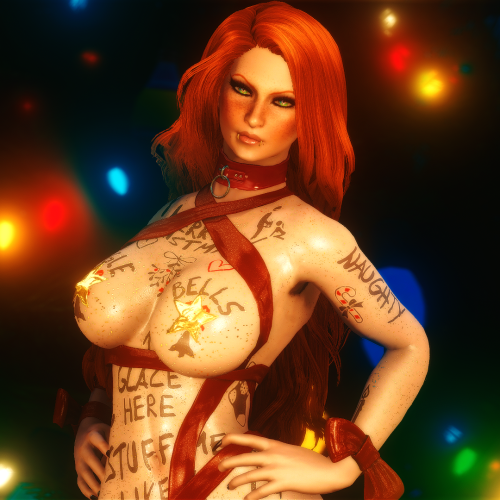
 Alpia Slave Tats Port - Fallout 4 View File Alpia Slave Tattoos - Fallout 4 port (again) Yeah this thing used to be deleted, more about this at the bottom of the description This mod adds... a lot of tattos, made By Alpia, into fallout 4's looksmenu system! uhh dirty plug, follow me on bsky for my screens :3 >>preety women here<< Unlike in skyrim all of these just appear in your looksmenu's overlay tab because there isn't a folder system for it or anything like that, so its annoying to navigate, im sorry for that Tattoos are 4k with the face ones being 2k in size. After unpacking the file size is about 13 gigabytes so i suggest you head to the properties window in explorer and select the advanced option in attributes, then select compress folder and apply The face tattoos will ONLY work with 2k faces unless you decrease their resolution through photoshop or something spicydoritos actually came around and posted the 1k face textures in the thread, its the first message in fact, if you download it make sure to thank them cus i couldn't be bothered to downsize the textures lol This modpack does NOT have the recently added tats, as this was made over a year ago, maybe ill do them one day Credits: Alpia - duh, made the thing, i just ported it JB. - helping me understand the overlay system with me using his mod as a template for this Mzmoro - letting me rant about f4's shitty overlay system Chatgpt - writing a powershell script that made the .json for looksmenu (yes it was vibecoded, yes it would've been faster to make it myself rather than fixing its trash script) SpicyDoritos - Making a 1k version of the face tattoos on the original upload of this mod's page (im sorry i deleted ur work) InvictusBlade - adding support for this into his random overlay framework (again, before i deleted this) now, for the elephant in the room this mod was originally deleted due to me having concerns about the morality of spreading it, i was also pressured into it by someone i won't name. However, that passed and now i wish to reupload the mod, not even because its mean to the people that worked on this like alpia and spicydoritos, moreso because i hate when mods dissapear from the internet only to be shared among select few, so like, heres the thing oh and no i won't share the preset, i did that once and someone told me they made my character pregnant. never again 😭 Submitter Baja the local Tgirl Submitted 06/28/26 Category Models & Textures Requirements Looksmenu, 2k resolution face unless the face tattoos are not installed, then you dont need a 2k face
 -
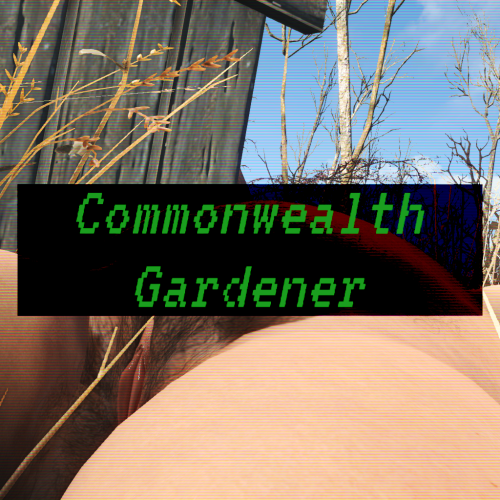
 Commonwealth Gardener - Simple pubes growth View File What's this? Believe it or not, but radiation hasn't significantly changed the human's ability to grow hair even on their nethers. Some people prefer to have these coarse hairs removed, but some others forgo this habit and let it grow. This is is a simple, three-stage pubic hair growth system that applies overlays of your choice to the player if they don't shave their hair (the razor is craftable on the chem lab for three aluminum, one use only). The time needed to grow hair can be edited on the MCM. Installation This mod installs like a regular .esp addon, but don't forget to get the requirements! I heavily recommend Porcupine's PubicHairs as they are of extreme high quality and are setup as the default on the mod's settings. Uninstallation In order to safely uninstall this, please write this into the console: stopquest CG_PubesManager I apologize for this rudimentary setup. This is the first time I ever create a mod involving scripts and the MCM. I will try to address this soon. Permissions You are free to utilize all the assets on this mod in any way or shape you desire. Credits are appreciated, but not needed. Credits The people involved on the MCM and LooksMenu, which are the spine of many people's setups. @HeavyYoungHeathens for All Things Natural, which inspired this mod (I saw there were plans for pubic hair growth upon inspecting the .esp) and I greatly recommend it. Tools used Creation Kit Notepad++ Papyrus Compiler Patch (NoDox edition) Submitter DragAndPlace Submitted 10/01/26 Category Other Requirements LooksMenu, Mod Configuration Menu, (Optional but recommended) PorcPubes
 -
Version 0.5.0
283 downloads
What's this? Believe it or not, but radiation hasn't significantly changed the human's ability to grow hair even on their nethers. Some people prefer to have these coarse hairs removed, but some others forgo this habit and let it grow. This is is a simple, three-stage pubic hair growth system that applies overlays of your choice to the player if they don't shave their hair (the razor is craftable on the chem lab for three aluminum, one use only). The time needed to grow hair can be edited on the MCM. Installation This mod installs like a regular .esp addon, but don't forget to get the requirements! I heavily recommend Porcupine's PubicHairs as they are of extreme high quality and are setup as the default on the mod's settings. Uninstallation In order to safely uninstall this, please write this into the console: stopquest CG_PubesManager I apologize for this rudimentary setup. This is the first time I ever create a mod involving scripts and the MCM. I will try to address this soon. Credits The people involved on the MCM and LooksMenu, which are the spine of many people's setups. @HeavyYoungHeathens for All Things Natural, which inspired this mod (I saw there were plans for pubic hair growth upon inspecting the .esp) and I greatly recommend it. -
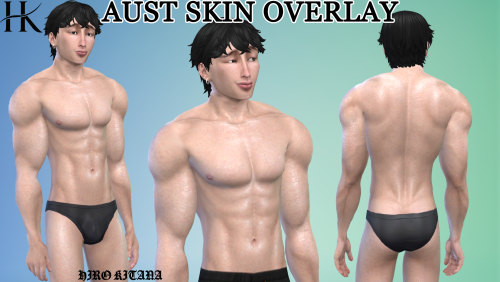
AUST Skin Overlay View File Includes: 6 color variations Eyebrows, so remove the in game ones A sexy body and cute face (it resembles to my face lol) Where to find? U can find the overlay in the face skin details in CAS 🫶🏻 If u use wicked mod u need to change the skin color to an alike skin color u choose so the PP is same color Submitter Hiro Kitana Submitted 09/29/26 Category Body Parts Requirements Base game
-
Version 1.0.0
320 downloads
Includes: 6 color variations Eyebrows, so remove the in game ones A sexy body and cute face (it resembles to my face lol) Where to find? U can find the overlay in the face skin details in CAS 🫶🏻 If u use wicked mod u need to change the skin color to an alike skin color u choose so the PP is same color -
EUTWK Male skin overlay 🍾 View File Includes: 6 color variations Where to find? U can find the overlay in the face skin details in CAS 🫶🏻 If u use wicked mod u need to change the skin color to an alike skin color u choose so the PP is same color Used Bank42n texture as base Submitter Hiro Kitana Submitted 09/27/26 Category Body Parts Requirements Base game
-
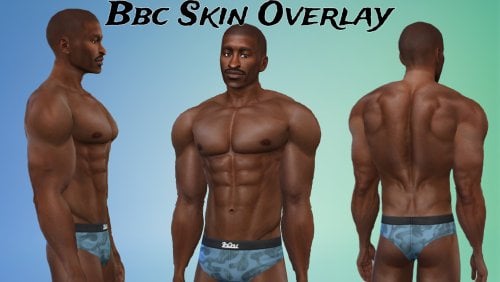
BBC Male skin Overlay 🖤 View File Includes: 6 color variations Where to find? U can find the overlay in the face skin details in CAS 🫶🏻 If u use wicked mod u need to change the skin color to an alike skin color u choose so the PP is same color Used Bank42n texture as base Submitter Hiro Kitana Submitted 09/27/26 Category Body Parts Requirements Base game
-
Version 1.0.0
843 downloads
Includes: 6 color variations Where to find? U can find the overlay in the face skin details in CAS 🫶🏻 If u use wicked mod u need to change the skin color to an alike skin color u choose so the PP is same color Used Bank42n texture as base -
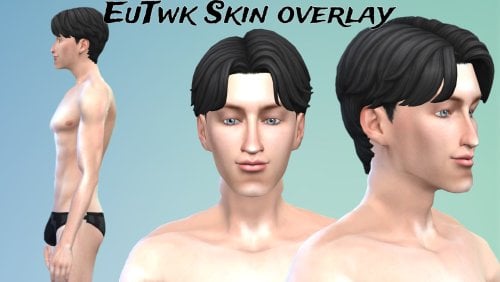
Version 1.0.0
123 downloads
Includes: 6 color variations Where to find? U can find the overlay in the face skin details in CAS 🫶🏻 If u use wicked mod u need to change the skin color to an alike skin color u choose so the PP is same color Used Bank42n texture as base -
 Dynamic Body Hair Overlays View File Additional Screenshots (due to the (i think) well known issue with getting file screenshots in the desired order): Before & After example MCM Settings Player - Body Overlay Settings Player - Enabled Body Overlay Settings Import/Export Settings Table of Contents Requirements Optional Files Recommended Features Planned Features Video Demonstration Mod Setup Frequently Asked Questions (FAQ) and Common Issues Translation Authors Mods used in Screenshots/Videos Credits & Supporters Requirements JContainers RaceMenu SkyUI (for Mod Configuration Menu) Backported Extended ESL Support (Optional) (Only if your Skyrim version is older than 1.6.1130) Open Animation Replacer (Optional) (If you want your custom animation(s) to play while shaving). The mod doesn't come with any animations at the moment. You'll need to add your own. See optional files below. Main File It's the one called "Dynamic Body Hair Overlays.rar" Optional Files Dynamic Body Hair Overlays - X Seconds Shaving Sound: Different lengths for the shaving sound. The one in the main file is 5 seconds long. I've provided versions for 10, 15, 20, 25, 30, 35, and 37 (original file length) seconds. Dynamic Body Hair Overlays - Your Custom Shaving Sound Use this to add your own custom sound so that it doesn't get overwritten in future updates. You just need to overwrite the "shaving.wav" file. The name cannot change at the moment. Dynamic Body Hair Overlays - Your Custom Shaving Animations For Open Animation Replacer. Use this to add your own animation that will play when shaving (male or female). Your "hkx" file needs to go in the "_variants_mt_idle" folder in the "male" & "female" folders. You can name your hkx files anything you want. You can also add as many animations as you want and they will play randomly. Recommended Nordic Warmaiden Body Hair (armpit, back, belly, & pubic/butt hair) Pubes Forever SSE (pubic hair) Features Growing Hair - Your body hair overlays will increase in opacity based on the settings. Shaveable Hair - Press the key in the settings and your body hair overlays will have their opacities decreased based on the settings. Planned Features (Planned) Shaving animation(s) - However I don't know how to make animations yet (something I want to learn how to do), so unless there are any out there I'm unaware of, or if someone else can make any, they might not be added for a while. I was thinking of an animation where the character uses the "scissors" from https://elderscrolls.fandom.com/wiki/Embalming_Tool#Trivia (Planned) Shaving happens instantly (noticeable only if Fade to Black is disabled). I plan to improve this in the future. (Planned) Face, hand, feet body overlay support. This means beards could be supported in the future assuming they are added as racemenu overlays. I'm not aware if such overlays exist at the moment. (Planned) NPC/Follower support (Maybe) Ability to change from one overlay to another after the opacity has reached a certain value. At the moment we're just increasing/decreasing each overlay. (Maybe) Related to the above, being able to fine tune what is shaved when shaving. Currently, when shaving, it'll decrease all of the enabled opacities to their minimum opacity in the settings. Please submit your own ideas and I will consider them! Video Demonstration Mod Setup 1/ Add Body Overlays in RaceMenu (If you already have the body overlays you want to use you can skip this part and go to 2/) Add some body overlays to your character in RaceMenu (tip: type the tilde (~) key to access the Console, then type showracemenu, then go to the "Body Paint" tab and add some overlays. Once done, save your character). If the Body Paint tab is empty, or to change the amount of paints/overlays you can use, you'll need to edit the "skee64.ini" file provided by RaceMenu. I recommend making a copy of this file, and adding it to a new empty mod in your load order (ensuring it loads after RaceMenu), and then making your changes to that file. In the "skee64.ini" file, find these lines: [Overlays/Body] ; "Body [Ovl#]" and "Body [SOvl#]"; Determines how many body overlays there should be The default should be 6. To change the number of allowed overlays, change "iNumOverlays" to something else, e.g. iNumOverlays=10 or iNumOverlays=20 2/ Go to Mod Configuration Menu (MCM) -> Dynamic Body Hair Overlays 3/ Click the "Player - Body Overlays" page and make sure your overlays appear. If they don't, double check they were added in RaceMenu. If it still doesn't show, please open a bug report. You can ignore the greyed out overlays that say "default.dds". Those arejust overlays in RaceMenu that haven't been customized. Click the empty box next to the overlay names to enable them. You can alsomanually change their current opacities on the right side of the page. 4/ Go to the "Player - Enabled Body Overlays". Here you will be able to tweak enabled body overlays further. You can set the minimum & maximum amount that the overlays can increase in opacity during each update, as well as the minimum and maximum opacity. 5/ Go to the "Settings" page and change them to your liking. When you're finished be sure to enable the mod! 6/ Once you're happy with the settings, I recommend going to the "Import/Export" page, and exporting your settings. Your exported settings can be found at "Documents\My Games\Skyrim Special Edition\JCUser\Dynamic Body Hair Overlays\settings.json". I recommend manually backing up this file as well. 7/ If you ever add or remove any overlays in RaceMenu, please make sure you go into the "Player - Body Overlays" & "Player - Enabled Body Overlays" mod pages to make sure everything looks correct. 8/ If you change sex or preset, see 7/ 9/ Enjoy! Frequently Asked Questions (FAQ) and Common Issues Please see Frequently Asked Questions (FAQ) and Common Issues Translation Authors Translation files can be found in the mod's folder at "Interface\Translations" I think I've added all the languages that are supported by the game, so please let me know if one is missing. If you're a translator, feel free to translate the mod, and you caneven upload your translation as your own mod (requiring this mod). I'll include the translation in a future update, credit you, and link to your mod. Your mod's translation will take priority. Mod's used in the Screenshots/Videos See the bottom of my Beach Body - Skin Tanning and Paling and Overlay Fading & OStim Standalone - Dynamic Spanking Overlays mods for details. Mods used for the Orc in the first few screenshots: UBE 2.0 -- Ultimate Body Enhancer 2.0 Yuriko - UBE RaceMenu Preset Perfectly Peach - UBE Bodyslide Preset - Thicc Hourglass Nordic Warmaiden Body Hair - UBE (UBE Discord) Zhizhen Female Skin - UBE Hexed Poses (main screenshot and before & after screenshots) Please let me know if I missed anything or if you'd like to know what something is. Credits Skyrim Script Extender (SKSE64) RaceMenu SkyUI JContainers Nordic Warmaiden Body Hair - I use this one a lot Creation Kit Platform Extended for Skyrim SSEEdit Scissors Sound Supporters Thank you to all my supporters! Gold Members JR2992 Submitter RaddusX Submitted 07/25/25 Category Adult Mods Requirements See description. Regular Edition Compatible No Install Instructions
 -
Version 1.0.1
645 downloads
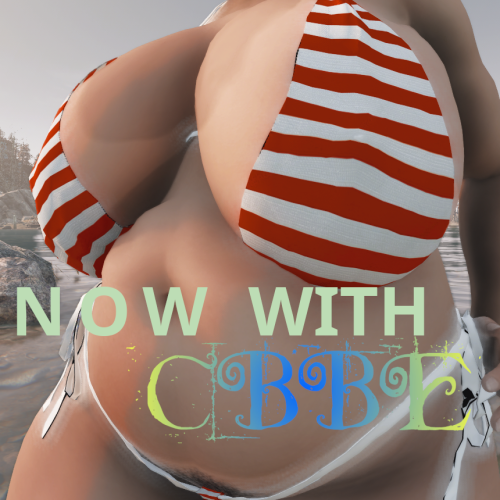
Description This mod adds 3 LooksMenu overlays for men and 4 for women for you to add. At first, their intensity is very little and are hardly visible on darker skins. Worry not, you can pile them up by adding them multiple times via LooksMenu to get a greater effect. Mix and match! They work for BodyTalk, CBBE (as well as TWB and likely Fusion Girl) and JaneBod (and its extended version, of course). There's two versions of this file: one with loose files and one packed. I highly recommend the latter due to a vastly reduced file size. Unless you use JaneBod, download the cbbe-* package. Credits Monno for creating the bikini some overlays were based on and aubrii for porting it to FO4. DemiDemonArt for BodyTalk v4 and its outfits. Caliente for creating CBBE. Nightasy for creating JaneBod. dup3w4sh1ngt0n for creating Vanilla Wares, from which I based the underwear overlays. Permissions Feel free to use any part of this mod for whatever purpose! Credits, of course, would be appreciated; but not needed. Tools used GIMP Blender Material Editor by Ousnius -
Version 1.1.0
1530 downloads
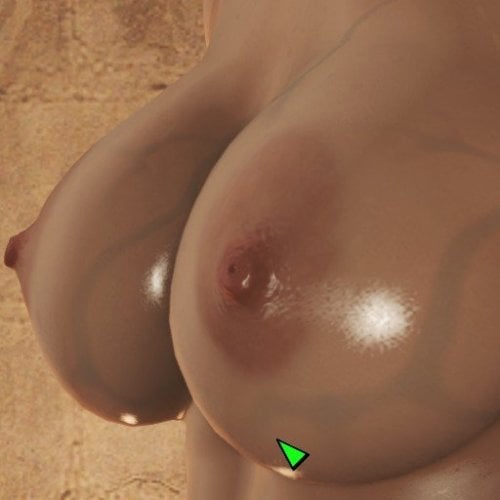
Description At last, some LooksMenu overlays for JaneBody as I couldn't find any. This is a simple, sloppy port of pema123's breast veins overlays made for Skyrim. Currently, you have six options, where there's two variants of each pattern. There's a loose version and a bsa-packed version. I recommend using the latter as it is much smaller in file size. Don't forget to activate the plugin JBOverlays.esp! Credits pema123 for creating the original textures and having open file permissions krisser143 for "How to make LooksMenu body overlays" tutorial Tools used GIMP Material Editor by Ousnius -
Version 1.0.0
1806 downloads
Alpia Slave Tattoos - Fallout 4 port (again) Yeah this thing used to be deleted, more about this at the bottom of the description This mod adds... a lot of tattos, made By Alpia, into fallout 4's looksmenu system! uhh dirty plug, follow me on bsky for my screens :3 >>preety women here<< Unlike in skyrim all of these just appear in your looksmenu's overlay tab because there isn't a folder system for it or anything like that, so its annoying to navigate, im sorry for that Tattoos are 4k with the face ones being 2k in size. After unpacking the file size is about 13 gigabytes so i suggest you head to the properties window in explorer and select the advanced option in attributes, then select compress folder and apply The face tattoos will ONLY work with 2k faces unless you decrease their resolution through photoshop or something spicydoritos actually came around and posted the 1k face textures in the thread, its the first message in fact, if you download it make sure to thank them cus i couldn't be bothered to downsize the textures lol This modpack does NOT have the recently added tats, as this was made over a year ago, maybe ill do them one day Credits: Alpia - duh, made the thing, i just ported it JB. - helping me understand the overlay system with me using his mod as a template for this Mzmoro - letting me rant about f4's shitty overlay system Chatgpt - writing a powershell script that made the .json for looksmenu (yes it was vibecoded, yes it would've been faster to make it myself rather than fixing its trash script) SpicyDoritos - Making a 1k version of the face tattoos on the original upload of this mod's page (im sorry i deleted ur work) InvictusBlade - adding support for this into his random overlay framework (again, before i deleted this) now, for the elephant in the room this mod was originally deleted due to me having concerns about the morality of spreading it, i was also pressured into it by someone i won't name. However, that passed and now i wish to reupload the mod, not even because its mean to the people that worked on this like alpia and spicydoritos, moreso because i hate when mods dissapear from the internet only to be shared among select few, so like, heres the thing oh and no i won't share the preset, i did that once and someone told me they made my character pregnant. never again 😭 -
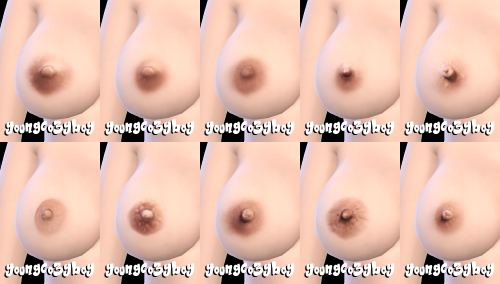
Version 1.0.1
14978 downloads
Simple nipples overlay for Female sim (Based on EvE 9+) Find in Skin Detail, Mole (Right Cheek) For EvE 9+ Shape Teen - Elder -
Female Nipples overlay View File Simple nipples overlay for Female sim (Based on EvE 9+) Find in Skin Detail, Mole (Right Cheek) For EvE 9+ Shape Teen - Elder Submitter youngcozyboy Submitted 05/29/26 Category Body Parts Requirements
-
LooksMenu Breast Vein Overlays View File Description At last, some LooksMenu overlays for JaneBody as I couldn't find any. This is a simple, sloppy port of pema123's breast veins overlays made for Skyrim. Currently, you have six options, where there's two variants of each pattern. There's a loose version and a bsa-packed version. I recommend using the latter as it is much smaller in file size. Don't forget to activate the plugin JBOverlays.esp! Credits pema123 for creating the original textures and having open file permissions krisser143 for "How to make LooksMenu body overlays" tutorial Tools used GIMP Material Editor by Ousnius Submitter DragAndPlace Submitted 05/14/26 Category Models & Textures Requirements LooksMenu, JaneBod, CBBE (or its derivatives)
-
overlay LooksMenu Tanline Overlays
DragAndPlace posted a topic in Downloads - Fallout 4 Adult & Sex Mods
LooksMenu Tanline Overlays View File Description This mod adds 3 LooksMenu overlays for men and 4 for women for you to add. At first, their intensity is very little and are hardly visible on darker skins. Worry not, you can pile them up by adding them multiple times via LooksMenu to get a greater effect. Mix and match! They work for BodyTalk, CBBE (as well as TWB and likely Fusion Girl) and JaneBod (and its extended version, of course). There's two versions of this file: one with loose files and one packed. I highly recommend the latter due to a vastly reduced file size. Unless you use JaneBod, download the cbbe-* package. Credits Monno for creating the bikini some overlays were based on and aubrii for porting it to FO4. DemiDemonArt for BodyTalk v4 and its outfits. Caliente for creating CBBE. Nightasy for creating JaneBod. dup3w4sh1ngt0n for creating Vanilla Wares, from which I based the underwear overlays. Permissions Feel free to use any part of this mod for whatever purpose! Credits, of course, would be appreciated; but not needed. Tools used GIMP Blender Material Editor by Ousnius Submitter DragAndPlace Submitted 05/17/26 Category Models & Textures Requirements LooksMenu, BodyTalk v4 (or similar, e.g A-Body V2), CBBE (or derivatives, e.g, TWB or Fusion Girl) or JaneBod -
So I'm having an issue where a mod and I'm not sure which one is randomly applying an overlay to my entire character but it doesn't have a texture so it just comes up purple, if I open up racemenu to check it it turns white and just says default instead of blank like my other ones do which is strange is there a way in the console or like the debug section of a mod to check what mod is applying which overlay or something as checking in slavetats just says external
-
 A long time ago I came across a mod that had Halloween themed skins. I can't remember if it was just skins, textures, or a separate race mod. But I recall a couple of designs being included such as one that makes the body look stitched together, one that makes the body look a bit zombified, etc. It was on nexus but none of the searches I've tried have it showing up. It must have been removed or purged. Because I used to see it quite frequently since my early modding days.


