Search the Community
Showing results for tags 'dynamic'.
Found 7 results
-
 One day I woke up and was like let's see what this DAR (Dynamic Animation Replacer) thingy is about so I went and downloaded DAR and everything worked fine. Now time to download some animations, let's start with something simple. Dynamic Sitting Idles Mixed virsion was chosen as the beta test. Lunched the game and.... the image happened. I also recived the same error for male animation. Welp... time to trouble shoot. I ran FNIS like six more times same happened. Deleted literally every other idle or animation replacer I had... nothing. OK... maybe this is just an annoying thing I have to deal with in the name of dynamic animations. I pressed ok and the T Pose was solved no T posing so.. it's not a FNIS error but the thing was the the dynamic sitting also didn't work. it only played the default sitting animation everytime. With and without fancy stuff. So... Any ideas? Solved: DAR animation limit... gues they have to make a DAR XXL virsion like FINIS or remove the hard limit For Normal use it's compeletly servicable just not for peopel with a lot of animations.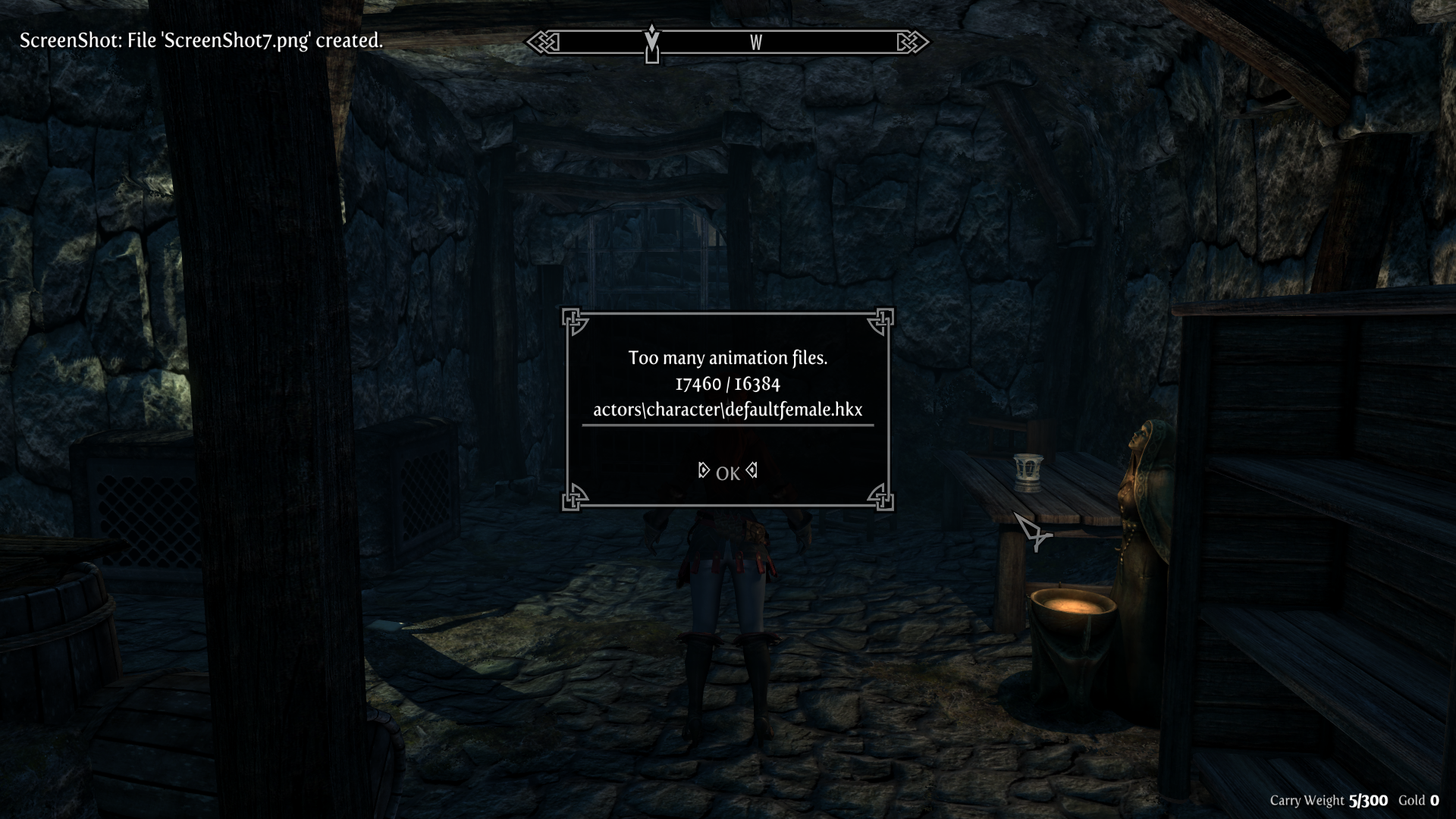
-
DYNAMIC MODESTY (Please let me know if I seem to have forgotten anything or something seems wrong!) IMPORTANT NOTE!!! Dynamic Modesty is a female-only feature and requires Dynamic Feminine Female Modesty Animations (aka DFFMA) from Nexus or Brimming Arousal Reveals Everything (BARE), otherwise it will be disabled in the MCM. Any other mods that have covering animations such as Sexlab Survival, Deviously Cursed Loot, some of Baka Factory's mods, and so on CURRENTLY DO NOT use Advanced Nudity Detection's modesty system (and probably never will). At the time of writing this guide, DFFMA version 4.0 is required, and Advanced Nudity detection must overwrite any conflicting DFFMA files. If a new version of DFFMA is released, it might not be compatible with AND depending on what was changed. If you DON'T want to use Dynamic Modesty and want to keep DFFMA's original functionality, then either disallow AND from overwriting conflicting files or simply reset DFFMA back to default when in-game via the OAR (SHIFT+O) menu. What does Dynamic Modesty do? What causes female characters to cover themselves? What are Modesty Ranks? Dynamic Modesty and NPCs Modesty Randomization Hardcore Mode
-
 I'm wondering if there's a mod somewhere that can control the player's weight slider. I'm specifically trying to find one that does it without my input. maybe doing it in a cycle or with a delay. I have came across several, but they mostly use bodymorpth sliders, not the character Weight slider itself:
 -
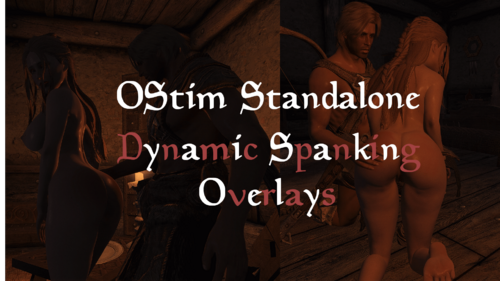
 OStim Standalone - Dynamic Spanking Overlays View File The mod you've all been waiting for! XD Jokes aside, this is a VERY BASIC mod at this stage. It uses your 1st & 2nd body overlay slots for the left & right butt spank overlays respectively. I thought I would upload it in the meantime for anyone who wants to use it, and I'll be developing it further over time. Table Of Contents: Overview Requirements Optional Files Recommended Features Frequently Asked Questions (FAQ) (Load Order, NPC/Follower support, ESL) Mod's Used Overview As mentioned above, currently this will use your 1st and 2nd body overlay slots for a left & right butt cheek spank overlay. 1st body slot = left butt cheek spank overlay 2nd body slot = right butt cheek spank overlay Set the opacity/alpha of those overlays to 0 to begin with, and they will be increased during Ostim spanking scenes. Basically you can choose whatever overlay you want, and in an OStim scene with spanking, it'll increase the opacity of those overlays. Requirements OStim Standalone - Advanced Adult Animation Framework RaceMenu SkyUI - for Mod Configuration Menu (MCM) Optional Files Billyy's animations for Ostim Standalone - Spanking Scene Adjustments.rar FOR VERSION 2.1.0 ONLY. A patch will be provided for their latest version soon For Billyy's animations for Ostim Standalone Adjusts their spanking scenes to LEFT, RIGHT, or IDLE spanking scenes Nibbles' animations for Ostim Standalone - Spanking Scene Adjustments.rar For version 2.2.0. Hasn't been tested on older versions. For Nibbles' animations for Ostim Standalone Adjusts their CHAIR spanking scenes to LEFT, RIGHT, or IDLE spanking scenes. Open Animations Romance and Erotica - Spanking Scene Adjustments.rar For version 1.52.1. Hasn't been tested on older versions. Load after Open Animations Romance and Erotica (OARE). Adjusts their spanking animations to LEFT spanking designated animations. Lovemaking Compendium for OStim Standalone - Spanking Scene Adjustments.rar Should work on v1.13/1.13.17 and newer. Tested on 1.14 as well. For Lovemaking Compendium for OStim Standalone Recommended RaceMenu Overlays Body Blushing - Racemenu Overlays - 3BA - CBBE - BHUNP - I'm using their "ass" & "BONUS" butt overlays. Additional Spanking Animations Open Animations Romance and Erotica for OStim Standalone (OARE) - see below for note about sounds Lovemaking Compendium for OStim Standalone Billyy's animations for Ostim Standalone Nibbles' animations for Ostim Standalone Other Mods (mods I recommend using along this mod) Ostim Standalone Sound Overhaul - includes nice spank sounds if I'm not mistaken among many other great sounds. Note that they don't always play for all animations, such as OARE's spanking animations. According to the author this is because of a change to OStim Standalone and they'll need to edit their hkx animation files to update the annotations which apparently isn't a simple task. Female Moan Voicesets For Ostim Standalone - Also get the patch from the above mod if you use this. Lots of great sounds/voices to choose from, and like the mod above, will play moans during spanking animations. Beach Body - Skin Tanning and Paling and Overlay Fading - Another mod of mine that you may like for immersion. Also you can easily change the opacity of your RaceMenu overlays in the MCM settings without having to enter RaceMenu. Advanced Users (mods that don't add overlays to RaceMenu. If you know what you're doing, you could use the overlays from these mods: Spanked pack for Slavetats on LoversLab Features The overlays will be increased during Ostim spanking scenes The opacity of your 1st RaceMenu body slot (LEFT BUTT) & 2nd body slot (RIGHT BUTT) will be increased during OStim spanking scenes. Of course this depends if the scene has distinguished between a left and right butt spanking. I've provided optional files to patch some scenes from some mods. Please ensure they are loaded after the mods they change.Also, please be aware that they may need to be updated after the affected mod updates. I'll do my best to keep the files updated. All you'll have to do is ensure the "name" inside the scene JSON contains "left", "right", or "idle". Regarding scene names that contain "IDLE" (i.e. no actual spanking happening in the scene), which many do, this is used so that it won't increase the opacity of any overlays. Eventually you'll be able to configure the RaceMenu overlays used in the MCM. Also, Opacity/alpha is between 0-100. The overlays will increase by 10 points for each animation. In the future this will be able to be configured in the MCM. The overlays will slowly fade away overtime That's right. Currently it's 0.1 every 5 seconds. In the future this will be able to be configured in the MCM. If you use my Beach Body - Skin Tanning and Paling and Overlay Fading mod, disable the 1st & 2nd body overlays, so that it doesn't also decrease the overlay opacities. Or don't, if you want/need that any reason. You can also use the Beach Body mod to easily change the alpha/opacity of the overlays without having to go into RaceMenu. Helpful if one of the overlays increases its opacity when it shouldn't have e.g. due to a OStim scene not having distinguished between a left, right, or idle spanking animation. Note that if an overlay is disabled in Beach Body, it'll show the alpha/opacity as 0, which it shouldn't actually do and may be a bug that I'll need to fix. Frequently Asked Questions (FAQ) What's with the name? I couldn't think of anything better at the time and ... HAHAHA (Now better thanks to Tiress! xD That's what you get for creating a mod at 5am in the morning o.0) Eventually this mod may become a Sex Markings mod and cover all kinds of markings instead of just butt spank overlays. Load Order? After Ostim Standalone & RaceMenu. If you use any of the optional files, they will need to be loaded after the mods they affect. How to enable the mod? Go to Mod Configuration Menu (MCM) -> OStim Standalone - Dynamic Spanking -> Settings -> Enable NPC/Follower support? Not at the moment, sorry :'(. Player only. Some Ostim scenes don't distinguish between a left & right butt spank Some OStim scenes don't distinguish between a left & right butt spank (at least in the scene name which we're using, which I think is better),so they will need to be updated. I'm providing a few modified scene files as optional files. Load those after the affected mods. Note that when Ostim Standalone / other Ostim mods/animation mods update, those scene files may need to be updated. I'll try to keep updated files available, and I'm sure other users will help with that, until we find a better way if there is one. If you encounter any animations which don't increase the correct overlay, please provide a screenshot of the animation in use (with the menu open so it shows the animation info) I don't have a separate overlay for left & right butt spanks If you don't have a separate overlay for the left & right butt cheek that's okay, just use the 1st body overlay. Set the 2nd body overlay to "default"/"default.dds" as currently the mod will try to use it if not. ESL Flagged? Not yet. Once it's finished it will be. How much do the overlays increase in opacity during ostim scenes? Opacity/alpha is between 0-100. It will increase by 10 points for each animation. In the future this will be able to be configured in the MCM. How accurate is the application (i.e. the timing)? Depending on the animation, it may increase the opacity slightly before it's supposed to. Over time this may be able to be improved. The overlays aren't increasing or decreasing in opacity If the overlays aren't increasing in opacity, then it may be because the animation isn't a spanking animation or it hasn't been marked as a spanking animation correctly (as far as our mod is concerned). Please see "Some Ostim scenes don't distinguish between a left & right butt spank" above. If however it definitely is a spanking animation and it should be increasing the opacity, then try refreshing the mod by going to Mod Configuration Menu (MCM) -> OStim Standalone - Dynamic Spanking -> Settings -> Disable and then Enable the mod to refresh it. Mod's used in the screenshots? See the bottom of my Beach Body - Skin Tanning and Paling and Overlay Fading for many of them. Some not listed there that I'm currently using are: Your Nord Friend's Hot Mom - Highpoly Nord Preset Milfactory - Critical Mass - BHUNP Bodyslide Preset Body Blushing - Racemenu Overlays - 3BA - CBBE - BHUNP Ostim Standalone Sound Overhaul - includes nice spank sounds if I'm not mistaken among many other great sounds. Note that they don't always play for all animations, such as OARE. According to the OARE author it sounds like this is because of a change to Ostim Standalone and they'll need to edit their hkx animation files to update the annotations which apparently isn't a simple task. Female Moan Voicesets For Ostim Standalone - Also get the patch from the above mod if you use this. Lots of great sounds/voices to choose from, and like the mod above, will play moans during spanking animations. Pandorable's NPCs - males 3 - For Cosnach shown in the screenshots. I use all of Pandorable's NPC mods ^^ Please check them out! Submitter RaddusX Submitted 05/08/2025 Category Adult Mods
 -
Dynamic Body Hair Overlays View File Additional Screenshots (due to the (i think) well known issue with getting file screenshots in the desired order): Before & After example MCM Settings Player - Body Overlay Settings Player - Enabled Body Overlay Settings Import/Export Settings Table of Contents Requirements Optional Files Recommended Features Planned Features Video Demonstration Mod Setup Frequently Asked Questions (FAQ) and Common Issues Translation Authors Mods used in Screenshots/Videos Credits & Supporters Requirements JContainers RaceMenu SkyUI (for Mod Configuration Menu) Backported Extended ESL Support (Optional) (Only if your Skyrim version is older than 1.6.1130) Open Animation Replacer (Optional) (If you want your custom animation(s) to play while shaving). The mod doesn't come with any animations at the moment. You'll need to add your own. See optional files below. Main File It's the one called "Dynamic Body Hair Overlays.rar" Optional Files Dynamic Body Hair Overlays - X Seconds Shaving Sound: Different lengths for the shaving sound. The one in the main file is 5 seconds long. I've provided versions for 10, 15, 20, 25, 30, 35, and 37 (original file length) seconds. Dynamic Body Hair Overlays - Your Custom Shaving Sound Use this to add your own custom sound so that it doesn't get overwritten in future updates. You just need to overwrite the "shaving.wav" file. The name cannot change at the moment. Dynamic Body Hair Overlays - Your Custom Shaving Animations For Open Animation Replacer. Use this to add your own animation that will play when shaving (male or female). Your "hkx" file needs to go in the "_variants_mt_idle" folder in the "male" & "female" folders. You can name your hkx files anything you want. You can also add as many animations as you want and they will play randomly. Recommended Nordic Warmaiden Body Hair (armpit, back, belly, & pubic/butt hair) Pubes Forever SSE (pubic hair) Features Growing Hair - Your body hair overlays will increase in opacity based on the settings. Shaveable Hair - Press the key in the settings and your body hair overlays will have their opacities decreased based on the settings. Planned Features (Planned) Shaving animation(s) - However I don't know how to make animations yet (something I want to learn how to do), so unless there are any out there I'm unaware of, or if someone else can make any, they might not be added for a while. I was thinking of an animation where the character uses the "scissors" from https://elderscrolls.fandom.com/wiki/Embalming_Tool#Trivia (Planned) Shaving happens instantly (noticeable only if Fade to Black is disabled). I plan to improve this in the future. (Planned) Face, hand, feet body overlay support. This means beards could be supported in the future assuming they are added as racemenu overlays. I'm not aware if such overlays exist at the moment. (Planned) NPC/Follower support (Maybe) Ability to change from one overlay to another after the opacity has reached a certain value. At the moment we're just increasing/decreasing each overlay. (Maybe) Related to the above, being able to fine tune what is shaved when shaving. Currently, when shaving, it'll decrease all of the enabled opacities to their minimum opacity in the settings. Please submit your own ideas and I will consider them! Video Demonstration Mod Setup 1/ Add Body Overlays in RaceMenu (If you already have the body overlays you want to use you can skip this part and go to 2/) Add some body overlays to your character in RaceMenu (tip: type the tilde (~) key to access the Console, then type showracemenu, then go to the "Body Paint" tab and add some overlays. Once done, save your character). If the Body Paint tab is empty, or to change the amount of paints/overlays you can use, you'll need to edit the "skee64.ini" file provided by RaceMenu. I recommend making a copy of this file, and adding it to a new empty mod in your load order (ensuring it loads after RaceMenu), and then making your changes to that file. In the "skee64.ini" file, find these lines: [Overlays/Body] ; "Body [Ovl#]" and "Body [SOvl#]"; Determines how many body overlays there should be The default should be 6. To change the number of allowed overlays, change "iNumOverlays" to something else, e.g. iNumOverlays=10 or iNumOverlays=20 2/ Go to Mod Configuration Menu (MCM) -> Dynamic Body Hair Overlays 3/ Click the "Player - Body Overlays" page and make sure your overlays appear. If they don't, double check they were added in RaceMenu. If it still doesn't show, please open a bug report. You can ignore the greyed out overlays that say "default.dds". Those arejust overlays in RaceMenu that haven't been customized. Click the empty box next to the overlay names to enable them. You can alsomanually change their current opacities on the right side of the page. 4/ Go to the "Player - Enabled Body Overlays". Here you will be able to tweak enabled body overlays further. You can set the minimum & maximum amount that the overlays can increase in opacity during each update, as well as the minimum and maximum opacity. 5/ Go to the "Settings" page and change them to your liking. When you're finished be sure to enable the mod! 6/ Once you're happy with the settings, I recommend going to the "Import/Export" page, and exporting your settings. Your exported settings can be found at "Documents\My Games\Skyrim Special Edition\JCUser\Dynamic Body Hair Overlays\settings.json". I recommend manually backing up this file as well. 7/ If you ever add or remove any overlays in RaceMenu, please make sure you go into the "Player - Body Overlays" & "Player - Enabled Body Overlays" mod pages to make sure everything looks correct. 8/ If you change sex or preset, see 7/ 9/ Enjoy! Frequently Asked Questions (FAQ) and Common Issues Please see Frequently Asked Questions (FAQ) and Common Issues Translation Authors Translation files can be found in the mod's folder at "Interface\Translations" I think I've added all the languages that are supported by the game, so please let me know if one is missing. If you're a translator, feel free to translate the mod, and you caneven upload your translation as your own mod (requiring this mod). I'll include the translation in a future update, credit you, and link to your mod. Your mod's translation will take priority. Mod's used in the Screenshots/Videos See the bottom of my Beach Body - Skin Tanning and Paling and Overlay Fading & OStim Standalone - Dynamic Spanking Overlays mods for details. Mods used for the Orc in the first few screenshots: UBE 2.0 -- Ultimate Body Enhancer 2.0 Yuriko - UBE RaceMenu Preset Perfectly Peach - UBE Bodyslide Preset - Thicc Hourglass Nordic Warmaiden Body Hair - UBE (UBE Discord) Zhizhen Female Skin - UBE (using Sayble Skin for UBE 2.0 brighter version for the normal map for the body, but I can't remember if it was active when I took the screenshots ^^) Please let me know if I missed anything or if you'd like to know what something is. As soon as I remember I've forgotten something I update this list so it may change a lot ^^ Credits Skyrim Script Extender (SKSE64) RaceMenu SkyUI JContainers Nordic Warmaiden Body Hair - I use this one a lot Creation Kit Platform Extended for Skyrim SSEEdit Scissors Sound Supporters Thank you to all my supporters! Gold Members JR2992 Submitter RaddusX Submitted 07/25/2025 Category Adult Mods Requirements See description. Regular Edition Compatible No Install Instructions
-
Version 1.0.1
2491 downloads
The mod you've all been waiting for! XD Jokes aside, this is a VERY BASIC mod at this stage. It uses your 1st & 2nd body overlay slots for the left & right butt spank overlays respectively. I thought I would upload it in the meantime for anyone who wants to use it, and I'll be developing it further over time. Table Of Contents: Overview Requirements Optional Files Recommended Features Frequently Asked Questions (FAQ) (Load Order, NPC/Follower support, ESL) Mod's Used Overview As mentioned above, currently this will use your 1st and 2nd body overlay slots for a left & right butt cheek spank overlay. 1st body slot = left butt cheek spank overlay 2nd body slot = right butt cheek spank overlay Set the opacity/alpha of those overlays to 0 to begin with, and they will be increased during Ostim spanking scenes. Basically you can choose whatever overlay you want, and in an OStim scene with spanking, it'll increase the opacity of those overlays. Requirements OStim Standalone - Advanced Adult Animation Framework RaceMenu SkyUI - for Mod Configuration Menu (MCM) Optional Files Billyy's animations for Ostim Standalone - Spanking Scene Adjustments.rar FOR VERSION 2.1.0 ONLY. A patch will be provided for their latest version soon For Billyy's animations for Ostim Standalone Adjusts their spanking scenes to LEFT, RIGHT, or IDLE spanking scenes Nibbles' animations for Ostim Standalone - Spanking Scene Adjustments.rar For version 2.2.0. Hasn't been tested on older versions. For Nibbles' animations for Ostim Standalone Adjusts their CHAIR spanking scenes to LEFT, RIGHT, or IDLE spanking scenes. Open Animations Romance and Erotica - Spanking Scene Adjustments.rar For version 1.52.1. Hasn't been tested on older versions. Load after Open Animations Romance and Erotica (OARE). Adjusts their spanking animations to LEFT spanking designated animations. Lovemaking Compendium for OStim Standalone - Spanking Scene Adjustments.rar Should work on v1.13/1.13.17 and newer. Tested on 1.14 as well. For Lovemaking Compendium for OStim Standalone Recommended RaceMenu Overlays Body Blushing - Racemenu Overlays - 3BA - CBBE - BHUNP - I'm using their "ass" & "BONUS" butt overlays. Additional Spanking Animations Open Animations Romance and Erotica for OStim Standalone (OARE) - see below for note about sounds Lovemaking Compendium for OStim Standalone Billyy's animations for Ostim Standalone Nibbles' animations for Ostim Standalone Other Mods (mods I recommend using along this mod) Ostim Standalone Sound Overhaul - includes nice spank sounds if I'm not mistaken among many other great sounds. Note that they don't always play for all animations, such as OARE's spanking animations. According to the author this is because of a change to OStim Standalone and they'll need to edit their hkx animation files to update the annotations which apparently isn't a simple task. Female Moan Voicesets For Ostim Standalone - Also get the patch from the above mod if you use this. Lots of great sounds/voices to choose from, and like the mod above, will play moans during spanking animations. Beach Body - Skin Tanning and Paling and Overlay Fading - Another mod of mine that you may like for immersion. Also you can easily change the opacity of your RaceMenu overlays in the MCM settings without having to enter RaceMenu. Advanced Users (mods that don't add overlays to RaceMenu. If you know what you're doing, you could use the overlays from these mods: Spanked pack for Slavetats on LoversLab Features The overlays will be increased during Ostim spanking scenes The opacity of your 1st RaceMenu body slot (LEFT BUTT) & 2nd body slot (RIGHT BUTT) will be increased during OStim spanking scenes. Of course this depends if the scene has distinguished between a left and right butt spanking. I've provided optional files to patch some scenes from some mods. Please ensure they are loaded after the mods they change.Also, please be aware that they may need to be updated after the affected mod updates. I'll do my best to keep the files updated. All you'll have to do is ensure the "name" inside the scene JSON contains "left", "right", or "idle". Regarding scene names that contain "IDLE" (i.e. no actual spanking happening in the scene), which many do, this is used so that it won't increase the opacity of any overlays. Eventually you'll be able to configure the RaceMenu overlays used in the MCM. Also, Opacity/alpha is between 0-100. The overlays will increase by 10 points for each animation. In the future this will be able to be configured in the MCM. The overlays will slowly fade away overtime That's right. Currently it's 0.1 every 5 seconds. In the future this will be able to be configured in the MCM. If you use my Beach Body - Skin Tanning and Paling and Overlay Fading mod, disable the 1st & 2nd body overlays, so that it doesn't also decrease the overlay opacities. Or don't, if you want/need that any reason. You can also use the Beach Body mod to easily change the alpha/opacity of the overlays without having to go into RaceMenu. Helpful if one of the overlays increases its opacity when it shouldn't have e.g. due to a OStim scene not having distinguished between a left, right, or idle spanking animation. Note that if an overlay is disabled in Beach Body, it'll show the alpha/opacity as 0, which it shouldn't actually do and may be a bug that I'll need to fix. Frequently Asked Questions (FAQ) What's with the name? I couldn't think of anything better at the time and ... HAHAHA (Now better thanks to Tiress! xD That's what you get for creating a mod at 5am in the morning o.0) Eventually this mod may become a Sex Markings mod and cover all kinds of markings instead of just butt spank overlays. Load Order? After Ostim Standalone & RaceMenu. If you use any of the optional files, they will need to be loaded after the mods they affect. How to enable the mod? Go to Mod Configuration Menu (MCM) -> OStim Standalone - Dynamic Spanking -> Settings -> Enable NPC/Follower support? Not at the moment, sorry :'(. Player only. Some Ostim scenes don't distinguish between a left & right butt spank Some OStim scenes don't distinguish between a left & right butt spank (at least in the scene name which we're using, which I think is better),so they will need to be updated. I'm providing a few modified scene files as optional files. Load those after the affected mods. Note that when Ostim Standalone / other Ostim mods/animation mods update, those scene files may need to be updated. I'll try to keep updated files available, and I'm sure other users will help with that, until we find a better way if there is one. If you encounter any animations which don't increase the correct overlay, please provide a screenshot of the animation in use (with the menu open so it shows the animation info) I don't have a separate overlay for left & right butt spanks If you don't have a separate overlay for the left & right butt cheek that's okay, just use the 1st body overlay. Set the 2nd body overlay to "default"/"default.dds" as currently the mod will try to use it if not. ESL Flagged? Not yet. Once it's finished it will be. How much do the overlays increase in opacity during ostim scenes? Opacity/alpha is between 0-100. It will increase by 10 points for each animation. In the future this will be able to be configured in the MCM. How accurate is the application (i.e. the timing)? Depending on the animation, it may increase the opacity slightly before it's supposed to. Over time this may be able to be improved. The overlays aren't increasing or decreasing in opacity If the overlays aren't increasing in opacity, then it may be because the animation isn't a spanking animation or it hasn't been marked as a spanking animation correctly (as far as our mod is concerned). Please see "Some Ostim scenes don't distinguish between a left & right butt spank" above. If however it definitely is a spanking animation and it should be increasing the opacity, then try refreshing the mod by going to Mod Configuration Menu (MCM) -> OStim Standalone - Dynamic Spanking -> Settings -> Disable and then Enable the mod to refresh it. Mod's used in the screenshots? See the bottom of my Beach Body - Skin Tanning and Paling and Overlay Fading for many of them. Some not listed there that I'm currently using are: Your Nord Friend's Hot Mom - Highpoly Nord Preset Milfactory - Critical Mass - BHUNP Bodyslide Preset Body Blushing - Racemenu Overlays - 3BA - CBBE - BHUNP Ostim Standalone Sound Overhaul - includes nice spank sounds if I'm not mistaken among many other great sounds. Note that they don't always play for all animations, such as OARE. According to the OARE author it sounds like this is because of a change to Ostim Standalone and they'll need to edit their hkx animation files to update the annotations which apparently isn't a simple task. Female Moan Voicesets For Ostim Standalone - Also get the patch from the above mod if you use this. Lots of great sounds/voices to choose from, and like the mod above, will play moans during spanking animations. Pandorable's NPCs - males 3 - For Cosnach shown in the screenshots. I use all of Pandorable's NPC mods ^^ Please check them out! -
Version 1.0.1
962 downloads
Additional Screenshots (due to the (i think) well known issue with getting file screenshots in the desired order): Before & After example MCM Settings Player - Body Overlay Settings Player - Enabled Body Overlay Settings Import/Export Settings Table of Contents Requirements Optional Files Recommended Features Planned Features Video Demonstration Mod Setup Frequently Asked Questions (FAQ) and Common Issues Translation Authors Mods used in Screenshots/Videos Credits & Supporters Requirements JContainers RaceMenu SkyUI (for Mod Configuration Menu) Backported Extended ESL Support (Optional) (Only if your Skyrim version is older than 1.6.1130) Open Animation Replacer (Optional) (If you want your custom animation(s) to play while shaving). The mod doesn't come with any animations at the moment. You'll need to add your own. See optional files below. Main File It's the one called "Dynamic Body Hair Overlays.rar" Optional Files Dynamic Body Hair Overlays - X Seconds Shaving Sound: Different lengths for the shaving sound. The one in the main file is 5 seconds long. I've provided versions for 10, 15, 20, 25, 30, 35, and 37 (original file length) seconds. Dynamic Body Hair Overlays - Your Custom Shaving Sound Use this to add your own custom sound so that it doesn't get overwritten in future updates. You just need to overwrite the "shaving.wav" file. The name cannot change at the moment. Dynamic Body Hair Overlays - Your Custom Shaving Animations For Open Animation Replacer. Use this to add your own animation that will play when shaving (male or female). Your "hkx" file needs to go in the "_variants_mt_idle" folder in the "male" & "female" folders. You can name your hkx files anything you want. You can also add as many animations as you want and they will play randomly. Recommended Nordic Warmaiden Body Hair (armpit, back, belly, & pubic/butt hair) Pubes Forever SSE (pubic hair) Features Growing Hair - Your body hair overlays will increase in opacity based on the settings. Shaveable Hair - Press the key in the settings and your body hair overlays will have their opacities decreased based on the settings. Planned Features (Planned) Shaving animation(s) - However I don't know how to make animations yet (something I want to learn how to do), so unless there are any out there I'm unaware of, or if someone else can make any, they might not be added for a while. I was thinking of an animation where the character uses the "scissors" from https://elderscrolls.fandom.com/wiki/Embalming_Tool#Trivia (Planned) Shaving happens instantly (noticeable only if Fade to Black is disabled). I plan to improve this in the future. (Planned) Face, hand, feet body overlay support. This means beards could be supported in the future assuming they are added as racemenu overlays. I'm not aware if such overlays exist at the moment. (Planned) NPC/Follower support (Maybe) Ability to change from one overlay to another after the opacity has reached a certain value. At the moment we're just increasing/decreasing each overlay. (Maybe) Related to the above, being able to fine tune what is shaved when shaving. Currently, when shaving, it'll decrease all of the enabled opacities to their minimum opacity in the settings. Please submit your own ideas and I will consider them! Video Demonstration Mod Setup 1/ Add Body Overlays in RaceMenu (If you already have the body overlays you want to use you can skip this part and go to 2/) Add some body overlays to your character in RaceMenu (tip: type the tilde (~) key to access the Console, then type showracemenu, then go to the "Body Paint" tab and add some overlays. Once done, save your character). If the Body Paint tab is empty, or to change the amount of paints/overlays you can use, you'll need to edit the "skee64.ini" file provided by RaceMenu. I recommend making a copy of this file, and adding it to a new empty mod in your load order (ensuring it loads after RaceMenu), and then making your changes to that file. In the "skee64.ini" file, find these lines: [Overlays/Body] ; "Body [Ovl#]" and "Body [SOvl#]"; Determines how many body overlays there should be The default should be 6. To change the number of allowed overlays, change "iNumOverlays" to something else, e.g. iNumOverlays=10 or iNumOverlays=20 2/ Go to Mod Configuration Menu (MCM) -> Dynamic Body Hair Overlays 3/ Click the "Player - Body Overlays" page and make sure your overlays appear. If they don't, double check they were added in RaceMenu. If it still doesn't show, please open a bug report. You can ignore the greyed out overlays that say "default.dds". Those arejust overlays in RaceMenu that haven't been customized. Click the empty box next to the overlay names to enable them. You can alsomanually change their current opacities on the right side of the page. 4/ Go to the "Player - Enabled Body Overlays". Here you will be able to tweak enabled body overlays further. You can set the minimum & maximum amount that the overlays can increase in opacity during each update, as well as the minimum and maximum opacity. 5/ Go to the "Settings" page and change them to your liking. When you're finished be sure to enable the mod! 6/ Once you're happy with the settings, I recommend going to the "Import/Export" page, and exporting your settings. Your exported settings can be found at "Documents\My Games\Skyrim Special Edition\JCUser\Dynamic Body Hair Overlays\settings.json". I recommend manually backing up this file as well. 7/ If you ever add or remove any overlays in RaceMenu, please make sure you go into the "Player - Body Overlays" & "Player - Enabled Body Overlays" mod pages to make sure everything looks correct. 8/ If you change sex or preset, see 7/ 9/ Enjoy! Frequently Asked Questions (FAQ) and Common Issues Please see Frequently Asked Questions (FAQ) and Common Issues Translation Authors Translation files can be found in the mod's folder at "Interface\Translations" I think I've added all the languages that are supported by the game, so please let me know if one is missing. If you're a translator, feel free to translate the mod, and you caneven upload your translation as your own mod (requiring this mod). I'll include the translation in a future update, credit you, and link to your mod. Your mod's translation will take priority. Mod's used in the Screenshots/Videos See the bottom of my Beach Body - Skin Tanning and Paling and Overlay Fading & OStim Standalone - Dynamic Spanking Overlays mods for details. Mods used for the Orc in the first few screenshots: UBE 2.0 -- Ultimate Body Enhancer 2.0 Yuriko - UBE RaceMenu Preset Perfectly Peach - UBE Bodyslide Preset - Thicc Hourglass Nordic Warmaiden Body Hair - UBE (UBE Discord) Zhizhen Female Skin - UBE (using Sayble Skin for UBE 2.0 brighter version for the normal map for the body, but I can't remember if it was active when I took the screenshots ^^) Please let me know if I missed anything or if you'd like to know what something is. As soon as I remember I've forgotten something I update this list so it may change a lot ^^ Credits Skyrim Script Extender (SKSE64) RaceMenu SkyUI JContainers Nordic Warmaiden Body Hair - I use this one a lot Creation Kit Platform Extended for Skyrim SSEEdit Scissors Sound Supporters Thank you to all my supporters! Gold Members JR2992