Jump to content

Regular Mods

These Skyrim: Special Edition mods are of a non-adult nature.

1196 files

  1. Housecarls Revamped SE

    A simple port to SE of my first ever "mod". (aww!)
     
    From the original mod page:
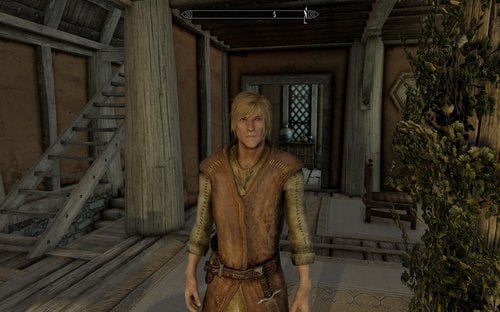
    So in short: all the housecarls are now male. The changes are purely cosmetic. The only change in the SE version is updated meshes and textures and change to Form 44 (whether needed or not *shrug*)
     
    Name Changes:
    Jordis = Yorrick the Sword-Polisher
    Iona = Ian
    Rayya = Rayyan
    Lydia = Lanius
    You can see screenshots of all the housecarls on the original (LE) mod page
     
    Requirements:
    Skyrim SE (so all DLC)
    USSEP
    SexLab FULL SE
    SexLab Aroused Redux SE (+ dependencies)
     
    Highly recommended mods:
    The Manipulator SE
    SexTalk (gay) SE

    1383 downloads

    Submitted

  2. Legacy of the Dragonborn Painting Replacer

    Be sure to Follow me on Lovers Lab!
     
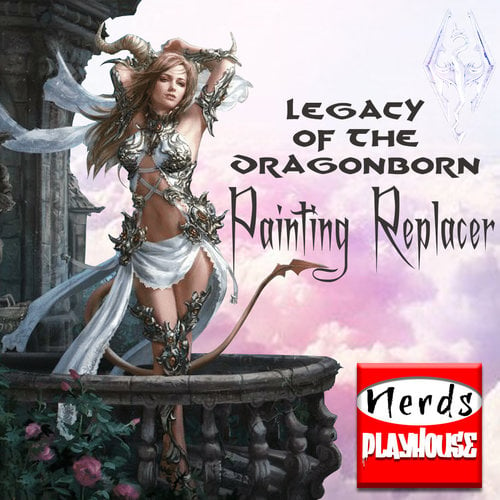
    Legacy of the Dragonborn is my personal favorite when it comes to Skyrim mods. But the paintings you spend hours finding that decorate your beautiful new home, were absolute garbage. 
    So I fixed that with a new painting pack replacer featuring an assortment of downright delectable images from Legend of the Cryptids the card game. One of my favorite artists of all time, he marries beautiful and scantily clad women with fantasy elements that would put any Lord of the Rings movie to shame.
    Don't be the guy showing off his 100% completionist game of Skyrim with flowers and buffalos all over your walls. Upgrade to the sexiest painting pack on Nirn today!

    INSTRUCTIONS:
    Simply drag the Data folder into your Skyrim SE folder, or install the RAR file with Mod Organizer or Mod Manager.

    8926 downloads

    Updated

  3. Creature Framework SE

    This is the Creature Framework conversion from the SE Conversion Tracking thread:
     
    Thanks go to Ep1cL3w7z for allowing me to upload this for the masses, Flowers go to LazyGirl and Tasairis for editing some scripts and making this possible. 
     
    This is NOT an official version! (It seems like it will be the only one thats officially availible)
     
    If you run into problems, first make sure you have the fitting JContainers version for your SKSE version.
     
    Thanks to MadMansGun there is a full installation guide here:
     
     
    If you still have problems visit:
    https://www.loverslab.com/topic/94228-sse-conversion-tracking-mar-16-rev-8/?page=25&tab=comments#comment-2182722
     
    SKSE can be found here:
     
    http://skse.silverlock.org/
     
    JContainers can be found here:
     
    https://www.nexusmods.com/skyrimspecialedition/mods/16495


    758051 downloads

    Updated

  4. Armor and Clothes Patch for RS Children

    Just a simple patch to allow RS Children to wear armors and clothes.
     
     
    -Inspired by the Skyrim versions that almost did the same. (I made this from scratch, but I had a look at his patch first) 
    -I have not tested this patch much, so please post a msg here if something is wrong or missing.
     
     
    Requirements:
    RS Children Overhaul (I have not tried the optional experimental version, it may or may not work.)
     
    Recommended:
    EFF Extesible Follower Overhaul 
    (Enable "Outfit" in MCM menu to be able to equip outfits for NPCs, you can also force recruit them in MCM menu if not having another way to recruit)


    CREDITS:
    Ranaline for RS Children Overhaul.
    PlagueHush for the Skyrim version of basically the same patch.

    4131 downloads

    Submitted

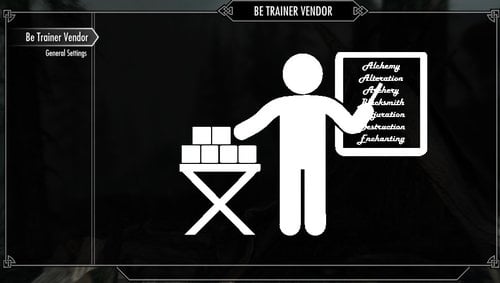
  5. Be Trainer Vendor SSE (aka BTV)

    Be Trainer Vendor SSE (aka BTV)
     
    A simple mod that allows almost any actor (even creatures if wanted) to offer Trainer & Vendor services.
    BTV is a standalone mod and does NOT EDIT or touch any VANILLA game assets at all.
     
    Originally I wrote this for oldrim a while ago.
    While setting up SSE I discovered I still had it on one of my drives.
    So thought I'd convert and offer it here on LL for a bit.
     
    Requires:
    SKSE64
    SkyUI
     
    Optional (Recommended):
    Fuz Ro D'oh (for actors that don't have generic shared dialogue which BTV uses)
     
    Install:
    Extract the contents of BTV_SSE.7z to your data directory.
    Enable BTV.esp in your load order and play.
     
    After Install Tip:
    Default when installed any Actor will offer Trainer Vendor services.
    Simply configure via MCM to get things to your preference.
    Point at controls in MCM and read what they are or do.
     
    General Info:
    There are multiple methods you can use to permit or deny actors to offer BTV services.
    These range from basic MCM Presets or by manually adding actors via target and a configurable key press.
    Manually added actors have per actor full control of exactly what they can offer you.
    You can talk to any actor that offers BTV services and tell them not to offer services any more.
    All manually added or ignored actors can be cleared at anytime via MCM options.
    All manually added actors can offer remote training via options listed on there MCM page
    All manually added actors you can also quick travel to them via MCM.
     
    Vendor Info:
    Vendor services can offer one or all types with any actor.
    You can boost the amount of cash that the BTV vendors will have (via MCM).
    You can specify if vendor stock and cash is reset every access (via MCM).
     
    Trainer Info:
    Trainer services still cost the standard amount of money
    Unlike the vanilla trainers you can not pickpocket or take the paid money back.
    Any single actor can offer one up to all types of training services.
    You can configure who offers what type(s) of training for any actor offering BTV services.
    You can specify how many Training Per Level is permitted (only affects BTV trainer dialogue).
    Trainers can be set to offer services that match your level (configurable level crossover via MCM).
    Trainers can can also set to be master 100 trainers ignoring your level (configure in MCM).
     
    MCM Translations:
    BTV has translation files for MCM, but all languages are presently in English only.
    For those that want to translate MCM the translation files can be found in:
    BTV.bsa\Interface\Translations

    Permissions:
    Use BTV or any part of it as you please.
    No need to ask for permission or give credit.
    Source is in the BSA.
     
    For problems, errors or general questions feel free to post.
     
    Enjoy

    561 downloads

    Submitted

  6. Arrow-in-the-knee and other stuff you never missed in Skyrim

    Now that I became a contributer it is time to contribute something....
     
    It has been a long time since i have been working with 3DS Max, so I decided to start with something simple.
     
     
    An arrow in the knee.... 
     
    For all those poor guards who used to be an adventurer like me


    And Ysgramor's soup spoon: It's a fork... You can use it as a dagger.
     

    502 downloads

    Updated

  7. XML Builder

    Author: Reniastyc(天道玄虚)
    Current Version: 1.02E
     
    If you find something wrong, please tell me and then I can solve it.
     
    2018-09-04--1.02E
    --New Preset Rule: Add a attribute [auto] to leave out a void attribute.
    --New Preset Rule: Add a attribute [condition] to leave out a attribute when the selected attribute is void.
    --Update the preset file used the new feature.
    --Add a New Preset to set win10 visual element manifest.
     
    2018-08-23--1.02D
    --Interactive optimization: Optimized the execution logic of some operations and adjusted some of the button functions.
    --New page: Add a page about the basic usage of the program.
    --Adjusting the terms: modified some terms and English translations to make it more relevant.
     
    2018-08-16--1.02C
    --Optimization for UI: If the basic path has been set, when you execute save dialog or open dialog, the initiate directry will be the same.
    --New Preinstall rule: You can set the default file name for a preinstall file by using the attribute [file] in the file header. e.g. <xmlbuilder file="ModuleConfig">
    --BugFix: It may not get the full xml file if you don not change the main tab into Origin Structure tab.
     
    2018-08-15--1.02B
    --Optimization for UI: Adjust the layout.
    --New function: File association added.
    --Optimization: Adjust the loading for multi-language preinstall files.
     
    2018-08-14--1.02A
    --New Preinstall rule: You can make a multi-language preinstall file.
     
    2018-08-10--1.01D
    --BugFix: The Basic Path function may go wrong sometimes.
     
    2018-08-09--1.01C
    --BugFix: when the flag is "file" or "path", xml files may not change.
    --New Function: you can choose a Basic Path, the file path will be a relative path. e.g. When the Basic path = "D:\Test", the File Path "D:\Test\AFile.esp" will be "AFile.esp".
     
    2018-08-06--1.01B
    --New Preinstall rule: if the flag is "option", the tag should also contain the label of each option. e.g. <type flag="option:SelectAny|SelectOnlyOne" tag="Select Type|Select Any|Select Only One"/>
    --BugFix: Attribute Index may go wrong at some time.
     
    For Chinese, here: http://www.9damao.com/thread-133026-1-1.html
     
    Features
    Ubiquitous--You can deal with any type of xml files with a suitable preinstall file.
    Multi-language--You can change UI language with translation file.
     
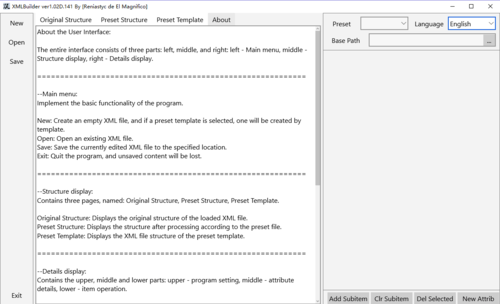
    How to create a module config by this app?


    UI (ver1.02D)

     
    If I use this to read the fomod config file of Module "Know Your Enemy", I can get this:

     
    Then I shall choose a PreInstall File:

     
    And then, I get this: (The Tab turned into PreInstall Struct)

    When I select any Item, I can change the details.

    If I want to create a new module, I will click New in the Left Menu, and then Add Child.
     
    If you want to Add A New FilePlugin, you should Choose A FileGroup, not a FilePlugin.
     
    Notice: if you select a file or a path with the Button"...", remember change it into Relative path.
    e.g. D:\Module\Fomod\ModConfig.xml --> Fomod\ModConfig.xml
     
    How to write a translate file?
     
    That is easy.
    Translate Files are located in Data\Languages\
    You can see Four Files named: Default, English, 简体中文, 繁體中文. Do not change the file named default.
    Open the English.txt and you will see this.
     
    $New    New
    $Open    Open
    $Save    Save
    $Exit    Exit
    $Attrib    Attribute
    $Value    Value
    $Lang    Language
    $PreIn    PreInstall
    $Item    Item
    $AddCI    Add Child
    $ClrCI    Clr Child
    $DelTI    Del Item
    $NewAt    New Attrib
    $OStru    Origin Struct
    $PStru    Preinstall Struct
    $PFile    Preinstall File
     
    the structure is : $Word[tab, #9]Word.
    This is a tab, not serveral spaces.
    Also you can translate the english word and then save the file as another name.
    If you want to translate the application, just create a new translate file. You can send the file to me by e-mail.
    elmagnifico@vip.qq.com
    And you can also upload the translate file as you like. There is no need to tell me that you have translated my application.
     
    If you have any problem with this, you can send me an e-mail, or post comments here.
    I'm not sure whether you can send an e-mail to QQ mail, but I don't have other e-mail.
    And you can post comments here.
     
    How to create Preinstall File?
    Thas more difficult. I'm sorry but I don't know how to describe in English.
    If only you can read Chinese.
    Add a English translation, but I may not explaim how they work clearly.

    ================================================================================
    Preinstall file is also a xml file, and the first line or file header must be <xmlbuilder>.
    To distinguish the aim object, the first child item must have the same name and attributes as the aim xml files do. For example, if we want to deal with mod config file, the header of it is:
    <config xmlns:xsi="http://www.w3.org/2001/XMLSchema-instance" xsi:noNamespaceSchemaLocation="http://qconsulting.ca/fo3/ModConfig5.0.xsd">
    Therefore, the preinstall file should be:
    <xmlbuilder>
    <config xmlns:xsi="http://www.w3.org/2001/XMLSchema-instance" xsi:noNamespaceSchemaLocation="http://qconsulting.ca/fo3/ModConfig5.0.xsd"/>
     ...
    </xmlbuilder>

    After the first one, all of the child items should have the name of <structure>, and each of them will represent a level of structure.
    There are two available attributes: folder, unique.
    [folder] the value of it should be the where the child items are. e.g. In the fomod config, first level of structure: folder="installSteps", and the second level of structure: folder="installStep\optionalFileGroups"
    [unique] You can use this only when the item should be unique. When exists, the value should be "true".

    The child items of [structure] verify the way to show attributes, or to create a folder.
    If the child item has attributes, it's a statement for an attribute.
    If the child item has no attribute, it's a statement for a folder.

    There are serveral parameters: flag, tag, default, text.

    [flag] verify the type of the attribute. The value can be:
      option: [option:A|B|C] In this case, the tag should be [optionName|AName|BName|CName]
    --e.g.<type flag="option:SelectAny|SelectOnlyOne" tag="Select Type|Select Any|Select Only One"/>
      paragraph
      text
      file (point to an exact file)
      path (point to a folder)
      hide (the attribute will be hide. In this case, you should give it a default value)
      name (the attribute will be the item's name)

    [tag] verify the label showed with the value. If you want to translate a preinstall file, you should translate the value of tag.
    [default] declare the default value of the attribute.
    [text] is a special parameter. When the attribute points to the item's text, you should set it to "true" and let the name be "text".

    <moduleName>
            <text flag="name" tag="" text="true" default="New Module"/>
    </moduleName>
    ================================================================================
     
    Multi-language Preinstall File:
    =====================================
     
    For attributes named [tag] and [default], if the value starts with '$', then the app will search for the translation of current language. If there is no correct translation, the first one will be chosen.
     
    Multi-language statement:
    e.g. the statement for fomod config could be:
        <config xmlns:xsi="http://www.w3.org/2001/XMLSchema-instance" xsi:noNamespaceSchemaLocation="http://qconsulting.ca/fo3/ModConfig5.0.xsd">
            <language name="English">
                <string name="$NewMod" value="New Module"/>
                <string name="$NewStep" value="New InstallStep"/>
                <string name="$NewGroup" value="New FileGroup"/>
                <string name="$NewPlugin" value="New FilePlugin"/>
                <string name="$Condition" value="Condition"/>
                <string name="$GroupOption" value="Select Type|Select Any|Select Only One"/>
                <string name="$Description" value="Description"/>
                <string name="$PluginImage" value="Plugin Image"/>
                <string name="$SourFile" value="Source File"/>
                <string name="$SourPath" value="Source Path"/>
                <string name="$DestPath" value="Destination"/>
                <string name="$PluginOption" value="Plugin Type|Required|Recommended|Optional"/>
            </language>
            <language name="简体中文">
                <string name="$NewMod" value="新模组"/>
                <string name="$NewStep" value="新步骤"/>
                <string name="$NewGroup" value="新组别"/>
                <string name="$NewPlugin" value="新选项"/>
                <string name="$Condition" value="条件"/>
                <string name="$GroupOption" value="类型|任意选择|唯一选择"/>
                <string name="$Description" value="描述"/>
                <string name="$PluginImage" value="选项图片"/>
                <string name="$SourFile" value="源文件"/>
                <string name="$SourPath" value="源路径"/>
                <string name="$DestPath" value="目标路径"/>
                <string name="$PluginOption" value="选项类型|必需|推荐|可选"/>
            </language>
            <language name="繁體中文">
                <string name="$NewMod" value="新模組"/>
                <string name="$NewStep" value="新步驟"/>
                <string name="$NewGroup" value="新組別"/>
                <string name="$NewPlugin" value="新選項"/>
                <string name="$Condition" value="條件"/>
                <string name="$GroupOption" value="類型|任意選擇|唯壹選擇"/>
                <string name="$Description" value="描述"/>
                <string name="$PluginImage" value="選項圖片"/>
                <string name="$SourFile" value="源文件"/>
                <string name="$SourPath" value="源路徑"/>
                <string name="$DestPath" value="目標路徑"/>
                <string name="$PluginOption" value="選項類型|必需|推薦|可選"/>
            </language>
        </config>

    =====================================

    ================================================================================
    预设模板文件同样是一个xml文件,必须含有名称为【xmlbuilder】的文件头。
    为识别预设模板作用的对象,第一个子项应与对象文件的文件头有着相同的名称和属性。例如fomod config文件的文件头:
    <config xmlns:xsi="http://www.w3.org/2001/XMLSchema-instance" xsi:noNamespaceSchemaLocation="http://qconsulting.ca/fo3/ModConfig5.0.xsd">
    因此,作用于fomod config文件的预设模板应:
    <xmlbuilder>
        <config xmlns:xsi="http://www.w3.org/2001/XMLSchema-instance" xsi:noNamespaceSchemaLocation="http://qconsulting.ca/fo3/ModConfig5.0.xsd"/>
        ...
    </xmlbuilder>

    第二个子项目之后,子项目名称均为【structure】,分别代表每一级项目的模板结构,可以包含两项属性:folder,unique。
    【folder】的值应为下一级子项所在的目录,例如fomod config中,第一级的【folder】应等于:installSteps
    而第二级则为:installStep\optionalFileGroups
    【unique】仅在该项结构仅能唯一存在时声明,其值仅仅需要为true。

    【structure】的子项目决定解读规则,对每一个子项解释如下:
    若子项有属性,则该项为属性声明,即对应于原本属于父项目的属性。其名称与父项目属性名相同,属性决定解读方式。
    若子项没有属性,则该项为项目目录结构,对应于父项目所包含的目录。
    属性声明中,需要定义以下参数:
    flag:决定属性的类别,包括:
    【】选项:option:A|B|C(A、B、C为具体选项名)
    ——1.01B:当属性声明的flag标识为option时,tag应分别包含标签和选项标签,并以“|”分割,例如:<type flag="option:SelectAny|SelectOnlyOne" tag="Select Type|Select Any|Select Only One"/>
    【】文段:paragraph
    【】文本:text
    【】文件:file
    【】路径:path
    【】隐藏:hide(不会被显示)
    【】名字:name(拥有该标识的属性,其值为项目名,覆盖之前的指定,原则上不应多次指定)
    tag:决定属性的显示标签,当希望翻译预设文件时,应翻译此项。
    default:决定属性默认值,当新建属性时默认设定的值,隐藏属性应指定默认值。
    text:当该项属性对应于项目文本时,应设定为true,同时该条属性声明的名称应为text。例如:
    对于moduleName这一项,需要的值为项目文本,则声明应写作:
    <moduleName>
            <text flag="name" tag="" text="true" default="New Module"/>
    </moduleName>
    ================================================================================

    405 downloads

    Updated

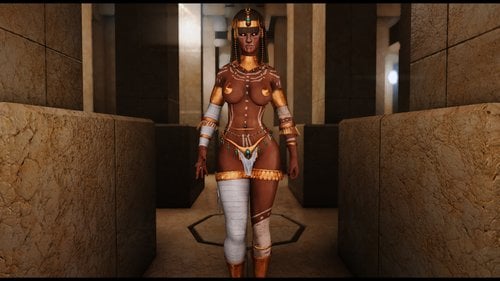
  8. CBBE SE - PeroPeroArmorPack

    CBBE SE - PeroPeroArmorPack
     
    An armor pack mod featuring 6 unique outfits for Skyrim SE!


    - WHAT'S INCLUDED -

    Aegyptus Hands
    Aegyptus Head
    Aegyptus Head B
    Aegyptus Heels
    Aegyptus Nipless
    Aegyptus Outfit
    Aegyptus Pants
    ---------
    BlackWidow Armor
    BlackWidow Armor SP
    BlackWidow Boots
    BlackWidow Boots SP
    BlackWidow Gloves
    BlackWidow Gloves SP
    BlackWidow Boots
    BlackWidow Boots SP
    BlackWidow Head
    BlackWidow Head SP
    ---------
    Caged Vixen Ears
    Caged Vixen Hands
    Caged Vixen Heels
    Caged Vixen Heels Alt
    Caged Vixen Outfit
    Caged Vixen Outfit Alt
    --------
    Dancer Girl Boots
    Dancer Girl Outfit
    Dancer Girl Outfit Blue
    --------
    PeroPero Armor
    PeroPero Boots
    PeroPero Bra
    PeroPero Gauntlets
    PeroPero Goggles
    PeroPero Goggles B
    PeroPero Helmet(Invisible)
    --------
    Wanderer Mage Armor
    Wanderer Mage Hands
    Wanderer Mage Helmet(Invisible)
    Wanderer Mage HighHeels
     
    - REQUIREMENTS - 

    CBBE SE Body
    HDT physics compatible skeleton (Groovtama's XPMSSE)
    The latest Bodyslide (Optional)
    CBP Physics or HDT SMP (For Boobs and Butt Jiggle)
    Lazy Tools or Racemenu Alpha for the Heels effect

    - INSTALLATION -

    1. Download and install this mod (automatically, using NMM or MO2, or Vortex, or if manually then extract the file into SkyrimSE's Data folder).
    2. Obtain in-game via crafting at any blacksmith forge/tanning rack or by using AdditemMenu SE
    3. The default body is CBBE Curvy. If you wish to customize your shape then read on.
    4. Download and install the Bodyslide and Outfit Studio utility.
    5. Open the BodySlide utility. Search for "CBBE SE - Goma's..."
    6. Tweak the sliders to your liking, or use a preset that you have already created.
    - Credits -
     
    Gomaperopero for the permission to share this with you guys!
     
    Please don't bother Gomaperopero via his own page about this SSE port!
     

    81063 downloads

    Updated

  9. Exotic beauty Persephone - a racemenu preset

    Racemenu preset for an ashen-haired exotic-looking female Nord named Persephone.

    When the download of this file is complete, enter the following directory (if you're using microsoft windows) my computer/local disk/program files x86/steam/steamapps/common/skyrim special edition/data/skse/plugins/chargen/presets

    Copy and paste the .jslot file contained in this download into the presets folder. Keep in mind that the preset folder won't be there until you've already created and saved a preset in racemenu.

    I made this preset in enhanced character edit, and tried porting it over to racemenu, but I didn't know how, so I installed both ECE and racemenu, and then saved this preset in racemenu.

    There might be some compatibility issues.

    348 downloads

    Submitted

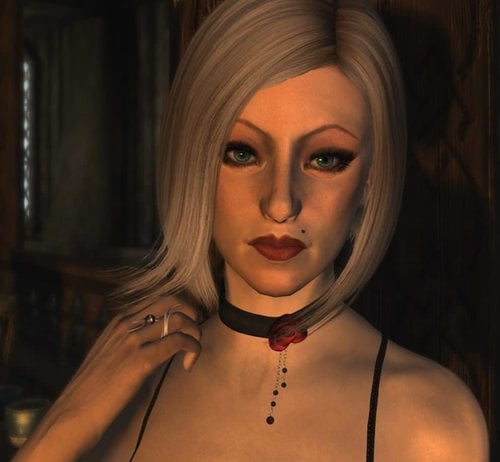
  10. Exotic beauty Persephone ECE preset

    This is an enhanced character edit (ECE) face preset that was (more or less) made in the likeness of a curiously sexy, young ex of mine 'whose name was actually Persephone.

    HOW TO INSTALL

    Drag the .slot file contained in this download to the following directory folder. Documents\My Games\Skyrim\, there will be a CME_Save folder.

    After that, boot the game, go into showracemenu, and then load presets, load the slot that this file occupies, (slot #2) make sure you have all of the prerequisites mods installed beforehand, and then it should work.

    REQUIRES THE FOLLOWING MODS.

    *SKSE64
    *Enhanced Character Edit
    *Realistic Faces - Skyrim SE Character Overhaul
    *KS Hairdos SSE
    *The Eyes Of Beauty
    *Kyoe's Bang'n Brows Female Eyebrow Replacer
    *Better Female Eyebrows Standalone
    *Seductive Lips HD SE Edition

    RECOMMENDED MODS
    *Caliente's Beautiful Bodies Enhancer.
    *Left hand rings

    128 downloads

    Updated

  11. Submitted

  12. Another Sleep Mod SE

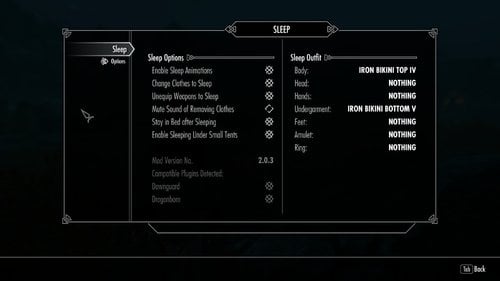
    A conversion of the Another Sleep Mod for SSE. 
    Now when your character chooses to sleep in a bed, bedroll, or tent, you can now see him/her sleeping in Skyrim SE!  Also includes functionality to wear a sleep outfit that automatically re-equips your previously worn clothing/armor once you wake up.
     
     
    No plans to add additional functionality beyond what is already provided.
     
    Credits:
    Pevey who developed the original Another Sleep Mod for Oldrim
    https://steamcommunity.com/sharedfiles/filedetails/?id=190651656

    5664 downloads

    Updated

  13. Rabbot modder's resource

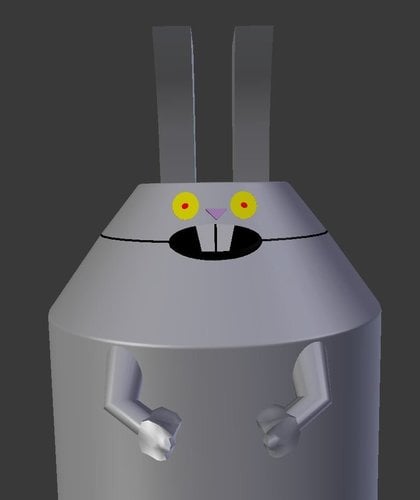
    Untextured Blender model of Rabbot from the Adult Swim cartoon Aqua Teen Hunger Force.
     
    I'm sure you can find a use for it.

    27 downloads

    Submitted

  14. atronachflame/various creatures cbbe bodyslide skyrim SE

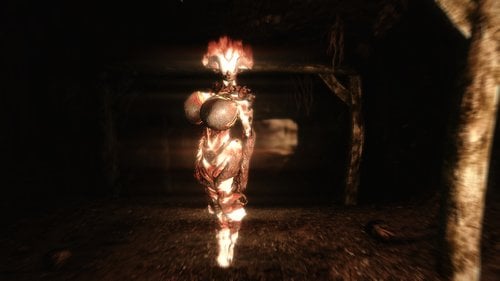
    Was using the atronachflame spell and decided i'd bodyslide it and here you go!

    16309 downloads

    Updated

  15. SkyHunks for SSE

    This is a conversion for SSE of Skyhunks by ffabris
     
    This mod beautifies a lot (143) of the male NPCs in Skyrim. It also makes the random spawned NPCs (guards, soldiers, bandits) all male. 
     
    For more info and images see the page of the original mod. I'm going to make some screenshots in the coming few days.
     
     
    Requirements
     
    - All DLCs
    - Unofficial Skyrim Special Edition Patch
    - Apachii Hair - Full and Male
    - KS Hairdos Renewal
     
     
    Important
     
    Installing the mod on an existing save will cause neckseam on some of the NPCs. It is best to use it with a new game. 
    I have exported the facegen of all changed NPCs so there should not be black faces in the game. If you see black faces try this file instead. 
     
     
    Credits / Thanks
     
    - ffabris for the excellent mod
    - infiniteone for the converted ESP
     
     
    License
     
    Like the original mod this convertion is published under Creative Commons Attribution-NonCommercial-ShareAlike.
     
     
    █-)  works with SkyrimVR

    3808 downloads

    Updated

  16. CBBE SE - Tera Succubus Armor

    CBBE SE - Tera Succubus Armor
     
    An armor mod featuring 4 different colored succubus outfits from Tera for Skyrim SE!


    - WHAT'S INCLUDED -
     
    Tera Succubus Armor Corset [Black&Gold]
    Tera Succubus Armor Corset [Black&Purple]
    Tera Succubus Armor Corset [Brown]
    Tera Succubus Armor Corset [Red&Gold]
    ---------
    Tera Succubus Armor Gauntlets [Black&Gold]
    Tera Succubus Armor Gauntlets [Black&Purple]
    Tera Succubus Armor Gauntlets [Brown]
    Tera Succubus Armor Gauntlets [Red&Gold]
    ---------
    Tera Succubus Armor Panty [Black&Gold]
    Tera Succubus Armor Panty [Black&Purple]
    Tera Succubus Armor Panty [Brown]
    Tera Succubus Armor Panty [Red&Gold]
    --------
    Tera Succubus Armor Collar [Black&Gold]
    Tera Succubus Armor Collar [Black&Purple]
    Tera Succubus Armor Collar [Brown]
    Tera Succubus Armor Collar[Red&Gold]
    --------
    Tera Succubus Armor Stockings [Black&Gold]
    Tera Succubus Armor Stockings [Black&Purple]
    Tera Succubus Armor Stockings [Brown]
    Tera Succubus Armor Stockings [Red&Gold]
    --------
    Tera Succubus Armor Garter [Black&Gold]
    Tera Succubus Armor Garter [Black&Purple]
    Tera Succubus Armor Garter [Brown]
    Tera Succubus Armor Garter [Red&Gold]
    --------
    Tera Succubus Armor Boots [Black&Gold]
    Tera Succubus Armor Boots [Black&Purple]
    Tera Succubus Armor Boots [Brown]
    Tera Succubus Armor Boots [Red&Gold]
    --------
    Tera Succubus Armor Tail [Black&Gold]
    Tera Succubus Armor Tail [Black&Purple]
    Tera Succubus Armor Tail [Brown]
    Tera Succubus Armor Tail [Red&Gold]
     
    - REQUIREMENTS - 

    CBBE SE Body
    HDT physics compatible skeleton (Groovtama's XPMSSE)
    The latest Bodyslide (Optional)
    CBP Physics or HDT SMP (For Boobs and Butt Jiggle)
    Lazy Tools or Racemenu Alpha for the Heels effect

    - INSTALLATION -

    1. Download and install this mod (automatically, using NMM or MO2, or Vortex, or if manually then extract the file into SkyrimSE's Data folder).
    2. Obtain in-game via crafting at any blacksmith forge (Daedric Smiting Perk required) or by using AdditemMenu SE
    3. The default body is CBBE Curvy. If you wish to customize your shape then read on.
    4. Download and install the Bodyslide and Outfit Studio utility.
    5. Open the BodySlide utility. Search for "CBBE SE - Tera Succubus..."
    6. Tweak the sliders to your liking, or use a preset that you have already created.
     
    - Credits -
     
    Veraly for the original version!

    10659 downloads

    Updated

  17. LazyThiefTargets

    Makes it possible to select target city or cities for the thieves guild radiant quests. This mod does not edit base scripts, dialogue or main quests and should (hopefully) be safer to use than the "popular option" some users have experienced problems with.
     
    WHAT *DOES* IT EDIT THEN?
    It changes the conditionals for one alias in each of the seven radiant handler quests.
     
    INSTALLATION
    * Finish or abandon any active thieves guild radiant quests
    * Install mod
    * Use "The Lazy Thief" book, automatically added to inventory to select desired cities
     
    If the book is lost you can craft a new one at any tanning rack.
     
    DISCLAIMER
    I only made this mod to play through part of the thieves quests so it hasn't been tested beyond that. While the edits are as minor as possible, only to the radiant quests and the unofficial patch changes are included that does not guarantee problems may arise later in your playthrough.
     
    Tested with Less Tedious Thieves Guild and All Thieves Guild Jobs Concurrently
     

    585 downloads

    Updated

  18. [2018 April 17 - Horse Riding Animations + Fix][Skyrim SE] Tera Elin Race

    Tera Elin Race
    Skyrim Special Edition
     
    Tera Elin Race for Skyrim Legendary Edition
    https://www.loverslab.com/files/file/301-update-horse-riding-animations-fix-tera-elin-race/


    LORE
    Building corporeal forms around tiny fragments of her own divine being, the goddess Elinu created the elins. Their physical appearance reflected the youngest daughter of Arun's wish for beauty and peace. Their queen governs both the elins and the poporis, with whom they share a history and a mission. The queen and her forces have proven their wisdom and diplomatic prowess in peace, and their tactical and fighting prowess in war.
    The Elins have one driving goal: If it's not good for nature, stop it. Older and wiser than they appear, they join with forces of nature and mortal races to sweep their enemies from the battlefield. Their speech is often dark, forthright, and otherworldly, and their sense of humor can border on vicious.
     
     
    ===========================================================
     

    ABOUT
    Tera Elin race for Skyrim Special Edition. These files are neither backward compatible nor interchangeable with the Tera Elin race for Skyrim Legendary Edition.


    ===========================================================
     

    UPDATES - WHAT'S NEW or CHANGED (2018 April 17)
     
    2017 October 15 - Regarding the Elin Idle Animation Redone v2
     
    *** READ ***  


    ===========================================================
     

    FILES - ELIN MODS, REQUIREMENTS, and INSTALLATION


    ===========================================================
    MAIN ELIN MODS
    Adds the Elins as a playable race in Skyrim Special Edition.
     
    Requirements
    Skyrim Special Edition
    ===========================================================
    Elin Race Package
    FILE: SSE_MAIN_TeraElinRace_v1_0-20170116.7z
    Adds:
    Main Elin files. ElinRaceTaint.esm, which adds the various Elin hairs, has been merged with the main master file (ElinRace.esm). [*]Elin voices for combat and dragon shouts for Skyrim, Dragonborn, and Dawnguard. [*]Summon Elin Ring.
     
    1st-Person Camera Fix.  
     

    ===========================================================
    OPTIONAL - Color-Matching Ears and Tails
    [2017-01-28] [FIXED] FILE: SSE_MAIN_OPTIONAL_TeraElin_ColorMatch_v1_0-20170128.7z BSA only. Allows the Elin ears and tails, both standalone and hair sets, to match color with the hairs.
    Install FIRST: Tera Elin race main package.
    Install SECOND: Tera Elin Color Match option.
    Allow overwriting of 'ElinRace.BSA'.
     

    ===========================================================
    CUSTOMIZATION FEATURES
    This is for both the Normal main package and the Color-Match main package.
     
    You have 2 methods to select the Elin ears/tail sets when in the Character Customization menu (console command, 'showracemenu'):
    HAIR > HAIRS selection slider. The ears/tail sets are part of the Elin hairs.
    HAIRS > ADDITIONS selection slider. These are standalone sets and can be used with the earless/tailless Elin hairs or custom Skyrim hairs.
     
    ===========================================================
    OPTIONAL - Extended Colors
    FILE: SSE_MAIN_OPTIONAL_TeraElinRace_ExtendedColors_20170125.7z
     
    Due to SKSE, RaceMenu, and Enhanced Character Edit not yet compatible with Skyrim Special Edition, I have modified the Elin master file (ElinRace.esm) to include additional colors.
    Extended hues, saturation, and luminosity. Not too much, not too little. Additional colors for hair, skin, makeup, and warpaints. Works with the Elin Color-Matching option.
    Install FIRST: Tera Elin race main package.
    Install SECOND: Tera Elin Extended Colors option.
    Allow overwriting of 'ElinRace.esm'.
     

    ===========================================================
    FIXES/PATCHES - for Any of the MAIN Mods
     
    Horse Riding Animations - 2018-04-17
    FILE: SSE_TeraElinRace_HorseRiding_Animation-n-Fix.7z
    Greatly reduces the clipping into the horse due to the Elin's size.
    Adds horseback idle animations.
    Works on any horses that uses the original Skyrim horse riding animations.
     
    Requirements
    Tera Elin main package.
     
    Installation
    Install with mod manager or manually.  There are no special installation procedures. FNIS not required.  
     
    Elin Voice Fix - 2017-03-07
    FILE: SSE_UPDATE_OPTION_Elin_Voice_COMPLETE_v2.1-20170307.7z Version 2.1 fixes the problem with version 2 not playing any of the Elin voices.
    NOTE: Soul Tear shout is silent.
     

    Requirements
    Tera Elin main package.
    Installation
    Install manually or with a mod manager. Allow overwriting of the (Elin) voice files. DELETE the old plugin (ElinRaceVoice.esp). The v2 update/fix uses a new plugin (ElinRace_Voice.esp). DELETE the voice controller script (SCRIPTS > x2chElin_FemaleElinVoiceController.pex.  
     
     
    ===========================================================
     

    ===========================================================
    OPTIONAL ELIN MODS
    Adds followers, NPCs, additional customizatin features, armors, and race exclusive animations.
     
    Requirements
    Skyrim Special Edition. Main Elin race files.  

    ===========================================================
    Elin Idle Animation Redone v2.0.
     
     
    Remade using the exclusive animation paths from PC Exclusive Animations. Now compatible with the latest FNIS. For now only features the base idle animation; the Elin dance will be added as an emote in a future update. *NEW* Choice of 2 variant of the base idle animation. *NEW* Option to use the child sitting animation to fix some of the clipping when sitting on chairs and benches. *NEW* Tera (Castanic) animations. Replaced most of the Skyrim animations.  

    REQUIREMENTS
    FNIS v7.0 Beta or newer
    http://www.nexusmods.com/skyrimspecialedition/mods/3038
     
    INSTALLATION
     
    Before installing v2, uninstall v1 to ensure there are no conflicts or animation oddities.
    Install FNIS. Install Elin Idle Animation Redone and allow overwriting of the files in TOOLS > GENERATEFNIS_FOR_USERS folder. Run GenerateFNIS for Users.exe.  

    ===========================================================
    Elin CBBE-UNP Body Replacers.
     
     
    FILE: SSE_OPTION_TeraElinBody_CBBE-UNP_v3_9-20170131.7z  

    Requirements.
    *** If you want to use BBP or TBBP armors and outfits then you need to install the following. ***
    SSE XPMSE (http://www.nexusmods.com/skyrimspecialedition/mods/1988) SSE FNIS (http://www.nexusmods.com/skyrimspecialedition/mods/3038) FNIS is needed if you experience the T-pose bug (no animations are being used).
    NOTE: If there are no noticeable breast bounce, even when naked, then install SSE XPMSE and remember to select the 'BBP MAP' option which adds the breast and butt bounce animations.
     

    NOTE 2: XPMSE and FNIS is not necessarily required for the BBP and TBBP animations that is included with the Elin CBBE-UNP body replacer package (I have tested without using FNIS), but if your Elin and NPCs in general are stuck in a T-pose then you have 2 options:
    Install FNIS then run the FNIS Generator for Users (select Gender Animation fix + Arm Fix). Delete the BBP-TBBP animations (located in MESHES > ACTORS > CHARACTER > ANIMATIONS > FEMALE).
    Allows the Elins to use a custom CBBE or UNP body.
    3 options for CBBE and UNP body:
    Slim (flatchest) (NO BBP, NO TBBP). BBP (with breasts) TBBP (with breasts)
    3 options for CBBE and UNP textures:
    Fairskin. Normal. Sunburn Bikini.  

    ===========================================================
    Elin CBBE-UUNP BodySlide Presets + Outfit Studio Conversion Templates.
    FILE: OPTION_Bodyslide-OutfitStudio_ElinBody_PresetsandConversionTemplates.7z
    Requirements.
    Bodyslide (SSE) (http://www.nexusmods.com/skyrimspecialedition/mods/201/?). Bodyslide (Skyrim) (http://www.nexusmods.com/skyrim/mods/49015/?).
    NOTE: Bodyslide/Outfit Studio for SkyrimSE (SSE) does not have any files for the following:
    Conversion Sets Shape Data Slider Categories Slider Groups Slider Preseets Slider Sets  

    This is why you need to also download Bodyslide/Outfit Studio for original Skyrim. Extract the archive and go to the BODYSLIDE subfolder. Copy the folders I previously mentioned then paste them in the BODYSLIDE subfolder from Bodyslide/Outfit Studio for SSE.
     
    There are 2 Elin body Presets for CBBE and UUNP:
    Elin (flatchest).
    Elin Curvy (with breasts).
     
    There are 6 conversion templates to convert armors to the Elin bodies:
    7Base (bombshell) to Elin.
    7Base (bombshell) to Elin Curvy.
    CBBE to Elin.
    CBBE to Elin Curvey.
    UUNP to Elin.
    UUNP to Elin Curvey.
     
    How to Choose a Bodyslide Preset or Elin Conversion Template.
     
    ===========================================================
    Elin-Skyrim Hair Packs.
    FILE: TeraElinRace - Offsite Download Links.txt
    NOTE #1: These can be downloaded offsite. You need to download a text file which lists the hair packs and download links.
    I made separate hair packs instead of an All-in-One pack. Mega, the file storage site, has problems uploading a 1gb+ file. I might create an AIO pack in the future when done adding any additional hairs for the Elins.
     

    NOTE #2: The hair packs contain only the hair meshes and textures from the original hair mods. These are only playable for the Elins.
     
    NOTE #3: All hair meshes have been updated for Skyrim SE.


    ===========================================================
    NPC Replacers and Additions.
     
    Elin NPC and Enemies Complete (Skyrim. No DLCs, yet).
    FILE: SSE_OPTION_Elin NPC and Enemies Complete_v1_0-20170110.7z
    Does the following:
    Replaces certain unique (female) characters (i.e., all female housecarls including Rayya). Adds new NPCs to Whiterun and Mage's College. Replaces some of the randomly generated hostile and non-hostile NPCs (i.e., Imperials, Stormcloaks, bandits, witches, necromancers, and hunters). Adds new Elin enemeies to the level list separate from what is originally generated by the game.
    NOTE: TDA made changes to the Elin mage instructor. Now when she demonstrates elemental magic in the Aracanaeum she will not damage and/or aggro any followers.
    Thank you, TDA!
     

    ===========================================================
    Elin Mannequins.
    FILE: SSE_OPTION_Elin_Mannequins_v1_0-20170117.7z Replaces all original mannequins in Skyrim, Hearthfires, and Dragonborn homes. Does not add new mannequins.  


    ===========================================================
    Elin Armors for the Elin body.
    FILE: ARMOR_ElinBody_ElinMaidCostume.7z Elin Maid outfit from the game Tera. Craftable at the forge (requires GLASS Blacksmith perk) and tempered (requires Arcane Blacksmith perk). FILE: ARMOR_ElinBody_ConvertedVanillaSets.7z Some Skyrim armors converted to the Elin body (NOT CBBE or UNP). Craftable at the forge under ELVEN and MISCELLANEOUS.  
     
     
    ===========================================================
     

    CREDITS
    Special thanks:
    Mephykun for advising me on what needs to be done to make the Elin mods compatible with Skyrim Special Edition.
    Miczello for providing the resources I need for some additional Elin mods I may release in the near future.
    TDA for his Elin NewNPC edits.
    Himika and the people of 2ch for bringing the Elins to Skyrim+Summon Ring, NPC -n- Enemies, and Elin Followers.
    Ousnius for his Nif Optimizer and help with fixing bugs with some of the custom hairs.
     
    ELINS
    The Elin race and resources from the game Tera to add the Elins to Skyrim SE are the properties of BluHole Studio.
    Elin armors are from the game Tera and thus the property of BluHole Studio.
     
    The Elins use XPMSE skeletons by Groovtama.
    http://www.loverslab.com/topic/25971-xp32-maximum-skeleton-extended/
     
    The base Elin voice mod provide by KuriYokan.
     
    HEARTHFIRE MODS
    Lakeview Extended for Skyrim Special Edition by Ac3s
    http://www.nexusmods.com/skyrimspecialedition/mods/6363/?
     
    HAIRS (Custom Skyrim Hair Packs)
    Apachii Hairs v1.5 and v1.6 by Apachii.
    http://www.nexusmods.com/skyrim/mods/10168/?
     
    Cazy/Demoness/CCC/MySims/Newsea by zzJay.
    http://www.loverslab.com/topic/10943-zzshop/
     
    Oblivian Hairs by Radioragae.
     
    Sims/JHairs by ???
     
    Hepsy Hairs by Ryoso
    http://www.nexusmods.com/skyrim/mods/59661
     
    Twintails (Twosideup) by Pyopyo23
    http://www.nexusmods.com/skyrim/mods/59869

    83532 downloads

    Updated

  19. SMP Capes SSE

    There have been some reports of issues with this mod since the last update. I have not updated my game yet and wasn't really planning on doing so any time soon. I'm not trying to be unsupportive, it's just that my game runs good the way it is and I'd rather not mess it up just to make it compatible with some CC mod that I'll never use.
     
    So please be advised that this might not work without some XML tinkering on your part.
     
     
    Updated  2/4/2018
    Added a Retextured Version for people to try out. Nothing fancy, just some basic colours. Thanks to cminnow and bongo88 for testing.
     
    Should be working fine as of the 1/29/18 HDT update. Tweaked the XMLs to get rid of some jitters, but other than that not much is changed.
     
    Warning!
    It looks as though this NOT compatible with Realistic Ragdolls and Force. Something with the skeleton it would seem. Credit to bongo88 for catching that one. 
     
    Other issues
    The male capes clip pretty badly with higher body weight settings. I tried to add weight sliders and it broke the mesh. Apparently the meshes don't like having bone weights fooled with. 
    The capes clip with most of the armours I tested. 
    The Fix
    Edit the cape in Outfit Studio to fit whatever armour/body you like. Just don't alter the bone weights. https://www.loverslab.com/topic/25180-unofficial-bodyslide-2outfit-studio-tutorials/
     
     
    A big "Thank You" to prZ who has been kind enough to let me share the converted files here on loverslab. 
     
    So, this is really more of a modders resource. It's just a basic conversion. 
     
    If you have any issues post here and I'll try to help you out. But, please understand that I'm only uploading this just so people can test it out. It's not really meant as a finished product.
     
    Anyhow. Enjoy, and Please let me know how it works out.

    3144 downloads

    Updated

  20. BeeingFemale SE

    Pregnancy and menstrual cycle mod that will give a complete new and better feeling to Skyrim. Just give it a try


    Version 2.8 SE Fix 1
     
    Thanks to Zerantha for helping converting the files!


    BeeingFemale is a menstrual cycle simulation mod that allows female character to have a menstrual cycle and even to become pregnant.
    It's a very complex mod based on reality with a lot of realistic features like simulating the LH and FSH Hormones, sperm life-time, egg and sperm traveling duration, and way more.
     
    It's a high advanced mod with many features that won't touch other mods except you want it. It's compatible with most other mods.
    The born children will have an own leveling system, too as well as there own skill and perk tree.
    They can follow you, doing some favours and more.
     
    If you are a woman in Skyrim, after having sex you can become pregnant - depending on your hormones and your menstrual cycle phase.
    After some many days you can born a little cute girl or a strong cute boy.
    For sure NPCs are supported, too! So even when you are a Men in Skyrim, you can have a lot of fun with this mod and you will have your own child that will give support.
     
    BeeingFemale is based on reality. It was a lot to read about the menstrual cycle, birth, hormones and stuff.


    Install:
    --------------------------------------------------------------------------------------------------------------------------------------------------------------------------------------
    1) Install the requirements
    - SKSE SE
    - SkyUI
    - PapyrusUtil SE
    2) Install BeeingFemale
     
    (optional)
    3) Install XPMSE32
    4) Install a body with Belly Node (for example UNP with TBBP option, or CBBE with HDT option)
    5) Install armor mods (for example CBBE Armors with HDT Option, most of them got the "NPC Belly node")
     
    How does it Work / FAQ:
    --------------------------------------------------------------------------------------------------------------------------------------------------------------------------------------
    As I said, BeeingFemale is based on reality. So it works like it does in reality. It's a bit complicated to explain how everything works - only having sex won't impregnate a woman. That's why i wrote 3 Books you can find in your inventory after starting the game.
     
    Q: The Menu is black
    A: scroll a few lines back. below the Installation guide I've wrote an "important" note
     
    Q: How does it work?
    A: There are 3 Books in your inventory. It is way to complex to explain everything in a FAQ. But it works like it does in reality - an egg is traveling thought the female body, a sperm can concive it and the woman will be pregnant.
     
    Q: What are those AddOns?
    A: AddOns are specific mods that include content to BeeingFemale. They can specificate races (changing the duration of a phase, the pain level, the kid of child that will born, and even more, adding more PMS Effects, menstrual effects, ....)
     
    Q: Where can I find a pregnancy Body / Skeleton / Clothes - and what should i use?
    A: On Lovers Lab! Depending on you body you are using, the textures, the skeleton, the physics there are diferent mods you need. But the good answer is, you can find all of them on Lovers Lab, just use the search function. The first set up of those mods can be a bit anoying but when it works it looks great
     
    Q: I've got a problem with the Body / Skeleton / Clothes
    A: I'm sorry to say that, but this is the wrong thread for that. The creater of the body / skeleton / clothes can help you way better with you problem.
     
    Q: My character is spinning when she gives birth
    A: Isn't it funny? I'm sorry i'm not an animator. Those were the best looking animations for birth i could find. If someone could create new realistic bith animations it would be great
     
    Q: Is Female / Female suported?
    A: Yes, if you have SexLab installed. Even when this is not realistic at all, i made it possible. Just enable the Female sperm effect in the SexLab MCM Settings.
     
    Q: Are creatures suported?
    A: Yes, if you have SexLab installed. Just enable it in the Beeing Female MCM Settings.
     
    Q: I had sex with a female guard / thief / ... but she won't become pregnant - why?
    A: Those are non-unique characters. There would be to many problems to make them work correctly. Non-unique characters may change there sex. Sometimes they are female, sometimes male, ... sometimes they are Nord, sometimes argonian.... and when they will respawn after killing them, they may change again. If i would store them it would slow down everything and create massive stored data. Male non-unique can still impregnate female unique.
     
    Q: Is the Sourcecode included?
    A: Yes! Except the widgets everything is included
    (A typo happend, the Source files are located in a folder that is named "Scource" - Just copy and past all files into your Source folder and you can edit them.)
     
    Q: Will the childs grow to an adult?
    A: No. This got many reasons. The most imporant is that children won't grow to an adult in just 10 days. Another thing is that this would be realy dificult to make, because of the AddOn System, and stuff.
     
    Q: I'm suffering on an infection - will my character die now?
    A: Cure it - just buy a cure potion! otherwise you will die.
     
    Q: Why the min duration of a phase is 2 Days?
    A: This was the easiest way to fix problems with the calculation and the AddOns.
     
    Q: Why are children / elder forbidden / blocked?
    A: Elder won't have a menstrual cycle anymore... same to children.
     
    Q: Are there crafts i can create?
    A: Yes. There are many crafts you can create. Contraception Fluid so you can't become pregnant, Anti Sperm Fluid (aka: Wash out sperm fluid) to wash out the sperm that is already inside you, sanitary napkins to fetch the menstrual blood.
     
    Q: The Conecption Widget says i've got 6% chance to conceive and i'm ovulating - what does this actualy meen?
    A: Such low conception chances are like 0% + tollerance. I don't think your character will become pregnant. Seems the egg won't nist in the utherus or there was no egg when ovulating or something else happend. Wait for the next cycle maybe next time it will work.
     
    Q: I've got a negative 'State Time' and it's falling even more - what can i do?
    A: This is a bug i couldn't figure out right now. It happens when the BeeingFemale Timer is resumend after a pause (disabled via MCM Menu or Estrus Chaurus Pregnancy). The only way to fix it is a reset the Player Stats using the MCM Menu. I'm still working on this bug.
     
    Q: Are you a doctor or a midwife or something like that?
    A: Ähm no, not really, i'm software developer who liked Trixy's "Procreation" and continued his work. I've asked some many female friends, reading forums, reading wikiedia with the result - really really to much informations!!! Now i know a lot about FSH Hormones, LH Hormones, even how often and how much menstruation blood drips out.... uuuuhrs.... But i think it was worth it.
     
    Q: Do you spend hours for just feeding your own fetish?
    A: No. First of all, i spend less time. Sorry for that but i'm busy with my real life as I already said. I love developing and it's better then base jumping when releasing a mod or a bug fix. I don't even play skyrim anymore. Maybe sometimes when I have nothing else to do but most of the playing is just for testing bug fixes in BeeingFemale.
     
    Q: Is it possible to keep the widgets visible?
    A: Yes, keep the hotkey pressed for 1.2 sec or longer. Press the key again to hide them again
     
    Q: Are there any console commands?
    A: Yes, there are a few. The most important is "bf:code" (without the quotes) this will display an error code that I need, for fixing some bugs. But I will ask for them, you don't need to send me the code for each request. There are a few more for healing the baby, adding contraception, give contraception bottles to the selected NPC, impregnation, sperm adding, and so on..... Maybe you will find them out sometimes
     
    Items and Crafts:
    --------------------------------------------------------------------------------------------------------------------------------------------------------------------------------------
    There are a few items you can craft.
    Using the cooker (you can find in a kitchen or a camp fire) you can create the Contraception Fluid and the Wash Out Sperm fluid.
     
    The Contraception fluid will raise the chance of contraception depending. But don't use them all at once! You must wait around 3 - 4 days till you can use the next contraception - otherwise it won't have the full effect. There is a How To note in your inventory, please read it first!
     
    Using the Wash Out sperm fluid you can wash out the sperm that is already in you so it won't impregnate you anymore.
    But beware - sperm that is to long (by default 6 game hours - can be changed in the MCM Menu) is in you, already reached the utherus and can't be washed out anymore.
     
    Then there are the sanitary napkins. You can craft them in the forge -> Leather.
    They will fetch the menstrual blood so you won't have any bloody legs anymore.

    Requirements:
    --------------------------------------------------------------------------------------------------------------------------------------------------------------------------------------
    - PapyrusUtil (or SexLab)
    - SKSE SE 2.0.7
    - SkyUI 5 SE
     
    Optional:
    --------------------------------------------------------------------------------------------------------------------------------------------------------------------------------------
    - FNIS
    - RaceMenu
    - A SexLab compatible sex mod so you can have sex
    - Body with pregnant belly support
    - Skeleton with pregnant belly support
     
    Not compatible with:
    --------------------------------------------------------------------------------------------------------------------------------------------------------------------------------------
    - Most other pregnancy mods
    - There is a little bug with Skyrim Romance - will be fixed soon
     
    Change Log
    --------------------------------------------------------------------------------------------------------------------------------------------------------------------------------------
    2.8 SE
    - Update BeeingFemale to BeeingFemale64
     
    Translations and AddOn Links
    --------------------------------------------------------------------------------------------------------------------------------------------------------------------------------------
    - comming soon
     
    Guids
    --------------------------------------------------------------------------------------------------------------------------------------------------------------------------------------
    There are 4 guids planed (2 guides released, 2 guides will follow soon)
     
    - BeeingFemale Developer Guide - This guide is about creating AddOns for BeeingFemale. Race AddOn, CME AddOn and Misc AddOn.
    - BeeingFemale Perk Guide - Create your own perks for your children!
    - BeeingFemale Make your mod compatible without requirement - All you need is SKSE. There are a bunch of "ModEvents" beeing female supports.
    - BeeingFemale Translation Guide - (must be redone) This guide explain how to create translations for the MCM Menu and the game content.
    - BeeingFemale Script Guide - In this Guide i will explain how to create simple and advanced scripts for BeeingFemale... how to impregnate any woman using scripts only and what options there are.
    - BeeingFemale Modder Guide - This guide descripts how to make mods based on BeeingFemale. For example you talk to an NPC who needs help, rescue her pregnant wife.
     
    For Developer
    --------------------------------------------------------------------------------------------------------------------------------------------------------------------------------------
    Beeing Female is made for player and developer!
    There are many diferent ways to make developer happy - For example the AddOn Manager. It's easy to create new AddOns like menstrual syndromes, PMS effects, and stuff. It's also possible to create race specific settings or gain access to the BeeingFemale Events.
    Another way to make developer happy is the FWController Class. You can gain access to all NPCs even when they are not loaded or never were loaded. You can impregnate a NPC with just one command, damage / heal the unborn baby, reading and writing the stats and way more.
    There are also functions included to gain access to BeeingFemale without including it to your mod, using the SendModEvent Command.
     
    Here is a short list for SendModEvent examples:
     
    FemaleActor.SendModEvent("BeeingFemale", "AddContraception", 100) ; This adds contraception to the woman
    FemaleActor.SendModEvent("BeeingFemale", "AddSperm", MaleActor.GetFormID()) ; This will add sperm to the woman
    FemaleActor.SendModEvent("BeeingFemale", "WashOutSperm", 100) ; This will wash out 100% sperm
    FemaleActor.SendModEvent("BeeingFemale", "ChangeState", 3) ; This will change the state to 'Menstruation'
    FemaleActor.SendModEvent("BeeingFemale", "InfoBox", 100) ; This will open the info window with all informations
    FemaleActor.SendModEvent("BeeingFemale", "DamageBaby", 30) ; This will make 30 damage to the baby
    FemaleActor.SendModEvent("BeeingFemale", "HealBaby", 60) ; This will heal the baby with 60 Health points
    FemaleActor.SendModEvent("BeeingFemale", "CanBecomePregnant", 1) ; This will make the FemaleActor able to become pregnant in this cycle (0 for disable)
    FemaleActor.SendModEvent("BeeingFemale", "CanBecomePMS", 1) ; This will make the FemaleActor able to become pms in this cycle (0 for disable)
    MaleActor.SendModEvent("AddSperm","", FemaleActor.GetFormID()) ; this is basicly the same as above, except that his is called from the male actor
    More informations can be found in the Guids i've uploaded
     
    Console Commands
    --------------------------------------------------------------------------------------------------------------------------------------------------------------------------------------
    Most of the console commands may have a selected NPC. If no NPC is selected, it will take effect at the player.
    after the command itself there may follow arguments, written in angle brackets. Some of them are only numeric
    Arguments written in square bracket [<...>] are optional and can be set, or not.
     
    Some commands may take a few second!
    This meen, it will display the error message, that the command could not be found, untill the command is was done successfully.
    Just wait a few seconds


    Special Thanks
    --------------------------------------------------------------------------------------------------------------------------------------------------------------------------------------
    Trixy - for Procreation
    Muon Shan - for your active help
    Huili - for your rus. translation
    Aravis7 - for your france translation and your help with the baby mesh
    xiaomiza - for your chinese translation
    jbezorg - for help with the baby mesh
    Slorm - for sharing his bug fixed FWSystem
    Leito - For the birth animation
    Corum - For the PMS "Depressive" fix
    Lactina - For the Baby-Armor-Mesh
    Vader666 - For converting the Baby-Armor-Mesh
    Vioxsis - For converting the Baby-Armor-Mesh
    Bane Master - For his BeeingFemale Patch
    Chosen Clue - For his BeeingFemale Patch
    qotsafan - For his BeeingFemale Patch
    zarantha - Thanks for updating to Skyrim SE
     

    Lovers Lab Community for the realy great support, help, bug fixing, and way way more!
    Everyone who made a donation! This is realy realy great! Thanks!
     
    Visit the BeeingFemale Blog, too!
    Here some background informations can be found.

    59103 downloads

    Updated

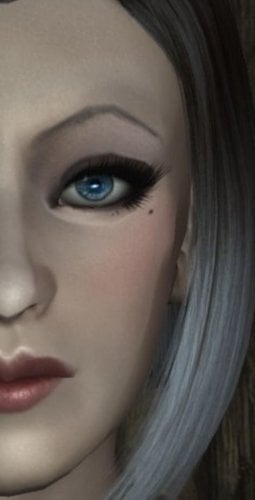
  21. Goregous Kaela - A ECE Preset

    This is an enhanced character edit (ECE) face preset made in the likeness of beautiful female solo musician and M83 band member Kaela Sinclair.

    HOW TO INSTALL

    Drag the .slot file contained in this download to the following directory folder. Documents\My Games\Skyrim\, there will be a CME_Save folder.

    After that, boot the game, go into showracemenu, and then load presets, load  the slot that this file occupies, make sure you have all of the prerequisites beforehand, and then it should work.

    REQUIRES THE FOLLOWING MODS.

    *SKSE64
    *Enhanced Character Edit
    *Realistic Faces - Skyrim SE Character Overhaul
    *KS Hairdos SSE
    *Multicolored hair for KS v2.4
    *The Eyes Of Beauty
    *Kyoe's Bang'n Brows Female Eyebrow Replacer
    *Better Female Eyebrows Standalone
    *Seductive Lips HD SE Edition

    131 downloads

    Updated

  22. The Meme Poser SE

    Meme Pack SE
     
    A pose mod featuring 14 unique meme animations and 67 unique meme poses for many type of screen-archery scenarios !


    - Credits -
     
    Collygon for the screenshots and giving me permission to share this with you guys!
    Original Version: Click here
     
    Please don't bother Collygon via his own page about this SSE port!

    10740 downloads

    Updated

  23. Lustmord Vampire Armor - CBBE SSE Bodyslide

    WARNING: This is only bodyslide files and updated .esp (form 44). You still NEED to download original mod here.
     
    Credit to AmethystDeceiver. Author isn't active for a long time, if there's any issues please PM me and I'll remove it.
     
    Steps you need to do (for newbies. If you know what you're doing please skip this)
    1. Download original mod. MANUAL download. Put in somewhere you like (not inside the game folder).
    2. Install BSA extractor. Run it.
    3. Simply drag the .bsa file to the BSA extractor tool. You will find the meshes and textures folder after the .bsa file is extracted.
    4. Install SSE NIF Optimizer. Extract it.
    5. Copy all the meshes (.nif files) to the folder where you installed the NIF Optimizer. Run the tool.
    6. Copy all the optimised .nif files and paste it to the folder in step 1 (Lustmord files). let it overwrite oldrim meshes.
    6. Don't forget to delete the .bsa file.
    7. Put my files and let my .esp overwrite the original mod.
    8. It should be this structure in the end:

     
    and this is inside the scripts folder

     
    You don't need to convert the textures and scripts!
    You can safely delete any .nif files that contains name "unp", "unpb", and "cbbe" in meshes folder as they're no longer needed (I edited the .esp and the bodyslide will refer to the files without those labellings).
     
    9. Repack the mod into zip using 7z or whatever you have.
    10. Add via mod manager like NMM.
    11. Install.
    12. And done!
     
    Pic credit: dovajoaquim
     

    1363 downloads

    Updated

  24. Skyrim Social Conscience Series - P1 - Julius Cretak - Scholar Speech

    Skyrim Social Conscience Series

    Part 1 - Julius Cretak - Cyrodil Scholar Unity, Diversity, and Tolerance Speech
     
    by Arron Dominion
     
    Mod Trailer
     
    Description:
    This mod is the first in a series of mods designed to look at current events in a familiar context of Skyrim.  This installment brings a scholar from the city of Bruma that has taken the mantle of fighting the hate from the Stormcloaks.  His speech is full of calls for unity, diversity, and tolerance.  This mod is touching on the growing division, and hate we see in the modern world.
     
    Features:
    -A scholar with a few dialogue pieces involving his background
    -A speech in the center of Solitude with a large diverse audience.  There is at least 2 of each race represented
    -The speech tackles the Stormcloak Rebellion and preaches unity, tolerance, and diversity
    -The audience for the speech changes on each playthrough
    -All done in a lore-friendly way
     
    Installation:
    -Extract .zip into your Data folder
    -Use whatever tool for managing your load order
    -Recommend having this mod at the bottom of the mod order
    -Load the game
     
    Note:
    For best experience make sure you have enough Solitude citizens.
    Dominion's More NPC mods will help if you need more.
     
    Final Note:
    There are more in this series planned.  Thank you for taking the time to view the mod, watching the trailer and/or speech in full, or using the mod.
     
    Credits:
    https://www.freesound.org/people/anagar/sounds/267930/ -clapping -  anagar
    https://www.freesound.org/people/unchaz/sounds/150957/ -Audience Cheering - unchaz
    https://www.freesound.org/people/jessepash/sounds/139971/ -Applause 25 people - jessepash
    Huntress - Intro Artwork
    CharlieDeCat - Intro Diverstiy
    Alex Cain - Intro Unity
    Druundev (Ditte Bruun) - Intro Tolerance
    Alex Flick - Intro Ever-Learning
    Jessica Thorn (aka Sweet) - Intro Love
    Darkrogue21 - Intro Strength
    Billyro - Intro Progress
    juniper - Intro Hope
    Cheyenne - Intro and Trailer Creative Consultant
     
    Trailer Credits:
    Kai Engel - preiculum - http://freemusicarchive.org/music/Kai_Engel/Caeli/Kai_Engel_-_caeli_-_09_periculum_1089
    https://creativecommons.org/licenses/by/4.0/
     
    Help & Support:
    Pyro's Asylum
    Skinnytecboy Discord
    Armstrong Security Solutions
    Former Competitive Teammates
    VS
    Family
    Those Listed in Intro Credits

    321 downloads

    Submitted

  25. Skyrim Pizza - CC Survival Mode Edition

    Skyrim Pizza - Survival Mode Edition

    by Arron Dominion
     
    Non Survival Mode Mod Trailer
     
    Tasty Skyrim mod adds Riverwood Pizza shop with 80 different combos, Survival Mode compatible - PC Gamer Review

    Short Description:

    Pizza is not as modern as one might think.  Chef Turtle has moved to
    Riverwood and opened up Riverwood Pizza.  He has shared his secret with the
    Dragonborn through books, and there are 80 different combinations that
    can be baked.
     
    Requirements:
     
    Creation Club Survival Mode

    Long Description:

    Pizza does not exist anywhere.  It is seen as modern, but Chef Turtle has moved
    to Riverwood and has opened up Riverwood Pizza.  He bakes in the morning
    and opens up from Noon to 8 pm every day to sell Pizza.  Who knows
    how Chef Turtle discovered pizza.

    While Chef Turtle only sells the variants that are popular in Riverwood, he has shared much
    more with the Dovahkiin with three texts that you can buy from Chef
    Turtle, the Soul Cairn, or a chef that has set up shop in The Retching
    Netch.  There are a total of 80 different combinations that one can bake
    .  All that is required is the knowledge, retrieving the proper
    ingredients, and find an Oven.  And in this version each will help you in managing your hunger for the Creation Club Survival Mode content.


    Below are the types of Pizza that can be baked:

    Pizza - tomatos(x2), flour, cheese wedge (first type), salt pile
    Dragonborn Lovers Pizza - Pizza ingredients, 1 beef, 1 goat meat, 1 pheasant, 1 rabbit, 1 venison
    High Elf Special Pizza - Pizza ingredients, 1 Carrot, 1 Gourd, 1 Leek, 1 Juniper Berries
    Horkers Special Pizza - Pizza ingredients, 1 Ale, 1 Cabbage, 1 Horker Meat, 1 Garlic, 1 Slaughterfish Egg
    Ratway Special Pizza - Pizza ingredients, 1 Black Briar Mead, 1 Moon Sugar, 1 Skooma
    Three Cheese Pizza - Pizza ingredients, 1 other cheese wedge, 1 mammoth cheese bowl
    Ash Hopping Pizza - Pizza ingredients, 1 Ash Hopper Jelly, 1 Ash Hopper Meat

    Potato Bread Pizza - Butter, Milk, Cheese Wedge (first type), Potato, Salt Pile, Tomato (x2)
    Dragonborn Lovers Potato Bread Pizza - Potato Bread Pizza ingredients, 1 beef, 1 goat meat, 1 pheasant, 1 rabbit, 1 venison
    High Elf Special Potato Bread Pizza - Potato Bread Pizza ingredients, 1 Carrot, 1 Gourd, 1 Leek, 1 Juniper Berries
    Horkers Special Potato Bread Pizza - Potato Bread Pizza ingredients, 1 Ale, 1
    Cabbage, 1 Horker Meat, 1 Garlic, 1 Slaughterfish Egg
    Ratway Special Potato Bread Pizza - Potato Bread Pizza ingredients, 1 Black Briar Mead, 1 Moon Sugar, 1 Skooma
    Three Cheese Potato Bread Pizza - Potato Bread Pizza ingredients, 1 other cheese wedge, 1 mammoth cheese bowl
    Ash Hopping Potato Bread Pizza - Potato Bread Pizza ingredients, 1 Ash Hopper Jelly, 1 Ash Hopper meat

    Breakfast Pizza - Potato Bread Pizza ingredients, 1 Chicken Egg, 1 Goat Meat
    Frontier Breakfast Pizza - Potato Bread Pizza ingredients, 1 Chicken Egg, 1 Netch Jelly, 1 Boar Meat
    Ash Hopping Breakfast Pizza - Potato Bread Pizza ingredients, 1 Chicken Egg, 1 Ash Hopper Jelly, 1 Ash Hopper Meat
    Falmer Breakfast Pizza - Potato Bread Pizza ingredients, 1 Charrus Egg, 1 Nightshade, 1 Frost Salts
    Maormer Breakfast Pizza - Potato Bread Pizza ingredients, 1 Slaughterfish Egg, 1 River Betty, 1 Salmon, 1 Void Salts

    Garlic Bread Pizza - Butter, Flour, Cheese Wedge (first type), Garlic, Salt Pile, Tomato (x2)
    Dragonborn Lovers Garlic Bread Pizza - Garlic Bread Pizza ingredients, 1 beef, 1 goat meat, 1 pheasant, 1 rabbit, 1 venison
    High Elf Special Garlic Bread Pizza - Garlic Bread Pizza ingredients, 1 Carrot, 1 Gourd, 1 Leek, 1 Juniper Berries
    Horkers Special Garlic Bread Pizza - Garlic Bread Pizza ingredients, 1 Ale, 1
    Cabbage, 1 Horker Meat, 1 Garlic, 1 Slaughterfish Egg
    Ratway Special Garlic Bread Pizza - Garlic Bread Pizza ingredients, 1 Black Briar Mead, 1 Moon Sugar, 1 Skooma
    Three Cheese Garlic Bread Pizza - Garlic Bread Pizza ingredients, 1 other cheese wedge, 1 mammoth cheese bowl
    Ash Hopping Garlic Bread Pizza - Garlic Bread Pizza ingredients, 1 Ash Hopper Jelly, 1 Ash Hopper Meat

    Flin Crust Pizza - Butter, Flour, Cheese Wedge (first type), Flin, Salt Pile, Tomato (x2)
    Dragonborn Lovers Flin Crust Pizza - Flin Crust Pizza ingredients, 1 beef, 1 goat meat, 1 pheasant, 1 rabbit, 1 venison
    High Elf Special Flin Crust Pizza - Flin Crust Pizza ingredients, 1 Carrot, 1 Gourd, 1 Leek, 1 Juniper Berries
    Horkers Special Flin Crust Pizza - Flin Crust Pizza ingredients, 1 Ale, 1 Cabbage, 1 Horker Meat, 1 Garlic, 1 Slaughterfish Egg
    Ratway Special Flin Crust Pizza - Flin Crust Pizza ingredients, 1 Black Briar Mead, 1 Moon Sugar, 1 Skooma
    Three Cheese Flin Crust Pizza - Flin Crust Pizza ingredients, 1 other cheese wedge, 1 mammoth cheese bowl
    Ash Hopping Flin Crust Pizza - Flin Crust Pizza ingredients, 1 Ash Hopper Jelly, 1 Ash Hopper Meat

    Matze Crust Pizza - Butter, Flour, Cheese Wedge (first type), Matze, Salt Pile, Tomato (x2)
    Dragonborn Lovers Matze Crust Pizza - Matze Crust Pizza ingredients, 1 beef, 1 goat meat, 1 pheasant, 1 rabbit, 1 venison
    High Elf Special Matze Crust Pizza - Matze Crust Pizza ingredients, 1 Carrot, 1 Gourd, 1 Leek, 1 Juniper Berries
    Horkers Special Matze Crust Pizza - Matze Crust Pizza ingredients, 1 Ale, 1
    Cabbage, 1 Horker Meat, 1 Garlic, 1 Slaughterfish Egg
    Ratway Special Matze Crust Pizza - Matze Crust Pizza ingredients, 1 Black Briar Mead, 1 Moon Sugar, 1 Skooma
    Three Cheese Matze Crust Pizza - Matze Crust Pizza ingredients, 1 other cheese wedge, 1 mammoth cheese bowl
    Ash Hopping Matze Crust Pizza - Matze Crust Pizza ingredients, 1 Ash Hopper Jelly, 1 Ash Hopper Meat

    Shein Crust Pizza - Butter, Flour, Cheese Wedge (first type), Shein, Salt Pile, Tomato (x2)
    Dragonborn Lovers Shein Crust Pizza - Shein Crust Pizza ingredients, 1 beef, 1 goat meat, 1 pheasant, 1 rabbit, 1 venison
    High Elf Special Shein Crust Pizza - Shein Crust Pizza ingredients, 1 Carrot, 1 Gourd, 1 Leek, 1 Juniper Berries
    Horkers Special Shein Crust Pizza - Shein Crust Pizza ingredients, 1 Ale, 1
    Cabbage, 1 Horker Meat, 1 Garlic, 1 Slaughterfish Egg
    Ratway Special Shein Crust Pizza - Shein Crust Pizza ingredients, 1 Black Briar Mead, 1 Moon Sugar, 1 Skooma
    Three Cheese Shein Crust Pizza - Shein Crust Pizza ingredients, 1 other cheese wedge, 1 mammoth cheese bowl
    Ash Hopping Shein Crust Pizza - Shein Crust Pizza ingredients, 1 Ash Hopper Jelly, 1 Ash Hopper Meat

    Sujamma Crust Pizza - Butter, Flour, Cheese Wedge (first type), Sujamma, Salt Pile, Tomato (x2)
    Dragonborn Lovers Sujamma Crust Pizza - Sujamma Crust Pizza ingredients, 1 beef, 1 goat meat, 1 pheasant, 1 rabbit, 1 venison
    High Elf Special Sujamma Crust Pizza - Sujamma Crust Pizza ingredients, 1 Carrot, 1 Gourd, 1 Leek, 1 Juniper Berries
    Horkers Special Sujamma Crust Pizza - Sujamma Crust Pizza ingredients, 1 Ale, 1
    Cabbage, 1 Horker Meat, 1 Garlic, 1 Slaughterfish Egg
    Ratway Special Sujamma Crust Pizza - Sujamma Crust Pizza ingredients, 1 Black Briar Mead, 1 Moon Sugar, 1 Skooma
    Three Cheese Sujamma Crust Pizza - Sujamma Crust Pizza ingredients, 1 other cheese wedge, 1 mammoth cheese bowl
    Ash Hopping Sujamma Crust Pizza - Sujamma Crust Pizza ingredients, 1 Ash Hopper Jelly, 1 Ash Hopper Meat

    Soul Husk Pizza - tomatos(x2), soul husk, cheese wedge (first type), salt pile
    Dragonborn Lovers Soul Husk Pizza - Soul Husk Pizza ingredients, 1 beef, 1 goat meat, 1 pheasant, 1 rabbit, 1 venison
    High Elf Special Soul Husk Pizza - Soul Husk Pizza ingredients, 1 Carrot, 1 Gourd, 1 Leek, 1 Juniper Berries
    Horkers Special Soul Husk Pizza - Soul Husk Pizza ingredients, 1 Ale, 1 Cabbage, 1 Horker Meat, 1 Garlic, 1 Slaughterfish Egg
    Ratway Special Soul Husk Pizza - Soul Husk Pizza ingredients, 1 Black Briar Mead, 1 Moon Sugar, 1 Skooma
    Three Cheese Soul Husk Pizza - Soul Husk Pizza ingredients, 1 other cheese wedge, 1 mammoth cheese bowl
    Ash Hopping Soul Husk Pizza - Soul Husk Pizza ingredients, 1 Ash Hopper Jelly, 1 Ash Hopper Meat

    Arcanely Resistance Soul Husk Pizza - tomatos(x2), soul husk, cheese wedge
    (first type), salt pile, chicken egg, nirnroot, bleeding crown

    Fruity Sweet Tooth Special Pizza - Butter, Flour, Green Apple, Cheese Wedge
    (first type), JazBay, Juniper Berries, Salt Pile, Snowberry
    Khajiit Special Pizza - Fruity Sweet Tooth Special, Moon Sugar, Skooma

    Fruity Sweet Tooth Special Potato Bread Pizza - Butter, Potato, Green Apple,
    Cheese Wedge (first type), JazBay, Juniper Berries, Salt Pile, Snowberry
    Khajiit Special Potato Bread Pizza - Fruity Sweet Tooth Special Potato Bread, Moon Sugar, Skooma

    Fruity Sweet Tooth Special Garlic Bread Pizza - Butter, Flour, Garlic, Green
    Apple, Cheese Wedge (first type), JazBay, Juniper Berries, Salt Pile,
    Snowberry
    Khajiit Special Garlic Bread Pizza - Fruity Sweet Tooth Special Garlic Bread, Moon Sugar, Skooma

    Fruity Sweet Tooth Special Flin Crust Pizza - Butter, Flour, Flin, Green
    Apple, Cheese Wedge (first type), JazBay, Juniper Berries, Salt Pile,
    Snowberry
    Khajiit Special Flin Crust Pizza - Fruity Sweet Tooth Special Flin Crust Bread, Moon Sugar, Skooma

    Fruity Sweet Tooth Special Matze Crust Pizza - Butter, Flour, Matze, Green
    Apple, Cheese Wedge (first type), JazBay, Juniper Berries, Salt Pile,
    Snowberry
    Khajiit Special Matze Crust Pizza - Fruity Sweet Tooth Special Matze Crust Bread, Moon Sugar, Skooma

    Fruity Sweet Tooth Special Shein Crust Pizza - Butter, Flour, Shein, Green
    Apple, Cheese Wedge (first type), JazBay, Juniper Berries, Salt Pile,
    Snowberry
    Khajiit Special Shein Crust Pizza - Fruity Sweet Tooth Special Shein Crust Bread, Moon Sugar, Skooma

    Fruity Sweet Tooth Special Sujamma Crust Pizza - Butter, Flour, Sujamma, Green
    Apple, Cheese Wedge (first type), JazBay, Juniper Berries, Salt Pile,
    Snowberry
    Khajiit Special Sujamma Crust Pizza - Fruity Sweet Tooth Special Sujamma Crust Bread, Moon Sugar, Skooma

    Fruity Sweet Tooth Special Soul Husk Pizza - Butter, Soul Husk, Green Apple,
    Cheese Wedge (first type), JazBay, Juniper Berries, Salt Pile, Snowberry
    Khajiit Special Soul Husk Pizza - Fruity Sweet Tooth Special Soul Husk, Moon Sugar, Skooma

    Blood Pie Pizza - tomatos(x2), flour, cheese wedge (first type), salt pile, potion of blood
    Blood Pie Potato Bread Pizza - Butter, Milk, Cheese Wedge (first type), Potato, Salt Pile, Tomato (x2), potion of blood
     

    This is for those that are wandering in the wilderness and require variety in their packed meals.  Enjoy your pizza!

    Installation Instructions:
    -Find your Skyrim Special Edition folder
    -Find the Data folder
    -Place the contents of the zip within the Data folder
    -Launch Skyrim Special Editions and go to mods
    -Find ajd_pizzaandpizzeria_survival_sse_pc.esp
    -Enable the mod
    -Enjoy!

    Compatible With:
    -Immersive Citizens
    -Imps More Complex Needs
    -Wayshrines of Tamriel

    Known Compatibility Issues:
    -JK's Riverwood - Must be loaded before JK's Riverwood.  Some of the assets from JK's
    Riverwood are in the same spot as Riverwood Pizza.  It will be a little
    time before a JK's Riverwood version can be done.

    Changelog:
    v1 - Initial Release

    Credits:

    Bethesda - Creation Kit and Bethesda.net
    GJ Knutsen - Original mod concept
    Huntress - Assistance with GIMP and Pizza Sign Critique
    Meatstakk, FoxyC, Crimson Phoenix, DoomSgt, PyroToaster - Pizza Texture Critique
    Pizza Texture - https://pixabay.com/en/pizza-food-fast-tomato-dinner-1547254/
    Sign Wood Texture - http://www.benkyoustudio.com/Textures/TexturesWood/

    Special Thanks:

    Skinnytecboy
    Epoch Sanctum
    Armstrong Security Solutions
    Huntress
    VS

    110 downloads

    Submitted


×
×
  • Create New...