Search the Community
Showing results for tags 'Guide'.
Found 15 results
-
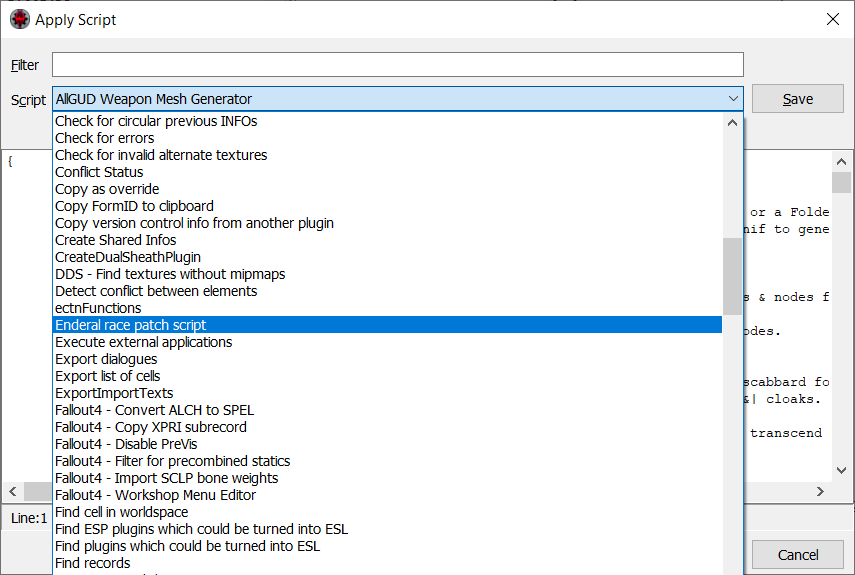
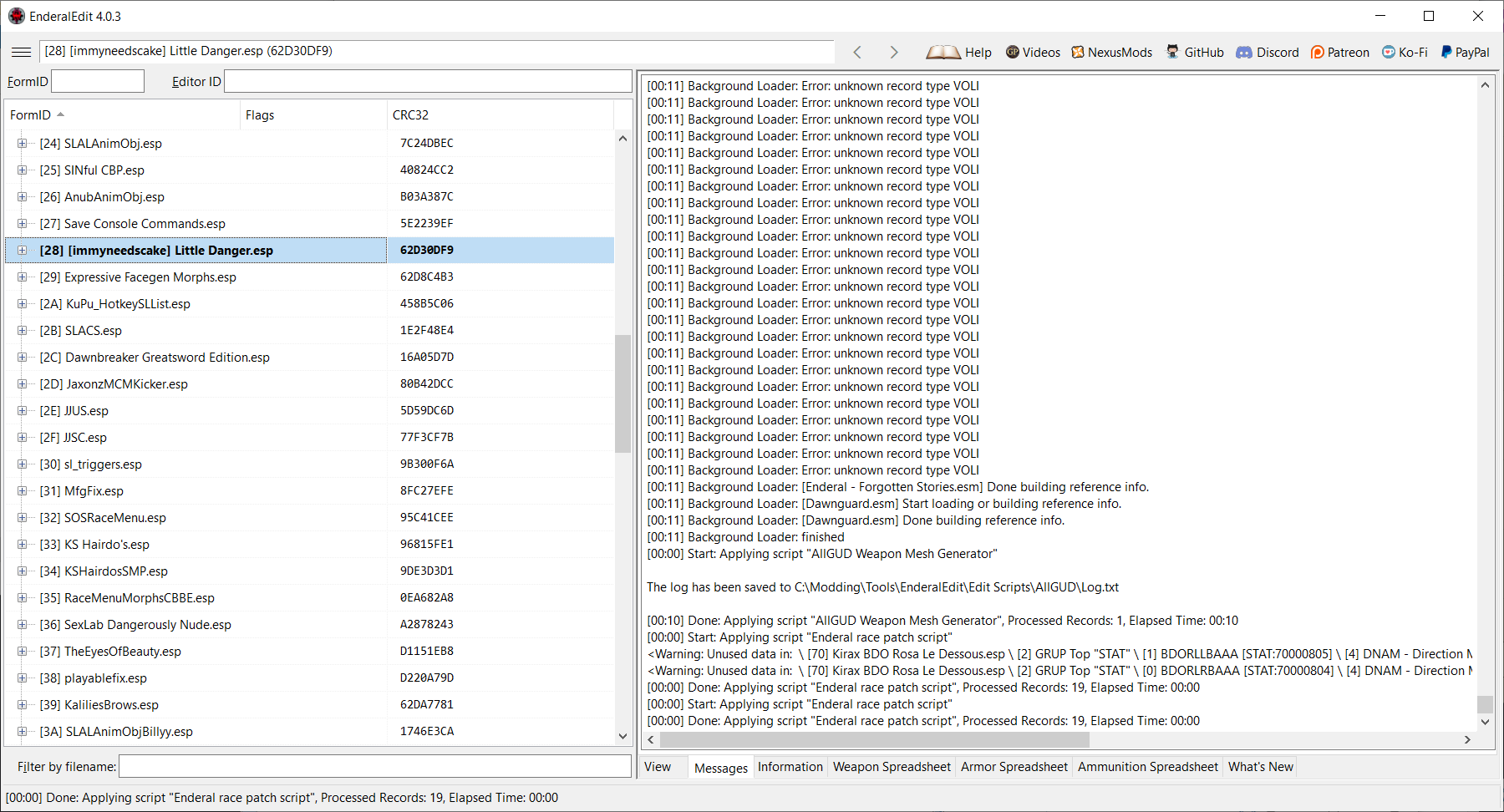
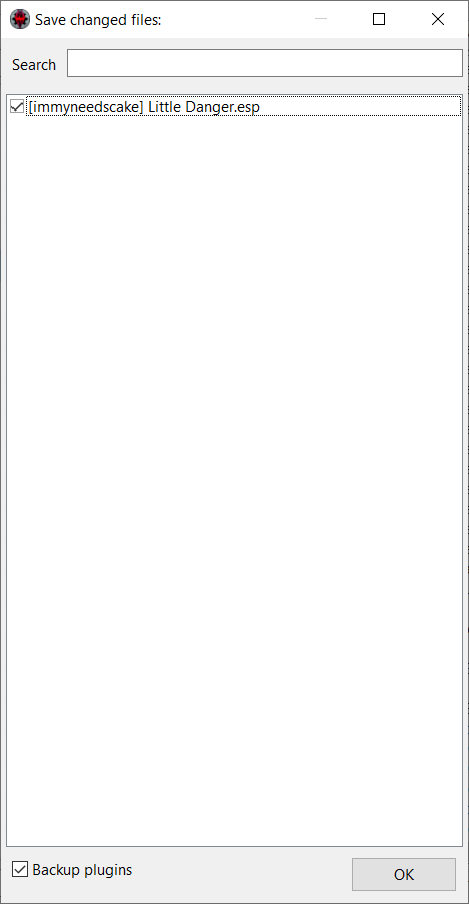
EnderalSE and SexLab Setup Guide Hopefully we'll have a stickied place to keep all this in one thread. Please feel free to add your fixes, cheats, cludges and experiences! Good Stuff will be added to this post, so it will be easier to find. An accurate list of what extras are installed in the base game install of EnderalSE Forgotten Stories from Steam Is located in the {Steam Path}\steamapps\common\Enderal Special Edition folder in a file called "credits.txt" Post 2 continues with mod reports. Post 3 has converted mods/plugins, at least they are working for me. They may contain a patch, and this patch must be loaded after the main plugin. *** A guide for installing Creation Kit for EnderalSE is in Post 7! *** A really good script for making the race changes : https://www.nexusmods.com/enderal/mods/18 This script fixes an issue with HDT I haven't mentioned previously, see thread: https://www.loverslab.com/topic/168078-enderal-se-hdt-physics-for-all-races/ Automates the process and works in SE as well. Update: Using the above script makes the patches un-necessary, 3 days of play testing. May 17, 2021 playablefix.esp still required Update: LOOT has an update for Enderal/EnderalSE see: https://www.loverslab.com/topic/168116-enderalse-and-sexlab-setup-guide/?do=findComment&comment=3390604 Update: Fellow LL member @Amokhem has come up with a way to avoid the Registry Edits, see post https://www.loverslab.com/topic/168116-enderalse-and-sexlab-setup-guide/?do=findComment&comment=3402653 Update: Member @Xerrasx has managed to get MoreNastyCritters operational! Details in post https://www.loverslab.com/topic/168116-enderalse-and-sexlab-setup-guide/?do=findComment&comment=3440629 A pictorial guide to patching mods for Enderal/EnderalSE: {because we have to do so much of it} If you don't have "Enderal race patch script" get it from: https://www.nexusmods.com/enderal/mods/18 Confirmed working SexLab mods: Mods that appear to be trying to work: Some informative links for Enderal/EnderalSE:
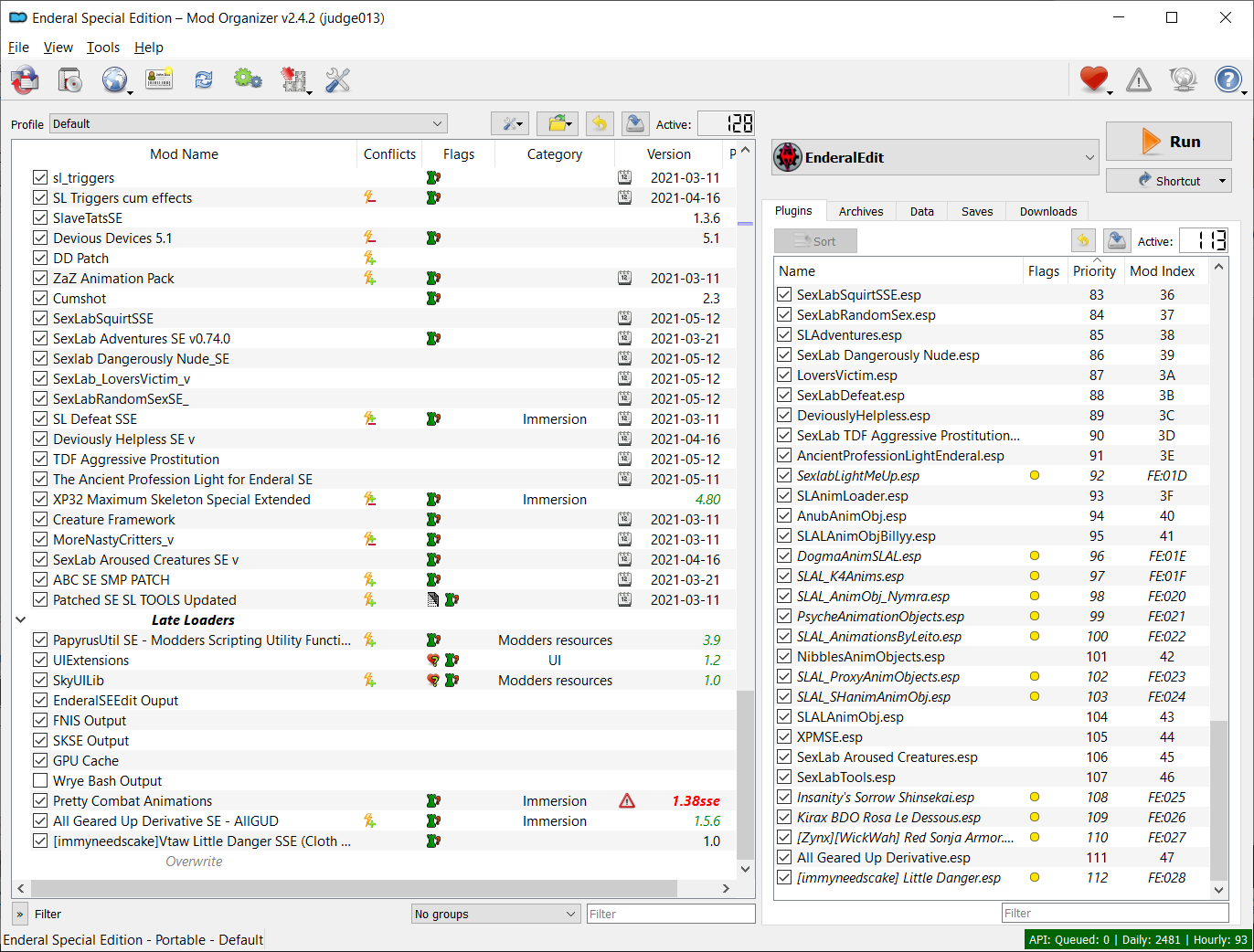
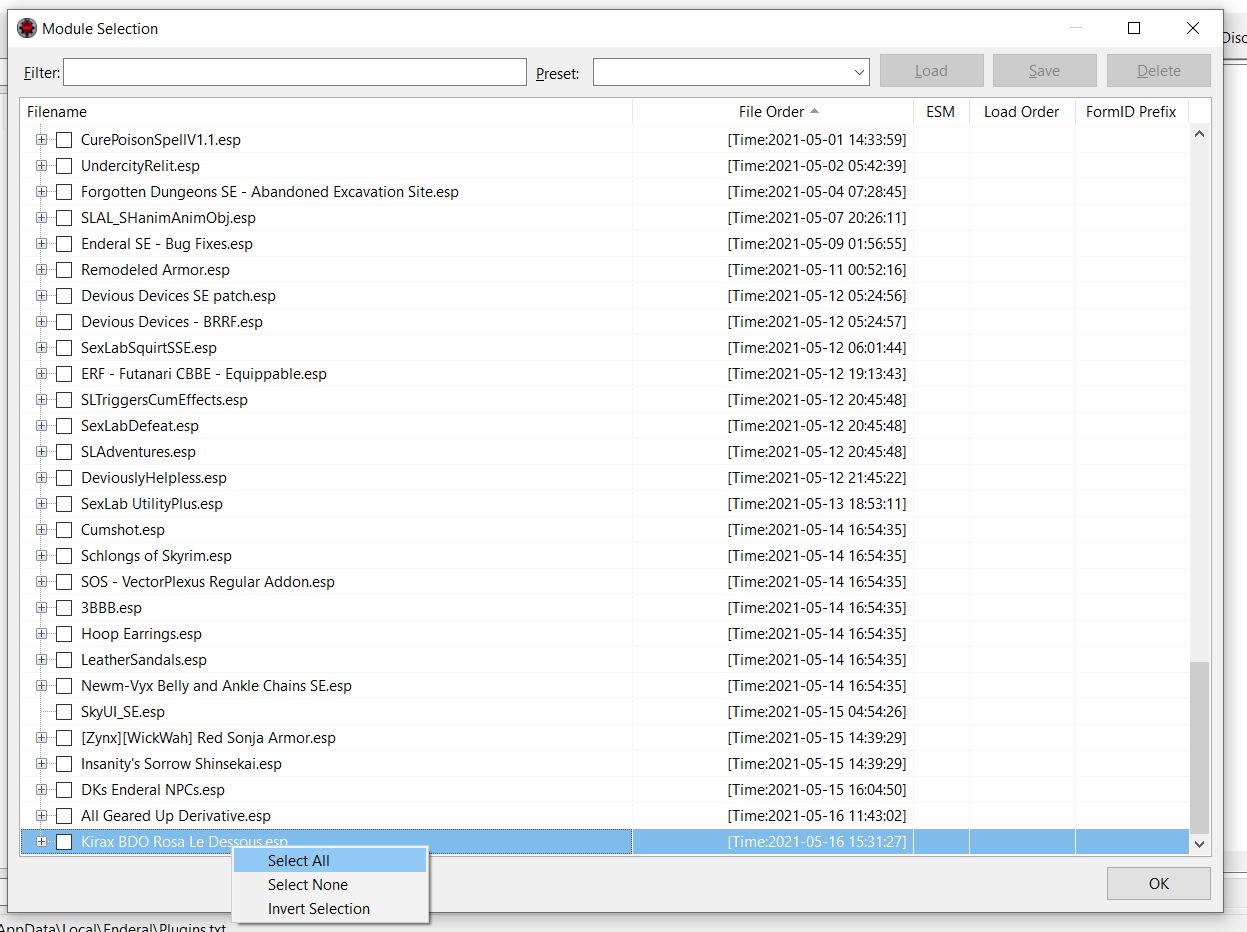
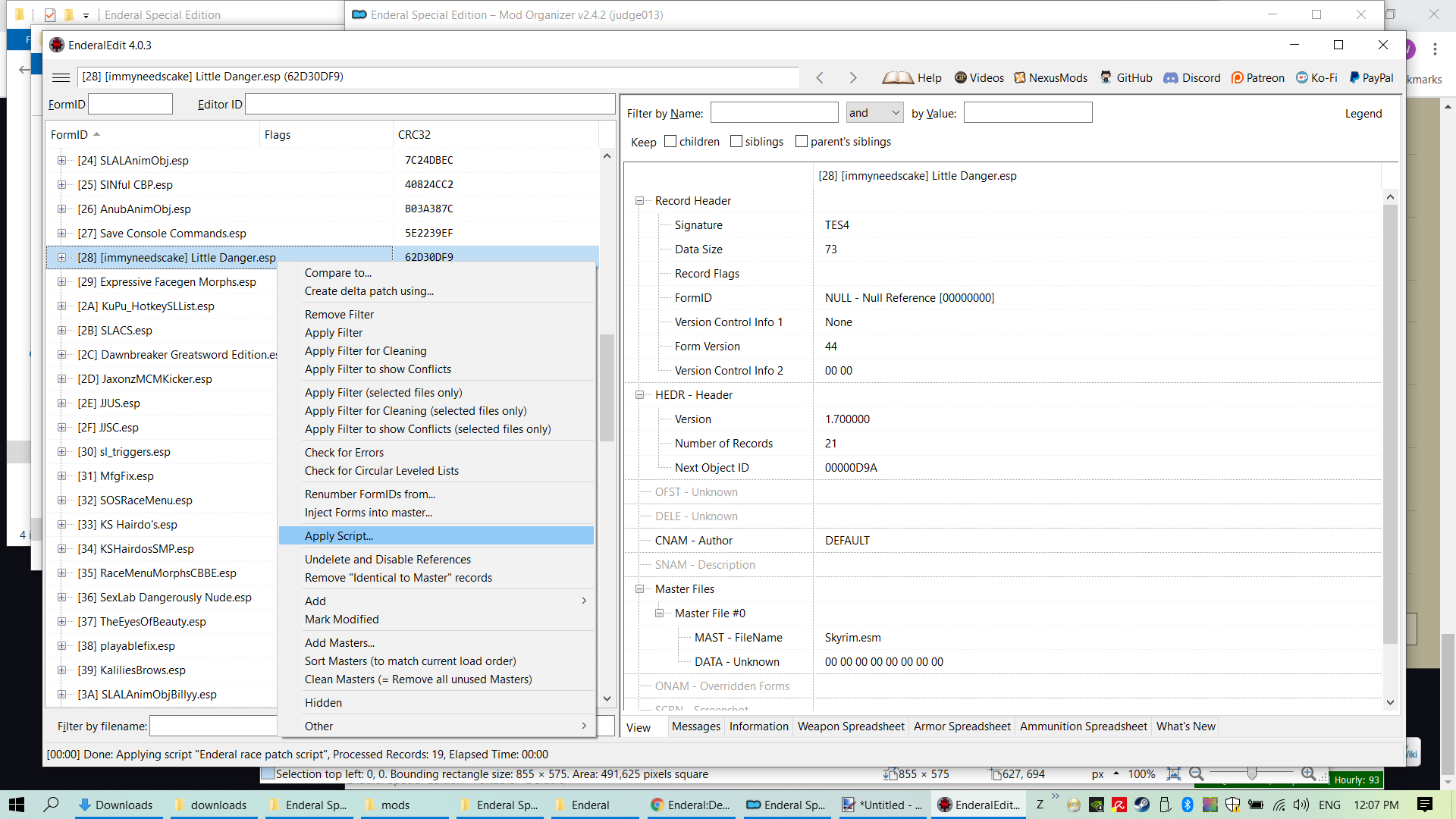
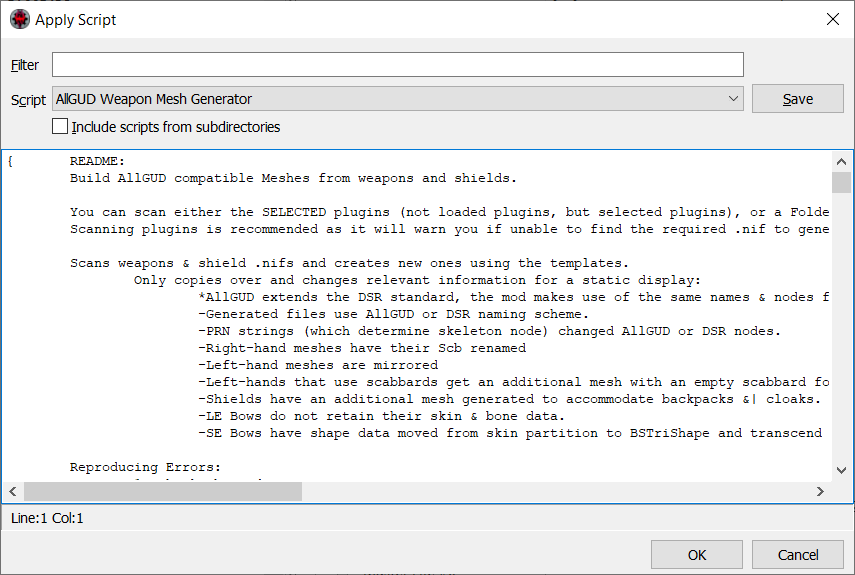
-
Last Update 02. Nov. 2025 Overview Part 1 - Modlist Part 2 - DynDOLOD Part 3 - Files Part 4 - Armor Preview Part 5 - Tips and Tricks Part 6 - My thoughts on the CCC Introduction This is the reworked version of my 'Skyrim SE for Beginners' for the newest version of Skyrim AE. It will also work with an updated version of Skyrim SE from STEAM (aka Skyrim AE Light). My goal was to freshen Tamriel up a bit. Most cities, towns and villages have gotten a new design, the roads got new lanterns, and even a few new dungeons can now be found. Some spots get rebuild over time as new occupants move in. Another thing are relicts of the past. Shrines of Snowelves can be found, same as the remains of the anchors of Molag Baal (when he tried to invade Tamriel) and all daedric princes have new shrines hidden away. I also tried to get a beautiful game which is fun and, although it is a FRPG, as realistic as possible without punishing you for playing it. So you'll find neither skimpy outfits (aka Bikinis in a snowstorm) nor overly gothified fantasy weapons and armor which are totally useless in reality (i replaced those as much as possible). Happy to disappoint in this regard: But the beauty of it is that you can still adapt the list to what you like. I'm just trying to give you a solid base where you can add the things you like (or remove the ones you don't). Nothing here is carved in stone. A big 'Thank you' to all the modders out there! The game wouldn't be as good as it is now without you guys and gals! Don't forget to either endorse the mods you use or give the authors a 'thumbs up' here at LL. And, if you like my work, you can support me on Patreon. Most of the time i will be here (so don't expect updates), so it is only for those of you that want to support all the work on my guides (better said providing me with a steady supply of much needed coffee and cookies). Recommended additional threads There are a two threads i can only strongly recommend: If you're new to modding take a look at Mod Organizer 2 & Other tools - From zero to "Hey Sexlab is working!". @Just Don't Does an excellent job there. ? When it comes to conversions and/or updates then SE Compatibility Tracking (he supports AE too) is incredible useful. Thanks to @tasairis for keeping this updated. ?
-
 View File Being a DIK Hack 2.0.1 BIG UPDATE Lite — Cheat Menu Overview One menu for the choice guide and the route helper on the PC version of Being a DIK. Original script only. This download does not include the game, does not include scene scripts, and does not include the official walkthrough pages. Seasons 1–2 and Season 3 are separate folders. Copy the script into each one you play. Written for Ren'Py 7.4.10, Seasons 1 through 3. It is not for Episode 13. F8 and F10 open this menu. The Cheat button at the top left opens it too. F9 stays the separate pocket-money hack, if you already use that one. Install the Optimal Guide 1.0.3 and All Routes 1.0.0 in the same game folder before this menu. Those two scripts are the engines. This download does not include them. What it does Press F8 or F10, or the Cheat button. - Guide uses the Optimal Guide. Auto follows your DIK score and marks the strongest open line BEST. You still click the line, so the game writes that line's own DIK points. Auto-win and hints switch from this page. - Auto-win covers beer pong, cards, English, math, science, the puzzle, party rank, the fish tank, tennis, shooting, drawing, the claw, Shuffle, Brawler, the punch fights, beach ball, the paint checks, and the pancake flips. - Swyper and the class answers stay marked on the choice. Basketball and the mansion game are not solved from here. - Scenes uses All Routes. Gallery fills the pictures. The story stays where it is. Turn Gallery off and the pictures return to what this install had before the route helper first set them. - All main girls keeps every main-girl route the current episode has already created. Maya and Josy, Jill, Sage, Isabella, and Zoey stay available together, and the alone route stays off. A choice written as if/else still plays one branch. Later checks can see the others. - A girl whose relationship is already above zero is held at 22 until the story goes higher. A girl still at zero stays at zero until the story raises her. - Walkthrough opens the game's own walkthrough. While that screen is open, the page lock that skips the scene section is held open. The save still records the original install value. - DIK score, the affinity lock, mansion money, pocket money, and the breakup check stay on the game's own values. Submitter BlackBoxMods Submitted 10/03/26 Category Other Games Requirements - Being a DIK, PC, Ren'Py 7.4.10. - Seasons 1–2, Season 3, or both. - Optimal Guide 1.0.3 (game\badik_optimal.rpy) already in that folder. - All Routes 1.0.0 (game\badik_routes.rpy) already in that folder. Install Instructions Install 1. Close the game. 2. Unzip the download. 3. Copy game\badik_desk.rpy into the game folder of Seasons 1–2, and into the game folder of Season 3. It sits next to badik_optimal.rpy and badik_routes.rpy. Leave PATREON.txt outside the game folder. 4. If game\badik_desk.rpyc is already there, delete that compiled file. 5. Start the game, load a save, then press F8 or F10, or the Cheat button. 6. The menu title reads Desk 2.0.0 Lite. Remove Close the game. Delete game\badik_desk.rpy and game\badik_desk.rpyc. The Optimal Guide and All Routes stay in the folder. Their own keys work again on the next start. Changelog 2.0.0 Lite - One menu for the choice guide and the route helper. F8, F10, and the Cheat button open it.
 -

Version 2.0.1
18 downloads
Overview One menu for the choice guide and the route helper on the PC version of Being a DIK. Original script only. This download does not include the game, does not include scene scripts, and does not include the official walkthrough pages. Seasons 1–2 and Season 3 are separate folders. Copy the script into each one you play. Written for Ren'Py 7.4.10, Seasons 1 through 3. It is not for Episode 13. F8 and F10 open this menu. The Cheat button at the top left opens it too. F9 stays the separate pocket-money hack, if you already use that one. Install the Optimal Guide 1.0.3 and All Routes 1.0.0 in the same game folder before this menu. Those two scripts are the engines. This download does not include them. What it does Press F8 or F10, or the Cheat button. - Guide uses the Optimal Guide. Auto follows your DIK score and marks the strongest open line BEST. You still click the line, so the game writes that line's own DIK points. Auto-win and hints switch from this page. - Auto-win covers beer pong, cards, English, math, science, the puzzle, party rank, the fish tank, tennis, shooting, drawing, the claw, Shuffle, Brawler, the punch fights, beach ball, the paint checks, and the pancake flips. - Swyper and the class answers stay marked on the choice. Basketball and the mansion game are not solved from here. - Scenes uses All Routes. Gallery fills the pictures. The story stays where it is. Turn Gallery off and the pictures return to what this install had before the route helper first set them. - All main girls keeps every main-girl route the current episode has already created. Maya and Josy, Jill, Sage, Isabella, and Zoey stay available together, and the alone route stays off. A choice written as if/else still plays one branch. Later checks can see the others. - A girl whose relationship is already above zero is held at 22 until the story goes higher. A girl still at zero stays at zero until the story raises her. - Walkthrough opens the game's own walkthrough. While that screen is open, the page lock that skips the scene section is held open. The save still records the original install value. - DIK score, the affinity lock, mansion money, pocket money, and the breakup check stay on the game's own values. -
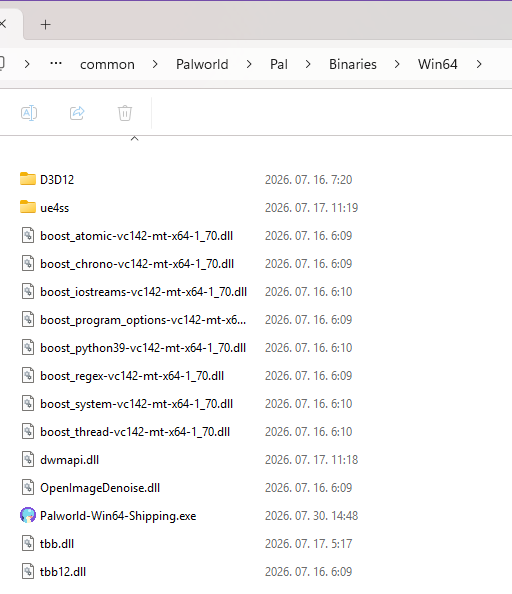
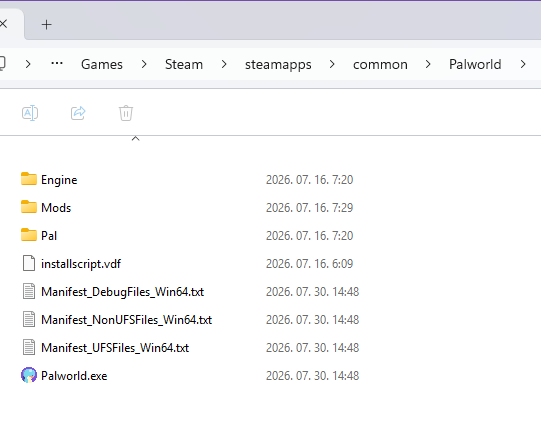
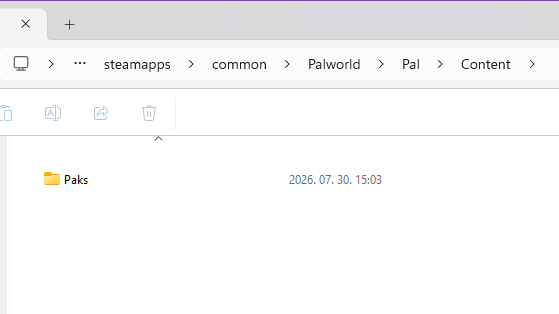
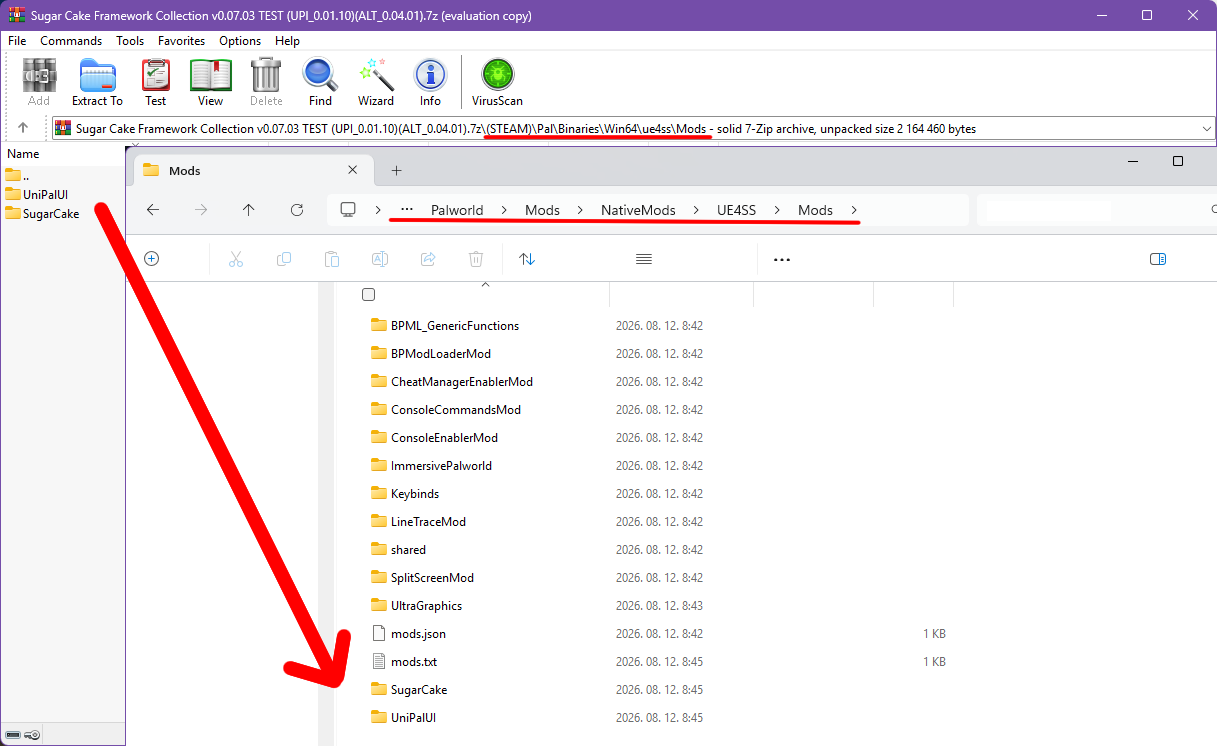
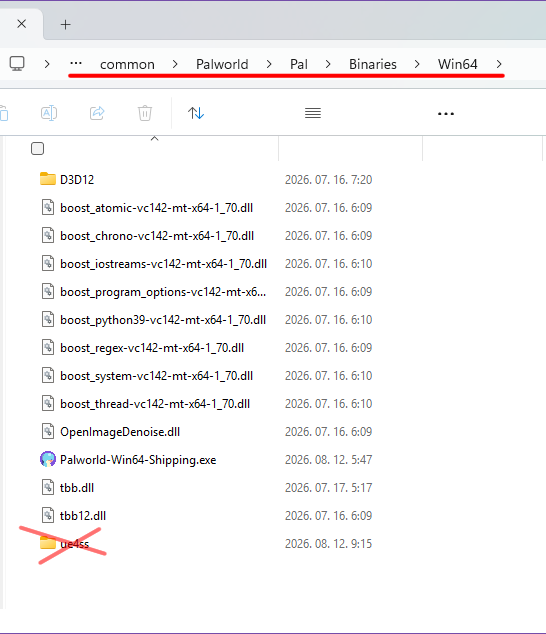
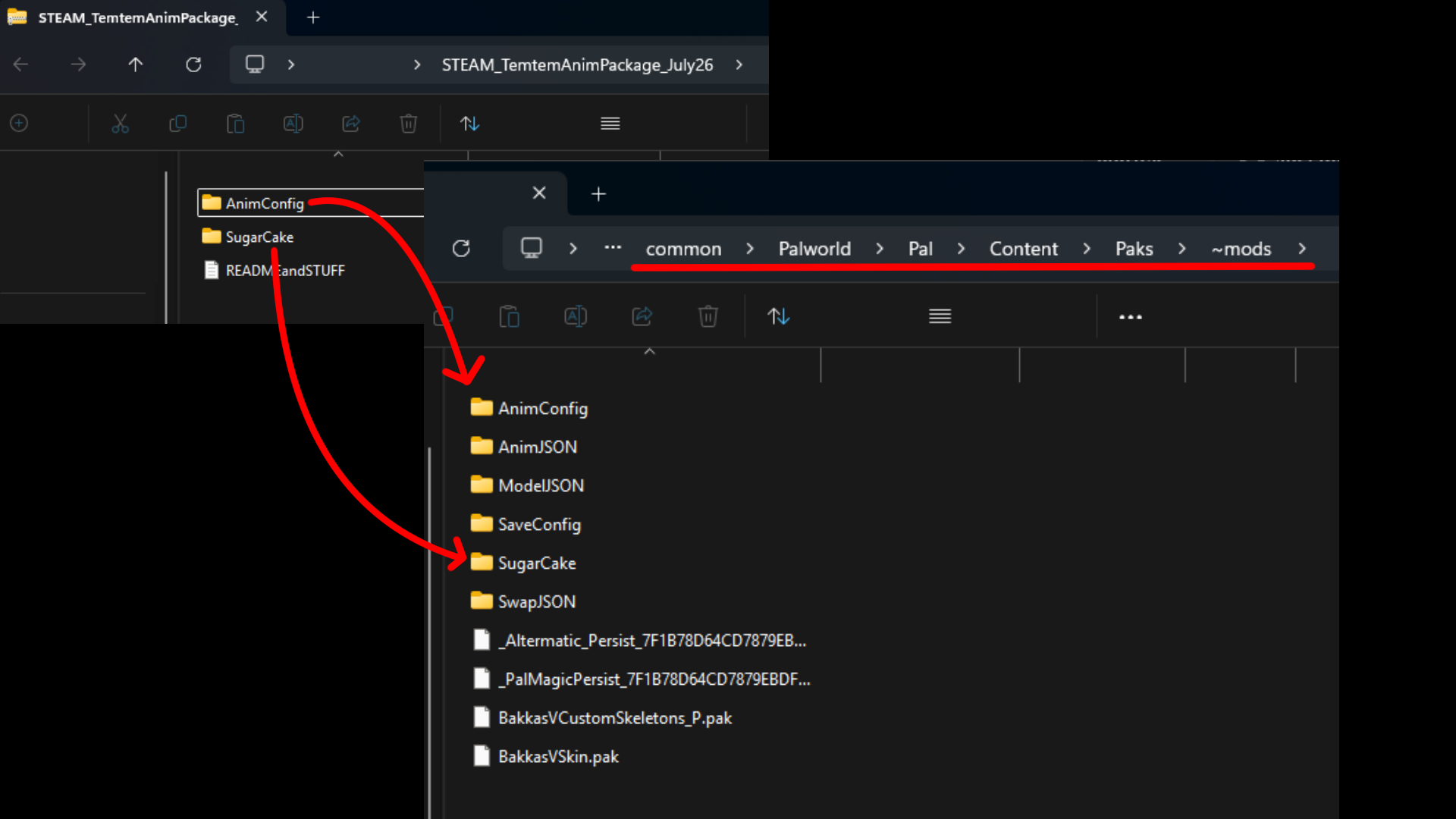
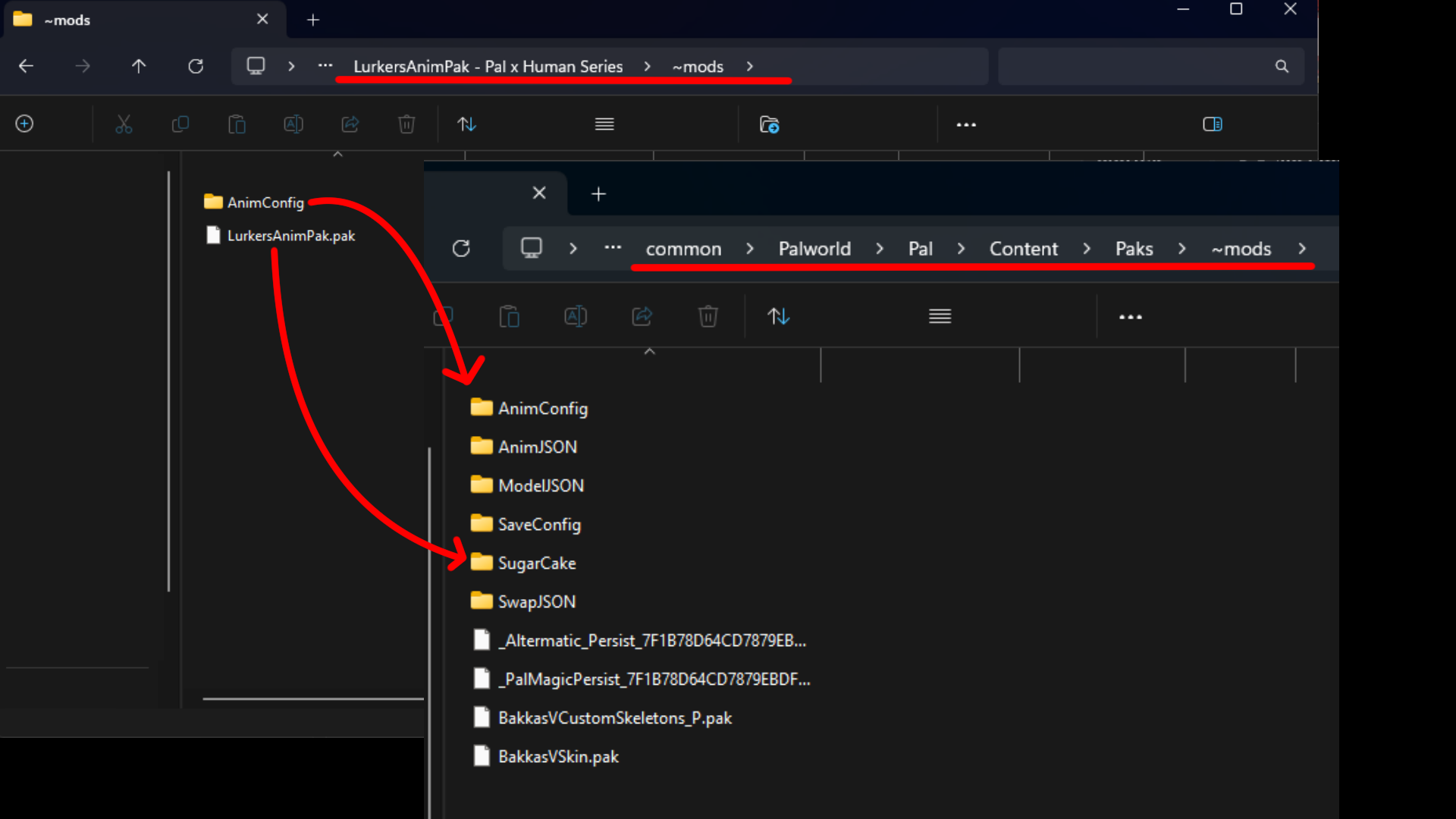
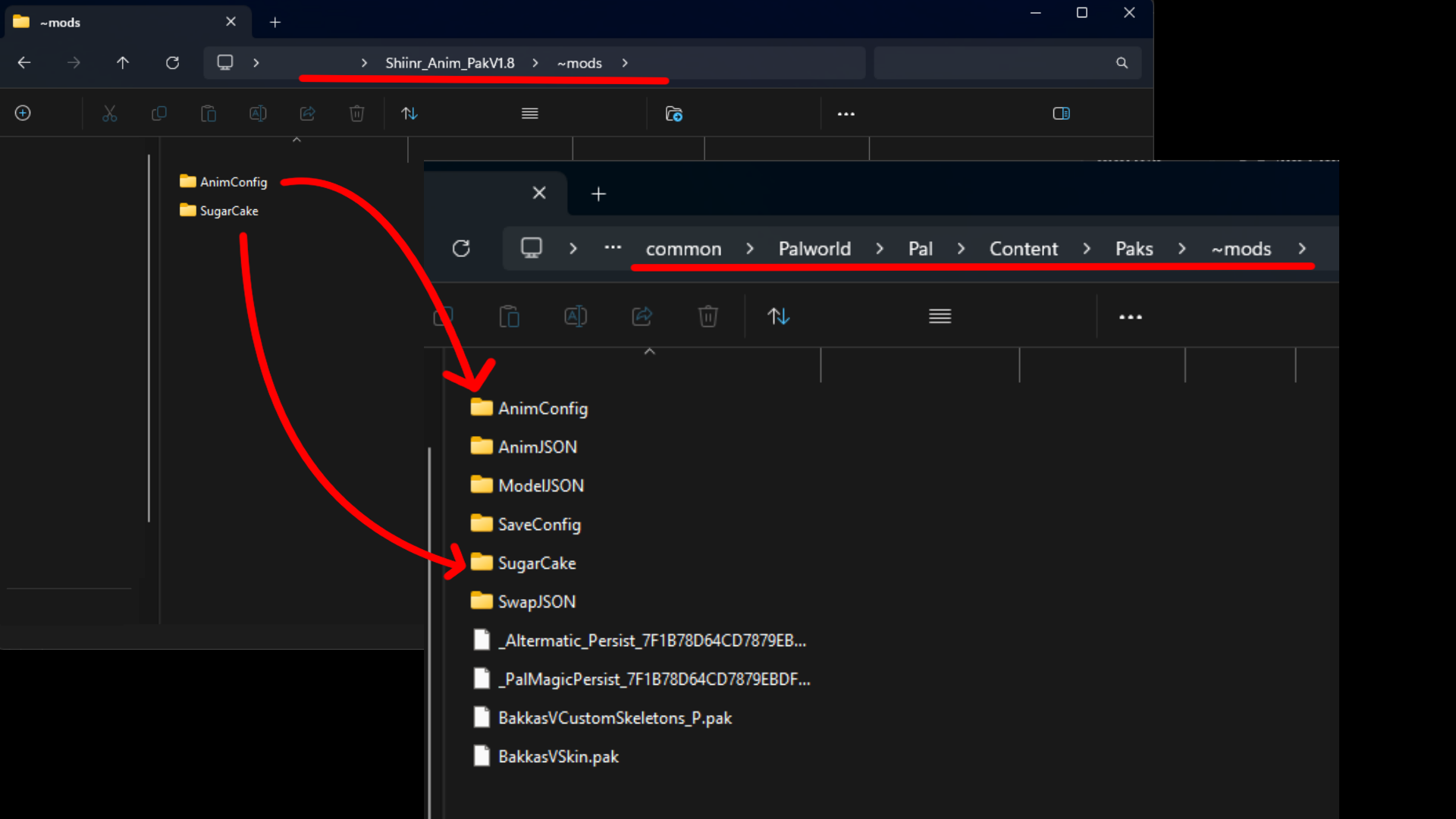
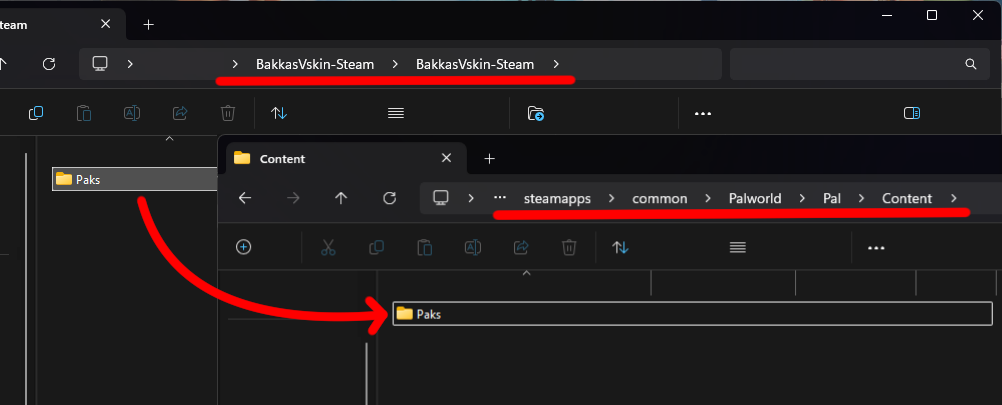
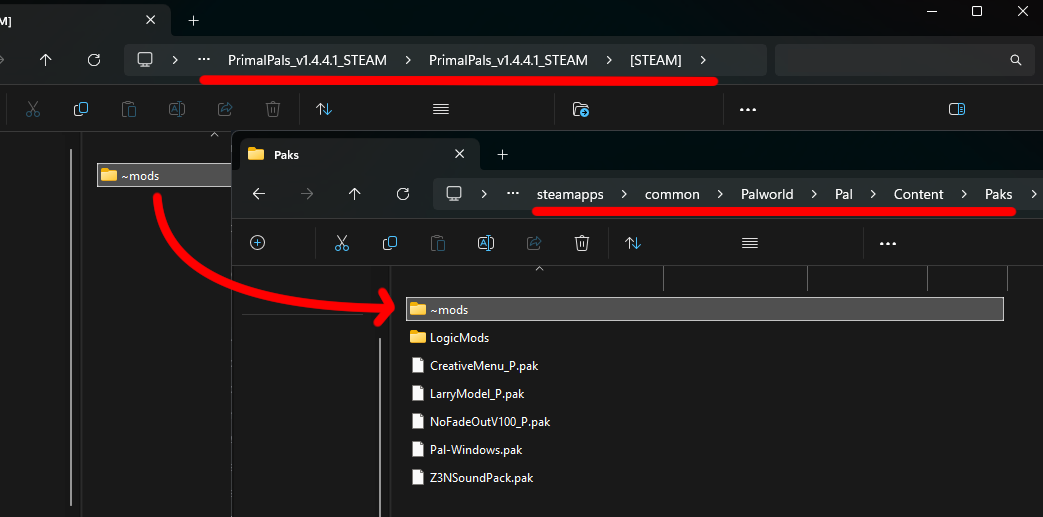
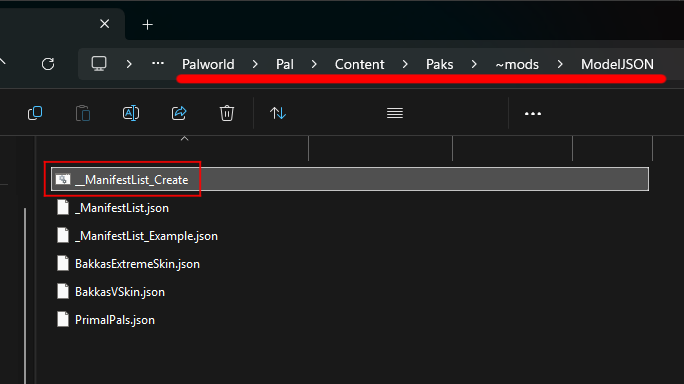
Hi Everyone! Since the game entered 1.0 LL Palworld is flooded with newcomers, and they all have the same, problem, Why mods don't work? So, I decided to create a guide for all the Newcomers! This is how things are as of yet! There are many Animation and Model Swap packs on LL, but most of them were either removed, abandoned and/or need to be updated. For this reason, i will focus only on the Latest releases that work, to avoid Misunderstandings and Workarounds. Animation part, Latest S-Cake changed how animations register, so Animation Creators have to update their packs to the new system, but that's easy to say and takes a long time to do, as for Model Swaps, the 1.0 changed a lot of models and added new ones, so that will also take a lot of time to work on the models. All right then, let's get started! The most important mod is UE4SS (Scroll down to the bottom and look for a zip called UE4SS_v3.0.1-1152-ge3ba1016.zip) You need to put the files in Palworld\Pal\Binaries\Win64 (You can skip this part if you are Workshop user and you have the Workshop version of UE4SS already) Download S-Cake Just drag and drop the Pal Folder into your Palworld install folder. !For Workshop UE4SS Users! After you downloaded the mod and drag and dropped everything, INSIDE RAR, go to (Steam)/(XBOX)\Pal\Binaries\Win64\ue4ss\Mods and drag and drop UniPalUI and SugarCake folder into your Palworld\Mods\NativeMods\UE4SS\Mods folder, and after this go to Palworld\Pal\Binaries\Win64 and delete ue4ss folder. Download PalMagic You need to put this Paks folder in Palworld\Pal\Content (You need this for Bakkas V skin and PrimalPals) Download PalSoundBank You will have to put these files in Palworld\Pal\Content\Paks\~Mods Now that we are done with the Essentials, time to see what working animations and model swaps do we have. (I will update this part every time a new updated Animation pack or Model Swap pack comes out.) Animations TemtemLover's animations Lurker's Animation Pack Shiinr Animation (Download the one on the top named view) Model swaps Pal Models BakkasVSkin (Has a Male Nude model with physics) PrimalPals (Make sure to run __ManifestList_Create.bat after installing model swaps.) Character Models Nude Base Outfit (Female Nude model with physics) R345OT's Pal Human Pack (Detailed Female model with Aroused and Pregnancy sliders, futa mesh and clothing/armor replacements) Kaitzuwu's Male Furry player replacers ________________________________________________________________________________________________________________________________________ Well that's about it for now, 1.0 is out, many models have changed, and added so, it takes a mighty amount of time to update everything, be patient and don't forget to enjoy the game. Happy Hunting! Alternatively The author of S-Cake, has put together a guide as well, you might wanna check it out!
-
This here is my newest iteration of the Fallout Guide. Bethesda screwed everyone by making so many updates (and introducing new bugs) that we now got something close to three different versions of the game. Instead of trying to keep up with all the changes, or having exceptions left and right, I'm reworking the guide so it should work independant of your version of the game. But you have to make sure that you downloads the listed mod for your version (I can't take that off your hands 😉). Threadmap 1. Overview 2. Modlist 3. Files 4. Recommended settings 5. (Re)Creating the LOD for the guide. 6. Bugs and solutions 7. Screenshots Regarding AE The newest update broke, as usual, F4SE and a few other mods. I'll remove this note as soon as everything works again. I recommend to stay on version 221 for now. Who this guide is for. I've watched quite a few videos on Youtube and some of them look fantastic. But most of the time you simply don't get a complete list of what they actually use or have to watch a dozen or so (*cough* 250 *cough* MxR *cough*) to get a hint of what they might use and then they might switch mods at any time. So this here is my complete list and i'll add a few screenshots (i recommend to take a look there first) so you'll know what to expect if you follow this guide. My goal is to get a beautiful game which is fun and, although it is a RPG, as realistic as possible without punishing you for playing it. So you'll find no nonsensical weapons which have been changed just to have something 'new' (i replaced those as much as possible), and none of the punishing survival mods. But the beauty of it is that you can still adapt the list to what you like. I'm just trying to give you a solid base where you can add the things you like (or remove the ones you don't). See 'Nothing is carved in stone' in post #6. A big 'Thank you' to all the modders out there! The game wouldn't be as good as it is now without you guys and gals! Don't forget to either endorse the mods you use or give the authors a 'thumbs up' here at LL.
-
 The guide is effectively version agnostic. There are instructions to identify your game version as well as pointers to get compatible files regardless of previous, current or future versions. If you want to mod the game from scratch check the patch notes for the game and see if there has been a recent update. If that's the case it's very likely this newest version isn't fully supported by mods yet. You can look into downgrading your game version to the previous stable one or waiting a few weeks for full mod support. Other than that you should be okay following this guide, as long as you apply the recommended practices detailed in it. As of May 29 MO2 is having login issues due to a recent update to the TLS/SSL certificates the site uses. MO2 devs are aware of the issue and a proper fix will likely be implemented in the next official update, but no ETA about when that will be. Meanwhile, a workaround is to delete the following files from your MO2 install: libssl-3-x64.dll from \MO2 (root folder of your MO2 installation, where the ModOrganizer.exe file exists) libssl-3-x64.dll from \MO2\dlls qopensslbackend.dll from \MO2\dlls\tls Do it sequentially, so first delete the .dll file in MO2, try to start MO2 and see if it logins correctly, if not delete the next .dll from the dlls folder and so on. By doing this MO2 will fallback to use the default Windows libraries to check this new certificate. The purpose of this guide is to provide a comprehensive source of information for newcomers. If you follow the steps described here you'll end up with a basic set of mods covering the requirements (plus some recommendations) to use Sexlab and its additional mods. On top of that I hope by following the instructions given here you'll be able to grasp the fundamental concepts about installing mods and using the different tools available to further tweak your game. This was made with Skyrim Special Edition ("Skyrim SE" or "SE" from now on) in mind. Some of the instructions or complete sections may not apply to regular or Legendary ("LE") Skyrim . And of course most mods won't work if you use the SE versions in a LE game. For Skyrim LE I recommend you to check the Conglomerate blogs. This guide is heavily centered around Mod Organizer 2. If you prefer to use Vortex it won't be of much use to you. I'm not aware of a similar guide made with Vortex in mind, but there is a good video series on how to use Vortex. That would be the starting point. After that you'll need to check the mods you intend to use. Always verify you're installing all the requirements and that the mods you're getting are compatible with SE. Preparations - The required and the recommended stuff A computer with Windows 10 or higher and Internet access is implied. Steam and the game "The Elder Scrolls V: Skyrim Special Edition" acquired in your Steam account. Pirated copies of the game are not supported (against site rules and also some mods won't work so don't waste your time). Game Pass/Microsoft Store versions of Skyrim cannot be freely modded (so again don't try, just go for the Steam version). The GOG version has some mod support (check this thread for more info). But I won't buy and test this personally so it's not something I'll cover here. Any program capable of zipping and unzipping files in .rar, .zip and .7z format. 7-Zip is a free program that does all of that. Recommended: enable the Windows Explorer setting to see file extensions, this may be useful to confirm you're following the instructions using the correct files: Press the ˅ ˄ buttons in the top bar of any folder to expand the settings. Go to the "View" tab. Enable the "File name extensions" setting. You can revert back this setting at any time, as I think most people are used to have file extensions hidden. Recommended: If you're not a premium user in nexusmods you may have noticed that when you press any of the download buttons you're redirected to a new page and you have to click in another download button to finally get the file you want to download. Here is a simple fix for this nuisance of a webpage design. You'll need to install a browser extension and add a little script to it. This script will only help you with the extra redirect mentioned before, it doesn't grant premium benefits. Install the Violent Monkey browser extension (for Chrome) - (for Firefox). Install script: Nexusmods Download Fix. A new Violent Monkey tab will open with the script ready to be added. Press "Confirm installation" and close said tab. Currently outdated, disable or remove it if you were using it. Nexusmods Enhanced Auto-download. Press the install script button, then the install button in the ViolentMonkey tab. The script will be active while you navigate the nexusmods site and skip the additional redirect 99% of the times you want to download something. The guide - Download and recommended usage Guide MO2 & Other Tools v1.5.1.pdf If you want to share this guide with others please don't upload the pdf directly. Instead link this thread. That way people can download the latest version directly from here and read the rest of the information. To open the guide you can use any PDF reader. Most web browsers work for this too: simply get the pdf file and drag it to your preferred browser. It will open as any other page and you'll have zoom buttons, middle click to open links and so on. The first page has an Index, click in any title to go there immediately. The header of every page has a "[Return to Index]" button. Currently the guide covers the following points: 01. Steam settings and Skyrim SE installation 02. Mod Organizer 2 - The first look 03. Skyrim Script Extender 04. Minimal modlist 05. LOOT 06. FNIS 07. BodySlide 08. Into the game 09. Mod Organizer 2 - A second look 10. (Optional) Enhancing graphics - Post-processing effects 11. Updating Skyrim SE, SKSE and mods 12. Locating your files + Quick tool recap 13. Final words Each section will get you closer to the final goal. Just take your time and read all the instructions. I've tried to be as descriptive and direct as possible, using screenshots of my own setup to show the different settings and features used. The way the sections are listed is 100% intentional. So don't try to skip one or do them in a different order. You'll have a better experience if you fully read the instructions the first time and go one step at a time. The current setup can be installed and tweaked in about 4-6 hours (give or take, depending on your knowledge of the tools used here, and the wait times if you can't download mods at full speed). So don't rush it, and aim to learn more than just imitate. Changelog

-
 First of all, welcome to this community ! Hope you enjoying your time here ! So, I will make a little help guide for you if you still confused to choose which mods you want to use. For the first time, it may be still a few list because I'm making the list from what I've tried before. But, if you have any suggestions, leave a comment. I'll add it and update this topic as soon as possible. WickedWhims A fundamental base mod for nudity and sex for The Sims 4. You can download this mod at LoversLab or at Wicked Official Site. WickedWhims Animations Sex animations for WhickedWhims - you can check the full list of animations at LoversLab or at Wicked Official site. Bouncing Boobies Mod to make breast more realistic like how it bounces when walking or sex. You can download this mod here. Cherry_Pie Cum Mesh Add animation cum grid in Sims 4. You can download this mod at Cherry_Pie Patreon Site (I'm not using LoversLab version because it's not updated). Use this mod along with Spent's Cum Corner to get more fantastic experiences. Nisa's Wicked Perversion Massive mod that contain wicked content for your sims world. This mod have some features such as prostitution, succubi, and other else. You can download this mod at LoversLab or Wicked Official Site. Basemental Drugs Complex and extensive mod for drugs. This mod contain drug selling, drug dealing, drug gang, and gang war. Also your sim can drunk with alcohol and have some actions that will make the game more fun. You can download this mod at Basemental Drugs Official Site or Wicked Official Site. Basemental Addons - addition for Basemental Drugs mod to expand its features. You can download this mod here. MC Command Center (MCCC) Adds greater control and NPC story progress. You can edit your world setting, career, CAS, occult, clubs, and many more. You can download this mod at The MC Command Center Official Site. EllaNoir Flirty Fetish BDSM mod to stimulate real-world BDSM lifestyle. This mod give additional features such as special relationships, training, events, and others. You can download this mod at LoversLab or Wicked Official Site. Replacer Mod that replace the visual into erotic scheme. TV Channel ☆ Big Zhbr Adult TV Channels & Movies ☆ CinErotique TV Easel ☆ Big Zhbr Adult Easel Painting Replacements BDSM & Other Device ☆ asketo's objects ☆ Azmodan22 Bondage Device ☆ Azmodan22 Strapon ☆ bobahloo BDSM Furniture ☆ Kritikal's Naughty BDSM & Fetish Collection ☆ Supern4tural Dildos ☆ YrSa BDSM Device Custom Sims ☆ 420simerror Sims ☆ ArchSkylar's Sims Creation ☆ Cafekko57 Collection ☆ Discovery Sims (Original) (Townie Makeovers) (Special Characters) ☆ Fabulous Honey Sims ☆ JoyToySims ☆ MISSME's Sims ☆ mrrakkon's Sims (and stuff) ☆ My Sims by Etiennet! ☆ sims4you #1 and sims4you#2 ☆ SecretCrush ☆ Sims List [Sims Custom] ☆ WORLD SUGAR BABIES SIMS Sexy Clothing ☆ BlueCraving ☆ MISSME's CC ☆ Nany-Design Clothing ☆ WuxinUshin | Sexy Clothing Q : I have problem with Customized Sims that others have created for download, they aren't in gallery. A : There will be 2 folders in the downloaded file, Mods and Tray. You should put it into the correct directory, Mods folder and Tray folder. And don't forget to check box "Enable Custom Content" and "Script Allowed". Q : Do some mods require DLC's ? Is there any list of which DLC's I should own if I do decide to buy it ? A : Yes, some mods require DLC's to get its full features. I suggest you to only buy the DLC's that required for essential mods, like WhickedWims need Get To Work for Strip Club feature. But still the mods still working on base game. And some modders will tell you the specific DLC's for their mod to work. _________________________________________________________________________________________________________________________________________________________________________________________ I will update soon with more specific or suggestion from comments. Please report to me if there's any misspell or error link. If you want to support me, please visit my patreon by clicking the Patreon Picture below. Any support is very much appreciated. Enjoy your game, and have a nice day !



-
INTRODUCTION Skyrim VR is aging. The SKSE site lists the different game versions, and Skyrim VR is the oldest and no longer receiving updates. This is good, in the respect that Bethesda won't change anything about the game that breaks mods. But it's also bad because mod developers are not making mods that are backwards compatible with the VR version. In this list, I'll provide exact versions and URLs for where to find the mods I use, if I can. Some of these are no longer available. Ask me if you would like the version I have. If I get enough requests, I'll put them on a cloud drive. LEGEND 👄 means Adult content ♀️ means female main character content ♂️ means male main character content INSTALLATION Start with a fresh Steam install of Skyrim VR. Ensure you have no files in "My Documents / Save Games / Skyrim VR" or "Skyrim Special Edition". We're starting clean. If cloud saves put games back in, that's ok. Run Skyrim VR once, as is, without any mods, in SteamVR. This will create and populate "My Documents / Save Games / Skyrim VR" with some files. CLEAN MASTER FILES This could be considered an optional step. Some modders swear by it, others never mention it. I've done this both with and without cleaning and I honestly can't tell the difference, which is why I call this "optional". This is the YouTube video that I follow. Everything you need to know is in there about how to get SSEEdit 4.0.4, configure it for SkyrimVR, and how to clean the files. I'll post some notes about this below the video. I also don't have an opinion on when to clean. Before you start Skyrim? Before your first save? After? I will leave that up to you because I don't think it makes any difference. NOTES: At this point in the video, he's just a little impatient. Dawnguard takes a bit to load and the offending line will show up in red if you let the application work for a moment. Autoclean Update Autoclean Dawnguard Manually clean Dawnguard - Cell block 5, sub-block 3, in the RIGHT HAND pane, 4th column - remove "RiftenRatwayZone [ECZN:0009FBB9]" - Cell block 2, sub-block 1, Guard - remote the whole record - Cell block 8, sub-block 1 Test - remove the whole record Autoclean Hearthfires Autoclean Dragonborn DO NOT CLEAN SKYRIM SETTING UP VORTEX Install Vortex. If you prefer another mod manager, that should be fine, but I've only used Vortex. Use Profiles. This will keep your mods and save games in sync. Maybe you want to be a breton today, tomorrow a khajiit. By using profiles, you can switch between them as if they're separate installs. NOTE: you cannot change the settings of the mods, just whether or not the mod is installed, so keep that in mind when configuring later in SkyUI. Take note of your profile's ID. It is used for where your save games will be written to. For example, mine is "SkS-j0XPh" and so my save games are written to C:\Users\corysia\Documents\My Games\Skyrim VR\Saves\SkS-j0XPh. If you have trouble saving your first game, it may not have created that directory and you'll have to do it yourself, and then save. I've only had that happen once, but it's easy to fix. My Steam Library is on D:\Games, so Vortex needs to be configured to use the same drive. In settings, under the Mods tab, I set my staging folder to be "D:\Games\Vortex\staging\{game}" and set Deployment Method to "Hardlink". In Settings, under Download, I've got my Download Folder set to "D:\Games\Vortex\downloads" SET UP SKYRIM VR FOR MODDING Start Vortex. When it first starts, it may need patching and provide a number of alerts in the upper right corner. For loose files, just press 'fix'. The rest we can ignore for right now. We'll fix them as we progress. Visit SKSE and download sksevr 2.0.12. That's the version for Skyrim VR. On the SkyUI VR GitHub page, you'll find SkyUI 1.2.2 Skyrim VR Tools 2.3-BETA UIExtensions 1.2.0 Install Fores New Idles in Skyrim [Required] FNIS Behavior VR 7_6 XXL (Optional) FNIS Creature Pack SE 7.6 if you are going to use creatures (I do) (Optional) FNIS Spells SE 7.0 (I don't use this one) Configure FNIS in Vortex to auto-run. Go to the Mods tab and then click "Configure FNIS" along the top menu bar. Be sure to check the Skeleton patch, as we'll be needing it shortly. Also, if you run Fores by hand, it may repeatedly bring up this "Create a shortcut" menu. If you read the message (I didn't, for the longest time! ), if you hit [Cancel], it won't ask you again. 👄Install SexLabFrameworkSE_v163_BETA8 because this is the last version that still supports VR. Install the SexLab VR patch beta8 38-test, tell Vortex to load after the SL framework Install the SexLab VR patch hotfix for v38, tell Vortex to load after the previous patch you just added. Install XP32 Maximum Skeleton Special Extended (XPMSSE) 4.80. This is what we needed the checkbox in FNIS for. For options, I select the following: Skeleton - Physics Extensions Character Creation pg 1 - Racemenu (we'll install that shortly) Character Creation pg 2 - Out of sync Animation Variants - none for everything First Person Animation - none Mounted combat animations - none Compatibility pg 1 - 👄Schlongs of Skyrim (we'll install shortly) Compatibility pg 2 - none, I don't use Deadly Mutilation Compatibility pg 3 - none, I don't use Enderal Install RaceMenu Special Edition v0-4-9 This specific version. Install RaceMenu VR 0.4.14 Delete skee64.dll and skee64.ini from <your_steam_install>\steamapps\common\SkyrimVR\Data\SKSE\Plugins NOTE: When you install the next mod, you'll get a warning about deleting 2 files. It's OK. Install PapyrusUtil VR 3.6b. NOTE: This version does not need the Address library When prompted, override SexLab with this version (in other words, Load After) VR Address Library Papyrus Tweaks NG Install VRIK Player Avatar v0.8.1 Build 28. NOTE: If you're going to play the vanilla introduction and not use Realm of Lorkhan as I do, disable these VRIK mods until after your hands are freed. (Optional) Install VRIK Rift-Index-WMR Controller bindings. This will remap some of your controller keys. (Optional) Install Arctal's VRIK Tweak, tell Vortex to override VRIK. 👄Install HDT-SMP VR (Skinned Mesh Physics) for Havok breast physics. Install BodySlide and Outfit Studio v5.5.2 Options: BodySlide and CBBE Body Physics, RaceMenu Morphs for CBBE Install Caliente's Beautiful Bodies Enhancer - v1.6.2, tell vortex to override BodySlide when asked Base Options: Curvy, ?None, Vanilla, Face Pack, Thin + Trimmed Brows Optional Features: check everything 👄Install Schlongs of Skyrim for VR 1.0.7 Default body, Hairy, and all addons Load after XP32 Install Fuz Ro D'oh VR Run BodySlide Studio. You'll want to check the meshes checkbox and the "Build Morphs" checkbox, then press "Batch Build". You'll get another dialog box asking about which sliders to choose. I select ?"CBBE Body HDT" which will make my character nude when undressed. There are other options for Undies, etc. On the next screen, you'll also see a list of outfits and you need to pick a shape again. Here, I choose CBBE Physics (I'll try to grab a screenshot next time). It should generate morphs for 292 items. OPTIONAL PRE-GAME MODS These are some additional mods I typically start with prior to creating a new game. Achievement Mod Enabler to enable Steam Achievements Install Realm of Lorkhan v.3.6.1 Install Realm of Lorkhan - Unbound patch (Optional) Realm of Lorkhan - No Shards No Starting Spells No Racial Starting Spells KS Hairdos SSE CREATING A NEW GAME In this section, I'll describe how I configure these mods from within the MCM. I won't go over all of my personal settings, but I'll call out some important ones. In the end, you should set it up the way you want to play. (Optional) Disable RaceMenu while you initially create your character. I do this because I just want a Breton. After you create your character and make your first save, you should re-enable RaceMenu. I find Race Menu too hard to work with in VR. Leave it on if you want the full functionality of it. Start a new game and create your character. I have found that when I try to switch from Male to Female, SteamVR locks up and I see my harddisk running solid for a bit. Sometimes I have to restart, other times I can just wait a bit and the female model will eventually show up. It didn't used to do this, but I am running in to this often now. Just be patient and keep trying if you're going to play a female character. After your character, configure VRIK. Go in to your Magic menu and select the VRIK Calibration Power. First, go with "Headset Height". After the power cooldown delay, go in again and choose "Default". I'm 5'3", so I then choose "shorter" a few times to get me at the height I want my character to be. Finally, choose "VR Scale" and then done. You can now unselect the VRIK Power option. Next, in the MCM, select VRIK. Under Controls, I like to check "selfie" and set the compass to "left hand up" so I only see the compass when I look at the palm of my left hand. For SexLab, first you need to choose Install and then exit the MCM. After it is installed, go in to the MCM again and under VR I like to choose "Lock view to body" and then I usually prefer to "disable 3rd person" so it's all 1st person. Under Animation, if you want creatures, turn that on and then exit the MCM. You'll get two notifications that Creatures is installed and you have to wait for both of them before the MCM will respond again. Go back in to Animation and set your preferences. If you want aggressive animations, be sure to set them to be allowed here or you'll get messages later saying how they were blocked. Under voices, I change my voice from Random to a voice I prefer. For NPCs, I set them to reuse their voice. Quit out of the MCM and save your game. Now is when you verify that your saves are going in to the correct subfolder. In my case: C:\Users\corysia\Documents\My Games\Skyrim VR\Saves\SkS-j0XPh Re-enable Race Menu if you turned it off. These are the core mods I start with. The rest of them are Quality of Life changes, adventures, and bugfixes. I'll continue to update this post periodically. QUALITY OF LIFE MODS In this next section, I'll list out all of the mods I add just to improve Skryim VR. Amazing Follower Tweaks SSE 1.66 - lets me turn anyone in to a follower and gives me the options to give them more commands than the default game. Audiobooks of Skyrim - I love to read, but not in VR. Audiobooks of Skyrim Gopher Collection 1 - Audiobooks read by Gopher Audio Settings for Audiobooks of Skyrim - gives a separate volume slider for the audiobooks. Be Seated v4.2.5 - really fun one where you can sit at a bar in an inn and order a drink and they bring it to you! Note: I have no luck with beds, I get stuck in them, so I disable that. Requires Skyrim VR Tools The Unofficial Skyrim Special Edition Patch v.4.2.6 - later versions won't work with SkyrimVR requires SkyrimVR - USSEP Compatibility Patch Campfire - a complete camping mod - My Breton is a forsworn, so she should be able to make basic bows and such in the wilderness. Papyrus VR should override Campfire. SexLab should override Campfire. We want PapyrusVR to be the latest Papyrus engine. Carriage and Ferry Travel Overhaul - More options to where the carriages will take you. (Optional) No Fast Travel - I'm using VR and a treadmill, I want to have to walk or pay for a ride. Crouch to Dodge VR - You'll break a sweat doing squats, I promise! Darkened Dungeons SE - dungeons should be dark Replaced in favor of Enhanced Light and FX Dual Wield Block VR - because you should be able to block even if you're holding two weapons or a weapon and a spell. Fishing in Skyrim VR - teach a girl to fish, you feed her for life! Footprints - because you should leave tracks in the snow. HIGGS Enhanced VR Interaction - because you should be able to touch everything in your world. Holidays - who doesn't love a party? In the MCM you can set your character's birthdate. Immersive Sounds Compendium - several improvements to sounds. I leave the Nirnroot as vanilla, however. Immersive Draw & Sheathe Sounds VR - a patch for the above compendium Modern Brawl Bug Fix - because for some reason, probably cloaks or something else, interferes with brawling and they always pull a weapon on me. Realistic Water Two SE v5.6.0 - water looks so much better Smoking torches and candles - I prefer the subtle option. Replaced in favor of Enhanced Light and FX Static Mesh Improvement Mod (SMIM) - really improves the looks of things. You'll have a lot of conflicts with this one. Always load it 'before' because the rest of the mods are newer, I'm sure. Super Simple Lock Bash - because you should be able to break in to a chest VR Bound Bow FX Restored - makes bound bows like the non-VR version Weapon Throw VR - so you can throw weapons, torches, etc. Lots of options in here. Wet and Cold SE - I like seeing my cold breath, etc. MAGIC More Valuable Spell Tomes - because magic shouldn't that cheap. Spell Research 2.2.2 SSE - to research magic rather than just reading a book. Be sure you go in to the MCM and import spells. No Spells From Vendors or Loot, to force me to do the research rather than saving up a ton of money Immersive College of Winterhold SE - a wonderful expansion to the College. A must-have if you play a mage. College of Winterhold - Quest Expansion - More quests for the College, and they're actually good! iUnlock - Spell Research version - import spells in Spell Research to pick this one up as researchable. Simple Mark & Recall - I loved this pair of spells from Morrowind. Not researchable, unfortunately, so it's going to be expensive! Teach Followers Spells Full SSE - do I teach my follower or do I sell that spell tome? Hmmm.... Wards Functionalities Extended - a ward can't stop an arrow?? Now they will. But shouts should break wards. Face Changer - I get this one mostly so I can change my hair style. Collage Days - Tuition, ugh!! bHaptics and KatWalk No Stamina Drain For Sprinting - This sounds overpowered, but I'm using a KatWalk. I promise you, my stamina drains faster running Real Life than it does in the game! TactSuit SkyrimVR - Only useful for someone with bHaptics toys. They're so much fun! Skyrim VR Configuration Tool - This handy tool allows you to adjust a lot of things. I read about it on reddit. I'm 5'3" and to physically crouch on a KatWalk with the default settings is more burn than I can handle right now, so this let me adjust it to a more comfortable stoop and still let me walk. NOTE: Another very useful feature is it allows you to increase the priority of Skyrim VR, making it run smoother. At this point, I run the game again and configure the MCM. And make another save game. Here I also joined the Forsworn faction and chose the Lover's Stone. Next, we'll start installing the Adult mods. Here we have to be careful because loading too many of these at once can overtax Papyrus. So, I periodically start the game and configure the MCM. RSSE Children Overhaul 1.1.3 with hotfix 1 - USSEP patch, 2K Aventus, Facial animations Hearthfire Multiple Adoptions JContainers VR 4.1.13 Enhanced Lights and FX - loading this later as it detects mods 👄Sexlab Aroused SSE Loose 29 👄ZaZ Animation Pack+ CBBE HDT V8.0+SEREV3 - ZaZ is going to give you a lot of extra items and put collars around the necks of a lot of people. Lots of slavery in Skyrim! Be sure you register SexLab in its MCM settings. 👄ZaZ Animation Pack+ CBBE HDT V8.0+SEREV3 Voice files 👄ZaZ 8+ - VRIK No Spin - VR Patch - this will cause a conflict, load it after to override. 👄SexLab Sexual Fame 0.99 - visit the MCM for rules, you might get arrested! 👄SexLab Sexual Fame Comments 3.31 👄SexLab Sexual Fame Comments Voice Files 3.31 👄Creature Framework 3.0 and More Nasty Critters. Be sure you look at the video there to understand how to put the 3-part file back together. 👄Fertility Mode 3.0.1 - choose Skyrim Special Edition and BSA. Ignore the Special Edition Patches, they're no longer needed. Choose HMA + SexLab. In the MCM, I like to deselect auto-inseminate PC, select only unique men and women. And I slide the UI bar ♀️ over from 900 to about 925. I also set the race to random between mine and the father. 👄Fertility Mode v3 Fixes and Updates Fertility Mode VR Name fix ♀️ Fertility Adventures - I disable the sleep creep. It happens too often. 👄SL Defeat - I would prefer to use Naked Defeat, but it doesn't play well with VR. This one is still good, tho. You need to turn on SL Defeat in the MCM. NOTE: If you find yourself being molested and the molester is suddenly attacked by the town guards, this is due to a setting down in Player as Victim called Witness Intervention where you can allow others to join in or save you. TURN IT OFF! Especially if you're a town or inn and don't want your NPC attacker to be killed. NOTE: If enemies stop attacking you, you probably need to go in to this MCM menu and CLEAN because your state is stuck in recovery mode. It's to allow you to get away and not be repeatedly victimized. But it gets stuck now and then. 👄SL Defeat Voice Files This is enough for now. I start up the game, and wait a bit for the MCM to catch up. The game might crash. Just try again. If it keeps crashing, start taking out mods and retry. Configure the MCM, and make a save. Now for the next batch of mods... 👄Devious Devices SE & VR 5.1 - I choose CBBE SE, FeuerTin, Bunnyhopping, no beast race, ♂️Devious Devices for Him, and Skyrim VR. I have Devious Devices override ZaZ conflicts. 👄Devious Devices 5.1 VRIK No Spin Patch - the patch should override the original. 👄Devious Cidhna 👄Devious Cidhna Voices 👄Sexual Persuasion 👄Sexual Persuasion voice 👄SL Animation Loader SE 👄Rydin SLAL Pack - You'll need to enable these in the SL Animation Loader MCM. 👄Absolutely No Naked Comments 👄SexLab Achievements - gamification of naughty activities! Time to break again to let Papyrus handle this. Before starting the game, run BodySlide to update the morphs for your new outfits. You'll get a list of options to choose. I choose HDT or CBBE SE whenever it's offered. It should be up to 448 morphs now. I always get an error on the Khajiit chain harness and the Breast Rope Extreme harness. I don't know how to fix it, so I ignore it. It hasn't messed me up so far. Skyrim Utility Mod (SUM) 👄Prison Overhaul Patched 5.32 (requires SUM) 👄Prison Overhaul Patched Voice SUM & POP No Spin VR Patch - load after-all 👄♂️Flower Girls SE and VR - remember to go back to Fertility and monitor FG girls if you'd like. 👄♂️Flower Girls SE Adventures 👄Public Whore 👄Public Whore voice 👄Public Whore SlaveTats Public Whore SE/VR patch 👄♀️Submissive Lola Resubmission 2.1.0 NOTE: If you don't set this to nickname mode or your character's name will be changed to Lola and it will affect your save games. When you end your service, you can get your name back. But you will need to save and restart your game for it to work properly. NOTE: By default, zaz slave control is off. Unless you've another mod that would conflict, I suggest turning this on because it will require other NPCs to ask your owner for permission first. ?Submissive Lola voice 👄♀️♂️Radiant Prostitution Gigolo SE 7.0.4 - This mod does not fully work, none of the additional quests will load in Skyrim VR. I've been trying to figure this out, and I think it's due to JContainers VR not being as current as JContainers SE. But the basics work. 👄Radiant Prostitution RMCW Edition 👄Radiant Prostitution v7.0.4 Voice Pack Gen4 👄Simple Slavery Plus Plus 6.3.19 [SE] 👄Simple Slavery Plus Plus voice 👄Spank That Ass SE v4.5 (25-Jan-2021) - there is a voice file for this one, but it doesn't match my chosen voice. Oddly, this will sometimes show up as "trial run alpha". 👄Dripping When Aroused SE (DW 2022-03-03) - also called Dripping Wet or Dripping When Wet. 👄Love Sickness 1.0.1 - Set this for hearts only on onset so you know when you first enter this stage. I have a lot more mods installed. I'll list them here, in no particular order. If there's interest, I'll track down the exact URLs like I have above where I can. But I'm not sure anyone's read this far! Skyrim VR Change Your Bindings NOTE: If you try to load VRIK Rift-Index-WMR Controller Bindings V2.1.0, this app will throw a parsing error. It turns out that the VRIK map adds an unexpected Activate option to the "Favor" section of the file. If you open the file in a text editor and delete Line 229, the VRIK mappings will open in this app. NOTE: combos are supposed to work, but I can't get them to, so maybe this is useless. 👄Body Search & voice files - gets repetitive, so turn it way down. 👄♀️Troubles of Heroine - can be Troubles of Hero, lots of options. I disable some side quests I don't personally care for. 👄♀️A Forsworn Story iNeed Food Water and Sleep Continued v1.93 - I can only see 1.94 now, so I don't know if one can still get this version. iNeed Water VR 👄Amorous Adventures All Male Housecarls light version 👄Animated Prostitution 👄TDF Prostitution 👄Bathing in Skyrim - I ended up removing these because of conflicts with layers on my character. 👄Bathing in Skyrim Tweaked Becoming a Bard & voice 👄Dark Desires Club 👄Devious Lore 👄Devious Enslaved Continued v13.25.0 👄Dibella Sisterhood 👄Fade Tattoos 👄Rape Tattoos & Rape Tattoos Tweaked 👄Horrible Harassment + no spin patch Improved bound sword and dagger collision 👄Sex Slaves aka Mia's Lair Immersive Good Boy - for Meeko, if I pick him up. Quiet Dog - Sit - I'm tempted to go with Complete Silence, but I don't want to break conversation. Ride Sharing Semi-open guard helmets 👄sex with thieves 👄Dangerous Nights - turn this WAY down or you'll never get any sleep 👄SL Kidnapped Spouses Enhanced Blood and Silver - vastly increases the size of Cidhna mine. 👄Skooma Whore Relationship Dialog Overhaul Relationship Dialog Overhaul - RDO SE - RDO - AFT SE Patch Final
-
This is a complete walkthrough of "A Snare To Loosen", the first quest of The Trappings of Fate. It was made for TToF v1.1.1. There might be slight differences with later versions, but nothing that should invalidate this guide. Needless to say, this is heavy spoiler territory. These first few spoiler tags below here hold the sequence of steps to get through the quest. First room: Second room: Third room: and these spoiler tags hold video guides for how to execute the individual steps: Quest start: First room: Second room: Third / final room:
-
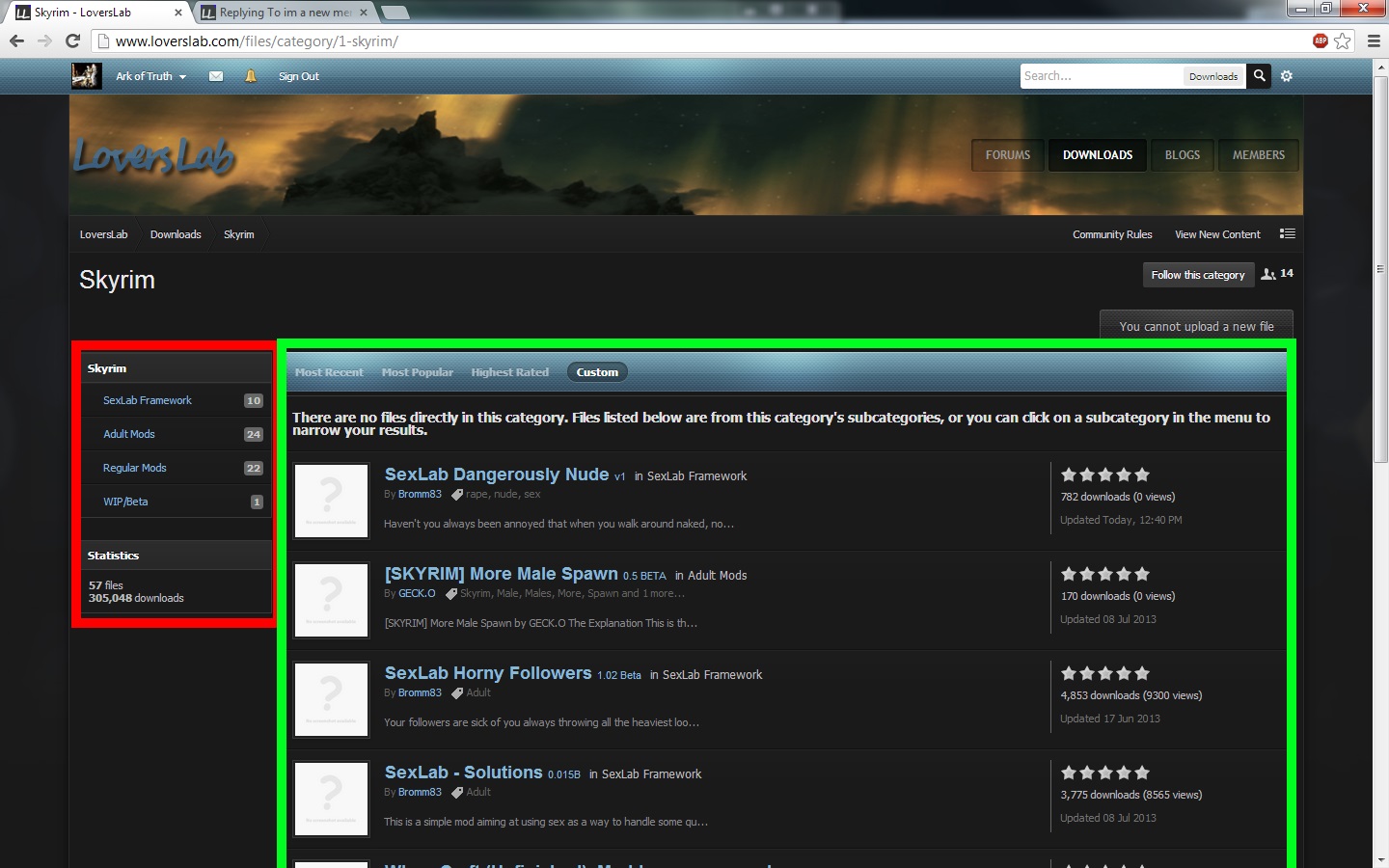
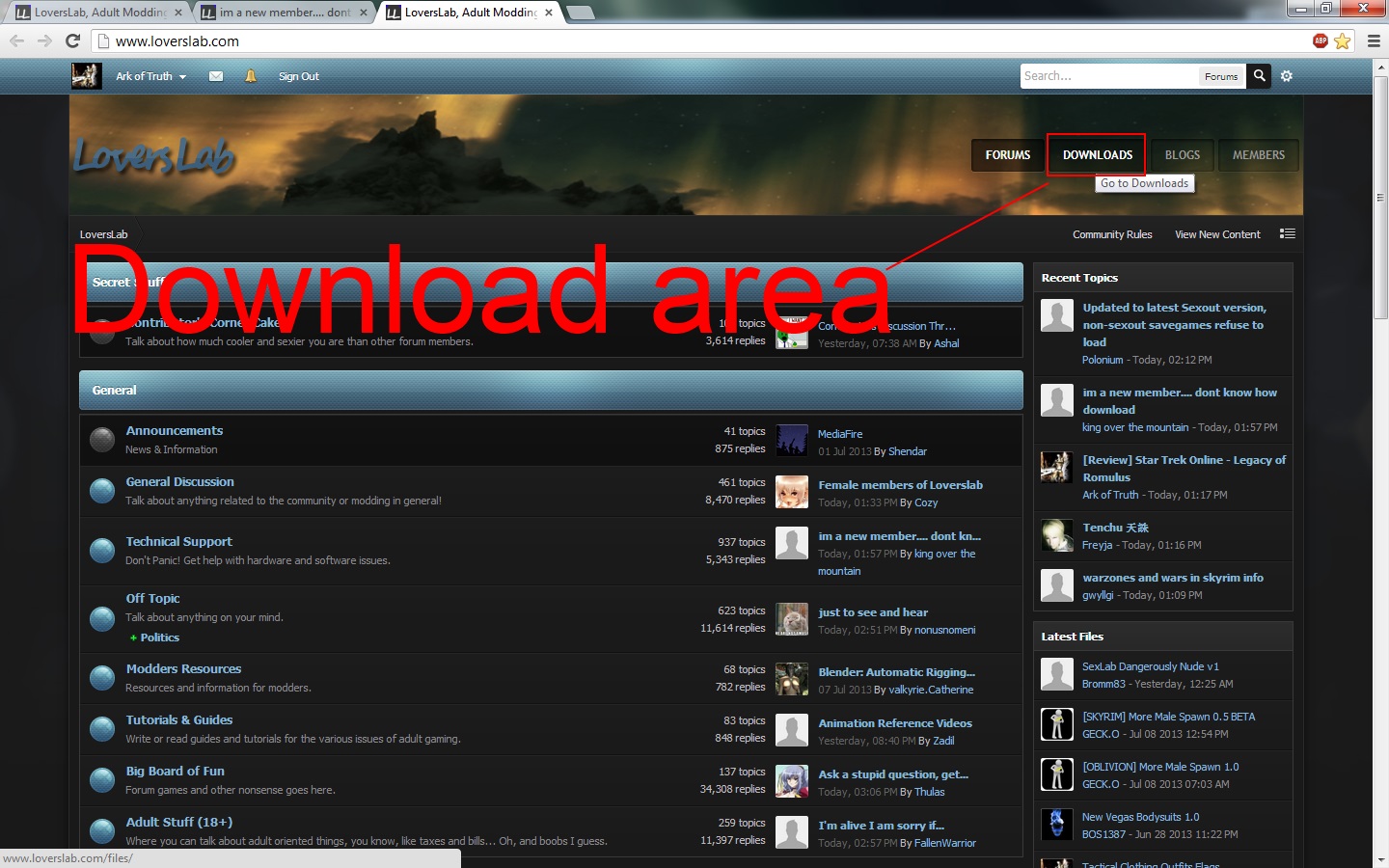
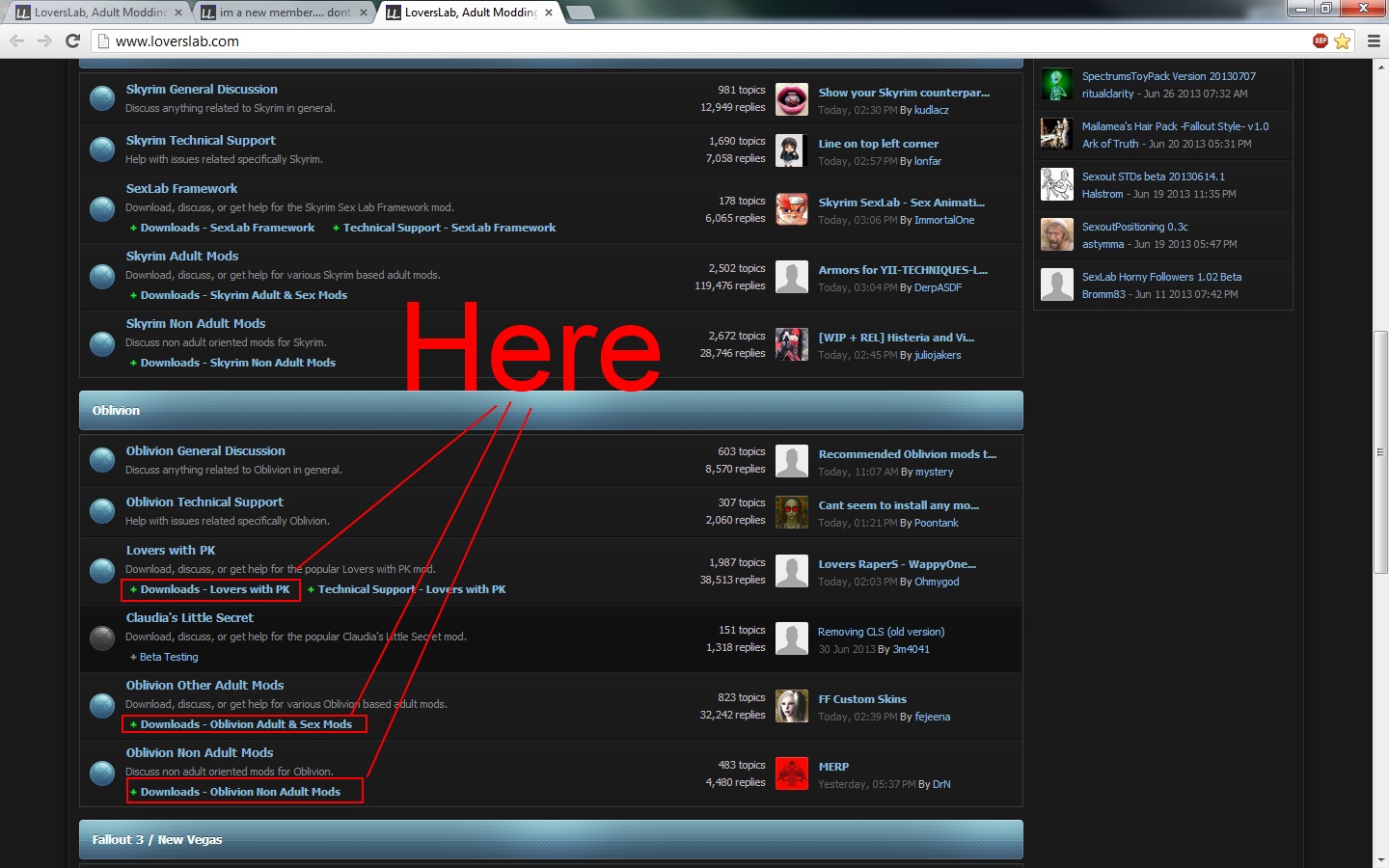
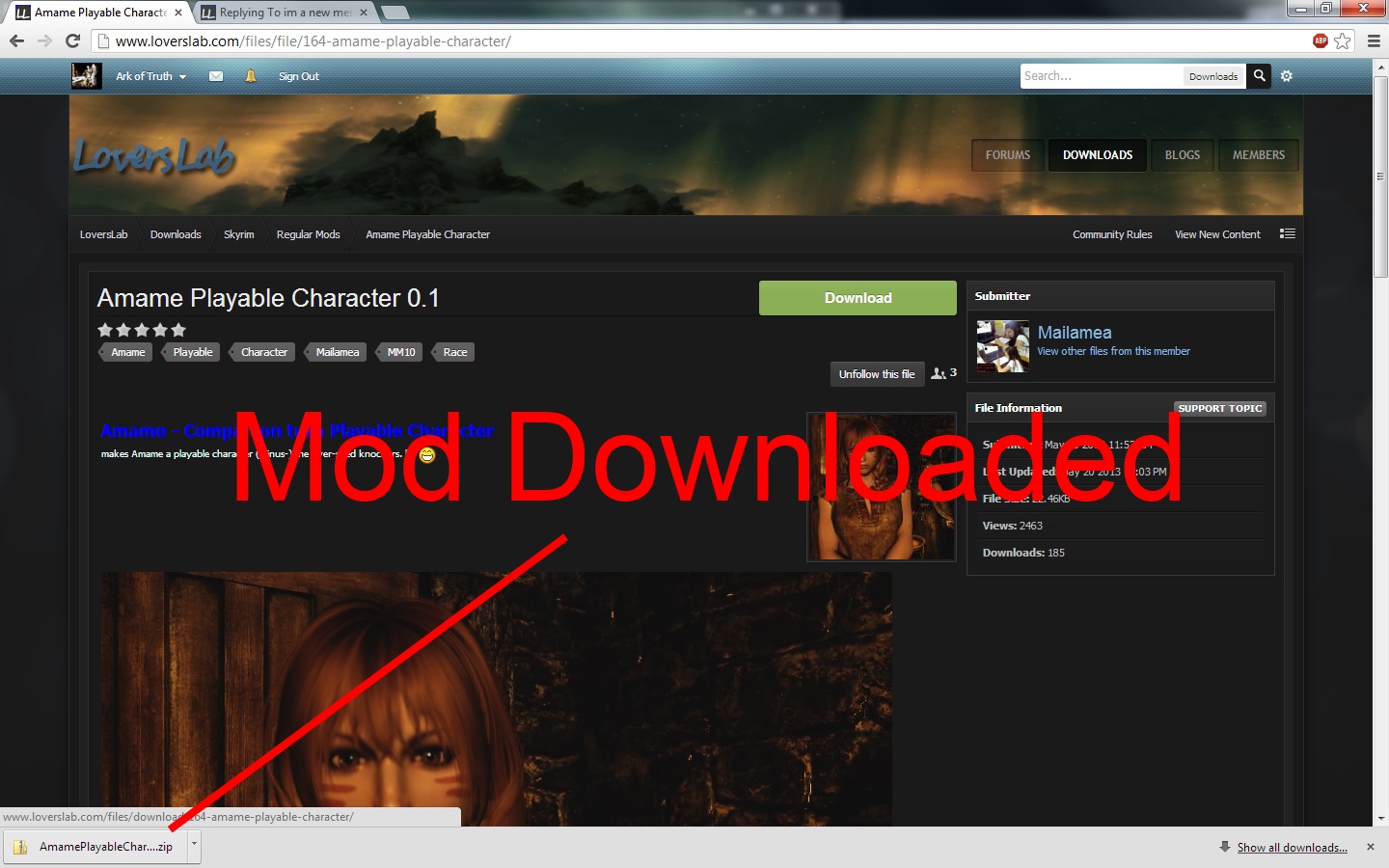
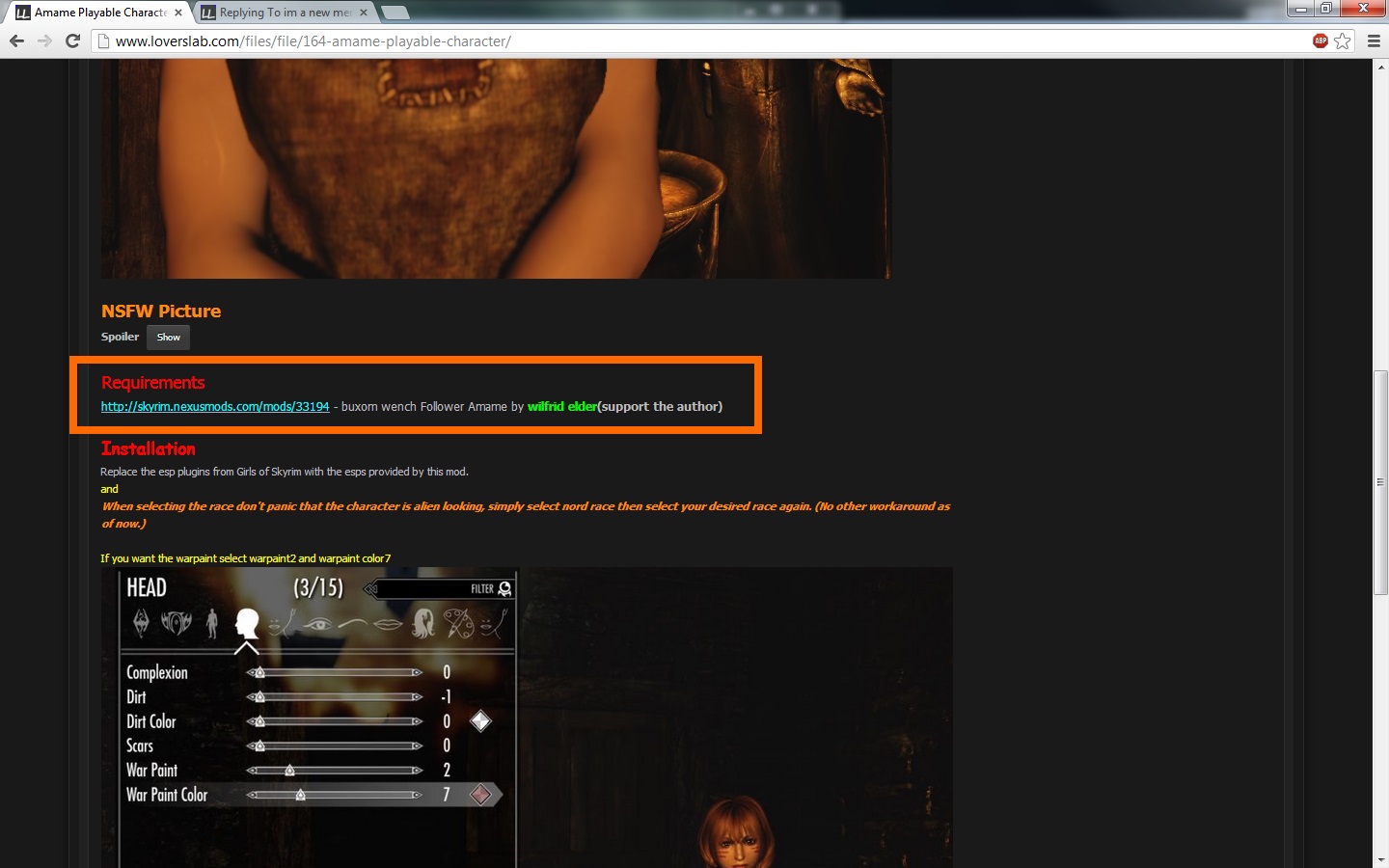
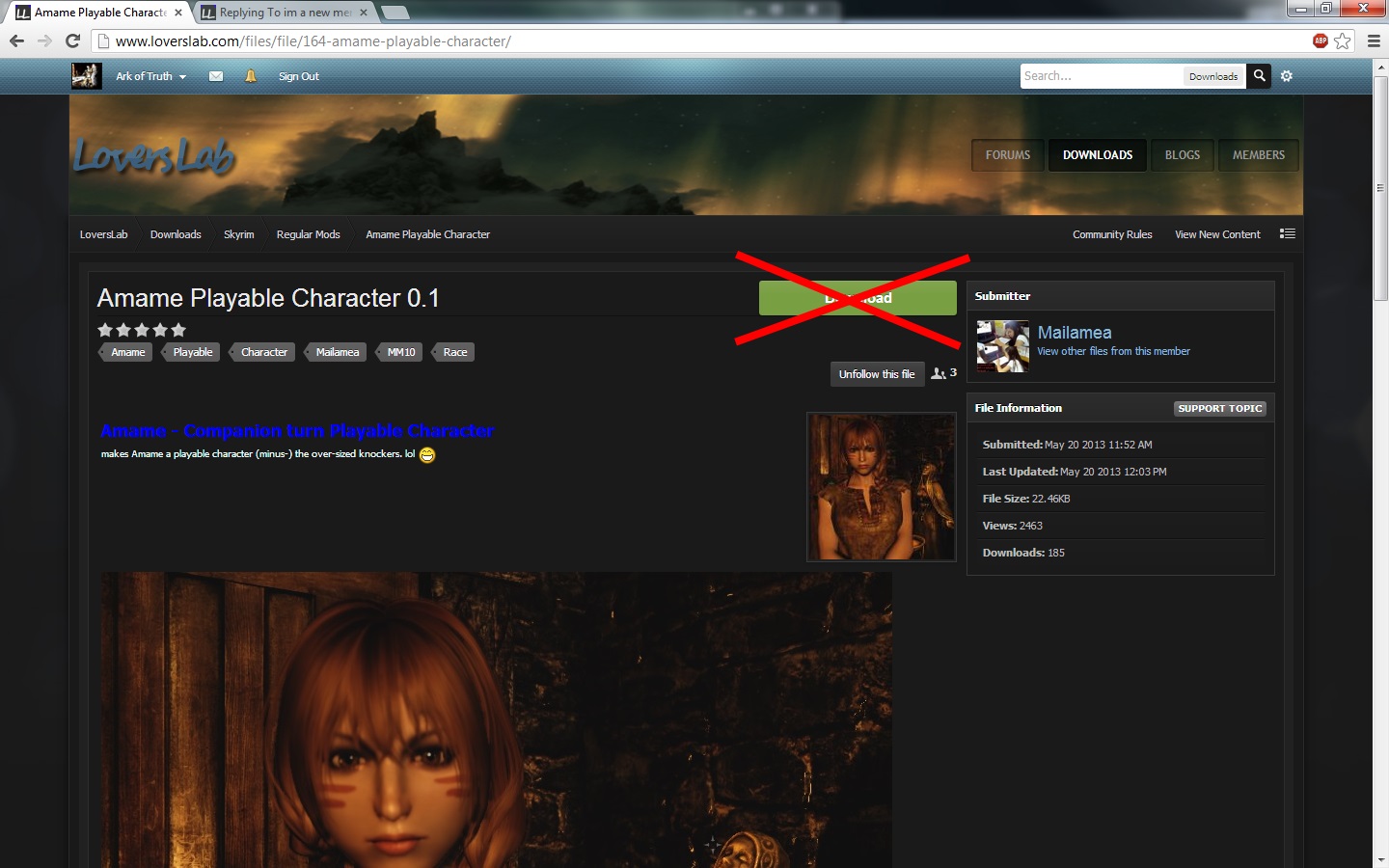
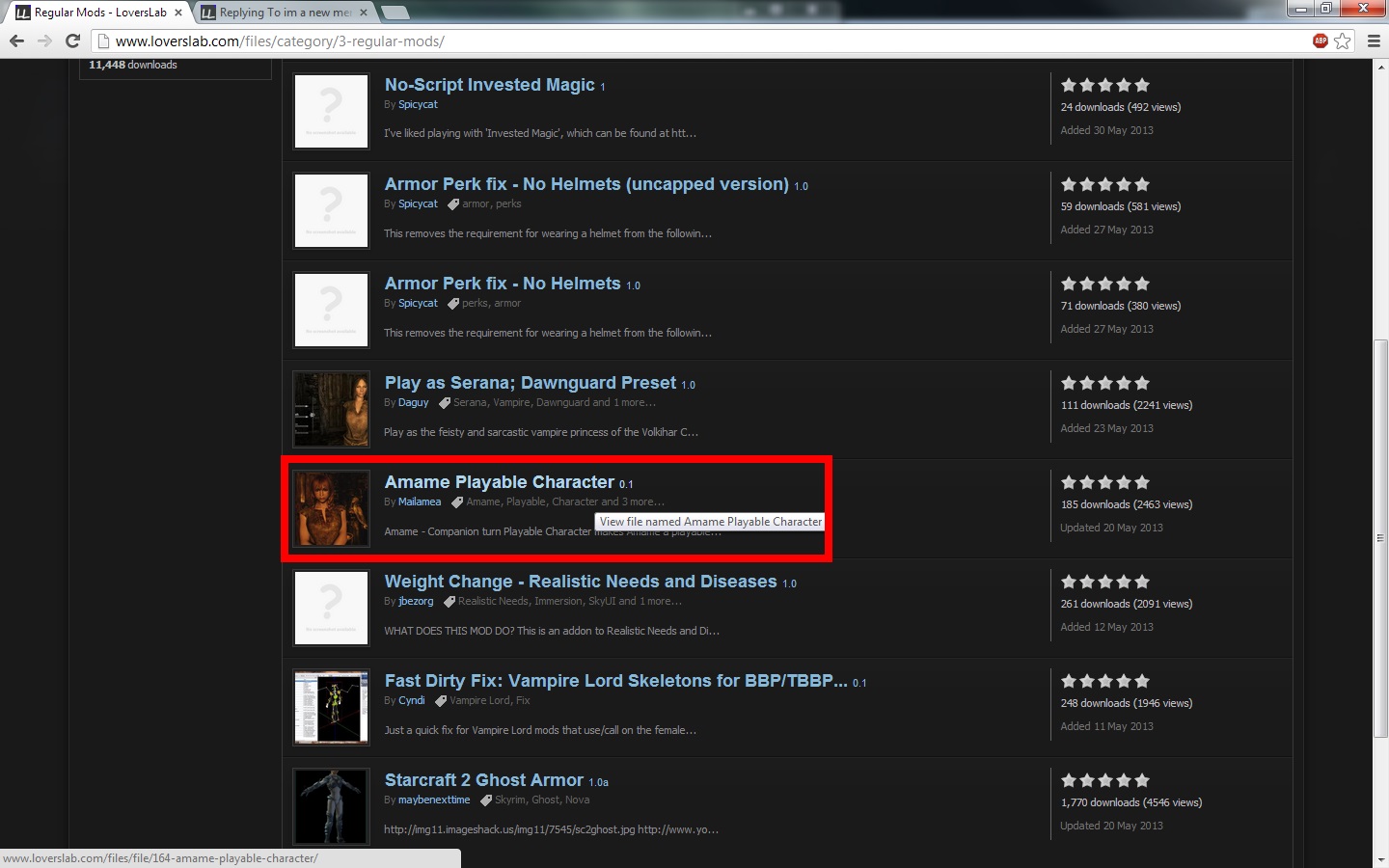
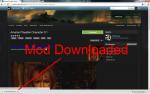
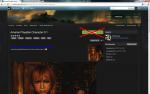
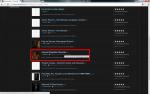
OK this is a tutorial on how to download mods from this site using the following methods. Downloading from the site downloads manager Downloading a mod from a thread in a downloads subforum. Site Download Subforums Threads which have downloads in them can be found in the Downloads subsection of the forums, Downloads - Oblivion Adult & Sex Mods is one example. To download the files from these threads just click on the download links, which should be marked. Inside there will be threads which contain mods for download. You can also find some more mods to download in the site's download area located in the top right of the screen. Site Download Area When you access this area you will be greeted with the following screen. On the left you will have the categories list, this is for what game you want to download mods for. In the centre of the screen you will see a preview of new mods which can be search through using the arrows, above that will be featured downloads and below it will be the highest rated. On the right will be the top downloads section. Below the Highest rated is the Most Watched downloads which can't be seen in the screenshot. Select the game you want from the categories list, we are going to use Skyrim in this case. The screen will now change and the follow will be displayed. The mods can be broken down into categories using the new list on the left and all the mods for that section will be displayed in the centre of the screen. We are going to use the categories list to get the screen to only display mods in the "Regular Mods" section. So we click it in the left box. Now we need to find a mod. I have scrolled down the screen and selected the mod Amame Playable Character 0.1 Now you will be greeted with the following screen. BEFORE you even touch that download button! Make sure that you go down the page and make sure that you have the requirements for the mod. After you have made sure you have the requirements you can hit the download button. If you don't have the requirements you can click on the links under the requirements section and you will be taken to the place you can download them from. Installing mods No pictures for this section. To install a mod simply unpack it to a temporary location. Most mods have a readme which tells you how to install the mod. READ THE THING AND FOLLOW IT FROM WORD TO WORD. Nothing rubs a modder the wrong way then someone being unable to read the readme or refusing to read it. Personally I find it easier to copy and paste the mods directly in the area they need to be without using mod managers. Mod managers which can be used for games are: Oblivion Mod Manager: Oblivion Fallout Mod Manager: Fallout 3 and Fallout New Vegas For Skyrim it most likely best to use the drag and drop method. In order to figure out how to install a mod using a mod manager follow the instructions in that mods readme or the instructions which came with the mod manager.





-
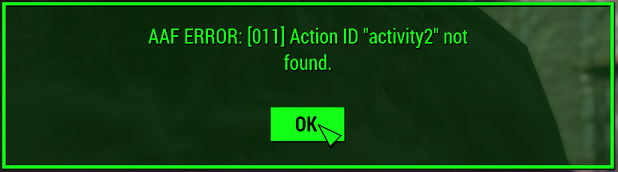
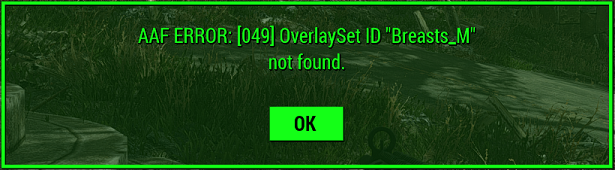
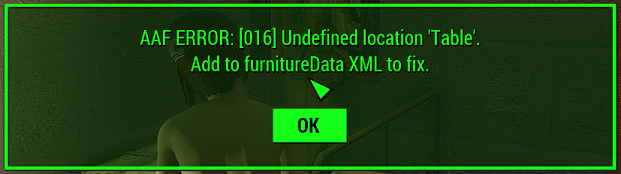
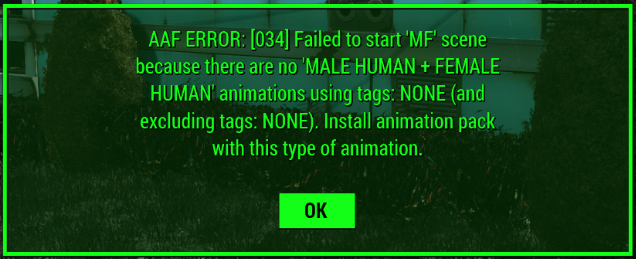
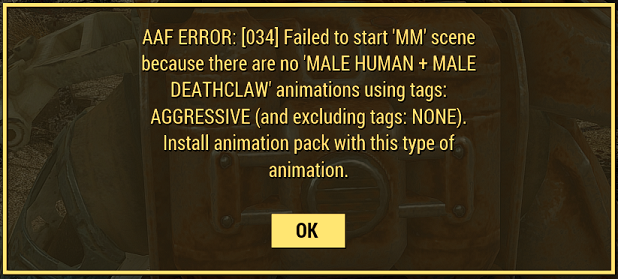
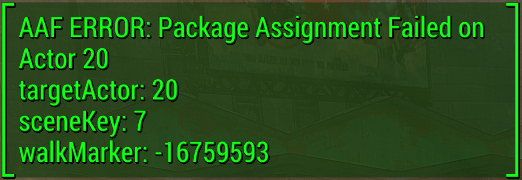
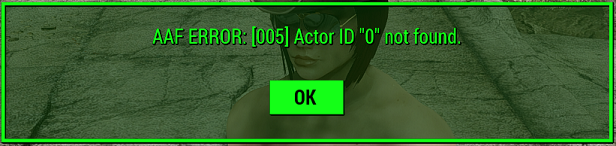
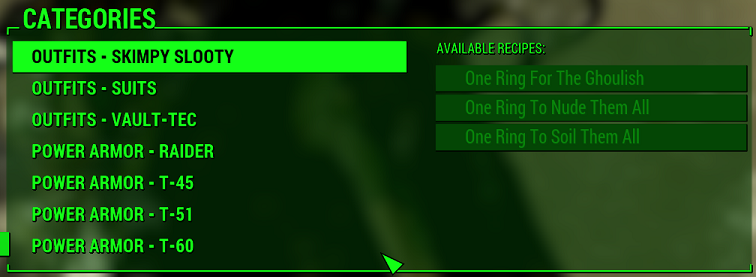
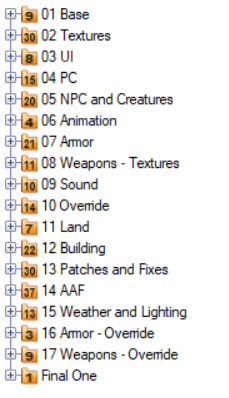
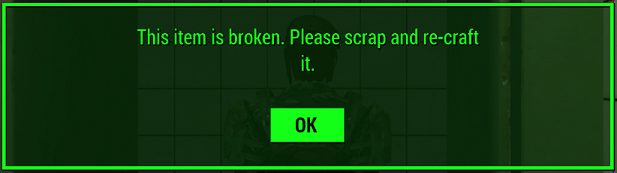
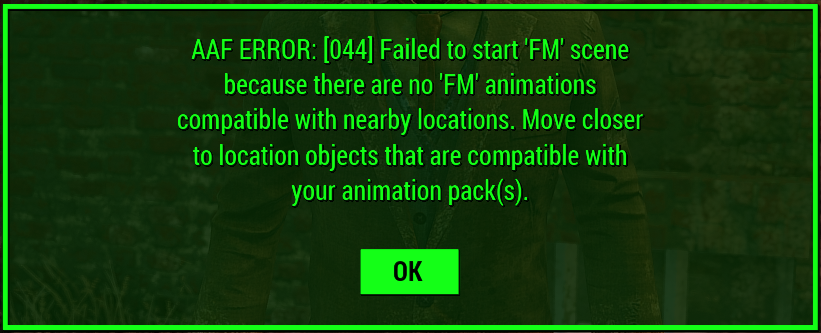
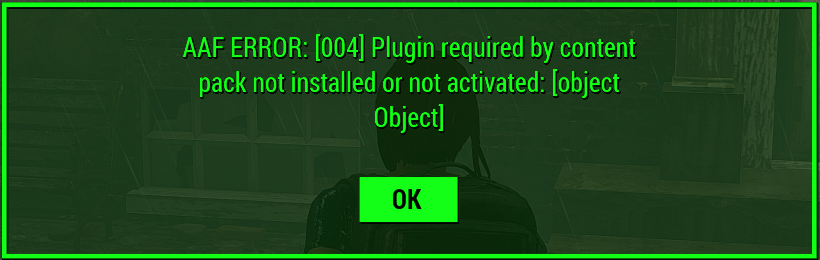
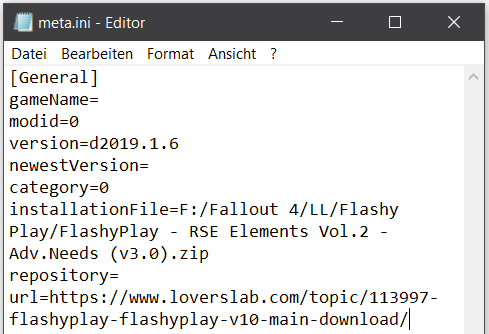
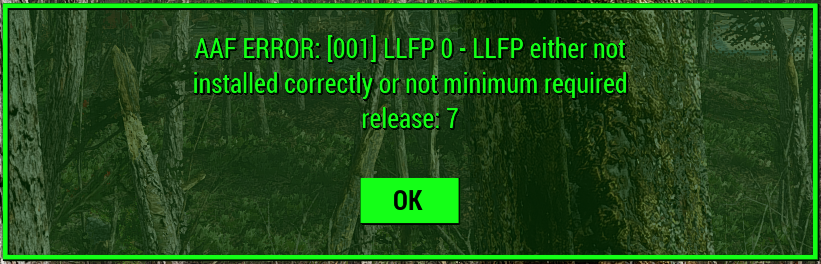
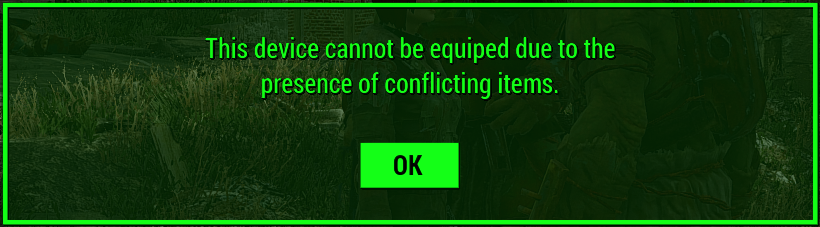
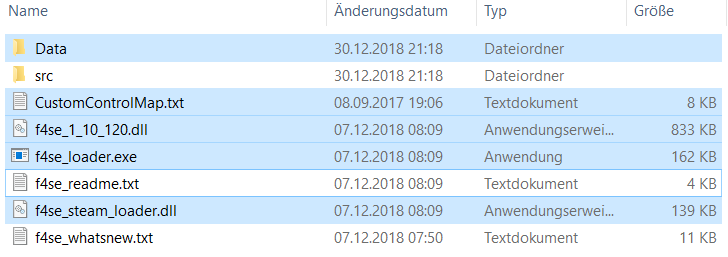
Last update: 31 Jan. 2019 This is a spinoff of my guide to AAF. Going through all the different threads i often noticed the same questions regarding errors coming up again and again. So i'll give you here the list of errors i've encountered and, if i found it, also a solution to fix the problem. But this thread will also need your support to be useful to all. Obviously i can't list an error i didn't encounter. So if you find an error, please make a screenshot of the error message and post it in the comments, also if you have the solution to one problem. This way i'm able to add it to the list and we got something to help all... Of course i'm also interested if you found a different solution than the one i did. Noch etwas: Falls Jemand mit Englisch nicht so recht klarkommen sollte. Ihr könnt eure eventuellen Fragen ruhig auch auf Deutsch stellen, versucht es aber bitte immer zuerst auf Englisch (notfalls kann man für die Details dann Deutsch nehmen). Eine übersetzte Zusammenfassung kann ich dann später machen. Schliesslich will ich hier Niemandem im Regen stehen lassen. Aber ich werde auf keinen Fall einzelne Mods unterstützen. Da müsst ihr euch schon an den jeweiligen Supportthread halten. Die Autoren da wissen viel mehr über ihre Mods als ich es jemals könnte. Letztendlich haben die ja auch die Sachen geschrieben. That for most unreadable part is just an additional offer to support a second language should someone run into trouble (it is hard to fight a bug and a language problem at the same time). Anything that comes up this way will of course be translated and/or integrated in the Troubleshooting guide as well. _____________________________________________________________________________________________________________________________________________________________________________________ People who assisted with this or pointed out things i either missed or had to check and recheck again (Thank you guys and gals): @2Dimm @AfroAttack @A.J. @Crimson0 @dagobaking @d3m4l1s @EgoBallistic @Flashy (JoeR) @Fridolin0815 @Halstrom @Jordick @Krazyone @KyLeeKu @mashup47 @picket @Sheppard @TerabyteDragon @Vincenza @walkin _____________________________________________________________________________________________________________________________________________________________________________________ Mod Organizer This is a thing i have to adress before anything else. The good old NMM doesn't get any updates anymore and the new spearhead on Nexus is Vortex. Based on my own experiences with them i can only say that you should look somewhere else to manage your mods. Both got trouble when it comes to install mods (they often 'forget' files) and they might even break or remove already installed ones. Communicating with others showed the same problems again and again. Either a missing file or the installation itself had to be repeated several times. I strongly recommend switching to a different mod manager (like MO2) as this will save you a lot of trouble in the long run. Most of the trouble i had while running the tests were suddenly missing and/or broken files. I even had a folder with extracted files to easily copy them back into the game if something stopped working. But having a mod manager and then being forced to drop a manual install on top of it somehow defies the reason why we use a mod manager at all. In the end its your decision. But, as one of my favourite NPC would say 'Ye have been warned...' Tools The following tools might help you in the long run either debugging or fixing a problem. AAF Tester With this you can check if AAF is set up properly. Fallout 4 Mod Cleaner Here we got a tool which will clean your game folder. It is best used after a fresh install with all the stuff from CC. But it is also useful if you want a fresh start and reinstall the things you want to use. If you have a stable modded version of your game you can create a batch (see description of the mod) so you can always return to this state. Fallrim Tools This is a nice tool which allows you to clean your savegame and to remove orphaned scripts. It can also be used to get a clean save after you decide to change things for AAF. This has solved quite a few problems for me while testing new builds and combinations for my list. But it can also damage your savegame. If you use this one to clean your savegame ONLY use 'Remove Unattached Instances'. This will kill all the loose scripts in your savegame and might even help you to 'repair' it this way. Also Do NOT overwrite the original savegame (so you might try something else) and save the cleaned savegame under a different name. _____________________________________________________________________________________________________________________________________________________________________________________ Troubleshooting Sometimes something breaks, sometimes something suddenly vanishes (i'm looking at you Vortex!), sometimes you remove a mod and it has unforseen consequences elsewhere, when it comes to modding thats almost inescapable. So i'll try to give you some tips to lessen the impact of such an occurance. AAF Error: ... In general it is a good idea to know where an error comes from. AAF always uses an error code, like '[34]', when there is a problem. If you don't see an error code it is one of the other installed mods (not AAF!) which got a Problem. This distinction might help you in narrowing down the culprit. Actor: Nudity Test To test your textures you can use a simple trick without having to remove any of the equipped clothing. Just craft the ring 'One Ring to Nude Them All' at the armorsmith workbench and equip it. Actors not stripping completely The stripping is done by checking the slot of the armor and hopefully those are assigned correctly. Copy the (here in post #2) provided AAF_equipmentSetData.xml into your game and it should solve this problem. Actors not redressing Activating the 'RSE Strip API Usage' in the MCM (Page #1) should do the trick. Actors stay flaccid This was 'a bit' complicated 'til i finally found the solution for this one. Just check if the body morphs (AAF Compatability Patch) have been overwritten. Those are needed to get any erection at all. Actors with underwear This can be caused by two things. Either you don't have the correct textures installed or you have a mod (like Unique NPC) installed which interferes and uses its own textures. While i can't provide more assistance with the second part, for the textures it might be useful to check post #4 of my guide. Advanced Installation for AAF (NMM) NMM sometimes 'forgets' to copy all files - manual installation is safe but doesn't offer you the choice to remove the single mod you want to get rid off. Both can be a hindrance to us users, but there's a way to get the advantages of both without getting the drawbacks of either option. It only takes more time... At first you install your mods for AAF with your mod manager (if there's a FOMOD write a note with the options you took for that mod). Now create a new folder and rename it to 'InstallAAF'. Then we can start to extract the compressed files and copy the files you need, and ONLY these, into your newly created 'InstallAAF'. If there is a folder called 'DATA' in the compressed file only use its content, do NOT simply copy 'DATA' and the rest. Do this while exactly following the order of your preferred loadlist for AAF. Now comes the last step, copy the content of 'InstallAAF' into the already existing folder DATA inside your game folder. This will take some time, but now your NMM knows where the files came from, and you can be sure that not a single file vanished somewhere. This now allows you to safely de- or reactivate single mods or even to remove them. When it comes to an update i recommend to do that manually so that NMM doesn't change your load order (and nothing goes *pooof* and is gone). Tip: Keep your 'InstallAAF' you want to be ready if something breaks. Animation failed This one was caused by using the 'wrong' SEU (there are two separate mods out here that are both called AAF SEU). So if you got this error check SEU first. If you got this version you will not have this problem at all. Broken furniture This error message only pops up when you made a mistake placing an object and the linked animation doesn't have enough room to play properly. Moving the object a bit will solve this. Cleaning your game and/or savegame Use this only if you have absolutely no other choice or someone with enough knowledge tells you EXACTLY what to do! You'll find the required tools in my guide in post #3. I've been using them for several years now and didn't encounter problems with them. But if you don't follow their instructions exactly they could either kill your game or your savegame! Thats also the reason i hesitated to add this entry in the 'open' thread... If you use the one to clean your savegame ONLY use 'Remove Unattached Instances'. This will kill all the loose scripts in your savegame and might even help you to 'repair' it this way. Also do NOT overwrite the original savegame (so you might try something else) and save the cleaned savegame under a different name. Cum overlay doesn't disappear Something broke the script for that. This happened to me after saving and/or reloading a gamesave while such a overlay is in effect. To remove them you have to get into the creation menu for the char and then remove them the same way as you would remove normal tattoos (in Body and then Overlays). Entering the menu can be done via console (only use this if you know exactly how to handle this), the face clinic, or an object (like the Looks Mirror). DD - Vibrator not working For anyone having issues with vibrators not triggering. The problem is an orphaned keyword on the player. To trigger again you have to enter following line in the console: player.cf "actor.RemoveKeyword" "DD_kw_Event_IsVibrating" To see when your next vibrate event will trigger you can type: player.sv You should see "DD_Event_Vibrate" followed by "real-time timer 1 expires in [X] seconds" Deathclaws There are afaik no M/M animations available atm. So if you got an error regarding this you have to ignore it as there is no solution for that available atm. Also you only seem to have a choice between permanent boner or flaccid. Downloads not working Often enough it seems as if a link is broken and you can't download a file from here. But in reality it is the installed AV software which is a bit overzealous (aka 'false positive') and doesn't allow the download. If you trust the source it might help to temporarily diasable your AV and reactivate it immediately after you downloaded the required file. Tip: If you use Windows 10 you don't need to install another AV. The one which is installed with the OS is already good and more than enough for any normal operation. In other words in most cases its a waste of money if you pay for something else as not a single AV on the market offers perfect protection. For 'more protection' you'd need a hardware firewall and the good ones are quite expensive and not meant for private users... Error: AAF Error [001] ... Here we got a mismatch of the versions of installed mods. Check if there are updates for required mods (like F4SE, AAF, etc). Error: AAF Error [004] Plugin required... This is one is caused by a missing requirement for your animations. Like for example 'Prisoner Shackles' for the animation pack of SavageCabbage. Recheck if you really got everything you need. Error: AAF Error [005] Actor ID ''0'' This is one i got no solution for, it happened sometimes in my game. But it seems i fixed it by accident… If someone got a solution for this one please post it in the comments so i can add it here. Error: AAF Error [011] ... This error seems to pop up when something is broken or missing. Most of the time it is either an animation pack or a patch for an animation pack. But the error message itself gives a good indication what is broken (see next entry). Error: AAF Error [011] ''activity2'' Some animation packs reference activity2 which only exists in the sample files. As long as the author of the mod doesn't fix that mistake we have to install the sample files from AAF as well. Error: AAF Error [016] Undefined Location I got to admit that the following is an assumption of mine. It looks like you got trouble with a file that was made for either 'Homemaker' or the 'Settlements Objects Expansion Pack'. As i use neither of these mods i have no way of finding a definite answer for this error. But it seems there is also the possibility of typos in used XML. In grouped animations made by BeoWulf91 is a File called 'SavageCabbage_positionData.xml' which contains the line <position id="FM-Table01-03Missionary" location="Table"/> which should be changed to <position id="FM-Table01-03Missionary" location="MediumTable"/> A fix for this typo can be found here. Error: AAF Error [033] Fallout.callFunction… Unknown error. Might be a 'broken' XML. Error: AAF Error [034] Failed to start… Something went wrong with the installation of an animation or the position pack (the error tells you what is missing). Reinstalling that file will solve this problem. Here the problem is the missing file for positioning tags (now replaced by 'Themes'). Error: AAF Error [044] Failed to start... Here you got a missing an animation pack. Error: AAF Error [049] OverlaySet Something went wrong with the installation of AAF Overlay Patches. Reinstalling them (only the ones you need for your setup!) will solve this problem. Error: AAF Error: Package Assignment failed... This one seems to get triggered when one of the actors can't get to the location of a scene or left it before it was triggered. So far staying together seems to at least partially solve this. The second way for this error to appear is when one of the participants is killed before the event was finished. Corpses usually can't move and be part of the action. Sadly this is something where we quite often have no control over and is hard or even impossible to prevent. Error: DD Here we got an error for DD. If there is already a device in place it can't be replaced by a new one. Error: FPP Report: ... You need to activate the integration of 'Plugs of the Commonwealth' in the MCM of 'AAF Prostitution'. F4SE (Installation) As quite a few People seem to get this wrong i'll add a picture with the files you need to copy so it works properly. Files damaged or overwritten There's no easy answer to this problem as this depends on the mods and fixes you use. The imho best way to solve this is also the one that takes the most time. Install your stuff via mod manager and then put a manual installation on top of that. Check the entry 'Game crashes with AAF' for more info. Only if you know exactly what the damaged/overwritten file is then its just copy and paste. Flickering light during gameplay and/or animations This could have a few causes. The most common one is a mod that breaks combined meshes (like Spring Cleaning) while having 'Cloud Shadows' activated in your ENB. One of those two has to go to solve this problem. Game crashes To be blunt Bethesda makes nice worlds, but if it comes to stability they could improve a lot. You'll have to watch out for a lot of things and even use mods to improve that. But mods (and i know no one playing this game without any mods) can cause their own problems too. So lets start with the most important one. Unofficial Fallout 4 Patch That one is one of the first things you install. There's no way to play the game without it. Next problematic thing is the UI itself. You might not expect it, but the UI can crash your game while doing anything. There are a lot different mods for a UI that might fit your style and i can't cover them all. But i can tell you the mix i use and how to get that stable. 01 DEF_UI and HUD (the classic one) 02 HUDFramework (this one is required for a heap of mods) 03 VIS-G (The 'new' VIS which requires a lot less patches as it is already compatible to many commonly used mods) You have to install them in exactly this order to get them stable (check the options!). Otherwise you might get crashes opening your Pip Boy, entering or leaving a power armor, entering a shop, inspecting an item, and many many other things. Sadly Vault Girl Mod ALPHA (on hold atm) doesn't play nice with VIS-G. If you use the older VIS it is definitely worth a look if you have a female char. Then it would be placed as #4. Also make sure that you really updated everything which uses F4SE and AAF when there was an update for FO4. Game crashes while loading a savegame This seems to be a problem with the newer AAF (35+). You have to change a setting in the file 'AAF_settings XML': 'use_external_data_storage' from 'false' to 'true' to fix that. Its close to the bottom of the file. This seems to be fixed with the new update, i'll let it stay as it might still be useful. Another possibility seems to be the limit for scripts. You might try to deactivate one of the scriptheavier mods (like the one for 'Settlements') and then load an earlier savegame. Game crashes with AAF This is a strong indication that there are some files missing and sadly there's no easy way to solve this as there's no error message. Manually extract and copy the mods (if there are Fomods you have to select the needed files (and ONLY copy those)), in the same order your modlist suggests, into an empty folder and, after this is done, the content of that folder into the game. KEEP THAT FOLDER! It may look like wasted space but it will prevent a lot of headache should something happen ever again. Game crashes with CWSS As CWSS got its own set of animations it can be a bit sensitive when exiting the shower (aka the game sometimes crashed). Even before AAF its position in the load order was important and i put it quite low (now it is included in the group 'AAF' and not 'Building'). Game crashes shortly after an AAF animation Activating the 'RSE Strip API Usage' in the MCM (Page #1) should do the trick. Game locks with AAF I only had this in combination with the AAF error about 'activity2' (Please check that entry). Headless Ferals Bethesda decided that the heads of ferals are armor, which means they can be stripped by some of the mods here. Copy the (here in post #2) provided AAF_equipmentSetData.xml into your game and it should solve this problem. Loadorder and Stability I prefer to have AAF (and the other files) quite low in my loadorder. With all the updates they end up quite low anyways. But there are some mods that should be put even below them. Defense Gun Replacer for Pipe-Guns (this one has to be the first installed one in the weapons override group). Modern Weapon Replacer - Beretta M9-FS (Very good replacer. If you see the barrel and a floating cartridge it must be put lower and reinstalled again). Modern Weapon Replacer - MK14 EBR Redux (Excellent one. Sadly this weapon has been hidden by the author and is VERY sensitive to the loadorder). Modern Weapon Replacer - Service Rifle Redux (Also a very good replacer. If you got missing parts it must be put lower and reinstalled again). Spring Cleaning Compatibility Patch (If Spring Cleaning is used this one has to be the last ESP in your loadorder. PERIOD). The best stable result i had was by grouping my mods. With extremely few (for a game from Bethesda) crashes. So if you got trouble in this regard this picture might help you. Btw everything regarding AAF is in that group and not the other ones. I provided an example how it could look like here in post #1 (the spoiler at the bottom of that post). Long wait for 'Fast Travel' This seems to occur quite often shortly after you changed the area (like exiting a building) or reloading the game. It seems to be linked to scripts that havn't been fully loaded yet. Wait a bit before activating 'Fast Travel' and you won't have this anymore. Long saving times This might sometimes happen, one moment the save is done in second, sometimes it takes a lot more. I assume that this has to do with the horde of scripts we are running. In the beginning i noticed that the more stuff for AAF was added the more this became noticable. Check if you really need all the options in RSE (for my tests i activated almost everything and this had an effect). On the other hand it might be a good idea to finally upgrade the RAM of your System. Misalignment with Leito's animations (AAF) This is a bug which is relatively easy to fix. Open the file Leito_FF_positionData, which is located in Fallout4 > Data > AFF, and delete the lines: <animationOffset actor="1" offset="0,70,0"/> <animationOffset actor="2" offset="0,0,0"/> MO2 Although i like MO2 there are some things you have to be aware of: 1. Papyrus is case sensitive and as it is heavyly used by MO2 the mod manager seems to be too. In regards to ini files they got to have exactly the same name as the used ESP. Example: fp_familyplanningenhanced.ini and FP_FamilyPlanningEnhanced.esp <- will NOT work properly FP_FamilyPlanningEnhanced.ini and FP_FamilyPlanningEnhanced.esp <- will work fine as the names match Although this won't happen most of the time, a small typo (nobody is perfect) can cause problems and it is something you should be aware of. 2. If some presets for bodyslides are installed but don't show up, then manually copy the files into DATA > Tools > Bodyslide > SliderPresets. 3. Often you have to manually edit the url in the meta.ini for an easier access to files which are not located on Nexus. While you do this better close MO2, otherwise the programm seems to ignore changes you just made. Missing Penis If the 'Schniepel' (the one who gets this deserves a cookie) is missing you have to install Leito F04 Rigs.. Mod Manager crashes Sadly this happens way too often with NMM. If that happens Forget the download or Installation you just tried. Those files are broken almost every time. You might be lucky and they still work, but thats rare. It is way safer to redownload your mod again than to introduce hidden bugs or errors into your game. Pregnant but no belly. Here we got something that is relatively easy to prevent. First of all you absolutely need 'CBBE' and the 'Bodyslide and Outfit Studio' for this to work. Secondly do NOT switch the bodytype or use bodyslide while your char is pregnant. This would break the script for the changes to the body. If you absolutely have to make a change to the Body there is a way. Deactivate AAF (and the rest), clean your savegame (aka remove the scripts of the uninstalled mods in your savegame!), make the changes, and then reactivate AAF and the rest again. This will reset everything and will then work. But you will loose the pregnancy if you go this route. Transfer Settlement: Mannequins. To be honest i don't know if this is normal for TS or if there is a conflict of scripts somewhere. So i'll add this one here even if it might not be related to anything of AAF. If you see something, like the error in the picture below, it can be that you got two mannequin occupying the same space at the same time. Try moving the mannequin in building mode and they'll separate. Whitescreen after starting a new game. This one is either a glitch (and you got very very lucky) or bad and then i mean REALLY bad. With this bug the game didn't initialize correctly and you are locked in the moment between intro and charakter creation. The 'very lucky' one: Just restart the game and wait a few moments while the movie is running. If you skip that one the game might not have finished loading completely and you can end up with the whitescreen. The 'lucky' one: You got an invisible installation message. Press [Enter/Return] a few times and the game continues to the creation of your char. The really really bad one: Your installation got murdered. Remove EVERYTHING regarding AAF completely from your Mod Manager (uninstall and delete), search every folder in DATA for obvious remnants of AAF and delete those. Now let Steam recheck the Integrity of the game and let the service repair the files that went missing or were damaged. The next step is to check if all of your other mods, which have no connection to AAF, are still there. If not then you have to clean the game (aka put it into a 'fresh installed' condition) and rebuild everything again. If they are all still there de- and then reactivating them should be enough. Now you have to redownload everything regarding AAF and install them with your Mod Manager again. In addition i'd manually extract and copy the mods (if there are Fomods you have to select the needed files (and ONLY copy those)) into an empty folder and, after this is done, the content of that folder into the game. I encountered this once and in my case it was Vortex that went, without any obvious cause, crazy and randomly deleted 15-20% of my FO4 files. I still have absolutely no clue what caused this as i had only restarted the game. Now i'm using MO2.


-
 Hello I do not consider myself a modder but I do know somethings about voice generation - still a noob tho. But I tried making a vomprehensive guide for it For experts and beginner alike I am creating this so we have something to look/guide us if we return after taking a long break from gaming/modding. This is not only for one of the most famous mod "Dragon Born Voice Over-DBVO" but also voice generation in general. 1. Extraction of dialogues I find Xedit .pas scripts to be most effective and nigh perfect for this job. You can extract both mod files dialogues and DBVO dialogues 2. Generating the voices Today thanks to AI we have many options nowadays Elevenlabs is almost obsolete thanks to QwenTTS. I think many new or old modders will generate voice mods of next generation in recent times. The hurdles a.) .lip generation - .lip file is a animation file which tells how the character's mouth moves You can get it here https://www.nexusmods.com/skyrimspecialedition/mods/40971 or https://www.nexusmods.com/skyrimspecialedition/mods/17765 (its inside its subdirectories) How to ??? ---->> https://github.com/Nukem9/FaceFXWrapper b.) .wav cannot generate workable .lip files. This is because the program will only work on 16Khz mono-channel audio. ffmpeg can do it in. For reference even in dual core CPU from 15 years back it could convert 10,000 files in around 20 minutes. For modern CPU its barely a problem. c.) Then later fuze both as .fuz file and characters will move their mouth with voice. (Don't make final .fuz with 16khz mono channel audio its a lower quality voice) The most famous option for Voice Packs generation is XVASynth. BUT I can bet that it will change soon because of voice cloning can be done in around 1-2 minutes. I created femaleelfhaughty voice clone in around 2 minute using Nvidia 3060. Why even in our community where people have absurdly powerfull PCs we don't have good Voice Packs?? Because XVASynth the most used option for voice generation has problems 1. with its .csv handling. its delimiter is commas `,` its a legit problem 2. Every Voice is generated for every voicetype. So if a mod has line for Ysolda saying - "Wanna buy my skooma?" The said voice line will be generated for every voicetype by XVASynth's logic. And this makes process around 10 times more longer. Its a headache to deal if voice contains around 100,000 voices (this number is actually on lighter side!!) 3. the .lip generation - For newbies who use XVASynth it produces .fuz for every file along the way so the lines per second is not that high (1.2-2.8 even on high end PCs) nor efficient at all and it takes stupid amount of times like 2-3 days of constant pc running. Because it produces the .fuz for every single line individually. What I do is make a unified cache of .lip and use .lip for every voicetype there is so it cuts production time of voicepacks to around 90% (2-3 hours only) - it has problem because no 2 voice types has exact same voice length but people never noticed until now, so they never will until someone spilled the beans. Oops. I actually believe with full faith that in near future people will use newer AI models for voice generation as its so much more expressive its not even a joke. Now lets tackle the elephant in the room the DBVO voice packs IDK why people think its a strength that DBVO picks up dialogue lines as voice lines but its a headache the only benefit it provides I think is if 100 mods have voice line `What?` so we don't have to generate `What_.fuz` 100 times Its a mess - I do not care how many I offend but its a fact. Anybody can extract the voice lines and make voices but the GOD-DAMNED naming is awful it has many limitations 1. first DBVO voice lines cannot have long lines. if your skyrim is installed in Drive://directory/sub-directory/sub-sub directories/TES - Skyrim - Anniversary Edition the DBVO will have a long address to fill the fragile skyrim world and it can, no it WILL crash the game. 2. "the character handling" many mod authors sometimes use fancy characters (i mean « » * < >) in mod - which itself is not a problem perse but DBVO bugs out here. 3. From what i can gather some experienced Mod authors are using normalization to tackle this which is fine but from what I can say after experimenting with it is -> `!` is allowed but `? * < >` is not -> ` ` space is not allowed. -> `()` is allowed -> `[]` is not allowed actually except normal brackets `()` no other parenthesis is allowed. Character will stay silent -> leading spaces ` What is your name? ` `What is your name? ` `What is your name?` `What is your name!?` all 4 are different -> every not allowed character has to be replaced with underscore `_` -> parenthesis are just not consistent. I think even this guide `https://www.nexusmods.com/skyrimspecialedition/articles/12180` is not complete as it misses so many things. Even i don't understand clearly. But its for a fact that some lines will not get voiced no matter what you name them the game is essentially blind to it simple technique I do is just use a script to make DBVO fix and just replace all the damned parenthesis with nothing so game at least sees the text. it does at least voice every single dialogue then "No I will not release that as I cannot maintain such a project. and it will render all existing voicepacks useless." Thank you for taking time out of your day to read this If this helped you in anyway I am glad Feel free to ask anything here. If I can I will answer. If I don't I just could'nt wait a few days. Thanks.
 -
 I'm in the process of modding Skyrim as a noob. I'm following LustfulLuna's Guide and at the moment I'm downloading core and essential mods. When installing FSMP - Faster HDT-SMP I noticed the Free FPS Guide https://www.nexusmods.com/skyrimspecialedition/mods/51229?tab=description But those are like 70 mods- Is doing all that even worth it and will it work? If it gives you more fps, then I will download all of this. But some mods I have already skipped. Like the Basecoat Mod, which has 15GB... no sorry. The other ones seem useful? But I'm not sure if it will pay off doing that guide.
 -
HDT vagina textures, the manual way (with Photoshop/GIMP) + Template PSD
Rattlesnark posted a blog entry in RS's Content Dump
Update for 2025: Just came across this old post of mine (that I totally forgot about. To clarify, this resource is strictly for Skyrim Legendary Edition (the old one from 2011). Bear also in mind that this is a old posting from 2018, so the information here might very well be outdated and obsolete. Here's a step-by-step-ish tutorial I've written for others like me who for some reason would prefer to add the vagina texture(s) to body textures manually, instead of using TexBlend or getting a set of prepared textures from a compilation mod (e.g. All-in-One). Additionally, I have also prepared template .psd files that you can use to quickly insert your own body textures, vagina-fy them up, and export them as .dds textures. The vagina textures included in the template are from BodySlide & Outfit Studio (UUNP), Clams of Skyrim (CBBE), and inner vagina textures for use with Bazinga's Naturalistic HDT Chinese UUNP meshes. This guide, in PDF format, as well as the templates are available for download here: MEDIAFIRE LINK Part 1: Preparing the Tools & Materials What you are expected to have before we begin. Part 2: Working the Textures Adding the vagina textures to the body textures, the “hard” way. The procedure is the same for both UUNP and CBBE/CoS. Extra: Using the ‘HDT Vagina Template’ PSD