Search the Community
Showing results for tags 'Sims'.
-
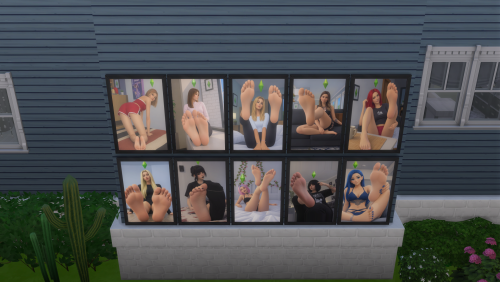
Images of feet View File Hi! This pack contains wall art depicting female feet, in a style inspired by The Sims. The first piece comes in 10 variations. The second piece comes in 4 variations. FeetSoles.zip Submitter Rabbitka Submitted 10/20/26 Category Objects Requirements
-
Version 1.0
2 downloads
Hi! This pack contains wall art depicting female feet, in a style inspired by The Sims. The first piece comes in 10 variations. The second piece comes in 4 variations. FeetSoles.zip -
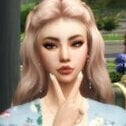
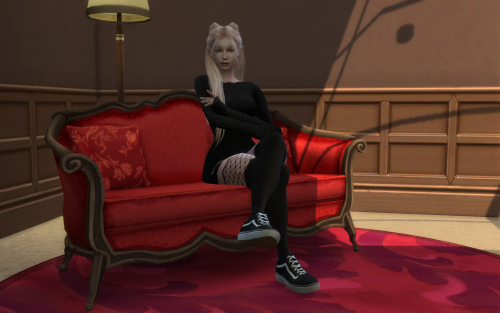
NATALY BRAUN View File Nataly Braun - A Dangerous Kind of Desire Nataly Braun was the kind of woman people noticed before she ever said a word. With her soft pink hair, porcelain-pale skin, and effortlessly captivating presence, she possessed a beauty that was difficult to ignore. But her greatest weapon wasn't her appearance. It was her confidence. Creative, self-assured, and hopelessly romantic, Nataly knew exactly how to turn an ordinary conversation into something unforgettable. She enjoyed flirting, playful teasing, lingering eye contact, and the delicious uncertainty of a new attraction. She loved being desired, but she refused to settle for someone who saw her as nothing more than a pretty face. For Nataly, romance was supposed to be intoxicating. Late-night conversations, spontaneous dates, whispered confessions, and kisses that made the rest of the world disappear these were the moments she lived for. She craved passion, excitement, and a connection powerful enough to challenge her carefully guarded independence. Yet beneath her charming smile and confident exterior lay a secret she rarely admitted: Nataly was terrified of falling for the wrong person. She had always believed she could keep her feelings under control. She could flirt without getting attached, walk away without looking back, and recognize trouble before it found its way into her heart. Until she met someone who refused to play by her rules. Someone who wasn't easily impressed by her beauty. Someone who challenged her, intrigued her, and seemed determined to discover the woman hiding behind her irresistible smile. What began as harmless flirtation soon became a dangerous game of attraction, pride, jealousy, and undeniable chemistry. For the first time, Nataly found herself wondering whether she was the one doing the seducing or the one slowly losing control. She wanted passion, but she also wanted something real. Someone who could match her fire without trying to tame it. Someone who would love her independence as much as her affection, and who could see beyond the woman everyone else thought they knew. Nataly Braun had always been good at making hearts race. Now, she was about to discover what happened when someone finally made her own heart skip a beat. Hey everyone! I know it’s been a long time since I was last around. Life got busy, and I ended up being away much longer than I expected. I’m sorry for disappearing and neglecting everyone for so long! I’m finally back, and I’m looking forward to catching up with you all, reconnecting with familiar faces, and seeing what everyone has been up to. I hope you’ve all been doing well! 🥰 It’s good to be back! Submitter ZUMZUMA Submitted 10/20/26 Category The Sims 4 - Sims Requirements
-
Using Nisa's Wicked Perversions? Update it after updating WickedWhims! Always remove all files from the previous version before installation! Didn't find an answer? Create a new topic.






-
 i need dirty body when having sex with a dirty partner I’m wondering if a mod like this exists, or if it’s already a standard feature.
 -
Version 1.0.0
20 downloads
Nataly Braun - A Dangerous Kind of Desire Nataly Braun was the kind of woman people noticed before she ever said a word. With her soft pink hair, porcelain-pale skin, and effortlessly captivating presence, she possessed a beauty that was difficult to ignore. But her greatest weapon wasn't her appearance. It was her confidence. Creative, self-assured, and hopelessly romantic, Nataly knew exactly how to turn an ordinary conversation into something unforgettable. She enjoyed flirting, playful teasing, lingering eye contact, and the delicious uncertainty of a new attraction. She loved being desired, but she refused to settle for someone who saw her as nothing more than a pretty face. For Nataly, romance was supposed to be intoxicating. Late-night conversations, spontaneous dates, whispered confessions, and kisses that made the rest of the world disappear these were the moments she lived for. She craved passion, excitement, and a connection powerful enough to challenge her carefully guarded independence. Yet beneath her charming smile and confident exterior lay a secret she rarely admitted: Nataly was terrified of falling for the wrong person. She had always believed she could keep her feelings under control. She could flirt without getting attached, walk away without looking back, and recognize trouble before it found its way into her heart. Until she met someone who refused to play by her rules. Someone who wasn't easily impressed by her beauty. Someone who challenged her, intrigued her, and seemed determined to discover the woman hiding behind her irresistible smile. What began as harmless flirtation soon became a dangerous game of attraction, pride, jealousy, and undeniable chemistry. For the first time, Nataly found herself wondering whether she was the one doing the seducing or the one slowly losing control. She wanted passion, but she also wanted something real. Someone who could match her fire without trying to tame it. Someone who would love her independence as much as her affection, and who could see beyond the woman everyone else thought they knew. Nataly Braun had always been good at making hearts race. Now, she was about to discover what happened when someone finally made her own heart skip a beat. Hey everyone! I know it’s been a long time since I was last around. Life got busy, and I ended up being away much longer than I expected. I’m sorry for disappearing and neglecting everyone for so long! I’m finally back, and I’m looking forward to catching up with you all, reconnecting with familiar faces, and seeing what everyone has been up to. I hope you’ve all been doing well! 🥰 It’s good to be back! -
Share Screenies Of Your Best Female Sims! Hi everyone! I've being wanting to create some sims in The Sims 4 (great character creator and amazing CC community, btw!) and would like some inspirations! Looking for screenshots of your cutest/sexiest/handsome? female sims you got! TS2/TS3/TS4 sims welcome! Oh and please try to keep images focused on the sims! (sex pics goes to the main stickied thread!) haha
-
Hiya!! I'm Caleb I've been one the internet a lot lately. (I live on the internet now) Loverslab is one of my favorite modding places for more realistic gameplay. I'm here mostly for the sims. Loverslab is stacked with a lot of sex mods, including both hetro and homosexuality. What I wanna do just for fun. For you guys. Share your LGBTQ+ Sims here! NSFW is allowed. You don't have to but if you wanna be a little extra like me, add a Get to Know my sim, bio, stories! I love interesting sims. The best way to have a interesting sim is by giving them life with words. I can't wait to read, see your guys sims! edit: FUTA IS ALLOWED.
-
Share Screenies Of Your Male Sims! What does your definition of a hot male look like? I've being wanting to create some sims in The Sims 4 (great character creator and amazing CC community, btw!) and would like some inspirations! Looking for screenshots of your handsome/sexiest/cute? male sims you got! TS2/TS3/TS4 sims welcome! Oh and please try to keep images focused on the sims! (sex pics goes to the main stickied thread!) haha
-
Molly View File Just download the file, put the CC in the mods folder and Tray in the tray folders and you're done. Check out my Patreon for more exclusive sims, early access and renders. Enjoy! Join my Patreon for Early access & Exclusive Sims Submitter GuGuGaa Submitted 10/18/26 Category The Sims 4 - Sims Requirements Mods & CC
-
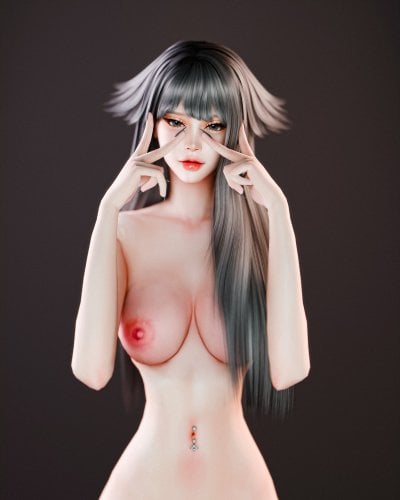
Version 1.0.0
194 downloads
Just download the file, put the CC in the mods folder and Tray in the tray folders and you're done. Check out my Patreon for more exclusive sims, early access and renders. Enjoy! Join my Patreon for Early access & Exclusive Sims -
sims4 My Pornstars UPDATE 14th April (Angel Smalls added)
IGI 2000 posted a topic in Downloads - CAS Sims
My Pornstars UPDATE 14th April (Angel Smalls added) View File 22 slutty girls - Angel Smalls added! Megan Rain, Madison Ivy, Apolonia Lapiedra, Luna Star, Adriana Chechic, Elsa Jean, Keisha Grey, Asa Akira, Gina Valentina, Sarah Banks, Lisa Ann, Riley Reid, Ella Hughes, Hitomi Tanaka, Rikki Six, Kira Noir, Ariana Marie, Dakota Skye, Lily Carter, Charlotte Sartre, Kenzie Reeves and Angel Smalls!!! Guys, just to let you know: due to real-life stuff I will have less time for ts4 over the next months. But I guess I will pop up from time to time and probably upload new girls anyway, so stay tuned! GIRLS SAY HI! ANGEL For Angel I recommend Sopor's Allure breast and Pixel's standard bottom. And she has one CC hair, but also hairs from Starngerville and Laundry Stuff Pack. KENZIE Kenzie is a legal teen in game, but you don't need to worry about boring rabbit holes - she has more than 90 holiday days available. She's also a lily of Nisa, if you know what I mean, although I'm not sure if it transfers (I'm not attaching Nisa's files). I recommend Sopor's Allure breast for Kenzie, suits her very well. And I made my first ever CC for her - very own tattoo "Desautels". Sadly it's a poor quality - I still need a lot of practice - but it's her own one, so who cares. NEW APPROACH TO OUTFITS for Charlotte, Kenzie and Angel Smalls! I have been uploading girls in base game clothes so far. I decided to stop (it takes time and these clothes are awful), but I'm not uploading actual outfits either. So if you have the outfits I've chosen, the girls will be dressed as I intended, and if not - they will be naked. Probably in most cases they will be half naked for you, so dress them as you like. Also, no body presets, they are all here on LL. I include make-up, hair, skin details, tattoos etc. as they are vital to the way girls look. I do it to save you time and pain, but none of these belong to me, all credit goes to: AirplaneRandy, Bobur, crabb, erplederp, Frostsims, FRS, Karsus, KiaraZurk, Kijiko, Kitty Meow, lilasims, Magic Bot, Magnolia, MsBlue, MYOBI, Pralinesims, REDHEADSIMS, Reevaly, Remusirion, S-Club, Serenity, SFox, Sopor, Stealthic, wild_guy and others. I'm trying to name as much as possible as they are all extremely talented creators and all credit goes to them. Go and visit their sites! I was only playing with sliders, selection of makeup, skin details, tattoos etc. One file per girl, mostly 10-20MB, sometimes more or less depending on CC. As usual, put CC to your Mods folder/subfolders, and the files from Tray folder to your Tray folder. IF YOU LIKE MY GIRLS, PLEASE SAY THANKS BY SHARING SOME PICS, I'D REALLY LIKE TO SEE THEM IN YOUR WORLDS!!! Have fun! Some boring notes about used packs: Note1: Elsa has various hairstyles, including the ones from Fitness and Romantic Garden packs. But be not afraid - there is a lot of hairstyles in game that suit her well! Note2: Sarah has the arm tattoo from Jungle Adventure. Note3: Lisa has hairstyles from various packages. But the key is her cute bang - it's an accessory, you may test it with various hairstyles. Note4: Riley's pigtails from Outdoor Retreat. Note5: Also Rikki and Ariana have hairstyles from varoius packs, and one CC hair each included in the file. Note6: Sorry, you need Get to Work and City Living for Dakota Skye's hair, nothing else suits her well. Note 7: Lily Carter is an alien, I was updating one of characters in my game. If it's a problem for you, use MCCC to change it. Note 8: Charlotte Sartre has hair from Cats & Dogs. There is another similar one with a bang in Base Game. A bit worst for her in my view, but if you don't have Cats & Dogs, try that. Note 9: Angel Small's hair from Strangerville and Laundry Stuff packs. Submitter IGI 2000 Submitted 04/07/2018 Category The Sims 4 - Sims Requires See Notes in Description -
Stella Astel was groomed for succession; But her role was to be seen, not to succeed. Born into a conservative family, Stella had always been naturally beautiful. Her long blonde hair, healthy and striking, carried much of her appearance through her early teenage years. As she grew older, however, her face developed into something far more alluring, and the combination became difficult to ignore. In almost any room, placed beside other beautiful girls, Stella would overshadow them. She was a magnet for attention. It was almost as if she carried her own spotlight. Unfortunately, Stella had never been equipped to handle it. From an early age, her personality was painfully shy and timid. In her own eyes she was insecure, dreamy, and completely unfit for action. She tended to follow rather than lead, and if nobody else moved the needle, Stella certainly wasn't going to be the one to move it. She was an over-dreamer, constantly disappearing into her own thoughts. Her teenage years contained almost none of the usual rebellion. There were few arguments, few confrontations, and almost no desire to prove herself. When her parents talked, Stella mostly nodded. Among her friends, she spent more time smiling than speaking. Crazy, really? Because while Stella was quietly sitting there, her beauty was doing all the talking for her. Innocent. Naive. Gentle. That was Stella. The strange thing about being perceived as an extroverted beauty while actually being an introvert was the duality of it. Everyone assumed that someone who attracted so much attention must enjoy receiving it. Stella didn't. The attention simply followed her. She could have mentioned to her friends how many friend requests she received from classmates and strangers. She could have mentioned how many boys — even boys who already had girlfriends — found excuses to message her. She rarely did. If she had, perhaps her friends would have understood just how different the world looked from Stella's side of it. Being so withdrawn meant that Stella spent more time online than outside. Ironically, her online presence was almost nonexistent. Her social media contained barely any photographs. Her walls were quiet. Her profiles were usually private. For someone who attracted so much attention, there was almost nothing to see. And yet the strangest thing about the online world was that Stella didn't even have to participate in it. One photograph of her friends might receive eighty-nine likes. Tag Stella in the same photograph? Five hundred and forty-one. She hadn't posted anything. She hadn't said anything. She had merely been tagged. That was when someone noticed. But even that wasn't really the beginning. The beginning was when Stella changed classes at sixteen. Unlike Stella, Victoria was action. Vicky was confident, outgoing, socially connected, and already had thousands of followers. On her first day, she asked Stella to sit with her. Everyone expected drama. Instead, Vicky became Stella's best friend. Almost her soulmate. And Vicky already had plans. She understood social media. She understood attention. More importantly, she understood how attention could be turned into something useful. She began pulling Stella into her world little by little. A photograph here. A post there. A tag. A story. Then Stella began posting herself. Her accounts started buzzing. Followers grew every day. By graduation, Stella was receiving professional offers to model — commercial campaigns, product work, fashion shoots. Dozens of opportunities were appearing in front of her. But Stella only listened to one person. Vicky. Everything else sounded suspicious. Too commercial. Too desperate. Too eager to take advantage of her. Vicky knew better. Or at least, that was what Stella believed. She wanted to model for 'Iconic'. Because that was what Vicky had been telling her for years. And Iconic's offer was extraordinary. Huge payouts. Custom schedules. Travel. Professional treatment. A glamorous career almost handed to her. It sounded too good to be true. Because it wasn't. After all, who didn't know 'Iconic'? Nobody would have said that 'Iconic' groomed her. They would have called it discovering talent. They would have called it giving a young girl a chance. They would have called it opportunity. Then Stella turned eighteen. Within weeks, she appeared on the front page of Iconic's Simstagram, Thousands of views pouring in beneath the photograph. .. PROMISING TALENT 💘 It's a fair world. Everyone deserves a chance. And Stella became exactly what the machine needed her to become. Nobody asked Stella to speak publicly. Nobody particularly cared what she thought. Her personality disappeared between pixels. Online, there was no shy girl who drew flowers in the corner of her notebook. No dreamy teenager who barely spoke. No insecure girl who followed everyone else's lead. There was only Stella... Tall. Curvy. Blonde. Beautiful. And immensely marketable. One photograph could put her on the trending page. One caption could become a slogan. So you want to win? Win with me. Or: I was born an Icon. 'Iconic' knew exactly what they were selling. And behind it all was Valerie's marketing. Beauty to be sold. Illusions. Delusions. Stella was Valerie's latest desire. Not a daughter. Not a protégé. A product. Marketable Lust. For now.
-
✨️ Sim Creation ~ Base Sim #22 ✨️ View File This here is my 22nd base sim creation! Feel free to check her out, along with my other creations on my Patreon Page! 😁 Submitter MrPoopyButtWarts Submitted 10/16/26 Category The Sims 4 - Sims Requirements Nesruii's Agave V2 Default Skin Replacement
-
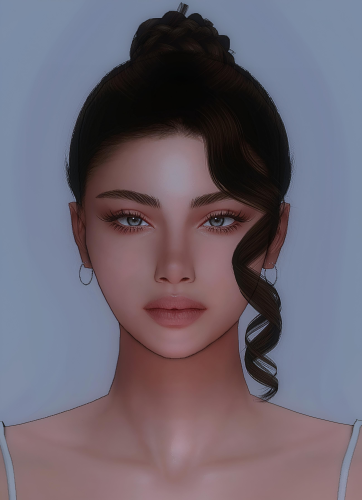
315 downloads
This here is my 22nd base sim creation! Feel free to check her out, along with my other creations on my Patreon Page! 😁 -
Sexy Model Sim 45 View File How to install? First of all, make sure " Enable Custom Content and Mods" option is turned on in your game. After activating this settings, you need to restart the game. Before restarting the game, download some of the Sims I shared. (Screenshot 1) After downloading a Sim, extract the Sim's files from the rar. You will get the following folders; Mods,Tray. Put the files in the "Mods" folder in > Documents/Electronic Arts/The Sims 4/Mods Put the files in the "Tray" folder in > Documents/Electronic Arts/The Sims 4/Tray After doing all this, when you open the game, click on the gallery icon in the upper right and check the "include custom content" box. This is how you can see your downloaded Sims. (Screenshot 2) See my other LoversLab Sims here Visit my SubscribeStar page for exclusive 200+ Sims,new Sims every week and Supporters Special Limited Gift Sims! Hope you enjoy my work! ~ ❤️ Visit my Website to see my Sims catalog and download more Sims! For more Sims & Support me,please visit ; https://www.mervejuanasims.com/ subscribestar.com/mervejuanasims I wish you a good game! ~ ❤️ 💌 October 2026 SubscribeStar Supporters Gift Sims 💌 💌 Early-Access Sims on my SubscribeStar 💌 Submitter Mervejuana Submitted 10/16/26 Category The Sims 4 - Sims Requirements The Sims 4
-
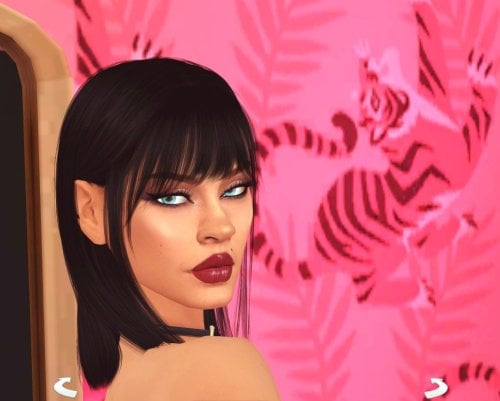
664 downloads
How to install? First of all, make sure " Enable Custom Content and Mods" option is turned on in your game. After activating this settings, you need to restart the game. Before restarting the game, download some of the Sims I shared. (Screenshot 1) After downloading a Sim, extract the Sim's files from the rar. You will get the following folders; Mods,Tray. Put the files in the "Mods" folder in > Documents/Electronic Arts/The Sims 4/Mods Put the files in the "Tray" folder in > Documents/Electronic Arts/The Sims 4/Tray After doing all this, when you open the game, click on the gallery icon in the upper right and check the "include custom content" box. This is how you can see your downloaded Sims. (Screenshot 2) See my other LoversLab Sims here Visit my SubscribeStar page for exclusive 200+ Sims,new Sims every week and Supporters Special Limited Gift Sims! Hope you enjoy my work! ~ ❤️ Visit my Website to see my Sims catalog and download more Sims! For more Sims & Support me,please visit ; https://www.mervejuanasims.com/ subscribestar.com/mervejuanasims I wish you a good game! ~ ❤️ 💌 October 2026 SubscribeStar Supporters Gift Sims 💌 💌 Early-Access Sims on my SubscribeStar 💌 -
.thumb.png.4ca10e1cbb08fca66e6018f8877adabb.png)
Version 1.0.0
261 downloads
💦Custom sims,milf,pornstar, celebrities and cosplay😍 Installation: First, unzip the mods Copy the uncompressed files to the: Documents folder »Electronic Arts» The Sims 4 »Mods and Tray files to the: Documents folder »Electronic Arts» The Sims 4 »Tray. 💋💦More sims custom on 🔥link🔥 Custom sims, celebrities, hentai and cosplay: Links : DOWNLOAD News! Sims on Link OMPLETE COLLECTION LINK CHECK OTHER SIMS AVAILABLE: 💋👍 -
Custom Sim - Kasandra The Succubus View File EDIT RECENTLY UPDATED!!! 10/11/2026 This is my personal Sim I've had for years named Kasandra. She's a Sexy Muscle Dommy Mommy Succubus. I wanted to share the gift of her sexiest with the internet. I've listed the packs required but I've also included a link to a google folder. This folder has not only the list of mod's I used in a document. But, it also includes a folder with various diffusions and images I used to edit some mods to fit my character better. I want to make this clear, I don't own any of the mods and any original mods are based on existing content. I'm not an expert and don't want to upload this and get in trouble. I've included links to all the mods involved in this character apart from 4. Those are mods that despite my best efforts I could not rediscover the links to the original, I apologize extremely for that failure on my part. For the edited parts of the mods required for this character, simply use Sims 4 Studio's to add the additional edits. Again, do not credit or claim I own the mods used I'm on a lake of ice and I don't know how thin it is so I'm on edge. But enough about that. For those wondering, Kasandra has a total of 5 outfits per category each with their own separate purpose. Here’s a list of each outfit and its purpose. I put a lot of time and effort into figuring out and determining each one. Everyday: Formal: Athletic: Sleep: Party: Swimwear: Hot Weather: Cold Weather: I have several other outfits that I may find a way to include for those who want to use them; but I currently don’t have a method of giving them to you yet. I am currently working on finishing the outfits for Kasandra’s Wife: The Werewolf Kelli. I’ll get her outfit finished as well and upload her. I also have several other sims of each Occult. However I need to finish many of their outfits as well. So I’ll let you know when I do. Please tell me your thoughts on Kasandra and all the work I put into her, I want to hear people’s love of my goddess sim. Anyway, Happy Simming you perverts and may my succubus queen bring you great pleasure. Pack's Required: Base Game EP01 - Get To Work EP02 - Get Together EP05 - Seasons EP06 - Get Famous EP07 - Island Living EP08 - Discover University EP10 - Snowy Escape EP11 - Cottage Living EP12 - High School Years EP16 - Lovestruck GP01 - Outdoor Retreat GP02 - Spa Day GP04 - Vampire GP05 - Parenthood GP06 - Jungle Adventure GP08 - Realm of Magic GP11 - My Wedding Stories SP01 - Luxury Party SP03 - Cool Kitchen SP04 - Spooky Stuff SP08 - Backyard SP16 - Tiny Living SP17 - Nifty Knitting SP24 - Fashion Street Mod Folder Link: https://drive.google.com/drive/folders/1nF3T6vXyEnjf5d1qbgtAIoisyyM0EvV3?usp=drive_link Submitter adfadfqwerqr4adf Submitted 10/08/26 Category The Sims 4 - Sims Requirements
-
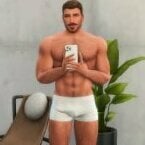
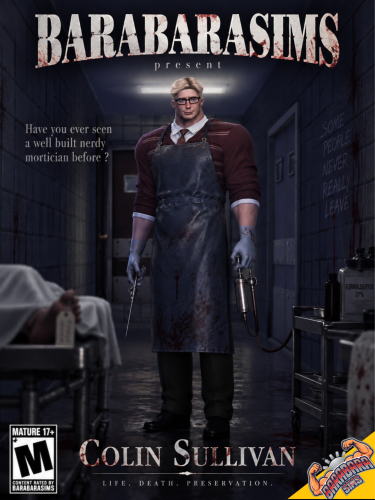
(EARLY ACCESS) BARABARASIMS — Colin Sullivan View File Meet Colin Sullivan, a shy, nerdy, old-fashioned mortician who runs the small Sullivan Funeral Home, which also happens to be his family home. He’s a little erratic and can sometimes be found talking to himself in a quiet corner of the mortuary. Despite his awkward, geeky personality, Colin is generous, caring, and deeply family-oriented. And surprisingly, this old-fashioned nerd is well-built, thanks to his athletic wife, who keeps him well-fed with nutritious meals and joins him for training. Traits: Erratic Geek Shy Family-Oriented Occupation: Embalmer (Mortician) Aspiration: Academic mod link : https://www.patreon.com/barabarasims/posts/early-access-169226116 Submitter BARABARASIMS Submitted 10/12/26 Category The Sims 4 - Sims Requirements
-
Version 1.0.0
87 downloads
Meet Colin Sullivan, a shy, nerdy, old-fashioned mortician who runs the small Sullivan Funeral Home, which also happens to be his family home. He’s a little erratic and can sometimes be found talking to himself in a quiet corner of the mortuary. Despite his awkward, geeky personality, Colin is generous, caring, and deeply family-oriented. And surprisingly, this old-fashioned nerd is well-built, thanks to his athletic wife, who keeps him well-fed with nutritious meals and joins him for training. Traits: Erratic Geek Shy Family-Oriented Occupation: Embalmer (Mortician) Aspiration: Academic mod link : https://www.patreon.com/barabarasims/posts/early-access-169226116 -
Version 1.0.1
554 downloads
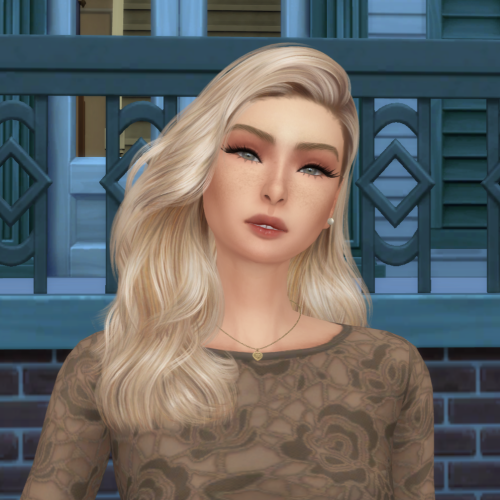
Name: Emma Harris Age: 24 Occupation: Barista Height: 5'4" Measurements: 32B/24/34 A sweet, innocent-looking girl with a passion for being creative and kind to everyone she meets. But she has a naughty side that comes out from time to time I OWN NONE OF THE CC USED, Thank you to all the wonderful people who make them I don't edit or process any of my images. All images shown are taken in game with no alterations -
 WhimWatch - A free and open-source updater for WickedWhims and WW Animations DIRECTLY from Creators View File WhimWatch An always free, always open-source, always privacy-focused update checker and updater for the WickedWhims Sims 4 mod and its animation packs. Who are you and what is this thing? I'm forthewhimsy, and I'm a gamer and software dev who was sick of manually curating my WickedWhims animations. Then I remembered that - unlike my Sims - I actually have agency and I finally did something about it. Now I want to share that with the rest of the community so that we can all remove the chore of maintaining our library of WW packages, and focus on actually having fun. As you probably know if you are here, WickedWhims has no built-in updater, and animation packs are spread across wicked.cc, LoversLab, Patreon, and other sites. That's where WhimWatch comes in. What does this thing do? TL;DR: WhimWatch scans your Mods folder, works out which creators' packs you have, and tells you when any of them, or WickedWhims itself, has a newer release, then updates them for you (upon your request). Key Features: Cross-platform support for Windows/Mac/Linux Finds your mod packs directory automatically Finds where each creator of your packages publishes and downloads directly from them (using a variety of standard sites, but you can add more!) Updates in one click wicked[.]cc downloads are public, and for LoversLab or Patreon, you can sign in inside the app first (with plenty of privacy settings built-in; your credentials are NEVER saved in WhimWatch) to download updates Before installing, you see exactly which files will be replaced or added, and can untick any. Old files are backed up, and every update can be undone from History Answers “Will this version of WW work with my game?" before you boot It shows your game version next to the newest one WickedWhims supports, and warns when mods or script mods are switched off in the game's options so you don’t have to do the ol’ dance of booting up, finding out there’s a bug or conflict, and then having to change options, close out, update, and reboot again. Stays discreet Has an optional privacy screen that blurs WhimWatch when it isn't the active window (and keeps it out of screenshots and screen sharing on Windows and macOS), a quick-hide shortcut, and hidden post titles. What should I know about this project? WhimWatch is an independent project and is not affiliated with TURBODRIVER, Electronic Arts, wicked.cc, LoversLab or Patreon. WhimWatch is NOT and does NOT condone pirating; In fact, this project is meant to remove friction so you can more easily support the rich community of artists and creators who contribute to WickedWhims. I also want to make this crystal clear, as there has apparently been an influx of vibe-coded projects and malicious EXEs submitted to LoversLab of late - While WhimWatch is maintained with LLM-assistance, I am a software engineer by trade who has worked in this industry for over a decade: I write some WhimWatch code by hand, some with LLM-assistance, but I review and understand every line regardless. I take the nuanced stance that using an LLM as one of many tools in the process does not make my software less genuinely mine when I am reviewing every single line, running manual tests, making edits, and making the architectural and engineering decisions for the project, and I own the responsibility of all those pieces. I really, really care about the quality of what I put out and have the experience and desire to maintain a good product. I am not a vibe-coder just slopping it up. I do understand AI/LLMs are very divisive in general, so I wanted to be as transparent as possible about this up front while also being adamant that I am not a slop-shoveler, and I put a ton of effort and passion into building and maintaining this project, and protecting my users, and I hope you see that come through in my code and the experience of the app. With the above said, I also encourage ALL users to always scan anything you download (including WhimWatch!) through a trusted virus scanner I recommend VirusTotal because it is free and easy to upload and see results quickly. It sometimes flags things as false positives/negatives, but if you look at the results holistically, you should get a good read on whether a file is malicious or not. I also include a SHA256SUMS.txt file in my releases so that you can check this page and ensure the hashes match the file you download (see "Download" below, and if you still have no idea what any of that means, VirusTotal will also provide you the SHA256 hash of the file you upload to it, and you can just use that to compare the known-good hashes in that TXT file - if these hashes don't match, you may have a compromised file). I designed WhimWatch to be respectful of privacy, secure, easy-to-use, customizable, and simple to submit improvements and bug reports to. I do my best to test the application as far as possible, but am limited by the packages and subscriptions I have available to me, so feedback from those on other operating systems, package sites, and other circumstances is vital to ensuring the app handles as many scenarios as seamlessly as possible. Share any feedback or questions here on LL, or send feedback or bug reports via the app, and you can also contact me on reddit at 4thewhimsy. WhimWatch is free and open source, and always will be. Stay Wicked. GitHub with Source Code and Releases: https://github.com/forthewhimsy/whimwatch Download System File Windows 10 and 11 WhimWatch-Setup-X.Y.Z.exe: installs for your user account, no administrator rights needed. Or WhimWatch-X.Y.Z-portable.exe to run without installing. macOS on Apple silicon (M1 and later) WhimWatch-X.Y.Z-arm64.dmg macOS on Intel WhimWatch-X.Y.Z-x64.dmg Ubuntu, Debian, Linux Mint WhimWatch-X.Y.Z-amd64.deb Fedora, openSUSE WhimWatch-X.Y.Z-x86_64.rpm Other Linux WhimWatch-X.Y.Z-x86_64.AppImage (make it executable, then run it) Windows will likely show a "Windows protected your PC" pop-up because these files are unsigned (click More info → Run anyway). macOS says it can't check the app (open System Settings → Privacy & Security and click Open Anyway). This happens once. To verify a download, compare its SHA-256 with SHA256SUMS.txt You can run sha256sum <file> on Linux shasum -a 256 <file> on macOS Get-FileHash <file> in PowerShell Or upload the file to VirusTotal, which will spit out the SHA256 for you (see above) Supported Languages The following languages are supported by WhimWatch (feel free to request or submit a PR for a new one!) English Italian Spanish Traditional Chinese Submitter forthewhimsy Submitted 09/22/26 Category WickedWhims Requirements The Sims 4 + WickedWhims base mod (https://wickedwhimsmod.com/)
 -
BS NIGHTFALL View File NIGHTFALL Night has fallen. And with it, a new story begins. When the sun disappears and the last city lights fade, another world begins to awaken. It was against this backdrop that NIGHTFALL was born — a special collection by Bancrof Studio, created for the universe of Decimos 4. Inspired by Halloween, dark aesthetics, and the world of Brancoff, the collection transforms classic elements of the night into a bold and contemporary style for men. Bats, pumpkins, skulls, webs, moons, roses, and shadows come together across five exclusive designs, each representing a different chapter of this story. The night has a new identity. The NIGHTFALL collection is available for free download. FREE DOWNLOAD Download the complete collection directly through the link below. Submitter leroybancrof Submitted 09/27/26 Category Clothing Requirements
-
Sexy Model Sim 44 View File How to install? First of all, make sure " Enable Custom Content and Mods" option is turned on in your game. After activating this settings, you need to restart the game. Before restarting the game, download some of the Sims I shared. (Screenshot 1) After downloading a Sim, extract the Sim's files from the rar. You will get the following folders; Mods,Tray. Put the files in the "Mods" folder in > Documents/Electronic Arts/The Sims 4/Mods Put the files in the "Tray" folder in > Documents/Electronic Arts/The Sims 4/Tray After doing all this, when you open the game, click on the gallery icon in the upper right and check the "include custom content" box. This is how you can see your downloaded Sims. (Screenshot 2) See my other LoversLab Sims here Visit my SubscribeStar page for exclusive 200+ Sims,new Sims every week and Supporters Special Limited Gift Sims! Hope you enjoy my work! ~ ❤️ Visit my Website to see my Sims catalog and download more Sims! For more Sims & Support me,please visit ; https://www.mervejuanasims.com/ subscribestar.com/mervejuanasims I wish you a good game! ~ ❤️ 💌 October 2026 SubscribeStar Supporters Gift Sims 💌 💌 Early-Access Sims on my SubscribeStar 💌 Submitter Mervejuana Submitted 10/11/26 Category The Sims 4 - Sims Requirements The Sims 4