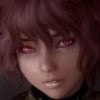
Antrox Posted August 19, 2015 Posted August 19, 2015 Im curious on feedback for Shyv's eyes. They are custom, and yes those are pentagrams.
GimmeBACON Posted August 19, 2015 Posted August 19, 2015 Im curious on feedback for Shyv's eyes. They are custom, and yes those are pentagrams. I'm sure a lot of people will love them... I kind of adored those bright red eyes she used to rock personally. They look cool by them-self, did you make them?
Antrox Posted August 19, 2015 Posted August 19, 2015 Im curious on feedback for Shyv's eyes. They are custom, and yes those are pentagrams. I'm sure a lot of people will love them... I kind of adored those bright red eyes she used to rock personally. They look cool by them-self, did you make them? These new ones are custom the old ones were from BVFE.
Kaos Wulf Posted August 20, 2015 Posted August 20, 2015 Up for criticism number 2. Can anyone here teach me how to take better combat screenshots ? (What fov , animations, poses, angle to use ? or just general tips about the locations, and enemies) The first thing you're going to want to learn before poses/animations or locations, is going to be console commands. Now, I don't know how well you know them, but I'll list some to help with combat shots. To change the game's speed; 'sgtm x' where x is an integer, - number decreases game speed, + number increases speed. Usually you'll want to slow time to catch an enemy in a combat pose. Speeding the game up can actually hurt your FPS, since it's rendering it faster. So, something like 'sgtm -1' is a good place to start off. You can also just turn off AI then pose them yourself. Use 'tai' for all AI, then 'tcai' for combat AI. Get the pose you want to use that makes them wield a weapon, and use 'setalert 1' to make them equip their weapon. The tricky thing about this, is they will put the weapon away unless you pose them as soon as you use the command. So open console, 'setalert 1', close console and pose them right away. Another thing with hostile NPCs, is that it won't let you pose them like just anyone. You also have to set their aggression towards the player by doing 'setav aggression 0'. Then there's 'tc', which let's you move them where you want them to be by taking control of them. Target yourself first, use 'tc', then target NPC and use it again. Of course, you can also just move them to your position by targeting them and using 'moveto player. I usually don't use moveto player unless I toggle off collision. To do that, don't have anything targeted and use 'tcl'. Get to where you want the NPC to be (like in the air if you want), then use 'moveto player' and they'll be in the exact spot you are. These should hopefully get you started, and maybe blazingsai will drop some pointers as well.
ubasa Posted August 20, 2015 Posted August 20, 2015 I appreciate the feedback, definitely will lower them a touch. And, yeah, you'd think a Bindi overlay would be pretty easy to make. Hope I'm not going too far away from the spirit of the thread by posting shots from the Racemenu screen, it looks like everyone is also commenting on the look of characters and I appreciate candor. I'm working on a new character and for the most part I'm really pleased with her. However, I feel like she's missing something... I have a tendency to over-tweak my characters and ultimately messing them up rather than improving them. So, I'm cool with any input as I'm at a crossroads here. haha She's a Redguard going for a Middle-Eastern/Indian/Exotic look. She may be fine, I'm certainly not expecting perfection. Here's some notes on the screenshot: her skin tone looks great with the racemenu face-light, however she get's very dark in normal play with my ENB, even in places where my main character looks great. Maybe lower the eyes on her a bit. Other then that, I doubt anybody made one availabe, but a Bindi would look really nice on her. On another note; somebody make a Bindi race-menu overlay.
Jexsam Posted August 20, 2015 Posted August 20, 2015 Eireya Kalmorn, Thalmor scout. Looking for feedback related directly to her face, but really, anything relating directly to her would be welcome. Rip'er apart. They'd've been here faster but when you're not in the mood to take screenshots, you're just not in the mood. :\
Buddy Christ Posted August 20, 2015 Posted August 20, 2015 I love the kind of harsh and arrogant face, but for my taste, the eyes are a bit too deep into the skull and the jawline seems to kind of clash with the thin cheeks. I would probably pull the eyes a bit out and smooth the jaw a bit, so it isn't in such contrast to the cheeks. But it might just be me and my taste ^^
blazingsai Posted August 20, 2015 Posted August 20, 2015 Up for criticism number 2. Can anyone here teach me how to take better combat screenshots ? (What fov , animations, poses, angle to use ? or just general tips about the locations, and enemies) The first thing you're going to want to learn before poses/animations or locations, is going to be console commands. Now, I don't know how well you know them, but I'll list some to help with combat shots. To change the game's speed; 'sgtm x' where x is an integer, - number decreases game speed, + number increases speed. Usually you'll want to slow time to catch an enemy in a combat pose. Speeding the game up can actually hurt your FPS, since it's rendering it faster. So, something like 'sgtm -1' is a good place to start off. You can also just turn off AI then pose them yourself. Use 'tai' for all AI, then 'tcai' for combat AI. Get the pose you want to use that makes them wield a weapon, and use 'setalert 1' to make them equip their weapon. The tricky thing about this, is they will put the weapon away unless you pose them as soon as you use the command. So open console, 'setalert 1', close console and pose them right away. Another thing with hostile NPCs, is that it won't let you pose them like just anyone. You also have to set their aggression towards the player by doing 'setav aggression 0'. Then there's 'tc', which let's you move them where you want them to be by taking control of them. Target yourself first, use 'tc', then target NPC and use it again. Of course, you can also just move them to your position by targeting them and using 'moveto player. I usually don't use moveto player unless I toggle off collision. To do that, don't have anything targeted and use 'tcl'. Get to where you want the NPC to be (like in the air if you want), then use 'moveto player' and they'll be in the exact spot you are. These should hopefully get you started, and maybe blazingsai will drop some pointers as well. Wait what? Me? I suck ass at taking battle screenshots. BUT, everything Kaos Wulf said is basically correct. I'd also probably use tdetect if you want to make sure like people don't aggro you period (aka appear as red dots), Also, you can do some cool things like using magic with your poses. All you have to do is equip magic your hand (or both) charge your magic, and then use a pose (while still charging your magic). NOTE: When you use tfc or tfc 1 and take the screenshot you may have to click the hand the magic is in once or twice to stop charging it then jump to leave the pose. If you do this you can make screens like this (again I'm not the best at this but my name was dropped, so I gotta deliver ): Posing while charging magic (forget where I got this pose aka It isn't from any of the Goma/Halo/Aloe/Kino sets) EDIT: It's from Purple Poser v2.1... I think :/ This one is using an Aloe pose. Again it's her charging her magic Same pose as above, different magic. This one is using a spell like flames/sparks that just continuously shoots out until you release it. Same pose as above Random shot of her :/ You can also do things like this And this (nothing special just holding the spell in her hands. One day I'll find a way to shoot magic sideways... maybe...) Or this... ... Sometimes it all comes down to just toggling god mode (tgm) and staging a fight or sequence of actions yourself (basically you'll tgm > aggro someone or something or multiple persons or things > use sgtm to slow time > let the enemy have at it until they strike a specific pose > target the enemy and use tai > adjust your character using attacks/poses/etc. > rinse and repeat (I personally don't use sgtm a lot, but when I have it turned out really well also; if your read Flame-Child, that's how the the fight between Nyleine and Mora Oghma was taken I literally just had a fight and used "actiony" imo camera angles). But yeah, tgm is definitely a must if you're going to be doing any super high powered spell based screens. (I forgot to do this and actually ended up killing myself immediately after this screen was taken ) Also if you need to have people get knocked back or straight up or whatever try messing with the pushactoraway command pulled from uesp (it's a targeted command): pushactoraway | Push an actor away in a random direction. | Example: pushactoraway 14 1337. Will push or launch your character in a random direction. If you enter negative amount, example: pushactoraway 0001A6B8 -200, will pull the selected actor to your character position. To answer asenasen's question(s) of: What fov , animations, poses, angle to use ? or just general tips about the locations, and enemies What fov?: I've asked around myself in the past. It really just depends on what you feel will have the most impact for your screens. In the above screenshots I used 40-20 (exactly 40, 30, and 20) because I'm weird like that and wanted a more close in view (the far away screenshot with the glare was done with the default fov because... it was far away XD) I've also hear that some people like to use anything from 60-100 depending on the shot and the angles they're going for. So... i guess experiment? Animation poses?: Depends. I have a ton of pose mods installed and the ones I've used most often are from Halo's Dramatic/Action Poses, Aloe Poser, Kinoko Pose, I also have used Larmir Pose and Purple Poser in the past as well. I used to (and still do from time to time when I'm not lazy) use poses from Additional Dramatic Poses for Pinup Poser however if you're going to use that, it would be best to put it in Public Poser so you won't have possible conflicts if Halo decides to upgrade his Dramatic set in the future. Angles to use?: No idea. (I just do what feels good/looks good to me. Others could help you more with this.) I hope some of this was somewhat helpful.
GrimReaper Posted August 20, 2015 Author Posted August 20, 2015 Eireya Kalmorn, Thalmor scout. Looking for feedback related directly to her face, but really, anything relating directly to her would be welcome. Rip'er apart. They'd've been here faster but when you're not in the mood to take screenshots, you're just not in the mood. :\ Jawline should be raised a bit and also made thinner, Chin a bit more round and broader. Here's a good reference, imo:
Kaos Wulf Posted August 20, 2015 Posted August 20, 2015 Wait what? Me? I suck ass at taking battle screenshots. ^ Proceeds to write an entire illustrated guide.
ao2thend Posted August 20, 2015 Posted August 20, 2015 Eireya Kalmorn, Thalmor scout. Looking for feedback related directly to her face, but really, anything relating directly to her would be welcome. Rip'er apart. They'd've been here faster but when you're not in the mood to take screenshots, you're just not in the mood. :\ Kind of difficult to say anything critical about a character when there's facial animations going on because of how they warp a characters facial features, but nevertheless I will give it a shot. If you look under the lip, notice the shadows. That could be smoothed over. In fact the areas around the lips in general look blocky and need some smoothing. In the picture where she has one eye opened, the chin also needs some smoothing. In truth, most of the issues i'm seeing are related to polygons sticking out where they shouldn't. The nose, chin and lips seem to be the biggest problem areas for your character. That's really all I can say on what needs improvement in regards to your character. Everything else is up to personal taste, which I usually try to avoid because your design choices are yours.
ao2thend Posted August 20, 2015 Posted August 20, 2015 And now here are some shots of my Skyrim I would like an opinion on from you all. Anything goes really. Textures, meshes, ENB, the shot itself, etc. Give me whatever opinions you may have.
Kaos Wulf Posted August 20, 2015 Posted August 20, 2015 And now here are some shots of my Skyrim I would like an opinion on from you all. Anything goes really. Textures, meshes, ENB, the shot itself, etc. Give me whatever opinions you may have. You've spent a lot of your time building a great looking ENB mashup (if that is indeed your custom NLA like I think it is), that it makes me feel lazy by comparison; like I settled on Aeon because it was high-end. The cinematic camera effects aren't my thing, but you made yours subtle rather than overpowering, which can take away from shots. This shot here I left in the spoiler, it doesn't make Alduin out to be very intimidating, if you catch my meaning. Black dragon against dark landscape doesn't bring him to the forefront like the shots of him in the night sky. Since it's taken at Helgen, there's all the burning wreckage there that could be used as backdrop. The other shots, the one looking down into the cave through the light shaft, to the dragon priest surrounded by the shock shield were my favorites.
ao2thend Posted August 21, 2015 Posted August 21, 2015 And now here are some shots of my Skyrim I would like an opinion on from you all. Anything goes really. Textures, meshes, ENB, the shot itself, etc. Give me whatever opinions you may have. You've spent a lot of your time building a great looking ENB mashup (if that is indeed your custom NLA like I think it is), that it makes me feel lazy by comparison; like I settled on Aeon because it was high-end. The cinematic camera effects aren't my thing, but you made yours subtle rather than overpowering, which can take away from shots. This shot here I left in the spoiler, it doesn't make Alduin out to be very intimidating, if you catch my meaning. Black dragon against dark landscape doesn't bring him to the forefront like the shots of him in the night sky. Since it's taken at Helgen, there's all the burning wreckage there that could be used as backdrop. The other shots, the one looking down into the cave through the light shaft, to the dragon priest surrounded by the shock shield were my favorites. Actually that's my modified CR ENB. I get what your saying about the Alduin shot. Thanks for the feedback.
Jexsam Posted August 21, 2015 Posted August 21, 2015 If you look under the lip, notice the shadows. That could be smoothed over. In fact the areas around the lips in general look blocky and need some smoothing. In the picture where she has one eye opened, the chin also needs some smoothing. Yeah I see that weirdly harsh shadow under her lip, too. Thing is, to the best of my ability to tell, that's a texture issue more than a mesh issue. I smoothed it over as well as I could without, at least to me, making it overly flat. I'll take another look at it sometime but after the first two attempt failed I'd sort of resigned myself to it. Keep in mind I'm not using a fancy high-poly head mesh, so some of those polys sticking out more than they should might be largely unavoidable. As for the jawline comments, I'll see what I can do, but I'm afraid doing that will edge her more towards sameface syndrome.
payes Posted August 22, 2015 Posted August 22, 2015 Is it better to take Screenshots with 'F12' through steam or Fraps? I guess my question is, is Fraps worth it?
Antrox Posted August 22, 2015 Posted August 22, 2015 Is it better to take Screenshots with 'F12' through steam or Fraps? I guess my question is, is Fraps worth it? If you have an ENB press PrintScreen button, has way better quality then steam shots.
gvman3670 Posted August 22, 2015 Posted August 22, 2015 Is it better to take Screenshots with 'F12' through steam or Fraps? I guess my question is, is Fraps worth it?If you have an ENB press PrintScreen button, has way better quality then steam shots. And the same is true if you're using SweetFX (like I Can't Believe It's NOT ENB).
Buddy Christ Posted August 22, 2015 Posted August 22, 2015 I always used the ....uhm.... I think it is the "insert" key as default for screenshots with ENBs? Then the screenies are saved as enb_blahblah.bmp instead of Screenshot######.bmp I am not sure if it actually makes a difference and if the screenshot is without ENB effects when using the PrintScreen button?
Guest Posted August 22, 2015 Posted August 22, 2015 I always used the ....uhm.... I think it is the "insert" key as default for screenshots with ENBs? Then the screenies are saved as enb_blahblah.bmp instead of Screenshot######.bmp I am not sure if it actually makes a difference and if the screenshot is without ENB effects when using the PrintScreen button? It depends. If you have SweetFX included with the ENB as a lot do, use it's own screenshot button or your shot won't look as they do in game. I usually define it to be the same as ENB's.
GrimReaper Posted August 22, 2015 Author Posted August 22, 2015 If you look under the lip, notice the shadows. That could be smoothed over. In fact the areas around the lips in general look blocky and need some smoothing. In the picture where she has one eye opened, the chin also needs some smoothing. Yeah I see that weirdly harsh shadow under her lip, too. Thing is, to the best of my ability to tell, that's a texture issue more than a mesh issue. I smoothed it over as well as I could without, at least to me, making it overly flat. I'll take another look at it sometime but after the first two attempt failed I'd sort of resigned myself to it. Keep in mind I'm not using a fancy high-poly head mesh, so some of those polys sticking out more than they should might be largely unavoidable. As for the jawline comments, I'll see what I can do, but I'm afraid doing that will edge her more towards sameface syndrome. I suppose the issues with the mouth come from whatever tint masks you have installed. Regarding the sameface syndrome, well. You shouldn't force uniqueness, imo. I mean, everybody has his or her preferences, and if you like a certain archetype there's nothing wrong in using it for your characters. Last but not least there are some universal rules when it comes to face proportions because skulls largely look the same. If the eyes are too far up or too low for example, it may give your character a unique look but also a deformed head. Seriously, I'd recommend looking at human skulls on wikipedia or something to get a feeling as to how faces look underneath the skin, makes it much easier to spot flaws. Sure, elven skulls would look slightly different than human ones, but you get the idea.
Kaz Aanh Posted August 22, 2015 Posted August 22, 2015 What do you think about my ENB? Screens in that order 9AM > 12 AM > 15 PM > 18 PM I have skipped night-time screenies becasue I have no idea how I should tweak them. ( still working on them ) Well my elf , i mean breton. Aww my half-elf. Has also received a visual update, especially skin texture which is now more "elvenish", smooth-like. I am really happy with the outcome. interior enbv2 test by Kazaanh, on Flickr
Kaos Wulf Posted August 23, 2015 Posted August 23, 2015 What do you think about my ENB? Screens in that order 9AM > 12 AM > 15 PM > 18 PM I have skipped night-time screenies becasue I have no idea how I should tweak them. ( still working on them ) It's got a nice realistic feel to it, which is typically what I go for with ENBs, and the color palette isn't over-saturated either. For the character, her eyes have a lot of appeal to them while the red dots help to offset the gold/yellow hues.
ao2thend Posted August 23, 2015 Posted August 23, 2015 What do you think about my ENB? Screens in that order 9AM > 12 AM > 15 PM > 18 PM I have skipped night-time screenies becasue I have no idea how I should tweak them. ( still working on them ) Well my elf , i mean breton. Aww my half-elf. Has also received a visual update, especially skin texture which is now more "elvenish", smooth-like. I am really happy with the outcome. interior enbv2 test by Kazaanh, on Flickr Its only my personal opinion but I'd say that the 9:00 and 18:00 shots need more color in regards to the sunrise/sunset, and the 12:00 shot could be brighter with maybe a bit more saturation. The reason is the color is just a bit too subtle to me (of course my tweaking attempts with ENB's are anything but subtle so perhaps I'm just crazy). Maybe that's just the location though. I usually sit right outside the Honningbrew Meadery by the signpost and bridge when I tweak ENB's because you are real close to the tundra and forest in addition to getting a nice view of the sunset and sunrise, which usually end up being the best times to take shots anyway. And for the nighttime, I always try to go as dark as possible and be able to still take character shots. Maybe start there? As far as your elf character? I've always been a fan of your characters so I have no gripes there.
Taskmaster Posted August 23, 2015 Posted August 23, 2015 @Dagren: I'm going to add on to what ao2thend said. A little saturation would help, but at the same time I'm unsure of the weather there - is it overcast? If so, then, I think that works the way it is, except for stronger clouds(so you could replace some textures for that). Your elf? I wish she was more world hardened, but that's my personal taste. As far as the appearance you're trying to convey with her, she looks on point.

Recommended Posts
Archived
This topic is now archived and is closed to further replies.