

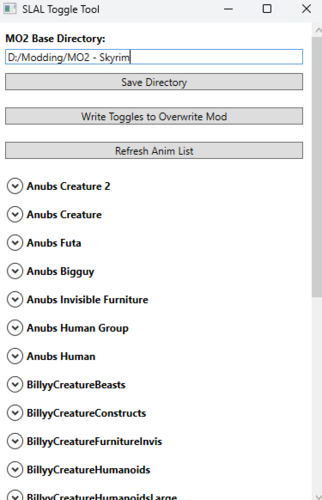
If you don't want to toggle anims for SLAL in MCM, you can use this. Useful if you never want a particular animation to show up in MCM across saves. You still need to use SLAL to register animations.
I mainly made this because I don't like spiders and certain packs only a have a few animations I want, and I didn't want to have to reenable/disable them all in SLAL every time I start a new game.
Instructions:
Start:
When first starting the tool, select your MODS directory. It should match whatever you have set for your mods folder in the MO2 settings.
Core:
1) toggle your animation using my toggle tool.
2) rebuild your animations (FNIS/Nemesis/Pandora)
3) go into SLAL MCM and click "enable all", then "Rebuild Registry", then "Register Animations"
If you want to remove a pack completely, make sure to completely delete it from your mod list in MO2, and rewrite the override file using the tool. If you don't do this after removing a pack, SLAL will try to pick up the animations, even though they don't exist.
Tag Editing:
Tag editing comes in 3 modes: None, Aggressive, Full.
None removes tagging options so you only see enabling option.
Aggressive allows you to easily tick whether an animation should be tagged aggressive (useful for defeat mods or anything that prioritizes aggressive tags)
Full allows you to directly add or remove tags as you see fit. Make sure they are comma separated. I am unsure if whitespace matters, but probably best to not have any.
Notes:
Don't add it as an executable to MO2, it doesn't work.
Doesn't work for SL P+ since P+ doesn't use SLAL.
Idk if it works for vortex, but assuming vortex uses a "mods" folder similar to MO2 it should be fine.
The tool is not aware of what mods are enabled or disabled, so if you have disabled SLAL packs, it will still pick those up. In order to avoid picking them up you need to uninstall the SLAL pack you aren't using.
If you uninstall a pack, make sure to reopen the tool and rewrite the jsons, otherwise the SLAL pack jsons it picked up from the previous rewrite will still be hanging around.
Let me know if something doesn't work, or you have a suggestion to improve it.
SL tags explained, leaving this here for my own reference later or if someone wants to know what the aggressive toggle does.
How it works:
Functions by creating a mod in your MO2 Base directory called "SLAL JSON Override". When you write the toggles using the tool, it duplicates the jsons from the associated animation packs, but removes the untoggled animations so SLAL/SL never see them in the first place. This is non-destructive, so it doesn't touch the original packs and can be reverted at any time. It finds SLAL packs by searching for JSON's in all folders under <MO2 Base Directory>/mods/*/SLAnim/json
Edited by Aggressive_Coast
What's New in Version 1.1.8
Released
Fixed Rotate type conversion in json
Installation:
Extract to a folder. I prefer having a dedicated tools folder, but you should be fine putting it anywhere. I couldn't get it to run in MO2 so don't add it as an exe to MO2.
Run "SL Anim Toggle Tool.exe".
Copy and paste your MO2 Mods directory (Tools -> Settings -> Paths -> Mods Directory)
Click Save directory and click Ok for the message.
Click Refresh Anim List.
Toggle the animations you don't want for each pack.
Click Write Toggles to Overwrite Mod.
Go back to MO2, refresh the mod list and enable "SLAL JSON Override"
Make sure it is below your animation packs so it actually overrides them.
Done.
Uninstallation:
Delete the tool and remove the SLAL JSON Override Mod from your mod list.