

Modlist and Setup

INTRODUCTION
Skyrim VR is aging. The SKSE site lists the different game versions, and Skyrim VR is the oldest and no longer receiving updates. This is good, in the respect that Bethesda won't change anything about the game that breaks mods. But it's also bad because mod developers are not making mods that are backwards compatible with the VR version. In this list, I'll provide exact versions and URLs for where to find the mods I use, if I can.
Some of these are no longer available. Ask me if you would like the version I have. If I get enough requests, I'll put them on a cloud drive.
LEGEND
👄 means Adult content
♀️ means female main character content
♂️ means male main character content
INSTALLATION
- Start with a fresh Steam install of Skyrim VR.
- Ensure you have no files in "My Documents / Save Games / Skyrim VR" or "Skyrim Special Edition". We're starting clean. If cloud saves put games back in, that's ok.
- Run Skyrim VR once, as is, without any mods, in SteamVR. This will create and populate "My Documents / Save Games / Skyrim VR" with some files.
CLEAN MASTER FILES
This could be considered an optional step. Some modders swear by it, others never mention it. I've done this both with and without cleaning and I honestly can't tell the difference, which is why I call this "optional". This is the YouTube video that I follow. Everything you need to know is in there about how to get SSEEdit 4.0.4, configure it for SkyrimVR, and how to clean the files. I'll post some notes about this below the video.
I also don't have an opinion on when to clean. Before you start Skyrim? Before your first save? After? I will leave that up to you because I don't think it makes any difference.
NOTES:
- At this point in the video, he's just a little impatient. Dawnguard takes a bit to load and the offending line will show up in red if you let the application work for a moment.
- Autoclean Update
- Autoclean Dawnguard
-
Manually clean Dawnguard
- Cell block 5, sub-block 3, in the RIGHT HAND pane, 4th column - remove "RiftenRatwayZone [ECZN:0009FBB9]"
- Cell block 2, sub-block 1, Guard - remote the whole record
- Cell block 8, sub-block 1 Test - remove the whole record - Autoclean Hearthfires
- Autoclean Dragonborn
- DO NOT CLEAN SKYRIM
SETTING UP VORTEX
- Install Vortex. If you prefer another mod manager, that should be fine, but I've only used Vortex.
- Use Profiles. This will keep your mods and save games in sync. Maybe you want to be a breton today, tomorrow a khajiit. By using profiles, you can switch between them as if they're separate installs. NOTE: you cannot change the settings of the mods, just whether or not the mod is installed, so keep that in mind when configuring later in SkyUI.
- Take note of your profile's ID. It is used for where your save games will be written to. For example, mine is "SkS-j0XPh" and so my save games are written to C:\Users\corysia\Documents\My Games\Skyrim VR\Saves\SkS-j0XPh. If you have trouble saving your first game, it may not have created that directory and you'll have to do it yourself, and then save. I've only had that happen once, but it's easy to fix.
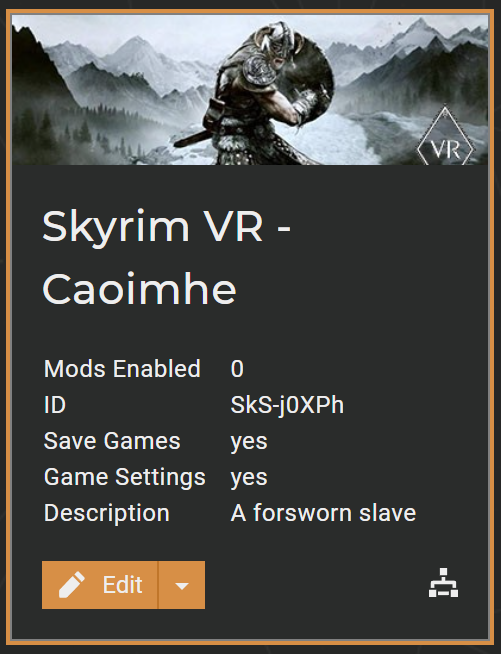
- My Steam Library is on D:\Games, so Vortex needs to be configured to use the same drive. In settings, under the Mods tab, I set my staging folder to be "D:\Games\Vortex\staging\{game}" and set Deployment Method to "Hardlink".
- In Settings, under Download, I've got my Download Folder set to "D:\Games\Vortex\downloads"
SET UP SKYRIM VR FOR MODDING
- Start Vortex. When it first starts, it may need patching and provide a number of alerts in the upper right corner. For loose files, just press 'fix'. The rest we can ignore for right now. We'll fix them as we progress.
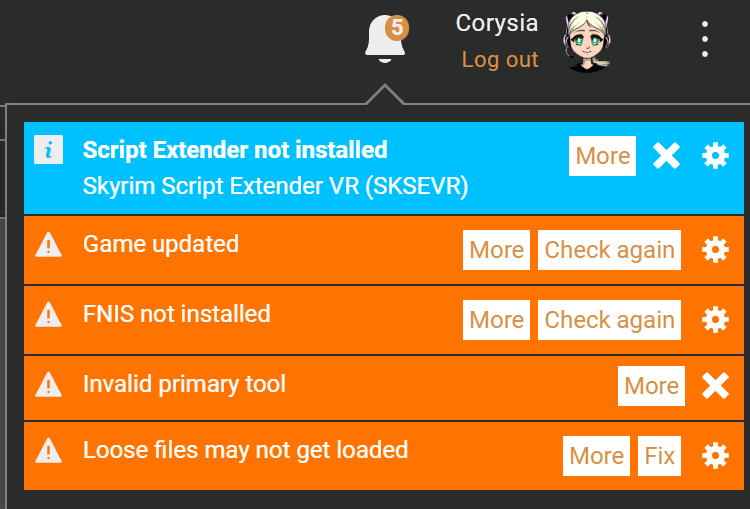
- Visit SKSE and download sksevr 2.0.12. That's the version for Skyrim VR.
- On the SkyUI VR GitHub page, you'll find SkyUI 1.2.2
- Skyrim VR Tools 2.3-BETA
- UIExtensions 1.2.0
- Install Fores New Idles in Skyrim
[Required] FNIS Behavior VR 7_6 XXL
(Optional) FNIS Creature Pack SE 7.6 if you are going to use creatures (I do)
(Optional) FNIS Spells SE 7.0 (I don't use this one)
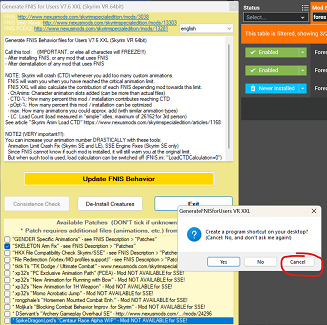
- Configure FNIS in Vortex to auto-run. Go to the Mods tab and then click "Configure FNIS" along the top menu bar. Be sure to check the Skeleton patch, as we'll be needing it shortly.
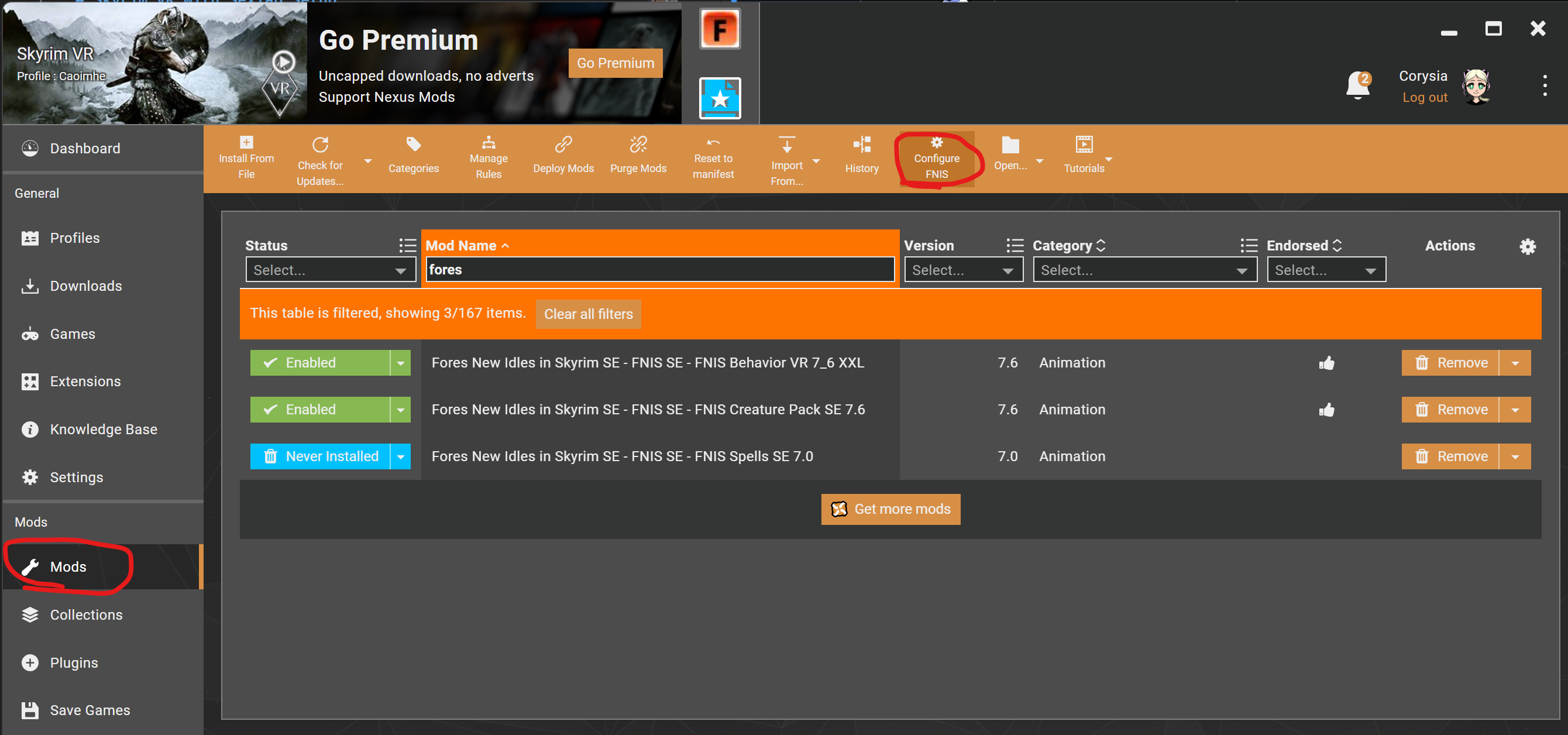
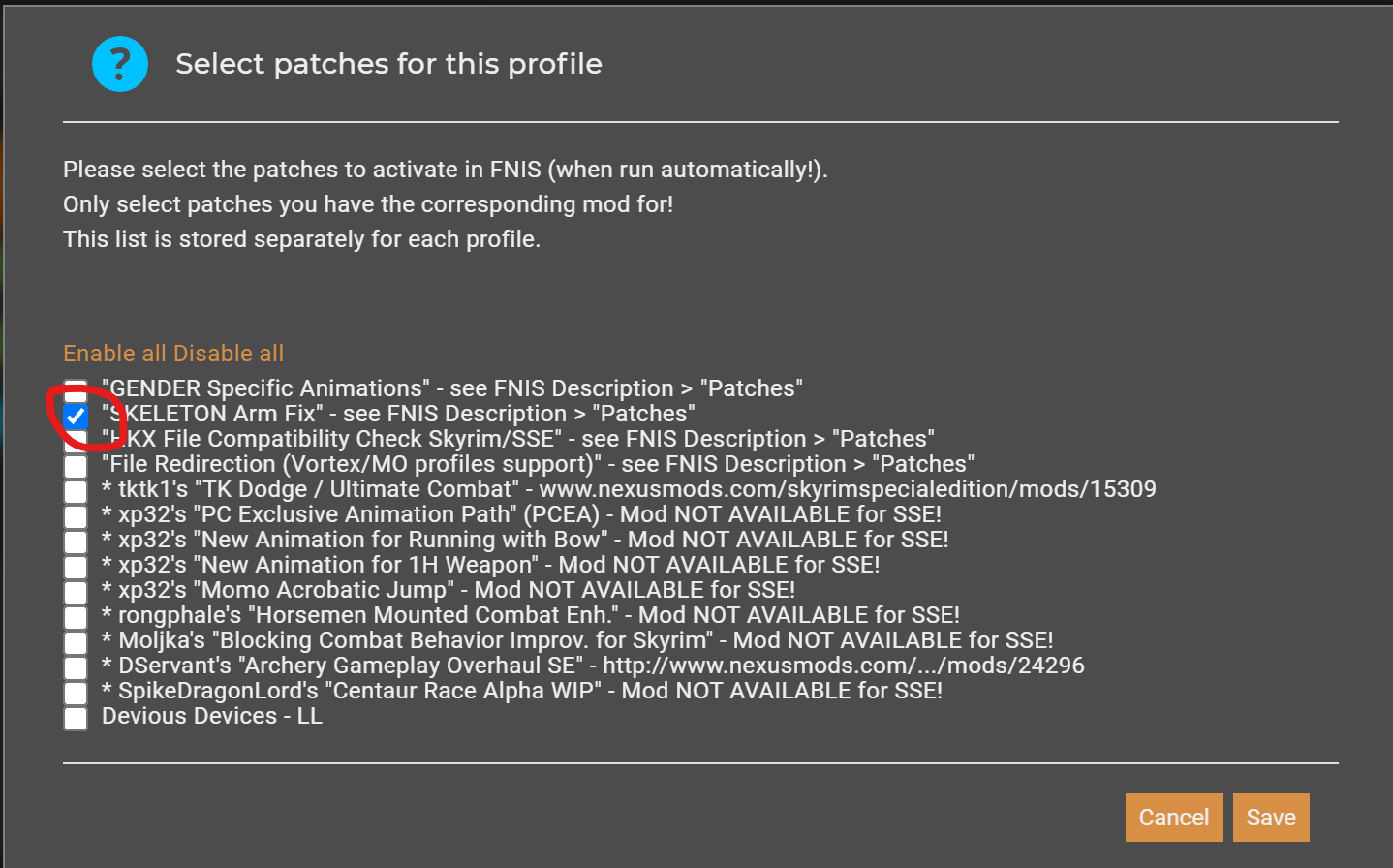
Also, if you run Fores by hand, it may repeatedly bring up this "Create a shortcut" menu. If you read the message (I didn't, for the longest time!  ), if you hit [Cancel], it won't ask you again.
-
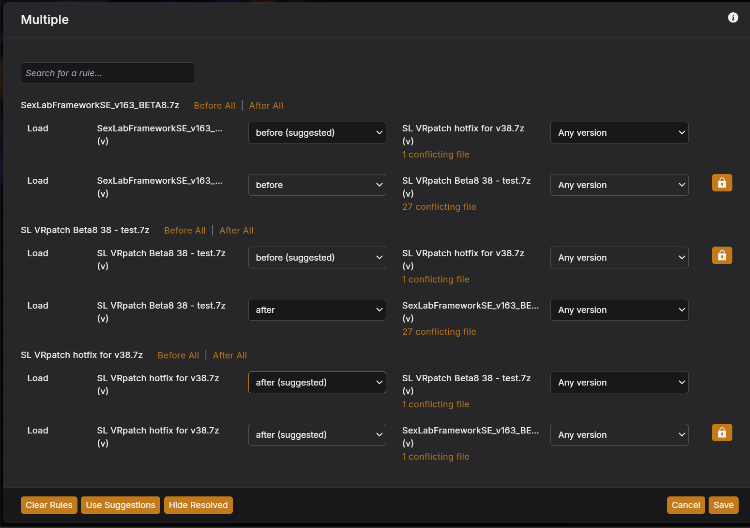
👄Install SexLabFrameworkSE_v163_BETA8 because this is the last version that still supports VR.
Install the SexLab VR patch beta8 38-test, tell Vortex to load after the SL framework
Install the SexLab VR patch hotfix for v38, tell Vortex to load after the previous patch you just added.
-
Install XP32 Maximum Skeleton Special Extended (XPMSSE) 4.80. This is what we needed the checkbox in FNIS for. For options, I select the following:
Skeleton - Physics Extensions
Character Creation pg 1 - Racemenu (we'll install that shortly)
Character Creation pg 2 - Out of sync
Animation Variants - none for everything
First Person Animation - none
Mounted combat animations - none
Compatibility pg 1 - 👄Schlongs of Skyrim (we'll install shortly)
Compatibility pg 2 - none, I don't use Deadly Mutilation
Compatibility pg 3 - none, I don't use Enderal -
Install RaceMenu Special Edition v0-4-9 This specific version.
Install RaceMenu VR 0.4.14
Delete skee64.dll and skee64.ini from <your_steam_install>\steamapps\common\SkyrimVR\Data\SKSE\Plugins
NOTE: When you install the next mod, you'll get a warning about deleting 2 files. It's OK. -
Install PapyrusUtil VR 3.6b. NOTE: This version does not need the Address library
When prompted, override SexLab with this version (in other words, Load After) - VR Address Library
- Papyrus Tweaks NG
-
Install VRIK Player Avatar v0.8.1 Build 28. NOTE: If you're going to play the vanilla introduction and not use Realm of Lorkhan as I do, disable these VRIK mods until after your hands are freed.
(Optional) Install VRIK Rift-Index-WMR Controller bindings. This will remap some of your controller keys.
(Optional) Install Arctal's VRIK Tweak, tell Vortex to override VRIK. -
👄Install HDT-SMP VR (Skinned Mesh Physics) for Havok breast physics.
-
Install BodySlide and Outfit Studio v5.5.2
Options: BodySlide and CBBE Body Physics, RaceMenu Morphs for CBBE
-
Install Caliente's Beautiful Bodies Enhancer - v1.6.2, tell vortex to override BodySlide when asked
Base Options: Curvy, ?None, Vanilla, Face Pack, Thin + Trimmed Brows
Optional Features: check everything -
👄Install Schlongs of Skyrim for VR 1.0.7
Default body, Hairy, and all addons
Load after XP32 -
Install Fuz Ro D'oh VR
-
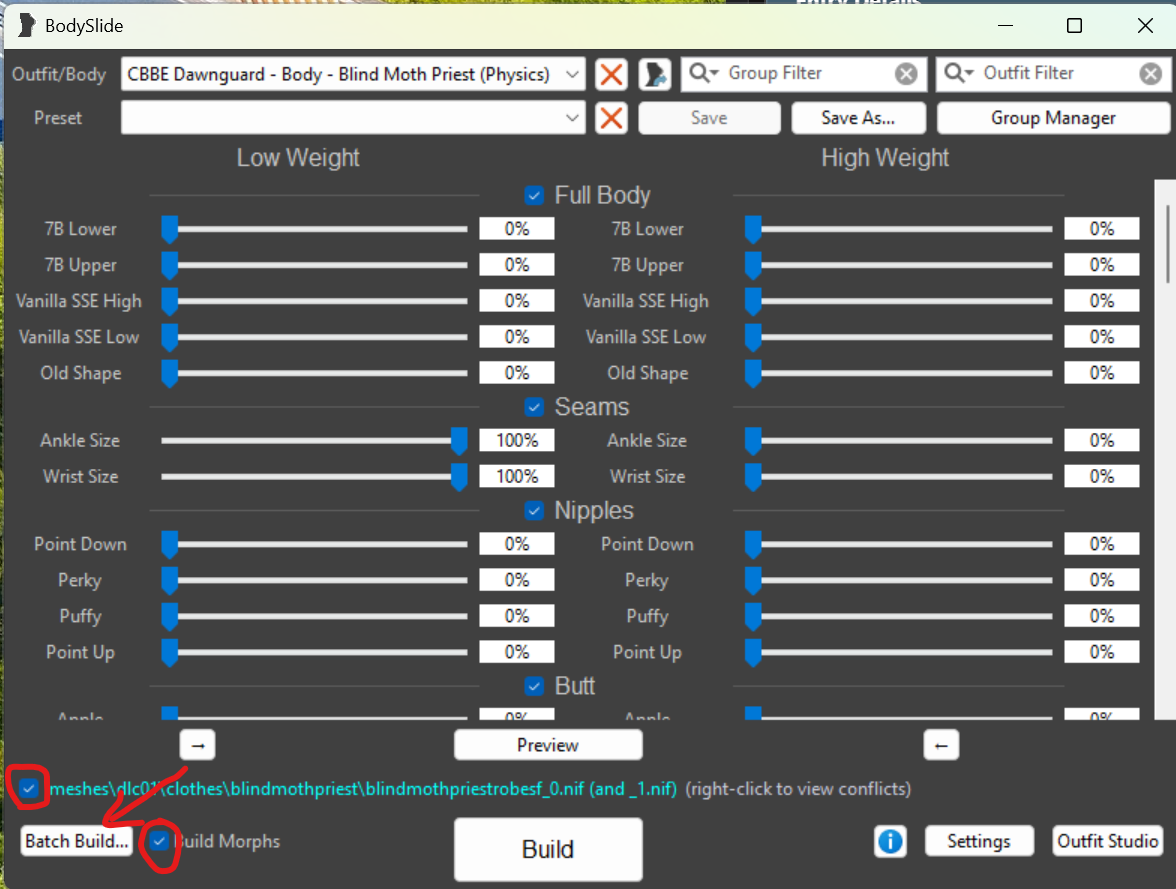
Run BodySlide Studio. You'll want to check the meshes checkbox and the "Build Morphs" checkbox, then press "Batch Build". You'll get another dialog box asking about which sliders to choose. I select ?"CBBE Body HDT" which will make my character nude when undressed. There are other options for Undies, etc. On the next screen, you'll also see a list of outfits and you need to pick a shape again. Here, I choose CBBE Physics (I'll try to grab a screenshot next time). It should generate morphs for 292 items.
OPTIONAL PRE-GAME MODS
These are some additional mods I typically start with prior to creating a new game.
- Achievement Mod Enabler to enable Steam Achievements
-
Install Realm of Lorkhan v.3.6.1
Install Realm of Lorkhan - Unbound patch
(Optional) Realm of Lorkhan - No Shards - No Racial Starting Spells
- KS Hairdos SSE
CREATING A NEW GAME
In this section, I'll describe how I configure these mods from within the MCM. I won't go over all of my personal settings, but I'll call out some important ones. In the end, you should set it up the way you want to play.
- (Optional) Disable RaceMenu while you initially create your character. I do this because I just want a Breton. After you create your character and make your first save, you should re-enable RaceMenu. I find Race Menu too hard to work with in VR. Leave it on if you want the full functionality of it.
- Start a new game and create your character. I have found that when I try to switch from Male to Female, SteamVR locks up and I see my harddisk running solid for a bit. Sometimes I have to restart, other times I can just wait a bit and the female model will eventually show up. It didn't used to do this, but I am running in to this often now. Just be patient and keep trying if you're going to play a female character.
- After your character, configure VRIK. Go in to your Magic menu and select the VRIK Calibration Power. First, go with "Headset Height". After the power cooldown delay, go in again and choose "Default". I'm 5'3", so I then choose "shorter" a few times to get me at the height I want my character to be. Finally, choose "VR Scale" and then done. You can now unselect the VRIK Power option.
-
Next, in the MCM, select VRIK.
Under Controls, I like to check "selfie" and set the compass to "left hand up" so I only see the compass when I look at the palm of my left hand. -
For SexLab, first you need to choose Install and then exit the MCM.
After it is installed, go in to the MCM again and under VR I like to choose "Lock view to body" and then I usually prefer to "disable 3rd person" so it's all 1st person.
Under Animation, if you want creatures, turn that on and then exit the MCM. You'll get two notifications that Creatures is installed and you have to wait for both of them before the MCM will respond again.
Go back in to Animation and set your preferences. If you want aggressive animations, be sure to set them to be allowed here or you'll get messages later saying how they were blocked.
Under voices, I change my voice from Random to a voice I prefer. For NPCs, I set them to reuse their voice. - Quit out of the MCM and save your game. Now is when you verify that your saves are going in to the correct subfolder. In my case: C:\Users\corysia\Documents\My Games\Skyrim VR\Saves\SkS-j0XPh
- Re-enable Race Menu if you turned it off.
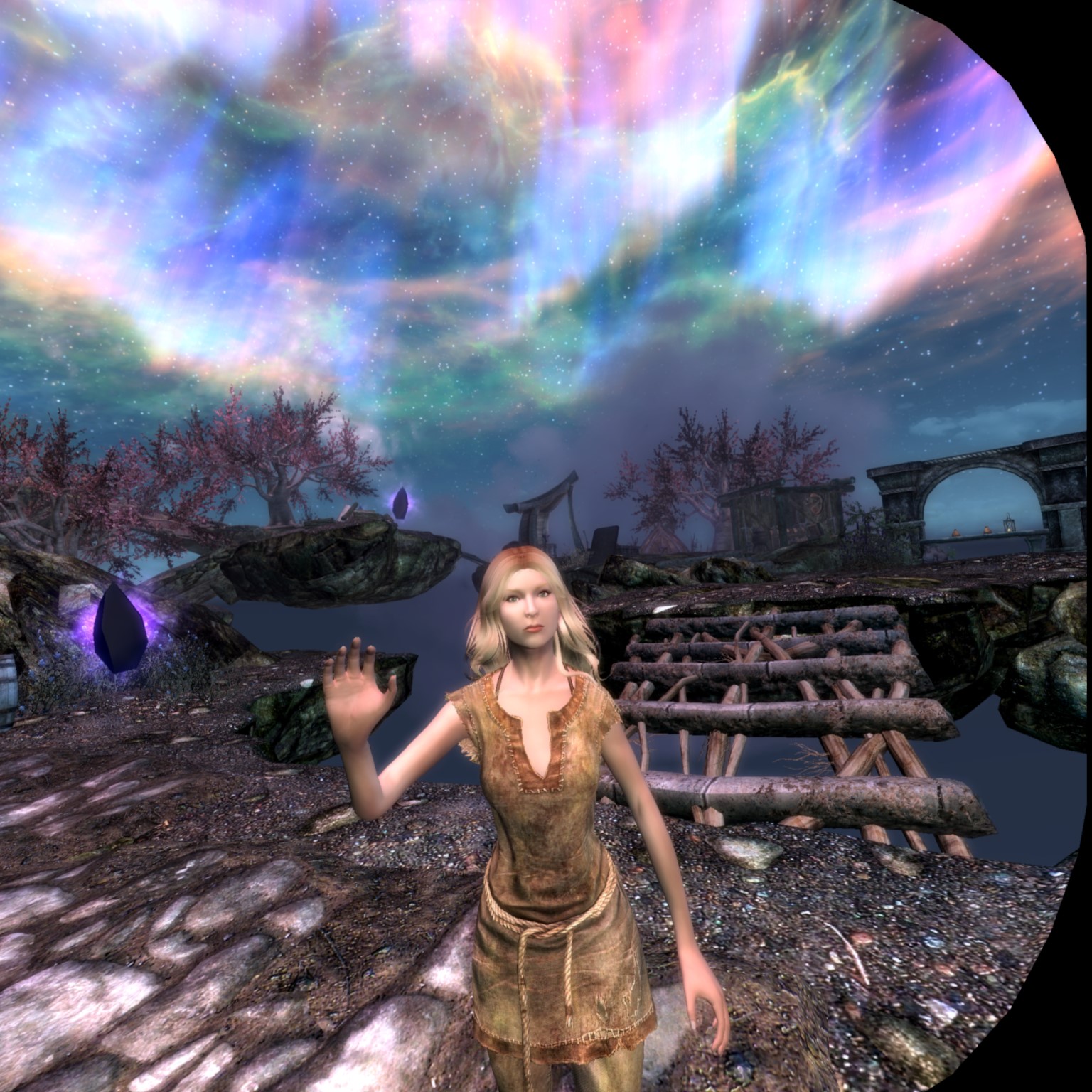
These are the core mods I start with. The rest of them are Quality of Life changes, adventures, and bugfixes. I'll continue to update this post periodically.
QUALITY OF LIFE MODS
In this next section, I'll list out all of the mods I add just to improve Skryim VR.
- Amazing Follower Tweaks SSE 1.66 - lets me turn anyone in to a follower and gives me the options to give them more commands than the default game.
-
Audiobooks of Skyrim - I love to read, but not in VR.
Audiobooks of Skyrim Gopher Collection 1 - Audiobooks read by Gopher
Audio Settings for Audiobooks of Skyrim - gives a separate volume slider for the audiobooks. -
Be Seated v4.2.5 - really fun one where you can sit at a bar in an inn and order a drink and they bring it to you! Note: I have no luck with beds, I get stuck in them, so I disable that.
Requires Skyrim VR Tools -
The Unofficial Skyrim Special Edition Patch v.4.2.6 - later versions won't work with SkyrimVR
requires SkyrimVR - USSEP Compatibility Patch - Campfire - a complete camping mod - My Breton is a forsworn, so she should be able to make basic bows and such in the wilderness. Papyrus VR should override Campfire. SexLab should override Campfire. We want PapyrusVR to be the latest Papyrus engine.
-
Carriage and Ferry Travel Overhaul - More options to where the carriages will take you.
(Optional) No Fast Travel - I'm using VR and a treadmill, I want to have to walk or pay for a ride. - Crouch to Dodge VR - You'll break a sweat doing squats, I promise!
-
Darkened Dungeons SE - dungeons should be darkReplaced in favor of Enhanced Light and FX - Dual Wield Block VR - because you should be able to block even if you're holding two weapons or a weapon and a spell.
- Fishing in Skyrim VR - teach a girl to fish, you feed her for life!
- Footprints - because you should leave tracks in the snow.
- HIGGS Enhanced VR Interaction - because you should be able to touch everything in your world.
- Holidays - who doesn't love a party? In the MCM you can set your character's birthdate.
-
Immersive Sounds Compendium - several improvements to sounds. I leave the Nirnroot as vanilla, however.
Immersive Draw & Sheathe Sounds VR - a patch for the above compendium - Modern Brawl Bug Fix - because for some reason, probably cloaks or something else, interferes with brawling and they always pull a weapon on me.
- Realistic Water Two SE v5.6.0 - water looks so much better
-
Smoking torches and candles - I prefer the subtle option.Replaced in favor of Enhanced Light and FX - Static Mesh Improvement Mod (SMIM) - really improves the looks of things. You'll have a lot of conflicts with this one. Always load it 'before' because the rest of the mods are newer, I'm sure.
- Super Simple Lock Bash - because you should be able to break in to a chest
- VR Bound Bow FX Restored - makes bound bows like the non-VR version
- Weapon Throw VR - so you can throw weapons, torches, etc. Lots of options in here.
- Wet and Cold SE - I like seeing my cold breath, etc.
MAGIC
- More Valuable Spell Tomes - because magic shouldn't that cheap.
- Spell Research 2.2.2 SSE - to research magic rather than just reading a book. Be sure you go in to the MCM and import spells.
- No Spells From Vendors or Loot, to force me to do the research rather than saving up a ton of money
- Immersive College of Winterhold SE - a wonderful expansion to the College. A must-have if you play a mage.
- College of Winterhold - Quest Expansion - More quests for the College, and they're actually good!
- iUnlock - Spell Research version - import spells in Spell Research to pick this one up as researchable.
- Simple Mark & Recall - I loved this pair of spells from Morrowind. Not researchable, unfortunately, so it's going to be expensive!
- Teach Followers Spells Full SSE - do I teach my follower or do I sell that spell tome? Hmmm....
- Wards Functionalities Extended - a ward can't stop an arrow?? Now they will. But shouts should break wards.
- Face Changer - I get this one mostly so I can change my hair style.
- Collage Days - Tuition, ugh!!
bHaptics and KatWalk
- No Stamina Drain For Sprinting - This sounds overpowered, but I'm using a KatWalk. I promise you, my stamina drains faster running Real Life than it does in the game!
- TactSuit SkyrimVR - Only useful for someone with bHaptics toys. They're so much fun!
-
Skyrim VR Configuration Tool - This handy tool allows you to adjust a lot of things. I read about it on reddit. I'm 5'3" and to physically crouch on a KatWalk with the default settings is more burn than I can handle right now, so this let me adjust it to a more comfortable stoop and still let me walk.
NOTE: Another very useful feature is it allows you to increase the priority of Skyrim VR, making it run smoother.
At this point, I run the game again and configure the MCM. And make another save game. Here I also joined the Forsworn faction and chose the Lover's Stone. Next, we'll start installing the Adult mods. Here we have to be careful because loading too many of these at once can overtax Papyrus. So, I periodically start the game and configure the MCM.
- RSSE Children Overhaul 1.1.3 with hotfix 1 - USSEP patch, 2K Aventus, Facial animations
- Hearthfire Multiple Adoptions
- JContainers VR 4.1.13
- Enhanced Lights and FX - loading this later as it detects mods
- 👄Sexlab Aroused SSE Loose 29
-
👄ZaZ Animation Pack+ CBBE HDT V8.0+SEREV3 - ZaZ is going to give you a lot of extra items and put collars around the necks of a lot of people. Lots of slavery in Skyrim! Be sure you register SexLab in its MCM settings.
👄ZaZ Animation Pack+ CBBE HDT V8.0+SEREV3 Voice files
👄ZaZ 8+ - VRIK No Spin - VR Patch - this will cause a conflict, load it after to override. -
👄SexLab Sexual Fame 0.99 - visit the MCM for rules, you might get arrested!
👄SexLab Sexual Fame Comments 3.31 - 👄SexLab Sexual Fame Comments Voice Files 3.31
- 👄Creature Framework 3.0 and More Nasty Critters. Be sure you look at the video there to understand how to put the 3-part file back together.
-
👄Fertility Mode 3.0.1 - choose Skyrim Special Edition and BSA. Ignore the Special Edition Patches, they're no longer needed. Choose HMA + SexLab. In the MCM, I like to deselect auto-inseminate PC, select only unique men and women. And I slide the UI bar ♀️ over from 900 to about 925. I also set the race to random between mine and the father.
👄Fertility Mode v3 Fixes and Updates
Fertility Mode VR Name fix
♀️ Fertility Adventures - I disable the sleep creep. It happens too often. -
👄SL Defeat - I would prefer to use Naked Defeat, but it doesn't play well with VR. This one is still good, tho. You need to turn on SL Defeat in the MCM.
NOTE: If you find yourself being molested and the molester is suddenly attacked by the town guards, this is due to a setting down in Player as Victim called Witness Intervention where you can allow others to join in or save you. TURN IT OFF! Especially if you're a town or inn and don't want your NPC attacker to be killed.
NOTE: If enemies stop attacking you, you probably need to go in to this MCM menu and CLEAN because your state is stuck in recovery mode. It's to allow you to get away and not be repeatedly victimized. But it gets stuck now and then.
👄SL Defeat Voice Files
This is enough for now. I start up the game, and wait a bit for the MCM to catch up. The game might crash. Just try again. If it keeps crashing, start taking out mods and retry. Configure the MCM, and make a save. Now for the next batch of mods...
-
👄Devious Devices SE & VR 5.1 - I choose CBBE SE, FeuerTin, Bunnyhopping, no beast race, ♂️Devious Devices for Him, and Skyrim VR. I have Devious Devices override ZaZ conflicts.
👄Devious Devices 5.1 VRIK No Spin Patch - the patch should override the original. -
👄Devious Cidhna
👄Devious Cidhna Voices -
👄Sexual Persuasion
👄Sexual Persuasion voice -
👄SL Animation Loader SE
👄Rydin SLAL Pack - You'll need to enable these in the SL Animation Loader MCM. - 👄Absolutely No Naked Comments
- 👄SexLab Achievements - gamification of naughty activities!
Time to break again to let Papyrus handle this. Before starting the game, run BodySlide to update the morphs for your new outfits. You'll get a list of options to choose. I choose HDT or CBBE SE whenever it's offered. It should be up to 448 morphs now. I always get an error on the Khajiit chain harness and the Breast Rope Extreme harness. I don't know how to fix it, so I ignore it. It hasn't messed me up so far.
- Skyrim Utility Mod (SUM)
-
👄Prison Overhaul Patched 5.32 (requires SUM)
👄Prison Overhaul Patched Voice
SUM & POP No Spin VR Patch - load after-all -
👄♂️Flower Girls SE and VR - remember to go back to Fertility and monitor FG girls if you'd like.
👄♂️Flower Girls SE Adventures -
👄Public Whore
👄Public Whore voice
👄Public Whore SlaveTats
Public Whore SE/VR patch -
👄♀️Submissive Lola Resubmission 2.1.0
NOTE: If you don't set this to nickname mode or your character's name will be changed to Lola and it will affect your save games. When you end your service, you can get your name back. But you will need to save and restart your game for it to work properly.
NOTE: By default, zaz slave control is off. Unless you've another mod that would conflict, I suggest turning this on because it will require other NPCs to ask your owner for permission first.
?Submissive Lola voice -
👄♀️♂️Radiant Prostitution Gigolo SE 7.0.4 - This mod does not fully work, none of the additional quests will load in Skyrim VR. I've been trying to figure this out, and I think it's due to JContainers VR not being as current as JContainers SE. But the basics work. -
👄Radiant Prostitution RMCW Edition
👄Radiant Prostitution v7.0.4 Voice Pack Gen4 -
👄Simple Slavery Plus Plus 6.3.19 [SE]
👄Simple Slavery Plus Plus voice - 👄Spank That Ass SE v4.5 (25-Jan-2021) - there is a voice file for this one, but it doesn't match my chosen voice. Oddly, this will sometimes show up as "trial run alpha".
- 👄Dripping When Aroused SE (DW 2022-03-03) - also called Dripping Wet or Dripping When Wet.
- 👄Love Sickness 1.0.1 - Set this for hearts only on onset so you know when you first enter this stage.
I have a lot more mods installed. I'll list them here, in no particular order. If there's interest, I'll track down the exact URLs like I have above where I can. But I'm not sure anyone's read this far!
-
Skyrim VR Change Your Bindings
NOTE: If you try to load VRIK Rift-Index-WMR Controller Bindings V2.1.0, this app will throw a parsing error. It turns out that the VRIK map adds an unexpected Activate option to the "Favor" section of the file. If you open the file in a text editor and delete Line 229, the VRIK mappings will open in this app.
NOTE: combos are supposed to work, but I can't get them to, so maybe this is useless. - 👄Body Search & voice files - gets repetitive, so turn it way down.
- 👄♀️Troubles of Heroine - can be Troubles of Hero, lots of options. I disable some side quests I don't personally care for.
- 👄♀️A Forsworn Story
-
iNeed Food Water and Sleep Continued v1.93 - I can only see 1.94 now, so I don't know if one can still get this version.
iNeed Water VR - 👄Amorous Adventures
- All Male Housecarls light version
- 👄Animated Prostitution
- 👄TDF Prostitution
-
👄Bathing in Skyrim- I ended up removing these because of conflicts with layers on my character.
👄Bathing in Skyrim Tweaked - Becoming a Bard & voice
- 👄Dark Desires Club
- 👄Devious Lore
- 👄Devious Enslaved Continued v13.25.0
- 👄Dibella Sisterhood
- 👄Fade Tattoos
- 👄Rape Tattoos & Rape Tattoos Tweaked
- 👄Horrible Harassment + no spin patch
- Improved bound sword and dagger collision
- 👄Sex Slaves aka Mia's Lair
- Immersive Good Boy - for Meeko, if I pick him up.
- Quiet Dog - Sit - I'm tempted to go with Complete Silence, but I don't want to break conversation.
- Ride Sharing
- Semi-open guard helmets
- 👄sex with thieves
- 👄Dangerous Nights - turn this WAY down or you'll never get any sleep
- 👄SL Kidnapped
- Spouses Enhanced
- Blood and Silver - vastly increases the size of Cidhna mine.
- 👄Skooma Whore
- Relationship Dialog Overhaul
- Relationship Dialog Overhaul - RDO SE - RDO - AFT SE Patch Final
Edited by Corysia
Added screenshot
40 Comments
Recommended Comments