Search the Community
Showing results for tags 'Utility'.
Found 23 results
-
 Libidinous Loader An experimental mod loader to moisturize your RimWorld experience. Its features include: Installing & updating mods Adding your own mods Automatically fetching up-to-date list of 100+ available mods (See How the mods are found section) Display already installed mods Remove mods Download Known issues On Windows, if you get a warning about an outdated OpenGL version, you can either: upgrade your graphics drivers try this even more experimental executable On first run, the executable will unpack some necessary files On second run, everything should work How to use Install git Download the executable into an empty folder Run it Select your Mods folder Select Mods in the Mod Providers list Press Install / Update How to update The application checks for new version at startup and updates itself automatically How to report problems / Request features Report problems here (Include the last.log file (next to the executable)): https://gitgud.io/AblativeAbsolute/libidinous_loader.rs/-/issues Request new features here: https://gitgud.io/AblativeAbsolute/libidinous_loader.rs/-/issues or join the RJW Discord Request new mods here: https://gitgud.io/AblativeAbsolute/libidinous_loader_providers/-/issues Screenshot Legacy Python version How the mods are found This project uses a centralized config file to retrieve information about what mods are available. The mods are specified in a providers.toml file and converted to JSON. For example, RJW is specified like this: [providers.root.rjw] type = "git" name = "rjw" description = "Depravity's foundation" url = "https://gitgud.io/Ed86/rjw.git" Projects like Sexperience, which provide a zip file for download instead of dumping DLLs into their repositories can be specified like this: [providers.extra.rjw-sexperience] type = "zip" name = "rjw-sexperience" description = "adds sex skill, cum bucked, sex history ui..." url = "https://gitgud.io/api/v4/projects/30860/packages/generic/rjw-sexperience/dev/rjw_sexperience.zip" More formats could be added in the future.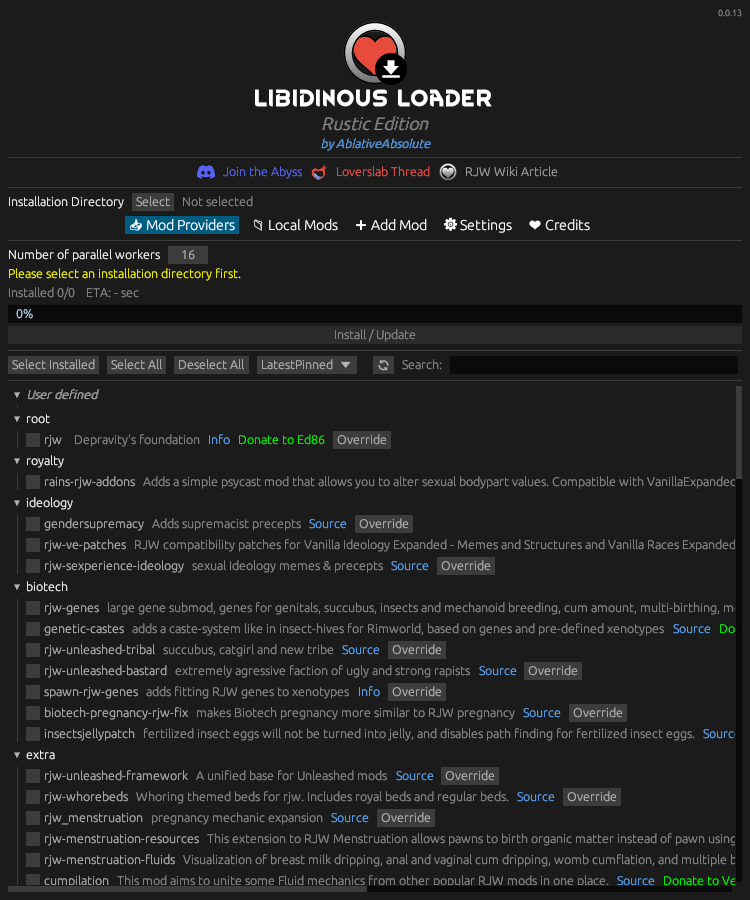
-
 Stable Captives - For Diary of mine 1.3.0 / SE_AE View File Stable Captives is now released in its first official version. This mod was inspired by BaF (Build a Follower). This mod is being developed based on the latest version of DoM, and was created solely to fix the naked bandit bug in DoM/PAH/HSH/AYGAS. (It cannot be used with PAHE alone.) It supports not only bandits, but all hostile spawning NPCs, including Forsworn. **Existing unique NPCs in Tamriel are not affected by this mod and are never stored in slave slots. This mod targets only spawned hostile NPCs, such as bandits. In MO2’s mod order, this mod must be placed below DoM so that it overwrites DoM’s files. In MO2's right-side ESP/ESL load order, if an NPC replacer or custom NPC mod is placed below DoM, it may be a good precaution to place Stable Captives below that NPC mod as well, so that Stable Captives overwrites it. If any issues occur, try this load order. Auction Slaves — Bandit ActorBase slaves obtained through AYGAS and HSH auctions are also handled by this mod. In AYGAS, the transfer process begins after the dialogue ends. HSH uses slightly more complex code, so there may occasionally be a delay and the slave may be registered again, but there is no need to worry. Just wait and the process will complete. 1. Required Steps After Updating the Mod 2. MCM 3. Mechanism The mechanism used to prevent naked bandit NPCs is relatively simple. Player + DoM knocks down a bandit → DoM duplicates the bandit and enslaves the duplicate, while the original is marked for deletion → Stable Captives mod captures the duplicated bandit in a unique ActorBase slot → Stable Captives loads all information for that NPC, including its FaceGen data → The loaded slave data is treated as a unique NPC → The slot is saved and locked → DoM resumes full management of the NPC stored in the locked slot. 4. Slot Cycling + Cleanup and Management Let me emphasize this once again: Please keep in mind that the Reset feature could corrupt every save file containing existing slaves. **More precisely, only save files that are currently using this mod and still have slaves occupying slots.** Please verify it thoroughly multiple times and proceed with extreme caution. A detailed mod manual is also included. No further features are planned for the mod, but bug fixes and discussion will continue. Optional MOD - Slave salon (BETA) Update Logs- 1.1.9 (Underground Salon) - 0.1.0 1.2.0 & (Underground Salon) - 0.1.1 1.2.1 - 1.2.2 1.3.0 Submitter Thrallmaster Submitted 08/04/26 Category Adult Mods Requirements Diary of mine, PAH-Home Sweet Home, PAH-And you Get a Slave!, Paradise Halls Enhanced (pahe) Special Edition (optional) Regular Edition Compatible Install Instructions
 -
 [AAF] M.C.G. (Extended Social Interactions) View File Magno CUM Gaudio 2.12.50 (Extended Social Interactions) A modification that covers all the basics to properly sexualize your Fallout 4. Check it also for Skyrim Legendary Edition, HERE. MOD GUIDE: HERE! MOD FAQs: HERE! FOR MODDERS: HERE! WHAT IS THIS MOD? This is a jack of all trades mod regarding sex features. Its purpose is to cover all the basics features a reasonable man or woman would want regarding sex, in a coherent, consistent, fair and balanced way gameplay-wise, the goal is to give a simple all purpose mod for sex to use as a "dressing" for your vanilla gameplay. Due to its vanilla friendly and completely modular and customizable nature it can be paired well with almost any other good mod by simply adjusting its settings accordingly but it excels when used as the only main sexual mod in your load order. The primary focus of MCG is to expand the social interactions of the player with neutral, friendly and also enemy actors... because as you surely have noticed, Fallout 4 doesn't have many non combat activities, with MCG, instead, you can rely on solid gameplay and finally pretend to live the world, socially interact with the NPCs, make friends and lovers, recruit who you want as companion, stop in bars, play and flirt with npcs, date people, fear harassment, prostitute yourself, trade in slaves and much, much more... SUMMARY OF FEATURES REQUIREMENTS: All these requirements are mandatory ALL FALLOUT 4 ORIGINAL DLCS; F4SE: HERE MCM: HERE LOOKSMENU: HERE (already a requirement for AAF) AAF: HERE. AAF THEMES: HERE. You need to install all of them, this means that you need to install the Vanilla, Kinky and Creature themes. LEITO'S ANIMATIONS: HERE. SAVAGE CABBAGE ANIMATIONS: HERE. ATOMIC LUST ANIMATIONS: HERE. OPTIONAL REQUIREMENTS FOR ADDITIONAL FEATURES: These mods are not required to be installed, but you can expand MCG features if you install them: HUD FRAMEWORK: HERE. To have widgets of your Lust, Wear and Infamy levels (you may additionally need its patch for dev_UI, if you use it). AAF FAMILY PLANNING ENHANCED: HERE. MCG will make sure you not start a pregnancy if you start a kissing/hugging or foreplaying/masturbation from MCG. Also wearing a condom from FPE will prevent MCG diseases from sexual acts; WORKSHOP SYNTH PRODUCTION: HERE. Synths built using that mod will be flirtable and enslavable at will; CREATURE PACK RELEASE: HERE. (Valid for any other creature pack for AAF). MCG natively support sex with all actors in Fallout 4, you can have sex with any race of Fallout 4, including robots, bugs, animals etc... Stats will be always calculated and if you don't have an animation for a particular race MCG will play a fade to black instead, so you can still pretend to roleplay; RSEII: CSA - COMBAT SURRENDER AND ABDUCTIONS: HERE. MCG player defeat system is integrated with the abductions from CSA, with this when the player is raped defeated you can end being abducted after the rape. AAF BAD END ANIMATIONS: HERE. When you have this mod installed you can execute submitted or enslaved npcs using these amazing animations. And in addition, if you have the MCG Player defeat (Respawn system) enabled, you can enable the execution animations also for the player when you are defeated. AAF BP70s FALLOUT4 SEX ANIMS: HERE. Vanilla chaises can be activated to have sex on them with MCG. POLISTIRO'S PATCHES: HERE. AND AAF OVERLAY PATCHES: HERE. Only CumNWealth_Patches_Base.rar should be installed of AAF Overlay Patches; MCG can apply cum effects if the relative option in MCM debug page is enabled. This system has also a fail safe that remove Cum overlays of those two mods from the actors when the magic effect finish, in case AAF or LM fail. This means that this mod can have a similar function as the mod "Wash out that cum". Generally the more animations packs, the more XMLs patches and gender support you have the better, MCG is a mod that has a very free conception of sex, basically you can do sex with who or what the fuck you want. But if you don't have the animations for the actors you are planning to do sex with, MCG will replace it with a fade to black, it's up to you to find the AAF XMLs patches and animations that satisfy your gaming needs and set MCG settings accordingly. In particular orgy animations in the MCG mod requires genderless XMLs to fully work, if you don't have them it is suggested to set MCG to avoid orgies. INSTALLATION: (Optional for better performances): Disable Fallout 4 Papyrus logging, why and how to do it in THIS POST. Make sure all the requirements are installed correctly with all their dependencie, especially AAF and its XMLs patches if you use them. Download and install MCG FO4 v2.12.50. Do not unpack the .ba2 file of MCG, if you do it you will have to follow the for modders guide, in particular you will have to pay extra attention to not overwrite other mods scripts with MCG ones. If you use any of the mods in the list in the following spoiler, you must download and install MCG Compatibility Patches v2.12.50 to patch them, so they can be used with MCG without producing conflicts. Note that if you don't have any of the mods in that list you don't have to install these compatibility patches. (Optional for no kissing and hugging poses): download and manually extract the content of the "AAF" folder inside the archive "MCG_NoKissHuggingPoses" to your Fallout 4/data/AAF directory in your PC. The files with (Optional) mark are patches for mods that are not required to be installed, they are completely optional and you could install them if you like the changes they make to the original mods, see the suggested mod paragraph below for more info; Source files and MCG_Integration_Kit are for modders only and if you are not a modder you must not install those files. Once into the game remember that MCG when loaded the first time starts completely disabled, and you can activate it when prompted by the starting pop up message or later using the "START THE MOD" button in the MCM front page of the mod. Also note that the "Respawn system", "NPC-NPC random sex system" and the "Npc Initiative (approach) system" need to be manually enabled, each of them in the MCG Option hotkey menu after you activate the mod, if you want to use them: SUGGESTED MODS: These mod are not required and they are entirely optional, these are just my personal recommendation: FULL DIALOGUE INTERFACE: HERE. It's a very well done mod which also preserve the "prompt" part of the dialogues so you can also have "Text Replacement" like knowing exactly what are you going to pay for a prostitute, or a doctor in the MCG dialogues. FDI is a superior choice over XDI, which doesn't preserve the "prompt", but both are compatible with MCG; CWSS: HERE. Optional patch available in the download section of MCG change the buffs to be less OP and make them visible in pipboy, and also add support for the big CWSS showers to be used by MCG furniture selector for sex perk to have sex on them when planning sex. (Do not use this patch if you have other mods that rely on the original CWSS like the "Get Dirty" mod). COMPANION STATUS HUD: HERE. Optional patch available in the download section of MCG limit the hud widgets to ten followers and align the widgets to the right while scaling them down to be minimal, in addition you can show and refresh them pressing the RIGHT CTRL button or hide them by long pressing the RIGHT CTRL button; LIGHT EM UP 2.0: HERE. Optional patch available in the download section of MCG reduce the duration of nicotine effects and the quantity of cigarettes and cigars to be like similar mods from New Vegas and also replace the lit cigar and cigarettes model if you drop them to the LIT one instead of the original off one and other recently additions: Custom immersive animation for when using cigarettes with MCG (The animation can be enabled in the MCM of MCG, Debug page). The animation will play if the player is not in power armor, not in combat, with weapons sheated and generally when it is not sit in any furniture or vertibird. Once started the animation can be controlled using the Right Shift key to have a smoke, drop the cigarette or put it in your mouth. The advantage over other mods is that the animation doesn't lock the player movement. Ligth2.0 cigarettes, cigars and stogies are valid to be used in the "Relax Scenario CRIME AND PUNISHMENT: HERE. It's an awesome mod by the great Flashy - JoeyR that I highly suggest to enhance your gameplay. It is also integrated with some MCG mechanics thanks to some of its optional patches that you can directly download from that mod page. LOAD ORDER: Generally is not important but if you have the following mods make sure to put them after MCG so they'll have an higher priority: RSEII: CSA; INCOMPATIBLE MODS LIST: HERE! KNOW BUGS LIST: HERE! HOW TO UPDATE THE MOD: If you are updating a save to version 2.12.50 from version down to 2.7.30 you must unistall the previous version with a mod manager. Then install the new version with the mod manager and finally once in game you must stop and restart the "Npc Initiative system" and "Respawn system" (Player defeated features) if you use them. Updating from versions lower than 2.7.30 is not possible on the same game, in that case a new game is required. MOD STATUS: The mod is officially finished feature wise. Support for bug fixing will continue if needed. At the current time I have thoroughly tested this mod in my personal gameplay and fixed all I found but this doesn't mean that this mod will run perfect for all configurations out there since mods for Fallout 4 are counted by the thousands and frankly I cannot make this compatible with all of them, so stick with the instructions, always read everything in the mod guide and the FAQs and other materials I have provided you in the long period I developed this mod. CREDITS: BETHESDA CREW; For stealing my time. THE AUTHOR OF F4SE; Because some mods will just be impossible to code without it; DOC CLOX, VINFAMY AND CHOSEN CLUE; Because they started everything about sex in Fallout 4... ASHAL: Because of the best sexual framework ever seen on this planet, and because his work on Skyrim enabled me to make MCG for Skyrim LE on which this mod is based and ported from even with all the current limitation of FO4; CRAZY, LEITO, SAVAGECABBAGE,RUFGT: for fantastic animations! DAGOBAKING: Because of the AAF. HALSTROM: for AAF THEMES! FLASHY(JOE-R): For inspiring me in start modding Fallout 4 in the first place, and for RSEII abductions system! IGNOTUM_VIRUM: for letting me check his code for inspiration! LAZY GIRL and KENTINGTON: for inspiration in the cloning code; nKALEX: for sexout unethical deeds EE (WIP)! DOCTASAX: for sexout spunk! DKATRYL: for sexlab submit! ODESSA: for sexout wear and tear! GRAYUSER: for AAF Bad End Animations mod! EXPIRED6978: for LooksMenu! POLISTRO AND RIOT_PUNCH: for human and mutant looksmenu cum overlays! KENNEDYMADEIT: for AAF XMLs Extended! VIOXIS: for "Strap-on's of Fallout 4". PRA: for "Grave Digger". LEGAL: Downloading or any form of distribution or modifications of this mod is allowed only from LOVERSLAB SITE; You can use the source code, provided under license, to do everything you want in your mod, or you can make forks, changes to this mod and even upload your own version of this mod, but: You must mention me (Anghelos92) in the credits of your mod if you were inspired or used any code from me as I did for every author that inspired or helped me with this mod; You must provide your source code in the download section; Don't allow any child porn situation in your modification, of any kind even if this is a videogame; No priority given in terms of privileged support or limited exclusive temporal distribution of newest version to eventual Patreon or Donators of any kind; If I go "AWOL" from this site for more than a month and a reasonable amount of attempts to contact me have been negative, I authorize Loverslab Staff to take ownership of this very download topic from me and give it to any maintaner(s) of good will. DISCLAIMER: I do not condone any form of violence or sexual abuse in real life. The content of this mod is purely fictional as the game "Fallout 4" which modifies. The file here presented is allowed to be downloaded only by people with the legal age of their country of origin and capable of discerning fiction (as this game and this mod) from reality. CHANGELOG Submitter anghelos92 Submitted 04/13/2019 Category Misc Sex Requires READING CAREFULLY THE INSTRUCTIONS;
 -
 View File Dynastic Comdom Pack: Dominion of Communion + Dynastic Domain Manager - NTR Lovers We Eating....Cucks, Your Scraps Are In The Corner | CK3 Relationship & Realm Management Mods Dynastic Comdom Pack Dominion of Communion + Dynastic Domain Manager NTR Lovers We Eating....Cucks, Your Scraps Are In The Corner Current LoversLab Pack — September 29, 2026 Dominion of Communion 2.7.0 | Dynastic Domain Manager 2.7.0 Carnalitas Compatibility 2.6.0 | Slavery Reimagined Living Market 2.7.0 Thank you for 1,000+ downloads (^^)d! This project is actively developed. If something breaks, feels unfinished, or you have an idea worth adding, please contact me through LoversLab. My DMs are open and people havent had issue so far! Collaboration requests are welcome too (and I'm just going to let you know, are approved). SEPTEMBER 29, 2026 — 2.7 UPDATE Stability • Performance • UI • Systems This release consolidates roughly two weeks of work across Dominion, Dynastic Domain Manager, Living Market, and the Carnalitas compatibility bridge. The focus was long-save stability, simulation overhead, AI behavior, market logic, GUI cleanup, nonsexual age-rule consistency, and retiring genuinely obsolete code without stripping out CK3 content that is discovered directly by the engine. DOMINION OF COMMUNION 2.7.0 Reworked recurring Patron maintenance around CK3's native pulse system instead of continuously generating delayed callback chains. Reduced unnecessary recurring and global work in several long-running systems. Reworked Human Amongst AI containment and coalition behavior to reduce excessive AI war spam. Containment responses now use stronger military checks, game-rule awareness, peace requirements, and longer cooldowns. Audited Dominion custom wars so they remain script/event-driven rather than being freely spammed by CK3's generic AI war planner. Completed a broad Communion Ledger GUI overhaul covering navigation, containment, spacing, columns, sorting controls, tooltips, and large-list usability. Removed unnecessary Dominion-specific age restrictions from nonsexual recruitment, political, administrative, court-transfer, legitimacy, and maintenance systems. Apex recruitment and ordinary court movement no longer use the previous custom Dominion age gate. Removed the oversized under-age character-hover warning that could turn character tooltips into giant banners. Fixed multiple parser, localization, profile, portrait, Endowment, Ruler Designer, and long-save state issues. DYNASTIC DOMAIN MANAGER 2.7.0 Completed a full Dynastic Domain Office GUI overhaul rather than continuing to patch individual screens. Standardized office sizing, navigation, page margins, footer containment, tab widths, dense-list behavior, and compact controls. Expanded pagination for large management screens, including Designated Heir and the optional Living Market interface. Reduced kidnapping overhead by removing unnecessary court-transfer operations before imprisonment. Reworked War to Recover the Kidnapped so it behaves as an exceptional recovery mechanism rather than an AI-spammable war. Recovery behavior now considers relationship importance, military strength, existing wars, game rules, and long cooldowns. Writ Hostage recovery no longer repeatedly retries on short timers. Removed unnecessary DDM-specific age floors from nonsexual systems including ordinary kidnapping, administrative Proscriptions, and Dynastic Command School eligibility. SLAVERY REIMAGINED LIVING MARKET 2.7.0 Fixed individual and bulk slave-sale execution. Mass Sell now evaluates the highest actually executable bid independently of the visible UI sort order. Characters with no valid or willing buyer, or only zero-value bids, are no longer sold anyway. Buyer affordability is recalculated while a bulk sale proceeds, so earlier purchases can correctly affect later bids. Tightened manual Sell validation. Rebuilt Buy, Sell, Marriage, and Workforce list handling around cached full rosters, sorting, and pagination. High-to-Low and Low-to-High sorting now applies to the complete roster before paging. Completed GUI containment work for the DDM-integrated Slavery office, including the Workforce page. Removed redundant custom age restrictions from nonsexual Labour, Military, procurement, and enslavement entry points where dependency-native validity already governs the action. Removed an expensive recurring AI procurement world scan. Slave sourcing now happens when procurement actually runs instead of during every eligibility check. Removed the obsolete standalone Slave Exchange window, hidden opener decision, associated UI state, localization, and standalone-only bridge code. Living Market Interface Dynastic Domain Office → Realm Office → Slavery CARNALITAS COMPATIBILITY 2.6.0 Updated the compatibility bridge for the 2.7 Dominion release. Continued synchronization hardening around Dominion's persistent Endowment/profile data. Dominion remains authoritative for established persistent measurements while supported Carnalitas state can synchronize without repeatedly rerolling or overwriting them. The compatibility module remains a bridge rather than another standalone interface or recurring gameplay layer. PERFORMANCE & CODE CLEANUP Audited recurring callbacks, world searches, delayed-event chains, GUI bridges, old decisions, and legacy integration paths across the pack. Removed or retired confirmed obsolete UI/state plumbing and genuinely unused legacy routes. Reduced recurring world searches, unnecessary court transitions, delayed-event generation, and custom-war evaluation. Retained compatibility stubs, save-migration logic, engine-discovered CK3 definitions, and legacy callback drains where removing them could break existing saves or optional dependencies. Cleaned several sources of repeated runtime and error-log noise. DOMINION OF COMMUNION Dominion of Communion is a relationship, rivalry, sexual-competition, household-control, and personal-power overhaul for Crusader Kings III. It began as an attempt to make cuckoldry/NTR mechanics matter beyond a single event. It has grown into a larger simulation of persistent relationships, humiliation, loyalty, rivalry, submission, reputation, personal influence, household politics, and the consequences of power and blah and blah and stroke and stroke of my own cokc, just try it out. Dominion and Patronage Characters can develop persistent relationships with individual Patrons. Dominion XP persists over time. Characters can become lovers, rivals, cuckolds, Owned characters, devoted followers, or otherwise tied to a Patron. Alpha Checks, Tantalize, humiliation, sex, loyalty, rivalry, and other interactions can deepen those relationships. Relationship states are repaired and audited during long campaigns instead of being treated as disposable one-event outcomes. Communion Ledger The Communion Ledger is the main interface for the mod. Use it to track: Dominion relationships Loyalty and followers World Outcomes Endowments and preferences Relationship states Persistent character records Reputation Long-running campaign data The Ledger is designed for campaigns with large dynasties, many lovers, numerous rivals, and sprawling realms. Alpha Check and Tantalize Alpha Check and Tantalize create direct competition between characters. Outcomes depend on the characters involved rather than automatic player victory. Competition can create rivalry, humiliation, attraction, submission, or deeper Dominion. Repeated outcomes can matter long after the original interaction ends. Cuckoldry With Persistent Consequences Cuckoldry is treated as a continuing relationship state rather than a temporary event modifier. Cuck XP can accumulate over time. Humiliation and submission can deepen. The system distinguishes actual cuckoldry from CK3 family structures that merely look suspicious. Lawful co-spouses are not automatically treated as cheating simply because they share a spouse. Old saves include repair logic for missing or invalid Cuck-state records. Endowment System Eligible adult male characters can receive persistent physical Endowment measurements. Length and girth are stored directly on the character. Visible size categories range from Micropenis through Massive. Exact measurements can be viewed through the Endowment systems. Characters can have their own size preferences rather than using a simple "larger is always better" rule. Manual preference controls are available where appropriate. Endowment Mastery Physical size and sexual experience are separate systems. Endowment Mastery represents experience, confidence, and reputation. A character can therefore be physically average but highly experienced, or extremely endowed but inexperienced. Endowment Registry The Endowment Registry lets you compare and sort eligible characters by: Measurements Endowment category Endowment Index Preferences Mastery The registry is designed to remain usable as the campaign population grows. World Alpha World Alpha is a global seeded elimination tournament. Eligible characters receive an Alpha Rating. Participants progress through successive matchups. Placement, opponent, rating, odds, and rewards are recorded. World Outcomes can be reviewed later instead of disappearing after the event. Lick the Tip Lick the Tip is a realm-wide loyalty test. Eligible adult courtiers, direct vassals, and their adult courtiers can be called upon to demonstrate loyalty. Every character makes an individual decision. Opinion, personality, Dread, position, and relationship with the Patron matter. Their answer is remembered. Repeated loyalty can build Loyalty XP. Cult of Personality Loyal followers contribute to a persistent Cult of Personality around their Patron. Followers can generate resources and political influence. AI characters can build their own followings. Loyalty can eventually become tangible political and military power. The Devoted A sufficiently developed Cult of Personality can support The Devoted, a special military force tied to the Patron's following. Its size and effectiveness scale with the strength and loyalty of the Patron's adherents. Human Amongst AI Human Amongst AI is an optional power-fantasy mode for players who want a more extreme relationship between the human player and the simulated world. Includes its own Fame progression. Provides special bonuses and reactions. Exists as an optional layer rather than replacing normal Dominion play. Power Trip Power Trip is a full activity built around traveling into another independent realm and forcing a major personal or political confrontation. Uses actual travel. Success is calculated rather than guaranteed. Targets can resist. Outcomes can affect rulers, titles, relationships, and realm politics. Repeated crash, targeting, and state-handling fixes have been made for long campaigns. Reputation The Reputation system watches how a character actually behaves over time and gradually builds public archetypes around those actions. It is intended to reflect a pattern of behavior rather than simply handing out another permanent personality trait. The D(etails) — Household Dynamics The D adds background household relationships between spouses and registered intimates. Depending on their personalities and circumstances, they can develop: Friendships Rivalries Hostility In extreme cases, genuine vanilla murder schemes Submission, Warfare and Collapse Dominion can affect more than sex and romance. Characters with extreme submission may behave differently during war, surrender, or political confrontation. At the furthest end, Final Collapse can produce major outcomes for rulers whose resistance to a Patron has effectively been destroyed. Special handling exists for unusual CK3 government and title structures to avoid needlessly breaking realms. AI Participation Dominion is not intended to exist only for the player. AI Patrons can pursue relationships. AI can deepen Dominion states. AI can build followings. Game rules let you decide how active or restrained the simulation should be. Player Household Agency The human player receives additional protection from completely invisible AI outcomes involving their household. When Dominion-generated behavior targets the player's lawful partner, the player can receive an opportunity to intervene rather than having the result silently decided in the background. Long-Term Campaign Support Dominion includes repair and audit systems intended for long saves and repeated updates. Missing or invalid relationship records can be repaired. Existing valid Endowments are not deliberately rerolled. Persistent registries use pagination where practical. Background maintenance is designed to avoid unnecessary repeated work. Routine lover/breakup memory spam is cleaned while important relationship, family, pregnancy, childbirth, death, crime, secret, and major memories are preserved. DYNASTIC DOMAIN MANAGER Dynastic Domain Manager is a standalone companion mod for players managing enormous dynasties, courts, and realms. It can be used with or without Dominion of Communion. Major systems include: Crown Estate management Dynasty and title distribution Realm and household administration Marriage planning Education management Prisoner and kidnapping tools Council and court staffing Child-ruler support Large-family management Proscriptions and bounty hunters Proscriptions and Bounty Hunters The Proscription system has grown into a persistent bounty-hunter simulation. Hunters track XP, wins, losses, and history. The Bounty Office provides direct management. Survivor progression runs through I–VIII. Eight successful defenses can earn Defied the Writ protection. Hostage, ransom, coercion, tributary, court-service, and abdication outcomes can occur. Retrieval Wars can undo certain DDM-imposed political coercion. Revocation, immunity, automation, and reissue rules are tracked persistently. Education and Realm Management DDM also includes expanded education and realm tools, including Educate the Realm, searchable character management, marriage planning, household management, and automation intended to reduce repetitive dynasty micromanagement. CARNALITAS COMPATIBILITY — OPTIONAL Dominion of Communion — Carnalitas Compatibility 2.6.0 is included for players using Dominion with Carnalitas. It keeps overlapping body/Endowment information synchronized and allows supported Carnalitas hooks to communicate with Dominion while keeping Dominion's persistent Endowment data authoritative. Requires: Dominion of Communion Carnalitas Do not enable this module if you are not using Carnalitas. SLAVERY REIMAGINED LIVING MARKET — OPTIONAL Slavery Reimagined Living Market 2.7.0 expands Carnalitas Slavery Reimagined + Carnalitas Slavery Expansion into a much more active slave economy. It is not required for Dominion or DDM. Living Slave Market The Buy market is designed as an actual paged market rather than a tiny local list. Available slaves within diplomatic range can be listed. Listings are paginated and sortable. Merchant inventory is replenished so buying a few characters does not empty the entire economy. AI rulers actively build slave households instead of waiting years between opportunities. AI can enslave eligible prisoners and war captives more aggressively. Strong hooks can create additional AI enslavement opportunities where allowed. Buy and Sell The Sell market evaluates actual available buyers rather than treating every candidate as a valid sale. Mass Sell evaluates the highest executable bid. The visible sort order does not determine which bid is used. Characters with no valid buyer remain unsold. Buyer affordability is reevaluated as bulk transactions proceed. AI Household Targets Major AI rulers attempt to maintain meaningful slave households. Approximate baseline targets: Dukes: 4 Kings: 8 Emperors / Hegemons: 10 Procurement becomes more active while rulers remain below target. Workforce Living Market uses the real CSE job systems for: Labour Slaves Slave Prostitutes Sex Slaves / concubine service Military Slaves The Workforce Service Desk makes the system visible to the player instead of hiding everything in background pulses. Each worker can be shown as: Listed Private Deployed Player controls include: List Pause Offer Service List All Pause All Service Economy Listed workers can provide supported services inside the owner's court or to eligible foreign rulers. Labour slaves generate court income and can take external work. Slave Prostitutes generate court income and can provide supported services to eligible adult characters. Sex Slaves / concubine service can generate prestige and can be offered externally. Foreign listed workers expose a visible Hire Listed Slave Service interaction. Buy-market rows can expose a direct Hire Service action. Your own selected worker can be offered by right-clicking an eligible landed ruler and choosing Offer Selected Slave Service. Automatic outside contracts for your workers can be shut off with Pause All Services if you want complete manual control. Military Slave Contracts Military Slaves can be contracted to rulers who are already at war. Contract values: Recruit: 400 Soldier: 800 Commander: 1,200 Military contracts use gold, prestige, and piety rewards. The current owner receives 99% and the slave retains 1%. While deployed: The slave receives a visible deployment state. They cannot be sold or reassigned through Living Market. The hiring ruler receives rank-scaled military assistance. The slave faces ongoing wound risk. The contract ends when the hiring ruler returns to peace or the deployment can no longer continue. The system deliberately avoids physically transferring ownership or permanently moving the slave into another ruler's court, which helps prevent conflicts with CSR's own ownership/court-restoration logic. Financial Report The Service Desk includes a visible financial report tracking: Court income External-service income Military income Prestige income Piety income Available listings Active military contracts A Reset Report control is included. Living Market Interface Living Market's player-facing management interface is integrated directly into: Dynastic Domain Office → Realm Office → Slavery The office contains Buy, Sell, Marriage, and Workforce pages. There is no separate standalone Slave Exchange window. Living Market Requirements Carnalitas Carnalitas Slavery Reimagined 0.30.0+ Carnalitas Slavery Expansion 2.2+ Dominion of Communion 2.6.0+ Dynastic Domain Manager 2.6.12+ INCLUDED FILES The LoversLab download contains four components: Dominion of Communion 2.7.0 — main Dominion / relationship / Endowment / personal-power mod. Dynastic Domain Manager 2.7.0 — standalone dynasty, realm, household, education, and proscription manager. Dominion of Communion — Carnalitas Compatibility 2.6.0 — optional Dominion + Carnalitas compatibility module. Dominion of Communion — Slavery Reimagined Living Market 2.7.0 — optional CSR/CSE slave-market and workforce expansion. INSTALLATION Manual Install Close Crusader Kings III and the Paradox Launcher. Go to: Documents/Paradox Interactive/Crusader Kings III/mod/ If updating, delete the old copies of: dominion_of_communion Dynastic_Domain_Manager dominion_of_communion_carnalitas dominion_of_communion_slavery_reimagined Extract the contents of the ZIP directly into the CK3 mod folder. The .mod launcher files should sit beside their matching mod folders. Enable only the components you actually use. Do not merge a new release over an old folder. Old development files can survive an overlay install and create duplicate decisions, raw localization keys, or other strange behavior. BASIC LOAD ORDER Dominion of Communion Dynastic Domain Manager IF USING CARNALITAS Carnalitas Dominion of Communion Dynastic Domain Manager Dominion of Communion — Carnalitas Compatibility IF USING LIVING MARKET Recommended full order: Carnalitas Carnalitas Love Reimagined (if used) Carnalitas Slavery Reimagined Carnalitas Prostitution Reimagined (if used) Carnalitas Slavery Expansion Dominion of Communion Dynastic Domain Manager Dominion of Communion — Carnalitas Compatibility Dominion of Communion — Slavery Reimagined Living Market EXISTING SAVES Current builds are intended to update existing campaigns, but always back up an important save before changing a large mod list. STEAM WORKSHOP Prefer Steam for the mods? The ones that are normie-ish are on steam Dominion of Communion Dynastic Domain Manager Dominion of Communion — Carnalitas Compatibility Dominion of Communion — Slavery Reimagined Living Market The LoversLab download remains the easiest way to get the combined manual-install package containing the entire current set. CHINESE TRANSLATION Chinese localization for Dynastic Domain Manager is available through 牛奶大魔王's CK3 Chinese translation collection: 集成汉化·|收复失地| Thank you to 牛奶大魔王 and the translation team for supporting Chinese players. SUPPORT Cashapp: $BBURDSCH Submitter cani____init Submitted 09/01/26 Category Crusader Kings 3 Requirements Crusader Kings 3 CK3_Comdom_Pack_2.7_RELEASE_2026-09-29.zip CK3_Comdom_Pack_2.7.1_RELEASE_2026-09-29.zip
 -
Devious Devices - Equip (AE) View File Description With this mod you can equip and un-equip most of the devious devices available from Devious Devices Assets and Devious Devices Expansion (DDf) by using the MCM menu. You can also create and store (to a .json file) custom DD outfits. Requirements Required Mods (this mod will not work without these and their dependencies) SkyUI (5.2 or later) PapyrusUtil Zaz Animation Pack Devious Devices - Framework (DDf) Skyrim Utility Mod Optional Mods (more features available with these and their dependencies) Devious Devices - Captured Dreams Shop Restored (CD) BHUNP SE Conversions by @Derenriche. Installation Install it using your favorite mod manager. Installation Steps 1. Install 'DDe’. 2. If you plan to use CD then install it first then, install DDe and select the ‘DDe - CD Patch’ in the FOMOD. Uninstallation Steps 1. Uninstall ‘DDe’. Updating to the Latest Version 1. Follow ‘Uninstallation Steps’, for the existing version. 2. Follow ‘Installation Steps’ for the new version. Versioning For example, version No. 1.2.3 A change in, 3 -> Patch, can be installed on the previous version (uninstall old, install new). 2 -> Content update, clean save is recommended. 1 -> Major update, clean save required, new save recommended. Features See update log below for features. API For Modders See post No. 2 in the support thread. DDe For Skyrim Legendary Edition (LE) Devious Devices - Equip LE Update Log Submitter Inte Submitted 08/12/2023 Category Adult Mods Requirements SkyUI, PapyrusUtil, DDf Regular Edition Compatible No Install Instructions
-
 [Beta] PrismaUI Sexlab P+ Animation Toggle View File If you're like me then you are very picky when it comes to animations. Nothing worse than trying to have a simple defeat system for losing a fight and suddenly you're doing acrobatics while pleasuring a bandit. You don't want to get rid of certain packs because of those one or two decent animations so you have to go through each animation to see what you like. This mod is here to help make your animation toggles much easier, faster and keep it across all your saves. Features A clean modern interface, no more sluggish flash menu. Toggle animations from the Sexlab registry at ease. Smart quick spawn, spawns the required actors for the scene. Preview system, scans for valid actors to use with the animation, can change who uses which slot. Spawn menu for basic humans and creatures. NPCs from this mod can be purged. Persistent saves, don't worry about re-doing all of your toggles when you end up breaking your game and need a restart. This mod is early development, once it reached the stage where it worked for my purposes is when I decided to release. That doesn't mean other people will find issues so please send feedback, logs etc.. to help me fix any issues. Preview 1 - Testing Animations.webm Preview 2 - UI Navigation.webm Submitter BananaZombie Submitted 08/11/26 Category Framework & Resources Requirements 1. Skyrim Script Extender (SKSE64) https://skse.silverlock.org 2. Prisma UI - Next-Gen Web UI Framework https://www.nexusmods.com/skyrimspecialedition/mods/148718 3. Address Library for SKSE Plugins https://www.nexusmods.com/skyrimspecialedition/mods/32444 4. SexLab Framework PPLUS (with valid SLSB animations) https://www.loverslab.com/files/file/25318-sexlab-p/ 5. Microsoft Visual C++ Redistributable (x64), 2015-2022 https://aka.ms/vs/17/release/vc_redist.x64.exe Regular Edition Compatible Not Applicable Install Instructions
 -
SL Triggers Redux View File SLTR lets you run simple scripts without the need to compile and without worrying about Papyrus script dependencies or whether your script will build. SLTR comes with some scripts for you, thinks like giving yourself a little gold, healing yourself, giving yourself a drink. You can also write your own custom SLTScripts. And finally, you can set up triggers, ways to make SLTScripts run in response to game events, like on game load, on changing location, or even tied to custom keymappings of your choice. All of this is configurable via MCM or text files if you prefer. It is ESL flagged to minimize impact on your load order and most dependencies are loaded dynamically, so aside from the requirements of SKSE and PapyrusUtils, everything else is optional depending on what functionality you want. Requirements: SKSE Address Library for SKSE Plugins PapyrusUtil powerofthree's Tweaks Optional: SexLab Framework (if you want SexLab events and commands) SexLab P+ Framework (this version works as well) OStim Standalone Console Util Extended (if you want to execute Skyrim console commands in your scripts) (or another ConsoleUtil variant) MfgFix (if you want facial expression related commands in your scripts) Devious Followers Continued OSLAroused Devious Devices NG/Devious Devices SE Pet Collar Nether's Follower Framework Autonomous Sex Framework More Details Please!: The source code is available at https://github.com/sltriggersredux/sltriggersredux which also has a Wiki. There is also a LoversLab SLTriggers Redux Club available for better organized sharing of SLTR related content (i.e. SLTScripts, mini-games, add-ons). SL Triggers Redux (SLTR, though you may still see references to SLT) is two things: first, it is a scripting engine for the SLTScript scripting language and second, it is an extensible set of triggers that let you set up SLTScripts to be run in response to in-game events. The original focus of SLTR was purely on the four basic SexLab events (Sex Start, Orgasm, Sex End, Separate Orgasm via SLSO), but the framework has been expanded to not be tied solely to SexLab events. In addition, out of the box, you can also set up hotkeys to run scripts on demand, set scripts up to run on the (in-game) hour, and even run scripts directly via console command. These scripts are simple text files with the .sltscript extension, with an easy to understand syntax and a number of examples available to work from. Scripts are comprised of commands. Commands can be functions like "av_set" (to set an Actor Value) or syntactic commands like "goto" (to script execution to a different line). SLTR comes with a base library of functions available for scripting that is growing. That said, it features an extension architecture through which mod authors can implement additional functions that would be available to other users of SLT that also install the extension. This allows the ability to expand the function library without needing it to be added to the core library. You don't have to program the scripts to use them. A selection is available for you to work with from the get-go, plus any you want to copy and modify, and of course you can also share scripts with other SLTR users. (I hold no copyright over any SLTScripts anyone creates, just so you know.) Visit the SLTR wiki for complete details, including script examples and SLT API documentation for your SLTScripts, as well as integration features. Supported Events Events that occur in game (SexLab orgasm, Key press, Fast Travel) can be configured to fire triggers, which in turn can result in running scripts if the filters match. Currently, you can run SLTScripts in response to the following events: Core Keymapping (triggers in response to your choice of hotkey mapping, with optional modifier and DAK support) Top of the Hour (triggers on the in-game hour (or on the next such hour after sleep or travel)) New Session (triggers on each new game load) Player Cell Change (triggers on each Cell change; this happens more frequently than you might think, so be careful about heavy scripts with this, and protect against spamming i.e. player running back and forth across cell boundaries could generate spammed script executions) Player Opened Container (triggers after a Player opens a container; depending on timing of the backing ActiveMagicEffect landing, might not run until after the container is closed) Player Location Change (triggers on each Location change; typically much less frequent than Cell change) Player Equipment Change (triggers when the player swaps equipment) Player Combat State Changed (triggers when the Player's combat status changes) Player Hit Or Is Hit (triggers when the Player is hit; this can result in a lot of executions so be careful with filter selection and heavy scripts) Timer (triggers on a per-minute timer, delayed anywhere from 1 to 60 minutes) Harvesting (triggers when harvesting typical harvestables; e.g. plants, mushrooms, butterflies) Fast Travel Arrival (triggers when you arrive after fast travel) Vampirism Transitions (triggers when: you become a Vampire, you are cured, you transform to a Vampire Lord, and you end the Vampire Lord transformation) Werewolf Transitions (triggers when: you are cursed, you are cured, you transform into a Werewolf, and you end the Werewolf transofmration) Vampire Feeding (triggers when you begin vampiric feeding) Player Swim Start/Stop Player Water Enter/Exit Soul Trapped SexLab (optional) Start Stop Orgasm Orgasm, Separate Stage Start Stage End OStim (optional) Start Stop Orgasm SceneChange Scripts Provided These are some of the SLTScripts provided out of the box with just the Core install. That means you can run any of them from the console, or in response to any trigger, with no additional configuration. Making more SLTScripts available is simple; add them to your 'Data/SKSE/Plugins/sl_triggers/commands/' folder and on your next game launch you will see them. The 'target' of a script might be someone other than the player i.e. if you target them when using the console commands or if an event fires that targets them, like SexLab Separate Orgasm. Core SLTScripts Add perk point.sltscript Alcohol.sltscript Cast Calm.sltscript Cast Fear.sltscript Cast Light.sltscript Change stats (bad).sltscript Change stats (good).sltscript Change stats (mix).sltscript Cry.sltscript CureDisease.sltscript Doomstone Lover.sltscript Eat (sweets).sltscript Give Gold(10).sltscript Harm (-100).sltscript Heal (+100).sltscript Learn skill (Mage).sltscript Learn skill (random).sltscript Learn skill (Thief).sltscript Learn skill (Warrior).sltscript Lovers comfort.sltscript MFG Reset.sltscript Necks bitten(+1).sltscript Show Limited RaceMenu.sltscript Sound - Levelup.sltscript Toggle Collision.sltscript Toggle God Mode.sltscript SexLab SLTScripts (included when selecting either of SexLab/SexLab P+) CumControl.sltscript DD Unlock All.sltscript DF Reset All.sltscript DF Set Debt to 0.sltscript Disease.sltscript Heart beat(A).sltscript Sex is crime.sltscript SL Aggressive Sex With Player - Anal.sltscript SL Aggressive Sex With Player - Oral.sltscript SL Aggressive Sex With Player - Vaginal.sltscript SL Masturbate Self.sltscript SL Sex With Player - Anal.sltscript SL Sex With Player - Oral.sltscript SL Sex With Player - Vaginal.sltscript SLS Destroy Random License.sltscript SLS Evict from Markarth.sltscript SLS Evict from Riften.sltscript SLS Evict from Solitude.sltscript SLS Evict from Whiterun.sltscript SLS Evict from Windhelm.sltscript SLS Magic Curse Add.sltscript SLS Magic Curse Remove.sltscript SLS Revoke All Licenses.sltscript SLS Revoke Random License.sltscript SLS Send to Kennel - Markarth.sltscript SLS Send to Kennel - Riften.sltscript SLS Send to Kennel - Solitude.sltscript SLS Send to Kennel - Whiterun.sltscript SLS Send to Kennel - Windhelm.sltscript SLS UnEvict from Markarth.sltscript SLS UnEvict from Riften.sltscript SLS UnEvict from Solitude.sltscript SLS UnEvict from Whiterun.sltscript SLS UnEvict from Windhelm.sltscript Time Control.sltscript Time Slow.sltscript Vision blurred.sltscript OStim SLTScripts (included when selecting OStim) OStim Disease.sltscript OStim Heart beat(A).sltscript OStim Masturbate Self.sltscript OStim Sex is crime.sltscript OStim Sex With Player.sltscript OStim Time Control.sltscript OStim Time Slow.sltscript OStim Vision blurred.sltscript General Adult-oriented SLTScripts (included when selecting any of OStim/SexLab/SexLab P+) Contamination - MME_Lactacid.sltscript Contamination - Transformative Elixir.sltscript PetCollar - Add Keyless.sltscript PetCollar - Add.sltscript PetCollar - Remove Keyless.sltscript PetCollar - Remove.sltscript Add-Ons/Mini-Games Available These are add-on packs or mini-games implemented through SLTR. These may alter gameplay or introduce new mechanics. Typically these involve combinations of SLTScripts, pre-built triggers, and sometimes configuration files. PetCollar Game - (Requires: SexLab, PetCollar; Contents: SLTScript, trigger, JSON) At the start of SexLab scenes, your followers will (somewhat) randomly choose to equip and unequip the "Keyless Pet Collar" from the PetCollar mod. This is the one which cannot be picked or removed by the wearer. Consumption Lifestyle - (Requires: Transformative Elixirs; contents: SLTScript, trigger) When the non-stealth varieties of Transformative Elixirs appear in containers the player interacts with, they will automatically pull them into their inventory and consume them. Additionally, a periodic timer will run which will look for these items and consume them. Speaking of Copyright and Licensing / Attribution: All work associated with "SL Triggers Redux" aka "SLTR" aka "SLT" (in relation to it's origin) is derived from the original, SL Triggers, by Fotogen. I received approval to continue development. More info available on the SLTR Wiki. All other work that exists as part of this project as well as the associated SKSE C++ plugin project (when it's not hosted here) is and always will be MIT Licensed. All SLTScripts created by anyone else are subject to their copyright and I hold none over them. Code and data related to container activation was graciously provided by @Bane Master from Deviously Enchanted Chests; they deserve any credit for the efficacy of the container activation logic and I'll take the heat for the issues with my implementation. As agreed, this code and data, as part of this project, will remain MIT Licensed. Installation: If You Are Updating From An Older Version If you are moving from Fotogen's original SL Triggers, you will need a new save. If you are updating from one version of SLTR (this mod) to a newer version, check the CHANGELOG, but I'll likely still recommend a new save. Regardless, especially for small version jumps, it doesn't hurt to try first without a new save. That said, I have often found that both Fotogen's and mine seem to be able to survive the following: Save your game and quit Skyrim Remove the old version Run Skyrim, load your save, click through the warning, save, and quit again Perform any necessary cleanup (e.g. some versions no longer understand old script formats like JSON) Install the new version Run Skyrim and enjoy your new version However, in case of support, if a problem persists beyond that, the next logical step would be to test on a new save if possible. If You Are Installing For The First Time Using MO2 Is Recommended I personally use ModOrganizer2/MO2 and even then, often just through whichever modlist I'm using via wabbajack. If using MO2, dragging an SLTR install .zip into the downloads tab should be sufficient to make it available to install into your list. Similarly dragging it into your active load order should be sufficient to have it installed and running when you next play. It doesn't (at this time) have any particular load order requirements so feel free to move it about as you need. If, However, You Are Doing A Manual Install SLTR itself is a typical mod install with a SKSE plugin. It installs into Data\ as you would expect Mod And Plugin Logging Output Mod logging output will appear in whichever folder SKSE is configured to output to. On a typical Windows 10 Steam install, for example, I think this ends up in your 'Documents\My Games\Skyrim Special Edition\SKSE\sl-triggers.log' folder. Generally I also send log output from Papyrus script through the plugin, so all log output should be located in that one file. Once It Is Installed Once installed, you should now find in your 'mods' folder a new sub-folder, 'sl_triggers' (or whatever you named it during install). The mod folder structure at install should look something like: interfaces\ - containing e.g. translation files scripts\ - containing compiled .pex files SKSE\ CustomConsole\ - config file for ConsoleUtil-Extended to provide improved console commands Plugins\ sl_triggers\ commands\ - pre-made SLTScripts you can link to triggers without having to do any coding commandstore\ - folder available for SLTScript usage as well as shared persisted files (other locations are not excluded) extensions\ sl_triggersExtensionCore\ - trigger definitions (JSON) for events handled by the 'Core' extension new triggers for the 'Core' extension will be created here (but may end up in your overwrite or other folder specified for output files) you can place your own JSON files (as long as the filename can be a valid string in the Skyrim Papyrus VM) here without needing to use the MCM this also allows you to share triggers created by others sl_triggersExtensionSexLab\ - trigger definitions (JSON) for events handled by the 'SexLab' extension new triggers for the 'SexLab' extension will be created here (but may end up in your overwrite or other folder specified for output files) similarly, this works for any extension; for now there are only 'Core' and 'SexLab' offered by the mod sl_triggersExtensionCore-attributes.json - DO NOT EDIT; JSON-based definitions for the SLTR MCM to handle Core triggers sl_triggersExtensionCore-libraries.json - DO NOT EDIT; JSON configuration for Core function libraries sl_triggersExtensionSexLab-attributes.json - DO NOT EDIT; JSON-based definitions for the SLTR MCM to handle SexLab triggers sl_triggersExtensionSexLab-libraries.json - DO NOT EDIT; JSON configuration for SexLab function libraries containers.json - JSON configuration for Containers (provides support for the Core trigger: On Player Activate Container) you can modify this file to add containers from other mods that will be detected; it includes some examples you can also define which containers will be considered "Common" for filtering purposes; some defaults are included settings.json - created at first launch to avoid being overwritten during updates sl-triggers.dll - SKSE plugin; CommonLibNG-SSE based; uses Address Library; should support most used versions source\ scripts\ - containing source .psc files for the .pex files sl_triggers.esp sl_triggers_CHANGELOG.txt sl_triggers_function_library.md - Markdown documentation for available SLTScript functions provided by SLTR (other functions may be provided by third party extensions and function libraries) sl_triggers_function_library.txt - Text documentation for available SLTScript functions provided by SLTR (other functions may be provided by third party extensions and function libraries) sl_triggers_sltscripts.txt - Basic information about SLTScript; for the best documentation visit the [wiki](https://github.com/lynnpye/sl_triggers/wiki). In-Game Configuration If you have SkyUI installed, you should have an MCM available as 'SL Triggers Redux'. Any extensions registering themselves with SLTR will be listed on the left. The main SLTR MCM screen has an 'Enabled' option (on by default), a 'Debug' option, and a number of Granular Debug options, all of which are off by default. This will cause very little logging output. Even with all 'Debug' options off, during SLTScript parsing, if errors or important warnings or info need to be reported, they will be sent to that log. If your SLTScript isn't behaving as expected, check the log first. All of the 'Debug' options will output to the log file and will absolutely impact performance, both of your SLTScript and likely the game itself. This can be useful when troubleshooting your scripts, but don't leave it on for general play. Selecting an extension displays it's triggers if it has any defined, and gives you the option to create more. Each trigger has filter options on it's card for you to customize when the scripts should be applied. In game, if you are using the MCM to create new triggers, or as any new files are generated by SLTR (like new .json files if you create SLTScript that does so), they will be generated in the 'overwrite\' folder as for any mod; if you want to manage those files, you will need to manually copy them into whatever new location you want them in. You can also "soft delete" a trigger, marking it inactive until either you restore it or go in and physically remove the trigger file. Until restored it will remain inactive. About Performance: Effort has been made to avoid scripts from stressing the system more than necessary, but there are still limitations. Each script will be run on an Actor in game (the Player or an NPC) as an ActiveMagicEffect i.e. as from a Spell. Any one Actor can have no more than 30 scripts running on them at one time. Scripts can be long-running if you make them so, so be careful not to let things run away. Papyrus Tweaks NG is Your Best Friend SLTriggers Redux is *extremely* Papyrus intense, so anything you can do to improve scripting performance will have a *dramatic* impact on SLTScript performance. To that end, I strongly recommend the following to maximize the performance of your SLTScripts. - Install Papyrus Tweaks NG - In SKSE/Plugins/PapyrusTweaks.ini (a reference copy of which is available in the Files tab on Nexusmods) make the following changes: - iMaxOpsPerFrame = 2000 - bSpeedUpNativeCalls = true - bIgnoreMemoryLimit = true For reference, I use several modlists for testing, including Skyrim Modding Essentials (SME), available on Wabbajack. This is a somewhat bare list meant as a springboard for creating your own modlist. While it includes Papyrus Tweaks NG, it only includes the unmodified reference copy of PapyrusTweaks.ini. I install SLTriggers Redux with the "Test Scripts" enabled. To run them, open your console in game and: - prid player - slt run zz_sltr_regression_test This will begin a set of SLTScripts which will send output to your sl-triggers.log file. I keep Notepad++ running, use "View | Always On Top", and "View | Monitoring (tail -f)" on sl-triggers.log so that I can see the output in real time and watch for failures, as well as knowing when the scripts have completed. Using the baseline reference copy of PapyrusTweaks.ini on SME, the full suite of regression test scripts takes roughly 140 seconds to run. Using just those 3 changes to PapyrusTweaks.ini, the execution time drops to just over 14 seconds. Not a 10% reduction in execution time but a whopping 90% reduction. I totally agree that SLTScripts are slow compared to actual compiled Papyrus, but you can get a lot of performance by making these changes. Okay, But How Do I Run A Script! Running Scripts Manually: You can use the console to list available scripts and run them. From the console, use: slt list To list the available scripts. To run a given script, use: slt run "scriptname" The quotes are only necessary if the script name has spaces. So, to give yourself a free 10 septims, try: slt run "Give Gold(10)" Setting Up a Keymapping: If you have a script you want to be able to run at the press of a button, set up a Keymapping trigger. This is most easily done through the MCM. Go to the "SL Triggers Redux" MCM and choose the "SLTR Core" extension. Then click "Add New Item" on the right. Choose "Keymapping" as the event type, then select the key you wish to map it to. Finally, click the "Do 1" drop down and select a script to run. Exit the MCM and you should be able to run that script on demand just by pressing your mapped key! What Is Different From the Original? Fotogen's original sl_triggers effort is great and still works well. Plus I had already added some of these features (like the Keymapping and Top of the Hour event handling) to it. - Extensible - It is very easy to expand functionality to add more operations to be available in your scripts with the new command libraries; Papyrus script developers can create their own .psc file with global functions to add new operations that will be available to any script run on the system - New script format - The original format used JSON which is conveniently supported in the Skyrim environment but not convenient for development; the new .ini format is easier to read and works conveniently with syntax highlighting for some of the features - More than SexLab - I know, SexLab is the SL in SLT; but the framework supports any event to fire a script - ModEvent support for Script Execution - Mod authors can send mod events with a script name and SLT will run the script on the targeted Actor (or the Player if no target is available) - API support - You can also access the same features through an API if you prefer - Console command support - Some features available from the console - Additional SLTScript language features: subroutines, script-to-script execution with call arguments, named variables This is a renewal of development on the original SL Triggers by Fotogen. I received approval to continue development. Submitter hextun Submitted 04/30/25 Category Framework & Resources Requirements Required: SKSE https://skse.silverlock.org/ Address Library for SKSE Plugins https://www.nexusmods.com/skyrimspecialedition/mods/32444 PapyrusUtil https://www.nexusmods.com/skyrimspecialedition/mods/13048 Optional: SexLab Framework https://www.loverslab.com/files/file/20058-sexlab-se-sex-animation-framework-v166b-01182024/ if you want SexLab events and commands SexLab P+ Framework https://www.loverslab.com/files/file/25318-sexlab-p/ this version works as well Console Util Extended https://www.nexusmods.com/skyrimspecialedition/mods/133569 if you want to execute Skyrim console commands in your scripts (or another ConsoleUtil variant) MfgFix https://www.nexusmods.com/skyrimspecialedition/mods/11669 if you want facial expression related commands in your scripts Devious Followers Continued https://www.loverslab.com/files/file/11732-devious-followers-continued-se/ for Devious Followers related functions OSLAroused https://www.loverslab.com/files/file/20867-osl-aroused-arousal-reborn-sse-ae/ for OSLAroused specific functions (not SexLabAroused) Devious Devices NG https://www.loverslab.com/files/file/29779-devious-devices-ng/ for Devious Devices NG functions Devious Devices SE https://www.loverslab.com/files/file/5878-devious-devices-se/ for Devious Devices functions Regular Edition Compatible No Install Instructions If You Are Updating From An Older Version If you are moving from Fotogen's original SL Triggers, you will need a new save. If you are updating from one version of SLTR (this mod) to a newer version, check the CHANGELOG, but I'll likely still recommend a new save. Regardless, especially for small version jumps, it doesn't hurt to try first without a new save. That said, I have often found that both Fotogen's and mine seem to be able to survive the following: - Save your game and quit Skyrim - Remove the old version - Run Skyrim, load your save, click through the warning, save, and quit again - Perform any necessary cleanup (e.g. some versions no longer understand old script formats like JSON) - Install the new version - Run Skyrim and enjoy your new version However, in case of support, if a problem persists beyond that, the next logical step would be to test on a new save if possible. If You Are Installing For The First Time Using MO2 Is Recommended I personally use (ModOrganizer2/MO2)[https://www.modorganizer.org/] and even then, often just through whichever modlist I'm using via (wabbajack)[https://www.wabbajack.org/]. If using MO2, dragging an SLTR install .zip into the downloads tab should be sufficient to make it available to install into your list. Similarly dragging it into your active load order should be sufficient to have it installed and running when you next play. It doesn't (at this time) have any particular load order requirements so feel free to move it about as you need. If, However, You Are Doing A Manual Install SLTR itself is a typical mod install with a SKSE plugin. It installs into Data\ as you would expect Once It Is Installed Once installed, you should now find in your 'mods' folder a new sub-folder, 'sl_triggers' (or whatever you named it during install). Mod logging output will appear in whichever folder SKSE is configured to output to. On a typical Windows 10 Steam install, for example, I think this ends up in your 'Documents\My Games\Skyrim Special Edition\SKSE\sl-triggers.log' folder. Generally I also send log output from Papyrus script through the plugin, so all log output should be located in that one file. The mod will be Enabled by default and all Debug features off. This will cause very little logging output. Even with all 'Debug' options off, during SLTScript parsing, if errors or important warnings or info need to be reported, they will be sent to that log. If your SLTScript isn't behaving as expected, check the log first. In game, if you are using the MCM to create new triggers, or as any new files are generated by SLTR (like new .json files if you create SLTScript that does so), they will be generated in the 'overwrite\' folder as for any mod; if you want to manage those files, you will need to manually copy them into whatever new location you want them in. The mod folder structure at install should look something like: interfaces\ - containing e.g. translation files scripts\ - containing compiled .pex files SKSE\ CustomConsole\ - config file for ConsoleUtil-Extended to provide improved console commands Plugins\ sl_triggers\ commands\ - pre-made SLTScripts you can link to triggers without having to do any coding commandstore\ - folder available for SLTScript usage as well as shared persisted files (other locations are not excluded) extensions\ sl_triggersExtensionCore\ - trigger definitions (JSON) for events handled by the 'Core' extension new triggers for the 'Core' extension will be created here (but may end up in your overwrite or other folder specified for output files) you can place your own JSON files (as long as the filename can be a valid string in the Skyrim Papyrus VM) here without needing to use the MCM this also allows you to share triggers created by others sl_triggersExtensionSexLab\ - trigger definitions (JSON) for events handled by the 'SexLab' extension new triggers for the 'SexLab' extension will be created here (but may end up in your overwrite or other folder specified for output files) similarly, this works for any extension; for now there are only 'Core' and 'SexLab' offered by the mod sl_triggersExtensionCore-attributes.json - DO NOT EDIT; JSON-based definitions for the SLTR MCM to handle Core triggers sl_triggersExtensionCore-libraries.json - DO NOT EDIT; JSON configuration for Core function libraries sl_triggersExtensionSexLab-attributes.json - DO NOT EDIT; JSON-based definitions for the SLTR MCM to handle SexLab triggers sl_triggersExtensionSexLab-libraries.json - DO NOT EDIT; JSON configuration for SexLab function libraries containers.json - JSON configuration for Containers (provides support for the Core trigger: On Player Activate Container) you can modify this file to add containers from other mods that will be detected; it includes some examples you can also define which containers will be considered "Common" for filtering purposes; some defaults are included sl-triggers.dll - SKSE plugin; CommonLibNG-SSE based; uses Address Library; should support most used versions source\ scripts\ - containing source .psc files for the .pex files sl_triggers.esp sl_triggers_CHANGELOG.txt sl_triggers_function_library.md - Markdown documentation for available SLTScript functions provided by SLTR (other functions may be provided by third party extensions and function libraries) sl_triggers_function_library.txt - Text documentation for available SLTScript functions provided by SLTR (other functions may be provided by third party extensions and function libraries) sl_triggers_sltscripts.txt - Basic information about SLTScript; for the best documentation visit the wiki. In-Game Configuration If you have SkyUI installed, you should have an MCM available as 'SL Triggers Redux'. Any extensions registering themselves with SLTR will be listed on the left. The main SLTR MCM screen has an 'Enabled' option (on by default), a 'Debug' option, and a number of Granular Debug options, all of which are off by default. All of the 'Debug' options will output to the log file and will absolutely impact performance, both of your SLTScript and likely the game itself. This can be useful when troubleshooting your scripts, but don't leave it on for general play.
-
View File Voices of the Court: Roleplay Expanded Voices of the Court: Roleplay Expanded Voices of the Court: Roleplay Expanded (VOTC-RE) is a standalone AI conversation and roleplay application for Crusader Kings III. VOTC-RE is a derivative work built from Voices of the Court / AliChat, Voices of the Court 2.0, and Voices of the Court - Community Edition. The project originally started as World Cards and slowly grew into something much larger. VOTC-RE now includes World Cards, Character Cards, conversation controls, retries, continuation, Scene Cast, Conversation Director, Global Messages, Letters, additional CK3 actions, conversation history tools, scene controls, prompt customization, and many other changes built around making AI roleplay in CK3 feel more persistent and useful. The main goal is simple: I want conversations to feel like they are actually part of your campaign instead of every interaction feeling completely disconnected from the last one. VOTC-RE uses current CK3 information alongside things like World Cards, Character Cards, summaries, previous conversations, memories, diaries, Letters, and other saved information so the AI has much more to work with when interacting with your characters. You do not need VOTC-CE installed separately. Download All VOTC-RE 1.6 application downloads are available here: https://daddyd1999.itch.io/votcre16 Available files include: VOTC_RE_1.6.0_Setup.exe — recommended installer VOTC_RE_1.6.0_Portable.zip — portable application VOTC_RE_1.6.0_CK3.zip — CK3 component VOTC_RE_1.6.0_Source.zip — corresponding source The CK3 component and source are also available with the LoversLab release. Use Setup OR Portable, not both. Why VOTC-RE Is Also on LoversLab I have several adult CK3 projects and ideas that I may experiment with over time. Some may remain completely separate mods. Where it makes sense, I may create optional compatibility patches or integration so VOTC-RE can recognize or work alongside them. The same applies to existing adult CK3 mods made by other authors. VOTC-RE already has systems such as World Cards, Character Cards, AI actions, conversation history, summaries, and custom prompts that make this kind of integration possible when I decide to support something. Suggestions are welcome, but a suggestion is not a promise. I will add integrations when they are technically reasonable, useful, and something I actually want to maintain. Current Adult Content Support The current base release does not include dedicated sex-mod integration. VOTC-RE can already handle mature, sexual, violent, vulgar, or otherwise explicit roleplay depending on the AI provider and model you choose. I do not create, train, host, or distribute AI models. Different models have very different restrictions, quality, context sizes, writing quality, and instruction-following ability, so model choice matters heavily for adult roleplay. One model may handle explicit dialogue, violence, complicated relationships, and long scenes perfectly fine while another may refuse the exact same thing. If a model refuses certain content, VOTC-RE cannot force that model to generate it. Dedicated integration with adult CK3 mods may be added later through optional compatibility work. World Cards World Cards preserve important campaign information and bring it into the AI's context when it becomes relevant. Cards can cover: Characters Events Locations Relationships Items Factions Religions Secrets Old wars Bloodlines Artifacts Sexual relationships Personal history Political situations Custom campaign lore Pretty much anything else you want the AI to remember Character Cards can also be linked directly to CK3 Character IDs. World Cards work alongside conversation summaries rather than replacing them. Summaries are useful for remembering what happened during previous conversations, while World Cards are better for information that should remain part of the campaign for much longer. VOTC-RE can also automatically create Character Cards after you interact with characters. The automatic system is meant to give you a good starting point. If a character, relationship, event, or other piece of information is especially important to your campaign, you can edit the card yourself and make sure it says exactly what you want it to say. VOTC-RE 1.5 also added World/Story Card Book export, so books can now be exported instead of remaining tied to one installation. Character Cards Character Cards are World Cards made specifically for individual CK3 characters. They can store information such as: Personality Character history Relationships Important conversations Motivations Opinions Titles Political position Secrets Rivalries Friendships Romantic relationships Sexual relationships Important campaign events Character development that happened during roleplay Character Cards can be linked directly to CK3 Character IDs, helping the application keep that information connected to the correct person. They do not replace CK3's actual game information. They give the AI additional roleplay information that CK3 itself normally has no reason to keep track of. Conversation Memory VOTC-RE does not rely on one endless chat log for everything. Depending on the conversation, the AI can be given information from things such as: Current CK3 character information Current game information Recent conversation history Conversation summaries Memories World Cards Character Cards Conversation Director Diaries Letters Scene Cast Other saved roleplay information This allows characters and events to carry forward much more naturally between conversations. The amount of information the AI can actually use at once still depends on the model you choose and how large its context window is. More context is not always automatically better. If bad or outdated information is being kept around, giving the model even more context can sometimes make that worse instead of better. Major Roleplay Features VOTC-RE includes: Writing Style controls Saveable Response Retries Continue This Response Same-Day Conversation Continuation Live message editing and deletion Manual NPC Rounds Choose Who Responds Response Length controls Conversation Director Scene Cast Manager Conversation Scene controls Global Messages World Cards Character Cards World/Story Card Book import and export Generate Starter Book Better World Card Activation Conversation History management Searchable saved conversation history Editing saved conversations Deleting saved conversations Persistent summaries Memories Diaries Additional CK3 actions Reworked private Letter system Standalone provider/application configuration Custom prompts Custom Prompt Presets Expanded localization support What's New in VOTC-RE 1.6 VOTC-RE 1.6 is mainly a compatibility and repair update following the latest Crusader Kings III changes. The focus of this release is keeping the existing standalone VOTC-RE systems working correctly rather than adding another large group of new features. CK3 Compatibility Update The supplied VOTC_RE CK3 component has been updated for the current CK3 version. The launcher should also correctly recognize the current supported version instead of incorrectly showing the mod as outdated. Conversation Fixes The recent CK3 update caused problems with conversations opening and communicating correctly with the application. VOTC-RE 1.6 updates the CK3-side communication needed for conversations so the normal Talk system works correctly again. Letter System Fixes The private Letter system was also affected by the recent CK3 changes. Version 1.6 restores Letter communication and transport so Letters can once again correctly move between CK3 and the VOTC-RE application. Additional work was also done around duplicate Letter handling so the same Letter is not incorrectly captured or processed multiple times. The existing rewritten Letter system remains intact. Conversation History Fixes Version 1.6 restores the Conversation History controls that were affected during the compatibility update. This includes: Opening Conversation History Open File Clear Conversation Summaries These controls now work correctly again alongside the conversation-history management added in 1.5. General Compatibility Cleanup The CK3 and application-side compatibility work in 1.6 was kept focused on restoring the existing systems affected by the game update. No major Roleplay Expanded system was removed or replaced. The World Cards, Character Cards, Scene Cast, Conversation Director, Global Messages, Letters, retries, continuation, history tools, prompt systems, and other existing VOTC-RE features remain part of the standalone application. What's New in VOTC-RE 1.5 VOTC-RE 1.5 added several new features while also fixing and improving parts of the application that needed more work. World/Story Card Book Export World and Story Card Books can now be exported. This makes it much easier to: Back up your books Move them between installations Save different campaign books Share books with other users Keep important World Cards without having to rebuild them manually Existing book importing still works alongside the new export option. Generate Starter Book Improvements Generate Starter Book has been improved for much larger campaigns. Very large campaigns with a lot of characters and accumulated information could previously cause problems when trying to generate a Starter Book. That system has been improved so it can better handle campaigns that have grown far beyond a simple new game. Character handling during generation has also been improved so existing characters are less likely to be handled incorrectly or unnecessarily recreated. Relationship Improvements Additional work has been done to reduce cases where the AI could save a relationship backwards. For example: A liege being described as the vassal A vassal being described as the liege A parent and child being reversed The person performing an action being confused with the target Other relationships where direction actually matters This is especially important because once incorrect information gets saved into a World Card or summary, the AI can continue seeing that bad information later. The changes in 1.5 are meant to make these relationships more reliable when new information is being saved. AI can still make mistakes, especially if the conversation itself already contains incorrect information, but the application should now do a better job of keeping directional relationships clear. Conversation History Editor Conversation history can now be managed much more easily from inside the application. You can: Search old conversations Find conversations by character or save Edit saved conversation history Delete individual conversations Delete multiple conversations Clean up old or incorrect roleplay information Previously, editing old conversation history could require manually going into the application's files and changing the text yourself. That should now be needed far less often. Better Data Management Several parts of the application now have better options for selecting and deleting saved information. This includes systems such as: World Cards Summaries Diaries Conversation History Letters Global Messages Custom Prompt Presets This is especially useful for long campaigns where a large amount of information can build up over time. Localization Fixes A large amount of newer VOTC-RE interface text was previously still English-only. That has now been corrected so the newer VOTC-RE features work properly with the application's supported languages. Supported languages include: English German Spanish French Japanese Korean Polish Portuguese Russian Turkish Chinese This includes newer controls and menus that had been added after the original application but were never properly connected to the existing language system. Conversation Director Conversation Director gives you another way to tell the AI how the current roleplay should be handled. It can be used for things such as: Important campaign context Long-term situations Relationship information Current political situations Character motivations Important instructions for a scene Information you want the AI to consistently keep in mind This is useful when something matters to the current roleplay but does not necessarily belong inside normal dialogue. Scene Cast Scene Cast gives you more control over who is actually part of a conversation. Characters can be added or removed from the current scene so the AI knows who is currently involved instead of simply assuming every nearby or relevant character should participate. Scene Cast works alongside: Choose Who Responds Manual NPC Round Conversation Director World Cards Response Length Conversation continuation Large conversations can become increasingly difficult for AI models as more characters are added, so the model you use still matters heavily here. Choose Who Responds Choose Who Responds lets you decide which character should answer next during conversations involving multiple people. This gives you more control over group scenes and prevents every response from being left entirely up to the model. Manual NPC Round Manual NPC Round allows the NPCs currently involved in the scene to speak without requiring the player character to say something first. This is useful for arguments, council meetings, group conversations, reactions, or scenes where you simply want the other characters to continue talking among themselves. Saveable Response Retries If the AI gives you a response you do not like, VOTC-RE allows responses to be retried. Retries can be saved instead of immediately replacing the previous version forever. This makes it possible to generate different versions of a response and decide which one you actually want to keep. Continue This Response If the AI stops before finishing a response, you can tell it to continue instead of starting an entirely new reply. This is particularly useful with longer responses or models that sometimes stop early. Same-Day Conversation Continuation Conversations can be continued later during the same in-game day while keeping the earlier conversation available. This makes it easier to temporarily leave a conversation and return without treating it like the characters completely forgot what just happened. Response Length VOTC-RE includes controls for how long you want model responses to be. Available options include: Short Medium Long Custom Default Different models interpret response length differently, but these controls give you a much easier way to tell the model roughly how detailed you want conversations to be. Writing Style Writing Style lets you control the general style you want the AI to use when generating conversations. This can help push the model toward a certain type of dialogue, prose, tone, or roleplay style without having to repeatedly explain it inside the conversation itself. Global Messages & Letters VOTC-RE includes communication systems outside normal face-to-face conversations. The Letter system is designed around private correspondence between characters and has been heavily reworked compared to the older implementation. Global Messages provide another way for messages and information to move between characters. These systems help roleplay continue without requiring every interaction to happen through a normal conversation scene. CK3 Actions VOTC-RE supports AI-interpreted CK3 actions so conversations can sometimes result in actual changes inside the game. This allows roleplay to interact with CK3 instead of everything happening only through narration. Supported actions include both inherited actions and additional actions added through Roleplay Expanded. Because actions are interpreted from natural language, the AI model you use still matters. Clear instructions and clearly named targets usually work better than vague wording. The AI saying something happened in dialogue also does not automatically mean the corresponding CK3 action actually happened. Narration and game actions are separate things. AI Providers VOTC-RE does not come with its own AI model. I personally use OpenRouter, although other supported providers can be configured. Different models behave differently with: Writing quality Sexual content Violence Profanity CK3 actions Multi-character conversations Long conversations Scene awareness Character consistency Summaries World Cards Context size Instruction-following If a model refuses certain content, VOTC-RE cannot force that model to generate it. VOTC-RE provides the connection between CK3, your campaign information, and the model. The actual writing still comes from whichever AI model you decide to use. Installation You need: Crusader Kings III VOTC-RE application VOTC_RE CK3 component A supported external AI provider/model You do not need VOTC-CE separately. Download: https://daddyd1999.itch.io/votcre16 The Setup version is recommended for most users. Portable users must install the supplied CK3 component separately and enable it in the CK3 launcher. Before install if you'd like to see it working and in order check out this short, shitty, demo video. : Support / Suggestions / Integration Requests For bugs, installation help, feature requests, adult integration ideas, or recommendations for mods you would like to see supported: https://discord.gg/wNmGZQtyJJ The Discord is also the best place to ask questions about VOTC-RE, World Cards, models, prompts, installation, CK3 actions, or anything else involving the application. Credits, Attribution & Project Lineage VOTC-RE is a derivative project and would not exist without the projects and contributors that came before it. Original Voices of the Court / AliChat Full credit goes to the original Voices of the Court / AliChat creators and contributors, including Durond / Demeter29, for establishing the original CK3-to-AI conversation framework. Original source: https://github.com/Demeter29/Voices_of_the_Court Voices of the Court 2.0 Credit goes to the contributors who continued and expanded that work through Voices of the Court 2.0. Source: https://github.com/Voices-of-the-Court/VOTC Voices of the Court 2.0 - Community Edition A large amount of credit goes to MrAndroPC, Lisiyuan233, zhaowendao2005, the Chinese VOTC development community, and the wider VOTC-CE team and contributors. Roleplay Expanded originally existed as an add-on/derivative of VOTC-CE 2.1.1-alpha.1. Standalone VOTC-RE no longer requires CE separately, but it remains derived from that codebase. machiavelli — VOTC-CE maintainer/developer. VOTC-CE source and contributor history: https://github.com/Z-Jianxin/Voices_of_the_Court_Community VOTC CK3 mod source: https://github.com/Voices-of-the-Court/votc_mod Voices of the Court: Roleplay Expanded I do not claim ownership over original VOTC/VOTC-CE code, systems, prompts, interface work, backend architecture, CK3 integration, provider systems, game-data handling, or other upstream material. My work covers the additions, modifications, fixes, and Roleplay Expanded systems introduced through World Cards, VOTC-CE Roleplay Expanded, and standalone VOTC-RE. Where those systems modify or extend upstream material, the applicable upstream rights and license obligations remain in effect. If I have missed an upstream contributor whose work is actually present in VOTC-RE, contact me and I will correct the attribution. Licensing / Source VOTC-RE is distributed according to the licenses applicable to the material from which it is derived, including GNU GPLv3 and CC BY-SA 4.0. The corresponding VOTC-RE 1.6 source is available alongside the release: https://daddyd1999.itch.io/votcre16 VOTC-RE 1.6 also includes the legal, copyright, attribution, and ownership information applicable to this release. Upstream material remains governed by its original ownership and license. GPLv3: https://www.gnu.org/licenses/gpl-3.0.html CC BY-SA 4.0: https://creativecommons.org/licenses/by-sa/4.0/ Future Adult Integrations If I create compatibility work for another author's mod, that does not give me ownership over that author's mod, code, assets, writing, or systems. Their work remains theirs and remains governed by their own license and permissions. I am open to future adult integrations where they make sense and where I have the time to maintain them properly. That may include support for existing adult CK3 mods, compatibility patches, or separate projects I create myself. The goal of any compatibility work would be to let VOTC-RE understand and interact with the relevant mechanics or roleplay information where possible, not to replace the original mod. Add things that are actually useful without getting in the way of what already works. If you enjoy VOTC-RE and want to help me keep building more weird, fun, adult-friendly CK3 stuff, I now have a Patreon for DaddyD1999's Mods and Content. There’s absolutely no pressure to support, but if you do, I genuinely appreciate it a lot. ❤️ https://patreon.com/DaddyD1999 Submitter DaddyD1999 Submitted 09/16/26 Category Crusader Kings 3 Requirements https://github.com/DaddyD1999/VOTC-RE-1.0/releases/tag/VOTC
-
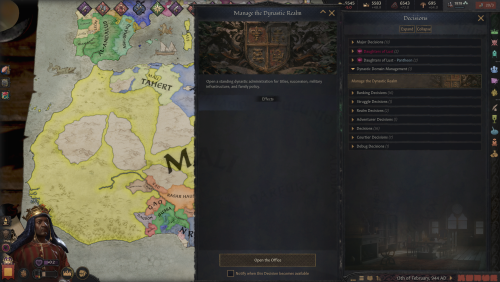
Version 2.7.1
2227 downloads
Dynastic Comdom Pack Dominion of Communion + Dynastic Domain Manager NTR Lovers We Eating....Cucks, Your Scraps Are In The Corner Current LoversLab Pack — September 29, 2026 Dominion of Communion 2.7.0 | Dynastic Domain Manager 2.7.0 Carnalitas Compatibility 2.6.0 | Slavery Reimagined Living Market 2.7.0 Thank you for 1,000+ downloads (^^)d! This project is actively developed. If something breaks, feels unfinished, or you have an idea worth adding, please contact me through LoversLab. My DMs are open and people havent had issue so far! Collaboration requests are welcome too (and I'm just going to let you know, are approved). SEPTEMBER 29, 2026 — 2.7 UPDATE Stability • Performance • UI • Systems This release consolidates roughly two weeks of work across Dominion, Dynastic Domain Manager, Living Market, and the Carnalitas compatibility bridge. The focus was long-save stability, simulation overhead, AI behavior, market logic, GUI cleanup, nonsexual age-rule consistency, and retiring genuinely obsolete code without stripping out CK3 content that is discovered directly by the engine. DOMINION OF COMMUNION 2.7.0 Reworked recurring Patron maintenance around CK3's native pulse system instead of continuously generating delayed callback chains.Reduced unnecessary recurring and global work in several long-running systems.Reworked Human Amongst AI containment and coalition behavior to reduce excessive AI war spam.Containment responses now use stronger military checks, game-rule awareness, peace requirements, and longer cooldowns.Audited Dominion custom wars so they remain script/event-driven rather than being freely spammed by CK3's generic AI war planner.Completed a broad Communion Ledger GUI overhaul covering navigation, containment, spacing, columns, sorting controls, tooltips, and large-list usability.Removed unnecessary Dominion-specific age restrictions from nonsexual recruitment, political, administrative, court-transfer, legitimacy, and maintenance systems.Apex recruitment and ordinary court movement no longer use the previous custom Dominion age gate.Removed the oversized under-age character-hover warning that could turn character tooltips into giant banners.Fixed multiple parser, localization, profile, portrait, Endowment, Ruler Designer, and long-save state issues. DYNASTIC DOMAIN MANAGER 2.7.0 Completed a full Dynastic Domain Office GUI overhaul rather than continuing to patch individual screens.Standardized office sizing, navigation, page margins, footer containment, tab widths, dense-list behavior, and compact controls.Expanded pagination for large management screens, including Designated Heir and the optional Living Market interface.Reduced kidnapping overhead by removing unnecessary court-transfer operations before imprisonment.Reworked War to Recover the Kidnapped so it behaves as an exceptional recovery mechanism rather than an AI-spammable war.Recovery behavior now considers relationship importance, military strength, existing wars, game rules, and long cooldowns.Writ Hostage recovery no longer repeatedly retries on short timers.Removed unnecessary DDM-specific age floors from nonsexual systems including ordinary kidnapping, administrative Proscriptions, and Dynastic Command School eligibility. SLAVERY REIMAGINED LIVING MARKET 2.7.0 Fixed individual and bulk slave-sale execution.Mass Sell now evaluates the highest actually executable bid independently of the visible UI sort order.Characters with no valid or willing buyer, or only zero-value bids, are no longer sold anyway.Buyer affordability is recalculated while a bulk sale proceeds, so earlier purchases can correctly affect later bids.Tightened manual Sell validation.Rebuilt Buy, Sell, Marriage, and Workforce list handling around cached full rosters, sorting, and pagination.High-to-Low and Low-to-High sorting now applies to the complete roster before paging.Completed GUI containment work for the DDM-integrated Slavery office, including the Workforce page.Removed redundant custom age restrictions from nonsexual Labour, Military, procurement, and enslavement entry points where dependency-native validity already governs the action.Removed an expensive recurring AI procurement world scan. Slave sourcing now happens when procurement actually runs instead of during every eligibility check.Removed the obsolete standalone Slave Exchange window, hidden opener decision, associated UI state, localization, and standalone-only bridge code. Living Market Interface Dynastic Domain Office → Realm Office → Slavery CARNALITAS COMPATIBILITY 2.6.0 Updated the compatibility bridge for the 2.7 Dominion release.Continued synchronization hardening around Dominion's persistent Endowment/profile data.Dominion remains authoritative for established persistent measurements while supported Carnalitas state can synchronize without repeatedly rerolling or overwriting them.The compatibility module remains a bridge rather than another standalone interface or recurring gameplay layer. PERFORMANCE & CODE CLEANUP Audited recurring callbacks, world searches, delayed-event chains, GUI bridges, old decisions, and legacy integration paths across the pack.Removed or retired confirmed obsolete UI/state plumbing and genuinely unused legacy routes.Reduced recurring world searches, unnecessary court transitions, delayed-event generation, and custom-war evaluation.Retained compatibility stubs, save-migration logic, engine-discovered CK3 definitions, and legacy callback drains where removing them could break existing saves or optional dependencies.Cleaned several sources of repeated runtime and error-log noise. DOMINION OF COMMUNION Dominion of Communion is a relationship, rivalry, sexual-competition, household-control, and personal-power overhaul for Crusader Kings III. It began as an attempt to make cuckoldry/NTR mechanics matter beyond a single event. It has grown into a larger simulation of persistent relationships, humiliation, loyalty, rivalry, submission, reputation, personal influence, household politics, and the consequences of power and blah and blah and stroke and stroke of my own cokc, just try it out. Dominion and Patronage Characters can develop persistent relationships with individual Patrons. Dominion XP persists over time.Characters can become lovers, rivals, cuckolds, Owned characters, devoted followers, or otherwise tied to a Patron.Alpha Checks, Tantalize, humiliation, sex, loyalty, rivalry, and other interactions can deepen those relationships.Relationship states are repaired and audited during long campaigns instead of being treated as disposable one-event outcomes. Communion Ledger The Communion Ledger is the main interface for the mod. Use it to track: Dominion relationshipsLoyalty and followersWorld OutcomesEndowments and preferencesRelationship statesPersistent character recordsReputationLong-running campaign data The Ledger is designed for campaigns with large dynasties, many lovers, numerous rivals, and sprawling realms. Alpha Check and Tantalize Alpha Check and Tantalize create direct competition between characters. Outcomes depend on the characters involved rather than automatic player victory.Competition can create rivalry, humiliation, attraction, submission, or deeper Dominion.Repeated outcomes can matter long after the original interaction ends. Cuckoldry With Persistent Consequences Cuckoldry is treated as a continuing relationship state rather than a temporary event modifier. Cuck XP can accumulate over time.Humiliation and submission can deepen.The system distinguishes actual cuckoldry from CK3 family structures that merely look suspicious.Lawful co-spouses are not automatically treated as cheating simply because they share a spouse.Old saves include repair logic for missing or invalid Cuck-state records. Endowment System Eligible adult male characters can receive persistent physical Endowment measurements. Length and girth are stored directly on the character.Visible size categories range from Micropenis through Massive.Exact measurements can be viewed through the Endowment systems.Characters can have their own size preferences rather than using a simple "larger is always better" rule.Manual preference controls are available where appropriate. Endowment Mastery Physical size and sexual experience are separate systems. Endowment Mastery represents experience, confidence, and reputation. A character can therefore be physically average but highly experienced, or extremely endowed but inexperienced. Endowment Registry The Endowment Registry lets you compare and sort eligible characters by: MeasurementsEndowment categoryEndowment IndexPreferencesMastery The registry is designed to remain usable as the campaign population grows. World Alpha World Alpha is a global seeded elimination tournament. Eligible characters receive an Alpha Rating.Participants progress through successive matchups.Placement, opponent, rating, odds, and rewards are recorded.World Outcomes can be reviewed later instead of disappearing after the event. Lick the Tip Lick the Tip is a realm-wide loyalty test. Eligible adult courtiers, direct vassals, and their adult courtiers can be called upon to demonstrate loyalty. Every character makes an individual decision.Opinion, personality, Dread, position, and relationship with the Patron matter.Their answer is remembered.Repeated loyalty can build Loyalty XP. Cult of Personality Loyal followers contribute to a persistent Cult of Personality around their Patron. Followers can generate resources and political influence.AI characters can build their own followings.Loyalty can eventually become tangible political and military power. The Devoted A sufficiently developed Cult of Personality can support The Devoted, a special military force tied to the Patron's following. Its size and effectiveness scale with the strength and loyalty of the Patron's adherents. Human Amongst AI Human Amongst AI is an optional power-fantasy mode for players who want a more extreme relationship between the human player and the simulated world. Includes its own Fame progression.Provides special bonuses and reactions.Exists as an optional layer rather than replacing normal Dominion play. Power Trip Power Trip is a full activity built around traveling into another independent realm and forcing a major personal or political confrontation. Uses actual travel.Success is calculated rather than guaranteed.Targets can resist.Outcomes can affect rulers, titles, relationships, and realm politics.Repeated crash, targeting, and state-handling fixes have been made for long campaigns. Reputation The Reputation system watches how a character actually behaves over time and gradually builds public archetypes around those actions. It is intended to reflect a pattern of behavior rather than simply handing out another permanent personality trait. The D(etails) — Household Dynamics The D adds background household relationships between spouses and registered intimates. Depending on their personalities and circumstances, they can develop: FriendshipsRivalriesHostilityIn extreme cases, genuine vanilla murder schemes Submission, Warfare and Collapse Dominion can affect more than sex and romance. Characters with extreme submission may behave differently during war, surrender, or political confrontation. At the furthest end, Final Collapse can produce major outcomes for rulers whose resistance to a Patron has effectively been destroyed. Special handling exists for unusual CK3 government and title structures to avoid needlessly breaking realms. AI Participation Dominion is not intended to exist only for the player. AI Patrons can pursue relationships.AI can deepen Dominion states.AI can build followings.Game rules let you decide how active or restrained the simulation should be. Player Household Agency The human player receives additional protection from completely invisible AI outcomes involving their household. When Dominion-generated behavior targets the player's lawful partner, the player can receive an opportunity to intervene rather than having the result silently decided in the background. Long-Term Campaign Support Dominion includes repair and audit systems intended for long saves and repeated updates. Missing or invalid relationship records can be repaired.Existing valid Endowments are not deliberately rerolled.Persistent registries use pagination where practical.Background maintenance is designed to avoid unnecessary repeated work.Routine lover/breakup memory spam is cleaned while important relationship, family, pregnancy, childbirth, death, crime, secret, and major memories are preserved. DYNASTIC DOMAIN MANAGER Dynastic Domain Manager is a standalone companion mod for players managing enormous dynasties, courts, and realms. It can be used with or without Dominion of Communion. Major systems include: Crown Estate managementDynasty and title distributionRealm and household administrationMarriage planningEducation managementPrisoner and kidnapping toolsCouncil and court staffingChild-ruler supportLarge-family managementProscriptions and bounty hunters Proscriptions and Bounty Hunters The Proscription system has grown into a persistent bounty-hunter simulation. Hunters track XP, wins, losses, and history.The Bounty Office provides direct management.Survivor progression runs through I–VIII.Eight successful defenses can earn Defied the Writ protection.Hostage, ransom, coercion, tributary, court-service, and abdication outcomes can occur.Retrieval Wars can undo certain DDM-imposed political coercion.Revocation, immunity, automation, and reissue rules are tracked persistently. Education and Realm Management DDM also includes expanded education and realm tools, including Educate the Realm, searchable character management, marriage planning, household management, and automation intended to reduce repetitive dynasty micromanagement. CARNALITAS COMPATIBILITY — OPTIONAL Dominion of Communion — Carnalitas Compatibility 2.6.0 is included for players using Dominion with Carnalitas. It keeps overlapping body/Endowment information synchronized and allows supported Carnalitas hooks to communicate with Dominion while keeping Dominion's persistent Endowment data authoritative. Requires: Dominion of CommunionCarnalitas Do not enable this module if you are not using Carnalitas. SLAVERY REIMAGINED LIVING MARKET — OPTIONAL Slavery Reimagined Living Market 2.7.0 expands Carnalitas Slavery Reimagined + Carnalitas Slavery Expansion into a much more active slave economy. It is not required for Dominion or DDM. Living Slave Market The Buy market is designed as an actual paged market rather than a tiny local list. Available slaves within diplomatic range can be listed.Listings are paginated and sortable.Merchant inventory is replenished so buying a few characters does not empty the entire economy.AI rulers actively build slave households instead of waiting years between opportunities.AI can enslave eligible prisoners and war captives more aggressively.Strong hooks can create additional AI enslavement opportunities where allowed. Buy and Sell The Sell market evaluates actual available buyers rather than treating every candidate as a valid sale. Mass Sell evaluates the highest executable bid.The visible sort order does not determine which bid is used.Characters with no valid buyer remain unsold.Buyer affordability is reevaluated as bulk transactions proceed. AI Household Targets Major AI rulers attempt to maintain meaningful slave households. Approximate baseline targets: Dukes: 4Kings: 8Emperors / Hegemons: 10 Procurement becomes more active while rulers remain below target. Workforce Living Market uses the real CSE job systems for: Labour SlavesSlave ProstitutesSex Slaves / concubine serviceMilitary Slaves The Workforce Service Desk makes the system visible to the player instead of hiding everything in background pulses. Each worker can be shown as: ListedPrivateDeployed Player controls include: ListPauseOffer ServiceList AllPause All Service Economy Listed workers can provide supported services inside the owner's court or to eligible foreign rulers. Labour slaves generate court income and can take external work.Slave Prostitutes generate court income and can provide supported services to eligible adult characters.Sex Slaves / concubine service can generate prestige and can be offered externally.Foreign listed workers expose a visible Hire Listed Slave Service interaction.Buy-market rows can expose a direct Hire Service action.Your own selected worker can be offered by right-clicking an eligible landed ruler and choosing Offer Selected Slave Service. Automatic outside contracts for your workers can be shut off with Pause All Services if you want complete manual control. Military Slave Contracts Military Slaves can be contracted to rulers who are already at war. Contract values: Recruit: 400Soldier: 800Commander: 1,200 Military contracts use gold, prestige, and piety rewards. The current owner receives 99% and the slave retains 1%. While deployed: The slave receives a visible deployment state.They cannot be sold or reassigned through Living Market.The hiring ruler receives rank-scaled military assistance.The slave faces ongoing wound risk.The contract ends when the hiring ruler returns to peace or the deployment can no longer continue. The system deliberately avoids physically transferring ownership or permanently moving the slave into another ruler's court, which helps prevent conflicts with CSR's own ownership/court-restoration logic. Financial Report The Service Desk includes a visible financial report tracking: Court incomeExternal-service incomeMilitary incomePrestige incomePiety incomeAvailable listingsActive military contracts A Reset Report control is included. Living Market Interface Living Market's player-facing management interface is integrated directly into: Dynastic Domain Office → Realm Office → Slavery The office contains Buy, Sell, Marriage, and Workforce pages. There is no separate standalone Slave Exchange window. Living Market Requirements CarnalitasCarnalitas Slavery Reimagined 0.30.0+Carnalitas Slavery Expansion 2.2+Dominion of Communion 2.6.0+Dynastic Domain Manager 2.6.12+ INCLUDED FILES The LoversLab download contains four components: Dominion of Communion 2.7.0 — main Dominion / relationship / Endowment / personal-power mod.Dynastic Domain Manager 2.7.0 — standalone dynasty, realm, household, education, and proscription manager.Dominion of Communion — Carnalitas Compatibility 2.6.0 — optional Dominion + Carnalitas compatibility module.Dominion of Communion — Slavery Reimagined Living Market 2.7.0 — optional CSR/CSE slave-market and workforce expansion. INSTALLATION Manual Install Close Crusader Kings III and the Paradox Launcher.Go to: Documents/Paradox Interactive/Crusader Kings III/mod/If updating, delete the old copies of: dominion_of_communion Dynastic_Domain_Manager dominion_of_communion_carnalitas dominion_of_communion_slavery_reimaginedExtract the contents of the ZIP directly into the CK3 mod folder.The .mod launcher files should sit beside their matching mod folders.Enable only the components you actually use. Do not merge a new release over an old folder. Old development files can survive an overlay install and create duplicate decisions, raw localization keys, or other strange behavior. BASIC LOAD ORDER Dominion of Communion Dynastic Domain Manager IF USING CARNALITAS Carnalitas Dominion of Communion Dynastic Domain Manager Dominion of Communion — Carnalitas Compatibility IF USING LIVING MARKET Recommended full order: Carnalitas Carnalitas Love Reimagined (if used) Carnalitas Slavery Reimagined Carnalitas Prostitution Reimagined (if used) Carnalitas Slavery Expansion Dominion of Communion Dynastic Domain Manager Dominion of Communion — Carnalitas Compatibility Dominion of Communion — Slavery Reimagined Living Market EXISTING SAVES Current builds are intended to update existing campaigns, but always back up an important save before changing a large mod list. STEAM WORKSHOP Prefer Steam for the mods? The ones that are normie-ish are on steam Dominion of Communion Dynastic Domain Manager Dominion of Communion — Carnalitas Compatibility Dominion of Communion — Slavery Reimagined Living Market The LoversLab download remains the easiest way to get the combined manual-install package containing the entire current set. CHINESE TRANSLATION Chinese localization for Dynastic Domain Manager is available through 牛奶大魔王's CK3 Chinese translation collection: 集成汉化·|收复失地| Thank you to 牛奶大魔王 and the translation team for supporting Chinese players. SUPPORT Cashapp: $BBURDSCH -
View File Streamer Mode Your monitor stays normal. OBS gets a censored picture. Skyrim Streamer Mode watches the game and tells OBS where to cover a body. Black rectangles over the pelvis and chest, or a black screen for menus and load screens. Your own screen is never modified — only the picture you send to Twitch/Kick/etc. Features Your monitor stays untouched — censoring only happens in a separate OBS feed.Frame-exact. Rectangles are built inside the game before OBS sees the picture, so they never lag behind a fast camera turn.Black, blur, pixelate or your own image — chosen separately for bodies and for the whole frame.Follows the body — rotation and lean, with its own size and All/Female/Male filter for pelvis, chest and extra zones.Scenes — frameworks for adult content are detected automatically, and scenes are censored at the appropriate moment. Creatures — 27 kinds, each with its own choice of rectangle.Anything else — look at it, press a key, it is covered. Installation Install the main file with Mod Organizer 2 or Vortex.Enable the mod and tick SkyrimStreamerMode.esp on the Plugins tab.Launch through SKSE, load a save, then Pause → Mod Configuration → Skyrim Streamer Mode. The recommended way: OBS plugin Install the optional download "OBS plugin" (manual install into your OBS folder), then in the scene you stream to Twitch/Kick/etc. add the source "Skyrim (StreamerMode)". Why this one: It is exact. The picture is censored inside the game, frame by frame, before OBS ever receives it. No catching up, no lag behind a fast camera turn.That feed physically cannot contain an uncovered frame — the raw pixels are not in that scene at all.Blur, pixelate or custom image instead of black boxes, if you prefer that look. The simple way: browser overlay No extra install: keep your normal Game Capture and add a Browser Source above it: URL: http://127.0.0.1:8765/Width / Height: your canvas size, e.g. 1920 × 1080 Read this before using the overlay. It draws on top of OBS's own capture, so it is always a step behind the game: during a fast camera spin or a sprint the rectangles can lag by a frame, and the raw picture is still in the scene underneath them. If you use the overlay, make the rectangles noticeably bigger (MCM → Rectangles → Width / Height) and keep "Motion margin" above zero. Trading a slightly larger black box for a safety margin is the whole point. (There are also auxiliary URL's, such as http://127.0.0.1:8765/debug or http://127.0.0.1:8765/state. Port can be reconfigured in MCM.) Settings (MCM) People — who gets covered, and what counts as undressedRectangles — size, position, rotation and All/Female/Male filter for pelvis, chest and extra-bone rectangles (chest defaults to Female)Creatures — 27 kinds, each with its own choice of rectangleObjects — non-actor objects and anything another mod addsMenus & scenes — optional black screen per menu, automatic SexLab/ OStim detection, and enlarged rectangles / whole-frame scene behaviorHotkeys — every binding in one place: the full-frame key, the mark-object key and the show-rules key. With modifiers.OBS connection — the browser overlay and the OBS-plugin options. Network and privacy The overlay mode runs a tiny web server on 127.0.0.1 only (your own machine, port configurable). It serves the rectangle positions to your browser source. Nothing is sent anywhere, there is no telemetry, no auto-update, no account. Nexus - Streamer mode at Skyrim Special Edition Nexus - Mods and Community Submitter xiqima Submitted 08/23/26 Category Regular Mods Requirements Skyrim Script Extender (SKSE64) Address Library for SKSE Plugins SkyUI and MCM Helper for the in-game settings menu Regular Edition Compatible Install Instructions
-

Version 1.5.0
309 downloads
Voices of the Court: Roleplay Expanded, or VOTC-RE, is a standalone AI conversation and roleplay application for Crusader Kings III, built from the foundation of Voices of the Court, Voices of the Court 2.0, and Voices of the Court - Community Edition. At its core, VOTC-RE lets you actually talk to CK3 characters through AI-generated conversations using information pulled from the game itself. Characters can respond according to personality, relationships, current circumstances, campaign history, scene context, and the information VOTC-RE receives from CK3. Supported actions can also communicate back to the game when something needs to happen mechanically. The project originally started as World Cards, a way to preserve important campaign lore without forcing every piece of information into every prompt. From there it expanded into conversation controls, retries, continuation, scene management, Character Cards, Global Messages, Letters, additional CK3 actions, provider support, and a much larger roleplay framework. The standalone version no longer requires VOTC-CE to be installed separately. Why VOTC-RE Is Also on LoversLab One of the reasons I wanted VOTC-RE available here is because I have several adult CK3 projects and ideas I would like to experiment with over time. Some of those may be completely separate mods that are not inherently part of VOTC-RE at all. Where it makes sense, however, I may create optional compatibility patches or integration so VOTC-RE can recognize, react to, or otherwise work alongside those mods. The same applies to existing adult CK3 mods made by other authors. If there is a popular adult mod, framework, system, or feature that people would like to see VOTC-RE understand or interact with, I am absolutely willing to hear suggestions. That does not mean I can promise support for every mod people request. I will look at recommendations, consider whether the integration is practical, and decide whether it is something I would personally use and actually want to maintain. That is generally how this entire project has developed in the first place. Most of the features in Roleplay Expanded exist because I was playing CK3 myself, ran into something I wished worked differently, and decided to build it. Adult development will be handled the same way. Current Adult Content Support The current base release does not include dedicated sex-mod integration. There is no claim that installing Carnalitas, another adult framework, or any particular LoversLab mod beside VOTC-RE will automatically make the two systems communicate. However, the conversation side of VOTC-RE is already capable of handling extremely mature, sexual, violent, vulgar, or otherwise explicit roleplay depending on the AI provider and model you choose. I do not create, train, host, or distribute AI models. VOTC-RE connects to supported outside AI providers. The behavior, restrictions, quality, censorship level, and adult-content capability of generated responses depend heavily on whichever model and provider the user configures. Some models heavily restrict sexual material. Others are much more permissive. So if you are specifically interested in adult roleplay, model choice matters a great deal. The important distinction is: VOTC-RE can already handle adult conversation content when the selected external AI model allows it. Dedicated mechanical integration with adult CK3 mods is something I may add through compatibility patches over time. Those are two different things. Adult Feature Suggestions I am very open to suggestions for features that would improve the adult side of VOTC-RE. That can include ideas for: Better awareness of adult relationships or events Integration with existing adult CK3 mods New CK3 actions that would make sense in adult roleplay Better conversation context for intimate scenes Improved handling of relationship or sexual history Features that make multi-character adult scenes work better Better communication between external adult mods and VOTC-RE Compatibility patches for specific LoversLab projects If you have an idea, feel free to suggest it. I do want to be clear about expectations, though. A suggestion is not a promise. I am far more likely to add something if it is useful, technically reasonable, fits the way VOTC-RE already works, and is something I would personally want in my own game. If I do not think I would use a feature myself, or if maintaining it would become more work than it is worth, I may decide not to add it. World Cards World Cards are the system that started this entire project. They allow you to preserve important campaign information and bring it into the AI's context only when it actually becomes relevant. A World Card can describe almost anything: Characters, events, locations, relationships, items, factions, custom religions, secrets, old wars, bloodlines, artifacts, prophecies, sexual relationships, personal history, or any other campaign information you want the AI to understand. Character Cards can also be linked directly to CK3 Character IDs. World Cards work alongside conversation summaries rather than replacing them. Major Roleplay Features VOTC-RE includes: Writing Style controls Saveable Response Retries Continue This Response Same-Day Conversation Continuation Live message editing and deletion Manual NPC Rounds Choose Who Responds Response Length controls Conversation Director Scene Cast Manager Conversation Scene controls Global Messages World Cards Character Cards Generate Starter Book Better World Card Activation Additional supported CK3 actions Reworked private Letter system Standalone provider and application configuration Saveable Retries allow multiple generated responses to be preserved rather than permanently losing an older response every time you regenerate. Continue This Response allows the character who just spoke to continue without requiring the player to send a meaningless fake message. Conversation Director lets you guide what is happening in a scene without pretending those instructions were literally spoken by your character. Scene Cast Manager allows appropriate characters to be added to an existing conversation as actual active participants. AI Providers VOTC-RE does not come with its own AI model. You configure an outside provider and model. I personally use OpenRouter, which gives access to many different models through one provider. Different models behave very differently with: Writing quality Sexual content Violence Profanity Formatting Actions Multi-character scenes Scene awareness Writing Style Continuation General instruction-following If a model refuses to generate a certain type of content, VOTC-RE cannot magically force that model to do so. Installation You need: Crusader Kings III The supplied VOTC_RE CK3 component The standalone VOTC-RE application A supported external AI provider/model configuration You do not need to install VOTC-CE separately. The application is downloaded here: https://github.com/DaddyD1999/VOTC-RE-1.0/releases/tag/VOTC You can use either the Setup version or Portable version. The Setup version is recommended for most people. Regardless of which application version you choose, the supplied VOTC_RE CK3 component must also be installed and enabled in the CK3 launcher. Support / Suggestions / Integration Requests For bugs, installation help, feature requests, adult-integration ideas, or recommendations for mods you would like to see VOTC-RE patched to support: https://discord.gg/wNmGZQtyJJ If you are the author of another CK3 mod and are interested in possible VOTC-RE integration, you are also welcome to reach out. Credits & Licensing VOTC-RE would not exist without the work that came before it. Full credit goes to the original Voices of the Court / AliChat team and contributors for creating the original CK3/AI conversation system. Credit also goes to Durond and contributors to Voices of the Court 2.0, as well as MrAndroPC and the wider Voices of the Court 2.0 - Community Edition contributor base. Roleplay Expanded originally existed as an add-on and derivative of VOTC-CE 2.1.1-alpha.1. The standalone version no longer requires Community Edition as a separate installation, but it remains derived from that codebase. I am not claiming ownership over original VOTC or VOTC-CE systems, interface code, backend architecture, prompts, CK3 integration, or other upstream material simply because those systems are included within or modified by Roleplay Expanded. Upstream source: https://github.com/Voices-of-the-Court/votc_mod VOTC-RE includes material governed by applicable upstream licenses, including GNU GPLv3 and CC BY-SA 4.0. Anything covered by an upstream open-source license remains governed by that license. Anything created by another author remains subject to that author's ownership, license, and permissions. For material I personally created and actually own, ask me before reusing, reuploading, repackaging, or modifying it for another project unless I have specifically stated otherwise. The same principle applies to future adult integrations. If I create a compatibility patch for another author's mod, that does not mean I own their mod or its assets. Their work remains theirs. Any optional patch I create will only cover the integration work that I actually created, and users will still need to follow the original mod author's requirements and permissions. GPLv3: https://www.gnu.org/licenses/gpl-3.0.html Going Forward I have several separate CK3 mod ideas planned, including adult ones, and some of those may eventually receive VOTC-RE integration where it makes sense. I am also open to patching VOTC-RE into other adult mods when there is enough interest and I have the time to do it properly. Nothing is guaranteed simply because it is suggested, but I absolutely want people to tell me what integrations and adult-focused features they would actually find useful. The development rule is the same one I have used since World Cards first released: Add things that are actually useful without getting in the way of what already works. -

Version 2.3.0
130 downloads
Your monitor stays normal. OBS gets a censored picture. Skyrim Streamer Mode watches the game and tells OBS where to cover a body. Black rectangles over the pelvis and chest, or a black screen for menus and load screens. Your own screen is never modified — only the picture you send to Twitch/Kick/etc. Features Your monitor stays untouched — censoring only happens in a separate OBS feed.Frame-exact. Rectangles are built inside the game before OBS sees the picture, so they never lag behind a fast camera turn.Black, blur, pixelate or your own image — chosen separately for bodies and for the whole frame.Follows the body — rotation and lean, with its own size and All/Female/Male filter for pelvis, chest and extra zones.Scenes — frameworks for adult content are detected automatically, and scenes are censored at the appropriate moment. Creatures — 27 kinds, each with its own choice of rectangle.Anything else — look at it, press a key, it is covered. Installation Install the main file with Mod Organizer 2 or Vortex.Enable the mod and tick SkyrimStreamerMode.esp on the Plugins tab.Launch through SKSE, load a save, then Pause → Mod Configuration → Skyrim Streamer Mode. The recommended way: OBS plugin Install the optional download "OBS plugin" (manual install into your OBS folder), then in the scene you stream to Twitch/Kick/etc. add the source "Skyrim (StreamerMode)". Why this one: It is exact. The picture is censored inside the game, frame by frame, before OBS ever receives it. No catching up, no lag behind a fast camera turn.That feed physically cannot contain an uncovered frame — the raw pixels are not in that scene at all.Blur, pixelate or custom image instead of black boxes, if you prefer that look. The simple way: browser overlay No extra install: keep your normal Game Capture and add a Browser Source above it: URL: http://127.0.0.1:8765/Width / Height: your canvas size, e.g. 1920 × 1080 Read this before using the overlay. It draws on top of OBS's own capture, so it is always a step behind the game: during a fast camera spin or a sprint the rectangles can lag by a frame, and the raw picture is still in the scene underneath them. If you use the overlay, make the rectangles noticeably bigger (MCM → Rectangles → Width / Height) and keep "Motion margin" above zero. Trading a slightly larger black box for a safety margin is the whole point. (There are also auxiliary URL's, such as http://127.0.0.1:8765/debug or http://127.0.0.1:8765/state. Port can be reconfigured in MCM.) Settings (MCM) People — who gets covered, and what counts as undressedRectangles — size, position, rotation and All/Female/Male filter for pelvis, chest and extra-bone rectangles (chest defaults to Female)Creatures — 27 kinds, each with its own choice of rectangleObjects — non-actor objects and anything another mod addsMenus & scenes — optional black screen per menu, automatic SexLab/ OStim detection, and enlarged rectangles / whole-frame scene behaviorHotkeys — every binding in one place: the full-frame key, the mark-object key and the show-rules key. With modifiers.OBS connection — the browser overlay and the OBS-plugin options. Network and privacy The overlay mode runs a tiny web server on 127.0.0.1 only (your own machine, port configurable). It serves the rectangle positions to your browser source. Nothing is sent anywhere, there is no telemetry, no auto-update, no account. Nexus - Streamer mode at Skyrim Special Edition Nexus - Mods and Community -
Version 1.0.0
151 downloads
XTH Perk Points - Always at Maximum Keeps your perk points permanently topped up. Spend as many as you like, and a few seconds later you have a full pool again. Why not simply "thousands of points"? Because Skyrim cannot store them. The perk point counter is a single byte in the save file - anything above 255 physically does not fit, and Game.SetPerkPoints(5000) is truncated. That is a limit of the game's save format, not of SKSE and not of this mod. Every mod promising you thousands of points runs into the same wall. So this mod takes the other route: instead of one huge number, it refills continuously. Every three seconds it checks whether the counter has dropped below 255 and tops it back up. The practical result is the same as an unlimited pool - buy a perk, and moments later the point is back. The notification appears once per session. After that it works silently. Requirements SKSE64 Nothing else. No SkyUI, no MCM, no other dependency. Skyrim Special Edition / Anniversary Edition only. The plugin is saved in form version 44 and will not load correctly in Legendary Edition. Installation Install with your mod managerEnable the pluginLoad a save and wait about two seconds Compatibility Works with every perk overhaul - Ordinator, Vokrii, SPERG, Adamant and the rest. The mod only writes the point counter and never touches perks, perk trees, skills or levels. The plugin contains exactly one record of its own (a quest) and overrides nothing from the vanilla game or from any other mod. Its only master is Skyrim.esm. It is 267 bytes. Uninstall Disable the plugin. Points you already have stay - they are an ordinary game value, not a script variable. No cleaning, no save scrubbing. Configuration Two values at the top of the included source file: ZIEL = 255 the target, higher has no effect TAKT = 3.0 check interval in seconds Recompile with the Creation Kit's Papyrus compiler after changing them. How it works A Start Game Enabled quest runs a script that polls with RegisterForSingleUpdate and calls the SKSE functions Game.GetPerkPoints and Game.SetPerkPoints. No memory patching, no Cheat Engine, no console batch files, no level manipulation. Full source is included. Permissions Do what you want with it. Credit is appreciated but not required. -
 View File XTH Perk Points - Always at Maximum XTH Perk Points - Always at Maximum Keeps your perk points permanently topped up. Spend as many as you like, and a few seconds later you have a full pool again. Why not simply "thousands of points"? Because Skyrim cannot store them. The perk point counter is a single byte in the save file - anything above 255 physically does not fit, and Game.SetPerkPoints(5000) is truncated. That is a limit of the game's save format, not of SKSE and not of this mod. Every mod promising you thousands of points runs into the same wall. So this mod takes the other route: instead of one huge number, it refills continuously. Every three seconds it checks whether the counter has dropped below 255 and tops it back up. The practical result is the same as an unlimited pool - buy a perk, and moments later the point is back. The notification appears once per session. After that it works silently. Requirements SKSE64 Nothing else. No SkyUI, no MCM, no other dependency. Skyrim Special Edition / Anniversary Edition only. The plugin is saved in form version 44 and will not load correctly in Legendary Edition. Installation Install with your mod managerEnable the pluginLoad a save and wait about two seconds Compatibility Works with every perk overhaul - Ordinator, Vokrii, SPERG, Adamant and the rest. The mod only writes the point counter and never touches perks, perk trees, skills or levels. The plugin contains exactly one record of its own (a quest) and overrides nothing from the vanilla game or from any other mod. Its only master is Skyrim.esm. It is 267 bytes. Uninstall Disable the plugin. Points you already have stay - they are an ordinary game value, not a script variable. No cleaning, no save scrubbing. Configuration Two values at the top of the included source file: ZIEL = 255 the target, higher has no effect TAKT = 3.0 check interval in seconds Recompile with the Creation Kit's Papyrus compiler after changing them. How it works A Start Game Enabled quest runs a script that polls with RegisterForSingleUpdate and calls the SKSE functions Game.GetPerkPoints and Game.SetPerkPoints. No memory patching, no Cheat Engine, no console batch files, no level manipulation. Full source is included. Permissions Do what you want with it. Credit is appreciated but not required. Submitter XTH SSE Submitted 08/30/26 Category Regular Mods Requirements SKSE64 Regular Edition Compatible Not Applicable Install Instructions Installation Install with your mod manager Enable the plugin Load a save and wait about two seconds Uninstall Disable the plugin. Points you already have stay - they are an ordinary game value, not a script variable. No cleaning, no save scrubbing.
 -
View File [XCL] X-Change Life Mod Loader Utility This is the official utility that can be used for applying mods to the game X-Change Life. Find mod loader usage details here: https://gitgud.io/xchange-life/mod-loader/-/wikis/home And a step-by-step guide for applying mods with this utility: https://x-change.life/wiki/docs/mods/ Developed by @togashikokujin who is a primary contributor to the X-Change Life project. If you feel like buying me a coffee, https://ko-fi.com/togashikokujin. The mod loader will always stay free, though. Starting with version 2.4.0, we had to up the Java version from 8 to 17. If you get the oh-so-helpful "A Java exception has occurred" when running the jar version, you will need to install a newer JRE. https://www.oracle.com/java/technologies/downloads/ is a good place for that if you don't already know what you're doing and have other preferences. NOTE: If you're using the installable version of the mod loader, be sure to install it to a folder other than your XCL folder. It will delete everything in its folder when you install updates. We do not have control over this aspect of the installer. Submitter togashikokujin Submitted 01/30/23 Category Gameplay Utilities
-
![More information about "[Beta] PrismaUI Sexlab P+ Animation Toggle"](https://static.loverslab.com/screenshots/monthly_2026_08/enb_2026-8-11_09-17-44_931.thumb.jpg.b03c956caa015044743205409deafdb7.jpg)
Version 0.3.1
1452 downloads
If you're like me then you are very picky when it comes to animations. Nothing worse than trying to have a simple defeat system for losing a fight and suddenly you're doing acrobatics while pleasuring a bandit. You don't want to get rid of certain packs because of those one or two decent animations so you have to go through each animation to see what you like. This mod is here to help make your animation toggles much easier, faster and keep it across all your saves. Features A clean modern interface, no more sluggish flash menu. Toggle animations from the Sexlab registry at ease. Smart quick spawn, spawns the required actors for the scene. Preview system, scans for valid actors to use with the animation, can change who uses which slot. Spawn menu for basic humans and creatures. NPCs from this mod can be purged. Persistent saves, don't worry about re-doing all of your toggles when you end up breaking your game and need a restart. This mod is early development, once it reached the stage where it worked for my purposes is when I decided to release. That doesn't mean other people will find issues so please send feedback, logs etc.. to help me fix any issues. Preview 1 - Testing Animations.webm Preview 2 - UI Navigation.webm -
2158 downloads
Stable Captives is now released in its first official version. This mod was inspired by BaF (Build a Follower). This mod is being developed based on the latest version of DoM, and was created solely to fix the naked bandit bug in DoM/PAH/HSH/AYGAS. (It cannot be used with PAHE alone.) It supports not only bandits, but all hostile spawning NPCs, including Forsworn. **Existing unique NPCs in Tamriel are not affected by this mod and are never stored in slave slots. This mod targets only spawned hostile NPCs, such as bandits. In MO2’s mod order, this mod must be placed below DoM so that it overwrites DoM’s files. In MO2's right-side ESP/ESL load order, if an NPC replacer or custom NPC mod is placed below DoM, it may be a good precaution to place Stable Captives below that NPC mod as well, so that Stable Captives overwrites it. If any issues occur, try this load order. 1. MCM 2. Mechanism The mechanism used to prevent naked bandit NPCs is relatively simple. Player + DoM knocks down a bandit → DoM duplicates the bandit and enslaves the duplicate, while the original is marked for deletion → Stable Captives mod captures the duplicated bandit in a unique ActorBase slot → Stable Captives loads all information for that NPC, including its FaceGen data → The loaded slave data is treated as a unique NPC → The slot is saved and locked → DoM resumes full management of the NPC stored in the locked slot. 3. Slot Cycling + Cleanup and Management Let me emphasize this once again: Please keep in mind that the Reset feature could corrupt every save file containing existing slaves. **More precisely, only save files that are currently using this mod and still have slaves occupying slots.** Please verify it thoroughly multiple times and proceed with extreme caution. A detailed mod manual is also included. No further features are planned for the mod, but bug fixes and discussion will continue. Update Logs- 1.1.8 -
Version 2.2.4
982 downloads
# Work in Progress This page is currently under construction. The mod is already functional and can be used, but the documentation is still being rewritten for V2. Some sections may be incomplete or updated as development continues. This is the second generation of SL Tags and Dialogue Sex. V2 focuses on a cleaner workflow, remove small bugs, and improved slot management, easy preset handling, A simple spell has been added to make it easier to test the low-health dialogue. This mod supports human 1 vs 1 animiations only. So I made add on to start 3p animaiton with prostitution dialog and up-date it too. SL Tag and Prostitution V2 Not compatible with SexLab P+ Currently, this mod is designed for the traditional/native SexLab environment, including users of SexLab Utility Plus. Supporting SexLab P+ would require adapting the mod's existing animation and tag-search system to the APIs and registry system used by SexLab P+. Since this involves more than simple compatibility changes, native SexLab support will remain the current target. Though I may consider a separate SexLab P+ compatible version when I migrate my own Skyrim environment to AE/P+ in the future. Then, this mod is intended for users who, like me, continue to maintain and use a traditional SexLab-based setup with ## What does this mod do? SL Tags and Dialogue Sex V2 is a dialogue animation management system for SexLab It allows you to organize your installed SexLab animations into reusable slot groups and play them through conditional dialogs. if you have very few registered animations, only a few tags and results may be available. This mod can search and organize nearly 2,000 registered animations as one List group.The more 2p human animations you have, and the more accurately they are tagged, the better the results will be. Search results depend entirely on the tags assigned to each animation. Incorrect or incomplete tags may produce unexpected results. ## Features Create and save reusable animation 16 slots (A–P). Assign animattion slots to different 5 main dialogue topics. Start animations automatically or manually from a selection list. Search animations again at any time using the current tags of each slot when run animation. (option) Save and load presets as JSON files. Display all serched animation as list with a page system. (avoid hard limit of 128 papyrus list length) (option) Test your current tag settings instantly with the included Test Dialogue and options ## Dialogue Conditions Dialogue A - available for most of NPC (default Dialogue) DIalogue B - Follower-only dialogue DIalogue C - NPC currently in bed DIalogue D - NPC health checked or is affected by a unique Magic spell (this mod added spell) DIalogue E - NPCs carrying a lockpick These are only example conditions. So I recommend change condition as you like. You can set your own conditions for each dialog in the Creation Kit, and assign your saved slot in MCM menu. (or show all slot option) A basic Creation Kit tutorial will be added in a future update. to change dialog text and condtions, Though this guide may assumes you already know the basics of the Creation Kit. not intended as a perfect beginner's guide. ------------------------------------------------------ Currently, there are three Quick Start Guides. ## Quick start guide 1 (edit tag setting and test animation) -------------------------------------------------------------------------- ## Quick start guide 2 (Save a Slot and Assign It to a Dialogue) -------------------------------------------------------------------------- ## Quick start guide 3 (save and load preset json) ------------------------------------------------------------------------------- ## Option Guide (Choosing Slots and Animation) If you find any behavior that is different from what I described here, please feel free to post in the Help thread for this mod. If possible, tell me the steps you followed, your settings, and what happened. That will help me investigate the problem. I plan to continue improving and updating this mod little by little. Thank you for using my mod, and have fun! Peace and Love! ## For advanced users and modders The saved slots can also be used by other add-ons to start sexlab animation. For example, my Prostitution Add-on lets you assign saved 16 animation slots through its MCM and start animations from its own custom dialogues. ---------------------------------------------------------- # About My AI Aibou (How and why I Use AI for Mod Development) I would like to thank ChatGPT, whom I call "Aibou" , which means "my partner" in Japanese. Aibou has been my programming teacher, code reviewer, and brainstorming partner throughout the development of this mod. Rather than generating code blindly, we discuss ideas, review each change step by step, and I always read, understand, test, and verify the final implementation by myself. Working together has helped me to learn papyrus scripting, and I hope this mod reflects that journey. -
SL Tags and Dialogue Sex V2 View File # Work in Progress This page is currently under construction. The mod is already functional and can be used, but the documentation is still being rewritten for V2. Some sections may be incomplete or updated as development continues. This is the second generation of SL Tags and Dialogue Sex. V2 focuses on a cleaner workflow, remove small bugs, and improved slot management, easy preset handling, A simple spell has been added to make it easier to test the low-health dialogue. This mod supports human 1 vs 1 animiations only. (PC vs NPC) ---------------------------------------------------- So I made add on for NPC vs NPC (tag and sex saved slot animation and setting) , 3P. SL Tag and Prostitution V2 ---------------------------------------------------------------------------- Version 2.2.3 fixes a bug in version 2.2.2 that could prevent animations from starting through dialogue in normal selection mode😑 2.2.2 NEW Features The MCM now shows the total number of matching animations, including matches beyond the 125 animations stored in a slot. Added a paged preview of every matching animation for the Temp Slot and Slots A–P. Added Rebuild Slot by Current Tags and Clear Slot controls for Slots A–P. Clear Slot resets the slot name, tags, and saved animations. The Temp Slot’s Tag Editor can now clear Common Tags, Normal Tags, and Suppress Tags individually. Removed the JSON load option that restored tags without rebuilding animations. Loading a preset now rebuilds animations and show total counts for every slot with saved keys. After updating: 2.2.0 NEW Features 1. The tag selection list now use paging, allowing all available SexLab tags to be displayed and selected. Previously, tags beyond the list/array limit could not be shown, so this is a major fix that finally allows the mod's tag-selection features to be used to their full extent. 2. Common Tags support I have also added support for **Common Tags**, which are part of SexLab's tag-search system, although I don't think many mods make much use of them. This greatly expands what you can do with tag-based animation searches. I'll add a more detailed explanation later... Not compatible with SexLab P+ ## What does this mod do? SL Tags and Dialogue Sex V2 is a dialogue animation management system for SexLab It allows you to organize your installed SexLab animations into reusable slot groups and play them through conditional dialogs. if you have very few registered animations, only a few tags and results may be available. This mod can search and organize nearly 2,000 registered animations as one List group.The more 2p human animations you have, and the more accurately they are tagged, the better the results will be. Search results depend entirely on the tags assigned to each animation. Incorrect or incomplete tags may produce unexpected results. ## Features Create and save reusable animation 16 slots (A–P). Assign animattion slots to different 5 main dialogue topics. Start animations automatically or manually from a selection list. Search animations again at any time using the current tags of each slot when run animation. (option) Save and load presets as JSON files. Display all serched animation as list with a page system. (avoid hard limit of 128 papyrus list length) (option) Test your current tag settings instantly with the included Test Dialogue and options ## Dialogue Conditions Dialogue A - available for most of NPC (default Dialogue) DIalogue B - Follower-only dialogue DIalogue C - NPC currently in bed DIalogue D - NPC health checked or is affected by a unique Magic spell (this mod added spell) DIalogue E - NPCs carrying a lockpick These are only example conditions. So I recommend change condition as you like. You can set your own conditions for each dialog in the Creation Kit, and assign your saved slot in MCM menu. (or show all slot option) A basic Creation Kit tutorial will be added in a future update. to change dialog text and condtions, Though this guide may assumes you already know the basics of the Creation Kit. not intended as a perfect beginner's guide. ------------------------------------------------------ Currently, there are three Quick Start Guides. ## Quick start guide 1 (edit tag setting and test animation) -------------------------------------------------------------------------- ## Quick start guide 2 (Save a Slot and Assign It to a Dialogue) -------------------------------------------------------------------------- ## Quick start guide 3 (save and load preset json) ------------------------------------------------------------------------------- ## Option Guide (Choosing Slots and Animation) If you find any behavior that is different from what I described here, please feel free to post in the Help thread for this mod. If possible, tell me the steps you followed, your settings, and what happened. That will help me investigate the problem. I plan to continue improving and updating this mod little by little. Thank you for using my mod, and have fun! Peace and Love! ## For advanced users and modders The saved slots can also be used by other add-ons to start sexlab animation. For example, my Prostitution Add-on lets you assign saved 16 animation slots through its MCM and start animations from its own custom dialogues. ---------------------------------------------------------- # About My AI Aibou (How and why I Use AI for Mod Development) I would like to thank ChatGPT, whom I call "Aibou" , which means "my partner" in Japanese. Aibou has been my programming teacher, code reviewer, and brainstorming partner throughout the development of this mod. Rather than generating code blindly, we discuss ideas, review each change step by step, and I always read, understand, test, and verify the final implementation by myself. Working together has helped me to learn papyrus scripting, and I hope this mod reflects that journey. Submitter greenmango12 Submitted 08/06/26 Category Dialog Sex Requirements Skyrim runtime SE 1.5.97 SexLab Framework SE v1.63 (and all of its required dependencies) SKSE for Skyrim SE 1.5.97 SKY UI for Skyrim SE 1.5.97 Regular Edition Compatible No Install Instructions 1. Download the archive. 2. Install it with your preferred mod manager (I may recommend MO2). 3. Enable the plugin. 4. Launch the game and wait for the MCM menu to initialize. Depending on your load order, this may take a few minutes after the first installation. 5. Open the MCM menu and configure the mod as desired.
-
Version 1.0.1
1529 downloads
Hallo!🥰 So, as a person who uses a bit too many tech mods (ACOT, GE, and things of that nature), sometimes the rare candy techs and other T5 soc techs are buried by the weight of other T4 and especially repeatable T5 techs. To keep my sanity, I made this mod that shows whether you meet the requirements for the tech weight modifiers. Also added a cheat to add the techs you fulfill the requirements for as research options. Load Order: Just put this thing after Lustful Void, and it should work fine Lustful Void Lustful Void Tech Inspector Compatibility: This should have no problems since it is just a new event file with the English loc file for the event PS: Since I made this mod using the last LV for 4.0, I put the same version on the descriptor, but it should not be a problem since LV is running ok in the new 4.3 patch -
View File Lustful Void Tech Inspector Hallo!🥰 So, as a person who uses a bit too many tech mods (ACOT, GE, and things of that nature), sometimes the rare candy techs and other T5 soc techs are buried by the weight of other T4 and especially repeatable T5 techs. To keep my sanity, I made this mod that shows whether you meet the requirements for the tech weight modifiers. Also added a cheat to add the techs you fulfill the requirements for as research options. Load Order: Just put this thing after Lustful Void, and it should work fine Lustful Void Lustful Void Tech Inspector Compatibility: This should have no problems since it is just a new event file with the English loc file for the event PS: Since I made this mod using the last LV for 4.0, I put the same version on the descriptor, but it should not be a problem since LV is running ok in the new 4.3 patch Submitter DNL Submitted 04/06/26 Category Stellaris Requirements Lustful Void
-
.thumb.png.26fdd61598fb1a9ea1dff7bde41675b5.png)
Skyrim Sentinel [BETA]
Somnacyl posted a topic in Downloads - Skyrim: Special Edition Non Adult Mods
Skyrim Sentinel Supply Chain Security for SKSE Plugins TL;DR: Know exactly what's in your load order. Sentinel verifies SKSE plugin hashes against a community-curated database of official releases. 🟢 Verified | 🟡 Unknown. Portable, offline-capable, open source. What is this? Know your DLLs. Every SKSE plugin in your load order is a compiled binary you're trusting to run on your machine. Sentinel gives you visibility into that trust. It scans your mods folder, generates SHA-256 hashes, and checks them against a community-curated database of official releases. Think of it as a provenance checker—answering: "Is this the exact file the author published?" Other modding communities (Minecraft, Factorio) have dealt with supply-chain compromises. This tool exists so Skyrim modders don't have to learn that lesson the hard way. 🟡 Most Plugins Will Show as "Unknown" — That's Expected Unknown does NOT mean unsafe. It simply means the plugin isn't in our database yet. Sentinel currently covers ~100 popular SKSE plugins (Engine Fixes, RaceMenu, po3 Tweaks, etc.). Adult-specific plugins from LL are underrepresented—we're building that coverage with your help. This is a community project. The database grows as people contribute verified hashes. Scan your MO2/Vortex mods folderVerify against 100+ curated plugins🟢 Verified | 🟡 UnknownClick to copy hashes, export unknowns for submissionWorks offline with cached database Download ⬇️ Download SkyrimSentinel.exe (v0.1.0-beta) Just download and run — no Python or installation needed. 📖 How to Use Download and run SkyrimSentinel.exe Click Browse and select your mods folder Click Scan Review results — green means verified! 🤝 Help Build the Trust Registry See unknown plugins? You can fix that. Click Export Unknown after scanning Add the mod name + Nexus/LL link to the JSON Drop it in this thread or open a GitHub PR Every submission helps the next person. We're building the definitive integrity database for SKSE plugins—together. ⚠️ Antivirus False Positives Some AV tools may flag SkyrimSentinel.exe. This is a false positive—extremely common with Python apps packaged as .exe files. PyInstaller bundles Python into a single executable, which looks "packed" to heuristic scanners. This is a well-documented issue affecting thousands of legitimate apps. See also: StackOverflow discussion. The code is 100% open source—review it yourself, or run from source. VirusTotal Analysis: View Full Report Roadmap More LL-specific plugins (SexLab, OStim, DD, etc.)🔴 Revoked status for known-bad hashesMigration to Nuitka (fewer AV false positives)Auto-update for databaseDirect hash submission from the app Requirements Windows 10/11 That's it. Source Code Fully open source: GitHub Repository About Me I started modding Skyrim in 2017—struggling to run Dual Sheath Redux on a low-end rig. Since then I've moved into Cybersecurity and Software Engineering (currently in university). I built Sentinel because I love this community and want to see it stay resilient. Other ecosystems have learned hard lessons about supply-chain security. My goal is to give Skyrim modders the tools to stay ahead—without adding friction to the chaos that makes this place great. Discord: Lullavy | GitHub: Lullacy Looking for Collaborators I'd appreciate suggestions and collaborators to help with: Threat modeling for Sentinel — identifying attack vectors and edge cases Algorithm development & optimization for traversing/walking the folder structure on the client side If you have experience in security research or performance optimization, I'd love to hear from you! A Note on Development I used GitHub Copilot as a development aid. All AI-generated code was reviewed and verified before inclusion. The architecture and security model are my own. Questions? Feedback? Hashes to submit? Post below! 👇 -
Skyrim Sentinel Supply Chain Security for SKSE Plugins TL;DR: Know exactly what's in your load order. Sentinel verifies SKSE plugin hashes against a community-curated database of official releases. 🟢 Verified | 🟡 Unknown. Portable, offline-capable, open source. What is this? Know your DLLs. Every SKSE plugin in your load order is a compiled binary you're trusting to run on your machine. Sentinel gives you visibility into that trust. It scans your mods folder, generates SHA-256 hashes, and checks them against a community-curated database of official releases. Think of it as a provenance checker—answering: "Is this the exact file the author published?" Other modding communities (Minecraft, Factorio) have dealt with supply-chain compromises. This tool exists so Skyrim modders don't have to learn that lesson the hard way. 🟡 Most Plugins Will Show as "Unknown" — That's Expected Unknown does NOT mean unsafe. It simply means the plugin isn't in our database yet. Sentinel currently covers ~100 popular SKSE plugins (Engine Fixes, RaceMenu, po3 Tweaks, etc.). Adult-specific plugins from LL are underrepresented—we're building that coverage with your help. This is a community project. The database grows as people contribute verified hashes. Scan your MO2/Vortex mods folderVerify against 100+ curated plugins🟢 Verified | 🟡 UnknownClick to copy hashes, export unknowns for submissionWorks offline with cached database Download ⬇️ Download SkyrimSentinel.exe (v0.1.0-beta) Just download and run — no Python or installation needed. 📖 How to Use Download and run SkyrimSentinel.exe Click Browse and select your mods folder Click Scan Review results — green means verified! 🤝 Help Build the Trust Registry See unknown plugins? You can fix that. Click Export Unknown after scanning Add the mod name + Nexus/LL link to the JSON Drop it in this thread or open a GitHub PR Every submission helps the next person. We're building the definitive integrity database for SKSE plugins—together. ⚠️ Antivirus False Positives Some AV tools may flag SkyrimSentinel.exe. This is a false positive—extremely common with Python apps packaged as .exe files. PyInstaller bundles Python into a single executable, which looks "packed" to heuristic scanners. This is a well-documented issue affecting thousands of legitimate apps. See also: StackOverflow discussion. The code is 100% open source—review it yourself, or run from source. VirusTotal Analysis: View Full Report Roadmap More LL-specific plugins (SexLab, OStim, DD, etc.)🔴 Revoked status for known-bad hashesMigration to Nuitka (fewer AV false positives)Auto-update for databaseDirect hash submission from the app Requirements Windows 10/11 That's it. Source Code Fully open source: GitHub Repository About Me I started modding Skyrim in 2017—struggling to run Dual Sheath Redux on a low-end rig. Since then I've moved into Cybersecurity and Software Engineering (currently in university). I built Sentinel because I love this community and want to see it stay resilient. Other ecosystems have learned hard lessons about supply-chain security. My goal is to give Skyrim modders the tools to stay ahead—without adding friction to the chaos that makes this place great. Discord: Lullavy | GitHub: Lullacy Looking for Collaborators I'd appreciate suggestions and collaborators to help with: Threat modeling for Sentinel — identifying attack vectors and edge cases Algorithm development & optimization for traversing/walking the folder structure on the client side If you have experience in security research or performance optimization, I'd love to hear from you! A Note on Development I used GitHub Copilot as a development aid. All AI-generated code was reviewed and verified before inclusion. The architecture and security model are my own. Questions? Feedback? Hashes to submit? Post below! 👇