Modders Resources
Adult oriented Fallout 4 resources for other mods or modders to make use of.
30 files
-
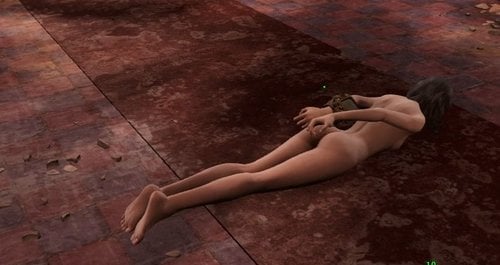
Bondage Position Animations
By Gray User
THIS FILE IS NO LONGER UNDER DEVELOPMENT
For the immediate future, updates will be through EgoBallistic's pack:
In the long run, there will probably be a major release that integrates this and a couple of other projects I'm working on. If you are developing a mod that uses these and have questions or requests, please PM me.
Bondage Position Animations v01.00
Credits:
The whole LL modding community, to whom I feel I owe something in return, but especially Kimy, Vader, Min, Guobu, Zaz, and all the other folks who have worked on Skyrim and FO4 mods here over the years.
Shadeanimator, for the indispensible FO4 animation tutorials.
Summary:
This is not a finished mod, it is just a pack of animations and assets for modders or end users to integrate into existing mods. I have not included an esp/esm, since I figure any modder who is going to be working with these already has a set of 'test animation' files linked in an esp that they can use. If this is a serious issue for mod designers, I can make an esm with all the animations in it, but that will complicate mod development more than just pointing your own esm files to these animations. These are all intended for use with the default CBBE body. They may clip with other bodies.
Permissions:
You are free to use any of the animations in this pack, with the following conditions:
- Do not post them to sites outside of LL without asking me. Basically, don't be that person who puts this up on Nexus or Bethesda.net...
- You cannot charge for mods that contain these animations. If you have an optional payment, that's fine, as long as users who don't pay get the same functionality
The contents of this pack:
Each animation has an hkx file that has been tested in-game and should work. Note that the default arm position for all poses is the armbinder position from my bondage devices pack, but the arm position should be overridden by any bondage gear, based on your '...injury.hkx' files. That means that, in theory at least, any of these animations should work with any cuffs, armbinders, etc.
All animations are 300 frames long (should be exactly 10 seconds) and start and end in the common pose for that animation family (e.g. all hogtie animations start and end in the same position). Each family has an 00 pose that is a breathing idle, followed by one or more struggle animations.
Facedown00
Facedown01
Facedown02
FacedownKneel00
FacedownKneel01
Hogtie00
Hogtie01
Hogtie02
Hogtie03
Side00
Side01
Side02
Side03
Plans:
- I may redraft some of the existing animations at some point.
- I'm working on some additional positions (sitting with legs in front, spreadeagled, kneeling), but the joints on the CBBE model are...tempermental. If I can make animations I'm happy with that don't have terrible clipping at the joints, I'll release them in an update.
13418 downloads
- bondage
- animations
- (and 1 more)
Updated
-
.thumb.jpg.81abdb4bf97e4e2f4bd0bfcdcffd3043.jpg)
Bondage Device Animations
By Gray User
Bondage Device Animations v01.00
Credits:
The whole LL modding community, to whom I feel I owe something in return, but especially Kimy, Vader, Min, Guobu, Zaz, and all the other folks who have worked on Skyrim and FO4 mods here over the years.
Shadeanimator, for the indispensible FO4 animation tutorials.
Summary:
This is not a finished mod, it is just a pack of animations and assets for modders or end users to integrate into existing mods (Devious Devices, etc). I have not included an esp/esm, since I figure any modder who is going to be working with these already has a set of 'test animation' files linked in an esp that they can use. If this is a serious issue for mod designers, I can make an esm with all the animations in it, but that will complicate mod development more than just pointing your own esm files to these animations. These are all intended for use with the default CBBE body. They may clip with other bodies.
Permissions:
You are free to use any of the animations in this pack, with the following conditions:
- Do not post them to sites outside of LL without asking me. Basically, don't be that person who puts this up on Nexus or Bethesda.net...
- You cannot charge for mods that contain these animations. If you have an optional payment, that's fine, as long as users who don't pay get the same functionality
The contents of this pack:
Restraint poses:
Restraint poses work by simulating an 'injury' to one or more limbs that tells fallout to fix those limbs in a particular postion no matter what is going on with the rest of the model. This makes it so we don't need an 'armbinder' version of every vanilla pose (run, sneak, etc, etc), and is genius (not mine though - I'd guess Vader came up with the idea).
Armbinder model and arm pose file (arm offsets):
I have included a different armbinder pose, with the shoulders pinned back rather than up (see included images). In order to make this work, I had to modify the armbinder nif pretty substantially, so a revised version of armbinderblack.nif is included as well.
(The hkx file in the custom armbinder folder replaces meshes\Torture Devices\DeviousDevices\Animations\Armbinder\MTBothArmsInjured.hkx)
Arm cuffs pose files (arm offsets):
I have included 4 customized cuffed arm animations. In theory, these can be used in place of or in addition to the cuffed arm animations in Tortue Devices. To replace the TD arm cuff idles, use one or more armcuffs hkx files to replace the various 'MTBothArmsInjured.hkx' files in the 'meshes\Torture Devices\wearables\Generic\BoundHands' folder and subfolders.
Yoke pose files (arm offsets):
I've included two yoke poses. The first (Yokeidle01) works with the bar and cuffs yoke, while the second (Yokeidle02) should work with both the bar and cuffs yoke, and the heavy steel yoke.
Leg Cuff/Hobbleskirt Custom Files:
This includes a standing idle for legs cuffs (or other situations where the model's legs are held together), and a corresponding walk animation. I've included arms in these animations as well. The major limitation is that because of the way the vanilla animations are set up, these will only work when the player is standing or walking without a weapon. If the player sneaks, runs, or draws a weapon, they'll go back to using vanilla movement animations.
Animations:
Each animation has an hkx file that has been tested in-game and should work. Note that the arm position should be overridden by any bondage gear, based on your '...injury.hkx' files. That means that, in theory at least, any of these animations should work with any cuffs, armbinders, etc. I have most use my custom armbinder position as a convenience, but that position should be overidden by any gear you have equipped.
Armbinder struggle animations:
These all have the model's arms locked back, and each has a different set of upper body and pelvic twists. Each animation is 300 frames long (10 seconds) and starts and ends start and end in the default standing leg position.
ArmbinderStruggle01
ArmbinderStruggle02
ArmbinderStruggle03
Armbinder horny animations
Each animation is 600 frames, and should be exactly 20 seconds long. They should all start and end in the default standing leg position. These are made to be usable in pairs - the 01 series has the model's knees come together, and the 02 series has her legs crossed. For each series, the 'a' animation as a writhing animation, and the 'b' animation as something more orgasm flavored.
*These should be usable for any type of arm restraint - if the restraint has an '*injury.hkx' file, that arm position should show up. If not, the default armbinder arm position will show up.
ArmbinderHorny01a
ArmbinderHorny01b
ArmbinderHorny01a
ArmbinderHorny01b
Unrestrained horny animations
These are identical to the armbinder horny animations, except that they include arm/hand movements. I have tried to keep the starting/ending arm positions the same within each series (e.g. 01a and 01b should have similar start/end arm positions) but these are approximate rather than exact (I haven't been able to get 3ds to copy keyframes between animations).
*In theory, you could probably use these with arm restraints, and the '*injury.hkx' file should overwrite the arm positions.
StandingHorny01a
StandingHorny01b
StandingHorny02a
StandingHorny02b
Collar animations
These are variations on the 01a series of horny animations. The normal collar animation has both hands tugging on the collar, while the collarhorny animation is a mix of Standinghorny01a and tugging on the collar.
Collar01a
CollarHorny01a
Chastity Belt animations
This is basically an additional unrestrained horny animation. It's 600 frames/20 seconds, and has the default start/end positions.
ChastityHorny01
Plans:
- If I get really ambitious, I may also go through the existing animations and refine some things. In particular, hand and finger positions may get smoothed out at some point in the next month or so.
- More device specific animations, and more general use 'struggle' or 'horny' animations may happen as inspiration strikes.
- If you are using these in a mod and there is something that you'd like to see along these lines or one of the animations is causing you problems, you're welcome to contact me. If it's something I can do fairly easily (e.g. not a movement animation or something that is going to require hours of posing individual finger joints), I'll try to help out.
23882 downloads
- bondage
- devious devices
- (and 3 more)
Updated
-
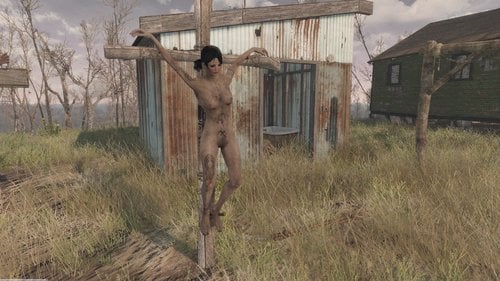
CRX add-on - dead restraints
By SAC
This add-on modifies the CRX restraints in order to keep the dead bodies crucified on their crosses.
Note: the entire point of this add-on is to get serious about crucifying NPCs and leaving them to their fate (or killing them yourself). There is no point in installing this add-on if you just want some harmless bondage play.
To install:
1. install CRX 1.7 by @Oakern
2. download this add-on and overwrite with the included files (meshes, scripts, esp)
Changes to the original mod:
- the dead bodies will stay crucified (hopefully across re-loads as well)
- replaced ropes with spikes in all configurations
- for each cross type, there are two variants: "spikes feet" and "ropes feet" - in fact, both variants will place spikes, but with slightly different dead body positions (for now, CR01 and CR05 have identical restraints between sp_feet and ro_feet - WIP)
- eliminated some logical constraints from the original script - select "add/keep all spikes" / "add/keep all ropes", and you're done, it will now disregard the initial configuration
- CR01 features a Skyrim model, instead of the original cross
- upon expiring, the crucified victims will spasm a few times - both for "artistic impression", and to stabilize their position in the restraints
Requirements:
- CRX 1.7
- Dead body collision
Screenshots: to illustrate the available variants for CR01, 02, 03 and 05
Future plans:
- different variants for CR01 and CR05 sp_feet / ro_feet
- further tweaks to positioning
Possible bugs and issues:
- CR01 (Skyrim) cross may feature spikes with purple or invisible textures - let me know if that's the case, the intention was to replace the steel texture with a rusty one
- various positioning issues - let me know if they occur immediately after the victim expires, or after a re-load
- you need to delete the restraints (select the restraint in console, then disable; mark for delete) in order to re-use an already used cross
Original credits, and thanks, to @Oakern, author of CRX
Permissions: as per Oakern's terms
6834 downloads
Submitted
-
Working noose - proof of concept
By SAC
Important notes to please pay attention to before installing 6.0.1
1. this mod is meant to be used with extensive console use, it is not “plug and play” and is not very user-friendly; please do not try to use unless you are familiar with the console and you are willing to put in some effort (sometimes) for things to look and work right
(if the codes listed for the items below don't mean anything to you, then you should not install this version)
2. if you have any previous versions of this mod, the new version will erase the previously placed furnitures because the form ids changed; don’t install if you want to keep already placed nooses and furniture
3. for convenience in commanding NPCs (placing them in setcommandstate mode), I highly suggest FO4 hotkeys https://www.nexusmods.com/fallout4/mods/11664
(I am attaching my own hotkeys.ini file, either rename “SAC Hotkeys.ini” to “Hotkeys.ini”, or copy/paste my commands to your keys of choice – I mapped F1 to getting a NPC into commandstate and F2 to release them)
4. all the furnitures in this mod will kill the NPCs, including essential ones (it will kill Preston); don’t hang NPCs that you don’t mean to die, or be prepared to reload
5. the placed furniture / nooses usually needs some position alignment
(I am using Autohotkey object mover https://www.nexusmods.com/fallout4/mods/24773)
6. all the objects must be obtained or placed via console, there is no constructible object, recipes or similar
Main new features of this new release:
- It will play a random mix of Grayuser’s hanging animations, mixing and switching the animations mid-scene
- The furnitures are no longer constructible, just use the weapons provided as directed or spawn them from console
- It will place random hands and/or feet restraints which persist after death (they will look weird sometimes)
- There are a number of facial expressions for the hanged NPCs, AAF is required to this to work
- Streamlined the scripts a lot behind the scenes
- Allows for many NPCs to be hanged simultaneously
- The player can now hang themselves (sort of, in fact it will hang a doppelganger of the player, otherwise the camera just doesn’t work, AAF is needed for doppelganging to work)
- Other stuff I’ve probably forgotten
Contains:
Scripted furniture (scripted = when NPC sits in furniture, the hanging starts automatically); use console PT to spawn the furniture
Gallows T scripted, 2 “seats” (28EAF)
Gallows TT scripted, 4 “seats” (28EB1)
Gallows Beam scripted (28EB2)
Hanging Pole (BE4D7)
Hanging Pole straight (BE4D9)
Hanging Plain (DBE93)
Use cases for the scripted furniture:
Setcommandstate the NPC, direct them to “sit furniture”, or
Shoot the NPC with the Noose IDLE gun, the IDLE gun will snap the NPC into the nearest furniture (either noose or gallows) – make sure you have previously directed them nearest to the furniture / noose you mean to use
Unscripted furniture (unscripted = the NPC will kneel and wait to be hanged later with the Hanging Gun) – this is useful for simultaneous hangings
Gallows T noscript (28EB5)
Gallows TT noscript (28EB4)
Gallows Beam noscript (28EB3)
Gallows with 3 nooses (BAFA4)
Gallows with 4 nooses (4F5DB)
Use cases for the unscripted furniture:
Setcommandstate the NPC, direct them to “sit furniture”, then shoot them with the Hanging Gun – it will spawn a noose and hang the NPC, or
Shoot the NPC with Hanging gun IDLE, they will kneel into the furniture, then shoot them with the Hanging Gun to hang them
Weapons:
Hanging Gun (58BF4) – spawns a short noose at the NPC location, hangs the NPC
Hanging Gun IDLE (AC438) – snaps the NPC into the nearest gallow seat (if the gallow is scripted then they will kill the NPC automatically, if the gallow is not scripted the NPC will kneel and wait) or noose (all nooses are scripted)
Hanging Gun Furn (150359) – will spawn a scripted furniture at the NPC location and hang the NPC
Noose arrow (10358B) – is a grenade that flies in straight line and spawns a long noose on contact with any surface; aim it at a beam or tree branch, fire like any grenade (straight line!), and you get a working noose
(sometimes the tree braches have no collision for the “arrow” to impact into, so the “arrow” will fly into the sky and spawn a noose very high up; be prepared to TCL, fly near the noose and delete it in console)
Noose arrow exec (8B283) – same as the noose arrow, but spawns a type of noose that doesn’t kill the NPC, rather they will animate indefinitely (until you kill them somehow else, like with a bullet, then they will hang dead)
Absolute requirements: F4SE, AAF
Version 5.0+ requires Gray User's Bad Ends Animations ; his NSWF pack is recommended if you want sound during the animation phase
I really do recomment installing FO4 Hotkeys and assign one hotkey (I use F1) to the command "pna; setcommandstate 1" (this will enable you to command any NPC just by pointing at them and pressing F1)
Place Everywhere is highly recommended
An autohotkey manager for object manipulation (like this one) is highly recommended, to position the nooses freely outside workshop areas
Credits
- ag12 for his invaluable help in setting up the script, thank you!
- Oakern, for his awesome CRX mod, which is a must-have for me (hopes he keeps adding content to it), for providing the inspiration and for giving me permission to use his assets (which I did)
- Vader666, from whom I took the hands-bound animation and helped me figure out how to add animations to furniture (thank you!), check out his Torture Devices mod
- LazyGirl, check out her Abduction mod
- steve40 for giving me permission to use his dirt shader from CWSS
- Crimsomrider, for giving me permission to distribute my modded versions of his outfits
- Gray User for his hanging animations
- others who kindly helped me at various stages along the way
Permissions
Use it - and hopefully improve upon it - in any way you want, but please let me know in a comment or PM if you managed to create a better version, so I can enjoy it myself. This is the reason why I uploaded it under modder's resouce.
I cannot speak for the assets I took from Vader666, Crazy, steve40 and Crimsomrider - those assets belong to them.
Future plans
- A flexible rope for the noose - help needed
- More animations - help needed
Disclaimer
This is my first scripted mod ever. It may break your save, your game, or your life (shouldn't, really, unless it's already fucked up) - I take no responsibility. The scripts are not tested for performance or for persistence. If you get bloated saves, or bloated Papyrus logs, or orphan scripts, or whatever, sorry, I don't really know what I'm doing, so use this mod(der's resource) on your own responsibility.
Detailed change log (please take the time to read this)
10581 downloads
Updated
-
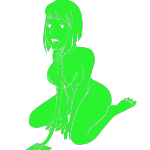
Vault Meat - Sex Tec Visual Assets
By Guest
Description
This modder's resource contains vault meat assets made for the purpose of supporting Sex Tec or any other fallout 4 sex animation mod. The resources have most scenarios considered as well as contain variations for both a full animation sequence as well changing the purpose of the asset in the first place.
Hence once animated these resources can be used in multiple ways and for multiple purposes.
For example:
The sex training asset, first previewed image, shows Vault Meat in a happy & docile state however the assets also contain different faces & body position variations that show her struggling to free herself. Most assets provided here contain workfiles that include these variations.
File Types
The assets provided are both in .psd and .ai formats to help animators to fully animate these files similarly used in the game without having to re-draw anything or needing to draw Vault Meat accurately from scratch. The modder in question needs to have experience with animating via vector lines to be able to properly animate these assets and bring Vault Meat to life in FO4.
Permissions
These files are free to use by anyone as long as they get in touch with me before starting work on them.
I simply hope to be involved.
Credits
All these arts & assets have been made by Ruthless Peasant
(If you like his work please consider supporting him on Patreon!)
28670 downloads
- Modders resource
- vault meat
- (and 1 more)
Updated



![More information about "[XCL] [0.25.9] Beta Blockers: Offline"](https://static.loverslab.com/screenshots/monthly_2026_09/image-1789120345821.thumb.png.52d3966f2e37e046631d444899ca6e46.png)