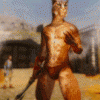
appalling Posted March 9, 2014 Posted March 9, 2014 View File This is a high resolution (4096x4096) skin for male Khajiit running Schlongs of Skyrim. They are also intended to run with Cover Khajiits, but it isn't necessary. Here is the promised huge update! New diffuse maps, object space normals, and specular maps! I also have included two versions, Muscle Cat and Extra Furry Khajiit Skin. Muscle Cat includes edited diffuse and normal maps, and slightly worse seams. Muscle Cat is possible thanks to WolverineHowlett's original textures. IF UPDATING: Navigate to Data/Textures/Actors/Characters/khajiitmale and delete bodymale_N.dds and handsmale_N.dds. They are just taking up space now. The uncompressed features textures in ARGB 8.8.8.8 and compressed in DXT5. On the subject of seams, help would be greatly appreciated. Please leave your feedback on how I can do this. This is my first high res texture for Skyrim. To do list: 1.Create _.msn maps. 2.Create custom meshes? 3.Try to hide the seams better. Warning! Revealing or short armors not made for SoS will cause (gasp) misaligned seams around the thigh fur. Why not pick up Some skimpy SoS enabled amour while you are here? Submitter appalling Submitted 03/09/2014 Category Models & Textures Requires Schlongs of Skyrim Special Edition Compatible 2
RitualClarity Posted March 9, 2014 Posted March 9, 2014 Could you post some pic please. EDIT: Thanks, they look nice.
gvman3670 Posted March 9, 2014 Posted March 9, 2014 How about a long haired version? An angora Khajiit?
CGi Posted March 9, 2014 Posted March 9, 2014 Looks good, especially in combination with Cover Khajitts, as now the blurry mess of a body texture is no longer making Khajiits look rather strange. Any plans to make a version for females too?
RitualClarity Posted March 9, 2014 Posted March 9, 2014 Is there some reason I am seeing double? It seems as if you have two post of the same mod. Did you make a mistake ? If so you might want to make a comment in the OP to which one you would like to have removed so that the Moderators can see and do "maintenance' at their leisure. No need to PM someone or anything like that.
appalling Posted March 9, 2014 Author Posted March 9, 2014 How about a long haired version? An angora Khajiit? Interesting suggestion. A set of Khajiit skins based on real cat breeds would be pretty cool. Also fuzzy. Any plans to make a version for females too? I hadn't planned on it, as there are so many female textures available. If enough people ask, I will definitely do it. Is there some reason I am seeing double? Whoops! I must have double clicked. I've modified the posts right now to show which one I'd like deleted.
RitualClarity Posted March 10, 2014 Posted March 10, 2014 I would like a female version if for no other reason than to have them look alike. I also like variety in the firs as well. Don't worry about the double click it happens to the best of us. You didn't even need to make any comments on which you would like deleted just something to be sure that the moderators see your direction and intent. That was before this thread took off. Now it is obvious which one to delete. Shame however it seems the post with the downloads got deleted and the post with the comments stayed... lol.
RitualClarity Posted March 10, 2014 Posted March 10, 2014 You might want to check the download thread. I didn't see any of the pictures that you had on the other post. Might need updating.
appalling Posted March 10, 2014 Author Posted March 10, 2014 You might want to check the download thread. I didn't see any of the pictures that you had on the other post. Might need updating. Whoops, I'm just now coming to terms with the fact that I have two threads, lol. Thanks for your input, I'd be lost without it.
RitualClarity Posted March 10, 2014 Posted March 10, 2014 Just giving you a little green hand . Once you get settled into this thread you should be able to work more on your projects. It takes a bit for new members to get the hang of this site. You are doing fine.
RitualClarity Posted March 10, 2014 Posted March 10, 2014 Oh, I almost forgot since you are new. If you edit the downloads page thread it automatically changes the OP here. Just an FYI. Often modders here reserve the second post for their updates, betas, comments etc. Just food for thought in the future. It not required or anything.
appalling Posted March 12, 2014 Author Posted March 12, 2014 So I am almost ready to release an update to this mod, and it's a pretty big one. New diffuse maps, new model space normal maps, and new specular maps. The only problem is that the feet aren't supported. Does anyone know about making normal maps specifically for feet? Does Skyrim support such a thing? Maybe asking on the SoS thread would be better?
RitualClarity Posted March 12, 2014 Posted March 12, 2014 Maybe put a new thread in tech support for aid in getting the feet to work with your new body. Post it is for SOS as well someone should see it (it post to the right of the screen for a short time and many like me watch that or "new files" to see what is going on when they have time. )
appalling Posted March 19, 2014 Author Posted March 19, 2014 New huge update! To save a little space on your PC, you can now delete the original bodymale_n.dds and handsmale_n.dds that came with the old textures. Now available in two new flavors, Muscle Cat and Extra Furry Khajiit! Feedback on improving the seams, especially on Muscle Cat, would be great. Thank you all, and stay tuned for another big update soon.
b3lisario Posted March 23, 2014 Posted March 23, 2014 bodymale_msn.dds in "Extra Furry Khajiit Skin- Compressed.zip" doesn't have the body. I think it would look better if you include it.
appalling Posted March 23, 2014 Author Posted March 23, 2014 bodymale_msn.dds in "Extra Furry Khajiit Skin- Compressed.zip" doesn't have the body. I think it would look better if you include it. I'm not sure exactly what you mean. I just downloaded the files and bodymale_msn.dds was there for me. Do you mean that it would be better to compress the bodymale_msn.dds file into a DTX5? Right now it is a ARGB8.8.8.8 even in the compressed, but the compressed bodymale_msn.dds is half the size of the uncompressed. Or do you mean something in the creation process would improve the appearance? Thanks for the update, I'm all ears.
b3lisario Posted March 23, 2014 Posted March 23, 2014 Compared with vanilla, there is missing a part.
appalling Posted March 24, 2014 Author Posted March 24, 2014 textures.jpg Compared with vanilla, there is missing a part. Bizarre. What program are you using to view the textures? When I view them in Photoshop they look like this: When I made the body texture, I made the feet separate and then I combined the maps in Photoshop. The combined texture seemed to work in Skyrim. Maybe some part of this creation process caused the problem. Do your Khajiit appear to only have space tangent maps on their feet, in game?
b3lisario Posted March 24, 2014 Posted March 24, 2014 I'm using gimp2. In game I'd say they don't work In photoshop CS2 the textures look OK LOL, maybe is caused by the alpha channel. No idea how to fix that, I'm not used to work with textures. Some links I had saved that might help: http://wiki.tesnexus.com/index.php/Creating_normal_maps_for_your_own_Skyrim_character_mods http://zzjay7272.tumblr.com/post/65623709333/textrure-editing-tutorial-dxt-compression-in http://cs.elderscrolls.com/index.php/Choose_the_right_DXTC_compression_algorithm
b3lisario Posted March 24, 2014 Posted March 24, 2014 When I made the body texture, I made the feet separate and then I combined the maps in Photoshop.There will be less seams if you weld both meshes, feet and body, to generate the normal maps. Normally the normal vectors corresponding to the vertices in the edges of the meshes are not perpendicular to the mesh. I don't know how to explain this, here is a drawing. No idea if there are other methods to hide the seams caused by normal maps. I guess so. Same for wrists and neck.
appalling Posted March 24, 2014 Author Posted March 24, 2014 There will be less seams if you weld both meshes, feet and body, to generate the normal maps. Is there a program that does this? Like opening both meshes at the same time in 3Ds Max? If that is possible, that would help a lot. I will test out more on how to do this. In photoshop CS2 the textures look OK LOL, maybe is caused by the alpha channel. They did look better before being saved in Photoshop. If I can find a way to do this all with xNormal or 3Ds Max, that would help. Thank you so much! Your advice is supremely helpful.
MarshDweller Posted August 9, 2014 Posted August 9, 2014 Waiting for the seam fix for feet in order to download.
RitualClarity Posted August 10, 2014 Posted August 10, 2014 I am glad to see you still working on this project.. Nice job.
27X Posted August 10, 2014 Posted August 10, 2014 It's more than likely a combo between interaction on the normals and spec maps. When working on them, what you should do is save them while working as 32bit TGAs with NO compression. at all. period. When you convert them to DDS files, be aware Photoshop Gimp and Irfanview will ALL darken the textures, which will change interaction. I would recommend saving them as flat uncompressed tgas and then converting them with nvidia's texture tool. Google DDS converter 1.4, it's a GUI that attaches to the nvidia texture tool API for batch conversions, and it won't alter the color and spec values unlike the other converters. 1

Recommended Posts
Create an account or sign in to comment
You need to be a member in order to leave a comment
Create an account
Sign up for a new account in our community. It's easy!
Register a new accountSign in
Already have an account? Sign in here.
Sign In Now