
Search the Community
Showing results for tags 'lovense'.
Found 7 results
-
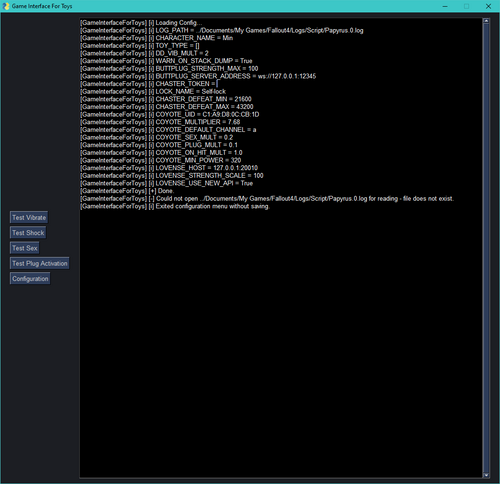
 GIFT: Game Interface For Toys (Skyrim LE + SE + AE + VR | Fallout 4) View File Summary This mod (GIFT) provides a gateway between supported games and various toys / devices that you might own IRL. Various events in-game trigger responses such as vibrations / shocks, or manipulating the user's lock on Chaster (if enabled). This mod is very light-weight, and will not lag your game at all. This mod runs in the background and reads the Papyrus log that the game writes, and reacts to it. Currently Supported Games Skyrim (LE + SE + AE + VR). SexLab Devious Devices Toys & Love Sexlab Defeat Naked Defeat Fallout 4 AAF AAF Violate Devious Devices Boston Devious Helper Mount and Blade: BannerLord Captive Events TBCaptivity BC Captor Supported Toys Lovense Kizuna Buttplug.io (Many different toy types) Chaster (Chastity Integration) DG-Lab Coyote (E-Stim) Overview Hey Folks! Decided to play a bit of Skyrim for the first time in years. Naturally, I wanted to include some of my new purchases in this gameplay. I've written a script to allow for Sex Toys (like Lovense) to react to events that happen in Skyrim. Currently the script responds to Devious Device vibration events, and SexLab scenes, as well as various world events (Such as being hit in combat). Open to more ideas for things to trigger them. This should work with any of Lovense's toys, though some may require additional scripting to fully take advantage of their features. This approach can also be expanded for other toys, assuming they expose a friendly API. The mod plays different patterns in response to different events; For example, being hit with an arrow feels different than being hit by an axe. Anal feels different than Oral, etc. As opposed to earlier versions, the current version of this mod does not require you to install Python, or any dependencies. Just download the mod, and run the executable. This script does not currently directly with the Skyrim process at all. This script runs in the background parsing the Papyrus log that Skyrim generates, and reacts to patterns that occur within the log. No script load, no chance of crashes. I have recently added a small plugin to the mod which watches for in-game events, and writes entries to the log. Extremely light-weight, low load. This script also supports Chaster! The current implementation requires a developer token (You can apply for this on Chaster). If others use this feature, I'll eventually add oauth support. This script can: * Add time to a lock. * Assign a task to the user of the lock (Task Extension) * Roll the dice (Dice Extension) * Spin the wheel of fortune (Wheel of fortune extension). Features Watches the log looking for in-game events such as DD vibrations and SexLab scenes. On finding either, sends a command to the toy to start a vibration. For SexLab scenes, stops the vibration when the scene is over. Varies the strength and pattern of the vibration depending on the source of the event. If using Chaster, spins the wheel when your character is knocked down via Defeat. When the whole party is defeated, adds a configurable amount of time to your lock. If using e-stim, applies a mild shock when hit, scaling in intensity as more damage is taken. Also watches the log for stack dumps, and immersively notifies you when these occur. These happen very rarely in my setup, but I always reload if they do. Future Plans Hmmm. More better? Credits Sirah - Buttplug.io and Kizuna implementations, and general contributions! Polite_Paddemelon - DG-Lab support! Zoollcar - XBox Controller and Winsound support! SprintElek - XToys Webhook Implementation! Submitter Min Submitted 06/06/22 Category Adult Mods Requirements Regular Edition Compatible Yes Install Instructions
 -

Version 1.1.2
20 downloads
MORTAL SHELL II HAPTICS Every hit. Every parry. Every pulse. ━━━━━━━━━━━━━━━━━━━━━━━━━━━━━━━━━━━━ Gameplay-synchronised Intiface vibration for Mortal Shell II. Feel Mortal Shell II in a different way. This mod translates combat, progression, and character abilities into responsive, configurable vibration patterns through Intiface Central. From the snap of a successful parry to the rising charge of a level-up, each effect is designed to follow what is happening on screen instead of producing constant, generic vibration. The mod adds no explicit visual content to Mortal Shell II. The adult element is the connected intimate haptics device. ◆ WHAT YOU CAN FEEL Combat: light and heavy attacks, hits, player damage, dodges, blocks, critical hits, death, and boss victory. Proxima: hook launch, latch, pull, lightning, block, and successful perfect-block/parry reactions. Level-up: a charge that rises while the button is held, stops immediately if released early, and ends with three ascending pulses after activation. Tiel: a quiet breathing wave while Lingering Shadow is active.Fine control: per-event intensity, timing, cooldown, pulse, and priority settings.Safety: a global intensity cap and an F9 emergency stop.Clean presentation: the local Intiface bridge starts hidden, so no command window remains over the game. ◆ SIGNATURE PATTERNS Successful parry — 90% → 70% → 50% in 0.88 seconds. Level-up hold — gradual rise from 10% to 70%; releasing early stops it. Successful level-up — 75% → 85% → 95%. Tiel's Shadow — smooth repeating wave from 4% to 9% over 2.4 seconds. ◆ CONTROL IT YOUR WAY Every reaction can be adjusted or disabled separately in: MortalShell2\Binaries\Win64\ue4ss\Mods\MortalShell2Haptics\config.ini Lower MaxIntensity before testing an unfamiliar device or placement. Press F9 to stop the device immediately; further feedback remains blocked until the game is restarted. ◆ WHY IS THERE AN EXE? UE4SS Lua detects gameplay events but does not provide the WebSocket client required by Intiface Central. MortalShell2HapticsBridge.v110.exe is a small local bridge that converts the mod's event stream into Buttplug/Intiface vibration commands. Starts automatically in the background without a console window.Reads only the mod's local events.log and config.ini files, plus the Mortal Shell II process state used to know when to exit.Connects only to the ServerUri selected in config.ini . The default ws://127.0.0.1:12345 address is Intiface Central on the same computer.Contains no updater, remote download function, analytics, account system, advertising, or telemetry.Runs outside the game process so device-communication errors remain isolated from Mortal Shell II.Stops all connected devices and exits when the game closes. The executable is not code-signed, so Windows or security software may display a warning. Its complete C# source is included in MortalShell2Haptics\Source . Bridge SHA-256: 0E355CBE76F0A73F308C062BFE7225872F692C42FFA544B484E394617990FA9E The DLL files beside it are open-source Buttplug C# and .NET dependencies with included licence notices. Removing or blocking the bridge does not modify the game, but the mod will be unable to control an Intiface device. ◆ WHAT'S NEW IN VERSION 1.1.2 Moved to the separate shared UE4SS for MS2 requirement.Added automatic activation through enabled.txt ; editing mods.txt is no longer required.Removed bundled UE4SS binaries and stock sample mods to prevent conflicts with other UE4SS mods.Gameplay patterns are unchanged from version 1.1.1. ◆ NEED HELP? When reporting a problem, include the game version, character, the action that caused it, and the relevant logs from the mod's Bridge folder. Please check logs for personal file paths before posting them publicly. ━━━━━━━━━━━━━━━━━━━━━━━━━━━━━━━━━━━━ Configure it. Feel it. Survive it. -
Version 1.4.7
8183 downloads
Summary This mod (GIFT) provides a gateway between supported games and various toys / devices that you might own IRL. Various events in-game trigger responses such as vibrations / shocks, or manipulating the user's lock on Chaster (if enabled). This mod is very light-weight, and will not lag your game at all. This mod runs in the background and reads the Papyrus log that the game writes, and reacts to it. Currently Supported Games Skyrim (LE + SE + AE + VR). SexLab Devious Devices Toys & Love Sexlab Defeat Naked Defeat Fallout 4 AAF AAF Violate Devious Devices Boston Devious Helper Mount and Blade: BannerLord Captive Events TBCaptivity BC Captor Supported Toys Lovense Kizuna Buttplug.io (Many different toy types) Chaster (Chastity Integration) DG-Lab Coyote (E-Stim) Overview Hey Folks! Decided to play a bit of Skyrim for the first time in years. Naturally, I wanted to include some of my new purchases in this gameplay. I've written a script to allow for Sex Toys (like Lovense) to react to events that happen in Skyrim. Currently the script responds to Devious Device vibration events, and SexLab scenes, as well as various world events (Such as being hit in combat). Open to more ideas for things to trigger them. This should work with any of Lovense's toys, though some may require additional scripting to fully take advantage of their features. This approach can also be expanded for other toys, assuming they expose a friendly API. The mod plays different patterns in response to different events; For example, being hit with an arrow feels different than being hit by an axe. Anal feels different than Oral, etc. As opposed to earlier versions, the current version of this mod does not require you to install Python, or any dependencies. Just download the mod, and run the executable. This script does not currently directly with the Skyrim process at all. This script runs in the background parsing the Papyrus log that Skyrim generates, and reacts to patterns that occur within the log. No script load, no chance of crashes. I have recently added a small plugin to the mod which watches for in-game events, and writes entries to the log. Extremely light-weight, low load. This script also supports Chaster! The current implementation requires a developer token (You can apply for this on Chaster). If others use this feature, I'll eventually add oauth support. This script can: * Add time to a lock. * Assign a task to the user of the lock (Task Extension) * Roll the dice (Dice Extension) * Spin the wheel of fortune (Wheel of fortune extension). Features Watches the log looking for in-game events such as DD vibrations and SexLab scenes. On finding either, sends a command to the toy to start a vibration. For SexLab scenes, stops the vibration when the scene is over. Varies the strength and pattern of the vibration depending on the source of the event. If using Chaster, spins the wheel when your character is knocked down via Defeat. When the whole party is defeated, adds a configurable amount of time to your lock. If using e-stim, applies a mild shock when hit, scaling in intensity as more damage is taken. Also watches the log for stack dumps, and immersively notifies you when these occur. These happen very rarely in my setup, but I always reload if they do. Future Plans Hmmm. More better? Credits Sirah - Buttplug.io and Kizuna implementations, and general contributions! Polite_Paddemelon - DG-Lab support! Zoollcar - XBox Controller and Winsound support! SprintElek - XToys Webhook Implementation! -
View File Mortal Shell 2 Haptics MORTAL SHELL II HAPTICS Every hit. Every parry. Every pulse. ━━━━━━━━━━━━━━━━━━━━━━━━━━━━━━━━━━━━ Gameplay-synchronised Intiface vibration for Mortal Shell II. Feel Mortal Shell II in a different way. This mod translates combat, progression, and character abilities into responsive, configurable vibration patterns through Intiface Central. From the snap of a successful parry to the rising charge of a level-up, each effect is designed to follow what is happening on screen instead of producing constant, generic vibration. The mod adds no explicit visual content to Mortal Shell II. The adult element is the connected intimate haptics device. ◆ WHAT YOU CAN FEEL Combat: light and heavy attacks, hits, player damage, dodges, blocks, critical hits, death, and boss victory.Proxima: hook launch, latch, pull, lightning, block, and successful perfect-block/parry reactions.Level-up: a charge that rises while the button is held, stops immediately if released early, and ends with three ascending pulses after activation.Tiel: a quiet breathing wave while Lingering Shadow is active.Fine control: per-event intensity, timing, cooldown, pulse, and priority settings.Safety: a global intensity cap and an F9 emergency stop.Clean presentation: the local Intiface bridge starts hidden, so no command window remains over the game. ◆ SIGNATURE PATTERNS Successful parry — 90% → 70% → 50% in 0.88 seconds.Level-up hold — gradual rise from 10% to 70%; releasing early stops it.Successful level-up — 75% → 85% → 95%. Tiel's Shadow — smooth repeating wave from 4% to 9% over 2.4 seconds. ◆ CONTROL IT YOUR WAY Every reaction can be adjusted or disabled separately in: MortalShell2\Binaries\Win64\ue4ss\Mods\MortalShell2Haptics\config.ini Lower MaxIntensity before testing an unfamiliar device or placement. Press F9 to stop the device immediately; further feedback remains blocked until the game is restarted. ◆ WHY IS THERE AN EXE? UE4SS Lua detects gameplay events but does not provide the WebSocket client required by Intiface Central. MortalShell2HapticsBridge.v110.exe is a small local bridge that converts the mod's event stream into Buttplug/Intiface vibration commands. Starts automatically in the background without a console window.Reads only the mod's local events.log and config.ini files, plus the Mortal Shell II process state used to know when to exit.Connects only to the ServerUri selected in config.ini . The default ws://127.0.0.1:12345 address is Intiface Central on the same computer.Contains no updater, remote download function, analytics, account system, advertising, or telemetry.Runs outside the game process so device-communication errors remain isolated from Mortal Shell II.Stops all connected devices and exits when the game closes. The executable is not code-signed, so Windows or security software may display a warning. Its complete C# source is included in MortalShell2Haptics\Source . Bridge SHA-256: 0E355CBE76F0A73F308C062BFE7225872F692C42FFA544B484E394617990FA9E The DLL files beside it are open-source Buttplug C# and .NET dependencies with included licence notices. Removing or blocking the bridge does not modify the game, but the mod will be unable to control an Intiface device. ◆ WHAT'S NEW IN VERSION 1.1.2 Moved to the separate shared UE4SS for MS2 requirement.Added automatic activation through enabled.txt ; editing mods.txt is no longer required.Removed bundled UE4SS binaries and stock sample mods to prevent conflicts with other UE4SS mods.Gameplay patterns are unchanged from version 1.1.1. ◆ NEED HELP? When reporting a problem, include the game version, character, the action that caused it, and the relevant logs from the mod's Bridge folder. Please check logs for personal file paths before posting them publicly. ━━━━━━━━━━━━━━━━━━━━━━━━━━━━━━━━━━━━ Configure it. Feel it. Survive it. Submitter BaaadRam69 Submitted 08/21/26 Category Other Games Requirements • Mortal Shell II for Windows through Steam. • Intiface Central: https://intiface.com/ • An Intiface-compatible device with vibration support. The default device-name filter is Hush. It can be changed in config.ini for other compatible vibration devices. Only Lovense Hush 2 has been tested directly. Install Instructions IMPORTANT — UPDATING FROM VERSION 1.1.1 OR EARLIER Do not extract version 1.1.2 or later over an old all-in-one Haptics installation. Releases through 1.1.1 included their own UE4SS base, while current releases use the separate shared UE4SS for MS2 package. IF YOU ARE INSTALLING THIS MOD FOR THE FIRST TIME: 1. Close Mortal Shell II. 2. Download the latest UE4SS for MS2 from https://www.nexusmods.com/mortalshell2/mods/45 and extract its contents into MortalShell2\Binaries\Win64. 3. Extract Mortal-Shell-II-Haptics-v1.1.2.zip, or any newer Haptics release, into the Mortal Shell II Steam game directory—the folder containing MortalShell2. 4. Install and launch the Intiface Central application. 5. In Intiface Central, press Start in the Engine Control Panel. The default server address is ws://127.0.0.1:12345. 6. Open the Devices panel, press Start Scanning, and wait until your device appears as connected. For Lovense devices, direct Bluetooth LE through Intiface Central is recommended; do not pair the toy in Windows Bluetooth settings first. 7. Keep Intiface Central running, then launch Mortal Shell II through Steam. The mod connects to Intiface Central automatically. The current UE4SS for MS2 package may enable its own console windows by default. To hide them, close the game and set ConsoleEnabled = 0 and GuiConsoleEnabled = 0 in MortalShell2\Binaries\Win64\ue4ss\UE4SS-settings.ini. The Haptics bridge itself starts hidden. The Haptics archive contains only MortalShell2Haptics and its local Intiface bridge. enabled.txt activates the mod automatically; no mods.txt edit is required. IF YOU ARE UPDATING FROM MOD VERSION 1.1.1 OR EARLIER: 1. Close Mortal Shell II. 2. Back up MortalShell2\Binaries\Win64\ue4ss\Mods\MortalShell2Haptics\config.ini if you want to preserve your settings. 3. If you have other UE4SS mods, back up the individual folders for those mods from MortalShell2\Binaries\Win64\ue4ss\Mods. 4. Delete the old MortalShell2\Binaries\Win64\ue4ss folder and MortalShell2\Binaries\Win64\dwmapi.dll. Do not delete any other game files. 5. Download the latest UE4SS for MS2 from https://www.nexusmods.com/mortalshell2/mods/45 and extract it into MortalShell2\Binaries\Win64. 6. Only after completing the cleanup above, download Mortal-Shell-II-Haptics-v1.1.2.zip, or any newer Haptics release, and extract it into the Mortal Shell II Steam directory—the folder containing MortalShell2. 7. Restore only the saved Haptics config.ini and the individual folders of any other mods. Do not restore the old UE4SS binaries, settings, signatures, mods.txt, or mods.json.
-

![More information about "[Mod] Hytale Lovense - Hytale Lovense Device Integration Mod"](https://static.loverslab.com/screenshots/monthly_2026_07/Screenshot2026-07-27232132.thumb.png.84eb1085348493ac9510028f01c9d243.png)
Version 1.0.0
11 downloads
HytaleLovense connects your Lovense device to what happens to your character in Hytale. Take a hit, run out of air, land badly, break a block, discover a new area - each one can drive your toy, and you decide which ones do and how hard. Everything is per-player and opt-in. You enter your own app's address in an in-game menu, flip the master switch, and tune each trigger's strength and duration to taste. Nothing happens until you have done all three. PLEASE READ BEFORE DOWNLOADING This currently works in singleplayer, or on a server hosted on your own network. It does NOT work on a remote or rented server. The Hytale server is what connects out to your Lovense app - not your game client. So the machine running the server has to be able to reach the machine running your app. A hosted server out on the internet cannot reach your home network. CONSENT AND CONTROL Fully opt-in. Off by default, per player. Nothing fires until you enter an address and switch it on. Only your own events drive your device. There is no admin override and no player-to-player control. That is deliberate, not an oversight. /lovense stop is a one-line panic switch: it stops the device and switches the mod off in one go. Every command carries a time limit, so even a server crash cannot leave a device running. Your device stops automatically when you log out. THE IN-GAME MENU (/lovense) Connection - host, port and HTTPS, with a live status line and a Test button. Detect PC app - finds Lovense Remote for PC automatically, so you do not have to type anything. Devices - every paired toy, with its name, battery level and what it can do. Triggers - all 22 triggers, each with its own on/off switch, strength (0-100) and duration. 22 TRIGGERS ACROSS 6 CATEGORIES Combat - damage taken, damage dealt. Scaled by how hard the hit was. Death - death, respawn. Progression - kills, zone discovery, crafting, level up. Environment - low health, drowning, burning, hard landing, low stamina. The continuous ones ramp up as things get worse. Movement - sprinting, swimming, climbing, free-fall, riding, sleeping. Activity - breaking blocks, placing blocks, picking up items. Most are off by default. The ones that fire constantly - mining, sprinting - are off until you turn them on. FOR SERVER ADMINS A config file with ceilings players cannot exceed: maximum strength, maximum duration, and a minimum gap between commands. Restrict which addresses the server may connect to (any / local network only / this machine only). The whole menu can be disabled without unloading the mod. FOR MODDERS Public API. Register your own triggers and fire them by id - they appear in the player's menu alongside the built-in ones and respect the player's own settings. Add "HytaleLovense" to OptionalDependencies and your mod works with or without this one installed. KNOWN LIMITATIONS English only. Commands drive every paired toy together; you cannot yet target a single device. Patterns and presets are supported by the underlying layer but are not yet wired to triggers. Local play only for now - singleplayer or a server on your own network. The network requirement: the connection to your toy is made by the SERVER, not by your game client, so the server has to be able to reach the device's app. Making it work remotely would mean exposing your Lovense app's API to the internet via port forwarding. That API has no authentication, so anyone who found the port could drive your device. This mod does not encourage it and no instructions for it are provided. Mod version 1.0.0 - Hytale server 0.5.0 and newer - English -
View File [Mod] Hytale Lovense - Hytale Lovense Device Integration Mod HytaleLovense connects your Lovense device to what happens to your character in Hytale. Take a hit, run out of air, land badly, break a block, discover a new area - each one can drive your toy, and you decide which ones do and how hard. Everything is per-player and opt-in. You enter your own app's address in an in-game menu, flip the master switch, and tune each trigger's strength and duration to taste. Nothing happens until you have done all three. PLEASE READ BEFORE DOWNLOADING This currently works in singleplayer, or on a server hosted on your own network. It does NOT work on a remote or rented server. The Hytale server is what connects out to your Lovense app - not your game client. So the machine running the server has to be able to reach the machine running your app. A hosted server out on the internet cannot reach your home network. CONSENT AND CONTROL Fully opt-in. Off by default, per player. Nothing fires until you enter an address and switch it on. Only your own events drive your device. There is no admin override and no player-to-player control. That is deliberate, not an oversight. /lovense stop is a one-line panic switch: it stops the device and switches the mod off in one go. Every command carries a time limit, so even a server crash cannot leave a device running. Your device stops automatically when you log out. THE IN-GAME MENU (/lovense) Connection - host, port and HTTPS, with a live status line and a Test button. Detect PC app - finds Lovense Remote for PC automatically, so you do not have to type anything. Devices - every paired toy, with its name, battery level and what it can do. Triggers - all 22 triggers, each with its own on/off switch, strength (0-100) and duration. 22 TRIGGERS ACROSS 6 CATEGORIES Combat - damage taken, damage dealt. Scaled by how hard the hit was. Death - death, respawn. Progression - kills, zone discovery, crafting, level up. Environment - low health, drowning, burning, hard landing, low stamina. The continuous ones ramp up as things get worse. Movement - sprinting, swimming, climbing, free-fall, riding, sleeping. Activity - breaking blocks, placing blocks, picking up items. Most are off by default. The ones that fire constantly - mining, sprinting - are off until you turn them on. FOR SERVER ADMINS A config file with ceilings players cannot exceed: maximum strength, maximum duration, and a minimum gap between commands. Restrict which addresses the server may connect to (any / local network only / this machine only). The whole menu can be disabled without unloading the mod. FOR MODDERS Public API. Register your own triggers and fire them by id - they appear in the player's menu alongside the built-in ones and respect the player's own settings. Add "HytaleLovense" to OptionalDependencies and your mod works with or without this one installed. KNOWN LIMITATIONS English only. Commands drive every paired toy together; you cannot yet target a single device. Patterns and presets are supported by the underlying layer but are not yet wired to triggers. Local play only for now - singleplayer or a server on your own network. The network requirement: the connection to your toy is made by the SERVER, not by your game client, so the server has to be able to reach the device's app. Making it work remotely would mean exposing your Lovense app's API to the internet via port forwarding. That API has no authentication, so anyone who found the port could drive your device. This mod does not encourage it and no instructions for it are provided. Mod version 1.0.0 - Hytale server 0.5.0 and newer - English Submitter Froccy Submitted 07/27/26 Category Other Games Requirements - Hytale server 0.5.0 or newer - A Lovense device - Lovense Remote (PC or phone) - Singleplayer, or a Hytale server running on your own network Install Instructions 1. Put HytaleLovense-1.0.0.jar in your Hytale server's Server/mods folder. If you are playing singleplayer, also place it in: %APPDATA%\Hytale\UserData\Mods 2. Start the server or world once. It creates its config at Server/mods/Froccy_HytaleLovense/Lovense.json and grants the "lovense" permission to the default player groups, so everyone can open the menu. 3. Open your Lovense app and turn Game Mode on: - PC: Lovense Remote, then Discover > Game Mode > turn on "Enable LAN". - Phone: Lovense Remote or Lovense Connect, turn on Game Mode. Note the address and port it shows you. 4. In game, type /lovense - If your PC app is on the same machine as the server, press "Detect PC app" and it fills everything in for you. - For a phone app, type the address and port your app is showing. Untick HTTPS if the app shows a plain http:// address. Then press Connect. 5. Tick "Enabled" in the top right of the menu, then press "Test" to confirm it works. 6. Open the Triggers tab and turn on the ones you want. Most are off by default. NOT CONNECTING? - Check the server is on the same network as your Lovense app. If you are playing on a hosted server, that is the problem - see Requirements. - Check Game Mode / Enable LAN is still switched on, and that the port matches exactly. - Untick HTTPS if your app shows a plain http:// address. - The server log records the reason on any line tagged [Lovense]. TO UNINSTALL Delete HytaleLovense-1.0.0.jar from the mods folder. Optionally delete Server/mods/Froccy_HytaleLovense to remove the config. Per-player settings live on the character save and are simply ignored once the mod is gone.
-
Hi! i am a 33m looking for females who may wish to just hangout in calls and play games together while i control your lovense or other wifi controlled toys! Let me know if anyone is interested.

