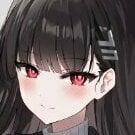
Cheri Song Posted July 27, 2020 Posted July 27, 2020 View File Asian Goddess Portraits Asian Goddess Portraits Version 1.0 - 27 July 2020 by Cheri Legend has it that the Far East is home to a race of impossibly beautiful young women, with skin of flawless porcelain and bodies that were made for sinning. If such temptresses were to arrive in the West, no man or woman would be safe from their charms... Asian Goddess Portraits is a mod that adds a new ethnicity for portraits to Crusader Kings 2. Based on the silicone look of K-pop idols. these deliciously lore-unfriendly Asian bimbo portraits can be chosen in the ruler designer or added to any character via console commands. Note: This mod only includes portraits for women. No portraits for men or children are included, so they will use the default western character portraits. Requirements Crusader Kings 2 version 3.3+ Cheri Scripting Library is required if you don't have Ruler Designer, or if you want to play with the inheritance game rule. Compatibility Compatible with most mods. Not compatible with Cheri Portraits or any other mod that overwrites portraits. Installation Download the archive and use 7zip to extract it into My Documents/Paradox Interactive/Crusader Kings II/mod/ Instructions I want to be an Asian Goddess You can give an Asian Goddess portrait to your character in two ways: Use Ruler Designer to choose the "Asian Goddess" ethnicity. Open the console by pressing the grave ` key, then run the command event asiangoddess.0 I want to turn other characters into Asian Goddesses You can give NPCs an Asian Goddess portrait by appending their character ID to the end of the command. For example, event asiangoddess.0 7757 will change the ethnicity of Duchess Matilda of Tuscany (character #7757) to Asian Goddess. You can see a character's ID by typing charinfo. I don't want to have non-Asian Goddess children If you want Asian Goddesses to always give birth to Asian Goddess daughters, you can set the Inheritance game rule to On. Note that this will affect the demographics of the game world over time, eventually leading to most characters being Asian Goddesses. I want to change the randomly generated hair or eye colors of Asian Goddesses You can edit the selection of hair and eye colors by going into the mod's interface/asiangoddessgfx.gfx file. Scroll down and you will see a block that looks like this: hair_color = { # dark, base, highlight { 0 0 0 } { 40 40 40 } { 120 120 120 } # black { 10 0 0 } { 55 35 30 } { 160 130 100 } # hazel { 0 0 0 } { 70 40 35 } { 150 80 80 } # dark brown { 10 0 0 } { 100 40 25 } { 200 130 100 } # chocolate brown { 40 30 0 } { 120 70 40 } { 215 160 60 } # warm gold { 60 30 10 } { 170 110 80 } { 255 190 160 } # rose blonde { 60 40 20 } { 176 135 80 } { 255 220 190 } # blonde { 60 40 20 } { 180 140 110 } { 255 230 210 } # platinum blonde { 10 0 0 } { 120 0 0 } { 200 100 100 } # scarlet { 10 0 0 } { 120 20 45 } { 200 75 100 } # rose red { 10 0 10 } { 70 30 50 } { 150 80 120 } # dark purple { 20 0 10 } { 100 40 70 } { 200 100 150 } # purple { 90 40 60 } { 170 120 140 } { 255 190 230 } # pink { 50 50 50 } { 150 150 150 } { 220 220 220 } # white } eye_color_index = 9 eye_color = { { 10 10 10 } # black { 150 0 0 } # red { 150 75 0 } # gold { 150 0 150 } # pink # { 200 150 80 } # bright gold # { 220 0 220 } # bright pink # { 150 150 150 } # white } You can remove any hair or eye color by adding a hash symbol # at the beginning of the line. This will mark it as a comment and cause CK2 to ignore that line. There are also some eye colors that are commented out by default. If you want to enable any of these colors, you can remove the # from the beginning of the line. Finally, you can add your own hair or eye colors by changing the red, green, and blue values in brackets. The block is repeated three times in the file for young age, middle age, and old age. Remember to make your changes in all three blocks! Credits The portraits are based on the Mongolian portraits in Portrait than Trait and heavily edited by me. They also include the collar sprite from The House of O. If you like this mod, consider checking out the mods that made it possible! Submitter Cheri Song Submitted 07/27/2020 Category Crusader Kings 2 Requires Cheri Scripting Library
1tomadeira Posted July 27, 2020 Posted July 27, 2020 This fits specially well with Tianxia: Silk Road Expansion. Would prefer a Japanese reference (you know why wink wink), but it's close by lmao.
Kalyian Posted July 28, 2020 Posted July 28, 2020 Top tier mod, absolute must have in general and you MUST have for tentacled dreams.
xlvs Posted July 28, 2020 Posted July 28, 2020 Is there a way to make these girls to accept any traditional clothing by chance?
Aasimar Posted July 28, 2020 Posted July 28, 2020 nice... but i guess it would not work together with Portrait than Trait mod?https://steamcommunity.com/sharedfiles/filedetails/?id=1584690453
sss1sss11 Posted July 28, 2020 Posted July 28, 2020 The default is male Celts. Quite ugly, it would be nice to add some more cute portraits. At least the German ones, or something. 1
sss1sss11 Posted July 28, 2020 Posted July 28, 2020 1 hour ago, Aasimar said: nice... but i guess it would not work together with Portrait than Trait mod?https://steamcommunity.com/sharedfiles/filedetails/?id=1584690453 I looked at the structure of the mod, this should work together. Asian goddesses are a separate culture.
1tomadeira Posted July 28, 2020 Posted July 28, 2020 6 hours ago, sss1sss11 said: I looked at the structure of the mod, this should work together. Asian goddesses are a separate culture. I don't know if Cheri already played the Tianxia mod, but Korea and Japan regions have their own cultures. I mainly use Ainu to conquer Japan when I play this (cliche too much? ?). Anyway, Tianxia itself has portraits for those regions, although it forces you to have mongol units expansion to work properly. I wonder though if that could work with Tianxia, since that way you would have different portraits for "vanilla" map and Tianxia map expansion. I have no idea if Cheri's Portrait Pack code is made to always overwrite or if it's possible to change that according to cultures added.
sss1sss11 Posted July 29, 2020 Posted July 29, 2020 5 hours ago, 1tomadeira said: there is a culture parameter, and there is a gfx_culture parameter. The second only affects the image. You can set gfx_culture 132546 asiangoddess_culture, and to breed your family only with a view, but with a Germanic culture, for example. but men will be ugly default Celts.
Axato Posted August 4, 2020 Posted August 4, 2020 Dude I've been following your mods for ages and I absolutelly love this one but I feel like I have to use my very first message to ask for this: I'm creeped out by those massive baloons they have, I would really appreciate a smaller boobs version. Let's hope I'm not the only one 1
Cheri Song Posted August 7, 2020 Author Posted August 7, 2020 On 8/4/2020 at 8:34 PM, Axato said: Dude I've been following your mods for ages and I absolutelly love this one but I feel like I have to use my very first message to ask for this: I'm creeped out by those massive baloons they have, I would really appreciate a smaller boobs version. Let's hope I'm not the only one I have no plans to make a version without boobs, but someone else can make a submod if they want. The original Portrait Than Trait images can be used as a reference.
MGTNP Posted January 18, 2021 Posted January 18, 2021 I'd hate to ask but how would you go about changing the gfx for the males of the race? I want to use the chaos spawns from the warhammer to show only "females" are born, men come out as mutated, monstrosities but no matter what I try, the male portraits never change from the westerngfx.
SamIAmHam Posted January 18, 2021 Posted January 18, 2021 1 hour ago, MGTNP said: I'd hate to ask but how would you go about changing the gfx for the males of the race? I want to use the chaos spawns from the warhammer to show only "females" are born, men come out as mutated, monstrosities but no matter what I try, the male portraits never change from the westerngfx. Easiest answer is for you to use Paint.net or similar and just copy the faces you want and overwrite hers.
jamadhujr Posted March 8, 2023 Posted March 8, 2023 I tried using the mod, picked the culture but somehow my portrait still in german, I use female only mod, luxury fantasy and Dark world, I had to change it manually using console command, any idea how to fix it? its hassle to change character one by one

Recommended Posts
Create an account or sign in to comment
You need to be a member in order to leave a comment
Create an account
Sign up for a new account in our community. It's easy!
Register a new accountSign in
Already have an account? Sign in here.
Sign In Now