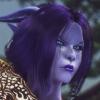
Lendova Posted March 9, 2016 Posted March 9, 2016 What I would like to do is: modifying a race mod for myself. This means, I want to delete a lot of unnecessary file, adding new files while renaming and rebuilding the directories. So later I can easily find/recognise everything in my folders when I want to change/modify them. My current problem: If I rename a .dds file for a hair, its not works in game. (I changed the .nif and the .dds locations in the Construction Set ofc) A picture about a working condition:
myuhinny Posted March 9, 2016 Posted March 9, 2016 Of course it's not going to that is because you have to change the name in the hairs nif file as well. You need nifskope load the hair nif into it and find the texture path for the hair and change the last part to the name you changed the .dds file to then save as to overwrite the nif. Also make sure the hair texture path matches the texture path in the nif. http://niftools.sourceforge.net/wiki/NifSkope/Documentation_And_Tutorials Here is a link to nifskope if you don't have one.
fejeena Posted March 9, 2016 Posted March 9, 2016 ? sure ? thougt body, eyes and hair don't need the exact texture path in the nif. The path is in the esp\esm. All bodies have Imperial texture path (e.g. Roberts male body meshes must have NiTriShape\strips "foot" and NiMaterialProperty "skin" ) There is only one vanilla human eye mesh ( ok two, left and right eye), with default ( blue) texture path. Both meshes with NiMaterialProperty "right eye" I have some race Mods which use Ren hair, and all the meshes have the original Ren textures path even if the textures are in new folders/the race folder. NiMaterialProperty should be "hair". The NiTriShape\strips name seems to be unimportant. Edit: I found a hair mesh with texture path D:\oblivion\Data\Textures\characters\krace\hair\coreanhair.dds and it works in game, the NiMaterialProperty is "hair" ( my game is not in D:\ ) So I think the NiMaterialProperty in Lendovas mesh is wrong ( not hair )
Lendova Posted March 9, 2016 Author Posted March 9, 2016 Problem solved. The texture path looks like do nothing, but...myuhinnys post made me think and I could solve it. Its works in game with this "pathname" fejeena, I not changed anything in the nif files. Its still shows hair. Not clear everything, but looks like the file names should not contain some specific characters. All of them, some of them? I dont know. But, without underlines, everything works. Before: kaleenhair_14.dds kaleenhair_14_n.dds kaleenhair_14_hl.dds kaleenhair_14_hh.dds After: kaleenhair14.dds kaleenhair14_n.dds kaleenhair14_hl.dds kaleenhair14_hh.dds My nif files are unchanged, looks like underlines not a problem there. Im trying to solves this in the few past days, but your inputs lead me to the solution pretty fast, even you were wrong. A lot of thanks! Finally i can think about my folder structure, since the file names are no longer a problem.
fejeena Posted March 9, 2016 Posted March 9, 2016 Good to know. I checked about 10 hair texture folders in my game and no "_" in the file names. But some eye textures have "_" in the name. ( and they work in game )
AnnaFly Posted March 9, 2016 Posted March 9, 2016 Good to know. I checked about 10 hair texture folders in my game and no "_" in the file names. But some eye textures have "_" in the name. ( and they work in game ) Greetings. @ Fejeena : Well i'm not quite sure most of peoples already know that a corrupted "_n.dds " file ( or missing -n ) could cause a " distorsion / misalignement "on a mesh ( and even more than only one mesh if the properties are combined ) . I started to mod with Morrowind, so it's a long time ago now, but i really saw this issue for the first time two weeks ago ... and two days ago too . But , you must also know that some parts don't need necessary a "_ n.dds "file ... ( example : icons) i 'm not quite sure for the hair , but i think i already use some of them without any "_n"dds texture ...but, maybe they are automatically added and replaced with a Vanilla one by the engine game ... ? ... i must investigate that point . Now , here a good example of a " distorsion " caused by a missing _n.dds file : take a look at this Nexus mod " Casual " ( i'm sorry , i'm not able to copy/past anythin to a post with IE11 ... here at LL , i don't know why , even from my own document and even if it's from a shared folder/partition ...) : so i 'll copy the link manually, i hope without any error . http://www.nexusmods.com/oblivion/mods/46727/? .... take a look at my screenshots & cooments too ( " Loukiana ",i hope they are still there ) . Well i found this "issue" two weeks ago, actually i decided to "remake" the whole "DukeCity mod " ( it's really painfull ) , i wanted to change and replace the texture from the "Servant Uniform - stocking " - probably just the Colourwheel's model renamed - by another CW ( ColourWheel) texture , this one is called " undies , it's just a Brown texture ( with alpha of course) and the _n.dds file is there . No problem with my meshes ... it's a reworked one and i already tested it ( in game , not only with NifSkope+ a .kf file ) without any issue , but when ichanged the texture path , firstly, the stocking are no more showed ( but the legs are still there )... and the "socks, shoes , garter and the " frill " part of the "Servant 's robe " are totally misaligned, exactly something like the screenshots i put in the "casual" mod. So i loose four days ( +/- 30 hours ) with these meshes, thinking i was doing something wrong when i reworked these ones ... so finally i give up ( or gave-up if you prefer, make your choice ) simply changed the stocking with another model and another texture. So two days ago, i decided to test the "Casual" mod and ... i saw the same problem ( sure , Casual's meshes are not perfect , but the problem isn't really there ) and i decided to check the "undies" texture from the " Servant Uniform " once again and, yes , the "guilty" is the "_n.dds " file . Strange isn't it that a simple texture file can "destroy" a mesh in game ? Last thing, this issue isn't showed with NifSkope , even with an animation file loaded. So now i know i must check my mesh es in real game too . Usually when a texture is missing , the mesh doesn't appear , but don't cause such a "distorsion" on other meshes , i suppose this "distorsion/misalignement" is caused by the combined properties of some meshes. I must investigate this last point too. Voilà, c'est tout pour cette nuit . Bonne nuit. Cheers. PS , sorry for my english.... but if i cannot copy/past a simple link, of course, i cannot use a "translator" too ( not important because the don't work well from french to English it's better to not use them ) PPS , ok i found a screenshot i forgot to delete in my folder , so no need ( but it's better) to go to the Nexus to see what i'm talking about
fejeena Posted March 10, 2016 Posted March 10, 2016 Thought the problem was the "double _" is fine RenGrey.dds RenGrey_hh.dds RenGrey_hl.dds RenGrey_n.dds causes problems/does not work Ren_Grey.dds Ren_Grey_hh.dds Ren_Grey_hl.dds Ren_Grey_n.dds "There can be only one" Of course corrupted or missing _n dds can crash the game. Yes icons or eyes don't need a _n dds. ---------------------- And with wrong textures ( _n) Once a wrong _n caused stretching and parts of the mesh were misplaced.
Lendova Posted March 10, 2016 Author Posted March 10, 2016 Yep, this part is clear, but not my previous post about. Btw, its interesting how its can cause problems for hairs but not for eyes. I'm going to keep these in mind next time I rename something.
movomo Posted March 10, 2016 Posted March 10, 2016 Not only to hairs. But also to armors and clothings. Oblivion's filename parser can be crappy at times. It happend to me before

Recommended Posts
Archived
This topic is now archived and is closed to further replies.