Search the Community
Showing results for tags 'build'.
Found 6 results
-
 View File Frontier - Skyrim Settlements Frontier: Skyrim Settlements Build your own settlements anywhere in Skyrim - from a lone camp by the road to a walled town full of people with homes, jobs, shops, moods and enemies at the gate. Then found a guild, carry its card, and take your party down into a 100-floor abyss. Frontier is an SKSE plugin with its own build menu. You set down a workbench, build with anything in your game, put down whole ready-made Skyrim buildings with working interiors, lay level ground and roads, and settlers arrive to live, work, trade, eat, sleep and defend the place - while you're there and while you're away. Found an adventurers' guild in your settlement, send its members out on contracts or take contracts on yourself, and lead your own party floor by floor down the Abyss. It changes no vanilla record. All three plugins only add new things. Currently working on: Frontier - Conqueror Addon: A new land full of settlements to attack and take as your own, be wary as you are vulnerable to attacks too. Crime and law - settlers can commit crimes, become a guard and track them down and lock them up (prison or death penalty) Requirements - Skyrim Special Edition / Anniversary Edition 1.6.x or 1.7.x (see Known limits for 1.5.97 and VR) - SKSE64 for your game version - Address Library for SKSE Plugins - Optional: powerofthree's Tweaks - lets the build menu show editor IDs for things Skyrim normally forgets Dawnguard and Dragonborn are used in the Abyss (every current Special / Anniversary Edition has them). Installing and updating - Install with your mod manager and tick all three plugins: FrontierSettlements.esp (light plugin), FrontierRooms.esp and FrontierAbyss.esp (both master-flagged - sort with LOOT). - Safe on an existing save - you can add Frontier to a game in progress. - Safe to update from any earlier version (1.0.x included) on the same save: everything saved by an older version is read by the new one, and new features start up on their own. FrontierAbyss.esp is new since 1.1.0 - tick it when you update. - To update, remove the old version in your mod manager, then install the new one. - Going back to an older version on a save made with a newer one isn't supported. - If you used a guild before 1.2.0, your guild card starts from the reputation your guilds already had. Getting started 1. Craft a Settlement Workbench Kit at any forge (4 firewood, 2 iron ingots, 2 leather strips). 2. Use the kit from your inventory and place the workbench where you want your settlement. 3. Activate the workbench to open the build menu. Everything is done from there. 4. Put down a Recruitment Banner (Settlers page) and some beds - settlers start arriving from the next day. Features Settlements - Any number of settlements, each with its own workbench, name, area and storage chest. - Area size adjustable per settlement, from a small camp up to about 300 m across. - A map marker with the settlement's name, and fast travel to it. You can choose your own fast-travel arrival point. - Each workbench only shows its own settlement's things. - Settlement Storage - one chest per settlement for materials, food, taxes and everything your workers bring in. Building - Build with any object in your load order - Skyrim's and every mod you have installed show up on the Build page. - Categories: walls, floors, roofs, doors and doorways, stairs, fences and gates, beams and pillars, foundations, whole buildings, interiors, decor, nature, defences. Search box and an "exterior only" filter. - Free-camera placing: fly round the piece while you place it, turn it, tilt it, roll it, raise and lower it, push it further or closer, scale it (10% to 1000%). - Lock in place - lock a piece where it is and nudge it a few units at a time. - Line up with the last piece - same height, angle and size as the piece before. - Snapping - pieces click flush against the ones next to them. - Fine steps for precise work, and a key to square pieces up. - Keep placing: after putting a piece down you get another one straight away - walls and fences go up without trips back to the workbench. - Pick in the world - fly about with your own pointer and click anything you've built to pick it. Handles let you drag it along an axis, turn it round any axis or size it, with Ctrl for exact steps. Copy, delete or fly to it from there. - Undo and redo - up to 200 steps of placing, moving and removing (Ctrl+Z / Ctrl+Y while picking, or the buttons on the Build page). Materials go back and forth with them. - Move, copy or remove anything you've built. Removing gives the materials back. - Moving a piece flies the camera smoothly to it. - Invisible markers (idle markers and so on) are drawn as a box while you place them, so you can see where they stand and which way they face. - Full controller support. Building costs - Building uses Hearthfire materials: sawn logs, quarried stone, clay, nails and iron fittings. What a piece costs depends on what it looks like it's made of (wood, stone or metal) and how big it is. - Materials come out of the settlement storage first, then your inventory. - A cost slider in Settings (1x to 5x) if you want building to be harder. Taking something down always gives back what you paid for it. - A "free building" switch is in Settings if you'd rather build without materials. Ready-made Skyrim buildings - About 150 of Skyrim's own town and village buildings - houses, farmhouses, halls, inns, shops, manors, longhouses, mills, warehouses, stables, barracks, huts, blacksmiths, meaderies, lighthouses - in Nordic, Whiterun, Riften, Solitude, Windhelm and Orc styles. - Each one comes with a working interior, either empty (to furnish yourself) or furnished (Skyrim's own furniture, beds, shelves, lights and fixtures, with empty containers and no owners). - Buildings with more than one door have all of them working. - Blacksmith buildings come with their forge, anvil, grindstone and sign. - Interiors have navmesh so settlers can move about inside. - Up to 20 copies of each building, shared by all your settlements. - Rename buildings, move them (doors and outside pieces come along), or remove them. - Furnish any interior with the same build menu: press Shift + B inside one of your buildings. - Move or remove Skyrim's own furniture inside a building, and put it back later. Land and roads - Level ground - lay flat ground to build on, in plain dirt, rough dirt, stone paving, Nordic stone, wooden boards, Dwemer metal, or "match the ground" (takes the land texture under it so it blends in). - Sides: sloped bank down to the land, sloped bank on a stone wall, straight down, stone wall, or nothing. - Walk your roads: press Shift + R and walk - the road is laid behind you as you go, with smooth curves, soft edges that blend into the grass, following slopes and level ground. Dirt path, cobbled road, packed dirt, match-the-ground, rough dirt, stone paving, Nordic stone, wooden boards, Dwemer metal, or loose stones and boardwalks. Four widths. Plain, snow, autumn and Reach looks, or picked from the land for you. - Clear an area - take away trees, plants, rocks and fallen logs round you, up to the size of the settlement. Everything can be put back. - Distant view - your bigger buildings and walls stay visible from far away. Settlers - Hundreds of unique settlers with their own names and real Skyrim faces and voices - Nords, Imperials, Bretons, Redguards, elves, Orcs, Khajiit and Argonians. - They arrive at your recruitment banner (with your hold's banner on it) - how many depends on room, beds, the settlement's size and how happy the people already there are. - Homes: give each settler a house. They own it like any Skyrim home - their bed, their things, and they lock the door at night. If you want in after dark, pick the lock. - Houses are named after who lives in them ("Ingrid's House"). - Jobs: farmer, hunter, miner, woodcutter, gatherer, guard, shopkeeper, tax collector, smelter, alchemist, tanner, adventurer, guild leader and quartermaster. - Work clothes for their job, their own clothes at home. - Job stars (1 to 5): settlers get better at their job with practice - more goods each morning, better guards, better shops. - Everything settlers bring in goes into the settlement storage each morning. - Settlers slowly put things out on the shelves and tables of their homes and shops. Work stations - Chopping blocks, ore veins (iron, silver, gold, corundum, orichalcum, quicksilver, moonstone, malachite, ebony), crops (cabbage, potato, leek, wheat, gourd), tanning racks, trees for gatherers, smelters, alchemy labs and animal pens. - Workers use the station you give them - or one is set up for them near the workbench. - A miner brings the ore of the vein they work. Animal pens - Cow, goat and chicken pens. Animals turn up on their own and are replaced over time if lost. - A farmer working a pen brings in milk, eggs and hides. Crafting workers - Smelters turn ore into ingots, tanners turn hides into leather, alchemists brew restore health, stamina and magicka potions from cheap ingredients. - Part of what they make goes to a matching shop in the settlement to sell, the rest into storage. Shops and inns - Turn any building into a shop: general goods, blacksmith, alchemist, fletcher, clothier, food and drink, jeweller, spells, books, hunter's goods or fence. - Shopkeepers trade like Skyrim's own merchants - same goods lists, the usual "What have you got for sale?", restocked every two days. - Shopkeepers stand behind the counter, open in the day, shut at night. Shops are open to customers during opening hours. - Inns: the tavern keeper runs the bar, sells food and drink, rents rooms and sleeps at night like Skyrim's innkeepers. The inn never locks its doors. - A bard performs Skyrim's songs, and visitors come by - travellers, adventurers, mercenaries, pilgrims, merchants and more. - Settlers spend some evenings at the inn. A day in the settlement - Every settler has their own plan for the day: up at their own time, work, lunch break, back to work, then an evening walk, a drink at the inn or a quiet night in. - They walk through doors like anyone else - no popping in and out of buildings. - They chat, sit, eat, and use the furniture you've put down instead of standing about. - Walking paths: press Shift + T and walk a route to record it. Settlers use your paths as guide rails to get round buildings. Walk an area back and forth and it becomes a place they wander about in. Defences and guards - Guards with day and night shifts, who patrol or stand at a guard post. Press Shift + G to set a post where you stand, facing the way you face. - Give guards their own patrol routes, or let them choose. - Walls, gates, towers and barricades you build count as defences ("Defences" category on the Build page). - Skyrim's town gates can be placed as open archways. Attacks - Bandits, Forsworn (in the Reach), wolves, bears, trolls, sabre cats, frostbite spiders and spriggans attack now and then, depending on the hold, the weather and how strong you are. - You get a warning about an hour before, and the Defences page shows when trouble is expected. - If you're there, the fight happens for real - you're told which way they're coming from. If you're away, it's worked out from your guards, settlers and defences. - Losing a fight means stolen food and gold - and, if you allow it, dead settlers. - More guards and better defences keep attackers away for longer. A full storage draws them in sooner. Food, mood and taxes - Food: every settler eats one meal a morning from the storage. Farmers, hunters and tavern keepers bring food in; hungry settlers get unhappy and eventually leave. - Mood: each settler's mood has reasons you can see - home, bed, job, food, guards, a tavern, recent attacks, taxes, defences, requests met or forgotten. Happy settlers work harder. Miserable ones refuse to pay taxes, and eventually pack up and leave. - Taxes: give a settler the tax collector job and set a rate from none to very high. They do the rounds and the gold goes into the storage - minus their cut. The higher the rate, the unhappier everyone gets. Growing settlements - Settlements grow from camp to village to town as they gain people, buildings, shops and defences. - Bigger settlements draw more settlers, have richer shops, and their people are prouder of them. - Settler requests: now and then settlers ask for something - a well, a shrine, a tavern, a blacksmith, more guards, walls, lights, benches, a farm. Give it to them and they're pleased for days. Ignore it and they grumble. The adventurers' guild - Mark a building as your guild hall, put a notice board inside it and give a settler the Guild Leader job - talking to them opens the guild menu. - Contracts on the board send your guild's adventurers to real places in Skyrim - bandit camps, draugr barrows, Falmer hives, vampire lairs, dragon lairs, giant camps, hagraven nests, Dwemer ruins and more - with danger, pay, travel time and a chance of success worked out from the party you send. They come back with gold and loot, or hurt, or not at all. - Or do a contract yourself: the place shows on your map, and you hand it in at the board when it's cleared. - Couriers bring requests from the holds, and each hold remembers how well your guild has served it. - Ranks from F (Recruit) to SS+ (Abyss Walker), each with its own colour. Guild points come from contracts, abyss floors, bosses and milestones; every new rank needs a promotion trial set by your Guild Leader. - A rank emblem - an amulet whose bonus grows with your rank. - Higher ranks bring harder and better-paid contracts, a bigger party and a better guild shop. - Recruit board: adventurers looking for a party - each with their own name, race, role (fighter, archer, mage, healer or tank), rank, skills, two traits and their own gear. Hiring is free. They live in the guild hall, rank up with you and gear themselves from the loot they find. A balanced party fights better. - A Quartermaster runs the guild shop; its stock gets better with your rank. - A weekly guild challenge, and a rival guild - the Ashen Lanterns - racing you down the abyss. - Mark a building as an infirmary and wounded members heal twice as fast. - A trophy hall - place a trophy for every boss floor you've beaten - and a memorial wall for members who fell. - Adventurers from all over drop in on your guild hall during the day. The guild card - A metal card you carry, in your rank's metal - from wood for F to black-gold for SS+. - Read it from your inventory or press Shift + K: name, race, level and class, six stats (STR, VIT, AGI, DEX, INT, LUK) graded F to SS+, top skills, shouts, your record (floors, bosses, contracts, kills by kind, best find, gold earned), badges, the weekly challenge and bounties. Click it to see the back. - The card shows you as you were when your Guild Leader last updated it - ask for a new one after a promotion. Lost cards can be reissued for a fee. Pick the title it shows: rank titles, badges, and titles earned in the Abyss. - Carrying it gives bonuses that grow with each stat's grade (can be switched off). - Guild bank: deposit and withdraw at any Guild Leader. Safe from raids, contract rewards go straight in, and it pays a little interest each week. Your party - Talk to a party member down the Abyss to open their window. - Positions: With you, Vanguard, Flank, Rearguard, Support or Scout, shown on a live map. Scouts warn you about enemies ahead. Anyone left behind runs to catch up. - Upgrades: Health, Damage, Armour, Stamina, Magicka and Speed, ten levels each, paid with points earned in the Abyss. Retrain at the guild for a fee. - Abilities: two per role, unlocked at ranks D and B - Shield Wall and Battle Cry (fighter), Volley and Deadeye (archer), Overcharge and Arcane Ward (mage), Mend and Sanctuary (healer), Taunt and Bulwark (tank). Use them yourself or let them fire on their own. - Bond: Wary, Trusting, Loyal, Devoted, Sworn - it grows as you fight together and makes them tougher and braver. - Gear: trade with them; whatever they wear becomes their gear. - No friendly fire: your spells and your teammates' spells don't hurt them, and an accidental hit only knocks them down. The Abyss - a 100-floor dungeon - Once your guild reaches rank D, build the Abyss Lift (Skyrim's own Dwemer lift) in your settlement and go down. - 100 floors in ten bands, each harder than the last: The Upper Caves, The Barrows, The Wild Halls, The Dwemer Gates, The Hive, The Conjured Deeps, The Blood Halls, The Deep Machines, The Tombs of the Dragon Priests and The Bottom of the Abyss. - Every floor is a whole dungeon - the next way down is somewhere inside it. Enemies get stronger the deeper you go. - Every 10th floor is a boss room - a frost troll, a draugr deathlord, a Spriggan Earth Mother, a Dwarven centurion, a Falmer chief, three atronachs at once, a gargoyle, a dragon priest... and at the very bottom, Karstaag. The way down stays shut until the boss is down. - After every boss there's a resting place: a quiet cave camp with a fire, a cooking spit, a tent and bedrolls, a way back up to the surface and a way down to the next floor. Once you've beaten a boss, the lift can take you straight to the camp after it - pick any camp you've reached. - You don't have to kill everything: reaching the next floor counts the floor behind you as done. - Bring your recruits: they follow you down, fight beside you and roll the loot of every floor for themselves. - Loot by depth - common, uncommon, rare, epic and legendary finds, from iron and hide on the first floors to daedric and dragonbone near the bottom, including Dawnguard and Dragonborn gear and reworked uniques. Every find is announced and glows in its tier's colour. - Ten new weapons found only in the Abyss - Copperfang, Invicta, Wayfinder, the Frostmarch Greatblade, Anvilfall, Stormcleaver, the Barrow-Bitten Axe, Wolfsong (a bow), Duskfall and Nightwarden - and a very rare Abyssal version of each, with three enchantments, on the last ten floors only. - You can't die down there: beaten, you wake up at the lift - but what you found on that run stays where you fell, in a satchel you can go back for. - Not going yourself? Send a guild expedition and read how deep they got. The build menu Fifteen pages: Build, Overview (the whole settlement at a glance), Buildings, Land, Roads, Settlers, Homes, Jobs, Work spots, Defences, Wellbeing, Economy, Guild, Abyss and Settings. Four colour schemes, adjustable text size and window opacity, full mouse, keyboard and controller support. The menu is drawn together with the game's own menus, so it shows with upscalers, frame generation and overlays. The game pauses while the menu is open (can be switched off). Add-on: Frontier: Wildlands A separate download - a whole new island to settle. What it is - A new world of its own: a large island about 3.7 km across (64 x 64 cells), with plenty of open land to build on. - Mixed climate - snowy mountains in the north, pine forests, green plains and hills, beaches and a lake. - Made entirely from Skyrim's own land textures, trees, plants, rocks and mountain pieces, placed the way Skyrim places them, with Skyrim's grass patterns. - Wildlife across the island, and four bandit camps marked on the map - Briarwood Camp, Wrackshore Camp, Frostfang Camp and Redcrag Camp - each with its bandits and a boss chest. - Navmesh on every cell, joined cell to cell, so NPCs, followers and settlers can walk anywhere on the island. - Distant view included: the land, mountains, rocks and trees show from far away. - Frontier settlements, roads, level ground and settlers all work on the island like anywhere else. Getting there - Open the world map and fast travel to the "Wildlands" marker in the sea north-west of Solitude. - Travel back with the "Skyrim" marker just off the island's west coast. Next time you go, you arrive where you left. Requirements and install - Frontier: Skyrim Settlements, SKSE64 and Address Library for SKSE Plugins. - Tick FrontierWildlands.esp (master-flagged - sort with LOOT). It changes no vanilla record. - To update, remove the old version first, then install the new one. Distant view (LOD) - recommended The distant view that comes with the add-on was made from Skyrim's own files only. If you use tree, rock, mountain or landscape texture replacers, the island's distant trees and objects won't match them. For the best result, generate LOD yourself for your own load order after installing - run xLODGen (terrain) and TexGen + DynDOLOD (objects and trees) with FrontierWildlands ticked, the same way you would for Tamriel. Your own output simply replaces the included one. Reporting problems The add-on writes where you are to SKSE\FrontierWildlands.log as you walk round the island. If something looks wrong, stand at it and press Shift + L - the spot is marked in the log. Send the log with your report. How some of it works Runtime navmesh Skyrim's NPCs walk on navmesh baked into the game. It doesn't know about anything you build, so on raised level ground NPCs would walk on the old land underneath, sinking into your ground or standing still. Frontier generates navmesh for your level ground while you play. It copies Skyrim's navmesh round your settlement, lifts it onto your ground, cuts holes where your buildings stand (using each building's real outline), joins it edge to edge with Skyrim's own navmesh round it, and swaps it in. Skyrim's navmesh under your ground is switched off while yours is in use. Nothing is saved and no navmesh record is ever overridden: it's made again when you come near and put back when you leave, so Skyrim's own navmesh is never changed for good. The Land page shows, for each level ground, whether settlers can walk on it. Ready-made interiors The interiors are copies of Skyrim's own interiors, with their navmesh. Each building has 20 copies, shared by all your settlements. Once all 20 copies of a building are in use, it can't be placed again until one is removed. Roads Walked roads are real ground meshes written while you play, curving with the way you walked and following the land and your level ground. On first start the mod creates a pool of 1,024 small path files in Data\Meshes\FrontierSettlements\Paths, because Skyrim only reads loose files that existed when it started. How the Abyss was made The Abyss is built entirely from Skyrim's own dungeons. Our tools read 90 of Skyrim's interior dungeons - caves, Nordic barrows, Forsworn and hagraven camps, Dwemer ruins, Falmer hives, warlock and vampire lairs and dragon priest tombs - and copied each one, room by room, into FrontierAbyss.esp as a brand-new cell: walls, rooms, lighting, water, traps and navmesh, everything kept where Skyrim had it. The real dungeons are never touched; you can still visit every one of them in Skyrim as normal. Each copy was then checked by walking its own navmesh from the way in to the way down. Anything that only a quest can open - claw doors, secret walls, cave-ins, magic barriers - was taken out of the way, and side doors that lead to other parts of the original dungeon are locked shut so every floor is one self-contained level. The ten boss rooms and the nine resting camps were built from Skyrim's own room kits. Enemies come from Skyrim's leveled lists, placed where Skyrim had them and scaled to the floor's depth; the loot tables were built from every weapon and piece of armour in Skyrim, Dawnguard and Dragonborn, sorted by material into the five depth bands. Attacks while you're away If you aren't there, the attack is worked out: each guard counts for more as they gain stars, other settlers count a little, and your walls, gates, towers and barricades add to it. Keys - Shift + B - build inside one of your buildings - Shift + R - start / stop walking a road (in a settlement) - Shift + T - start / stop recording a walking path (in a settlement) - Shift + G - set / remove a guard post where you stand (in a settlement) - Shift + K - read your guild card (while you carry it) - Shift + L - mark a spot in the Wildlands log (Wildlands add-on) These keys only do anything where they're meant to. Everywhere else they reach the game as normal. All of them can be changed in FrontierSettlements.ini. While placing, a help panel in the bottom right lists every key and controller button. The main ones: - Mouse wheel - turn; Shift / Alt + wheel - tilt / roll; Ctrl + wheel - further / closer - Page Up / Page Down - raise / lower - + / - - bigger / smaller - L - lock in place (then the arrow keys nudge it); M - line up with the last piece; G - snapping on / off - X - fine steps; R - reset / square up - Click or Enter - place; right-click or Esc - cancel - While picking in the world: Tab - move / turn / size handles; Ctrl+Z / Ctrl+Y - undo / redo; Ctrl+C - copy; Delete - remove; F - fly to it Making add-ons and patches for Frontier Frontier is built to be extended. Nothing below needs any of Frontier's files in your own download - just list Frontier as a requirement. Building packs (no programming) Every object from every plugin already shows up on the Build page. A building pack just tidies it up - a name, a category, a starting size and a credit line for each piece. Add a text file named after your plugin to Data\SKSE\Plugins\FrontierSettlements\Packs\ (MyHouses.esp -> Packs\MyHouses.txt), one line per piece: local form ID | category | starting size | indoors (0/1) | credit | name 000801|Walls|1.0|0|MyHouses by Someone|Timber wall, long Categories: Walls, Floors, Roofs, Doors, Stairs, Fences, Beams, Foundations, Buildings, Interiors, Decor, Nature, Defences. The log says how many pieces of your pack were read. Ready-made buildings with interiors Your own buildings can join the Buildings page too, with their interiors, doors and copies. The Frontier Modder's Kit explains the two text files you need, field by field, and the Creation Kit steps (navmesh, doors, beds, copies). SKSE add-ons (C++) A separate download, the Frontier Modder's Kit, has FrontierAPI.h (MIT licence), a README and example building packs - players don't need it. Any SKSE plugin can ask FrontierSettlements.dll for its interface and then: - list every settlement (workbench, area, storage chest, name) and find which settlement any reference stands in - list settlers with their job, stars, mood and home - mark a settler "away" for your own quest, trade run or dungeon - Frontier leaves them alone until you set them back, and brings them home by itself if your add-on is ever uninstalled - count, add and take items in a settlement's storage - show a message, and get a call at 6:00 every game morning for each settlement Plain C types only, so it works with any compiler and any CommonLib. Job numbers never change - new ones are only ever added at the end - so an add-on built today keeps working. Ordinary plugin patches Frontier overrides no vanilla record, so most mods need no patch at all. Mods that change Skyrim's town building meshes simply change how the ready-made buildings look. Known limits - Skyrim 1.5.97 hasn't been tested, and the runtime navmesh needs 1.6 or later - on 1.5.97 settlers can't walk properly on raised level ground. VR is not supported. - Navmesh can only be generated where Skyrim has navmesh underneath. Settlements over deep water may have spots settlers can't reach. - Each navmesh rebuild leaves about 1.5 MB in memory until you quit. This mostly happens when you go through doors near a big settlement, and it's cleared when you restart the game. - Doors and gates you place on level ground don't block the generated navmesh when they're shut. - 20 copies per ready-made building, shared by all settlements. - FrontierRooms.esp (about 84 MB) and FrontierAbyss.esp (about 10 MB) have the master flag, so they take regular load-order slots (sort with LOOT). FrontierSettlements.esp is a light plugin. - Doors into ready-made buildings and between abyss floors are load doors, like Skyrim's. - Clearing an area can't remove distant trees or object LOD (DynDOLOD and so on) - only what's loaded round you. - Walked roads are limited to roughly 9 km per game session before a restart is needed to lay more. - Settlers away from you move slowly, the way Skyrim moves any NPC you can't see. - On Skyrim 1.7, bounties aren't shown on the guild card. - Uninstalling mid-game leaves everything you built in the world, plus doors into interiors that no longer exist. Pack up your settlements first. - Settlers and guild members can die in fights by default - switch it off on the Defences page if you'd rather they couldn't. - Hooks into the game's input and rendering are shared with other menu mods in the usual chained way - other overlay mods work alongside it, but a mod that blocks all input may stop the menu reacting. FAQ Does it edit any vanilla records? No. None of the three plugins overrides a single Skyrim record. Everything it adds is its own. The same goes for the Wildlands add-on. Can I add it to an existing save? Yes. Craft the workbench kit at a forge and start. Is it safe to update on my save? Yes, from any earlier version. Tick FrontierAbyss.esp if you're coming from 1.0.x. Don't go back to an older version afterwards. Is that "runtime navmesh" safe? It's generated in memory only, never saved and never written to any plugin. Skyrim's own navmesh is switched back on whenever Frontier's is taken away, so removing level ground - or the whole mod - leaves Skyrim's navmesh exactly as it was. It can be switched off on the Land page. Can I use buildings and pieces from other mods? Yes. Anything installed shows on the Build page and can be placed like anything else. The ready-made buildings with interiors are Skyrim's own. Can I remove it? Pack up every settlement first (Overview page). Removing the mod with settlements still standing leaves the pieces in the world and doors into rooms that no longer exist. My settlers just stand there. Check the Land page: each level ground shows whether settlers can walk on it. Recording a few walking paths (Shift + T) round your buildings helps a lot. Give workers a work station on the Work spots page. How do I get more settlers? Put down a recruitment banner and more beds. Keep everyone happy - nobody new comes to a settlement whose people are unhappy. Bigger settlements draw more people. How do I get into the Abyss? Found a guild (guild hall, notice board, Guild Leader), take it to rank D, then build the Abyss Lift from the Abyss page and pull its lever. How do I get my guild card? Talk to your Guild Leader and ask for it on the Guild Card tab. After every promotion, ask them for a new one. Building is too cheap / too expensive. Use the "Building costs" slider in Settings (1x to 5x), or switch on free building. No attack ever comes. Attacks come every few in-game days. Lots of guards and strong defences keep attackers away for longer. The Defences page shows when trouble is expected. Can I stop attacks, hunger or settlers leaving? Yes - each has its own switch in the menu. Where do my settlers' goods go? Into the settlement storage (Economy page > Open storage), every morning at 6. Why are there new files in my overwrite folder (Mod Organizer)? Those are the road path files the mod makes on first start (Data\Meshes\FrontierSettlements\Paths). They're needed for walked roads. You can move them into the mod's folder. The Wildlands' distant trees don't match my tree mod. The included distant view is made from Skyrim's own trees. Generate LOD yourself with xLODGen and TexGen + DynDOLOD for your own load order and it will match. Is it compatible with...? It changes no vanilla records, so conflicts are rare. Mods that change Skyrim's town building meshes change how the ready-made buildings look. Mods that rebuild Skyrim's navmesh in the same spots work alongside it, because Frontier copies whatever navmesh is loaded. Performance? Settlers are run once a second, navmesh is generated on a background thread, and a settlement costs nothing while you're away beyond a few numbers each in-game day. Planned for the future - A warning bell to call settlers to safety and guards to arms - Supply lines - settlers carrying goods between your settlements - Follow-ups after attacks: tracking the attackers down, bounties - Plain stone foundations under buildings on slopes - More building styles and pieces, including free new models - More gate types - More jobs and things for settlers to do - Translations Credits Weapon models The ten Abyss weapons are converted from free models under the Creative Commons Attribution 4.0 licence (CC-BY-4.0). They were re-scaled, re-oriented and given new collision and textures made from the originals for Skyrim. - Invicta - based on "Chevalier Sword" by rubenve, licensed under CC-BY-4.0 - Duskfall - based on "Gradient Fantasy Sword" by Mikołaj Michalak (Nillusion), licensed under CC-BY-4.0 - Copperfang - based on "Fantasy Sword" by Mikołaj Michalak, licensed under CC-BY-4.0 - Nightwarden - based on "Fantasy Sword" by Mikołaj Michalak (Nillusion), licensed under CC-BY-4.0 - Frostmarch Greatblade - based on "Zweihander Sword Game Model" by Michael Makivic, licensed under CC-BY-4.0 - Stormcleaver - based on "Fantasy Nordic Axe" by Sir Erdees, licensed under CC-BY-4.0 - Wayfinder - based on "Nordic Axe Vegvisir" by Sir Erdees, licensed under CC-BY-4.0 - Barrow-Bitten Axe - based on "Ancient Axe [Low-Poly]" by SchrisArt, licensed under CC-BY-4.0 - Anvilfall - based on "Steel Warhammer" by Asylum Nox, licensed under CC-BY-4.0 - Wolfsong - based on "Bow of the Pack Hunter" by Asylum Nox, licensed under CC-BY-4.0 Guild card The guild card's model and its nine metal faces were made from scratch for Frontier - no textures from Skyrim or any other mod. Wildlands add-on - The island's land was made from scratch; everything on it is Skyrim's own (trees, plants, rocks, mountain pieces, creatures, bandits and camp pieces), used by reference. - Distant land generated with xLODGen by sheson, from Skyrim's own files only. - Distant objects and trees generated with DynDOLOD and TexGen by sheson, in DynDOLOD's "Create Mod" mode, from Skyrim's own files and DynDOLOD Resources. Those generated files and the occlusion data in FrontierWildlands.esp are covered by DynDOLOD's licence, Creative Commons Attribution-NonCommercial-ShareAlike 4.0. The add-on needs no part of DynDOLOD to run. Thank you, sheson. Libraries and fonts - CommonLibSSE NG (the MIT-licensed fork, QTR-Modding/CommonLibVR-MIT) - Ryan-rsm-McKenzie and contributors, MIT - Dear ImGui - Omar Cornut, MIT (with the ProggyClean font by Tristan Grimmer, MIT) - spdlog - Gabi Melman and contributors, MIT - {fmt} - Victor Zverovich and contributors, MIT - DirectXTK / DirectXMath - Microsoft, MIT - rapidcsv - Kristofer Berggren, BSD 3-Clause - Cormorant Garamond - the Cormorant Project Authors, SIL Open Font License 1.1 - Vault Sans - a renamed subset of Source Sans 3 by Adobe, SIL Open Font License 1.1 (not affiliated with or endorsed by Adobe) Full licence texts are in THIRD-PARTY-NOTICES.txt in each download. No GPL code is used anywhere. Skyrim Every building, interior, dungeon, enemy and piece of furniture is Skyrim's own (Skyrim, Hearthfire, Dawnguard and Dragonborn, by Bethesda Game Studios), used by reference - the plugins contain no assets from other mods. Thanks The SKSE team and the Address Library authors, without whom no mod like this could exist, sheson for xLODGen, TexGen and DynDOLOD, and everyone who tested and sent logs. Permissions - Please don't re-upload this mod or the Wildlands add-on. - Building packs and SKSE add-ons that use the files and interface described above are welcome - they don't contain any of Frontier's files. - Translations and other patches - just ask first. Submitter Binksy24 Submitted 10/14/26 Category Regular Mods Requirements Regular Edition Compatible No Install Instructions
 -
Version 1.5.1
551 downloads
Frontier: Skyrim Settlements Build your own settlements anywhere in Skyrim - from a lone camp by the road to a walled town full of people with homes, jobs, shops, moods and enemies at the gate. Frontier is an SKSE plugin with its own build menu. You set down a workbench, build with anything in your game, put down whole ready-made Skyrim buildings with working interiors, lay level ground and roads, and settlers arrive to live, work, trade, eat, sleep and defend the place - while you're there and while you're away. It changes no vanilla record. Both plugins only add new things. Requirements Skyrim Special Edition / Anniversary Edition 1.6.x or 1.7.x (see Known limits for 1.5.97 and VR)SKSE64 for your game versionAddress Library for SKSE Plugins Optional: powerofthree's Tweaks - lets the build menu show editor IDs for things Skyrim normally forgets. Getting started Craft a Settlement Workbench Kit at any forge (4 firewood, 2 iron ingots, 2 leather strips).Use the kit from your inventory and place the workbench where you want your settlement.Activate the workbench to open the build menu. Everything is done from there.Put down a Recruitment Banner (Settlers page) and some beds - settlers start arriving from the next day. Features Settlements Any number of settlements, each with its own workbench, name, area and storage chest.Area size adjustable per settlement, from a small camp up to about 300 m across.A map marker with the settlement's name, and fast travel to it. You can choose your own fast-travel arrival point.Each workbench only shows its own settlement's things.Settlement Storage - one chest per settlement for materials, food, taxes and everything your workers bring in. Building Build with any object in your load order - Skyrim's and every mod you have installed show up on the Build page.Categories: walls, floors, roofs, doors and doorways, stairs, fences and gates, beams and pillars, foundations, whole buildings, interiors, decor, nature, defences. Search box and an "exterior only" filter.Free-camera placing: fly round the piece while you place it, turn it, tilt it, roll it, raise and lower it, push it further or closer, scale it (10% to 1000%).Lock in place - lock a piece where it is and nudge it a few units at a time.Line up with the last piece - same height, angle and size as the piece before.Snapping - pieces click flush against the ones next to them.Fine steps for precise work, and a key to square pieces up.Keep placing: after putting a piece down you get another one straight away - walls and fences go up without trips back to the workbench.Move, copy or remove anything you've built. Removing gives the materials back.Invisible markers (idle markers and so on) are drawn as a box while you place them, so you can see where they stand and which way they face.Full controller support. Building costs Building uses Hearthfire materials: sawn logs, quarried stone, clay, nails and iron fittings. What a piece costs depends on what it looks like it's made of (wood, stone or metal) and how big it is.Materials come out of the settlement storage first, then your inventory.A "free building" switch is in Settings if you'd rather build without materials. Ready-made Skyrim buildings About 150 of Skyrim's own town and village buildings - houses, farmhouses, halls, inns, shops, manors, longhouses, mills, warehouses, stables, barracks, huts, blacksmiths, meaderies, lighthouses - in Nordic, Whiterun, Riften, Solitude, Windhelm and Orc styles.Each one comes with a working interior, either empty (to furnish yourself) or furnished (Skyrim's own furniture, beds, shelves, lights and fixtures, with empty containers and no owners).Buildings with more than one door have all of them working.Blacksmith buildings come with their forge, anvil, grindstone and sign.Interiors have walking maps (navmesh) so settlers can move about inside.Up to 20 copies of each building, shared by all your settlements.Rename buildings, move them (doors and outside pieces come along), or remove them.Furnish any interior with the same build menu: press Shift + B inside one of your buildings.Move or remove Skyrim's own furniture inside a building, and put it back later. Land and roads Level ground - lay flat ground to build on, in plain dirt, rough dirt, stone paving, Nordic stone, wooden boards, Dwemer metal, or "match the ground" (takes the land texture under it so it blends in).Sides: sloped bank down to the land, sloped bank on a stone wall, straight down, stone wall, or nothing.Walk your roads: press Shift + R and walk - the road is laid behind you as you go, with smooth curves, soft edges that blend into the grass and following slopes and level ground. Dirt path, cobbled road, packed dirt, match-the-ground, rough dirt, stone paving, Nordic stone, wooden boards, Dwemer metal, or loose stones and boardwalks. Four widths. Plain, snow, autumn and Reach looks, or picked from the land for you.Clear an area - take away trees, plants, rocks and fallen logs round you. Everything can be put back.Distant view - your bigger buildings and walls stay visible from far away. Settlers Hundreds of unique settlers with their own names and real Skyrim faces and voices - Nords, Imperials, Bretons, Redguards, elves, Orcs, Khajiit and Argonians.They arrive at your recruitment banner (with your hold's banner on it) - how many depends on room, beds, the settlement's size and how happy the people already there are.Homes: give each settler a house. They own it like any Skyrim home - their bed, their things, and they lock the door at night. If you want in after dark, pick the lock.Houses are named after who lives in them ("Ingrid's House").Jobs: farmer, hunter, miner, woodcutter, gatherer, guard, shopkeeper, tax collector, smelter, alchemist, tanner.Work clothes for their job, their own clothes at home.Job stars (1 to 5): settlers get better at their job with practice - more goods each morning, better guards, better shops.Everything settlers bring in goes into the settlement storage each morning.Settlers slowly put things out on the shelves and tables of their homes and shops. Work stations Chopping blocks, ore veins (iron, silver, gold, corundum, orichalcum, quicksilver, moonstone, malachite, ebony), crops (cabbage, potato, leek, wheat, gourd), tanning racks, trees for gatherers, smelters, alchemy labs and animal pens.Workers use the station you give them - or one is set up for them near the workbench.A miner brings the ore of the vein they work. Animal pens Cow, goat and chicken pens. Animals turn up on their own and are replaced over time if lost.A farmer working a pen brings in milk, eggs and hides. Crafting workers Smelters turn ore into ingots, tanners turn hides into leather, alchemists brew restore health, stamina and magicka potions from cheap ingredients.Part of what they make goes to a matching shop in the settlement to sell, the rest into storage. Shops and inns Turn any building into a shop: general goods, blacksmith, alchemist, fletcher, clothier, food and drink, jeweller, spells, books, hunter's goods or fence.Shopkeepers trade like Skyrim's own merchants - same goods lists, the usual "What have you got for sale?", restocked every two days.Shopkeepers stand behind the counter, open in the day, shut at night. Shops are open to customers during opening hours.Inns: the tavern keeper runs the bar, sells food and drink, rents rooms and sleeps at night like Skyrim's innkeepers. The inn never locks its doors.A bard performs Skyrim's songs, and visitors come by - travellers, adventurers, mercenaries, pilgrims, merchants and more.Settlers spend some evenings at the inn. A day in the settlement Every settler has their own plan for the day: up at their own time, work, lunch break, back to work, then an evening walk, a drink at the inn or a quiet night in.They walk through doors like anyone else - no popping in and out of buildings.They chat, sit, eat, and use the furniture you've put down instead of standing about.Walking paths: press Shift + T and walk a route to record it. Settlers use your paths as guide rails to get round buildings. Walk an area back and forth and it becomes a place they wander about in. Defences and guards Guards with day and night shifts, who patrol or stand at a guard post. Press Shift + G to set a post where you stand, facing the way you face.Give guards their own patrol routes, or let them choose.Walls, gates, towers and barricades you build count as defences ("Defences" category on the Build page).Skyrim's town gates can be placed as open archways. Attacks Bandits, Forsworn (in the Reach), wolves, bears, trolls, sabre cats, frostbite spiders and spriggans attack now and then, depending on the hold, the weather and how strong you are.You get a warning about an hour before.If you're there, the fight happens for real. If you're away, it's worked out from your guards, settlers and defences.Losing a fight means stolen food and gold - and, if you allow it, dead settlers.More guards and better defences keep attackers away for longer. A full storage draws them in sooner. Food, mood and taxes Food: every settler eats one meal a morning from the storage. Farmers, hunters and tavern keepers bring food in; hungry settlers get unhappy and eventually leave.Mood: each settler's mood has reasons you can see - home, bed, job, food, guards, a tavern, recent attacks, taxes, defences, requests met or forgotten. Happy settlers work harder. Miserable ones refuse to pay taxes, and eventually pack up and leave.Taxes: give a settler the tax collector job and set a rate from none to very high. They do the rounds and the gold goes into the storage - minus their cut. The higher the rate, the unhappier everyone gets. Growing settlements Settlements grow from camp to village to town as they gain people, buildings, shops and defences.Bigger settlements draw more settlers, have richer shops, and their people are prouder of them.Settler requests: now and then settlers ask for something - a well, a shrine, a tavern, a blacksmith, more guards, walls, lights, benches, a farm. Give it to them and they're pleased for days. Ignore it and they grumble. The build menu Thirteen pages: Build, Overview (the whole settlement at a glance), Buildings, Land, Roads, Settlers, Homes, Jobs, Work spots, Defences, Wellbeing, Economy and Settings. Four colour schemes, adjustable text size and window opacity, full mouse, keyboard and controller support. The game pauses while the menu is open (can be switched off). How some of it works Walking maps Skyrim's NPCs walk on a hidden walking map (navmesh) baked into the game. It doesn't know about anything you build, so on raised level ground NPCs would walk on the old land underneath, sinking into your ground or standing still. Frontier makes walking maps for your level ground while you play. It copies Skyrim's walking map round your settlement, lifts it onto your ground, cuts holes where your buildings stand, joins it edge to edge with Skyrim's own map round it, and swaps it in. Skyrim's triangles under your ground are hidden while yours are in use. Nothing is saved: it's made again when you come near and put back when you leave, so Skyrim's own walking map is never changed for good. It only exists while you're near the settlement. Ready-made interiors The interiors are copies of Skyrim's own interiors, with their walking maps. Each building has 20 copies, shared by all your settlements. Once all 20 copies of a building are in use, it can't be placed again until one is removed. Roads Walked roads are real ground meshes written while you play, curving with the way you walked and following the land and your level ground. On first start the mod creates a pool of 1,024 small path files in Data\Meshes\FrontierSettlements\Paths, because Skyrim only reads loose files that existed when it started. Attacks while you're away If you aren't there, the attack is worked out: each guard counts for more as they gain stars, other settlers count a little, and your walls, gates, towers and barricades add to it. Keys Shift + B - build inside one of your buildingsShift + R - start / stop walking a road (in a settlement)Shift + T - start / stop recording a walking path (in a settlement)Shift + G - set / remove a guard post where you stand (in a settlement) These keys only do anything in a settlement or one of your buildings. Everywhere else they reach the game as normal. All of them can be changed in FrontierSettlements.ini. While placing, a help panel on screen lists every key and controller button. The main ones: Mouse wheel - turn; Shift / Alt + wheel - tilt / roll; Ctrl + wheel - further / closerPage Up / Page Down - raise / lower+ / - - bigger / smallerL - lock in place (then the arrow keys nudge it); M - line up with the last piece; G - snapping on / offX - fine steps; R - reset / square upClick or Enter - place; right-click or Esc - cancel Known limits Skyrim 1.5.97 hasn't been tested, and the walking maps need 1.6 or later - on 1.5.97 settlers can't walk properly on raised level ground. VR is not supported.Walking maps can only be made where Skyrim has a walking map underneath. Settlements over deep water may have spots settlers can't reach.Each walking-map rebuild leaves about 1.5 MB in memory until you quit. This mostly happens when you go through doors near a big settlement, and it's cleared when you restart the game.20 copies per ready-made building, shared by all settlements.FrontierRooms.esp is about 84 MB and has the master flag, so it takes a regular load-order slot (sort it with LOOT). FrontierSettlements.esp is a light plugin.Doors into ready-made buildings are load doors, like Skyrim's.Clearing an area can't remove distant trees or object LOD (DynDOLOD and so on) - only what's loaded round you.Walked roads are limited to roughly 9 km per game session before a restart is needed to lay more.Settlers away from you move slowly, the way Skyrim moves any NPC you can't see.Uninstalling mid-game leaves everything you built in the world, plus doors into interiors that no longer exist. Pack up your settlements first.Settlers can die in fights by default - switch it off on the Defences page if you'd rather they couldn't.Hooks into the game's input and rendering are shared with other menu mods in the usual chained way - other overlay mods work alongside it, but a mod that blocks all input may stop the menu reacting. FAQ Does it edit any vanilla records? No. Neither plugin overrides a single Skyrim record. Everything it adds is its own. Can I add it to an existing save? Yes. Craft the workbench kit at a forge and start. Can I use buildings and pieces from other mods? Yes. Anything installed shows on the Build page and can be placed like anything else. The ready-made buildings with interiors are Skyrim's own. Can I remove it? Pack up every settlement first (Overview page). Removing the mod with settlements still standing leaves the pieces in the world and doors into rooms that no longer exist. My settlers just stand there. Check the Land page: each level ground shows whether settlers can walk on it. Recording a few walking paths (Shift + T) round your buildings helps a lot. Give workers a work station on the Work spots page. How do I get more settlers? Put down a recruitment banner and more beds. Keep everyone happy - nobody new comes to a settlement whose people are unhappy. Bigger settlements draw more people. No attack ever comes. Attacks come every few in-game days. Lots of guards and strong defences keep attackers away for longer. The Defences page shows when trouble is expected. Can I stop attacks, hunger or settlers leaving? Yes - each has its own switch in the menu. Where do my settlers' goods go? Into the settlement storage (Economy page > Open storage), every morning at 6. Why are there new files in my overwrite folder (Mod Organizer)? Those are the road path files the mod makes on first start (Data\Meshes\FrontierSettlements\Paths). They're needed for walked roads. You can move them into the mod's folder. Is it compatible with...? It changes no vanilla records, so conflicts are rare. Mods that change Skyrim's town buildings' meshes change how the ready-made buildings look. Mods that rebuild Skyrim's walking maps in the same spots work alongside it, because Frontier copies whatever walking map is loaded. Performance? Settlers are run once a second, walking maps are worked out on a background thread, and a settlement costs nothing while you're away beyond a few numbers each in-game day. Planned for the future A warning bell to call settlers to safety and guards to armsSupply lines - settlers carrying goods between your settlementsFollow-ups after attacks: tracking the attackers down, bountiesPlain stone foundations under buildings on slopesMore building styles and pieces, including free new modelsMore gate typesMore jobs and things for settlers to doTranslations Permissions and credits The plugins contain no assets from other mods. They use Skyrim's own records and models only.Built with CommonLibSSE NG (MIT-licensed fork), Dear ImGui, spdlog, {fmt}, DirectXTK and rapidcsv - full notices in THIRD-PARTY-NOTICES.txt in the download.Fonts: Cormorant Garamond and a renamed subset of Source Sans 3, both under the SIL Open Font License.Please don't re-upload this mod. Translations and patches - just ask first. -

1461 downloads
Now Available for Public ZEMzPhoneBackground V.2 --------------------------------------- Z E M z G l a s s P l a q u e ZEMz Glass Plaque - ZEMz Models Photos first N for ALL Dear ZEMz Fam Thank you to all ZEMz Members AND welcome new Members To the ZEMz and Welcome Visitors as well we Welcome Everyone To Out Page we have came a long way from nothing to now a Fan Base i didn’t ent expect the ZEMz Page To Make high results thats why i want to thank each n everyone thats been with ZEMz Brand M O R E Z E M Z M O D E L S O N T H E W A Y Created By NynaeveDesign Original DECOR Lyne House Number Plaque ZEMz Glass Plaque - ZEMz Models Photos CEO ZEMz Presents Glass Plaque Wall Decoration add ZEMz Glass Plaque to your Lot Decorate your home/Businesses/Etc. with photos from CEO ZEMz - ALL Photoshoots Photos From ZEMz Models now you can add your Favorite ZEMz Models To your Lot With a little of some ZEMz Style a perfect way to decorate a lobby with best photos from ZEMz the zemz way the only way to make a build more exotic from hottest sim Models from ZEMz Choose From Up to - 101 - Swatches all ZEMz Models SIMS to choose I will updating and Add More Swatches of photos when i Release NEW SIM DUMPS ZEMz Models or any Photos related ZEMz will be add for mean time 1-101 photos is for right now at time being YOU WILL HAVE TO MAKE ZEMZ GLASS PLAQUE BIGGER IN ORDER SEE IMAGE CHOOSE THE SIZE [ TO MAKE ZEMz Glass Plaque - objects bigger or smaller Open Build Mode and select the object. To make the object bigger, hold Shift and then press ] Each time you press ] the object will get larger. To make the object smaller, hold Shift and then press [ Each time you press [ the object will get smaller. ZEMZ glass plaque Enjoy WHERE TO INSTALL MODS/CC – All .package files that you have downloaded can be moved to the following folder: Documents > Electronic Arts > The Sims 4 > Mods. Check Out our ZEMz Models Sims more of ZEMz on Patreon https://www.patreon.com/user?u=103261374 Please Join My Patreon Paid For exclusive SIM DUMPS ZEMz Models - Info Chart ZEMz #1 Model SIM DUMP- Zihirah ZEMz #2 Model SIM DUMP- Rosemiah ZEMz #3 Model SIM DUMP- Kitty Pink ZEMz #4 Model SIM DUMP- May Thai ZEMz #5 Model SIM DUMP- Miss Stalli ZEMz #6 Model SIM DUMP- Tanyah Foxx ZEMz hottest Egyptian ZEMz #7 Model SIM DUMP- Miss Slummy NEW ZEMz #8 Model SIM DUMP- Connie Perignon NEW ZEMz #9 Model SIM DUMP- Payton Preslee Singer Artist’s ZEMz #10 Model SIM DUMP- Tyla ☠️GOTHIC SIM NEW ZEMz #11 Model SIM DUMP- Pixcy ZEMz 👯♀️Duo TWINS NEW ZEMz #12 Model SIM DUMP- THE CONNELL TWINS ❤️🔥HOTTEST MILF NEW ZEMz #13 Model SIM DUMP- Miss Nancy Nae NEW ZEMz #14 Model SIM DUMP- Lacey Jayne ZEMz First Japanese’s 🇯🇵 Asian Milf Model NEW ZEMz #15 Model SIM DUMP- Rei Kitajima NEW NOW Released ZEMz #16 Model SIM DUMP- Myra La Chula A SIM Request NEW NOW Released ZEMz #17 Model SIM DUMP- Havana Ginger > NOW available TIKTOK STAR ZEMz CELEBz #18 Model SIM DUMP- MsTriggaHappy < social media personality/ fitness model/influencer/personal trainer⚽️ NOW available ZEMz CELEBz STAR #19 Model SIM DUMP- Brittany Renner >> NEW ZEMz hottest Asian Pornstar ZEMz #20 Model SIM DUMP- Jade Kush << -------------------------------------------- Check out more ZEMz Modelz Sim Dumps -
Version 1.0.0
568 downloads
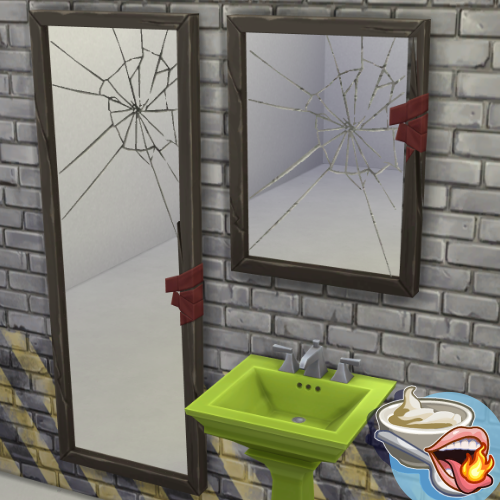
The Seven Years Unlucky Mirror that fits over a sink! Perfect for abandoned, shaby, tashy and grunge builds! I love this mirror, I just think it's a bit too big. So I made a smaller version. It comes in all the original swatches. This was my first time using blender so I decided to make something simple and that I'd always wished the game had. I'm pretty happy with the results! I hope you like it! Instalation Download the files and drop them into your mods folder. If you're making a trasy bathroom, you might wanna take a look at this mod. Join me on Patreon to see all my other mods! It's free! https://www.patreon.com/cw/SpcYogrt (I reply faster to comments left on Patreon.) -
Smaller Broken mirror from Werewolves View File The Seven Years Unlucky Mirror that fits over a sink! Perfect for abandoned, shaby, tashy and grunge builds! I love this mirror, I just think it's a bit too big. So I made a smaller version. It comes in all the original swatches. This was my first time using blender so I decided to make something simple and that I'd always wished the game had. I'm pretty happy with the results! I hope you like it! Instalation Download the files and drop them into your mods folder. If you're making a trasy bathroom, you might wanna take a look at this mod. Join me on Patreon to see all my other mods! It's free! https://www.patreon.com/cw/SpcYogrt (I reply faster to comments left on Patreon.) Submitter SpcyYogrt Submitted 08/14/26 Category Objects Requirements Werewolves Gamepack
-
Built this a few days ago & this retail venue flew right over my fucking head. I built, an appliance store, a candy store, a crystal store, a electronics store BUT NOT A SEX TOY STORE 😂🙄🤦🏻♂️ So here it is and let the lube fly off the shelves 🤙🏻✨🏳️🌈🏳️⚧️⚧️🤎🖤