
Your monitor stays normal. OBS gets a censored picture.
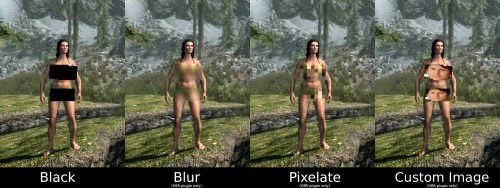
Skyrim Streamer Mode watches the game and tells OBS where to cover a body. Black rectangles over the pelvis and chest, or a black screen for menus and load screens. Your own screen is never modified — only the picture you send to Twitch/Kick/etc.
Skyrim Streamer Mode watches the game and tells OBS where to cover a body. Black rectangles over the pelvis and chest, or a black screen for menus and load screens. Your own screen is never modified — only the picture you send to Twitch/Kick/etc.
Features
- Your monitor stays untouched — censoring only happens in a separate
OBS feed. - Frame-exact. Rectangles are built inside the game before OBS sees the
picture, so they never lag behind a fast camera turn. - Black, blur, pixelate or your own image — chosen separately for
bodies and for the whole frame. - Follows the body — rotation and lean, with its own size and
All/Female/Male filter for pelvis, chest and extra zones. - Scenes — frameworks for adult content are detected automatically, and scenes are censored at the appropriate moment.
- Creatures — 27 kinds, each with its own choice of rectangle.
- Anything else — look at it, press a key, it is covered.
Installation
- Install the main file with Mod Organizer 2 or Vortex.
- Enable the mod and tick SkyrimStreamerMode.esp on the Plugins tab.
- Launch through SKSE, load a save, then Pause → Mod Configuration →
Skyrim Streamer Mode.
The recommended way: OBS plugin
Install the optional download "OBS plugin" (manual install into your OBS
folder), then in the scene you stream to Twitch/Kick/etc. add the source "Skyrim (StreamerMode)".
Why this one:
- It is exact. The picture is censored inside the game, frame by frame, before OBS ever receives it. No catching up, no lag behind a fast camera turn.
- That feed physically cannot contain an uncovered frame — the raw pixels are not in that scene at all.
- Blur, pixelate or custom image instead of black boxes, if you prefer that look.
The simple way: browser overlay
No extra install: keep your normal Game Capture and add a Browser Source
above it:
- URL: http://127.0.0.1:8765/
- Width / Height: your canvas size, e.g. 1920 × 1080
Read this before using the overlay. It draws on top of OBS's own capture, so it is always a step behind the game: during a fast camera spin or a sprint the rectangles can lag by a frame, and the raw picture is still in the scene underneath them.
If you use the overlay, make the rectangles noticeably bigger (MCM → Rectangles → Width / Height) and keep "Motion margin" above zero. Trading a slightly larger black box for a safety margin is the whole point.
(There are also auxiliary URL's, such as http://127.0.0.1:8765/debug or http://127.0.0.1:8765/state. Port can be reconfigured in MCM.)
Settings (MCM)
- People — who gets covered, and what counts as undressed
- Rectangles — size, position, rotation and All/Female/Male filter for
pelvis, chest and extra-bone rectangles (chest defaults to Female) - Creatures — 27 kinds, each with its own choice of rectangle
- Objects — non-actor objects and anything another mod adds
- Menus & scenes — optional black screen per menu, automatic SexLab/
OStim detection, and enlarged rectangles / whole-frame scene behavior - Hotkeys — every binding in one place: the full-frame key, the
mark-object key and the show-rules key. With modifiers. - OBS connection — the browser overlay and the OBS-plugin options.
Network and privacy
The overlay mode runs a tiny web server on 127.0.0.1 only (your own machine, port configurable). It serves the rectangle positions to your browser source. Nothing is sent anywhere, there is no telemetry, no auto-update, no account.
Nexus - Streamer mode at Skyrim Special Edition Nexus - Mods and Community
Edited by xiqima
What's New in Version 2.3.0
Released
New Creatures censorship features.
New non-actor Objects censorship features with hotkey mark tool.
Some OBS game capture fixes.
MCM rearranged.
Simplified Chinese translation.
xiqima