About This File
AAF Informer is the F4SE plugin to simplify obtaining of AAF scenes information in Papyrus scripts.
AAF Informer consist of 3 parts:
- AAFInformer.dll - F4SE plugin
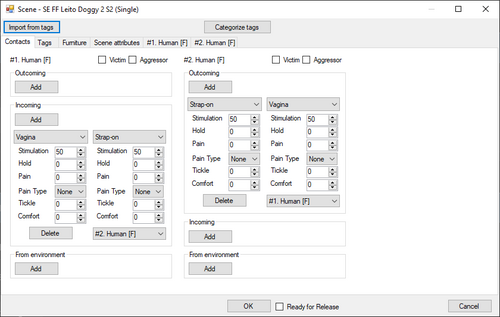
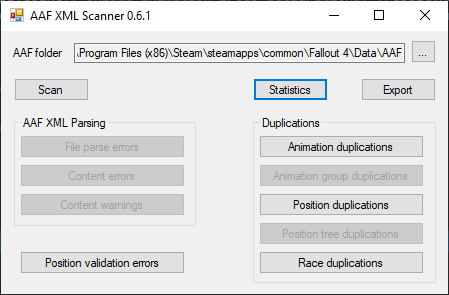
- AAFCollector.exe - service executable to parse AAF XML files
- Info.pex/Info.psc - Papyrus script to access AAFInformer.dll API
How it works:
At the game start up AAFCollector.exe is started to parse AAF XML files. When it finishes all collected information memorised in F4SE plugin and later this information can be accessed via API calls from Papyrus script.
Following information is available:
- For scenes (actually, positions in AAF terminology) that you can see in AAF UI - see SceneInfo structure in Info.psc
- For scene participant(s) - see ActorInfo in Info.psc
Most information is obtained from tags defined by animation authors or by themes. Themes are essential to get information from AAF scenes. Without themes installed, most likely your script will not receive usefull information.
Tags that defines types of actors (like F_F or F_M) are ignored. Actor types retrieved from animation definitions.
Tags that defines furniture are ignored. Furniture information retrived from positionData XMLs
Note: animation author's XML files and themes XML files contains a lot of mistakes. Fixing them is out of scope of this tool, but I hope all mistakes will be elimenated sooner or later.
To simplify mistakes detection usefull logs could be found in %userprofile%\documents\My Games\Fallout4\F4SE\AAFInformer.log
Also this log contains error messages generated by AAFCollector.exe
Implementation details:
What tags are supported? All tags falls into several categories:
How values are applied to actors?
The tags systems to define actor's values like stimulation level or held level seems novice. So some assumptions are made to calculate final values for actors
Also tag system to define contact between actors is very scarce and much more assumptions are used.
Calculation details could be found in processor
Example of script
function PrintActorInfo(AAF:Info:ActorInfo ai)
    if !ai
        Debug.Notification("No actor info")
        return
    endif
    string report = "" + ai.Index + ". " + ai.Participant.GetDisplayName() + " (" + ai.Type +"): "
    if ai.IsAggressor
        report += "/Aggr"
    endif
    if ai.IsVictim
        report += "/Vict"
    endif

    if ai.IsHandGiver
        report += "/HG:" + ai.IsHandGiver
    endif
    if ai.IsHandTaker
        report += "/HT:" + ai.IsHandTaker
    endif
    if ai.IsLegGiver
        report += "/LG:" + ai.IsLegGiver
    endif
    if ai.IsLegTaker
        report += "/LT:" + ai.IsLegTaker
    endif
    if ai.IsOralGiver
        report += "/OG:" + ai.IsOralGiver
    endif
    if ai.IsOralTaker
        report += "/OT:" + ai.IsOralTaker
    endif
    if ai.IsGenitalTaker
        report += "/GT:" + ai.IsGenitalTaker
    endif
    if ai.IsGenitalGiver
        report += "/GG:" + ai.IsGenitalGiver
    endif

    if ai.IsAnalTaker
        report += "/AT:" + ai.IsAnalTaker
    endif
    if ai.IsButtTaker
        report += "/BT:" + ai.IsButtTaker
    endif
    if ai.IsNippleTaker
        report += "/NT:" + ai.IsNippleTaker
    endif
    if ai.IsOtherGiver
        report += "/OtG:" + ai.IsOtherGiver
    endif

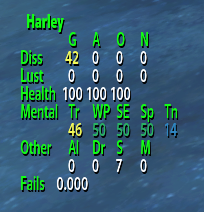
    report += ", Held=" + ai.HeldLevel + ", Stim=" + ai.StimLevel + ", Love=" + ai.LoveLevel + ", Dom=" + ai.DomLevel
    Debug.Notification(report)
endfunction

function PrintActorsInfo(AAF:Info:ActorInfo[] ais)
    if !ais
        Debug.Notification("No data")
        return
    endif
    int i = 0
    while i < ais.Length
        PrintActorInfo(ais[i])
        i += 1
    endwhile
endfunction

function Report(var[] args)
    Actor[] actors = Utility.VarToVarArray(args[1]) as Actor[]
    AAF:Info:ActorInfo[] ais = new AAF:Info:ActorInfo[actors.Length]
    int i =0
    while i < ais.Length
        ais[i] = new AAF:Info:ActorInfo
        i += 1
    endwhile
    AAF:Info:SceneInfo s = AAF:Info.GetSceneAndActors(args[2] as string, actors, ais)
    Debug.Notification("[" + s.Name + "] by [" + s.Author + "] started! " + " Furn="+s.FurnGroup)
    PrintActorsInfo(ais)
endfunction

Event AAF:AAF_API.OnAnimationStart(AAF:AAF_API sender, var[] args)
    if args[0] as int == 0
        Report(args)
    else
        Debug.Notification("Failed to start AAF scene")
    endif
Endevent

Event AAF:AAF_API.OnAnimationChange(AAF:AAF_API sender, var[] args)
    if args[0] as int == 0
        Report(args)
    endif
Endevent
Known issues:
1. Some positions contains location attribute that has multiple furniture groups separated by comma. Such locations are handled, but I can't test it as such position does not appear AAF UI. Probably defining multiple furniture groups is invalid location definition, but without original AAF source code it hard to say definitely.
2. I had no chances to test AAF sex overriding with keywords. So not sure is it even working.
3. With current system of tags it is not possible to recognize how actors are contacted with each other, so all contacts for actors with index greater than 0 are applied to actor with index 0. So scenes like "BP70 Lesbian Threesome..." might have irrelevant contact information. See below.
Next steps:
- try to introduce new tags system to allow definition of actors contacts exacly. This plugin will be updated on succees.
- try to introduce new tags system to allow definition of Held/Love/Dom/Stim values for each actor. This plugin will be updated on succees.
- try to introduce new tags system to allow definition of actor position for actors with index greater than 0. This plugin will be updated on succees.
New system to define contacts beween actors in scenes.
It is a problem to understand how actors are contacted in scene when tag for it is defined like HandToMouth or PenisToEither in case where more than 2 actors participate in scene.
To solve this problem new format of contacts definitions is introduced. The base is same, as introduced in AAF Themes, but extra data is necessary to difine actors that related to the contact definition.
An example of tag: PenisToEither:1-0
1-0 is the definition of contact direction. From actor with index 1 to actor with index 0. So actor 1 uses Penis to contact with actor 0, and actor 0 is contacted by Either (Genital+Anal)
This tag works exactly as PenisToEither when 2 actors are defined for scene where actor 0 is receiver, and actor 1 is giver. But it can be used for scenes with more than 2 actors.
More complex example:
<tag position="BP70 Lesbian Threesome 6" animation="rxl_bp70_lesbianthreesome06" tags="BP70,F_F_F,NoFurn,Cunnilingus,FromFront,Neutral,Climax,Held1,Love5,Stim3,Dom3,MouthToVagina:1-0,MouthToVagina:2-1,MouthToVagina:0-2"/>
3 tags defines 3 contacts between 3 actors - MouthToVagina:1-0,MouthToVagina:2-1,MouthToVagina:0-2
In this case it is not a problem to understand how actors contacted with other.
Additional benefit- tags like TongueToAnus can be correctly supported.
Usually, actor 0 is the victim in agressive scenes. And tags like PenisToAnus should means that agreessor (actor 1) uses Penis, and victim (actor 0) - Anus. I.e. direction is defined from agressor to victim. And this is ok for most of contacts definitions. But for TongueToAnus direction should be defined from victim to agressor. It can be solved by changing order of actors in scene definition, but this will mean that actor 0 should not be treated as victim.
New system allows to define correct direction by TongueToAnus:0-1. I.e, from actor 0 (victim, Tongue) to actor 1 (agressor, Anus) but keep actor 0 as a victim without scenes alteration.
Also, it is not a problem to define contact from actor to the same actor. Like HandToStick:0-0 or HandToFeet:5-5
Sample file with contacts that handles tentacles made by Snapdragon_
Feel free to request new features.
Edited by Dlinny_Lag
What's New in Version 0.8.0
Released
Added Anniversary Update patch (1.11.159)
Added Anniversary Update patch (1.11.169)
Added Anniversary Update patch (1.11.191)
Added Anniversary Update patch (1.11.221)
Added Anniversary Update patch (1.11.240)
Fixed XML syntax errors handling. Prevent 0xC00000FD error