Jump to content

Tutorial: How to duplicate an existing SOS Addon to make your own [QUICK N' DIRTY EDITION]


donnerwetter

18774 views

Have you ever wished you could use more than one version of the same schlong simultaneously? Maybe you want one that uses SOSmale.hkx and one to use SOSfemale.hkx. Maybe you installed my ERF Horse Penis Redux mashups and want to use more than one version at the same time. Well, I'm going to show the way I do it.


Do note though that as the title says, this is the quick and dirty way, which means we are only duplicating and changing the absolute minimum amount of things necessary to get a separate schlong addon to show in the MCM and for it to use its own mesh and textures. All the other things that make up a schlong addon, such as potions and code related to gender and race probabilities will be left untouched and shared with the parent schlong. Presumably this will fuck with SOS mechanics that distribute schlongs to NPCs, but since I do not use those mechanics, I don't care. If you DO care about such things, you are welcome to duplicate, rename and then painstakingly reassign EVERYTHING in the addon.


Anyway, we'll be using XEdit. Hope you have it installed (google for information on how to do so.) For this example, I'll be using the .esp from TRX Futanari Addon. Once you load the esp, it should look like this:


1583596926_tuttut(1).png.8a28f06f40fc50d1a08df7c03cf7e929.png


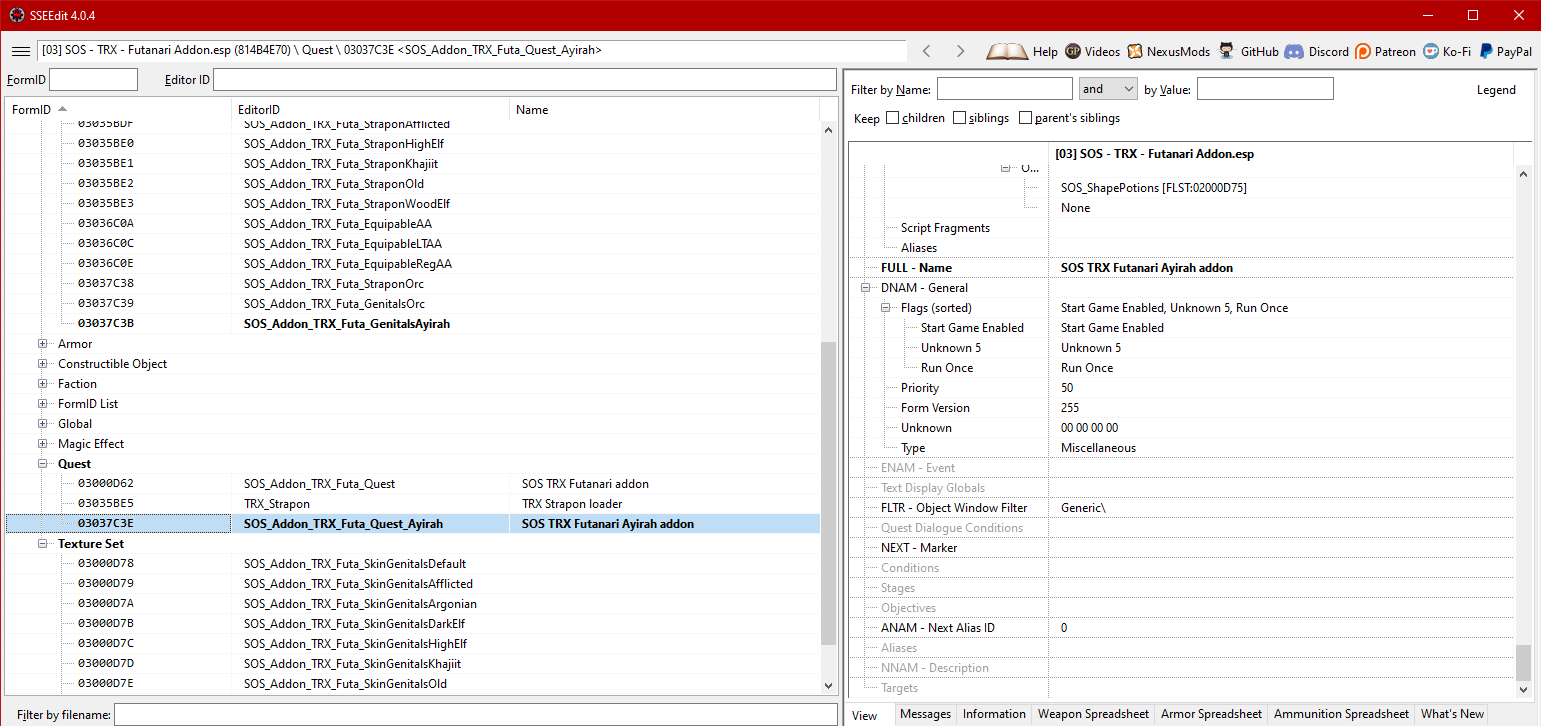
What we need to do is duplicate the correct records to get a separate schlong addon with its own mesh and textures, I will start with the textures:


988873017_tuttut(2).png.508dc1db0c3f2b21d92386876c3ef1ad.png


If we were being thorough, we would duplicate each of these records. But since we're all about doing things as quickly and lazily as possible, I will only duplicate the "Default" Texture Set since I only play as human characters anyway. If you play as other races, you might want to duplicate the texture sets relevant to you. Regardless, right click on a texture set you want to duplicate and select "Copy as new record into"
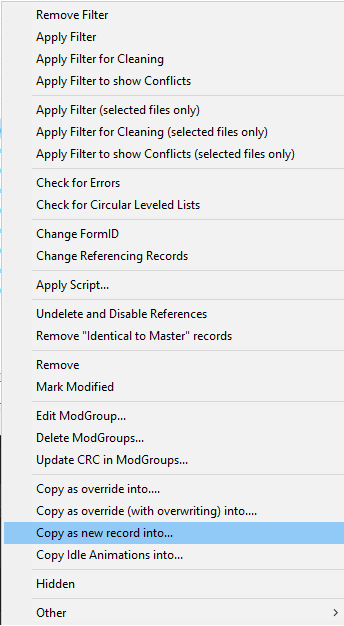
 

rightclick.png.e84c7453cce319d90e61ec5ae96ffae5.png


XEdit will ask you to change the EditorId. I am making a schlong addon for a character named Ayirah, so I will simply replace "Default" with "Ayirah".
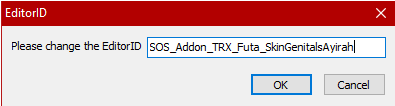
 

editorid.png.a0c98ae1b43dc9bdc889257c26b07d66.png


Next you will be asked which of the loaded files you want to add this new record into. We will choose the schlong addon we have been working on.
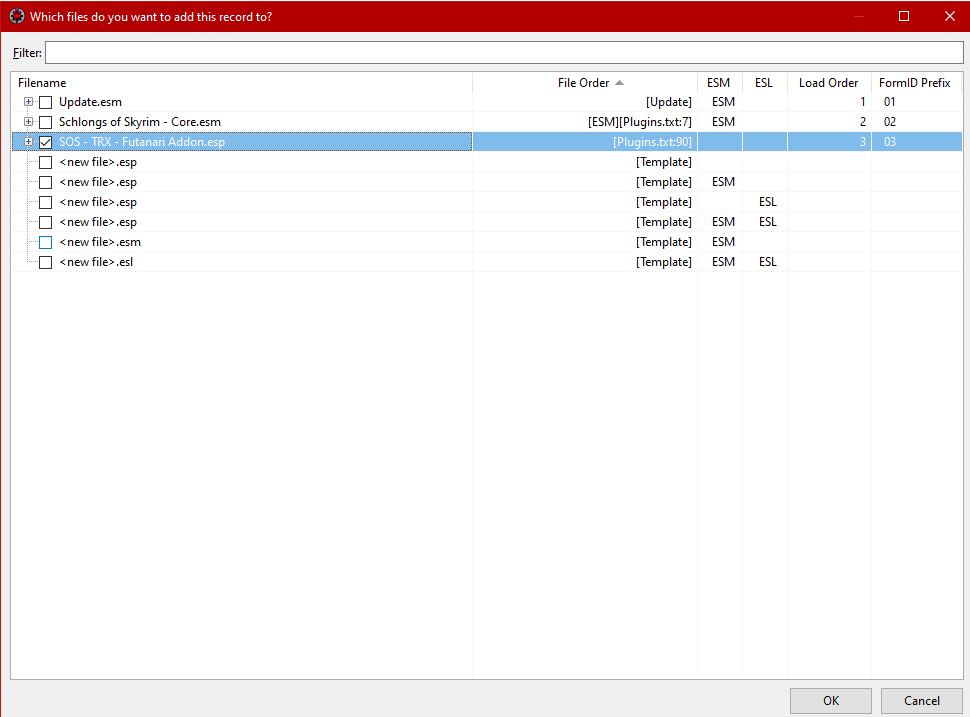
 

whichone.png.e6db30350c1d23c4c0554626bf5c602e.png


Congratulations! You have made a new texture set. Now to change the texture paths- my character will only need separate diffuse and normal maps from the regular addon, so those are the ones I will be editing. I'm going to place her textures in a folder named "Ayirah" inside the regular texture folder. You will notice that I'll do the same with the meshes too.
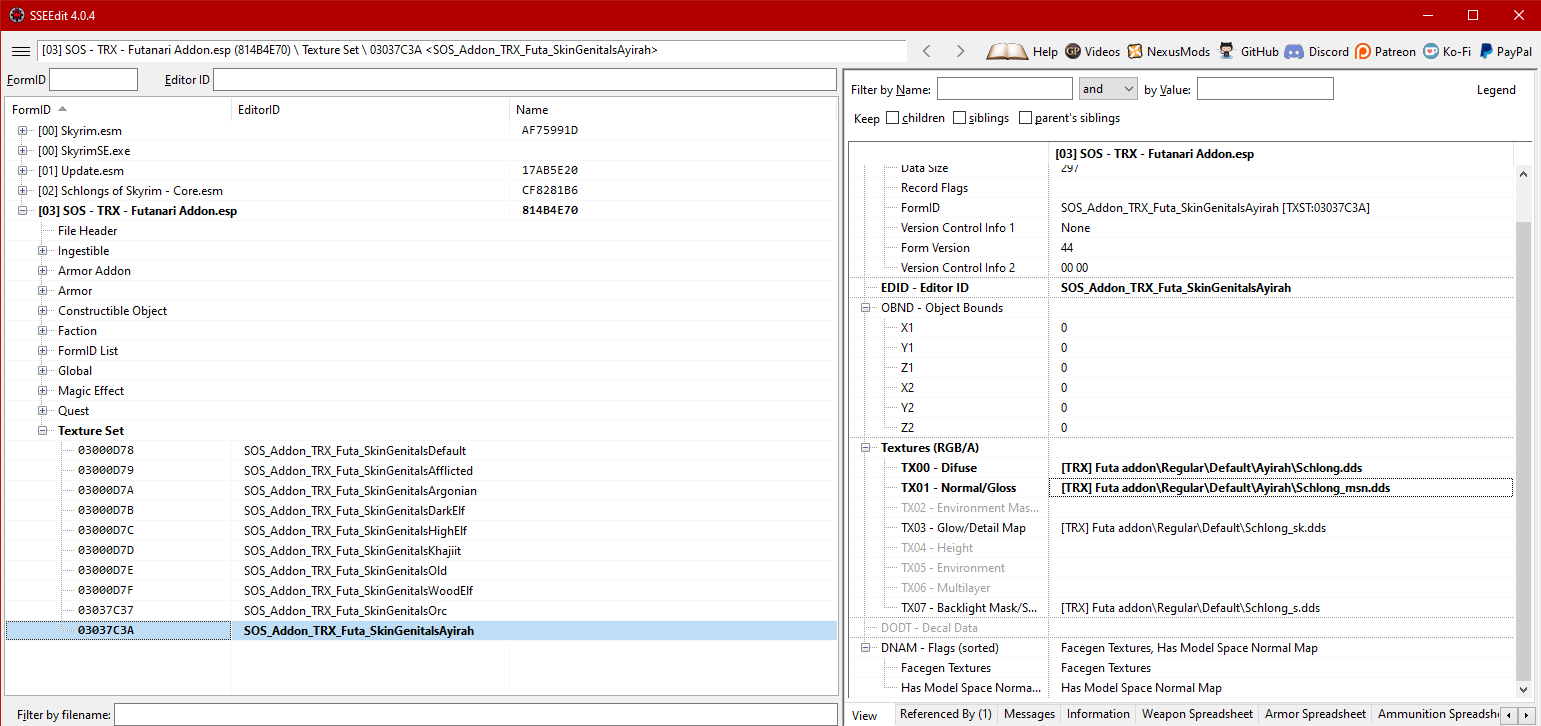
 

tuttuttut.png.06f4c81f54e97b8c040f54631dbe7fac.png


Next, we will go take a look at the Armor Addon records. Much like before, if we were being thorough, we would duplicate all 9 AA records, but again, I'll only need to duplicate the Default one for my purposes. (Your situation may be different)


1289079639_tuttut(9).png.8b660b596a2037e65fbd04b18fa19231.png


Duplicate and rename the record(s) you need the same way you did with the Texture Sets before. Then change the "Female world model" record (if this is a male addon, you will obviously need to change the male one instead) to point to the location you have chosen for the new mesh. Like I said, I'm just placing new folders inside the ones already existing in the mod and keeping the existing .nif name. The reason for this is that this way you don't need to rename the schlong .nifs once you have built them in BodySlide, just build them into the overwrite folder and place them inside the new folder you made. You will also need to alter the Female Skin Texture record and select the Texture Set you made previously.


813705420_tuttuttut(2).png.1f05b5fa84371722740f842504b2b7e7.png


Next up is the Armor Record. Just like before, copy the record and rename it. Then in the Armature section, select the Addon(s) you made in the previous step.


420871932_tuttut(12).png.6be09dfa76c290bd6189b93dd908c5cb.png


Now, we move on to the Faction record. This is what gives the addon the name it will be listed under in the SOS MCM. Once again, copy and rename the record. Afterwards, alter the text field next to Full - Name and give your new addon whatever name you wish.


1799033860_tuttut(13).png.3b946894c40eb4fada16b950ebe32309.png


Finally, we can tackle duplicating the SOS Addon quest. After you've done so, find the SOS_Addon_Faction and SOS_Addon_Genitals properties and change them to the Faction and Armor (Note: Armor, not ArmorAddon! Make sure it has the ARMO prefix) you made in previous steps. Finally, give the quest a new name, save the .esp and exit XEdit. You're done!


94135193_tuttut(16).png.532589aeef65c6338789ee8196976b50.png530604232_tuttut(15).png.d4a570d71e453615025af04995eb9c3e.pngtuttuttuttut.png.645ffb173d13f2473ef2348f185432b5.png


Now to check if our new addon works in game... success!
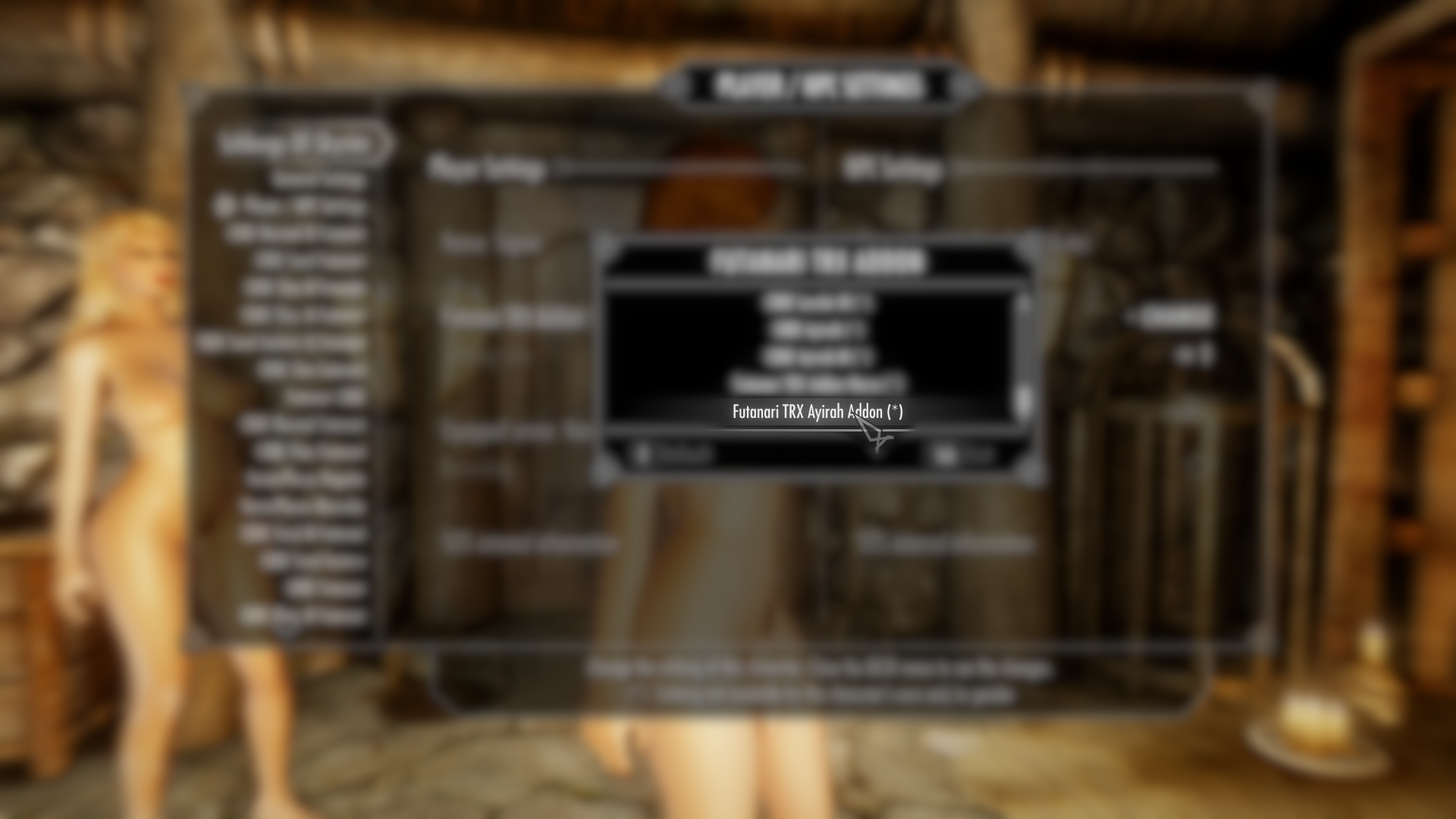
 

success.png.11caa59586574dffb354dd2b33818899.png

Edited by donnerwetter

40 Comments


Recommended Comments


david011191

Posted

Heya.


I'm a bit new to modding but I think I've done it the same way it was presented in the Tutorial.

But eveytime I load up my game the added new Schlong gets disabled, since the game thinks it is a "dirty" plugin.

Any idea / way I can bypass it or make it work?

donnerwetter

Posted

1 hour ago, david011191 said:

Heya.


I'm a bit new to modding but I think I've done it the same way it was presented in the Tutorial.

But eveytime I load up my game the added new Schlong gets disabled, since the game thinks it is a "dirty" plugin.

Any idea / way I can bypass it or make it work?


I think I or someone once had this issue but I can't remember what was done to fix it. You may need to try again

david011191

Posted (edited)

20 hours ago, donnerwetter said:


I think I or someone once had this issue but I can't remember what was done to fix it. You may need to try again

Hmmm, yeah I've tried that. For some reason when I've done this exact method with the ERF mod then everything was fine, but I'd prefer the TRX one, since it's more customizeable.

Went through the process back and forth can't really see the problem.

SOS - TRX - Futanari Addon.esp

Edited by david011191
das ist wurzig

Posted (edited)

Sadly I have that same problem. Followed all the steps and double checked, got that dirty plugin error as well.


Update: Alright so starting a new game managed to fix the issue but after selecting the new man made schlong it will not show up to my character lol


Update: never mind, its working fine now.

Edited by das ist wurzig
Bastak21

Posted (edited)

Hello I want to add custom meshes to new addon I created. After doing your steps I had a new schlong addon in the game normally with the same texture and meshes of the copied one. İn order the change the meshes of new addon I Putted new mesh files to the same path with different names.

Spoiler

2024-02-03_19-29-26.png.6dad970e0cfe251961889ba001f9ba6f.png

Then I changed Some parts in tesedit/armor addon section starting with "malegenitalsf_1.nif" to "malegenitalsfUNCUT_1.nif".But I couldn't find any replacement for "malegenitalsf_0.nif" in tesedit.

Spoiler

2024-02-03_19-30-44.png.b99eb91549ee6eb5cd5d77a27be4e371.png

After doing this steps. New Schlong addon still uses the same mesh of the copied one in the game. What did I do wrong or missed? How can I change the meshes of the new schlong addon I created?

Edited by Bastak21
donnerwetter

Posted

1 hour ago, Bastak21 said:

Hello I want to add custom meshes to new addon I created. After doing your steps I had a new schlong addon in the game normally with the same texture and meshes of the copied one. İn order the change the meshes of new addon I Putted new mesh files to the same path with different names.

  Hide contents

2024-02-03_19-29-26.png.6dad970e0cfe251961889ba001f9ba6f.png

Then I changed Some parts in tesedit/armor addon section starting with "malegenitalsf_1.nif" to "malegenitalsfUNCUT_1.nif".But I couldn't find any replacement for "malegenitalsf_0.nif" in tesedit.

  Hide contents

2024-02-03_19-30-44.png.b99eb91549ee6eb5cd5d77a27be4e371.png

After doing this steps. New Schlong addon still uses the same mesh of the copied one in the game. What did I do wrong or missed? How can I change the meshes of the new schlong addon I created?


Just to check- you also made new Armor records in addition to Armor Addon ones, right?

Bastak21

Posted (edited)

53 minutes ago, donnerwetter said:


Just to check- you also made new Armor records in addition to Armor Addon ones, right?

 I only did what you showed in the screenshots and made "Copy as new record into" to armor section with new name and haven't touched anything additionally.

Spoiler

2024-02-03_22-04-49.png.0fce8bb3aab7901feb705dad7be70761.png

Am I supposed to change something here?

Edited by Bastak21
donnerwetter

Posted (edited)

6 hours ago, Bastak21 said:

 I only did what you showed in the screenshots and made "Copy as new record into" to armor section with new name and haven't touched anything additionally.

  Hide contents

2024-02-03_22-04-49.png.0fce8bb3aab7901feb705dad7be70761.png

Am I supposed to change something here?


Ahh, I see the issue now. See the Armature section that I highlighted? This is where you link your Armor Addons to the Armor record. Yours still point to the default schlong Armor Addon records, which is why you're not seeing your custom schlong.


changetherse.png.b7a0c815e15e75259b3777ee9ebd05ca.png


Click on each of these records and change them to your UNCUT versions.

Edited by donnerwetter
Bastak21

Posted

5 hours ago, donnerwetter said:


Ahh, I see the issue now. See the Armature section that I highlighted? This is where you link your Armor Addons to the Armor record. Yours still point to the default schlong Armor Addon records, which is why you're not seeing your custom schlong.


changetherse.png.b7a0c815e15e75259b3777ee9ebd05ca.png


Click on each of these records and change them to your UNCUT versions.

Oh, It actually worked. Thank you

gerkesiz

Posted

I'll try added TRX-ERF Hybrid schlong textures for each skins to esp.  Dw's Vaginaless CBBE 3BA 2.1.7 . Is that possible ? 

Spoiler

image.png.ee840617f198d2a1af48967b4ab9e34c.png


image.png.3da031a6d23e776314f875f0c4a677da.png


First image textures location ( I copied schlong textures there) and second one ise meshes. I just copied schlong1.nif from regular folder to other skin folders. But  this nif "TRX" schlong. I build hybrid one on bodyslide and thats output path :   Meshes\[TRX] Futa addon\Regular\trx_schlong_0.nif (and _1.nif) 
So did bodyslide put file in Trx futa addon mod directly ?

donnerwetter

Posted (edited)

29 minutes ago, gerkesiz said:

I'll try added TRX-ERF Hybrid schlong textures for each skins to esp.  Dw's Vaginaless CBBE 3BA 2.1.7 . Is that possible ? 

  Hide contents

image.png.ee840617f198d2a1af48967b4ab9e34c.png


image.png.3da031a6d23e776314f875f0c4a677da.png


First image textures location ( I copied schlong textures there) and second one ise meshes. I just copied schlong1.nif from regular folder to other skin folders. But  this nif "TRX" schlong. I build hybrid one on bodyslide and thats output path :   Meshes\[TRX] Futa addon\Regular\trx_schlong_0.nif (and _1.nif) 
So did bodyslide put file in Trx futa addon mod directly ?


It did, yes. If you hold CTRL while building the files are instead output into your root BodySlide folder from where you can move them where you want. Alternatively, you can edit the TRX schlong project to change the output path so they'll instead save to your desired custom folder (Make sure not to overwrite the original project though)

Edited by donnerwetter
Vaultbomb89

Posted

Hi how i get a Bodyslide preset for my new addon?

donnerwetter

Posted

10 hours ago, Vaultbomb89 said:

Hi how i get a Bodyslide preset for my new addon?


What do you mean, exactly? Just download or make a new preset and use that when building the meshes for your new addon.

ad42121w2113

Posted (edited)

my mesh still the same

Screenshot 2025-09-17 210155.png

Edited by ad42121w2113
TheDisgracedMarlin

Posted (edited)

Everytime I try this method I get dirty plugins.


Edit: Turns out you need size, and probability globals for each individual race, I didn't know this.

Edited by TheDisgracedMarlin

×
×
  • Create New...