Alpia
-
Posts
1030 -
Joined
-
Last visited






-
Alpia Scribbles Slavetats Pack
Alpia replied to Alpia's topic in Downloads - Skyrim: Special Edition Adult Mods
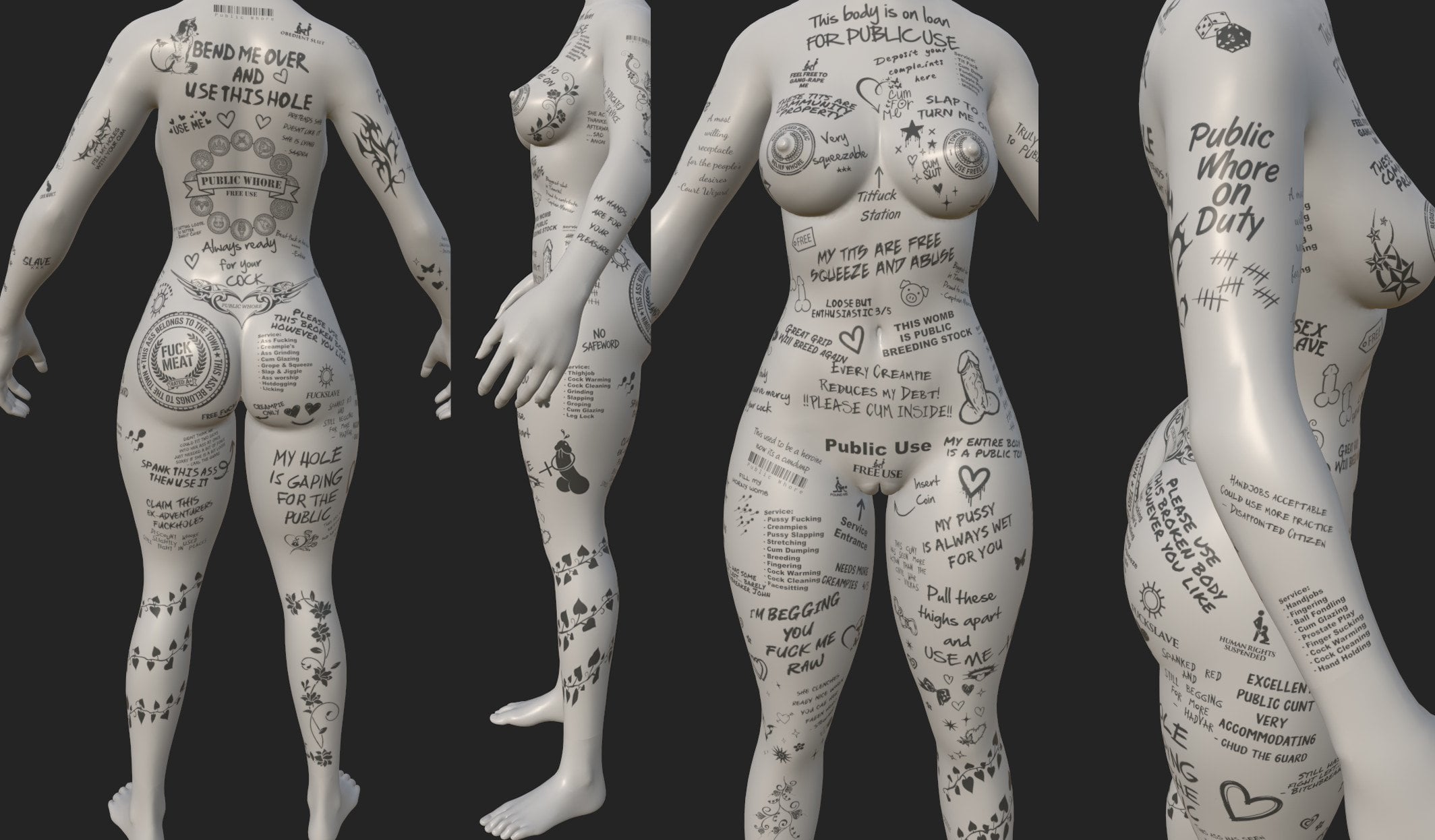
Mmh generally I dont mind. The mod is already 18gb and has 1200 textures. Its always a bit of a balance act if its worth to make something its own separate texture or make it part of a "filler" layer as no matter how big or small its always the same file size. Anyway I did update it now its probably too many variations but whatever. I left what was in it and made some additional "Progressive" layers. The tramp stamp area is free so you can use either the tramp stamp from the set or from the PW replacer in the tattoo dump. Also threw something together for the face and included some smaller tattoo's as individual tattoo's that where part of others or the fillers. Still not quite sure on the approach on the progressive tattoo. There is two ways to make it make sense either each layer is a addition without the previous layer or each layer includes the previous layer. I went with the later so it doesnt use up half a dozen slots, but the benefit of making each layer independent would be it could be colored individually. Long story short those are new: Arm R Lower 1B - PW Service List Only Chest 1C - PW Deposit Your Complaints Chest 1C - PW Loan Public Use Only Chest 1C - PW Service List Only Ribs R Upper 2A - PW Service List Only Full - PW Progressive 1 (Body) Full - PW Progressive 2 (Body) Full - PW Progressive 3 (Body) Full - PW Progressive 4 (Body) Full - PW Progressive 5 (Body) Full - PW Progressive 6 (Body) Left Arm LA - Fill Holes my holes Left Breast LBr - Cum Slut Right Buttcheek RBc - PW Service List Only Right Leg RL - PW Service List Only Throat 3d - Public Whore Tramp Face FA - PW Service List Only Forehead FH - Public Whore Full - PW (Face) Full - PW 2 Filler 1 (Face) Full - PW 2 Filler 2 (Face) Full - PW 2 Progressive 1 (Face) Full - PW 2 Progressive 2 (Face) Full - PW 2 Progressive 3 (Face) Full - PW 2 Progressive 4 (Face) Full - PW 2 Progressive 5 (Face) Mouth - Bitch Mouth - Cum Dumpster Alpia Slavetats SE (08.2026-rev1).7z Alpia Racemenu Plugins (08.2026-rev1).7z Alpia - Public Whore Rtats Settings.json For Rtats manual merging only the changes: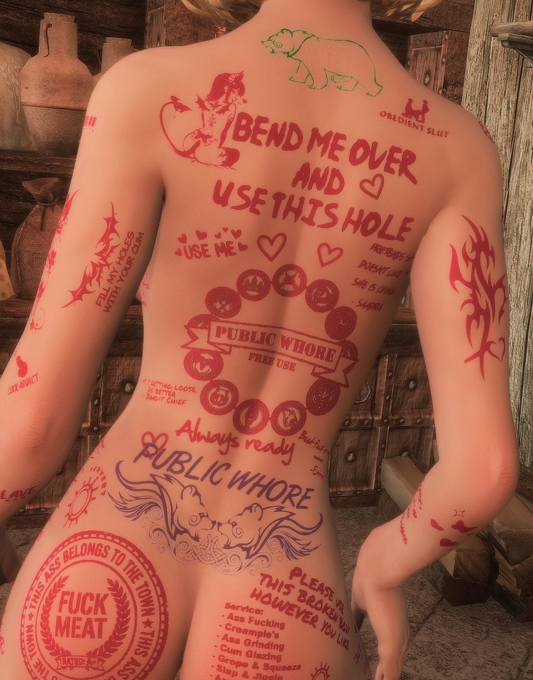
-
Rape Tattoos Continued
Alpia replied to elliesec's topic in Downloads - Skyrim: Special Edition Adult Mods
You can merge them with a text editor open the settings.json in Documents\My Games\Skyrim Special Edition\JCUser\rTats There your already existing settings are stored if you have any already. If not use one of the two you said you want to merge as base. If you open it you find a lot of entries like this or from whatever pack: }, "Alpia Scribbles V2\\Bandit\\1c - Bandit slave (g).dds": { "Group": "misc 1 - c" }, "Alpia Scribbles V2\\Bandit\\1c - Feed me.dds": { "Group": "misc 1 - c" Just copy all the entries from one file to the other, but pay attention to the format with the brackets and comma's. The file always starts with "{" { "Alpia Scribbles V2\\Bandit\\1a Side - Slave (g).dds": { "Group": "misc 1 - a" }, "Alpia Scribbles V2\\Bandit\\1b Side - Whore.dds": { "Group": "misc 1 - b" }, "Alpia Scribbles V2\\Bandit\\1c - Bandit slave (g).dds": { "Group": "misc 1 - c" The end of the file should look like this below instead of " }," its just " }" and one last " }" to mark the end of the file }, "Alpia Scribbles V2\\Bandit\\UB - Hero-Hoe of Whiterun (g).dds": { "Group": "Upper Back" }, "Alpia Scribbles V2\\Bandit\\UB - Make me your slut (g).dds": { "Group": "Upper Back" } } -
Alpia Scribbles Slavetats Pack
Alpia replied to Alpia's topic in Downloads - Skyrim: Special Edition Adult Mods
If you have a settings.json present in the SKSE location it should write the changes there, if you have it in documents it'll write there. Data/SKSE Path > mydocuments if both are present, but ideally I'd keep it in one place. Saw the error in your papyrus logs I have updated it missed a script. Should work again. Also took the chance to make the color config also variable so its not split from the rest. Same priority. ; 1. Data/SKSE/Plugins/RapeTattoos/ColorConfig/colorConfig.json ; 2. JCUser/rTats/colorConfig.json -
Alpia Scribbles Slavetats Pack
Alpia replied to Alpia's topic in Downloads - Skyrim: Special Edition Adult Mods
Thank you, those are some really nice screenshots I saw the one on the leash framework page and already thought "damn... that looks good". I may use a few or put them in the blog I have linked on the main page unless you make your own than I link to that. Its always nice to see the tattoo's actually used like when I browse a mod thread, see a screenshot and I'm like... Thanks, quite possible that the cow doesnt have a face tattoo if I remember I'll make one at some point. as for the hands and feet... multiple reasons one is that hands and feet are indeed quite small often found myself seeing rtats apply a tattoo and I have to look where the heck its even at as on foot and hand they are not very visible. Hand and Feet also have their own mesh so I have to switch back and forth between body and the other parts. Its like Skyrims infamous load screens when you go back and forth in the program, its not a big deal, but a nuisance. Probably the biggest factor is the hands, as adobe substance painter goes by the bodies uv map which is in square format so like 1024x1024, but the hands overlay used by slavetats/racemenu expects rectangle so like 1024x512 so I need to reposition and crop every single tattoo in photoshop/clip studio after exporting it. Long story short since they are not very visible and a nuisance I kinda just stopped bothering with them. Zaki's tattoo pack which I'll always praise for its quality and structure has a good amount that can fill the gap. -
Alpia Scribbles Slavetats Pack
Alpia replied to Alpia's topic in Downloads - Skyrim: Special Edition Adult Mods
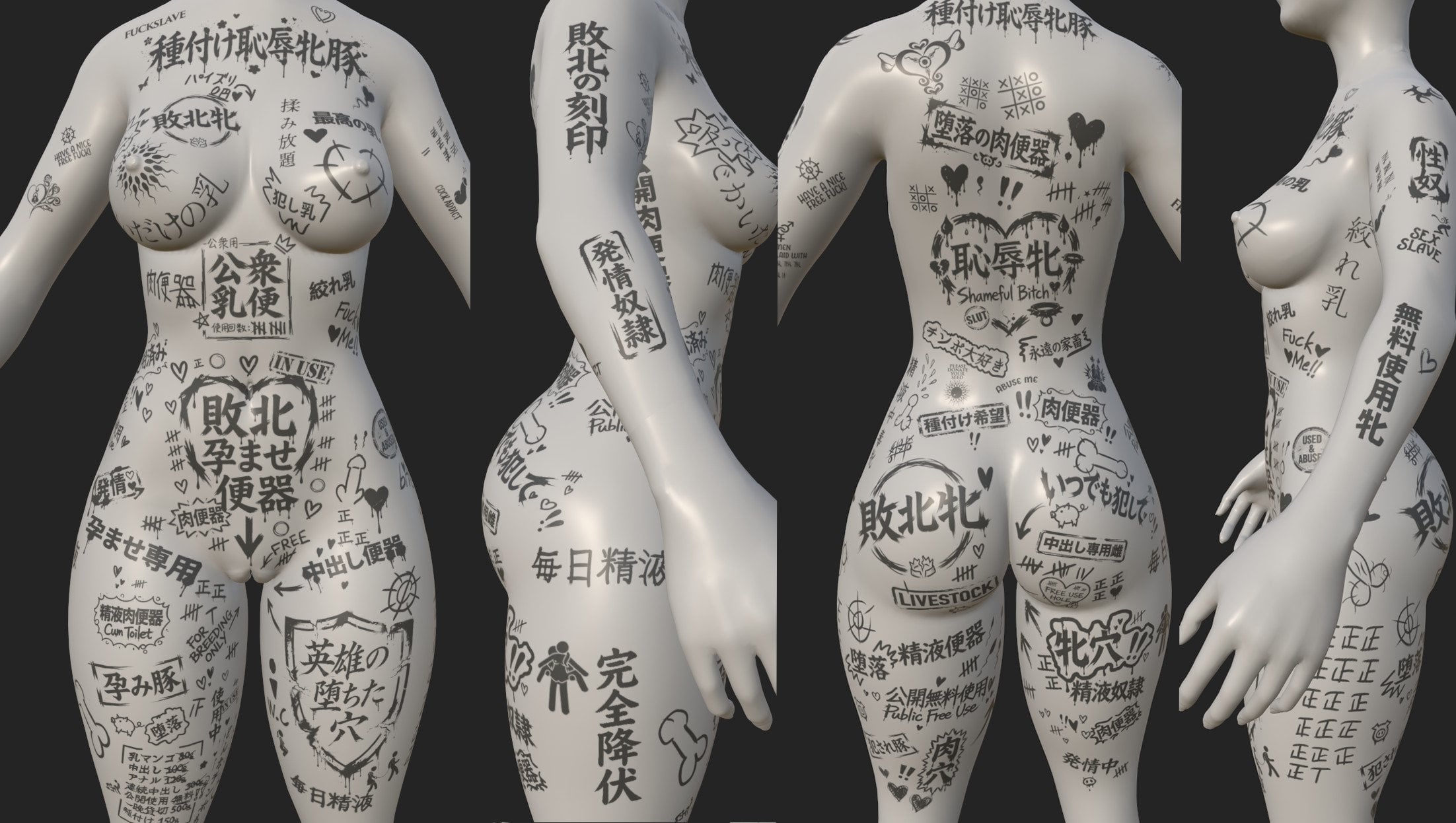
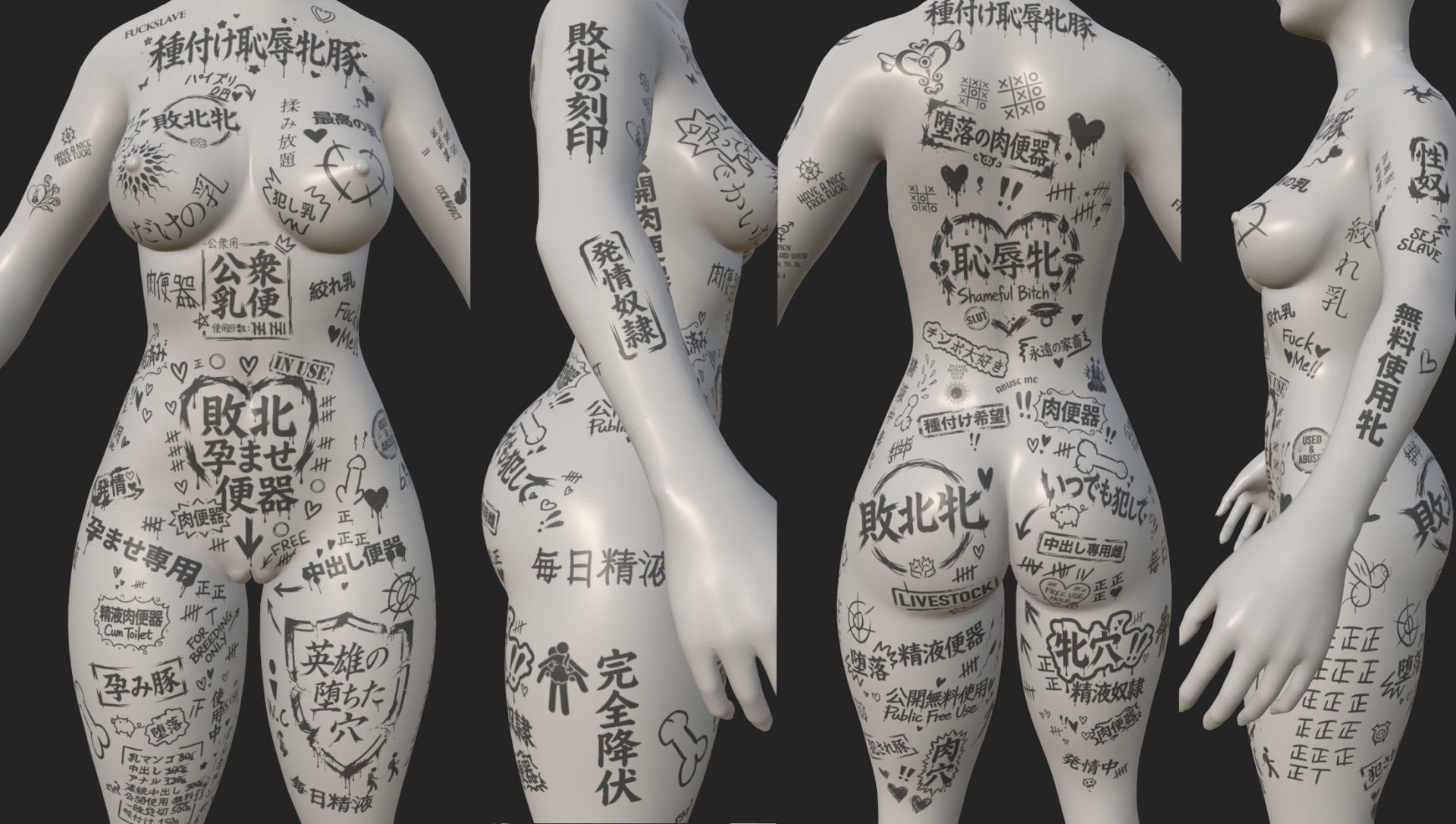
August 20 2026 - Added G-Drive link if you want to spare LL some download traffic. - Alpia Slavetats SE/LE (08.2026) - 90 New Tattoo's: 39 Public Whore Tats 51 Kanji Tats (Shoho Set/Folder) translation may or may not be accurate. No screenshots because I've been lazy. May add later. - 1k-2k Rescaled TEXTURES ONLY (08.2026) Download for 1k or 2k Textures (Aio install includes ALL including ORC and RIEKLING just pick by set if you dont need those or simply delete its just textures.) - Alpia Slavetats Orc SE-LE (08.2026) - Alpia Slavetats Riek SE-LE (08.2026) No new content just file related cleaning - Rape Tats Continued 2.0.3 QoL Extension (Patch) Explained on the page replaces tedious providing of various combinations of rtats settings.json. - Added a screenshot made by a user (not sure if they want to be named but it is appreciated) If you want a rough idea what is included, screenshot from substance painter as I couldnt be bothered to do screenshots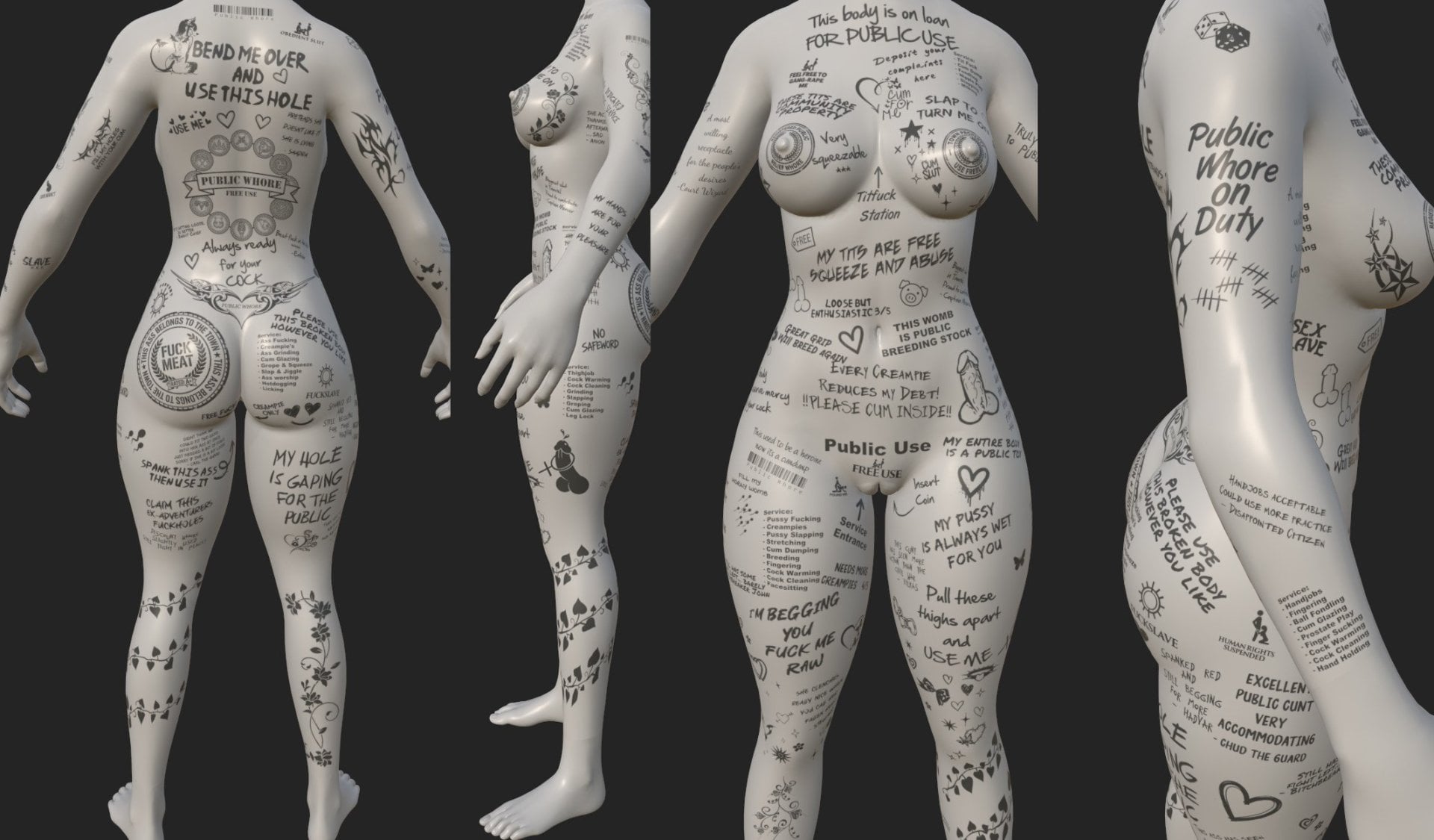
-
Alpia Scribbles Slavetats Pack
Alpia replied to Alpia's topic in Downloads - Skyrim: Special Edition Adult Mods
Now we are speaking of two different things. The settings.json is for Rape tats which has nothing to do with what you see in SlavetatsNG if you dont see them in the slavetats mcm there arent a lot of possible options. You didnt click the register new tattoo's button like the instructions say. You somehow managed to install only half of it. If you already have a bunch of other body overlays you should also check in race menu if not all your available slots are used already by default there isnt a lot of body slots. Since it says they are for 3ba on the main page they are obviously not only compatible with all CBBE bodies which includes CBBE 3BA, its exclusively for it, but on other bodies it would still be there simply look off at the seams. CBPC has nothing to do with body mods or textures. Your description is still not very clear what does "blank" mean? No visible option in the mcm for them? Simply doesnt get applied on the body? I cant see your screen so if you describe something it should be more precise as currently I'm playing a guessing game where you hold all the available information to what should be a easily solvable problem, but you only ever show me one card after another instead of the full hand. You can attach screenshots, you can describe what you see or dont see and where it occurs, like what do you see in the mcm? You see the "Alpia Arms" Alpia Body" or whatever else? If you pick a category do you see the individual tattoo's listed or is this what its blank? Or does blank mean you see it, pick it and when you close the mcm you dont see it on the body. I really dont mean it bad, but I probably invested 10x the effort in this answer then you in describing your error which makes any sort of help difficult.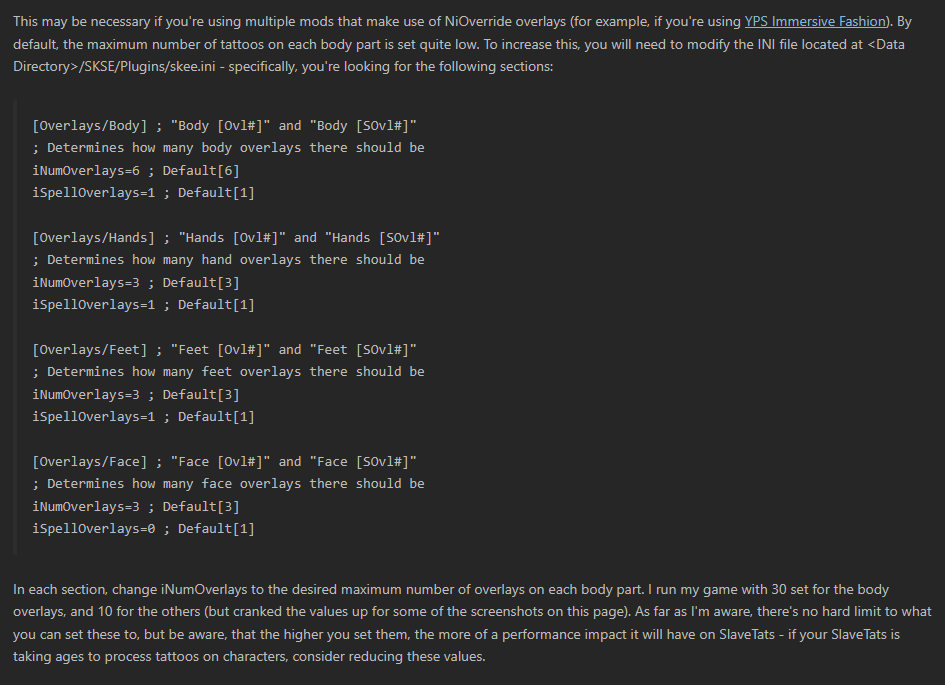
-
Alpia Scribbles Slavetats Pack
Alpia replied to Alpia's topic in Downloads - Skyrim: Special Edition Adult Mods
Sounds possibly interesting for a few tattoo's although the only thing I could imagine is some symbols or public whore like scrawls "At your service" etc. not sure what hypnosis or bimbo specific tattoo's would make sense. -
Alpia Scribbles Slavetats Pack
Alpia replied to Alpia's topic in Downloads - Skyrim: Special Edition Adult Mods
Cant really say much based on that description. What do you expect in game? Nothing visible changes. What categories? Nothing of that really tells me anything of what you did to get to whatever problem you have. You just follow the instruction and put it in the the right location then things appear configured if you click on tattoo config pages in rtats instead of everything on excluded as would be default. -
Rape Tattoos Continued
Alpia replied to elliesec's topic in Downloads - Skyrim: Special Edition Adult Mods
Correct, as described in the original post. It was kind of the whole point to make it so you can just drop in those additional preset settings.jsons, rtats by default works the same way just that it only reads from the default settings.json. Only thing needed is for the tat to be registered in the slavetats mcm or slavetats cant apply it when called just like when you dont have a sexlab animation registered. I could add a button in the mcm to manually merge... ... a few hours later... Actually I did just that I updated the patch with that and other logical changes. Updated the original post including a unnecessarily detailed manual. -
Rape Tattoos Continued
Alpia replied to elliesec's topic in Downloads - Skyrim: Special Edition Adult Mods
Yeah if you add new tattoo's you naturally have to register them to slavetats as rtats builds on top of slavetats that said this function is independent from how rtats works and the console output also belongs to slavetats only. If you have papyrus logging on you can search for "[ Rape Tattoos ]" there you'd see if it worked, but it'll work as it only adds on top of the existing rtats approach. You don’t need to touch the RapeTattoos MCM at all for the system to work under the hood if you have settings.jsons presets its the same as the default rtats just taking the additional files into account. Every time a tattoo is actually applied, the mod builds a fresh map the same way: it loads settings.json first, then merges settings1.json -> settings99.json on top of it (later files overwrite earlier ones). If you do open the MCM and click “Load tattoo config pages”, it does exactly the same build. That in-memory map is what you then edit on the individual tattoo pages. When you close the MCM, the entire current map (including your edits) is written back into the default settings.json. So you only ever need to click the load config pages button if you really want to edit something or if you want to merge it all in the single default settings.json. Important consequence of the load order: If a tattoo exists in both places, the numbered file always wins on the next load like in a normal load order. Example: settings1.json has tattoo “ABC” set to “lower back” You load the config pages, change it to “front lower”, and close the MCM The change is written into settings.json But the next time the map is built (either for applying tattoos or for opening the config pages again), settings1.json is still merged after settings.json, so “ABC” is forced back to “lower back” unless you remove the extra settings json after merging it anyway or edit it in that extra json file directly as I'd do. I'm using a small python script to simply write the file based on the texture file names (e.g. 3d in the file name prefix -> sorted into "misc 3 - d") making the process a lot less tedious. Naturally only works with how I name my files and use the categories but can be adapted to any naming scheme by editing the mappings and or modifiers. If there is multiple mappings or modifiers in a file name or a unknown the script makes a guess and will ask for input where it belongs.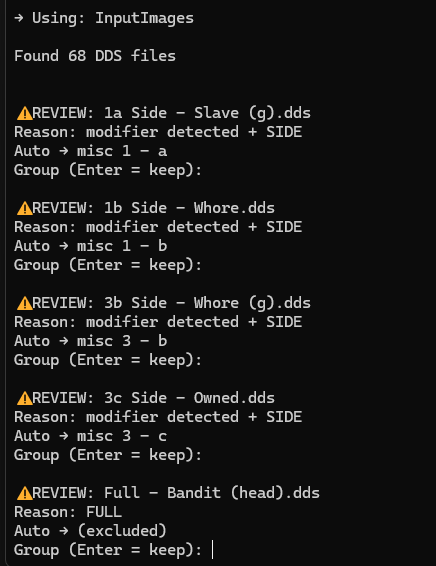
-
Alpia Scribbles Slavetats Pack
Alpia replied to Alpia's topic in Downloads - Skyrim: Special Edition Adult Mods
[Hirosin] Mal_lang Cow outfit for the bikini and ears but I think the harness is predators milk harness -
PAF Fixes and Addons
Alpia replied to Dg75's topic in Downloads - Skyrim: Special Edition Adult Mods
Thanks, I did update my original post a page back (including changelog). Took me a bit longer as I hit some problem with the mcm options (never fiddled with that before), but seems like adding a few more "State OID" blocks was too much as the mod already uses a lot. Instead I now added my mcm options as plain "non-ST" options. Either way its updated to 4.7.2 and I added for the json a field to exempt a pose from being used with the anal spray and a field that allows to assign one of your existing offsets. I think thats the easiest approach. The core problem remains that some poses my not look great with the spray or dynamic pooping, but good enough. If you add new "types" they can simply be added by expanding the existing options. elseif oType == "onback" _styleAdj = True nth = <index that matches the new behaviour> I did try to comment any changes with "PFA - EX Added/Edited" if you wish to use any of this you are free to otherwise it'll remain as is a optional download in the thread unless I'd really make some bigger change that would justify its own mod page/branch -
PAF Fixes and Addons
Alpia replied to Dg75's topic in Downloads - Skyrim: Special Edition Adult Mods
Yes mostly same poses different names best to just take a look at the poses in game. Did mark a few more poses with (-dp) those with that mark dont seem suitable for the dynamic pooping. The GS 21/07 didnt change numbers from GS 23/06 so still fits PAF_ExtraIdles.json For my own use I added a small extra function "Preview all poses" toggle with a hotkey that one can bind. Turn the toggle on, and your character will strike the first pose from the pose list along with an on-screen label showing its name and if enabled and dpexcempt. Press the key to move to the next one, and so on through the whole list. More a debug/testing thing, so not for your release, but maybe interesting for you to when trying to preview poses. Makes it easier to check out all poses as you dont have to reopen the mcm constantly to take a look at the next pose. I add it in the spoiler if you want it for your own testing. -
Thank you, you're welcome and no need to be sorry, its all good, tried to explain why you maybe encounter it again with another slavetats mod that has a race menu plugin. To work around you can always apply it via slavetats rather then race menu if its available in both menu's or you can adjust the race menu plugins script the way I described. You'd just need to copy the texture files to a separate file path outside the slavetats directory, point race menu to it and recompile the script. With time and the desire to fix things or adjust them to your personal needs you'll certainly be able to do relatively small stuff like that with ease.
-
PAF Fixes and Addons
Alpia replied to Dg75's topic in Downloads - Skyrim: Special Edition Adult Mods
Neat sounds good. I just used poserhotkeys and looked through all poses in the 23/06 poser and put in those that seemed like they may be usable or interesting in some way to make the json. It did feel like some poses I had seen in the old poser have been missing, but since the "gs123" pose numbers seem to have changed between 20/03 and 23/06 and they dont have names... its hard to know unless you can tell them apart visually. The json does have most old poses that I found in the new poser its just that the numbers changed gs11 is not gs11 in the newer etc. There isnt a changelog on the patreon so its difficult to tell if some poses have been removed from the poser or just re-ordered. 21/07 is now the newest btw Good thing about the approach with the json is you can ship it with a selection of your choice and people can change it to whatever poser/animations they use without editing the scripts. So yeah in my selection for now I only have gsposes from 23/06 as that still gets updated, but nothing wrong with just using the old one either. Personally I probably will mix and throw in some poses from other pose mods into the many empty placeholder slots gunslicer has as well so I dont need to have multiple pose mods installed. Looking at your old script this should be the selection for the 20/03 poser. { "extra_idles_f": [ { "event": "GS11", "label": "GS11 (non-DP)", "enabled": true, "dpExempt": true }, { "event": "GS12", "label": "GS12 (non-DP)", "enabled": true, "dpExempt": true }, { "event": "GS485", "label": "GS485 (non-DP)", "enabled": true, "dpExempt": true }, { "event": "GS532", "label": "GS532 (non-DP)", "enabled": true, "dpExempt": true }, { "event": "GS505", "label": "GS505 (non-DP)", "enabled": true, "dpExempt": true }, { "event": "GS510", "label": "GS510 (non-DP)", "enabled": true, "dpExempt": true }, { "event": "GS304", "label": "GS304 (non-DP)", "enabled": true, "dpExempt": true }, { "event": "GS497", "label": "GS497 (non-DP)", "enabled": true, "dpExempt": true }, { "event": "GS148", "label": "GS148 (Poop)", "enabled": true, "dpExempt": false }, { "event": "GS292", "label": "GS292 (Both)", "enabled": true, "dpExempt": false }, { "event": "GS320", "label": "GS320 (Poop)", "enabled": true, "dpExempt": false }, { "event": "GS365", "label": "GS365 (Poop)", "enabled": true, "dpExempt": false }, { "event": "GS366", "label": "GS366 (Poop)", "enabled": true, "dpExempt": false }, { "event": "GS404", "label": "GS404 (Both)", "enabled": true, "dpExempt": false }, { "event": "GS406", "label": "GS406 (Both)", "enabled": true, "dpExempt": false }, { "event": "GS458", "label": "GS458 (Both)", "enabled": true, "dpExempt": false }, { "event": "GS503", "label": "GS503 (Both)", "enabled": true, "dpExempt": false }, { "event": "GS509", "label": "GS509 (Both)", "enabled": true, "dpExempt": false }, { "event": "GS514", "label": "GS514 (Both)", "enabled": true, "dpExempt": false }, { "event": "GS501", "label": "GS501 (Both)", "enabled": true, "dpExempt": false }, { "event": "GS542", "label": "GS542 (Both)", "enabled": true, "dpExempt": false } ], "extra_idles_m": [ { "event": "GS198", "label": "Example Male Pose - Replace Me", "enabled": false, "dpExempt": false } ] } Trying to give the poses names with just a few words