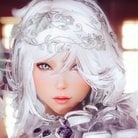
midgard229 Posted March 22, 2018 Posted March 22, 2018 I tried the Eye customization overh aul; i just end up with eyes that look like so that's out of the question for me; honestly her face does that with a few eye sets except Mikan yes. So my question is; can I create an eye set based off Mikan the same way i can with a hairstyle in creation kit? thank you!
SmedleyDButler Posted March 22, 2018 Posted March 22, 2018 Maybe just edit the actual texture .dds files of a pair of eyes and add it as an additional texture with a different filename?
midgard229 Posted March 23, 2018 Author Posted March 23, 2018 2 hours ago, SmedleyDButler said: Maybe just edit the actual texture .dds files of a pair of eyes and add it as an additional texture with a different filename? Ah I'm gonna have to learn that lol
midgard229 Posted May 3, 2019 Author Posted May 3, 2019 Anyone know a way? I tried editing dds file but it shows one eye since eyes are all mirrored. I also tried creation kit but dunno if I knew wtf I was doing
Guest Posted May 3, 2019 Posted May 3, 2019 11 hours ago, midgard229 said: Anyone know a way? I tried editing dds file but it shows one eye since eyes are all mirrored. I also tried creation kit but dunno if I knew wtf I was doing Two eyes needs two textures, as the left and right eye are separate meshes, at least in the case of heterochromia. Make or find your two eye textures and name them however you want. Open the eye mod's esp in either the CK or TES5Edit and make two new texture sets using ones from the mod as a base. Change the diffuse map of the two texture sets to the names of your two new eye textures you want to use. Find and duplicate one of the heterochromatic eyes (under Head Parts) from the mod, and reassign whatever texture set it's using to the eye texture you want that eye to use (you should be able to see the filepath for the eye mesh it's using to help you decide). That eye will have another head part attached to it, which will be the opposite eye. Find and duplicate that eye, then change the texture set it's using. Finally, go back to the first eye you altered, and remove the eye headpart attached to it to replace it with the new duplicate you've just created. Save and fire up the game. Voila. If the mod you're using as a base doesn't have heterochromatic eyes, i's mostly the same steps except after making the two separate eye headparts, change their mesh file paths to where eyesfemaleleft.nif and right are (actors\character\character assets\faceparts\eyesfemaleleft.nif , ___right.nif). Then add one eye to the other as directed. New Mikan eyes don't have these left and right meshes btw, just for the record.
midgard229 Posted May 4, 2019 Author Posted May 4, 2019 9 hours ago, Artsick said: Two eyes needs two textures, as the left and right eye are separate meshes, at least in the case of heterochromia. Make or find your two eye textures and name them however you want. Open the eye mod's esp in either the CK or TES5Edit and make two new texture sets using ones from the mod as a base. Change the diffuse map of the two texture sets to the names of your two new eye textures you want to use. Find and duplicate one of the heterochromatic eyes (under Head Parts) from the mod, and reassign whatever texture set it's using to the eye texture you want that eye to use (you should be able to see the filepath for the eye mesh it's using to help you decide). That eye will have another head part attached to it, which will be the opposite eye. Find and duplicate that eye, then change the texture set it's using. Finally, go back to the first eye you altered, and remove the eye headpart attached to it to replace it with the new duplicate you've just created. Save and fire up the game. Voila. If the mod you're using as a base doesn't have heterochromatic eyes, i's mostly the same steps except after making the two separate eye headparts, change their mesh file paths to where eyesfemaleleft.nif and right are (actors\character\character assets\faceparts\eyesfemaleleft.nif , ___right.nif). Then add one eye to the other as directed. New Mikan eyes don't have these left and right meshes btw, just for the record. Thanks a ton for the breakdown. I appreciate it. I'm going to experiment with the hetero ones first. Really wish it was simpler but what can we do haha. For whatever reason when I use the Heterochromia ones I get Lol
Guest Posted May 4, 2019 Posted May 4, 2019 1 hour ago, midgard229 said: Thanks a ton for the breakdown. I appreciate it. I'm going to experiment with the hetero ones first. Really wish it was simpler but what can we do haha. For whatever reason when I use the Heterochromia ones I get Lol RaceMenu (or chargen as a whole tbh) is all kinds of finicky so thats not surprising :p I'm running into a whole heap of troubles myself, but that's unrelated to this. I'm not quite sure how to fix your eyes tbh.. I've seen that a lot but have never bothered to find out the problem. Maybe it's the .tri's they're using?
midgard229 Posted May 4, 2019 Author Posted May 4, 2019 Just now, Artsick said: RaceMenu (or chargen as a whole tbh) is all kinds of finicky so thats not surprising ? I'm running into a whole heap of troubles myself, but that's unrelated to this. I'm not quite sure how to fix your eyes tbh.. I've seen that a lot but have never bothered to find out the problem. Maybe it's the .tri's they're using? I'm imagining so. I'm such a noob when it comes to this stuff haha. So many complications in this but that's modding life. Especially when going for something unique. I still appreciate the help and am gonna mess with the options you mentioned. hope you find solutions to your probs too lol
yatol Posted May 5, 2019 Posted May 5, 2019 On 5/4/2019 at 3:41 AM, midgard229 said: For whatever reason when I use the Heterochromia ones I get you select eye shape headpart eyeblind, game unload headpart eyefemaleblue morph to replace it with headpart eyeblind, and apply the other sliders to that headpart then you select eye color textureset eyegreenleft, that is for headpart eyegreenleft, that come with additionnal headpart eyeblueright, to load another texture on that headpart above you load textureset eyegreenleft with headpart eyefemaleblue still there, and you just have to look at your screen to see that's no good, because some sliders weren't applied, or none, or whatever isn't there when the game see it's not the good headpart and replace it

Recommended Posts
Archived
This topic is now archived and is closed to further replies.