
A lightweight SKSE plugin that lets you add, save, search, and execute console commands directly from the SKSE Menu Framework without keyboard. No more typing long commands manually!
Console Commander is a SKSE plugin that lets you add, save, search, and execute console commands directly from the SKSE Menu Framework without keyboard.
Endorse if you like it.
Features
Console Commander 1.2.5
-> Default key for SKSE Menu Framework is F1
-> Config and Commands are saved in ConsoleCommander.ini [Data\SKSE\Plugins\ConsoleCommander.ini]
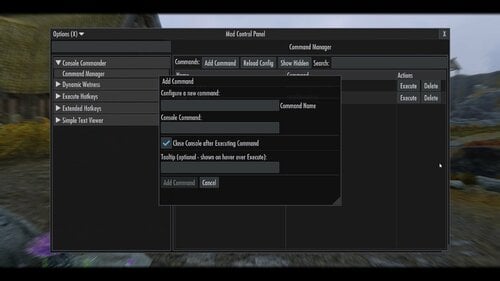
-> Add console commands and control 'console close' behavior
-> Reload config instantly
Console Commander 2.1.2
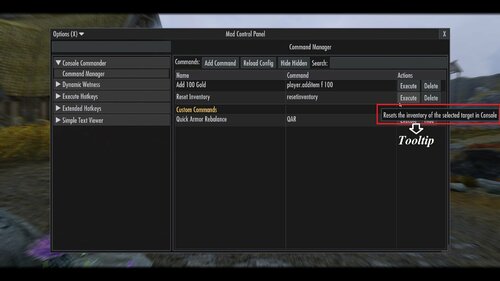
-> [New] Added custom tooltip function for additional information (Optional: Hover over Execute)
-> Format: Name|ConsoleCommand|CloseConsole (1=yes, 0=no)|Tooltip (optional)
-> Example: Add Gold - 100|Player.additem f 100|1|Adds 100 gold to player inventory
-> [New] Added custom ini support. Modders can now add custom ini with console commands.
-> Custom ini is saved in: Data\SKSE\Plugins\ConsoleCommander\ConsoleCommander_*.ini
-> Add ConsoleCommander_[name].ini in ConsoleCommander folder with the commands. it will scan add the command in the UI.
-> Format: ConsoleCommander_QAR.ini
[ConsoleCommands]
Quick Armor Rebalance|QAR|0|Open Quick Armor Rebalance UI
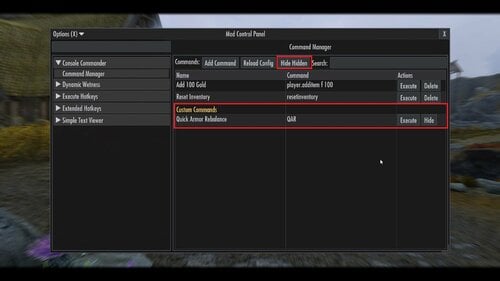
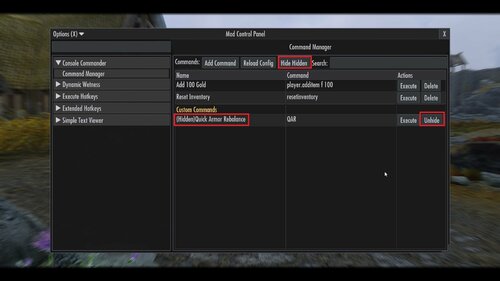
-> Custom Commands will appear after user added commands in the Custom Commands tab.
-> If no Custom Commands are present or all hidden, Custom Commands tab will not show up in UI.
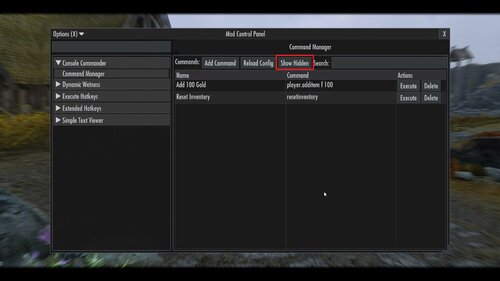
-> User can Hide/Unhide Custom Commands. A button 'Show Hidded/Hide Hidden' has been added to Show/Hide Hidden Commands. (Applicable for Custom Commands)
Console Commander 2.2.2
-> [New] Added support for execution of multiple commands at once.
->Separate multiple commands by adding , (comma) to execute the commands in sequence.
->Format: Name|Command1,Command2,Command4,Command4|CloseConsole (1=yes, 0=no)|Tooltip (optional)
Console Commander 2.3.0
-> [New] Added support for execution of commands with custom variable input when executing command.
->An option to add a command as variable command has been added in the 'Add Command'
->In the console command box: input a command without the last value. [Ex: player.additem f] it will add [#] to recognize the variable as variable command.
->Format: Name|Command [#]|CloseConsole (1=yes, 0=no)|Tooltip (optional)
->A popup will show up and ask for specific value before executing.
Video Demonstration (Old)
Requirements
- SKSE Menu Framework (required)
- Kill Caps Lock NG (Optional)[Strongly Recommend][It keeps caps lock off only in console]
Installation
1. Make sure SKSE Menu Framework is installed and working
2. Download and install the mod.
How to use
1. Open SKSE Menu Framework (default key: F1 or whatever you set)
2. Go to "Console Commander"
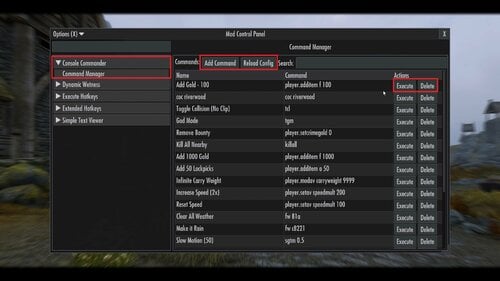
3. Click "Add Command" → enter name and console command → Add
4. Select a command → click "Execute"
5. (Optional) Edit Data\SKSE\Plugins\ConsoleCommander.ini manually and click "Reload Config"
Notes:
- It simulates keyboard key input to execute command so don't press any keys when executing the console command.
- If Caps Lock behaves strangely in console → install Kill Caps Lock NG (optional)
- Tested on Skyrim AE v1.6.1170 and v1.6.353. Confirmed to work on v1.5.97. Should work on all versions of Skyrim SE/AE.
- ini file will be created after adding a command. or use the provided ini below.
ConsoleCommander.ini config:
; Console Commander Config
[Delays] ; in ms
EscDelay=100 ; Delay to close SKSE Menu framework after executing
OpenConsoleDelay=200 ; Delay to open console after SKSE Menu framework is closed
TypingStartDelay=150 ; Delay before start typing
CharDelay=30 ; Typing Speed
EnterDelay=200 ; Delay to press enter after typing.
CloseConsoleDelay=50 ; Delay after entering command to close console.
[ConsoleCommands]
; Format: ; Format: Name|ConsoleCommand|CloseConsole (1=yes, 0=no)|Tooltip (optional)
Example:
Add Gold - 100|Player.additem f 100|1|Adds 100 gold to player inventory
For multi command execution
Format: Name|Command1,Command2,Command4,Command4|CloseConsole (1=yes, 0=no)|Tooltip (optional)
For custom variable command execution
Format: Name|Command(without value) [#]|CloseConsole (1=yes, 0=no)|Tooltip (optional)
Example:
Add Gold|player.additem f [#]|1|Adds x gold amout of gold in player inventory
Console Commander - Default ini.zip
Console Commander - Faster Execution ini.zip
Optional Custom Command
Opens 'Quick Armor Rebalance (QAR)' Menu
Requirement
Quick Armor Rebalance (QAR)
https://www.nexusmods.com/skyrimspecialedition/mods/127967
Console Commander - QAR ini.zip
Uninstallation
Disable/remove the mod in your mod manager.
Bug Reports
If you encounter issues, please report them through Github or support. Include 'ConsoleCommander.log' from Documents, description of the bug and steps to reproduce it.
Credits
* Mrowrpurr - for her amazing SKSE tutorials in YT (Skyrim Scripting)
* SkyrimThiago - for SKSE Menu Framework
* QTR-Modding - for SKSE Menu Framework 3 Example Template
Permissions
This project is licensed under the MIT License.
You are not allowed to use this mod in any mods/files/modlists that are being sold for money.
Enjoy faster console command execution!
Edited by Edzio
What's New in Version 2.3.0
Released
Console Commander 2.3.0
-> [New] Added support for execution of commands with custom variable input when executing command.
->An option to add a command as variable command has been added in the 'Add Command'
->In the console command box: input a command without the last value. [Ex: player.additem f] it will add [#] to recognize the variable as variable command.
->Format: Name|Command(without value) [#]|CloseConsole (1=yes, 0=no)|Tooltip (optional)
->A popup will show up and ask for specific value before executing.
* SkyrimThiago - for SKSE Menu Framework
* QTR-Modding - for SKSE Menu Framework 3 Example Template