General Summary:
SOS AE-NG is a new version of the SCHLONGS OF SKYRIM mod developed on CommonLibSSE-NG. This version focuses on profound structural changes to serialization and data handling, optimizing script performance by prioritizing the use of native C++ over Papyrus. Furthermore, it significantly improves compatibility with existing and future mods by implementing new features and optimized architectures within the code.
The next Spoiler is in Spanish, is only the personal motive for the mod, you can translate it, mostly for laughs
Motivo:
"It just works."
— Todd Howard, Director de Bethesda Game Studios.
"El Futanari es un sentimiento."
— Javier Milei, Economista.
"A girl's cumming inside me!♥"
- 345796, página 24
Un problema fundamental del viejo SOS es que básicamente debes organizar toda tu "modlist" en torno a él, debido a la forma en que reserva el Slot 52, es necesario curar
manualmente muchas listas de armaduras; además, el mod original es muy susceptible a errores y cierres inesperados (CTDs) a largo plazo; de hecho, los problemas
más comunes en una partida de Skyrim suelen provenir del SOS.
Esta situación llegó al límite tras crear múltiples mods de armaduras y verme obligado a realizar parches masivos solo para que los NPCs portaran el equipo de forma correcta
mediante el uso de Keywords. Aun tras realizar dicho esfuerzo, los errores persistían de formas que no pueden solucionarse con parches pequeños o muy grandes.
Por ello, me propuse realizar un "remake" integral de SOS. Es importante recalcar que el enfoque principal de este mod es para uso personal, por lo que las ideas, características
y soluciones tendrán prioridad según mis propias necesidades y gustos. No obstante, trataré de resolver dudas, errores o quejas reportadas por la comunidad.
Otro punto relevante es que el viejo SOS era, es y será de código abierto (Open Source); sin esa filosofía, posiblemente no habría continuado en la comunidad de modding de Skyrim.
Por lo tanto, se deben respetar estrictamente las condiciones establecidas por Galgaroth, VectorPlexus, Smurf y b3lisario:
-Todos y cada uno de los derivados de este mod o su código (SOS) deben mantenerse únicamente en Lover's Lab.
-VectorPlexus y Smurf siempre deben recibir el crédito correspondiente por su trabajo original.
-Los mods basados en este código no pueden ser vendidos bajo ninguna circunstancia.
Sin nada más que añadir, espero que disfruten del Mod.
=====================How to use the new SOS=====================
New features:
DRAWING -
When an NPC loads, a draw is performed using the available addons to determine which addon that NPC will receive.
For males, addon distribution has been updated to guarantee a 100% chance of receiving an addon, using relative scaling. Female distribution logic remains unchanged.
If the sum of all available addons is less than 100% (primarily relevant for females), there is still a chance of losing the draw and receiving an empty addon. This empty addon is not equipped and fixes the original SOS bug that forced a Schlong onto every NPC without respecting the total probability.
There are new files in Data\SKSE\Plugins\SchlongsOfSkyrim\ that will be used.
1. SOS_ConcealingArmorMods.JSON
Armor pieces from mods listed in this file will have Slot 52 added in addition to Slot 32. NOTE: Only armor pieces that already use Slot 32 will be affected. This replicates the old SOS behavior, but without relying on internal data, and it is applied every time the game is launched.
If you want all armor from a specific mod to be concealing, add the mod’s filename on a new line in the list. Remove a mod from the list if you want its armor to remain revealing by default. If the document does not exist, it will be automatically generated with a basic list of common mods.
The keyword SOS_Revealing takes precedence over the list. For example, if Skyrim.esm is present in the list and another mod adds the SOS_Revealing keyword to Iron Armor, that armor will be treated as revealing in-game rather than concealing. If an armor piece has both SOS_Revealing and SOS_Concealing keywords, neither effect should apply.
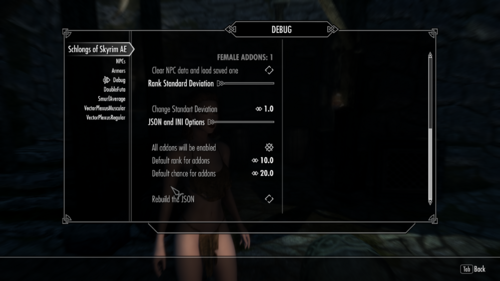
2. SOS_AE.ini
These options define the default values used when generating the JSON data.
- **Enabled**: Indicates whether the addon is active.
- **Rank**: Equivalent to the rank system from the original SOS.
- **Chance**: The probability that an NPC will receive this addon.
[JSON]
Enabled = true
Rank = 10
Chance = 20
GaussianDeviation = 1.000000
SOS_SchlongEligibleActorMods is a Whitelist = true
SexLabForceMaleOnSchlong = true
These options set the default values for the JSON that is generated the first time the game is launched after installing the mod, or whenever a previous JSON file is deleted. This is useful if you want to apply bulk changes with a single setting — for example, assigning Rank 20 to every addon or setting Chance to 100.
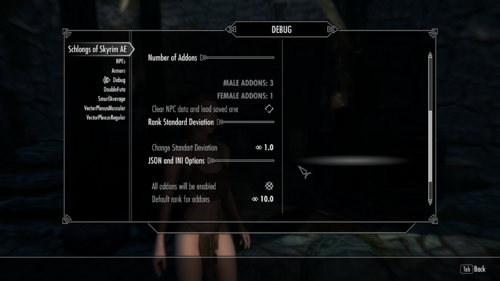
JSON data can also be edited directly in the MCM and will be saved automatically. Gaussian Deviation introduces a small amount of variability to the rank distribution.
**SOS_SchlongEligibleActorMods is a Whitelist**:
- When set to **true**, NPCs belonging to mods listed in SOS_SchlongEligibleActorMods can receive a random Schlong other than NONE during random selection (probability is still respected).
- When set to **false**, the list functions as a Blacklist: NPCs from those mods will default to having no Schlong (NONE).
3. SOS_AddonData.json:
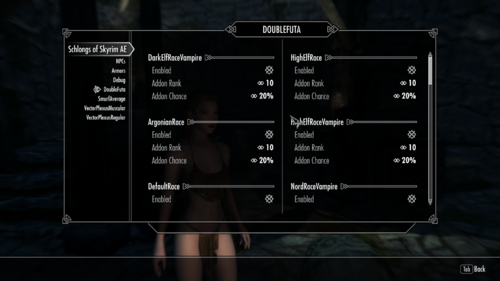
This file stores all addon data so it can be loaded in new games. It can be edited with a text editor or directly inside the MCM. Here you can view and modify the data for each addon, including supported races, enabled status, rank, probability, and the gender group that can use (or will visibly receive) the addon.
Some considerations:
1. For males, addon distribution has been updated to always guarantee a 100% chance of receiving an addon, using relative (weighted) scaling based on the configured probabilities. Female distribution logic remains unchanged: if the sum of probabilities for a given race and gender is less than 100%, there is still a chance the NPC will not receive a Schlong. This fixes a previous bug in SOS SE where even a 10% chance always resulted in a Schlong. If the sum of probabilities exceeds 100%, the values are weighted proportionally.
2. Data reading is very flexible as long as letters and floating-point numbers are avoided. Even if minor formatting issues exist, they generally do not cause significant errors in-game.
3. If -1 (or any negative number) is used for the rank, the rank distribution will be uniform.
If you see something like this in your JSON:
"undefined": [
"SPBAddonName123"
]
It means the gender globals inside the ESP/ESL for the addon “SPBAddonName123” are incorrect. This entry is mainly for debugging purposes. You can manually move the addon into the “female” or “male” group so it works correctly, provided you know which gender the addon is intended for.
The proper long-term solution is to review and fix the globals in the ESP. Addons left in the “undefined” group are simply ignored, but they can be moved into the appropriate gender group if needed.
4. SOS_ARMOR_override.JSON
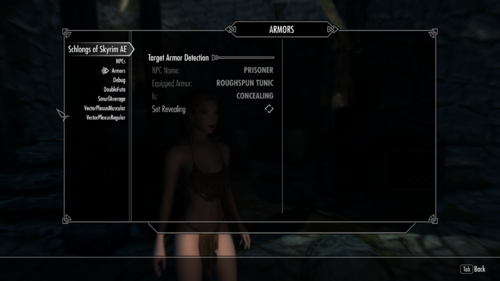
This is a simple JSON file that stores the armors that have been modified within the MCM. The armors within this JSON will be read after each session. It's a good way to save armors with the changes you want without having to enter the MCM in each new game, or for debugging. Here's an example.
{
"armor_overrides": {
"Skyrim.esm|ClothesPrisonerTunic": true
}
}
where you have a key or key "modname.esp|ArmorIDEditor" = revealingbool
where revealingbool has this meaning:
true = Revealing
false = Concealing
5. SOS_SchlongEligibleActorMods.txt
This is a text document similar to SOS_ConcealingArmorMods.txt. It lists mods whose NPCs are eligible to receive a Schlong other than NONE during the random draw.
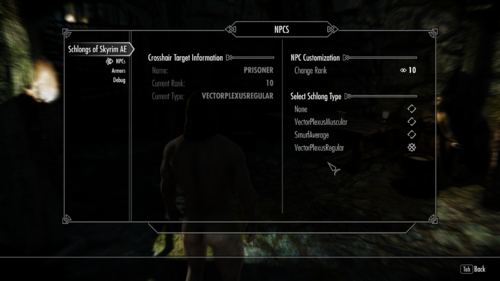
NPCs from mods that are not on this list can still receive a Schlong if it is manually assigned to them through the MCM. Eligibility is handled using a special keyword called SOS_NoneDefault, which is automatically added to the relevant NPCs when the game is launched.
In the INI you can choose whether this list functions as a Whitelist or a Blacklist.
This will only work for female NPCs, so you don't need to patch all female followers if you don't want them to be futanari, male NPCs don't use this list
6. Keyword SOS_NoneDefault
NPCs with this keyword will have an "empty" addon assigned in the lottery or drawing; that is, they will always lose the lottery, regardless of the probability. However, they are still saved in the mod's internal data. You can add this to NPCs you don't want to have Schlong due to the drawing (Like followers or other NPCs).
7. SOS_NPC_Override.JSON
When you edit an NPC (or the player) through the MCM, the changes are saved to this JSON file. The file is created the first time you edit an NPC or the player.
This JSON is used to preserve NPC modifications across new games or after clearing all saved NPC data. Any NPCs stored in the file will be automatically reloaded. You can also edit the data directly in the JSON file if desired.
8. Bending:
The erection (bending) mechanic works as follows:
Using the keys defined in the MCM will raise or lower the Schlong. The Shift modifier is no longer required.
There are now four dedicated keybinds:
- Two keys control the Schlong of the actor currently in the crosshair.
- Two keys control the player’s Schlong directly, without needing an empty crosshair.
9.- Custom Race Support
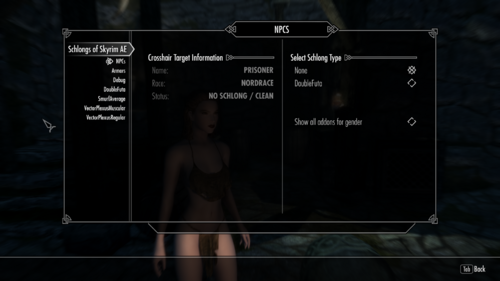
If you have an NPC from a custom race that has no available addons shown in the MCM, there is a toggle that lets you view all addons available for its gender, ignoring the race restriction.
Use this option carefully: not every addon includes textures for every race. Cycle through the available addons for the custom NPC until you find one that fits properly or looks acceptable.
10.- Sexlab Support,
Female NPCs that receive a Schlong other than NONE are automatically treated as male in SexLab (this can still be changed or confirmed in the SexLab MCM). Changing an actor’s or the player’s Schlong in the SOS AE NG MCM will also update the gender in SexLab automatically.
This SexLab integration can be disabled in the MCM if desired.
Note for SexLab P+: To use the Futanari gender, set the related toggle to OFF.
11.- Keyword SOS_Pubes
SOS_Pubes is an additional keyword intended for pubic hair addons. Addons that use this keyword will not change the actor’s SexLab gender when assigned through the random draw or the MCM.
Note that this keyword is only relevant for SexLab integration (within this mod) and does not replace SOS_Genitals. Both keywords should be present on a pubes addon.
12.- Keyword SOS_Underwear
Any armor that has the SOS_Underwear keyword will automatically hide the equipped addon (Schlong). When the armor is removed, the addon is restored (if there is nothing on the slot52 and there is no other SOS_Underwear equipped). This allows any piece of armor to function as underwear without conflicting with Slot 52 items.
I suggest use this mod to distribute SOS_Underwear KW to armors based on their EditorID or Full name instead of patching one by one
13. Remove Item on Slot52:
Added option to remove underwear or bikini bottom or Skirt from NPC to show the Schlong, is on MCM
14. Uninstallation or Update
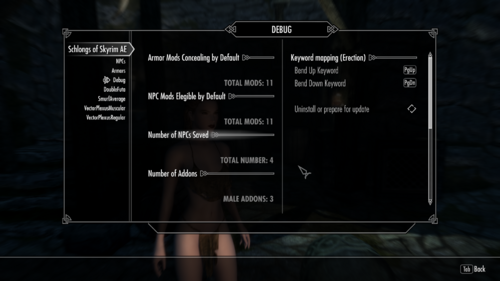
Within the MCM there is now an option to uninstall the mod or prepare it for an update. Follow these steps:
1. Go to the Debug page and click the Delete button.
2. You will see the mods loaded from the Concealing List disappear.
3. Save the game (preferably in a location with no NPCs present).
4. Delete or update the mod.
5. Load the game. Everything should now work normally.
You can check the original addons compressed and added ESL flag here, as well as some mods I made, update or get from SOS, and the Double Penis
Troubleshooting:
There is a log system you can check in
Documents\My Games\Skyrim Special Edition\SKSE\SOS_AE.log
if you have a problem you can't fix, try passing this
I need the old SOS?
No, and this version is incompatible, you should remove the old SOS and use this one instead,
It Works in 1.5.97?
R.- Yes it does
This version of SOS doesn't have the original addons
R.- Yes, i made a separate download to the original addons, now as ESL because the mod now supports it
There are no addons pages in the MCM
This can be happening for some reasons that are under stable:
1- The addons should load after SOS, try using LOOT, always work in these cases
2.- You installed a new addon (or deleted one) and didn't rebuild the JSON, you can do this deleting the JSON with the data or by using the MCM
3.- The ESP or ESL doesn't have the gender part correctly done, if you check the JSON you will find them in the unidentified Category in the JSON, you can fix it by moving them to the female category or renaming it, here is an example:
4.- Bad FormID in the esp, in this last case is better to pass me the name of the esp and maybe I can help, consider this as the last option if you already done the other 3 solutions I gave
There are pages for the addons but I can't choose one for X actor
This occurs because the actor is using a custom race. To resolve it, enable the “Show all addons for gender” toggle on the NPCs page in the MCM. This will display every available addon for that gender, ignoring race restrictions.
Keep in mind that some addons are designed only for vanilla races, while certain custom races have their own dedicated addons. The final appearance depends entirely on the addon itself; nothing can be done within this mod to alter how an addon looks on a given race.
The bend keywords don't work
Due to how the MCM works, you must manually assign the bend keys before they will function — even if you want to use the default Page Up / Page Down keys. There are four keybinds in total (two for the actor in the crosshair and two for the player). None of them will work until they have been assigned in the MCM.
The addons fail to the floor
You need a skeleton mod, like XP32
Erections work weird in X Arousal Mod or X Animation Mod
These mods generally do not rely on any of the scripts or functions from SOS (this was also true with the original SOS), as they only use the animations. Issues of this kind need to be resolved within those mods themselves. This mod only provides the necessary resources for animations and erections.
X mod doesn't work (No animation or Erection only)
These mods actually use functions from SOS. You can confirm this by searching their source files (.psc) for terms such as “SOS API”, “SOS_API”, or “SOS_SKSE” (note: not SOSAE_SKSE). The only proper way to fix compatibility is for the mod to be updated to use the new functions. In some cases additional work may be required, especially now that more functions are available.
If you are a user: Try contacting the mod author. If you receive no response or the mod is abandoned, feel free to contact me. I sometimes update mods I use myself, and I may be able to help.
If you are a mod author: Documentation for the new functions can be found in SOSAE_SKSE.psc, located in Schlongs of Skyrim AE\Source\Scripts. I may also be able to assist with new functions if the required changes are not too extensive.
If you know how to create SKSE plugins: The full source code for the DLL is provided if you wish to implement more technical solutions.
I don't know how to add Keywords to an addon
You can safely use the Creation Kit or SSEEdit for this. Adding or removing keywords will not cause CTDs or serious bugs — keywords only affect how addons are equipped and have no other significant impact.
I have a bug where the camera falls to the floor on cell changes, exit Racemenu or using Furniture or X
OK this is the bug I had before doing a fresh modlsit, after doing the new mod list I can't replicate it easily, I tried many times but something seems to fix it, or I'm fixing it by not a having a certain common Mod, so if you have that bug you can help by sending your mod list, try reading the next comment I will update to see what can be causing it:
I Suggest use of Pandora with Auto Skeleton Patch and to Install a basic XP32 instead of the expanded
More information about pubes and KID:
GITHUB Repository for latest version
Edited by Spongebob Hentai Mod
Update to 2.0.0
What's New in Version 3.2.0
Released
Changes to SOS_SchlongEligibleActorMods.txt, now it will only affect Female characters, all male characters from all mods will have a Schlong (if there is atleast one) independently of the list
Minor clean up of the scripts
Just install the mod. The only requirements are powerofthree's Tweaks and a Skeleton mod so the Schlong doesn't look weird.
You need to install the Microsoft Visual C++ Redistributable, NOT VISUAL STUDIO, just install what is it this link
https://aka.ms/vs/17/release/vc_redist.x64.exe
If you have some problems running skyrim with my mod, try checking the DLL with this:
https://github.com/lucasg/Dependencies
.thumb.png.16d41cb141f25c1a4ab618064edc7e9d.png)