Vyxenne Posted November 10, 2020 Posted November 10, 2020 I have made several recolors of the old Schoolgirl Mashup, using standard, tried-and-true Texture-Swap techniques: the 3D Shape name is correct the 3D Shape index (0-based) is correct I have tested my new diffuse maps by renaming them to the original one and observing the correct new color in-game: Sadly, despite my having done dozens of texture-swap recolors successfully, I can't get these 4 to work for unknown reasons, and it's driving me crazy. Well, crazier than usual.... Here is the complete installable archive, including the 4 new diffuse maps and the new plugin containing the new ARMOs with the texture swap info. The new supposedly-recolored items are available and equippable in-game, but they all have the default color that is specified in the nif- none of the texture swaps work: Schoolgirl Mashup New UUNP-HDT SE.7z Is there someone who could take a look at it and tell me why my texture swaps are not working in this case when they have always worked for me before? Thanks.
Corsayr Posted November 10, 2020 Posted November 10, 2020 Been a while since I did much alt textures, but just looking at it in xEdit have you tried a different 3D Name? 0001_jul_boss:1 I don't think I have ever seen a name with a ':' in it. weird that is the 3D name in NIF skope Sorry for the rambling it is sort of my process... ? I think I got it! just testing rq
Corsayr Posted November 10, 2020 Posted November 10, 2020 1 hour ago, Vyxenne said: Is there someone who could take a look at it and tell me why my texture swaps are not working in this case when they have always worked for me before? Your gonna laugh when you hear what it was... It is one of those duh! moment things. ? Ready? Spoiler You put the Texture folder in the path for the texture DDS files, you don't need that it already knows to look in the texture folder. Confirmed that was it ? Spoiler
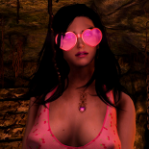
Vyxenne Posted November 10, 2020 Author Posted November 10, 2020 On 11/9/2020 at 8:07 PM, Corsayr said: Your gonna laugh when you hear what it was... It is one of those duh! moment things. ? Ready? Hide contents You put the Texture folder in the path for the texture DDS files, you don't need that it already knows to look in the texture folder. Confirmed that was it ? Hide contents Wow, thank you, that did it! But now I'm more confused than ever- those paths were directly copied from the original mesh's BSLightingShaderProperties >> TextureSet node (in the mesh) to make sure I didn't introduce any errors via fumblefingers typos. LOL. I did wonder briefly about it when I copied them, because I know that generally the first 2 folders for meshes and textures ("Data\textures" etc.) are assumed rather than explicitly specified, but I also know that in most situations it does no harm to specify them. Apparently, TXST Texture Sets in a plugin are an exception to that rule. So thank you for finding the issue. I just put on the pink shirt, not thinking about the fact that I'm in Blackreach- the pink looks really weird there.

Recommended Posts
Archived
This topic is now archived and is closed to further replies.