

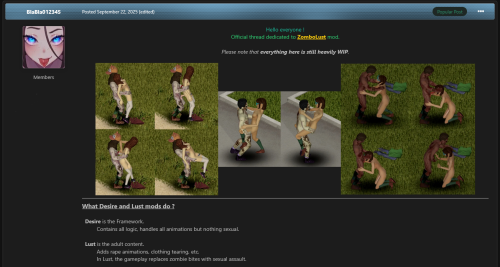
ZomboDesire Framework mod
A mod that adds public content to the game Project Zomboid
ADULT CONTENT DISCLAIMER
This mod contains fictional adult characters and adult-themed content.
All characters depicted in this mod are fictional adults, 25 years of age or older, consistent with the adult characters of the base game.
No minors are depicted or represented.
All scenes and activities depicted are entirely fictional and consensual.
Every character involved is an adult and willingly consents to the acts and interactions portrayed.
This mod does not depict or involve minors, non-consensual sexual activity, rape, sexual violence, bestiality, necrophilia, torture, or any other form of non-consensual abuse.
By accessing or using this mod, you acknowledge that all characters depicted are fictional adults and that the content is intended for an adult audience.
Click the green button to download the file ↗️
↖️ How to install ?

Description link
ZomboDesire (the Framework) is described in this ➡️ ZomboDesire Description Post.
For Linux users and those who prefer manual installation:
You can find a downloadable version for manual installation under the "Install Instructions" tab.
______________________________________________________________________________________________________________________________________
Official Discord Server
In partnership with my French friend Zunder, there's an official Discord server for the whole ZomboLust galaxy.
Join with the permanent invite link above.

⚠️ Don’t forget : To unlock every channel, you have to accept the rules in #rules first.
You'll also get a membership rank for doing so. It's free, so don't hesitate !
🔞 Discord - ZomboLust Galaxie 🔞
On the server you’ll find :
-
A section for mod coding (sharing fixes between coders)
-
A section for ideas and requested features
-
A section for implemented features & changelogs
-
A chill lounge
-
A memes corner
-
A space for general discussion
-
Une section dédiée à la Francophonie
Edited by BlaBla012345
Update
What's New in Version 0.4.2
Released
Changelog 0.4.2
Fix – Force ZombHuman to match the player’s Z height to prevent zombie death during stair animations
Addition – “Space bar” image under the validation minigame to indicate how to interact with it + automatic centering
Refactor – debugLog system with local helper and built-in auto-save
Refactor – Intercept: multiple handlers reduced to a single helper
Refactor – Centralized createDelayedAction utility function
Refactor – Centralized onPlayerDamageReceived and onWeaponHitCharacter functions into a createDamageDetection utility in ZomboDesire_Utils.lua
Removal – The OnClientCommand.Add(SetScene) event and associated functions were dead code
Fix – Duplicate “White Display Counter” removed in ZomboDesire_ObjectTags.lua
Fix – Two minor resource leaks in the minigame are now prevented
Fix – Missing list cleanup in ZombHumanUpdate.lua that never removed a dead ZombHuman from the list
Fix – Namespace and filename structural inconsistency resolved
Fix – Rare mod incompatibility case in ZomboDesire_InventoryHooks.lua where ISTimedActionQueue.add restoration only occurred if it was still exactly our hooked function
Fix – Re-registering the collisionListener at the end of invisibility no longer skips the isCollisionListenerRegistered flag check before calling Add, which previously could cause collisionListener to run twice per collision
AUTO INSTALL version
1️⃣ Download the file “ZomboDesire Framework - Beta X.X AUTO INSTALL.zip” — Click the green button to download the file ↗️
to your Downloads folder (typically C:\Users\USER_NAME\Downloads), or to any location of your choice on your PC.
2️⃣ Extract the contents of “ZomboDesire Framework - Beta X.X AUTO INSTALL.zip”
into your Downloads folder (typically C:\Users\USER_NAME\Downloads), or to any location you prefer on your PC.
3️⃣ You will obtain two files:
- an executable installer named “ZomboDesire_Setup_vX.X.exe”
- a file named “ZomboDesire_Setup_vX.X_hash_SHA256.txt” (provided to verify that the executable is uncorrupted and free of malware)
4️⃣ Double-click “ZomboDesire_Setup_vX.X.exe” and follow the installation instructions.
The installer will remove any previous version present on your PC and install the new version of the mod in the correct location.
Note: You can uninstall the mod via Windows’ standard uninstall system, just like any other software.
______________________________________________________________________________________________________________________________________
MANUAL INSTALL version
For Linux users, or for those who prefer to install the mod manually
you can download the “MANUAL INSTALL” version, and follow the instructions below
1️⃣ Fresh installation.
Delete any directories from previous versions.
Do NOT extract a new version while an old one still exists, as this may cause potential bugs due to leftover files.
2️⃣ Download ZomboDesire 👉 ZomboDesire Framework - Beta 0.4.2 MANUAL INSTALL.zip
3️⃣ Place the zipped archive in
✅ C:\Users\USER_NAME\Zomboid\mods
But nowhere else => ❌
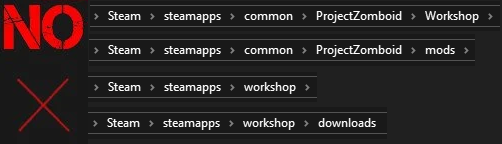
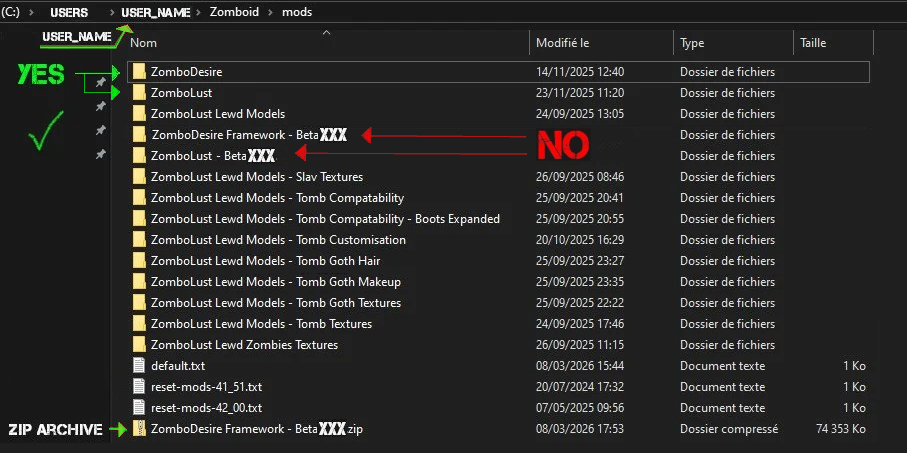
4️⃣ Unzip the archive in the same folder :
C:\Users\USER_NAME\Zomboid\mods
When you unzip the archive, the extracted folder MUST be named exactly “ZomboDesire” — nothing else
5️⃣ In Steam
-
Launch Project Zomboid Build 42
-
In the “Mods” tab, enable the ZomboDesire Framework
-
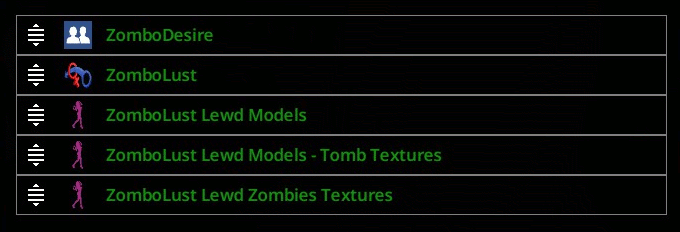
Load order (top to bottom):
-
ZomboDesire
-
ZomboLust
-
![More information about "[Project Zomboid] ZomboLust Lewd Models"](https://static.loverslab.com/screenshots/monthly_2026_09/ZomobLust_Lewd_Models_Female.thumb.png.27060a807444a8cd5bcca7bdee5dc1bf.png)
![More information about "[Project Zomboid] ZomboLust"](https://static.loverslab.com/screenshots/monthly_2026_09/ZomboLust_Back.thumb.png.19e0d128055fc075f0cc984148796ebd.png)